#support
1 messages · Page 37 of 1
 dull bear
the bank tag integration with potion storage is only working on one of my bank tags
it seems to be the only one working because i made it before the update? no new ones work, and no unfinished potions are working in said tag tab
 mossy swan
turn off the nvidia overlay stuff
 bronze idol
mossy swan
turn off the nvidia overlay stuff
bronze idol
mossy swan
turn off the nvidia overlay stuff
legend 🙏
 haughty pumiceBOT
@next forum To find the logs, you can do one of the following:
- If your client failed to open, click the
Open logs folderbutton. - Open the screenshot directory by right-clicking 📷
Camerabutton, navigate 1 directory up, then open logs folder. - Navigate to
%userprofile%\.runelite\logson Windows or$HOME/.runelite/logson Linux and macOS.
Upload the log files named client and launcher by dragging them to Discord. If there are files prefixed with jvm_crash dated from today, upload them too.
 civic pagoda
can anybody help me figure out why i have to use shift+tab to reply to pm's instead of just tab?
 oblique plume
maybe you have tab bound to something else
haughty pumiceBOT
If one of your keys isn't working in game, you've most likely bound it to a feature of a plugin. The Debug Helper hub plugin can show what keys are bound to what plugins.
civic pagoda
thx so much. was bound to screenshot lol no wonder i couldnt find it
 next forum
 leaden trail
next forum
leaden trail
next forum
Are you on a VPN?
next forum
no
leaden trail
What do you see if you try to open this in a web browser?
next forum
 leaden trail
Hmm.
Do you have a firewall or AV enabled?
next forum
I do
 lapis elm
it needs to be merged
leaden trail
next forum
I do
You probably need to disable it then
next forum
I'll try
 light trellis
Feel like this is long over due, but is it possible to fix the issue with bank tags and items that degrade. IE, instead of it tagging dharoks pieces at their respective percentage. It tags the item in general. As people are not going to have 100%, 75%, 50% and 25% sets in their bank. it makes no sense to have it differentiate and essentially makes the tag useless for degrading items. Or is it impossible as its linked to the items ID number which is based off the degredation level?
next forum
leaden trail
You probably need to disable it then
RL still doesn't work. I also can't download the official client for some reason
oblique plume
light trellis
Feel like this is long over due, but is it possible to fix the issue with bank t...
theyre called variation tags, you put a * at the end of the tag name or shift drag the item into the tag tab
 gaunt canopy
Anyone having troubles when ingame for a couple of seconds then dcing and nothing solves the problem?
leaden trail
That sounds like your Internet connection
next forum
leaden trail
That sounds like your Internet connection
It looks like it, but I can load all the pages. My internet works fine, with some short disconnections
leaden trail
That was more directed at the other person. Your issue, I'm not sure of if it's not firewall. If you try using your phone as a hotspot, are you able to launch the client then?
next forum
leaden trail
That was more directed at the other person. Your issue, I'm not sure of if it's ...
I tried it and no
could it be problem with Jagex Launcher?
leaden trail
Does the client launch if you don't go through the Jagex launcher?
But honestly if you can't open the official client either then it's not a RuneLite issue
light trellis
oblique plume
theyre called variation tags, you put a * at the end of the tag name or shift dr...
legit hero ❤️
gaunt canopy
leaden trail
That sounds like your Internet connection
This is what I thought. But my internet connection seem's pretty fine.
Also when I log into Runescape trough mobile network it does exactly the same..
haughty pumiceBOT
open command prompt, type this in: ping -t oldschoolXXX.runescape.com where the XXX is your world minus 300, for example world350 = 50
next forum
leaden trail
Does the client launch if you don't go through the Jagex launcher?
No I can't open it without Jagex Launcher too. I can't open OSRS in any way
I tried through Steam, the same issue
 strong aurora
is there any way to lessen the burden on my cpu and delgate it onto my gpu , for some reason even if it is idle or logged out , runelite requires a lot from my cpu and my fans start spinning while my gpu is just sitting there fans off , and yes i do have my gpu on , what could be the problem is it the more plugins i have the more cpu tax or ?
 zealous cedar
are you sure? runelite doesnt use much cpu when logged out
strong aurora
constant 8-15% of cpu usage even when logged out , i do not know if this is normal , the things im only bugged out about is that my fans to my cpu gets ramped up , but when i close runelite it goes back to being quite
its not "alot" but it does get my fans to freak out for some reason
next forum
leaden trail
Does the client launch if you don't go through the Jagex launcher?
Another interesting fact. I can launch the game on my mobile using the same hotspot which I use on the computer, so it's not the internet issue
 round jacinth
mobile is a different way to connect to the game than the desktop apps although I thought new jagex official client was more similar to mobile
next forum
This appears when I try to download the official client. Sometimes it starts downloading but never moves forward.
 oblique plume
then something on your computer is interrupting the connection
next forum
I tried disabling AV and Firewall
 livid merlin
Hello, I am having trouble with the Tagged NPC/Monster plugin. Every week it seems to break for araxxor, and ill be honest, it kinda sucks killing it without the tiles tagged around it.
Is this a known issue?
oblique plume
tag all
livid merlin
oblique plume
tag all
i used both, tag araxxor and tag all araxxor, it doesnt work
oblique plume
im confident tag all works
unless you have permissions issues and cant save any settings
livid merlin
oblique plume
im confident tag all works
??????? i was literally just there
oblique plume
its easiest enough to test
livid merlin
ok, how do we test it?
livid merlin
sure let me try ur way
zealous cedar
try using safe mode. if that still doesnt work, upload your client log file here
livid merlin
zealous cedar
try using safe mode. if that still doesnt work, upload your client log file here
how do i enter safe mode? and how do i upload client log files? happy to do both
haughty pumiceBOT
To find the logs, you can do one of the following:
- If your client failed to open, click the
Open logs folderbutton. - Open the screenshot directory by right-clicking 📷
Camerabutton, navigate 1 directory up, then open logs folder. - Navigate to
%userprofile%\.runelite\logson Windows or$HOME/.runelite/logson Linux and macOS.
Upload the log files named client and launcher by dragging them to Discord. If there are files prefixed with jvm_crash dated from today, upload them too.
zealous cedar
!safemode
haughty pumiceBOT
Windows
Run the RuneLite (safe mode) shortcut, or with a Jagex account, first run the RuneLite (configure) shortcut and tick the Safe mode box, then launch RuneLite via the Jagex launcher.
Mac
In Terminal, run:
/Applications/RuneLite.app/Contents/MacOS/RuneLite --configureTick the Safe mode box. Launch RuneLite.
If it's not working, download and install the updated RuneLite launcher from the website link in #welcome. You don't need to uninstall your current version. You will not lose any settings or plugins. Then try running safemode again.
oblique plume
bot dead
zealous cedar
it does seem to be having problems
livid merlin
There is supposed to be a shortcut? I dont see one.
oblique plume
get the newer launcher then
oblique plume
!launcher
haughty pumiceBOT
Download and install the updated RuneLite launcher from the website link in #welcome. You don't need to uninstall your current version. You will not lose any settings or plugins.
livid merlin
I downloaded it but i still do not see a safe mode version for RL
oblique plume
start menu
livid merlin
oblique plume
start menu
you mean the screen before login? literally all i can do is click the app, it loads to the login menu?
oblique plume
 oblique plume
yep
livid merlin
ok, is there a list of plugins known to affect it?
livid merlin
ok ill play around with it, ty
would i need to turn off the plugins or remove them from the client?
livid merlin
i found the plugin and the setting, its in slayer "highlight outline"
highlight tile and hull are fine, but highlight outline breaks the other plugin
now i can enjoy my task again, ty all again
oblique plume
slayer isnt a hub plugin so you just hit the dice roll to have it take precedence over npc indicators
only one of those can highlight at a time
 cloud viper
any known issues with 'discord loot logger' loot doesn't seem to be going to my text channel

got loot over the loot value in game but not going to my txt channel
nothings changed from my side, just suddenly not logging anything
oblique plume
did it say the value in chat
 haughty pumiceBOT
hubsupport: Support for hub plugins should be directed to the author of the plugin. You can find the support link by searching for the plugin in the Plugin Hub panel and clicking the ? button on the plugin, or by right-clicking the plugin in the plugin panel and clicking the Support menu option.
cloud viper
id of thought that should show up in my disc text channel
haughty pumiceBOT
oblique plume
what
how did you get the plugin to start with
if you dont know where the place is to get it
cloud viper
through plugin hub
gaunt canopy
Problem solved!!
 ebon dock
is it possible to copy bosses whole loot table tags from somewhere? for example if I want to make bank tag tab for araxxor
round jacinth
Check the hub for one
 vague ivy
Im sure this is asked so many times 😄 but...
bought new computer. signed into RL how do i get all my plugins :))) Zank you ❤️
haughty pumiceBOT
vague ivy
Tyvm ill check it out
oof enabled sync, then went to old computer, and it synced with the new computer? and took away all my plugins from my old computer lol. >.<
round jacinth
You’re on the wrong profile I think.
You need to enable sync on the old
On the profile you want to sync
oblique plume
the initial might be always id 0
so if you synced it on the new first then thatl overwrite the old
looks like it should be nanotime though
 lone gate
https://i.imgur.com/lMsiuEi.png how do i get to the runelite logs
 haughty pumiceBOT
To find the logs, you can do one of the following:
- If your client failed to open, click the
Open logs folderbutton. - Open the screenshot directory by right-clicking 📷
Camerabutton, navigate 1 directory up, then open logs folder. - Navigate to
%userprofile%\.runelite\logson Windows or$HOME/.runelite/logson Linux and macOS.
Upload the log files named client and launcher by dragging them to Discord. If there are files prefixed with jvm_crash dated from today, upload them too.

 leaden trail
Yeah send client_2024-10-10.0
lone gate
ive got more of these client ones, but was just showing theres no other "recent" ones
i uploaded to it like 2 days ago so idk whats diff
oblique plume
doesnt really matter, its a hub plugin
haughty pumiceBOT
Support for hub plugins should be directed to the author of the plugin.
You can find the support link by searching for the plugin in the Plugin Hub panel and clicking the ? button on the plugin, or by right-clicking the plugin in the plugin panel and clicking the Support menu option.
lone gate
gonna be honest i dont know what to do on this page
leaden trail
oblique plume
doesnt really matter, its a hub plugin
They have some angry logs though
oblique plume
from hub plugins
leaden trail
You might want to try disabling the max hit plugin and restarting
lone gate
im at the support page for it
leaden trail
Yeahhh but when they get this angry I try to look anyway
lone gate
huh
oblique plume
its just number format exceptions
lone gate
i didnt even restart and it fixed it
oblique plume
harmless
lone gate
or
leaden trail
lone gate
im at the support page for it
Create an issue saying it's doing what it's doing.
We don't really support hub plugins
lone gate
it couldve been the site couldnt it?
leaden trail
I don't think so
vague ivy
ill check ty
 cloud yarrow
hey fellas, i need some assistance with menu entry swapper
mossy swan
alr
cloud yarrow
when i shift click the item i want to change, the option to change them doesnt appear
mossy swan
what do you want to change?
cloud yarrow
making it where i can "use" sulliceps instead of wield
mossy swan
uhhhh it might be default or you already swapped it?
cloud yarrow
afaik i never messed with it, its wield by default
mossy swan
can you take a screenshot of the menu?
 mossy swan
i mean the menu entry swapping menu
 mossy swan
!shiftclick
haughty pumiceBOT
The Menu Entry Swapper, through various config options, allows you to hold shift+right click on items/NPCs/objects and configure new default left and shift click options on them.
 mossy swan
are you aware of this?
cloud yarrow
the !shiftclick ? no, i saw that gif on the website before i came here thinking its what i was missing but it still doesnt show the option
mossy swan
can you show me the "doesnt show the option" part?
cloud yarrow
im so stupid..... i had to click ctrl shit and click the item
sorry for the confusion >.<
mossy swan
no worries, happy gaming
cloud yarrow
happy gaming ❤️
vague ivy
coped whole .runelite folder from my old computer... Tried to load any of the 3 profiles it has on confiq. no plugins loading in >.<
any other suggestions? 😦 feelsbad
oblique plume
if it overwrote then its gone
 gray pebble
is it possible to increase the runelite panel width on the client? for wider settings and quest helper area
oblique plume
no
gray pebble
possible to increase font size somehow?
 ornate kite
I think you can scale it up, no? In the runelite (configure) you could probably increase the scale to 2 ?
vague ivy
I have another previous computer. That still has all my plugins and bank layouts etc etc. Without messing that one up.. is there a way i could use it! to get everything xfered to the new computer?
ornate kite
Testing, real quick. One second
round jacinth
That’s for runelite scale
ornate kite
^
round jacinth
It doesn’t do game afaik
ornate kite
Type in your search bar "Runelite". You might see an app called Runelite (configure)
 ornate kite
 leaden trail
That work for you?
gray pebble
yes it did, but now stretched mode does not
any change on resizable scaling in stretched mode does not take effect
any ideas?
ornate kite
Is your UI too big or too small?
gray pebble
so my runelite is great at 2 scaling via configure, but my ingame ui scaling is now broken
stretched mode does not work basically
also may have broken dps counter plugin
oblique plume
vague ivy
I have another previous computer. That still has all my plugins and bank layouts...
if you havent opened RL on it then you can grab the profiles2 folder before you do
and put that somewhere safe
then open RL and import the profile from there
vague ivy
Ill try that ty.
 glad fox
normal bank tags works with potion storage now right?
vague ivy
Alex you are god. I tried to get the info from the computer I lost it to and it didnt work. But getting the profiles from my oldest computer which Rl wasn't opened on, DID the trick. It'll have some things older that ill need to change/adjust, but all is well now! tysm!!
 frigid prairie
Is there a way to get entity hider to correctly hide the cow home teleport animation?

 upper gazelle
Hello , can someone please advise the best method for capturing streaming on OBS for 2 osrs clients at once?
 nova acorn
upper gazelle
Hello , can someone please advise the best method for capturing streaming on OBS...
nova acorn
upper gazelle
Hello , can someone please advise the best method for capturing streaming on OBS...
not really the place for it but cant you just do 2 application captures and split both in the obs view? you could probably also have two scenes setup in a picture in picture format for the alternate client and the second scene be the inverse
upper gazelle
nova acorn
not really the place for it but cant you just do 2 application captures and spli...
By application captures.. what does this mean?
nova acorn
its one of the various capture modes that lets you specify an application to watch as opposed to the whole screen display
it may actually be called window capture
 stone marsh
does anyone know what causes this?

i am using runelite through the jagex launcher btw
haughty pumiceBOT
safemode: Windows
Run the RuneLite (safe mode) shortcut, or with a Jagex account, first run the RuneLite (configure) shortcut and tick the Safe mode box, then launch RuneLite via the Jagex launcher.
Mac
In Terminal, run:
/Applications/RuneLite.app/Contents/MacOS/RuneLite --configureTick the Safe mode box. Launch RuneLite.
If it's not working, download and install the updated RuneLite launcher from the website link in #welcome. You don't need to uninstall your current version. You will not lose any settings or plugins. Then try running safemode again.
stone marsh
in safe mode it works normally
leaden trail
Does it work if you turn off 117?
leaden trail
did you turn it off then restart?
stone marsh
yes
and it still does nothing
i unninstalled it and now the client is working
(??)
 vagrant brook
wait what happened to my post lol
vagrant brook
yes they are lmfao
will move them here
hello, I've been having an issue of 3 random tiles arbitrarily being marked that persist or change locations as I move around osrs
I've tried finding other posts with similar issues and they were able to fix it by turning off radius markers. this did not work for me
they tend to follow npcs or enemies but they spawn randomly and change targets frequently
Image


ducks and tiles are not highlighted
 lethal stone
which plugin is used to investigate when u right click someone?
 solid mesa
RuneWatch
lethal stone
ty
 vapid vortex
does anyone know where i can find true tile id's for better npc highlight plugin. trying to find colosseum ones
round jacinth
you can just use normal npc indicator plugin and mark true tiles
solid mesa
If you do want NPC IDs the wiki has them or you can use the hub plugin Identificator
vapid vortex
how do you find them on the wiki
round jacinth
still not sure how regular npc indicators isnt cutting it
rather commend people core than hub lol
you can find ids of NPCs using another hub plugin called "NPC Id" or something similar
solid mesa
You have to have an account and turn on preferences > gadgets > other gadgets > Display advanced data in infoboxes
solid mesa
You can configure the colors before hand without trying to pick colors in the middle of the colosseum
 vapid vortex
true
 rustic kettle
Hey, I was hoping to get some help with the runelite application
solid mesa
Ask away
rustic kettle
I try to log in and it tells me too many attempts.
I need that fixed. It works on my laptop just not deskotp
solid mesa
That's a Jagex thing, not runelite. You can try restting connections on the jagex website
rustic kettle
Like ending all sessions?
rustic kettle
dang, I did that already and it didnt work
Oh, it's in the jagex launcher. found it,
 lone gate
so im back again; was told to report a bug i had to support page of clog plugin, didnt do that due to it being fixed turning off max hit plugin.
but now a bunch of other plugins are seemingly broken and i dont understand why
 harsh axle
Hi, I'm new to development. Noticed this error and looking how to resolve it. I'm not familiar with what ReflectUtil is.
I think it started when I had to redirect the client to use the Jagex Launcher's authentication. Otherwise wouldn't be able to effectively test as my acc requires a Jagex Account login.
 haughty pumiceBOT
 hot oasis
harsh axle
hot oasis
harsh axle
Thank you. Though I followed the instructions on that page and that's how I got this error. It's not preventing development, atm. Though I figured if there's an error, I should probably resolve it before submitting.
 sick juniper
Heey i just found out you cant tag arraxor anymore
solid mesa
Someone else had the same issue #support message
sick juniper
solid mesa
Someone else had the same issue https://discord.com/channels/301497432909414422/...
Thanks fore the tip it worked in this way
 granite arrow
 humble sand
anybody know if its possible to get split tunneling to work (nordVPN) with runelite through jagex launcher (it keeps logging me out of jagex launcher and wont let me log in while connected). i have added both to the list of exceptions but get the following error:
mossy swan
no
leaden trail
We should probably add that to FAQ or something at this point
lone gate
my client has lost its bar up at the top
i dont know how to describe it

its just gone, i cant drag it at all, i reopened it 3x
it also just randomly sucked me into super stretched mode and removed all my options to left click when i tried to upload to clog plugin
all my plugins are going haywire
mossy swan
i guess you installed full screen plugin
lone gate
???
mossy swan
!flow
haughty pumiceBOT
flowchart: Please refer to this flowchart for further troubleshooting.
lone gate
ill follow that, but ima post this in here too i changed my runelite setting to have custom window chrome and this is now what its doing, not letting me drag it at all.
ill try the flow steps now tho
mossy swan
do you have some special window manager or something?
maybe it just doesnt work with what you've got
or something that hides titlebars etc
lone gate
it jsut randomly happened
and when i went into safemode, it stopped, then when i came out of safemode it also stopped
lone gate
my runelite has been acting crazy for the last day and a half though
plugins are just breaking/not working right
and then they fix themself randomly, break again rinse repeat
mossy swan
got any examples?
lone gate
uh collectionlog luck has been just showing everything as 100%; checked my settings on it numerous times. sometimes it works and sometimes it doesnt. collection log itself also has been messing with stuff. this situation that caused me to come in here was as follows - get a drop from kril new on log, tried to !log kril, showed 0/8, the sidebar clog thing (see picture) said some error about putting the steam battlestaff on it, i clicked upload log and then my screen hyper zoomed in (as if i turned stretched mode to 500%) and also put me in detached camera mode, i then couldnt use my detached camera keybind to get out of it, however escape cleared whatever it was. then my client had the lack of bar at the top, it was stuck in an ugly orientation so i then tried the custom chrome bar or whatever its called, still couldnt move it around even after the bar being there.
https://i.imgur.com/sbwofT2.png
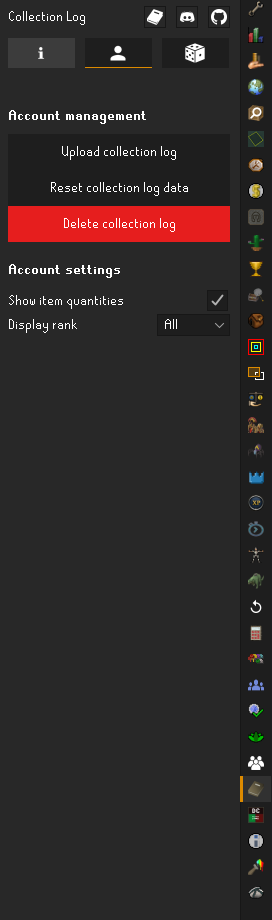
and here we are
mossy swan
someone else was complaining they had issues with it too
but those are hub plugins so we cant help with those
haughty pumiceBOT
Get support for the Collection Log Plugin Hub plugin here: https://runelite.net/plugin-hub/show/collection-log.
You can also find the support link by searching for the plugin in the Plugin Hub panel and clicking the ? button on the plugin, or by right-clicking the plugin in the plugin panel and clicking the Support menu option.
Get support for the Collection Log Luck Plugin Hub plugin here: https://runelite.net/plugin-hub/show/collection-log-luck.
You can also find the support link by searching for the plugin in the Plugin Hub panel and clicking the ? button on the plugin, or by right-clicking the plugin in the plugin panel and clicking the Support menu option.
lone gate
so someone else was complaining that the clog plugin was breaking their stuff?
mossy swan
at least they couldnt get it to upload or something
lone gate
pretty sure that was me; it did stuff messed up earlier, i dont know how to articulate what happened or how to recreate any of the problems so i dont know what to put in a bug report
mossy swan
put in the error and they can ask for more info if they need
lone gate
like it just happened theres no consistency between the two events
is there a place i can see the error it gave me?
i dont quite know what it said, just had red text then broke my game
mossy swan
!logs might have it
haughty pumiceBOT
To find the logs, you can do one of the following:
- If your client failed to open, click the
Open logs folderbutton. - Open the screenshot directory by right-clicking 📷
Camerabutton, navigate 1 directory up, then open logs folder. - Navigate to
%userprofile%\.runelite\logson Windows or$HOME/.runelite/logson Linux and macOS.
Upload the log files named client and launcher by dragging them to Discord. If there are files prefixed with jvm_crash dated from today, upload them too.
mossy swan
you could upload your client logs in the ticket as well
lone gate
okay ty
 sage ice
Hi! Does anyone know why my client resets camera zoom to what seems like default when I open the bank? I'm running the latest client I build from source on Kubuntu 24 LTS. When I use the appimage / flatpak it doesn't do that.
oblique plume
maybe you shouldnt run it from source then
there is a reason a release is provided
sage ice
oblique plume
there is a reason a release is provided
im sorry i know ur just trying to help but im just wondering why that's happening so I can learn from the experience so if u have no solution, maybe just stfu? Thanks, appriciate you though ❤️
mossy swan
thats for you to figure out :)
might be outdated source, or a bug in only that
or a hub plugin or whatever modifications you have
sage ice
mossy swan
or a hub plugin or whatever modifications you have
thanks for actually trying to offer a solution! I have no modifications yet and I'm sure I'm up to date with the latest source. Any other ideas?
sage ice
mossy swan
nobody else has that issue (nor do i) so must be something specific to you
I was hoping so, that's helpful to know. Thank you! I'll figure it out
 coarse sigil
!safe
haughty pumiceBOT
safemode: Windows
Run the RuneLite (safe mode) shortcut, or with a Jagex account, first run the RuneLite (configure) shortcut and tick the Safe mode box, then launch RuneLite via the Jagex launcher.
Mac
In Terminal, run:
/Applications/RuneLite.app/Contents/MacOS/RuneLite --configureTick the Safe mode box. Launch RuneLite.
If it's not working, download and install the updated RuneLite launcher from the website link in #welcome. You don't need to uninstall your current version. You will not lose any settings or plugins. Then try running safemode again.
 dense tendon
so it seems like asterisk for names works for nameless npcs in better npc highlight but not normal npc indicators. ive been using the latter but i want to highlight true tiles for laser crystals during sol fight. and for some reason npc id and also identificator with all settings enabled are not showing me any info for solarflare, so im thinking the same thing would happen for crystals at sol?
also, does anyone know how to choose specific colors for npc tiles of things that you can't right click?
 near wadi
Reporting a random bug: Using fairy rings from CIS to Zanaris cause randomly all actors to become cubic, blue, ground-like, tall tiles. Active plugins: 3d weather, 117, Star miners, Runewatch, Bot detector and default Runelite plugins except those overridden by a previously mentioned plug-in.
oblique plume
117 bug
 '
' rapid dawn
hi, im having issues with logging in via split tunnel VPN, runelite is on my exceptions but i can't log in unless i turn off VPN completely. can someone help me?
leaden trail
Split tunnelling doesn't really work for RuneLite
rapid dawn
but its been working for the last 2 days
round jacinth
We have more people where it doesn’t work than people who do I think
Probably just turn off vpn then load runelite
rapid dawn
yeah it works but then i can't hop
 devout gorge
to add to the above, runelite is in the exception and loads correctly etc just when it tries to hit the login server it gets instantly rejected
but can still see pings etc of worlds from world switcher
round jacinth
Because runelite launches through a launcher I think it’s confusing the vpn tunnel crap
Idk exactly tho
 compact orbit
leaden trail
Split tunnelling doesn't really work for RuneLite
compact orbit
leaden trail
Split tunnelling doesn't really work for RuneLite
I got it to work for me
round jacinth
Not to tell people how to use their programs but you don’t need a vpn probably lol
light trellis
where can i access information on my account cridentials for runelite?
compact orbit
I use proton vpn and I split tunnel the launcher and runelite and it works for me
devout gorge
round jacinth
Not to tell people how to use their programs but you don’t need a vpn probably l...
needs a vpn for discord
leaden trail
compact orbit
I use proton vpn and I split tunnel the launcher and runelite and it works for m...
You're a rare exception then
compact orbit
😢
round jacinth
Use the browser discord app and vpn on browser plugin
rapid dawn
i prefer using the app so i'm looking for an actual help about this exact issue, because it's been working perfectly fine and now it's not
round jacinth
We have had no success with it I think
And you don’t need a VPN, more than likely.
rapid dawn
discord is banned in my country, so i do need vpn xd
mossy swan
use vpn for everything instead of split tunneling 
rapid dawn
yeah still cant log in if vpn is on
 stone parcel
Split tunneling works for my VPN program, PIA, but only on some software versions, if it updates it breaks. Maybes yours updated?
compact orbit
I can’t download my legally obtained movies and tv shows while playing RuneScape if I use the vpn for everything
devout gorge
they're worried about getting banned for vpn
mossy swan
i dont think jagex bans for vpns
round jacinth
rapid dawn
discord is banned in my country, so i do need vpn xd
Use the browser discord app and vpn on browser plugin
Seems to fix your problem.
rapid dawn
stone parcel
Split tunneling works for my VPN program, PIA, but only on some software version...
i'm using kaspersky vpn, sat it up 2 or 3 days ago i think, dont know if it got updated, tried to uninstall and reinstall but the issue is still there. so i dont know
round jacinth
compact orbit
I can’t download my legally obtained movies and tv shows while playing RuneScape...
I have dedicated machine for obtaining such content 🙂
Well docker container
mossy swan
zom pls dont derail
devout gorge
i just live in a country that discord isnt blocked
round jacinth
I’m just trying to communicate split tunneling is extremely hit and miss and mostly a miss
And if their issue is discord then use the browser extensions available
rapid dawn
yeah but you're not helping. "use browser" is not the answer im looking for, thats the last option in case i can't fix my problem
mossy swan
uhh so why not just use vpn for everything? that does work
rapid dawn
no, if my vpn is on i still can't log in on runelite
rapid dawn
yeah, i just can't log in unless i turn it off
mossy swan
is there a specific error you get?
devout gorge
login failed
rapid dawn
"failed to log in please try again" immediately
devout gorge
like for some reason on runelite its instantly rejected
mossy swan
hmmm i wonder if jagex just blocked the vpn you are using
devout gorge
but official client logs in
mossy swan
wait, jagex client works?
rapid dawn
jagex client is working tho
mossy swan
uhhhh
rapid dawn
yeah
mossy swan

devout gorge
yeah exactly super weird lol
we added java exceptions etc, theres a post for support but theres no runelite (configure) anymore since jagex launcher
mossy swan
... yes there is?
rapid dawn
👀
devout gorge
would that transfer over to jagex side of runelitte tho
mossy swan
yes
leaden trail
Yes
mossy swan
thats why it was made
compact orbit
round jacinth
I have dedicated machine for obtaining such content 🙂
Hey that’s a neat idea
mossy swan

compact orbit
Yeah I’m sorry too
 keen knot
hey guys i need some help
im getting too many login attemt on pc
but on phone i can play normally
mossy swan
try clearing your sessions on the official runescape website
mossy swan
then jagex just doesnt like your internet
if you havent "upgraded" to jagex account now might be the time
keen knot
the other accounts i can login easily not the main one
on phone im on the same internet and its fine
leaden trail
Mobile isn't the same as RuneLite
keen knot
any others options what to do?
 dense sierra
Anyone know if it's possible for potion storage to work with bank tags? Definitely not expecting it to be any time soon just curious to know if it's even possible
leaden trail
You can try waiting it out or if you're not on Linux, you can upgrade to a Jagex account and use the Jagex launcher
leaden trail
dense sierra
Anyone know if it's possible for potion storage to work with bank tags? Definite...
I think it should already be working based on what others have said
dense sierra
That would be super sick if it was, not currently working for me but not sure if theres a setting or plugin you have to do or something
leaden trail
Try restarting your client maybe?
 dim stag
I noticed when watching other's discord streams, I can see their mouse cursor in game. With my client, they cannot see the mouse cursor...
is this runelite side or discord?
dense sierra
leaden trail
Try restarting your client maybe?
is this a newer thing? i restart my client daily
i tried restarting but it still just shows like this in the tag
 leaden trail
dim stag
I noticed when watching other's discord streams, I can see their mouse cursor i...
leaden trail
dim stag
I noticed when watching other's discord streams, I can see their mouse cursor i...
Probably Discord
leaden trail
dense sierra
i tried restarting but it still just shows like this in the tag
I would just try searching in here, I know it's come up but don't know the details offhand tbh
 flint pendant
Any idea to fix this other than going into safe mode and uninstalling plugins?
 zealous cedar
that is the way to fix it
flint pendant
this happens quite often like once a month, is there something else going on
zealous cedar
something else?
flint pendant
doesnt seem like a common problem for most people;
zealous cedar
everyone has different plugins installed
flint pendant
fair, thanks
mossy swan
flint pendant
this happens quite often like once a month, is there something else going on
the something else is you installing plugins that break i guess
rapid dawn
dim stag
I noticed when watching other's discord streams, I can see their mouse cursor i...
turn this off and then your cursor will be visible


 dim turtle
howdy, played for the first time yesterday but now when i try and start the game its just stuck like this

am i being dumb somehow?
nvm restarting my pc worked 🤡
 lapis echo
Hi I am having trouble importing a character to my account.


When I open RuneLite it makes me create a new character
stone parcel
Hi, you would probably have more luck seeking help in the Jagex discord.
!newplayer
haughty pumiceBOT
If you are new to OSRS, make sure to follow this excellent guide on OSRS wiki: https://oldschool.runescape.wiki/w/New_player_guide. You can also join official OSRS Discord here: https://discord.gg/osrs
upper gazelle
Hello , has anyone got a suggestion to kill Eclipse Moon in Perilous Moon Quest? It won't die when it's down to 1hp and it continues to stay alive. I have tried various stab weapons on it and it still won't go down. Could someone please help me with this? I have also reported the game as a bug with this issue but been days without a reply. Please help.
solid mesa
This is better in #runescape but you can't end the fight during special attacks
 slow root
oblique plume
Probably don't do that
slow root
oblique plume
Probably don't do that
No I didn’t install as admin
upper gazelle
solid mesa
This is better in <#448811926315728896> but you can't end the fight during speci...
How would i not use a special attack and still end the fight?
 gray halo
anyone knows why my numpad1 doesn't work with bank pin keypad
solid mesa
Install Debug Helper and you can see your keybinds if something is using numpad1
 violet pine
so i log into runlite today and all my pluggins are gone?
any help on getting them back
haughty pumiceBOT
 loud surge
how do i get help?
i havent been able to download runelite on my computer
for the longest
how do i know which version to download??
mossy swan
you should just click the download button, and not use the dropdown
website will try to automatically detect the correct version for your system
loud surge
ive tried that
mossy swan
!download
haughty pumiceBOT
Download from the link in #welcome or from the link from the Old School RuneScape home page
mossy swan
what system do you have?
loud surge
so im not that great with computers. i got some sort of mac
mossy swan
in the top-left, click the apple logo and select "about this mac"
loud surge
yeah waiting for it ot load lmao
mossy swan
what macos version does it have?
mossy swan
macOS (Intel) should work for you then in the dropdown menu on the website
 sage shoal
Once my PR is merged, this will be fixed
loud surge
says the app cant be opened
mossy swan
does it say why?
loud surge
wait hold up
if it starts verifying it worked yeah
?
nope, fuck. it says because it wasnt downlaoded from app store lol mb
solid mesa
You have to go to system settings, security, gatekeeper, and hit run anyway
loud surge
legend
mossy swan
theres an option there to also allow non-app store applications from trusted developers or something
loud surge
lifesaver lemme work on fixing that
wait whats it mean if it says cant open security settings
 gilded kayak
probably that you got this mac from a school or something along those lines
loud surge
lol wtf
gilded kayak
i'm only guessing because a school mac would have that error, did you?
it could show up if you didn't also
but it was just a quick easy guess from me
loud surge
nah but i dont really know my dad bought it for me
gilded kayak
then probably google cant open security settings macos since apple tends to have actual useful help posts
loud surge
trying bro i appreciate it
 cold bone
Is there an Event for when the current music track finishes playing?
leaden trail
I don't believe so
cold bone
How do I get the name of the action from the event that gets passed to the setOnOpListener callback?
leaden trail
This channel is for release client support. You can ask development questions in #runelite
dim stag
rapid dawn
turn this off and then your cursor will be visible
tyvm!
 bronze brook
Does anyone have any idea on how to remove the cleaning rates in the top right ? I desactivated the plugin but no matter what I do it's still there :

 fresh swift
restart
 analog sinew
Hi, sorry if this has been asked a bunch before -- is there a good plugin for Runelite to add touchscreen support? I'm stuck in bed for a bit and really dislike playing with a trackpad.
(Apologies if this is the wrong channel to ask this in)
bronze brook
fresh swift
restart
I tried multiple times but it doesn't seems to help.
I was wondering if there was a way to " restore " runelite without losing all my plugins and settings ?
 crimson cape
having some really annoying thing happen with chat, i type something and 2 seconds of inactivity it gets deleted
no clue what is causing it anyone know if this is a setting somewhere?
leaden trail
Turn off the plugin that deletes unsent messages
crimson cape
omfg
thank you
it was called just that lol, i didnt remember enabling it but i came back after a 5 month break for huey so i had to reinstall and lost the settings unless it something new
leaden trail
Well it's a hub plugin so you definitely installed it at some point
crimson cape
probably accidently installed it when i was grabbing gearsetups or something oops, thanks tho i genuinely thought i was going insane for a while
dense tendon
does anyone know if theres a way to set up notifications for divines running out? watchdog is disabled entirely in pvm areas and i dont want a timer infobox on my screen 24/7
ok theres a plugin hub plugin called unpotted reminder, i couldnt find it because of the name
solid mesa
You can also use chat notifications
dense tendon
that should work, ill just set up low opacity screen flash for when divines run out. ty
 raven vigil
hi
dense tendon
is there a way to hide thrall projectiles without hiding all projectiles
 terse dust
My friend is having an issue with the Dink plugin. He set his notify skill level interval to 5 and it does it in intervals of 5, but it started at 4... so it would notify levels 69, 74, 79 for example... isn't it supposed to be 70, 75, 80?
gilded kayak
are you assuming this will happen* or did it happen
 royal hull
Hi, anyone knows why the Strength skill is out of position? Tried creating new profile, no change.
 mossy swan
wdym out of position
solid mesa
The box is shifted up too high
mossy swan
hmm mine is normal
mossy swan
royal hull
Hi, anyone knows why the Strength skill is out of position? Tried creating new p...
did you restart the client after creating a new profile? many hub plugins dont shut down correctly so you'd need to restart to make sure they are not on
royal hull
mossy swan
did you restart the client after creating a new profile? many hub plugins dont s...
Ah lol, didn't come to mind, just been accepting it for months, a restart with the new profile sorted it! But yeh, seems to be some sort of plugin causing it, not sure which. But will report to the dev once found 👍
mossy swan
!flowchart i think has a method for quickly finding it
haughty pumiceBOT
Please refer to this flowchart for further troubleshooting.
royal hull
Thanks, will have a look
 sterile forge
my runelite got hacked a few months ago, today I tried reinstalling it but seems it's still compromised, is there anything I can do this fix without needing to uninstall my operating system?
haughty pumiceBOT
@sterile forge You've downloaded a fake client, and your account has been compromised. Remove the fake as soon as possible to minimise further damage.
The following actions should be performed from a secure computer or secure mobile device:
- Change your RuneScape password
- Remove and re-add Authenticator to RuneScape
- Change your RuneScape bank PIN
- Change your email's password
- Add 2FA to your email if you haven't got it enabled
- Check for any linked accounts by accessing the account settings page (https://www.runescape.com/account_settings)
Some fake clients also install malware, only a fresh install of your operating system can guarantee the total removal of any unwanted software.
You might also want to change any email password if you reused the same as your RuneScape account password.
Once your computer is secure, you should download RuneLite from the link available at the #welcome channel.
leaden trail
Make sure you do all that
sterile forge
yes I did all of this months ago when I got hacked, but I would really like to avoid having to uninstall my operating system
leaden trail
When you say "It's still compromised" what exactly is happening?
I'm generally one to nuke the affected disk from orbit so I'm not sure my usual recommended approach would be one you would like very much
sterile forge
I reinstall fresh runelite, go to https://runelite.net/verify/ to check. and it says it's still a hacked
 leaden trail
So download from the link in #welcome
Where are you downloading it from?
Actually DM that to @haughty pumice and a mod can take a look, probably best not to share a sus download here
sterile forge
I download from the official site, the runelitesetup is fine, however, once I install it and check the installed files, it's compromised
sterile forge
I uninstalled everything to do with runelite from my pc, multiple times
leaden trail
I'm not saying uninstall
Actually delete the folder
Uninstalling doesn't remove .runelite to my knowledge (maybe I'm crossing wires but I don't think it does)
sterile forge
I used a program that uninstalls and removes all files related on the pc
haughty pumiceBOT
To find the logs, you can do one of the following:
- If your client failed to open, click the
Open logs folderbutton. - Open the screenshot directory by right-clicking 📷
Camerabutton, navigate 1 directory up, then open logs folder. - Navigate to
%userprofile%\.runelite\logson Windows or$HOME/.runelite/logson Linux and macOS.
Upload the log files named client and launcher by dragging them to Discord. If there are files prefixed with jvm_crash dated from today, upload them too.
sterile forge
it's not there
leaden trail
sterile forge
I download from the official site, the runelitesetup is fine, however, once I in...
In that case, can you show me exactly what you're seeing here?
 viscid lantern
sterile forge
I download from the official site, the runelitesetup is fine, however, once I in...
viscid lantern
sterile forge
I download from the official site, the runelitesetup is fine, however, once I in...
the tool to verify the installer is intended for the installer, not any other files
 viscid lantern
yes
leaden trail
Ah I thought so but that was throwing me off
I'm blaming the fact that I was looking at 5am 💀
viscid lantern
so that setup file is fine and you can use it

 viscid lantern
well thats not a setup file so you shoudlnt scan that
mossy swan
shouldnt that still work or tell you to upload the setup file instead
leaden trail
It probably should tell you to make sure you're only checking the setup file imo, yeah
sterile forge
this is what i get when i check the same file on my laptop which has not be hacked:
 leaden trail
Interesting
viscid lantern
oh yeah sha256sums.js never got updated past 2.6.10
sterile forge
I assume something malicious is installed on my pc and hacks my runelite even when i reinstall it
viscid lantern
sterile forge
installerr: safe
the installer is from runelite.net so its fine to use
mossy swan
@sterile forge is your account getting constantly compromised or something?
sterile forge
my runelite got hacked a few months ago, reinstall today, check if everything is fine, but i get this:
 mossy swan
what do you mean by "my runelite got hacked"?
sterile forge
somebody managed to remotely login to my client, still not sure what happend, but i probably did something really stupid
mossy swan
i guess you fell for the classic "i got this really cool plugin if you just download this virus" thing
mossy swan
sterile forge
my runelite got hacked a few months ago, reinstall today, check if everything is...
for now just check if the setup file you used is fine, and you will be ok. this message is incorrect in that case, because the website has not been updated to include the latest version of runelite.exe
sterile forge
are you sure the message is incorrect? could you do me a favor and check if you get the same message?
mossy swan
unfortunately im on linux so i cant
round jacinth
When I downloaded the current exe and upload it I get a “it’s good”
Downloaded installer on my phone and uploaded the file.

Obviously I can’t install it on my phone but it’s the same file.
 molten dirge
Hi guys
mossy swan
hi guy
molten dirge
Im looking to buy a laptop to play osrs with max setting in the hd pluggin? Any recomendation ?
mossy swan
!hd
haughty pumiceBOT
Visit 117's HD plugin discord (https://discord.com/invite/U4p6ChjgSE) for support, issues & feedback
leaden trail
I'll check my launcher once I'm home in a few
 cloud gulch
Hello, im having problems with runelite on ubuntu right after i changed my systems gpu from the integrated one to my actual nvidia gpu i cant enable the GPU plugin any solutions?
haughty pumiceBOT
To find the logs, you can do one of the following:
- If your client failed to open, click the
Open logs folderbutton. - Open the screenshot directory by right-clicking 📷
Camerabutton, navigate 1 directory up, then open logs folder. - Navigate to
%userprofile%\.runelite\logson Windows or$HOME/.runelite/logson Linux and macOS.
Upload the log files named client and launcher by dragging them to Discord. If there are files prefixed with jvm_crash dated from today, upload them too.
 pine oriole
I opened runelite today and now all my plugins are gone and set to default. What now?
mossy swan
pine oriole
I opened runelite today and now all my plugins are gone and set to default. What...
!lost
haughty pumiceBOT
pine oriole
Thanks
 covert dome
Why is the colour of the despawn timer green for the top item here?
 mossy swan
once it turns yellow it’s visible for others
covert dome
yes but why is the one with 116 ticks left on the despawn timer not yellow and visible to others?
116 is less than 132 last time I checked
oh wait me stupid
I dropped a big bone myself, while the other is from npc drop ... sorry for confusion
cloud yarrow
is there a plug in that tells you if a certain farming spot in a world like abyssal demons for instance is open ?
not sure if im asking that correctly lol
round jacinth
we dont have any interest in logging where all players are and their worlds so that you can see what world is best
cloud yarrow
yeah i figured that d require way too much lmao
round jacinth
its invasive
cloud yarrow
so, youre part of the dev crew that made runelite?!
round jacinth
no
cloud yarrow
oh
round jacinth
but it wont happen
cloud yarrow
im not asking for it to happen haha i was asking if it was a thing
round jacinth
people already are incorrectly thinking runelite is why people find them in the wilderness and dieing
cloud yarrow
have yourself a good day man happy gaming! 🙂
round jacinth
u2
leaden trail
round jacinth
people already are incorrectly thinking runelite is why people find them in the ...
"people"
Nah just that one guy
round jacinth
more than him I think
 random hemlock
Any ideas why shift drop doesn't seem to work correctly when I bind the shift key to any button on my logitech g502 on OSX? it works properly when typing but releasing the key seems to keep the menu entry swapper key down action in the inventory
 tropic vine
Anyone else having issues with in-game sounds sometimes not working with runelite? Restarting the client always seems to fix this but it's quite strange
 hollow spire
can anyone help me I am getting stuck on bootsrap dpwnload
cloud yarrow
tropic vine
Anyone else having issues with in-game sounds sometimes not working with runelit...
i havent had that issue before tbh
 stone mantle
anyone know what plugin hides hammers? i take it oof the ground items hidden list but everytime i restart runelite its back on it again so it must be another plugin
cloud yarrow
option is under ground items setting
round jacinth
you have the option in chat noficiations for that i think
highlight own name is on i think
 noble gazelle
tyty
terse dust
gilded kayak
are you assuming this will happen* or did it happen
Sorry for late response… but it did happen
 hexed meadow
lets say i want to hide a single big bone on the ground but i want to show 20 noted ones on the ground, is this possible? currently it hides both
 zealous egret
Anyone know which plugin this is whiuch shoes these?
 gilded kayak
it's technically possible but it wont recognize the noted aspect
if 20 single bones were on the ground in the same spot, it would show
but you can use big bones>20
or maybe its <
i dont acutally remember
gilded kayak
gilded kayak
i dont acutally remember
i think its <
round jacinth
zealous egret
Anyone know which plugin this is whiuch shoes these?
I think those are all your daily things you can do
dull bear
zealous egret
Anyone know which plugin this is whiuch shoes these?
some daily task reminder plugin
round jacinth
You got a hub plugin that is doing that
zealous egret
I didnt have it installed, had to install it and uninstall it to fix 😄
 light geyser
hello. I am on the runlite website, to pull GE transactions, however everything is dated a year or longer out... I am unable to see recent GE transactions. How do I fix this?
 sterile void

i cant figure out what plugin this is ocming from
i turned it on so long ago and cant figure out how to turn off!! hahah
 hollow olive
tick tracker probably
hexed meadow
gilded kayak
i think its <
aight thanks!
 odd kelp
how can I undo the quest helper assistance selection and go back to using my custom set up? I dont wan't to use any of the presets.
The helper closed, and when reopening to select the quest, it makes me choose assistance level.
If I use auto start, it uses the settings I have chosen in the plugin setup settings, but I dunno know how to re-enable auto start for that quest once it closes on you.
I guess more simply put, I just want to be able to start a quest in quest helper manually and not have to choose assistance level
haughty pumiceBOT
Visit Zoinkwiz's Quest Helper plugin discord (https://discord.com/invite/XCfwNnz6RB) for support, issues & feedback
odd kelp
oh sorry I thought it was an official, thanks
 heady quail
I'm looking at https://github.com/runelite/runelite/blob/master/runelite-api/src/main/java/net/runelite/api/clan/ClanRank.java
And I'm trying to find how a clan rank is assigned an ordinal that's not listed here, is it based on the "title" that rank has only or the position the rank is in as well? I'm seeing ranks like 40 and 115 and trying to track down how to use a lookup to find the correct rank image

GitHub
Open source Old School RuneScape client. Contribute to runelite/runelite development by creating an account on GitHub.
leaden trail
ClanRank is the position, you probably want ClanTitle
zealous cedar
if you have the rank, you can call titleForRank() to get the title
heady quail
I'm not developing on Runelite/Java, I'm parsing outputs from the Chat Logger plugin
Wondering if there is a CSV or something somewhere I could use as a lookup
 light kraken
is there a way to have pot storage pots show up in bank tags?
leaden trail
light kraken
is there a way to have pot storage pots show up in bank tags?
Follow this
light kraken
leaden trail
Follow this
https://discord.com/channels/301497432909414422/301497432909414422/...
thanks i will give it a shot 🙂
light kraken
leaden trail
Follow this
https://discord.com/channels/301497432909414422/301497432909414422/...
just curious - does that mean we're going to have to redo all bank tag layouts and transform them to regular bank tag core plugin ones? : ) just wanna know so I can have a fun evening plan
solid mesa
You can export from bank tag layouts into core bank tags
light kraken
so do I export a tab - then turn off the plugin and import it?
solid mesa
Yep
light kraken
thank you! that will save me so much time haha
 storm halo
I dont think I can see all the plugins from the Plugin Hub. I am trying to find "Wintertodt Scouter" but it doesnt show up on the client, I can see it on the plugin hub website and on github
 sonic birch
Did ya give her the ol' restart?
sonic birch
Dw, I love you too
Xoxo
storm halo
❤️
 analog pecan
Hi
RuneLite is unable to connect to a required server while downloading the bootstrap. Please check your internet connection.
Exception: ConnectException
Message: Permission denied: no further information
is this only because my internet co ?
damn that was my firewal from bitdefender ^^
odd kelp
Is there a way to left click withdraw all?
I tried menu entry swapper, but only got it so I can withdraw all with shift + left click
 vast bone
you could click the "all" button at the bottomo f tha bnk @odd kelp
vast bone
np
odd kelp
it's like I had never even seen those before even though I have, lol
brain just tuned it out after ignoring it for so long
 stray tendon
just redownloaded runelite and gets a fatal error even trying to load it
odd kelp
is there a plugin to hide fires? I have entity hider but not an option there.
vast bone
stray tendon
just redownloaded runelite and gets a fatal error even trying to load it
what doesthe error say?
odd kelp
stray tendon
just redownloaded runelite and gets a fatal error even trying to load it
just curious, why not use it via the jagex launcher?
stray tendon
vast bone
what doesthe error say?
The file permissions of C:\Users\Dylan.runelite, or a file within it, is not correct. Check the logs for more details
but its a fresh install which is wierd
odd kelp
check protection history
vast bone
you've never had it on this pc before?
stray tendon
months ago but i wiped everything
odd kelp
controlled folder access could be blocking it
dont turn off your firewall if thats the case though, just allow, and then add to exclusion
stray tendon
yea its added as an exception
let me post the launcher log
2024-10-13 23:52:56 CDT [main] INFO  net.runelite.launcher.Launcher - Launcher configuration:
 debug: false
 nodiffs: false
 skip tls verification: false
 noupdates: false
 safe mode: false
 scale: system
 client arguments: none
 jvm arguments: none
 hardware acceleration mode: AUTO
 launch mode: AUTO
2024-10-13 23:52:56 CDT [main] INFO  net.runelite.launcher.Launcher - OS name: Windows 11, version: 10.0, arch: amd64
2024-10-13 23:52:56 CDT [main] INFO  net.runelite.launcher.Launcher - Using hardware acceleration mode: DIRECTDRAW
2024-10-13 23:52:57 CDT [main] INFO  n.r.launcher.FilesystemPermissions - RuneLite is running as an administrator. This is not recommended because it can cause the files RuneLite writes to C:\Users\Dylan\.runelite to have more strict permissions than would otherwise be required.
2024-10-13 23:52:57 CDT [main] INFO  n.r.launcher.FilesystemPermissions - RuneLite is updating the ACLs of the files in C:\Users\Dylan\.runelite to be: NT AUTHORITY\SYSTEM, BUILTIN\Administrators. To avoid this, don't run RuneLite with elevated permissions.
2024-10-13 23:52:57 CDT [main] ERROR n.r.launcher.FilesystemPermissions - Permissions for C:\Users\Dylan\.runelite\logs\launcher.log are incorrect. Readable: true writable: false```what ifyou just rename .runelite to .runelit2
also To avoid this, don't run RuneLite with elevated permissions. don't run it as administrator
odd kelp
manually add the permission via file explorer?
right click > properties > security tab > etc
stray tendon
yea its not set to run as admin
just deleted all files and downloaded it to my M.2 other drive, but still comes up with that error
 woeful ermine
hello, new Runescape player here (sort of - never got deep in to it in the past). I am not able to get Runelite to output sound at all. I'm on Linux and a very experienced Linux user at that. I'm launching through the Bolt Launcher to get logged in. I have no idea why it isn't outputting any sound - music, effects, etc. sounds works for all my other apps/games. it's not outputting to the wrong device (first thing I checked) and sound seems enabled and turned up everywhere in the client (second thing I checked). I guess my question is probably: where else should I be checking for sound settings other than the bottom right hand corner settings menu?
I wonder if there's a "reset all options" button somewhere as well
 halcyon pelican
my client full reset idk why but how do i get my setting and plugin back
woeful ermine
hmm, I reset my whole client settings by setting aside various folders and still no sound
I wonder if there's just a new bug
woeful ermine
oh, just realized it's installed as a flatpak....all bets off. I'll figure it out probably. flatpaks are the worst
nope, switching to native didn't fix it - it still just doesn't even attempt to output sound. now I'm betting on it being a java issue
ornate kite
anyone know how I can make thralls transpaernt?
instead of completely removing them with entity hider
 junior cedar
Hey, im having issues with world map, when i type varrock and press enter the enter doesnt seem to work? escape to close map is also not working. anyone know how to fix this?
 vale glacier
Hello! Just noticed that Anti Drag doesn't seem to work anymore at the banks "show worn items" subscreen.
 charred wind
woeful ermine
nope, switching to native didn't fix it - it still just doesn't even attempt to ...
charred wind
woeful ermine
nope, switching to native didn't fix it - it still just doesn't even attempt to ...
You have to add something to your Java runtime config, I have it but I don’t know it off the top of my head
charred wind
woeful ermine
hello, new Runescape player here (sort of - never got deep in to it in the past)...

Launchpad
package: openjdk-17-jre
steps to reproduce
write a clean raspberry pi os bullseye image
update all packages
install pulseaudio and openjdk-17-jre
use any java application which uses java sound api for playback
when playback is running, call pactl list sink-inputs
expected behavior:
sink input should be in the list
actual behavior:
nothing in...
It'll output as several alsa streams, but I have confirmed this also works with j11
oblique plume
dont you just have to get pulseaudio-alsa
haughty pumiceBOT

BartWillems
When I start Runelite before any other application, it locks my sound devices.
Because of this, I can't play youtube videos, vlc can't output sound, ...
I always have to make sure that either Firefox or vlc is started first.
I'm using pulseaudio 11.1, Linux 4.16.12 and OpenJDK 8 on Arch Linux
charred wind
I have that link bookmarked as what fixed it for me when running the .jar
extra/pipewire-alsa 1:1.2.5-1 [installed]
    Low-latency audio/video router and processor - ALSA configuration```

I've had that installed but it still doesn't work without that link's stepsMy specific issue, which sounds like theirs, wasn’t solved in those threads. I haven’t tested this fix WITHOUT the changes in that thread unfortunately
ornate kite
hi i keep getting this when running the maven install
[ERROR] Failed to execute goal org.apache.maven.plugins:maven-surefire-plugin:2.22.2:test (default-test) on project cache: There are test failures.
[ERROR]
[ERROR] Please refer to C:\Users\blueb\IdeaProjects\runelite\cache\target\surefire-reports for the individual test results.
[ERROR] Please refer to dump files (if any exist) [date].dump, [date]-jvmRun[N].dump and [date].dumpstream.
[ERROR] -> [Help 1]
[ERROR]
[ERROR] To see the full stack trace of the errors, re-run Maven with the -e switch.
[ERROR] Re-run Maven using the -X switch to enable full debug logging.
[ERROR]
[ERROR] For more information about the errors and possible solutions, please read the following articles:
[ERROR] [Help 1] http://cwiki.apache.org/confluence/display/MAVEN/MojoFailureException
[ERROR]
[ERROR] After correcting the problems, you can resume the build with the command
[ERROR] mvn <args> -rf :cache
round jacinth
2 things. You can skip tests. This channel is for support to release client not how to build the client.
You more than likely want to be doing hub dev, follow the build guide that is appropriate for you.
charred wind
That’s spelled out in the contribution guide on GitHub
ornate kite
Okok mb im new to this plugin development for rl rust server’s are so much more simple 😂
 sleek steppe
im not sure if this is the correct place to ask this, but is it possible to remove these from chat with chat filter?
 round jacinth
probably? you can also just right click trade and clear history
leaden trail
"Filter game chat" and add them as filtered messages, probably?
sleek steppe
i tried that but it still didnt remove them

i also restarted client incase that needed to be done but still didnt work
oblique plume
maybe they arnt "game" messages
oblique plume
ye, thought so
you could ask for TRADE to be included in the game message option though #suggestions
 crystal summit
hello my client keeps freezing when I kill the leviathan. It is after the boss dies but I do not see the loot appear before the client freezes. Has anyone had this issue?
zealous cedar
its probably a pluginhub plugin freezing. you can use safe mode to avoid it.
 steady tusk
Hello I cant log in when using a Nord Vpn but just on this pc. I tried on my laptop and it works fine.
In the crash report it says. " error fetching bootstrap
java.net.ConnectException: Cannot assign requested address: no further information"
leaden trail
Are you trying to use split tunneling?
ornate kite
stone marsh
i unninstalled it and now the client is working
@stone marsh yo idk if you are even still active anymore but you got DM's and friend req off rn. It's me from like few months ago. I gotta tell you something Kami
leaden trail
ornate kite
<@286489288433205249> yo idk if you are even still active anymore but you got DM...
Can you move to #general ?
 carmine moon
yo, my boost infermation suddenly went from showing divine time,thrall timer etc to only show a box of attack/str/def/range/mage, any suggestions`?
carmine moon
carmine moon
yo, my boost infermation suddenly went from showing divine time,thrall timer etc...
insted of

 steady tusk
@leaden trail I switched to split tunneling when the problem first began but just turned it off and now it works! Thanks for the help.
leaden trail
Split tunnelling usually won't work for RuneLite
steady tusk
ah gotcha, good to know. Thanks again
oblique plume
carmine moon
yo, my boost infermation suddenly went from showing divine time,thrall timer etc...
your screenshot very obviously shows those, why do you think they arnt there
carmine moon
oblique plume
your screenshot very obviously shows those, why do you think they arnt there
Its from a friend 🙂
carmine moon
oblique plume
your screenshot very obviously shows those, why do you think they arnt there
Have timer and buffs enabled too, worked fine on laptop, but swapped computer to main and dident work there
haughty pumiceBOT
carmine moon
haughty pumice
<https://github.com/runelite/runelite/wiki/FAQ#i-want-to-transfer-my-settings-to...
Yeah im using same account, never been a problem until today
 young jasper
crystal summit
hello my client keeps freezing when I kill the leviathan. It is after the boss d...
young jasper
crystal summit
hello my client keeps freezing when I kill the leviathan. It is after the boss d...
Having a similar issue my client will just 1t close out randomly
leaden trail
It's probably a hub plugin like for the other person
 bright dew
What is the correct thing to put inbetween highlighted and hidden? Assumed it was default or something but that doesnt work
https://i.imgur.com/4ncV8ps.png
If I leave it out it still has items that are hidden show on the left click above items that arent hidden, but I dont want to deprioritize hidden items completely using "deprioritize hidden items"
I had it working before but I lost my runelite settings and now I cant remember how I originally had it and it's driving me up the wall lol
edit: custom menu swap plugin btw
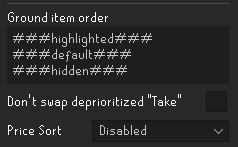 haughty pumiceBOT
Get support for the Custom Menu Swaps Plugin Hub plugin here: https://runelite.net/plugin-hub/show/hotkeyable-menu-swaps.
You can also find the support link by searching for the plugin in the Plugin Hub panel and clicking the ? button on the plugin, or by right-clicking the plugin in the plugin panel and clicking the Support menu option.
bright dew
Yeah that doesnt say
 earnest tundra
My power supply died on my computer and I had to redownload runelite again with the new one. It is logging in fine but none of the pluggins are downloading. I tried making sure it was the write profile and it is correct. Unsure what to do at this point.
haughty pumiceBOT
vast bone
bright dew
Yeah that doesnt say
###hidden###,-1
 stray lynx

Anyone know of a plugin that can filter this? Used to collapse with chat filter when it was a red message, but just refuses to collapse or be filtered after they changed it. It's dialogue when you defeat one of the Moons of Peril bosses.
 whole phoenix
when i put a cursor.png the plugin just sets it to default, anywaything im doing wrong?
solid mesa
Did you name it cursor.png.png? Windows has a tendency to hide file extensions
whole phoenix
just cursor.png and it's a cur file
 dull parrot
Not sure if part of runelite. But Clue Scroll plugin doesnt highlight the "bow" emote on this medium step before talking (so minor impact).
 solid mesa
It's been fixed but hasn't been released yet
dull parrot
Ah nice 👍
leaden trail
whole phoenix
just cursor.png and it's a cur file
It needs to be a .png not a .cur
whole phoenix
leaden trail
It needs to be a .png not a .cur
i'll try that
now it's a png and named cursor.png, should i take the .png out of the name
fixed, ty!
 teal otter
When will the new Wintertodt reward cart be updated to show on the loot tracker? I missed out on the big loot items I got there for it. Also will pets be added to the tracker?
stone marsh
ornate kite
<@286489288433205249> yo idk if you are even still active anymore but you got DM...
bro i think you got the wrong guy
ornate kite
stone marsh
bro i think you got the wrong guy
nono it's you. add me sec. it won't let me add you @stone marsh
I got a diff discord
but come #general **
 silk saddle
 haughty pumiceBOT
@silk saddle Visit Zoinkwiz's Quest Helper plugin discord (https://discord.com/invite/XCfwNnz6RB) for support, issues & feedback
junior cedar
Hey, im having issues with world map, when i type varrock and press enter the enter doesnt seem to work? escape to close map is also not working. anyone know how to fix this?
solid mesa
Install Debug Helper and you can see your keybinds, maybe a plugin is mapping the enter key
Did you try what Yves suggested? #runescape message
junior cedar
ive tried that yes, still nothing
ive just installed debug helper but idk how to use it
solid mesa
Even in safe mode you can't search the map with enter?
junior cedar
no, i also cant close the map without clicking the x
solid mesa
Do you have this option on?
 junior cedar
it works on official client tho
haughty pumiceBOT
If one of your keys isn't working in game, you've most likely bound it to a feature of a plugin. The Debug Helper hub plugin can show what keys are bound to what plugins.

 hollow olive
not too sure then
junior cedar
ive also just noticed i cant backspace when typing in the map aswell
hollow olive
try it in safe mode, if you cannot replicate it in safe mode then it's some hub plugin causing the issue, and you should isolate and remove it
haughty pumiceBOT
Windows
Run the RuneLite (safe mode) shortcut, or with a Jagex account, first run the RuneLite (configure) shortcut and tick the Safe mode box, then launch RuneLite via the Jagex launcher.
Mac
In Terminal, run:
/Applications/RuneLite.app/Contents/MacOS/RuneLite --configureTick the Safe mode box. Launch RuneLite.
If it's not working, download and install the updated RuneLite launcher from the website link in #welcome. You don't need to uninstall your current version. You will not lose any settings or plugins. Then try running safemode again.
round jacinth
if it's a recent behavior you could try to remenber the order you added plugins
otherwise have fun checking them all 😄
!flow
haughty pumiceBOT
flowchart: Please refer to this flowchart for further troubleshooting.
junior cedar
its been happening since like 2 months ago (only remember cos i was clueing when i realised)
but i havent downloaded anything
solid mesa
Then follow the flowchart
junior cedar
in like 4 months at least
hollow olive
follow the bottom half of the yellow tree
junior cedar
imma follow that now
somehow i just got wintertodt scouter back? How is that possible
i thought the server that ran that plugin got shut down?
solid mesa
It's on the plugin hub again
hollow olive
someone else took it over
junior cedar
damn that was recent, tried to get it 2 days ago lol
hollow olive
if you figure out which plugin it is let us know
solid mesa
You can turn half off, restart, see if it happens. Then you can narrow down by 50% every time
junior cedar
is there a way to see only enabled ones? if not ill have to screenshot them
hollow olive
duplicate your profile and turn off half of the ones you have on
restart, test and repeat
junior cedar
hollow olive
duplicate your profile and turn off half of the ones you have on
Ayoo i found the issue
hollow olive
i see
junior cedar
idk why that was turnt on i dont think it does anything
hollow olive
well supposedly someone reported it in their repo and it was fixed 2 days ago but the review will probably take weeks
but good to know since at least two other people have come in asking why their keys weren't working in world map
 red fox
I got pet yesterday and I noticed the screenshot (chat colors) were messed up on it

It should be these colors

but on this screenshot - The chat colors are fine :
 mossy swan
holy hell your game looks like one of those "too many plugins" memes
mossy swan
do you have any more screenshots with that issue?
mossy swan
oh that could be it too
 opaque carbon
Anybody know why my Araxxor pet has suddenly transmoged into a Tekton pet?
mossy swan
i guess you have some hub plugin that does that
opaque carbon
Metamorphisis option doesn't work, when I pick the tekton pet, nothing is in my inventory - it should be araxxor
eh
opaque carbon
mossy swan
i guess you have some hub plugin that does that
what type of plugin is this? Is this the thrall plugin where you change your thrall
I have a feeling it might be that
haughty pumiceBOT
flowchart: Please refer to this flowchart for further troubleshooting.
opaque carbon
companion pet plugin
but if I do that, my pet disappears and I no longer have a follower even though I dropped my araxxor pet to follow me
It's the companion pet plugin I think yeah
 gusty ferry
Hi guys for some reason today my GPU option doenst work in RL
ben je try to click it on it automaticly toggles off
mossy swan
!logs
haughty pumiceBOT
To find the logs, you can do one of the following:
- If your client failed to open, click the
Open logs folderbutton. - Open the screenshot directory by right-clicking 📷
Camerabutton, navigate 1 directory up, then open logs folder. - Navigate to
%userprofile%\.runelite\logson Windows or$HOME/.runelite/logson Linux and macOS.
Upload the log files named client and launcher by dragging them to Discord. If there are files prefixed with jvm_crash dated from today, upload them too.
mossy swan
looks like you either dont have a gpu, its not working, or you are missing drivers for it
are you on a laptop or desktop?
gusty ferry
desktop
mossy swan
make sure your monitor is plugged in to the gpu and not motherboard
gusty ferry
it did work until today
mossy swan
then probably something like windows helpfully "updated" your drivers or something and it broke
gusty ferry
so what would be the fix here
mossy swan
install drivers i guess
strong aurora
is there any way to limit the use of resources by runelite when it is afk , i just afk some stuff but it is always taking 10-15% of cpu power even though i have limited fps to 20 , wanted to ask if there is a plugin or anything really that can really lower the usage of cpu because my fans are really noisy when im trying to watch something on the side
looks like making it 5 fps on unfocused is the way to go , if there is anything else would love to hear
 fallen nebula
Does anyone know when the reward cart for Todt will be on Runelite please? Thanks! 🙂
 dapper lynx
i open my runelite and now all is rested? known why profile is right
haughty pumiceBOT
 dim kettle
Does the native bank tag plugin now offer the same functions as bank tag layouts? And does it support pot storage?
Sorry if this has been asked a lot
vast bone
More or less
 alpine atlas
my world is filtered by location and idk how this happened at all, i want it to go back to filtering by world number. how do i make it go back to that?

i tried to go to the configure button next to the "Current world" text but it didnt help at all
oblique plume
The chevron at the top of the column
alpine atlas
oblique plume
The chevron at the top of the column
lol its so fking small i didnt even notice it
tyvm
round jacinth
dim kettle
Does the native bank tag plugin now offer the same functions as bank tag layouts...
Yes and yes
 gilded pendant
anyone know why my gauntlet plugin stopped working ? i've restarted pc and unistalled plugin etc. nothing seems to work for me.. anybody that can help me out ? 😦
 keen dawn
anyone having issues with notifications on windows 11? have them enabled in my windows settings, but timers aren't showing notifications
leaden trail
Do you have "Notify when focused" enabled, under "RuneLite"?

 gilded pendant
anyone know why my gauntlet plugin stopped working ? i've restarted pc and unist...
gilded pendant
gilded pendant
anyone know why my gauntlet plugin stopped working ? i've restarted pc and unist...
if any fixes pls tag me 😦
 flat socket
hi, does anyone know how to fix memory leak with 117 hd plugin?

it starts from 750m and crawls up to 18gb in a couple mins
haughty pumiceBOT
Visit 117's HD plugin discord (https://discord.com/invite/U4p6ChjgSE) for support, issues & feedback
flat socket
tnx
 static temple
hello, the TOA puzzle helper isnt working for me, it used to work but is now not highlighting any of the puzzles, ive tried resetting it and un and reinstalling it, any help is appriciated ty
round jacinth
which helper are you using?
the one by llemon duck is the correct one to use, the other(s) aren't it
static temple
ToA puzzle helper
static temple
oh, is there another plugin that highlights the puzzles?
round jacinth
yes and i mentioned it

the other helper should be disabled tbh, idk why it isn't lol
static temple
nice one ty!
nova acorn
round jacinth
beat me to it
static temple
fk knows why i had that other 1 on haha
gilded pendant
in development chat do i just post my link from the github ?
gilded pendant
oh nice thanks
round jacinth
oh you're github verified
you can talk in #development but it's more aimed towards core talk
gilded pendant
yh i really need some help 😦
round jacinth
but it can hel pwith hub stuff
gilded pendant
its about my plugin " The Gauntlet "
round jacinth
are you rdutta?
gilded pendant
no ? x d
round jacinth
then idk what gauntlet plugin you're talking about lol
just ask what you want to ask probably in #runelite





 gilded pendant
yh i saw that aswell haha
solid mesa
round jacinth
are you rdutta?
Who maintains The Gauntlet? Plugin Hub shows rdutta but the github links to LlemonDuck
round jacinth
it's llemon now i think
gilded pendant
yeah i checked that llemonducks profile out and there was a post about transering the ownership idk
round jacinth
you came in and said "my plugin "the gauntlet""
refering to ownership of the plugin to me lol
lmao
gilded pendant
yeah i mean it is not working for me sorry mate :p
gilded pendant
all my friends say that its working fine for them but not for me 😦
round jacinth
you need to enable stuff my guy
leaden trail
Someone was having this issue a week or two ago I think