#support
1 messages · Page 34 of 1
 elfin forum
but ty anyway
is there anybody that can see on streaming or something
screen sharing or something ?
Recent change not predicting hit when xp drops are hidden in native osrs settings ?
when is this setting
on the osrs it self or in runeligh?t
runelite
 final axle
This channel is for support for the core runelite client, not hub plugins
elfin forum
so where can i get the information for my issue sir ?
 sonic birch
I already answered your question
elfin forum
i went to the page and couldnt find anything that would solve it
sonic birch
then open an issue
elfin forum
where ?
 haughty pumiceBOT
[ https://github.com/Lazyfaith ] [ @wary atlas 188137636748066817 ] lazyfaith#0
[ https://github.com/Lazyfaith ] [ @wary atlas 188137636748066817 ] lazyfaith#0
[ https://github.com/melkypie ] [ @tidal ocean 131873747819823105 ] melky#0
 craggy star
How are the highlight regexs expected to be formatted in the Chat Notifications plugin?
I want a chat notification when I finish a slayer task... I have this You're completed \d\d .* and it isn't highlighting
 vast bone
maybe it's "you've"
vast bone
np. typos happen to all of us king
craggy star
Well its still actually not triggering (I'm turael skipping right now). Is there something I need to do to escape the apostrophe?
 vast bone
oh do you need col tags?
sonic birch
idk, I added this years ago. might not need them
I probs just wanted to make it more specific
craggy star
Thats what I am using as well to verify @vast bone , I'll continue to play with it more
I just changed the highlight to You have completed your task! and it works, so I'm just gonna stick with that
 ionic ivy
It's currently in need of updating and real life has not been kind to me recently
 odd kelp
Is there a plugin that can auto tele you at low health? Like ring of life but for f2p?
odd kelp
oh
😬
yeah makes sense, would be cool though, lol
lets not act like the line isn't already blurred, Treasure trail plugin is OP 😁
but yeah def not tryna go againt TOS
 solid mesa
Even official mobile client has clue scroll solver
 mossy swan
you start to memorize the clues after a few times anyway
and previously you would ctrl+f on wiki
 floral linden
i'm having problems removing a plugin called "Essence pouch health", i uninstalled it but the number is still on my essence pouches
sonic birch
restart the client
mossy swan
try restarting
floral linden
i wanna remove it bc it seems to not work with the colossal pouch and i would like to use "Pouch time to degrade" instead which seems to work
i already did
sonic birch
impossible
if you uninstall a plugin and restart the client, it's gone
it means you did not uninstall it properly, removed the wrong plugin, or did not restart properly
floral linden
i 100% removed the right plugin, restarted a few times now

still shows the number on the pouch
sonic birch
!flow then it's a different plugin I assume
haughty pumiceBOT
flowchart: Please refer to this flowchart for further troubleshooting.
floral linden
ooke im gonna go thru the chart ty
mossy swan
im guessing its the "pouch time to degrade" but who knows 
 rancid current
Any idea on what might be causing my potion abbreviations to get cut off?
 sonic birch
try restarting the client for the latest update
if it still happens then, silent ping hexagon with a screenshot and steps to reproduce
rancid current
Lol, I swear I just restarted not too long ago, but you were right that fixed it thanks (I'm an idiot shoulda tried that sooner lol)
sonic birch
that stuff is still fresh, so hex pushes updates often
try restarting at least daily
mossy swan
or every time you log out
 grim oak
anyone have suggestions for what plugins could be causing crashing but it ONLY happens when i loan a new area? had it happen twice teleing to valamore, once entering zebak puzzle, once dying. makes me think GPU but unsure how to troubleshoot?
mossy swan
!flow
haughty pumiceBOT
flowchart: Please refer to this flowchart for further troubleshooting.
 languid ravine
I’m looking for some advice. I’m currently using the Discord notifications plugin, but some people are having trouble with the setup since they’re not very tech-savvy. I also don’t like how little control I have over how users configure notifications or that I have to give them a webhook URL. I’ve thought about creating a custom plugin, but I don’t think that’s the best solution. Is there a way to combine a plugin with a Discord bot to manage notifications, where the configuration is handled on the server instead of by the users?
mossy swan
languid ravine
I’m looking for some advice. I’m currently using the Discord notifications plugi...
dink supports importing settings at least so maybe look in to that?
languid ravine
mossy swan
dink supports importing settings at least so maybe look in to that?
That looks like it should work. I'll have to read up on it. Thanks I appreciate it.
 left tide
Anyone know why even though I have the Canifis teleport unlocked, it still shows greyed out on the interface?

 round jacinth
If you just unlocked the location you maybe need to reload the plugin or client? Not sure that’s a hub plugin.
haughty pumiceBOT
Support for hub plugins should be directed to the author of the plugin.
You can find the support link by searching for the plugin in the Plugin Hub panel and clicking the ? button on the plugin, or by right-clicking the plugin in the plugin panel and clicking the Support menu option.
left tide
Its been like this for a while but i never cared to look into it. Now that i need it, it seems it might be a setting or something
left tide
haughty pumice
Support for hub plugins should be directed to the author of the plugin.
You can ...
gotcha, thanks!
 lunar burrow
how do i get rid of the stuff showing in my chat

 zealous cedar
use safe mode
haughty pumiceBOT
Windows
Run the RuneLite (safe mode) shortcut, or with a Jagex account, first run the RuneLite (configure) shortcut and tick the Safe mode box, then launch RuneLite via the Jagex launcher.
Mac
In Terminal, run:
/Applications/RuneLite.app/Contents/MacOS/RuneLite --configureTick the Safe mode box. Launch RuneLite.
If it's not working, download and install the updated RuneLite launcher from the website link in #welcome. You don't need to uninstall your current version. You will not lose any settings or plugins. Then try running safemode again.
 bold tundra
hallo there is a problem with blood fury if u hvae more then one at a time.

if u have a tab and enable it to costum it and u have a bloodfury in it, and then buy another bloodfury (so u have 2) in your bank. The placeholders will multiply every time to opena and close your bank. can it be fixed?
 ornate fiber
My Runelite stopped launching about a week ago,
Today I finally tried to troubleshoot it & i've hit a wall with it, tried reinstalling from the website the newest version and got this error
Have tried to troubleshoot that launcher & run as admin, no success there
 sonic birch
left tide
Anyone know why even though I have the Canifis teleport unlocked, it still shows...
sonic birch
left tide
Anyone know why even though I have the Canifis teleport unlocked, it still shows...
You got some plugin that changes that tp name. Either need to disable that or maybe enable a config option for this plugin
 oblique plume
can you manually delete that directory?
ornate fiber
oblique plume
can you manually delete that directory?
/lib/classlist? I can try
sonic birch
bold tundra
if u have a tab and enable it to costum it and u have a bloodfury in it, and the...
Does this also happen in safe mode?
!flow
haughty pumiceBOT
flowchart: Please refer to this flowchart for further troubleshooting.
oblique plume
im thinking more like the entire RuneLite one
ornate fiber
I'll try safemode first, safemode isn't in my runelite folder however, or the configure mode as the flowchart suggests
oblique plume
its a start menu shortvut
ornate fiber
That's my folder

 leaden trail
search "runelite" in the start menu
sonic birch
Uhhh, safe mode was not meant for you though
oblique plume
does uninstall work
sonic birch
Just uninstall and reinstall
ornate fiber
sonic birch
Uhhh, safe mode was not meant for you though
It's the first suggestion in troubleshooting..
oblique plume
yves isnt talking to you though
leaden trail
which was also not for you
ornate fiber
sonic birch
Just uninstall and reinstall
Will this remove my plugins?
oblique plume
no
sonic birch
No
ornate fiber
leaden trail
which was also not for you
So people who encounter this issue just, shouldn't use runelite anymore? 😂
oblique plume
there are two convos going on, youre reading stuff for the other one
ornate fiber
Apologies 🙂
 vast elm
anyone know whats causing this?
ERROR injected-client - Client error
java.lang.RuntimeException: unable to SwapBuffers (6)
at net.runelite.rlawt.AWTContext.swapBuffers(Native Method)
at net.runelite.client.plugins.gpu.GpuPlugin.draw(GpuPlugin.java:1364)
at ba.hl(ba.java:9381)
at ba.rz(ba.java)
at ba.run(ba.java:39919)
at java.base/java.lang.Thread.run(Unknown Source)
leaden trail
post your full log, not a snippet
ornate fiber
What exactly is this file?

uninstalled the program and this folder was the only thing that remained, which is also what's causing the problem (I believe)
 sonic birch
Try to delete it manually
oblique plume
looks like its corrupted
ornate fiber
Just trying to confirm that the file isn't associated to my plugins library before doing so
oblique plume
we already said no earlier
ornate fiber
sonic birch
Try to delete it manually
File will not remove
I tried to manually delete the folder & it actually is just unresponsive. Remains in the folder
sonic birch
Does it work via cmd?
leaden trail
Try what Yves is suggesting and if that doesn't work, reboot and try again
sonic birch
del /f /s D:\Games\RuneLite\jre\lib probably
ornate fiber
 oblique plume
nice
we can prob move the install directory but you should figure out why your drive doesnt work tbh
which if you run a chkdsk
chkdsk D:
ornate fiber
 sonic birch
oblique plume
`chkdsk D:`
sonic birch
oblique plume
`chkdsk D:`
Can also add /f /r /x
/f is kinda superfluous with /x
Ohh guess it didn't find problems though... Weird
ornate fiber
As far as I'm aware the issue is within the file
sonic birch
Maybe powertoys file locksmith can delete it on boot
Otherwise we just change the install directory indeed
sonic birch
sonic birch
Maybe powertoys file locksmith can delete it on boot
Or you could maybe just boot of a linux live usb, mount the driver and delete the file, idk
ornate fiber
Download the linux client on another device and port it over?
sonic birch
Nooooo
ornate fiber
Would I need a linux device to do so?
sonic birch
Let's ignore that solution
Try file lock smith if you want to from microsoft powertoys. If you don't want to or it doesn't work, we just change install directory
ornate fiber
Prefer to change directory first,
haughty pumiceBOT
If you're getting an error while trying to install RuneLite in the lines of unable to find unins000.exe that means you have a previous RuneLite version that didn't uninstall cleanly. To fix that you need to delete the following windows registry key: Computer\HKEY_CURRENT_USER\SOFTWARE\Microsoft\Windows\CurrentVersion\Uninstall\RuneLite Launcher_is1
oblique plume
delete that key then
unless the uninstall process did it already
then try just reinstalling
ornate fiber
oblique plume
unless the uninstall process did it already
It did not, as shown above
oblique plume
where
ornate fiber
ornate fiber
What exactly is this file?
'
oblique plume
this is not your registry
ornate fiber
oblique plume
we already said no earlier
where did you say no earlier?
oblique plume
oblique plume
no

ornate fiber
oblique plume
no
So before I asked the question about the file
You answered no to another question, and then gave a passive aggressive response
Thanks
oblique plume
its literally the same question?
ornate fiber
ornate fiber
Just trying to confirm that the file isn't associated to my plugins library befo...
I asked if uninstalling Runelite would remove my plugins, no was the answer
Then I asked if removing a different file would effect my plugin history when reinstalling
ornate fiber
oblique plume
its literally the same question?
This is just as passive aggressive
oblique plume
im not sure why you want to argue about this, youre the one with the issue were just trying to help you
we could just not do that instead
sonic birch
haughty pumice
If you're getting an error while trying to install RuneLite in the lines of `una...
Anyway, just do this so you can install do another directory
ornate fiber
Yeah I'd honestly just rather troubleshoot through Yves if that's okay
He's being helpful without the attitude
I actually DM'd him to try and have the conversation privately but he insisted we have it here
oblique plume
lol ok
ornate fiber
Nothing personal, trying to play a game I enjoy
ornate fiber
haughty pumice
If you're getting an error while trying to install RuneLite in the lines of `una...
Is this done through cmd also, deleting the following windows registry key?
oblique plume
no
sonic birch
Regedit
ornate fiber

 sonic birch
Click on uninstall
oblique plume
no id be there already
oblique plume
oblique plume
unless the uninstall process did it already
so its this
sonic birch
Idr if it's a key or subkey
ornate fiber
So just try a reinstall
sonic birch
If it's just a key then it might be already gone
Just install and see if you can change the directory in the installer
oblique plume
i forget exactly how you can change it
usually it doesnt even prompt
so idk how people even get it to D
oblique plume
lmao
shoudl i hit him with the timeout and then say "maybe talking isnt for you"
that would be pretty funny
oops
wc
ornate fiber
You could if you like, i'm sure everyone would think it's funny to timeout a guy simply troubleshooting
I previously asked if I could just shoot with Yves if that's alright
sonic birch
I don't live in the us, so I'm not allowed to shoot
oblique plume
shame
ornate fiber
sonic birch
Just install and see if you can change the directory in the installer
I'll move it to another drive entirely
Trying this now
oblique plume
by default it goes to %localappdata%/RuneLite
ornate fiber
ornate fiber
I'll move it to another drive entirely
I will move it to another drive
Problem solved
re-install, which was the logical first course of action after confirming that the /lib/ folder was not associated to my plugins library
Thanks for helping @sonic birch
ornate fiber
ornate fiber
File will not remove
For future reference, best to try re-install at this point as this was the only issue
The file didn't need to be removed and there's info about that in the flowchart, just thought i'd follow the advise that followed my query first
ornate fiber
ornate fiber
The file didn't need to be removed and there's info about that in the flowchart,...
Literally only stating this to speed up future troubleshooting
Thanks for the help & have a good night
zealous cedar
Not only did noone tell you to follow the flowchart, you were explicitly told that you should not be following the flowchart lol. I think the flowchart is fine.
oblique plume
i dont like the flowchat personally but thats because i dont trust people to do it correctly
ornate fiber
🤷♂️
solid mesa
People don't even restart the client when they're told to
ornate fiber
I'm posting screenshots working with someone step by step
believe marked tiles have wiped, not a huge deal
oblique plume
any other settings seemingly missing?
ornate fiber
None noticeable, other external plugins all remained
oblique plume
dunno then, people have lost entire profiles before but not just one setting
 arctic crypt
Ever since I downloaded Runelite and started playing osrs with my new pc, my clue scroll helper doesn't show arrows on my mini map or show where to dig, who to talk to, etc. It only shows the general location on the world map. I've turned the plug in on and off, checked the settings, and drop/picked up the scrolls. Does anyone have any suggestions?
zealous cedar
what runelite version do you have?
arctic crypt
I'm not sure where to see that I just recently downloaded it though.
zealous cedar
click the 
arctic crypt
version 1.10.38.1
zealous cedar
that should work, try safe mode?
haughty pumiceBOT
Windows
Run the RuneLite (safe mode) shortcut, or with a Jagex account, first run the RuneLite (configure) shortcut and tick the Safe mode box, then launch RuneLite via the Jagex launcher.
Mac
In Terminal, run:
/Applications/RuneLite.app/Contents/MacOS/RuneLite --configureTick the Safe mode box. Launch RuneLite.
If it's not working, download and install the updated RuneLite launcher from the website link in #welcome. You don't need to uninstall your current version. You will not lose any settings or plugins. Then try running safemode again.
arctic crypt
It's asking me to log in with the jagex launcher because I think I've upgraded to a jagex account
 elder cove
Hello, can someone help me import my runelite settings onto my laptop. I am signed into runelite on both devices, but the settings on my laptop are not up to date
sonic birch
!transfer
haughty pumiceBOT
elder cove
thank you!
so.. i found the .runelite folder on my pc, that link doesnt explain how to get it to my laptop
sonic birch
just like the way you copy other files between devices
elder cove
😳
sonic birch
can even use floppy disks if you want to
elder cove
cani email it to myself and download it?
sonic birch
ohterwise just zip is up and use google drive
arctic crypt
Ever since I downloaded Runelite and started playing osrs with my new pc, my clue scroll helper doesn't show arrows on my mini map or show where to dig, who to talk to, etc. It only shows the general location on the world map. I've tried opening safe mode and that made it worse by not showing a general location on the world map. Any other suggestions?
zealous cedar
no. I dont think that can happen
arctic crypt
I know it sounds hard to believe but it's even harder to explain because it doesn't make sense. The only thing I can think of is to get a new clue and hope it starts registering.
zealous cedar
what clue do you have?
arctic crypt
I've tried it with my easy, medium, and elite clues.
zealous cedar
... ok
arctic crypt
Did you mean what specific clue step is it? I'm not sure what else to do or if there's anyone to contact specifically.
zealous cedar
yes, which specific clue step
arctic crypt
My elite scroll says "With drinks and dwarves I make my way, upon my head a glass will stay." And it does tell me the solution - Speak to Funbo inside Cam Torum's pub.
But there's no arrows pointing me in the right direction and Funbo isn't highlighted like usual.
zealous cedar
that clue is underground so I dont think it will show on the map
if you open the cam torum map it does actually but theres nothing in the overworld showing it

 regal trellis
can anyone tell me if theres a specific size for an image to be to be used a custom cursor
struggling to get it to work
zealous cedar
clue is fine
 regal trellis
ive done all the steps right i have custom.png in .runlite and restarted my client but its not working
 charred wind
Can u see the other file extensions in that folder? It maybe be named custom.png.png

 glad fox
any update on potion store working with bank tags/inventory setups?
regal trellis
my theory is its cause the picture is 344 x 484 and i guess it should be smaller
round jacinth
Did you rename a .jpg file as .png
regal trellis
no
round jacinth
glad fox
any update on potion store working with bank tags/inventory setups?
I think they’re still thinking of how it should work. It’s a wip, for now you’re shooting yourself in the foot until it’s supported.
regal trellis
 round jacinth
That doesn’t really prove what I asked but you’re the one who made the file
regal trellis
it was saved as png
haughty pumiceBOT
Place the files for the feature you want in %userprofile%\.runelite on Windows or ~/.runelite/ on Linux/OSX
The names and type for the files are:
- Custom cursor:
cursor.png - Custom notification sound:
notification.wav - Custom login screen:
login.png. An image size of 765 x 503 is recommended, but bigger images will be (simply) scaled down automatically.
regal trellis
i saved as png
 glad fox
cj, I know that custom mouse cursor images for windows is between 16x16 to 128x128.
regal trellis
thank you
thats what i was looking for
ah man still aint workin
at 91x128
does it have to be 128x128 exactly
glad fox
it might also need a transparent background. And yes it needs to be square
arctic crypt
Thank you Adam I appreciate your help! I have display arrows turned on but even when I'm in Cam Torum they aren't displayed on my mini map. Same with my other clues in the overworld. I guess that's what I'm confused about. It's still possible to complete the clues so I shouldn't make it a huge deal.
regal trellis
ok ill change it to square thank you
glad fox
what are you using to change all of this? PS,Gimp, MS paint?
regal trellis
gimp
think ive got it now just need to try it out
damn nvm
this image still wont work
do you guys see anything wrong with it
128x128 png and it wont work aye caramba
glad fox
file name is cursor.png right?
 atomic hamlet
is there a way to have shift click make every item bank all?
charred wind
Yes, in menu entry swapper plugin config
 runic sparrow
Hey anyone that can help. I logged in on runelite through my google account and I noticed an account that I do-NOT- have associated with my google runelite pluggin under the name 95poundmole
is this normal?
zealous cedar
do you have an example of what you mean?
 zealous cedar
this probably means this player logged in on your pc at some point, it doesnt necessarily mean that they were using your google account
runic sparrow
does this mean my accounts are compromised?
zealous cedar
not necessarily
runic sparrow
is there anything that I can do to further secure my accounts when using runelite?
zealous cedar
using runelite doesnt inherently make your account insecure. password reuse and having a compromised email address usually is how people get hacked
runic sparrow
even with 2fa?
zealous cedar
the jagex 2fa isnt really useful since you can remove it by just recovering the account via email
runic sparrow
I meant on your email as-well.
zealous cedar
ya that is good
runic sparrow
adam one last question. is it possible a name was generated for an account i made without setting a name
oblique plume
no
runic sparrow
because the account thats on the runelite pluggin doesnt exist
hm. strange
Thank you guys for the prompt answers
left tide
Is there a way to make ctrl+left click and click through monsters?
like the Shift click Walk here option but with ctrl
sonic birch
I think those are hardcoded, but I'd have to check the code at some point to confirm (on mobile rn)
You can technically remap shift to ctrl, but it'll remap all shift actions
left tide
ah, no worries then. ill just remap control to something else
 solar cairn
Still getting random stutters and fps with only GPU and FPS Control (just for draw FPS). Have a 3060ti and 5600x and 32gb ram, so should be able to hold this FPS no problem. MW2 was consistently getting higher FPS.
I've tried turning hw accel off, changing to a known good driver version (522.25), temps are all 50*C or lower on average, nothing else running in the background, etc.
This will randomly happen while running back and forth in an area that's already loaded and has nothing to do with loading lines. Will occasionally happen when attacking with the shadow even.
Any ideas here? I'm pretty stumped and feel like I've tried everything - including a fresh install of Windows. I switched to a profile that only has GPU and FPS control on, restarted the client and then took this video to make sure everything was turned off.
Here's another video where the stutter is less, but shows the settings.
This happens all over, even just running at the GE. This is just the most easily reproducible
zealous cedar
can you upload it to streamable or youtube or something?
solar cairn
nvm I'm stupid. https://streamable.com/wihlpq https://streamable.com/zvguz5

 zealous cedar
I dont see any stutters in this zvguz5 video at least
i see a 20fps drop summoning the thrall, i assume that is just because it has to go to disk to get the model for it
but 144 to 120 fps is not much
solar cairn
It's a very small stutter in the first video. This was just a small example, it happens all over. Like when I'm in Wardens and attacking with shadow, it will occasionally drop FPS right as I click to move and it won't register the click. I get FPS drops in Zebak puzzle, drop down to ~90fps in Kephri and Akkha and stay there, etc. I will also get bigger/longer FPS drops but those are much harder to reproduce
I have an 980 m.2, with like 900GB free, I would think that would be fast enough to not cause any latency when going to disk, but not entirely sure.
I also notice this drop when I have entity hider on for thralls - is it still going to disk to get the model and then just hiding the model?
 eager niche
I'm trying to launch built-from-src runelite through the Bolt launcher and am getting this error - any advice?
"no main manifest attribute, in /home/user/runelite/client-1.10.39-SNAPSHOT.jar"
zealous cedar
solar cairn
I also notice this drop when I have entity hider on for thralls - is it still go...
I think no but im not 100% sure offhand
does the stutter happen if nothing is spawning in?
like just stand and do nothing somewhere
zealous cedar
eager niche
I'm trying to launch built-from-src runelite through the Bolt launcher and am ge...
you probably want to run the shaded jar, the main client jar is not runnable like that
zealous cedar
solar cairn
I also notice this drop when I have entity hider on for thralls - is it still go...
you would see an fps drop with gpu off too if it is diskio, but, if it is only dropping ~20 frames at 144fps that is only ~13ms which is less than the time for 1 frame at 50fps, so you may not be able to measure it there
.. i think
solar cairn
I believe I have seen that, but don't recall. I have noticed running back and forth between the camel and the obelisk in the TOA lobby as well as running back and forth at the ge, where everything has already spawned/loaded. It will also happen when attacking with the shadow occasionally. But it's most obvious when spawning things - e.g. thrall, monkey waves, etc.
I've seen that with GPU off, too, I think, but the switch from 50->49->50 is so fast, it's hard to tell and that number kinda always jumps like it does between 143->144 in the example videos
zealous cedar
that is weird
solar cairn
So, could this possibly be a SSD issue then?
zealous cedar
it does that even at 50fps?
solar cairn
Yeah, it doesn't always stay a solid 50. Let me see if I can grab a video later of it.
zealous cedar
with gpu off?
solar cairn
I believe so. I've done so much testing recently I don't remember what all was doing it. But I have noticed that stutter no matter what I do.
It is very weird. Given that there's no mouse software, gpu software, etc. that might be causing this and my hardware should handle it fine. Just wanna make sure it's not something off with RuneLite before I start replacing hardware for a 20 year old game 😂
zealous cedar
does it happen in eg safe mode fixed mode too?
solar cairn
I think so. I will re-test it later and record it
I've tested everything at least once at this point lol. Including changing windows power settings, turning precision boost on and off, capping FPS, safe mode, etc. etc. So maybe it is an SSD issue or something. 🤔
I had an issue long ago that was persistent in safe mode, too, that ended up being an issue with the chat filter. So, I just wanna make sure I'm not missing anything here before jumping to replacing hardware. (I had upgraded my computer and it was still an issue with that one, but that was like 3-4 years ago and hasn't been an issue since). Not saying this one is an issue with RuneLite though
eager niche
zealous cedar
you probably want to run the shaded jar, the main client jar is not runnable lik...
Thanks. With the shaded jar I'm getting this error now. Any immediate thoughts?
Exception in thread "main" joptsimple.UnrecognizedOptionException: J is not a recognized option
at joptsimple.OptionException.unrecognizedOption(OptionException.java:108)
at joptsimple.OptionParser.validateOptionCharacters(OptionParser.java:633)
at joptsimple.OptionParser.handleShortOptionCluster(OptionParser.java:528)
at joptsimple.OptionParser.handleShortOptionToken(OptionParser.java:523)
at joptsimple.OptionParserState$2.handleArgument(OptionParserState.java:59)
at joptsimple.OptionParser.parse(OptionParser.java:396)
elder cove
hi, i am still trying to get my runlite setting on my laptop. Somehow i reset all my settings on my pc now. can someone please help me restore my settings and get them onto my laptop?
haughty pumiceBOT
leaden trail
and then
haughty pumiceBOT
 feral wraith
My PC bluescreened today and after restarting it, my Runelite profile wasn't loaded into my jagex launched Runelite. I reloaded/imported my profile into the runelite config and it is super outdated. i.e. lost a ton of inventory setups and specific plugin data that I've spent hours on. I checked every saved runelite profile on my pc and none contain my data. Any advice?
I've attempted all the lost settings instructions located in faq to no avail
zealous cedar
unless the crash caused disk corruption, it should be there. maybe you did not find the correct one?
 patent geyser
Hey all hoping for help if you'd all be so kind. Runelite continues to crash in TOA monkey room, ive disabled toa plugins and still happens. Does not happen in vanilla client. Have tried reinstalling runelite and no change. Anything i can do to get started figuring out what's happening?
zealous cedar
have you tried safe mode?
patent geyser
i have not, how do i go about trying that?
haughty pumiceBOT
Windows
Run the RuneLite (safe mode) shortcut, or with a Jagex account, first run the RuneLite (configure) shortcut and tick the Safe mode box, then launch RuneLite via the Jagex launcher.
Mac
In Terminal, run:
/Applications/RuneLite.app/Contents/MacOS/RuneLite --configureTick the Safe mode box. Launch RuneLite.
If it's not working, download and install the updated RuneLite launcher from the website link in #welcome. You don't need to uninstall your current version. You will not lose any settings or plugins. Then try running safemode again.
feral wraith
zealous cedar
unless the crash caused disk corruption, it should be there. maybe you did not f...
I've checked every one and it when I attempt to import various versions, it keeps making new "imported profile-"
I even checked to see if each had a previous version saved from like a day or two ago and none have any previous versions
leaden trail
Can you show the contents of the profiles2 folder, with last modified date and file size etc all visible?
sonic birch
Most likely is default-0
Or one of the actually singey ones, but I assume you made those after importing
solar cairn
Stutter still happens in fixed safe mode. 12FPS drop on room load (assuming some drop is normal) and 2 FPS and very slightly stutter when summoning thrall. Have not tried just standing still yet.
patent geyser
zealous cedar
have you tried safe mode?
Does not happen in safe mode. Removed it from safemode and it happened again, then disabled GPU plugin for giggles and still does it
haughty pumiceBOT
To find the logs, you can do one of the following:
- If your client failed to open, click the
Open logs folderbutton. - Open the screenshot directory by right-clicking 📷
Camerabutton, navigate 1 directory up, then open logs folder. - Navigate to
%userprofile%\.runelite\logson Windows or$HOME/.runelite/logson Linux and macOS.
Upload the log files named client and launcher by dragging them to Discord. If there are files prefixed with jvm_crash dated from today, upload them too.
zealous cedar
solar cairn
Stutter still happens in fixed safe mode. 12FPS drop on room load (assuming some...
ok then it is obviously not a gpu-related issue
feral wraith
sonic birch
Or one of the actually singey ones, but I assume you made those after importing
Yes you're right. The actually ones were made after the corruption. I tried default-0, and it was the only one that was close to my settings. I think they were from Feb 2023 though.
sonic birch
feral wraith
Yes you're right. The actually ones were made after the corruption. I tried def...
What folder is this?
feral wraith
profiles2
sonic birch
Hmm, idk then. It's the correct folder as expected (which we already knew, since imported profiles were showing up, but iirc on feb 2023 we switched from profiles to profiles2 lol)
solar cairn
zealous cedar
ok then it is obviously not a gpu-related issue
so it should consistently stay at 50 here no matter what?
zealous cedar
i dont know about that... but if youve shown it happens both with gpu on and also in safe mode than it is obviously not affected by gpu
solar cairn
is it possibly a RL issue still or maybe SSD/other hardware?
feral wraith
sonic birch
Hmm, idk then. It's the correct folder as expected (which we already knew, since...
so its the original file from that changeover? I don't know how runelite has been running the profile i've been using for a year and a half now then
And how a crash lost that profile
sonic birch
No, generally files are never lost from the disk unless the user either deleted it manually or the disk literally malfunctioned and lost the data.
feral wraith
Any other checks I could make before starting from scratch? Or safety steps to prevent it happening again?
sonic birch
You could back up profiles2 from time to time I guess
 rigid bough
how can i send my runelite settings to a new computer i have my desk top pc but i reacently got a loptop cause i will be out of the country for a while but can get my runelite settings on it is there a way i can export my runelite setting to send onto my new pc
haughty pumiceBOT
 stone parcel
Syncing might be what you are after. 😄
 brittle umbra
loot beam on ground items keeps turning off, any idea why?
vast bone
Do you have rainbow rave plugin
brittle umbra
i did, i was just thinking about if that messed with it
sonic birch
I think it does turn it off to enable the rainbow rave ones
Idk exactly when or if it's just bugged, it's geheur's plugin
 junior violet
I'm interested in messing around with adding some small extra functionality I thought would be nice in one of the built-in plugins (Ground Items) and am entirely new to RL plugin development. Is there a way for external plugins to override some of the behavior of the built-in plugins or would the entire built-in plugin need to be disabled and re-implemented as part of my own plugin?
solid mesa
You can look at the Barbarian Assualt plugin. It (poorly) modifies the configuration of ground items.
junior violet
ty for the lead I'll take a look, much appreciated
vast bone
junior violet
I'm interested in messing around with adding some small extra functionality I th...
probably yes you'd have to remake it.
what are you trying to do?
junior violet
vast bone
probably yes you'd have to remake it.
what are you trying to do?
I thought it'd be interesting if item colors smoothly interpolated between price brackets instead of just going from one to the next. So if an item is blue at 10k and green at 50k, it'd be a bluish/green at 30k rather than just blue.
I looked through the ground items code and it looks one place to do this might be in the getHighlighted function in GroundItemsPlugin.java
I was hoping I could just override a part of the built in plugin but it doesn't seem like a thing
junior violet
Makes sense, appreciate the info
 junior rapids
Can you run runelite on yosemite os?
haughty pumiceBOT
If you are on macOS version 10.11 or older (El Capitan, Yosemite), download this Runelite launcher instead: https://github.com/runelite/launcher/releases/download/2.4.2/RuneLite-x64.dmg
 deft fulcrum
Right clicks in the Runelite UI are extremely unreliable. Is there some setting that I could change to resolve this?
For that matter, double-clicks in the world hop panel seem to be unreliable as well
haughty pumiceBOT
safemode: Windows
Run the RuneLite (safe mode) shortcut, or with a Jagex account, first run the RuneLite (configure) shortcut and tick the Safe mode box, then launch RuneLite via the Jagex launcher.
Mac
In Terminal, run:
/Applications/RuneLite.app/Contents/MacOS/RuneLite --configureTick the Safe mode box. Launch RuneLite.
If it's not working, download and install the updated RuneLite launcher from the website link in #welcome. You don't need to uninstall your current version. You will not lose any settings or plugins. Then try running safemode again.
deft fulcrum
mossy swan
wow never seen that before
Sure. It'll be a minue. Got a tree roots event atm
I wonder if it's related to whatever causes the custom cursor to break for me
 minor hill
Im unable to launch the client, Ive tried with / without a vpn, allowing it through the firewall, and reinstalling runelite and jagex launcher.
No luck so far.
Any help would be appreciated
 mossy swan
minor hill
Im unable to launch the client, Ive tried with / without a vpn, allowing it thro...
mossy swan
minor hill
Im unable to launch the client, Ive tried with / without a vpn, allowing it thro...
could you try a different dns? https://developers.google.com/speed/public-dns/docs/using
mossy swan
i wonder if you have some mouse driver or something then doing that
deft fulcrum
Why would it be specific to runelite UI? It functions as expected inside the game window
I'll terminate the Logitech G thing and see what happens
Nop. Still happens
haughty pumiceBOT
Graphical artifacts? Try disabling hardware acceleration: https://github.com/runelite/runelite/wiki/Disable-Hardware-Acceleration
deft fulcrum
ooh it really doesn't like starting without hw accel lol
mossy swan
you mightve typed it wrong
deft fulcrum
Oh I see. For macOS Metal or OpenGL are required
mossy swan
oh you are on mac?
 deft fulcrum
 mossy swan
i wonder if they broke something in sequoia
deft fulcrum
I have the custom chrome enabled. I don't recall it occurring with it disabled. Let me test
mossy swan
i know theres been complaints about disconnecting (runelite users), and some new mouse/keyboard stuff on forums
deft fulcrum
Hmmm I'm surprised. I haven't seen any new quirks aside from this.
Nevermind I was wrong. Custom chrome has nothing to do with it. I'm going to try OpenGL
OpenGL behaves the same as well
 minor hill
mossy swan
could you try a different dns? <https://developers.google.com/speed/public-dns/d...
minor hill
mossy swan
could you try a different dns? <https://developers.google.com/speed/public-dns/d...
this worked , thank you very much
mossy swan
minor hill
this worked , thank you very much
cool, what internet provider do you have?
deft fulcrum
🤷 I'll just pretend right click doesn't exist. It's a mac so I shouldn't be allowed right click anyway
mossy swan
deft fulcrum
🤷 I'll just pretend right click doesn't exist. It's a mac so I shouldn't be al...
oh, is it just with external mouse, or also with the touchpad?
minor hill
mossy swan
cool, what internet provider do you have?
WhiteSky Communications LLC.
I never had issues with them before, I just ended up reinstalling tonight and was having issues
deft fulcrum
deft fulcrum
wtf trackpad works
ctrl+click doesn't though o-o
mossy swan
deft fulcrum
ctrl+click doesn't though o-o
might be just that we are not tracking that for rightclick. interesting though... maybe you should try some of those mouse tests and see if your mouse is double clicking or something
mossy swan
minor hill
WhiteSky Communications LLC.
I never had issues with them before, I just ended u...
alright not familiar with that, not satellite or anything is it? just curious in case someone else comes in with same problem
minor hill
Not sure, its through my apartment complex.
Im normally connected through nordvpn but that wasnt working either
deft fulcrum
mossy swan
might be just that we are not tracking that for rightclick. interesting though.....
Doesn't appear to be
 mossy swan
gotcha. maybe nordvpn wasnt changing your dns like its supposed to
(may i recommend mullvad for an actually decent vpn)
mossy swan
deft fulcrum
Doesn't appear to be
super super weird then
minor hill
mossy swan
gotcha. maybe nordvpn wasnt changing your dns like its supposed to
(may i recomm...
Ive been having issues lately with nord so I honestly might switch.
deft fulcrum
Does Runelite rely on LWJGL?
mossy swan
hmmmmmm maybe?
deft fulcrum
Wait no the issue I found was from 2013 😐
 ornate kite
I'm having trouble with stretched mode, XBR ui scaling only looks good with "integer scaling"
When I turn that on while in windowed mode, setting any scale simply makes the window smaller with black borders around it
am I doing something wrong? I don't understand why it would change the window size
I just want to make the UI bigger while keeping client the same
mossy swan
integer scaling means it will only scale to 2x, 3x, 4x etc size
your window is not big enough to do that i guess
or your scale in the config is too small
ornate kite
so will XBR always just look disgusting without integer scaling on? 😦
deft fulcrum
I use one of the Bicubic ones
Bicubic (Mitchel)

vs XBR

There's definitely a difference between the two Bicubic, but I haven't been able to decide which looks better because they're so similar
Oh I think Bicubic CR makes pixels look a little more crisp
 keen pelican
any ideas on what the reason could be that my ground item plugin resets its item lists to before after every restart of runelite?
i am using different profiles
keen pelican
thats nice to know 😄
yeah i was leaving it empty
thank you
minor hill
mossy swan
gotcha. maybe nordvpn wasnt changing your dns like its supposed to
(may i recomm...
I did some more digging with NordVPN and my issue, it seems that if you have split tunneling enabled for ANYTHING it causes IPv4 vs IPv6 issues and messes with Runelite connecting to the bootstrap.
Might help someone else with a similar issue, save them the 3 hours i spent on it
 merry burrow
Hi all i cant use runelite any more? I will logging in and get a error from the inlog wrong password or username if i log in on the website or normal client from osrs than i can log in and play any know the problem?
 hollow olive
use the jagex launcher to launch runelite
merry burrow
hollow olive
use the jagex launcher to launch runelite
Normal osrs launch?
hollow olive
you have a jagex account. see https://help.jagex.com/hc/en-gb/articles/17160314769041-RuneLite-via-the-Launcher
merry burrow
Got it sorry i read it wrong
merry burrow
Thank you very much @hollow olive For you help☺️
eager niche
Can I control what version of runelite client/api gets used via the runelite launcher? E.g., if I built the runelite client from source and wanted to use that via the runelite launcher?
mossy swan
no
mossy swan
 safe moon
im having stuttering problems with runelite
safe moon
im having stuttering problems with runelite
you got a video of that?
eager niche
mossy swan
no
Okay thanks. Does the runelite-launcher just launch the latest stable release? I'm trying to run 1.10.39 through the launcher but looks like it wants to use 1.10.38?
mossy swan
eager niche
Okay thanks. Does the runelite-launcher just launch the latest stable release? I...
yes, it's basically an autoupdate mechanism. it should run 1.10.38.1
eager niche
mossy swan
yes, it's basically an autoupdate mechanism. it should run 1.10.38.1
So even if I build the launcher from source I can't make it use 1.10.39?
round jacinth
no
zealous cedar
it looks like you are in a couple botting discords? we probably don't want to assist you with running your bots
eager niche
zealous cedar
it looks like you are in a couple botting discords? we probably don't want to as...
Nope, just tryng to get runelite working on Linux with the Bolt launcher
haughty pumiceBOT
Using Jagex accounts on Linux is not officially supported by Jagex, but there are some third party community guides to make it work https://help.jagex.com/hc/en-gb/articles/13413514881937-Downloading-the-Jagex-Launcher-on-Linux
For support with using Jagex accounts on Linux, visit 7ormRS's Discord https://discord.gg/aX7GT2Mkdu
round jacinth
There is no reason to continuously run your dev branch as if it was release through the launcher, in anycase.
I think Adam isn't wrong on this though.
eager niche
leaden trail
Go there then
Yep I am active in that Discord. They suggested I ask here and in another Discord. Regardless, not going to keep spamming here, thanks for help!
leaden trail
If you're using their launcher then their discord is the place to get support for it
 placid nacelle
i dont see XP-drops on RuneLite, any suggestions what it can be?
mossy swan
!xpdrops
haughty pumiceBOT
We are using vanilla XP drops. To configure them: https://github.com/runelite/runelite/wiki/XP-Drop
placid nacelle
ty 🙂
safe moon
mossy swan
you got a video of that?
i dont. i found similar threads on reddit. runescape client is working fine, runelite is stuttering. was working fine before
mossy swan
safe moon
i dont. i found similar threads on reddit. runescape client is working fine, run...
please record a video adn ill take a look
 graceful tinsel
Just wondering, is it possible to request features for plugins etc?
round jacinth
 sharp nest
Hey, something's been bugging me. When I use ground markers and I zoom out further and start moving around, they get really jittery which is very annoying. I know stretched mode plays a big part in it but idk how to fix this while using stretched.
mossy swan
i dont think you can
 silk wind
Anyone having any issues with overlays in specifically the gauntlet? I had it highlighting resource nodes yesterday now it's not wokring?
haughty pumiceBOT
Get support for the The Gauntlet Plugin Hub plugin here: https://runelite.net/plugin-hub/show/the-gauntlet.
You can also find the support link by searching for the plugin in the Plugin Hub panel and clicking the ? button on the plugin, or by right-clicking the plugin in the plugin panel and clicking the Support menu option.
silk wind
haughty pumice
Get support for the **The Gauntlet** Plugin Hub plugin here: <https://runelite.n...
Lead to a blank page with just the active installed users. No support found here. parts of the plugin are wokring like the resource tracking. but overlay on the resource icon on/in the game world aren;t lighting up.
Option are alos checked on the hunlef to highlight it's hitbox this isn't working either?

 small acorn
Does anyone know of any plugins for cox that might conflict with “Crab Solver” and stop it from working? I’m learning solo, 48kc, a few times now I’ve got to crabs and there’s no tile markers or anything on the floor. I went to WDR and got shit on by elitists “use your brain” “get good” blah blah, like I can do it without the plugin it just takes me a little longer and if there’s a plugin that makes it a little easier why not use it just like thousands of other players do for every bit of content in the game. Just trying to figure out why it won’t work sometimes
leaden trail
silk wind
Lead to a blank page with just the active installed users. No support found here...
Click the "report an issue" link on that page
sonic birch
They deleted the repo lol
leaden trail
Oh lmfao
mossy swan
they really dont want to support it lol
silk wind
Am I missing something?
 leaden trail
Should it be marked as unavailable/disabled then?
leaden trail
silk wind
Am I missing something?
The plugin is gone apparently
silk wind
Weird thing is i just tried it on my girlfriend PC and the plugin functions fine
leaden trail
Not for much longer, I'd imagine
sonic birch
leaden trail
Should it be marked as unavailable/disabled then?
Nah, then we'd get a ton of support. We just need a trusted author to take it over
hollow olive
how without source though
leaden trail
I'm sure there's a clone of the source somewhere
zealous cedar
we have backups of all of the source of the pluginhub
leaden trail
sonic birch
Nah, then we'd get a ton of support. We just need a trusted author to take it ov...
It seems the repo being deleted is already causing it to disappear though, no?
sonic birch
leaden trail
It seems the repo being deleted is already causing it to disappear though, no?
No, just the readme on our website
sharp nest
mossy swan
i dont think you can
I'm curious, were there ever plans to have a more native UI resizing without stretching and jittering pixels? Does RL being an injecting client make this impossible?
I mean with catmull the inventory and chatbox look pretty great don't get me wrong. Just some of the overlay tiles and stuff
and indicators
silk wind
leaden trail
I'm sure there's a clone of the source somewhere
When plugin install do they have any sort of cache? Anything I can try deleting? As i said the Misses PC it's working and i just installed it to test see if it would for her machine.
zealous cedar
I think the plugin is actually working and is present
its going to break at some point tho
silk wind
zealous cedar
I think the plugin is actually working and is present
Yeah I think the issue is more something related to me. But nothing as far as i can tell has changed for me. I was using it fine last night, shutdown logged again today and nothing highlighted. But parts of the plugin are certainly still functioning for me
hollow olive
i'd take a stab at fixing but it doesn't fail to highlight for me so ..
if adam's saying the plugin is bound to break, can someone provide the reason and maybe source? it probably can't be too hard to fix right
silk wind
hollow olive
i'd take a stab at fixing but it doesn't fail to highlight for me so ..
If there anything thing i can try/do that might help let me know 🙂
hollow olive
yeah if adam can provide the source code then i'll dm you and try to replicate
sonic birch
hollow olive
if adam's saying the plugin is bound to break, can someone provide the reason an...
It will just break when e.g. an npc gets renamed at some point which changes the NpcID lol
 winged hornet
i have a question. for some reason runelite keeps opening in a minimized screen size and i need to maximize it manually. is there a way i can set runelite to automatically open in full screen mode?
zealous cedar
it should remember the maximized state and reopen with that I think
winged hornet
nope weird
oblique plume
Do you have the setting enabled to remember it
winged hornet
i dont remember changing any settings like that but where can i find those?
oblique plume
"Runelite" settings
winged hornet
these?
 oblique plume
Yea, maybe it thinks it's opening offscreen
winged hornet
which setting should i change?
seeing as i dont necesseraly see anything that would change it
locking window size would also lock out the taskbar
oblique plume
You have remember checked
So that's good
What if you resize it a little but not full-screen
Does it save then
 tawdry basin
hi guys can someone give me hint what is this red square? i tried disabling most of the addons that seem related but no help. also when i remove GPU/11HD it goes away !! tks . i enabled disabled/enable each plugins and nothing seem to make it go away .... any ideas?

 tacit lion
hello! i just noticed an issue with the varlamore graceful outfit. when i try to make a new tab and add the equipment im wearing to the tagged tab, it doesnt recognise it as an item. if i manually drag it into the tab, it will tag the items from bank though
vast bone
weight reducing items have different ids when equipped so it's probably that
probably someone has to add it to the equipped -> inventory mapping.
 shy gale
Hi! I'm trying to run runelite on linux ubuntu and I keep running into a fatal error. Is there a way to fix this?
zealous cedar
we would have to see the log files to tell what the error is
shy gale
Nvm I figured it out, thank you for the swift response tho!
I have another question is there a way to increase the screen size?
haughty pumiceBOT
 tawdry basin
hi guys can someone give me hint what is this red square? i tried disabling most...
tawdry basin
tawdry basin
hi guys can someone give me hint what is this red square? i tried disabling most...
somehow got fixed ... i got log off log on disabled some addons and i do not see that 😛 prolly some addon had "Stuck" 😄
 dreamy bison
I'm following the Runelite wiki to build runelite on IntelliJ-IDEA, but right when I try to run RuneLite.main() I'm getting these errors. I found the location of the errors but I can't figure out what to do. Did I fail to install something correctly or am I missing something?

I've already tried reloading all Maven projects but that didn't change anything
sonic birch
run install, reload maven projects
dreamy bison
sonic birch
run install, reload maven projects
that fixed it, can't believe it was such a simple fix. Thanks!
 modest ridge
Yo, anyone know why the !kc command doesnt show killcount when i use it? i reset the chat commands ect. the others work tho weirdly.
oblique plume
read RoW boss log or adventure log in house
modest ridge
ty legend it worked
 whole trench
hey! where can i report a rl bug?
the bug is with the smithing interface when anvil smithing, it does not let me use "Esc" to exit the interface nor does it recognize the spacebar to repeat the last smithed item, so essentially it just doesn't recognize any key input. It's only this interface, exiting the bank works just fine with escape key and spacebar works fine when fletching
and I tried on the vanilla client and it worked fine there
haughty pumiceBOT
Many plugins from the pluginhub break the client in subtle or not-so-subtle ways, including causing issues like client freezes. We do not support pluginhub plugins because we do not make or quality control them, and do not recommend their use.
Run the RuneLite (safe mode) shortcut, or with a Jagex account, first run the RuneLite (configure) shortcut and tick the Safe mode box, then launch RuneLite via the Jagex launcher.
This temporarily disables the GPU plugin and all hub plugins which will allow you to confirm the issue is caused by one of those plugins and isn't a core RuneLite issue.
If the issue is caused by a hub plugin, you should isolate which plugin it is and then uninstall the plugin.
mossy swan
surely its not legacy escape
whole trench
oh noooo it worked in safe mode .... well off to find which plugin is doing that 🙂
thank you for that!
mr. superfly
whole trench
update: I deactivated and reactivated the "Action Progress" plugin and now spacebar works but esc still doesn't 😄
 blazing widget
so i launched my runelite and all my settings and plugins have been wiped
 waxen plinth
My clan uses Discord Rare Drop Notificator plugin and I'm trying to figure out why my new collection logs don't get notified. I have the same configuration settings as my other clan mates and I also have the collection log plugin enabled.
sonic birch
waxen plinth
My clan uses Discord Rare Drop Notificator plugin and I'm trying to figure out w...
Tell them to use dink (and/or just use dink yourself)
haughty pumiceBOT
 spark raptor
I can't log in to runelite. and I have the credentials correct.. what's the deeeeeaaal?

it IS correct.
hollow olive
read the small text
spark raptor
hollow olive
read the _small_ text
am i to not use runelite ever now tho?
hollow olive
you have a jagex account. see https://help.jagex.com/hc/en-gb/articles/17160314769041-RuneLite-via-the-Launcher
 brave ferry
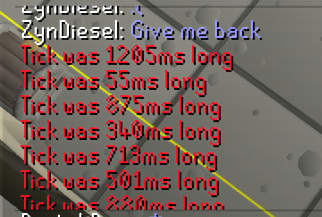
does anyone know why this is always happening regardless of world?
i switched isps recently and this was happening before so i'm thinking it's something on my side
this only happens on runescape
any other game is very stable
 celest badger
I'm having issues where I get a connection lag and randomly get logged out of Runelite. I've tried starting it up in safemode and also have tried both my home and work wifi to see if that's the problem. It drops me equally on both wifi networks. I'm able to play on mobile with no issues when connected to the same wifi.
Also, I have a Jagex account and tried using the launcher with the official client and I get the same issue.
sonic birch
Sounds like it's an issue with your pc then
celest badger
I think the issue first started when I updated my mac to Sequioa.
I've tried uninstalling RL and the launcher, deleting, cache, and restarting my computer.
solid mesa
MacOS Sequioa has lots of networking issues
celest badger
Do I just need to wait for Jagex to catch up to Sequoia?
sonic birch
You need to wait for apple to fix their shitty software probably
celest badger
Brutal. I might try going to a backup before the update.
And then just not install the update.
hollow olive
fwiw i haven't had rl issues on sequoia.. yet
but i do hear networking is pretty scuffed
sonic birch
There is also some tick fixer for mac plugin. Idk if that helps
I think it often pings because otherwise macos just decides to put wifi into a low power stage or something? Idk, I don't have an apple device
celest badger
Tried adding the tick fixer but it didn't work. Still has major connection issues.
sonic birch
Well, you can try rolling back then. Idk if that's possible, or how it works.
junior violet
Is there anything I should do to have a PR looked at or are they just reviewed periodically?
 steady ingot
hi, is this channel for account support? I had my runelite account assocaied with my student email, but then moved it to a "former students" address which is slightly different, so I lost all my settings/notes. is there a way to recover it?
junior violet
gotcha, my bad wasn't sure
zealous cedar
steady ingot
hi, is this channel for account support? I had my runelite account assocaied wit...
If you still have the settings file from the computer you were playing on, you can import it as a new profile
steady ingot
i'm not sure that i do, i'm on a new computer
zealous cedar
that is not great then
steady ingot
uh oh... is there like a support team or something that would be able to help with this?
zealous cedar
how slightly different is the new email?
steady ingot
the ending is @formerstudents.schoolname.edu, instead of @schoolname.edu
zealous cedar
dm the old and the new emails to @haughty pumice and i will change it
steady ingot
thank you so much, you're the bomb
 wispy silo
Hello, I'm having an issue where my computer is completely freezing on me in TOA, I've tried turning off more demanding plug ins like the 117 HD graphics and I still freeze up. I only freeze in TOA which is the strange part. I haven't raided in a couple months and never froze up anywhere else in the game, even with multiple accounts running at the same time. Any insight would be helpful. Thanks
sonic birch
Client or whole pc?
wispy silo
Whole PC, it freezes and then I get an repetitious audio buzz in my headphones.
sonic birch
I don't think that's really a runelite issue, more a pc issue
wispy silo
I'll look into it more hardware wise.
odd kelp
Where should I be seeing this notif? It's the motherlode mine plugin

 stone spruce
hi
my xp drops disappeared in the last update, anyone know about it?
leaden trail
odd kelp
Where should I be seeing this notif? It's the motherlode mine plugin
Should be in an overlay
leaden trail
stone spruce
hi
my xp drops disappeared in the last update, anyone know about it?
You probably clicked the orb by mistake
stone spruce
hmm no idea, what orb
mossy swan
!xpdrops
haughty pumiceBOT
We are using vanilla XP drops. To configure them: https://github.com/runelite/runelite/wiki/XP-Drop
 crisp dune
dunno yet
 earnest sinew
Kk
 boreal harbor
Does anyone know how long rs is gonna be down for? Apologies if this has been asked.
crisp dune
no idea, we haven't been told anything about it
 rancid snow
There seems to have been a dupe issue with pot storage from what I could find
crisp dune
that's our best guess as well
 vital nest
Hey, I only recently found out you can write special codes in search for bank stuff - is there a way to show items for specific attack styles (such as slash, stab, crush) so i can find the most efficient weapons for each slayer task more easily?
 warped schooner
damn theres a dupe like every month
oblique plume
odd kelp
Where should I be seeing this notif? It's the motherlode mine plugin
i moved that to the mining plugin but i guess missed there was a config option enabling it
round jacinth
vital nest
Hey, I only recently found out you can write special codes in search for bank st...
You could tag the gear as slash without an additional plugin
round jacinth
warped schooner
damn theres a dupe like every month
 dense gorge
hey guys, i've been having an issue for quite some time now where RuneLite crashes my laptop, completely freezes and shuts down. I'm running a macbook pro late 2014 all up to date, MacOS big sur, and have tried pretty much every troubleshooting trick, brought my game graphics down to as low as possible, turned on GPU and brought fps to like 20-30. Anyone know how I can fix this?
oblique plume
It crashes with gpu off even?
dense gorge
i was told to turn GPU on, but yes it crashes while it's off as well
oblique plume
Dunno then
dense gorge
ahh damn, i will try to turn GPU off again though after the maintenance is done
oblique plume
Are there any crash logs from the system
dense gorge
oblique plume
Are there any crash logs from the system
where do i find those?
oblique plume
Idk i don't have a mac
vital nest
round jacinth
You could tag the gear as slash without an additional plugin
I figured as much, tysm though for clarifying. Thanks bud 😁
 little hatch
 ornate kite
is there any way to remove the spammy ge messages?
I have all the spam filter plugins you can get I think
and they still show up
round jacinth
which spammy messages?
ornate kite
the ones advertising websites or the casino ones etc
leaden trail
The hub spam filters don't do a ton tbh.
You're better off learning basic regex and writing your own regex filters for the core chat filter 🤣
Although I suppose the last time it was suggested someone in support try to learn regular expressions, it was all we heard about in here for like a week
 solar leaf

 thorn pond
Added a modification to the client's attackstyles plugin, how can i submit it to be edited in the master? if at all?


git is not allowing me to make a pr for it
oblique plume
you need to work in your own fork
thorn pond
oblique plume
you need to work in your own fork
aha, of the master plugin then i assume, as i am forked on the master itself, it doesnt allow me, correct?
round jacinth
master is the name of the branch that release uses, you branch off of master and make changes then make a PR with your changes to merge onto master
oblique plume
but you have to do that in your fork
 glad crypt
anyone familiar with the panels not wanna minimize properly?
OS: Arch linux
Running this a flatpack with wine:
https://github.com/USA-RedDragon/jagex-launcher-linux-flatpak
Not a gamebreaking bug but kinda annoying
GitHub
Play RuneScape with the Jagex Launcher - in Flatpak form! - USA-RedDragon/jagex-launcher-linux-flatpak
glad crypt
like the runelite panels on the right part of the screen. double tapping it to minize just moves the "icon" bar lol
yeah dunno why discord didnt wanna embed
mossy swan
do you have runelite installed as a windows app or linux?
discord does only mp4 not mkv
glad crypt
ah right
mossy swan
you might want to just try using bolt launcher instead
glad crypt
its is running the window app under wine by the looks of it
mossy swan
yeah thats probably the problem
 versed island
is there a way to remove a highlighted obstacle in the agility plugin?
round jacinth
no afaik
versed island
rip in the new wyrm course both the advance and normal is highlighted would have been nice to only have 1 of them on
versed island
ty
ornate kite
is there any way to not have black border around client with stretched mode integer scaling?
round jacinth
you can resize the client to be exactly the size of the integer scaled client
otherwise no, that is intentional
ornate kite
okay well I did that but how do I keep this setting?
I don't even know what resolution it's at right now and I'd like to go back to the way it is later
 raw pendant
hello i am having issue where my mac keyboard wont let me press enter to type in the chat. it let me press shift then enter to type in the chat but not without holding shift. i x out of everything and restarted the rl app didnt change anything. its done this all morning not sure what the problem is. turned key board off and on and all that enter is working for all other stuff on computer just not the game
hollow olive
raw pendant
hello i am having issue where my mac keyboard wont let me press enter to type in...
download the debug helper plugin and you can view your keybinds in there, you might have something bound on enter
thorn pond
@twin spade its fine, i get it. i closed the pr >.>
hollow olive
versed island
rip in the new wyrm course both the advance and normal is highlighted would have...
i menu entry swap the basic one to walk here, so i don't click on it accidentally
raw pendant
hollow olive
download the debug helper plugin and you can view your keybinds in there, you mi...
ok ill try but i dont think thats the issue i didnt touch anything it was just that way from the time i logged in this morning
raw pendant
hollow olive
download the debug helper plugin and you can view your keybinds in there, you mi...
it was the dps calculator i downloaded that fixed it thank you
versed island
hollow olive
i menu entry swap the basic one to walk here, so i don't click on it accidentall...
dw i just turned off the plugin and highlighted the tiles manually
glad crypt
glad crypt
anyone familiar with the panels not wanna minimize properly?
OS: Arch linux
Run...
same issue when swapping to bolt luncher hmm guess hyprland (wayland) hates runelite 🤔
sometimes it likes to play hide and seek too

 solid jetty
good evening,
i have a question about runelite profile.
i lost my runelite plugins, and i want to import my old profile 12/2022 but the plugins don't come back
oblique plume
maybe they arnt in there
sonic birch
!lost
haughty pumiceBOT
solid jetty
thats the file i selected
solid jetty
!lost
haughty pumiceBOT
solid jetty
ok i will try
round jacinth
You may want to delete this picture , an email is in it.
solid jetty
 round jacinth
Both have it I guess lol
solid jetty
the default and rs1 don't work also 😦
oblique plume
new profile
solid jetty
pff still nothing , i am afraid all is lost 😒
oblique plume
show the directory in file explorer
round jacinth
There is other views using the buttons in the top right in that screen
To see the file sizes and dates
oblique plume
ik
 oblique plume
it wont have an email
round jacinth
Oh right profiles2 built different
solid jetty
 round jacinth
Profiles2
solid jetty
 oblique plume
it does look like its gone
unless you dont have many settings
then all of them look the same
solid jetty
i don't understand why i can't use the file in the profile (1) map
its a version of late 2022.
solid jetty
ok, thanks for the effort
oblique plume
its interesting you have jsons set to default openwith acrobat though lol
solid jetty
last question, can't i retrieve something with my email adres

i am always logged in
oblique plume
if you were syncing it then its already there to select
 silver citrus
how can i get all my plugins from my pc to my laptop?
sonic birch
!transfer
haughty pumiceBOT
silver citrus
what if i dont have the cloud icon?
hollow olive
then you're probably not signed into a runelite account
silver citrus
if i sign into my account now will it get rid of all the plugins i have now being not signed in?
sonic birch
No
silver citrus
ok thanks
 uneven lily
If i have a question about araxxor screenshots from runelite being all messy and not sending me rare drops to discord. Should i then be here?
zealous cedar
the screenshots are "all messy"?
 wide chasm
Heya, have a question about Loot Tracker. I was resetting individual NPCs and reset all by accident. Is there a way to get it back or is the tracked loot gone now?
zealous cedar
its probably gone, unless you happen to have a backup of .runelite
odd kelp
oblique plume
i moved that to the mining plugin but i guess missed there was a config option e...
okay Ill check that out, thanks
wide chasm
@zealous cedar No backup before I did it unfortunately. Thanks though.
 rancid pilot
Hey Team
Sorry to trouble you, my RL seems to have overnight lost all its plugins
I am still logged in etc
just most of them are gone?
Is the client yet to update from the game updates or am I being stupid?
haughty pumiceBOT
rancid pilot
Logged in and out and seems to have fixed it, apologies it was deffo me jajaja have a good one
 vernal locust
hey, logged in as normal and runelite seems to be capped at 60 fps, gpu plugin with fps unlocked, was running fine yesterday, now not today, any ideas?
zealous cedar
what do your gpu settings look like?
sonic birch
You probably got vsync enabled in your gpu settings
vernal locust
zealous cedar
what do your gpu settings look like?
within runelite?
 patent jewel
client is suddenly becoming choppy / tearing for frames, i tried safemode but it persists. anything i might be able to do?
i was playing valorant, came back and noticed my client was laggy.
zealous cedar
vernal locust
within runelite?
yes
vernal locust
zealous cedar
yes
 zealous cedar
as Yves said, you probably just have a 60hz display
vernal locust
zealous cedar
as Yves said, you probably just have a 60hz display
its a razer laptop
not on an external
sonic birch
Set vsync to off instead of adaptive
patent jewel
i turned vsync off myself, and it helped a little bit but i am still getting tearing especially when i have my sidebar open, i've just noticed.
sonic birch
patent jewel
i turned vsync off myself, and it helped a little bit but i am still getting tea...
Only with sidebar open in safe mode?
patent jewel
its like a whole visible frame skip that isn't there when i close it
sidebar open out of and inside of safe mode
ill check safe mode rn 1s
sonic birch
patent jewel
sidebar open out of and inside of safe mode
Check if it happens with sidebar closed in safe mode or not.
 dull root
cant log in, stuck in: connecting so server... Loading please wait. Has this been adressed before?
sonic birch
Don't suspect it's a rl issue, but a connection issue
patent jewel
safe mode is really hard to tell
 sonic birch
dull root
cant log in, stuck in: connecting so server... Loading please wait. Has this bee...
sonic birch
dull root
cant log in, stuck in: connecting so server... Loading please wait. Has this bee...
!flow you can try if it happens in safe mode with world hopper off. If it does, it's just your connection
haughty pumiceBOT
flowchart: Please refer to this flowchart for further troubleshooting.
sonic birch
vernal locust
Have you tried what I suggested?
vernal locust
sonic birch
Have you tried what I suggested?
vsync off not changing it
stuck on 60
sonic birch
!flow Can you get me a video of it in green tree with your gpu settings visible?
haughty pumiceBOT
flowchart: Please refer to this flowchart for further troubleshooting.
vernal locust
sonic birch
!flow Can you get me a video of it in green tree with your gpu settings visible?
sorry guys, i appreciate the help, opened safe mode and trying to follow the tree however im confused as theres no "gpu" plugin in safemode and now in safemode im at 50 fps
 brave flame
good afternoon, I have problems with the GPU plugin, the moment I turn it on, it turns off instantly
patent jewel
vernal locust
sorry guys, i appreciate the help, opened safe mode and trying to follow the tre...
unlock frames in 117hd
and set a target
nvm u have it i see in image mb
vernal locust
WOW, i am so sorry, my laptop became unplugged from the wall and i guess it limits frames when its not plugged in, feel so stupid, sorry guys
haughty pumiceBOT
@brave flame To find the logs, you can do one of the following:
- If your client failed to open, click the
Open logs folderbutton. - Open the screenshot directory by right-clicking 📷
Camerabutton, navigate 1 directory up, then open logs folder. - Navigate to
%userprofile%\.runelite\logson Windows or$HOME/.runelite/logson Linux and macOS.
Upload the log files named client and launcher by dragging them to Discord. If there are files prefixed with jvm_crash dated from today, upload them too.
 chilly bluff
I downloaded a pluigin called "cg recolor"
It's making my runelite lag really bad. I tried uninstalling it but for some reason, things are still colored in the raid despite it being uninstalled. It's causing me to lag still only within the CG. Any help?
hollow olive
have you restarted your client after uninstalling?
chilly bluff
yes and even my computer
It's weird that some things would still stay colored. Its only a few things not the entire raid
sorry not raid, i meant CG
sonic birch
Can you show us a video of you starting a fresh rl instance, the plugin being uninstalled, and things still being recolored?
I don't think this is possible
If it is possible, that seems like something we'd look into
zealous cedar
restarting runelite after uninstalling the plugin will fully remove it
odd kelp
oblique plume
i moved that to the mining plugin but i guess missed there was a config option e...
I found that same setting under advanced mining, but I'm not seeing any mining state with this enabled either
also I'm not able to turn off ore respawn timer (the yellow pie/circle) when advanced mining is enabled
sonic birch
we don't support hub plugins, just the core mining plugin
odd kelp
the person I tagged is the one that made it though, no?
Are you saying I need to move to a different server to ask for support about this plugin?
solid mesa
Is it RuneLite or Jagex that makes clicking a fairy code in the travel log change the combination? Because in Safe Mode clicking the new C K Q Varlamore: Aldarin in the travel log does not rotate the combination.
round jacinth
Hub plugins should be directed to their GitHub for issue tracking, this discord is for core client belp
odd kelp
round jacinth
Hub plugins should be directed to their GitHub for issue tracking, this discord ...
gotcha, thanks
round jacinth
solid mesa
Is it RuneLite or Jagex that makes clicking a fairy code in the travel log chang...
I think that’s the fairy ring plugin?
solid mesa
Even with Fairy Ring plugin off it seems to pick the combination when clicking the travel log
odd kelp
round jacinth
Hub plugins should be directed to their GitHub for issue tracking, this discord ...
I was just thinking, I never downloaded advanced miner nor motherlode miner, they were already installed
maybe I did advanced actually, but I'm certain i didn't for motherlode
round jacinth
solid mesa
Even with Fairy Ring plugin off it seems to pick the combination when clicking t...
Maybe the only thing it adds is the search, you could check by feeding -vanilla arg I think
round jacinth
odd kelp
I was just thinking, I never downloaded advanced miner nor motherlode miner, the...
The default mining plugin is all you need
Most hub plugins are abandonware written to be “better” than the plugin it wants to be better than and not updated. Mining plugin has been updated recently.
odd kelp
gotcha
odd kelp
the motherlode plugin is good tbh, if only it had that one feature working, but yeah I gotcha not gonna bother yall with that
solid mesa
round jacinth
Maybe the only thing it adds is the search, you could check by feeding -vanilla ...
I don't think that works. It downloads bootstrap then just closes.
solid mesa
I downloaded the vanilla client. Clicking the travel log rotates the combination. So it's a Jagex bug not a RuneLite bug
round jacinth
Neat
odd kelp
any idea where this info panel originates from? I turned all mining plugins off but still see it, and can't find anything in the "normal" settings menu either
 round jacinth
That’s jagex
round jacinth
They recently did some mlm reworks
Recently as in a few months ago
They made it so you can’t overstock the sack which is sad
odd kelp
I actually like it, just was curious, cuz maybe that plugin it was coming from had other tweaks, was my thought process anyways
oh Im new to mlm so didnt know about that
round jacinth
The older plugin would tell you how many full deposits you had left but they changed it so it goes by ore not full inventory
But it’s the same at end of the day sorta
sonic birch
odd kelp
the person I tagged is the one that made it though, no?
No, alex did not make advanced mining
 sonic bay
Curious if this is a bug / error or there could be an improvement? In a hard clue step, the helper suggests checking the first floor (see screenshot below), but the crates are on the second floor, which matches what I see in the Wiki. THOUGH, when I Google search the clue step, I see a [UK] and a [US] designation. Is the clue different if you are in the US vs UK? And if so, can the clue helper match that in some way? I was confused really only for a second or two, so not a crucial error/issue.
 hollow olive
in the UK they use ground / 1st / 2nd, i believe. and the clue isn't different
sonic bay
hollow olive
in the UK they use ground / 1st / 2nd, i believe. and the clue isn't different
Is there a way for Runelite to detect US vs UK similar to the Wiki to then match the clue helper text? Wiki uses cookies I assume
odd kelp
round jacinth
Hub plugins should be directed to their GitHub for issue tracking, this discord ...
when I search motherlode it doesn't show in the plugin hub, how can I find the author and the github of the plugin?
Like I said, it was already installed when I started using runelite. It wasn't enabled, but was there.
sonic birch
odd kelp
when I search motherlode it doesn't show in the plugin hub, how can I find the a...
It's a core plugin, not a hub plugin. For core you can ask support here, for hub you need to contact the author that made it.
"Advanced mining" is a hub plugin. We recommend just using the motherlode mine plugin and mining plugin from core, not a hub plugin
odd kelp
sonic birch
It's a core plugin, not a hub plugin. For core you can ask support here, for hub...
I'm referring to the motherlode plugin, I was only checking out the advanced mining plugin because Alex said he moved that feature, and that was the only other plugin I could find with said feature
but okay makes sense
sonic birch
Yeah, he moved it from the core motherlode plugin to the core mining plugin
odd kelp
sonic birch
Yeah, he moved it from the core motherlode plugin to the core mining plugin
okay that worked.
I wish it had toggle-able features though, I'm not a fan of the the ore respawn timers. The motherlode plugin just uses a dull colored pickaxe versus the bright yellow circles, and also the pickaxes only show once the vein is ready versus the timers just always going


but anyways thanks for the help
and I know I'm sitting here talking about the yellow circles being annoying, but it there was an option like with the Health Notification plugin, where the screen turned red or whatever color when you're not mining, that would make the "afk" ability a lot easier IMO.
The "are you mining/not mining" notif isn't very helpful in it's current state IMO
sonic birch
you can use idle notifier for a red flash
odd kelp
sonic birch
you can use idle notifier for a red flash
amazing haha, thanks so much
 warped trail
anyone know how to change the scaling of the runelite client itself? I found the stretched mode setting which scales the game, but doesn't seem to effect the scaling of the client.
sonic birch
!config has a scale param
haughty pumiceBOT
sonic birch
It scales both the client and the game
warped trail
thank you!
 graceful raven
Anyone else getting this with party hub panel? Standing next to him in game while he's geared for a raid with me
 sonic birch
You can check the gh pr
That will fix some bugs once it's merged
Might include this bug
uneven lily
zealous cedar
the screenshots are "all messy"?
My bad. Araxxor screenshots are only showing the kills. Not the drops when i 'open' araxxor. Combined with dink plugin. When i click a weapon the same tick as i 'open' araxxor. Dink sends me the screenshot of the weapon i put in my invent as a drop. And so does the loot plugin. I have 183b loot cos i looted 83 scythes there
oblique plume
odd kelp
the person I tagged is the one that made it though, no?
im confident i didnt make a bad hub plugin
 red fox
Hey, Is there any way to disable the chat collapsing and the inventory collapsing?

im on resizeable modern layout
 merry surge
Can you add a toolbox to OSRS like the one in Runescape. How do you add Plug-ins to Runescape Please
Is there something like puzzle solver etc. ?
leaden trail
merry surge
Can you add a toolbox to OSRS like the one in Runescape. How do you add Pl...

GitHub
Open source Old School RuneScape client. Contribute to runelite/runelite development by creating an account on GitHub.
 rough agate
hey, does quest helper have it's own discord?
in DT2 requirments it states you will need to have 60% tai bwo wanai score
which is only true to one of it's prerequisites, not for DT2 itself
haughty pumiceBOT
Visit Zoinkwiz's Quest Helper plugin discord (https://discord.com/invite/XCfwNnz6RB) for support, issues & feedback
 timid rock
 hybrid orchid
Is there a way to change my email linked with my runelite account?
oblique plume
no
hybrid orchid
Can I export my plugins and loot trackers to a new account?
oblique plume
you can sign in with a new one then import and i think they become the same
haughty pumiceBOT
oblique plume
like that
i think youd do the $rsprofile one in order to get it into the new account
havent tried before
 distant dove
Can someone help me figure out and understand why I can log into Kate’s launcher fine but runelite tells me incorrect user or password?
I’m going crazy I just even reset my password but it’s still giving me the issue
zealous cedar
 hollow olive
if you have a jagex account you have to launch runelite through the jagex launcher
 mossy tide
How can I get around my work firewall? I've gone through numerous avenues trying to add it as an exception, a number of other things, but need to have admin access to do so. Any other ideas as workarounds to use RuneLite at work?
hollow olive
i think its just a typo imo
distant dove
How do I add runelite to the jagex launcher? I didn’t know that was a thing I took a few months break
Oh Nevermind I just saw it, thank you lol I’m dumb
hollow olive
mossy tide
How can I get around my work firewall? I've gone through numerous avenues trying...
play on your non work computer lol
you're just asking for trouble
 cunning zenith
Is this a new clue? No pop up for location
 cunning zenith
Is this a new clue? No pop up for location
cunning zenith
cunning zenith
Is this a new clue? No pop up for location
Confirmed I checked the wiki and see added 25th 😄
oblique plume
you should probably update your client more than once a month so that that doesnt happen in the future
 gilded kayak
cunning zenith
Confirmed I checked the wiki and see added 25th 😄
gilded kayak
cunning zenith
Confirmed I checked the wiki and see added 25th 😄
it said twlight last week so that's what the plugin expects
also they changed the items, but if they hadn't it would have been broken today either way
 sacred sluice
Hello Everyone so i recently got a VPN on my pc and ever since i have not been able to get on Runelite with vpn connected , I'm using Nord vpn and i have the split tunneling feature turned on and added runelite and jagex launcher to it as well. I made an exception for Runelite on the windows firewall does anyone know how to resolve this or do i just need to turn off the vpn whenever i play. I would appreciate any help on this Thanks!
round jacinth
split tunneling doesn't work
 mint raft
Is anyone noticing runelite getting stuck on the cloading please wait screen its not frozen just wont move to the next screen? After today's update
 vapid ridge
Bank Diff plugin used to change the bank value to be the value of the diff, but only shows the unfiltered value now. Anyone have any idea why / how to fix this?
round jacinth
submit an issue to their github
haughty pumiceBOT
Support for hub plugins should be directed to the author of the plugin.
You can find the support link by searching for the plugin in the Plugin Hub panel and clicking the ? button on the plugin, or by right-clicking the plugin in the plugin panel and clicking the Support menu option.
vapid ridge
Did so, but was just wondering if anyone else had any input.
 dusty sentinel
curious how i lost 10+ !pbs when i type them now, happened on an update to rl 2 weeks ago talked to a few mates, and finally decided to ask in here.
sonic birch
!loot could be this I guess, with duplicate rsprofiles, idk
haughty pumiceBOT
sonic birch
but can also just check the adventure log in your poh or kill the boss
 tight bobcat
I'm trying to import my old profile into Runelite (RL Version 1.10.38.1, old school revision Rev 225, Launcher version 2.7.2) launched via Bolt (Bolt version 0.9.0) on LinuxMint22 but nothing happens. The profile imports successfully on my Windows machine. I have tried running the profile.properties through dos2unix since it was created on a windows 10 machine but that hasn't done anything. Also, the .properties file does not show on the file picker when trying to import it and I have to manually enter the name. It does create a new profile but with none of the plugins installed. Any advice?
Edit: Found a workaround, replied to this message with the solution
I have also tried restarting runelite after importing the profile to no avail
tight bobcat
Also, I do not see the ~/.runelite folder so I cannot access the error logs
sonic birch
tight bobcat
Also, I do not see the `~/.runelite` folder so I cannot access the error logs
ask the bolt guys what they do with it
tight bobcat
I've found the .runelite folder, where should I look for error logs?
haughty pumiceBOT
To find the logs, you can do one of the following:
- If your client failed to open, click the
Open logs folderbutton. - Open the screenshot directory by right-clicking 📷
Camerabutton, navigate 1 directory up, then open logs folder. - Navigate to
%userprofile%\.runelite\logson Windows or$HOME/.runelite/logson Linux and macOS.
Upload the log files named client and launcher by dragging them to Discord. If there are files prefixed with jvm_crash dated from today, upload them too.
tight bobcat
oblique plume
are you sure youre attempting to import the correct file
what does the imported profile file look like after importing
tight bobcat
Yes. This is the same file I imported successfully on Windows. It looks like a second profile named "Imported Profile" but it is the same as a default profile
oblique plume
i mean like compare the contents
tight bobcat
output from diff Imported\ Profile.properties default.properties > diff.txt
 lapis elm
you need to sort the file first
oblique plume
idk, looks fine to me
i dont see how OS matters
but linux is stupid so i guess it could be doing stupid things
tight bobcat
output from diff <(sort Imported\ Profile.properties) <(sort default.properties) > sorteddiff.txt
2024-10-02 16:39:54 PDT [AWT-EventQueue-0] INFO n.r.c.plugins.config.ProfilePanel - Importing profile from /home/username/Downloads/default.properties 2024-10-02 16:39:54 PDT [pool-2-thread-1] INFO n.r.client.config.ConfigManager - Finished importing 0 keys
Not sure if this is runelite or Bolt related
lapis elm
Did you close your client before doing the diff



 tight bobcat
I'm trying to import my old profile into Runelite (RL Version 1.10.38.1, old sch...
tight bobcat
tight bobcat
I'm trying to import my old profile into Runelite (RL Version 1.10.38.1, old sch...
I've found a workaround:
- Import the profile into Runelite, then close runelite
- In the
profiles2folder, rename the new.propertiesfile to something else - Copy the file you want to import to the
profiles2folder and rename it to what runelite named the imported profile - Launch runelite and activate the profile
zealous cedar
it is not nearly this complicated. you just click import profile and import it.
tight bobcat
Tried it, didn't work, blamed Linux and moved on 🤷♂️
zealous cedar
lol
sonic birch
 slender forge
it's bugged, see his plugin-hub github pr
 granite leaf
is there a known issue with https://runelite.net/plugin-hub/show/annoyance-mute this plugin not working correctly?
trying to mute the new sounds in toa but it just wont
 gleaming moat
How can I see a plugins latest update? I want to check the mixology one in particular
sonic birch
you check the github prs
gilded kayak
for the mixology one in particular, development discussion is happening in https://discord.com/channels/301497432909414422/1288913931057889302
gleaming moat
thank you
sonic birch
That as well, but for updates, see https://github.com/runelite/plugin-hub/pulls?q=is%3Apr+is%3Aclosed
gilded kayak
but the last update was 4 days ago
sonic birch
and then look for mixology, click on the link the bot posted and read the commit titles
gleaming moat
ah, darn, got it. thanks
 tall olive
Does anyone know what might break my ability to spacebar smithing?
(not sure if runelite related)
Normally I can spacebar here to smith my last item
 sonic birch
!flow
haughty pumiceBOT
flowchart: Please refer to this flowchart for further troubleshooting.
round jacinth
gilded kayak
<@179369590902489088> ZOM IS YOUR PLUGIN BROKEN
no its not
but i know the ids of the new sounds
gilded kayak
round jacinth
no its not
lit
round jacinth
6562,6495,6509
round jacinth
granite leaf
is there a known issue with https://runelite.net/plugin-hub/show/annoyance-mute ...
try those
jagex added sounds to the bomber bugs and the zebak puzzle room
classic
 tepid vault
Anyone getting issues with that new jagex launcher when tabbing out the client gets covered in a white blurr?
 fervent meteor
what plugin for these tile markers?

 hot oasis
corner tile indicators
fervent meteor
thank you
 stark solstice
Just curious on something i've already fixed, would resetting my jagex acc password have caused my runelite acc profile to have reset? Never had this issue before was a simple fix just wondering what to avoid in the future
mossy swan
no
rancid current
Not sure if this is the place to post this, but the tags on the 'emote clue items' plugin. Are showing through from the tab 'behind' the potion storage when you have it open.
 haughty pumiceBOT
Get support for the Emote Clue Items Plugin Hub plugin here: https://runelite.net/plugin-hub/show/emote-clue-items.
You can also find the support link by searching for the plugin in the Plugin Hub panel and clicking the ? button on the plugin, or by right-clicking the plugin in the plugin panel and clicking the Support menu option.
rancid current
Ahh, I don't have a github acc or I would've posted there, I'll make one.
 weary peak
One message removed from a suspended account.
One message removed from a suspended account.
haughty pumiceBOT
Visit 117's HD plugin discord (https://discord.com/invite/U4p6ChjgSE) for support, issues & feedback
weary peak
weary peak
One message removed from a suspended account.
One message removed from a suspended account.
One message removed from a suspended account.
 lunar tulip
having some issues with opening multiple runelite clients. anyone ever experience that before?
 supple sage
ANyone else having issues with the Party plugin?