#support
1 messages · Page 30 of 1
 tropic schooner
 zealous cedar
it might yeah.
 thick panther
you're not on a proxy?
tropic schooner
I have my VPN turned off. If it's on, then I get a different error.
(I think, try switching world). And it's not instant, whereas this one is instant.
zealous cedar
were probably not going to get anywhere if you don't answer my questions though
so wait you have two network connections and a vpn?
tropic schooner
Hi Adam, is this your question around network connection?
zealous cedar
i cba trying to mentally picture this tbh
tropic schooner
So:
- I normally use my WiFi
- For debugging I have used my phone's data (with Hotspot)
- I sometimes forget to turn my work VPN off, if I don't turn it off, nothing works. But for all of the above it has been turned off.
Official launcher works if:
- VPN is off
- Any network
Runelite log-in never works, regardless of VPN / network status
zealous cedar
 tropic schooner
Both
Let me clarify, sorry a lot of different attempts so I should be clear:
- I was on my WiFi when the launch failed after switching off the TLS tick-box
zealous cedar
i am obviously referring to the failed launch at 09:34:35 AEST
it can't be both, find a better answer
tropic schooner
- However, because I had an issue with the launcher a few days ago, I had tried everything back then (incl. mobile data) and only ticking this box worked
That one was on WiFi
I guess what I am trying to say is that I have had failed launches before, and at the time I tried different networks and the launch failed on both
That was solved by ticking the skip tls verification checkbox
zealous cedar
if it only works on two different, independent networks, with disable tls verification on, it means something on your computer is backdoored basically
but I cant really explain why the jagex client would work
tropic schooner
Could it be the same issue as this one?

GitHub
Type Incorrect behavior Operating System MacOS OS Version MacOS Monterey Bug description Upon attempting to login via Runelite, I am met with the error: Failed to login. Please try again. This is m...
zealous cedar
maybe. this post provides almost no information
do you have something called "netskope"?
tropic schooner
Yes - afraid so, that's why I thought it might be that
tropic schooner
No, afraid not.
zealous cedar
then I dont think you can use runelite. but I dont know why the jagex client works
tropic schooner
Got it. Yes it's weird. The above Github suggests it might be something on JAGEX's end. Do you know if it's possible to reach out to them anyhow? I assume not..
zealous cedar
I dont think it is something on jagex's end
If you could get packet dumps of the official client vs runelite both logging in that would be interesting to figure out what the difference is that netskope decides to block it
but i doubt you can do that without local admin
at least not easily
tropic schooner
Thank you a lot for your help! I might give that a whack later, though I get that it's unlikely I'll be able to get it going on this laptop!
zealous cedar
if you have a non-jagex account, that would work probably
thick panther
I imagine it's because RuneLite uses Java-based SSL handling
zealous cedar
so you think its fingerprinting the java tls stack? maybe
that would be kind of bizzare though
thick panther
I mean Java's TLS stack is more easily recognizable, NetSkope may apply more stringent inspection or interception policies on connections originating from Java-based applications
 opal stream
thick panther
zealous cedar
what makes the java tls stack more recognizable?
opal stream
thick panther
zealous cedar
what makes the java tls stack more recognizable?
the java stack is more recognizable because of how it handles SSL handshake, like specific ordering of cipher suites, how it deals with TLS extensions, and the default protocol versions, which are different from libraries like OpenSSL. Java is also stricter with certificate validation
zealous cedar
are you putting my questions into chatgpt?
thick panther
No your question stays with me
 haughty pumiceBOT
@opal stream Visit 117's HD plugin discord (https://discord.com/invite/U4p6ChjgSE) for support, issues & feedback
opal stream
Is 117 causing the flashbang on world hop?
cause my wife also uses 117 and doesnt have the same problem
zealous cedar
id think so yes
 leaden trail
It was fixed for GPU in the version you're on so yeah probably
opal stream
but her runelite is like 4 days old now
leaden trail
If it happens for you with 117 off we can look into it but realistically you'll want to go to their discord
zealous cedar
i think it happens on any version of 117 and you are just mistaken
opal stream
i mean.. i did confirm and watched her hop a few times, hers is just a black screen when she hops
mines sky blue
ill check with 117 off
zealous cedar
.. obviously she has no skybox
opal stream
idk, we both have 117 hd blue on
zealous cedar
try turning the "skybox" plugin off
zealous cedar
i dont think it can flash blue then, it would be black
thick panther
Unless you got the skybox plugin on

 round jacinth
what does the version of your game say when you click the 
opal stream
1.10.37.1 runelite ver, rev 225, launcher 2.6.10
leaden trail
So what if you turn 117 off?
opal stream
same but black
thick panther
What about the low detail raids plugin
opal stream
i asked in 117s discord as per your suggestion though anywho
opal stream
thick panther
What about the low detail raids plugin
bonus, i get both 🙂 very odd, i'll see what they say i guess
with auto-low detail off and 117 on i get blue then black as a lil treat
thick panther
that's fun
thick panther
opal stream
with auto-low detail off and 117 on i get blue then black as a lil treat
did you try turning on hardware acceleration?
opal stream
No, i'm just waiting to see what 117hd guys say, this issue started this past game update it's not been a long-standing thing
thick panther
alrighty, might be a good idea to enable it, so your GPU handles the rendering instead of your CPU
opal stream
for gigs, which hw acc would i select? auto?
thick panther
auto should be fine
opal stream
fwiw, still blue flashbang, but delayed.
thick panther
Not too sure then must be a 117 thing or another plugin
your graphics drivers are up to date?
leaden trail
Using the latest drivers is generally tempting fate
opal stream
yeah theyre up to date(ish) 🙂
 eager sequoia
why is my GPU going up to 90% when im on resizeable HD mode ? i have RTX 3060
zealous cedar
HD uses a bit more gpu, try using normal GPU mode?
eager sequoia
that means no HD then ?
zealous cedar
maybe you can turn down some settings or something, you could try asking in the HD discord
haughty pumiceBOT
Visit 117's HD plugin discord (https://discord.com/invite/U4p6ChjgSE) for support, issues & feedback
eager sequoia
deifnantly something on the plugins side cause thats wild
 ornate kite
hi guys, when i right click on the world map and click import ground markers it says "unable to read system clipboard"
what am i doing wrong?
zealous cedar
The log file might contain more info
ornate kite
zealous cedar
The log file might contain more info
nvm sorted it, thanks anyway mate
 lapis mist
Hello, I'm having issues with my system audio when the app is open. The is audio is distorted with runelite and all other applications, when i close it, its gone.
 quaint willow
Small question, sometime I got like small studder (I suppose it’s when I load a new zone example, cms after vanguard just before crossing door I get a mini freeze) is there a way to fix it?
 late frigate
odd bug lol
 serene plank
did i do something wrong in the initial setup? or can i not download my current plugins to use in this?

or is this a thing i need to drag all my plugins into
for them to work
 mossy swan
use release for plugins
serene plank
where's that in intellij?
serene plank
u gotta be more specific. sorry. I wanna add my current ones to make sure the test one ddoesn't overlap.
in addition advanced raid tracker has an alt version waiting for approval that covers all raids. I wanted to use it while waiting for approval.
i just wanna know how I can make sure the one im making and testing doesn't interfere w/ my other daily driver plugins
haughty pumiceBOT
@serene plank We don't provide builds of pluginhub plugins for snapshot versions. Usually you can pass -Drunelite.pluginhub.version=<current RL version> as a VM option to load the plugins built against the release into your build, which will work if there are no ABI changes. If there are ABI changes, build the plugins yourself and place them into the sideloaded-plugins directory when running in developer mode.
mossy swan
this channel is for release support, so please ask in #runelite next time if you have questions about development
serene plank
mossy swan
this channel is for release support, so please ask in <#301497432909414422> next...
it said "support" so i assumed this was a dev channel, sorry.
serene plank
haughty pumice
<@1157469907756265512> We don't provide builds of pluginhub plugins for snapshot...
ty
 limpid sparrow
pardon the silly Question- but I just installed runelite to use through the Jagex launcher, but its not seeing runelite. Im essentially at an impass where both are telling me to use the other.. is there a meathod to make the jagex launcher see that I have runelite?
mossy swan
have you selected runelite in jagex launcher client selection drop-down menu?
limpid sparrow
yes. it only has the "Install" option
 mossy swan
you may need to restart after installing, not sure
i don’t use windows so that’s all the help i can give 
limpid sparrow
Fair enough. I'll give it a shot. Thank you.
 gleaming hollow

 twilit sorrel
is the xp updater plugin not working for anyone else? i set it to update wise old man and logged out (but didnt close out of runelite), and wise old man still hasnt been updated, >10 minutes later
 slow pendant
Ik this has probably been asked a lot but how can I make stretched mode (fixed) less blurry? I've watched a bunch of vids but everything I do its still blurry
 prisma marlin
slow pendant
Ik this has probably been asked a lot but how can I make stretched mode (fixed) ...
prisma marlin
slow pendant
Ik this has probably been asked a lot but how can I make stretched mode (fixed) ...
Try following this guide I was having the same issue and this is the only one that worked for me https://www.reddit.com/r/2007scape/comments/hx8nki/psa_runelite_has_great_features_for_ui_scaling/

Reddit
Explore this post and more from the 2007scape community
slow pendant
prisma marlin
Try following this guide I was having the same issue and this is the only one th...
Just did this, the chatbox text looks really weird but everything else is nice
It looks nice when I'm full screen but if not then its a bit worse
 digital basin
anyone notice any issue with screenshots? i have them set to screenshot every boss kill, and as of 9/14 it stopped creating them. Just confirmed with 2 separate bosses arraxor and mole, still creates death screenshots, and i can use the manual screenshot buttom and it will send them to the same folder. i have toggle the plug in and reset the client.
leaden trail
digital basin
anyone notice any issue with screenshots? i have them set to screenshot every bo...
Yes, see here #support message
digital basin
awesome, thanks, sry for repost
prisma marlin
slow pendant
It looks nice when I'm full screen but if not then its a bit worse
I found setting the UI scaling in the GPU config to "Bicubic (Catmull-Rom)" makes the text look nicest for me but I really only play on fullscreen so I'm not sure of settings if you play windowed you might have to mess around a little bit with values
 wet gull
When I change to another world, this annoying message appears. How do I cancel it forever?
 slow pendant
wet gull
When I change to another world, this annoying message appears. How do I cancel i...
slow pendant
wet gull
When I change to another world, this annoying message appears. How do I cancel i...
theres a world hopper confirmation setting in runescape settings (not runelite settings)
wet gull
I want a picture of That's
 proper bear
Hello there, have a bit of a strange question about screenshots acting up. Since last Saturday new boss screenshots come back was Barrows(1) or just not at all (zulrah, whisperer, hespori). Currently doing a bingo which makes providing evidence a bit harder. Collection log screenshots and valuable drops are saved properly - it seems to just be related to the boss kills. Would anybody know what could have caused this and how I can resolve it? I changed nothing on my settings
round jacinth
it's a known bug fixed in next update
proper bear
Amazing! thanks, is it known when that update will be?
round jacinth
no
leaden trail
I can't imagine it would be TERRIBLY long but can't really say more beyond that
 pine stirrup
Hi im using the 117 hd plugin and i have for a long time - ive just come back to playing and noticed whenever someone has an ursine chainmace it looks like my fps is going to shit - i watch my fps counter and its still 144 (ive set this as max) anyone have any ideas? v sync is off
 oblique plume
the smoothing was removed from chainmace because it was broken
pine stirrup
hmmm its very offputting trying to pk at revs haha
 drifting lotus
where is runelite saved on my pc? i cant find it in program files or program files x86
oblique plume
installation: %localappdata%/RuneLite
data: %userprofile%/.runelite
drifting lotus
thanks found it now
 narrow ruin
is there a plugin that at times pops a random glass shattering/bell like sound? been getting it for a week and i for the love of me cant figure out whats doing it
leaden trail
Task jingle maybe?
narrow ruin
im cutting wood/fletching no drops or anything
 cinder yoke
boss kc screenshots decided to stop working for me at some point today 😦
leaden trail
cinder yoke
boss kc screenshots decided to stop working for me at some point today 😦
Known issue, wait for the next release
round jacinth
cinder yoke
boss kc screenshots decided to stop working for me at some point today 😦
fixed in next release
leaden trail
narrow ruin
im cutting wood/fletching no drops or anything
Are you in Priff?
narrow ruin
leaden trail
Are you in Priff?
yea i was doing some wcing
 graceful gyro
hi, any idea why Mage arena 'Alchemy room' plugin not working ? it doesn't show with item to alch
 sterile void
how do i tell the guy who made the timers plugin that demonic offering doesnt get a infobox count down?
i think its standard with RL
leaden trail
narrow ruin
yea i was doing some wcing
That's just Priff sounds then
round jacinth
graceful gyro
hi, any idea why Mage arena 'Alchemy room' plugin not working ? it doesn't show ...
can you show this?
round jacinth
sterile void
how do i tell the guy who made the timers plugin that demonic offering doesnt ge...
i do not think demonic offering is in the timers plugin
or im blind
there is a plugin on the hub dedicated to that spell book you might find better
@graceful gyro you dont need to dm me
you don't know where the best item to alch is at any given moment you must find it first
graceful gyro
oh okey, thank you
 sick void
Hello, I am bumping this question to see if I can get it some love 🙂
leaden trail
I don't believe so
 mint raft
Quick question, does anyone know why my fps is rapidly flickering between 143 and 144 when using the fps control display option. I am using unlocked fps from the HD plugin.
haughty pumiceBOT
Visit 117's HD plugin discord (https://discord.com/invite/U4p6ChjgSE) for support, issues & feedback
leaden trail
You can ask them there I guess
oblique plume
Sounds like vsync
 gusty lodge
is this still the most up to date work around for split tunneling? specifically ProtonVPN
oblique plume
yes
gusty lodge
oblique plume
yes
ty
 jolly falcon
Hi. I'll try today again. I have an issue where i can only hop world once otherwise the game freeze and i must restart client. Tried in safemode aswell and there i can hop worlds twice before i get the same problem. Does anyone know wtf this problem is and whats causing it lol
zealous cedar
can you provide your client logs from safe mode?
jolly falcon
 fringe fiber
Anyone know why I'm getting such low when I set it to 144?

I thought RuneLite + 117HD would allow for uncapping
I have an RTX 3070
zealous cedar
jolly falcon
after it freezes can you still interact with the sidebar ui?
jolly falcon
yap
haughty pumiceBOT
@fringe fiber Visit 117's HD plugin discord (https://discord.com/invite/U4p6ChjgSE) for support, issues & feedback
leaden trail
If you're having 117 issues, you're better off asking in their discord
zealous cedar
jolly falcon
yap
after it freezes, use the debug helper plugin and click "thread dump" and then paste it here
fringe fiber
leaden trail
If you're having 117 issues, you're better off asking in their discord
didnt know that existed, appreciate u thanks!
jolly falcon
zealous cedar
after it freezes, use the debug helper plugin and click "thread dump" and then p...
i can also add, after getting this debug helper, i cant hop even once.
oblique plume
what if you were to rename the $rsprofile file in the profiles2 directory to something like rsprofile-old and let it remake it from scratch
or you can move it somewhere else
zealous cedar
this is hung while doing disk i/o for logging
oblique plume
its logging a rsprofile mismatch looks like
oblique plume
that is true
zealous cedar
try deleting the logfile maybe
oblique plume
if its been happening over multiple days though im not sure its the logfiles fault
since this one hes provided earlier is only the one day today
jolly falcon
zealous cedar
try deleting the logfile maybe
the whole logs file?
zealous cedar
yea
jolly falcon
no difference. :/
zealous cedar
you sure you are taking the thread dump when it is frozen? how long are you waiting before clicking it?
jolly falcon
its kinda full, where the game is installed. should i try moving it?
zealous cedar
it doesnt log to where it is installed
jolly falcon
where does it log then? XD
zealous cedar
user.home/.runelite/logs
oblique plume
no
jolly falcon
yes adam, no other problems with the computer... and also not with runelite, except im just hopping.
but its mad annoying when u need to find an empty world for smth and need to restart the game every 5 seconds XD
but smth is obviously wrong since i could hop 1 time before, but now with debug plugin i cant hop at all
2 times in safe mode, 1 time in normal mode and now 0?
xD
oblique plume
youre probably only allowed to write like 10 lines an hour and the more plugins you have the more lines so its failing sooner lmao
im still kinda interested to see what happens if you move that $rsprofile file out
oblique plume
oblique plume
what if you were to rename the `$rsprofile` file in the profiles2 directory to s...
i did
jolly falcon
oh mb, missed it
"$rsprofile--1.properties" so i change this one into ur suggestion?
oblique plume
move it out of there or rename it to something yea
its got stuff in it like loot tracker and kc data
thats tied to a rs account
so dont delete it if you dont want those gone
jolly falcon
ok changed the name. lets try = p
my fucking brother
u solved it!
huge thanks ❤️
oblique plume
im not sure i did, it would have just moved the problem somewhere else
zealous cedar
i am pretty sure actually your computer is broken
oblique plume
but maybe that somewhere else is something you wont ever find
jolly falcon
ye well, i take it for now lol
oblique plume
dunno
jolly falcon
but yes, i bought the pc like 7 years ago and never changed a part on it
so its not impossible
ok, got problems again lmao
i logged into runelite, tried to update kc etc
cause it didnt show any kc + nothing in loot tab
and then the same problem started again 😛
oblique plume
your log says you dont use a rl account
jolly falcon
nah i was logged out i guess
sterile void
round jacinth
there is a plugin on the hub dedicated to that spell book you might find better
i didnt find anything about demonic offering on the pluginhub
its just a 5sec cooldown, its similar to magic imbue, dunno why theres no timer for it
jolly falcon
problem is if press sign in on runelite
i have 2 different profile
with different kc's
oblique plume
yea you gotta delete one
leaden trail
sterile void
i didnt find anything about demonic offering on the pluginhub
Search the name of the spell book
jolly falcon
oblique plume
yea you gotta delete one
ok i did, now the hopping works again 🙂
can it be that was the problem from the start?
oblique plume
its doing what i told you to do by renaming the file yes
twilit sorrel
is the xp updater plugin not working for anyone else? i set it to update wise old man and logged out (but didnt close out of runelite), and wise old man still hasnt been updated, >10 minutes later
oblique plume
but it doesnt make sense that thats the real issue
it was just the point at which you notice it
leaden trail
twilit sorrel
is the xp updater plugin not working for anyone else? i set it to update wise ol...
How much xp did you gain?
twilit sorrel
280k or so
haughty pumiceBOT
To find the logs, you can do one of the following:
- If your client failed to open, click the
Open logs folderbutton. - Open the screenshot directory by right-clicking 📷
Camerabutton, navigate 1 directory up, then open logs folder. - Navigate to
%userprofile%\.runelite\logson Windows or$HOME/.runelite/logson Linux and macOS.
Upload the log files named client and launcher by dragging them to Discord. If there are files prefixed with jvm_crash dated from today, upload them too.
leaden trail
Not sure if it would say in the logs but worth taking a peek
oblique plume
better question is do you even have anything to be updated
twilit sorrel
yes?
twilit sorrel
jolly falcon
oblique plume
better question is do you even have anything to be updated
will it always show wrong kc with !kc command now tho?
jolly falcon
kay thanks
oblique plume
usually people dont know how the hiscores work and expect to see lvl 2 attack or something on it
twilit sorrel
leaden trail
Not sure if it would say in the logs but worth taking a peek
will be somewhere in here
oblique plume
based on the diff between the real hiscopres and WoM it would appear you didnt gain enough exp to send an update request
twilit sorrel
that was a manual update
oblique plume
these logs are unreadable because you have shitty hub plugins
 toxic urchin
anyone else?
 twilit sorrel
oblique plume
these logs are unreadable because you have shitty hub plugins
twilit sorrel
oblique plume
these logs are unreadable because you have shitty hub plugins
this is the only stuff around logouts
sterile void
leaden trail
Search the name of the spell book
oh shittt
twilit sorrel
oblique plume
so reg logs wont show anything
thats what @leaden trail wanted me to post
which log do you want from debug
oblique plume
its the same one but debug
but im pretty sure its just cuz you arnt gaining enough exp
sterile void
leaden trail
Search the name of the spell book
YOURE A LEGEND
oblique plume
zom told this this previously lmao
 sharp thorn
can someone please help me understand these profiles so i don't mess up mine
leaden trail
What are you attempting to do?
haughty pumiceBOT
sharp thorn
So I wanted to use the bank tabs on the side instead of the inventory setups I have made. I made a new profile and logged into that one. I am wondering what the cloud syc does as I no longer have it on the new profile.
also want to have a profile for my main and a profile for my iron if thats possible?
leaden trail
Did you click the cloud icon on the new profile on the computer you made it on?
Yup, look at the link above
sharp thorn
I don't ever remember clicking on that cloud sync tbh
 scarlet knot
hello does anyone know why my animation smoothing doesnt have an option setting and it feels like its not on at all?
oblique plume
dont use chainmace
scarlet knot
ermmm thats weird how did you know im usoing one lol
round jacinth
Because it’s what anybody is complaining about with animation smoothing right now
 fresh swift
look behind you 
scarlet knot
oh dayum
 opal vigil
Why can't my runelite client find the plugin?

 pure ruin
hello, im haviung an issue where runelite locks up then crashes and reset my pc, any help?
 compact spear
opal vigil
Why can't my runelite client find the plugin?
compact spear
opal vigil
Why can't my runelite client find the plugin?
Cos you need to download it first, it's not a default plugin. Click the  and search there
oblique plume
if it crashes your pc its nota rl problem
pure ruin
oblique plume
if it crashes your pc its nota rl problem
any ideas its a brand new pc
leaden trail
You can maybe check event viewer
pure ruin
ok i will try this tomorrow when back at the pc thanks
scarlet knot
Will there be a fix for the mace if so I just won’t do the task yet
lapis mist
hello, I'm having issues with my system audio when the app is open. The is audio is distorted with runelite and all other applications, when i close it, its gone.
 gilded kayak
!safe does it happen in safe mode
haughty pumiceBOT
safemode: Windows
Run the RuneLite (safe mode) shortcut, or with a Jagex account, first run the RuneLite (configure) shortcut and tick the Safe mode box, then launch RuneLite via the Jagex launcher.
Mac
In Terminal, run:
/Applications/RuneLite.app/Contents/MacOS/RuneLite --configureTick the Safe mode box. Launch RuneLite.
If it's not working, download and install the updated RuneLite launcher from the website link in #welcome. You don't need to uninstall your current version. You will not lose any settings or plugins. Then try running safemode again.
gilded kayak
and if safe mode doesn't work, in safemode does it happen with the music plugin disabled
 zenith sage
been having crashes/pc restarts whenever runelite is open. Can't really find a pattern. However it does occur quite often when i drag around the client to a different monitor for example... any help is appreciated
i started up runelite right after the pc restart and these are the logs
please @ me
lapis mist
haughty pumice
**safemode**: **Windows**
Run the ``RuneLite (safe mode)`` shortcut, or with a J...
Nether solution worked, turns out its only when I fullscreen runelite oddly enough.
also when i enlarge the minimized screen
 nova bolt
Interface styles keeps changing back to default after switching it to 2005, any solutions?
 sterile bison
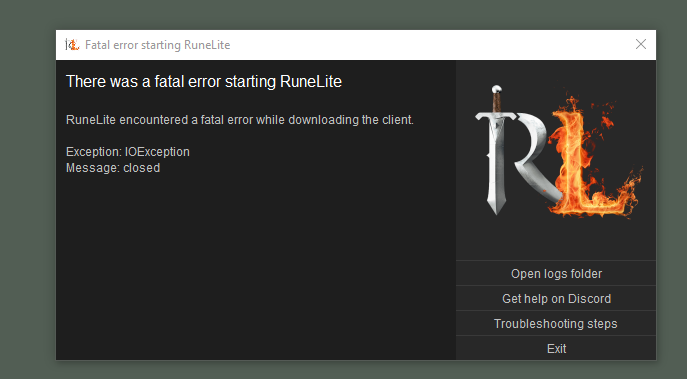 leaden trail
Open your logs folder with the button and upload the launcher.log file here
quaint willow
Small question, sometime I got like small studder (I suppose it’s when I load a new zone example, cms after vanguard just before crossing door I get a mini freeze) is there a way to fix it?
zealous cedar
maybe. try creating a new profile and enable only gpu, and then see if it still happens
quaint willow
already has only gpu active
zealous cedar
then you probably cant get rid of the stutter without disabling gpu
quaint willow
also has it without it, got a i7 7700k, 1080ti with 32 ram
make no sense to have studder
zealous cedar
have you tried safe mode?
quaint willow
whats that
haughty pumiceBOT
Windows
Run the RuneLite (safe mode) shortcut, or with a Jagex account, first run the RuneLite (configure) shortcut and tick the Safe mode box, then launch RuneLite via the Jagex launcher.
Mac
In Terminal, run:
/Applications/RuneLite.app/Contents/MacOS/RuneLite --configureTick the Safe mode box. Launch RuneLite.
If it's not working, download and install the updated RuneLite launcher from the website link in #welcome. You don't need to uninstall your current version. You will not lose any settings or plugins. Then try running safemode again.
quaint willow
ill give it a shot

 hollow olive
 proud zinc
you know u can mess with these urself lol
anyway that's how to get the left side ones
 proud zinc
hollow olive
you know u can mess with these urself lol
anyway that's how to get the left sid...
proud zinc
hollow olive
you know u can mess with these urself lol
anyway that's how to get the left sid...
ahh just didnt know where to find it, thanks my guy!
 eager wave
Is there a way to hide other players thralls but still see yours?
hollow olive
eager wave
Is there a way to hide other players thralls but still see yours?
it'd look like this if you did this

 eager wave
Yeah I know about that method, was wondering if there was a way to not just outline mine
Thanks for the help though!
 velvet shoal
hi guys. New here...discord in general. Im trying to run runelite on linux and am having trouble. im a GenZ Boomer. Ive tried typing in the commands ive found from various yt videos but i havent made any traction. any help getting me going would be apprechiated.
gilded kayak
are you a new player/on a new account, or aware of having a Jagex account
velvet shoal
I am a vet player. +15 years. just always played on windows. Im trying to ensure i have all the right settings and am typing the script correctly... never used linux before
 charred wind
velvet shoal
I am a vet player. +15 years. just always played on windows. Im trying to ensure...
charred wind
velvet shoal
I am a vet player. +15 years. just always played on windows. Im trying to ensure...
Download and run the appimage
Make sure you’re running Java 11, preferably openjdk 11 jre
velvet shoal
maybe im way out of my realm here... im not sure how to know what version of java im running or if i even am running java...
charred wind
What Linux are you running? Ubuntu? Arch?
charred wind
zealous cedar
the appimage includes java, so you don't need your own jre
I run then appimage and only get sound through my headphones with Java 11, so it does matter
zealous cedar
you are wrong
charred wind
I’ll get a screencap and post in #development later
Could be unique to my system so I’ll defer to you for now
velvet shoal
sorry guys, perhaps im not fit for this challenge... If anyone wants a special project and wants to walk me through this and teach me the basics of software engineering im happy to learn.
charred wind
velvet shoal
sorry guys, perhaps im not fit for this challenge... If anyone wants a special p...
click the copy button on the right side of the code there

open terminal
paste
hit enter
Runelite is now installed
velvet shoal
my chromebook doesnt allow me to paste the script in the linux terminal i am running.
okay that may be resolved
how can i install cortini
dom, where can i find the link you shared to copy rather than having to type the entire script?
velvet shoal

 stone parcel
I think that looks like it did it, now RuneLite should be in your Start menu/Application tray.
Might need to reboot for it to appear sometimes.
velvet shoal
Where would I find my application tray?
stone parcel
I'd guess the thing in the bottom left of your screenshot, dunno though.
For me I hit windows key on keyboard to open it, but idk if that is standard.
velvet shoal
I really am sorry for the dumb questions. I build engines for a living. Computers hurt my head.
Chrome book is very not user friendly when I was raised on windows. I swear I wouldn’t be in this boat if I had windows OS at my disposal. Just trying to learn how to skin this cat in a new way.
stone parcel
No worries. 😄
 bold burrow
Just wondering if i made a custom plugin can someone using normal runelite use my plugin if i gave them the jar? or do i have to give them my custom runelite version?
haughty pumiceBOT
Add the following line to your plugins block in build.gradle:
id "com.github.johnrengelman.shadow" version "6.1.0"
Add this block elsewhere in the file, changing the Main-Class to your plugin's test:
shadowJar {
 from sourceSets.test.output
 configurations = [project.configurations.testRuntimeClasspath]
 manifest {
 attributes "Main-Class": "com.example.ExamplePluginTest"
 }
}```
Then run `./gradlew shadowJar` and a runnable jar will appear in `build/libs/*-all.jar`. You can run the jar with `java -jar -ea jarName.jar` mossy swan
no, you dont need that
velvet shoal
restarted as told and found the app. Hasnt loaded yet. anything else i need to verify to ensure it runs properly?
mossy swan
he was replying to extract
mossy swan
velvet shoal
restarted as told and found the app. Hasnt loaded yet. anything else i need to v...
do you see it in your bottom bar or anything like that?
velvet shoal
It is... Throbber has been circling for a few minutes..
mossy swan

it might take a while to launch if your internet is slow, but it should show you a loading screen still
velvet shoal
my internet is pretty decent.. Im thinking i havent done something quite right. Still never figured out if i have all the linux:chrome settings right. I dont have the GPU extension ive seen people talking about
mossy swan
can you just try to launch it again?
velvet shoal
not sure how to kill the task
mossy swan
dont worry about that for now
velvet shoal
it doesnt seem to relaunch while its loading
velvet shoal
no right click options on chromebook......
do you feel like youre teaching 1st grade computer class yet?
mossy swan
oh and probably you have non-chromebook compatible appimage too
can you tell me what uname -p says?
velvet shoal
unknown
 velvet shoal
 mossy swan
what the fuck
 cyan lark
Hey guys. My computer crashed and I lost all my settings/plugsins. I was signed in, but I don't remember how to get them all back.
velvet shoal
 mossy swan
cyan lark
Hey guys. My computer crashed and I lost all my settings/plugsins. I was signed ...
mossy swan
cyan lark
Hey guys. My computer crashed and I lost all my settings/plugsins. I was signed ...
!lost
haughty pumiceBOT
mossy swan
velvet shoal
ok looks like you probably have the wrong version of runelite then
velvet shoal
 mossy swan
try running this:
curl -L -o ~/.local/RuneLite.AppImage https://github.com/runelite/launcher/releases/download/2.6.3/RuneLite-aarch64.AppImage
oh yea and chmod +x ~/.local/RuneLite.AppImage after that
cyan lark
@mossy swan Tried that. Didn't fix it.
mossy swan
cyan lark
<@213762071165141002> Tried that. Didn't fix it.
tried what?
cyan lark
The profile
velvet shoal
 mossy swan
cyan lark
The profile
mossy swan
cyan lark
The profile
is there only one profile? can you screenshot it
cyan lark
There is, yes.
velvet shoal
Unamoon. I’ll hold off for tonight. Let me not cluster the support chat with my nonsense. Thanks for the help. I’ll reach out again.
mossy swan
velvet shoal
Unamoon. I’ll hold off for tonight. Let me not cluster the support chat with my ...
you are so close please dont go now lol
just try it now
cyan lark
 velvet shoal
okay okay if you insist
mossy swan
cyan lark
have you tried just restarting the client?
also what settings are you missing
cyan lark
mossy swan
have you tried just restarting the client?
Multiple times
cyan lark
All plugins I had enabled. Ping, resized chatbox, all my tile markers, etc
Whole side was full.
My loot tracker is still configured.
I know I have cloud synced, because I ported it over from my old laptop to this one like a year ago.
mossy swan
velvet shoal
okay okay if you insist
so any luck?
velvet shoal
not sure what to do next
mossy swan
try launching runelite?
velvet shoal
still spinning
mossy swan
ah uhm, i guess log out and log back in, that should shut it down at least
mossy swan
cyan lark
I know I have cloud synced, because I ported it over from my old laptop to this ...
unless you had like two clients where you were doing different stuff i dont know why some settings would disappear :/
velvet shoal
Im not sure i ran the launcher properly..
cyan lark
Literally all of them disappeared. I had my screenshot, discord, logout button for runelite up at the top of my screen, now it's back down on the side in the lower right corner.
mossy swan
thats just custom chrome being turned off
mossy swan
velvet shoal
Im not sure i ran the launcher properly..
why?
mossy swan
alright, please try apt-get install zlib1g-dev
lets hope thats the command on chromebooks too
velvet shoal
 mossy swan
oh sorry sudo apt-get install zlib1g-dev
velvet shoal
 mossy swan
you pasted that twice
velvet shoal
data is unpacking... standby
mossy swan

velvet shoal
 mossy swan
now try runelite again
velvet shoal
no change yet.
mossy swan
!logs
haughty pumiceBOT
To find the logs, you can do one of the following:
- If your client failed to open, click the
Open logs folderbutton. - Open the screenshot directory by right-clicking 📷
Camerabutton, navigate 1 directory up, then open logs folder. - Navigate to
%userprofile%\.runelite\logson Windows or$HOME/.runelite/logson Linux and macOS.
Upload the log files named client and launcher by dragging them to Discord. If there are files prefixed with jvm_crash dated from today, upload them too.
mossy swan
could you post logs please
cyan lark
How to I move these back to the top of my screen?
 velvet shoal
no such job
stone parcel
cyan lark
How to I move these back to the top of my screen?
Enable Custom Chrome in the RuneLite settings.
mossy swan
velvet shoal
no such job
sorry, what?
velvet shoal
 cyan lark
stone parcel
Enable Custom Chrome in the RuneLite settings.
cyan lark
stone parcel
Enable Custom Chrome in the RuneLite settings.
Thank you. I'm trying to redownload all my plugins cause I lost all of them.
mossy swan
velvet shoal
try putting "open" in front of it, but i guess it didnt even get to create it..
gilded kayak
custom chrome is enabled by default
are you sure you didn't override the settings somewhere else
like maybe log into a computer that isn't yours anymore
cyan lark
gilded kayak
custom chrome is enabled by default
Wasn't on my laptop. Somehow it reverted back to my settings from my MacBook. I'm now on a Windows laptop. My MacBook has been fried for over a year.
velvet shoal
Im gone for the night, work in 5 hours, thank you though
 vapid gyro
oooo sorry for the late response :3
mossy swan
velvet shoal
Im gone for the night, work in 5 hours, thank you though
one last thing to try, type in .local/RuneLite.AppImage and see what it says
probably you get some error, and that will tell us whats wrong
velvet shoal
 mossy swan
 what the frick
 median flint
Can someone help me with importing my old runelite settings to my new computer?
mossy swan
velvet shoal
i guess not everything needed is installed on your system, but you can show that next time you have a moment to ask for help
mossy swan
median flint
Can someone help me with importing my old runelite settings to my new computer?
!transfer
haughty pumiceBOT
velvet shoal
thank you so much.
will reach out soon. Kinda wanna figure this out. and the second runelite runs im buying a new windows os pc for home
median flint
I have the cloud enabled on my old pc but it wont work on my new one
mossy swan
velvet shoal
will reach out soon. Kinda wanna figure this out. and the second runelite runs i...
linux good but chromebook not
gilded kayak
median flint
I have the cloud enabled on my old pc but it wont work on my new one
did you check the  tab for something that might look like this
default
default

this is my current profile - I click it off and on but never works
my old profile just has one default account with the cloud synced
gilded kayak
if you're logged into the same email on both accounts, and one of them has an orange ☁️ but the other doesn't, post your logs on the one that doesn't
!logs
haughty pumiceBOT
To find the logs, you can do one of the following:
- If your client failed to open, click the
Open logs folderbutton. - Open the screenshot directory by right-clicking 📷
Camerabutton, navigate 1 directory up, then open logs folder. - Navigate to
%userprofile%\.runelite\logson Windows or$HOME/.runelite/logson Linux and macOS.
Upload the log files named client and launcher by dragging them to Discord. If there are files prefixed with jvm_crash dated from today, upload them too.
median flint
Do I do this from my new computer or old?
mossy swan
 median flint
I think I accidently deleted the old default profile for some reason...that's why it wasn't working. ugh
Unless there is a way to restore it from one of the old ones?
mossy swan
if you still have it on old pc, export it
 hybrid talon
Is there a way to set a PC to go to sleep even with runelite open? Typically not a problem, I just leave my PC on and it would fall asleep, but I tend to not close Runelite and its preventing the PC from falling asleep. Checked the FAQ and didn't see anything.
median flint
mossy swan
if you still have it on old pc, export it
So I think I have the default.properties file - but everytime I import the properties file it wont load. Am I doing something wrong?
mossy swan
hybrid talon
Is there a way to set a PC to go to sleep even with runelite open? Typically not...
i dont think thats intended behaviour, but dont know of a fix. maybe there's a way to have the pc shut down certain programs before going to sleep?
mossy swan
median flint
So I think I have the default.properties file - but everytime I import the prope...
idk what you are doing, but there is an export button (same row as the cloud symbol)
gilded kayak
!logs
haughty pumiceBOT
To find the logs, you can do one of the following:
- If your client failed to open, click the
Open logs folderbutton. - Open the screenshot directory by right-clicking 📷
Camerabutton, navigate 1 directory up, then open logs folder. - Navigate to
%userprofile%\.runelite\logson Windows or$HOME/.runelite/logson Linux and macOS.
Upload the log files named client and launcher by dragging them to Discord. If there are files prefixed with jvm_crash dated from today, upload them too.
zenith sage
zenith sage
been having crashes/pc restarts whenever runelite is open. Can't really find a p...
any knowers? inlcuded 2 more files/logs
 humble veldt
anyone could help with support for runelite?
 burnt gulch
Anyone know why ground items wouldnt have loot beams even when loot beams are turned on? keeps happening and i cant figure out why
 vast bone
is it rainbow rave?
I think someone said there was a bug with that.
with it turning them back on.
burnt gulch
vast bone
with it turning them back on.
as in, you need that plugin for the beams to work or?
(as i dont have rainbow rave on)
vast bone
no it can apparently interfere with it
if you don't have it then it shouldn't be a problem.
oh, you said wouldn't have
my bad
burnt gulch
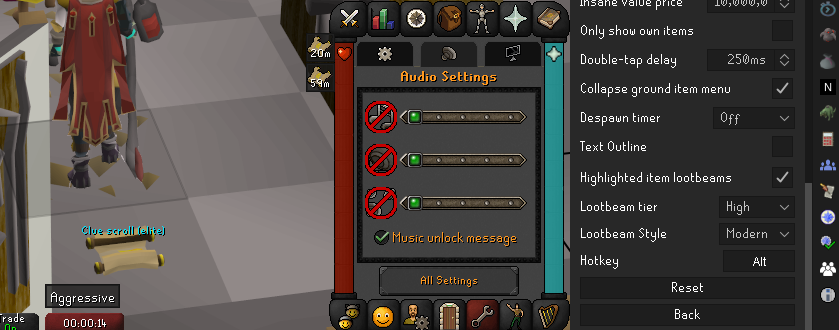
yeah! i seem to not have loot beams sometimes when i log in, even though settings havent changed
 vast bone
and that clue is highlighted?
burnt gulch
yeah!
vast bone
like, it's in the list at the top
burnt gulch

its weird because sometimes when i log in it works, other times it doesnt, its the same with valuable items too not just the highlighted ones
unless theres another plugin thats interferring with it somehow
vast bone
I'm not aware of any that would
best you could do I guess is check the client.log
maybe there's an error in there.
haughty pumiceBOT
To find the logs, you can do one of the following:
- If your client failed to open, click the
Open logs folderbutton. - Open the screenshot directory by right-clicking 📷
Camerabutton, navigate 1 directory up, then open logs folder. - Navigate to
%userprofile%\.runelite\logson Windows or$HOME/.runelite/logson Linux and macOS.
Upload the log files named client and launcher by dragging them to Discord. If there are files prefixed with jvm_crash dated from today, upload them too.
vast bone
otherwise you could try safe mode (doesn't load hub plugins)
but if it doens't always happen then it's probably hard to figure out if it's changing anything or not 🤷♂️
haughty pumiceBOT
Windows
Run the RuneLite (safe mode) shortcut, or with a Jagex account, first run the RuneLite (configure) shortcut and tick the Safe mode box, then launch RuneLite via the Jagex launcher.
Mac
In Terminal, run:
/Applications/RuneLite.app/Contents/MacOS/RuneLite --configureTick the Safe mode box. Launch RuneLite.
If it's not working, download and install the updated RuneLite launcher from the website link in #welcome. You don't need to uninstall your current version. You will not lose any settings or plugins. Then try running safemode again.
burnt gulch
will have a try! yeah, its like a plugin doesnt work sometimes when i log in and does on others
thanks!!
vast bone
my money would be on some hub plugin
I've never heard of this before and lots of hub plugins do things with rlobjects which lootbeams are.
burnt gulch
trying to go through the plugins i have to see if theres one that might have something similar
beacuse it also does it with the TOB chests too
burnt gulch
vast bone
tob chests have loot beams?
it can have with a plugin yeah
which im wonderinf if thats interferring but it seems they either both work, or both dont work
burnt gulch
vast bone
or is that added by a plugin.
most confusing thing is, my alt which is exactly the same RL settings
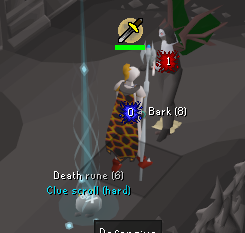 leaden trail
Can you post your logs and I'll take a look?
haughty pumiceBOT
@shadow sand To find the logs, you can do one of the following:
- If your client failed to open, click the
Open logs folderbutton. - Open the screenshot directory by right-clicking 📷
Camerabutton, navigate 1 directory up, then open logs folder. - Navigate to
%userprofile%\.runelite\logson Windows or$HOME/.runelite/logson Linux and macOS.
Upload the log files named client and launcher by dragging them to Discord. If there are files prefixed with jvm_crash dated from today, upload them too.
leaden trail
And can you also post a screenshot of exactly what you see when you log in just to make sure I know what issue to look for?
That's your full client log?
Post the one with yesterday's date then
Ah ok
Yeah so this is doing exactly what it was told to do
For a moment I thought your install was fucked by the cheats you're using
Lmfao
 marsh matrix
hello i want to ask why my rl isnt screenshotting my kc and stuffs anymore
and there is no xp drop in phosani when im maging the pillars
compact spear
Awkward 😂
leaden trail
marsh matrix
hello i want to ask why my rl isnt screenshotting my kc and stuffs anymore
There's a known issue right now that will be fixed with the next release
marsh matrix
marsh matrix
and there is no xp drop in phosani when im maging the pillars
i assume this is also an issue atm? @leaden trail
leaden trail
marsh matrix
i assume this is also an issue atm? <@288504448030867466>
For this can you make it happen in safe mode? There are enough plugins that mess with XP drops that I'd want to see that confirmed before trying to figure it out
haughty pumiceBOT
Windows
Run the RuneLite (safe mode) shortcut, or with a Jagex account, first run the RuneLite (configure) shortcut and tick the Safe mode box, then launch RuneLite via the Jagex launcher.
Mac
In Terminal, run:
/Applications/RuneLite.app/Contents/MacOS/RuneLite --configureTick the Safe mode box. Launch RuneLite.
If it's not working, download and install the updated RuneLite launcher from the website link in #welcome. You don't need to uninstall your current version. You will not lose any settings or plugins. Then try running safemode again.
marsh matrix
leaden trail
For this can you make it happen in safe mode? There are enough plugins that mess...
yup no xp drop when maging the pillars
 silent charm
is there any plugin that tells u if u have clues in the bank
leaden trail
marsh matrix
yup no xp drop when maging the pillars
Do you happen to have 200m magic XP?
marsh matrix
leaden trail
Do you happen to have 200m magic XP?
nope
my str is 200m and it still shows
leaden trail
Uh, not sure then, not quite fully awake yet.
Work is picking up so I'm gonna have to let someone else pick this up when they're able. So it may be a bit but someone who knows more/is less potato than me should be able to help you soonish
marsh matrix
leaden trail
Uh, not sure then, not quite fully awake yet.
Work is picking up so I'm gonna h...
its working on another pc
hmmm
leaden trail
NPC indicators?
 warped schooner
can i just apply it to all or do i have to write every name of every npc?
 rough hinge
Tz*
hollow olive
or just * while youre in there then remove later
 gilded notch
Anyone know how to get the farming contract box back?
gilded kayak
we fixed it 4 days ago so close your client often I guess
gilded notch
idk why I didnt think to restart the client. Thanks!
round jacinth
You should be closing it every day
And opening for the first session of the day tbh
gilded kayak
it will work starting with the contract you get post-restart
the one u got while it was broken will stay broken
gilded notch
yee just got a new one and it worked, thanks man
 jolly bronze
Hey everyone, i think i need help from some experts for the runelite client on mac.. I tried to start the launcher but every time i try i get the following fatal error code: RuneLite was unable to establish a SSL/TLS connection with a required server while downloading the bootstrap.. Looks like it's a firewall problem but i dont know how to fix it. Can someone help?
zealous cedar
do you have any network filtering software?
jolly bronze
Tbh not sure.. Got a new antivirus programm on the mac - it's mc afee
leaden trail
Lol
zealous cedar
could be that
jolly bronze
I think the problem has to do with that
jolly bronze
Really?.. damn.. Is there another solution to uninstall it? Im paying for that shit lol and do not want to uninstall as the first solution
leaden trail
You'd probably come out on top by not paying for it, it's awful
jolly bronze
Maybe i can change something in the mcafee settings
But not sure what i could change or what i have to change
leaden trail
Let me put it this way
It's bad enough that it's basically malware you're paying for
round jacinth
Window’s defender is free and does a good job.
FWIW the best anti virus is common sense and not downloading and running everything you do download. If you only play games on steam, play osrs and watch YouTube you don’t need a premium antivirus.
Had many iterations on that comment lol
leaden trail
I mean defender won't help them on mac
round jacinth
I didn’t read Mac part above
lol
I read the state sponsored malware from Russia
😂
leaden trail
But, and I can't believe I'm saying good things about an Apple product, I think Apple's equivalent is decent enough too
round jacinth
It probably is
jolly bronze
Thanks guys, appreciate the help
 wraith lance
Hi I am wondering if anybody has any ideas on what's going on with my client. On my integrated monitor (laptop) Runelite displays as pictured when GPU is on. What's odd is on my secondary monitor there are no issues with GPU on. I tried uninstalling and reinstalling Runelite and I manually updated my GPU drivers too. GPU is NVidia GEForce GTX 1060
 sterile void
why ussually upon restart, i have to load my client 1x in "Run as Admin" to get it to load properly with the plugins and shit
someone in here told me that and it fixes the issues, but i dont get why
oblique plume
perhaps you have something always breaking it
gilded kayak
we have the RuneLite launcher attempt to manually fix the permissions of your .runelite folder when you run as admin, so what Alex said is likely true, after we fix it, something else is breaking it
sterile void
this just started recently. nothing has changed on my end
is there anything i should change or do differently to fix?
gilded kayak
i asked my friend if he had any idea of applications that grief appdata permissions, and he responded honestly its windows, you could open explorer and have it deleted 3 files for no reason
so no
sterile void
was thinking if i should back up my .rl folder, and delete it and start fresh
sterile void
client cant tell us why its doing it?
gilded kayak
the client doesn't know who's locking your door, it just can't get in
gilded kayak
i don't think so, most people who run into the issue just have it resolved after the 1 admin start
gilded kayak
i mean resolves post-restart
or at least they never come back and say this is happening
sterile void
yeah this all started happening recently, never had this issue
haughty pumiceBOT
Use /ghauth command to get github roles and be allowed to post in #development
 fossil bough
Is there any way to pre-set item priority on the ground? For example if I wanted to have araxyte venom sacks appear first before something like an adamant longsword?
Or, god willing, the armor crafting items at CG to not be 3 stacks of 3 each.
 willow wind
you can set those items as highlighted items to prioritize them
in ground items plugin
fossil bough
Yeah I tried that but the constant dinging as they drop ends up being more of a headache than its worth
willow wind
you can turn that off

you can also change the text color and remove lightbeams if u don't want to visually delineate them
fossil bough
Got it, I've never really messed with these settings too much before. Good shout
willow wind
no problem
 deep vine
Runelite is unable to connect to a required server while downloading the bootstrap , anyone knows how to fix this?
gilded kayak
what about the section afterwards
 steel fractal
anyone having an issue recently with boss kills screenshots no longer working?
tried restarting, running as admin, checked folder permissions etc but nothing seems to fix it
oddly enough valuable drops do work
fossil bough
Yes, some seem to work some don't. Araxxor and Sire both don't but Chambers does
steel fractal
and other settings in the screenshot plugin
leaden trail
It's a known issue that'll be fixed with the next RuneLite update
fossil bough
Okay I seem to have messed up my ground items now, highlighted items are no longer being prioritized in ground stacks
 final quarry
my farming contract isnt showing, is this happening for anyone else? I have the tick box checked for it to show
zealous cedar
restart your client
steel fractal
leaden trail
It's a known issue that'll be fixed with the next RuneLite update
aight thx
fossil bough
fossil bough
Okay I seem to have messed up my ground items now, highlighted items are no long...
bumping this in case anyone has an easy fix. I'm sure this is user error so I apologize in advance
oblique plume
I don't even think that's a feature
fossil bough
I swear my highlighted items took priority before, maybe I'm crazy though.
I apologize then, carry on and thanks.
mossy swan
fossil bough
bumping this in case anyone has an easy fix. I'm sure this is user error so I ap...
maybe you used to have "deprioritize hidden items" on?
fossil bough
mossy swan
maybe you used to have "deprioritize hidden items" on?
My understanding is that just makes it so you can't left click to pick up hidden items, which I do have on and want to have on (assuming that's the functionality)
mossy swan
yeah
fossil bough
What I'm thinking happened is that when I chose to highlight an item it would appear as the left click option over things that don't hit any value filters or anything
mossy swan
custom menu swaps has some ordering stuff at least if you wanna check it
it has ability to sort by price, and custom order on top of that
fossil bough
Oh holy shit this is exactly what I was looking for
 hard vine
hey, im getting strange graphical bugs with nvidia on wayland, does anyone know how to help?
the side pannel sometimes causes the rest of the window to become bugged and uneuseable, while it sometimes works fine

 gilded kayak
does this happen with GPU
hard vine
there is no real rhyme or reason to it it seems, but closing and reopening the side pannel a bunch of times tends to fix it
with gpu and 117hd
 zealous cedar
does setting _JAVA_AWT_WM_NONREPARENTING=1 fix it?
hard vine
as an environment variable?
zealous cedar
yes
 zealous cedar
duno then
hard vine
thanks 4 trying lol my fault for having nvidia on wl
btw regardless of gpu the side pannel is only useable after clicking the maximize/minimize button
hard vine
is runelite safe to use on wine, actually? i might try that out for now
zealous cedar
ive never heard of anyone using wine
youd have to run the jvm in wine which is... odd
hard vine
i mean id love to run it natively, but idk if it's an issue with what i'm doing, or the client
 brittle charm
anyone know why i have this setting on my laptop but not my desktop? would like to get it for my runelite on my desktop but not sure why its not there. its part of profiles
 zealous cedar
are you logged into the game?
brittle charm
that appears to be the reason why haha tyvm
 crisp dune
 light kraken
are boss screenshots broken?
stone parcel
It's a known issue that'll be fixed with the next RuneLite update
light kraken
ah ok, thank you Kalil 🙂
 unkempt compass
is animation smoothing broken? my attacks and teleports aren't smooth anymore
unkempt compass
thats exactly what it was thanks!
 leaden tundra
Aye I have a somewhat decent computer. Normally I get about a 30-35 ms response time but now all of a sudden I’m getting 70-75. I tried uninstalling and clearing the cache in my settings but I have no clue why it would all of sudden spike like this. Anyone have any ideas?
 safe grail
i have a macbook pro max 14.2 inch m3 chip, do you guys think it'll destroy my battery if i get runelite on it? cause my current macbook air battery got merked by runelite. now it needs to stay plugged in to use
zealous cedar
using the fps limiter plugin to lower the fps might help
 sly basalt
my runelite is freezing currently following mac update
leaden tundra
leaden tundra
Aye I have a somewhat decent computer. Normally I get about a 30-35 ms response ...
Also noticed I have higher then usual memory usage
zealous cedar
you are describing your ping, which is dependent upon your network. thus reinstalling runelite or deleting random cache files won't affect it
leaden tundra
I see, thank you
sly basalt
Is anyone available to help me with a freezing issue? I am able to still click on the plugin stuff, but the image is frozen
it doesn't say unresponsive like it typically would if it was frozen as well
round jacinth
If you turn off the GPU plugin does it work again?
sly basalt
I turned it off now, but the image is still frozen
round jacinth
Hmmm well it was my only idea because of my own issue with it with my laptop ages ago
I think some one else had a similar issue earlier today let me try find it
Oh you said since a Mac update? Hmmm
gilded kayak
is this jump update the jump to macos15
sly basalt
correct
gilded kayak
can you go to the tab, install debug helper and click the thread dump button and post it here
idk if this is the best approach to get the answer but it might be
sly basalt
sly basalt
seeing anything?
 full laurel
yo i accidentally reset my loot tracker i exported it from the site but its still empty client side
is there a way to put it back, havent closed the client yet
 bronze furnace
hi everyone
is it possible to remind me the valarmore wealthy citizen being attracted by a nearby urchin with a plugin?
 abstract stone
hey trying to scale the client for a 4k monitor and everything is fuzzy
tried xbr setting on gpu and stretched mode and all the integer scaling options etc
still always fuzzy
 terse linden
any fix for this?
 mossy swan
 terse linden
yeah without doing that
mossy swan
maybe clearing your active sessions on the osrs website
 sacred rapids
Hey, need some help.
Downloaded runelite on a new pc, logged in to my runelite account and none of my settings/plugins has come back. is there a fix for this or do i need to copy my runelite folder on my other pc and transfer it to the new one?
mossy swan
sacred rapids
Hey, need some help.
Downloaded runelite on a new pc, logged in to my runelite a...
check on your OLD pc that they are set to cloud sync
!transfer
haughty pumiceBOT
sacred rapids
alright. so a copy of the .runelite folder is the move. thanks ❤️
mossy swan
probably easiest yeah
 lofty sky
Hey guys I got a bit of a weird one I can't find any information on online as it might be impossible.
Is there a way when using resizable to have the visuals of the game stretched horizontally? I used to play in fixed stretched with a wider aspect ration then the og client and became fond of everything being a bit squashed. Now that I've swapped the resizable I cant find a way to replicate this. Thanks in advance!
(Kind of how obs stretches the game to fit 16:9 aspect ratios
mossy swan
i dont think so
lofty sky
sadge, ty for the consideration
i think its impossible too haha just one last hail mary
 distant roost
is there a update today
 snow ridge
Nope
zenith sage
anyone understand why i crashed here?
zenith sage
leaden trail
Disable some hub plugins
just any plugin? and is switching off okay or actual uninstall the plugin?
leaden trail
I mean you have too many so anything helps. Switch off ones you aren't using and then restart your client
zenith sage
Did some trimming in the plugin department.
Is there no way to increase the heapspace or something? got quite a decent pc in terms of ram and storage etc
leaden trail
You can but it's kind of a bandaid fix and half the time it just buys some time
oblique plume
sly basalt
if this dump was taken while it was frozen this its prob rsnhider
leaden trail
Classic
 mental granite
hi everyone, my runelite client seems to freeze every few minutes or so for like 4-5 game ticks. Would there be any reason for that happening?
leaden trail
Is the sidebar still responsive when it happens?
mental granite
i believe so
 proven cave
Quick question - Is it possible to have a separate "custom" notification sound per plugin?
From my understanding, using the "custom" notification sound option just uses the notification.wav file in the Runelite folder, and this sound is used for any plugins that have notification sounds.
leaden trail
proven cave
Quick question - Is it possible to have a separate "custom" notification sound p...
Not currently
leaden trail
mental granite
i believe so
Could be a bad hub plugin, could be your connection to Jagex. Can you see if it happens in safe mode?
haughty pumiceBOT
Windows
Run the RuneLite (safe mode) shortcut, or with a Jagex account, first run the RuneLite (configure) shortcut and tick the Safe mode box, then launch RuneLite via the Jagex launcher.
Mac
In Terminal, run:
/Applications/RuneLite.app/Contents/MacOS/RuneLite --configureTick the Safe mode box. Launch RuneLite.
If it's not working, download and install the updated RuneLite launcher from the website link in #welcome. You don't need to uninstall your current version. You will not lose any settings or plugins. Then try running safemode again.
mental granite
when running in safemode i lose all plugins though?
round jacinth
it's meant to diagnose if the client works normally or not
it's not meant to be played forever, because gpu and all hub stuff are disabled..
if it works it means either gpu isn't for you or you have misbehaving hub plugins
mental granite
ahh i see
round jacinth
or, both.
mental granite
seems to work fine in safemode
round jacinth
!flow might be helpful to you then
haughty pumiceBOT
flowchart: Please refer to this flowchart for further troubleshooting.
 plush dew
can anyone comment on the performance on linux vs windows for runelite?
round jacinth
Since they're both on the JVM they should be within margin of error of eachother?
oblique plume
i can see gpu perf being different
round jacinth
i think windows has more overhead for the OS that some unix distro don't have so runelite probably runs better on bad hardware if that overhead matters
 fresh cosmos
hey friends how do i get rid of this? https://i.imgur.com/dZZYTMh.png
 round jacinth
that's nivida shadowplay
oblique plume
nvidia shadowplay
round jacinth
oblique plume
i can see gpu perf being different
Yeah the gou driver support might more 100% on windows but many have good enough experience with unix with their drivers.
fresh cosmos
thought i disabled shadow play thanks
round jacinth
you can have shadowplay enabled but disable those overlay icons fwiw
 solar crane
So i am on mac and since this morning i experience random logouts, and bad network connection.
Safe mode did not make a diffrence, anyone else having this issue?
 fossil flower
My runelite has been struggling for a while, it feels like im 1 tick off and my character is lagging while attacking, i have no idea how to fix this? Is it only me or?
round jacinth
solar crane
So i am on mac and since this morning i experience random logouts, and bad netwo...
i think the most recent OS update for mac is having some issues, did you update?
round jacinth
idk if it's a runelite thing or mac thing for that issue, can you roll it back?
oblique plume
fossil flower
My runelite has been struggling for a while, it feels like im 1 tick off and my ...
chainmace?
solar crane
Unfortunately not 😦
fossil flower
@oblique plume Is that a addon or?
solar crane
I have a windows laptop too lets see if that works fine
oblique plume
a weapon
round jacinth
he's asking if you're using the chainmace weapon when you notice the lag
fossil flower
No, like every weapon i cba playing atm @oblique plume
oblique plume
dunno then
solar crane
Work laptop dont tell my boss 😛
oblique plume
does it happen in safemode
haughty pumiceBOT
Windows
Run the RuneLite (safe mode) shortcut, or with a Jagex account, first run the RuneLite (configure) shortcut and tick the Safe mode box, then launch RuneLite via the Jagex launcher.
Mac
In Terminal, run:
/Applications/RuneLite.app/Contents/MacOS/RuneLite --configureTick the Safe mode box. Launch RuneLite.
If it's not working, download and install the updated RuneLite launcher from the website link in #welcome. You don't need to uninstall your current version. You will not lose any settings or plugins. Then try running safemode again.
fossil flower
@oblique plume all my plugins disappeared, can i get them in?
oblique plume
no
plush dew
round jacinth
i think windows has more overhead for the OS that some unix distro don't have so...
that's what i thought as well
fossil flower
@oblique plume still lagging idk
oblique plume
you sure its not just network lag
round jacinth
your connection to jagex is not the same as the site you use to speedtest
fossil flower
How do i check that mister?
haughty pumiceBOT
open command prompt, type this in: ping -t oldschoolXXX.runescape.com where the XXX is your world minus 300, for example world350 = 50
fossil flower
Ingame?
round jacinth
read what the bot command replied to do
solar crane
round jacinth
idk if it's a runelite thing or mac thing for that issue, can you roll it back?
Yeah it's definitely a mac thing everything works fine on windows
Thnx for the help!
fossil flower
@zom 29-35ms
round jacinth
if you let it run for an extended perido of time do you see any drops?
fossil flower
Nope sir
round jacinth
then idk
fossil flower
Can it be my screen? Im capped at 100fps on 360hz
round jacinth
the game only needs to run at 50 fps lol
so i do not think so
some weapon animations are 3 frames long
can you record what you're trying to explain you're experiencing
fossil flower
I will try
fossil flower
Should i send it here or?
oblique plume
where else would we be able to see it if not here
fossil flower
Its to big sir
round jacinth
then upload it to youtube then link it here?
fossil flower
Will do
fossil flower
Cause i couldnt enable gpu in safemode
round jacinth
we request you to check in safe mode to confirm the issues are present in safe mode or not
hard to know what you're seeing since you deleted the video too
:<
I do not see any issues in that clip either
fossil flower
Feels like my character is freezing and lagging when i look at my screen maybe just placebo
Like it started 2 weeks ago, never had it like that before, should i put on anti ala or something, i just have on billinear now
round jacinth
you can try what ever you want, but i don't see any delay in anything
fossil flower
Alright sir, thanks for ur help!
 shy ore
is NPC Indicators broken? none of my NPCs are showing their tiles anymore
round jacinth
it is not broken, did you type in the name wrong?
shift right click the npc you want to tag
shy ore
i didn't change anything. I was fighting araxxor perfectly fine last night with her tiles. login today no highlighted NPCs have tiles now
even highlighting new ones doesn't give them tiles
so i just tagged the baby araxalyte and that works, but Araxxor isn't working at all. even taggin/untaggin. I reset the plugin too
round jacinth
Did you change the highlight style on Arraxor to be blank?
which is silly to ask but i've seen sillier
shy ore
i literally changed nothing. I logged in to the game today and she wasn't highlighted from my first kill
oblique plume
slayer plugin
shy ore
my last kill last night she was highlighted just like normal
what about the slayer plugin? i never really use it
round jacinth
slayer plugin can highlight stuff too
shy ore
all i have turned on in there is outline
and that's never been an issue for the 340 kc i have at araxxor
shy ore
this is how the settings have been since i set them up. the only thing that changes is what I have tagged

ive never changed them
vast bone
if you shift-right-click -> tag style -> and pick tile does it work?
vast bone
maybe it thinks araxxor is dead XDXDXD
shy ore
if i turn on highlight tile for the slayer plugin
she gets a tile highlight
but my NPC indicators one is not working at all
shy ore
did not work either lol
maybe its all the araxyte stuff
if i tag the level 96 ones
it highlights the ones i cant even fight
 oblique plume
you can only use one plugin to highlight at a time
the slayer plugin is the one highlighting
thats all it is
oblique plume
its not deterministic
vast bone
oh I thought that was changed. but maybe it was just people talking about it.
shy ore
since when? I've had slayer highlight my task NPC, while also having tiles marked and its never been an issue until today
even last night it was working fine
 vagrant summit
my runelite settings disappeared. is this because it's update day and I just need to wait?
round jacinth
there was no update today
shy ore
turned slayer plugin off and back on
haughty pumiceBOT
vagrant summit
cool ty
 storm glade
I’m saving up to buy a new laptop. Does anyone know if the jagex launcher and runelite will work on a chrome book or hp laptop from Walmart?
leaden trail
Chromebook would require some jumping through some hoops I believe, but you should probably be fine on a windows machine
Qualifying that because you're asking about a really broad category there
 grave prairie
Not sure if this is best asked here or in the wiki discord, but after I switched to a new laptop the RL lookup on the wiki no longer has the most recent information. Is there a setting I forgot to toggle? Using RuneLine from Bolt Launcher on Fedora 40
leaden trail
grave prairie
Not sure if this is best asked here or in the wiki discord, but after I switched...
You need to have the WikiSync plugin installed and enabled
 cloud leaf
hey lately I have had an issue with the screenshots plugin where the kc keeps being saved as (1) every time, any fix for this?
 grave prairie
leaden trail
You need to have the WikiSync plugin installed and enabled
grave prairie
leaden trail
You need to have the WikiSync plugin installed and enabled
thanks!
leaden trail
cloud leaf
hey lately I have had an issue with the screenshots plugin where the kc keeps be...
Wait for the next RuneLite update and close your client when you aren't actively using it to make sure you get it as soon as possible when it goes out
cloud leaf
leaden trail
Wait for the next RuneLite update and close your client when you aren't actively...
oh ok ty
 spice prairie
is there a way to retain the window size when i open the side bar? i'm using stretched mode in fixed mode
round jacinth
in the plugin runelite change the resize type
spice prairie
round jacinth
in the plugin `runelite` change the resize type
omggg thanks so much!!!
heavenlyyyyy
 native cairn
Just redownloaded windows. Locked into my rune account via jagex launcher + runelite. Lost all my tile markers plugins everything. Is there anyway to recover this? It looks like this an issue in your end. (I was logged in with my email etc before reinstalling windows)
oblique plume
were you syncing the profile before
haughty pumiceBOT
native cairn
oblique plume
were you syncing the profile before
Yes. Never had issues before
sterile void
any fix on the having to start on admin on start up 😮
round jacinth
you shouldn't need to run the application as admin, ever
install runelite again from #welcome
and run runelite once as admin and then reload it normally without amdin
sterile void
whenever i restart my PC. it loads an outdated version, of RL
round jacinth
wym outdated
round jacinth
did you do that today then?
haughty pumiceBOT
@sterile void To find the logs, you can do one of the following:
- If your client failed to open, click the
Open logs folderbutton. - Open the screenshot directory by right-clicking 📷
Camerabutton, navigate 1 directory up, then open logs folder. - Navigate to
%userprofile%\.runelite\logson Windows or$HOME/.runelite/logson Linux and macOS.
Upload the log files named client and launcher by dragging them to Discord. If there are files prefixed with jvm_crash dated from today, upload them too.
round jacinth
can you share your logs then
sterile void
sure
sterile void
 rustic fox
Hey, for some reason my anti aliasing setting doesn't do anything. I'm on an AMD GPU and I don't have my settings overwritten or anything by the AMD software.
Atleast I think lol I checked and it was off so idk
 young ridge
Any way I can get a notification when daggonoth respawns?
round jacinth
i think watchdog can do it
round jacinth
sterile void
idk what to look for in here but i do see in the laucnher you do run as admin once
i think you've got some funky read/write permissions going on
sterile void
cause i opened the client and it was like a weird load - it didnt remember the last client i had closed, the position was wrong, the plugin on radius markers loaded an old one with ALOT of radius markers
round jacinth
this log file is yesterday's too
sterile void
round jacinth
i think you've got some funky read/write permissions going on
yes thats exactly whats going on
it doesnt save the new log file or something
so the client doesnt rememeber
been coming here asking for a fix but no one knows how
sterile void
yeah i did that the other day
round jacinth
it should fix it
sterile void
it didnt fix
ONCE i launch as an admin
and c lose
and reopen
its fixed
but everytime i restart MY PC.
i have to launch as an admin.
round jacinth
you've got some program re-assigning the broken perms then
or something else interacting with it
because the admin runelite is re-fixing it
sterile void
yeah idk what tho
round jacinth
and you've got smething re-breaking it
round jacinth
i have no clue what software you do or don't have on your pc that would do it...
sterile void
this has all started after i did some windows updates
this shit wasnt happening 2 weeks ago lol
idk how to fix. idk what could be doing it
how can i solve this
zealous cedar
can you enable debug mode on the launcher and get the logs from that running as admin?
sterile void
sure just tell me how to do that
zealous cedar
run runelite (configure), enable debug mode
sterile void
like even just now, i closed out 3 clients. my main client last.. it didnt rememebr the main client position. opened the first client that i closed lol
!debug
haughty pumiceBOT
windows-debug: run this command in cmd, then show us the displayed output through a screenshot.
"%localappdata%\runelite\runelite.exe" -c -v --console -- --debug
sry help



 round jacinth
yes
sterile void
dont run it as admin?
round jacinth
run it as admin after enabling debug mode, that's what adam asked to do
can you enable debug mode on the launcher and get the logs from that running as admin?
sterile void
ok i enabled debug
now im opening RL as admin
ok right away it loaded an older preset , i know that cause of the custom radius markers..
let me get the log now.
round jacinth
i've had that issue with radius markers too, i think a better thing to check is ground item plugin
radius markers when i switched between my main which had the coll markers withm y iron which only had akkha markers it broke it
sterile void
round jacinth
i've had that issue with radius markers too, i think a better thing to check is ...
its also the profile that the last client was closed on... and the location...
round jacinth
🤷♂️
haughty pumiceBOT
sterile void
idk as much about this stuff as you guys, but its obvious its some sort of read/write issue