#support
1 messages · Page 26 of 1
 lament island
 boreal mango
does anyone know why the attack range plugin looks so odd now? it didn't use to show melee range or the tile that your player is standing on but now it shows both of those for some reason

 gilded kayak
the author submitted and we approved an update for it yesterday, so probably because of that
 haughty pumiceBOT
Get support for the Attack Ranges Plugin Hub plugin here: https://runelite.net/plugin-hub/show/attack-ranges.
You can also find the support link by searching for the plugin in the Plugin Hub panel and clicking the ? button on the plugin, or by right-clicking the plugin in the plugin panel and clicking the Support menu option.
 vague bison
Does anyone know of any plugins that could cause me bank lag? I've removed flipping utilities and some bank values ones but I think it's still a problem. I'm talking about lag on withdrawing items
 urban lodge
Are you sure you didn't have instant inventory on before?
Other than that, try to check if the issue persists in safe mode.
 sinful drum
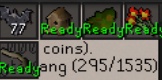
Does anyone know how i can customise these and choose what it shows? fed up seeing my herbs are ready lol
 gilded kayak
you installed time tracking reminder so probably from that plugins settings
 harsh gull
hey guys, is there an FAQ to optimisation/performance related issues?
RL not feeling as smooth as it used to. Not sure if I have too many plugins
Have checked here but not seeing anything tooo related:
https://github.com/runelite/runelite/wiki/FAQ
 edgy musk
I noticed the issue in the FAQs here: https://github.com/runelite/runelite/wiki/FAQ#my-loot-tracker-data-is-gone , and tried deleting the duplicate that I found, but it created another duplicate soon after. Is it necessary not to just delete either one, but to delete the oldest one?
 oblique plume
was your client closed
 radiant sapphire
i need help, my internet is fine everything is running fine except runelite, my latency keeps saying timed out and im lagging making it unable to do anything
gilded kayak
that would mean your connection to Jagex is having problems
radiant sapphire
so what can i do about that ?
 leaden trail
Try connecting to a world in a different region?
radiant sapphire
i live in the united kingdom, and using united kingdom worlds though ?
radiant sapphire
yes
on aussie world im sitting at 324 ping
288ms latency
😦
any suggestions as to whats happening
haughty pumiceBOT
open command prompt, type this in: ping -t oldschoolXXX.runescape.com where the XXX is your world minus 300, for example world350 = 50
oblique plume
you can verify its nota RuneLite issue by doing that
you just gotta wait for the connection to get better
radiant sapphire
how do i open command prompt?
oblique plume
the search bar
radiant sapphire
says ping request could not find host
gilded kayak
well that's either really bad or you did it wrong
radiant sapphire
ping -t oldschoolXXX.runescape.com
radiant sapphire
yeah i done that
gilded kayak
u just said you didn't
radiant sapphire
ping -t oldschool124.runescape.com
gilded kayak
alright
radiant sapphire
thats what im putting into command prompt
gilded kayak
if that failed to work then its your internet 1000000000000%
radiant sapphire
but i ran a speed test and my internet is runnig at nearly 500mbps ?
gilded kayak
runescape isn't hosted on that speedtest website
so that doesn't matter
the internet isn't as simple as everything works or nothing works
radiant sapphire
okay ill try to restart my router see if it does anything
edgy musk
oblique plume
was your client closed
Yeah my client was closed
 spark halo
Ok, so I took the zulrah helper from this github page (https://github.com/JosephsPlace/zulrah-helper) and I changed a few images, how do I compile the code now into a .jar I can place in my runelite plugins folder to use it in game?
gilded kayak
because we don't let you run random jars
 zealous cedar
the correct terminology is we don't support sideloading
spark halo
uhhh ok
edgy musk
oblique plume
are you signing into the rl account after logging in
I was staying logged into the RL account.
I wonder if it just doesn't treat it as the same account anymore after migrating to the Jagex launcher and going through all that nonsense. Different IDs or something.
 noble dawn
my RL has been super shitty fps wise and laggy lately, is there a known issue?
im typically >200fps now im lucky to get 40
weither on cpu or hd
noble dawn
theyre both running slow
everything else runs fine, i have a 4049 and 13900ks
i have updated all my drivers recently. but not until after i noticed this was running slow
no change
4090*
 quasi rapids
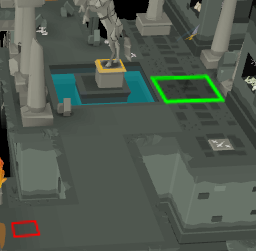
Any Sepulchre enjoyers notice that most of it is no longer low detail in low detail mode? Some of floor 1 still has the old behavior of becoming a completely smooth gray floor, but there are sections (including almost all of floor 2 and above) where you can see that the ground textures are still loaded.
https://i.imgur.com/HR0ISLw.gif
https://i.imgur.com/33BtXsD.png

 gilded kayak
yes jagex broke it
use ground object hider
what that plugin does works for this I believe
noble dawn
is there anyway to help the fps issue
quasi rapids
gilded kayak
what that plugin does works for this I believe
yeah kind of it just turns the textured parts completely black which might be workable
noble dawn
it shows im having 31ms ping
 gloomy frost
youre a legend!!! holy shit since Toa I've been unable to save settings!!
leaden trail
quasi rapids
yeah kind of it just turns the textured parts completely black which might be wo...
set your skybox plugin to a different color
@noble dawn do you have framerate issues in safe mode?
haughty pumiceBOT
Windows
Run the RuneLite (safe mode) shortcut, or with a Jagex account, first run the RuneLite (configure) shortcut and tick the Safe mode box, then launch RuneLite via the Jagex launcher.
Mac
In Terminal, run:
/Applications/RuneLite.app/Contents/MacOS/RuneLite --configureTick the Safe mode box. Launch RuneLite.
If it's not working, download and install the updated RuneLite launcher from the website link in #welcome. You don't need to uninstall your current version. You will not lose any settings or plugins. Then try running safemode again.
 round jacinth
gloomy frost
youre a legend!!! holy shit since Toa I've been unable to save settings!!
round jacinth
gloomy frost
youre a legend!!! holy shit since Toa I've been unable to save settings!!
you only ran as admin the once right?
gloomy frost
round jacinth
you only ran as admin the once right?
Yeah it only works on admin mode, if I quit jagex launcher it returns to old issue
gloomy frost
do i ahjve to right click runelite and do admin shit?
gloomy frost
okay okay
round jacinth
you wont lose settings
we should never run runelite as admin
only to fix perms the one time
so lets do it correctly 🙂
round jacinth
no need to restart
after you've installed it again run the regular runelite .exe as admin once
gloomy frost
Okay runelite admin completed
round jacinth
idk how long it has to be open but you can probably close it now
then run runelite normally
gloomy frost
Okay through jagex launcher yes?
round jacinth
if you have to use jagex launcher yes
round jacinth
then check your settings see if they behave
round jacinth
nobody works for runelite lol
gloomy frost
 gloomy frost
Tysm sir, you changed my game entirely
round jacinth
hopefully when you say its been a problem since toa you started toa like last week
not since 2022 lol
gloomy frost
No bro legit mid 2023 I swear
round jacinth
we could had this fixed mid 2023!
gloomy frost
I remember I did npc highliter for the bosses and then my settings began to unsave
round jacinth
haha
gloomy frost
ahhahahahah
 pine solar
i cant get more than 20-30fps on my desktop. I have fps uncapped, on 64bit version. Not using 117.
2080, i7-8700k, 32gb of ram
leaden trail
do you have the GPU plugin enabled?
pine solar
leaden trail
do you have the GPU plugin enabled?
i do
leaden trail
does your framerate improve if you disable it?
pine solar
maybe a 2fps increase but nothing noticeable
leaden trail
If you play League or Valorant make sure neither of those are running and kill the process for Vanguard
pine solar
force closed vanguard and no real improvement from it
leaden trail
turn GPU back on
leaden trail
and it doesn't show up in task manager?
you may need to reboot? I'm not certain. But Vanguard basically kneecaps the client
leaden trail
pine solar
updated drivers, restated pc, made sure vanguard was still closed, and no improvement
dropping draw distance to near default level seems to help, but my gpu and cpu are only reporting 15%-ish usage when it's raised so im not sure why its tanking my fps so much
does anyone have another suggestion? i dont think draw distance should be causing such a big fps drop
 storm creek
i just got dynamic inventory tags and when i shift right click to set my gear, only melee highlights red. range and mage setting dont highlight green or blue. anyone know the issue?
haughty pumiceBOT
Get support for the Dynamic Inventory Tags Plugin Hub plugin here: https://runelite.net/plugin-hub/show/dynamic-inventory-tags.
You can also find the support link by searching for the plugin in the Plugin Hub panel and clicking the ? button on the plugin, or by right-clicking the plugin in the plugin panel and clicking the Support menu option.
 elfin jackal
did you manage to fix this btw? im having the same problem
leaden trail
Post your logs and I'll take a look
haughty pumiceBOT
To find the logs, you can do one of the following:
- If your client failed to open, click the
Open logs folderbutton. - Open the screenshot directory by right-clicking 📷
Camerabutton, navigate 1 directory up, then open logs folder. - Navigate to
%userprofile%\.runelite\logson Windows or$HOME/.runelite/logson Linux and macOS.
Upload the log files named client and launcher by dragging them to Discord. If there are files prefixed with jvm_crash dated from today, upload them too.
elfin jackal
gilded kayak
did you do development and forget
elfin jackal
possibly, i havent needed to log into a non-launcher account for quite some time
wait
elfin jackal
pr
gilded kayak
or do anything involving runelite development
re-read the guide you followed
it says at the bottom once ur done do this
elfin jackal
thanks, ill give that a read
elfin jackal
gilded kayak
it says at the bottom once ur done do this
yep that was it lol cheers

GitHub
Open source Old School RuneScape client. Contribute to runelite/runelite development by creating an account on GitHub.
for anyone else
gilded kayak
most of the people who come here with that problem are not deving
they were cheating and they didn't know the cheats did that
elfin jackal
ahaha
gilded kayak
that's why I only alluded to how to fix it
elfin jackal
yeah fair
 split pilot
Getting the sidebar glitch again after maybe a year or so... tried basically everything from github and nothing is working.
I see Alienware control center and Nvidia may be an issue..do I have to actually uninstall them to stop the glitch? Can I prevent runelite from interacting with them without having to remove them? My control center allows me to update and control my fans.
On an Alienware laptop.
 hollow olive
did u try disabling hw accel like i suggested
split pilot
Yeah I did unfortunately it didn't work
hollow olive
you tried method 1? whats your launcher version?
maybe wait for some more experienced person to help you out here ig
split pilot
Yeah I did and how do I see that? I use runelite often I have to be at the latest update since it auto updates right?
Yeah Ill wait
Only thing I haven't done yet is mess with Alienware control center and Nvidia
I've seen people with success but Alienware CC controls my bios updates and my fans if I remove that I fear my CPU would take a dump
If I uninstall and reinstall would that remove my plugins?
 dire heath
I'm having an issue opening multiple instances of runelite. No errors are showing up in the logs, but I can only open one window at a time. I'm using the Jagex launcher, but the issue seems to be happening while runelite is trying to open.
 stone parcel
What happens when you try to open another window? Just nothing?
dire heath
The little window with the loading bar pops up, then looks like it finishes loading, but then just disappears and no runelite window opens
stone parcel
Hmmm, maybe someone around here could spot something in your logs.
haughty pumiceBOT
To find the logs, you can do one of the following:
- If your client failed to open, click the
Open logs folderbutton. - Open the screenshot directory by right-clicking 📷
Camerabutton, navigate 1 directory up, then open logs folder. - Navigate to
%userprofile%\.runelite\logson Windows or$HOME/.runelite/logson Linux and macOS.
Upload the log files named client and launcher by dragging them to Discord. If there are files prefixed with jvm_crash dated from today, upload them too.
dire heath
split pilot
stone parcel
Nope :), just download and install from <#432655530352181248>
Thanks kalil! I'll do that
 chilly rampart
Im currently logged into my runelite on my PC, and want to login to the same profile on my laptop but I cant remember the gmail that i used to login into runelite. is there a way for me to find this? ive tried going into the profiles folder but couldnt find it in there
stone parcel
chilly rampart
Im currently logged into my runelite on my PC, and want to login to the same pro...
Check the  tab
tab
chilly rampart
thanks!
stone parcel
dire heath
You probably want to wait until someone more knowledgeable appears, but I think you are running out of RAM. Might wanna try with 117hd off, or maybe the 64 bit client (I think you are running 32).
zealous cedar
Java VM: OpenJDK 64-Bit Server VM
stone parcel
Ah.
dire heath
stone parcel
You probably want to wait until someone more knowledgeable appears, but I think ...
I’d been having issues with 117 crashing on 32 bit, so today I uninstalled runelite and reinstalled 64 bit. Ever since doing that I can’t even turn on gpu or 117, when the issues were sporadic before. Now turning on gpu crashes runelite, and I can’t open a second window haha. I’m restarting my computer now to see if that fixes anything.
stone parcel
Ohhhhh I see now!
 vivid idol
any idea why this plugin wont update my miscellania favor?
 haughty pumiceBOT
Get support for the Daily Tasks Plugin Hub plugin here: https://runelite.net/plugin-hub/show/tictac7x-daily.
You can also find the support link by searching for the plugin in the Plugin Hub panel and clicking the ? button on the plugin, or by right-clicking the plugin in the plugin panel and clicking the Support menu option.
vivid idol
that link does not help answe my question, ive already checked there
vivid idol
how do i post a question on the runelite.net page?
hollow olive
make an issue on the plugin's github page
gilded kayak
 vivid idol
i see
does anyone here know whats going on, im not going to create a github account to post a question :p
gilded kayak
none of us make that plugin so no
it hasn't had an update all year so it could be broken
but maybe not
vivid idol
okay, i didnt know that. Do you know is the author active in this server?
@winged flame
hollow olive
i think i have that plugin or a similar plugin but i dont use infoboxes
 winged flame
Because you probably just installed it while being on the island? Relog or revisit some other place and try again
@vivid idol
vivid idol
winged flame
Because you probably just installed it while being on the island? Relog or revis...
thank you king re logging and then visiting the island worked! i appreciate you!
 vapid leaf
any idea how to get these to a different color? its like the default ones are black now instead of the default white?

 vast bone
shift right-click
gilded kayak
also did you change the default color to black?
vapid leaf
what setting is it in?
 gilded kayak
default items
the default is FFFFFFFF
but it looks like black would properly show up on the sidebar, i'm not sure what color that is
i guess i could google it but
 gilded kayak
very good 👍
 upper valley
ok so both 117hd and the gpu plugin is making my laptop to crash for some reason and i have no idea why.
 desert bronze
is the laptop older than runescape itself ?
upper valley
idk it has 64gb ram ddr5 probs is honestly @desert bronze
haughty pumiceBOT
To find the logs, you can do one of the following:
- If your client failed to open, click the
Open logs folderbutton. - Open the screenshot directory by right-clicking 📷
Camerabutton, navigate 1 directory up, then open logs folder. - Navigate to
%userprofile%\.runelite\logson Windows or$HOME/.runelite/logson Linux and macOS.
Upload the log files named client and launcher by dragging them to Discord. If there are files prefixed with jvm_crash dated from today, upload them too.
desert bronze
maybe theres more info in there 🤷♂️
upper valley
so the client opens its more gpu and 117 hd plugins are causing a crash
desert bronze
if it was runelite crashing and not just your 64gb ddr5 laptop being fried I'm sure there would be some info in the logs
round jacinth
It comes from building the client
 shell iron
round jacinth
It comes from building the client
shell iron
round jacinth
It comes from building the client
I fixed it
round jacinth
You likely don’t need to clone core unless you need to make changed there for a pr
haughty pumiceBOT
How to develop plugin-hub plugins: https://github.com/runelite/plugin-hub/blob/master/README.md
round jacinth
👍
shell iron
Thanks for the help I will post there
 wary umbra
i need help
keeps saying this and i keep trying to download runelite but everytime i do nothing happens?
 leaden trail
You can try disabling "compute shaders" in the GPU plugin, I guess
upper valley
had to add runelite to run for the right gpu setting
 magic sorrel
can someyone help me please

im using stretched mode plugin
and its not getting compact
or its impossible to get it more compact?
 magic sorrel
magic sorrel
magic sorrel
i want to see the game this stretched
but without the plugins panel on
its that possible?
desert bronze
not sure if I understand correctly but this might do what you want
 magic sorrel
magic sorrel
magic sorrel
i want to see runelite like this compact without having to have panel on
magic sorrel
magic sorrel
can someyone help me please
when i put panel off i see it like this
i want it more stretched
desert bronze
have you tried the thing I suggested
desert bronze
when I do that it does for me what you asked for though 🙈
closing side panel just hides it rather than resizing your client
leaden trail
That was in response to someone who deleted their messages
 pure egret
I have a bug regarding in- game sounds.
I have a Sony XM4 bluetooth headphones, and a Astro A40 headset.
When I am listening to the sounds on xm4 and I disconnect (through bluetooth) and I connect my Astros through USB, the in- game sounds go away until I open a new client.
It's just RuneScape, so it's not affected by Spotify, YouTube etc.
 patent jewel
is there a way to clear all of my profiles ground markers?
i want to share my profile without the ground markers.
oblique plume
no
patent jewel
oblique plume
no
I believe yes? if I'm correct I found it, C:\Users....runelite\profiles2\profilexxx.properties > groundMarker.region_xxx
just gonna try to remove those
leaden trail
That's how you break your config
oblique plume
we dont support config surgery, nor really recommend giving people your config because theyll just be confused what things are doing and then cause additional traffic in here
 timid pilot
Hello,
I want to play ors again. but I can no longer log in via Runelite, and when I download Jagex Laucher I cannot log in either, because then the site tells me that I have to download Runelite. can anyone help me play on a macbook.
oblique plume
drag runelite into the application folder
timid pilot
I've already tried it, I'll try it again
I don't know what I did differently but I succeeded, thanks❤️
 raven vapor
Three times in the last 15 minutes Runelite has crashed and my antivirus is flagging it as ransomware. This is despite grabbing a fresh installer just for the sanity check. Anyone else having crashes today? I was playing last night with no issues
raven vapor
It might be, but it's because its flagging it as ransomware, even when whitelisted.

 quiet lance
anyone know if its possible to get runelite on any tablets? android/ipads?
gilded kayak
you could get it on a steamdeck but thats about it
quiet lance
gilded kayak
you could get it on a steamdeck but thats about it
thank you 🙂
zealous cedar
https://www.virustotal.com/gui/file/3c2f35b4a7fc06e1052c90a90051d011fb6576019afda5d188570230419cc7cd?nocache=1 malwarebytes shows the file as non-malicious, so im not sure why it would tell you that?
VirusTotal
raven vapor
I don't know either, like I said I had zero issues last night when I was playing and I haven't done anything to change that. No plugin additions or anything between the two play sessions
patent jewel
what does this?
 round jacinth
Looks like a hub plugin?
leaden trail
Some hub plugin you installed
round jacinth
Sorta a reminder: just because the plugin hub has stuff with an install button there does not mean you’re missing a feature. Use as few hub plugins as possible lol
 solid mesa
I thought it was like Pokémon, gotta catch em all
 runic grail
But I like me some plugin hub plugins
 neat notch
download hub plugins until stuff breaks then complain in here about it
oblique plume
patent jewel
what does this?
Isn't this just the loot trackers message option
patent jewel
oblique plume
Isn't this just the loot trackers message option
Thanks a bunch, enabled it relatively recently and couldn't find it to turn it off for the life of me
chat go brrr during cannon/burst tasks
 dire olive
Hey there! Awhile ago, I had a conversation with an admin, and don't remember which one. But he said that if I could update the old Google Translate plugin, I could get it uploaded again. I was wondering if I could chat with someone to see if they could find it possibly, so I could get the code and update it?
dire olive
I can't see it anywhere on the repo at all. Is it just the runelite/plugin-hub/master/plugins?
gilded kayak
dire olive
Yeah, I'm not seeing it anywhere in there. I think it might've been fully removed. It hadn't been updated in a long time
I'm working with that guy to get that one finished, haha. This one was a google translate plugin
vast bone
$ cat chat-translator
repository=https://github.com/simbleau/chat-translator.git
commit=d3c5b0cd32c77f0eaafdf8087d6cd8eb537b2c05
disabled=unmaintained
this one?
gilded kayak
ah I just stole the link from your ticket xd
dire olive
That actually might be it. I just found it, I'm gonna look at it now
dire olive
gilded kayak
ah I just stole the link from your ticket xd
I appreciate that, haha
 upbeat nova
Hey there. Is it possible to add a group ironman leaderboard to runelite ? I cant see my stats, kc and stuff on the tab c:
gilded kayak
is there a GIM leaderboard on the jagex hiscores?
afaik they just slapped you into the ironman one
leaden trail
As far as I know you can't look up GIMs by RSN on the GIM highscores
You can only search by group name
leaden trail
gilded kayak
afaik they just slapped you into the ironman one
I think they just go on normie hs
gilded kayak
funny
but yeah we just use Jagex's hiscores so u gotta get them to do it the way you want, for us to add it
upbeat nova
oh okee, tyy
leaden trail
Yeah you just have to look at normal HS
 dense tendon
idle notifier doesnt seem to work when making bone shards?
gilded kayak
it checks what you're doing by the animation ID and I have no memory of anyone submitting it
so that makes sense
dense tendon
how do i get the animation id?
gilded kayak
i'm not sure if we have a way via hub plugins
a dev might have to check it
i'm not bonded or i'd just do it right now
dense tendon
i can give you a bond
vast bone
weapon charges has a logging checkbox that logs animations iirc
gilded kayak
i see u can just bless regular bones to get some
dense tendon
yes im talking about when u bless regular bones at the altar then left click one set of blessed regular bones to break them all down
leaden trail
gilded kayak
i'm not sure if we have a way via hub plugins
Identificator
dense tendon
vast bone
weapon charges has a logging checkbox that logs animations iirc
do u know where the log file it write to is
dense tendon
 gilded kayak
i'll look into fixing it later, i have a hub plugin PR i should actually test anyway
dense tendon
so if i were to add line public static final int ASFMFKLDSLD = 11099; to runelite/blob/master/runelite-api/src/main/java/net/runelite/api/AnimationID.java and build runelite myself it work?
gilded kayak
u gotta add ASFMFKLDSLD to the idlenotifier plugin as well
leaden trail
I can PR it in about 5 if someone will test
Unless you want it felan, I'm just chillin
leaden trail
VALID
Mind testing it at some point for me though?
Eh it's idle notifier, I can probably just yolo it
gilded kayak
maybe pine will test that one for us too :tf:
leaden trail
What the hell was I doing on my local copy of master?
Oh. Right. Trying to work out stuff for xptracker. Don't need that anymore
dire olive
I'm pretty braindead on git stuff. Where's the tut on how to pull request it into runelite?
leaden trail
if you're talking about the bone shard thing, there'll be a pr in about 30s
dense tendon
it seems like 11095 making sunfire wines doesnt work either
leaden trail
make that two minutes then lol
dense tendon
o even 11002, actually using the bone shards at the bowl, doesnt work?
but u can do prayer notifs for that one kinda
and the blessing of bones and wine are both 1 click for full inventory
not sure if those are supposed to be included or not but empty bin for ectofunctus is, idk what that does ingame
leaden trail
anything else you're checking so I can just push one additional commit?
dense tendon
let me see
832 pouring sunfire wine is a 1 tick action that executes once so maximum 600ms of idle time, idk if thats supposed to be included or not. its also already included in animations as a generic water filling thingy, and it does indeed work with idle notifier ingame. so i guess it is supposed to be included
11001 is used for both blessing wines and bones on the altar and is also a 1 tick action that does entire inventory at once
leaden trail
so 11001 and 11002?
dense tendon
yes
11099 chiseling blessed bones into shards, 11095 making sunfire wines, 11002 submitting bone shards to libation bowl, 11001 blessing bones or wines at exposed altar
leaden trail
yeah the first two are already covered by the PR I opened
dense tendon
i just learned how to do this prayer method today but i think that covers all of the possible involved actions
restoring prayer at the shrine doesnt work with idle animation notifier but its the same animation id 645 as restoring at the lumbridge altar and works with movement idle notifier so probably WAI
leaden trail
that's a one off action is it not?
solid mesa
Yes
leaden trail
doesn't really need to be in idle notifier for a one off
wait is blessing them a one off as well?
solid mesa
Yes it blesses all at once
leaden trail
alright I'm not going to include that then
what about using the shards on the bowl?
solid mesa
It does it slowly automatically or you can spam click. Like using bones on the chaos altar
leaden trail
that'll stay in then since it's not a one and done
cool, think I have everything then
dense tendon
yes 11001 is a one off
leaden trail
just pushed
 ornate kite
Does GraphicChanged event trigger even if actor.getGraphic() doesn't change? since an actor can have multiple graphics/spotanims?
edit: seems the event fires independent of getgraphic
 brittle gorge
hi there i have a problem with runelite , im doing the new boss and since the update the spiders have a red box and outline around them but not the main boss , ive tried restarting the plugins relogged and turned off indicators any help please
leaden trail
Do you use entity masker or whatever the other arachnophobia one is?
brittle gorge
how do i check for that , what plug in would it be called i have better npcs and the normal one but ive tried turing them both off but still red boxes
brittle gorge
yeah
oh wow
that was simple but if i didnt come here i wouldnt of known thank you
didnt thinking about slayer plugin
 fathom kraken
!import
haughty pumiceBOT
 scarlet pine
hi not sure if this is the right place to ask but i have noticed that there are floor patterns in the theatre of blood (namely in verzik's room and in some parts of the hallways) that i used to not see but are there now, see attached screenshots. For reference, i am playing with low detail mode in both and have gpu on. I dont believe anything has changed on my end, but i am wondering if anyone has any idea what setting/plugin could affect this or if anything has changed.


 final axle
gilded kayak
yes jagex broke it
final axle
gilded kayak
yes jagex broke it
.
desert bronze
 scarlet pine
desert bronze
scarlet pine
desert bronze
ah i was searching theatre of blood, ty 🙂
 reef vale
hello, need help with the customizable xp plugin, support page is zero help with info on installing custom fonts


basically not sure in what format the "font name" should be entered
leaden trail
If you ask in #runescape, someone might be able to help you with that, but we don't really provide support for hub plugins
 potent vault
Hello. Is there a way for me to debug the reason for the client lagging? Especially in the Gauntlet and Hunllef my fps drops to 10-20 from time to time. I have a RX6800XT GPU and R7 3700X CPU and 16GB ram. My RAM usage is constantly at 50%, cpu and gpu are very low so i doubt either of them are falling apart
Overall fps just drops when i enter the gauntlet. From 120~ to 80~
leaden trail
It's probably a hub plugin you have installed
potent vault
Yeah i think you are right. On my linux runelite i get the 300 max fps constantly and it has different plugins
Thanks
 spice shard
I have this issue where if I hold the middle mouse to rotate the camera and then pull the mouse outside of the game area, the camera will glitch and do a full spin before going back to normal. Very strange. Anyone else have this issue before? It's very annoying
spice shard
example for ya. saw someone else having this issue earlier. running it in safemode and it still happens. doesnt happen in the regular osrs client. Anyone able to help?
 timid rock
spice shard
example for ya. saw someone else having this issue earlier. running it in safemo...
timid rock
spice shard
example for ya. saw someone else having this issue earlier. running it in safemo...
try closing the sidebar, does it still happen?
spice shard
spice shard
timid rock
try closing the sidebar, does it still happen?
yup
doesn't seem to be related to the sidebar. Happens at any areas of the game edge, in this case at the bottom. have the sidebar entirely shut off in this one 🤷♀️
leaden trail
I have some guesses at what's happening, will look at it this afternoon
 exotic mica
Hi all, I'm having issues split tunelling my runelite client with ProtonVPN. I saw some reddit threads on the topic but didn't understand
I want to allow runelite to bypass the VPN while having all other traffic go through the VPN as normal
zealous cedar
split tunneling doesn't work with runelite
exotic mica
Oh I see, is there anything else I can do? I don't like having my entire pc exposed while I play runescape
zealous cedar
there is this workaround https://github.com/runelite/runelite/issues/15098#issuecomment-1796518159
exotic mica
where do I set -Djava.net.preferIPv4Stack=true?
leaden trail
Read the second bullet point of the last comment in the thread
 candid peak
Hey good morning. Looking for some help around runelite randomly closing out with no error message and then the client being unable to re-launch
My current work around has been shutting my PC off entirely which works
haughty pumiceBOT
To find the logs, you can do one of the following:
- If your client failed to open, click the
Open logs folderbutton. - Open the screenshot directory by right-clicking 📷
Camerabutton, navigate 1 directory up, then open logs folder. - Navigate to
%userprofile%\.runelite\logson Windows or$HOME/.runelite/logson Linux and macOS.
Upload the log files named client and launcher by dragging them to Discord. If there are files prefixed with jvm_crash dated from today, upload them too.
candid peak
These are my logs and launcher
leaden trail
Do you have any jvm_crash logs?
leaden trail
I'm only able to skim through super quickly but nothing sticks out at a glance. Maybe take a look at Event Viewer
oblique plume
i would have to guess its something video driver related
i dont see a running RL client in the logs though, just you rapidly opening new ones
which appear to open fine
actually the first one has a log of the gpu plugin starting and the others dont
so yea it must be failing to start that in some way
candid peak
the only error I've ever seen windows side is something mentioning runelite and my graphics driver
guess I'm wondering what to action there given I'm using a brand new computer
leaden trail
I would try to roll back your GPU drivers to an older version
 dense arch
im getting the same issue
updated my amd drivers last night but was able to play after that
only this morning is it an issue
HDOS and official client are launching no problem
dense arch
nvm it's working now, i rolled back the change to make protonvpn work
round jacinth
So your issue was a connection issue…?
dense arch
no, it was crashing jagex launcher, i didn't even have the vpn connected
i just removed the ipv4 stack entry in config
leaden trail
Having a windows error mentioning RuneLite and GPU drivers, and having things that would point to GPU driver issues would geeeeeeenerally, in fact, be GPU related.
dense arch
yea it's almost like i explained i thought it could be a GPU issue until i tried something else
wild to imagine i know
 opaque shuttle
is there a way to get my RL profile if i had cloud sync enabled? My driver was corrupted so files got wiped.
leaden trail
If you had it enabled, just sign into the client and it should redownload
haughty pumiceBOT
 keen hatch
Hello, I got a new m.2. I copied my whole .runlite folder and pasted into my new one but my profiles / plugins won't show up. It shows in the new folder for .runelite on my m.2 though.
haughty pumiceBOT
leaden trail
That'll show you how to import the profile
 rose kestrel
Is there a way to turn off the apple CMD psuodo right click on mac? I would like to CMD walk instead of ctrl walk. Its an awkward placement on macs.
 merry vessel
I'm not sure if this has been asked already, but did the low detail plugin change for the floors at Hallowed Sepulcher? There used to be not clutter on the floors but now some floors still have clutter and some do not.
Here's an example
 merry vessel
Well that's unlucky lol. Did it break with the instance change?
gilded kayak
verzik's room is broken also so i think it's some other change
merry vessel
What's the plugin to see the IDs? I can't find it
 fierce onyx
hi. I just started the game. I have a character. How do I log in?
 leaden trail
If you just started playing, you need to use the Jagex launcher
leaden trail
merry vessel
What's the plugin to see the IDs? I can't find it
If you search in here someone listed them a few days ago
fierce onyx
leaden trail
If you just started playing, you need to use the Jagex launcher
I log in with jagex. But I can't log in with runelite.
fierce onyx
leaden trail
There's a dropdown
okey ty
timid rock
fwiw the weird border doesn't appear if "lock window size" is disabled... but disabling it is kinda not ideal.
 tidal bramble
it seems I cannot move (left click on any tile outside of interactable entities) my character when playing on the RuneLite client. i tried looking at the camera addon issues i've seen online but none of them seem to be the issue, any thoughts on what this could be?
leaden trail
Do you have pickpocket helper or whatever installed?
tidal bramble
I'll look
doesn't seem like it
if it helps, whenever i hover a player "follow" is what appears as an immediate clickable option, and "examine" shows up on every inanimate object too
haughty pumiceBOT
To find the logs, you can do one of the following:
- If your client failed to open, click the
Open logs folderbutton. - Open the screenshot directory by right-clicking 📷
Camerabutton, navigate 1 directory up, then open logs folder. - Navigate to
%userprofile%\.runelite\logson Windows or$HOME/.runelite/logson Linux and macOS.
Upload the log files named client and launcher by dragging them to Discord. If there are files prefixed with jvm_crash dated from today, upload them too.
leaden trail
Probably easier for me to just look at what you have installed than to try and remember the random plugins that do this
 toxic shuttle
my client has crashed twice in the past hour... can anyone look at my log lol
leaden trail
Post it up
toxic shuttle
 void saffron
.
tidal bramble
that's fair
leaden trail
toxic shuttle
Try disabling the pyramid plunder counter plugin and restarting your client afterwards
toxic shuttle
leaden trail
Try disabling the pyramid plunder counter plugin and restarting your client afte...
thank you a ton!! ill give it a shot 🫶
leaden trail
It looks like it's getting angry and then causing your client to OOM
toxic shuttle
didnt even know that was a plugin 😛 it wont be missed
leaden trail
Actually you have several days in that one log so you may have some underlying file permission issues as well
toxic shuttle
ooooh
leaden trail
I'd recommend reinstalling RuneLite from the link in #welcome and running it as admin ONCE
And then close it, and the file permissions stuff should be fixed
toxic shuttle
you dont get paid enough
leaden trail
I don't get paid at all 🙃
So sure, that checks out
haughty pumiceBOT
[ https://github.com/adnapPanda ] [ @fallen lynx 181346916091691008 ] adnappanda#0
leaden trail
toxic shuttle
@fallen lynx looks like your plugin may be reaching a state that gets it to be very angry and caused the client to OOM
Reaching an illegal state in your importData func, it looks like
tidal bramble
omg, i found it "custome menu swaps" i guess i somehow put "Walk Here" in it??? interesting. still thanks for responding!
 shell garnet
I need some help. How do i login to runlite through steam? I put the link in the launch options for OSRS in steam and it launches, but wont let me login through runelite
leaden trail
You can't
You can use the Jagex client through steam, or you can use the Jagex launcher for RuneLite but you can't launch RuneLite with steam
shell garnet
that is terrible.. I hate the jagex launcher. Lose connection every 5 seconds and its a jittery laggy mess
leaden trail
The Jagex launcher just launches the game, it's the same as RuneLite launched standalone as soon as you're logged in
shell garnet
Anyone reason why i lose connection to server a million times a day. I cant keep playing like this lol. Ive tried clearing cache and all that stuff. Doesnt help at all.
leaden trail
Sounds like a problem somewhere between your system and Jagex's servers. You could try connecting to a world in a different region maybe, or a wired network connection to try and rule out it being a local network issue
shell garnet
I wish i could wire my laptop, but i cant. Yeah im not sure. Just annoying is all. Thanks for the insite.
 simple trail
ive been trying to figure this out for an hour and ive gotten nothing, my sprites have been super washed since yesterday. i looked through the chats here for info and saw something about the ingame bright ness but when ever i change it, it changes back after i tele and i cannot for the life of me figure out why anyone have any ideas
examples

 simple trail
what i want vs what it changes to after every tele

 haughty pumiceBOT
Many plugins from the pluginhub break the client in subtle or not-so-subtle ways, including causing issues like client freezes. We do not support pluginhub plugins because we do not make or quality control them, and do not recommend their use.
Run the RuneLite (safe mode) shortcut, or with a Jagex account, first run the RuneLite (configure) shortcut and tick the Safe mode box, then launch RuneLite via the Jagex launcher.
This temporarily disables the GPU plugin and all hub plugins which will allow you to confirm the issue is caused by one of those plugins and isn't a core RuneLite issue.
If the issue is caused by a hub plugin, you should isolate which plugin it is and then uninstall the plugin.
simple trail
k so did that and its not changing on tele time to figure out what plugin is messing with it
jfc i got it thank god
hollow olive
simple trail
jfc i got it thank god
what was it?
simple trail
no idea just started removing shit
 jade thunder
Sorry if this sounds ridiculously nooby but....Looking at getting into writing plugins. Was wondering if there was a way to see existing code? Would be interesting and always feel like examples are the best way for me to learn. Thought the forestry tree count (infinitay) would be a good place to start
 gilded kayak
click the ?
there's a link to the github on that page
but you should copy base plugins from https://github.com/runelite/runelite/ over hub plugins
jade thunder
Legend - the github link is miniscule hahah
 proud zinc
Hey quick question, how do I sync my windows runelite settings to my macbook runelite?
haughty pumiceBOT
stone parcel
You probably want to use a profile and enable cloud sync.
proud zinc
stone parcel
You probably want to use a profile and enable cloud sync.
thanks!
 prisma lodge
how do you get your discord icon to show in the hub party plugin? I do have the discord plugin enabled in runelite and im signed into it
just an example. Right now mine is blank
 haughty pumiceBOT
If your Discord activity status is not showing properly follow these steps:
- Make sure your Discord plugin is enabled.
- Make sure RuneLite is not manually added as game to Discord game list.
- Enable
Share your detected activities with othersin Discord settings. - Make sure both RuneLite and Discord are NOT running as admin.
prisma lodge
the thing is i have a buddy in my party right now that doesnt have his dicord set to show that and it still shows the icon
 mossy swan
maybe yours is not working but his is, just he has set it not to display the status on discord
the discord “link” needs to work
 subtle plaza
anyone know how to get rid of this?
 mossy swan
subtle plaza
anyone know how to get rid of this?
mossy swan
subtle plaza
anyone know how to get rid of this?
some hub plugin you installed, maybe try searching for “death”
final axle
that's from dude wheres my stuff
subtle plaza
i tried removing that lemme try again
 rancid sphinx
i have a question
i clan memeber and i have the same pluging but it isnt working for and is for him these is what show when we search the plugin in the hub for ech of us any ideas?

 gilded kayak
whoever doesn't have the plugin working close your client more than once a month
rancid sphinx
haha okay
mossy swan
and switch to dink
prisma lodge
mossy swan
the discord “link” needs to work
got er workin. thanks!
 modern trail
runelites been using a ton of ram and GPU power since yesterday and i can't figure out why. any ideas?

 wheat pier
does any1 know why the plugin aint displaying? it shows for a split second then disappears vid doesnt catch it tho
ornate kite
modern trail
runelites been using a ton of ram and GPU power since yesterday and i can't figu...
That's a good case of run in safe mode and then try plugins one by one until it spikes. GPU usage is similar to mine (had lag issues since last update though) memory usage seems really high - probably a rogue plugin
Don't think there's any way to see resources used by plugin unfortunately
 gentle mauve
hi just had a random question.
i reset my pc a while back after getting my first and only jad kill which wiped all the data from my pc and i had to reinstall everything. it seems to remember my !kc jad command stats but doesnt remember my !pb jad stats.
with that i also lost my loot tracker information.
i was wondering, is there a way to recover that old information and if so, is there a way to inject that into the client i have now so that i keep the information i have now + the old information prior to the pc wipe?
im guessing i probably wasnt signed into actual runelite before (i dont really remember) so probably not?
 mint quartz
Has anyone ever seen the client stop responding to inputs for a few seconds while using the 117hd plugin?
In that video you can see the hover text stays even after I move my mouse, I was spam clicking that SE tile near the boss for like .5 seconds before anything registered, and it took me spam clicking the GPU plugin for it to enable. I have a i5-12600k & 3070ti with 32gb of ram so I should definitely be able 2 handle this even with a youtube video playing...
 elder glade
hey wondering if someone can help, doing dt2 on the hardcore and crashed in the whisper city part, prior my fps going low, i also have fps issues in valamore event with 117hd off, any chance someone can look at logs and advise much appreciated
 ionic fog
Hello there, anyone know when my sky colour is not the sky blue? logged in this morning, and none of the options change the colour on 117 hd plug in
 elder glade
ionic fog
Hello there, anyone know when my sky colour is not the sky blue? logged in this ...
elder glade
ionic fog
Hello there, anyone know when my sky colour is not the sky blue? logged in this ...
try changing seasonal theme
ionic fog
elder glade
try changing seasonal theme
oh its on auto and has gone to autumn thank you 🙂
 gilded cobalt
My plugin presets profiles keep randomly vanishing. Even after I hit the refresh button they're gone.
They're no longer in the presets folder either -.- Happened a few times now.
haughty pumiceBOT
Get support for the Plugin Presets Plugin Hub plugin here: https://runelite.net/plugin-hub/show/plugin-presets.
You can also find the support link by searching for the plugin in the Plugin Hub panel and clicking the ? button on the plugin, or by right-clicking the plugin in the plugin panel and clicking the Support menu option.
 charred wind
I have the same problem, but this channel will be no help for it
gilded cobalt
:/ fortunately I have one backup from last time that I'll have to rebuild from ig.
 warped schooner
im at the gilded altar, how do i move my inventory so its close to the altar and not at the bottom left?
hollow olive
play in any resizable mode and alt left click drag?
warped schooner
@hollow olive Thanks!
How can i use menu entry swapper to make Visit-Last the default option on the House advertisement object?
nvm its not really needed
round jacinth
you can shift swap many game objects
 unique dagger
can some one tell how the whitelisted rotations works
 round jacinth

GitHub
Open source Old School RuneScape client. Contribute to runelite/runelite development by creating an account on GitHub.
unique dagger
idk what i have done wrong 😦

 oblique plume
It's spelled shamans not shaman
 tardy saddle
hey can anyone help me i cant do the kc command for awakened anymore but it was working yesterday and i tried the ring of wealth kc log trick
unique dagger
oblique plume
It's spelled shamans not shaman
no
 oblique plume
You're telling me no while showing me a picture of it being shamans?
Do you realize what you're saying
tardy saddle
lol
tardy saddle
oblique plume
You're telling me no while showing me a picture of it being shamans?
yo can u help with my issue
oblique plume
No
tardy saddle
alr
round jacinth
Get another kc
tardy saddle
yesterday my pb wasnt working wich was weird but my kc was working
unique dagger

 oblique plume
Tada
tardy saddle
i was tripping since yesterday
 opaque carbon
Hi how could I make this landscape view?
 haughty pumiceBOT
You can configure horizontal/vertical orientation, infobox groups or split infoboxes into new groups with the menu options opened with Shift + right-click. https://runelite.net/img/blog/1.6.28-Release/infobox.gif
 oblique plume
The flip option
opaque carbon
Thank you
 molten aurora
why does this happen how do i fix it? my main is on jagex launcher, using friend acc to spec transfer araxxor never seen it been this bad before. usually just 3 or 4 times then logs in.. legit hard locked outta acc rn

 rugged nova
is there any way to change this font in the rl settings? i know it used to be bold/regular font me months ago
 round jacinth
there was a clint ui rework a few months ago and now it is what it is now
 honest harbor
I have a question regarding sound, If i leave my runelite client open, and hibernate my pc, all sounds is gone after i wake up my pc, is this known / is there an easy fix for this?
round jacinth
probably just windows not being able to recover itself on wake
imo just reload/close client when done
leaden trail
Please close your client when you aren't actively using it. It ensures you have the most up to date version and avoids some weird issue that tend to pop up when it's left open for days on end
 gleaming hollow
Has anyone gotten gpu support working on pi5?
leaden trail
I think RuneLite on a pi in general has always ended up being a bad time™ when people have tried it
 tough copper
Hi wondering if anyone knows how to fix blurry text in runelite
 gleaming hollow
leaden trail
I think RuneLite on a pi in general has always ended up being a bad time™ when p...
gleaming hollow
leaden trail
I think RuneLite on a pi in general has always ended up being a bad time™ when p...
I actually get pretty decent fps on cpu I'd say. Not like 60fps, but around 40 in cases. Going on 2 cores
 tardy yoke
I've been scouring the discord to find some solution but I can't find one. I have followed the instructions on the github page to remove the java memory limit but I am still getting the warning message when I start RuneLite. I have restarted my individual launchers as well as my computer, but the warning message still remains and I will consistently crash after only a few moments of being in-game. Anybody have some wisdom?
haughty pumiceBOT
To remove the Java memory limit on your PC follow https://github.com/runelite/runelite/wiki/Remove-java-memory-limit
zealous cedar
have you done this?
tardy yoke
yes
 stiff tree
Has anyone else had problems with the client freezing/
I push the play now button and it's frozen. been uninstalling and reinstalling to no avail
tardy yoke
Seems like I'm likely having the exact same problem as this guy.
It sure seems like whoever is unlucky enough to not have the https://github.com/runelite/runelite/wiki/Remove-java-memory-limit solution work for them are just ignored. Sucks to suck, I guess.
zealous cedar
I dont think its possible for that to not work
tardy yoke
How I can I prove it to you, man. I deleted the "_JAVA_OPTIONS" and bada-bing... it still doesn't work
The instructions on the Github page couldn't be simpler. I am confident I followed the instructions perfectly
zealous cedar
i dont know then
stiff tree
I don't see Java Options in user variables.. ugh
tardy yoke
zealous cedar
i dont know then
Thanks anyways...
LOL, how sad
stiff tree
I've been trying to play for 3 days and haen't found a solution to this freezing problem...
zealous cedar
have you tried safe mode?
stiff tree
How do i do safe mode for RL through the jagex launcher
haughty pumiceBOT
Windows
Run the RuneLite (safe mode) shortcut, or with a Jagex account, first run the RuneLite (configure) shortcut and tick the Safe mode box, then launch RuneLite via the Jagex launcher.
Mac
In Terminal, run:
/Applications/RuneLite.app/Contents/MacOS/RuneLite --configureTick the Safe mode box. Launch RuneLite.
If it's not working, download and install the updated RuneLite launcher from the website link in #welcome. You don't need to uninstall your current version. You will not lose any settings or plugins. Then try running safemode again.
stiff tree
I'm in, thank you!
 lilac sage
Is this the correct channel to see if a plugin exists?
zealous cedar
what plugin?
lilac sage
I'm hoping to only highlight arrows on the ground in stacks bigger than 1. Doesn't seem to be possible in the ground items plugin
leaden trail
arrows>1
zealous cedar
i think you can do bronze arrow>1
oblique plume
The inequalities are by price I think
leaden trail
GitHub
Open source Old School RuneScape client. Contribute to runelite/runelite development by creating an account on GitHub.
Looks like item quantity
oblique plume
Oh I always have it backwards I guess
lilac sage
Nice! That worked. Thanks all
 tough copper
Hi wondering if anyone knows how to fix blurry text in runelite
tough copper
tough copper
Hi wondering if anyone knows how to fix blurry text in runelite
in game its fine just the text on runelite itself
 leaden trail
Do you have GPU enabled?
tough copper
yes
solid mesa
When stealing from the Varlamore house chest/wardrobes you eventually get a chat popup "You don't spot anything else worth stealing from the chest." When you stop thieving it doesn't trigger idle notifier. Is it worth adding the animation or chat popups to idle notifier?
tough copper
leaden trail
Try different scaling settings then
as in ui scalling?
leaden trail
I think so
zealous cedar
I dont think the gpu ui scaling settings affect the text on runelite itself, whichis what they are asking
tough copper
yeah its only changing in game :/
leaden trail
I could have sworn the RuneLite text was some scaling setting or another, although I'm super sick ATM so I could be misremembering
leaden trail
solid mesa
When stealing from the Varlamore house chest/wardrobes you eventually get a chat...
Having never done Varlamore stuff, is it a continuous thing until you eventually stop or is it one action you have to repeat over and over manually?
solid mesa
Continuous until the popup
ornate kite
Hi all, is there like a plugin that lowers the cpu usage even more? My pc is burning when having multiple clients open. Looking for something similar to 'Low detail' plugin
leaden trail
solid mesa
Continuous until the popup
Can you get the animation ID(s) with either dev mode or Identificator on the hub? I can add if so.
leaden trail
ornate kite
Hi all, is there like a plugin that lowers the cpu usage even more? My pc is bur...
Cap your framerate?
tough copper
leaden trail
I could have sworn the RuneLite text was some scaling setting or another, althou...
ye everything in game is totally fine, just on the actual runelite side part
leaden trail
Yeah I just don't remember offhand what the setting is if it's not that
I had to change something to resolve it myself for a development build ages ago
solid mesa
leaden trail
Can you get the animation ID(s) with either dev mode or Identificator on the hub...
I have Show player animation ID turned on but I'm not seeing it anywhere
 leaden trail
solid mesa
I have Show player animation ID turned on but I'm not seeing it anywhere
leaden trail
solid mesa
I have Show player animation ID turned on but I'm not seeing it anywhere
Give me 5, I can't read any of the settings text in discord so I'll hop on my pc
solid mesa
leaden trail
Give me 5, I can't read any of the settings text in discord so I'll hop on my pc
A: 11075
leaden trail
Ah ok, is it just one for all the different stuff you steal from?
solid mesa
Looks like it
leaden trail
Alright I'll add it to the existing PR I have
solid mesa
The bonus loot is 11091 but then it immediatly changes to 11075
ornate kite
leaden trail
Cap your framerate?
That's nice, can we even get more out of it? Like deleting some scenery
 deft lintel
Does anyone know which add on makes noise when character is not moving
cant figure it out
 frigid sky
Client ran fine for a couple days, now the problems are back with hw accel off
i close and reopen runelite and it works as intended for a couple minutes, then i lose function of the keyboard, scroll wheel for camera movement, and the ability to close,min, or max the window
as well as use the plugin bar
(must be closed from task manager)
 little goblet
Hey, can someone tell me how to move the tooltip if im using the plugin "Lingering Click Tooltips" and have the location of the tooltip set to "fixed"
round jacinth
Seems like you don’t want fixed? Right click the plugin and click support and see if they post how to use it
This channel is for release help not hub help
haughty pumiceBOT
Support for hub plugins should be directed to the author of the plugin.
You can find the support link by searching for the plugin in the Plugin Hub panel and clicking the ? button on the plugin, or by right-clicking the plugin in the plugin panel and clicking the Support menu option.
little goblet
Okey thanks!
 short night
Anyone have any idea why my frames drop to the single digits when I enable the 117HD plugin?
My PC is probably not the issue, it's a pretty nice rig. I am on linux however, and have wondered if that might have something to do with it.
haughty pumiceBOT
Visit 117's HD plugin discord (https://discord.com/invite/U4p6ChjgSE) for support, issues & feedback
solid mesa
Clue helper isn't highlighting the tile for this emote clue

 neat dove
when maximizing the window I get this white bar on the top of the client, is this a fixable iussue?
 zealous cedar
we dont know what causes it i think, it doesnt happen to me
if you can figure out how to make it happen reliably id look into it
neat dove
Just had it happen today for the first time and can't find a way to resolve it, if i do ill bring it forward
zealous cedar
I guess try to think of what did you change today that could have caused it?
neat dove
funny enough I left my PC and runelite window open for over 24 hours, so maybe that did it
zealous cedar
i pretty regularly leave the client open for multiple days and have not seen that
neat dove
two days ago the client wouldn't open the launcher or safe/configure mode, so i did a fresh uninstall and reinstall. that's the only other thing that was out of the ordinary
it's obv not a huge deal, if i figure it out ill be back
 magic pawn
Hi I got scammed for whole bank from a plug in, who or where do I contact someone to make sure that this has been fully removed so my account is safe to use again.
 crisp dune
Please message @haughty pumice with more info
frigid sky
hey guys, over the passed six months or so ive been fighting with a bunch of issues with my client. They don't always happen, or happen at the same time but the issues are as follows (they only happen to runelite not my other windows
The enter button wont register on my client
the entire keyboard wont register on my client
I can no longer move the camera around with my scroll wheel
The minimize/maximize/close options wont be clickable
The side pannel will not be clickable
The minimize/maximize/close/sidebar will disappear completely
When this happens i have to close the client from the task manager, when i reset it will function as normal for a bit then issues will start to pop up again. I've tried running it from the desktop icon, runelite launcher and in safe mode. I've also uninstalled and reinstalled runelite multiple times. I'm attaching a screenshot showing an example of my sidebar and min/max/close disappearing. Has anyone had similar issues or know how i could potentially fix this?
ive also turned hardwire acceleration off

also when this issue is happening, when i type locations into the fairy ring chatbox, it doesnt show the related search in the list on the inv
 lilac harbor
How can I remove the cloud data from runelite's profile sync? I have a local profile I want to overwrite the cloud one with.
zealous cedar
sync the local one, then you wil have 2 cloud profiles
lilac harbor
it has the same name
default-0.properties
every time I replace it and then enable cloud sync it just overwrites my one with whats stored on the cloud
zealous cedar
I dont think it should be possible for it to have the same name hmm
click "import profile" and import it
it should give it an id other than 0
lilac harbor
But I would like to remove the cloud data for "default-0.properties"
around a year ago I was banned for using some... naughty plugins (bad judgement on my part)
and they have left a lot of settings inside the cloud sync'd "default-0.properties"
I cleaned up my settings file completely
zealous cedar
you should be able to un-sync the other profile after that and it will delete it
lilac harbor
when launched without
--profile="ProfileName"
isnt the default profile always "default-0.properties"?
zealous cedar
no, the -0 profiles are from profiles that are migrated from the old system, I dont think you can get new profiles with 0 anymore
0 is the profile id
lilac harbor
Sorry for all the questions - I think i've mostly got it resolved now but.
is it possible to clean up names after import? I have a few profiles and after import they end up with names like "Imported Profile-11930295923834.properties"
kinda hard to identify which is which
zealous cedar
just rename it
lilac harbor
oh really? I thought it'd lose the relation to the selected profile inside RL
lilac harbor
Oh I see, it keeps the random string of numbers upon rename and just changes the part before the "-"
zealous cedar
you are really not supposed to look at the profiles on disk
lilac harbor
Yeah I wouldn't usually just trying to resolve this self created mess without losing all my settings 😛
But I think I understand it all now - thanks a lot for the help
 pure rose
Hello, when I try to log into the runelite client (not my osrs account but actually runelite account) to get my settings, it just says "local host not found" any idea?

if I log in through the website theres no issue but getting it to come up in the RL client wont happen
 winged nymph
!profile
haughty pumiceBOT
winged nymph
i lost my old loottracker. I was logged into runeliteis there a way to recover it from the cloud? I've logged in but cant seem to have it
if not it's fine. I've lost my loot tracker a few times over the years unfortunately.
I believe last time I lost it the loot tracker changed or something and it couldn't be recovered if I remember correctly?
haughty pumiceBOT
 shy parrot
is it common for the bank tags plugin to glitch out and not allow me to add new tags?
winged nymph
everytime i login and navigate to account page it says im not logged in
nvm it worked after looking in like 5 times
is there a way to combine loot tracker from different profiles?
I have so many emails I guess the emails swapped at some point.
diff emails, same acc

 oblique plume
no
winged nymph
that is so sad
I found a third email with some as well 🤦♀️
I guess me losing my tracker a few times mighta been my own stupidity
 outer ledge
VLC "always on top" doesn't work with runelite what do
frigid sky
frigid sky
hey guys, over the passed six months or so ive been fighting with a bunch of iss...
does anyone have any insight on this?
oblique plume
do you have runelite always on top
outer ledge
i do not
mossy swan
then it should work
outer ledge
it unfortunately does not
 modern sky
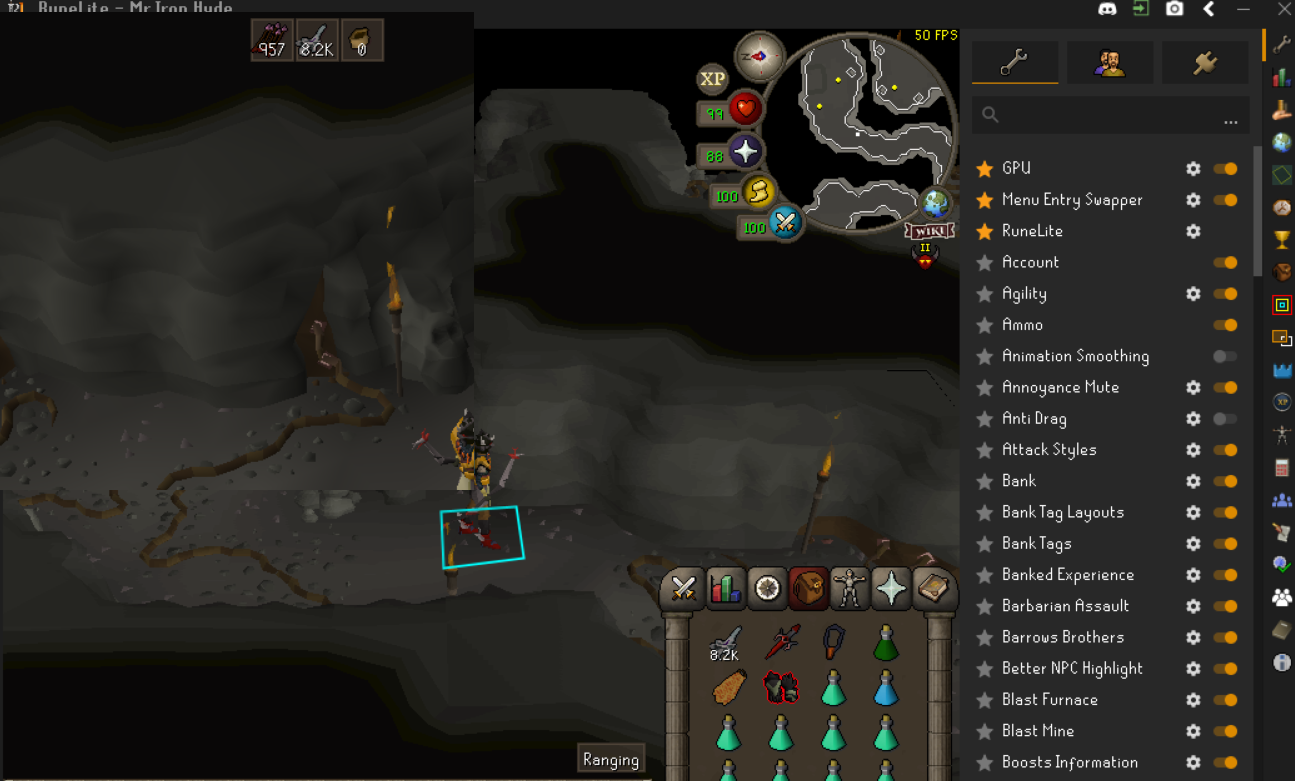
https://gyazo.com/d27625a54329bb5efa31c8ea46317c34 So this keeps happening everytime I open RuneLite with the GPU plugin turned on. The bottom 3/4 is static while the top left is the only part of the screen thats responsive. I have tried the basic "fixes" uninstalling, resetting PC etc etc., all to no avail. Help 🙂 Im on a laptop with an Nvidia 3050 if that helps narrow down possible causes
 ornate kite
Hey i was looking for help is there a way to auto sync plugins to a new laptop
lilac harbor
frigid sky
does anyone have any insight on this?
the way its freezing and u need to reset, its a pc hardware/windows issue - not runelite
lilac harbor
ornate kite
Hey i was looking for help is there a way to auto sync plugins to a new laptop
copy your .runelite folder from your user folder to the new laptop
by signing in with google, runelite settings/native plugins will sync i believe - plugin hub plugins either don't or some won't, not 100% sure
 mental granite
Hi, i have been constantly having issues with my game freezing for around 3 seconds every 10 mins or so, is there a solution for this?
ornate kite
lilac harbor
by signing in with google, runelite settings/native plugins will sync i believe ...
yes im having a sync problem
i am trying to copy folder and email to myself but gettting errors
not very tech savy any way aroudn this
hollow olive
would recommend you use something like google drive or whatever to copy said files around.
ornate kite
yes google drive may work
ornate kite
got it ty
elder glade
elder glade
hey wondering if someone can help, doing dt2 on the hardcore and crashed in the ...
wondering if anyone can help still thanks
 deep oriole
Hey guys I'm new here and to discord in general, so firstly I want to say my thanks for being here and making this available and apologies ahead of time, if I'm not following the exact protocol I'm suppose to. I promise I will learn. Anyways, the problem I'm having is with equipping or wielding weapons sounds, They are to quite and generally get lost under other sounds like while doing raids or things like bossing so I have to turn down all other sounds so I can hear them correctly which causes other problems, like not being able to hear audio ques that are relevant to game play in those situations, this would vastly improve my gaming experience, to make sure clicks were accurate auditorily or know when I need to re click something, because I can actually hear an auditory cue. I've tried to looking up sound IDs but cant find the correct ones and don't exactly know the correct process to change them but could definitely figure it out if I had them, so if anyone could help with this process or point me in the right direction I would greatly appreciate it. Thanks again for any help you can provide and cheers everyone.
 shy vale
deep oriole
Hey guys I'm new here and to discord in general, so firstly I want to say my tha...
shy vale
deep oriole
Hey guys I'm new here and to discord in general, so firstly I want to say my tha...
I apologize this is not an answer to your question, but how experienced are you with the game? Wield/equip sounds aren't really that important in terms of auditory ques, especially in end game. However if they do bother you for any reason I do hope you find a solution.
deep oriole
shy vale
I apologize this is not an answer to your question, but how experienced are you ...
I know they aren't detrimental, but I find with really fast switches it slows me down a whole game tick at times and when I'm trying to do a six way switch and the weapon is the last click it will get buried under other game noises like in the monkey room at ToA one specific place it happens often and then I have to wait or look back at the inventory to see if i mis-click a tick later where as if the sound was better thing like that wouldn't take place. As far as how experience I am.. I'm fair. I'm probably just trying to do to many thing at once while playing multiple accounts. It would just make things a little simpler at times, if its not possible don't worry about it. It would just make the quality of game play at times a little better. Its not a huge thing, you are right about that.
deep oriole
shy vale
I apologize this is not an answer to your question, but how experienced are you ...
I just came back to the game after a long break, a few a weeks back so right now I'm at about a Low 300 solo ToA, if that helps any or is a better answer then "fair" for you. Not good, not bad, just kind of fair game play!
haughty pumiceBOT
Search for https://github.com/barthogenes returned no results.
Search for Discord Group Bank Notifications returned no results.
 vague ether
hm
oblique plume
just gh name/phub file name
vague ether
i wanna find discord name for https://github.com/barthogenes
GitHub
barthogenes has 20 repositories available. Follow their code on GitHub.
haughty pumiceBOT
Search for barthogenes returned no results.
vague ether
a ghost
vague ether
fair enough
pure rose
pure rose
Hello, when I try to log into the runelite client (not my osrs account but actua...
Good Morning, does anyone have any ideas on this?
leaden trail
Post your logs maybe?
haughty pumiceBOT
To find the logs, you can do one of the following:
- If your client failed to open, click the
Open logs folderbutton. - Open the screenshot directory by right-clicking 📷
Camerabutton, navigate 1 directory up, then open logs folder. - Navigate to
%userprofile%\.runelite\logson Windows or$HOME/.runelite/logson Linux and macOS.
Upload the log files named client and launcher by dragging them to Discord. If there are files prefixed with jvm_crash dated from today, upload them too.
pure rose
pure rose
that is after doing that
pure rose
yea basically I click sign in, it opens a browser at google, I sign in and then it gives me the
leaden trail
Can you have RuneLite not run as admin?
pure rose
have tried both ways
leaden trail
I would still set it to not run as admin because that can cause other problems
pure rose
yea I turned it off when I saw that in the log
leaden trail
Poking around a bit, try restarting your computer and your router
pure rose
Both done, also been happening for a few days
Is there any other method for client log in than the little green door?
leaden trail
Not as far as I'm aware
haughty pumiceBOT
Search for pajlads returned no results.
 noble flint
I've had a bug twice now where runelite just stops accepting inputs in any form; can't click, can't type, can't even close the window, I have to kill it through task manager and reload
top of client.log
zealous cedar
can you upload the full log file?
noble flint
oblique plume
nice plugin
zealous cedar
I guess disable the dude wheres my stuff plugin
 proven shard
Does anyone know which chat color name the drops are in runelite settings for Chat Color?

I wan't to change the green basicly
 random copper
Is it possible to only scale the sidebar? at 4k 150% windows scaling its pretty small
haughty pumiceBOT
zealous cedar
adjust the scale here
 sonic pagoda
what plugin could potentially block me from using the ` (back quote) key in runelite? cant even type it in chat
gilded kayak
the quickest guess would be you bound it to party ping
otherwise download debug helper from the hub
it has a list of all your keybinds
sonic pagoda
thats exactly what it was, thank you it was driving me crazy
proven shard
proven shard
Does anyone know which chat color name the drops are in runelite settings for Ch...
@zealous cedar do you know how solve this one?
nobody in my clan can figure it out either. Might be a bugged client version or something
random copper
zealous cedar
adjust the scale here
thanks @zealous cedar , but I think that will scale the entire client right? I just want a scaled sidebar. When I put it on 1.5 it also looks very blurry.
leaden trail
proven shard
nobody in my clan can figure it out either. Might be a bugged client version or ...
You might need to use Force Recolor from the hub to change it
 spring crown
Having issues with my screen just freezing on runelite. Second time today where it just freezes and have to restart client
zealous cedar
proven shard
<@143183183322677248> do you know how solve this one?
you would definitely have to use force recolor
leaden trail
I can never remember what does and doesn't need that since I don't recolor stuff 😅
leaden trail
🤷
proven shard
imma try it out
 lyric remnant
Hey guys, had a question about the order in which events get processed by the client. Say you attack something and receive an XP drop. Both StatChanged and AnimationChanged events occur. Is there a deterministic order in which these two events occur and get processed by a plugin, assuming I subscribe to both using the event bus? If not, does the API offer a way to force these things to happen in a certain order? Not sure how clear my question is so I can describe with more details if needed.
proven shard
@leaden trail @zealous cedar thanks, that worked ^^
leaden trail
lyric remnant
Hey guys, had a question about the order in which events get processed by the cl...
What are you actually trying to do?
zealous cedar
lyric remnant
Hey guys, had a question about the order in which events get processed by the cl...
there is a deterministic order yes
lyric remnant
Basically when I hit an NPC, I'm trying to calculate the damage I dealt to it, and compare it to the expected damage based on gear/stats to see whether my hit was lucky or not. Not sure whether to use StatChanged or AnimationChanged.
zealous cedar
you might have to try it and see
lyric remnant
Does StatChanged trigger if someone has 200m xp?
zealous cedar
no
lyric remnant
Hmm I might not be able to use it then to calculate damage.
zealous cedar
there is a fake xp drop event, but it fires at a different time
 pliant magnet
 leaden trail
if you search ground object hider in here the ids will come up that you can use for that along with changing skybox color
Jagex broke low detail there
lilac harbor
How would I verify that "-Xmx4G" is working
Extract taken from log:
2024-09-02 21:52:33 BST [RuneLite] INFO net.runelite.client.RuneLite - Java VM arguments: -XX:+DisableAttachMechanism -Drunelite.launcher.blacklistedDlls=RTSSHooks.dll,RTSSHooks64.dll,NahimicOSD.dll,NahimicMSIOSD.dll,Nahimic2OSD.dll,Nahimic2DevProps.dll,k_fps32.dll,k_fps64.dll,SS2DevProps.dll,SS2OSD.dll,GTIII-OSD64-GL.dll,GTIII-OSD64-VK.dll,GTIII-OSD64.dll -Xmx768m -Xss2m -XX:CompileThreshold=1500 -Dsun.java2d.d3d=true -Dsun.java2d.opengl=false -Drunelite.launcher.version=2.7.1 -XX:ErrorFile=C:\Users\Username\.runelite\logs\jvm_crash_pid_%p.log -Xmx4G
Looks like its being set to 768m, is the -Xmx4g at the end then overwriting that & does it verify that its now set to 4g?
 viscid kelp
Why does my PissGaming acc keep getting baned?
it didnt happen until I started useing runelite
zealous cedar
why does Cook keep ignoring my dms
zealous cedar
lilac harbor
How would I verify that "-Xmx4G" is working
Extract taken from log:
```2024-09-...
as long as -Xmx4G is at the end that is good
viscid kelp
Answer my got damn question and ill answer you'res
Support here is so bad really gone down the hill
zealous cedar
you'res
lilac harbor
viscid kelp
Why does my PissGaming acc keep getting baned?
this is troll, right? xD
viscid kelp
Not everything I say is "troll"ing
zealous cedar
everything he says is trolling
viscid kelp
Do you even know who I am
vast bone
you're this guy with the sweater
 leaden trail
Cook ignores everyone's DMs

 compact spear
oh so support is the new gen chat, nice😂
gilded kayak
its only in short bursts when cook is here
leaden trail
vast bone
artist's reconstruction
I'm dead
hollow olive
shift right click
 spice prairie
why is it that when i borrow my mate's account, each time i logout, it ask for 2fa?
on some accounts it does, some doesn;t
leaden trail
That's more of a Jagex question
hollow olive
dont ask jagex that though since account sharing isnt legal
spice prairie
yeah hey mod ayiza why does it keep asking for my mates 2fa each time i log out?
xD
zealous cedar
its just part of the client. it cant be disabled
 pastel mortar
any idea why bank keeps closing when i open it randomly?
 shy copper
all of a sudden when i open runelite it opens a jagex account up... i cant log into my legacy. any ideas?
gilded kayak
!logs
haughty pumiceBOT
To find the logs, you can do one of the following:
- If your client failed to open, click the
Open logs folderbutton. - Open the screenshot directory by right-clicking 📷
Camerabutton, navigate 1 directory up, then open logs folder. - Navigate to
%userprofile%\.runelite\logson Windows or$HOME/.runelite/logson Linux and macOS.
Upload the log files named client and launcher by dragging them to Discord. If there are files prefixed with jvm_crash dated from today, upload them too.
shy copper
gilded kayak
shy copper
It looks like the cheats/bots you installed configured RuneLite to work like this
shy copper
i dont have a cheat or bot
gilded kayak
no clue 🤷
round jacinth
your issue started today so just tell us what you did today?
shy copper
damn, looks like imma have to wipe my pc again ffs....
round jacinth
ok
shy copper
appreciate it. ill change my login credentials too.
 thorn grail
so when i shift click an item on the ground, my character automatically walks to it instead of sprinting. anyone know what would cause this?
shift click just normal ground works fine. an item or an object like jewelry box and i auto walk to it now for some reason
 acoustic lily
is there any reason why the refresh rate of my 2nd monitor effects the smoothness of runelite when its not even on that monitor. My main monitor is at 144hz and I put my 2nd at 60hz to save a little bit of gpu resource, but it makes runelite feel choppy
 remote orbit
Hi there, I'm having trouble with the party plugin, I can see my friends on the map but they cant see me, my name is also red and my discord picture doesn't show. Any tips? Couldn't find anything online.
Sincerely.
gilded kayak
did you maybe disable the discord plugin
remote orbit
no
gilded kayak
i see you don't currently have the discord status playing runelite - areaName
so i would assume it's maybe related to that
remote orbit
sorry didn't understand, its in discord?
remote orbit
gilded kayak
i see you don't currently have the discord status `playing runelite - areaName`
How can i switch it on?
round jacinth
So the party plugin pulls your image from discord due to the discord plugin being on but you don’t need the discord to show your game status for it to work I don’t think
You might need to just rejoin with discord plugin on
Rejoin that party I think maybe idk
remote orbit
i have discord plugin on
round jacinth
Idk how the map thing works tho
remote orbit
they can´t see me my man
It dosen´t work
I try the party plugin without the discord one being on, and i still see yhem but they can´t se me
 unborn kraken
so I just re did my pc, is there any way to update it so it shows my zuk times/olm pb's & so on again without having to go re do the content???
mossy swan
unborn kraken
so I just re did my pc, is there any way to update it so it shows my zuk times/o...
!lost should be the same as settings
haughty pumiceBOT
unborn kraken
I only saved my profile, I dont sign into runelite with a gamil or anything like that. from what im seeing here its not possible?
or im just dumb & dont understand ahahahha
mossy swan
i think that should have your times but maybe i’m dumb (too?)
unborn kraken

so i saved that profile to a usb thinging it would save it all and show it

thats what it shows when i try

but thats my time from when i did it
mossy swan
so you did like export profile or what’s up?
unborn kraken
mossy swan
so you did like export profile or what’s up?
yeah I exported profile
so it saved all my plugins/ layout
mossy swan
hmmm i thought they would have it but i must be wrong
unborn kraken
but it wont show my kc or times
mossy swan
i’m afraid there’s no other way to get it to show but to do the content
unborn kraken
ahh ok, thats what i was told 😦
mossy swan
unless there’s just some bug and you need to restart the client
unborn kraken
but i wasnt sure if it was correct
remote orbit
@mossy swan Do after can you gimme a tip?
unborn kraken
mossy swan
unless there’s just some bug and you need to restart the client
nahh i just re lauched it n same thing :p
 mossy swan
rip
unborn kraken
time to get another inferno cape ahahahaha 😦
i kinda like it the way it is as it shows if someone bought the cape most of the time unless they re did their pc like this, but at the same time AHHHHHHH lol
mossy swan
remote orbit
<@213762071165141002> Do after can you gimme a tip?
i don’t see you playing runelite on discord
unborn kraken
thx for help, hope u have a great night/morning
remote orbit
mossy swan
i don’t see you playing runelite on discord
how do i cahnge that?
mossy swan
remote orbit
how do i cahnge that?
!discord
haughty pumiceBOT
If your Discord activity status is not showing properly follow these steps:
- Make sure your Discord plugin is enabled.
- Make sure RuneLite is not manually added as game to Discord game list.
- Enable
Share your detected activities with othersin Discord settings. - Make sure both RuneLite and Discord are NOT running as admin.
remote orbit
my discord is runing as admin
thanks thats a great clue
i have this bug that i can only run discord in admin mode. dont know why
 slate moss
hey i'm having an issue with number keys to select interface options (like construction popup)
nothing happens when i press for instance 1 2 3 4 etc
works for dialogue options though
solid mesa
It's possible you've rebound keys to something else. The plugin Debug Helper will show what keys are bound
slate moss
seems like i have F keys rebound but can't seem to think why F keys are the problem
elder glade
elder glade
hey wondering if someone can help, doing dt2 on the hardcore and crashed in the ...
still wondering if anyone can identify why my clients crashing, thanks!
leaden trail
elder glade
still wondering if anyone can identify why my clients crashing, thanks!
Looks like Quest Helper is unhappy
elder glade
leaden trail
Looks like Quest Helper is unhappy
thank you, uninstall angle i guess. when games back up ill uninstall and go to valamore see if im still getting fps issues/crash
haughty pumiceBOT
Visit Zoinkwiz's Quest Helper plugin discord (https://discord.com/invite/XCfwNnz6RB) for support, issues & feedback
leaden trail
Might be worth mentioning to them
elder glade
leaden trail
Might be worth mentioning to them
i see someone has posted something very similair, will keep tabs on there response, after i crashed the last time in whisper area of DT2, upon relogging i turned off 117hd and it seemed ok, any advice regarding that or do the logs not show this at all
 hollow lily
elder glade
i see someone has posted something very similair, will keep tabs on there respon...
hollow lily
elder glade
i see someone has posted something very similair, will keep tabs on there respon...
It seems to all be coming from The Path of Glouphrie, had you just done that before DT2 or something?
elder glade
yea i had done it in the same session
hollow lily
Okay nice, at least I can look to fix the message you're getting from QH spammed in your logs, thanks
 cinder spruce
unborn kraken
i kinda like it the way it is as it shows if someone bought the cape most of the...
cinder spruce
unborn kraken
i kinda like it the way it is as it shows if someone bought the cape most of the...
If you have an Adventure Log in your in your PoH Achievement Gallery, it'll populate your pb/kc/ect
oblique plume
mossy swan
hmmm i thought they would have it but i must be wrong
account specific settings, like kcs and pbs, are in rsprofiles
well not really "settings" more like information
 hybrid otter
hey guys how do i get runelite working on macbook? through the jagex launcher?
 celest root
hey guys ive banned for no reason at all for botting when i dont even know how to bot or where to get 3rd party software.
could i get assistance
 fresh swift
we can't help you with that
oblique plume
hybrid otter
hey guys how do i get runelite working on macbook? through the jagex launcher?
gotta drag runelite into applications
 fossil forge
unborn kraken
i kinda like it the way it is as it shows if someone bought the cape most of the...
fossil forge
unborn kraken
i kinda like it the way it is as it shows if someone bought the cape most of the...
You can get your old pb/kc back- you need to build an adventure log in your house. Once you open it you can see your pbs and kc’s and it updates your runelite
oblique plume
i should probably see how hard it is to get them from cl tbh
since everyone tries that first
cinder spruce
would probably have to cycle each boss
 subtle depot
i think clue solver is broken? or my puzzle box is just that difficult
been stuck like this ive been doing this box for like 30mins lmao
 unborn kraken
cinder spruce
If you have an Adventure Log in your in your PoH Achievement Gallery, it'll popu...
unborn kraken
cinder spruce
If you have an Adventure Log in your in your PoH Achievement Gallery, it'll popu...
thx so much !!!!!!! this worked!!! also to you @fossil forge
 near saddle
anyone getting severe fps drops in runelite lately? I'm normally capped at refresh rate but now getting insane variation, like -100 fps for minutes. No other process (>1% gpu) is running on my pc.
been this way for like 2 weeks
zealous cedar
nope.


