#support
1 messages · Page 19 of 1
 sonic birch
You show the littlest amount of investment by creating the suggestion, which asks other people to donate a lot of their time to code it
 formal ice
It's not on the plug-in. I'm doing it right now and no future tile I there
 round jacinth
read what i said
- that feature is already added and coming in next release
next runelite update will have it
round jacinth
github is the best way to document proper bugs and ask for features, asking here is how they get lost to the sands of time
discord is a chat room
 weak sinew
how can i make it so runelite gives me a notification when ive depleted a vein in motherlode mine?
sonic birch
Idle notifier
 fossil summit
I tried idle alarm and it broke my client immediately
weak sinew
i keep playing around with the settings for that but it never works
 mossy swan
abex idle notifier 
weak sinew
it works for combat, hp and running but thats it
ty ill give it a go
nice it works ty, is it against the rules? probs not but i wanna make sure haha
mossy swan
its fine
sonic birch
weak sinew
it works for combat, hp and running but thats it
incorrect config probs lol
 regal quest
got this crash log yesterday, happens seemingly randomly, thought it was to do with new maps loading in but I just got it wave 55 inferno and I've had it mid vard kill so its just random it seems. I didn't get any crash log for the recent one 20 mins ago
 muted musk
Anyone else come across “runelite quit unexpectedly” while trying to use runelite on Mac? Is there a fix for this or just a computer issue?
sonic birch
muted musk
Anyone else come across “runelite quit unexpectedly” while trying to use runelit...
!logs
 haughty pumiceBOT
To find the logs, you can do one of the following:
- If your client failed to open, click the
Open logs folderbutton. - Open the screenshot directory by right-clicking 📷
Camerabutton, navigate 1 directory up, then open logs folder. - Navigate to
%userprofile%\.runelite\logson Windows or$HOME/.runelite/logson Linux and macOS.
Upload the log files named client and launcher by dragging them to Discord. If there are files prefixed with jvm_crash dated from today, upload them too.
Visit 117's HD plugin discord (https://discord.com/invite/U4p6ChjgSE) for support, issues & feedback
fossil summit
regal quest
got this crash log yesterday, happens seemingly randomly, thought it was to do w...
post that log and info here
regal quest
it should be attached
fossil summit
join that discord, go to windows support and post it there i mean
fossil summit
I dont think so
 leaden trail
it's probably this
haughty pumiceBOT

Ketner777
A fatal error has been detected by the Java Runtime Environment:
#
#  EXCEPTION_ACCESS_VIOLATION (0xc0000005) at pc=0x03d9c70d, pid=15208, tid=9740
#
# JRE version: OpenJDK Runtime Environment (11.0.4+11) (build 11.0.4+11)
# Java VM: OpenJDK Server VM (11.0.4+11, mixed mode, emulated-client, g1 gc, windows-x86)
...Cheers I’m trying some things from that thread, nothing seems consistent though from the replies
 orchid canyon
Afternoon - I have this very annoying issue with Runelite atm that's persisted for months. I have bluetooth Sony XM5's, and whenever I pair them to my PC whilst Runelite is already open, sound will never come from Runelite until I fully close the program and re-open it. Every other sound output (youtube, other games, etc) work completely fine, it's just Runelite. I've tried searching on here and reddit but can't find any solutions. I've tried switching Runelite profiles, messing with program device output, and removing all 3rd party sound plugins, but to no change.
Any thoughts?
mossy swan
i think that may be a java limitation
muted musk
haughty pumice
To find the logs, you can **do one of the following**:
- If your client failed t...
?
sonic birch
?
muted musk
Is that the solution?
round jacinth
No? We would like your logs to provide you the solution
 fallen prism
When using Nvidia shadow play to save your recent game history, if you have the plugin bar popped out it causes the video footage to flicker?
Any ideas?

 tawdry olive
any idea if there will be a fix or somethiung added where amulets or rings with charges wont be categorized by (charge #) when filtering inventory set ups
 vernal portal
alright so my computer turned off twice basically back to back because of a bad breaker. and when i logged back into runelite all of my plugins were gone. i tried logging in and out of my runelite account and nothing. is there anyway to recover those plugins or am i screwed?
sonic birch
tawdry olive
any idea if there will be a fix or somethiung added where amulets or rings with ...
!hubs
haughty pumiceBOT
hubsupport: Support for hub plugins should be directed to the author of the plugin. You can find the support link by searching for the plugin in the Plugin Hub panel and clicking the ? button on the plugin, or by right-clicking the plugin in the plugin panel and clicking the Support menu option.
sonic birch
vernal portal
alright so my computer turned off twice basically back to back because of a bad ...
!lost
haughty pumiceBOT
vernal portal
got em back! thanks you so much (:
 rustic yew
hydra animations are removed correct for integrity?
 charred wind
What
 fallow panther
visual sounds? yes
 twin pivot
is there any way to change the font in the chat box during quests and stuff? i find it so hard to read and i saw hdos has a different one
 compact pier
im doiing MM2 and the client has crashed over 10 times
has anyone had this issue
ive lost 1.5m in death coasts
haughty pumiceBOT
To find the logs, you can do one of the following:
- If your client failed to open, click the
Open logs folderbutton. - Open the screenshot directory by right-clicking 📷
Camerabutton, navigate 1 directory up, then open logs folder. - Navigate to
%userprofile%\.runelite\logson Windows or$HOME/.runelite/logson Linux and macOS.
Upload the log files named client and launcher by dragging them to Discord. If there are files prefixed with jvm_crash dated from today, upload them too.
 clever thunder
I'm failing to build the latest commit on my new project. I did a clone from VCS, verified lombok is still installed and up to date, set the java JDK as outlined here https://github.com/runelite/runelite/wiki/Building-with-IntelliJ-IDEA
There are no .dump or .dumpstream files in cache\target\surefire-reports either, only txt and xml


GitHub
Open source Old School RuneScape client. Contribute to runelite/runelite development by creating an account on GitHub.
clever thunder
Okay the solution was to skip tests
 old lantern
Hi, I've been experiencing random lag spikes (could be every 20min to sometimes an hour) where my client will just drop frames for a few ticks. It happens anywhere in-game without any clear pattern and it's hard for me to pinpoint which plugin could be causing it if there is one. I've already tried reinstalling the client. (win10)
 sonic birch
old lantern
Hi, I've been experiencing random lag spikes (could be every 20min to sometimes ...
sonic birch
old lantern
Hi, I've been experiencing random lag spikes (could be every 20min to sometimes ...
!flow
haughty pumiceBOT
flowchart: Please refer to this flowchart for further troubleshooting.
 rugged wren
I'm having problems with the "party plugin". It doesn't seem to be a Plugin Hub plugin as when I right click it, it doesn't show "support".
For some reason recently whenever I try to ping it does not work? I tried changing key binds, turning it off and on and I make sure I am in a party whenever testing it. Does anyone know how to fix the issue? If this is the wrong channel I apologise and could you direct me to the correct place please
 oblique plume
its not a hub plugin, left click to ping
sonic birch
Read the config description if you're having problems
 rocky ocean
I have a new computer, downloaded runelite and logged in but all my plugins/settings are gone. I have 2 other devices and they are both logged in to the same account and they share all the plugins/settings just fine. When I download new plugins on one device and then hop on the other, they marge/update automatically. How can I get my plugins and settings in this new device without having to download them all one by one?
mossy swan
!transfer
haughty pumiceBOT
rocky ocean
ty
 cobalt vessel
hey why my client bugged so it shows roofs now even tho i got it all hidden what hapennd?
round jacinth
in game settign to turn off roofs?
cobalt vessel
..
i had it all hidden and did quest now it shows roof even tho i got it hidden
in game settings aswell
have*
round jacinth
restart client?
cobalt vessel
did didnt help
cobalt vessel
buildings
round jacinth
i mean where
cobalt vessel
everything
round jacinth
all of them?
round jacinth
idk i use the in game setting with roof removal off
haughty pumiceBOT
Windows
Run the RuneLite (safe mode) shortcut, or with a Jagex account, first run the RuneLite (configure) shortcut and tick the Safe mode box, then launch RuneLite via the Jagex launcher.
Mac
In Terminal, run:
/Applications/RuneLite.app/Contents/MacOS/RuneLite --configureTick the Safe mode box. Launch RuneLite.
If it's not working, download and install the updated RuneLite launcher from the website link in #welcome. You don't need to uninstall your current version. You will not lose any settings or plugins. Then try running safemode again.
round jacinth
check safe mode

 mossy swan
that is working exactly as intended
cobalt vessel
my point is i never had roofs on till now they just come on out of nowhere
i had it all hidden since day 1
now i cant get them hidden
like perma off never ever showed roofs
mossy swan
then maybe some hub plugin broke them and you should try safe mode
round jacinth
The behavior you’re having is intended from that plugin tho
cobalt vessel
someone pmed me to do "toggleroof and it worked
weird why it come back itself tho lol
round jacinth
Idk why they would dm you when you’re actively talking to people here
Odd
If you don’t want that behavior to come back again just turn off the roof removal plugin and keep the in game setting on
round jacinth
What you had was intended behavior
cobalt vessel
it come back itself
round jacinth
I’m telling you dude that it was suddenly fixed then lol
And not suddenly broken
W/e
cobalt vessel
no i had plugin off and in game roff removal on since day 1
i finished quest and roofs come back on itself lol
as i said my english isnt the greatest but alteast its fixed now
round jacinth
On mobile the setting reverts itself for me so I just turn it off and on, it’s a jagsx problem
Thought you were using the plugin
And mad about how it worked
mossy swan
zom is native english speaker and he still cant read so dont worry about it
round jacinth
sorta but they weren’t being clear at all
cobalt vessel
bet! anyways thanks for fast answer
 timid rock
@cobalt vessel did u do the contact quest recently
cobalt vessel
yees
timid rock
that quest breaks hide roofs in game
cobalt vessel
lmao
mossy swan
wow
cobalt vessel
makes sense
cobalt vessel
thats exactly the quest i did
timid rock
it does u have to toggle it in game after quest
mossy swan
cobalt vessel
makes sense
no, definitely does not 😂
cobalt vessel
timid rock
it does u have to toggle it in game after quest
happend lol
timid rock
add that to the faq 😂
round jacinth
you typically troll
cobalt vessel
 arctic stirrup
that why I dm him toggleroof command
arctic stirrup
that why I dm him toggleroof command
it worked thanks
round jacinth
and you should not be dming people
round jacinth
you got lucky then
cobalt vessel
100%
round jacinth
lol
round jacinth
i know it worked, you did what umer was saying to do and i thought i said to turn it off and back on too. but i said just turn it off.
arctic stirrup
nothing wrong to dm a user that’s my business
round jacinth
we typically tell people to turn off random dms in this server because it's a big server for bots to join and send spam dms to people & since there was an active discussion about the topic going on you were more than welcome to chat here
its just weird to dm it tbh
mossy swan
you can go to dms to argue about this thank you
arctic stirrup
last time I post someone delete my posts
round jacinth
cant i got him blocked, because he is a troll lol
cobalt vessel
i have dms blocked i have to first accept the dm before i can see it tho
oblique plume
wtf did i just read
arctic stirrup
cobalt vessel
guys love and peace everything worked out all it matters right?
may allah bless you with his mercy and barakah
 limber seal
which file in .runelite is the one that saves every settings/plugins etc?
mossy swan
what do you want to do?
limber seal
pretty much re-install every plugin
mossy swan
if you just want to clear the settings, make a new profile in the middle tab here
 limber seal
mossy swan
if you just want to clear the settings, make a new profile in the middle tab her...
limber seal
mossy swan
if you just want to clear the settings, make a new profile in the middle tab her...
Isee 200 iq ty
 brazen dirge
why does timer keep showing eventhough i have the config disabled

from 'Timers' plugin
mossy swan
ermm what timer is that
 wooden flax
Recently my client crashed while i was in ToA on my hardcore. Long story short I'm still alive but i obviously want to make sure this never happens again.
I have a couple questions about heap space (please keep in mind im a 2Head with minimal programming experience)
-is there any way to monitor heap space to know if im getting close to the limit?
-i posted about this a few days ago and was linked the runelite config page where I learned that there is a line option to expand heap space. Theres an example on this page about how to double the heap space -Xmx1536M, but what about triple? Quadruple? What makes sense to do in my scenario, if anything?
-what kind of actions reduce used heap space? Restarting the client? Restarting computer? Etc.
-I uninstalled and reinstalled Runelite and im building a new profile with ONLY the plugin hub plugins I deem absolutely necessary. Have I actually accomplished anything by doing this? I noticed that if I switch profiles back to the one i was using, all my old data is there, leading me to believe that maybe i havent actually accomplished anything. This is over my head from a programming perspective.
Any other tips to prevent this from happening again are appreciated. I wanna live on the hardcore!
more info if it matters: windows 10 64bit, 32gb ram
Thanks!
 leaden trail
Disable some hub plugins, most likely
But in the future, post the full log rather than just a snippet
wooden flax
leaden trail
Disable some hub plugins, most likely
i made a new profile with minimal plugin hub plugins, thats a good start, right?
wooden flax
leaden trail
But in the future, post the full log rather than just a snippet
I can post that when i get home to my computer, im typing from work
oblique plume
its just a bad hub plugin
you could maybe find out which one if you get the debug plugin and select to heap dump on oom
leaden trail
Yeah my comment about logs was mostly just in case you have other issues in the future.
OOMs are generally fairly easy but there are a lot of cases where we want to look at more than just the error that's immediately before the crash
wooden flax
is simply disabling a plugin in the settings menu enough to reduce heap space if its a bad plugin or does it need to be completely uninstalled from my profile?
mossy swan
so turn off -> restart
wooden flax
got it. I'll post full log when i get home and also download the debug plugin
thanks for the help
sonic birch
Please do post the full log indeed so we can check if you applied the JVM parameters correctly. If we determine that you did, please enable heap dumps on oom in the debug helper as mentioned above. When you oom, upload the dump on e.g. google drive, type some words to @haughty pumice , send your logs and the dump link
wooden flax
sonic birch
Please do post the full log indeed so we can check if you applied the JVM parame...
So I havent actually applied any JVM parameters in the launcher config. It crashed with everything set to default. Do you think I should increase heap space and if so, to what amount?
I also can't force a crash, its only ever happened twice, seemingly at random. But if it happens again i will post those logs too.
I have the logs from when it crashed on my hardcore in ToA, but everything was default as far as launcher configuration.
I'll post those tonight.
sonic birch
Oh, you didn't crash again after increasing it.
Up your heap space to 1536M if you got too many hub plugins
wooden flax
sonic birch
Up your heap space to 1536M if you got too many hub plugins
is there any downside?
sonic birch
Nah, perfectly fine to do that
 broken fjord
is there a way to use menu entry swapper within my bank tabs
sonic birch
Going higher is somewhat pointless though since then there's just a memory leak and you will keep crashing. In that case, we have to fix it (read: we disable the plugin, hub author has to fix the leak)
wooden flax
broken fjord
is there a way to use menu entry swapper within my bank tabs
i might be able to help with this, what are you trying to do exactly?
broken fjord
i have custom menu entry swaps setup. when i setup bank tabs the swaps don´t work, nor cant be setup, within that tab
sonic birch
!hubs for cms
haughty pumiceBOT
hubsupport: Support for hub plugins should be directed to the author of the plugin. You can find the support link by searching for the plugin in the Plugin Hub panel and clicking the ? button on the plugin, or by right-clicking the plugin in the plugin panel and clicking the Support menu option.
wooden flax
you want to withdrawl X or withdraw all when pressing shift? You want to equip/eat when pressing shift or another hotkey? Whats the end goal?
I use a combination of menu entry swapper and custom menu entry swaps to be able to withdraw 1, all, or equip/eat depending on if im pressing nothing, shift, or capslock.
Or are you looking to set individual items within the bank or withdraw 1, withdraw X, withdraw all, etc?
broken fjord
the last
wooden flax
ah ok i dont know how to do that, sorry. gl!
broken fjord
trying to have a bank tab with stamina withdraw one gold bars withdraw 27 (all)
np, ty anyways
 pearl fractal
Gm, is there a way to disable the alt key turning my left clicks into camera rotates? Or is that just base Runescape?
 vast sundial
pearl fractal
Gm, is there a way to disable the alt key turning my left clicks into camera rot...
vast sundial
pearl fractal
Gm, is there a way to disable the alt key turning my left clicks into camera rot...
Key Remapping plugin perhaps?
actually i don't think you can do that with it
oblique plume
its just from runescape
pearl fractal
Dang
 chilly bane
Hey team, I am getting an error on my Mac trying to run Runelite through the Jagex Launcher.
Every time I try to login I simply get a "Failed to login" message. I've looked through log files and it seems the login is failing with a 400 code and no actual error text.
The OSRS client works fine through the Jagex launcher so I am not sure exactly what's going on. Has anyone seen this before?
For more context, I am running a Macbook M1 Max and it actually used to work at some point - but there have been no changes to the system
sonic birch
Last time this happened, the login servers were having problems
chilly bane
I've been trying over the past few weeks 😦
sonic birch
Idk then, post logs
chilly bane
2024-08-06 13:02:23 EDT [Client] DEBUG injected-client - Game state changed: LOGIN_SCREEN 2024-08-06 13:02:23 EDT [Client] DEBUG n.r.client.RuntimeConfigRefresher - Skipping runtimeConfig refresh, next refresh at 2024-08-06T17:12:04.822280Z 2024-08-06 13:02:25 EDT [Client] DEBUG injected-client - Game state changed: LOGGING_IN 2024-08-06 13:02:25 EDT [Client] ERROR injected-client - Client error: Response code: 400Response body: 2024-08-06 13:02:25 EDT [Client] DEBUG injected-client - Game state changed: LOGIN_SCREEN 2024-08-06 13:02:25 EDT [Client] DEBUG n.r.client.RuntimeConfigRefresher - Skipping runtimeConfig refresh, next refresh at 2024-08-06T17:12:04.822280Z 2024-08-06 13:02:38 EDT [Client] DEBUG injected-client - Game state changed: LOGGING_IN 2024-08-06 13:02:39 EDT [Client] ERROR injected-client - Client error: Response code: 400Response body: 2024-08-06 13:02:39 EDT [Client] DEBUG injected-client - Game state changed: LOGIN_SCREEN 2024-08-06 13:02:39 EDT [Client] DEBUG n.r.client.RuntimeConfigRefresher - Skipping runtimeConfig refresh, next refresh at 2024-08-06T17:12:04.822280Z 2024-08-06 13:02:55 EDT [Client] DEBUG injected-client - Game state changed: LOGGING_IN 2024-08-06 13:02:55 EDT [Client] ERROR injected-client - Client error: Response code: 400Response body: 2024-08-06 13:02:55 EDT [Client] DEBUG injected-client - Game state changed: LOGIN_SCREEN 2024-08-06 13:02:55 EDT [Client] DEBUG n.r.client.RuntimeConfigRefresher - Skipping runtimeConfig refresh, next refresh at 2024-08-06T17:12:04.822280Z
Essentially a blank reponse 😢
 gilded kayak
drag&drop the file*
leaden trail
Why are you running in debug?
chilly bane
In hopes that the client would provide more verbose information as to why the login is failing. It was failing before debug mode as well
In case it seems weird, I also added the 'disable-telemetry' flag because I noticed some errors in the logs about reporting telemetry data before which I assume is because of the outbound filtering my macbook has
 zealous cedar
Try logging out of and into the launcher?
... you have outbound filtering? are you filtering the client oauth request?
chilly bane
I've tried the log out/in to try and fix and potential credential caching issues, but no dice
It's a work laptop that has an outbound traffic filter yes. It doesn't seem to block the original clients request though
The way I understand that set of error logs is that the client is trying to initiate a login request to the login server at jagex and the client is providing a possibly malformed request to the login server - hence the 400 code
Just not sure what the actual malformed request is...
 gusty reef
is there a plugin that allows runelite to start with a panel opened?
sonic birch
no afaik
gusty reef
damn
zealous cedar
chilly bane
The way I understand that set of error logs is that the client is trying to init...
i dont think it is a "login request", but it is trying to get an auth token. im not sure under what conditions it returns a 400 though
chilly bane
Additional context, if I load the runelite launcher without the jagex launcher, I don't get failed to login, but rather just the expected incorrect username/password message
leaden trail
gusty reef
is there a plugin that allows runelite to start with a panel opened?
I think that's what "Default tab" on the hub does although I'm not certain
sonic birch
Oh, I thought he meant RL sidepanel
leaden trail
Ah yeah that probably is what they meant
chilly bane
zealous cedar
i dont think it is a "login request", but it is trying to get an auth token. im ...
Trying to figure out where these errors are coming from in the code base, but it's my first time ever looking through the RuneLite code so not coming up with much
zealous cedar
its from the jagex client, not runelite
chilly bane
Ah, so because the runelite client was booted by the Jagex client, it needs to communicate its auth through there - that makes sense
I wonder if there are Jagex Launcher logs that will give me a better hint
leaden trail
Nope
fossil summit
I have this issue when using a vpn sometimes
chilly bane
There is a VPN on my work laptop that I use, but I've tried with it connected and disconnected
fossil summit
you probably shouldn’t be playing runescape on your work laptop anyways lol
orchid canyon
orchid canyon
Afternoon - I have this very annoying issue with Runelite atm that's persisted f...
Any ideas for this one?
sonic birch
no, only unmoon's answer
leaden trail
You probably missed a step in the guide, make sure you read it carefully
A lot of people just end up skimming it but there aren't really any optional steps
Can you move to #runelite ? This channel is for release client support
regal quest
Left the room for 5mins came back and runelite has crashed again, then get an error on startup i've never had but no error log like the normal jvm_crash_pid logs ive been getting for "siginfo: EXCEPTION_ACCESS_VIOLATION (0xc0000005), reading address 0x0000000000000000"
Worked when I tried again but dunno if anything useful is in those. Either way still getting EXCEPTION_ACCESS_VIOLATION (random runelite closes) after trying various things from that thread people link, no idea the root issue
 stone parcel
You turned off your BIOS setting for CPB or Speedstep?
regal quest
I had tried that earlier yeah, did bios update so maybe its reset but I got crashes with it off anyway
stone parcel
Yes it defaults to ON, it might turn back on with update.
leaden trail
Can you upload the most recent JVM crash log?
 sonic birch
FYI you can enter advanced mode, if you're not in advanced mode already
fossil summit
I don't think there's anything you can do to fix your faulty intel cpu that needs an RMA
regal quest
yeah I think the search goes across them all
it’s only 3 weeks old I thought the deg would take months to see any issues
sonic birch
But you got an intel cpu, so just turning of speedstep should hopefully be enough
IIRC this might be a jvm bug, and it also happens on amd systems, so I doubt it's the intel degradation fuck-up
regal quest
That’s true I’ve seen people with AMD hit this too
Should I be using a different version of Java?
fossil summit
I have the same processor, I can tell you what I'm using
sonic birch
regal quest
Should I be using a different version of Java?
No, java is bundled with rl and using the wrong version causes way more problems usually
We'd tell you if you had to change anything else than what's mentioned in the issue
fossil summit
I have speedstep off
regal quest
Have you done anything to the performance core ratio? Think somewhere it mentioned setting it to sync all cores instead of auto
 ornate kite
Hey folks, I've heard I can share crash logs here and the team can help determine what's making my client crash. Is that true? I keep crashing out mid NMZ afk 🙃
haughty pumiceBOT
To find the logs, you can do one of the following:
- If your client failed to open, click the
Open logs folderbutton. - Open the screenshot directory by right-clicking 📷
Camerabutton, navigate 1 directory up, then open logs folder. - Navigate to
%userprofile%\.runelite\logson Windows or$HOME/.runelite/logson Linux and macOS.
Upload the log files named client and launcher by dragging them to Discord. If there are files prefixed with jvm_crash dated from today, upload them too.
fossil summit
I was getting this error in other games at one point and had to turn down vddq to 1.45, but I don't really know what kit you have
you mentioned in 117hd discord you had this built by a pc specialist, may be best to have them fix it
regal quest
yeah I’m hoping I get a decent reply from them, cheers for the help anyway
Pc specialist is a company in UK
Would it be that I’d set to 1.45? Might as well give it a go
 chilly bane
fossil summit
you probably shouldn’t be playing runescape on your work laptop anyways lol
chilly bane
fossil summit
you probably shouldn’t be playing runescape on your work laptop anyways lol
Eh I am the team that manages network traffic, but I can't give myself an exemption or infosec will murder me
 median osprey
Hello, I'm having a problem launching OSRS with runelite. I click play and nothing happens and it will let me click play again seconds after. ive reinstalled a few times to no avail. I can launch with offical client no problem. I would really like some help. Thank you!
gilded kayak
what happens when you try to open runelite by itself
median osprey
Nothing
gilded kayak
were any of these few reinstalls RuneLite, or just the jagex launcher
median osprey
both at the same time
haughty pumiceBOT
run this command in cmd, then show us the displayed output through a screenshot.
"%localappdata%\runelite\runelite.exe" -c -v --console -- --debug
me?
leaden trail
yes
regal quest
yeah turning speed step off didn’t help lol , was fine for an hour then crash mid muspah gg
median osprey
 gilded kayak
can you press down ctrl+shift and up/left-arrow key so it selects all the text
and then ctrl+c should let u copy even tho its a terminal, and then paste it here
median osprey
oh my bad one sec
haughty pumiceBOT
To find the logs, you can do one of the following:
- If your client failed to open, click the
Open logs folderbutton. - Open the screenshot directory by right-clicking 📷
Camerabutton, navigate 1 directory up, then open logs folder. - Navigate to
%userprofile%\.runelite\logson Windows or$HOME/.runelite/logson Linux and macOS.
Upload the log files named client and launcher by dragging them to Discord. If there are files prefixed with jvm_crash dated from today, upload them too.
gilded kayak
just click+drag client.log and launcher.log into here
median osprey
where do i see those?
leaden trail
the message from the RuneLite bot explains it
gilded kayak
you could press windowskey+R and copy paste in that folder the bot posted %userprofile%\.runelite\logs
that's the fastest way
median osprey
gilded kayak
is that a firewall blocking it?
median osprey
im dumb af with computers man idk
leaden trail
I think "Unable to establish loopback connection" is generally a firewall yeah
median osprey
is there a palce to go that will help me with that?
gilded kayak
youtube likely has a video from a guy with a funny accent if you search how to add an application to firewall exceptions
and then just add runelite instead of what the video shows
median osprey
okay thank you!
 desert canyon
I'm not seeing ge prices anymore on my tooltips or on examine
haughty pumiceBOT
To find the logs, you can do one of the following:
- If your client failed to open, click the
Open logs folderbutton. - Open the screenshot directory by right-clicking 📷
Camerabutton, navigate 1 directory up, then open logs folder. - Navigate to
%userprofile%\.runelite\logson Windows or$HOME/.runelite/logson Linux and macOS.
Upload the log files named client and launcher by dragging them to Discord. If there are files prefixed with jvm_crash dated from today, upload them too.
median osprey
gilded kayak
and then just add runelite instead of what the video shows
still nothing
 glossy flume
how to chance this icon for unaggressive npc's

 vocal jolt
dont know if this is the right place to ask but is there any way to get rid of multi combat sword icons?
 wooden flax
@leaden trail @oblique plume @mossy swan @sonic birch
here is the full log from the OOM heap space crash i had in toa on my hardcore we were discussing earlier today. The crash occurred at 2024-08-04 21:34:43 CDT. Sorry if I'm being annoying pinging you, but since you replied to my post earlier i thought id get the same eyes back on the topic for a moment.
Thank you for taking a look, let me know if anything in particular stands out to you in the log.
leaden trail
I think that's just the existing log, not a new OOM
wooden flax
correct, the log i just posted was the log when my client crashed before i took any steps to prevent or detect the problem, i havent had a problem since.
but im downloading debug plugin now and if it crashes again (i dont expect it to) ill post the heap dump
leaden trail
honestly you just have a ton of hub plugins installed
I don't know if it would even be one specific plugin to blame, just the sheer number of them
wooden flax
here is my log from today. you can see ive significantly reduced the number of installed plugins. I started the client once, then shut it down, added -Xmx1536M to the launcher config, and then restarted the client and installed debug plugin.
Is there a way to see from this log if ive properly modified the heap space?
gilded kayak
yes and yes you have
wooden flax
ty! Ill chime back in if i get another crash. Is it accurate to say this is about all i can do for now until/if the issue happens again?
leaden trail
I'd guess that this should probably be enough to fix the issue for you, you're doing pretty much all the stuff I'd recommend for resolving OOMs
wooden flax
ty again for your time and help with the issue!
leaden trail
🫡
sonic birch
regal quest
yeah turning speed step off didn’t help lol , was fine for an hour then crash mi...
Then try some of the other fixes, but you might have to underclock yourself
sonic birch
wooden flax
correct, the log i just posted was the log when my client crashed before i took ...
Don't post it here in case that happens. DM it to @haughty pumice
 dense vigil
Hello, I really need help. As Im loading up runelite, it only gives me an option to one click login to an account. There's no signout, to use another account. I cannot figure this out. Can someone please help me.
haughty pumiceBOT
To find the logs, you can do one of the following:
- If your client failed to open, click the
Open logs folderbutton. - Open the screenshot directory by right-clicking 📷
Camerabutton, navigate 1 directory up, then open logs folder. - Navigate to
%userprofile%\.runelite\logson Windows or$HOME/.runelite/logson Linux and macOS.
Upload the log files named client and launcher by dragging them to Discord. If there are files prefixed with jvm_crash dated from today, upload them too.
pearl fractal
vocal jolt
https://i.gyazo.com/f513b2a8553adce7454a760194d1ec28.png
You can make a custom resource pack and replace that icon with like a single pixel
 trim wadi
Can anyone think of a reason or plugin that’s causing my cox chat issues. Basically it’s no longer showing cox completion time, if someone got a purple, It’s just telling me my kc now
round jacinth
Are you hiding the “channel” chat?
 grand flame
how do I find what plugin is showing something on my screen?
trying to figure out what's causing the "The Final Challenge" to show up here

 sharp nest
I'm curious too
haughty pumiceBOT
flowchart: Please refer to this flowchart for further troubleshooting.
 chilly bluff
Has anybody had this issue? My time tracker plugin just says its ready no matter what i do...

i just did a BH run and it still says ready instead of starting a timer.
 deft pendant
I have a plugin question
Plugin: Discord Notifications
When configuring the notifications there are some standard, preconfigured variables ($Name, $Achievement, etc..). Is there a full list of all available variables anywhere?
I've checked the github readme's and can't find what I'm looking for.
haughty pumiceBOT
Get support for the Discord Notifications Plugin Hub plugin here: https://runelite.net/plugin-hub/show/discord-notifications.
You can also find the support link by searching for the plugin in the Plugin Hub panel and clicking the ? button on the plugin, or by right-clicking the plugin in the plugin panel and clicking the Support menu option.
sonic birch
Also, just use dink
deft pendant
dink?
 leaden trail
If you aren't using your client you should close it anyway
 echo narwhal
this is new behavior
 winged nymph
$support
sonic birch
echo narwhal
!flow
haughty pumiceBOT
flowchart: Please refer to this flowchart for further troubleshooting.
echo narwhal
neat i'll try that
haughty pumiceBOT
Windows
Run the RuneLite (safe mode) shortcut, or with a Jagex account, first run the RuneLite (configure) shortcut and tick the Safe mode box, then launch RuneLite via the Jagex launcher.
Mac
In Terminal, run:
/Applications/RuneLite.app/Contents/MacOS/RuneLite --configureTick the Safe mode box. Launch RuneLite.
If it's not working, download and install the updated RuneLite launcher from the website link in #welcome. You don't need to uninstall your current version. You will not lose any settings or plugins. Then try running safemode again.
 winged nymph
how do i find out who made a plugin on the hub so i can ask about it
 prisma forum
winged nymph
how do i find out who made a plugin on the hub so i can ask about it
prisma forum
winged nymph
how do i find out who made a plugin on the hub so i can ask about it
it says in the top right
prisma forum
winged nymph
how do i find out who made a plugin on the hub so i can ask about it
@winged nymph
 winged nymph
calummagee
sonic birch
!hubs
haughty pumiceBOT
hubsupport: Support for hub plugins should be directed to the author of the plugin. You can find the support link by searching for the plugin in the Plugin Hub panel and clicking the ? button on the plugin, or by right-clicking the plugin in the plugin panel and clicking the Support menu option.
winged nymph
I have no clue if this is possible just a question
sonic birch
If it's a hub plugin, ask the author
winged nymph
i mean in general is it possible to like add stuff
like a skull above the nexus
specifically if on high risk world
its not a plugin yet i just want to know if its possible. my ironman friends have lost lots of items due to high risk worlds so it got me thinking about it
 primal canopy
Hello. I just did a factory reset on my computer and only backed up my screenshots from my RL folder (thinking that logging to RL on the reset PC would restore my profile)
Any reason RL is on vanilla and wont recognize my profile even after logging into RL
gilded kayak
maybe the  tab has
 default and default and you need to swap to the second one
primal canopy
its currently on top
 tender iron
how do i get rid of fishing timers like this?
 echo narwhal
echo narwhal
echo narwhal
https://github.com/runelite/runelite/issues/10886
no resolution here

GitHub
The client is preventing my laptop from sleeping, even when not in use. Within the activity monitor it mentions specifically that RL is preventing the computer from sleeping. This could be useful i...
runelite still prevents sleep even in safemode
gilded kayak
that's an issue from 2020 and you said your issue is new
oh also that comment about them testing it on the vanilla client too
unlucky
did you turn sound/music/ambience on in-game?
echo narwhal
gilded kayak
that's an issue from 2020 and you said your issue is new
yeah it just started happening .-.
but that's all i could find online
i'll have to do more a/b testing
gilded kayak
it seems like u did whatever triggers it, but figuring out what it was seems like it wont be fun
 primal canopy
Any reason RL is on vanilla and wont recognize my profile even after logging int...
primal canopy
primal canopy
Any reason RL is on vanilla and wont recognize my profile even after logging int...
loggin into RL on the web shows a lot of my stuff still
is this unrelated to my profile not working
 static ivy
is there any pointers as to what to look for in client/crash logs?
Ive crashed multiple times in olm on the same tick it attacks a couple times this week
leaden trail
Just post your logs here
stone parcel
Uploading the client, launcher, and a JVM_Crash (if any) here would probably be best for figuring out what happened.
haughty pumiceBOT
To find the logs, you can do one of the following:
- If your client failed to open, click the
Open logs folderbutton. - Open the screenshot directory by right-clicking 📷
Camerabutton, navigate 1 directory up, then open logs folder. - Navigate to
%userprofile%\.runelite\logson Windows or$HOME/.runelite/logson Linux and macOS.
Upload the log files named client and launcher by dragging them to Discord. If there are files prefixed with jvm_crash dated from today, upload them too.
echo narwhal
echo narwhal
https://github.com/runelite/runelite/issues/10886
no resolution here
here's what's preventing the sleep

only shows up with runelite open, even in safemode
zealous cedar
does it still happen if you mute all of the game audio?
echo narwhal
everything already muted :/
killing the runelite process and checking back in in a few hours o7
here's evidence its runelite
 static ivy
stone parcel
Uploading the client, launcher, and a JVM_Crash (if any) here would probably be ...
static ivy
stone parcel
Uploading the client, launcher, and a JVM_Crash (if any) here would probably be ...
Yeah I could do that, but after reading through them I didn't really identify anything that stuck out. I'd rather not bug yall for every crash
gilded kayak
are you in a position to use the official™️ client and see if it still happens, and it is that same issue
stone parcel
static ivy
Yeah I could do that, but after reading through them I didn't really identify an...
Personally I like trying to figure out crash logs, even though I rarely can. I think many people here would enjoy trying to figrue it out. 🙂
echo narwhal
gilded kayak
are you in a position to use the official™️ client and see if it still happens,...
no jagex account yet 
but yeah i'm willing to try that if this persists
zealous cedar
the official client isnt java, so i wouldnt expect it to be relevent
static ivy
the crash happened around 21:36
stone parcel
Oooo, I think (I may be wrong) that it is this issue: https://github.com/runelite/runelite/issues/10628#issuecomment-1771957664
(You can try turning off CPB in your BIOS)
gilded kayak
zealous cedar
the official client isnt java, so i wouldnt expect it to be relevent
ah yeah the original issue comment was using the official™️ java client for their followup testing
zealous cedar
this is pretty obviously something with the java sound stuff
gilded kayak
yeah but the question is what did he do that it suddenly appeared after all this time
suddenly an old java bug attack this poor user
static ivy
hmm my CPU should be on default clocks. I reverted all overclocking years ago when i stopped playing cool games
ill check though
stone parcel
Yeah, CPB is on by default and would need to be turned off.
static ivy
youre right it was on. I've diasabled that and will report back if i stop experiencing crashes, but unfortunately its pretty infrequent. 3 times in a week with dozens of hours played
stone parcel
Yeah I feel that, good luck! 😄
echo narwhal
gilded kayak
yeah but the question is what did he do that it suddenly appeared after all this...
i really do hope this is another case of user stupid
static ivy
ty
echo narwhal
😂
gilded kayak
echo narwhal
i really do hope this is another case of *user stupid*
for this it's unlikely to be user stupid, just user accidentally find bug
twin pivot
anyone know what plugin causes right click menu selections on a player to be condensed into a drop down?
e.g. like this:
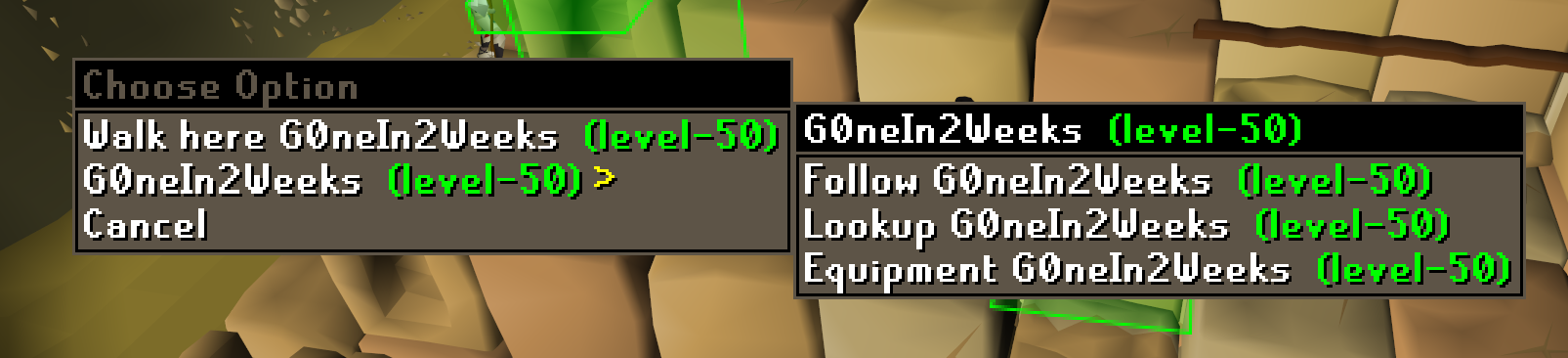 gilded kayak
interface styles
twin pivot
thanks!
 ripe coral
my debuff timers are off, how do i fix or reset this?
 ruby quail
anyone know why my idle notifier will randomly stop notifying? usually just close client and reopen, but a little annoying
 jade haven
Had a weird thing occur today and yesterday.
After opening runelite and playing for a bit i noticed i was unable to interact outside of the game, i am able to tab in and out of runelite and see that i'm hovering over different menu options in discord, browsers and top/sidebars of runelite, but i cannot interact with anything EVEN runelite other than the gameclient itself until i Ctrl+Alt+Del
Not sure if it's a runelite issue or not, tried to restart comp and replicate to record but didn't manage to do it
 cloud cape

any ideas why this isn't showing plugin names?
had this before where plugin is enabled but not actually functioning
sonic birch
ripe coral
my debuff timers are off, how do i fix or reset this?
Can you hit us up with a picture or more explanations?
Do you mean the timers from the boost plugin?
sonic birch
ruby quail
anyone know why my idle notifier will randomly stop notifying? usually just clos...
Make sure notify while focused is enabled in the runelite config. Also enable game message notifications in there so you can see if you are getting the notifs or if it's an audio problem
sonic birch
jade haven
Not sure if it's a runelite issue or not, tried to restart comp and replicate to...
Doesn't really sound like a rl issue tbh
sonic birch
cloud cape
!hubs
haughty pumiceBOT
hubsupport: Support for hub plugins should be directed to the author of the plugin. You can find the support link by searching for the plugin in the Plugin Hub panel and clicking the ? button on the plugin, or by right-clicking the plugin in the plugin panel and clicking the Support menu option.
 edgy leaf
when we back on?
ruby quail
sonic birch
Make sure notify while focused is enabled in the runelite config. Also enable ga...
Notify while focused is enabled. Not an audio problem unfortunately - the flashing indicator doesn’t activate either.
cloud cape
sonic birch
!hubs
I've had the same thing with other plugins
Eg the tob plugin
Deffo not a rl issue?
sonic birch
cloud cape
Deffo not a rl issue?
If it is a core plugin, it is a runelite issue
If it's a hub plugin, it's a hub plugin issue
sonic birch
ruby quail
Notify while focused is enabled. Not an audio problem unfortunately - the flashi...
!flow can you get me a video in safe mode with game message notifications enabled of this happening?
haughty pumiceBOT
flowchart: Please refer to this flowchart for further troubleshooting.
 glossy cobalt
Sorry if this has been asked before but runlite is running really really slow on an Intel macbook >5 fps. Is there a fix?
sonic birch
!flow try safe mode and green tree
haughty pumiceBOT
flowchart: Please refer to this flowchart for further troubleshooting.
Windows
Run the RuneLite (safe mode) shortcut, or with a Jagex account, first run the RuneLite (configure) shortcut and tick the Safe mode box, then launch RuneLite via the Jagex launcher.
Mac
In Terminal, run:
/Applications/RuneLite.app/Contents/MacOS/RuneLite --configureTick the Safe mode box. Launch RuneLite.
If it's not working, download and install the updated RuneLite launcher from the website link in #welcome. You don't need to uninstall your current version. You will not lose any settings or plugins. Then try running safemode again.
 gritty raven
guys i’m trying to use the aggression timer but i noticed that sometimes the box changes it parameters?
so instead of going to my before location to get aggro again now i have to move a little bit out and i don’t get the full 10min timer now
anyone know why?
sonic birch
The box should change the size/location a bit afaik
Think that's just how the game works
 grim vault
Hi, so I've been taking a break and came back, noticed that clan chat messages disappear after the person logs out, but comes back when they log back in, was it always this way? am i going crazy? is there any way to persist everything?
sonic birch
Depends on what you describe as clan chat messages
If you mean regular chat messages of cc members, they persist
grim vault
Other people's messages in my clan's chat
haughty pumiceBOT
flowchart: Please refer to this flowchart for further troubleshooting.
sonic birch
If they don't persist in safe mode, turn off all core plugins to check if it's not some jagex setting or w.e
grim vault
All right I'll try to reproduce it with an alt or smth
 desert berry
Hello, Runlite is only opening as the vanilla client now. Opening it through Jagex launcher and without it still only opens a very basic login screen. Installed jagex lancher and runelite again and still same issue. Mac OS system M1. RL and Jagex launcher have been working perfectly for years for me and I closed RL down the other day and have had this issue now. Tried safe mode and still same issue.
sonic birch
desert berry
Hello, Runlite is only opening as the vanilla client now. Opening it through Jag...
!lost
haughty pumiceBOT
 neon lantern
I just closed my client for 30 mins (using jagex launcher) and althought still being logged in to my runelite account, all my profiles are gone and it only has the default profile and default plugins. Nothing saved in import profile either.
The only thing i can think of that has change is i updated my nvidia drivers, but i did that several hours beforehand and had launched the client multiple times before that too with plugins showing up.
Any ideas, or fastest fix probably just making another profile and setting up my plugins again? ( I had cloud sync off, and have tried relogging into my runelite, restarting client completely as well as computer)
o
grim vault
oblique plume
its this
Huh it IS, disabling the chat filter brings back the messages
sonic birch
It is using ClanChannel.findMember iirc
desert berry
sonic birch
!lost
This is all I get. Logged in my account on RL website though.
sonic birch
neon lantern
I just closed my client for 30 mins (using jagex launcher) and althought still b...
!lost
haughty pumiceBOT
sonic birch
desert berry
This is all I get. Logged in my account on RL website though.
I know, follow those steps
sonic birch
sonic birch
It is using ClanChannel.findMember iirc
Using ClanSettings.findMember might fix this
sonic birch
sonic birch
I know, follow those steps
Oh, you mean no sidebar
Try cmd+f10 or cmd+f11
That's the default hotkey to hide/unhide the sidebar
grim vault
If filtering is not turned on for the clan chat why is it affecting it in the first place?
sonic birch
Iirc it does something like this:
grim vault
these are my settings + a regex list
 sonic birch
Determine if person is clan chat member by getting the clan channel, using find member. Same for guest clan. Then if the person is not in either, it's deemed as not a clan member.
Potentially this can be fixed by also using ClanSettings.findMember (this does not contain clan guests though)
desert berry
sonic birch
Oh, you mean no sidebar
Awesome! Sidebar was hidden and a new profile was selected. Thanks for the help!
neon lantern
desert berry
This is all I get. Logged in my account on RL website though.
this is the part that helped me, had to go into the profiles2 folder in import profiles and find it

thanks guys ❤️
sonic birch
grim vault
If filtering is not turned on for the clan chat why is it affecting it in the fi...
You could create a GH issue regarding this and someone might take a look at it
desert berry
neon lantern
this is the part that helped me, had to go into the profiles2 folder in import p...
Thanks for the help! Got it fixed!
 mystic idol
I am fairly consistently crashing when in priff/tping to priff
possibly related to loading chunks in priff since I would crash when respawning in priff or tping to priff
regal quest
there’s a plugin that hides a bunch of stuff in priff, I used it on my laptop cause fps would drop so hard
sonic birch
mystic idol
I am fairly consistently crashing when in priff/tping to priff
I think this is either you running the 32 bit client or running out of memory
Can you check in task manager if you are running 32 bit rl?
sonic birch
mystic idol
how can I tell?
 grave marsh
Hello, I am having an issue with my game client not recognizing my razer naga function keys. Any ideas?
oblique plume
we have extra mouse buttons disabled by default in "runelite" settings
 oblique plume
are you out of system memory then?
mystic idol
probably what happened, a lot of things started freaking out just now and I restarted my pc
grave marsh
oblique plume
we have extra mouse buttons disabled by default in "runelite" settings
Hmm the side buttons on the mouse still aren't working. Worked last night and no updates any suggestions?
oblique plume
we didnt change anything so if they were working then its not RL
leaden trail
sonic birch
You could create a GH issue regarding this and someone might take a look at it
Maybe I'll actually (briefly) join your clan to test something 😛
winged nymph
dont want to ping geheur but does anyone know if the dmm transmogs/spec animations will be added to the animation swap plugin? I messed up when buying the kits and cant afford to buy the weapon one anymore...
and I figure the chances of jagex fixing it are 0
leaden trail
Geheur would be the person who would know that
winged nymph
I feel bad pinging people :C
leaden trail
He's really the only one who would be able to answer your question though.
 hallow stag
Can i copy all my runelite settings from 1 computer to another
 unborn zodiac
Real weird issue idk if anyone else has experienced, I am unable to get any runelite plugin sounds (c engineer, wildy player alarm ping etc) to play for my alt account (different runelite profile setup from my main account), I have two sounds customized in the c engineer plugin but that is the only thing different from base settings. I've tried messing with the audio mixers but nothing has worked as of yet
sonic birch
hallow stag
Can i copy all my runelite settings from 1 computer to another
!transfer
haughty pumiceBOT
sonic birch
leaden trail
Maybe I'll actually (briefly) join your clan to test something 😛
Should just join permanently smh
sonic birch
unborn zodiac
Real weird issue idk if anyone else has experienced, I am unable to get any rune...
If it's just the hub audio stuff, contact the author(s)
For general audio troubleshooting:
leaden trail
sonic birch
Should just join permanently smh
Then I'd feel obligated to play and do stuff.
 keen sedge
Is the 'XP Tracker' resetting on RL exit intended, and if so is it change-able to persist through sessions?
sonic birch
Yes; not supported rn
leaden trail
Yes, not currently.
Consider using an external tracker like Wise Old Man. There's a plugin that will refresh it every time you log out as well
keen sedge
Alright, thanks.
 slate saddle
Can the bank tags plugin be made to apply tag to all barrows equipment? Like Karils 100 but also Karils 75 so that when I pull up the bank tag tab, it just shows whichever I have rather than greying it out
 hollow olive
i think you hold shift and drop it onto the tag to fuzzy it
 raven nymph
Is it possible to change the color of the predicted hit also when offensive prayers are active (like augury)?
 sonic birch
raven nymph
Is it possible to change the color of the predicted hit also when offensive pray...
sonic birch
raven nymph
Is it possible to change the color of the predicted hit also when offensive pray...
!hubs
haughty pumiceBOT
hubsupport: Support for hub plugins should be directed to the author of the plugin. You can find the support link by searching for the plugin in the Plugin Hub panel and clicking the ? button on the plugin, or by right-clicking the plugin in the plugin panel and clicking the Support menu option.
echo narwhal
echo narwhal
here's evidence its runelite
test 1:
disable wifi, disabled bluetooth, opened runelite
result: no battery loss
test 2:
enabled wifi, enabled bluetooth, closed runelite
result: no battery loss
test3:
enabled wifi, enabled bluetooth, opened runelite
result: no battery loss
??????? will keep testing
zealous cedar
I think everyone agrees it is runelite, but it is likely due to some detail of how java interfaces with the macos sound system and isnt something which we have immediate knowledge of
there is even an issue for it https://github.com/runelite/runelite/issues/10886
the problem is basically I don't know how macos or java audio works
echo narwhal
runelite doesn't launch without an internet connection, yeh?
i'm going to start closing runelite every night and see if my laptop dies overnight.
just for funsies
 worthy ether
Evening, whenever I open runelites sidepanel it "moves" my infoboxes and boost info etc as showed in the video, is there a way to make them not move at all?
zealous cedar
change "Resize type" to "Keep game size"
worthy ether
Still same issue sadly
zealous cedar
maybe your window is maximized? it cant keep game size when you are out of screen space
worthy ether
Yes, and fair point. So can't play maximized then?
sonic birch
not if you don't want this to happen. where would the sidepanel expand to maximized?
alternatively just put the infoboxes in the anchors
worthy ether
Gotcha, I'll use the anchors 👍 Thank you!
winged nymph
why does this happen when switching monitors

the birdhouses is under the tab and the activity advisor is clipping the inventory
round jacinth
monitors are different sizes so the scaling of ui is going to impact it differently
idk about the birdhouse thinf
round jacinth
you can remove that advisor button too
sonic birch
You can change the ui scaling percentage a bit in stretched mode if needed
winged nymph
i have the scaling at 135%
round jacinth
135% on monitor 1 might look better as 117% on monitor 2
winged nymph
round jacinth
you can remove that advisor button too
i like it
sonic birch
You can reduce it to e.g. 100% so it might look better on both sizes. For automatically changing it, you'd have to look to a hub plugin
winged nymph
surely nobody has made a plugin where i can have 2 scalings depending on monitor
round jacinth
i dont think so
sonic birch
client resizer has the option to do it based on your monitor or hotkey
round jacinth
i know im on my desktop for 80% of play time and laptop for 20% and suck it up for the 20% that the scaling is wonky
oh that thing :<
meh
winged nymph
sonic birch
client resizer has the option to do it based on your monitor or hotkey
you need a degree to figure out how to use that
round jacinth
no you just ask him how to use it
winged nymph
 round jacinth
because he made it
winged nymph
how do i use it
sonic birch
check the readme first, because I added a step by step guide on how to use it
winged nymph
what the hell is a readme
sonic birch
if that does not help, ping me in #general but the step by step guide should have all the info
 alpine prawn
Can I get these tooltips to only show while holding alt?

 limpid orbit
anyone had any issues with sound? my blade of saeldor is making the sound as if i'm using a bofa?
charred wind
alpine prawn
Can I get these tooltips to only show while holding alt?
No but you can disable them in mouse tooltips, or contribute an option to display (they may or may not accept) 🙂
alpine prawn
I'm a programmer so I might try to add this feature, is there a safe way to work on this feature and test it in game without breaking TOS or worrying about getting banned while I develop it?
 wanton edge
Are there any new updates to the game or runelite that makes the client instantly click the "Click here to play" ? I have some f2p ge alts where I basically switched every plugin off except a couple (low detail, menu swaps, stretched mode etc). Every login it skips the welcome screen :S
round jacinth
i dont think a plugin can skip it and there isnt an in game setting to skip it either
wanton edge
round jacinth
i dont think a plugin can skip it and there isnt an in game setting to skip it e...
Sometimes depending on my lag I can see the welcome menu for about a split ms, but most of the time I don't even see it. I have one account that I didn't close and reopen today and that account does not skip the welcome menu
Edit: Some of my fellow bulk seller friends told me it happened to them in the past too. One said that logging out, then back in leaves the message box open, which was correct. So might actually be a in game error? Looks like it at least.
 rigid glacier
 round jacinth
??
 fresh swift
wrong neighbourhood pal
leaden trail
lmao
 charred vigil
idle notifier doesnt seem to be working for rooftop agil, any ideas?
 vagrant brook
If anyone has a steam deck, how were you able to sign into runelite? Pressing the "Sign In to Runelite" button does nothing
round jacinth
sign in as in the google acc sync?
i think you need xdg-open installed for the links to work on a unix based OS like steamdeck uses?
gilded kayak
yes, try checking the logs and see if there's an angry error about it
 twilit garden
Does anyone know if there is a chat command for pvp arena rank, like you can do !lms for your lms rank
gilded kayak
we don't have a native command, but the lvl command does a hiscore lookup
so try doing !lvl pvp arena - rank
exactly like that
twilit garden
It worked, thanks
 merry sparrow
@small musk hi, question about colo plugin, is it possible to hide last wave loot aswell or does that work only for next wave loot?
tender iron
How do i get rid of these timers?
 sonic birch
!flow
haughty pumiceBOT
flowchart: Please refer to this flowchart for further troubleshooting.
 haughty bronze
I just did a factory reset of my OS, i had signed into my google account before hand - i thought it backed up the configs when connected with RL. Or is there something i missed? None of my config is there when signing back in
charred vigil
dont know if still relevant, but u need to open and close it after signing in
haughty bronze
charred vigil
dont know if still relevant, but u need to open and close it after signing in
No luck with that 😦
charred vigil
ah idk then sorry, there is prolly a command for it coz its a common issue
primal canopy
haughty bronze
I just did a factory reset of my OS, i had signed into my google account before ...
I just did the same as of recent
Turns out you had to click the cloud on your profile to get it to sync
if you didn't do that, I hate to tell you but your runelite is reset
Been dealing with resetting up the client myself for the last day or so
haughty bronze
@primal canopy Awh man! I didn't do this either - seems like i'll be perfecting my client again 😢 Ty for the info tho!
primal canopy
yeah it didn't used to be like this until they made the profile update. i was totally oblivious to it too
at least as far as I'm aware
gilded kayak
on by default mean we suddenly sync every profile that everyone has, which would probably triple how much we have to sync
and unfortuantely ontop of that, people get really really really really really mad when you auto do things
 small musk
merry sparrow
<@138318226181324800> hi, question about colo plugin, is it possible to hide las...
small musk
merry sparrow
<@138318226181324800> hi, question about colo plugin, is it possible to hide las...
I figured no one would want it since you'll want to decide whether to leave if you pull a unique early
 frank thunder
what file do I add to a ddivided
sorry
what file do I add for runelite in a divided tunnel for VPN?
sonic birch
You could check that github issue, but generally split tunneling just doesn't work with RL
frank thunder
thanks
merry sparrow
small musk
I figured no one would want it since you'll want to decide whether to leave if y...
understandable.
 zinc fox
Hello! Is there a setting in an official plugin or a phub plugin to reorder the icons on the rightmost sidebar?
 leaden trail
Nope
zinc fox
okay cool, thanks for the response
 hard pebble
I keep seeing this message under certain item drops and not sure where it's from and how to get rid of it. Anyone know?
 gilded kayak
i would assume its quest helper since that looks to be the quest icon, and their plugin icon
hard pebble
Ah yeah I think you're right. Thanks!
 upbeat wasp
Anyway to get ahold of jagex other then twitter? I can’t login and I’m thinking I’ve been hacked. I could probably recover before they get into my bank if I could get jagex to lock the account
I’m on my account now through steam but I don’t know the password
 mortal pond
upbeat wasp
Anyway to get ahold of jagex other then twitter? I can’t login and I’m thinking ...
mortal pond
upbeat wasp
Anyway to get ahold of jagex other then twitter? I can’t login and I’m thinking ...
This channel is for RuneLite support, try the #account-help channel on the official osrs discord
!newplayer
haughty pumiceBOT
If you are new to OSRS, make sure to follow this excellent guide on OSRS wiki: https://oldschool.runescape.wiki/w/New_player_guide. You can also join official OSRS Discord here: https://discord.gg/osrs
 gloomy helm
yo my blade of saeldor has the incorrect sound
i dont have any plugin related to that on
leaden trail
Does it happen in safe mode?
haughty pumiceBOT
Windows
Run the RuneLite (safe mode) shortcut, or with a Jagex account, first run the RuneLite (configure) shortcut and tick the Safe mode box, then launch RuneLite via the Jagex launcher.
Mac
In Terminal, run:
/Applications/RuneLite.app/Contents/MacOS/RuneLite --configureTick the Safe mode box. Launch RuneLite.
If it's not working, download and install the updated RuneLite launcher from the website link in #welcome. You don't need to uninstall your current version. You will not lose any settings or plugins. Then try running safemode again.
 regal remnant
Are there any plans to fix the Arceuus spell ''Dark Demonbane'' when using the animation smoothing plugin? It looks so janky
sonic birch
You can add it to the GH issue if it isn't in there yet
Nowadays the blocklist is not internal anymore so I added good for first contribution iirc
haughty pumiceBOT

ghost
Type
Incorrect behavior
Operating System
Windows
...
 indigo wolf
any idea why the gpu plugin seems to have crashed the client? the client log doesn't say anything, it happened at 13:34
indigo wolf
sec, I'll remove the logs
sonic birch
It's probably this but hard for me to read jvm crash logs on mobile and impossible to read the client log
indigo wolf
here's one where any bank related logs have been removed
indigo wolf
I'll check if I have that on, though it's odd that it only now happened
it felt "laggy" before the crash
sonic birch
Still takes me 5 hours to scroll down on mobile, I might take a look on desktop if I remember
indigo wolf
alright, thanks
sonic birch
indigo wolf
it felt "laggy" before the crash
If you went down to single digits fps, it's sometimes a heap oom but I can't find heap in your log when I use the search function in chrome so that ain't it
Think it's just that gh link
indigo wolf
sonic birch
If you went down to single digits fps, it's sometimes a heap oom but I can't fin...
Wasn’t quite that, the fps counter said 90+ iirc but it didn’t feel like 90, maybe ballpark of 10-20
indigo wolf
sonic birch
<https://github.com/runelite/runelite/issues/10628#issuecomment-1771957664>
what the fuck, I updated the bios to disable that and then I received some MSI installer automatically which was basically just adware where it felt like going back in time to 2000 where every installer wanted to give you mcaffee and a thousand toolbars...
sonic birch
Ok, don't download weird or incorrect stuff
indigo wolf
yeah, had to tick like 10 boxes that I don't want stuff xd
sonic birch
fossil summit
indigo wolf
Wasn’t quite that, the fps counter said 90+ iirc but it didn’t feel like 90, may...
you use vsync?
fresh swift
sonic birch
Ok, don't download weird or incorrect stuff
Motherboards can force download their “drivers” through windows update
Asus has the shame shit with armory crate, gotta disable it in bios
O maybe that msi isnt MSI 
sonic birch
Think he means .msi, yeah
 hardy carbon
can anyone assist me regarding fps issues with runelite? For context, if I use HD OS I have consistent 100 fps, but for runelite I get fps drops to like 10/20 at certain points
indigo wolf
fresh swift
Motherboards can force download their “drivers” through windows update
ye this is what happened
sonic birch
hardy carbon
can anyone assist me regarding fps issues with runelite? For context, if I use H...
!flow try green tree, you probs got some bad hub plugin
haughty pumiceBOT
flowchart: Please refer to this flowchart for further troubleshooting.
indigo wolf
fossil summit
you use vsync?
no
sonic birch
sonic birch
!flow try green tree, you probs got some bad hub plugin
Also, stuff like prif and fossil island are just very intense
There are 2 hub plugins that make those areas a lot better
hardy carbon
!flow try green tree
haughty pumiceBOT
flowchart: Please refer to this flowchart for further troubleshooting.
 rough flame
Hi guys. I have issues starting runelite since today.
It opens the window, “downloading bootstrap” and then closes the window again. What can I do?
zealous cedar
Check the logs
haughty pumiceBOT
To find the logs, you can do one of the following:
- If your client failed to open, click the
Open logs folderbutton. - Open the screenshot directory by right-clicking 📷
Camerabutton, navigate 1 directory up, then open logs folder. - Navigate to
%userprofile%\.runelite\logson Windows or$HOME/.runelite/logson Linux and macOS.
Upload the log files named client and launcher by dragging them to Discord. If there are files prefixed with jvm_crash dated from today, upload them too.
rough flame
Hi Adam, I’m unfamiliar with these steps. I’m playing on a MacBook atm. Can you guide me through it perhaps?
leaden trail
Go to $HOME/.runelite/logs and upload the files client.log and launcher.log here
echo narwhal
echo narwhal
i'm going to start closing runelite every night and see if my laptop dies overni...
day 2 and the bug cant be recreated
tl;dr m1 mbp with macOS Monterey was dying overnight. 'coreaudio' started for Runelite was preventing sleep. it's still preventing sleep however the laptop charge is no longer depleting overnight. much to think about
things I immediately did:
try runelite safemode
reinstall runelite
what im thinking it may be:
a bug with macOS low power mode on battery and having runelite open
 reef inlet
Good morning everyone, if someone can please help me with runelite. My clients are stacking on top of each other and I can't move it at all or click on any plug ins. Any one know what to do? 🙏🏼
leaden trail
Do you have "always on top" enabled, maybe?
reef inlet
@leaden trail how do I check if I have this option enabled? Thank you for the fast response
leaden trail
Actually if you can't click on anything that might be kinda hard.
Can you interact with the client if you only have one open?
reef inlet
I can barely interact with the client. Like I can't even close the client with the x button on the top right
sonic birch
You've got some pop-up box behing your client probably
!flow open in safe mode, go to the runelite config, disable always on top
haughty pumiceBOT
flowchart: Please refer to this flowchart for further troubleshooting.
sonic birch
Then open outside of safe mode again
leaden trail
It'll be under "RuneLite" in the plugins list
sonic birch
Please do let us know what pop-up panel it was if you find one
reef inlet
I'm sorry I'm so bad at PC. I'm looking at the flowchart and trying to locate where the safe mode option is @sonic birch @gaunt cave
Okay I found safe mode
sonic birch
follow the purple tree if you can't find it
reef inlet
Trying to find runelite config now. I do have safe mode opened though
round jacinth
it will be called runelite as if it was a plugin
reef inlet
@round jacinth I have runelite opened on safe mode and I still can't click on my plug ins. Like I still can't exit the client with the x button on the top right
I've tried to uninstall and reinstall the app also
sonic birch
can you give us a video of that?
sonic birch
Preferably you record it with obs and then upload the file directly or to youtube/streamable
sonic birch
it's private
round jacinth
make it unlisted rather than private
 echo narwhal
does running in safemode disable all plugins? ive had a similar thing happen when using GPU graphics
round jacinth
safemode disables gpu and hub plugins, running only core
echo narwhal
are you able to resize the window at all? @reef inlet
echo narwhal
😂
sonic birch
I thought his desktop was the client, since he has a client screenshot as wallpaper LOL
echo narwhal
mans proud of his fire cape o7
sonic birch
Gotta respect that
Well, the only thing I got is checking logs, idk what could cause this in safe mode
!logs
haughty pumiceBOT
To find the logs, you can do one of the following:
- If your client failed to open, click the
Open logs folderbutton. - Open the screenshot directory by right-clicking 📷
Camerabutton, navigate 1 directory up, then open logs folder. - Navigate to
%userprofile%\.runelite\logson Windows or$HOME/.runelite/logson Linux and macOS.
Upload the log files named client and launcher by dragging them to Discord. If there are files prefixed with jvm_crash dated from today, upload them too.
 sinful swallow
hey guys!
I'm new to RS and even newer to RuneLite, I installed RuneLite just yesterday on a strangers recommendation, but I have a couple problems with it and was wondering if someone could help me? 😔
sinful swallow
Of course.
The first is font size.
I have kinda poor eyesight. I did scale up the UI, but it makes all the menus and stuff really huge and they cover the screen a lot, and even then the text is still kinda small in comparison... Is there a plugin or some other way to increase font size without scaling up the UI?
The quest dialogs are quite funny but I hate having to squint and strain my eyes to read them 😔
gilded kayak
the 2 options are the stretched mode plugin, and the scale launcher argument
!config scale is done here, stretched mode is a plugin
haughty pumiceBOT
sinful swallow
I am using stretched mode, yes
sinful swallow
ok so... I launch via de Jagex launcher since I have a Jagex account
I cant seem to login when I use the RL launcher
gilded kayak
the way thats listed on that page, also works for jagex accounts
sinful swallow
I will try. Give me a moment, I'm not very competent lol
gilded kayak
open runelite (configure) from your windows start menu | put some value 1.5 or 2.0 in the scale box | save | start runelite via the jagex launcher again
sinful swallow
ok, it worked
however
at 1.5 it works fine
at 2.5, things go off-screen
I dont seem able to resize the game's window in a way that lets me see the whole thing 😆
 stuck warren
Hey how do you search for quest items for a quest in advanced search?
round jacinth
idk what you mean by advanced search
quest helper can help identify the items right away or compare your bank against the wiki'
weak sinew
is there a way i can set a hotkey to close my bank?
echo narwhal
esc closes your bank doesnt it?
gilded kayak
i think so
echo narwhal
if youre talking about rebinding, that may be in the game settings
hollow olive
esc is in the rs game settings to close interfaces yep
weak sinew
doesnt work for me :(




 wind owl
can you 1 click tele edge with glory like you can on max cape?
wind owl
yeah, but not in inventory?
gilded kayak
but the rule change allowing max cape, was explicitly stated to be only for capes
no for that, it's still against the rules to do
wind owl
ok
weak sinew
ahh i see now it does, ty
is there a way i can change the key for that?
from esc to something else
gilded kayak
probably not if nothing else comes up when u search for that
weak sinew
just found it haha, if u change it in keyremapping it works so u can press a key for inv and to close the bank
reef inlet
@echo narwhal @sonic birch I apologize boys work was going crazy for a minute. But no I cannot resize the client at all I can't even close it with the x button.
echo narwhal
you have restarted your computer, yes? 🤐
sonic birch
Restarting your pc is a good suggestion at this point indeed. If it's still fucked afterwards, do #support message but I doubt the logs will contain useful info
 dire jackal
Hello, recently upgraded my mobo and cpu, had to do a fresh window install. I then reinstalled RL and signed in my profile but it is not syncing my profile so I do not have any plugins
sonic birch
!transfer if you got the old data backed up somewhere
haughty pumiceBOT
sonic birch
!lost if not, but you might not have it cloudsynced
haughty pumiceBOT
 robust ruin
Hey guys, So when I launch runelite, it loads my character from my jagex launcher. any way to fix that? So i can login to a different account thats not linked to jagex acc
leaden trail
Launch RuneLite but not through the Jagex launcher
robust ruin
Thats what im saying, my shortcut still lauches the jagex acc?
haughty pumiceBOT
@robust ruin To find the logs, you can do one of the following:
- If your client failed to open, click the
Open logs folderbutton. - Open the screenshot directory by right-clicking 📷
Camerabutton, navigate 1 directory up, then open logs folder. - Navigate to
%userprofile%\.runelite\logson Windows or$HOME/.runelite/logson Linux and macOS.
Upload the log files named client and launcher by dragging them to Discord. If there are files prefixed with jvm_crash dated from today, upload them too.
dire jackal
sonic birch
!lost if not, but you might not have it cloudsynced
do not have a back up file and clicking the sync button is not doing anything, can see from the runelite page it has all my records
leaden trail
You would have had to have enabled sync
robust ruin
My client is loading..... just not to the login screen.
sonic birch
dire jackal
do not have a back up file and clicking the sync button is not doing anything, c...
Don't click the sync button. That might override it if it is the correct profile but with incorrect settings
Try step 2 again
robust ruin
robust ruin
My client is loading..... just not to the login screen.
It loads my character from the jagex laucher
leaden trail
robust ruin
My client is loading..... just not to the login screen.
I get that, post your logs so I can take a look to see what's going on
robust ruin
leaden trail
I get that, post your logs so I can take a look to see what's going on
pmed
dire jackal
sonic birch
Don't click the sync button. That might override it if it is the correct profile...
step 2 within 'lost settings'? if so I have clicked both profiles and they do not bring up my previous plugins and loot
sonic birch
dire jackal
step 2 within 'lost settings'? if so I have clicked both profiles and they do no...
Your loot is saved in something else.
So it's your plugins at best
Double click btw, not single click
If that does not work, you could technically try to restart the client after 10 mins on both profiles and see if it downloads the plugins
I have hit the rate limit once
But if double clicking on different profiles to swap to them does not work, it probably means you didn't have it cloudsynced
dire jackal
was that something I had to turn on before I cleared my data from my computer?
sonic birch
Yep
robust ruin
do i need to reinstall runelite?
 safe cloud
So I'm messing with the built in xp calculator plugin and having some problems. For prayer my Current Exp field keeps switching between my current prayer xp and a lower amount which I'm assuming is the amount of xp I had at the start of my curretn grind session
sonic birch
I think that's the xp when you enter a current level and press enter or unfocus it or something
It'll go to the minimum xp for that level then iirc
I don't really use the xp calculator though
safe cloud
ok yeah, it's something like that. i just need to make sure i dont accidentally click the level field
 glass sentinel
for some reason i cant seem to get my full loot tab back on my runelite i got a new pc and ever since it reset on runelite i have 2 seperate logs now under same account name how do i get my old log back imported onto runelite?
logged into runelite and can see everything on the desktop but now i have an entire new loot tab thats now sepereate from the old one
haughty pumiceBOT
leaden trail
you have to pick one or the other though I think, I don't believe they can be merged
glass sentinel
ill go with the better sized one the old one if able to checking that page now
glass sentinel
yea so i guess thats the only way i now have my old list back but anything new ive gotten is gone, i did save the tracker info from newest list but no way for me to copy and paste the code of it into the current runelite now ? or am i just rucked?
leaden trail
there's no way to import it, no
 eager sequoia
anyone know how to fix this every since i got a new monitor like the chat text is all messed up
 glass sentinel
thanks anywho you got me my old stuff back atleast
sonic birch
eager sequoia
anyone know how to fix this every since i got a new monitor like the chat text i...
 pearl lantern
I found out that my idle notifier stops working after my mac has been to sleep while runelite was open. If and only if I restart runelite, the idle notifier will work again. Other runelite notifications are working fine regardless of sleeping the mac.
Anyone familiar with this issue and / or knows how to solve it?
 vivid fossil
Trying to load up runelite and keep getting this error trying to run the client. Am I missing a step somewhere?

Iv tried cleaning and installing
checked my compiler version
branch is up to date
stone parcel
Maybe this is one of the things solved by running Maven a few more times.
vivid fossil
I wish things were that simple
gilded kayak
well i've got great news for you
vivid fossil
If you are about to say run the maven install, iv tried that multiple times already
gilded kayak
what about a clean install
vivid fossil
yes
vivid fossil
vivid fossil
Iv tried cleaning and installing
^
gilded kayak
well unfortunately i'm 1000% sure that issue is fixed by that
mvn clean install -> build -> run
unless
this is the classpath issue where intellij just forgets it
if it's that u should reimport the project
vivid fossil
i just cloned it down and opened it, havent used intellij much, how do I reimport?
gilded kayak
https://stackoverflow.com/a/9981056 apparently its this
i love when 2 issues display in the exact same way
really keeps us on our toes
vivid fossil
The life of software development
Even better when the error your console spits out isnt even relevant
sonic birch
It's in the build guide
vivid fossil
Guys I followed the build guide
sonic birch
Not well apparently: https://github.com/runelite/runelite/wiki/Building-with-IntelliJ-IDEA#make-sure-intellij-is-picking-up-changes-from-maven Additionally that should not be required with:
 vivid fossil
Is this how you treat everyone trying to contribute?
vivid fossil
sonic birch
Yes i did that
I even tried recloning my fork since its been a good year since I last updated it
 serene nymph
just getting this when I try to launch. it launches fine with a vpn.
 gilded kayak
I would guess your ISP is having an issue then
u can turn a VPN off after RuneLite starts
u dont have to play with it
serene nymph
I've moved houses in the past week and it's still doing it weirdly
gilded kayak
ah well
serene nymph
uninstalled/reinstalled as well
vivid fossil
Okay I got it working after I made a run config to skiptests
And the build sucessfully finished
So why does the install fail when tests are ran?
vivid fossil
Highly recommended is not the same as required
 vivid fossil
gilded kayak
idk did it say what test failed
vivid fossil
gilded kayak
idk did it say what test failed
1 sec
I thre the log into notepad
I ignored it because it said to not worry about them
 gilded kayak
idk someone rewrote the build guide a few months back because they didn't like what we had
nothing seemed objectively wrong so we merged their version
they were adamant that what we had before wasn't good enough
vivid fossil
I opened a issue https://github.com/runelite/runelite/issues/18146

GitHub
Type Other Operating System Windows OS Version 10 Bug description When following the guide: https://github.com/runelite/runelite/wiki/Building-with-IntelliJ-IDEA At this step: https://github.com/ru...
 silk lichen
Hi,
my PC crashed while RL was open. After a restart all my settings and 3rd party plugins are gone. I'm logged into my RL account.
Any way to recover?
haughty pumiceBOT
silk lichen
Allready tried that, sadly I only have a single profile, so no switching
Edit: Found a week old backup on my NAS. Thanks for your help.
 woven rapids
can someone help me?
 potent oriole
hi, switched to runelite recently and the +10 buff during forestry doesnt show anymore and idk if anything i setup on runelite caused it, is there a way to make it show up again?
 proper robin
Can somebody help me with this fatal error? I'm trying to open RuneLite with the Jagex Launcher but it won't work.
 leaden trail
It's something that hasn't been added to RuneLite yet. I believe there's a PR that would add it but that hasn't yet been merged
proper robin
So there is no way to solve it atm?
haughty pumiceBOT
To find the logs, you can do one of the following:
- If your client failed to open, click the
Open logs folderbutton. - Open the screenshot directory by right-clicking 📷
Camerabutton, navigate 1 directory up, then open logs folder. - Navigate to
%userprofile%\.runelite\logson Windows or$HOME/.runelite/logson Linux and macOS.
Upload the log files named client and launcher by dragging them to Discord. If there are files prefixed with jvm_crash dated from today, upload them too.
leaden trail
woven rapids
can someone help me?
With?
proper robin
 leaden jewel
Hello everyone, can someone help me remove this grey smiley face thats overlaid on runelite? I'm not sure whats causing it-- thank you for your time!
 leaden trail
leaden jewel
Hello everyone, can someone help me remove this grey smiley face thats overlaid ...
leaden trail
leaden jewel
Hello everyone, can someone help me remove this grey smiley face thats overlaid ...
I think it's something from Discord rather than from RuneLite, someone else had that happen yesterday
leaden jewel
Oh that would make sense as I did have it open-- I'll try to figure out how to get rid of it as it's really bothersome--Thank you for your response!
leaden trail
proper robin
You can try following this: #support message
I've never seen that error personally so give that a shot and we'll see if it works for you
proper robin
leaden trail
You can try following this: https://discord.com/channels/301497432909414422/4424...
Where can I find this folder: try renaming .runelite/profiles2 to something else and then following ?
leaden trail
proper robin
Where can I find this folder: try renaming .runelite/profiles2 to something else...
Go to the folder where you got your logs from and then go up a level, and that'll be your .runelite directory. profiles2 will be in there
proper robin
Ok thanks, do I rename it to something specific?
leaden trail
Just call it old-profiles2 or something so you can find it easily in the future if you need to
proper robin
It works, many thanks!
 weary solar
There are test failures. Please refer to /Desktop/rl/cache/target/surefire-reports for the individual test results. Please refer to dump files (if any exist) [date].dump, [date]-jvmRun[N].dump and [date].dumpstream.
Someone know how to fix this?
leaden trail
This channel is for release client support, #runelite would be more appropriate. But this is answered in the build guide
weary solar
leaden trail
This channel is for release client support, <#301497432909414422> would be more ...
sorry
 cosmic depot
Hi guys,someone on Facebook shared that when used RuneLite and was away from game awhile for meal after meal,back to game,items sold to Grand exchange and account hacked. What could the reason be? Is it going to do with 3rd party RuneLite plug-ins as some of the user commented or other form of way to get him hacked?
sonic birch
Let me state first that runelite downloaded from the official link in #welcome and using plugins that are in the official pluginhub is completely safe and is according to jagex's guidelines!
As to how he got hacked, there are a ton of options. Already had virus on his pc, clicked a phishing link, installed a fake version of runelite, had a weak password (potentially used it also on another website) and no 2FA, same for his email, shared his account and that person stole it etc etc.
The important part is that the official RL download and the official pluginhub plugins are not malicious, and they conform to Jagex's guidelines.
leaden trail
To add a little bit to that, anyone telling you to download RuneLite (Pro/Plus/etc) for "extra plugins" or anything like that is trying to lure you.
cosmic depot
Thank you for assisting me guys. I will let the guy know the answers directly from RuneLite contributors.
sonic birch
We generally recommend doing this when people get hacked:
haughty pumiceBOT
You've downloaded a fake client, and your account has been compromised. Remove the fake as soon as possible to minimise further damage.
The following actions should be performed from a secure computer or secure mobile device:
- Change your RuneScape password
- Remove and re-add Authenticator to RuneScape
- Change your RuneScape bank PIN
- Change your email's password
- Add 2FA to your email if you haven't got it enabled
- Check for any linked accounts by accessing the account settings page (https://www.runescape.com/account_settings)
Some fake clients also install malware, only a fresh install of your operating system can guarantee the total removal of any unwanted software.
You might also want to change any email password if you reused the same as your RuneScape account password.
Once your computer is secure, you should download RuneLite from the link available at the #welcome channel.
 fossil raptor
Could someone pm me and take a look at my crash logs and help me figure out what’s going on? it’s for macbook
hollow olive
drop it here and someone with experience can look at it
haughty pumiceBOT
@fossil raptor To find the logs, you can do one of the following:
- If your client failed to open, click the
Open logs folderbutton. - Open the screenshot directory by right-clicking 📷
Camerabutton, navigate 1 directory up, then open logs folder. - Navigate to
%userprofile%\.runelite\logson Windows or$HOME/.runelite/logson Linux and macOS.
Upload the log files named client and launcher by dragging them to Discord. If there are files prefixed with jvm_crash dated from today, upload them too.
fossil raptor
i don’t have that folder. runelite is in my applications folder
oblique plume
If the client starts I'm pretty sure the logs have to exist
leaden trail
Use the second bullet point to get to the right place if you aren't finding it
 tardy jasper
I need help with the plugin HD.
sonic birch
!hd for hd help
haughty pumiceBOT
Visit 117's HD plugin discord (https://discord.com/invite/U4p6ChjgSE) for support, issues & feedback
 high hinge
limpid orbit
anyone had any issues with sound? my blade of saeldor is making the sound as if ...
high hinge
limpid orbit
anyone had any issues with sound? my blade of saeldor is making the sound as if ...
Same here! thought I was the only one lol.
high hinge
gloomy helm
yo my blade of saeldor has the incorrect sound
Same. Makes the sound of Bowfa lol.
haughty pumiceBOT
safemode: Windows
Run the RuneLite (safe mode) shortcut, or with a Jagex account, first run the RuneLite (configure) shortcut and tick the Safe mode box, then launch RuneLite via the Jagex launcher.
Mac
In Terminal, run:
/Applications/RuneLite.app/Contents/MacOS/RuneLite --configureTick the Safe mode box. Launch RuneLite.
If it's not working, download and install the updated RuneLite launcher from the website link in #welcome. You don't need to uninstall your current version. You will not lose any settings or plugins. Then try running safemode again.
limpid orbit
won't let me run that exact link mate
gilded kayak
which link?
limpid orbit
the /applications one for terminal
says not is
not recognized as the name of a cmdlet, function, script file, or operable program
hollow olive
if you're on windows use the first instructions (start menu)
high hinge
gilded kayak
can you confirm it still happens in safe mode
it still does happen in safe mode
gilded kayak
i wonder if jagex screwed the sound and so little people use that weapon
high hinge
maybe lol
limpid orbit
yeah i can't imagine it's a runelite issue if its sound right?
gilded kayak
highly unlikely if ur in safe mode
limpid orbit
to twitter it is
gilded kayak
the only thing that runs in safe mode that could but unlikely cause it, is the music plugin
maybe try mobile and see if its broken there too
limpid orbit
my music plugin has always been off
shall try now
yeah same on mobile
jagex issue then
sonic birch
It's a jagex bug afaik, yes
gilded kayak
i guess so little people actually use that weapon
limpid orbit
wonder how many other weapons are bugged lol
sonic birch
You can report a bug by right clicking the report button
sonic birch
limpid orbit
wonder how many other weapons are bugged lol
Probably only that one, based on the reports I've received
limpid orbit
reported we'll see how long it takes, cheers gents
 timber meteor
i managed to add a custom notification sound by saving a .wav file in the runelite folder named "notification" and changing "notification sound" to "custom" in the "runelite" plugin
but is there a way to set a unique sound SPECIFICALLY for ground item notifications i.e. a drop over X value plays a separate sound?
sonic birch
No, not in core rn
Custom sounds per custom notification might be something we introduce in the future
timber meteor
that would be sweet! thanks
 gilded trail
My pc crashed and both of my RL profiles are gone, what do I do?
gilded kayak
!lost
haughty pumiceBOT
 lost crown
Hey guys! I downloaded jagex launcher and after that my runelite dont work anymore. I use macbook air. Can someone please help
sonic birch
google runelite wiki faq and on the page, read the item that has jagex launcher and macos in the title
sonic birch
potent oriole
hi, switched to runelite recently and the +10 buff during forestry doesnt show a...
It's not been added to runelite, so it's currently not possible.
A maintainer would have to review and (in case there'd be no requested changes) merge this PR https://github.com/runelite/runelite/pull/17219
 vale ginkgo
Hello, I need some help with an issue that I routinely get with the notification sound in the runelite plugin. If I leave the client running for too long, the notification sound simply will not sound. I get the red flash that goes on screen when I get a notification, but no sound. All other game sounds work. The only thing that works is by restarting runelite, which is not convienent.
 leaden trail
How long is running too long?
vale ginkgo
Just overnight. Like I'll log out and just keep the client running on my computer
sonic birch
Is that after a sleep or hibernate?
We generally recommend closing the client daily anyway to receive updates
vale ginkgo
Just sleep
sonic birch
Try opening a new client right before sleeping. It might just be that sleeping fucks with your audio for some reason.
If you are 100% sure that you are actually getting notifications (I recommend turning on game message notifications in the runelite config to confirm), I can only think of general audio troubleshooting: #support message
You could also drop your logs here when it happens, maybe they contain something
 left wagon
hello, is there anyway to indicate that a plugin is either default with runelite or if it is a thrid party one?
left wagon
thanks for the quick reply
vale ginkgo
sonic birch
You could also drop your logs here when it happens, maybe they contain something
I am definitely getting notifications because I get the notifications in chat and I get the red flashing screen when I get notified. And the rest of my sound works, so it shouldn't be an issue with my computer sound persay.
sonic birch
I'd still try #support message might be java sound specific.
Also just try the generaul audio troubleshooting when it happens. People have said that e.g. they have perfect system audio except runelite and then they realize they forgot to install their drivers for their dac/amp and it magically works. Not saying that's the same problem as here, but it's been shown to work in situations you might not expect.
If all else fails, you can do this #support message