#support
1 messages · Page 18 of 1
 leaden trail
 leaden trail
are you certain the process isn't running?
 ornate kite
only things that are running
leaden trail
check in task manager, not in the tray
leaden trail
Vanguard
ornate kite
nothing in task manager
leaden trail
I've got nothing then, sorry
ornate kite
ggs 😦
 oblique plume
just try different driver versions
leaden trail
Don't give up, I'm basically the least helpful support poster
ornate kite
haha 😄
leaden trail
I'm a potato for a reason
ornate kite
ive tried multible drivers @oblique plume 😦
 mossy swan
dont you need to turn off vanguard and reboot to actually disable it? or is that just how you get it back on
mossy swan
i c
 gilded kayak
that you know of~
ornate kite
ima try delete runelite again
leaden trail
that's unlikely to help, try what Alex said
ornate kite
ima try going back to 22.5.1 gpu driver 🙂
 junior plume
so with custom menu swapper as soon as i downloaded it on my laptop it worked. i did shift right click on my gnome benches and was able to change the click settings. but when i downloaded on my PC the exact same way i did for my laptop, im not getting the options to change the clicks. any help would be deeply appreciated!
mossy swan
well uhh thats just menu entry swapper, nothing to do with the hub plugin
make sure its turned on, the custom object swapping is enabled in settings and then just shift-right click to get the menu
 mossy swan

 junior plume
i see thank you
 vast bone
what if core plugins showed up on the hub
trick people into "installing" them XD
and avoid this situation
leaden trail
What if we just listed core plugins and nothing else on the hub?
 viral jacinth
When i use to hover an item, it use to tell me if it's better or worse in certain stats, now i hover nothing shows, does anything know the plugin name?
fixed had to restart client
 dim eagle
does anyone know why my text now appears under NPCs?

Nevermind turning it off and on fixes it (im an IT specialist now)
 south flare
Does anyone know how to adjust runelite's UI scale (not in game, the client itself) on a mac?
I've tried changing the scale in the launcher configuration and it hasn't changed
 glossy flume
how to stack the bottom icons on top of each other

 round jacinth
Shrink the size of the game
They automaticity stack or spread on the game window size
 hollow olive
i think it's a rs option to always stack them too
 half condor
It seems the kourend catacomb (slap your head) master clue step helper is bugged. I think since they added emberlight's compatibility.
gilded kayak
yeah we knew the change was coming but since they changed the actual text of the clue it doesn't match
someone submitted the change early, but they need to update it for the new text
oblique plume
glossy flume
how to stack the bottom icons on top of each other
Interface styles plugin
 dreamy jackal
Hey for transmog
Anyone know what plugin to use for wildy
Like to make my firecape look like a inferno
Willing to pay 10m for help
vast bone
For wildy?
dreamy jackal
Yes
vast bone
I imagine they all work in wildy
dreamy jackal
What’s it called
vast bone
Mine is weapon/gear/animation replacer
dreamy jackal
does it work in wildy?
 terse token
Hi, how do I get rid of this progress bar, i'm new and this is kinda annoying me, at least let me know hwo to move it
 gilded kayak
it goes away as soon as you finish the tutorial so doing that would be the easiest
under normal circumstances tho you would hold alt and left-click&drag the overlay, but since that one only exists for the first few minutes of your account, I doubt anyone ever made it dragable
 naive hornet
Hey Guys! Just getting back into OSRS after DMM and my games crashed on 2 consecutive CG runs, if anyone could help me try fix this that would be awesome
Dont remember it crashing during DMM maybe once max
 haughty pumiceBOT
To find the logs, you can do one of the following:
- If your client failed to open, click the
Open logs folderbutton. - Open the screenshot directory by right-clicking 📷
Camerabutton, navigate 1 directory up, then open logs folder. - Navigate to
%userprofile%\.runelite\logson Windows or$HOME/.runelite/logson Linux and macOS.
Upload the log files named client and launcher by dragging them to Discord. If there are files prefixed with jvm_crash dated from today, upload them too.
 stone parcel
Maybe something in your logs that show something.
naive hornet
Ive got the logs here
2 instances, 6 minutes apart
i was looking at some known issues but they involved going into bios which im unfamiliar with
stone parcel
Yeah I was gonna guess it is this (I might be wrong) https://github.com/runelite/runelite/issues/10628#issuecomment-1771957664
If this is the issue, turning CPB off in your BIOS may help.
naive hornet
Yeah i was looking at that but couldnt find the CPU Core ratio in bios and didnt wanna fuck something
ill look at CPB
stone parcel
For me I had to use my BIOS's "Search" function to search "Core Performance".
naive hornet
ok ty ill go try it now
stone parcel
Good luck! 😄
stone parcel
Np 🙂
 sonic birch
dim eagle
does anyone know why my text now appears under NPCs?
sonic birch
dim eagle
does anyone know why my text now appears under NPCs?
"better" tile indicators causes this generally
Or "improved" w.e it's called
 dire jolt
When I try logging into Runelite, I get the window telling me my credentials are incorrect. Ive retyped multiple times and I know i've input everything correctly. I've seen people having a problem with this in the past, but I couldn't find a solution.

 meager atlas
The ironman icon next to my name seems to have disappeared. It shows in chat when I type but that's it. Uninstalled and re-installed the client but still nothing. Any ideas?
 sonic birch
dire jolt
When I try logging into Runelite, I get the window telling me my credentials are...
sonic birch
dire jolt
When I try logging into Runelite, I get the window telling me my credentials are...
You have a jagex account probs
Launch rl via the jagex launcher
sonic birch
meager atlas
The ironman icon next to my name seems to have disappeared. It shows in chat whe...
!flow
haughty pumiceBOT
flowchart: Please refer to this flowchart for further troubleshooting.
 fiery aurora
looking for some help on the entity hider plugin - hide thralls, ivv reset and redownloaded runelite, the entity hider plugin multiple times; but its still not hiding thralls
vast bone
is the plugin on?
fiery aurora
yes
fiery aurora
ooo i bet thats what it is
that solved it, thank you. been fighting this for like a month
vast bone
np
 vagrant night
my line marker plugin data corrupted
uninstalling/reinstalling didnt delete my local data
how can i do that
more specifically, ```java
2024-08-01 04:40:26 CDT [AWT-EventQueue-0] ERROR net.runelite.client.RuneLite - Uncaught exception:
java.lang.NullPointerException: null
at com.linemarkers.Line.instances(Line.java:33)
at com.linemarkers.LineGroup.instances(LineGroup.java:38)
at com.linemarkers.LineMarkerPlugin.mirrorMarkers(LineMarkerPlugin.java:354)
at com.linemarkers.LineMarkerPlugin.saveMarkers(LineMarkerPlugin.java:349)
at com.linemarkers.LineMarkerPlugin.pasteMarkers(LineMarkerPlugin.java:408)
at com.linemarkers.LineMarkerPluginPanel.pasteMarkers(LineMarkerPluginPanel.java:298)
at com.linemarkers.LineMarkerPluginPanel$4.mousePressed(LineMarkerPluginPanel.java:211)
...
And now the plugin just wont turn back on!hubs
haughty pumiceBOT
hubsupport: Support for hub plugins should be directed to the author of the plugin. You can find the support link by searching for the plugin in the Plugin Hub panel and clicking the ? button on the plugin, or by right-clicking the plugin in the plugin panel and clicking the Support menu option.
vagrant night
well i figured if there was like a place for local data that i could go wipe then that would work
 harsh gull
Hey, does anyones CoX point overlay dissapear? can't find which plugin/setting would hide this
leaden trail
"Chambers of Xeric", probably?


 lethal bear
I tried to open runelite through jagex launcher but when I go to log in it just says error connecting to server, anyone have this problem lately?
Able to log in on mobile just fine
 tight talon
u probably have no jagex account
lethal bear
i have a jagex account, using jagex launcher
sonic birch
lethal bear
I tried to open runelite through jagex launcher but when I go to log in it just ...
In RL or the jagex launcher?
lethal bear
jagex launcher
sonic birch
!new ask in their official discord, because we didn't create, and we don't maintain the jagex launcher
haughty pumiceBOT
newplayer: If you are new to OSRS, make sure to follow this excellent guide on OSRS wiki: https://oldschool.runescape.wiki/w/New_player_guide. You can also join official OSRS Discord here: https://discord.gg/osrs
lethal bear
ty i'll try
 worldly parrot
Finally got time to mess around with drivers and I can say that nope - downgrading does nothing to fix this, tried nvidia 535, nothing changed.
worldly parrot
What I did find though, is that Stretched mode is the primary culprit - GPU makes problems more common and more persistent, but it can still happen with it off, only Stretched mode on. The difference is that it happens like 1 in 20 side panel openings/closings with GPU off, and it's more common with GPU on, like 50/50 lol

 wispy steeple
hello i want to try making my own plugins and having an issue with runelite-plugin template, i thought id ask some questions in development, but it requires /gh oauth (i have github) but im not familiar with this registration process if anyone could explain it please
oblique plume
run the command
haughty pumiceBOT

Trevor159
it work
SQL for database migration
ALTER TABLE `users` ADD `oauth_provider` ENUM('GOOGLE', 'DISCORD') NOT NULL DEFAULT 'GOOGLE' AFTER `username`, DROP INDEX `username`, ADD UNIQUE(`username`, `oauth_provider`);
 rustic thistle
Hello. I'm trying to export all of my tile markers to give to a friend to import but when i right click the map icon > export > i get "you have no ground markers to export". Does anyone know what i'm missing to be able to do this? Thanks!
gilded kayak
it only exports the ones in the current area
rustic thistle
Oh I see. Is it possible to export all of my markers or no? His tile markers got cleared somehow so im trying to give him mine to rebuild off of.
gilded kayak
I don't think so
rustic thistle
Thanks 🙂
 sharp nest
does ground item despawn timer never count projectiles such as arrows you used?
leaden trail
There's a config setting for that I believe
 old torrent
My runelite keeps crashing sometimes when i use shift, got a crash log if anyone could help me out with this. Id like to figure out which client is doing this to me
sonic birch
old torrent
My runelite keeps crashing sometimes when i use shift, got a crash log if anyone...
Define crash: poof, client gone?
old torrent
Yeah shuts down the client and gives me the runelite crash text
sonic birch
What is the rl crash text?
old torrent
The "there was a fatal error" popup window that has RL logo on it and the options to open logs folder, get help on discord etc
sonic birch
Oh, usually people don't get those when it crashes, I think. At least the crashed I'm expecting
!logs I suppose
haughty pumiceBOT
To find the logs, you can do one of the following:
- If your client failed to open, click the
Open logs folderbutton. - Open the screenshot directory by right-clicking 📷
Camerabutton, navigate 1 directory up, then open logs folder. - Navigate to
%userprofile%\.runelite\logson Windows or$HOME/.runelite/logson Linux and macOS.
Upload the log files named client and launcher by dragging them to Discord. If there are files prefixed with jvm_crash dated from today, upload them too.
old torrent
do I send them here or rather in dm
stone parcel
Here is generally fine, it has stuff like your windows username.
 wispy sundial
hey guys, i accidentally alt right clicked my info box sending it to the top left of the client, and now every time i log in, it's default location is in the top left so i have to manually drag it down to the bottom left where it used to be
 old torrent
crash in this case happened at 19:01
More specifically what happens is when I use shift click when there are items on the ground the client might crash
sonic birch
wispy sundial
hey guys, i accidentally alt right clicked my info box sending it to the top lef...
It should just work. Make sure you don't release alt before lmb, maybe
sonic birch
old torrent
More specifically what happens is when I use shift click when there are items on...
When was the last crash
old torrent
half an hour ago at smoke devils :p
sonic birch
old torrent
half an hour ago at smoke devils :p
Is that 7PM your time?
old torrent
yes
sonic birch
You could try to turn off improvedcontextmenu since it has an NPE in your logs, but maybe it's some other hub plugin accessing the client instanced off-thread which corrupts internal client data
sonic birch
old torrent
crash in this case happened at 19:01
cc @digital bough
old torrent
I just deleted that whole plugin, iirc the crashes started to happen when i downloaded my latest set of plugins and that was one of em I think
Gotta see if that does the trick
But maybe im too optimistic :p
 pure remnant
So im currently not signed into runelite, if i choose to sign in do i lose all settings/saves
sonic birch
no
 finite roost
Runelite is currently consuming 100% of my GPU (RTX 3080) and im only getting 10 fps with 117 HD plugin running. I get 15 fps with just the standard GPU plugin enabled instead.... Are there any indicators I can look for as to what could be causing RL to use so much?
sonic birch
!flow try green tree here
haughty pumiceBOT
flowchart: Please refer to this flowchart for further troubleshooting.
sonic birch
if you still get bad fps in green tree, make sure vanguard anticheat (riot games/lol/valorant) isn't running in the background and I guess also checks if it happens with the sidebar closed
 woven patrol
hi, i havent touched runelite in years, i have just tried to load the app, and got a 0% stuck loading screen, any ideas? i have allowed windows firewall access
sonic birch
woven patrol
hi, i havent touched runelite in years, i have just tried to load the app, and g...
!launcher try this probs if it's been years
haughty pumiceBOT
Download and install the updated RuneLite launcher from the website link in #welcome. You don't need to uninstall your current version. You will not lose any settings or plugins.
finite roost
sonic birch
if you still get bad fps in green tree, make sure vanguard anticheat (riot games...
Thanks. I ran through the green tree on that troubleshooting, not 100% sure what hub plugins are, but I created the new profile and left everything default, enabled the GPU to the same effect. drops to 12 fps and 100% GPU utilization
sonic birch
finite roost
Thanks. I ran through the green tree on that troubleshooting, not 100% sure what...
And the vanguard, sidebar stuff?
woven patrol
sonic birch
!launcher try this probs if it's been years
will try it now, thank you
finite roost
Don't have vanguard installed, tried closing the side bar. didn't change
sonic birch
finite roost
Don't have vanguard installed, tried closing the side bar. didn't change
!logs post logs just for fun
haughty pumiceBOT
To find the logs, you can do one of the following:
- If your client failed to open, click the
Open logs folderbutton. - Open the screenshot directory by right-clicking 📷
Camerabutton, navigate 1 directory up, then open logs folder. - Navigate to
%userprofile%\.runelite\logson Windows or$HOME/.runelite/logson Linux and macOS.
Upload the log files named client and launcher by dragging them to Discord. If there are files prefixed with jvm_crash dated from today, upload them too.
woven patrol
@sonic birch all sorted, thank you again.
finite roost
hmm. So I had WoW running at the same time, but it was sitting real low at like 3% GPU utilization. Closed WoW and RL, reopened RL and it seems fine (117 HD still janky but i'll leave that be) reopened WoW and it seems like everythings kosher now. RL sitting at 20% GPU utilization, 60 fps
sonic birch
Probs because of gsync then, or maybe a driver issue
Or some anticheat wow uses, perhaps
finite roost
that would make sense.
sonic birch
I'd try disabling gsync in your graphic's card settings
finite roost
Yeah I disabled G-Sync and it was ok until i walked towards Falador, then it went right back to the same issues. I wonder if its a driver issue with the WoW prepatch or something
sonic birch
can always try to roll back to some ancient nvidia driver
finite roost
very true. Thanks for your help
 sterile light
I would like to make a plugin that keeps track of trades between players. I would like it to sort by the name and amount traded and keep that information in the plugin. Would this be allowed by jagex and or runelite? (PS I have no experience with making a plug but it sounds like a fun project)
 fresh swift
that's perfectly fine
 wicked wind
runelite using my all gpu without any gpu plugins active , any solution?
 sterile light
fresh swift
that's perfectly fine
sterile light
fresh swift
that's perfectly fine
thank you!
 timid rock
is there an event on the trade completing?
sterile light
If youre asking me, I have no idea. Currently watching a tutorial on how to make a runelite plugin lol
sonic birch
I don't think there are any good video guides available
I recommend going to the official website and clicking on the contribute option
sterile light
ok. I will look into that, thank you ❤️
is this the place to come to if i have any questions during the process?
sterile light
got it. thanks!
 digital bough
old torrent
I just deleted that whole plugin, iirc the crashes started to happen when i down...
digital bough
old torrent
I just deleted that whole plugin, iirc the crashes started to happen when i down...
looks like my plugin (improved context menu) had a collision with one of your new ones, it'd be useful if you could pinpoint which plugin, so I can see if I can resolve the collision 🙂
 primal tinsel
wicked wind
wicked wind
runelite using my all gpu without any gpu plugins active , any solution?
primal tinsel
wicked wind
wicked wind
runelite using my all gpu without any gpu plugins active , any solution?
can anybody help me?
leaden trail
Cap your framerate under "FPS control"
 round jacinth
Idk what is wrong in that picture
 weak sinew
ty
 crude sail
Does the GPU plugin support "render scaling"? This term is from other games' settings, I don't know if it's correct. With scaling set to 200% in Windows display settings the game seems to be rendered first, then stretched to twice the size. This is the behavior I am seeking, but only for RuneLite -- this setting applies to all applications and makes them less than desirable to use.
When Stretched Mode is used to scale the game in Fixed mode, the game still seems to be drawn on a canvas of the new size, rather than being stretched from the original size like the interface is. The scale option in 'RuneLite (configuration)' behaves the same way, except the RL sidebar is made bigger as well.
Because of this behavior I often play on CPU+Fixed+Stretched, but I would like to benefit from extended map loading.
sonic birch
What do you actually want to achieve / why do you want to do this?
 orchid pebble
for using the RuneLite Launcher Configuration,
i was wondering if there was a complete documented list of arguments that can be passed to Client arguments and JVM arguments anywhere i havnt been able to find much outside of https://github.com/runelite/runelite/wiki/RuneLite-Launcher-Configuration#Client-arguments but im sure there is more to Client arugments than just profile and JVM arguments than Xmx size i just cant find thanks 🙂

GitHub
Open source Old School RuneScape client. Contribute to runelite/runelite development by creating an account on GitHub.
 zealous cedar
you can pass --help on the command line
crude sail
sonic birch
What do you actually want to achieve / why do you want to do this?
Performance and aesthetics. I play either on 1440p or a 4k display, with the window maximized. So with the GPU plugin the game gets rendered at those resolutions, even though a quarter or less would be enough or even preferable. Some effects, like the sparkling of fishing spots are better on lower resolutions. It's a swarm of single pixels regardless of resolution, on a higher resolution the number of them just seems to increase while stretching a lower resolution view makes the fewer pixels more visible. It also exposes many things that are supposed to be circular, and look so on a low resolution, to actually be octagons. Rope piles and such.
orchid pebble
zealous cedar
you can pass --help on the command line
im usin windows im not sure how to get to the command line for this guy
 gilded kayak
you could probably open command prompt and just drag runelite.exe into it, that should auto fill the path
and then just type --help at the end
orchid pebble
ty
sonic birch
crude sail
Performance and aesthetics. I play either on 1440p or a 4k display, with the wi...
Generally most people like using scale=1.0 in runelite configure with catmull-rom in the gpu plugin to make it look less blurry. They then stretch the UI using stretched mode. You could also try e.g. 2.0 if you like that more for some reason. If that doesn't work for you, there are no other options probs
crude sail
sonic birch
Generally most people like using scale=1.0 in runelite configure with catmull-ro...
2.0 is what I tried just now on 1440p. But it seemed to have no effect on the 3D game view, just the RL sidebar and the game interface.
I was expecting the game to be drawn, then scaled to twice the size. But rather it seems like the starting canvas is just made twice as big, which means there is zero difference when the window is maximized.
 hollow steppe
Anyone able to help me, Im trying to launch runelite not on the jagex launcher to log into an older account thats not on my jagex launcher, but when i launch runelite, it just shows a jagex account
like its only showing a one click log in
no option to enter in other credentials
crude sail
hollow steppe
Anyone able to help me, Im trying to launch runelite not on the jagex launcher t...
Does your shortcut point to runelite.exe directly? It sounds like it doesn't, and is being launched through the Jagex Launcher.
hollow steppe
yeah, when i open file location it takes me right where runelite is installed

like this is all i get
 jagged terrace
I'm wondering why the game is so underperforming on Windows, on Linux I have almost stable 240fps majority of the time, while on Windows it's going between 120-240fps
sonic birch
crude sail
2.0 is what I tried just now on 1440p. But it seemed to have no effect on the 3...
It just sets sun.java2d.uiScale which is basically like the windows scaling but then just for swing iirc
hollow steppe
crude sail
Does your shortcut point to `runelite.exe` directly? It sounds like it doesn't,...

my jagex launcher isnt even open
crude sail
Is it the same if you launch that directly instead of the shortcut? If this doesn't work you need somebody with more expertise than me.
vast bone
did you ever set runelite up to launch jagex accounts without the launcher?
hollow steppe
crude sail
Is it the same if you launch that directly instead of the shortcut? If this doe...
yeah its the same
hollow steppe
vast bone
did you ever set runelite up to launch jagex accounts without the launcher?
If i did, i dont remember doing so lol
like i uninstalled everything to do with runescape and just installed runelite and its still doing it
orchid pebble
gilded kayak
and then just type ` --help` at the end
is there an argument for the world selector, --help didnt have the info i was lookin for
 median nimbus
i used to have a plugin that added a little ↪️ here and when clicking it i could view my GE search history, was this plugin removed? or did I disable it somehow? either way which one was it?
 sonic birch
median nimbus
i used to have a plugin that added a little ↪️ here and when clicking it i could...
sonic birch
median nimbus
i used to have a plugin that added a little ↪️ here and when clicking it i could...
Plugin broke iirc
Author needs to fix it
crude sail
sonic birch
It just sets sun.java2d.uiScale which is basically like the windows scaling but ...
I made this to visualize it. CPU is the first picture with all scaling methods (RL configure, Windows, Stretched Mode). Windows scaling GPU looks like the last picture, which was made from the smaller game view stretched 2x in an image manipulation program. The two pictures in the middle are identical, at least by fidelity. There are single pixel details in the fishing pool, which shouldn't be possible when scaling an image to be twice the size.
 sonic birch
It looks fine to me. I use scale=1.0 and gpu. Use whatever you prefer
crude sail
The original problem was that what I prefer, which would be the last image, does not seem possible. Scaling and stretching neither do so for the game view, just the interface.
 charred wind
sounds like something that could be contributed as a setting in the GPU plugin, but I've never heard anyone ask for this before
like "render at X*Y pixels, then stretch that." I'm not sure how stretched mode works though. Surely rendering with the gpu at 1.0 on stretched mode is not significant enough to be an issue. The only other way I can think of is using stretched fixed mode?
crude sail
I will just continue using the CPU renderer if I am this alone with my preference, it is not worth wasting time on.
-- or get a second monitor to set a low resolution on.
charred wind
There's probably a virtual monitor solution
Hadn't thought of that
oh also antialiasing makes a huge difference, if you completely disable that you'll get more jagged lines if you really wanted those
crude sail
Yeah, I have AA disabled. And anisotropic filtering set to 0 because it seems to blend the fishing spots even more, the whitest/brightest pixels become more like the ones in the upper left corner of the spot, barely visible.
 potent fern
hello i need some help i just made a account for runescape but runelite wont let me log in the credentails are correct tho
old runescape xD
gilded kayak
you have to use the Jagex launcher to start RuneLite for new accounts
new accounts are no longer able to use username/password login directly in RuneLite anymore
potent fern
ah okay did not know that thanks
 jolly yew
hollow steppe
Anyone able to help me, Im trying to launch runelite not on the jagex launcher t...
jolly yew
hollow steppe
Anyone able to help me, Im trying to launch runelite not on the jagex launcher t...
In your .runelite folder, is there a credentials.properties file? If so, delete that.
%userprofile%\.runelite\credentials.properties on Windows
 brittle fractal
any reason i cant enter the fight caves?
 brittle fractal
like few days ago lol
does having an inferno cape do something ?
figured it out, tzhaar hp tracker had something to do with it
 deft sentinel
So my buddy has given up trying to recover his account through jagex trying to find out what email he registered his account to for our group ironman is there anyway to look through the files to find the email that he used to logged into his account. We have tried getting to submit more support claims but he is pretty down about them not wanting to help out and since he was using his main to give bonds to his ironman there is little to go for billing. I've been trying to dig through the files the past 3 hours to see if I can find anywhere in the files that stores logged in emails with no luck any help would be very appreciated.
 desert osprey
I've also been locked out of my main account. I've been trying for over three hours and nothing. I don't want to start from scratch, but it's looking more and more hopeless.
 tranquil nebula
desert osprey
I've also been locked out of my main account. I've been trying for over three ho...
tranquil nebula
desert osprey
I've also been locked out of my main account. I've been trying for over three ho...
You need to ask jagex not runelite
leaden trail
deft sentinel
So my buddy has given up trying to recover his account through jagex trying to f...
If it's not an account where the client was set to remember the login email, it's not something that RuneLite stores, no
desert osprey
tranquil nebula
You need to ask jagex not runelite
I've tried. My attempts were met with an instant "denied".
tranquil nebula
desert osprey
I've tried. My attempts were met with an instant "denied".
Well runelite don't handle accounts
deft sentinel
leaden trail
If it's not an account where the client was set to remember the login email, it'...
He had it stored but then runelite updated and deleted all his logins
desert osprey
tranquil nebula
Well runelite don't handle accounts
Strange that this has been the first place I've gone to where I'm actually getting responses to my problems.
 jade tree
If I open RL on OSX 13.4 with jagex launcher, then try to launch another RL instance without using jagex launcher, it won't open. However, if I do RL first and then the Jagex launcher I can get two instances. Is there a way to make it so the order doesn't matter?
leaden trail
desert osprey
Strange that this has been the first place I've gone to where I'm actually getti...
Nobody here can help with account recovery
desert osprey
leaden trail
Nobody here can help with account recovery
I understood that the first time it was said to me.
deft sentinel
I'm not trying to recover the account just trying to see if the email was in the files

 calm yoke
My runelite is crashing on one of my accounts immediately or shortly after pressing the red "click here to play" button after the login screen
Where can i find some logs?
haughty pumiceBOT
To find the logs, you can do one of the following:
- If your client failed to open, click the
Open logs folderbutton. - Open the screenshot directory by right-clicking 📷
Camerabutton, navigate 1 directory up, then open logs folder. - Navigate to
%userprofile%\.runelite\logson Windows or$HOME/.runelite/logson Linux and macOS.
Upload the log files named client and launcher by dragging them to Discord. If there are files prefixed with jvm_crash dated from today, upload them too.
Please refer to this flowchart for further troubleshooting.
oblique plume
deft sentinel
I'm not trying to recover the account just trying to see if the email was in the...
you would just have to search the config for the username, if its there its there if its not its not
round jacinth
you're at the grand exchange on a populated world and its a lot to draw i think
oh just delete your message so i looke crazy
😒
 vocal vine
how do I get rid of this?
 round jacinth
Probably time tracking reminder?
vocal vine
round jacinth
Probably time tracking reminder?
Still there
nvm 😛
thanks @round jacinth
round jacinth
Np evil monopoly man
vocal vine
round jacinth
Np evil monopoly man
cute dog 🙂
round jacinth
Mods are asleep
 vocal vine
round jacinth
Mods are asleep
vocal vine
round jacinth
Mods are asleep
this will give me nightmares
round jacinth
He was very muddy 😭
 crisp dune
round jacinth
Mods are asleep
crisp dune
round jacinth
Mods are asleep
ngl thought that was a capybara pic for a hot second
 blazing bronze
My Runelite seems unable to open the browser. For example, using the wiki button doesn't do anything; clicking links, or when there's some announcement containing a link I cannot seem to open it, nor do the buttons in the 'Info' tab (such as the links to github, discord, etc.) work. I'm running Runelite on Linux (Ubuntu 22.04 LTS) using the AppImage for Linux (x64) from runelite.net. Anyone have an idea how to fix this?
crisp dune
iirc it's an appimage-specific issue, I'd recommend using the all-platform jar launcher instead if you can
 unique heron
is it possible to only make it turn red when its over 500k?
 mossy swan
no thats a jagex thing
unique heron
ok ty
blazing bronze
crisp dune
iirc it's an appimage-specific issue, I'd recommend using the all-platform jar l...
Thanks, I'll give that a try
unique heron
mossy swan
no thats a jagex thing
how come this streamer can do it?
 mossy swan
i dont know
unique heron
turning low detail on makes it yellow text even though it above 300k
mossy swan
thats weird lol
 fossil summit
the code that determines if it’s red is supposedly
(j1 > 0x2000000 && lowMem)
unique heron
can i change it in config somehow?
fossil summit
no shot
unique heron
ok ty tho
fossil summit
I would ignore that number completely if you're using runelite
sonic birch
jade tree
If I open RL on OSX 13.4 with jagex launcher, then try to launch another RL inst...
MacOS is weird. You gotta use terminal to launch it
mossy swan
you can actually just make a copy of the app and launch that
 fresh walrus
Hello, I am having an issue on my Windows PC.
I downloaded Runelite yesterday, but it seems like it keeps freezing when I alt-tab (The game freezes, I can still press thing in Runelite). When I ran Runelite though safe mode that didn't happen.
I looked at the logs, and it seems that i am getting these type of errors
ERROR injected-client - Client error
java.lang.OutOfMemoryError: Java heap space
    at java.desktop/java.awt.image.DataBufferInt.<init>(Unknown Source)
    at java.desktop/java.awt.image.Raster.createPackedRaster(Unknown Source)
    at java.desktop/java.awt.image.DirectColorModel.createCompatibleWritableRaster(Unknown Source)
    at java.desktop/java.awt.image.BufferedImage.<init>(Unknown Source)
    at net.runelite.client.plugins.gpu.GpuPlugin.screenshot(GpuPlugin.java:1464)
    at net.runelite.client.plugins.gpu.GpuPlugin$$Lambda$2240/0x0000000100bb8040.get(Unknown Source)
    at net.runelite.client.ui.DrawManager.processDrawComplete(DrawManager.java:84)
    at net.runelite.client.plugins.gpu.GpuPlugin.draw(GpuPlugin.java:1377)
    at bs.av(bs.java:54321)
    at bs.lp(bs.java)
    at bs.run(bs.java:4037)
    at java.base/java.lang.Thread.run(Unknown Source)
Try uninstalling some hub plugins
fresh walrus
Is there any other way to increase the heap space?
sonic birch
fresh walrus
Is there any other way to increase the heap space?
!config
haughty pumiceBOT
sonic birch
But if you already got this after 1 day, you downloaded way too many hub plugins too quickly
fresh walrus
No, I have used Runelite in the past
But on this PC i just downloaded runelite yesterday
my other laptop is fine
I will use this, and see if that makes a change
Xmx1536M
 unkempt jungle
hello maybe someone has faced this problem before because i cant find any information or help online. after a few weeks break i came back and i cant use "backspace" in game cant delete anything i type. it only work while holding "ctrl+backspace" and then it deletes the whole last word but not single letters. but if i want to delete 1letter or symbol using "backspace" it doesnt do anything. ive checked plugins with hotkeys and there are no plugins with assigned hotkey. Tried restarting runelite tried restarting pc etc. what can i do? reinstall runelite?
sonic birch
unkempt jungle
hello maybe someone has faced this problem before because i cant find any inform...
!key
haughty pumiceBOT
keybinds: If one of your keys isn't working in game, you've most likely bound it to a feature of a plugin. The Debug Helper hub plugin can show what keys are bound to what plugins.
unkempt jungle
Omg thank you so much! ❤️
fresh walrus
I think that runelite is losing a lot of FPS when it is not focused, can I change that?
 timid quiver
fresh walrus
I think that runelite is losing a lot of FPS when it is not focused, can I chang...
timid quiver
fresh walrus
I think that runelite is losing a lot of FPS when it is not focused, can I chang...
 leaden trail
If that doesn't do it for you, it's probably a GPU driver setting
 hushed quail
Did you confirm this was your mouse? suddenly having the same issue @sick crane
sonic birch
hushed quail
Did you confirm this was your mouse? suddenly having the same issue <@6079719621...
If it happens in safe mode, it's your mouse
!flow
haughty pumiceBOT
flowchart: Please refer to this flowchart for further troubleshooting.
round jacinth
hushed quail
Did you confirm this was your mouse? suddenly having the same issue <@6079719621...
https://doubleclicktest.com/ is helpful to determine if your mouse is faulty, my g502 wireless I just replaced would click rapidly while I held right or left click… It made aiming down sight on games a nightmare lol
Hello There! 🖐️ Use this double click test to test your mouse for double clicks. This mouse tester is a great tool to measure your gaming mouse’s sensibility, accuracy, and speed.
fossil summit
round jacinth
https://doubleclicktest.com/ is helpful to determine if your mouse is faulty, my...
great for cookie clicker
fresh walrus
Thanks @sonic birch @leaden trail @timid quiver for the help. It looks like after deleting the plugin Picture-in-Picture fixed the issue
 crimson elbow
does anyone know how to fix this gap in the side bar and invy?

when its open its fine but i cant have the sidebar closed
 haughty pumiceBOT
RL overlays and many Jagex widgets can be moved around the screen by holding the Drag Hotkey, (default: Alt) configurable in "RuneLite" settings, and left click dragging it around the screen.
Some overlays can be resized by dragging their bounds, right clicking will also reset their size and position.
They can also contain additional options, such as opening the config of the plugin that makes them, which can be discovered by shift right clicking.
crimson elbow
moving the overlays doesn't help me
crimson elbow
okay but then if i move the invy to the right i do not get the screensize i want
crimson elbow
thats the screensize i wish to play on

 spiral sleet
what will be the upcoming changes to animation smoothing?
oblique plume
oh are you saying the window size stays the same if you open close the sidebar
switch it to keep game size in "runelite" settings
crimson elbow
ahh okay yeah thats it
ty
does the ui scaling BR setting on work with certain game/window sizes
crimson elbow
okay i notice if i have different screen sizes some will have smooth edges on items and some dont
first image is if i have the client size i want, secon is if i make it bigger is it possible to have smoothness for the first game size

 oblique plume
try a different algo
crimson elbow
seems like it changes based on screensize, if i have it at the standard screensize it works, i did try the other settings didnt get the smoothness
oblique plume
i use mitchell
crimson elbow
i noticed i get the results if i scale my settings up by 1 pixel
thats fine i can live with a 1 pixel larger game size😆
 harsh laurel
I transfered to a new laptop recently, so all my runelite settings are gone. Is there a way to recover this?
haughty pumiceBOT
harsh laurel
ty
 chilly osprey
Hey my buddy had his old pc die and was resetting all his settings, anyone know which setting/plugin (thought it was under 117HD) he plays with it on that makes the CoX shadows way more visible
timid rock
low detail?
ornate kite
Hi, is there a way to change the size of the RL UI itself? So all the stuff on the right hand side... it really hurts my eyes. I've worked out how to increase the size of the game itself now hopefully I can find a way to increase size of the RL.
 round jacinth
GitHub
Open source Old School RuneScape client. Contribute to runelite/runelite development by creating an account on GitHub.
 forest lodge
hi
instead of having the target as .jar file
how can i have it as 32bit or 64bit exe file? just like we launch runelite..
ornate kite
round jacinth
https://github.com/runelite/runelite/wiki/RuneLite-Launcher-Configuration#Scale
I'm launching from Jagex client, would this still work?
round jacinth
yes
ornate kite
Gonna guess I'm placing numbers in wrong, did try it inbetween <> too.
 forest lodge
no no
round jacinth
try smaller first
round jacinth
you can't
round jacinth
we package it without the cheats you're wanting to include
chilly osprey
timid rock
low detail?
He said the floor didn't look like that but it's a fix, can't figure out waht he did before
timid rock
maybe ground object hider? not sure if there's ground objects in there
ornate kite
round jacinth
remove the cli
is this right?cos if so then still no change. I put it to 5.0 just to double check incase 2.0 wasnt making a noticable difference.
 chilly osprey
maybe ground textures for my fix
round jacinth
remove the -- maybe
idk how it works tbh, search the discord for the word scale=1.5
it could be just 1.5 by itself in that field
round jacinth
i did the same thing they did and just read the cli --scale= part
gilded kayak
well were u using the command line interface???????
ornate kite
I'm using this
 round jacinth
put in 2.0
ornate kite
as it says to on the link.
timid rock
--scale=2.5 is for client-arguments no
ornate kite
2.0 is perfect scale too 🙂 thank you @round jacinth that's helped a lot.
round jacinth
timid rock
--scale=2.5 is for client-arguments no
correct, never said it wasn't but i didn't read the help i just shared the link with the user
zealous cedar
--scale is a launcher argument, which is why there is an input box for it in the launcher configuration and it doesnt go into the client arguments
terse token
Hey is there a rule about recording or streaming for runelite I'm a streamer who is thining about extending to youtube videos
 rough tendon
terse token
Hey is there a rule about recording or streaming for runelite I'm a streamer who...
rough tendon
terse token
Hey is there a rule about recording or streaming for runelite I'm a streamer who...
What do you mean? Runelite is approved by Jagex
terse token
cool just checking, haven't played in a while and when I stopped playing I remember hearing about some drama about that.
sonic birch
terse token
Hey is there a rule about recording or streaming for runelite I'm a streamer who...
No, you can definitely stream or record runelite. We do recommend using obs without game capture though (use e.g. window capture).
 narrow wedge
Any idea why my profiles sometimes diss appear
oblique plume
we really dont know, but it seems like the profiles file just gets corrupted all the time for people
even though there are specific steps taken that would make that impossible
haughty pumiceBOT
oblique plume
you just gotta do this
 glad gate
any1 else getting the following error code on runelite? Crashed Thread: 49 Dispatch queue: opencl_runtime
oblique plume
disable compute shaders in gpu plugin
narrow wedge
oblique plume
you just gotta do this
Ah ok, yeah I noticed when I copy a profile for an alt and rename it usually the main one goes away
oblique plume
yes
leaden trail
For you
glad gate
is it called compute shaders
oblique plume
yes
glad gate
weird how its been on for a year never had issue with it till now
oblique plume
drivers do be wild
vagrant night
where are my plugin config files located?
oblique plume
press the import button for a profile
oblique plume
iirc it should take you all the way to the profiles
sonic birch
You should probably ask skretzo to create a patch for you, I doubt config surgery would go well
oblique plume
surgery is actually super easy if you know basically anything
sonic birch
Yes, and based on his prior messages, he does not know what he's doing
 lean canyon
Hi. On runelite, some sounds are missing for me. Like Dclaw spec doesnt have a sound.
I fixed it... turns out claw spec and veng are area sounds?
sonic birch
yes
 fallow frost
https://i.imgur.com/sfoppDp.png
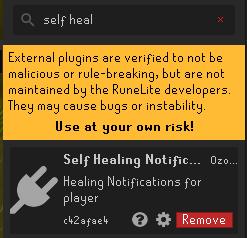
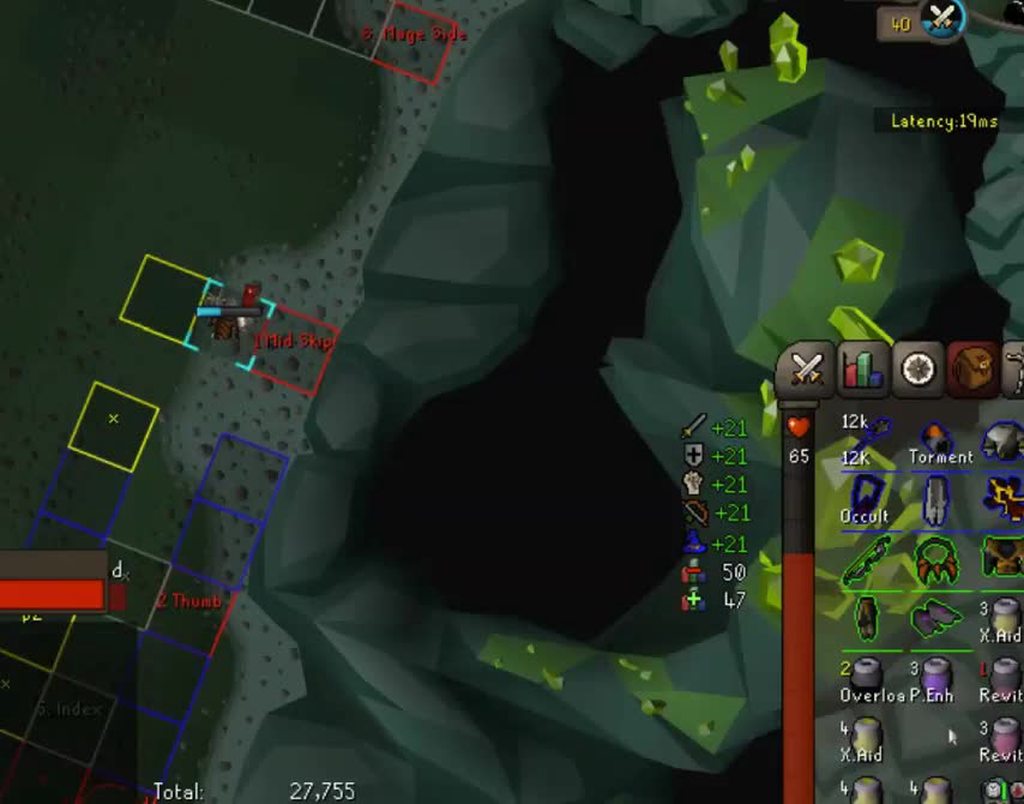
This plugin has stopped working for me. Can someone install it and eat something to see if it works for you. If you are 99 hp you need to eat a angler or brew to trigger it.
It should look like this: https://i.imgur.com/Rb9MM6b.mp4 (stating how much you healed above your character in text), now it only announces the amount healed in chatbox.
 haughty pumiceBOT
Get support for the Self Healing Notifications Plugin Hub plugin here: https://runelite.net/plugin-hub/show/self-healing-notifications.
You can also find the support link by searching for the plugin in the Plugin Hub panel and clicking the ? button on the plugin, or by right-clicking the plugin in the plugin panel and clicking the Support menu option.
fallow frost
ty, made a post. But since the dev made it like 7+ years ago i'd be suprised if i get a reply. Be great if some1 could test in with their client. It does still work in chatbox but not anymore displaying above character..
round jacinth
It was made 2 years ago and maybe they’re still around
 cinder topaz
Hi! New to the game. I recently installed OSRS on steam without runelite and the graphics, while not boosted with plugins, were crystal clear. Then I tried runelite with both HD and GPU plugins (successively and maxed) and the graphics are blurry, which is quite frustrating since the rest looks better. I also tried with the stretcher plugin with no success. My monitor resolution was also correctly set in runelite (2K).
I searched for information but everything I find is about blurry TEXT which I solved with the stretcher plugin.
Any idea what I could do to correct that? I know they can be clearer since they are on the official client.
Thank you in advance for your help!
fallow frost
round jacinth
It was made 2 years ago and maybe they’re still around
been using it for way more but ye lets hope
made a new profile and did not work either
round jacinth
cinder topaz
Hi! New to the game. I recently installed OSRS on steam without runelite and the...
Besides GPU plugin and stretch mode plugin there isn’t much to mess around with, you just keep tweaking them until you’re happy
round jacinth
fallow frost
been using it for way more but ye lets hope
It was published 2 years ago, the dev is still in the discord and with any luck they’ll care to fix the problem.
cinder topaz
There’s clearly something wrong since it’s not blurry on the official client. I tried pretty much all the options in gpu and the HD one 😦 maybe I missed one I guess
round jacinth
Official client is a different client than runelite
What’s blurry about it can you show
cinder topaz
Im in bed haha. But I feels like if the resolution was too low. Even if it’s full screen. But I made sure it was the proper one in the runelite options
I’ll try to take screenshots tomorrow
 arctic stirrup
get out of bed so you can get proper support
arctic stirrup
yes you posted at 1am
cinder topaz
I know. I tried my luck as I thought it could maybe be something well known and easy to solve
sonic birch
cinder topaz
Hi! New to the game. I recently installed OSRS on steam without runelite and the...
Not gonna read all that rn but this will fix it probably if something is blurry: #support message
crude sail
cinder topaz
Hi! New to the game. I recently installed OSRS on steam without runelite and the...
The scale option linked by Yves should work. I think Windows sets scaling to 125% on 2k by default, so start with 1.25 and the interface should remain the same size. But the game view will be higher resolution.
sonic birch
No?
1.25 scale is the same as 125% in windows. It's a pixel game, so he wants 1.0 as linked in my comment
The problem most people have is actually that windows is applying 125/150% scaling and that the game is blurry that way. They think they can only fix it by setting windows scaling to 100%, but they don't want to do that. Setting scale to 1.0 fixes it for them then
mossy swan
ville wants the game to be blurry with gpu
but in runelite gpu renders at the "actual" resolution so its not blurry
crude sail
sonic birch
1.25 scale is the same as 125% in windows. It's a pixel game, so he wants 1.0 as...
I had the reverse problem some days ago, I found out that the scale option makes the canvas bigger, doesn't actually stretch it like Windows does.
sonic birch
Yes, you got a weird problem/wish and did some analysis for that very specific thing. Telling this guy to put scale to 1.25 will not fix his issue
mossy swan
oh i didnt read the earlier messages, my bad
crude sail
1.25 is the same size regardless of Windows scaling, it takes priority. So it will remain the same size, except now scaled by Java instead, no?
sonic birch
It's blurry because it is scaled
1.0 makes sure it is not scaled anymore, thus not blurry
crude sail
Scaled by Windows, yes. RuneLite scaling does not make it blurry, it makes the canvas bigger. It doesn't stretch it.
sonic birch
Osrs is a pixel game. Adding 25% to 1 pixel will make it blurry
crude sail
Does resizing the Window on Resizeable mode make it blurry, or make you see a larger area?
sonic birch
Blurry
crude sail
That has not been my experience, but I guess I can't confirm anything as I'm on a telephone currently.
I could swear that characters don't look like wide putin on ultrawide aspect ratio, you instead have a higher field of view.
 brave turtle
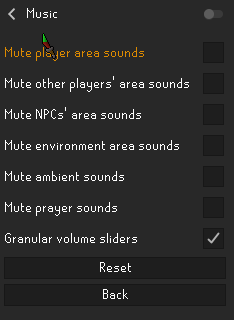
I think one of my plugins is muting the nightmare attack sound. these are my audio settings. I have the annoyance mute plugin turned off, and have no nightmare-related plugins 
 sonic birch
Disable the music plugin to check
brave turtle
sonic birch
Disable the music plugin to check
yes, that fixed it! thanks!
Weird, because these are the settings , doesn't seem to have anything related to nightmarehttps://i.imgur.com/8MV9pBm.png
 sonic birch
You also have to be close enough to the npc probs
brave turtle
yeah, that's weird. With the plugin off it works exactly like I'd expect it to. Thanks!
sonic birch
Also, if you changed some sound settings recently, it might require a client restart since some audio only loads when loading the area?
Or at least there is some weird stuff with how some of the the audio works. I've never messed with it, so 50/50 I'm spouting bs
leaden trail
In my limited experience, audio stuff is pretty weird, yeah
crude sail
sonic birch
Osrs is a pixel game. Adding 25% to 1 pixel will make it blurry
I am now on my computer. I remembered correctly. The 'scale'-option is not adding 25% to every drawn pixel, it is adding 25% more pixels to draw on[1]. Windows' scaling does the former, which is why his game looks blurry. My point about resizing the game window also remains true, on an ultrawide you see more horizontal tiles, the same with vertical tiles and a portrait aspect ratio. If you retain the same aspect ratio your view of the world remains the same, just on a higher or lower resolution canvas. Neither makes it blurry, just like zooming in and out doesn't. As it's not a pixel game (which I should have pointed out), but 3D, and uses vertices. On a 2D plane think how resizing a vector graphic is different from resizing a bmp.
If you maximize the window and hide the sidebar, the game looks the same (pixel perfect) regardless of the 'scale' value. It could be 1.0, 1.34, 2.0, 12.5... Just your interface, and the sidebar you have hidden, along with its contents, would be a different size.
[1] By making the initial window bigger, increasing the resolution of the canvas, width of the sidebar and the size of its contents. It also scales the size of the in-game interface[2], which in fact are pixel-based graphics, which is why there's an option for which scaling algorithm to use for that in the GPU plugin.
[2] When in Resizeable mode, as in Fixed mode the game view and interface are inseparable.
 jovial vigil
This question may seem a bit random, but is anyone aware of Runelite 117HD apparently running on DirectX9 API? My AMD graphics card detects the API being used as DX9. I was wondering if there may be a way to change the API to Vulkan or DX11/12 to increase the performance at higher settings? Just a question/idea.
sonic birch
jovial vigil
This question may seem a bit random, but is anyone aware of Runelite 117HD appar...
!hd
haughty pumiceBOT
Visit 117's HD plugin discord (https://discord.com/invite/U4p6ChjgSE) for support, issues & feedback
jovial vigil
Thanks! Will do.
 worn flame
Anyone familiar with plug-in preset plugin? I'm trying to keybind entity hider on/off for certain group pvm scenarios


Not sure if I'm using the plugin correctly
sonic birch
!hubs
haughty pumiceBOT
hubsupport: Support for hub plugins should be directed to the author of the plugin. You can find the support link by searching for the plugin in the Plugin Hub panel and clicking the ? button on the plugin, or by right-clicking the plugin in the plugin panel and clicking the Support menu option.
worn flame
I figured it out nevermind thank you
 nimble lion
Hi all, i've come back after years on a very old laptop that had RuneLite installed, i've tried opening, re-installing etc and I keep getting 'Exception: ConnectException
Message: Permission denied: no further information'.
Tried everything so far but no dice, I can attach the launcher.log because I see exceptions but this is an old machine and it's FULL of useless folders and files
 neon girder
Hello, i recently experience that all my usb devices (mouse and keyboard) disconnecting randomly when on runelite. Does anybody ever had this issue too - or maybe know a pinpoint were to look for logs/errors?
sonic birch
neon girder
Hello, i recently experience that all my usb devices (mouse and keyboard) discon...
That does not really sound like a RL issue. You can try safemode I suppose. After that check windows event viewer to look for problems
!flow
haughty pumiceBOT
flowchart: Please refer to this flowchart for further troubleshooting.
oblique plume
nimble lion
Hi all, i've come back after years on a very old laptop that had RuneLite instal...
does going to https://static.runelite.net/bootstrap.json work
neon girder
thanks @sonic birch for your answer - i'll try that!
nimble lion
oblique plume
does going to https://static.runelite.net/bootstrap.json work
That just pulls up a text document on chrome, might be missing a tool to open it
nimble lion
Hmmm, any ideas? I can open the RS client itself but not this
nimble lion
Nah got none of them on or open
 tidal rover
I'm having some issues with the idle notifier while blowing glass. It's constantly going off after around 9 lenses, then every few lens notifies again.
oblique plume
the animation has pauses, if you dont have your delay set high enough itl fire in those pauses
tidal rover
Trying to increase 1s -> 2s
hollow olive
2s should be good
but then again i don't blow glass lol
tidal rover
It works perfectly, thanks!
 river palm
I've been trying this for 3 days and still nothing. is there anything else that can fix this?
 small night
is there anything I can do to fix the broken mark of darkness timer when I have a purging staff equipped ?
 echo hemlock
Is there a particular reason when I log in, I don't see the "lobby" last login X hours ago / last login X days ago?
leaden trail
The welcome screen?
echo hemlock
Yeah
The welcome screen will not appear if the player logs in to a dangerous area, such as the wilderness, or if the player is creating a new account.
Neither of this applied in my circumstance.
Was a f2p world, on 3 different worlds, on 3 old pures I have. And not 1 of them got the welcome screen lol
gilded kayak
if they're "old" pures is it possible the HEY WELCOME BACK browser page bypasses the welcome screen
 granite dust
hey, is it normal for runelite to use 12gb of ram?
echo hemlock
Hmm okay, maybe
I did used to recall both happening, welcome screen & welcome back, just thought I'd ask 😛 thought I may have been hacked or something at first lol
leaden trail
granite dust
hey, is it normal for runelite to use 12gb of ram?
GPU drivers can be a bit leaky when it comes to memory.
Close your client regularly and you probably won't experience this issue
granite dust
leaden trail
GPU drivers can be a bit leaky when it comes to memory.
Close your client regul...
ok ty
never noticed it happen befor on my old install of w11
did a fresh install and i just noticed it
 sharp zealot
having trouble opening runelite
 winged nymph
does aynone know how to make it like tbow or lookup the animation ID or something :(?

the projectile is still the bowfa
sharp zealot
im getting the fatal error starting runelite
stone parcel
Does it say anything more than that? What is the complete message or popup?
sharp zealot
RuneLite is unable to resolve the address of a required server while downloading the bootstrap. Your DNS resolver may be misconfigured, pointing to an inaccurate resolver, or your internet connection may be down.
Exception: UnknownHostException
Message: static.runelite.net
that is the message
i would sometimes have this problem when server down or update and it would normally work after a few attempts but its not working at all.
stone parcel
You may be having trouble connecting to RuneLite, you could try these options. #support message
sharp zealot
magic of the reseting of laptop has worked!!! thanks 🙂
crude sail
river palm
I've been trying this for 3 days and still nothing. is there anything else that ...
Do you have any hub plugins? Does the client crash happen in safe mode? Do you have RuneLite logs from a crash you could link?
leaden trail
It's their system crashing, not RuneLite, so it really isn't something any of those things would help with
crude sail
Their original message says "Runelite keeps crashing as soon as I log in and often crashes the whole pc as well".
Often would imply not always.
charred wind
then the answer is fix your machine, and then
haughty pumiceBOT
Please refer to this flowchart for further troubleshooting.
 bleak palm
im getting "too many login attempts, you can use the Jagex Launcher to continue playing" when trying to log in. any help?
gilded kayak
leaden trail
Felan is too fast for me
gilded kayak
i'm gonna forward chain that until they delete the forward experiment
bleak palm
ah clearing the sessions worked, thanks!
 hallow helm
i've got an issue with ground items plugin - even tho i tick the "show highlighted items only" setting on - it shows me all the items
 worthy atlas
I have this weird glitch where the login screen background does not display and I only see the different color for the main login panel. Unless I turn the default plugin "login screen" on and off, then the background shows normally. Anyone know what plugin this would be?

when i turn on safemode it works normally
oblique plume
Resource packs
worthy atlas
ty
worthy atlas
oblique plume
Resource packs
is there a way to remove that modification to the login screen from that resource pack?
haughty pumiceBOT
Get support for the Resource packs Plugin Hub plugin here: https://runelite.net/plugin-hub/show/resource-packs.
You can also find the support link by searching for the plugin in the Plugin Hub panel and clicking the ? button on the plugin, or by right-clicking the plugin in the plugin panel and clicking the Support menu option.
gilded kayak
they have a discord i think

 ember vault
when i login i get an error, someone know how to fix it?
leaden trail
Can you be more specific?
ember vault
when I log in it tells me the wrong password
leaden trail
You probably need to use the Jagex launcher to launch RuneLite
ember vault
can i play it on steam?
leaden trail
You can't launch RuneLite through steam as far as I'm aware
glossy flume
issue?
 crisp dune
?
If you picked up the staff and that message appears, you should report that bug to Jagex
 urban lodge
Nah that happens so often
If someone is really quick and already dropped the staff in front of verzik, you get that message
Unless you're in a solo ofc. then it's definitely a bug xd
 unreal vessel
anyone know why my skybox is perma black i changed it to light coloour for better visuals for bloat/ tob and its still black
even when i turn the plugin off
sonic birch
Works perfectly for me, just properly set the settings
 toxic girder
Does anyone know if the Chat filter is not able to hide this message for some reason? Doesn't seem to wanna hide, for me
 leaden trail
I don't think it hides those, no
 sweet crescent
I have 2 rl shortcuts, each linking to a different profile. Recently the saved login has been getting muddled between them, rather than being unique for each profile
anyone have any idea why?
has there been a profile update or something?
round jacinth
There hasn’t been a profile update since Feb 2023 with a different profile update to add linking a profile to an account
sweet crescent
do you know why the login info would start being linked between profiles then?
it only goes 1 way too
round jacinth
no i dont know, what does your shortcut look like
and are the profiles actually linked to the rsn(s)?
sweet crescent
eLite\RuneLite.exe --profile=Main
ite\RuneLite.exe --profile=Iron
those are the launch arguments
they've been that way since the profile update
but now any login typed on the main profile also transfers to any others
it definitely launches into a different profile
nothing else i can see is shared
round jacinth
tbh idk if the login name at the login screen is part of the profile at all, that's the "remember username" checkbox
maybe profiles do it though, not sure
sweet crescent
both have the remember username box checked
this is new behaviour
as of a few weeks ago
but it's finally annoyed me enough i'm trying to fix it lol
round jacinth
sweet crescent
both have the remember username box checked
right but its 1 game window remembering 1 name not 2 games
sweet crescent
i don't understand what you mean
round jacinth
the remember my name is not a runelite feature, its a jagex one so it's maybe rememebring the last name used unrelated to the profile youre on..?
hollow olive
you have to use login screen plugin to sync the username
sweet crescent
if i log in on profile b, it will remember that log in
if i log in on profile a, both a+b will switch to that login
logging in on b does not affect a
round jacinth
hollow olive
you have to use login screen plugin to sync the username
oh okay
do what josh said
hollow olive
i have two profiles set up that way it works for me
sweet crescent
so log in screen needs to be on?
hollow olive
it's on for me and i believe that is the one doing the work
sweet crescent
ok, i'll have a play with it, thanks
hollow olive
the sync username should be checked
round jacinth
according to the code, that is the plugin yes
@Subscribe
    public void onProfileChanged(ProfileChanged profileChanged)
    {
        // configuation for the account is available now, so update the username
        applyUsername();
    }
good catch josh
round jacinth
yay
sweet crescent
it's been slowly driving me crazy
dim eagle
why isnt the "civitas illa Fortis" under the Zeah section for this plugin?
 sonic birch
dim eagle
why isnt the "civitas illa Fortis" under the Zeah section for this plugin?
sonic birch
dim eagle
why isnt the "civitas illa Fortis" under the Zeah section for this plugin?
Someone pred it but the author decided not to merge it because he didn't have a p2p account iirc
dim eagle
so only the author can add it?
sonic birch
Yes, this was the last time he responded to someone #support message
But most of the work has technially been done https://github.com/Antipixel/nexus-map/pull/18
 azure inlet
can i speak with someone related to direct runelite support? have a massive bug going on
 final axle
Just post your issue here and maybe someone can help. We don't know if you don't ask
azure inlet
alright heres the issue , am unsure how to do screenshots but if i do !Log wt for wintertodt it shows my main accounts old rsn name , Keypad, which i changed name to "Quit4 iron" when i transferred the name "Keypad" to the iron. fresh 2 week old account... it does this for many logs and it isnt right at all, can someone please help me , i believe maybe manually you need to change the logs from " Quit4 iron" to "Quit4 iron" and not have "Keypad" logs show "Quit4 iron" i would really appreciate it as its very frustrating not having logs work. a bit confusing hope it makes sense
very frustrating completing logs on new account and ill do !log cox for example a boss i havent even done yet and itll show multiple logs completed.
thanks!
vast bone
you have to ask the author about that
runelite doesn't control the server that !log uses.
it's the collection log plugin.
azure inlet
@vast bone
vast bone
dunno
haughty pumiceBOT
Support for hub plugins should be directed to the author of the plugin.
You can find the support link by searching for the plugin in the Plugin Hub panel and clicking the ? button on the plugin, or by right-clicking the plugin in the plugin panel and clicking the Support menu option.
azure inlet
seems they dont reply
vast bone
someone had this issue a while ago
idr what they did about it
but I think you had to contact the author or something
 fossil quail
heya, wondering if i can get some help with something thats just started happening over the past day or so, so far ive only noticed it on coin drops but could be on other items that i haven't seen but i get the tooltip "highlighted due to the config setting 'highlight missing items' " its not intrustive, just annoying and ive been scowering the internet and reddit trying to find a answer but alas, have also tried to toggle on and off individual plugins that are related to items/ground items and no luck there either, so im asking for help here. thank you in advance
 sonic birch
Quest helper
fossil quail
holy fuck, thank you so much
 gilded goblet

Hi guys
Theres a friend who wants to play osrs en runelite
but for any reason he cant log into the launcher
gilded goblet
gilded goblet
this is what he gets when he tries to launch
he just created a new ccount and he didnt upgrades the account
so i dont know what is going on
you cant log into the original runelite client anymore?
 fierce anchor
is there a plugin which you can use to reduce the brightness of gwd or vork?
to help with eye strain?
 winter niche
Are there any plugins that give you the name of a game object? I know there is the one that shows you the IDs
sonic birch
gilded goblet
he just created a new ccount and he didnt upgrades the account
All new accounts are jagex accounts
sonic birch
winter niche
Are there any plugins that give you the name of a game object? I know there is t...
Right mouse button?
 honest plover
I put the wrong date in when making an account now it wont let me make an account anyway to fix it ?
mossy swan
!newplayer
haughty pumiceBOT
If you are new to OSRS, make sure to follow this excellent guide on OSRS wiki: https://oldschool.runescape.wiki/w/New_player_guide. You can also join official OSRS Discord here: https://discord.gg/osrs
mossy swan
idk we dont run account systems
fierce anchor
found a solution using the blindfold plugin
turning that on and turning the cave skybox to a grey colour gives me this

 granite berry
Does anyone know how to fix this? Troubleshooting steps are advising to contact cloudflare?

 green rampart
Can I export my runelite config on my windows machine and import it on my linux machine?
Really hoping this is as easy as moving my .runelite folder from one machine to another 😅
vast bone
yes it is
haughty pumiceBOT
glossy flume
at 99, how to show virtual levels for this?

 round goblet
everytime i re open the game it resets all my mods back to default ive have to re go through everything like 4 times
round jacinth
you might have read/write perm issues
install latest version of runelite from link in #welcome
and then run runelite ONCE as admin
round goblet
ahh ok thank you
 fluid palm
hello, I was just training cooking/magic and this randomly popupd on my screen what plugin caused this?
 sonic birch
!flow
haughty pumiceBOT
flowchart: Please refer to this flowchart for further troubleshooting.
 autumn frigate
TD Health is no longer 600, is there a way for me to change this manually, or do I just wait for the plugin to update?
 round jacinth
^
sonic birch
We also scrape the info from the wiki though
You are talking about proposed changes that got canceled afaik
autumn frigate
lemme double check, i'll count out my damage this time 😔
dont wanna go get monster examine runes
nvm it's still 600 im just really bad at math
sonic birch
To offset this effect, we suggested lowering the demons’ stats while increasing their Magic Defence bonus to compensate. We also planned to have Demonbane weapons reduce their Defence by at least 5%. However, after taking your feedback on board, we’ve decided not to make these changes. We understand that the community has already developed strategies for the existing mechanics, and that you love the unique element it adds to the combat. We’ll still look for small tweaks we can make, but for now, the tormented demons will keep their stats and we won't be fixing the accuracy bug.
 ancient geode
Is this plugin not updated? I see the screenshot of the emberlight spec but it's not working for me
 sonic birch
It's open, not merged, so no
One of the maintainers has to review and merge it. Then a RL release has to happen
That person just loaded the code of the PR and tested it ingame
ancient geode
okay so i shouldn't expect to see it live until maybe Wednesday after game update?
sonic birch
If it gets reviewed and merged, and the osrs update is significant enough to release a new rl version, yes
ancient geode
ty
 dire harbor
hey guys , this might be offtopic to runelite but does anyone know how to fix like a font issue , all of a sudden my client has a weird font on it

idk if it looks off to anyone else

how it should look
😂
dire harbor
hey could u explain in detail cause im not really a pc guy
just dont know exactly what u mean
gilded kayak
🔧 -> GPU plugin -> ⚙️ -> UI scaling
 buoyant robin
Was there ever the ability to turn off other people's item despawn timers for items they drop? I used it to know what supplies are mine when I dropped them (ie spade at cox prep) so I didn't steal another persons, esp when they're an iron.
I remember after the update coming in here and seeing a lot of people complaining about the update, but times passed and I'm not sure if anything was done about that.
gilded kayak
only show own items but if your issue is still cox items that isn't fixed, they don't work the same as everywhere else in the game
sonic birch
I think they were fixed maybe but then got broken again because of weirdos? Not 100% sure
Irons were too stupid to put their minimum value to 1k instead of 1 gp
 flat parcel
hello my pc crashed on blue screen now i lost all my plug ins and bank tags ??? anyone know how to fix it ??? im also logged in on runelite
sonic birch
flat parcel
hello my pc crashed on blue screen now i lost all my plug ins and bank tags ??? ...
!lost
haughty pumiceBOT
 pliant scroll
runelite highscore down?
granite berry
granite berry
Does anyone know how to fix this? Troubleshooting steps are advising to contact ...
Any suggestions on how to fix this error?
granite berry
I performed general network troubleshooting, uninstalled/reinstalled, etc. Is there a way for me to give you more information on what specifically the error is?
fossil summit
granite berry
I performed general network troubleshooting, uninstalled/reinstalled, etc. Is th...
https://runelite.net/ does that load for you?
granite berry
The site? yes
sonic birch
I've got no clue what that error is tbh
I assume it means the remote host closed the connection for some reason (I'm basically just reading the error) but why? Idk
fossil summit
granite berry
The site? yes
https://static.runelite.net/bootstrap.json does that work?
 novel laurel
Is there any particular reason why this doesn't work for supplying the developer-mode arg? Trying to load a plugin locally from .\sideloaded-plugins and I'd rather stick to launching via Jagex launcher or a .bat than having to use my IDE.
I can launch the client via a .bat with the args, but it won't sideload plugins. If I add the args to Runelite (Configure), the client seems to crash.
 granite berry
fossil summit
https://static.runelite.net/bootstrap.json does that work?
granite berry
fossil summit
https://static.runelite.net/bootstrap.json does that work?
Yes, I'm able to access. What do I do with it?
fossil summit
no idea, was just checking to see if cloudflare banned your ip
sonic birch
developer mode does not work via the launcher
you can create a shadowjar for your plugin
will have to rebuild it after jagex updates though
!shadow
haughty pumiceBOT
shadowjar: Add the following line to your plugins block in build.gradle:
id "com.github.johnrengelman.shadow" version "6.1.0"
Add this block elsewhere in the file, changing the Main-Class to your plugin's test:
shadowJar {
 from sourceSets.test.output
 configurations = [project.configurations.testRuntimeClasspath]
 manifest {
 attributes "Main-Class": "com.example.ExamplePluginTest"
 }
}```
Then run `./gradlew shadowJar` and a runnable jar will appear in `build/libs/*-all.jar`. You can run the jar with `java -jar -ea jarName.jar`So if I can access the link you sent me I'm not banned?
leaden trail
fossil summit
no idea, was just checking to see if cloudflare banned your ip
I think it's normally a 403 when that happens
fossil summit
yeah not banned if that loads
leaden trail
Honestly I'm only seeing your specific error come up one other time and they didn't get a response so I'm drawing a bit of a blank other than suspecting it's some sort of general connection issue
Can you try using your phone as a mobile hotspot and seeing if the client will launch that way?
novel laurel
@sonic birch I did create a shadowjar and dropped in \plugins\ folder initially. It does not appear to load. The only way I've been able to successfully load plugin is via debug in the plugin project itself.
There seems to be no difference whether I load Runelite that way or clone the RL repo and run it in developer-mode -- either way you have to load and keep the IDE open in the background. That's why I've been trying to load developer-mode through the launcher via configure or via a .bat file
granite berry
I connected to my mobile hotspot earlier and it didn't work. Let me try again
sonic birch
novel laurel
<@164496095794167809> I did create a shadowjar and dropped in \plugins\ folder i...
Just load the shadowjar
Dropping it in a folder does not work
fossil summit
novel laurel
<@164496095794167809> I did create a shadowjar and dropped in \plugins\ folder i...
do what they are telling you
java -jar -ea jarName.jar
okay, I tried that earlier and ran into this:
Error: Main method not found in class com.[my Plugin]
 novel laurel
 sonic birch
also, this channel is for release client support
leaden trail
That's not your plugin's test
sonic birch
feel free to move it to #runelite if you got further questions after fixing it (see dura's comment)
granite berry
leaden trail
Can you try using your phone as a mobile hotspot and seeing if the client will l...
Connected to hotspot network, same error when trying to load RuneLite
novel laurel
leaden trail
That's not your plugin's test
shit you're right ty solved
leaden trail
granite berry
Connected to hotspot network, same error when trying to load RuneLite
Then I have nothing
novel laurel
sonic birch
also, this channel is for release client support
Can we possibly update the channel descriptions then? I noticed some messages from Adam earlier about how #development is basically just for discussions with him.
This felt like an issue with the client (per description), so I asked here. #runelite is just "Runelite related talk" -- not very clear if support or troubleshooting is even suitable for that channel.
sonic birch
I suggested that once, but we could not come to a conclusion
granite berry
leaden trail
Then I have nothing
Is there a way for me to contact Cloudflare?
leaden trail
I dunno, look at their website
leaden trail
sonic birch
I suggested that once, but we could not come to a conclusion
Yeah this is something that's been raised once or twice that I remember but nothing has come of it
glossy flume
is there a death charge timer post npc kill plugin
sonic birch
idk what that means but check the hub
glossy flume
so after u kill a npc with death charge it restores ur some of ur spec but there is no timer after u kill an npc when it recharges

 urban lodge
I think arceuus timers has it
 fallen zodiac
Hey! I've had this happen a few times where it is stuck here forever and usually am forced to uninstall and lose all my settings. Trying to see if anyone knows how to fix this. Ive only downloaded the more popular plugins but even if i delete any they just redownload when i launch.
 haughty pumiceBOT
Windows
Run the RuneLite (safe mode) shortcut, or with a Jagex account, first run the RuneLite (configure) shortcut and tick the Safe mode box, then launch RuneLite via the Jagex launcher.
Mac
In Terminal, run:
/Applications/RuneLite.app/Contents/MacOS/RuneLite --configureTick the Safe mode box. Launch RuneLite.
If it's not working, download and install the updated RuneLite launcher from the website link in #welcome. You don't need to uninstall your current version. You will not lose any settings or plugins. Then try running safemode again.
round jacinth
Use safe mode to uninstall some of the plugins
fallen zodiac
thank you so much
 dawn pilot
Anyone know why I can't hear Olm's area/attacking sounds?
I have annoyance mute plugin - off
Tried everything and can't figure it out.
round jacinth
They might area sounds and you have area sounds muted in the music plugin
dawn pilot

Is this not the correct setting? I just have music muted.
Ohh! my fault.
I didn't even know there was a music plugin lol!
Thank you so much
round jacinth
It was a educated wish
dawn pilot
that was it!
 indigo vigil
Does anyone know why this happens? It's happens atleast twice a day?
 sonic birch
Post the actual text
But if I had to guess, disable compute shaders in the gpu plugin and restart the client
Mac gpu drivers bad
indigo vigil
It's hard to post a good picture. But I will try that, thanks
 sonic birch
You can just select and copy the text
cinder topaz
Hey! New firstime OSRS player! I register throught steam and owuld like to use runelite via steam so it could track hours played and all. is there a way? If I add the command line in the launch option, i can't log in and have to instead add the jagex launcher via the steam launch options, but when I do so, steam dont recognize the game as open
sonic birch
At least people usually post the text
indigo vigil
When it happens again I'll post it. Thanks
sonic birch
cinder topaz
Hey! New firstime OSRS player! I register throught steam and owuld like to use r...
No
cinder topaz
oh! okay thanks
sonic birch
Your hours are tracked by hans though
cinder topaz
who's hans
gilded kayak
in-game NPC
cinder topaz
nice !
sonic birch
Oh sorry, hans is account creation. Maybe also time played
Time played is at least visible in the brown star tab
 hasty slate
Hello, I used to use the Wintertodt Scouter Plug In on RuneLite but it has disappeared from my client and my friend says his client does not show it anymore eiter. Has it been removed? If so for what reasons and will it return eventually? Thank you!
gilded kayak
it was removed yes but I think its coming back
the author needed the server it was hosted on, for work
hasty slate
I understand. Thank you!
 deft fulcrum
For some reason, plugin hotkeys don't seem to be captured for me. What can I do to figure out why that is? I'm using the Arm macOS version of Runelite, and my macbook is running macOS 14.6
for example, the zulrah helper plugin has a "next phase" hotkey that can be set in the settings, but it doesn't register for me. Another plugin that I'm trying to use hotkeys for is called Canvas, and it does not work either.
green rampart
Was running the RuneLite.AppImage supposed to create a .desktop file for me?
stone parcel
Think you have to do that yourself.
 magic kiln
I'm not sure if this is the right channel for this, but would anyone know where I'd go to commission someone to create a plugin for me? Or where a good place might be to ask around
charred wind
Try #runelite and #suggestions
If your idea is good someone might pick it up in #runelite
magic kiln
Thanks 🙂 it would be something more niche for my clan, so I don't think anyone would make it on their own
charred wind
Have you asked within your clan? Maybe your needs are universal and there’s an implementation that would be suitable for your clan already? Or others might benefit from a framework similar?
 torpid vigil
sometimes on login npcs are not rendered for me. this has been happening over the past few days. if i relog, they are rendered.
it's is definitely not the entity hider plugin, and i went and turned each plugin i have off and on and none of them fixed the issue.
thinking back, it's been happening since the last game update, sporadically. is this a known issue?
haughty pumiceBOT
Many plugins from the pluginhub break the client in subtle or not-so-subtle ways, including causing issues like client freezes. We do not support pluginhub plugins because we do not make or quality control them, and do not recommend their use.
Run the RuneLite (safe mode) shortcut, or with a Jagex account, first run the RuneLite (configure) shortcut and tick the Safe mode box, then launch RuneLite via the Jagex launcher.
This temporarily disables the GPU plugin and all hub plugins which will allow you to confirm the issue is caused by one of those plugins and isn't a core RuneLite issue.
If the issue is caused by a hub plugin, you should isolate which plugin it is and then uninstall the plugin.
 final quarry
my runelite will close with this error about once a day and i do tons of different activities so i dont know what the problem is. I googled it and it said it had something to do with 117 HD but i dont have that plugin at all. Oddly, when i try and relaunch, it says my account is still logged in from the last time. and it take until my account logs out from the 25min afk logout timer for me to get back in.
Here's the error:
[AWT-Windows] ERROR net.runelite.client.RuneLite - Uncaught exception:
java.lang.OutOfMemoryError: OutOfMemoryError
at java.desktop/sun.awt.windows.WToolkit.eventLoop(Native Method)
at java.desktop/sun.awt.windows.WToolkit.run(Unknown Source)
at java.base/java.lang.Thread.run(Unknown Source)
gilded kayak
are you using 32bit RuneLite?
gilded kayak
it will say in Task Manager
final quarry
gilded kayak
it will say in Task Manager
ty, it is the 32 bit
 wooden flax
my client crashed tonight while i was in HC ToA, account is now in purgatory until membership runs out. Curious if this has any clues as to why it happened? might be similar to @final quarry conversation.
 final quarry
wooden flax
my client crashed tonight while i was in HC ToA, account is now in purgatory unt...
final quarry
wooden flax
my client crashed tonight while i was in HC ToA, account is now in purgatory unt...
i was also in toa
at zebak
wooden flax
specifically i had just finished akkha puzzle and it crashed when i clicked on the door to akkha boss
haughty pumiceBOT
final quarry
gilded kayak
get the 64bit version
i assume that my profile will be okay? i have tons of tile markers
gilded kayak
final quarry
i assume that my profile will be okay? i have tons of tile markers
yes as long as you just run the installer again and don't try to start removing stuff manually
wooden flax
gilded kayak
you should remove some hub plugins or increase your heap size
thank you, is there any way to know what plugins are using the most memory?
gilded kayak
technically yes but not easily for the user
if you really want to know you could install the debug helper plugin from the hub, enable heap dump on oom in there and then crash again
and someone might be willing to check that
wooden flax
im not sure how to force a crash, it barely ever happens
gilded kayak
but if you have like 200 hub plugins then that's probably more likely the issue
wooden flax
yeah i have alot of plugins that i never use i need to unsinstall
if the hardcore survives when membership runs out ill probably start a profile from scratch and only install what i deem necessary
final quarry
gilded kayak
yes as long as you just run the installer again and don't try to start removing ...
ty for the help. i downloaded the 64bit version. apoligies if this is a dumb followup question but now the task manager doesnt have anything in the name that indicates bits, does the launcher know to point to the 64bit version automatically? or should i do some setup.
final quarry
perfect i hope this helps in the future. i only crashes like that once in a while
gilded kayak
and the launcher just runs whatever runelite.exe you have installed
final quarry
ty very much
 humble dagger
Everytime I restart my computer lately my plugin settings, including newly downloaded and edited bank tabs, rollback to the same state a few months ago. Cloud sync is enabled, does anyone else find this issue? I will edit my bank tabs and then restart the client and all my changes are gone. It seems the rollback of all settings is the same point everytime i restart the client/jagex launcher. Cloud sync is enabled. I have to export and import every time I change a setting.
 random flax
I was wondering if someone could help/teach me to make a runelite plugin. If anyone can, please send me a dm and I’ll be happy to pay for your time, thankssss.
sonic birch
deft fulcrum
For some reason, plugin hotkeys don't seem to be captured for me. What can I do ...
!key you should check this first probably
haughty pumiceBOT
keybinds: If one of your keys isn't working in game, you've most likely bound it to a feature of a plugin. The Debug Helper hub plugin can show what keys are bound to what plugins.
sonic birch
Cute kitty btw
sonic birch
torpid vigil
thinking back, it's been happening since the last game update, sporadically. is ...
Kind of, but you have to restart the client to fix it.
deft fulcrum
sonic birch
!key you should check this first probably
Isn't this saying that I should check whether an in-game keybind is also bound to a runelite plugin action?
I'm specifically just saying that a runelite plugin binding isn't working
sonic birch
That way you can at least confirm that it's bound
sonic birch
Should, but can't hurt to double check
!flow If that doesn't work, try safe mode. If it also happens with core plugins, we can look further. If it's a hub plugin, contact the author
haughty pumiceBOT
flowchart: Please refer to this flowchart for further troubleshooting.
sonic birch
humble dagger
Everytime I restart my computer lately my plugin settings, including newly downl...
!logs if the rollback happened today
haughty pumiceBOT
To find the logs, you can do one of the following:
- If your client failed to open, click the
Open logs folderbutton. - Open the screenshot directory by right-clicking 📷
Camerabutton, navigate 1 directory up, then open logs folder. - Navigate to
%userprofile%\.runelite\logson Windows or$HOME/.runelite/logson Linux and macOS.
Upload the log files named client and launcher by dragging them to Discord. If there are files prefixed with jvm_crash dated from today, upload them too.
winged nymph
#support message been a couple days and I still can't figure it out 😦
i realize it's not base RL so no worries if you cant help
sonic birch
!hubs also for next time, contact geheur
haughty pumiceBOT
hubsupport: Support for hub plugins should be directed to the author of the plugin. You can find the support link by searching for the plugin in the Plugin Hub panel and clicking the ? button on the plugin, or by right-clicking the plugin in the plugin panel and clicking the Support menu option.
winged nymph
thank you both ❤️
 viscid kelp
can i use my runescape prepaid membership cards on runelite?
round jacinth
Yes but I can confirm their validity
 pliant karma
Any eta on Wintertodt Scouter?
round jacinth
no
fossil summit
never heard of it
 reef heart
Are you still able to outline gear with inventory tags?
haughty pumiceBOT
The Inventory Tags plugin allows you to customize highlighted outline colors on items, you can pick the color by holding shift and right clicking on the item in your inventory then picking the color from the color picker window that appears, any previously used colors will already be available in the rightclick menu.

 gritty raven
is there a way that i can auto position the compas to south isntead of north all the time?
 open kayak
hey all. not new to runescape but new to runelite. I am trying to login to my account and I have an account through Jagex but when i sign in with the same info as my jagex but its not working and I dont know how to sign in with jagex.
 round jacinth
use jagex launcher to launch runelite
 atomic pollen
dose anyone know why it still tells me to download runelite on the jagex launcher when its already downloaded, and i cant play on runelite
open kayak
understood. I am looking at the main page but not seeing an option to launch with RuneLite
open kayak
open kayak
understood. I am looking at the main page but not seeing an option to launch wit...
nvm got it
 atomic pollen
open kayak
nvm got it
atomic pollen
open kayak
nvm got it
what did you do i have the same problem but for me it still tells me to install it
round jacinth
if you have a jagex account you must use jagex launcher to launch runelite
hollow olive
are you on a mac
open kayak
i went back to my jagex launcher then clicked the dropdown arrow under Game Client
 gilded kayak
the correct question is what does the error actually say, not a paraphrased version of it
round jacinth
yeah users do often say they have the same issue but it's entirely diferent all the time
borg show a screenshot
atomic pollen
it dosent give me a error just that i need to install it but its already istalled but cant play
okey give me a sec
open kayak
@atomic pollen I just exited out, relaunched jagex, clicked game client and then it recognized that I had RuneLite installed
atomic pollen
open kayak
<@1167742121642577961> I just exited out, relaunched jagex, clicked game client ...
have tried that dosnt work for me
leaden trail
If you redownload RuneLite sometimes that does seem to resolve the issue you're describing for some people, if I'm remembering correctly
atomic pollen
naah i have tried to re installt like 10 times haha
open kayak
i closed all my browsers, game, everything
leaden trail
atomic pollen
naah i have tried to re installt like 10 times haha
Make sure the Jagex launcher is set to run as admin but that RuneLite isn't, then
Beyond that, this is one of those things that pops up just infrequently enough for me to never be able to remember the solution offhand
hollow olive
on the mac the runelite application needs to be in the applications folder
i don't know about windows though
round jacinth
windows just works because of a registry location lookup the launcher uses i think
sonic birch
Uhhh, don't run the jagex launcher as admin probs
Tell me where the following key points to
!regis
haughty pumiceBOT
registry: If you're getting an error while trying to install RuneLite in the lines of unable to find unins000.exe that means you have a previous RuneLite version that didn't uninstall cleanly. To fix that you need to delete the following windows registry key: Computer\HKEY_CURRENT_USER\SOFTWARE\Microsoft\Windows\CurrentVersion\Uninstall\RuneLite Launcher_is1
leaden trail
sonic birch
Uhhh, don't run the jagex launcher as admin probs
I thought it had to run as admin
atomic pollen

 sonic birch
leaden trail
I thought it had to run as admin
sonic birch
leaden trail
I thought it had to run as admin
Nah, only when it updates itself sometimes. Then they try to restart it to not run as admin though iirc?
Yeah, it probs has trouble with the key, so I'd like to know where it points
atomic pollen
i can open runelite fron the app but not via jagex is it still that its maybe not installed correctly
?
gilded kayak
open Registry Editor and go to where the bot posted
Computer\HKEY_CURRENT_USER\SOFTWARE\Microsoft\Windows\CurrentVersion\Uninstall\RuneLite Launcher_is1
and screenshot it so we can see why its wrong
atomic pollen
haughty pumice
**registry**: If you're getting an error while trying to install RuneLite in the...
i have now deleted that, should i try to download it again via jagex or runelite website?
gilded kayak
..
sonic birch
Zzzzzzzzzzzzzzzz
Both I and Felan told you to post where the key points to, not delete it
leaden trail
That's not what you were told to do
sonic birch
Just reinstall now to fix it





 normal spruce
Is it any places its possible to Get hjelp to start up intellij for creating plugins? Tried out everything on runelite wiki; but i dont there is still a few things i wondering about 🤔 but i know how to create a plugin when its all set up.
haughty pumiceBOT
How to develop plugin-hub plugins: https://github.com/runelite/plugin-hub/blob/master/README.md
 round quiver
hey guys, my runelite has made it so the attach option is no longer appearing. I tried removing anything recent, but it's still persisiting. anyone have any ideas before I just re-install it?
sonic birch
What the hell is attach?
 tender iron
Anyone know how i can move all these tiles? its not under any aerial fishing plugin
 sonic birch
!flow
haughty pumiceBOT
flowchart: Please refer to this flowchart for further troubleshooting.
 ripe igloo
I have a question with transferring runelite acc settings. If I transfer my .runelite settings folder, do I need to delete the one thats already on this pc and just transfer the one I copied from old pc to the new pc?
 mighty crystal
Hi everyone. i cant find the issue with RuneLite not loading into the world. i've tried uninstalling jagex+RuneLite twice and its still not working. i'm stuck in this screen:

is this issue familiar to anyone ? 🙂 sry, im totally new to osrs
haughty pumiceBOT
@mighty crystal Windows
Run the RuneLite (safe mode) shortcut, or with a Jagex account, first run the RuneLite (configure) shortcut and tick the Safe mode box, then launch RuneLite via the Jagex launcher.
Mac
In Terminal, run:
/Applications/RuneLite.app/Contents/MacOS/RuneLite --configureTick the Safe mode box. Launch RuneLite.
If it's not working, download and install the updated RuneLite launcher from the website link in #welcome. You don't need to uninstall your current version. You will not lose any settings or plugins. Then try running safemode again.
mighty crystal
same scenario :/ stucks there in the loading
gilded kayak
!logs
haughty pumiceBOT
To find the logs, you can do one of the following:
- If your client failed to open, click the
Open logs folderbutton. - Open the screenshot directory by right-clicking 📷
Camerabutton, navigate 1 directory up, then open logs folder. - Navigate to
%userprofile%\.runelite\logson Windows or$HOME/.runelite/logson Linux and macOS.
Upload the log files named client and launcher by dragging them to Discord. If there are files prefixed with jvm_crash dated from today, upload them too.
mighty crystal
sonic birch
Loaded fine multiple times in safe mode. You could try disabling the spellbook plugin because it's something easy to test, but I doubt that'll do something.
Connection problem? idk
mighty crystal
hi Yves. Lol, if i disabled the spellbook plugin its working rn 😄
thank you so much. i dunno what the spellbook plugin does, but without it , its instantly starded 😄 cheers mate
sonic birch
Hmmm
humble dagger
sonic birch
!logs if the rollback happened today
What would i be looking for in logs? It happens every time i restart the client now. My alts profile does the same and sometimes that profile doesnt even show up. Then i restart and both profiles will show up but be rolledback. I didnt play my main for a few months and now its basically rolling back to the last time i played it no matter what i change
round jacinth
you share the logs here instead of trying to read it yourself
humble dagger
stupid question but is there anything in the logs that could be sensitive?
round jacinth
no
you could open it and ctrl + f to find stuff you find sensitive and see if it pops up but nothing is in there that is sensitive imo
 formal ice
Yall make adding a plug-in suggestion almost impossible. I just want to suggest adding a future tile highlighted in orange for telekinetic room in mage training arena. Like for where on the next side of the maze you should be standing since there is no cast delay anymore and everything moves so much faster.
round jacinth
- creating a github account to interact with #suggestions is quick
- that feature is already added and coming in next release
formal ice
I don't see why I should make a whole account for one suggestion. Can't someone just transcribe it for me to suggestions
sonic birch
No
If people don't make the suggestion on gh, it's basically the same as not making it
It'll get lost instantly
Also, geheur already did this
formal ice
Right so if you have one, can't you copy mine for me
sonic birch
No, making an account is the least you can do
sonic birch
It's best if you write the feature yourself
formal ice
Wowww such support, much help lol. I suppose the suggestion shall be lost to time