#support
1 messages · Page 16 of 1

 astral gulch
lol i got dc'd and now hit with the same bs again
 sonic drift
astral gulch
lol i got dc'd and now hit with the same bs again
sonic drift
astral gulch
lol i got dc'd and now hit with the same bs again
ouch. rip
astral gulch
i decided to upgrade to jagex account... fixed all my issues
@gilded kayak just wanted to take a second to thank you for all the help. Youre amazing and a gem. Keep making the world a better place
 opal patio
using tab to reply to in-game messages hasn't been working for ages, help 😭
 sonic birch
!rsopt check your ingame settings
 haughty pumiceBOT
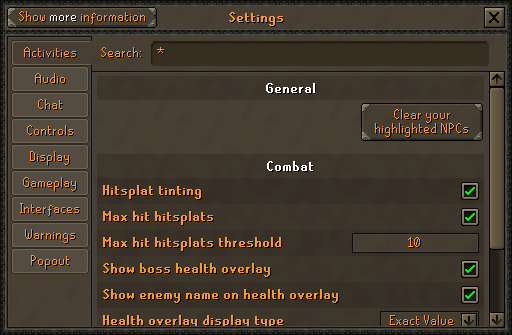
rsoptions: https://oldschool.runescape.wiki/w/Options
Old School RuneScape Wiki
Settings is the screen that lets players change various settings, such as the brightness of the game client, whether or not chat effects display, whether to accept aid or not, the volume of the music and sound effects, and much more.
sonic birch
I kinda forgot what it's a part of
!key Alternatively check if there are no overlapping keybinds
haughty pumiceBOT
keybinds: If one of your keys isn't working in game, you've most likely bound it to a feature of a plugin. The Debug Helper hub plugin can show what keys are bound to what plugins.
opal patio
i've tried searching for 'tab' 'messages' and so on but dont see anything for it
OHH i had tab set to be hotkey for party plugin pings 🤦♂️ tysm
 tawny flame
when I toggle on the gpu plugin it turns off again immediately and outputs this in the logs
2024-07-22 00:37:10 CEST [Client] ERROR n.r.client.plugins.gpu.GpuPlugin - Error starting GPU plugin
java.lang.UnsatisfiedLinkError: /tmp/2793569841982379486librlawt.so: /tmp/2793569841982379486librlawt.so: failed to map segment from shared object
    at java.base/jdk.internal.loader.NativeLibraries.load(Native Method)
    at java.base/jdk.internal.loader.NativeLibraries$NativeLibraryImpl.open(NativeLibraries.java:331)
    at java.base/jdk.internal.loader.NativeLibraries.loadLibrary(NativeLibraries.java:197)
    at java.base/jdk.internal.loader.NativeLibraries.loadLibrary(NativeLibraries.java:139)
    at java.base/java.lang.ClassLoader.loadLibrary(ClassLoader.java:2418)
    at java.base/java.lang.Runtime.load0(Runtime.java:852)
    at java.base/java.lang.System.load(System.java:2025)
    at net.runelite.rlawt.AWTContext.loadNatives(AWTContext.java:92)
    at net.runelite.client.plugins.gpu.GpuPlugin.lambda$startUp$1(GpuPlugin.java:295)
    at net.runelite.client.callback.ClientThread.invokeList(ClientThread.java:119)
    at net.runelite.client.callback.ClientThread.invoke(ClientThread.java:101)
    at net.runelite.client.callback.Hooks.tick(Hooks.java:226)
    at client.ff(client.java:58760)
    at client.bw(client.java)
    at bs.nd(bs.java:388)
    at bs.yl(bs.java)
    at bs.run(bs.java:34115)
    at java.base/java.lang.Thread.run(Thread.java:1583)
I have this openjdk version
openjdk 21.0.3 2024-04-16 LTS
OpenJDK Runtime Environment Temurin-21.0.3+9 (build 21.0.3+9-LTS)
OpenJDK 64-Bit Server VM Temurin-21.0.3+9 (build 21.0.3+9-LTS, mixed mode, sharing)
and two gpus connected (nvidia 1050ti and 950) with nvidia-drivers-555.58.02
these are some of the parameters runelite launches java with which look vaguely relevant
-XX:+DisableAttachMechanism, -Xmx768m, -Xss2m, -XX:CompileThreshold=1500, -Dsun.java2d.opengl=true,
runelite version 1.10.35
launcher version 2.6.9
 zealous cedar
is tmp mounted noexec?
tawny flame
yes
zealous cedar
I think that will prevent it from working
tawny flame
can I tell runelite/java to use a different tmp directory?
zealous cedar
you might be able to set java.io.tmpdir
tawny flame
that seems to work thanks
I added the line
Djava.io.tmpdir=./tmp_dir/
to the end of JVM arguments in the window that pops up when running java -jar RuneLite.jar --configure
although it has flickering black bands/rectangles with the plugin enabled
it looks slightly more intense than in the video probably because of fps stuff
tawny flame
fixed my flickering issue by setting hardware acceleration in the --configure menu to auto instead of opengl (I assume it uses off as the auto-choice then)

 gilded kayak
isn't auto the default
tawny flame
yes but I set it to opengl trying to fix the gpu plugin issues I had
 round folio
okay so it has been many moons, do I have to log on via jagex launcher THEN launch runelite now, cause that was the only way I could log in for first time in a while
 stone parcel
If you have a Jagex Account yes, you must use the Jagex Launcher to open RuneLite.
round folio
and that will be like an every time sort of thing
stone parcel
Yeah
round folio
thanks
 bitter thorn
i was having issues with my runelite expanding past the second monitor its on, and figured id try searching the discord before i asked. this solved my problem, u are a saint thank u so much!
 fossil summit
I'm nearly blind, so I love scale 1.5
 fickle timber
got a new pc old one crashed. are all my settings and loot tab etc gone for ever? my its like a whole new game trying to remember what i had. all of my kcs done were on the other pc so !kc/!pb doesnt register. I am also pretty slow operating os so it could be something easy, but i am logged in.. tyvm for help
 vast bone
fickle timber
got a new pc old one crashed. are all my settings and loot tab etc gone for ever...
vast bone
fickle timber
got a new pc old one crashed. are all my settings and loot tab etc gone for ever...
yeah probably. if you have the old pc you can copy them over but it not, and if you weren't signed in to runelite, then you're out of luck.
sonic birch
!transfer if you got your old hard drive
haughty pumiceBOT
sonic birch
!lost can try this (especially step 1/2) if you don't
haughty pumiceBOT
sonic birch
But might just have cloudsync disabled
 sinful stratus
i just downloaded runelite and when examining items it only shows HA price, not GE price. how to fix?
sinful stratus
vast bone
does it fix it if you restart client?
ah that worked thanks
vast bone
np
I think it happens if your internet is bad when you start the client.
something like that.
 tepid matrix
Back with my weird issues, so

RuneLite gets stuck in this screen, any ideas on how to fix this?
haughty pumiceBOT
To find the logs, you can do one of the following:
- If your client failed to open, click the
Open logs folderbutton. - Open the screenshot directory by right-clicking 📷
Camerabutton, navigate 1 directory up, then open logs folder. - Navigate to
%userprofile%\.runelite\logson Windows or$HOME/.runelite/logson Linux and macOS.
Upload the log files named client and launcher by dragging them to Discord. If there are files prefixed with jvm_crash dated from today, upload them too.
tepid matrix
No crash files
 oblique plume
seems fine
haughty pumiceBOT
Windows
Run the RuneLite (safe mode) shortcut, or with a Jagex account, first run the RuneLite (configure) shortcut and tick the Safe mode box, then launch RuneLite via the Jagex launcher.
Mac
In Terminal, run:
/Applications/RuneLite.app/Contents/MacOS/RuneLite --configureTick the Safe mode box. Launch RuneLite.
If it's not working, download and install the updated RuneLite launcher from the website link in #welcome. You don't need to uninstall your current version. You will not lose any settings or plugins. Then try running safemode again.
oblique plume
what if you launch in safemode
tepid matrix
Uhhh I think this might be an issue on my end, safe mode launched, but it also launched another instance of RuneLite that is not safe mode that loaded up just fine
Yeah gonna need to flash BIOS, probably 100% unrelated to RuneLite. Weird since everything else seems to be working, but must be my PC. Thanks again, and sorry for bothering you 😄
 junior axle
!lost
haughty pumiceBOT
 inland nest
Hey, where can i find lists of actors etc. i can use in my plugin?
 golden aurora
anyone know how to fix this?

 rough ridge
Can fairy rings have another code added to the right click menu , maybe have it remember and show the last two locations used to make banking kwambams faster ?
 viscid lantern
nope
viscid lantern
golden aurora
anyone know how to fix this?
you can try clearing your active sessions on the jagex website
golden aurora
tried that :/
viscid lantern
could also try a vpn
golden aurora
im using a vpn
viscid lantern
try not using it maybe
golden aurora
tried lol
viscid lantern
sadly not a lot you can do then
you can try waiting it out, or upgrade to a jagex account
golden aurora
i also flushed dns cache
 rocky ocean
Where can I find the out of combat notification to turn it off?
sonic birch
Idle notifier
 pure glen
Is there a item despawn timer that u can turn on for only certain items? I would like it for clue scrolls only but I can only find an option to toggle it on/off for all visible items on the ground
vast bone
closest thing is my clue juggling timer on the hub.
I think you can also just hold alt to see the despawn timers, so you could hide them and only look at them when you want to.
pure glen
Okay thank you
inland nest
inland nest
Hey, where can i find lists of actors etc. i can use in my plugin?
as in if i want to highlight a certain clickbox, how do i find out the id for that click box, npc etc
 round jacinth
npc indicator or hub's "better" npc indicator doe that already..?
inland nest
i want to make a plugin that highlights a click box under certain conditions
vast bone
what condition?
inland nest
when the wintertodt brazier is about to explode
inland nest
oh, gotta read that then
 leaden trail
Could fall under a few different guidelines
inland nest
ah i see that now, thanks and sorry :D
 tender iron
is there any chance i can make these collapsed?
 pure glen
ground items -> collapse ground item menu maybe?
tender iron
i think its becuase there diff ids?
pure glen
Ah right
Yeah u've got some with the same step collapsed on top and the rest are different item ids
 soft agate
Any idea why a party member can't see my pings?
vast bone
tender iron
is there any chance i can make these collapsed?
there's no chance zoinkwiz's plugin can do that can it?
or maybe that one just tells you which step each one is.
vast bone
soft agate
Any idea why a party member can't see my pings?
did they disable them in party plugin?
soft agate
I don't think so
leaden trail
Are you holding the key and clicking?
 wooden dust
loot tracker is not counting stall`s robbed
leaden trail
Yeah that's known.
I'm not sure if it's deliberate or not
wooden dust
ahh tyty
 night notch
my client starts with a black screen when GPU plugin is turned on. but I can start the client with GPU off, then turn it on, and it seems to be working ok... any ideas why this is happening? I recently switched GPUs, did not encounter this issue with the previous one (1050 Ti -> 7800 XT)
sonic birch
You can try some other drivers probably
fossil summit
not surprising, amd has been trying to get opengl right for years
 bronze sun
Is there a user guide to fix FPS issues with RuneLite specifically? no way 3900x w/ 3080ti has 60 fps or less with GPU plugin enabled right?
 timid rock
night notch
my client starts with a black screen when GPU plugin is turned on. but I can sta...
timid rock
night notch
my client starts with a black screen when GPU plugin is turned on. but I can sta...
did u ddu at any point?
bronze sun
bronze sun
Is there a user guide to fix FPS issues with RuneLite specifically? no way 3900x...
yes i have 64 bit client
round jacinth
it really depends on the area(s) you're in
night notch
timid rock
did u ddu at any point?
Yes
timid rock
sorry that was my only idea gonna need to escalate this to customer service ii
 topaz socket
is entry swap allowed for blackjacking#?
viscid lantern
no
topaz socket
whys it on the client then ?
gilded kayak
where do you see the ability to do that
topaz socket
 topaz socket
no I am asking if its allowed
gilded kayak
the plugin won't allow you to change the blackjacking entries
topaz socket
it lets u put pickpocket to left click
 timber saffron
so im wondering if anyone can help... i have a buddy thats done something but he doesnt know how... so bassically he has to press shift then enter now to send any kind of message ingame, does anyone know how to resolve this>
gilded kayak
well you asked about blackjacking so we said no
if you had asked about regular thieving, we would have said yes
topaz socket
so whats blackjacking then
 sinful prairie
Hey I switched to a different laptop and used the same email and none of the plugins and stuff switched over
zealous cedar
are you using the correct profile?
sinful prairie
It's saying it's a certain email address so I did that one, do I have to have every plug-in installed and then it'll put those settings on?
Kuz I tried the email as the email and as my phone number and same thing
oblique plume
in the  tab you have to switch to the synced profile
if you synced it from the other computer
if not go back to it and sync it
haughty pumiceBOT
sinful prairie
Ok tysm man
It just shows my name
Oh fuckkkkk
I see it u mean on the new one
Dude ur a legend tysm @oblique plume
 ornate kite
anyone know how to get emberlight spec amount showing?
 thorny hedge
Is it possible to only show "noted" items of a specific item on the ground? As an example, I want to only show noted mithril bars and hide the unnoted mithril bars, is that possible?
vast bone
no
leaden trail
ornate kite
anyone know how to get emberlight spec amount showing?
it hasn't been added yet
ornate kite
when will it be added?
ornate kite
leaden trail
it hasn't been added yet
any idea when it will be added mate?
leaden trail
When someone adds it
I have no idea, personally
There's an open PR but it would need to be received and merged, and then it would roll out with the next RuneLite update.
timid rock
vast bone
no
does menu swaps support item ids?
 torpid elk
anyone else having issue with the client flashing transparent for some ticks? tried to reload client and restart pc and nothing
haughty pumiceBOT
Windows
Run the RuneLite (safe mode) shortcut, or with a Jagex account, first run the RuneLite (configure) shortcut and tick the Safe mode box, then launch RuneLite via the Jagex launcher.
Mac
In Terminal, run:
/Applications/RuneLite.app/Contents/MacOS/RuneLite --configureTick the Safe mode box. Launch RuneLite.
If it's not working, download and install the updated RuneLite launcher from the website link in #welcome. You don't need to uninstall your current version. You will not lose any settings or plugins. Then try running safemode again.
 minor wren
Has anyone ever used the group tileman addon plugin? I'm having trouble with getting it to share tiles across multiple accounts
haughty pumiceBOT
Support for hub plugins should be directed to the author of the plugin.
You can find the support link by searching for the plugin in the Plugin Hub panel and clicking the ? button on the plugin, or by right-clicking the plugin in the plugin panel and clicking the Support menu option.
 safe siren
having issues whilst playing on a mac, after playing for an hour or so the client just randomly crashes and closes. has been happening frequently for past few weeks. Anyone else having issues?
haughty pumiceBOT
To find the logs, you can do one of the following:
- If your client failed to open, click the
Open logs folderbutton. - Open the screenshot directory by right-clicking 📷
Camerabutton, navigate 1 directory up, then open logs folder. - Navigate to
%userprofile%\.runelite\logson Windows or$HOME/.runelite/logson Linux and macOS.
Upload the log files named client and launcher by dragging them to Discord. If there are files prefixed with jvm_crash dated from today, upload them too.
 sterile void
so i had come here a long time ago and asked about some assistance with the "Stretched Mode" plugin, if i want to play the game at a larger size but use stretched mode once i enable it the text / game looks pixelated and detirorated. ive tried all the GPU settings etc, im not sure if theres anything i can do to fix this. just figured its been like 6 months so checking in to see if anyone could help
 charred wind
could you post a screenshot?
 digital hedge
Encountering an issue with severe lag. Finally figured out that it's linked to leveling up.
- Client only starts lagging any time i level up and continues to lag until I restart it.
- Lag begins again if I level up during my next session.
charred wind
!logs
haughty pumiceBOT
To find the logs, you can do one of the following:
- If your client failed to open, click the
Open logs folderbutton. - Open the screenshot directory by right-clicking 📷
Camerabutton, navigate 1 directory up, then open logs folder. - Navigate to
%userprofile%\.runelite\logson Windows or$HOME/.runelite/logson Linux and macOS.
Upload the log files named client and launcher by dragging them to Discord. If there are files prefixed with jvm_crash dated from today, upload them too.
charred wind
but also
haughty pumiceBOT
@digital hedge Many plugins from the pluginhub break the client in subtle or not-so-subtle ways, including causing issues like client freezes. We do not support pluginhub plugins because we do not make or quality control them, and do not recommend their use.
Run the RuneLite (safe mode) shortcut, or with a Jagex account, first run the RuneLite (configure) shortcut and tick the Safe mode box, then launch RuneLite via the Jagex launcher.
This temporarily disables the GPU plugin and all hub plugins which will allow you to confirm the issue is caused by one of those plugins and isn't a core RuneLite issue.
If the issue is caused by a hub plugin, you should isolate which plugin it is and then uninstall the plugin.
digital hedge
Ah, right. Plugins seem so core to the runelite experience I forgot they're not supported. (Yes, even despite the yellow warning banner)
sterile void
charred wind
could you post a screenshot?
sure
its harder to to tell from screen shots tbh
digital hedge
The issue persists after running in safe mode
 tough mountain
what do i type to get my bank tags/lost plugins back or whatever it does?? sorry i slo
haughty pumiceBOT
 pallid dragon
So I have the equip inspector plugin on but I cant see the option for it when I right click

 gilded kayak
there's a limit to how many entries that menu can have
wom and whatever investigate plugin that is, is using them up
pallid dragon
gilded kayak
wom and whatever investigate plugin that is, is using them up
Grazie
 nimble vault
 glass rose
Is there a plugin that shows specifically bracelet of ethereum charges? Item charges plugin doesnt seem to work for this item
 ripe coral
my xp drops don't show blue when boosted by prayer anymore, which plugin was I using for this?
vast bone
XP drop
sonic birch
digital hedge
The issue persists after running in safe mode
!flow after or during?
haughty pumiceBOT
flowchart: Please refer to this flowchart for further troubleshooting.
 faint hazel
when using inventory setups plugin, importing a setup with a name that already exists as a setup bricks that name and messes up your bank layout
haughty pumiceBOT
Get support for the Inventory Setups Plugin Hub plugin here: https://runelite.net/plugin-hub/show/inventory-setups.
You can also find the support link by searching for the plugin in the Plugin Hub panel and clicking the ? button on the plugin, or by right-clicking the plugin in the plugin panel and clicking the Support menu option.
 hoary thunder
Strange I don't have same issue on mobile
 final axle
Mobile is a completely different thing to runelite, we have nothing to do with it. It's likely that just no one has added it to the mining plugin
 tulip pivot
any fix?
 final axle
that looks like rs3
tulip pivot
whats that?
final axle
runescape 3? is that what you're trying to play? I don't think that error looks like a runelite error I've ever seen
tulip pivot
im tryna play runeelite
but it says to go on jgex
jagex*
and it sends me to runescape
final axle
you have to click the osrs tab on the jagex launcher
 digital hedge
sonic birch
!flow after or during?
digital hedge
sonic birch
!flow after or during?
During. Will post video when i get the chance
sonic birch
Check if it also happens with the sidebar closed or not
If it does also happen with the sidebar closed, a video as described in the flowchart would be most beneficial indeed
 dull bronze
hello, I noticed that my client freeze only when I have two open clients and only one of them and when I opened the task manager I saw that the client I clicked off from and now considered as prolly background up lose the CPU power to it and it looks frozen and to unfreeze it click back to it, anyone know away to let my pc keep providing all the clients with the resources they need regardless if focued or background ?
example
sonic birch
!flow also I'd try turning of gsync
haughty pumiceBOT
flowchart: Please refer to this flowchart for further troubleshooting.
dull bronze
sonic birch
!flow also I'd try turning of gsync
what does it do and where is it located please
sonic birch
assuming you have an nvidia card: https://www.howtogeek.com/902169/how-to-turn-off-g-sync-for-specific-or-all-games/
dull bronze
ty ill try it
dull bronze
sonic birch
assuming you have an nvidia card: <https://www.howtogeek.com/902169/how-to-turn-...
still the same unless i need to reset client does this need to be turned off too or this si soemthign else
 sonic birch
no, that's something else. can turn it off if you want more fps than your monitor's refresh rate I guess
Yes, you need to restart the clients probably
if turning off gsync does not work, follow the flowchart
dull bronze
ty
 idle quest
Is there a way to make my boosts information (pots, heart, thrall etc) stay as one column while also making it smaller? If I change the infobox size to anything below 31 it changes to two columns and won't let me drag it to make it only one.
 mossy swan
drag it in the "column" direction and make it bigger that way
oblique plume
you dont even have them set to be vertical
haughty pumiceBOT
You can configure horizontal/vertical orientation, infobox groups or split infoboxes into new groups with the menu options opened with Shift + right-click. https://runelite.net/img/blog/1.6.28-Release/infobox.gif

 lean echo
for some reason ive been having mouse issues. right now my mouse is jumping and before it usualyy disappears. its onmly on runelite and not on my other screen. ive tried turning gpu off and also going to new profile with no plugins and it still does it
 night bane
 viscid lantern
thats an ingame setting you can enable it at the edgeville notice board
digital hedge
sonic birch
Check if it also happens with the sidebar closed or not
I saw that in a reddit post. It does happen regardless of whether the sidebar is open or closed.
digital hedge

 sweet cargo
my rooftops shows up sometimes at certain angle even with the option turned off, any fix for this?
haughty pumiceBOT
@digital hedge To find the logs, you can do one of the following:
- If your client failed to open, click the
Open logs folderbutton. - Open the screenshot directory by right-clicking 📷
Camerabutton, navigate 1 directory up, then open logs folder. - Navigate to
%userprofile%\.runelite\logson Windows or$HOME/.runelite/logson Linux and macOS.
Upload the log files named client and launcher by dragging them to Discord. If there are files prefixed with jvm_crash dated from today, upload them too.
viscid lantern
sweet cargo
my rooftops shows up sometimes at certain angle even with the option turned off,...
disable roof removal plugin and hide roof with the ingame settings
sweet cargo
viscid lantern
disable roof removal plugin and hide roof with the ingame settings
thanks bro
digital hedge
 lapis elm
maybe try not using opera
digital hedge
those were the only logs dated today
oblique plume
yea, so tick the debug box in the configuration window and cause the issue again in another safemode run then post the logs
not sure what they could say but maybe theres something in there
digital hedge
“LagLikeCrazyWhenThisDudeLevelsUp” = true ```can you post the screenshot for that levelup from your video
it's in %userprofile%/.runelite/screenshots
digital hedge
I actually disabled that and most other plugins
gilded kayak
well that's my only idea for it actaully being a RL problem
oblique plume
yea that was sorta my idea too
oblique plume
can look at resource monitor while you play and see if stuff spikes
or that yea
from the debug hub plugin
start profiling -> lvl up -> experience a lag tick thing -> stop profiling
lapis elm
doesn't opera fuck with processes with their game mode?
oblique plume
sounds like something theyd do
gilded kayak
almost certainly
leaden trail
But it's ThE bRoWsEr FoR gAmErS!!!11!!
Yup sounds on brand
 ocean skiff
opera sucks weenie
i used it for years then one update it just started using 50% cpu all the time
 mossy osprey
Anyone know how to fix this?
 gilded kayak
you can try to log into the runescape website and under account will be a clear sessions button
if that doesn't work you can maybe use a VPN
if neither of them work you'll have to wait, or do what the error says, which is upgrade to a Jagex account
mossy osprey
I did all three already lmfao
gilded kayak
well u didn't upgrade or the issue would have went away
mossy swan
well theres 4 things there
gilded kayak
but waiting is not actually a workaround it's just praying
mossy osprey
It will run on the Jagex launcher just won’t do it on runelite, I’m already a jagex account I run nord vpn, and I’ve cleared my sessions
digital hedge
ok so ill close opera, open task manager to watch resource values, and use debug mode
mossy swan
mossy osprey
It will run on the Jagex launcher just won’t do it on runelite, I’m already a ja...
you need to use jagex launcher to launch runelite, if you have a jagex account
mossy osprey
 mossy swan
?
 empty stump
I was about to say something three times, backspaced, and then decided I don't even wanna try to explain how it works
Sorry
digital hedge
gilded kayak
we should have been more specific so we could have checked 2 boxes with 1 level
but it's w/e
can you leave safe mode, install the debug helper plugin from the 🔧 ->  tab, on the sidebar will be a green blob icon, click that and once you're close to levelup, click
 start profile
once your freezing has finished up end the profile
 oblique plume
ohh i wonder if its audio things
do you have bluetooth speakers/headset
ive seen those do some weird shit
basically anything bluetooth
digital hedge
Nothing bluetooth. All USB
oblique plume
darn
some guy posted a vid once of opening his bluetooth caase and every time it opened you could see in the background RL froze
it was neat
charred wind
Would it be worth looking at Event Viewer?
oblique plume
might as well i suppose
charred wind
Have a gander at Event Viewer and look here. You're looking for red circles on the left side
 digital hedge

 honest shore
has the nex nostalgiia fix been pushed yet?
leaden trail
Doesn't look like it
charred wind
digital hedge
That error doesn't look related to this. Unlucky. If you want to make sure it's not I'd unplug the stream deck, reboot, and try again
but again I don't think it's related at all and would be surprised if it was
 keen garden
hi. getting some error, related to jagex launcher:

regular runelite client is working ok on the side with another account (not through jagex launcher)
gilded kayak
is this other account open from earlier?
because this error is for when you can't connect to our website to load the stuff for starting the client
keen garden
mm, might be, yes. i had two runelite clients open overnight. then the one through jagex wouldn't log in, so restarted it. worked once, but now getting this. the other runelite window is logged in. i can try restarting if that helps to troubleshoot
actually, just opening up another client loads it fine
keen garden
i think it has to be jagex error then
jagex side issue i mean
thanks felan for the responses anyway!
sonic birch
digital hedge
Nothing bluetooth. All USB
Do you have vanguard (valorant/league of legends anticheat) installed?
 hallow turret
Hey all, anyone every have an issue with the game freezing for long periods of time only when going to a certain place. everytime i tele to pollvineach the games freezes for a while, then when it unfreezes if i take a step it does it again. only at pollvineach @haughty pumice
sonic birch
hallow turret
Hey all, anyone every have an issue with the game freezing for long periods of t...
!flow
haughty pumiceBOT
flowchart: Please refer to this flowchart for further troubleshooting.
digital hedge
sonic birch
Do you have vanguard (valorant/league of legends anticheat) installed?
No. Some of my games use easy anti-cheat, but not vanguard.
 gray mortar
my runelite keeps crashing every time i wake my computer from sleep while the client is open and loogged out. when it crashes i loose all of my recent data from loot logger and any changes I've made to any plugins such. if i leave the client open while crashed for a range between 1-5 minutes, it uncrashes itself and i can play as normal. any suggestions on how i can troubleshoot this?
 storm valve
Hjelp 🙂

Started happening when i world hopped, game crashed and cannot open it since then. Tried rebooting pc, tried reinstalling RL, tried launching as admin
Internet connection is fine, not using VPN
gilded kayak
the client doesn't fake errors
if it says it's having a proble connecting to our bootstrap, then it definitely is
gilded kayak
gilded kayak
if it says it's having a proble connecting to our bootstrap, then it definitely ...
problem*
I would normally suggest using a VPN to resolve this, but I see the jagex launcher in the background of your screenshot
which I believe doesn't like VPN's
so i'm not sure the best approach
storm valve
Official RS client works fine
 crisp dagger
just sayng it started to happen 2 hours ago
 gilded kayak
what if you open Windows Powershell and copy paste in
Invoke-Webrequest https://static.runelite.net/bootstrap.json
do you get a bunch of text with a StatusCode or a big red angry error
and what number is the statuscode if you got one
storm valve
Statuscode 200, no angy message
gilded kayak
so that would mean something else is causing you to be unable to connect to our bootstrap
maybe it is something in the jagex launcher pipeline causing it
storm valve
There is a wall of text after the status code under content
gilded kayak
yeah that's correct
200 is the status code for OK which means it worked as expected
gilded kayak
does opening runelite.exe work
you wont be able to login obviously, but knowing if that works would almost certainly push the blame to jagex
storm valve
No, same thing. It stays on "Downloading" screen for a while and then the error pops up again
 crisp dagger
yes it works fine
gilded kayak
what's the chance you both happen to live in the same country or WEST/EAST/CENTRAL/TEXAS if it's the USA
storm valve
Im in Estonia
crisp dagger
yeah same
gilded kayak
well
storm valve
Weirddd
crisp dagger
btw what network provider you use Kurgurohi
crisp dagger
i see i guess elisa have som network job, so this cause a problem...
 rotund sinew
I can access Runelite normally myself, but Jagex Launcher's also dying on me.
I've got Elisa too, Kurgurohi. I think it's our issue 😄
storm valve
Rrrr ookay. Makes sense then i guess. My friend has telia and he is fine
crisp dagger
Yeah on steam it works just sayn
storm valve
you can run RL on steam?
crisp dagger
yes
gilded kayak
you can start RuneLite with steam the same way you can start any non-steam game, but it's not an option afaik if you have a Jagex account
storm valve
oh, i have a jag acc yeah
gilded kayak
but yeah it's clearly an issue with Elisa, this sort of thing happens every so often with peoples ISPs but they aren't used to it because it never happened to something they actually use
if you scoured the internet you could probably find a few things that also don't load, but that's not really something anyone would actually care to do
 junior glen
I have Elisa also. Works with VPN, but once I turn VPN off it aint working
storm valve
Yeah, its weird. Welp, gotta play official rs then 🤮
storm valve
junior glen
I have Elisa also. Works with VPN, but once I turn VPN off it aint working
I might run a vpn then
Any issues when running it with vpn?
junior glen
Nope. But if I turn VPN off the client wont open.
gilded kayak
you would only need to get RuneLite started with the VPN, usually you can turn it off right after the client opens
storm valve
Worked like a charm
 rotund sinew
lfg, decent workaround for now
keen garden
reinstalling jagex launcher helped me
had the same error as Kurgurohi, but only through jagex launcher
storm valve
Tried it too, didnt work. Ive been troubleshooting for a while now. VPN worked fine
gilded kayak
keen garden
reinstalling jagex launcher helped me
probably more likely that the reinstall was unrelated and the issue just happened to letup when you started the client
sometimes issues like this people just try 50 times in a row
and the 50th time it works
🤷
keen garden
well, i am also with Elisa in estonia, so there's a good chance it had something to do with the ISP after all
gray mortar
gray mortar
my runelite keeps crashing every time i wake my computer from sleep while the cl...
hey @gilded kayak, you able to take a look at my query above if you get the chance?
gilded kayak
you aren't the only person who's reported that but I'm not sure the best way to debug it
i would just close RuneLite so you can mitigate the losses
gray mortar
gilded kayak
you aren't the only person who's reported that but I'm not sure the best way to ...
sounds good, wasn't sure if there was a workaround but if its an active issue ill leave it a while and see if its resolved in an update. thank you
 static topaz
I'm just reporting something i found, I've been having quick stutters issues since late June and have been diagnosing slowly. Using 3080 Nvidia GPU and I shutdown my PC every night.
The quick stutters came when the character is running, every 2-3 tick or so, tried with safe mode on and no plugins (new profile)+np GPU plugin, fresh install on different drives and everything, could not fix it. Also, Official client from Jagex did not have the stutters, only when using Runelite.
I was playing other games the last 2-3 weeks so i didn't really try anything else because when i restart my pc it fixes it.
But last Nvidia driver update from July 16th, I was playing the game and the stutters were there, then i saw the Nvidia update come through so i downloaded and installed it, and right away the stutters stopped without restarting my PC. I thought the driver update must've fixed it.
The next day, I start my PC and stutters were back, so I restart it and it went away again.
So when i install new drivers or restart my PC, it seems to fix it. My PC must do something wrong when it shuts down or something...
Decided to roll back the drivers from June 4th update to test it and I've had no problem for 3 days now without restarting my PC and I shut down every night still.
I don't know if the last 2 Nvidia drivers fucked something with my 3080 or its something from my PC from the last driver updates but I thought I would post here so maybe someone has an idea and it can help someone else.
gray mortar
oblique plume
The crash would be from gpu afaik
ahh, is there anything i can do to aid in resolving the issue? i assume its not a physical issue with my gpu if others have also experienced the same issue
oblique plume
i reckon its driver related
but closing RL wen youre not using it makes sense anyways
 frozen storm
Hey, I've just cloned the latest Runelite repo. When I run the application, the window appears broken with a white square and there are errors in a console.
    at java.base/java.io.DataInputStream.readInt(DataInputStream.java:392)
    at net.runelite.api.overlay.OverlayIndex.<clinit>(OverlayIndex.java:45)
    ... 10 common frames omitted
    Suppressed: java.lang.NullPointerException: null
        at java.base/java.io.FilterInputStream.close(FilterInputStream.java:180)
        at net.runelite.api.overlay.OverlayIndex.<clinit>(OverlayIndex.java:41)
        ... 10 common frames omitted
WARNING: An illegal reflective access operation has occurred```
I have used Runelite installer before, so I guess it could be an issue with an existing session? reef sleet
In RuneLite I'm missing this specific texture here and just see this weird blackness. It's there when I use the official client. I've tried running RuneLite in safe mode. I'm assuming there's some cache I need to delete or something, but not sure what files are safe to delete without messing up my settings
 reef sleet
Oh okay you are right it seems. I swear at some point the texture was there
sonic birch
Yeah, they deleted it at some point
reef sleet
I guess I'll report it as a bug in game
 rigid glacier
hi i have a problem with my client crashing before able to login
 magic skiff
My client has also been crashing... launch Runelite, it runs for ~5 mins then crashes.
I'm going to reinstall to see if that resolves it for now
sonic birch
Define crashing: poof, client gone?
magic skiff
poof client gone. Crash report made it seem like a memory issue. I just restarted computer and working fine now.
haughty pumiceBOT
To find the logs, you can do one of the following:
- If your client failed to open, click the
Open logs folderbutton. - Open the screenshot directory by right-clicking 📷
Camerabutton, navigate 1 directory up, then open logs folder. - Navigate to
%userprofile%\.runelite\logson Windows or$HOME/.runelite/logson Linux and macOS.
Upload the log files named client and launcher by dragging them to Discord. If there are files prefixed with jvm_crash dated from today, upload them too.
magic skiff
Seemed like it had issues opening the client sometimes too (guessing that's when the 9s crash report is from)
leaden trail
magic skiff
Seemed like it had issues opening the client sometimes too (guessing that's when...
You can try the stuff in the comments here
haughty pumiceBOT

Ketner777
A fatal error has been detected by the Java Runtime Environment:
#
#  EXCEPTION_ACCESS_VIOLATION (0xc0000005) at pc=0x03d9c70d, pid=15208, tid=9740
#
# JRE version: OpenJDK Runtime Environment (11.0.4+11) (build 11.0.4+11)
# Java VM: OpenJDK Server VM (11.0.4+11, mixed mode, emulated-client, g1 gc, windows-x86)
...Thanks, I'll try them out if it starts happening again! Just got a new NVMe drive so it could be anything since I'm on a fresh Windows install...
 glossy flume
what plugin is this? i dont see any active ones for mahogany homes

 hollow olive
its just vanilla?
 toxic girder
Unsure if there's a specific dev for the Skill Calculator plugin (it's a default Runelite plugin) but it doesn't have Gold Tiaras as a crafting option
ornate kite
Pretty please push the nex nostalgia plugin fix that was done 🙂 its a quickie instead
leaden trail
I can't do that though
charred wind
everytime someone asks it's delayed a week
leaden trail
*month
 fair tiger
Would it be possible to add a Spotify plugin to replace the music player osrs songs with ur own playlist?
leaden trail
I don't think it's feasible really, the music stuff is kinda wack as far as I know
glossy flume
hollow olive
its just vanilla?
Option to turn this off?
 limber seal
any1 had weird mouse click issue, like can't switch gears can't click an npc or even move for a few second...? Have this when I am swarming in toa very fast clicks and bugs out
digital hedge
digital hedge
https://youtu.be/N7FKb468EqU
I figured out the cause. It was an audio routing issue with Elgato Audio routing services

 echo wing
tough mountain
echo wing
tough mountain
hello, i tried to follow all the steps that were on the runelite page about getting your unsaved bank tabs back and i was unable to get them. The ones that are there are old/deleted ones.
It says on the page if none of these options work, constact runelite support. Can anyone on here help me? Thank you.
 upbeat ginkgo
can anyone help me with the collection log plugin
when anyone does the !log command it doesnt load properly, ive tried uninstalling the plugin and runelite as a whole and cant seem to figure it out


 haughty pumiceBOT
Get support for the Collection Log Plugin Hub plugin here: https://runelite.net/plugin-hub/show/collection-log.
You can also find the support link by searching for the plugin in the Plugin Hub panel and clicking the ? button on the plugin, or by right-clicking the plugin in the plugin panel and clicking the Support menu option.
mossy swan
@upbeat ginkgo ^
upbeat ginkgo
mossy swan
<@278620523032739841> ^
reported the issue on the github page 🙂
sonic birch
digital hedge
I figured out the cause. It was an audio routing issue with Elgato Audio routing...
Classic audio devices causing weird problems. Thanks for letting us know so we know it in case someone else has the same problem 👍
sonic birch
limber seal
any1 had weird mouse click issue, like can't switch gears can't click an npc or ...
!flow
haughty pumiceBOT
flowchart: Please refer to this flowchart for further troubleshooting.
 jade spire
Does anyone know if the Nex Nostalgia plugin will be fixed after this update?
 raw ibex
anyone else stuck on the connecting to update server page in rl
leaden trail
Literally everyone, probably, seeing as the game is offline for an update
raw ibex
ah got it thought was an issue on my side, tyy
oblique plume
tough mountain
hello, i tried to follow all the steps that were on the runelite page about gett...
which profiles did you try to import
haughty pumiceBOT
@haughty pumice If you want to launch separate instances of RuneLite each with a different loaded profile, see:https://github.com/runelite/runelite/wiki/General-Features#profiles
 thick solar
How can i complete my levels for membership
sonic birch
!new you don't need any levels for membership. Also, we're just the people that maintain the third-party client RuneLite. You probs want to ask in the OSRS discord
haughty pumiceBOT
newplayer: If you are new to OSRS, make sure to follow this excellent guide on OSRS wiki: https://oldschool.runescape.wiki/w/New_player_guide. You can also join official OSRS Discord here: https://discord.gg/osrs
@haughty pumice Dont ask to ask. https://iki.fi/sol/dontask.html
charred wind
digital hedge
I figured out the cause. It was an audio routing issue with Elgato Audio routing...
@oblique plume was right
 crude sail
the stile in the fence next to Falador herb patch has its clickbox shown despite disabling "highlight agility shortcuts" in the agility plugin. I assumed leaving "highlight clickboxes" enabled and disabling shortcuts would only show clickboxes for obstacles part of a course. am I mistaken, or should this and possible future encounters with shortcuts behaving like this be reported as a bug?
gilded kayak
i think that one is an exception because f2p players can use it, despite not having agility
so it's probably handled weirdly
(I didn't check if it is, i'm just assuming based on the f2p info)
 tribal geyser
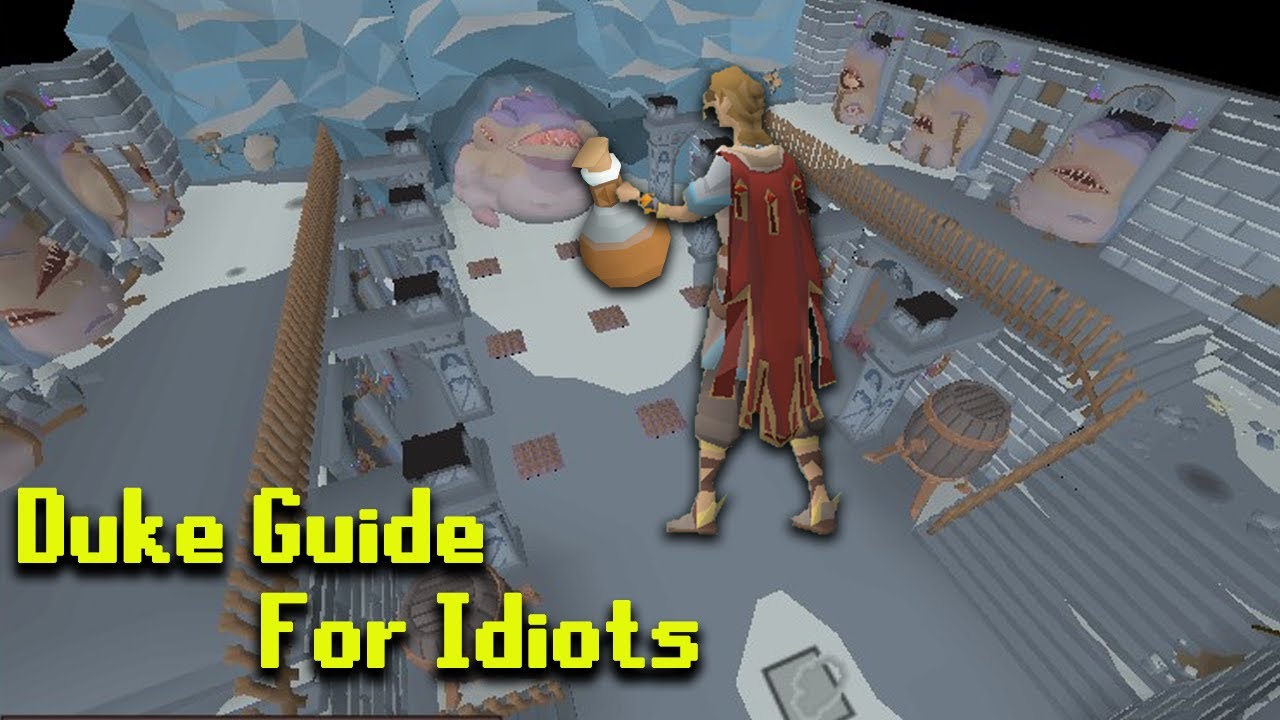
https://www.youtube.com/watch?v=1QjdtcregEQ any idea on how i get invisible with highlight hull on my character like this guy did in his guide?
I will give every single person reading this, one big smooch. Thanks for being a part of this channel adventure.
Sub if you're not already, your sub notification will inspire more videos
Tile Markers: https://pastebin.com/6FKNRXVw
Follow me on Twitch! Twitch.tv/Extillian
Follow me on Twitter! https://twitter.com/extileyt
Join our Discord! htt...
tribal geyser
Ill check it out thx
 ocean path
Hey all, im having the "too many login attempts" issue after the most recent update on my account. I have tried waiting it out and testing on other accounts, but it seems that the default world plugin may be the cause. If I manually select a world it will allow it to log in, but once I hop to the world selected as default the game kicks me back to the login screen and it will throws the error again. This has been going on since last Friday so any help would be appreciated ❤️
Also it recommends using the Jagex launcher, is this a good idea and can I launch runelite from that or should I hold off? I also have authenticator on the account
viscid lantern
runelite is available on the jagex launcher yes
gilded kayak
as long as the account you're playing on was created by you, and you're not on Linux, you should have no issues migrating
ocean path
Okay using Jagex launcher to boot Runelite fixed the issue, thanks guys 😄
viscid lantern
happy gaming!
digital hedge
sonic birch
Classic audio devices causing weird problems. Thanks for letting us know so we k...
Just a heads up, a tell-tale sign is that I was also unable to play video or audio via any browser that had output set to output to any Elgato wavelink channels.
Other games outputting to Elgato channels were not affected so it didn’t cross my mind for a while.
digital hedge
oblique plume
ohh i wonder if its audio things
Now we have to be scared of bluetooth and USB, great. 🙃
 low furnace
i'm looking for the plugin "NPC Indicators" so io can highlight whatever npc or player i'm interacting with or fighting like in the screenshot:
 sonic birch
Where did you get that screenshot?
low furnace
someone who was using it
zealous cedar
this screenshot isnt runelite, i dont know what this is
 leaden trail
It's still not RuneLite
 zealous cedar
yes
 vale dome
Why is the top left hidden though? 😛
leaden trail
Not one in RuneLite.
low furnace
is there anything similar or would i have to attempt to make this on my own 0_o
sonic birch
It's bannable.
low furnace
hows that bannable? custom plugins are illegal?
gilded kayak
the feature that fake plugin is using is against the rules
sonic birch
!statement
low furnace
Oh, is it possible this was a real plugin at one time and then got removed because of this?
viscid lantern
no
gilded kayak
the image you posted is not from any plugin in RuneLite
whoever you got that image from, is not using RuneLite
low furnace
Interesting, Thanks for the info and heads up guys.
Didn't realize that guy was cheating either.
 fresh cosmos
does the 'Named Pets' plugin show the name you choose for other people aswell?
sonic birch
!hubs
haughty pumiceBOT
hubsupport: Support for hub plugins should be directed to the author of the plugin. You can find the support link by searching for the plugin in the Plugin Hub panel and clicking the ? button on the plugin, or by right-clicking the plugin in the plugin panel and clicking the Support menu option.
fresh cosmos
Named Pets doesnt say it shows for other players, aswell... unless i missed it
tough mountain
oblique plume
which profiles did you try to import
i tried every one of them but none of them had the bank tabs
oblique plume
post an image of your profiles in the folder, with the size/last modified visible
most of the time people didnt actually try each one
vast bone
fresh cosmos
does the 'Named Pets' plugin show the name you choose for other people aswell?
if it warns you on install about networking/ip addresses, then probably yes. otherwise definitely no
fresh cosmos
@vast bone it just installs the plugin so i guess not vOv
 dire harbor

hey guys does anyone know
how to remove this quest icon
from the floor for drops
mossy swan
turn off quest helper
 solid mesa
Or turn off the setting it says in the tooltip. “Highlight Missing Items”
mossy swan
!questhelper
haughty pumiceBOT
Visit Zoinkwiz's Quest Helper plugin discord (https://discord.com/invite/XCfwNnz6RB) for support, issues & feedback
dire harbor
ty @mossy swan
solid mesa
dire harbor
couldnt anywhere
It doesn't look like this?
 dire harbor
kk im stupid
cause i kept opening the quest helper sidebar
and not actual settings
but checked settings for everything else
pretty new to this
appreicate it
ornate kite
leaden trail
*month
Well ppl will keep asking because it's waiting on runelite to do the update, not the plugin devs
sonic birch
Just wait patiently.
 alpine pivot
Would anyone you know what could be the cause of runelite now showing the current ping of mine. I do have it enabled in the world hopper plugin
Also on the world switcher it doesnt display the pings for servers
sonic birch
Sounds like you might be having some connectivity problems
alpine pivot
Like i know when it changed and i know what kind of caused it but i dont see the reason
My internet is fine. And the game itself is running normally just not displaying the ping.
Like it shows my ping whenever im connected to wifi
my connection is managed by dhcpcd rather than networkmanager
sonic birch
Still sounds you are having some connection issues, and you even know the cause
alpine pivot
yeah but idk why it do that
i just know it happens when i switch
actually im gonna test other game if it shows up there. kinda bad coming here first
sonic birch
Even then, you could have connection issues to jagex's servers and not to other games
alpine pivot
well yea
 sour mauve
can anyone help me understand why I'm not able to clone/fetch updates?
it's not related only to runelite.. I'm also unable to update the project via intellij
 zealous cedar
firewall maybe?
sour mauve
I was able to clone small repos so I don't think so but I'll check that
 untold mantle
at some point runelite worked with windows snapping functionality (slam it to left and resolutions swaps to left half of monitor). It stopped working a few months ago for me.
Is it something I did or a Runelite change? Can i get it back?
untold mantle
Okay i wonder if something in my windows settings got messed up, Ill look into it, Thanks!
zealous cedar
does window snapping work for other apps?
untold mantle
yeah
zealous cedar
weird
 zealous cedar
it should work regardless
untold mantle
Thats how I remember it too! It works on my laptop, ill try a full reinstall
Tried and true, reinstall fixed it. DK root cause.
Thanks @zealous cedar
zealous cedar
weird
untold mantle
been messing w/ plugin development so maybe i borked a setting somewhere
 mossy sable
Is there a way to detect when a spell is cast or used in the Runelite API?
mossy sable
Ah, I assumed that was only for right click. That should give me most of what I need. Thanks!
 cerulean wasp
i can not figure out how to save all my settings from my old computer to my new one. im on both at the same time rn btw
sonic birch
!transfer
haughty pumiceBOT
cerulean wasp
goated
 limber frigate
question, i turned my pc off then when i went to log in all my runelite settings all reverted to being off/default
sonic birch
limber frigate
question, i turned my pc off then when i went to log in all my runelite settings...
!lost
haughty pumiceBOT
limber frigate
ily @sonic birch
 nova pollen
Anyone able to help, one of my clients is extremely blurry, same gpu settings?

 final zenith
Anyone have any idea what could be leading to this error that causes RL to crash? I've now had my client crash 3 times in PvP, and only in PvP. My profile has not changed in years, but I feel like has crashed at random times after converting to Jagex Launcher
I have a separate RL profile for PvP-related content, that only has 3 external plugins activated and very few default plugins.
RL logs:
2024-07-25 00:46:01 CEST [Client] ERROR injected-client - Client error: 1972 4731 4730 25
java.lang.NullPointerException: null
    at tz.dy(tz.java)
    at mo.ag(mo.java:48)
    at dk.aq(dk.java:33)
    at gc.aq(gc.java:26)
    at mb.ag(mb.java:54795)
    at no.ad(no.java:8285)
    at df.aq(df.java:101)
    at client.lu(client.java:3618)
    at client.bw(client.java:1215)
    at bs.nd(bs.java:388)
    at bs.yl(bs.java)
    at bs.run(bs.java:34115)
    at java.base/java.lang.Thread.run(Unknown Source)
2024-07-25 00:46:01 CEST [Client] ERROR injected-client - Client error: 1972 4731 4730 25
java.lang.NullPointerException: null
    at tz.dy(tz.java)
    at mo.ag(mo.java:44)
    at dk.aq(dk.java:33)
    at gc.aq(gc.java:26)
    at mb.ag(mb.java:54795)
    at no.ad(no.java:8285)
    at df.aq(df.java:101)
    at client.lu(client.java:3618)
    at client.bw(client.java:1215)
    at bs.nd(bs.java:388)
    at bs.yl(bs.java)
    at bs.run(bs.java:34115)
    at java.base/java.lang.Thread.run(Unknown Source)
2024-07-25 00:46:01 CEST [Client] ERROR injected-client - Client error: 2101 2100 25
java.lang.NullPointerException: null
    at tz.dy(tz.java)
    at mo.ag(mo.java:44)
    at dk.aq(dk.java:33)
    at gc.aq(gc.java:26)
    at mb.ag(mb.java:54795)
    at no.ad(no.java:8285)
    at df.aq(df.java:101)
    at client.lu(client.java:3618)
    at client.bw(client.java:1215)
    at bs.nd(bs.java:388)
    at bs.yl(bs.java)
    at bs.run(bs.java:34115)
    at java.base/java.lang.Thread.run(Unknown Source)
And a couple more errors that occured at 00:46:01 as well..

 fierce barn
why is runelite randomly minimizing itself soemtimes?
i see no obvious reason why it should do that at all
zealous cedar
runelite does not randomly minimize itself
zealous cedar
final zenith
Anyone have any idea what could be leading to this error that causes RL to crash...
its probably just a broken pluginhub plugin, try safe mode
If you can get it to happen when in safe mode I will look closer
final zenith
zealous cedar
its probably just a broken pluginhub plugin, try safe mode
Probably... but yeah gonna try that when I pvp from now on, thankfully it was only in LMS this time.
If the error is triggered by an external plugin, how come its not visible in the stack trace? That makes it very hard to debug
zealous cedar
typically it is caused by plugins accessing the client instance off-thread which will corrupt a bunch of the clients internal data structures which then causes it to break at some point later
I will delist plugins that do that though if you can identify what is causing it and how
final zenith
ah ok yeah that makes sense, thanks for the explanation
final zenith
zealous cedar
I will delist plugins that do that though if you can identify what is causing it...
man I would if i could, i know 0 java
zealous cedar
eh if you can correctly use the term "stack trace" in a sentence you are ahead of most
final zenith
just a quick question, could swapping back and forth between RL profiles without restarting the client corrupt data/bloat the client as well? assuming there are no external plugins actually corrupting the data.
 odd lagoon
anyone know why i cant loginto runelite? im new to runescape and this launcher but everytime i try to log in it says its wrong info or i need to use jagex launcher?
 fresh swift
you need to use the jagex launcher
just select runelite from the dropdown after having installed it
stone parcel
With what?
 shy dove
Please Tell Me About Runelite
 warped mango
Anyone know if theres an easy way to clear ALL bank tags? Trying to make a clone of my main account's profile but want to use a fresh set of bank tags.
 fallow panther
does anyone have jagex launcher working on linux with discord rich presence (i.e. not saying lutris)
I used the USA-RedDragon flatpak, would it be worthwhile to try bolt instead?
would this be a question more suited for torm's discord?
stone parcel
Yeah probably better for there. 🙂
 worn stirrup
Hello do you know how can i turn that mark off? I cant find a plugin named that way
 stone parcel
That's from the Quest Helper plugin I'm pretty sure.
The Highlight missing items option.
worn stirrup
You are fast, thank you very much!
 fickle solstice
Is there a way to make it so that random stuff doesn't prioritize over my UI bubbles?

I just died to this a second time
stupid character ran under Dusk instead of speccing
It seems that the spec bubble is the only one this happens with
Run and Pray both correctly prioritize
I haven't tried Hp bubble while being poisoned yet
vast bone
it doesn't go over quick-prayer?
fickle solstice
Ah.. maybe I swapped that specific object
vast bone
There's also a generic option, or there used to be. idr.
I think some people use "custom menu swaps" to swap use,special attack
kind of a workaround though.
it doesn't happen for npcs afaik
fickle solstice
yep... you were right, swapped objects are above quick prayer and spec, but NOT run, interestingly enough.
Non-swapped objects are behind all orbs
I think even swapped objects should be behind all orbs, but maybe that is a plugin bug instead of RL bug
vast bone
I think people have mentioned it before
I had the same issue with my plugin "Custom menu swaps" and I put a fix in for it, and it wasn't too hard.
but idr how runelite's MES is set up
It's a bit more complicated iirc.
haughty pumiceBOT
@odd lagoon Dont ask to ask. https://iki.fi/sol/dontask.html
@haughty pumice If you want to launch separate instances of RuneLite each with a different loaded profile, see:https://github.com/runelite/runelite/wiki/General-Features#profiles
 split drift
i cant get the sound for idle notifier to work, got any help?
sonic birch
split drift
i cant get the sound for idle notifier to work, got any help?
Custom sound? Regular sound? Do you get a notification?
For the last one, you can enable game notifications in the runelite config to get a message in game chat when a notification goes off
Also make sure notifications while focussed is checked in the runelite config
split drift
focused was checked and i get a notification. i use regular sound
maybe i should try custom sound
the notification dosent always go off
sonic birch
So, you have to figure out based on game chat notifications if the problem is that you're not getting any sound ever, or if it's not getting notifications
Then I can help you further
 supple cave
how do i submit a issue about a plugin
mossy swan
hub plugin?
supple cave
yeah
sonic birch
!hubs
haughty pumiceBOT
hubsupport: Support for hub plugins should be directed to the author of the plugin. You can find the support link by searching for the plugin in the Plugin Hub panel and clicking the ? button on the plugin, or by right-clicking the plugin in the plugin panel and clicking the Support menu option.
supple cave
do i just submit a pull request?
supple cave
i clicked report an issue, it directed me to the pull request page
sonic birch
 supple cave
my end doesnt have the issues tab
sonic birch
a few authors sadly have it disabled; can you send the link?
supple cave
haughty pumiceBOT
[ https://github.com/guillaume009 ] [ @prisma thicket 208019880048459787 ] krytlex#0
sonic birch
supple cave
https://runelite.net/plugin-hub/show/slayer-wiki
@prisma thicket Could you enable issues on your slayer-wiki repo?
 prisma thicket
sonic birch
<@208019880048459787> Could you enable issues on your slayer-wiki repo?
prisma thicket
sonic birch
<@208019880048459787> Could you enable issues on your slayer-wiki repo?
Done
@supple cave you can go ahead with your issue now 🙂
 noble echo
Is anyone else having problems hopping worlds? I keep getting disconnected and it's saying "too many login attempts" and telling me to download the jagex launcher lol
sonic birch
No, that's a jagex problem
You can upgrade if you're not on linux and admin of your system to fix it permanently probably. Alternatively try a vpn/wait/clear the sessions via the official website
 molten bluff
I am at the agility pyramid and this is what my screen looks like... No idea how to fix. Can anyone help?
 zealous cedar
turn off hide lower planes
fresh cosmos
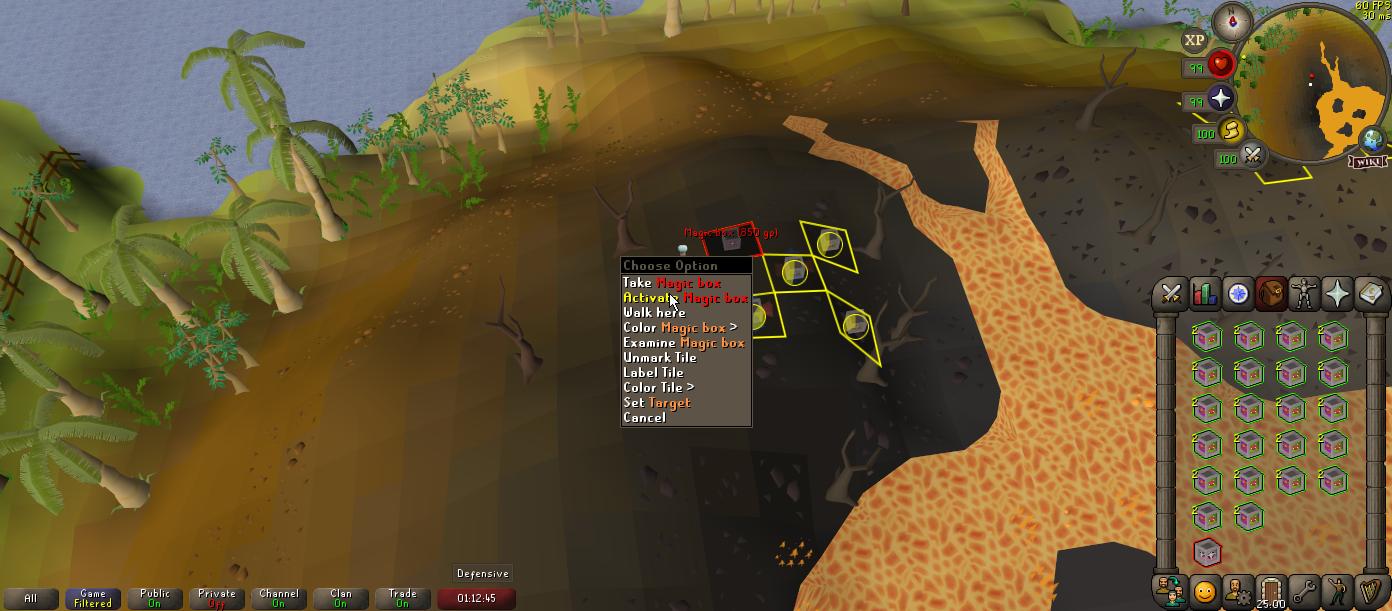
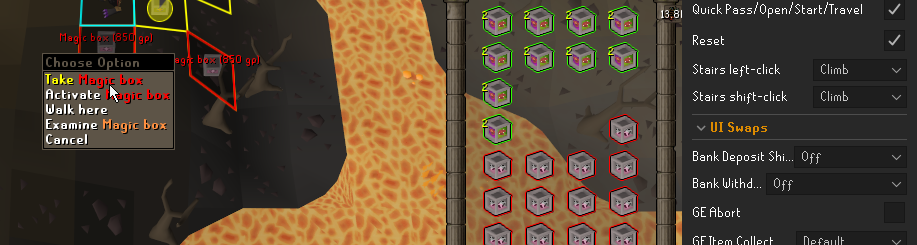
how come i cant swap the left click on a Magic Box? https://i.imgur.com/GfjPNiE.jpeg
 viscid lantern
but also make sure to enable the respective category to allow swaps like that
or is that a ground item?
mossy swan
probably same as box traps
viscid lantern
ngl idk even what that thing is 
mossy swan
it says only box trap but maybe it applies for this too

and then the custom thing is the one at top
viscid lantern
classic imps
fresh cosmos
 viscid lantern
can you swap it if you enable the Customizable swaps in that category?
gilded kayak
pretty sure there's no code for this item because it's activate
i see a PR here adding it that was closed
viscid lantern
maybe there just isnt a swap for it
fresh cosmos
ugh
viscid lantern
you could try the custom menu swap plugin from the hub
and just add Activate,Magic box to the custom swaps
fresh cosmos
thanks friend that worked
 thick copper
I have a buddy whose client stops accepting any inputs once he gets Sol Heredit to 20% hp. This is the only place in this or any other game this is happening, making us think its some plugin or client related but its kinda hard to troubleshoot. Anyone have this happen to them?
hollow olive
teleport
 storm coyote
guys, can somebody help me
i just got a blue screen and all my plugins are gone
somehow i have the profile file, but it's not loading anything
my "plugins" file have all my plugins but ain't loading it too
haughty pumiceBOT
storm coyote
yea i followed those support thing but its not loading anyways
gilded kayak
can you screenshot that profiles2 folder, it's more obvious to us which one is your settings
if you're doing it in-client click the top right button so the details show up
storm coyote


let's start over again
i click the import profile and choose the first from the profiles2
gilded kayak
are you sure it's not main
storm coyote
nah nope
storm coyote
yea, and its not loading
gilded kayak
did you try double-clicking it
gilded kayak
did the orange bar on the left side, swap itself to the left of main
storm coyote
ye
gilded kayak
and nothing changed?
 gilded kayak
!logs I guess
haughty pumiceBOT
To find the logs, you can do one of the following:
- If your client failed to open, click the
Open logs folderbutton. - Open the screenshot directory by right-clicking 📷
Camerabutton, navigate 1 directory up, then open logs folder. - Navigate to
%userprofile%\.runelite\logson Windows or$HOME/.runelite/logson Linux and macOS.
Upload the log files named client and launcher by dragging them to Discord. If there are files prefixed with jvm_crash dated from today, upload them too.
gilded kayak
oh maybe it's because the main in that folder has no number
that's probably weird
what about re-importing imported profile 4
gilded kayak
left-click & drag client in discord
gilded kayak
weird
can u dm @haughty pumice that main file and maybe also the imported profile 4 one
storm coyote
shiet
golden aurora
can any one help? i can still log in via mobile .

also can still log in on my alt account via runelite, but my main keeps saying to many log in attempts
charred wind
The solution to this is upgrade to a Jagex Account
haughty pumiceBOT
Get support for the Radius Markers Plugin Hub plugin here: https://runelite.net/plugin-hub/show/radius-markers.
You can also find the support link by searching for the plugin in the Plugin Hub panel and clicking the ? button on the plugin, or by right-clicking the plugin in the plugin panel and clicking the Support menu option.
vast bone
fickle solstice
Is there a way to make it so that random stuff doesn't prioritize over my UI bub...
https://github.com/runelite/plugin-hub/pull/6359 does this plugin do that maybe?
 urban lodge
vast bone
I think some people use "custom menu swaps" to swap `use,special attack`
urban lodge
vast bone
I think some people use "custom menu swaps" to swap `use,special attack`
This is the only thing that worked for me yeah. The spec orb in particular seems to have a very low priority
No idea why
vast bone
that plugin I just linked doesn't do that?
urban lodge
Oooh there's a plugin for specifically that interaction now?
I can check it in a couple of hours
fickle solstice
vast bone
<https://github.com/runelite/plugin-hub/pull/6359> does this plugin do that mayb...
Interesting! I'll check it out when it's merged for sure
vast bone
it already exists
urban lodge
I can very consistently trigger it in the jad challenges
fickle solstice
A bit odd that it's a plugin rather than a fix or setting somewhere in RL or menu entry swapper
urban lodge
The spec orb just refuses to work for a solid 10-15 seconds
fickle solstice
Ah I thought that pull request was open and not yet merged
vast bone
i'll give it a try and see if it works
vast bone
fickle solstice
Ah I thought that pull request was open and not yet merged
it is but it's an update
fickle solstice
Oh I understand now.
 fickle solstice
Awesome
vast bone
the pr is to add the prayer orb, I think
fickle solstice
Right, I guess to actually allow passthrough on prayer or
vast bone
I have no idea why they wouldn't include the prayer orb lol. oversight?
fickle solstice
Thanks so much, I had no idea this exists
I think prayer works differently
Code might be different?
Not sure
 plain shell
Hello, I have been experiencing this weird bug for few months. I play with two accounts and the second account I log into gets these stutters every few game ticks when running around. I tried turning GPU plugin off but it doesn't help. Would you have any idea what causes this?
zealous cedar
it might be a pluginhub plugin. try safe mode?
plain shell
Thanks for the swift replay! I'll try that!
plain shell
Ok I tried safe mode and both instances ran without any lag. I did some testing and figured out that it isn't about which account logs in first but which account's profile isn't loaded. For example, if I shutdown alt account's client first and then main. After opening 2 new instances, alt profile is loaded on both. Then when I log into my main and runelite switches profiles, my main account gets the lagging while running and vice versa.
Now I tried switch back and fourth the profiles while logged in on both accounts, this made the account that didn't have lag, get the lag also...
zealous cedar
I am not sure I follow, does it lag in safe mode?
plain shell
No
and it is more like stuttering than lagging, and that is only happening while npc or my character is moving
oblique plume
then that means itl be a pluginhub plugin causing the issue
plain shell
oblique plume
then that means itl be a pluginhub plugin causing the issue
Would you have any tips on how to find what plugin causes this? I have like 300 plugins if you coun't everything 😄
vast bone
search "hub" and uninstall anything you don't need, is a good first step
there's no easy way really.
 frank basin
is there a plugin that shows you how long your target is still stunned for?
oblique plume
no
frank basin
is it against rules?
oblique plume
yes
nova pollen
!config
haughty pumiceBOT
 gaunt widget
howdy all, downloaded runelite today, installed one texture plug-in (the 117 HD one) but my audio is distorted and scratchy and no music is playing. Im on Windows 11 btw. anyone have a fix
mossy swan
!hd
haughty pumiceBOT
Visit 117's HD plugin discord (https://discord.com/invite/U4p6ChjgSE) for support, issues & feedback
haughty pumiceBOT
flowchart: Please refer to this flowchart for further troubleshooting.
gaunt widget
thank you, i will look into those now
gaunt widget
mossy swan
or erm
im thinking it might not be the texture pack bc when i disable it, it didnt fix anything idk tho
gaunt widget
mossy swan
or erm
in reality im actually just goofy and didnt realize if you mute the menu music, it mutes all music and you have to go back to start menu and unmute it lol
hollow olive
theres a volume slider for music in game as well
gaunt widget
hollow olive
theres a volume slider for music in game as well
when i was originally adjusting that slider, it wasnt changing. For some reason I had to go back to that start menu and unmute to get the slider working
 fluid tartan
On Linux using the .jar I'm able to pass --scale=2.0 arg to double the scale of the client, but passing --scale=0.5 does not decrease the size. Is this expected?
zealous cedar
no, but also i dont know how linux works really
on windows --scale=0.5 would decrease it
its possible there is some limitation
 half drum
Hi, my pc just restarted and now all my plugins have disappeared
No matter how i open runelite, from jagex launcher or runelite itself, i have no plugins
i was previously signed into a runelite account and i still am
i can see all my plugin jar files in the .runelite folder, i can see runelite trying to load the plugins in the logs from before my pc restarted, and now its not anymore
its not an issue with my profiles. i have one profile and its blank. default.
haughty pumiceBOT
half drum
legend, thank you. found an old one to import
noble echo
sonic birch
You can upgrade if you're not on linux and admin of your system to fix it perman...
Thank you upgrading fixed it 🙂
 formal crag
is there a way to remove this instance time for GG's

 crisp dune
You could disable the Boss Timers plugin
formal crag
i will turn that off ! thanks a lot
crisp dune
Just remember to turn it back on to get the respawn timer back for other bosses 🙂
formal crag
crisp dune
Just remember to turn it back on to get the respawn timer back for other bosses ...
thx beast apprecaite u
 vast sundial
How do I start my plugin on the client thread?
crisp dune
You don't
You can use clientThread.invokeLater(() -> {}); to do stuff on the client thread
vast sundial
ah, so when is my plugin and when isnt it on the client thread?
i'm guessing it's not when the my plugin's startUp is called?
crisp dune
plugin events are run on the event they're triggered from
startUp and shutDown are called on EDT
vast sundial
crisp dune
You can use `clientThread.invokeLater(() -> {});` to do stuff on the client thre...
do you have an example of how this is used?
crisp dune
Search the client codebase, you'll see many examples
 digital condor
can anyone help me I keep getting a fatal error on startup
gilded kayak
does it say anything else
digital condor
unale to establish a SSl/TLS
Expception: SSLhandshakeexpection
Message: Remote hpst terminated the handshake
fossil summit
probably timed out
gilded kayak
what about the part in the middle
does it say
this can be caused by firewall, antivirus, malware, isp, proxy
digital condor
Runelite was unable to establish a SSL/TLs connection with a required server while downloading the bootstrap. This can be caused by a firewall antivirus malware, misbehaving isp or a proxy
gilded kayak
did you try to check if those things are blocking runelite
I'd probably start with adding runelite to firewall exceptions, and check if your antivirus is blocking it
digital condor
looking at those now
fossil summit
Can also click this see if it loads for you
digital condor
that loads all the code
ok got it thank you all for the direction on my incompetence of reading lol
limber frigate
hey question, everytime i go to a second floor up, everything below is completely blue and doesnt load, for rooftop agility courses 98% of my screen is just full on light blue
zealous cedar
turn off low detail
 frail terrace
does anyone know how to fix menu entry swapper when it does not allow you to change back to the default left click of an item? I swapped my sea boots 4 to left click teleport and now when I reset "swap left click" to default it stays on teleport and there is no option to change that back to "wear".

 hollow olive
menu entry swapper config menu has an option specifically for the boots, change that one
 limber frigate
got another question itll be a simple one for u guys, when i right click someone its not the extended menu there isnt a trade option/follow/ etc i have to move my cursor down and then it gives me a secondary drop down menu, how do i revert that to normal
 solar bramble
Hey guys, where can I post my runelite logs? Everytime I try streaming my runelite client in discord, it causes my runelite client to crash. I don't know what else to do
crisp dune
limber frigate
got another question itll be a simple one for u guys, when i right click someone...
Interface styles, I think? I don't quite remember which plugin does that
limber frigate
yup that was it it was the condense player options thanks so much dude i was looking for it for hours much love @crisp dune
gilded kayak
solar bramble
Hey guys, where can I post my runelite logs? Everytime I try streaming my runeli...
turn off advanced capture something in discord settings
solar bramble
gilded kayak
turn off advanced capture something in discord settings
ily if this works
solar bramble
gilded kayak
turn off advanced capture something in discord settings
ty youre the man
 heavy belfry
are pbs and kcs stored locally on our machines? i want to access them without logging in
mossy swan
keep it to one channel
heavy belfry
mb, i posted it in the wrong channel. thought it'll belong to the support channel
heavy belfry
mossy swan
keep it to one channel
any ideas on where this data is stored?
nvm found it
how do some plugins track how many of one item you have in the bank? can i do that without a plugin? (sorry if this is an obvious qn, im clueless)
heavy belfry
mossy swan
no, and this is a channel for help with the client, keep other stuff in <#301497...
ok, thanks for the help
ornate kite
uhhh idk what happened but i log in this morning and all my plugins are just gone and all my profiles are as well
haughty pumiceBOT
 zenith turret
Hey team. noticed my barrage timer doesnt work. its switched on and i already reset it. any ideas?
mossy swan
you can only see a freeze timer when a freeze is cast on you
crude sail
Can the Jagex Launcher pass launch options to RuneLite? Specifically, I would like to use the --scale option.
mossy swan
crude sail
Can the Jagex Launcher pass launch options to RuneLite? Specifically, I would l...
launch runelite (configure) and set it there
crude sail
Ah, that works. Thank you.
 mellow canopy
How do i check if i have a legit version of runelite installed?
mossy swan
!verify
haughty pumiceBOT
You can verify your downloaded RuneLite setup file is authentic by visiting https://runelite.net/verify/
mellow canopy
Thank you!
zenith turret
mossy swan
you can only see a freeze timer when a freeze is cast on you
yes i understand that
zenith turret
mossy swan
you can only see a freeze timer when a freeze is cast on you
It dont work lol
 opaque oar
Hi all, I can no longer toggle the GPU plugin on/off. If I switch it on it immediately turns off. It has been working fine and never had this issue. Any ideas?
haughty pumiceBOT
To find the logs, you can do one of the following:
- If your client failed to open, click the
Open logs folderbutton. - Open the screenshot directory by right-clicking 📷
Camerabutton, navigate 1 directory up, then open logs folder. - Navigate to
%userprofile%\.runelite\logson Windows or$HOME/.runelite/logson Linux and macOS.
Upload the log files named client and launcher by dragging them to Discord. If there are files prefixed with jvm_crash dated from today, upload them too.
opaque oar
 hallow cove
my pc crashed today somehow and now when i load up my runelite all my setting are gone
mossy swan
hallow cove
my pc crashed today somehow and now when i load up my runelite all my setting ar...
!lost
haughty pumiceBOT
hallow cove
i try to get them all back but im not handy with pc stuff
mossy swan
zenith turret
It dont work lol
can you show me?
zenith turret
mossy swan
can you show me?
Ill get a clip
hallow cove
holy shit getting my profile back is insane
i finaly got it
but damn shit pc i got
deleting everyting i hate it
mossy swan
hallow cove
deleting everyting i hate it
you are losing other stuff too?
if so, you might have a broken pc. contact support of the company you bought it from
and make sure you have cloud sync enabled for runelite
haughty pumiceBOT



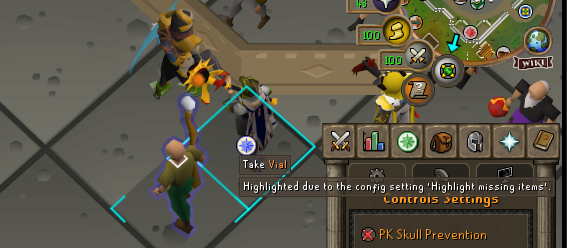

 mossy swan
yep
hallow cove
prob time to sned the pc back again if it keep crashing
ill already got it send back 2 times last year becouse of the 4070 ti was broken 2 times
hallow cove
azerty from a dutch company
there really chill in sendign it back and repairing
but still it sucks to send it away
mossy swan
no doubt
 royal oriole
why did wilderness player alarm have to be broken? :P
haughty pumiceBOT
Get support for the Wilderness Player Alarm Plugin Hub plugin here: https://runelite.net/plugin-hub/show/wilderness-player-alarm.
You can also find the support link by searching for the plugin in the Plugin Hub panel and clicking the ? button on the plugin, or by right-clicking the plugin in the plugin panel and clicking the Support menu option.
 granite dune
Hey! I just joined the Discord and I am not sure if this is the right place to post or not (maybe I should try via Github directly)
Maybe someone can point me in the right direction?
There is a plugin called 'key remapping' which I use and today I notice that the keys don't work when a text is prompted (can send image if that helps to clarify).
Meaning when I use default F-keys I can still toggle between the tabs while game prompts a game message/dialog.
And when I use for example 'Q' it does nothing while the game message is present. (I think it treats as a normal 'Q' input) when this occurs.
There is ways around this by remapping globally or via keyboard programs but i still want the ability to type without forcing the key to be blank when typing.
zealous cedar
that is intentional, it is so that you can type into input boxes
granite dune
zealous cedar
that is intentional, it is so that you can type into input boxes
So it's not possible when this is prompted? (Normal f-keys can toggle/cycle when this window appears)
 zealous cedar
no
granite dune
zealous cedar
no
Alright thanks for the information and quick response! Ill go search if there is a quirky workaround somehow
 oak hinge
Is the gauntlet plugin currently not working? or is it just me having issues?
 viscid verge
anyone one know how to stop the jagex launcher from closing when opening runelite? steam use to be able to track my hours without an issue on runescape but now it seems it has an issue
 gentle summit
royal oriole
why did wilderness player alarm have to be broken? :P
gentle summit
royal oriole
why did wilderness player alarm have to be broken? :P
Is it?
royal oriole
gentle summit
Is it?
Buggy as hell
round jacinth
boss man
gentle summit
royal oriole
Buggy as hell
is it not flashing anymore when someone’s near?
gentle summit
I haven’t used it today I’ll see myself in a bit
Was working last night for me at least
royal oriole
gentle summit
is it not flashing anymore when someone’s near?
With some settings it doesnt but i was mixing settings for 30mins to get it working
Everything just worked before it
now the plugin works with runelite notifications
leaden trail
I think the author was considering reverting the change, I'm not sure if that's still the case though
gilded kayak
i thought they did revert it
 trim wolf
I just came back to osrs about a month ago and since then I have had this issue but I just can't deal with it anymore, I tried everything I can think of, uninstall, reinstall, wipe configs, runelite folder, everything... nothing works, only thing left I can think of is reformatting my entire PC but I have important things on my PC so I don't want to lose them just to make RuneLite work
gilded kayak
maybe they reverted it badly
zealous cedar
if you resize the client does it fix it?
trim wolf
Resize it as in resizable mode? or RuneLite itself?
zealous cedar
enter resizable mode and then go back to fixed
trim wolf
No difference
But in resizable mode it is not as bad
The issue is still there but it doesnt effect the full screen
zealous cedar
what if you resize when in resizable mode?
trim wolf
oblique plume
could that be low detail related?
I turned off low detail, didnt help
ok
Where do I find that?
zealous cedar
.runelite/jagexcache
 sinful cedar
Hey, I have a problem. I used windows 10 and everything was smooth, today I upgraded to windows 11 and at the beginning everything seemed to be a-okay, but then all of a sudden out of nowhere the client seemed very choppy and laggy, but the fps and ping seemed to be fine also my os seemed to be lagging as well. Any ideas?
I tried deleting jagexcache, toggling plugins on and off, reinstalling runelite, updating win 11, updating net framework.
haughty pumiceBOT
safemode: Windows
Run the RuneLite (safe mode) shortcut, or with a Jagex account, first run the RuneLite (configure) shortcut and tick the Safe mode box, then launch RuneLite via the Jagex launcher.
Mac
In Terminal, run:
/Applications/RuneLite.app/Contents/MacOS/RuneLite --configureTick the Safe mode box. Launch RuneLite.
If it's not working, download and install the updated RuneLite launcher from the website link in #welcome. You don't need to uninstall your current version. You will not lose any settings or plugins. Then try running safemode again.
sinful cedar
no, I didn't use safe mode
leaden trail
To clarify, he's asking you to try safe mode and tell us if it still happens
sinful cedar
alrighty
hmmm no jitters so far, but when I played without safe mode sometimes it would take 1.5 hours to crash
 grizzled pollen
Anyone know how to fix this?
 zealous cedar
try again?
grizzled pollen
Tried a couple of times with ethernet, on my wifi (both 5.0 and 2.4 ghz) and on mobile where i shared my internet
Also tried resetting my PC
gilded kayak
i saw someone ask if cloudflare was having issues about 15 minutes ago
that would check out with a cloudflare 520 error
grizzled pollen
Well it started working randomly 😅
sinful cedar
im in the game for 35 minutes using safe mode no problems yet
51 minutes in, no crash
 violet pendant
Hey all, wondering if anyone else has encountered audio not playing when more than 6 or so tiles from an enemy?
Killing whisperer and getting no audio when far away from her (well within attack range of shadow)
Tried looking for some setting that might be controlling this but no luck
Oh wow, saw a somewhat similar reddit post. Ended up being the music plugin. Once I turned it off, sound returned to normal
charred wind
sinful cedar
51 minutes in, no crash
So then if you're not encountering these issues on the client while in safe mode, the likely cause is a plugin hub plugin.
Because it's intermittent, you could play until it happens again on the normal client and share your client.log, but ideally you just figure out what hub plugin is causing the problem and disable it.
 teal juniper
so it's my third time writing here about this bug i found with mouse tooltips and i finally figured out when it happens so it seems to turn off mouse tooltips when you hover over anything on the big world map that has a tooltip and exiting this map with escape button on your keyboard
also i don't know if it is somehow connected with the known bug (someone said that it is a jagex bug) in which it doesn't work for the same tick you hover over prayers but i noticed that it sort of "resets" it when it is bugged by the world map, here's the clip that shows it, let me know if that is fixable or not, maybe it also is jagex bug and not runelite
 wise hamlet
I feel like i know the answer to this question but... I factory reset my harddrive with my runlite client folder in but completely forgot to export my runelite profiles, is there anyway to get them back or is it gg?
crisp dune
If you did not have them synced, there is no way
wise hamlet
synced to what may i ask?
gilded kayak
our cloud sync, clicking the 🚪 near the top of the client is the login
you login with a google account so if you have no memories of doing that, you probably didn't
wise hamlet
gilded kayak
you login with a google account so if you have no memories of doing that, you pr...
okay no i definitely remember doing this because i remember it being a red 🚪
gilded kayak
oh well great
wise hamlet
whats my next steps from that?
charred wind
click the green door in the top right, mine is red because I'm logged in
 wise hamlet
yup
gilded kayak
login again, 🔧 -> -> double-click the new profile -> gg ez
gilded kayak
gilded kayak
login again, 🔧 -> <:profiles:1183560772022964305> -> double-click the new profi...
I should say the synced profile that magically appeared, and looks like it's new. since there's also a new profile button
wise hamlet
oh you guys are beautiful, thank you
oak hinge
Is the gauntlet plugin currently not working? or is it just me having issues?