#support
1 messages · Page 15 of 1
 leaden trail
 molten ore
imagine i get like 5000 detections
 hushed night
you probably have a rootkit
hushed night
a disease not a virus
molten ore
haha
could be why i was hacked like a week ago 8)
but i cleared some virus so thought i fixed it
well, we'll see
hushed night
I think you should not use a computer anymore
hushed night
android tablets only
hushed night
get an amazon fire tablet
molten ore
rather not
i have 2 macbooks, 1 pc
hate tablets
1 (from work, for work), 1 for my own coding adventures
hushed night
do a scan on all 3
i’m just messing with you brotherman
i have to go, hope you the road meets you at the end of the hill
 glossy flume
are there plugin shortcuts like how to quick search ge?
 viscid lantern
(it might be a: buy an external harddrive tomorrow, back all your pictures and other files up on there and reinstall windows angle) unless the scan comes up with something
hushed night
buy an external computer and use that instead
 steady geode
Too many login attempts how do you fix??
 grim oak
anyone elses farm timers messed up constantly? hespori, calquat and hard woods constantly off time wise (not done yet)
molten ore
jesus it takes long time to do a scan
 gilded kayak
steady geode
Too many login attempts how do you fix??
gilded kayak
steady geode
Too many login attempts how do you fix??
clear your active sessions on the jagex website
if that doesn't work, you either have to upgrade to a jagex account or wait
molten ore
viscid lantern
(it might be a: buy an external harddrive tomorrow, back all your pictures and o...
no rootkits found atleast
but still scanning
40 min scan is crazy
steady geode
gilded kayak
clear your active sessions on the jagex website
i dont have anything open on any jagex websites
molten ore
steady geode
i dont have anything open on any jagex websites
he means that u can clear the login things on runescape from jagex webpage
not tabs etc
if that makes sense
steady geode
where do you do that? ive never played on the launcher
molten ore
dont know exactly where
but its somewhere where u are logged in and account settings etc
like logged in on jagex/osrs
(webpage)
steady geode
shit that didnt work
gilded kayak
I forgot to mention you should restart RuneLite while doing this
but it still might not work
steady geode
yeah i did, doesnt work
crazy i was just playing, went to eat dinner, came back and got this lmao
molten ore
god damn malwarebytes scan takes long time XD
gilded kayak
it seems to be hit or miss whether or not it works as a workaround sadly
various people say it worked, but many others say it doesn't
steady geode
so the only other option is to wait?
gilded kayak
that or upgrade to a Jagex account
steady geode
yeah never had this lol
literally left for 15 minutes and came back
is it due to high traffic?
gilded kayak
we're not really sure the cause afaik
unless your roommate is running a botnet, then that would make sense
but that's probably unlikely
steady geode
nobody running anything haha and i can login to my phone no problem
gilded kayak
gilded kayak
yeah it's a Jagex product
that's why the main workaround is to upgrade, once you're using the Jagex Launcher™️ the issue goes away
steady geode
im watching videos online saying to copy runelite files into launcher games
but when i open my file location it doesnt give me the games option
must be an old fix
 gilded kayak
some people claim it goes away yes
I don't know for certain that what they say is true
glossy flume
how to turn off repeated untradable screenshot?
turn off for a dupe untradable
@winged flame plank sack isnt showing charges in Item Charges Improved
grim oak
grim oak
anyone elses farm timers messed up constantly? hespori, calquat and hard woods c...
bumping this
gilded kayak
right-click the time tracking plugin and click wiki
there's a section on how to reset it
 compact gale
Too many login attempts, is this still a jagex issue? cleared active sessions and still no luck
gilded kayak
it is still a Jagex issue yes
compact gale
fun times. thanks 🙂
steady geode
compact gale
Too many login attempts, is this still a jagex issue? cleared active sessions an...
Im just waiting it out. Im maxed main been playing on runelite since launch first time this has ever happened to me
compact gale
i tried my alt and its only one account too
steady geode
Your alt login worked?
compact gale
yea
steady geode
wtf lol
molten ore
man
8 seconds off my 500 invo toa
anyways, i havnt crashed for like 40 min now
so hopefully everything is all g
why am i jinxing myself
hahaha
how do i generate a jvm crash txt?
 kind forge
Is there a guideline on how to optimize runelite for your laptop? I just bought a gaming laptop from playing on a macbook pro in forever and i still have 30fps.. I'd assume I'd get at least 100 with buildin nvidia and i5
gilded kayak
is it plugged in
kind forge
yes
gilded kayak
well that was my only guess
we get various users who get reduced fps while not plugged in
 stone yarrow
Hey folks. I am trying to get stretched mode setup and am having issues with lines drawn from plugins like tile markers.
I posted some examples of the same ground markers/npc indicators/tile markers between the stretched and non-stretched versions. Does anyone know a solve to essentially only stretch the ui without affecting these elements?


 vast bone
you can't do that
stretched mode is all-or-nothing
would be nice though. the ui upscaling algorithms don't work well on lines.
stone yarrow
Thanks for the response.
molten ore
guys
how do i get the jvm crash text in my logs
nvm
got it
is this graphics issue?
 hollow spruce
hmm whenever i change the angle of my camera to be too horizontal it just black screens and i cant see anything
nvm was cause GPU turned off cause iw as m,essing with HD
 flat quest
Hi - I am getting a "This program can only be installed on versions of Windows designed for the following processor architectures: ARM64" when trying to install Runelite ARM64
However, this laptop is running a Ryzen 7 processor.
Do I have the wrong version of windows installed?
 delicate bobcat
flat quest
Hi - I am getting a "This program can only be installed on versions of Windows d...
delicate bobcat
flat quest
Hi - I am getting a "This program can only be installed on versions of Windows d...
you'll want the regular 64-bit version
this button
 delicate bobcat
hollow spruce
hmm whenever i change the angle of my camera to be too horizontal it just black ...
delicate bobcat
hollow spruce
hmm whenever i change the angle of my camera to be too horizontal it just black ...
I believe this area in particular has some unresolved rendering bugs
delicate bobcat
molten ore
is this graphics issue?
this sort of crash I think is usually a system stability issue, but it's very hard to say for sure. I'd try disabling any form of overclocking of your CPU and memory
delicate bobcat
molten ore
seems to happen when i have the "GPU" plugin on?
I think you can trigger variations of this rendering bug both with and without GPU
I'm not sure exactly what's going wrong though
delicate bobcat
it only happens in the new Varlamore areas though I think
delicate bobcat
oh? could you grab a video of it there too? preferably with the GPU plugin on
delicate bobcat
that's less useful than a video unfortunately
molten ore
just thought u could clip it through dc 😛
delicate bobcat
I guess I could, but it would be lower quality
if it's not too much work, a video would be helpful
molten ore
will try
there it is basically
and its not just when i use the sidebar, it happens when i load in and such aswell sometimes, sometimes it takes longer
delicate bobcat
oh jeez, sorry. I confused you with the guy reporting the issue at Perilous Moons
molten ore
aha haha 😛
delicate bobcat
molten ore
aha haha 😛
tried reading up on your chat here. Did you manage to rule out the OBS dll being the cause?
molten ore
haha yeah like i removed obs and stuff
and still got a obs folder somehow all the time
delicate bobcat
if you dump dlls again, is it in the list now?
molten ore
yeah
but the thing is like
that isnt the thing that causes my crashes
whenever i had gpu plugin on i crashed
delicate bobcat
that's pretty hard to say for certain
molten ore
didnt think that was the issue first, but now when i turned it off it works
trying it rn with the settings lowered
delicate bobcat
it seems that DLL is possibly doing something right at the time of the crash, based on your jvm_crash log
delicate bobcat
did you try uninstalling OBS and restarting your PC once?
molten ore
yup
delicate bobcat
not sure why a restart would be needed tbh, but I saw you had tried uninstalling already
 mossy swan
obs hooking in to runelite will cause gpu to crash
probably you have some recording program that uses obs
i think amd had something like that
molten ore
i had obs before, but then uninstalled it, and somehow it just appears
im using intel :S
mossy swan
i guess check all programs that have recording functionality
steam has that now too but probably it’s not using obs
molten ore
you think steelseries.gg uses it?
mossy swan
possible
molten ore
"Streaming with SteelSeries
Our newest offering from our free SteelSeries GG software is Sonar for Streamers. Sonar for Streamers works together with any of the softwares mentioned above, including OBS."
i mean it only says it works with it
not that it is using obs
hmm
delicate bobcat
maybe you could use Process Explorer to figure out which programs are using the DLL
that steelseries thing seems worth trying to uninstall or kill though
molten ore
ye checking rn
process explorer only said something with overwolf tho
so uninstalled that
might have solved it
jinxed!
molten ore
delicate bobcat
maybe you could use Process Explorer to figure out which programs are using the ...

its these mfkers that just re appears
even tho obs is uninstalled
like i remove the folder
and when i start runelite via the jagex launcher
it appears again
delicate bobcat
molten ore
it appears again
maybe you could try deleting the folder, then creating a new text file with the same name as the folder
that might prevent it from being recreated
you have file extensions hidden currently though, so you might accidentally create obs-studio-hook.txt
molten ore
Wdym
Should i make fake dll
Or a txt?
Like the vulkan is json, the others are dll
delicate bobcat
making a fake dll might work too, but I was suggesting replacing the entire folder with a file with the same name
that way whatever process is creating it would be unable to create the folder without first deleting that file
 wet gull
Please, I want to display the monster's actual blood, not a percentage
 molten ore
wet gull
Please, I want to display the monster's actual blood, not a percentage
molten ore
wet gull
Please, I want to display the monster's actual blood, not a percentage
there is a plugin for that
wet gull
molten ore
there is a plugin for that
name of plug?
molten ore
wet gull
name of plug?
ill check
wait
u sure u dont have the boss health indicator already
and thats why its %
 haughty bronze
i see people with a dark mode UI in game, can't seem to find anything in the plugin list for it. anyone able to point me in the right direction?
mossy swan
resource packs probably

 tepid sedge
can I get some help pls
not sure why but some of my info boxes are showing 2 of the same boost

any idea how to fix? might be 2 plugins messing with eachother but not sure which?
 sudden bay
My essence pouch no longer has the fill option when getting essence from bank via Runecrafting Utilities. I was doing RC at ZMI just fine, then it just stops working
 charred wind
tepid sedge
charred wind
tepid sedge
Which boost is the one showing twice? I see the boxes but I couldn’t tell you what they’re from.
 haughty pumiceBOT
Get support for the Runecrafting Utilities Plugin Hub plugin here: https://runelite.net/plugin-hub/show/easy-empty.
You can also find the support link by searching for the plugin in the Plugin Hub panel and clicking the ? button on the plugin, or by right-clicking the plugin in the plugin panel and clicking the Support menu option.
charred wind
@sudden bay see this ^
sudden bay
Do I report an issue on that link?
charred wind
Yes
sudden bay
Seems like the dev of the plugin has fucked off
 last jungle
my runelite client thinks im still woodcutting by making the wood cutting sound even though im standing at the ge. i have uninstalled rune lite and re installed it and still making the noise
haughty pumiceBOT
@last jungle Windows
Run the RuneLite (safe mode) shortcut, or with a Jagex account, first run the RuneLite (configure) shortcut and tick the Safe mode box, then launch RuneLite via the Jagex launcher.
Mac
In Terminal, run:
/Applications/RuneLite.app/Contents/MacOS/RuneLite --configureTick the Safe mode box. Launch RuneLite.
If it's not working, download and install the updated RuneLite launcher from the website link in #welcome. You don't need to uninstall your current version. You will not lose any settings or plugins. Then try running safemode again.
last jungle
i did notice when i uninstalled and re installed it still has all my pluggins, is there a way to reset plugins to see if it foes away
charred wind
Does it happen in safe mode?
 timid rock
tepid sedge
timid rock
tepid sedge
might be better overload?
turn off boosts in regular plugin that better ovl has
 elfin parrot
Hey guys my gaming pc occasionally blue screens and restarts or runelite crashes randomly
Could this be cause of gpu settings
 keen lodge
happens when he turns on GPU setting ^^
haughty pumiceBOT
To find the logs, you can do one of the following:
- If your client failed to open, click the
Open logs folderbutton. - Open the screenshot directory by right-clicking 📷
Camerabutton, navigate 1 directory up, then open logs folder. - Navigate to
%userprofile%\.runelite\logson Windows or$HOME/.runelite/logson Linux and macOS.
Upload the log files named client and launcher by dragging them to Discord. If there are files prefixed with jvm_crash dated from today, upload them too.
 oblique plume
if its BSoDing then its not a RL problem
youve got hardware issues at that point afaik
keen lodge
didnt BsoD
elfin parrot
viscid lantern
That can be bad drivers/hardware/windows installation. Probably start by trying a different gpu driver
 ionic epoch
Is there a way to hide all other characters and NPCs beyond the one you're fighting?
 round jacinth
No that UX would probably be bad too
leaden trail
oblique plume
if its BSoDing then its not a RL problem
Yeah I was more targeting the RL crashes portion of that
 night echo
I feel like my game is a bit laggy
despite having 60fps
Is there anything I can do? its like little micro stutters
haughty pumiceBOT
@night echo Windows
Run the RuneLite (safe mode) shortcut, or with a Jagex account, first run the RuneLite (configure) shortcut and tick the Safe mode box, then launch RuneLite via the Jagex launcher.
Mac
In Terminal, run:
/Applications/RuneLite.app/Contents/MacOS/RuneLite --configureTick the Safe mode box. Launch RuneLite.
If it's not working, download and install the updated RuneLite launcher from the website link in #welcome. You don't need to uninstall your current version. You will not lose any settings or plugins. Then try running safemode again.
charred wind
does the issue occur in safe mode?
night echo
charred wind
does the issue occur in safe mode?
I'd need to check. What does safe mode change?
charred wind
Safe mode disables third party plugins
haughty pumiceBOT
Many plugins from the pluginhub break the client in subtle or not-so-subtle ways, including causing issues like client freezes. We do not support pluginhub plugins because we do not make or quality control them, and do not recommend their use.
Run the RuneLite (safe mode) shortcut, or with a Jagex account, first run the RuneLite (configure) shortcut and tick the Safe mode box, then launch RuneLite via the Jagex launcher.
This temporarily disables the GPU plugin and all hub plugins which will allow you to confirm the issue is caused by one of those plugins and isn't a core RuneLite issue.
If the issue is caused by a hub plugin, you should isolate which plugin it is and then uninstall the plugin.
charred wind
that's command I should've run, apologies.
elfin parrot
Any ideas on my issue
leaden trail
Did you do what Gamma suggested?
elfin parrot
Yeah I have a tech guy he installed 555.85 nvidia drive
Runelite running on windows 8 compatibility
Windows 7/8 we are trying both
We have version 560.70 which is newer. We’ve installed an older gpu driver
From versions
560.70
To 555.86
charred wind
Try running sfc /scannow in an elevated command prompt. Also, have your tech guy check out Event Viewer to diagnose what's going on.
 hearty nymph
My vanilla plugin "item stats" is broken.
the plug in is turned on and when the client loads it automatically un-checks "enable consumable stats" and "enable equipment stats". Every time that I open the client I have to turn these values back on. I've clicked reset on the plugin a lot, and I cant re-install it. I don't want to re-install Runelite because I'm afraid of loosing all my plugins entirely.
I don't know how to get in contact with a dev or support.
please help.
 hollow olive
do you have "Bank Item Stats Toggle"?
uninstall that. the purpose of the above plugin is to disable those two things when your bank is opened.
 rapid widget
leaden trail
rapid widget
leaden trail
 neon jacinth
it seems like my runelite profiles page isn't showing my profiles. they sometimes are there and sometimes not.
oblique plume
are you singed in to different RL accounts
i think it changes whats shown there if its a synced profile
 shell plinth
Did they fix the nex plug in??
oblique plume
have you tried it
shell plinth
no thats why im asking???
oblique plume
so how do you know itsnot working
shell plinth
Simple yes or no mate
oblique plume
we dont make it, why would i know if it works or not
round jacinth
the answer is no, it doesn't work and won't work for a while yet
 stoic olive
Anyone knows why I´m getting this error when trying to build runelite? I'm following the tutorial from https://github.com/runelite/runelite/wiki/Building-with-IntelliJ-IDEA


GitHub
Open source Old School RuneScape client. Contribute to runelite/runelite development by creating an account on GitHub.
I can try and fix it, but shouldnt it work because its a fresh install? :p
viscid lantern
thats due to your system locale, should just skip the tests. Also #runelite would be a better channel. this one is intended for release client support
stoic olive
Oh my bad, thanks :)
viscid lantern
-DskipTests if you search for that on the build guide it should show+tell you how
stoic olive
yeah got it! very much appreciated
 viral coral
Hello, is anyone able to help me please?
I'm having trouble understanding Highscore sync in runelite, and where it pulls data from. If anyone can help me with this
 solid mesa
It pulls from the OSRS high scores
viral coral
Thanks for helping
solid mesa

Old School RuneScape
If you're a RuneScape veteran hungry for nostalgia, get stuck right in to Old School RuneScape. Sign up for membership and re-live the adventure.
viral coral
OSRS doesn't display unranked stats
viscid lantern
its still pulled from their api
solid mesa
The API returns the data even if the website doesn’t show it
viral coral
however, when logging in runelite is sending information from the account which updates it?
viscid lantern
the hiscores visible on runelite are populated with the osrs hiscore api
viral coral
when you say 'returns the data', are you saying that the information is included on the OSRS homepage highscores in that link it just doesn't show it?
viscid lantern
yes
 sonic birch
All data displayed is from the jagex api. We don't do anything.
viscid lantern
the api shows more than the website does(in most cases)
timid rock
🫥
viscid lantern
so the website can say: nope nothing to see here
but their own api says: btw they are this lvl and xp
viral coral
So I have an account, the stats are usually unranked. However it's only when I login to runelite that the stats show up

 fresh swift
have you read anything that was said to you
viral coral
right, so it's in the API
fresh swift
whats your ingame name
timid rock
we just guess and write some random number
viral coral
But does this not imply it was added in: https://github.com/runelite/runelite/issues/4691

GitHub
This would be useful for pure staking - please add the feature so that it shows the actual opponent level, even if it doesn't show up on the hiscore. OSbuddy will show when an opponent has 4 de...
timid rock
that commit shows that it has always existed in the api but runelite used to choose to not show it
 viral coral
ok that makes sense
but if it's an option, then shouldn't we be able to also opt in or out with our account?
viscid lantern
all information in the hiscore/!lvl command ingame is from jagex
you would have to convince jagex to opt out
we just show the data provided by jagex through their api
solid mesa
You have already opted in by making an account with Jagex. They store xp for every skill whether you are ranked or not
 crisp dune
I'm a bit confused, what exactly are you wanting to "opt out" of?
viral coral
timid rock
that commit shows that it has always existed in the api but runelite used to cho...
but runelite added it in, right?
viscid lantern
if they were to add an opt out option and include that in their api, we would respect that ofcourse
viral coral
runelite used to choose to not show it
crisp dune
We used to not fully process that data, correct
viral coral
So the only way to not display unranked stat information is to not use runelite?
crisp dune
Whether or not you use runelite, somebody who looks up your account via our hiscore plugin would see that information
viscid lantern
thats because jagex stops showing stuff after inactivity
viral coral
ah
oblique plume
have you considered the difference is that the account is logged in in general and not that its logged in on runelite
sonic birch
You can read all the code. It's publicly available. We do nothing with the data except display Jagex's data.
viscid lantern
which is a bit of black magic, nobody is entirely sure how it works and what is "inactive"
viral coral
if it was previously not displayed however, and runelite at some point added this in. Is there any chance of making it an option to either not show an accounts unranked stats?
or would that be too complicated
viscid lantern
if we wouldnt show it, something else would
one of the xp tracking websites for example
oblique plume
additionally, if there even were to be an option it would only exist for you
viral coral
viscid lantern
thats because jagex stops showing stuff after inactivity
Any idea why Jagex would stop sharing only xp in unranked stats after inactivity? Does that sound right? All other stats still display
oblique plume
its not like you turning on a feature also enables it for everyone else
they will still know you got lvl 2 attack
 versed harness
has anyone experienced this before
 sonic birch
!flow
haughty pumiceBOT
flowchart: Please refer to this flowchart for further troubleshooting.
sonic birch
it's some hub plugin very likely
viral coral
String exp = (requestedSkill.getExperience() == -1L) ? "Unranked" : StackFormatter.formatNumber(requestedSkill.getExperience());
So the -1L is experience being pulled for unranked data from the API to be translated into a level?
viral coral
Ok that's it then, thanks anyway
Sorry last question, is this related in any way: https://runelite.net/plugin-hub/show/http-server
viscid lantern
no
thats purely local
so people can set up their own xp tracking stuff or whatever they come up with
viral coral
Okay thanks
timid rock
viral coral
Okay thanks
just curious why are you interested in this
leaden trail
They were posting on GitHub earlier
See #18062, #18063, and their comment on #6829 for context, I guess.
timid rock
leaden trail
See #18062, #18063, and their comment on #6829 for context, I guess.
doesnt explain why
 vital jacinth
anyone else having the issue where they snap runelite to fill half their screen but its not filling the full half and leaving a gap like this on the right side?

 lone juniper
I can't tell if its an issue with windows or runelite but no matter which HD plugin I use (117 or GPU) or no plugin, runelite is only locked at 60 fps. Everywhere with an "unlock FPS" checkbox is checked. Any ideas?
delicate bobcat
lone juniper
I can't tell if its an issue with windows or runelite but no matter which HD plu...
did you remember to turn off VSync in the GPU plugin/117 HD?
arguably it's not worth disabling VSync, but having it on will cap the FPS to your monitor's refresh rate
lone juniper
delicate bobcat
arguably it's not worth disabling VSync, but having it on will cap the FPS to yo...
welp, that helped me figure out two problems. Apparently my monitor refresh rate setting never saved and was still at 60
 rustic marten
what do I have to do to solve it
 gilded kayak
are you a new player
rustic marten
ye
gilded kayak
you have to use the Jagex Launcher to start RuneLite
on the right side of the Jagex launcher where it says Official Client, is a dropdown menu, select RuneLite on there
gilded kayak
yes
 leaden trail
Yes
rustic marten
what server should i enter
 gilded kayak
when you click the world xxx button bottom left, you want to select one of the Silver ones
gold is members
rustic marten
and can I choose any one?
gilded kayak
there are a few that say xxx Skill Total you can't pick those
rustic marten
ok
gilded kayak
basically the ones that have less than 100 players and are Silver, have a skill requirement
rustic marten
thanks for the help
gilded kayak
np 👍 - if you have any new questions you can ask in #runescape
!newplayer also there's this guide
haughty pumiceBOT
If you are new to OSRS, make sure to follow this excellent guide on OSRS wiki: https://oldschool.runescape.wiki/w/New_player_guide. You can also join official OSRS Discord here: https://discord.gg/osrs
 lone aspen
Not sure if this is the right place to ask but is it possible to disable everything in 117HD except for the water graphics? I would like to play the game in normal osrs graphics but with the 117HD water enabled. Thanks!
haughty pumiceBOT
Visit 117's HD plugin discord (https://discord.com/invite/U4p6ChjgSE) for support, issues & feedback
 vapid shadow
how come the world switcher plugin seems to be a bit delayed compared to switching ingame
 brazen dirge
I installed the most recen launcher version but now my client wont load, any tips?
nvm found the issue
 vital maple
not sure where to find info on this but I lose all my plugins whenever my computer resets. I am signed in and I even tried to save my profile to my desktop and import it. It still doesnt show any plugins. please help
 elfin shell
Anyone know if a plugin for spydar wildy boss is bannable if it says when web is coming soon, like web soon some # of ticks after the spiderlings die or something? or like the screen gets a light outlined hue color when web is coming "soon" is that bannable / against TOS?
 light trellis
@zealous cedar How do we turn off the HP bar thats displayed while in combat with the opponents name and hp?
 zealous cedar
the opponent info plugin?
light trellis
already looked, im wondering if its even a rl plugin or a default and if its even possible to remove
gilded kayak
can you screenshot it
light trellis
good idea
gilded kayak
you might be talking about the in-game one
light trellis
 gilded kayak
that's the Opponent Information plugin in RuneLite like adam said
light trellis
oh weird i swear when i tried playing around with it b4 nothing changed.
thank you both ❤️
leaden trail
elfin shell
Anyone know if a plugin for spydar wildy boss is bannable if it says when web is...
This would not be allowed
elfin shell
how the hell am i supposed to dodge these webs then???
leaden trail
Indicates the time where a boss mechanic may start or end
Adds additional visual or audio indicators of a boss mechanic except in cases where this is a manually triggered external helper.
 brazen ferry
My chat commands aren't working for me. My clan chat says that my commands are showing up for them just fine, but prompting eg. "!task" or "!lvl att" results in nothing for me
leaden trail
Restart your client
brazen ferry
Ive already reset chat commands plugin, but maybe a chance another plugin is hiding it for me?
 fickle quail
just wanted to let everyone know that the blue moon spear's defence option is not remvoed by the attack styles pluggin so stay safe 1 defencer's! #purelife lol
 uncut zodiac
Anyone know what plugin is preventing me from right click examining things wiyhout left click options?
(Its not the no examime plugin)
 bitter sleet
I've started playing again this past week or two after a long hiatus, and I notice now that when the RuneLite main window loads there is about a second delay before the splash page loads where the main window looks like so. I have a pretty high-end machine so that shouldn't be the problem. I don't remember this happening in the past. Is this a known issue? Does anyone care? I might look into it for a bit if nobody is doing so already. I've gotten a lot of attention on my plugin PRs and I'd love to give back to core if I can figure this out.
 zealous cedar
are you talking about the white box? i think it is from after the applet is added but before it starts painting, it is just white
i tried to fix it once before but i dont think i figured it out
bitter sleet
Yeah the white box. I notice there is an abnormal login screen right now actually (not sure what the occasion is). But maybe that takes longer to render?
zealous cedar
i dont think so
bitter sleet
Okay. If older versions of the client remain buildable it might not actually be too hard to track it down with just a git bisect. Might do that next week if I can find the time for it
zealous cedar
i know that it started with the change to flatlaf
vast bone
uncut zodiac
Anyone know what plugin is preventing me from right click examining things wiyho...
is it "Camera"?
zealous cedar
I think the issue is the applet cant paint if it isnt displayable, and the white is the time before awt thinks it is displayable
vast bone
no one can. if you get hacked you can't get your stuff back.
 feral jasper
not stuff
vast bone
change your password/add 2fa so it doesn't happen again.
 stone parcel
Maybe something you can do with Jagex support, but this is RuneLite, not much we can do about account stuff. :C
 lapis elm
good luck with that
stone parcel
Dang, that sucks. 😦 Yeah good luck
 vernal locust
Hi, the other day I joined a party using the party plug in and I saw some weird stuff happening on the ground around me with tile markers that werent mine. Being unfamiliar with the functions of the party plugin it freaked me out and I left the party and turned off the plugin. Now in the area where I was (nex bank), there is a marked tile that I cannot right click unmark. If I turn of ground markers, it doesnt go away. What can i do? Thanks.
haughty pumiceBOT
safemode: Windows
Run the RuneLite (safe mode) shortcut, or with a Jagex account, first run the RuneLite (configure) shortcut and tick the Safe mode box, then launch RuneLite via the Jagex launcher.
Mac
In Terminal, run:
/Applications/RuneLite.app/Contents/MacOS/RuneLite --configureTick the Safe mode box. Launch RuneLite.
If it's not working, download and install the updated RuneLite launcher from the website link in #welcome. You don't need to uninstall your current version. You will not lose any settings or plugins. Then try running safemode again.
vernal locust
lets see
how do i find the safemode shotcut
the instructions are speaking to me
nvm got it
vernal locust
gilded kayak
!safe is it still there in safe mode?
no its not
gilded kayak
so one of the plugins you installed from the 🔌 tab is causing it
maybe radius markers or something
charred wind
This sounds like 1) radius markers you’ve imported and 2) players in your part pinging tiles
vernal locust
charred wind
This sounds like 1) radius markers you’ve imported and 2) players in your part p...
it is radius markers
thanks
 warped hatch
Could be a once off because they are few and far between, but my clue helper plugin is not working specifically for my master clue? none of the steps at all are giving me answers, tips, locations etc but all other tiers of clue are fine.
Any ideas?
warped hatch
Ahh, funnily enough, that is the exact clue I have. Thank you very much
 sleek frigate
is it possible to have a runelite account that isn't google based? I've tried syncing to what i thought was my runelite account but i cannot login because it isn't a google email
lapis elm
no
 astral willow
restarted client, is it known that cryptic/multi step clue scroll helper isnt functioning atm? iirc it works for other types of steps
 astral willow
gilded kayak
they changed the ghommal step so when it's there the clue plugin cries
astral willow
gilded kayak
they changed the ghommal step so when it's there the clue plugin cries
ah oops just saw this
sleek frigate
this portion on my old pc is a non-gmail email https://i.imgur.com/6TUaOI3.png
 gilded kayak
we use google's flow so whatever they accept is possible
e.g. you can use some school emails
but if they stop accepting those emails, there's not really much you can do
!transfer just do this and re-setup the settings on a different email
haughty pumiceBOT
sleek frigate
yeah i guess that's what happened. I just don't have access to the pc so i'm out of luck
 distant roost
does XP GLOBES AFFECT CPU USAGE?
 topaz oyster
Any idea when logging in , i can't click anything for a few seconds as soon as i load into the game, like i can not interact ingame
 sturdy elk
what is the name of the plugin that shows xp drop when you hit 0/ miss
 fluid furnace
I never found out which plugin this is. I just wanted to turn it off. 🤔
haughty pumiceBOT
Many plugins from the pluginhub break the client in subtle or not-so-subtle ways, including causing issues like client freezes. We do not support pluginhub plugins because we do not make or quality control them, and do not recommend their use.
Run the RuneLite (safe mode) shortcut, or with a Jagex account, first run the RuneLite (configure) shortcut and tick the Safe mode box, then launch RuneLite via the Jagex launcher.
This temporarily disables the GPU plugin and all hub plugins which will allow you to confirm the issue is caused by one of those plugins and isn't a core RuneLite issue.
If the issue is caused by a hub plugin, you should isolate which plugin it is and then uninstall the plugin.
 median dagger
Can't zoom in and out on laptop freely. Plug-ins allow to set keys for presets but no free zoom. Jagex client allows zoom with touch pad. Am I missing something?
oblique plume
describe freely
median dagger
Like you can with a mouse wheel
oblique plume
so scrolling doesnt work at all?
median dagger
I don't have a scroll wheel. Just TouchPad. Simple solution is to get a mouse but I'm hoping there's another way
 oblique plume
i just two finger scroll on mine
round jacinth
oh true that works too
median dagger
I'll have to try that. Pinch doesn't work though
round jacinth
i confused actual ipad controls for touch with laptop touchpad, the two finger is how you normally scrolle up/down on a webpage
but only if your laptop supports it, i reckon most do in current year
if you google your laptop + touchpad gestures you'll see what you can do with it though, it's likely not runelite related
median dagger
It's just odd that I can use pinch zoom on the original client and not runelite
round jacinth
original client or their new enhanced client
median dagger
Guessing the enhanced? It's the one available on the launcher. I just came back a few days ago
round jacinth
their enhanced client is their new modern client, runelite is based on their java client which maybe is why the pinch part doesn't work
 dawn forum
My computer shut off and all my settings and profiles are gone any ideas how to restore/ get it back?
haughty pumiceBOT
dawn forum
TYSM @oblique plume
 dull current
Does anyone know what's going on with my menus? First time hooking up to a monitor. Maybe it has to do with a plugin?
 leaden trail
Hold alt and right click them and they'll go back to where they belong
 frozen tartan
Just deleted my RL profile, is there a way to recover this?
oblique plume
import it again
deleteing only removes it from the sidebar, its still on disk in the same location
 ebon nova
Hello support, I'm looking to import my plugins on a new pc without having to physically transfter them and im having a little trouble with the cloud sync
oblique plume
whats the trouble
ebon nova
i have the cloudsync enabled on the old computer, and after also logging in and enabling it on the new pc the plugins wont download or show up on the new one
also im lagging a fuck ton but thats not related
ebon nova
is it supposed to automatically download all the plugins?
oblique plume
yes
ebon nova
ill close everything and try again
 hoary thunder
Hello, I don't know if it is an expected behavior on Varlamore Calcified Rocks spots in Cam Torum, there is this line of rock not referenced in the respawn timer of "Mining" plugin.
Did you already see this?
 ebon nova
sorry but im still having trouble
on the old pc i create a profile, enable cloud sync, then close the account. On my new pc i login, select the profile and nothing happens
haughty pumiceBOT
To find the logs, you can do one of the following:
- If your client failed to open, click the
Open logs folderbutton. - Open the screenshot directory by right-clicking 📷
Camerabutton, navigate 1 directory up, then open logs folder. - Navigate to
%userprofile%\.runelite\logson Windows or$HOME/.runelite/logson Linux and macOS.
Upload the log files named client and launcher by dragging them to Discord. If there are files prefixed with jvm_crash dated from today, upload them too.
oblique plume
each
ebon nova
i genuinely cant find it
oblique plume
windows?
ebon nova
yes
oblique plume
open file explorer and put %userprofile%\.runelite\logs in the address bar
ebon nova
i did, nothing showed up (on the new pc at least)
oblique plume
is there anything in .runelite?
ebon nova
oh got them
new pc
old support
old pc*
i have multiple client files on my old pc, this one is the most recent
ebon nova
nothing so far
so whats the step by step here that im not doing right
create a profile, enable clound sync on it, then close the account. open the account on new computer, select then account, and then gg?
also the lag is wild for some reason lol
oblique plume
open RL on old computer
select to sync a profile
close RL on old computer (maybe wait a min or two so it can finish syncing, i think it should be really fast though)
open RL on new computer
switch to profile that you just synced
ebon nova
ill give everything a little more time
oblique plume
it took less than 40 seconds last time
2024-07-19 16:19:46 CEST [AWT-EventQueue-0] INFO n.r.c.plugins.config.ProfilePanel - Enabling sync for: New Profile (1)
to
2024-07-19 16:20:21 CEST [RuneLite] INFO n.r.client.config.ConfigManager - Profile 'New Profile (1)' (sync: true, active: false, id: 1789149518457300)
ebon nova
damn, then there shouldnt be a reason that it doesnt work
all the profiles i created also show up on the new pc, just nothing happens when i interact with them
ebon nova
ill restart the pc as well real quick. that never hurt anybody
just nothing happens. idk if it has anything to do with this latency i have on osrs for some reason
but nothing gets downloaded or changes
guess itll have to be manually huh
@oblique plume lthanks for your time mate
 fresh cosmos
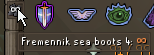
hi friends. what plugin tells you this information? https://i.imgur.com/G7mbpqI.png
 viscid lantern
some charge plugin you installed
 rocky python

 mild ore
Hello, have the options to customize animation smoothing been removed from anyone else too?
Causes visual glitches at a lot of places for objects and nps.. :S

npc's*
vast bone
yes they were removed
 coarse sail
i know this is likely not an issue with runelite itself.. but im having problems with nvidia recordings of runelite, they keep getting stutters every few seconds... is there any known issues or likely something going on that is unrelated
do yall see this u can kinda see the sidebar stuttering.. is it maybe related to the custom window chrome or somethihng
crisp dune
Are you using something like the hub fullscreen plugin?
mossy swan
i had that happen when i deleted the window borders with borderless window gaming thing
coarse sail
not sure what the first thing is, not using thhe borderless thing either
neon jacinth
oblique plume
are you singed in to different RL accounts
nah it's just one rl account that i been logged
leaden trail
I think Nvidia stuff just doesn't like recording RuneLite tbh
oblique plume
neon jacinth
nah it's just one rl account that i been logged
then idk, if you arnt doing anything and sometimes theyre there and sometimes they arnt idk what that could be
coarse sail
im stepping frame by frame
and theres like 1 frame every like 30 or so where its just a black runelite screen with the sidebar

mighth be custom window chrome related maybe is my thought
leaden trail
I mean you could disable it and try
round jacinth
or just use obs
leaden trail
But I suspect it's just the usual "Nvidia stuff not wanting to record RuneLite"
round jacinth
OBS has a trailing replay feature too
coarse sail
yea i might try obs then i guess
it didnt use to stutter for thelongest time
randomly started doing it
 swift path
found a master clue that doesn't have the step being tracked
 hot oasis
Should be fixed in the next runelite release
shell plinth
..
mild ore
vast bone
yes they were removed
but why? is there a workaround to add them?
crisp dune
iirc the change is a temporary one as we're working on some other things related to it, so it will probably come back later
mild ore
cool 🙂 thanks for the quick replies ❤️
 hallow helm
anyone else on macos crashing?
mossy swan
hallow helm
anyone else on macos crashing?
try turning off compute shaders in gpu plugin
hallow helm
mossy swan
try turning off compute shaders in gpu plugin
didn't work sadly, still crashing
restarted runelite
and it's the same
mossy swan
hallow helm
didn't work sadly, still crashing
!logs
haughty pumiceBOT
To find the logs, you can do one of the following:
- If your client failed to open, click the
Open logs folderbutton. - Open the screenshot directory by right-clicking 📷
Camerabutton, navigate 1 directory up, then open logs folder. - Navigate to
%userprofile%\.runelite\logson Windows or$HOME/.runelite/logson Linux and macOS.
Upload the log files named client and launcher by dragging them to Discord. If there are files prefixed with jvm_crash dated from today, upload them too.
 ornate kite
hey guys, can anyone please tell me the add on for removing the defend/attack option on the spec/weap menu?
vast bone
attack styles.
 tribal marsh
any idea when emberlight wil be added to spec attack counter plugin?
crisp dune
we'll see about getting it added this weekend
 rancid sigil
anyone know if "the gauntlet" plugin is bugged atm, stopped working for me for some reason
gilded kayak
maybe
haughty pumiceBOT
Get support for the The Gauntlet Plugin Hub plugin here: https://runelite.net/plugin-hub/show/the-gauntlet.
You can also find the support link by searching for the plugin in the Plugin Hub panel and clicking the ? button on the plugin, or by right-clicking the plugin in the plugin panel and clicking the Support menu option.
rancid sigil
doesn't say anything on there unfortuantly
 fossil summit
I keep bumping into a tls error today
 lavish cedar
on runelite i have two separate loot trackers for the same charater is there a way to merge them so that all my loot will show on my character
vast bone
no
 boreal steppe
my quest helper is missing, can anyone help?
haughty pumiceBOT
Visit Zoinkwiz's Quest Helper plugin discord (https://discord.com/invite/XCfwNnz6RB) for support, issues & feedback
 outer grotto
ive been on 32 bit this whole time, will i have to redo all my plug ins and settings on the 64 bit ?
leaden trail
no
zealous cedar
the profile is tied to your email, so if you change it it treats it as separate
if you still have the profile on your hard drive you can just reimport it though
 knotty raptor
followed intellij building guide andd i get this when clicking "Click here to play" in runescape

also throws a timeoutexception after some time
gilded kayak
i don't think anyone here can help with 1 line out of the log
you'll need to post everything or at least the whole error
knotty raptor
java.lang.NoClassDefFoundError: org/bouncycastle/crypto/tls/TlsClient
    at jy.mn(jy.java:11269)
    at jy.mn(jy.java:11386)
    at jy.mn(jy.java:11386)
    at dy.ma(dy.java:11250)
    at jy.mn(jy.java:11390)
    at jy.mn(jy.java:11386)
    at jy.mn(jy.java:11386)
    at dy.ma(dy.java:11250)
    at client.oc(client.java:4940)
    at client.bl(client.java:1250)
    at bs.bj(bs.java:418)
    at bs.bi(bs.java)
    at bs.run(bs.java:9050)
    at java.base/java.lang.Thread.run(Thread.java:831)
Caused by: java.lang.ClassNotFoundException: org.bouncycastle.crypto.tls.TlsClient
    at java.base/jdk.internal.loader.BuiltinClassLoader.loadClass(BuiltinClassLoader.java:636)
    at java.base/jdk.internal.loader.ClassLoaders$AppClassLoader.loadClass(ClassLoaders.java:182)
    at java.base/java.lang.ClassLoader.loadClass(ClassLoader.java:519)
    ... 14 common frames omitted
is there any way to fix that
zealous cedar
it might be broken atm
knotty raptor
sad
 vocal estuary
hi all, i'm trying to move my plugins/profile from windows --> steam deck. is dragging and dropping my .runelite folder possible? if not, how would i go about it? thanks
zealous cedar
yes
vocal estuary
great, thank you
 karmic marlin
anybody know why my avantoes show up as blue text? ive reset ground items and everything, still shows up as blue. Cant figure out why
i dont have any colors set to blue and nothing else shows up as blue. all my items show up as white other than avantoes
karmic marlin
oohhh youre probably right, i must have done that on accident. thank you so much
wow that was it, thank you so much man. i appreciate it
vast bone
np
 fluid swan
Recent crashes any idea why?
zealous cedar
gpu driver crash maybe. turn gpu mode off?
glossy flume
i got the big swordfish, but runelite didnt auto screenshot it under untradable drops, how do i get auto screenshots for drops like this?
charred wind
Did you get a screenshot for collection log?
fluid swan
zealous cedar
gpu driver crash maybe. turn gpu mode off?
Alright it works most of the time so I will keep a lookout
 gilded kayak
no
 burnt tiger
oh, hai felan. Thanks for the dup highlight
gilded kayak
the clue plugin is out of date, it's just that the challenge is the same as the old one
as I mentioned in the other issue, the challenge scroll will give you the answer if you need it, that's it
you'll still need to go to the new NPC south of castle wars to complete it
 round jacinth
click the > in the top right
 umbral pumice
oh duh. such an idiot lol
round jacinth
😎
 patent gulch
Was in here the other day with a hub plugin causing frame issues. Took a while, but eventually nailed it down to Transmogrification hub plugin causing extreme stutters when using party plugin.
Don't know if this issue is specific to my machine, but thought it might be useful to share my fix.
 tired drift
How can I retrieve all the plugins I had installed before and the settings of it?
haughty pumiceBOT
tired drift
There it is, thank you so much!
distant roost
does XP Globes plugin affect cpu usage?
leaden trail
I don't think it would do so to any actually noticable degree, no
haughty pumiceBOT
To find the logs, you can do one of the following:
- If your client failed to open, click the
Open logs folderbutton. - Open the screenshot directory by right-clicking 📷
Camerabutton, navigate 1 directory up, then open logs folder. - Navigate to
%userprofile%\.runelite\logson Windows or$HOME/.runelite/logson Linux and macOS.
Upload the log files named client and launcher by dragging them to Discord. If there are files prefixed with jvm_crash dated from today, upload them too.
 jovial matrix
leaden trail
jovial matrix
jovial matrix
leaden trail
jovial matrix
Upload the ones that don't have any dates in the file names. They'll just be called client.log and launcher.log
leaden trail
Did it not crash today then?
leaden trail
Are you running multiple instances of the client at once?
I'm a bit confused by some of the plugin loads being duplicated
jovial matrix
just 1
leaden trail
Someone else will have to take a look, I'm only seeing one thing that sticks out immediately and it's probably a result of the underlying issue rather than a cause
You could try following this though
!flow
haughty pumiceBOT
flowchart: Please refer to this flowchart for further troubleshooting.
 whole yarrow
hi, my client keeps crashing is there anyone who can advice? i have zero clue as to why its doing this its been happening for a while now
even when i try boot up,i click login and it just freezes and crashes, then if im lucky enough to get in, i cannot come off the RL client to another browser/disc or something otherwise wil insta crash
haughty pumiceBOT
To find the logs, you can do one of the following:
- If your client failed to open, click the
Open logs folderbutton. - Open the screenshot directory by right-clicking 📷
Camerabutton, navigate 1 directory up, then open logs folder. - Navigate to
%userprofile%\.runelite\logson Windows or$HOME/.runelite/logson Linux and macOS.
Upload the log files named client and launcher by dragging them to Discord. If there are files prefixed with jvm_crash dated from today, upload them too.
 jaunty widget
Hello, I dont know if its a routing issue, or a jagex server issue... my ping on UK worlds was around 118-120 (my best ping) pre-update this Wednesday, but now post-update the UK worlds are all on 198-200 ping, I haven't had any changes done to my internet connection or moved location or anything like that, can anybody sort me out? Thank you! 🙂
leaden trail
That would probably just be a routing issue, yeah
 dusk night
Hi, how do I change all my plugin settings and runelite settings from my old pc to my new one? I signed into runelite on my new pc and only my loot logger has appeared, but none of my plugins or game settings, notes
haughty pumiceBOT
oblique plume
set the profile on the old computer to sync then boot RL on the new one and switch to it
dusk night
oblique plume
set the profile on the old computer to sync then boot RL on the new one and swit...
Does that copy everything even all the extended plugins
oblique plume
read the link
 tawny kettle
any reason why my 117hd plugin would be capped at a specific graphics setting?
mossy swan
!hd
haughty pumiceBOT
Visit 117's HD plugin discord (https://discord.com/invite/U4p6ChjgSE) for support, issues & feedback
 fiery timber
so i have this issue with my side and top bars not showing anything
 haughty pumiceBOT
@fiery timber Graphical artifacts? Try disabling hardware acceleration: https://github.com/runelite/runelite/wiki/Disable-Hardware-Acceleration
fiery timber
that fixed it after a restart too


 alpine geyser
my runelite cant play on anything higher than 144hz or else it breaks and runs at like 5fps and i have to throw it on my 2nd monitor with 75 hz
the guy above had the problem with top bar hiding mine does that to but the fix for me is changing from 240hz to 144hz
i dont want to manually change my hz to play different games
leaden trail
glossy flume
commands for hallowed sepulchre arent working
!pb hs 4
 left lichen
Not sure if it's related to my problem but, ever since I reached total level 2200, I began receiving this error message when I attempt to sign in via the runelite client. I used to be able to login by the 3rd-4th attempt but I can't anymore I just continue receiving this message. I've restarted runelite but that hasn't helped. I don't want to have to use the official jagex launcher. Does anyone have a potentnial solution to my issue?
Thank you in advance!
 gilded kayak
you can try clearing your active sessions on the jagex website
other than that we don't have a resolution that isn't upgrade or wait
zealous cedar
sometimes using a vpn bypasses it
 cinder agate
i need some help with my launcher
i created a jagex account and it keeps saying my password is wrong
ive changed my password manytimes now and it still says the same thing
left lichen
gilded kayak
you can try clearing your active sessions on the jagex website
would I need to download the jagex launcher to do this?
gilded kayak
no you would need to log into https://www.runescape.com and clear your active sessions

RuneScape
Play the best MMORPG RuneScape for free. Join the millions of others already exploring the fantasy game world of Gielinor.
left lichen
gilded kayak
no you would need to log into https://www.runescape.com and clear your active se...
if i upgrade my account to a jagex account as they want, will I lose any accessibility to runelite or something else i'm unaware of?
stone parcel
cinder agate
ive changed my password manytimes now and it still says the same thing
With a Jagex Account you will need to open the Jagex Launcher and then use that to launch RuneLite.
cinder agate
yeah ive been trying to do that but it wont let me importmy account it just keeps saying my password is wrong
gilded kayak
left lichen
if i upgrade my account to a jagex account as they want, will I lose any accessi...
are you on Linux is the only question needed
cinder agate
i wish i could show you what i was talking about
zealous cedar
the jagex launcher also requires admin, so if you play on a work/school pc it might not work there
gilded kayak
gilded kayak
are you on Linux is the only question needed
if you aren't on Linux then it will be fairly smooth, the difference will be instead of opening RuneLite.exe, you will open the Jagex launcher and use that to start RuneLite
and yeah what Adam said
cinder agate
yeah then when i log in it says sorry we have tech problems try again later
left lichen
gilded kayak
are you on Linux is the only question needed
no sir, windows 10 on pc
gilded kayak
then you shouldn't run into any issues using RuneLite, on the right side of the Jagex Launcher where it says Official Client is a dropdown menu where you'll select RuneLite and click play
 wise girder
Is there something going on the past couple days? Its been 2 days since ive been avle to login through runelite
Its the "too many login attempts" thing. It usually goes away after 5-10 minutes or so, but not this time
stone parcel
You can try clearing your active sessions on the Jagex website, or could try to use a VPN.
wise girder
Thanks ill try thay
 frank vortex
Does the "Default World" plugin not work in runelites safe mode?
 white pebble
Is this the correct place to get help with a plugin malfunctioning? "The Gauntlet" plugin seems to be broken for just me, not others. Would love some help if possible.
leaden trail
Define "broken"
gilded kayak
someone else said it was broken
I gave them the link to the github page to report their issue, but they just said "nothing is there"
so I don't think they reported it
white pebble
https://i.imgur.com/G5cHqvM.jpeg first issue is this, it shows the stuff i need in the gauntlet outside of the room
 haughty pumiceBOT
Get support for the The Gauntlet Plugin Hub plugin here: https://runelite.net/plugin-hub/show/the-gauntlet.
You can also find the support link by searching for the plugin in the Plugin Hub panel and clicking the ? button on the plugin, or by right-clicking the plugin in the plugin panel and clicking the Support menu option.
white pebble
second issue, I have it configured to highlihgt rseources and mobs and such until i get enough that i need for the boss (tier 1 armor), and it isn't highlighting at all
 gilded kayak
frank vortex
Does the "Default World" plugin not work in runelites safe mode?
gilded kayak
frank vortex
Does the "Default World" plugin not work in runelites safe mode?
I guess not
white pebble
as you can also see it's showing double the resources i need upon re-entry. I will report it there as well thank you. If anyone here has any ideas I could try, I'm all ears. So far I've turned it off and on, logged out and back in, fully closed my runtelite and reopened it, tried it on a second account (same issue), and I've uninstalled and reinstalled the plugin, I've also verified I have the settings set up correctly
gilded kayak
you should click the bots link and then click Report an Issue on that page
and report it there
frank vortex
gilded kayak
I guess not
how can I tell if a plugin is supposed to be part of the safe mode or not?
white pebble
gilded kayak
and report it there
Thank you
gilded kayak
frank vortex
how can I tell if a plugin is supposed to be part of the safe mode or not?
if you installed it from the 🔌 tab it doesn't run in safe mode
and GPU also does not run
frank vortex
Yeah those don't show in the list in safe mode
Would I have to report the Default World plugin as bugged then? it's listed in the safe mode version (and interactable, just fails to set the world upon launch)
leaden trail
It looks like there is a bit of code in there to not apply the default if in safe mode though
So I would say that's probably deliberate
frank vortex
Alright, thank you both
 normal glade
I'm having an issue where every 15 seconds my fps will drop to 40-50 and after 1 second it goes back to 60, any advice?
 quaint python
Whats the quest journal for de-sync during Fremennik Trials?
leaden trail
normal glade
I'm having an issue where every 15 seconds my fps will drop to 40-50 and after 1...
I'd say it's almost certainly a hub plugin causing it
haughty pumiceBOT
@quaint python Visit Zoinkwiz's Quest Helper plugin discord (https://discord.com/invite/XCfwNnz6RB) for support, issues & feedback
quaint python
Thjank you potato
normal glade
leaden trail
I'd say it's almost certainly a hub plugin causing it
I uninstalled all the recent plugins I downloaded and set everything back after I realized the issue but its still there, would I have to reinstall runelite?
 gilded kayak
I would say you should probably unbind it from Thrall Helper Hide Reminder Hotkey
ornate kite
is there a plugin to disable player chat completey and disable you from typing
 dusty sequoia
thank you bro
white pebble
How do I check which version of Runelite I am running?
white pebble
round jacinth
I would delete this photo, hide your emails
thanks
didnt see that there
white pebble
white pebble
https://i.imgur.com/G5cHqvM.jpeg first issue is this, it shows the stuff i need ...
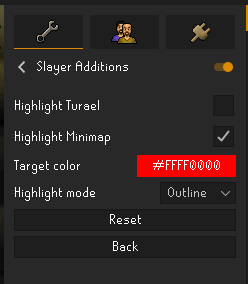
by the way I resolved this issue! Turns out enabling the "Highlight Turael" setting in the "Slayer Additions" plugin is what caused it. Both devs of both plugins are aware of it now and will work on it when they can 🙂 https://i.imgur.com/6ngLRQj.png
 normal glade
I'm having an issue where every 15 seconds my fps will drop to 40-50 and after 1...
normal glade
normal glade
I'm having an issue where every 15 seconds my fps will drop to 40-50 and after 1...
also just found out that turning vsync on gpu and 117 fixes this but it was working fine before so idk what changed
dusk night
hey, do i just need to drag the .runelite folder onto a usb and when setting up my new pc, do i just open download runelite and open it up and everything will be there?
 hexed lark
clicking to import a tile marker set won't work for me, is there any other way to import them?

I'm 100% sure it's on my clipboard tho, maybe it's somethin with linux or wayland

does it get stored in any other place so I can put it on a text file?
round jacinth
dusk night
hey, do i just need to drag the .runelite folder onto a usb and when setting up ...
Put .runelite the same spot on the next pc
haughty pumiceBOT
dusk night
@round jacinth i may have accidently just deleted the .runelite folder
is there a way to redownload
im still online on rl rn
leaden trail
restore from your recycle bin
dusk night
not here for some reason
round jacinth
If you deleted it when it was in your usb it’s gone gone
hollow olive
hexed lark
double check that you're onyl copying one set of markers at a time
there may be more than one set of []
dusk night
i deleted it in the usb thinking i could re drag it from my pc to usb
but theyre both gone now
hexed lark
hollow olive
there may be more than one set of []
oh
 compact spear
0
 solid stag
I just updated my account to OSRS launcher and I tried downloading runelite from it and when I try to log in it says I need to login using Jagex launcher. Then when I go back into launcher it’s just the same thing I did all over again. Any help on this would be greatly appreciated!
leaden trail
You need to launch RuneLite through the Jagex launcher
solid stag
I did and when i get to the login screen it tells me I need to launch it through the jagex launcher 😖
solid mesa
Like this in the Jagex launcher
 solid stag
Yes, but it doesn’t give me the play option. Mine says download. Even after I download it and go back to Jagex launcher it still says download
zealous cedar
are you using macos?
solid stag
Yes
zealous cedar
you need to install runelite like this https://github.com/runelite/runelite/wiki/FAQ#the-jagex-launcher-is-stuck-on-install-on-macos
solid stag
You are a life saver, thank you so much!
 unborn dragon
zealous cedar
unborn dragon
zealous cedar
its the green skull

 zealous cedar
just restart
 noble marsh
How can I change my level up sound? I downloaded the C Engineer plugin a while back and I've since uninstalled it but I still can't get rid of the pokemon level up sound
haughty pumiceBOT
stone parcel
Don't need to ping everyone here...
 shadow helm
sorryy
stone parcel
No worries, good luck. 🙂
 mighty flame
is there any way to have a notepad 'element' on the screen at all? so i can write stuff in there and just have it on my screen instead of the side panel?
 final axle
On-screen Notes plugin on the hub
mighty flame
awesome thanks
vast bone
are you sure it isn't resource packs
 raven grotto
hi guys, im trying to start runelite client and its lagged on this screen. Can u help me please? Thanks
 vernal locust
there is a plugin i saw on youtube but cant find the clip again where it looks like hovering a cursor over an npc will highlight their outline, but only when the curson is over the NPC, this seems like it would help with yellow x ing during fights, does anybody know what it is?
--- I found it if anybody wants to know what im talking about its called Interact highlight
 sonic beacon
raven grotto
hi guys, im trying to start runelite client and its lagged on this screen. Can u...
sonic beacon
raven grotto
hi guys, im trying to start runelite client and its lagged on this screen. Can u...
im also stuck but on this screenm
 haughty pumiceBOT
To find the logs, you can do one of the following:
- If your client failed to open, click the
Open logs folderbutton. - Open the screenshot directory by right-clicking 📷
Camerabutton, navigate 1 directory up, then open logs folder. - Navigate to
%userprofile%\.runelite\logson Windows or$HOME/.runelite/logson Linux and macOS.
Upload the log files named client and launcher by dragging them to Discord. If there are files prefixed with jvm_crash dated from today, upload them too.
 rapid spruce
im having weird issue with the stretched mode plugin, whenever i use the plugin and i have any kind of videoplayback going on in browser on in media player on my second monitor, the camera movement ingame starts to stutter. If the video in the browser/software is hidden/minimized/new tab without video, the game runs fine.
ive tried both firefox and chrome, same problem.
i dont get the problem if i disable stretched mode or if i disable all but one monitor.
i re-installed runelite, only used default settings first and started to test which pluging makes this to happen and it was sadly stretched mode, the one plugin i kinda need since i got 2k monitors, oof.
i did also reset nvidia control panel settings, fiddled with vsyncs in gpu plugin/nvidia control panel, nothing works.
i exported my runelite plugin file to my friend and he cannot recreate my problem, he might have had tiny stutter when checking out video by using firefox.
i dont get the problem if i play any other games while having videos anykind running on the second monitor.
round jacinth
rapid spruce
im having weird issue with the stretched mode plugin, whenever i use the plugin ...
This seems like a new one to me - turn off vsync for runelite entirely.
Could you also confirm all the monitors are plugged into the GPU rather than the motherboard outputs? That can have odd behavior if I recall
Also can you make a new profile with only gpu on and stretched mode no other hub plugins and see if it still happens
rapid spruce
both monitors are plugged into gpu, ive even fiddled with the cables, switching them around and all of that
rapid spruce
round jacinth
Also can you make a new profile with only gpu on and stretched mode no other hub...
gonna try that
okay so im not sure if its working yet, but using default nvidia control panel settings for runelite and having vsync on in the gpu plugin made it work
maybe
trying to pin point this down since im not really trusting that i fixed it
rapid spruce
oka so the problem came from mix of ndivida control panel and gpu plugin settings
no idea why it made only stretched mode plugin go crazy, but i basically just reseted nvidia control panel globally and selected program (runelite)
its weird because i had few moths ago problems with fps limitter which made runelite lag everytime i got xp drop or farming cycle updated in the tracker plugin and that problem is gone as well lol
tl dr; game is spaghetti
charred wind
fwiw having nvidia control panel defer to application settings most of the time will resolve a lot of issues. You usually aren't going to see significant benefit from custom settings in the control panel, especially for RS
rapid spruce
i just like to have vsync always on and frame limit 2-3 under my monitor refresh rate but that made rune go nuts apparently, but i swear to god that this problem came recently and hasnt been there earlier
had to make custom rules for runelite which is basically just default settings for it
nah it didnt fix itself, only just got slightly better :/
leaden trail
Why do you want your frame cap to be just under your refresh rate?
rapid spruce
only solution for the lag is to just not use stretched mode plugin
charred wind
!logs upload your logs please
haughty pumiceBOT
To find the logs, you can do one of the following:
- If your client failed to open, click the
Open logs folderbutton. - Open the screenshot directory by right-clicking 📷
Camerabutton, navigate 1 directory up, then open logs folder. - Navigate to
%userprofile%\.runelite\logson Windows or$HOME/.runelite/logson Linux and macOS.
Upload the log files named client and launcher by dragging them to Discord. If there are files prefixed with jvm_crash dated from today, upload them too.
charred wind
You can also try a new runelite profile to see if there's some hub plugin causing it -- so create a new profile, select that profile, restart runelite. Make sure other profiles aren't linked to the account you're logging in with so the hub plugins never start
Or you can try rolling back drivers to see if that alleviates the issue
You're the first person I've seen say stretched mode causes a stutter
rapid spruce
charred wind
You're the first person I've seen say stretched mode causes a stutter
yeah thats my typical rng with softwares and hardwares 😂
 cursive glen
hello i am going on day 2 of (too many log in attempts) it works fine on mobile and the jagex launcher but i prefer runlite. please help
sonic birch
the jagex launcher can launch runelite
rapid spruce
@charred wind i think installing newest nvidia drivers fixed everything
thanks for the help tho, for everyone who suggested things 🙂
 sand idol
i cant hear nex's voice lines, is this a runelite setting?
sonic birch
it's a currently broken hub plugin
 vivid dust
Hello. Is there any way I can find exported Runelite profiles?
haughty pumiceBOT
 brave ginkgo
Any idea why I can’t use a question mark, I have key remapping in but that shouldn’t change anything.
leaden trail
You can install the "debug helper" plugin from the hub and use it to check what keys are bound to what
 inner ocean
2024-07-21 11:28:32 CDT [Map Loader] ERROR injected-client - Client error: map loading
java.lang.OutOfMemoryError: null
    at java.base/jdk.internal.misc.Unsafe.allocateMemory(Unsafe.java:616)
    at java.base/java.nio.DirectByteBuffer.<init>(DirectByteBuffer.java:122)
    at java.base/java.nio.ByteBuffer.allocateDirect(ByteBuffer.java:317)
    at net.runelite.client.plugins.gpu.GpuIntBuffer.allocateDirect(GpuIntBuffer.java:79)
    at net.runelite.client.plugins.gpu.GpuIntBuffer.ensureCapacity(GpuIntBuffer.java:65)
    at net.runelite.client.plugins.gpu.SceneUploader.upload(SceneUploader.java:254)
    at net.runelite.client.plugins.gpu.SceneUploader.upload(SceneUploader.java:138)
    at net.runelite.client.plugins.gpu.SceneUploader.upload(SceneUploader.java:107)
    at net.runelite.client.plugins.gpu.GpuPlugin.loadScene(GpuPlugin.java:1510)
    at rl3.ab(rl3.java:22571)
    at rl3.run(rl3.java:20994)
    at java.base/java.util.concurrent.Executors$RunnableAdapter.call(Executors.java:515)
    at java.base/java.util.concurrent.FutureTask.run(FutureTask.java:264)
    at java.base/java.util.concurrent.ThreadPoolExecutor.runWorker(ThreadPoolExecutor.java:1128)
    at java.base/java.util.concurrent.ThreadPoolExecutor$Worker.run(ThreadPoolExecutor.java:628)
    at java.base/java.lang.Thread.run(Thread.java:829)
2024-07-21 11:28:33 CDT [Client] ERROR injected-client - Client error
java.lang.NullPointerException: null
    at net.runelite.client.plugins.gpu.GpuPlugin.swapScene(GpuPlugin.java:1586)
    at client.da(client.java:6905)
    at nt.kd(nt.java:24702)
    at client.bw(client.java:1205)
    at bs.nd(bs.java:388)
    at bs.yl(bs.java)
    at bs.run(bs.java:34115)
    at java.base/java.lang.Thread.run(Thread.java:829)
I've had this error mulpitple times today
gilded kayak
you ran out of memory
inner ocean
unlikely
gilded kayak
remove some hub plugins or increase your heap
ok
we don't put fake errors into the client
inner ocean
I have 32gb of ram
gilded kayak
we don't let RuneLite use that much of your memory
that's insane
randomly bsod because of a bad hub plugin
nty
!config you can increase your heap here
haughty pumiceBOT
inner ocean
I havent added anything (recently) and I dont even have that many hub plugins maybe 10-15
leaden trail
Felan is telling you what the issue you're encountering is. Arguing with him doesn't change the cause of it.
zealous cedar
are you using 32bit runelite?
there are 3 different types of memory limits and you cant just blindly tell people to increase the java max heap since it won't help any here
 astral gulch
Hi there, am looking for some advice, ever since the microsoft crash i keep getting this "too many login attempts" even though i try to log once a day on Runelite. only way i can play is through mobile or steam, has anyone found the issue to this? Ive re-installed Runelite twice, doesnt fix the issue.
gilded kayak
you can try to log into the runescape website and under account will be a clear sessions button
if that doesn't work you can maybe use a VPN
if neither of them work you'll have to wait, or do what the error says, which is upgrade to a jagex account
astral gulch
alright, thank you!
gilded kayak
the mobile and steam clients are official™️ jagex products so they aren't affected* by this problem
astral gulch
interesting
hallow helm
runelite keeps crashing on macos
sonic birch
Please define crashing, and post the full client.log or the one from yesterday if this is the complete log.
This does not look fatal
ornate kite
hey guys does anyone know how to make construction left click now? I thought they allowed that now or am i wrong??
solid mesa
Menu Entry Swapper
haughty pumiceBOT
The Menu Entry Swapper, through various config options, allows you to hold shift+right click on items/NPCs/objects and configure new default left and shift click options on them.
 gilded kayak
do that on the object you want changed
you don't have to do anything special in Menu Entry Swapper, it used to have code specifically to prevent it, the code was removed after Jagex changed the rules, so it just works
ornate kite
ok ty felanbird! How to remove in one click too tho lol?
gilded kayak
you probably want to install construction qol from the hub and swap the thing you're building to 1
that way you can hold down 1 to remove and also to build
round jacinth
ornate kite
ok ty felanbird! How to remove in one click too tho lol?
The same trick on the item to remove
The build spot is an object to left click swap on and so is the built item you want to remove
ornate kite
round jacinth
The build spot is an object to left click swap on and so is the built item you w...
ty both of you! Got it working now. didnt realize separate items...
round jacinth
Get construction qol while on the grind makes it so you can mash 1 for building the item in the nth spot on the choose item to build menu 🙂
 spark crown
Are we allowed to overlay data from an external api? Like… the rss feed for example (dumb example, but w/e) or ge data
crisp dune
Yes, though depending on the source of the data you may be required to add a warning regarding the external connection
spark crown
I just wondered mainly about the “unfair advantage” thing
raven grotto
here are the logs (not starting client)
 carmine plank
Has anyone experienced items disappearing from Loot Tracker when logging into a different computer than your main one? For example, I had 856 Abyssal Sire kills in my Loot tracker. However, after logging into a different computer I now only have 637 kills tracked and the recent loot I had is gone.
sonic birch
carmine plank
Has anyone experienced items disappearing from Loot Tracker when logging into a ...
!loot
haughty pumiceBOT
 pseudo sleet
is there a way to have runelite utilise less GPU when not in focus, the way World of Warcraft goes into like 2 fps when its tabbed out?
sonic birch
fps control
sonic birch
raven grotto
here are the logs (not starting client)
You could try deleting %userprofile%\.runelite\cache\vanilla.cache and then starting the client
raven grotto
still the same bug, here are new logs
sonic birch
There's no error now (just nothing really happening). Did the client ever run on this windows account? Your account has some weird characters in it
 sonic birch
You got connection problems to osrs servers then, I suppose
Try general connection troubleshooting #support message
 copper trellis
My game looks blurry **after **disabling the HD 117 plugin. Anyone knows what could cause that? I checked NVidia settings and anti-aliasing is application-controlled. Thanks in advance
 final axle
Turning off HD doesn't turn GPU back on, you gotta go do that yourself
copper trellis
final axle
Turning off HD doesn't turn GPU back on, you gotta go do that yourself
you the goat thanks!
 dusky pivot
it says to many login attempts download the jagex launcher
iv'e waited overnight to see if things change but no




 dusky pivot
i cant upgrade my account becuase the email adress is linked to my school and they delete the mails after we finished school like 4 years ago
bruv i cant get the email back iv'e done like 10 requests
sonic birch
You should get that sorted, because Jagex accounts will become mandatory at some point
sonic birch
!new can ask in the osrs discord for help; they might be able to point you in the right direction. I'd really contact your school though
haughty pumiceBOT
newplayer: If you are new to OSRS, make sure to follow this excellent guide on OSRS wiki: https://oldschool.runescape.wiki/w/New_player_guide. You can also join official OSRS Discord here: https://discord.gg/osrs
final axle
I dunno if you could get jagex support to help change the email
dusky pivot
thats what i need to do
i love u josh
i'll make them a gun sorts everything out
my bro ❤️
 livid grail
hey guys can anyone help with this problem
my overlays keep having priority over my ingame interfaces like the quest helper over equipment screen and bank interfaces
 gilded kayak
the RuneLite overlays are overlayed over the game, that outcome is intended
livid grail
hmm didn't used to work like that for me, cos i only just noticed it when i was raiding recently and now questing
gilded kayak
oh yeah I'm mistaken actually
idunno why yours are layered like that, mine are fine
livid grail
ye idk, been looking through the runelite plugin cos my friends is fine
gilded kayak
did you maybe leave your client open since the last game update
that seems like the type of issue that would arise from that
!safe if not try safe mode I guess, i'm not sure
haughty pumiceBOT
safemode: Windows
Run the RuneLite (safe mode) shortcut, or with a Jagex account, first run the RuneLite (configure) shortcut and tick the Safe mode box, then launch RuneLite via the Jagex launcher.
Mac
In Terminal, run:
/Applications/RuneLite.app/Contents/MacOS/RuneLite --configureTick the Safe mode box. Launch RuneLite.
If it's not working, download and install the updated RuneLite launcher from the website link in #welcome. You don't need to uninstall your current version. You will not lose any settings or plugins. Then try running safemode again.
livid grail
ye i close my client every night, i'll try that though
final axle
Is the quest helper box snapped to one of the anchor points? I seem to remember if it's not, it might do that
livid grail
oh thats fixed it
so it's probs the same with my raid point overlay then
well thats done the trick, thanks for the help
no more malding for me
astral gulch
sad, even with VPN.... "too many login attempts"
 sonic drift
I'm having the same issue also with the "too many login attempts." I already cleared all active sessions. Any help would be greatly appreciated
stone parcel
I think that's pretty much it, clear sessions, try VPN, wait, or upgrade to Jagex Account.
But there are considerations to be made before upgrading to a Jagex Account like if you use Linux.
sonic drift
But why am I able to log into mobile without any issue?
stone parcel
Thats a Jagex product.
sonic drift
I can also log into my other accounts on runelite without issue
Are there any VPN's that doesn't require a subscription?
astral gulch
stone parcel
I think that's pretty much it, clear sessions, try VPN, wait, or upgrade to Jage...
i dont see a "clear sessions" anywhere, VPN doesnt fix the issue, and i dont have access to the email so upgrading isnt an option
everything was fine until the fire nation attacked.
gilded kayak
astral gulch
i dont see a "clear sessions" anywhere, VPN doesnt fix the issue, and i dont hav...

 astral gulch
found it, thank you
sonic drift
gilded kayak
This didn't fix it for me