#support
1 messages · Page 14 of 1
 gilded kayak
 tepid iris
that explains why all my plugins dissapeared lol
 quasi oriole
Yes i still have it but i am using my old hdd for the new one and it got wiped
 zealous cedar
make sure you are logged into the client with the same account as before and check the profiles panel and see if your profile is there
if it isnt then it is probably lost
 glossy flume
what is this plugin that highlights if i right click over someone?

 steady wraith
Hi i just made a runescape account to play on runelite but my credentials dont work.. any ideas on what the problem is im sure i have them correct as i reset my pass
 stone parcel
If you just made an account you made a Jagex Account and must use the Jagex Launcher to launch RuneLite.
gilded kayak
kind of like how steam or epic starts rocket league
or some other example that I don't have since zom used rocket league twice
I guess steam starting ffxiv would also be an example
 swift fox
does anyone know how to recolour these kind of messages in particular? server, game, filtered and examine don't do anything to it. i'm not sure what else i could change
 gilded kayak
you could try force recolor on the hub maybe
i don't know if it works retroactively tho
swift fox
the thing is, i would have to make a separate recolour for every highlighted drop i get. or is there a way around that?
 noble meteor
hey all
anyone who's smarter than me know what plugin is causing a clientside text message to appear over my character's head
the message says "Sit Krak" colored cyan. everyone I've asked has no clue, and we all can't help but laugh but it's driving me crazy
gilded kayak
watchdog
noble meteor
what part of the plugin is causing it
gilded kayak
its one of the default examples I believe
it's for kraken so look for one that says kraken maybe
I would click ✏️ on each alert you have until you find one that's overhead - sit krak I guess
 vocal hawk
hi, im using pop_os. what do i do with the .appimage file? it asks me what program to use to open the file
gilded kayak
google seems to think --disable-gpu-sandbox will resolve that
vocal hawk
oh never mind i think, i found the answer on the faq on the wiki. i initially saw code and my brain tuned it out
 sharp nest
There's something wrong with the farming tracker. My plants wouldn't display until I travelled to the area. Is there something I need to do or does it do that sometimes?
 oblique plume
you mean it doesnt think any plants are planted until you go there?
zealous cedar
you can try running as administrator and it might fix it
can you upload your launcher log file here?
have you tried clicking the "Run as administrator" button here?
what does it do?
 grave monolith
Can someone help me fix this issue? The game runs at 20 fps most of the time and only hits the frame cap when I zoom out like 200%. I am using a i9 12900H and a RTX 3070ti. It doesnt matter if I enable/disable 117 or the GPU plugin, FPS stays the same. There is no thermal throttling, the gpu usage is only at 2% when zoomed in and 5% when zoomed out. I disabled every single plugin oon runelite and the fps remained 20. I am using x64 client. I have tried every solution I could dig up on reddit but not a single one made a difference. I did try to use the vanilla client and that is the only thing that fixes the issue for me. Vanilla runs flawlessly.

 cold shore
There a fix for commands not working? It's not an update issue, they just straight up wont work for me when they have in the past
cold shore
Nevermind, closed out jagex launcher and runelite and reopened and it fixed. Should've tried that before asking. Sorry :/
grave monolith
This seems to be why vanilla runs better. It uses 30% of gpu rather than runelites 1%. I have nvidia settings forcing runelite to use the 3070. Why does runelite not utilize the gpu even with the gpu or 117 plugin? Is there something im missing?


 mossy swan
grave monolith
This seems to be why vanilla runs better. It uses 30% of gpu rather than runelit...
mossy swan
grave monolith
This seems to be why vanilla runs better. It uses 30% of gpu rather than runelit...
runelite uses gpu in a weird manner, that probably doesn’t show up in task manager
 delicate bobcat
can you try removing all hub plugins and see if the issue persists?
or try safe mode maybe
 haughty pumiceBOT
Windows
Run the RuneLite (safe mode) shortcut, or with a Jagex account, first run the RuneLite (configure) shortcut and tick the Safe mode box, then launch RuneLite via the Jagex launcher.
Mac
In Terminal, run:
/Applications/RuneLite.app/Contents/MacOS/RuneLite --configureTick the Safe mode box. Launch RuneLite.
If it's not working, download and install the updated RuneLite launcher from the website link in #welcome. You don't need to uninstall your current version. You will not lose any settings or plugins. Then try running safemode again.
grave monolith
Yeah hold on
Usage went up a little bit. running at a capped 50fps. Safe mode seems to fix the issue.

So should I just uninstall and reinstall? I did that the other day and the issue persisted
 jagged vortex
gm nex plugin working again?
 rancid rapids
Any ideas?
mossy swan
rancid rapids
Any ideas?
its not set to default?
rancid rapids
mossy swan
its not set to default?
It is, and it's working for every other program
mossy swan
weird, no idea, sorry
 pallid wasp
Today i Logg in and a lot of my loot tracker is missing? Any ideas how i can get it back?
haughty pumiceBOT
pallid wasp
haughty pumice
<https://github.com/runelite/runelite/wiki/FAQ#my-loot-tracker-data-is-gone>
Cant find my problem here. Dont have dupe profiles and its not that everything is gone. I just killed a nuclear smoke devil superior. For some reason I can only see 1. Also normal smoke devils reset for some reason and I kill them often enough
 knotty totem
anyone know how to disable runelite notification flash on taskbar? i have my settings all turned off for it in runelite but it still happens. I even went as far as disabling it in regedit and taskbar settings / windows notification settings and it still happens.
Am i missing the incorrect setting on the runelite client?


 sturdy elk
Am I the only one that experiences, that wilderness player alarm, doesn't works anymore?
The plugin seems to have changed? Can't even change the colour anymore
haughty pumiceBOT
Get support for the Wilderness Player Alarm Plugin Hub plugin here: https://runelite.net/plugin-hub/show/wilderness-player-alarm.
You can also find the support link by searching for the plugin in the Plugin Hub panel and clicking the ? button on the plugin, or by right-clicking the plugin in the plugin panel and clicking the Support menu option.
 shell plinth
anyway of fixing the nex nostalgia?
 viscid lantern
wait for the next runelite update
delicate bobcat
grave monolith
Usage went up a little bit. running at a capped 50fps. Safe mode seems to fix th...
it's probably caused by one of your hub plugins then
haughty pumiceBOT
Graphical artifacts? Try disabling hardware acceleration: https://github.com/runelite/runelite/wiki/Disable-Hardware-Acceleration
delicate bobcat
 vagrant otter
How do I turn off hardware acceleration on runelite?
vagrant otter
How do I turn off hardware acceleration on runelite?
see above
 idle thunder
hello all, i have a friend who is constantly having issues with his runelite profile dissapearing, he's not logged in anywhere else other then his pc, from what i've been told it just dissapears, all his plugins and so on gone, it's happened a handful of times to him now, i've sent him a copy of mine as he's got the same plugins and such mostly but it just keeps happening, anyone know anything about this?
 round jacinth
Have them join here instead of a game of telephone please
idle thunder
yeah he's not home at the moment i thought i'd ask until then haha
round jacinth
We can help more when they’re at their computer and in this discord
 compact basin
does js5 cache reloading (when outdated) still work on runelite or was it disabled
 stone spruce
Hi, im experiencing a weird bug with lamps with runelite, the official client works fine. I'm not sure what it could be, has anyone else had this problem?
 haughty pumiceBOT
Many plugins from the pluginhub break the client in subtle or not-so-subtle ways, including causing issues like client freezes. We do not support pluginhub plugins because we do not make or quality control them, and do not recommend their use.
Run the RuneLite (safe mode) shortcut, or with a Jagex account, first run the RuneLite (configure) shortcut and tick the Safe mode box, then launch RuneLite via the Jagex launcher.
This temporarily disables the GPU plugin and all hub plugins which will allow you to confirm the issue is caused by one of those plugins and isn't a core RuneLite issue.
If the issue is caused by a hub plugin, you should isolate which plugin it is and then uninstall the plugin.
Get support for the lamp-lockout Plugin Hub plugin here: https://runelite.net/plugin-hub/show/lamp-lockout.
You can also find the support link by searching for the plugin in the Plugin Hub panel and clicking the ? button on the plugin, or by right-clicking the plugin in the plugin panel and clicking the Support menu option.
stone spruce
thanks, I dont use lamp-lockout but ill try to see if it overwrites it
mossy swan
im pretty sure that plugin does what you are showing there
or maybe theres two of them lol
stone spruce
hmm weird xD I installed it but still shows only slayer
most probably is another plugin, ill have to try and error it out
round jacinth
if you close out of it, reload the lamp options
 timid rock
there's a museum plugin @stone spruce that might cause this
 quick slate
hey everyone, my runelite crashes frequently on mac. i've read some posts about installing another jdk but it's 2 years old. has anyone tried that out recently and can confirm it works?
most issues seem to be related to memory access
i haven't checked all, but all the ones i've checked are related to memory access
mossy swan
try turning off compute shaders in gpu plugin
knotty totem
knotty totem
anyone know how to disable runelite notification flash on taskbar? i have my set...
anyone got a solution for this
quick slate
mossy swan
try turning off compute shaders in gpu plugin
thanks, i'll try that out
 solid mesa
sturdy elk
Am I the only one that experiences, that wilderness player alarm, doesn't works ...
solid mesa
sturdy elk
Am I the only one that experiences, that wilderness player alarm, doesn't works ...
Yes the plugin was updated to use native runelite notifications rather than a custom overlay.
 leaden trail
knotty totem
anyone got a solution for this
leaden trail
knotty totem
anyone got a solution for this
Does it happen in safe mode?
haughty pumiceBOT
Windows
Run the RuneLite (safe mode) shortcut, or with a Jagex account, first run the RuneLite (configure) shortcut and tick the Safe mode box, then launch RuneLite via the Jagex launcher.
Mac
In Terminal, run:
/Applications/RuneLite.app/Contents/MacOS/RuneLite --configureTick the Safe mode box. Launch RuneLite.
If it's not working, download and install the updated RuneLite launcher from the website link in #welcome. You don't need to uninstall your current version. You will not lose any settings or plugins. Then try running safemode again.
knotty totem
yah i tried that
oblique plume
are you sure youre getting a notification
knotty totem
yea must be anytime i dont have the game focused and playing say im idling blue dragons on ironman itl just flash orange in my tray seconds after tabbing out and im not in combat etc
 sturdy plume
What could be the reason that clicking on the worlds in world hopper plugin don't register at all sometimes?
round jacinth
do you have an ingame message saying how you can't do that at that moment?
or a "finish what you are doing" ?
sturdy plume
the problem is even when I'm logged out and just trying to switch worlds
stone spruce
timid rock
there's a museum plugin <@147662997135818752> that might cause this
damn thats right! it has an option to hide lamp skills
thanks :D
 round dock
Client freeze roughly every 30sec for 1-1.5 sec, not sure whats causing it
round jacinth
most certainly a hub plugin
haughty pumiceBOT
@round dock Many plugins from the pluginhub break the client in subtle or not-so-subtle ways, including causing issues like client freezes. We do not support pluginhub plugins because we do not make or quality control them, and do not recommend their use.
Run the RuneLite (safe mode) shortcut, or with a Jagex account, first run the RuneLite (configure) shortcut and tick the Safe mode box, then launch RuneLite via the Jagex launcher.
This temporarily disables the GPU plugin and all hub plugins which will allow you to confirm the issue is caused by one of those plugins and isn't a core RuneLite issue.
If the issue is caused by a hub plugin, you should isolate which plugin it is and then uninstall the plugin.
 errant grail
I keep getting a complete black screen issue where i cant even see the title page with the gpu plugin enabled. Could anyone help troubleshoot this.
 round jacinth
errant grail
I keep getting a complete black screen issue where i cant even see the title pag...
round jacinth
errant grail
I keep getting a complete black screen issue where i cant even see the title pag...
try turning gpu off then?
errant grail
Yeah I turn gpu off restart the client however the window gets resized so i go to resize the window and same thing happens. Even with the plugin off
round jacinth
can you shar your logs then i guess
haughty pumiceBOT
@errant grail To find the logs, you can do one of the following:
- If your client failed to open, click the
Open logs folderbutton. - Open the screenshot directory by right-clicking 📷
Camerabutton, navigate 1 directory up, then open logs folder. - Navigate to
%userprofile%\.runelite\logson Windows or$HOME/.runelite/logson Linux and macOS.
Upload the log files named client and launcher by dragging them to Discord. If there are files prefixed with jvm_crash dated from today, upload them too.
errant grail
round jacinth
does it load normally in safemode?
haughty pumiceBOT
@errant grail Windows
Run the RuneLite (safe mode) shortcut, or with a Jagex account, first run the RuneLite (configure) shortcut and tick the Safe mode box, then launch RuneLite via the Jagex launcher.
Mac
In Terminal, run:
/Applications/RuneLite.app/Contents/MacOS/RuneLite --configureTick the Safe mode box. Launch RuneLite.
If it's not working, download and install the updated RuneLite launcher from the website link in #welcome. You don't need to uninstall your current version. You will not lose any settings or plugins. Then try running safemode again.
errant grail
safe mode works fine yeah
haughty pumiceBOT
flowchart: Please refer to this flowchart for further troubleshooting.
 delicate niche
Why is my world switcher not loading?
gilded kayak
the in-game one?
delicate niche
yeah
errant grail
round jacinth
then its gotta be some hub plugin/you are leaving the gpu plugin on
Following that test all plugins have been turned off however Second I turn GPU on and GPU Only the issue still persists
gilded kayak
does the one inside RuneLite work?
delicate niche
i can quick hop
round jacinth
errant grail
Following that test all plugins have been turned off however Second I turn GPU o...
try with compute shaders off
delicate niche
I cant chose without quick hopping tho
errant grail
round jacinth
try with compute shaders off
same result
 subtle mulch
My mouse was stuck, never mind if anything read what I wrote* 😂
 mild trout
Im looking for a feature that will put hidden ground items take option under 'walk here' and 'examine'. I saw Alfies stream couple days ago and he had it like that and i can't find for the life of me how he had it. Any help? 🙂
zealous cedar
 mild trout
zealous cedar
mild trout
zealous cedar
Bless you
 teal juniper
for some reason my mouse tooltips plugin just stops working, idk why, it seems random to me, can someone help? it's not a big problem but just pretty annoying
 tacit pebble
i'm sorry to bother you all is there anyway an admin could help me i get hit with too many log in attemps? i can play runescape through steam still i just cant log in and play using runelite 😦
mossy swan
you dont need an admin to help with that
tacit pebble
mossy swan
you dont need an admin to help with that
i have tried un installing and re installing
mossy swan
#support message see here
and/or if you dont mind using jagex launcher, you could upgrade to jagex account and use jagex launcher to launch runelite
 glacial ember
normally my fps is capped at 50 through the GPU plugin, right now it is capped at 30.
in my GPU plugin the FPS target is set to 50.
i turned off my GPU plugin and restarted my client and that fixed the problem. does anyone know whats wrong?
mossy swan
nothing since that fixed it?
glacial ember
mossy swan
nothing since that fixed it?
the target is set to 50 but it is capped at 30? seems like an issue
tacit pebble
okay so runelite standalone is scapped now?
gilded kayak
tacit pebble
okay so runelite standalone is scapped now?
no
mossy swan
tacit pebble
okay so runelite standalone is scapped now?
no, you can still use it. if you want to, follow the support link i posted
mossy swan
glacial ember
the target is set to 50 but it is capped at 30? seems like an issue
probably vsync/gsync then
leaden trail
If turning off GPU fixes it and it's not gsync/vsync, if you play a game that uses Vanguard for anticheat, make sure to kill that process
 sly frigate
I haven't played in a few months, and I could be trippin, but did the animation smoothing plugin used to let you apply it to different categories instead of just being on everything? Like I swear I used to have it on for objects but not the player.
 vast bone
yes, it was changed
sly frigate
oh :*(
 vale pecan
sly frigate
I haven't played in a few months, and I could be trippin, but did the animation ...
sly frigate
vale pecan
sly frigate
I haven't played in a few months, and I could be trippin, but did the animation ...
sly frigate
is it this way forever then? I mean I can get used to it, but just curious
vale pecan
Yes (from what I've seen in the comments at least)
sly frigate
would it be possible for someone who knows how to make a version closer to how it used to be in the plugin hub?
vale pecan
I can't say for certain, the admins and contributors would know for sure, but I doubt it since the change was implemented in preparation for future changes, and from what i've read it was a change to the core code so it's unlikely to be possible for a plugin to revert it.
 crisp dune
That's correct, the state it is in now is not how we plan to keep it indefinitely
 amber thunder
Yo, the Clue Helper plugin doesn't have the step "Speak to Uglug Nar". Nothing appears, not a tough one, but not sure if its an oversight 😄
answer is: 6859
if anyone needs it 😄
gilded kayak
there just hasn't been a RL update since the game update where they moved that step
viscid lantern
It should be fixed on the next runelite release, ty for reporting it though!
gilded kayak
if you click the challenge scroll, it's the same text as it was before so it will give you the old(but still correct) answer
amber thunder
nothing appeared fo me =/
 mighty elbow
Im pretty sure my animation smoothing plugin is causing the dark demonbane spell to break my back....
viscid lantern
yeah it does that
mighty elbow
ahh it's known?
viscid lantern
yup
vast bone
music fits somehow XD
gilded kayak
amber thunder
nothing appeared fo me =/
weird, it still works for me because the challenge text is exactly the same


 brisk birch
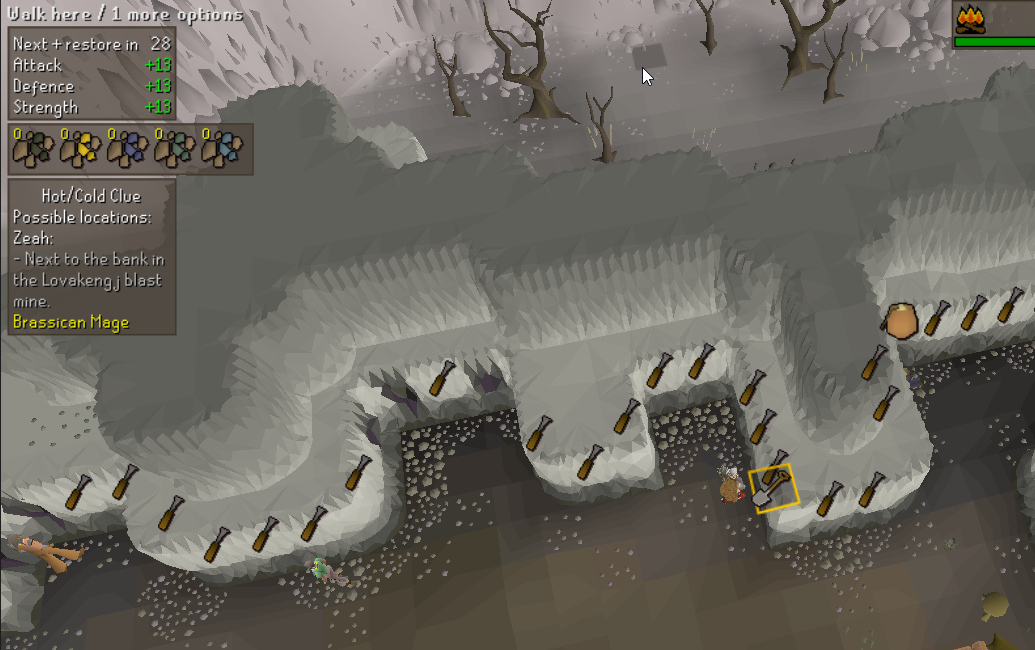
Where would one go to report a plugin having a minor issue ? https://i.imgur.com/jUQvHke.png This hot and cold master clue is now inside the wall at blast furnace according to the clue helper plugin, update a few weeks ago added more spots to efficiently mine at so I guess it got shoved in there. It works to dig right next to the spot still 🙂
 gilded kayak
probably in-game, we use the exact coord jagex says otherwise the solver might not be able to calculate it
brisk birch
Oh so this is a jagex coordinate issue thing?
viscid lantern
I dont think we do
gilded kayak
for hotcold we do
leaden trail
Handy wiki cache diff page link to check what changed:
https://oldschool.runescape.wiki/w/RuneScape:Cache/2024/223.2

Old School RuneScape Wiki
brisk birch
Well, happy to report it where ever, just not sure what would be the right place to go
crisp dune
The area you dig is larger than that single tile; that spot is just the center of that area
brisk birch
Yep, as said, it worked to dig right next to it
crisp dune
yeah
brisk birch
It still looks a little funny that it's inside the wall though
(and the flavor text doesn't fit anymore, it's not next to the bank)
gilded kayak
i'll look into the hint at least
gilded kayak
there's another hotcold near the dueling arena that's like that
also one at watson's house
brisk birch
oh I've only done like 20 masters, I've not had those yet I guess
gilded kayak
ye looks like they didn't change the hint (in cache at least)

 fossil garnet
I'm trying to leverage IntelliJ's Swing UI Designer to design a plugin panel, but I'm not able to find any guidance or examples online. Does anyone know of any sample plugins that utilize the Swing UI Designer .form files that I can use as an example?
round jacinth
i dont think there are any
find a design of a plugin panel you like and look what they do
fossil garnet
I wanted to avoid code-based formatting. Oh well 😦
 icy briar
runelite doesnt run vanilla osrs graphics - only gpu or 117. when i have both off, the screen remains frozen, yet seems like I can click and interact in the game. any idea why?
haughty pumiceBOT
To find the logs, you can do one of the following:
- If your client failed to open, click the
Open logs folderbutton. - Open the screenshot directory by right-clicking 📷
Camerabutton, navigate 1 directory up, then open logs folder. - Navigate to
%userprofile%\.runelite\logson Windows or$HOME/.runelite/logson Linux and macOS.
Upload the log files named client and launcher by dragging them to Discord. If there are files prefixed with jvm_crash dated from today, upload them too.
leaden trail
But also does it happen in safe mode?
haughty pumiceBOT
Windows
Run the RuneLite (safe mode) shortcut, or with a Jagex account, first run the RuneLite (configure) shortcut and tick the Safe mode box, then launch RuneLite via the Jagex launcher.
Mac
In Terminal, run:
/Applications/RuneLite.app/Contents/MacOS/RuneLite --configureTick the Safe mode box. Launch RuneLite.
If it's not working, download and install the updated RuneLite launcher from the website link in #welcome. You don't need to uninstall your current version. You will not lose any settings or plugins. Then try running safemode again.
 formal veldt
key remapping keeps stopping once every few hours after the last update and im not sure why. i have to turn the plugin off and on again to get it working again
 lone anvil
 zealous cedar
adjust the opacity in the runelite settings
if you don't see the runelite settings, use safe mode.
haughty pumiceBOT
Windows
Run the RuneLite (safe mode) shortcut, or with a Jagex account, first run the RuneLite (configure) shortcut and tick the Safe mode box, then launch RuneLite via the Jagex launcher.
Mac
In Terminal, run:
/Applications/RuneLite.app/Contents/MacOS/RuneLite --configureTick the Safe mode box. Launch RuneLite.
If it's not working, download and install the updated RuneLite launcher from the website link in #welcome. You don't need to uninstall your current version. You will not lose any settings or plugins. Then try running safemode again.
icy briar
icy briar
runelite doesnt run vanilla osrs graphics - only gpu or 117. when i have both of...
bump this
gilded kayak
dura ask for both your logs and if your* issue happens in safe mode
 tawdry shore
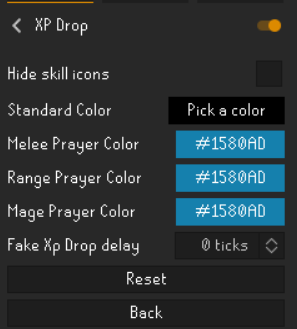
anyone know why my xp drops are not blue with the right boosting prayer? These are my settings in xp drops https://i.imgur.com/d3EnN75.png
 gilded kayak
probably figure out which hub plugin is causing your issue then
icy briar
i turned off all plugins and went to "default" runelite one and still happened
gilded kayak
did you restart after doing that
icy briar
like restart runelite while it's on default?
icy briar
oh man you're right. didnt know i had to restart it
ok let me figure out which plugin broke. the last external plugin i downloaded was the robes of ruin emote thing
how do i find out which plugin could be causing this
i just uninstalled a few external plugins i wasnt using, but the rest im pretty much using
 radiant canyon
no idea what plugin im using thats causing this
but how do i turn off tile indicators for raid members
icy briar
should be player indicator
radiant canyon
THANK YOU
icy briar
icy briar
i just uninstalled a few external plugins i wasnt using, but the rest im pretty ...
let me uninstall 117
 fossil summit
your cpu rendering doesn’t work?
icy briar
fossil summit
your cpu rendering doesn’t work?
no
i just uninstalled 117 and now it works...
but i like 117, however i play 2 accts: one full screened 117, and one cpu render fixed screen
hmmm
icy briar
fossil summit
your cpu rendering doesn’t work?
i install 117, but i can't toggle it off basically. if i toggle it off, the visual freezes as if its a still image, however i can interact through it
so 117 seems to be my issue. was working fine until literally an hour or two ago
fossil summit
what happens if you uncheck compute shader and restart
icy briar
icy briar
i install 117, but i can't toggle it off basically. if i toggle it off, the visu...
this just happened with gpu too actually. if i toggle gpu off, its visually frozen
let me share a video
icy briar
im using an external monitor w/ my laptop, but laptop screen is offline and only external monitor is on
fossil summit
I think that’s part of your problem
icy briar
been like this for over a year
hmmm my nvidia shadowplay isnt even wanting to screen record
let me see if my driver needs an update actually
fossil summit
there’s a lot of layers to this onion when it’s an external display we’re dealing with lol
icy briar
wait i also turned on dev mode on my laptop today
let me disable that
and powertoys
would be a huge L if it's bc of powertoys
fossil summit
I think you need to decouple from all of these factors like external monitor, a dev mode, especially powertoys
you can’t really expect anyone here to know that a solution if you are running the most complex OS
icy briar
yea i turned it all off and unplugged my external monitor. still persists
fossil summit
reboot your computer
icy briar
my nvidia is also not screen recording like it did before. something is up with my laptop. i'll keep expirmenting and report back
yup did so 3x
and updated drivers
leaden trail
fossil summit
your cpu rendering doesn’t work?
they don't have the problem in safe mode which disables GPU so it's a hub plugin
oh this sounds like a combination of things
but nvidia screen recording not working is basically expected, it doesn't work for Runelite for most people
icy briar
leaden trail
oh this sounds like a combination of things
but nvidia screen recording not wor...
Yea it generally would record my desktop, but it isn’t even doing that now
fossil summit
I wish you luck, you’ll figure it out
you’ll find a balance between what you can enable/disable
icy briar
Yea im sure I will but man this is annoying. I only play on 117 too but I like putting up a second afk account on the lowest settings I possibly can
I dont know why it decided to break all today
 past ruin
Anyone running into a fatal error on trying to load runelite? I've uninstalled and installed, restarted router multiple times, not sure where to go to fix this.
haughty pumiceBOT
To find the logs, you can do one of the following:
- If your client failed to open, click the
Open logs folderbutton. - Open the screenshot directory by right-clicking 📷
Camerabutton, navigate 1 directory up, then open logs folder. - Navigate to
%userprofile%\.runelite\logson Windows or$HOME/.runelite/logson Linux and macOS.
Upload the log files named client and launcher by dragging them to Discord. If there are files prefixed with jvm_crash dated from today, upload them too.
leaden trail
But also what specifically does the error say?
past ruin
One sec, I'll try to reload it quick

I havent been able to find the %userprofile%.runelite\logs
Opened logs, theres a screenshot folder but leads me nowhere
 past ruin
Ive opened the logs multiple times, been through every option lol.. cant find it.
been trying since 3pm yesterday
haughty pumiceBOT
run this command in cmd, then show us the displayed output through a screenshot.
"%localappdata%\runelite\runelite.exe" -c -v --console -- --debug
 gilded kayak
yes but i'm pretty sure that java error means your harddrive is dying
so that's not good
past ruin
lmao
It's an old laptop, my next option was to reset to fact.. see if it can save some life
Reckon thats my best bet at this point?
gilded kayak
try deleting that entire .runelite folder, or renaming it to .runelite-old if you have settings in there
gilded kayak
gilded kayak
try deleting that entire `.runelite` folder, or renaming it to `.runelite-old` i...
the one the screenshots folder is in
past ruin
Welp, that worked.
gilded kayak
well great
 gusty reef
how do these pvm streamers fit their inventory/prayer underneath their minimap? (mine vs example)

 crisp dune
make your window taller
gusty reef
so theyre not playing in the fixed 765 x 503?
crisp dune
doesn't look like it
 soft oasis
i get massive fps drops drop down to 18-19 fps how can i fix it?
 dire flume
gusty reef
so theyre not playing in the fixed 765 x 503?
dire flume
gusty reef
so theyre not playing in the fixed 765 x 503?
stretched off and make it a bit taller
 fresh kernel
having an issue with master clue/clue scroll plugin not showing where to go or what is needed. I have a torn clue scroll step and its not showing where to go or what items are needed like it normally does
vast bone
probably one of the steps isn't added to the solver yet
fresh kernel
im guessing since its not ghommal any more theres an issue then?
gilded kayak
yes the wording change is the problem
viscid lantern
yup, will be fixed in the next runelite update
fresh kernel
got it thanks
 quaint python
Is there a way to restart settings of RL to defualts?
gilded kayak
you could click the new profile button and double-click to swap to that profile
 rare pendant
is there a plugin for the mage training room? I've heard of one but cannot find it in the plugin search
gilded kayak
gilded kayak
you could click the `new profile` button and double-click to swap to that profil...
that's the easiest way to get default
quaint python
gilded kayak
you could click the `new profile` button and double-click to swap to that profil...
Where is that?
gilded kayak
🔧 -> 
quaint python
okay
gilded kayak
rare pendant
is there a plugin for the mage training room? I've heard of one but cannot find ...
it's a default plugin, it's not in the 🔌 tab
quaint python
Thanks, that fixed my issue I was having
rare pendant
okay thank you! What is it called? Just so I can find it
gilded kayak
Mage Training Arena
rare pendant
found it! thank you so much!!
 dark kestrel
no sound all of a sudden? not sure why
 teal gulch
Hi I'm trying to build RuneLite in Intellij, but getting a 404 on the plugins repo
Searching for the correct manifest file
haughty pumiceBOT
We don't provide builds of pluginhub plugins for snapshot versions. Usually you can pass -Drunelite.pluginhub.version=<current RL version> as a VM option to load the plugins built against the release into your build, which will work if there are no ABI changes. If there are ABI changes, build the plugins yourself and place them into the sideloaded-plugins directory when running in developer mode.
teal gulch
That worked, thanks
And how do I run it in developer mode? Adding --developer-mode to my configuration file doesn't seem to help
Getting Unrecognized option: --developer-mode
haughty pumiceBOT
teal gulch
Nvm, didn't correctly send it as a CLI arg
dark kestrel
dark kestrel
no sound all of a sudden? not sure why
anyone?
 lament crest
leaden trail
lament crest
leaden trail
You're the only person to report that
leaden trail
dark kestrel
anyone?
Does it come back in safe mode?
haughty pumiceBOT
Windows
Run the RuneLite (safe mode) shortcut, or with a Jagex account, first run the RuneLite (configure) shortcut and tick the Safe mode box, then launch RuneLite via the Jagex launcher.
Mac
In Terminal, run:
/Applications/RuneLite.app/Contents/MacOS/RuneLite --configureTick the Safe mode box. Launch RuneLite.
If it's not working, download and install the updated RuneLite launcher from the website link in #welcome. You don't need to uninstall your current version. You will not lose any settings or plugins. Then try running safemode again.
dark kestrel
leaden trail
Does it come back in safe mode?
will try right now
 storm cedar
Anyone able to answer why runelite does not let my computer fully sleep? I come back and the battery is dead after I shut it everytime
dark kestrel
leaden trail
Does it come back in safe mode?
nope
 kindred patrol
Hi, I just joined, I've been working on my own plugin but wanted to ask a question regarding development, but I see that I'm not allowed to speak in that channel - how do others go about this?
gilded kayak
dark kestrel
no sound all of a sudden? not sure why
just to be sure you didn't upgrade to windows 11 or anything like that right
kindred patrol
gilded kayak
you can ask in <#301497432909414422>
thank you :)
dark kestrel
gilded kayak
just to be sure you didn't upgrade to windows 11 or anything like that right
nope
teal gulch
If I create a plugin that assosts
assits me with switching prayers for demonic gorillas
Will I get banned?
gilded kayak
yes
viscid lantern
thats against the rules so yes
teal gulch
Aah, also if its just a sound effect?
teal gulch
Aah okay thank you for sharing
gilded kayak
dark kestrel
nope
!logs
haughty pumiceBOT
To find the logs, you can do one of the following:
- If your client failed to open, click the
Open logs folderbutton. - Open the screenshot directory by right-clicking 📷
Camerabutton, navigate 1 directory up, then open logs folder. - Navigate to
%userprofile%\.runelite\logson Windows or$HOME/.runelite/logson Linux and macOS.
Upload the log files named client and launcher by dragging them to Discord. If there are files prefixed with jvm_crash dated from today, upload them too.
storm cedar
Anyone able to answer why runelite does not let my computer fully sleep? I come back and the battery is dead after I shut it everytime
gilded kayak
are you on mac
gilded kayak
i would guess maybe a hub plugin isn't closing it's audio correctly and windows thinks audio is constantly playing
or maybe the login screen is playing audio?
viscid lantern
dark kestrel
no sound all of a sudden? not sure why
do you use bluetooth headphones by any chance?
dark kestrel
nope
storm cedar
Could it be 117 hd?
dark kestrel
was working this morning, came home after work and its just not working
everything else does
viscid lantern
and you tried restarting the client?
dark kestrel
yup
gilded kayak
storm cedar
Could it be 117 hd?
i doubt it but you could try
viscid lantern
see if its muted in the windows volume mixer maybe
gilded kayak
gilded kayak
i doubt it but you could try
i'd probably just close rl instead of debugging this personally but u might find the problem
storm cedar
THat is alot of work to always close runelite lol
gilded kayak
is it
storm cedar
Also prevents my desktop from sleeping properly as well
dark kestrel
viscid lantern
see if its muted in the windows volume mixer maybe
nope
storm cedar
Only got like 6 extra plugins
THen sometimes when I close it runelite just auto closes out
Close the laptop*
Think it might be quest helper
I believe it is quest helper. Any fixes for that or hows that work
 hot oasis
you could look in the quest helper discord
storm cedar
There is a discord for that?
haughty pumiceBOT
Visit Zoinkwiz's Quest Helper plugin discord (https://discord.com/invite/XCfwNnz6RB) for support, issues & feedback
storm cedar
Joined it
 scenic fiber
is the clue scroll helper down for anyone else?
gilded kayak
it just doesn't recognize the clues they changed in the last game update
one of them being a master 3step so it's much more obviously missing
gilded kayak
yeah xd
icy briar
this is what im experiencing. i have absolutely no idea why
wasnt doing this before
vanilla doesnt work after disabling 117/gpu
if i disable them, restart runelite, the game will start disabled normally. once i enable 117/gpu and disable it again, it freezes like this, yet everything is clickable
 rugged gulch
feel hella dumb for asking but how do i get rid of this?
 icy briar
if i disable them, restart runelite, the game will start disabled normally. once...
icy briar
icy briar
if i disable them, restart runelite, the game will start disabled normally. once...
safe mode works fine. just the gpu/cpu plugins that affect this
 willow furnace
https://i.imgur.com/KjYFo6H.png
Not sure if this is a runelite issue but for some reason the highlighted ground items no longer take priority over certain monsters hitboxes? Dust Devils for example in the image have a circular hitbox that's covering the text.
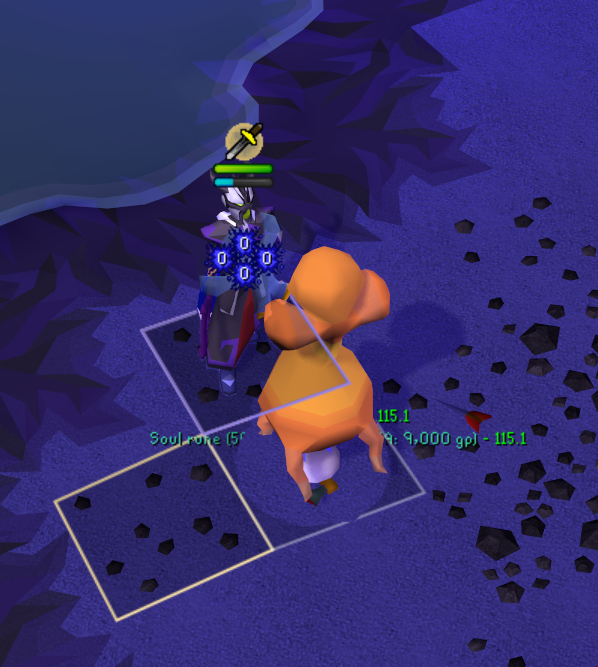
It also blocks other plugins from working such as Monkey Metrics
willow furnace
Hm, can I un-improve them? XD
zealous cedar
uninstall the improved tile indicators or w\e
oblique plume
uninstall the improved plugin
willow furnace
Toggled the plugins on/off after resetting client and that seems to have fixed things
ty 🙂
 modest walrus
i keep getting fps drops after my client has been open a couple hours causing it to massively tank frames whenever the window isnt in focus
is there anyway i can fix this?
 fresh whale
Heya, my game just started shuddering, kinda feels like lag every single tick, any ideas for plugins etc?
Nvm lol was just my laggy computer hahaha
 steel dagger
why is my runelite a bit blurry
icy briar
steel dagger
why is my runelite a bit blurry
resize it
 safe pulsar
hi guys i lost my runelite plugins / tile markers
i dont have a recent profile saved that has the latest settings
is there anything saved in the runelite folder that i could use to restore settings back?
zealous cedar
maybe.
haughty pumiceBOT
haughty pumiceBOT
[ https://github.com/geel9 ] [ @feral imp 57348691459059712 ] geel9#0
 subtle plaza
@feral imp Whn i change this setting https://i.imgur.com/gLYKw81.png and theni turn off the plugin the npcs in the hunter guild stay highlited for some reason -- FOR UR HUNTER RUMOR PLUGIN

 bright vapor
Hey I used a plugin that shows me all the items that cost the mound of gp i type. Like if I type 2 mill in the bank search then it will show all items that cost the same price like 2 mill. It was long time ago i used it so now I have forgot witch one it was. Anyone know witch plugin it is?
hot oasis
Not sure if it's exactly what you had before, but the Bank plugin supports searches like that with ctrl+f. You can use "=2m" or ">5k" for example
 glass rose
Does anyone have an issue with long bones not being treated like untradables in Ground items plugin? For some reason long bones are recognized as having a GE value of 1000 which is below my low price threshold

 viral bear
anyone know of a way to hide npcs but still keep them clickable? both entity hider and better npc highlight can hide entities, but remove their clickboxes as well. specifically asking for tds since their fire shield hurts my eyes so i want to jsut fight them invisible (with their hull outlined)
 fluid furnace
Is there a plugin that removes the take-to-inventory button in Moons of Peril? 🤔
bright vapor
Can we get a plugin to make zerker pure? We need a plugin that shows all quest you can do and not to do. If you are going for zerker main.
haughty pumiceBOT
The Jagex launcher (https://www.jagex.com/en-GB/launcher) will let you login and fully supports RuneLite. Login problems are a Jagex issue and there is nothing we can do about it.
solid mesa
The wiki page pretty much explains it https://oldschool.runescape.wiki/w/Berserker_(Account_build)#NH/Tribrid
Old School RuneScape Wiki
A berserker pure or zerker is an account build characterised by the Defence level of the build, typically having 45 Defence in order to wear the berserker helm. Historically, this build has also been characterised as having the lowest Defence level with all requirements to obtain Barrows gloves.
 dim scaffold
i had to reinstall runelite, is there a way to retrieve all my old plugins after I logged back in?
mossy swan
!lostsettings
haughty pumiceBOT
mossy swan
you should not have lost anything by reinstalling
dark kestrel
still no sound playing from runelite, not sure what else to do at this point.
 feral imp
subtle plaza
<@57348691459059712> Whn i change this setting https://i.imgur.com/gLYKw81.png a...
feral imp
subtle plaza
<@57348691459059712> Whn i change this setting https://i.imgur.com/gLYKw81.png a...
Oof -- I'll look into it. Apologies
subtle plaza
@feral imp NO WORRIES. Just thought I did something by accident lol
 fiery cove
Hey just wanted to check and see if this was a popular question. I started playing Runescape a little over a month ago and started on steam. I was told to get RuneLite but I want to continue tracking my hours on steam so I used the launch options to launch RuneLite through steam. When trying to log in, it says I need to use the Jagex Launcher instead. Any help on the matter is greatly appreciated.
mossy swan
basically you cant do that
you need to use jagex launcher to launch runelite, since you now have a jagex account
fiery cove
well thats unfortunate :/
mossy swan
runescape already tracks your hours played though
fiery cove
ya I just wanted to show my hours on my steam lol
 hot nexus
na sorry should of specified
round jacinth
i imagine they still have a scale tho
hot nexus
im pretty new to coding , how could i increase its scale to 200%?
hot nexus
round jacinth
i imagine they still have a scale tho
even setting the xan2d yan2d and zan2d isnt fixing it so im not sure
round jacinth
idk what to do because when i did item swaps in a bank for a goofy mopar scape esque picture (10000000b as a joke) it didn't have any issues with scaling, it just worked - all i did was replace the spriteid or something
this channel is for core client help not anything dev related, you can ask for dev help in #runelite though, im sure some one knows what you're doing wrong
hot nexus
oh mb
 tropic gulch
im having issues with rl client, ive deleted my jagex cache .. i dont understand what i did if i did anything, 80% of screen is covered by blasck screen small top left corner shows, i can still hit enter and login but the screen is still covered
 whole meadow
Anyone tell me where osrs soa chat is please as stuck an can't move on
whole meadow
How do. I find it ? What sub heading is it in an thanks
tropic gulch
Fixed
 gilded quail
I currently have a master clue step that is not showing the overlay and any directional arrows on map. When I open a easy clue the overlay and map direction arrows appear but for some reason my master clue is not working. Is this a known bug?
mossy swan
yes, jagex updated some clues
 sick crane
hey guys, im having some item drag issues in my inventory when trying to move items around. sometimes the items move as i intend and other times they get stuck as i click on them and i end up eating or drinking the potions i have. i turned off anti drag and tried turning it back on but nothing seems to work. has anyone experienced this?
leaden trail
Are you in the wilderness?
sick crane
yeah idk what the deal is...
leaden trail
That's intentional
sick crane
no yeah i mean with whats goin on with my game. its almost as if anti-drag is set to 100+, but when i hold left click on the item its as if its registering as my mouse repeatedly clicking and the item wont move
viscid lantern
leaden trail
Any PvP areas have it off, I believe
that was changed in 2021, it should work just fine
leaden trail
viscid lantern
that was changed in 2021, it should work just fine
Ahh, tells you the last time I played actively lmao
sick crane
disregard my messages. i believe its my mouse. thanks anyways!
 tardy escarp
Is there a way to import a profile using a script? I help maintain some of the methods of running Jagex Launcher on Linux, and a common pain point is Steam Deck users having settings issues. I have a profile that fixes this, and would like to provide a script to apply these settings for them because flatpaks make it a little confusing for a new person to be able to import a profile.
 vivid basin
Some plugin is hiding the mage training arena overlays (that show Pizazz points, alch prices). I can't find the option to enable/show them again for my life. Anyone know where this is configured?
 split radish
Hi all, i accidentally disabled the "bank" plugin and now my bank interface is no longer working, it is hiding items that are in my bank
This is what my bank currently looks like:
 haughty pumiceBOT
Many plugins from the pluginhub break the client in subtle or not-so-subtle ways, including causing issues like client freezes. We do not support pluginhub plugins because we do not make or quality control them, and do not recommend their use.
Run the RuneLite (safe mode) shortcut, or with a Jagex account, first run the RuneLite (configure) shortcut and tick the Safe mode box, then launch RuneLite via the Jagex launcher.
This temporarily disables the GPU plugin and all hub plugins which will allow you to confirm the issue is caused by one of those plugins and isn't a core RuneLite issue.
If the issue is caused by a hub plugin, you should isolate which plugin it is and then uninstall the plugin.
split radish
I have uninstalled and re-installed RL but no joy
How do i run in safe mode? i can't spot the option - apologies if it's somewhere. i can't see it in any channels
vast bone
should be in your start menu
split radish
Perfect, thank you
leaden trail
vivid basin
Some plugin is hiding the mage training arena overlays (that show Pizazz points,...
It's probably behind your status bars if you have those enabled
vivid basin
leaden trail
It's probably behind your status bars if you have those enabled
That's not it:
- I don't have status bars enabled
- the overlay actually shows up if I login inside a room but then disappears. So it's not hidden behind another element.
gilded kayak
!safe
haughty pumiceBOT
safemode: Windows
Run the RuneLite (safe mode) shortcut, or with a Jagex account, first run the RuneLite (configure) shortcut and tick the Safe mode box, then launch RuneLite via the Jagex launcher.
Mac
In Terminal, run:
/Applications/RuneLite.app/Contents/MacOS/RuneLite --configureTick the Safe mode box. Launch RuneLite.
If it's not working, download and install the updated RuneLite launcher from the website link in #welcome. You don't need to uninstall your current version. You will not lose any settings or plugins. Then try running safemode again.
 copper basin
i reset my laptop and i cant find my settings/plugins or how to import then on to my runelite with out having the folder that has been deleted
 hollow olive
without the folder, if they arent already cloud synced then youre sol
 light trellis
Where can you turn off the hp bar with the name in it for opponents/mobs.
copper basin
hollow olive
without the folder, if they arent already cloud synced then youre sol
how can i check if its cloud sync
oblique plume
it would be a profile you can switch to when you sign in to your RL account
copper basin
thank you
 shadow spoke
My audio stopped working yesterday, ive run runelite safe mode and that didnt fix it either. Audio works on official client. Any fixes :)?
 queen ferry
https://github.com/adhansen/plugin-repo/issues
my wilderness player alarm no longer works
is this happening to anyone else?
viscid lantern
the plugin got some changes recently, make sure to check its settings and set it up again
solid mesa
The changed it to use native runelite notifications rather than their own flashing overlay. So check your notification settings
 brittle valley
For the last couple days I've been having issues where notifications from runelite cause my screen to flash white for one flash. I've checked everywhere I know where to look and flash is turned off everywhere. If I turn on flash intentionally and set it to another color i still get the white flash overlayed on the flash color I picked for that first flash and then it goes to whatever color I selected for the remainder. Any ideas? It does this on all screens, even when runelite isn't focused
queen ferry
I changed my notification settings to “flash until cancelled” but it still isn’t flashing
solid mesa
Do you have notify when focused turned on?
queen ferry
seems like you need to have "send notifications when focused" turned on
leaden trail
Yeah that checks out
 obtuse mortar
is there a way to remove those blue lines ?
 queen ferry
kinda wish they didnt change it to runelites native notifcation, because now it flashes every time i get a game notification.
brittle valley
same
leaden trail
obtuse mortar
is there a way to remove those blue lines ?
The frame around your window?
obtuse mortar
yessir
leaden trail
It's from some recording software or another I believe
gilded kayak
queen ferry
kinda wish they didnt change it to runelites native notifcation, because now it ...
I believe the author plans to change the plugin back
queen ferry
i hope so
 steel elk
my log in wont work on runelite, but it works on everything else
 strong dune
how can i open runelite to use login info instead of auto login?? my alt account isnt jagex account but when i open runelite (not through the jagex launcher) it will still load up my main account as auto login?
mossy swan
strong dune
how can i open runelite to use login info instead of auto login?? my alt account...
launch the runelite exe, without using jagex launcher
strong dune
mossy swan
launch the runelite exe, without using jagex launcher
tried that mate same issue
gilded kayak
steel elk
my log in wont work on runelite, but it works on everything else
new accounts are required to launch runelite through the jagex launcher
round jacinth
o
strong dune
mossy swan
launch the runelite exe, without using jagex launcher
so used the .exe instead of the jagex luncher. even quit the process in task manager but same thing

just uninstalled jagex launcher and runelite reinstalled and its still coming up my account wth lool
viscid lantern
make sure to launch runelite.exe directly and not through the jagex launcher
strong dune
viscid lantern
make sure to launch runelite.exe directly and not through the jagex launcher
yep even trying it like that mate, same issue my account loads up no matter what
 mossy swan
that should definitely work
make sure you have real runelite and not a fake
!verify
haughty pumiceBOT
You can verify your downloaded RuneLite setup file is authentic by visiting https://runelite.net/verify/
strong dune
defo the real one
steel elk
gilded kayak
new accounts are required to launch runelite through the jagex launcher
i can get jagex launcher to run runelite, and it logs in fine. still wont let me log in if i try to open runelite normally though
strong dune
mossy swan
that should definitely work
were is runelite stored? can try just deleting it all from appdata or were ever it is
gilded kayak
steel elk
i can get jagex launcher to run runelite, and it logs in fine. still wont let me...
Yes that's intended by Jagex
mossy swan
you can right click the icon and open file location, and then right click that again and open whatever
gilded kayak
gilded kayak
Yes that's intended by Jagex
your username/password for the Jagex launcher, is not valid to use the old login system RuneLite uses
mossy swan
maybe you already upgraded that to jagex account or something?
strong dune
i give up lol, Jagex launcher isn't even on my pc anymore, runelite has been deleted and reinstalled and still cant use email and password as it is detecting the account from somewhere
haughty pumiceBOT
@strong dune To find the logs, you can do one of the following:
- If your client failed to open, click the
Open logs folderbutton. - Open the screenshot directory by right-clicking 📷
Camerabutton, navigate 1 directory up, then open logs folder. - Navigate to
%userprofile%\.runelite\logson Windows or$HOME/.runelite/logson Linux and macOS.
Upload the log files named client and launcher by dragging them to Discord. If there are files prefixed with jvm_crash dated from today, upload them too.
teal juniper
sorry for asking again but nobody answered before, for some reason my mouse tooltips sometimes turn off randomly, i don't know why it happens but it works again when i reload the plugin in plugins menu
gilded kayak
!logs
haughty pumiceBOT
To find the logs, you can do one of the following:
- If your client failed to open, click the
Open logs folderbutton. - Open the screenshot directory by right-clicking 📷
Camerabutton, navigate 1 directory up, then open logs folder. - Navigate to
%userprofile%\.runelite\logson Windows or$HOME/.runelite/logson Linux and macOS.
Upload the log files named client and launcher by dragging them to Discord. If there are files prefixed with jvm_crash dated from today, upload them too.
gilded kayak
maybe there's an error we don't know about yet
teal juniper
okay, give me a moment
 drifting mason
with the xp drop plugin i've swapped the colors around made sure standard is different than when an offensive prayer is active but i'm camping peity just to test and the drops aren't showing up blue suddenly. Any ideas?
nvm I solved it. Custom xp drops was overiding it
🙂
teal juniper
gilded kayak
maybe there's an error we don't know about yet
there, i think this session had the thing, it didn't show up today, but yesterday and before it showed up a lot, if there's nothing in it i'll try to get the thing again today, but i have no clue what causes it
i just remembered that because for some reason mouse tooltips also don't show up on the same tick when you change prayers but i don't know if it's okay or not, i guess it is
but when it just randomly stops working it's really annoying
also sometimes it just don't work for like a minute and then it works again without reloading it but it also happens randomly
gilded kayak
teal juniper
i just remembered that because for some reason mouse tooltips also don't show up...
jagged vortex
is this ticket support?
gilded kayak
maybe, depends what your problem is
jagged vortex
i need refund
gilded kayak
ah no we are the RuneLite discord
haughty pumiceBOT
If you are new to OSRS, make sure to follow this excellent guide on OSRS wiki: https://oldschool.runescape.wiki/w/New_player_guide. You can also join official OSRS Discord here: https://discord.gg/osrs
viscid lantern
you wont get any refunds because you died to nex
jagged vortex
8million coinsi died 80 times 100k each
because nex voice dont work
everyday i ask you guys say next update
maybe today maybe tomorrow now its 1 week later
gilded kayak
well there hasn't been an update yet
jagged vortex
i need 8million sir
teal juniper
yeah it looks like it
but that's just what i noticed today, the other times it just stopped working and i think it's not because of the prayers, it is just random
jagged vortex
1 week sir
hollow olive
sounds like u should get good
jagged vortex
my boss asked first
viscid lantern
they didnt type before just now either
jagged vortex
then i came ask again
gilded kayak
teal juniper
yeah it looks like it
but that's just what i noticed today, the other times it j...
Ah that's a problem then since that video posted says they recorded it on the steam client
meaning it's a Jagex bug
jagged vortex
felanbird sir come to g.e. w395 sir
mossy swan
lmao skill issue
leaden trail
Dying because of a hub plugin is indeed a skill issue lmaooo
oblique plume
How though???
leaden trail
Unlucky
mossy swan
making money by selling runescape gold is against the rules of the game
 fresh swift
what a shit plugin developer
leaden trail
I'm sure he'll be there with your 8mil....never
leaden trail
fresh swift
what a shit plugin developer
Lmfao
jagged vortex
fresh swift
what a shit plugin developer
plugin is really good sir
leaden trail
Apparently not if you've died because of it so much!!1!
jagged vortex
i died because no update
teal juniper
gilded kayak
meaning it's a Jagex bug
oh, okay, but that's not my main issue though, there are two problems:
- it just stops working randomly
and 2. it don't work after prayers (which i know now is jagex bug)
viscid lantern
jagged vortex
<@323951080188936192> sir am waiting in g.e. w395
dont see you
gilded kayak
teal juniper
oh, okay, but that's not my main issue though, there are two problems:
1. it jus...
I'm not aware of it randomly just not working
leaden trail
Felan gave it to me. I trimmed his armour
haughty pumiceBOT
safemode: Windows
Run the RuneLite (safe mode) shortcut, or with a Jagex account, first run the RuneLite (configure) shortcut and tick the Safe mode box, then launch RuneLite via the Jagex launcher.
Mac
In Terminal, run:
/Applications/RuneLite.app/Contents/MacOS/RuneLite --configureTick the Safe mode box. Launch RuneLite.
If it's not working, download and install the updated RuneLite launcher from the website link in #welcome. You don't need to uninstall your current version. You will not lose any settings or plugins. Then try running safemode again.
teal juniper
okay i will try
viscid lantern
jagged vortex
i trade ypi
standing next to brugsen npc at the south
leaden trail
jagged vortex
what is your rsn
Xi plzPetDogz xiX
teal juniper
also i will try to record it if it happens again
 vague bison
Is there something that messes with the scaling modes? When I've seen other people use Mitchell or Catmull-Rom they look great (when stretched). When I turn those on while stretched mode is on they look awful?
 mossy swan
it depends on the scaling %
vague bison
Does anyone have a screen size + scaling % combo that looks good?
I'm currently using 1200 * 800 and I cannot get any scaling % to look good without it being 0/off
mossy swan
probably with those algorithms it would need to scale too big to look good or something
just try all of them
xbr might be better
vague bison
I've been on xBr for a long time, I wanted to play on a smaller screen and it doesn't seem great on that unfortunately :/
oblique plume
I do 30% Mitchell and think it looks good
glossy flume
what is this pink pixel top right of the world switcher
 viscid lantern
its art(thats what jagex released)
fossil summit
they call it programmer purple
viscid lantern
maybe they fix it tomorrow 
 timid tiger
what is it with jagex and leaving weird random pixels
 obsidian needle
is there anyway for me to get runelite to utilize all of my gpu? it maxes out at like 100fps when zoomed out but its only using like 60% of my gpu. I have frames unlocked am using 117 HD and have it on v sync which is 144hz
zealous cedar
no
steel dagger
my runelite is so laggy in certain areas. i even tried to reinstall but still lags
obsidian needle
ahh well, as long as its not my laptop, its brand new and i was thinking something was funky, guess its just runelite thats funky
thanks guys
 inland crest
Are there any Java args that would be beneficial for Runelite? maybe a GC?
 light tapir
obsidian needle
ahh well, as long as its not my laptop, its brand new and i was thinking somethi...
light tapir
obsidian needle
ahh well, as long as its not my laptop, its brand new and i was thinking somethi...
No thats just that its CPU bottlenecked
GPU plugin doesnt make all of it run on the GPU, only the graphics are
The only time your GPU will be at 100% is when you are GPU-bottlenecked
which is unlikely to happen on runelite unless you crank up HD plugin and all the settings
and even then its still not likely
 night lintel
Hello, I believe I have a repeat of issue #18037, doorman of the warrior guild master step isn't displaying clue helper. Restarted runelite and issue is still present.
 gilded kayak
there hasn't been a RL update with the fix yet
 spiral sundial
Hey everybody just logged in and all my runelite settings and plugins are gone? Never signed out of runelite though.
haughty pumiceBOT
spiral sundial
Kalil
Thank you!
So stoked I didn't lose all of that I had going since like 2015/16
No idea what I did or how that happened but i'm glad my current settings are back
stone parcel
Yeah for sure! 😄
spiral sundial
Ok got my 2 profiles set up and have them defaulted to each account. Cloud sync enabled. Just got a new laptop. I downloaded runelite on it and signed in. Are all of my settings saved on my laptop too?
obsidian needle
light tapir
No thats just that its CPU bottlenecked
hmm, cpu usage was only at like 8% lmaoo.. does runelite only run off of a couple cores?
spiral sundial
glossy flume
what is this pink pixel top right of the world switcher
I always wondered that myself lol
 steady minnow
anybody know how to fix this

ive tried uninstalling and reinstalling
i fixed it by restarting my internet
 stiff raptor
Is it possible to make a copy/backup of any plugin's config? Kinda want to make comparison pics of 117HD
leaden trail
Just duplicate your profile
 silent charm
how do u hide the green bars on ruen pouch plugin
 stiff raptor
leaden trail
Just duplicate your profile
stiff raptor
leaden trail
Just duplicate your profile
I'll try it ty
 terse linden
anyone know what the go with this is? havnt made any login attempts, and mobile is working fine?
 leaden trail
It's a Jagex issue.
Basically as long as you aren't a Linux user, the best solution is just to convert to a Jagex account and start using the Jagex launcher
terse linden
mossy swan
ermm there is a fix for that now
how do i end all sesions?
terse linden
leaden trail
It's a Jagex issue.
Basically as long as you aren't a Linux user, the best solu...
seems like a forced switch lol
cant get around it, even says i have to make a jagex account to use the launcher
 scarlet shell
is this related to my pc/client? it happened when i walked into another room

turning off 117hd and back on fixed it
leaden trail
mossy swan
ermm there is a fix for that now
Whoops forgot that was a thing 😅
In my defense I was just about to go on a trip when that got figured out 😅
But also potato
terse linden
that didnt work by the way but i tell you what did
i logged into my alt account, logged off closed runelite
reloaded runelite (had alt account username remembered) then just logged back into the iron..(main)
light tapir
obsidian needle
hmm, cpu usage was only at like 8% lmaoo.. does runelite only run off of a coupl...
Only a few threads, since OSRS isnt multithreaded
obtuse mortar
anyone knows how to fix this blue around the client ?
 leaden trail
It's your window border.
Please keep stuff to a single channel
 midnight radish
did rl update?
leaden trail
The game updated, but I don't think the client needed an update
midnight radish
does the nex plugin works now?
leaden trail
No, the client hasn't updated
midnight radish
ok ty
 spark knot
Lost my runelite proflies during update 🤣 ... this will be "fun" to re-do everything
fossil summit
terse linden
cant get around it, even says i have to make a jagex account to use the launcher
for non jagex accounts, world hops count as sessions you have to log out of all sessions in the runescape account settings
yes it is a forced switch and converting to a jagex account will fix it (so you can use jagex launcher)
haughty pumiceBOT
spark knot
haughty pumice
<@337247513385893889> <https://github.com/runelite/runelite/wiki/FAQ#my-plugins-...
thank you! holy cow this changed everything!
 old hinge
leaden trail
old hinge
leaden trail
The next time RuneLite updates
 fresh cosmos
how do i get rid of these orbs? https://i.imgur.com/18QQNOt.png
 viscid lantern
you disable XP Globes
fresh cosmos
thanks friend
 proven stump
is there a way to disable the hover text for boosts?

 proven stump
no i just want the text disabled
oblique plume
no
 oblique plume
you can do compact mode i guess
fresh cosmos
oh im sorry sir i stepped out of my lane lol
oblique plume
i dont think that has tooltips
proven stump
yea i guess compact mode doesnt have it
 serene nymph
I have runelite set up in intellij to access developer mode, but the client is outdated. How can I update it?
oblique plume
git pull
leaden trail
Or just "update project" even
 molten ore
Heelo
When i got the jagex client, i run runelite
i perma crash runelite
cant play the game no more
anyone have the same issue?
haughty pumiceBOT
@molten ore To find the logs, you can do one of the following:
- If your client failed to open, click the
Open logs folderbutton. - Open the screenshot directory by right-clicking 📷
Camerabutton, navigate 1 directory up, then open logs folder. - Navigate to
%userprofile%\.runelite\logson Windows or$HOME/.runelite/logson Linux and macOS.
Upload the log files named client and launcher by dragging them to Discord. If there are files prefixed with jvm_crash dated from today, upload them too.
 solid current
been trying to get .bat files going (one desktop shortcut for each acc). Now, the profiles load accordingly to the shortcut, its just the account login/pw get overwritten each time. i added --sessionfile=sessionX to it. did i do somethign wrong there?
fluid furnace
Which plugin is doing this? 🤔
 haughty pumiceBOT
round jacinth
solid current
been trying to get .bat files going (one desktop shortcut for each acc). Now, th...
haughty pumiceBOT
round jacinth
solid current
been trying to get .bat files going (one desktop shortcut for each acc). Now, th...
--session is old you now do something like
C:\Users\yourname\AppData\Local\RuneLite\RuneLite.exe --profile=ironman
solid current
so how i interpret that, is i won't even need a .bat file anymore. can just put in the shortcuts target?
hollow olive
i think you could pass it in the shortcut target yeah,
but the main point is sessionFile arg has been deprecated and profiles is the new arg now
oblique plume
even that can be depricated probably
since you can link rs account to config profiles
 cursive egret
My client seems to freeze for 1/4 of a sec every time an npc despawns, is this a known issue? I tried with a blank profile with no plugins, no issues with that but id rather not set up all my plugins again..
gilded kayak
I would think that's the type of issue where a lot of hub plugins could be causing it probably
search hub in the 🔧 -> 🔧 tab and start removing the ones u dont use first probably
timid rock
iirc bossing info had issues intermittently, and i dont think it has been fixed, if you have it
 tribal crater
anyone know how to get freecam plugins to ignore the hard limits for camera view angles? i want to be able to look straight up and straight down for example
viscid lantern
this setting in Camera plugin
 tribal crater
that works for looking straight down, any options for looking straight up, like if i wanted to have a point of view from the ground looking up at my player
(using freecam)
viscid lantern
are you talking about detachable camera or the normal camera?
because that option does allow you to go fully horizontal in normal camera
tribal crater
i want to go under horizontal in freecam in the detached camera or keyframe camera plugin
oblique plume
under horizontal would probably start to look bad because render order expects viewing from above afaik
viscid lantern
under horizontal would result in not seeing anything probably
since tiles dont have an underside, some gear doesnt have an unside etc
you would end up seeing some triangles here and there
ie:
 tribal crater
fair, thanks for the info
wanted to do some cool montage stuff for pking events, might just have to export the models and rig it up in blender
viscid lantern
yeah some things just arent very feasible to do ingame
 brazen dirge
If i try to update my launcher version on windows can i just download the newest version from the website without de installing?
haughty pumiceBOT
Download and install the updated RuneLite launcher from the website link in #welcome. You don't need to uninstall your current version. You will not lose any settings or plugins.
 lavish mural
Just changed my username and all my RuneLite settings for my previous username is no longer being used. How do I get that back?
lavish mural
I think all, like even my user interface changed from being fixed to modern. Like everything changed for some reason
oblique plume
well thats not even a RL setting
 patent gulch
Having an issue with party plugin causing severe frame jitter. Originally I thought it was my PC, but built a new one (still not top end) and experience the same behavior. I'm at 144 fps, but the stutter is so significant it feels like 30 fps. A few years back I had a similar issue which ended up being the result of the music plugin.
Basically I'm asking: Is this a known issue, or is it more likely my hardware?
zealous cedar
its likely a pluginhub plugin, not the party plugin
patent gulch
zealous cedar
its likely a pluginhub plugin, not the party plugin
You'd suspect it to be a plugin over my hardware though? I've tried disabling several plugins, but couldn't nail down the issue
zealous cedar
it is probably a pluginhub plugin causing it
unless you have some other reason to suspect your hardware is broken I wouldnt jump to that first
viscid lantern
if you can run the game at 144fps your hardware sounds fine from a performance point of view
and hub plugins are known to cause performance drops
patent gulch
Understood. I guess it'll just be a painstaking process to figure out the specific problem hub plugin. Thanks
viscid lantern
go for a binary search approach
disable half, restart your client. If the problem persists disable half of that, if it doesnt then the culprit is in the disabled half
patent gulch
I shouldn't need to uninstall correct? Simply disable?
viscid lantern
as long as you restart after disabling
patent gulch
oh! I didn't realize I'd need a restart
viscid lantern
not all hub plugins clean up after themselves properly
patent gulch
I see. I'll go through and report back if I can find the problem
gusty reef
is there a plugin that allows me to zoom while hovering over chat?
since scrolling normally just scrolls the chat up and down
 unique abyss
why did this happen?
 zealous cedar
cache corruption maybe? try restarting
unique abyss
ok thank you
 hushed night
unique abyss
why did this happen?
hushed night
unique abyss
why did this happen?
were you killing dwarves?
 balmy patrol
Hello, when I was fletching on my account i swapped the maple shortbow inventory left click to drop, but now that i want to swap it back to wield, it doesn't have the option for left click only shift click. Is there a way to fix this?
 viscid lantern
Reset option
molten ore
where do i uoload the logs?
leaden trail
here
molten ore
it still gets like that
molten ore
leaden trail
don't just paste them as a message
idk how else to do it XD
haughty pumiceBOT

Ketner777
A fatal error has been detected by the Java Runtime Environment:
#
#  EXCEPTION_ACCESS_VIOLATION (0xc0000005) at pc=0x03d9c70d, pid=15208, tid=9740
#
# JRE version: OpenJDK Runtime Environment (11.0.4+11) (build 11.0.4+11)
# Java VM: OpenJDK Server VM (11.0.4+11, mixed mode, emulated-client, g1 gc, windows-x86)
...is that legit the issue?
leaden trail
more details in the comments on that issue ^
leaden trail
yeah it's a Java bug and the only real resolution has been to do that
I'm not sure tbqh
hushed night
java has very poor customer facing error messages
molten ore
okay okay
hopefully it works
dont wanna perma crash when playing dmm
crashed 4 times today while doing TOA 500s
hushed night
I’m no developer but I feel like the people who write java don’t do any error handling
hushed night
they just do try and catch and print the exception right?
molten ore
seems so
hushed night
access violation is probably an exception to that dirt I just talked
@molten ore may be best to avoid runelite if you are getting a fatal error
molten ore
hushed night
<@199604681800941568> may be best to avoid runelite if you are getting a fatal e...
gonna try that fix the potato sent
if that aint work ill just run normal client XD
i was stupid and did the jagex account thing
hushed night
I’d hate for it to happen outside safe zone
molten ore
yeah XD
leaden trail
molten ore
gonna try that fix the potato sent
can you resend the jvm_crash log file again?
leaden trail
yeah, curious if yours is consistent with something I'm seeing people say about that specific JVM error in a non-runelite context
molten ore
thing is like
i didnt crash before
then i made my account a jagex one
so i have to use runelite withing the jagex client
then the crashes started happening
hushed night
the registers are pointing to opengl
leaden trail
leaden trail
yeah, curious if yours is consistent with something I'm seeing people say about ...
nope, it's not
leaden trail
molten ore
i didnt crash before
this specific issue long-predates the Jagex launcher
hushed night
question
leaden trail
oh you're on an intel CPU, I thing CPB is AMD
leaden trail
The similar Intel fix is https://github.com/runelite/runelite/issues/10628#issuecomment-1967388241

GitHub
A fatal error has been detected by the Java Runtime Environment: # # EXCEPTION_ACCESS_VIOLATION (0xc0000005) at pc=0x03d9c70d, pid=15208, tid=9740 # # JRE version: OpenJDK Runtime Environment (11.0...
zealous cedar
this is probably caused by obs crashing
molten ore
obs crashing?
zealous cedar
obs, it is streaming software
molten ore
ah
zealous cedar
try uninstalling it/disabling it
molten ore
i dont even have it open
gilded kayak
is it installed tho
zealous cedar
it is linked into runelite so something is running
zealous cedar
unstall it? not sure
molten ore
yeah i ahve it installed, i stream league alot so i really dont wanna uninstall it xD
but i never have it open when playing runescape
gilded kayak
did you have it open since you last restarted your computer
gilded kayak
then you'll probably have to uninstall to confirm like Adam suggested
hushed night
zealous cedar
this is probably caused by obs crashing
is there something in the log that points to OBS? I’m not questioning your integrity just looking to learn
zealous cedar
yes try searching for obs
molten ore
says loaded successfully tho right?
zealous cedar
particularly "stack slot to memory mapping" have 2 graphics-hook64.dll addresses
hushed night
so OBS is at the end of the event trace, that means it’s most likely the culprit in that log?
hushed night
zealous cedar
particularly "stack slot to memory mapping" have 2 graphics-hook64.dll addresses
oh, way over my head
you do you boo boo
hushed night
molten ore
says loaded successfully tho right?
probably best to do what he says, league sucks anyways, you’ll be playing dmm
molten ore
hushed night
probably best to do what he says, league sucks anyways, you’ll be playing dmm
haha
gotta play to keep the gm rank
zealous cedar
if you just fully turn it off it should be fine
hushed night
there’s always xsplit right
molten ore
okok
zealous cedar
you can use the debug helper plugin "dump natives" feature to see if it is loaded or not
molten ore
but should i still do the thing in bios?
zealous cedar
no
molten ore
zealous cedar
you can use the debug helper plugin "dump natives" feature to see if it is loade...
how?
zealous cedar
see if graphics-hook64.dll is listed
gilded kayak
on the hub is a plugin called debug helper
install that, click the green blob icon that appears on the sidebar of RuneLite
click dump natives
hushed night
adam’s leet speak is so high level that his layman terms are still considered leet speak
molten ore
zealous cedar
0x00007ffbd8020000 - 0x00007ffbd806c000 C:\ProgramData\obs-studio-hook\graphics-hook64.dll
still there
molten ore
so restart pc completely
then try again
and if its still there
can i clear it somehow without removing obs?
zealous cedar
afaik you can just turn off obs
leaden trail
whoops Discord just failed to load several minutes of messages for me
gilded kayak
leaden trail
whoops Discord just failed to load several minutes of messages for me
yeah I saw that
hushed night
bring back irc
gilded kayak
molten ore
can it be obs virtual camera?
if you have an OBS feature running that would make sense why OBS is hooked to RuneLite yes
hushed night
runelite support is better than most tech companies
gilded kayak
that's how it has to work, the smaller you are the more likely people will have issues you have to prove aren't your app
hushed night
make a new user account on windows and name it dmm and play runelite there seperate to other software?
molten ore
hushed night
 molten ore
yep isee it
hushed night
i think you’re prepared to figure this out on your own now
molten ore

i mean can it have smoethign with discord to do?
since discord is picking up runelite
hushed night
doubtful
leaden trail
go into task manager and disable OBS under startup
hushed night
ctrl shift escape
 hushed night
filter by enabled and disable everything that doesn’t sound important lol
molten ore
fuck it then..
molten ore
read something with that obs is using vulkan
hushed night
should carry me out of bronze
molten ore
which has a implicit layer
so that they can catch games that is already started beforer u start obs
basically
smh
hushed night
I’ve been in bronze since season 2
 civic fiber
bit of an odd one so wanted to see if anyone else is experiencing this, I hopped world and now run into "too many login attempts" - 1 hour late issue remains, any ideas?
stone parcel
civic fiber
bit of an odd one so wanted to see if anyone else is experiencing this, I hopped...
You can try logging into your account on the Jagex website and clearing your active sessions.
civic fiber
stone parcel
You can try logging into your account on the Jagex website and clearing your act...
Yeah, I tried that too but issues to still be happening, I can't imagine someone is spamming my login, the username is from the early 2000s and a completely childlike username never used outside the game
at a bit of a loss
fossil summit
@civic fiber have to upgrade to Jagex Account it’s really the only way around it.
civic fiber
😦 i'm thinking that looks to be the case, utterly confused how on earth some spam crackers or whatever even discovered the username to spam attempts
civic fiber
but even after 1 hour the issue remains
molten ore
@zealous cedar can i screen share or something? Really want this fixed before dmm :S
civic fiber
I'd avoid just tagging adam like that 😅
fossil summit
just upgrade to a jagex account
molten ore
oh sorry
leaden trail
you can try the speedstep thing I linked earlier if still crashing
molten ore
yeah will do now
leaden trail
I don't think it's as reliable of a solution as CPB is for AMD CPUs but still works for a lot of people
 willow wind
does the "clear" option clear only visible markers or all tiles i have marked in the game?
 leaden trail
only the ones in the area
 shadow bronze
At this point why not start in safe mode to delete the obs hook dll
Or did you manage to delete that already
molten ore
i have
ÍDK WHY
but when i start my pc
i get in "ProgramData" a folder called " obs-studio-hook"
even tho obs is uninstalled
finally
fcking nailed iot
viscid lantern
how did you fix it?
molten ore
nvm crashed again
but i atleast got the obs shit gone
basically when uninstall obs
u can either just uninstall obs, or u can uninstall the profiles aswell
i did it first without removing my profiles
molten ore
which made so that whenever i start something it creates the "obs-studio-hook"
yeah
so i had to reinstall it
then remove all
still crashing tho
NEVER MINDI
ITS FCKING BACK
hooooooooooooooow
im losing my mind haha
viscid lantern
 you could try adding a system variable called:
 DISABLE_VULKAN_OBS_CAPTURE with value 1
molten ore
you think that would work
viscid lantern
https://obsproject.com/forum/threads/vulkan-application-touchdesigner-crashing-in-graphics-hook64-dll-for-many-users.173423/ obs admin said it should prevent the dll from loading if thats set
viscid lantern
potentially
shadow bronze
You'd probably have issues with obs recording certain games but yeah, potentially
viscid lantern
its worth a shot to see if that fixes the crashing at least
viscid lantern
did you reinstall obs as well?
viscid lantern
try installing obs, restart pc and then try again
viscid lantern
molten ore
do u mind coming voice so i can screenshare?
its 3am and I am half asleep 😂
molten ore
aha ah okay
viscid lantern
oh, install obs, run it once, then restart pc and try again
the running part might be important
 lapis elm
Sounds like you got a virus
hushed night
time for a new pc
molten ore
bro xD
viscid lantern
I would run a full virus scan probably, maybe that obs dll isnt an obs dll at all
hushed night
that’s why you shouldn’t download from sourceforge
molten ore
ye doing a virus scan with malwarebytes atm
hushed night
you don’t need photos




 hushed night
all you need is runelite