#support
1 messages · Page 8 of 1
 sonic birch
 polar locust
Is there a plugin that shows you how much everything in your house costed to build (using current GE prices of the materials used)?
sonic birch
I don't think so
 gusty delta
Hey, I made my runelite account many years ago with a google account that has since been linked (merged) to a different google account. When I now log into runelite using the old email, it automatically logs me in with the new email because it's linked. Runelite thinks this is a new account and my profiles are not there.
Any way to fix this? I already imported my profile, but it doesn't have the loot tracker info etc.
 haughty pumiceBOT
 leaden trail
Maybe try that?
gusty delta
I actually fixed it by unlinking my google accounts, now I can directly log into the old one again. Thanks for the help though
 heavy pumice
Hey... Just booted up RL, was playing last night and all my plugins are gone
everything has just been set back to default
aall ground markers, everything is gone
 mossy swan
heavy pumice
Hey... Just booted up RL, was playing last night and all my plugins are gone
mossy swan
heavy pumice
Hey... Just booted up RL, was playing last night and all my plugins are gone
!lost
haughty pumiceBOT
heavy pumice
mossy swan
!lost
Omg you are an absolute legend ❤️
 copper crystal
Hello i wanted to start using runelite bit whenever i log in it says inncorect username or password but it is 100% correct. Does somebody know why i can login normally nto runescape oldschool but not via runelite?
 zealous cedar
you have to launch runelite with the jagex launcher
copper crystal
Ahh ok then i can change the client i got it! Thank you!!!!!
 chilly moth
I'm having issues getting audio working and wonder if others might have suggestions. I'm running NixOS and Hyprland and using pipewire. I tried both flatpak and appimage versions and neither seem to work. Looking at output in the terminal, I'm not seeing any errors or something that stands out. Attached is the output for the appimage.
Any suggestions for things to try? I tried running some other flatpak packages and they seemed to work fine.
sonic birch
You probably need pipewire-alsa
chilly moth
sonic birch
You probably need pipewire-alsa
Ok will try
 simple oar
when im partaking in wintertodt, when gathering logs or fletching it contantly uses my idle notifier yet its set to 3 seconds and works with every other skill, any fix ideas?
 round jacinth
are you sure it's not just the wintertodt plugin yelling at you instead
simple oar
its not when i get hit
round jacinth
idk if damage alone is the only thing that makes you stop doing stuff at wt
what alert is in the chatboxc
simple oar
its when i chop logs, every second it dings my notification
round jacinth
round jacinth
what alert is in the chatboxc
screenshot it
round jacinth
there should be a chat box message with a notification
simple oar
nothing in chat
 simple oar
mine doesnt
i may have turned that off
oh game message, ok next game we will see
turned it on
every fletch and log does that
 oblique plume
chat notifier
chilly moth
sonic birch
You probably need pipewire-alsa
No luck, any other suggestions? Here's what I have for my pipewire config if anything stands out.
Also have jack enabled, and included that config as well.
services.pipewire = {
enable = true;
alsa.enable = true;
alsa.support32Bit = true;
pulse.enable = true;
wireplumber.enable = true;
};
services.jack = {
jackd.enable = true;
alsa.enable = true;
#loopback.enable = true;
};
haughty pumiceBOT

BartWillems
When I start Runelite before any other application, it locks my sound devices.
Because of this, I can't play youtube videos, vlc can't output sound, ...
I always have to make sure that either Firefox or vlc is started first.
I'm using pulseaudio 11.1, Linux 4.16.12 and OpenJDK 8 on Arch Linux
oblique plume
thats the only thing i know for linux sound stuff
chilly moth
oblique plume
thats the only thing i know for linux sound stuff
Thanks! I'll poke around with it some more from ideas from that issue. If others have ideas, feel free to send them my way 🙂
 ionic hearth
hello all, quick question, I want to have runelite open while play Valorant so I can afk skills and such but it always causes valorant to crash, anyone know of any potential fixes for this?
oblique plume
i know the valorant anti cheat doesnt like runelite
 tranquil vapor
I'm starting to play oldschool Runescape, but the jagex client weighs a lot on my Macbook M2, it gets really, really hot. I would like to test the native RuneLite client, is there any way for me to create a new account and be able to use it?
oblique plume
just launch it through jagex launcher
tranquil vapor
Thank you very much
ionic hearth
oblique plume
i know the valorant anti cheat doesnt like runelite
yah thats what I assumed, I used to use HDOS and it was happening as well until someone suggested limiting the client fps and then it started working, so was wondering if there was something similar on RL
oblique plume
fps control plugin
ionic hearth
thanks!
tranquil vapor
Is it possible to play the old layout with zoom?
 lunar stirrup
hey
tranquil vapor
Yeah! Please
 oblique plume
then the stretched mode plugin is what you want
tranquil vapor
What name plugin?
oblique plume
the name of the stretched mode plugin
is stretched mode
thats why its called the stretched mode plugin
tranquil vapor
Thx!
 ruby path
is there any quick way to find out what's causing my client to freeze for like a second every few minutes? I've tried loading in safe mode and played for 20 mins and seems ok so must be an external plugin i assume?
zealous cedar
most commonly it is a pluginhub plugin yes
ruby path
zealous cedar
most commonly it is a pluginhub plugin yes
ty, think it might be the gpu plugin
 severe grail
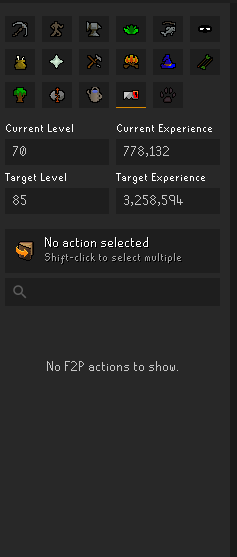
https://i.imgur.com/YuOud8m.png is there a way to disable the f2p world check on the skill calculator plugin other than hopping to a p2p world?
 sterile venture
Ever since the ToA plugin updated, I am noticing a strange flicker around the chest in the Burial Tomb. I have the chest recolors disabled, but it looks like the radius of white flames extends away from the chest every few frames.
This is a screenshot of one of the frames, you can see the fire is extended far to the right.
 sonic birch
!flow Check if it's the plugin by running in safe mode or with gpu only, then with the plugin only. If it is the plugin, create an issue on the github repo, and Llemon will take a look at it. She's active
haughty pumiceBOT
flowchart: Please refer to this flowchart for further troubleshooting.
 wooden flax
is it still possible to have 2 seperate shortcuts that lauch to their respective runelite profiles? I think things have changed slightly since I did this last time. I read the wiki but the Runelite(configure) is new to me and im not sure how to apply this properly to get the results i want.

 long thistle
im trying to follow the flowchart to create a bug report for key remapper, but how am I supposed to log in with runelite safe mode if I log in via jagex account?
wooden flax
i used to put "--profile=iron" in the properties of the shortcut but i cant get that to work anymore
long thistle
nvm, found it
sonic birch
long thistle
im trying to follow the flowchart to create a bug report for key remapper, but h...
Follow the arrow that says I have a jagex account?
long thistle
yeah my bad, i somehow was staring right at it and didnt see it
sonic birch
wooden flax
is it still possible to have 2 seperate shortcuts that lauch to their respective...
Don't use that, just link the accounts to the profile
!profile
haughty pumiceBOT
oblique plume
wooden flax
is it still possible to have 2 seperate shortcuts that lauch to their respective...
with jagex accounts that doesnt work, but you can link the profile to an account
oblique plume
then it works afaik
zealous cedar
it definitely still works without jagex accounts
wooden flax
the thing thats nice about the seperate desktop shortcuts is that it remembers my login email for each account depending on the shortcut i click, is this possible with the profile link somehow or do i need to enter my info each time i switch accounts?
zealous cedar
the profile link doesn't switch profiles until at the time you login, so it cant know how to change your login name
using --profile on the shortcut should definitely work i think
oblique plume
or its time to convert to jagex account
wooden flax
zealous cedar
using --profile on the shortcut should definitely work i think
silly question but do i put it at the end of the "target" or "start in"
 zealous cedar
target
wooden flax
 zealous cedar
you need a space before the --
wooden flax
zealous cedar
you need a space before the --
My king 👑 ty as always
 rapid sable
hello, im unable to start runelite. I get this message
 leaden trail
rapid sable
hello, im unable to start runelite. I get this message
leaden trail
rapid sable
hello, im unable to start runelite. I get this message
What do you see when you open this page in a browser?
rapid sable
idk, codes i guess 😅
leaden trail
Actually if it timed out it's probably just your connection
 modest echo
i have the same problems as the last person here. im just wondering if its any confirmed issue atm?
round jacinth
if it was a bigger issue this place would be a faster chat
your connection is either poor or a firewall is blocking it
modest echo
worked itself out 🙂
 thick edge
Can you not get
-ev and --developer-mode
by using runelite launcher configuration or do you have to use intelij
oblique plume
intellij
thick edge
oblique plume
intellij
Cap, just did it
 sonic birch
!flow try safemode first probs
haughty pumiceBOT
flowchart: Please refer to this flowchart for further troubleshooting.
 heady sandal
sonic birch
!flow try safemode first probs
heady sandal
sonic birch
!flow try safemode first probs
Im pretty sure I set the draw distance too high
in gpu setting
how do I change it back
sonic birch
I very much doubt that's the problem, but that'd work in safe mode
heady sandal
the game runs in safe mode
sonic birch
well, then follow green tree to see if it is actually gpu
 gleaming latch
what is runelite vip?
 proud burrow
I don't think that exists man
 gilded kayak
RuneLite VIP indeed does not exist, whoever is telling you about that is trying to scam you
gleaming latch
??
zealous cedar
RuneLite VIP does not exist, whoever is telling you about it is trying to scam you
gleaming latch
thanks
 ocean skiff
gilded kayak
RuneLite VIP indeed does not exist, whoever is telling you about that is trying ...
ocean skiff
gilded kayak
RuneLite VIP indeed does not exist, whoever is telling you about that is trying ...
put on a movie
 bold crater
i have a broken logout timer plugin if i got it activated it wont log me of until i get nerd logged
 woven mirage
bold crater
i have a broken logout timer plugin if i got it activated it wont log me of unti...
woven mirage
bold crater
i have a broken logout timer plugin if i got it activated it wont log me of unti...
Do you ever hover the client during this time?
Hovering the client will reset the idle timer, no need to actually interact with the client or have it focused in order to reset the timer
bold crater
no even having mouse just still after faling asleep it wont log me out
woven mirage
That's weird. Sorry I'm not equipped to help you then 🙂
 clever thunder
don't think this got a reply, bump
clever thunder
ty
 brisk abyss
Hey not sure if this is the right place to post, my buddy has this left click set to view instead of new but i cant seem to adjust it with bank tag layouts

or with menu entry swapper
sonic birch
You can create a tab called tagtabs iirc and it'll show all tag tabs
Alternatively, you'd have to use CMS
brisk abyss
Whats CMS?
brisk abyss
ohhh
 blissful kraken
Hey has anyone had an issues with runelite clients crashing with 2+ clients open?
logged into my main and my iron, 1 is a jagex account.
i'm not using the same runelite profile for both accounts, both different
and it's random crashing, i'll be doing something on the main, go to click on the ironman and the client freezes then crashes
tried turning off a bunch of plugins and still same issue
sonic birch
With crash you mean poof client gone?
sonic birch
!logs
haughty pumiceBOT
To find the logs, you can do one of the following:
- If your client failed to open, click the
Open logs folderbutton. - Open the screenshot directory by right-clicking 📷
Camerabutton, navigate 1 directory up, then open logs folder. - Navigate to
%userprofile%\.runelite\logson Windows or$HOME/.runelite/logson Linux and macOS.
Upload the log files named client and launcher by dragging them to Discord. If there are files prefixed with jvm_crash dated from today, upload them too.
blissful kraken
and i can see from my other account, the one which crashes gets logged out
upload them here? @sonic birch
sonic birch
Yes
blissful kraken
i have alot here
sonic birch
Dont upload those with a date
sonic birch
I'm mostly interested in the jvm crash logs tbh
blissful kraken
i only have a jvm crash log from 2 days ago
sonic birch
Upload that jvm crash log, client.log from a date where it crashed, can do client.log from today to be sure
sonic birch
I'll take a look in 15-30 mins probs
blissful kraken
thanks man preciate you
sonic birch
Oh, that is quite hard for me to look read on mobile, so apologies if I made a mistake, but it's probably:
blissful kraken
alright thanks i'll try it out either tonight or tomorrow and let you know if any better
 hallow yew
Is there a plugin or anyway to resize individual UI elements?
sonic birch
Depends on what it is, but likely no
 true arrow
Hey guys, yesterday evening I noticed a sudden increase of extended freezing on RuneLite, anywhere from a few seconds to a full disconnect. Could these be caused by plugin hub plugins?
 wraith saddle
anyone how to fix this?
 haughty pumiceBOT
To remove the Java memory limit on your PC follow https://github.com/runelite/runelite/wiki/Remove-java-memory-limit
 timid mason
i think my runelite is not working???
 viscid lantern
the game is down for the weekly game update
timid mason
it is down? for good?
viscid lantern
no?
timid mason
no more runescape???
 short pumice
It will be down until it's updated, happens every time there's a game update
 unkempt pawn
probably about 10 more mins + runelite update if its needed, not likely though
 wise dune
get new pc
 pure egret
Update when
 echo eagle
unkempt pawn
probably about 10 more mins + runelite update if its needed, not likely though
echo eagle
unkempt pawn
probably about 10 more mins + runelite update if its needed, not likely though
riiip
 amber flame
echo eagle
riiip
amber flame
echo eagle
riiip
lmao that comment aged YEARS in mere minutes
leaden trail
I mean I don't know why people would trust a total random's assessment of if the client would need to be updated after an engine update 😶
 calm juniper
why doesn't the client work without being 100% up-to-date with osrs? I can't imagine the entire thing being impossible to work (although not as stable ofc and possibly crashing from some plugins, but not all)
 zinc echo
cheers guys the bairns crying now
 placid nacelle
My runelite is outdated it says
placid nacelle
kk ty
 stark dust
zinc echo
cheers guys the bairns crying now
stark dust
zinc echo
cheers guys the bairns crying now
respect for use of Bairn
 hot terrace
eta is unk but like 5 mins - couple hrs
 wet gull
plugins not loading

 noble shell
Literally shaking
 lost dust
wet gull
plugins not loading
lost dust
wet gull
plugins not loading
Welcome
 modest kindle
anyone having issues with runelite?? its literally broken for me
 ruby moss

noble shell
Guys my dad just got off the phone to mod mark he said he’s working on it to get runelite back on
 tribal girder
@modest kindle mines working perfectly
stark dust
lol Adam set himself to DND
 slim ruin
The reading comprehension of this community is impressive.
 lapis beacon
noble shell
Guys my dad just got off the phone to mod mark he said he’s working on it to get...
lapis beacon
noble shell
Guys my dad just got off the phone to mod mark he said he’s working on it to get...
thank fuck
 swift violet
are we just waiting for update then
hot terrace
eta is anywhere from 5 min - couple hrs. they are working on it tho
stark dust
yeah let them cook nerds
leaden trail
stark dust
lol Adam set himself to DND
He's always on dnd
 smoky brook
Anyone knows how long runelite needs to work again?
hot terrace
prolly on the shorter end tbh
noble shell
noble shell
Guys my dad just got off the phone to mod mark he said he’s working on it to get...
Please read this if wanting to know update status
stark dust
go do some agility whiley you wait 😉
 rapid aurora
gross
leaden trail
hot terrace
prolly on the shorter end tbh
I mean you don't know this lmao
hot terrace
check development for progress
tribal girder
smoky brook
Anyone knows how long runelite needs to work again?
5 minutes to 5 hours - if you tag Adam, he'll run it faster
leaden trail
hot terrace
check development for progress
That's all automated stuff that runs after game updates
smoky brook
tribal girder
5 minutes to 5 hours - if you tag Adam, he'll run it faster
5 hours sounds great
hot terrace
thats ok im sure they are working oni it
 vast bone
leaden trail
That's all automated stuff that runs after game updates
vast bone
leaden trail
That's all automated stuff that runs after game updates
Is it really? I don't remember the answer from last time I asked
Like is Adam awake or not
 umbral hedge
Tag him and ask
vast bone
Or could he be asleep.
stark dust
gonna have to use official client for a bit 😭
zealous cedar
i am awake
 solar leaf
bruh they are literally adding commits to the github, y'all chill
 ornate kite
Leave the man alone and wait
tribal girder
Time to touch grass
vast bone
😮
modest kindle
POGG he is awake!!!!
 amber heart
viscid lantern
amber heart
viscid lantern
sup
 brazen grail
lost dust
brazen grail
lost dust
LL
hot terrace
lol
 obsidian lion
one of my friends said he banned and dont know why7
ornate kite
obsidian lion
one of my friends said he banned and dont know why7
KEKWWWWWWWWWWWW
obsidian lion
and is aksing for help regarding it
 winged imp
hahahahaha
viscid lantern
we cant help with that
 cedar galleon
l0l
 livid tinsel
anyone know aprox when its done?
 raven quail
my butthole itchy
ornate kite
he knows why
viscid lantern
we aren't jagex
ornate kite
wen update
 little herald
bro how am I supposed to train construction without my 29 different plugins
winged imp
obsidian lion
no lool he banned from the server kekw
regard
ornate kite
this isn't a runescape server
vast bone
zealous cedar
i am awake
Thank you Adam for left-click walk here
ruby moss
raven quail
my butthole itchy
apply chilli powder. then at least it won't be just itchy
lost dust
obsidian lion
no from runescape
has he tried turning it off and on again
obsidian lion
lost dust
has he tried turning it off and on again
relax with the stupiud comments if aint going ot help stfu
ornate kite
obsidian lion
relax with the stupiud comments if aint going ot help stfu
just join the osrs discord
noble shell
Any advice on coping strategies for when runelite is down? Really struggling atm
ornate kite
.gg/osrs
 gritty fossil
noble shell
Any advice on coping strategies for when runelite is down? Really struggling atm
gritty fossil
noble shell
Any advice on coping strategies for when runelite is down? Really struggling atm
BACK IN MY DAY
ornate kite
noble shell
Any advice on coping strategies for when runelite is down? Really struggling atm
it's summer, touch grass
that's a good cope
 nocturne garnet
noble shell
Any advice on coping strategies for when runelite is down? Really struggling atm
nocturne garnet
noble shell
Any advice on coping strategies for when runelite is down? Really struggling atm
use official client
 wooden grove
ornate kite
it's summer, touch grass
wooden grove
ornate kite
it's summer, touch grass
too hot
noble shell
Literally shaking right now
obsidian lion
Brother the invite link for this runlite discord is not working
 cinder gate
nocturne garnet
use official client
cinder gate
nocturne garnet
use official client
rather die
 azure trellis
ornate kite
it's summer, touch grass
azure trellis
ornate kite
it's summer, touch grass
but why? when I can click the same pixels over and over
obsidian lion
he been banned from the ruinlite server and need help as to why
 light garnet
click grass
ornate kite
azure trellis
but why? when I can click the same pixels over and over
it's worth it, trust
 soft mango
noble shell
Any advice on coping strategies for when runelite is down? Really struggling atm
soft mango
noble shell
Any advice on coping strategies for when runelite is down? Really struggling atm
bust a nut
ornate kite
believe in something!
 ocean fiber
the plugin which tells me when to breathe isn't functional :(
ornate kite
how will I possibly decant my positions without all the plugins
 jaunty prawn
no sleeping
noble shell
soft mango
bust a nut
Come over 😏😏
little herald
ornate kite
how will I possibly decant my positions without all the plugins
time to pull some b0aty level clicks
 grizzled raven
Hi when will plugins be updated?
lost dust
grizzled raven
Hi when will plugins be updated?
2 weeks
 grand quartz
ETA ?
 smoky anchor
adam is on it
grand quartz
trying to game
light garnet
grizzled raven
Hi when will plugins be updated?
5 business days
grand quartz
u feel me
ornate kite
grizzled raven
Hi when will plugins be updated?
by quarter 4 it should all be resolved
livid tinsel
uppdate done when?
ornate kite
please come check up on us in October
 viscid pike
Never getting updated btw
cinder gate
livid tinsel
uppdate done when?
adams on vacation, he said next week
ornate kite
wen plugins
livid tinsel
cinder gate
adams on vacation, he said next week
serusly?
little herald
Adam said that it would get updated as soon as you support him on Patreon
smoky anchor
rip quest helper plugin
ornate kite
R U GUYS SERIOUSLY TELLING ME I HAVE TO USE THE OFFICIAL GAME CLIENT NOW ? ? ? ?? ? ? ? ? ?
noble shell
Does anyone live near jagex hq who can go over and ask them how long it’ll be??
wooden grove
wow adam on holiday ripperino
gritty fossil
ornate kite
R U GUYS SERIOUSLY TELLING ME I HAVE TO USE THE OFFICIAL GAME CLIENT NOW ? ? ? ?...
forever now
wooden grove
its true
cinder gate
livid tinsel
serusly?
idk maybe read
amber flame
buncha armchair devs thinking they know how long it will or won't take - Runelite will be updated when they update it
 small night
ornate kite
R U GUYS SERIOUSLY TELLING ME I HAVE TO USE THE OFFICIAL GAME CLIENT NOW ? ? ? ?...
small night
ornate kite
R U GUYS SERIOUSLY TELLING ME I HAVE TO USE THE OFFICIAL GAME CLIENT NOW ? ? ? ?...
no, you can just not play
hot terrace
5 mins - coupl hrs
livid tinsel
cinder gate
idk maybe read
hard to read when all is spamming bro. no need to be like that
zinc echo
small night
no, you can just not play
wot
cinder gate
livid tinsel
hard to read when all is spamming bro. no need to be like that
the answers been posted a dozen times in the last 3 minutes
small night
zinc echo
wot
go outside, walk 10 meters. Should be nightfall by the time you finish
zinc echo
small night
go outside, walk 10 meters. Should be nightfall by the time you finish
dont swear at me
little herald
small night
go outside, walk 10 meters. Should be nightfall by the time you finish
how far is that in freedom units
one lap around ur mom?
livid tinsel
cinder gate
the answers been posted a dozen times in the last 3 minutes
if you got the answer just let me know, then being toxic
small night
little herald
how far is that in freedom units
5 cheeseburgers
isn't it 5 am in freedomland? On a work day? what are you doing on runescape ?
leaden trail
vast bone
Is it really? I don't remember the answer from last time I asked
I thought the cache update stuff was at least
cinder gate
livid tinsel
if you got the answer just let me know, then being toxic
i expect to be paid for my valuable information, I will accept 1 bond as payment for the answer
little herald
small night
isn't it 5 am in freedomland? On a work day? what are you doing on runescape ?
i work 3rd shift bro, I occupy myself by sitting in #support of runelite discord
small night
ah, a zombie. I feel for you
little herald
🧟♂️
ornate kite
I believe everyone should call Adam on the phone now and ask him wen update
little herald
That should progress things faster, good idea
viscid lantern
its up
 indigo spoke
woo hoo
solar leaf
Adam the god
 heady owl
anyones runelite not working? it says it needs to update
indigo spoke
saved me from having to do work at work
heady owl
how do we check update?
little herald
yo guys
hot terrace
reset
little herald
you can check #development and watch the god at work
 wild marsh
heady owl
how do we check update?
wild marsh
heady owl
how do we check update?
just launch thru jagex launcher again
heady owl
ahh thank you
ruby moss
🚽
solar leaf
little herald
you can check <#419891709883973642> and watch the god at work
god's work

 rich folio
we gaming
wooden grove
adam doing the lords work
little herald
solar leaf
god's work
phub 😉
wooden grove
don't forget the tips
vast bone
little herald
phub 😉
Adam knew what he was doing!
little herald
WE'RE BACK BOHYS
 cinder echo
omg that was quick, thanks a ton
zinc echo
runelite up boys
little herald
PILE IN
zinc echo
see you degenerates next week
cinder echo
😂
 dense zenith
now I can finally do my clues, thanks Adam
 languid bramble
runelite most goated
slim ruin
Quest helper broken, quest completion going down across runescape.
vast bone
NPCs in despair.
 steady depot
Time for unguided to shine 😅
vast bone
Wiki stocks going up.
 rustic torrent
DUDE WHERE'S MY STUFF?!
 leaden stag
chyna
 broken otter
 prime rock
Literally half way through mm2 163/164 im crying rn
prime rock
Literally half way through mm2 163/164 im crying rn
They put some text that helps you in the game (I think it was added in an update?) but to access it you have to remove the paperweight from your space bar
not sure if it's worth it
vast bone
Is there a plugin that will unpress space so I can read the text?
timid mason
RL has the best developers
ornate kite
soo back
 quartz lance
has mouse tooltips been updated, they appear to be more laggy on uncapped fps than before
 viscid kelp
how do, i keep the old runelite
leaden trail
vast bone
Is there a plugin that will unpress space so I can read the text?
I unironically love quests
viscid kelp
answer me
 stray grove
you can have the old runelite when I have the old rs knowledgebase
leaden trail
He's gonna ping Lenny so much now
viscid lantern
alternatively you could just not launch the client at all to prevent it from updating
vast bone
viscid kelp
how do, i keep the old runelite
go to the north pole where adam's updates can't reach you
viscid kelp
stray grove
you can have the old runelite when I have the old rs knowledgebase
i tried to upload it here but i got yelled at by runelite adam

 rich sequoia
zinc echo
see you degenerates next week
rich sequoia
zinc echo
see you degenerates next week
c ya daddy
 celest mango
QH doesnt work
 tidal creek
Not sure if this is the right place, but the "Camera Points" plugin often deletes the other camera points I have saved and only keeps the first one, any known fixes for this? I checked FAQ already.
Also searched past mentions of it here and didn't find any solution or anyone else facing the same problem
zealous cedar
camera points plugin is a third party plugin so we don't know probably
 west smelt
Quest helper not working unfortunately
tidal creek
rip
zealous cedar
we are aware quest helper is down atm
 merry vessel
Did Jagex change their rules on RuneLite? Because apparently I was banned for using "illegal 3rd party software which violates the rules of the game and breaches your terms of service with Jagex". I appealed the ban and they came back and denied it which is complete bs.
west smelt
Any idea when it will be back up again?
merry vessel
merry vessel
Did Jagex change their rules on RuneLite? Because apparently I was banned for us...
I've never used anything but RuneLite and I've never botted or used any macros
 sterile grove
Could there be an issue with red X at cerberus?
All of a sudden he is stepping out
yesterday and the days before it went without problems
zealous cedar
there was an engine change, its possible that they changed something related to the npc red x behavour
idk
it isn't client related?
zealous cedar
if it isn't client related then it is not really anything we can do about it
 analog sandal
is there an issue with having multiple clients open at the moment? my main account keeps crashing but my iron has no issues?
viscid kelp
there should be a runelite plugin that freezes the monsters in place
vast bone
When I pull out the Internet cable they freeze in place for many seconds
Hardware solutions are underrated.
stray grove
lag switch activate
leaden trail
viscid kelp
there should be a runelite plugin that freezes the monsters in place
So ice barrage but a plugin so it's not in a skill guide and therefore something you can use?
ornate kite
Any1 know when quest helper will be working again?
viscid lantern
in a minute or so
 vale dome
Restart client 🙂
ornate kite
just did after seeing post in dev
viscid lantern
vale dome
Restart client 🙂
its not done building/uploading 
vale dome
I see
ornate kite
ahh gotcha
zealous cedar
 signal fox
clan symbol not showing next to name above head is this a bug
signal fox
clan symbol not showing next to name above head is this a bug
works for me
 ornate kite
tyty


 tawdry badge
I cant believe I used to read from the wiki to complete quests


 sand oyster
quartz lance
has mouse tooltips been updated, they appear to be more laggy on uncapped fps th...
sand oyster
quartz lance
has mouse tooltips been updated, they appear to be more laggy on uncapped fps th...
I thought it was just me. I have fps uncapped and locked to 180 and the game feels like I'm playing at 50 fps when pvm'ing. Can easily see it when flicking the mouse around and when the mouse tooltip is up
quartz lance
Thank god, was starting to think I was losing my mind
signal fox
nevermind i rebooted runelite and its back 🙂
sand oyster
Yeah it's really distracting and the entire game feels off
zealous cedar
there is an issue affecting mouse tooltips atm
sand oyster
I see, thanks for confirming, I'm happy I'm not crazy haha
 flint nexus
is there something specific that causes runelite profile to not save changes? and remove it as the default profile for a certain account?
zealous cedar
im not aware of anything causing profiles to not save
oblique plume
only one i know of is when you lose connection to the config api and cant push changes
so on next restart it "resets"
flint nexus
how often does it try to connect to the config api? everytime you log in/out? im guessing based on the inaccurate overlays that it reset to sundays save
oblique plume
whenever you change a value
flint nexus
i see, i had this happen before too and then a few days later it changed again back to what the newer save should've been
oblique plume
I don't think it can do that
 leaden trail
 coral lintel
ornate kite
how do i fix this? I'm trying to build a dungeon
coral lintel
ornate kite
how do i fix this? I'm trying to build a dungeon
Very strange, you don't need a room below the dungeon
ornate kite
round jacinth
help them in <#448811926315728896>
stfu
ornate kite
coral lintel
Very strange, you don't need a room below the dungeon
yeah just found out its a bug
with new update
round jacinth
this is a support chat for the client
coral lintel
ornate kite
yeah just found out its a bug
Ok 🙂
ornate kite
round jacinth
this is a support chat for the client
🤓
 fluid crypt
hey all of my plugins and marked tiles have disappeared?
they show up on my account on the runelite website but not in the actual client
oblique plume
are you using a different profile
 lone inlet
hey, for some reason my profiles dissapeared on runelite, anyone have this issue/fix for it?
 lusty hedge
lone inlet
hey, for some reason my profiles dissapeared on runelite, anyone have this issue...
lusty hedge
lone inlet
hey, for some reason my profiles dissapeared on runelite, anyone have this issue...
me too
lone inlet
lusty hedge
me too
okay i found a fix, go to where you can usually see the profiles on runelite. Import profile-> profiles2-> select the profiles you had. Idk if it had like older saves or w/e bcs some of them were kind of duplicate for me. or had like same name but random numbers after them.. but bit trial and error and i found the profiles i had set. Just gotta rename them again after and set as profile for the accs you were using, if you was using that before.
haughty pumiceBOT
oblique plume
thats all documented on there actually
obsidian lion
any mods in here that i can get help from
friend canyt join server is wondering if he is banned
zealous cedar
what is his discord name?
 whole goblet
Does anyone know how to link discord with your runelite?
haughty pumiceBOT
If your Discord activity status is not showing properly follow these steps:
- Make sure your Discord plugin is enabled.
- Make sure RuneLite is not manually added as game to Discord game list.
- Enable
Share your detected activities with othersin Discord settings. - Make sure both RuneLite and Discord are NOT running as admin.
 rancid herald
Is anyone else having issues with the !kc command not working for your character? It's working fine for a couple of my clanmates, but appears to be broken on all bosses we've tried for myself and one other person. Any way we can remedy this?
zealous cedar
kc works for me
oblique plume
boss log from RoW or adventure log in house
rancid herald
I'll go check that in a sec, was just launching safe mode because I realized I forgot to try that.
Now that you mention it I did have to go through my entire clog for that one plugin. Heading to my house now.
rancid herald
oblique plume
boss log from RoW or adventure log in house
Yeah. That did it. Weird. Never had to do that before. Thanks.
 toxic cape
Hello All, between yesterday evening and now today I am experiencing repeating/irregular "connection lost" errors after ~3-5 minutes of being logged in. I've been using RL for years, just now began having this issue.
Any thoughts?
gilded kayak
internet
but I know you're going to say "my internet is fine" like everyone who comes in the discord so I don't have another answer
toxic cape
gilded kayak
but I know you're going to say "my internet is fine" like everyone who comes in ...
I appreciate the suggestion, but I was playing CS2 as well as in discord as it was happening and had no issues with those and multiple packet loss tests are coming back without issue
leaden trail
(the answer is that your connection to Jagex's servers is not the same as your connect to <random other online thing here>)
gilded kayak
yeah saw that coming
i'm not sure what to tell you when the error is connection lost
I feel like that's pretty clear
leaden trail
CS2 servers and Discord servers aren't hosted on the same machines as OSRS worlds
leaden trail
gilded kayak
yeah saw that coming
We've really gotta write up a copy/paste-able response for this situation at some point
 mellow burrow
been having an issue with right clicking since yesterday. I can't seem to right click my inventory or bank to select a quantity to withdraw, etc. any suggestions?
gilded kayak
!safe
haughty pumiceBOT
safemode: Windows
Run the RuneLite (safe mode) shortcut, or with a Jagex account, first run the RuneLite (configure) shortcut and tick the Safe mode box, then launch RuneLite via the Jagex launcher.
Mac
In Terminal, run:
/Applications/RuneLite.app/Contents/MacOS/RuneLite --configureTick the Safe mode box. Launch RuneLite.
If it's not working, download and install the updated RuneLite launcher from the website link in #welcome. You don't need to uninstall your current version. You will not lose any settings or plugins. Then try running safemode again.
gilded kayak
oh unless
there is a known bug with mouse tooltips I think
what Runelite version are you on in the  tab
tab
 queen aurora
gilded kayak
yeah saw that coming
queen aurora
gilded kayak
yeah saw that coming
Yeah but how do you fix it then?
I ran the safe mode and it works but i still get the same issue as @toxic cape
and it was running fine the other day cept yesterday when it started lagging and dcing
gilded kayak
probably ask him what ISP he has and maybe what general area he lives in and if it matches up with yours you say "damn my isp is griefing me"
queen aurora
hows that helpful?
oblique plume
would you rather not recieve a response at all?
queen aurora
if its going to be useless then yes
gilded kayak
as I mentioned before connection lost is a very clear error
if you'd rather just pretend like it's not an internet issue until they fix it that's fine I guess
leaden trail
The problem is somewhere between your computer and Jagex's servers
gilded kayak
normally people come in here and understand it's an ISP issue when they confirm others who live in their area have the same problem
oblique plume
queen aurora
if its going to be useless then yes
thats sort of loaded since the initial question is useless
gilded kayak
but I guess that's not your vibe
leaden trail
your connection to anything other than Jagex's servers is not really relevant
queen aurora
gilded kayak
normally people come in here and understand it's an ISP issue when they confirm ...
bro ngl but i didnt study the same thing you did my guy
i just want to chill and play the game xD
zealous cedar
connection issues are outside of the scope of what we can provide support for
queen aurora
leaden trail
The problem is somewhere between your computer and Jagex's servers
so would connecting the internet directly into the computer work?
leaden trail
open cmd and run ping -t oldschoolXXX.runescape.com, replacing the XXX with your world number of choice-300
e.g. world 421 (421-300) = ping -t oldschool121.runescape.com
if you see pings timing out, the problem is your internet connection.
leaden trail
queen aurora
so would connecting the internet directly into the computer work?
if you can connect to other stuff fine, no
leaden trail
leaden trail
open `cmd` and run `ping -t oldschoolXXX.runescape.com`, replacing the XXX with ...
tldr you'll see stuff timing out if you do this
queen aurora
thanks @leaden trail
leaden trail
I didn't help you lmao. I explained why there's nothing anyone here can do
queen aurora
yes but you gave me more explanations
 vernal wing
Does anyone know how long the upcoming update is expected to take?
oblique plume
at least 1 second
vernal wing
Figured
gilded kayak
however long it takes to restart the servers I guess 🤷
viscid lantern
https://x.com/OldSchoolRS/status/1806035832500896119 this is all we know
🔔 A 30-min timer will soon reboot all game worlds to resolve issues with the PoH, Temple Trekking, and CoX.
🌎 We are aware of further issues requiring a fix, including unintended changes to Red X methods. We'll prioritize these fixes ASAP when the team is back in tomorrow.
 Twitter
·
Twitter
·
 hard kiln
Hi guys, i've accidentally added my alt account to a secondary jagex launcher acc.. im zepressed..
any way to run two instance of launcher? i swear im considering quitting
leaden trail
it's not reversable and we aren't Jagex
hard kiln
i understand t2
leaden trail
just log out between client launches
round jacinth
oof
oblique plume
i feel like ive heard people say that invalidates the already running client
so you cant do that
but idk
round jacinth
maybe bolt and regular can allow it
round jacinth
i do not think that is true, only new accs use a jagex acc
zealous cedar
I think they can move characters between accounts if you contact them
hard kiln
how are they so ###################
round jacinth
hmm
hard kiln
zealous cedar
I think they can move characters between accounts if you contact them
yeah gl with that
viscid lantern
round jacinth
maybe bolt and regular can allow it
bolt allows multiple accounts yeah
surely the official one does at well at this point
round jacinth
i meant like i can use edge for 1 twitch acc and chrome for another
leaden trail
leaden trail
it's not reversable and we aren't Jagex
in my defense I sent this before I saw the second message lmao
round jacinth
so if you got 2 distinct jagex accs maybe regular launcher for jagex acc 1 and bolt for jag acc 2
but i was just guessing
 tired hull
how do i figure out how long runescape will be offline today for system update?
round jacinth
it is not helpful for this
hard kiln
what is a bolt lol
round jacinth
tired hull
how do i figure out how long runescape will be offline today for system update?
nobody knows
leaden trail
tired hull
how do i figure out how long runescape will be offline today for system update?
when it's back up it's back up
 grizzled parrot
 haughty pumiceBOT
To remove the Java memory limit on your PC follow https://github.com/runelite/runelite/wiki/Remove-java-memory-limit
oblique plume
you wait for it to happen then start a stopwatch
hard kiln
round jacinth
so if you got 2 distinct jagex accs maybe regular launcher for jagex acc 1 and b...
can you elaborate on what bolt is pls?
zealous cedar
its another launcher, but it only works on linux so it probably isn't relevant
grizzled parrot
i dont have a java options on it tho
zealous cedar
i dont know
round jacinth
zealous cedar
its another launcher, but it only works on linux so it probably isn't relevant
oh i thought it was a generic launcher, my bad im sorry for bringing it up
zealous cedar
this is not something we should be recommending to people
gilded kayak
I lied mac isn't an option
viscid kelp
when is runelite back up?
hard kiln
gilded kayak
why would u want to
exacttly always run default
viscid kelp
@lapis elm will runelite work during game is down?
 lapis elm
yes
round jacinth
viscid kelp
<@121791968899629056> will runelite work during game is down?

looks like yes!
viscid kelp
@zealous cedar suggestion: implement a mini game inside runelite so we can play it while the real rune scape doesnt work
zealous cedar
great idea
viscid kelp
sorry is there a better place for suggestions
@zealous cedar clarification on suggestion: implement DOOM (1993) in rune lite
or should i make it a plugin
lapis elm
i don't think you have the skills for that
zealous cedar
Cook doesnt know how to code
leaden trail
Rune(scape is currently down)versi when?
 inland crest
I'm having an issue with AMD drivers. When I update to the latest drivers (24.5.1), when fully zoomed out, I only get around 30 fps. But when I downgrade back to 22.5.1 (2 year old driver) I'm getting 100+ fps at all times. I'd prefer to be on the latest drivers. Any idea what may cause this? 13700k w/ 6900xt
 cyan stratus
Just got Runelite, where is 117 hd and quest helper?
round jacinth
on the hub
 pure dagger
been having an ongoing issue connection to runelite the last week. cannot seem at add runelite to my split tunnel =/ and when i have vpn off i can login and play but the ingame world hopper will not load... the world hopper plugin works but its just getting frustrating using that rather than the ingame one.. any idea how i can fix this?
after last weeks update this just randomly happened 😅
gilded kayak
RuneLite does not work when you* split tunnel
pure dagger
savage
gilded kayak
it's a bug with our JVM
so once you take that out of the picture you're not having any issues with RuneLite just issues with Jagex
since the in-game world hopper doesn't work
and ours works fine
words are hard
wait no
i was right xd
gilded kayak
I do not, nobody with that issue ever comes back
gilded kayak
leaden trail
don't split tunnel
seperate issue
pure dagger
fuuuuuuuck
leaden trail
oh mb
gilded kayak
everyone who has that issue either switches to using our world hopper or _____
I don't know what happens after that
pure dagger
so im fucked basically
gilded kayak
no I would say you're slightly inconvenienced
pure dagger
aight ill stop wasting my time trying so fix it
pure dagger
gilded kayak
no I would say you're slightly inconvenienced
and i lol'ed hard at that
gilded kayak
someone who knows what they're doing might have this issue one day and figure out what's actually at fault
a firewall or something
but who knows if that info will make it to us
it happens, but not to large amounts of people 🤷
 tall olive
Does anyone know why the wintertodt overlay goes away when you tp back to camp? It never used to be that way for me
zealous cedar
no. maybe they changed it with the update today
 small hatch
i'm trying to make my own personal simple loader for several jagex accounts. is there a way to pass the creds from --insecure-write-creds to the vanilla runelite.jar using like, a bat file?
just trying to figure out how to not have to log in and out of each of my jagex accounts each time i wanna load up 3 diff accounts
sonic birch
No, we don't support this
 graceful heart
hi everyone.
I recently "upgraded" my gpu to an AMD RX 7800 XT.
The GPU runs perfectly fine with other games. I have ran ddu and fresh installed my drivers. I have tried restarting the client/my pc/etc
When I enable the GPU plugin, even with bare settings and everything disabled, my gpu usage goes from 15% to 90% at normal zoom, and maxes out at 100% even in my empty POH. Enabling vsync seems to lower the usage 5-10%, but it still hits 100% in busy areas like the GE. It causes noticeable stutter, especially when loading in chunks.
sonic birch
!flow check what happens in green tree
haughty pumiceBOT
flowchart: Please refer to this flowchart for further troubleshooting.
sonic birch
If it happens in green tree, make sure vanguard (lol & valorant anticheat is not running), and check if it also happens with the sidebar closed
If none of this helps, roll back drivers to a version that works
small hatch
sonic birch
No, we don't support this
figured it out, thanks though
 inland nebula
Who can i message about runelite in regards to copyright and IP questions?
sonic birch
Are you afraid your IP is being stolen?
Or is it a question regarding e.g. what can I use in a hub plugin?
inland nebula
Intellectual Property.
sonic birch
Yeah I know, I meant intellectual property theft/infringement/violation
Or e.g. can I use this audio clip in my hub plugin, what license does my hub plugin need etc
inland nebula
I see, I am interested in clarification for use of runelite client and its plugins in a visual artwork. The visual assets are utilized to manipulate and create a unique outcome that contains heavily abstracted source materials from runelite and its plugins.
sonic birch
In that case maybe send a dm to @haughty pumice
inland nebula
Thanks Yves, I appreciate it
 waxen steeple
Whenever I have the XP tracker open with TTL on every time it updates the game basically eats inputs, resulting in dead clicks or when turning the camera it will stutter but the rest of the game doesn't. Is this a known bug or is it just the nature of updating several skills ttl at once. I've noticed it only happens at 5 skills or more, 4 or less it's fine.
sonic birch
waxen steeple
Whenever I have the XP tracker open with TTL on every time it updates the game b...
!flow
haughty pumiceBOT
flowchart: Please refer to this flowchart for further troubleshooting.
waxen steeple
sonic birch
!flow
Slightly harder to tell from the reduced framerate of the game+video but you can notice it most at the start. But every xp tracker update causes the camera to stutter which by itself isn't that significant but it also blocks clicks when it happens.
 ornate yoke
Hi guys. I'm trying to find a way to fix osrsparatodos plugin to correctly display cyrillic characters. Currently it has russian language present but it is not displayed correctly. Does anyone has an idea how to fix it?
haughty pumiceBOT
Get support for the OSRSParaTodos Plugin Hub plugin here: https://runelite.net/plugin-hub/show/osrs-para-todos.
You can also find the support link by searching for the plugin in the Plugin Hub panel and clicking the ? button on the plugin, or by right-clicking the plugin in the plugin panel and clicking the Support menu option.
 final axle
looks like it's known to not work
sonic birch
waxen steeple
Slightly harder to tell from the reduced framerate of the game+video but you can...
If you notice it with the xp tracker open but not the sidepanel open, it is /gh 14978 aka:
haughty pumiceBOT

FrancisIris
Type
Crash or hang
Operating System
Windows
...
sonic birch
That issue has some fixes in the comment. You should first try turning off hw accel probs
haughty pumiceBOT
Graphical artifacts? Try disabling hardware acceleration: https://github.com/runelite/runelite/wiki/Disable-Hardware-Acceleration
waxen steeple
sonic birch
That issue has some fixes in the comment. You should first try turning off hw ac...
Not getting it looking up somebody on the highscores but it does also do it with the loot tracker updating. Does disabling hw acceleration have any downsides?
sonic birch
Disabling it will be fine. It probably fixes your issue
sonic birch
waxen steeple
Not getting it looking up somebody on the highscores but it does also do it with...
For sure 14978 then
waxen steeple
sonic birch
Disabling it will be fine. It probably fixes your issue
Yes it does seem to fix it. Thank you.
ornate kite
Guys i have problem with sound, i can hear me attacking mobs but cant hear them.. such as nex or inside of tob… cant hear them attacks.. someone know wtf is happening?
leaden trail
Do you have a plugin that mutes sounds, or one of your volume sliders muted?
That sounds like annoyance mute or something though
 pastel mortar
client has been crashing recently, here's the crash file
i appreciate the help 🙏
haughty pumiceBOT

Ketner777
A fatal error has been detected by the Java Runtime Environment:
#
#  EXCEPTION_ACCESS_VIOLATION (0xc0000005) at pc=0x03d9c70d, pid=15208, tid=9740
#
# JRE version: OpenJDK Runtime Environment (11.0.4+11) (build 11.0.4+11)
# Java VM: OpenJDK Server VM (11.0.4+11, mixed mode, emulated-client, g1 gc, windows-x86)
...It's probably that, you can look through the comments for details but TLDR go into BIOS and disable "core performance boost"
 brisk lichen
I have the single mouse button mode activated, but left-clicking on items in the inventory or bank interface doesn't bring up the context menu and just acts like a normal click. Clicking on items in the world brings up the context menu correctly. This only occurs in RuneLite, not the official client. Anyone have advice? Thanks!
leaden trail
Does it occur in safe mode?
haughty pumiceBOT
Windows
Run the RuneLite (safe mode) shortcut, or with a Jagex account, first run the RuneLite (configure) shortcut and tick the Safe mode box, then launch RuneLite via the Jagex launcher.
Mac
In Terminal, run:
/Applications/RuneLite.app/Contents/MacOS/RuneLite --configureTick the Safe mode box. Launch RuneLite.
If it's not working, download and install the updated RuneLite launcher from the website link in #welcome. You don't need to uninstall your current version. You will not lose any settings or plugins. Then try running safemode again.
 modern ember
I'm having an issue where, when I'm at a bank, and want to withdraw-x, and the typing window pops up, when I begin typing the quantity, it changes to search my bank. So I'm searching my bank for the quantity instead. Anyone know which pluggin this may be caused from?
 hollow olive
i dont remember which plugin binds the search key for the bank but it might be that
bank maybe idk
modern ember
Thanks josh, I had 1 as a keybind to search the bank. No wonder I couldn't enter 13.
 devout grove
Heya, Inventory Grid seems to be broken. Not entirely sure where to drop this, but just letting yall know 👌
leaden trail
Broken how?
devout grove
As far as I can tell, the grid is just not showing
Unless I'm doing something wrong, obviously, but this should work, right?
 oblique plume
drag the item
devout grove
Well, guess I was doing something wrong indeed lol
Is there a way to show a grid when not dragging?
devout grove
Aight, ty for clearing that up though
leaden trail
Is there a resource pack with one maybe?
 glacial abyss
I've been looking online to find it, but I can't get an answer I understand. Can you change the little buttons for
? I started RuneScape today and am really thankful for the Stretched Mode, which my friend showed me so that I could finally play with them, but I can't see the UI (legally blind).
viscid lantern
you mean the little buttons on the sidebar?
ideally post a screenshot of what you want to have bigger @glacial abyss
glacial abyss
Aye.
viscid lantern
!configuration you can increase the client scale itself and set it to 2.0 to make everything twice as big
haughty pumiceBOT
viscid lantern
in the Scale box
glacial abyss
viscid lantern
!configuration you can increase the client scale itself and set it to 2.0 to ma...

The little things on the right side.
viscid lantern
yup you can make that bigger by changing the Scale option in the configuration panel, link above to how to get there
 viscid lantern
double click the title bar to make it fit your screen maybe
its too big atm so you have to drag it back to a size that fits
glacial abyss
Maybe 3.0 was too big?
viscid lantern
oh that sounds way too big yes
try 2.0 first, see how that is and then maybe 2.5 if you need it even bigger
glacial abyss
I shall try 2.5.
I tried 2.0, but still too smalol.
It did let me get rid of the stretched mode tho, so small vicotires.
glacial abyss
viscid lantern
oh that sounds way too big yes
Thanks. I don't know why 3 is so much bigger than 2.5, but I think 2.5 is the sweet spot
glacial abyss
Godsend.
Actually, 2.5 messes up if I open up plugins, but now I understand how to change it. You've taught me to fish.
 timid rock
glacial abyss
Actually, 2.5 messes up if I open up plugins, but now I understand how to change...
timid rock
glacial abyss
Actually, 2.5 messes up if I open up plugins, but now I understand how to change...
there might be a setting in runelite plugin to make it stay within ur screenlimits
ornate kite
leaden trail
Do you have a plugin that mutes sounds, or one of your volume sliders muted?
Only got music off
leaden trail
ornate kite
Only got music off
Does it happen in safe mode?
haughty pumiceBOT
Windows
Run the RuneLite (safe mode) shortcut, or with a Jagex account, first run the RuneLite (configure) shortcut and tick the Safe mode box, then launch RuneLite via the Jagex launcher.
Mac
In Terminal, run:
/Applications/RuneLite.app/Contents/MacOS/RuneLite --configureTick the Safe mode box. Launch RuneLite.
If it's not working, download and install the updated RuneLite launcher from the website link in #welcome. You don't need to uninstall your current version. You will not lose any settings or plugins. Then try running safemode again.
 burnt yoke
Im trying to test my plugin but unable to login with jagex account, i checked the "using jagex account" page from github but i cant see "runelite (configure)" anywhere on my computer, just regular runelite
hollow olive
read step 1
haughty pumiceBOT
Download and install the updated RuneLite launcher from the website link in #welcome. You don't need to uninstall your current version. You will not lose any settings or plugins.
burnt yoke
hollow olive
read step 1
Oh yeah i just checked and for some reason my current RL version is 1.10.33.1 😅 My bad!
oblique plume
lol
hollow olive
its the other version number
burnt yoke
hollow olive
its the other version number
2.5.0, im downloading RL again. Thanks ❤️
There we go, that fixed it thank you 😄
brisk lichen
leaden trail
Does it occur in safe mode?
Yes it still happens in safe mode 😦
haughty pumiceBOT
To find the logs, you can do one of the following:
- If your client failed to open, click the
Open logs folderbutton. - Open the screenshot directory by right-clicking 📷
Camerabutton, navigate 1 directory up, then open logs folder. - Navigate to
%userprofile%\.runelite\logson Windows or$HOME/.runelite/logson Linux and macOS.
Upload the log files named client and launcher by dragging them to Discord. If there are files prefixed with jvm_crash dated from today, upload them too.
To find the logs, you can do one of the following:
- If your client failed to open, click the
Open logs folderbutton. - Open the screenshot directory by right-clicking 📷
Camerabutton, navigate 1 directory up, then open logs folder. - Navigate to
%userprofile%\.runelite\logson Windows or$HOME/.runelite/logson Linux and macOS.
Upload the log files named client and launcher by dragging them to Discord. If there are files prefixed with jvm_crash dated from today, upload them too.
brisk lichen
The issue started yesterday (26/6) so I am uploading the previous day's log as well in case it helps
zealous cedar
hmmm I have made a change that probably negatively affected single mouse button mode
ill look into it
brisk lichen
Thank you! It's an important accessibility feature for me personally to be able to play the game in comfort. I appreciate your attention!
And am honoured that the founder himself replied to me haha 😅
 flat hill
if i'm troubleshooting my client crashing on login and have confirmed it works in safe mode, do i need to fully uninstall my pluginhub plugins to find the culprit, or would disabling them (probably) achieve the same result?
mossy swan
disabling AND restarting client after should do the same
flat hill
ty :)
 subtle plaza
has anyone else noticed that the leaves disappaear like this?
vale dome
subtle plaza
has anyone else noticed that the leaves disappaear like this?
Do you have that thing enabled that removes npcs when they're dead?
subtle plaza
vale dome
Do you have that thing enabled that removes npcs when they're dead?
thank you....iv never noticed it until recently 😄
haughty pumiceBOT
Search for michaelperino returned no results.
Search for michaelperino returned no results.
flat hill
flat hill
if i'm troubleshooting my client crashing on login and have confirmed it works i...
just in case someone else has the same problem -- the Raid Data Tracker plugin causes the client to crash when logging into a beta world. disabling it and restarting the client has resolved my issue
 torn stream
Hi, I've got a plugin development related question but I can't send a message in the #development channel. Do plugin dev-related questions go somewhere else, like GH?
timid rock
flat hill
just in case someone else has the same problem -- the Raid Data Tracker plugin c...
i thiught this got fized last time round, i guess not
leaden trail
Someone said they were going to try to fix it but I don't think they actually did
 meager mountain
Anyone aware of why whenever I use the custom cursor plugin, the cursors are extremely washed out/bright?
ornate kite
is there a way to filter game chat from messages plugins send? i want to get rid of the daily item charges one, its from item charges improved.
without turning the plugin off

 crisp dune
No
 vocal dock
I seem to be getting some missing data for loot tracker. I've troubleshooted with the page but to no avail. Only my most recent dusty task is showing, did one a few days ago so know there should be more.
No duplicate profiles or anything like that. Interestingly the loot logger also only showing that one task as well.
meager mountain
meager mountain
Anyone aware of why whenever I use the custom cursor plugin, the cursors are ext...
I believe this is due to my amd gpu, as I wasnt having this issue when I was on nvidia, im on windows 11 if that gives any more info
gilded kayak
vocal dock
I seem to be getting some missing data for loot tracker. I've troubleshooted wit...
have u restarted the client, it only loads x amount of recent enemies on startup so if you have dust devil history further down the list it wont show up until u restart
timid rock
ngl when you say washed out and bright im thinking hdr
vocal dock
gilded kayak
have u restarted the client, it only loads x amount of recent enemies on startup...
It was the last mob I killed before and after the weekly update. I have restarted client and also re-killed the mob :/
 reef cave
so my runelite starting having issues changing from the default profile to another. it will freeze until i switch it back to the default. has anyone ran into this issue before and have a fix for it?
meager mountain
timid rock
ngl when you say washed out and bright im thinking hdr
I dont have hdr enabled
 plucky gulch
Hi, my runelite is crashing when reaching the login screen on the beta world. Im on linux and this is happening both on the flatpak and snap application.
zealous cedar
try using safe mode
plucky gulch
is there a linux guide for that
gilded kayak
i'll just save you the trouble it's raid data tracker
plucky gulch
interesting
zealous cedar
i thought that I deleted that
gilded kayak
lets see if i remember correctly
you did that
then someone brought it back, on the grounds they probably fixed it
but they could no longer confirm it was fixed, due to beta worlds going away
yeah that sounds about right
zealous cedar
yeah they didn't fix it at all tho
gilded kayak
ig so
leaden trail
Did the underlying issue that caused the crash get figured out?
gilded kayak
this is who I was thinking of who had a fix but couldn't confirm it because beta worlds went away
ornate kite
leaden trail
Does it happen in safe mode?
found out in safe mode i can hear
but i dont know what pluggin is desabling sounds
leaden trail
So you have a hub plugin muting stuff for you
haughty pumiceBOT
To find the logs, you can do one of the following:
- If your client failed to open, click the
Open logs folderbutton. - Open the screenshot directory by right-clicking 📷
Camerabutton, navigate 1 directory up, then open logs folder. - Navigate to
%userprofile%\.runelite\logson Windows or$HOME/.runelite/logson Linux and macOS.
Upload the log files named client and launcher by dragging them to Discord. If there are files prefixed with jvm_crash dated from today, upload them too.
 feral rune
good afternoon team, ground items are not displaying properly for me when killing Scavengers / Cox bosses, even though they're highlighted. They don't show up highlighted on the ground when the npc dies, not even while holding the "Alt" key, I've shared some pictures demonstrating this.

 gilded kayak
it's a conflict with the show own items setting
or whatever it's called
since cox items are different than every other item in the game IIRC
feral rune
Okay, that makes sense, since if I pick them up and drop them again they show highlighted, any work around for this?
ie:
 feral rune
that worked, thanks!
gilded kayak
when we switched to Jagex's official™️ despawn timers, everything seems to work as expected, except cox items
since they seem to have a weird owner value
feral rune
strange indeed, thanks again for the help!
ornate kite
anyone know why when my chat is minimized and i get a message or clan chat it doesnt blink to notify me?
timid rock
ornate kite
anyone know why when my chat is minimized and i get a message or clan chat it do...
toggle chat has a feature to not blink
ornate kite
timid rock
toggle chat has a feature to not blink
i dont have toggle chat plugin, and i want them to blink, i just cant find a setting anywhere why they currently arnt
round jacinth
does it work in safe mode?
haughty pumiceBOT
Windows
Run the RuneLite (safe mode) shortcut, or with a Jagex account, first run the RuneLite (configure) shortcut and tick the Safe mode box, then launch RuneLite via the Jagex launcher.
Mac
In Terminal, run:
/Applications/RuneLite.app/Contents/MacOS/RuneLite --configureTick the Safe mode box. Launch RuneLite.
If it's not working, download and install the updated RuneLite launcher from the website link in #welcome. You don't need to uninstall your current version. You will not lose any settings or plugins. Then try running safemode again.
ornate kite
thank you, got it working now
 candid carbon
Hi, when i'm trying to import a profile i saved from an old 1 def account, i click on import profile in the profile settings and it does nothing when i click it, any advice?
oblique plume
a file explorer should show up
candid carbon
It doesn't, the button just doesn't respond
But when i click new profile it adds a new one, but I don't know how to access the profile ive saved to get all the settings out
oblique plume
idk tbh
haughty pumiceBOT
To find the logs, you can do one of the following:
- If your client failed to open, click the
Open logs folderbutton. - Open the screenshot directory by right-clicking 📷
Camerabutton, navigate 1 directory up, then open logs folder. - Navigate to
%userprofile%\.runelite\logson Windows or$HOME/.runelite/logson Linux and macOS.
Upload the log files named client and launcher by dragging them to Discord. If there are files prefixed with jvm_crash dated from today, upload them too.
oblique plume
maybe the client log says something


 zealous cedar
check if your internet is working
 steel kindle
it is working tho , how i am sending masseges
gilded kayak
the same way my friend was in discord with me earlier and couldn't load a single website
the internet isn't on or off
 fallen tiger
steel kindle
https://gyazo.com/b87367adeef5722d53b25b7820abc823
fallen tiger
steel kindle
https://gyazo.com/b87367adeef5722d53b25b7820abc823
Seing this screen makes me think, would it be a lot of effort to scrape the game status page and put the info on this screen?
oblique plume
this has nothing to do with game status
if the game is down there is a different error that says that
 tribal glacier
Anyone having chat issues on RL? Didnt play all day, start client, its on "press enter to chat" mode (i dont use this ever) but the responsible plugin is off (key remapping) i flick it on and off, msg goes away, but i can only type 1 letter that replaces itself with the next keypress showing just 1 character, cant enter even since that deletes the 1 character i see without sending it?
I can literally only type wirh the key remap plugin and press chat to enter turned on.
A few client restarts etc still can only type 1 character that deletes and replaces for the next, i have plugin hub stuff turned off, barelt have any on this new laptop
proud burrow
why does my fps drop to 30 when i move my mouse, but at static mouse position it's 90?
fallen tiger
proud burrow
why does my fps drop to 30 when i move my mouse, but at static mouse position it...
I bet some plugin uses the event and prints logs or something lol
proud burrow
lemmie deactivate all the plugin hub plugins i have and see if that fixes it
zealous cedar
Safe mode disables pluginhub plugins
haughty pumiceBOT
@tribal glacier Many plugins from the pluginhub break the client in subtle or not-so-subtle ways, including causing issues like client freezes. We do not support pluginhub plugins because we do not make or quality control them, and do not recommend their use.
Run the RuneLite (safe mode) shortcut, or with a Jagex account, first run the RuneLite (configure) shortcut and tick the Safe mode box, then launch RuneLite via the Jagex launcher.
This temporarily disables the GPU plugin and all hub plugins which will allow you to confirm the issue is caused by one of those plugins and isn't a core RuneLite issue.
If the issue is caused by a hub plugin, you should isolate which plugin it is and then uninstall the plugin.
Windows
Run the RuneLite (safe mode) shortcut, or with a Jagex account, first run the RuneLite (configure) shortcut and tick the Safe mode box, then launch RuneLite via the Jagex launcher.
Mac
In Terminal, run:
/Applications/RuneLite.app/Contents/MacOS/RuneLite --configureTick the Safe mode box. Launch RuneLite.
If it's not working, download and install the updated RuneLite launcher from the website link in #welcome. You don't need to uninstall your current version. You will not lose any settings or plugins. Then try running safemode again.
tribal glacier
tribal glacier
Anyone having chat issues on RL? Didnt play all day, start client, its on "press...
"Camera keys" seems ro interfere with "key remapping" even if keyremap is OFF, turning camera keys on will turn on press enter to chat.
Ive used both on pc and laptop before wirhout ever having this forced interaction
Can turn off Camera Keys for now and type like normal, but when its ON, chat is limited to 1 char or press enter to chat.
Camera keys on: goes press enter to chat.
Can flick on/off key remapping, to make enter to chat dissapear. (Aka what normally have, camera keys on and normal chatbox.)
But now yea 1 char. Hope this makes more sense
Ill use camera points, removed camera keys. Just better and no issues
 torpid wedge
how can i move this menu?

for whatever reason holding alt doesnt allow me to move it
i can see a line around the edge as if it should be, it wont "reset" and its just stuck in the top left corner
same with this boss healthbar that only appears p2 of the nightmare, how... do i disable that
 candid carbon
Hi, when i'm trying to import a profile i saved from an old 1 def account, i cli...
candid carbon
candid carbon
Hi, when i'm trying to import a profile i saved from an old 1 def account, i cli...
Can anyone help with this? Tried reinstalling RuneLite and still won't work
haughty pumiceBOT
To find the logs, you can do one of the following:
- If your client failed to open, click the
Open logs folderbutton. - Open the screenshot directory by right-clicking 📷
Camerabutton, navigate 1 directory up, then open logs folder. - Navigate to
%userprofile%\.runelite\logson Windows or$HOME/.runelite/logson Linux and macOS.
Upload the log files named client and launcher by dragging them to Discord. If there are files prefixed with jvm_crash dated from today, upload them too.
candid carbon
No i have i think 6 profiles, ill check the logs now
 sinful prairie
Is there a way to tell if I have 64 but runelite installed? Kuz idk it was a while ago when I downloaded it
leaden trail
Open task manager while it's running. If it doesn't specify 32 bit than it's 64 bit iirc
 silent wolf
hi guys, i'm hoping you could provide some assistance to resolve this launch error on Mac
 zealous cedar
mm can you provide the client log file?
silent wolf
thanks Adam - i'm not able to locate the log folder ($HOME/.runelite/logs)
zealous cedar
click "open logs folder"
oblique plume
if youve never been able to run the client before, i think you could be in a state where that folder doesnt exist
silent wolf
zealous cedar
click "open logs folder"
i click it and nothing happens
silent wolf
oblique plume
if youve never been able to run the client before, i think you could be in a sta...
this is the case - i've never ran the client before
oblique plume
on windows at least that would mean you have a ! in your system username
silent wolf
oblique plume
on windows at least that would mean you have a `!` in your system username
in on Mac
zealous cedar
can you open terminal and run /Applications/RuneLite.app/Contents/MacOS/RuneLite --debug and copy/paste what it shows here?
silent wolf
oblique plume
this looks like the client is starting to me, interesting
zealous cedar
its not able to create the log folder which is odd
silent wolf
i can manually create it, if i know the path to create it in
zealous cedar
what happens if you run mkdir -p ~/.runelite/logs in terminal
silent wolf
says permission denied
gilded kayak
well
zealous cedar
what about mkdir ~/.runelite
silent wolf
file exists
zealous cedar
ls -ahl ~/.runelite
silent wolf
dr-xr-xr-x+ 4 jasontory staff 128B 28 Jun 12:22 .
dr-xr-xr-x@ 27 jasontory staff 864B 28 Jun 11:47 ..
dr-xr-xr-x+ 2 jasontory staff 64B 28 Jun 12:21 logs
drwxr-xr-x+ 32 jasontory staff 1.0K 28 Jun 11:49 repository2
i did just manually create logs folder though
but no logs within, even after attempting to relaunch
oblique plume
its not writeable
oblique plume
should prob try and figure out why its being made non writeable
cuz you wont be able to make screenshots at least
or even worse, settings
zealous cedar
you need write privs on the .runelite folder which you just dont have
which is somewhat concering
you could do chmod -R u+w ~/.runelite and that might fix it
oblique plume
chmod 777 
round jacinth
777 as a little treat
silent wolf
thanks gents, really helpful
i allowed write permissions in runelite folder and now its all working
wouldn't allow download of all game resources etc but appears to be working now
zealous cedar
I dont understand how you got it to create the .runelite folder but also not have write privs
zealous cedar
...
oblique plume
lmao
 elfin jackal
Hi, I've created a simple update to a main runelite plugin (i've added a true tile option for sepulchre obstacles in the agility plugin). I've followed the excellent wiki guides on https://github.com/runelite/runelite/wiki/Submitting-a-Pull-Request and https://github.com/runelite/runelite/wiki/Beginner's-Guide-To-Git and I think I've done the process correctly
hopefully that's all good! i've created a pull request
vast bone
is it different from https://github.com/runelite/runelite/pull/15372?
elfin jackal
vast bone
is it different from <https://github.com/runelite/runelite/pull/15372>?
Ah, good shout. I did a preliminary search and couldn't find anything
Nah the code is basically the same. We both took the existing true tile implementation from NPC Highlight and added it to the Agility plugin
 stone parcel
It's still nice to know you came to the same solution. 😄
elfin jackal
stone parcel
It's still nice to know you came to the same solution. 😄
Indeed lol
 narrow tangle
Im having an issue allocating slightly more ram to runelite. its currently set at Xmx 768m i want it at -Xmx1G however changing either the config.json file or the configure runelite application doesnt save the change. Can anyone help?
.


 nocturne lake
i just crashed walking into the boat for tempoross, second time this has happened but almost 3 months between occorunces. should i send my log in?
only using tempoross plugin and 117
sonic birch
Does crash mean poof client gone?
!logs if so, post logs. Someone else will likely look at it since I'll be gone
haughty pumiceBOT
To find the logs, you can do one of the following:
- If your client failed to open, click the
Open logs folderbutton. - Open the screenshot directory by right-clicking 📷
Camerabutton, navigate 1 directory up, then open logs folder. - Navigate to
%userprofile%\.runelite\logson Windows or$HOME/.runelite/logson Linux and macOS.
Upload the log files named client and launcher by dragging them to Discord. If there are files prefixed with jvm_crash dated from today, upload them too.
 sturdy vortex
hey ive been using runelite on my pc and a laptop, my pc has been signed into my RL account and laptop hasnt. i just signed in to my account on my laptop in hopes of syncing my loot tracker and its deleted my tracker info. is there anyway to get it back and sync it? appreciate any responces offered
haughty pumiceBOT
sturdy vortex
this didnt work.
example; my desktop which was signed in to a RL account had 200 demonic gorilla kills, my laptop which wasnt signed in had 400 demonic gorilla kills. when i signed my laptop in to my RL account it re-wrote my loot tracker to be the same as my desktop. (ex 200 kills) i was hoping it would sync the two computers files but ive lost the 400 kills. i assume when i wasnt logged in to a RL account the data was being stored on a "guest account" and its been lost.
i dont really know what im talking about so im probably wrong but i there a way to get my "guest account" info back or is it lost?
leaden trail
You can't merge the two
sturdy vortex
Can I get the lost one back?
sonic birch
You can opt to use one of the two by doing !loot
 cosmic depot
Hello. This isn't accurate. How can this amount be done within this time using dragon bone? Can RuneLite staff check.
 leaden trail
Were those like the first two XP drops for prayer that you got?
Do a few more and the rate will be more realistic
cosmic depot
No,been there awhile. Slight different only by 10 minutes+ for now.
oblique plume
prob have auto pause too agressive
cosmic depot
And the readings showing all.
 oblique plume
thats because youre logging in to a laggy area
 dense karma
Guys, so uh my default option for a 1 dose stamina when bank is open is "Drink" already checked to see if I accidentally changed it with left click or shift click and I didnt, also turned off menu entry swapper pluggin completely and it is still like that, any idea???
viscid lantern
some rc plugin iirc
dense karma
viscid lantern
some rc plugin iirc
Thank you Demon LOL!
leaden trail
oblique plume
thats because youre logging in to a laggy area
This reminds me I need to revisit the fix for this I had since there were a few suggestions on implementing it differently 😅 maybe I can do that this afternoon
 celest vale
Hello there, just wondering if it’s possible to transfer runelite plug-ins from 1 pc to another?
zealous cedar
Copy the .runelite folder between pcs
 hollow plover
Hello
Is monster hp percentage not working? fx baba it just keeps showing "100" on his hp
But in colosseum it works fine
haughty pumiceBOT
Support for hub plugins should be directed to the author of the plugin.
You can find the support link by searching for the plugin in the Plugin Hub panel and clicking the ? button on the plugin, or by right-clicking the plugin in the plugin panel and clicking the Support menu option.
 devout torrent
Hi, I am unable to currently use raid data tracker because it says it crashes on beta world. I am not using beta worlds, ive tried reinstalling and still cannot access
devout torrent
devout torrent
Hi, I am unable to currently use raid data tracker because it says it crashes on...
tried reinstalling runelite i mean
leaden trail
It's disabled right now
devout torrent
oh that's annoying, wish i could toggle, thank you!
 outer vessel
devout torrent
Hi, I am unable to currently use raid data tracker because it says it crashes on...
outer vessel
devout torrent
Hi, I am unable to currently use raid data tracker because it says it crashes on...
Should be reenabled within a day or two.
viscid lantern
outer vessel
Should be reenabled within a day or two.
https://github.com/runelite/plugin-hub/actions/runs/9706780952/job/26790995011?pr=6226#step:6:64 its failing CI btw, assuming you are raitab on github as well
outer vessel
Yeah, I've "fixed" the deprecations but I want to raid to test it, but the test-client is a bit laggy for me so I'm waiting for one of my friends to carry me lmao
haughty pumiceBOT
Add the following line to your plugins block in build.gradle:
id "com.github.johnrengelman.shadow" version "6.1.0"
Add this block elsewhere in the file, changing the Main-Class to your plugin's test:
shadowJar {
 from sourceSets.test.output
 configurations = [project.configurations.testRuntimeClasspath]
 manifest {
 attributes "Main-Class": "com.example.ExamplePluginTest"
 }
}```
Then run `./gradlew shadowJar` and a runnable jar will appear in `build/libs/*-all.jar`. You can run the jar with `java -jar -ea jarName.jar`It would be cool, if I could manually update this for when its down, thank you for your work!
viscid lantern
can always do that so you dont have to run it from an ide
gilded kayak
!new ask in the osrs discord we don't do the jagex launcher
haughty pumiceBOT
newplayer: If you are new to OSRS, make sure to follow this excellent guide on OSRS wiki: https://oldschool.runescape.wiki/w/New_player_guide. You can also join official OSRS Discord here: https://discord.gg/osrs
gilded kayak
but my own personal opinion would be, telling the patch notes guy to update the website and actually remembering to update the client are 2 very different things
so it's probably just a lol issue on their end
torpid wedge
anyone know why i cant seem to move this ui whatsoever, even with holding alt

(nightmare)
mossy swan
what launcher/client are you talking about?
no idea about jagex updates. runelite client was updated to 1.10.33 and then 1.10.33.1 to fix some small issues with the earlier update. runelite autoupdates, and as long as you've verified that you've installed real runelite, it's all good
 mossy sable
For a plugin, is there a good way to detect when a player is doing an activity like Pest Control in an instanced area?
ruby path
https://streamable.com/q3y5ai im losing my mind, can someone pls tell me what's causing these freezes

Watch "vlc-record-2024-06-28-21h29m48s-Runelite 2024.06.28 - 21.21.30.04.DVR.mp4-" on Streamable.
haughty pumiceBOT
Many plugins from the pluginhub break the client in subtle or not-so-subtle ways, including causing issues like client freezes. We do not support pluginhub plugins because we do not make or quality control them, and do not recommend their use.
Run the RuneLite (safe mode) shortcut, or with a Jagex account, first run the RuneLite (configure) shortcut and tick the Safe mode box, then launch RuneLite via the Jagex launcher.
This temporarily disables the GPU plugin and all hub plugins which will allow you to confirm the issue is caused by one of those plugins and isn't a core RuneLite issue.
If the issue is caused by a hub plugin, you should isolate which plugin it is and then uninstall the plugin.
 topaz oasis
what was the name of the plugin that allowed you to filter the trade channel to only show trades?
round jacinth
What, it’s just in game stuff I think
hard kiln
zealous cedar
this is not something we should be recommending to people
can you expand on this?
is there any additional configuration i should be aware of?
it may very well be my only resource at this point
zealous cedar
what?
viscid lantern
its not a client but an alternative launcher for linux users
since jagex launcher doesnt exist for linux
viscid lantern
I think your only option is to just switch accounts manually when you want to play on another character/contacting jagex and asking if they can move it to your main account
hard kiln
https://github.com/Adamcake/Bolt has anyone reviewed the code?
i can use an assitant i guess
thanks for help!
hard kiln
viscid lantern
I think your only option is to just switch accounts manually when you want to pl...
to my point, i must have my main _ + alt
running simultaneously
zealous cedar
zealous cedar
if you use linux then sure, use it
hard kiln
i guess my question is, is it safe and approved?
provided i configure it as it should go
zealous cedar
you should vet it as you would any other software
hard kiln
any tips on doing so?
just bc my account is not some draft case scenario
any help is ❤️
zealous cedar
read the code i guess?
 upper gazelle
Please help , when i use OBS studio to stream my game via game capture using Jagex runelite , the captured footage flickers alot. According to OBS , it's something within runelite that is causing this problem. Please help me identify for a possible remedy.
gilded kayak
use window capture
 bright vapor
Hey runelite can you make new plugin that allows the friend chat text message size gets bigger and the public text size gets bigger? It's so hard to read small text otherwise
viscid lantern
with stretched mode you can make all of the ui bigger, might not be what you want exactly but could do the trick
 cinder zephyr
Hi guys, rookie question (probably most common). I have created my account using steam, I did linked it to Jagex but I cant login into my account through runelite itself, I know I can run it through Jagex Launcher but I'd like to run it with steam to count my hours 😅
Is it possible to do it or I just have to stick with Jagex launcher
zealous cedar
you have to use the jagex launcher
cinder zephyr
ahh, alright. Thanks 😁
 solid mesa
If you don't know the game tracks your hours played per account.
 vagrant night
im trying to highlight the venom clouds at zulrah. i believe their ID is 11700 but its not working with Better NPC Highlight. is that because they are a weird type of object or something?
sonic birch
if they are an object, they are not an npc
vagrant night
i see
i thought like the ahkka orbs or the colo pillar orbs were objects
but i guess those are NPCs
sonic birch
nope, those are npcs
 tulip tinsel
I'm having trouble accessing runelite on my compute right now. I restarted modem, restarted computer, uninstalled and reinstalled. Anyone able to help. Getting "there was a fatal errorn while loading/starting the client".
sonic birch
!logs
haughty pumiceBOT
To find the logs, you can do one of the following:
- If your client failed to open, click the
Open logs folderbutton. - Open the screenshot directory by right-clicking 📷
Camerabutton, navigate 1 directory up, then open logs folder. - Navigate to
%userprofile%\.runelite\logson Windows or$HOME/.runelite/logson Linux and macOS.
Upload the log files named client and launcher by dragging them to Discord. If there are files prefixed with jvm_crash dated from today, upload them too.
tulip tinsel
2024-06-28 17 50 PDT [Preloader] INFO net.runelite.client.rs.ClientLoader - Using cached vanilla client
2024-06-28 1751 PDT [Preloader] INFO net.runelite.client.rs.ClientLoader - Client is outdated!
2024-06-28 1751 PDT [Preloader] ERROR net.runelite.client.rs.ClientLoader - Error loading RS!
gilded kayak
that is 3 lines from your logs
sonic birch
drag in the full log
tulip tinsel
zealous cedar
try deleting the cache folder
elfin jackal
Does anyone know which plugin is responsible for this search functionality? being able to search for item GE values

Was thinking of extending it to alternatively work based off of high alch values
sonic birch
that's core
zealous cedar
its the bank plugin, and i think it already allows alch value searches
tulip tinsel
the cache here?
 zealous cedar
yes
elfin jackal
zealous cedar
its the bank plugin, and i think it already allows alch value searches
Which setting would that be?
zealous cedar
search eg ha>10k