#support
1 messages · Page 6 of 1
 gilded kayak
 halcyon kite
Is there a class for modifying the colours of an object similar to ColorTextureOverride for items?
 topaz oasis
symbol: variable MLM_LAYER
location: class net.runelite.api.widgets.ComponentID```
i upadted the project with the latest update but i keep getting this error haughty pumiceBOT

 leaden trail
I forget which maven thing resolves that, but I think it's either build or install
 rancid carbon
anyone else having issues with they're ms jumpin up loads? my net speed is fine
 hollow olive
net speed and connection to jagex servers are not related. try a different world or world type (us west/uk)
 patent jewel
spec counter + party hub plugin is being super weird.. i'm doing corp with a friend and it's counting his arclight damage as hits
 rancid carbon
hollow olive
net speed and connection to jagex servers are not related. try a different world...
rancid carbon
hollow olive
net speed and connection to jagex servers are not related. try a different world...
ok ill try
 sonic birch
patent jewel
spec counter + party hub plugin is being super weird.. i'm doing corp with a fri...
sonic birch
patent jewel
spec counter + party hub plugin is being super weird.. i'm doing corp with a fri...
Can you recreate this in safe mode?
haughty pumiceBOT
Windows
Run the RuneLite (safe mode) shortcut, or with a Jagex account, first run the RuneLite (configure) shortcut and tick the Safe mode box, then launch RuneLite via the Jagex launcher.
Mac
In Terminal, run:
/Applications/RuneLite.app/Contents/MacOS/RuneLite --configureTick the Safe mode box. Launch RuneLite.
If it's not working, download and install the updated RuneLite launcher from the website link in #welcome. You don't need to uninstall your current version. You will not lose any settings or plugins. Then try running safemode again.
patent jewel
sonic birch
Can you recreate this in safe mode?
does safe mode allow hub plugins? party hub is a hub plugin
in addition i'm running from jagex launcher
 zealous cedar
no, but, we want to know whether this issue is specific to the runelite plugin or the pluginhub plugin
patent jewel
zealous cedar
no, but, we want to know whether this issue is specific to the runelite plugin o...
can i still see my partners damage with the normal party plugin?
zealous cedar
yes
patent jewel
okay, i will give it a go. i can set it to safe mode as instructed then launch through jagex, correct?
 rain cloud
Sorry if im in the wrong place but im looking for help to build the dource on OSX with intelliJ
patent jewel
ah yes it says as much
rain cloud
can someone point me to the correct channel
patent jewel
1s
patent jewel
zealous cedar
no, but, we want to know whether this issue is specific to the runelite plugin o...

prevailed
it happens to both me and my friend, so it must be runelite-sided.
zealous cedar
did you hit 16 times or did you hit 16 damage?
patent jewel
16 dmg
my friend is x
it seems to behave a bit weirder than just counting damage at times
can't put a rhyme to rythm to it
zealous cedar
it is working correctly for me
patent jewel
zealous cedar
it is working correctly for me
can i invite you to my clan discord and you can join us?
i can stream and show you what i'm doing
zealous cedar
we just shifted around a bunch of the special attack counting code is probably what the issue is
patent jewel
whole window
patent jewel
zealous cedar
we just shifted around a bunch of the special attack counting code is probably w...
ah
zealous cedar
you might be on mixed RL versions or something
patent jewel
zealous cedar
you might be on mixed RL versions or something
this makes sense because it didnt start happening until he restarted his client
while we were diagnosing
initially it was a problem only i had on his counter
then when he restarted, he started getting the same issue i have.
zealous cedar
can you both check the version in 
 zealous cedar
then that should be ok
rain cloud
Is anyone free to point me in the right direction ?
rain cloud
thankyou
patent jewel
zealous cedar
oh actually i think this is a bug
how long should we expect to wait for a bug to be fixed typically?
zealous cedar
ill fix it tomorrow
patent jewel
zealous cedar
ill fix it tomorrow
tyvm
 fresh cosmos
anyone know what is making the resize cursor show up?
rancid carbon
whats the command for the !log shades of mort'ton
anyone know or is it not just loading for kme?
 dreamy pagoda
Is there a way to completely uninstall/reinstall runelite so I can have a fresh download? - As of late my runelite will have input delay of 2-3s, for hours nonstop. No other programs seem to have this problem and I cant think of any other solution.
zealous cedar
have you tried making a new profile in RL? that is ~the same as a fresh install
dreamy pagoda
I have not, I will try that.
 honest ether
Not sure if this is the right location so if it isn't please let me know.
I recently installed RuneLite on a system and I've noticed my plugin hub failed to download manifest on the first few launches and some hash errors. Second launch loaded with no plugins but it's now fine.
Usually I think that's a bad sign but I also lost my plugins folder and it seemed to fail to download some of them, also had error 429 so I was wondering if it sounds more likely to just be caused by a rate limit.
I've compared the sha256 and used the verify tool and it seems good.
Just would rather be safe if anyone knows.
zealous cedar
429 is a rate limit yes, if you had a lot of plugins all not downloaded it could maybe hit it when fetching them all
honest ether
I believe the total amount was 205 because I just disabled and forgot to uninstall them.
zealous cedar
the rate limit only lasts for 10mins, if you just wait and launch again itl download the remaining plugins
honest ether
I rebooted it later that hour and it was working good. Just wanted to make sure it sounded normal.
thanks for the confirmation
 ornate kite
What is the proper way of updating ComponentID and InterfaceID. I want to see if antidrag plugin will work on the raid supplies widget.
zealous cedar
edit interfaces.toml and rebuild runelite-api
 elfin mango
running the game on debian with gnome, I noticed the games percieved smoothness seems to be limited to my lowest refresh rate display. For example, I have 3 displays, 200hz, 144hz, and 60hz. When the 60hz is plugged in, the game visually looks like 60 fps, even on the 200hz screen, and my fps shows it being rendered at 180+ FPS. when I disabled the 60hz display, it seemed to jump in smoothness to 144hz, and again when the 144hz was disabled the game jumped in smoothness again. Any idea if this is an issue with runelite or my operating system?
zealous cedar
I dont know, but I do know if the client fps display shows 180fps then it is actually emitting 180fps
elfin mango
Alright, thanks
zealous cedar
since unplugging your other displays seems to impact it it might be something with whatever is managing your displays. i dont know much about linux.
elfin mango
no worries, genuinely much appreciation for even responding. Well wishes.
 serene elbow
I've been having random freeze issues where I completely can't do anything, but plugins are still accessible. I have to close RL out completely and reopen to log back in. Anybody else having this issue?
sonic birch
serene elbow
I've been having random freeze issues where I completely can't do anything, but ...
!flow
haughty pumiceBOT
flowchart: Please refer to this flowchart for further troubleshooting.
sonic birch
Alternatively you could get a thread dump using the debug helper WHEN THE GAME IS FROZEN, but someone would have to look at it
 wheat cairn
key remapping isnt working, im on a 60% keyboard and the F Keys arent mapping to my 1234 etc
any help?
sonic birch
!flow does it happen in safe mode?
haughty pumiceBOT
flowchart: Please refer to this flowchart for further troubleshooting.
sonic birch
Also, what 60% keyboard?
wheat cairn
hyperx alloy origins 60%, ive used it in the past fine
but i havent played osrs in 80 days
sonic birch
Oh. Well, try if it happens in safe mode or not
wheat cairn
ill give it a try, cheers,
sonic birch
If it does, post a pic of the client with the title bar visible and your key remapping config
wheat cairn
stupid question but why the title bar visible
gilded kayak
it says ur in safe mode
and people say they are in safe mode when they aren't
literally all the time
wheat cairn
why would they lie about that
gilded kayak
i don't know
sonic birch
Well, they are probably not lying about it with bad intentions
They just think they launched safe mode while they didn't
So it's easier for me to ask for that to be in the screenshot than to troubleshoot for 20 mins, and then it turns out the problem is a hub plugin
wheat cairn

I had it ticked
same thing
tried unticking n reticking
wait a sec
it works in safemode
sonic birch
Then it's a hub plugin interfering probably; the flowchart has the instructions for a binary search
Charge calculator, key remapping plus, or global f keys if I had to guess?
(The first one had some problems with certain keys not working iirc, and the other two also do F key remapping so they might be relevant. I haven't really looked into those plugins, so take it with a big grain of salt)
wheat cairn
cheers ill sus it
 analog root
friend cant even open runelite anymore, he opens it on jagex he gets this, he opens it himself this happens- he completely uninstalls everything the second he opens it this happens
 sonic birch
Get him in here.
 lost blaze
happens in safe mode too
sonic birch
!logs
haughty pumiceBOT
To find the logs, you can do one of the following:
- If your client failed to open, click the
Open logs folderbutton. - Open the screenshot directory by right-clicking 📷
Camerabutton, navigate 1 directory up, then open logs folder. - Navigate to
%userprofile%\.runelite\logson Windows or$HOME/.runelite/logson Linux and macOS.
Upload the log files named client and launcher by dragging them to Discord. If there are files prefixed with jvm_crash dated from today, upload them too.
sonic birch
try rebooting your pc
 void saffron
my runelite keeps closing during 'downloading bootstraps'
but my isp is also acting up right now, not sure if they are related somehow
sonic birch
yeah, if your ISP is acting up, it's probably that
you could try e.g. changing your DNS servers, but idk if that'd help
void saffron
ill prob just go to sleep and hope its better in the morning lmao
ty
it just randomly stopped working
ornate kite
void saffron
ill prob just go to sleep and hope its better in the morning lmao
I;ve been having similar issues all day. Tried changing dns but still getting connection problems.
 distant roost
try opening jagex launcher shit is auto closes
 shrewd narwhal
Hey guys, noob question. I'm trying to edit configurations for this ExamplePluginTest class and it doesn't seem to find any Main class. Any idea as to why?
 distant roost
anyone jagex launcher crashing ?
 whole yarrow
morning all, i have been abroad for a week and returned yesterday, i havent installed any new plugins but my RL client through launcher keeps craashing, any tips?
distant roost
whole yarrow
morning all, i have been abroad for a week and returned yesterday, i havent inst...
same
no fix , best guess is jagex servers\
 daring frost
hey team, my PC just blue screened and when i turned it back on i've lost all my plugins. tried loading different profiles, there's only 1 there. signed in and out of runelite, tried uninstalling and re-installing. still nothing. any suggestions ?
haughty pumiceBOT
daring frost
ty 🥲
 left locust
hello everyone, im having trouble with runelite just randomly closing, no error and such. all random
it can be 1-3 times per day, some days no crashing at all
haughty pumiceBOT
To find the logs, you can do one of the following:
- If your client failed to open, click the
Open logs folderbutton. - Open the screenshot directory by right-clicking 📷
Camerabutton, navigate 1 directory up, then open logs folder. - Navigate to
%userprofile%\.runelite\logson Windows or$HOME/.runelite/logson Linux and macOS.
Upload the log files named client and launcher by dragging them to Discord. If there are files prefixed with jvm_crash dated from today, upload them too.
 mossy sable
I'm trying to find the best way that a player's skill level has changed. I found a branch that has a BoostedLevelChanged event, but it's not on the master branch or the api documentation. Curious what this is and if I can use it in my plugin

GitHub
Open source Old School RuneScape client. Contribute to runelite/runelite development by creating an account on GitHub.
 timid rock
mossy sable
I'm trying to find the best way that a player's skill level has changed. I found...
timid rock
mossy sable
I'm trying to find the best way that a player's skill level has changed. I found...
https://github.com/runelite/runelite/blob/master/runelite-api/src/main/java/net/runelite/api/events/StatChanged.java its now this afaik
GitHub
Open source Old School RuneScape client. Contribute to runelite/runelite development by creating an account on GitHub.
fresh cosmos
how come the client is stopping me from changing the size of the info boxes?
mossy sable
timid rock
https://github.com/runelite/runelite/blob/master/runelite-api/src/main/java/net/...
Oh, good call. Missed that when I looked through the events the first time
left locust
left locust
who is gonna check this? 😄
fresh cosmos
fresh cosmos
how come the client is stopping me from changing the size of the info boxes?
can anyone help me? sorry didnt mean to bug, just didnt get an answer yesterday
timid rock
fresh cosmos
can anyone help me? sorry didnt mean to bug, just didnt get an answer yesterday
try shift right click and flip?
possibly its tryna expand horizontally
fresh cosmos
timid rock
try shift right click and flip?
thanks brother man
 fluid furnace
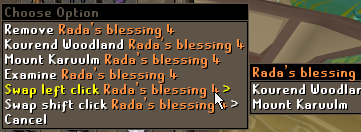
What's the best way to change the quiver ammo left click to swap? 🤔
fresh cosmos
shift right click > Swap left click swap
fluid furnace
Nah, doesn't work on equipped items
Oh, I just saw there's a pull request for this for MES https://github.com/runelite/runelite/pull/17659
 sick bluff
Hiya,
For the past two days the "Item Sats" plugin isn't showing the stats when i hover over items and was wondering if there was a fix for this?
fresh cosmos
fluid furnace
Nah, doesn't work on equipped items
https://i.imgur.com/vxITlMI.png idk what i have but it works for me vOv
 oblique plume
It prob failed to grab them on startup, try restarting
fluid furnace
fresh cosmos
https://i.imgur.com/vxITlMI.png idk what i have but it works for me vOv
Oh, yeah, weird. I guess it's just specifically a problem with the quiver 🤔
fresh cosmos
or i might have a plugin that allows me to change the left click option for equipped items sorry i cant help ya man
fluid furnace
Nah, I realised I can too. I was thrown off by the fact that there's no option for items that are just remove and examine
leaden trail
left locust
the last jvm_crash_pid is from 45 mins ago when it crashed last time
Go into your BIOS and disable "Core Performance Boost"
more info is on this issue page:
haughty pumiceBOT

Ketner777
A fatal error has been detected by the Java Runtime Environment:
#
#  EXCEPTION_ACCESS_VIOLATION (0xc0000005) at pc=0x03d9c70d, pid=15208, tid=9740
#
# JRE version: OpenJDK Runtime Environment (11.0.4+11) (build 11.0.4+11)
# Java VM: OpenJDK Server VM (11.0.4+11, mixed mode, emulated-client, g1 gc, windows-x86)
...😮 so thats the problem?
leaden trail
that's what we generally find solves that, yeah
left locust
leaden trail
that's what we generally find solves that, yeah
aha, okey, ill try that
sick bluff
oblique plume
It prob failed to grab them on startup, try restarting
sorted, cheers
left locust
leaden trail
Go into your BIOS and disable "Core Performance Boost"
Cant find it in my bios 😩😪
 stone parcel
Some BIOS have an option to search for a phrase. Try searching "core performance"
leaden trail
if you can't find it, take a peek at the comments on the GH issue I linked. I think there may be another name for it as well
stone parcel
Oh you are Intel, yeah look for SpeedStep.
left locust
Okey, feels shit to not being able to overclock, bcs you cant run runelite 😂
Im on intel i9 14900k with asus z790-A WIFI mobo
leaden trail
I think you can still OC you just need to actually do it yourself rather than relying on it being done for you
 glossy flume
plugin to autojoin guest clan chat or join faster? hopping worlds makes u have to rejoin manually
leaden trail
there's gotta be an in game setting or something for it, I rejoin automatically when hopping
ornate kite
Just a question for my own knowledge. The SpecialCounterPlugin has an array list that is accessed by 2 threads, why doesn't it need synchronization?
 stark valve
is there a way to change the color of the dark green to something else for the transparent chatbox?
it also happens to "X User has received Y loot from Z boss" too
really hard to read against some backgrounds
ive tried Chat Color but none of them seem to affect it
 zealous cedar
there is a pluginhub plugin "force recolor" which can
stark valve
hmm, doesnt seem to recolor anything

is my matched text wrong or maybe theres a plugin conflict? 🤔
zealous cedar
i actually dont know how to use it
stark valve
seems like it doesn't retroactively change the color of game messages
a new one has to pop up for it to be recolored
 gusty reef
im getting duplicate messages like these and i have no idea why

it also happens when a superior slayer monster spawns
zealous cedar
you might have chat message notifications on and the 2nd one is the notification
gusty reef
how can i check for it?
zealous cedar
check if chat message notifications is on in the notification settings
gusty reef
game message notifications were enabled
gusty reef
gusty reef
it also happens when a superior slayer monster spawns
so in this case its basically runelite sending a notification and then the slayer plugin?
 sharp nacelle
hey, any clue why the GPU plugin looks so dark? It wasnt this dark before

the floor for example were brighter
zealous cedar
adjust the brightness?
sharp nacelle
where? the plug doesnt have an option for brightness, besides the brighter textures which barely do anything
zealous cedar

 somber tangle
what is anisotropic filtering for runelite?
zealous cedar
it adjusts textures further away from the camera to be more blurred
 vestal knoll
im playing 2 accoutns at the same time, whenever im focused one 1 screen the other starts lagging
it didnt use to happen, but i moved to a diff home and now it suddenly happens. Is it a setting thing?
 mossy swan
check that your monitors are set to the correct refresh rate, and no gsync etc is enabled
vestal knoll
how do i check correct rate
 round jacinth
If you have nvidia card you can use their nvidia control panel to see, I think windows has a default way of checking
Google would be a great resource
 charred wind
can also check fps control plugin to make sure unfocused fps isn't limited
 frigid current
im currently having an issue with connecting to a required server while downloading the bootstrap
anyone know how id go about resolving that?
i reset my router and modem and so far that hasn't done anything
leaden trail
frigid current
im currently having an issue with connecting to a required server while download...
What do you see when you open this page in a browser?
frigid current
is that what im supposed to see
i just tried it again and it now gives me a different message than it did

it didnt mention the dns resolver previously
@leaden trail
leaden trail
I don't have a good answer for what your problem is right now, and I've been pulled away by some IRL things. Someone else can look when they have a chance
gilded kayak
frigid current
thanks anyways
can you instead open windows powershell and copy paste and enter
Invoke-Webrequest https://static.runelite.net/bootstrap.json
and post what StatusCode: # you get back, or if you get a big red error
there are times where people try to replicate the issue in browser, but their browser is "fixing" their problem for them so it works fine for them, despite being broken
frigid current
status code 200
gilded kayak
ok then something is blocking RuneLite specifically
frigid current
interesting
gilded kayak
or an ISP issue that only effects RuneLite which isn't impossible
well, it could be effecting other things but you'd have to open a lot of things to compare
frigid current
gonna try my personal hotspot from my phoen to see if its an isp issue
gilded kayak
very good
 ashen chasm
i am aware of that runelite follow on window's resolution, but i dont like it, because i have to change the scale and layout size to 125 or 150% and i can see it as little big icon on menu but 100% it looks so SMALL. i am on 1440p
my question is why not you make this self client add interface for size icon/font? since i don't want to change the scale and layout throught on my windows, not client.
whenever if i finisht the game then i have to change it back to 100% again
gilded kayak
!config
ashen chasm
for example this i am on 100%
 haughty pumiceBOT
gilded kayak
haughty pumiceBOT
gilded kayak
set the scale option in that prompt
ashen chasm
oh it does exist. thank you
i've been looking for and it seems no one answer that question on reddit til i joined this server
gilded kayak
yeah a lot of people who look for answers on reddit don't answer themselves if they find the answer
 gilded kayak
one of your hub plugins maybe was updated?
!safe safe mode will confirm it to be a hub plugin
haughty pumiceBOT
safemode: Windows
Run the RuneLite (safe mode) shortcut, or with a Jagex account, first run the RuneLite (configure) shortcut and tick the Safe mode box, then launch RuneLite via the Jagex launcher.
Mac
In Terminal, run:
/Applications/RuneLite.app/Contents/MacOS/RuneLite --configureTick the Safe mode box. Launch RuneLite.
If it's not working, download and install the updated RuneLite launcher from the website link in #welcome. You don't need to uninstall your current version. You will not lose any settings or plugins. Then try running safemode again.
gilded kayak
otherwise u can sort most-recently-updated on the website https://runelite.net/plugin-hub/
 primal canopy
gilded kayak
otherwise u can sort most-recently-updated on the website https://runelite.net/p...
primal canopy
gilded kayak
otherwise u can sort most-recently-updated on the website https://runelite.net/p...
thank you
 steady arrow
Anyone happen to know how to import settings for the dynamic inventory tags plugin?
Can't seem to find a place to paste 'em
haughty pumiceBOT
Get support for the Dynamic Inventory Tags Plugin Hub plugin here: https://runelite.net/plugin-hub/show/dynamic-inventory-tags.
You can also find the support link by searching for the plugin in the Plugin Hub panel and clicking the ? button on the plugin, or by right-clicking the plugin in the plugin panel and clicking the Support menu option.
 thorn gazelle
why was this dust devil considered dead and therefore hidden? it's not like it was 0/1 hp or something - it had high hp (first time seeing this and I've done a ton of tasks here)
gilded kayak
yes
I've never heard of it happening with Dust Devils, but your assumption of the problem is correct
tho it did happen to me once with a Rune dragon so who knows
thorn gazelle
I've only ever heard of the problem with npcs like ice demon or KQ
but I thought it was related to like some 0->1 hp regen thing
where the game thinks its dead for a moment, but then its actually not dead
but in this case its max hp, so I have no idea why
gilded kayak
it is indeed a same tick heal 0->1 issue, no idea why it happened to that dust devil
and KQ is the biggest culprit
 vast bone
does the client even know its hp before you hit it?
 spring night
any idea what happened here? Client froze on me for a good bit of time, when it unfroze all the npcs were gone and i got stacked out. it took a while to respawn in the lobby at which point my camera was offset from my character (the one stuck praying mage with 0 prayer and 0 hp). I could click to move but it would cause a DC and when reconnected my char would be at the new spot, with the camera still being messed up.

 zealous cedar
no idea
spring night
restarting client solved it but its a weird situation
Ive never crashed/dced so hard that i had an out of body experience
 outer seal
hey i need some help merging my loot tracker, my old pc has the majority of my loot logged ive since started using a runelite account, how do i add the existing loot tracked to my runelite account? as when i sign in on the old pc it just shows lott from when runelite account created
haughty pumiceBOT
vast bone
you cannot merge them, only switch to the old one.
 true niche
Is there a setting in RL for when your farming timers go off as I don't get notified when they go off?
leaden trail
time tracking notifications on the hub will do that I think
 tidal magnet
relatively recently (I have been playing other games for a couple months) since I have been back whenever I stream runelite to discord it will stream fine for an undetermined amount of time before runelite just full closing without warning - I tried updating runelite off the website today, any other ideas or suggestions?
only seems to happen when I am streaming runelite
I have a most recent jvm crash log
charred wind
disable these in Voice and Video settings:
 tidal magnet
sweet I will try that the bottom one was on
sonic birch
true niche
Is there a setting in RL for when your farming timers go off as I don't get noti...
You have to have the bell enabled next to them
Also make sure notifications while focussed are enabled in the runelite config
 uncut meteor
Looking for some help
is annoyance mute and visual sounds plugin not working?
I cant see the sounds made by my zcb spec or when my char takes damage
round jacinth
annoyance mute eating a sound might happen before visual sounds shows it so it doesn’t show
Not sure, try without annoyance mute on.
Not all sounds go off on visual sounds either
 hard kiln
is there any reason for an i5 late gen to have spikes up to 98% cpu usage
its not really ap roblem just curious
haughty pumiceBOT
flowchart: Please refer to this flowchart for further troubleshooting.
 dire flume
is it possible to set a low run energy notification with watch dogs?
 steel sphinx
Hi can someone help me with runelite intelij, and jagex accounts?
I wanted to learn how to do some plugin work, and realised that I can't login to my account, because it's jagex, and I can't create a non jagex account.
I know, and do use runelite through the launcher, yet I would like to use custom plugs.
 sick ridge
has the world global chat plugin been removeD?
 viscid lantern
yes
sick ridge
aww 😦
 ruby moss
Is there any way to get that RS3 Music plugin working? I've wanted that for so long
 oak idol
is the custom cursor plugin working still? I have a cursor.png in .runelite directory and its just showing the default one
steel sphinx
How do I build runelite.exe or runelite.jar I have it in intellij
leaden trail
oak idol
is the custom cursor plugin working still? I have a cursor.png in .runelite dire...
Is it called cursor.png or cursor.png.png?
haughty pumiceBOT
Place the files for the feature you want in %userprofile%\.runelite on Windows or ~/.runelite/ on Linux/OSX
The names and type for the files are:
- Custom cursor:
cursor.png - Custom notification sound:
notification.wav - Custom login screen:
login.png. An image size of 765 x 503 is recommended, but bigger images will be (simply) scaled down automatically.
oak idol
leaden trail
Is it called cursor.png or cursor.png.png?
genius lol
it was actually a .webp format, but i got it figured out thank you
haughty pumiceBOT
If you are new to OSRS, make sure to follow this excellent guide on OSRS wiki: https://oldschool.runescape.wiki/w/New_player_guide. You can also join official OSRS Discord here: https://discord.gg/osrs
oblique plume
sounds like a jagex launcher issue, try talking to them in their server
 sick folio
hellooo how do i disable custom chrome so fullscreen works?
leaden trail
"RuneLite" settings
 oblique plume
"runelite"
sick folio
I've just downloaded it I;m not sure what you mean by that.
I have the settings open.
oblique plume
scroll down to r
 reef wadi
hi, I've been trying to replace the default sounds in the c-engineer: completed plugin with different ones, but for some reason none of the new sounds are working, despite the chatbox message from the plugin still going off. i've made sure the file types and names are identical, have tried restarting both runelite and my pc, and have searched all over online trying to find a solution. should also note that the new sounds play just fine when i click on them in the folder for the plugin, they just aren't working in-game--although normal sounds from the plugin that I've not replaced work just fine. any advice?
haughty pumiceBOT
To find the logs, you can do one of the following:
- If your client failed to open, click the
Open logs folderbutton. - Open the screenshot directory by right-clicking 📷
Camerabutton, navigate 1 directory up, then open logs folder. - Navigate to
%userprofile%\.runelite\logson Windows or$HOME/.runelite/logson Linux and macOS.
Upload the log files named client and launcher by dragging them to Discord. If there are files prefixed with jvm_crash dated from today, upload them too.
oblique plume
maybe the client log says something
otherwise make sure you arnt doing the normal mistakes of calling it .wav.wav
or simply renaming a .mp3 to .wav without exporting it actually as a wav
reef wadi
i used an online file converter i found. could be that causing the issue, but when i hover over the files it says it's a wav file
idk if this is what i was supposed to send for the logs thing
oblique plume
bad file it says
reef wadi
how do I go about fixing that?
sonic birch
convert it again using e.g. audacity and use the appropriate format
the author probably has info on the correct format in the readme
 foggy smelt
Is there any way to hide the minimap icons? (Water source and such)
 wind dove
Hey yall, Ive been trying to solve this myself and cant, it is likely user error and i apologize for the dumb question. I am opening up Runelite and the screen is tiny even though it fills the screen. The rest is black, how do I change this?
 gilded kayak
!resizable but the in-game setting doesn't effect the loading screen
haughty pumiceBOT
 sonic birch
stretched mode fills it in the loading screen
gilded kayak
you'd have to use the stretched mode plugin if you really care about the loading screen
 spiral flare
why not a stretched mode for login screen option
little dumb but itd fill the window
turn it off on game render
gilded kayak
cuz then we'd have to add it and you're in the login screen for actual seconds
vast bone
be green, don't spend elektricitee on the fire animation
you can make it bigger with stretched mode it just doesn't fill the space.
spiral flare
i dont, i close when im done because of a 6700k paired with a 3070
bottlenecked hard
vast bone
or, it won't fill it if you don't have the same aspect ratio.
spiral flare
i play in resizable non stretched, but i dont want to swap to stretched for the login screen
literally anything to make the background or login scale would be nice at this point
its one of the few L's when comparing RL to HDOS (and theres really not many)
or the new launcher idr which has the full
oblique plume
Why does the screen need to be bigger when you just press the enter key on it
spiral flare
because black bars on the side bother me
i have a custom image on my resource pack, id like to see more of it
if i could id ask for the hd 2010 login screen that rotates with the scroll
but we all know thats impossible
so, no black bars on the side at the very least would be nice
scale to shorter side no stretch
gilded kayak
yeah it would somebody should tell jagex 8 years ago
then runelite would always have had it
spiral flare
spiral flare
i have a custom image on my resource pack, id like to see more of it
id chose a rotating video of the gameworld over my custom login background any fucking day though
i know we cant edit any of the assets either, so something would be nice idk
haughty pumiceBOT
To find the logs, you can do one of the following:
- If your client failed to open, click the
Open logs folderbutton. - Open the screenshot directory by right-clicking 📷
Camerabutton, navigate 1 directory up, then open logs folder. - Navigate to
%userprofile%\.runelite\logson Windows or$HOME/.runelite/logson Linux and macOS.
Upload the log files named client and launcher by dragging them to Discord. If there are files prefixed with jvm_crash dated from today, upload them too.
 bold elk
jvm_Crash
round jacinth
That is both not the jvm crash nor a log from today
bold elk
its not showing upp logg from today
leaden trail
they'll just be called client.log and launcher.log
bold elk
jvm_Crash
leaden trail
do you have any files with names starting with "jvm_crash"?
And we need your client.log as well
gilded kayak
check windows event viewer probably
since you're using 117HD without a GPU I'd assume that it's getting very upset and crashing
bold elk
oh what gpu do i use???
bold elk
wwwhhat doo i do now??
gilded kayak
don't use 117 and see if you stop crashing?
the Event Viewer application will probably say the problem
bold elk
what do i do??
 delicate bobcat
bold elk
what do i do??
delicate bobcat
bold elk
what do i do??
try updating your driver to the one found here https://www.intel.com/content/www/us/en/download/776137/intel-7th-10th-gen-processor-graphics-windows.html
Intel
This download installs Intel® Graphics Driver 31.0.101.2128 for 7th-10th Gen Intel® Core™ Processor Graphics, and related Intel Atom®, Pentium®, and Celeron® processors.
if that doesn't work, you're probably out of luck
bold elk
damn
delicate bobcat
(I would give it a solid chance of actually working though, go try it)
you'd be the 3rd or 4th person with a similar issue
bold elk
yesss!!!!!!!!!!!!
spiral flare
so, i believe this is tile indicators and slayer both doing a respawn timer at once (slayer hull does not overlap with tile indicators on normal mobs either, not just bosses (this is a kurask)) would be nice if that got fixed, but if theres any way to have respawn timers like, overlap instead of doing this dumb shit, id love to know

cant really fix slayer hull overriding boss tile indicators, but id at least like to have one respawn timer if im on a boss slayer task (as i dont need normal mobs tagged)
sonic birch
spiral flare
so, i believe this is tile indicators and slayer both doing a respawn timer at o...
If you can recreate this in safe mode, create a github issue if none exists yet with a picture/video of the issue with the client in safe mode and the titlebar visible, client.log, steps to reproduce
spiral flare
how do i enable safe mode in the client, unless its like, windows safe mode
haughty pumiceBOT
Windows
Run the RuneLite (safe mode) shortcut, or with a Jagex account, first run the RuneLite (configure) shortcut and tick the Safe mode box, then launch RuneLite via the Jagex launcher.
Mac
In Terminal, run:
/Applications/RuneLite.app/Contents/MacOS/RuneLite --configureTick the Safe mode box. Launch RuneLite.
If it's not working, download and install the updated RuneLite launcher from the website link in #welcome. You don't need to uninstall your current version. You will not lose any settings or plugins. Then try running safemode again.
spiral flare
sonic birch
If you can recreate this in safe mode, create a github issue if none exists yet ...
i seem to only be getting the tile indicator respawn in safe mode
sonic birch
if it does not happen in safe mode, it's a hub plugin problem
spiral flare
which is weird because iirc i dont have anything that adds slayer respawns
could be improved tile indicators maybe
only other plugin i can think of that i have installed that would do it
what is this clan bit, never seen this before
 sonic birch
you right clicked all and set it to clan
 gilded kayak
jagex many years ago I believe
leaden trail
that's ollllld
spiral flare
spiral flare
so, i believe this is tile indicators and slayer both doing a respawn timer at o...
not improved tile indicators 🤔
sonic birch
!flow you can use a binary approach as described here
haughty pumiceBOT
flowchart: Please refer to this flowchart for further troubleshooting.
spiral flare
vast bone
it's probably better npc indicators
i guess they intended for you to.. disable it? even though theirs doesnt pop up all the time
theres no disable option but this should work

 pale zinc
hi i have certain npcs such as verzik p2 and certain objects such as fairy ring/door flickering on and off on certain camera angles, i figured out its the gpu plugin but if i tick everything on and off within the plugin it doesnt change anything, doesnt happen in safemode where gpu is disabled or if i launch a client with gpu turned off https://imgur.com/DrwE7qP

im still able to interact with the npcs/objects
does anyone know how i could possibly fix this?
sonic birch
!flow check if you can recreate in safe mode. check green tree after that
haughty pumiceBOT
flowchart: Please refer to this flowchart for further troubleshooting.
pale zinc
issue does not persist
is a pluginhub plugin fucking with the gpu plugin?
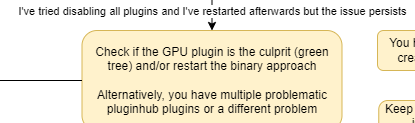
so how do i go about shit from here
sonic birch
have you checked green tree to see if the problem is gpu?
pale zinc
yeah i started out there and made my way to the yellow tree
pale zinc
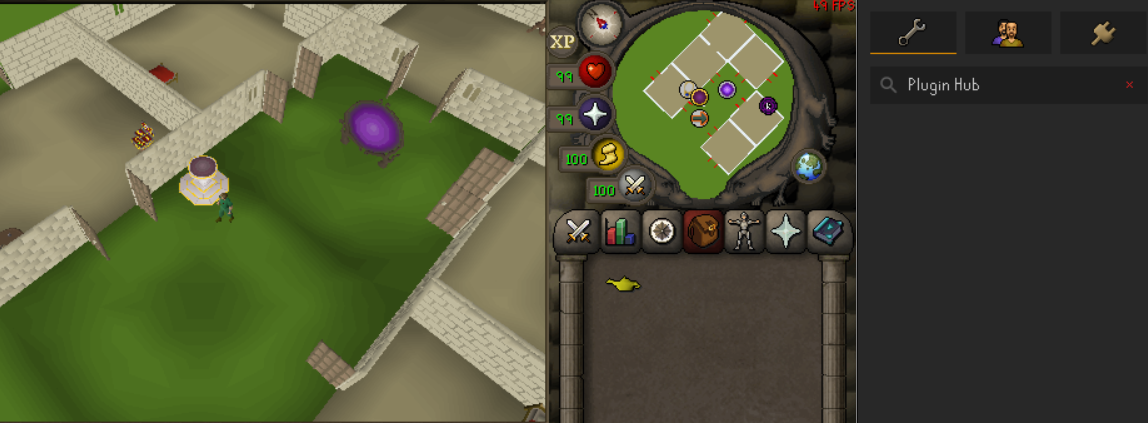
went ahead and sorted out all the pluginhub plugins, removed em all on a separate profile and im still having this issue, very odd https://i.imgur.com/E87Wf6U.png
 pulsar garden
Is there any benefit playing the game with GPU/117HD plugin set to ~120 FPS? I've been doing this since I got a nice PC couple years ago as most streamers with the FPS displayed on client run similar FPS. Although one outlier exists, Gnomonkey. He always has his FPS 50-60, is that all that you need? Is FPS higher than that just redundand and servers no purpose on this game?
 vast bone
it doesn't do much unless you like the added smoothness of the camera movement or maybe animations if you use animations smoothing (idk if those run >50fps).
osrs runs on 0.6 second ticks, 6ms is not going to make that big a difference.
pulsar garden
vast bone
it doesn't do much unless you like the added smoothness of the camera movement o...
AHHHHH that's the plugin that makes things look smooth HOLY SHIT I've seen so many videos where people's characters move sooo smooth and had no idea what setting it was. One of the reasons I started using 120 FPS was to try to mimmick the animation smoothing plugin lmao thanks
 final axle
pulsar garden
final axle
pulsar garden
oh fuck yeah smooth me out baby
I checked the GPU plugin so many times thinking it would be in there
finally
spiral flare
i mark every herb patch with outline + tile for better visibility to not forget to plant, and ive noticed the outline doesnt work the same as other places here.


same w here


how it should look normally (although i hate the bleed-through)

 pulsar patrol
Hello i am using Jagex launcher to use runelite, i am getting the following error as shown in the picture. My internet is working fine i checked other websites and they are working all good.
 leaden trail
Try turning off your firewall
Connecting to other websites is also not the same as connecting to Jagex.
pulsar patrol
leaden trail
Try turning off your firewall
i dont use firewall. also the osrs website is not loading. is that related?
leaden trail
Probably
pulsar patrol
any suggestion? i cleared all the website data and meta data under privacy settings.
 tender geode
Hey all! QQ - I have never logged into RuneLite... If I create an account and login, will my loot tracker and plugins transfer over? I am terrified of loving them both 😄 thanks!
 silent mantle
has anyone got this whitescreen from running client from source?

 pastel kelp
Is this because i have a plugin thats not working properly or is this some kind of bug ?!?
 pastel kelp
i've been trough the plugin but cant find wich one it is 😦
vast bone
lamp lockout
pastel kelp
i haven't instaled that plugin XD
viscid lantern
some specimen cleaning plugin maybe
pastel kelp
that was the problem thanks guys
 turbid niche
Hi, where can I increase the Runelite fontsize? I am playing on a widescreen and have pretty shitty eyesight. I cant properly read required quest items for example on the right sidebar...
haughty pumiceBOT
vast bone
scale
tender geode
tender geode
Hey all! QQ - I have never logged into RuneLite... If I create an account and lo...
Bump ☺️
leaden trail
It should transfer it over, yes
tender geode
leaden trail
It should transfer it over, yes
Should or will? This is terrifying lol
oblique plume
you cant lose data unless you delete it yourself
 viral ermine
I'm contemplating buying a laptop with Snapdragon X Elite chip. Does the ARM64 version of Runelite have more issues than the normal 64 bit variant?
Or is it just about as stable?
Thought I'd ask before buying the laptop...
oblique plume
its fine afaik
viral ermine
Ty
 serene dirge
does anyone know how to move around the timers? mine are right in the middle of the client
same thing with the thing that says what attack style im using
zealous cedar
hold alt
serene dirge
ty
 sullen sable
My 'XP Drop' plugin has stopped working, anyone else??
haughty pumiceBOT
We are using vanilla XP drops. To configure them: https://github.com/runelite/runelite/wiki/XP-Drop
sullen sable
Lmao, I was hiding XP drop... thanks!!! @haughty pumice
 teal juniper
hi, for some reason "Party" plugin doesn't want to show my discord profile picture on the map and in the menu of the plugin, how can i fix this?
zealous cedar
turn the discord plugin on
teal juniper
it is on
 teal juniper
yeah i just don't share my activity status, can it be the problem?
zealous cedar
i think so
 calm wigeon
Hi. Im trying to find my old computers plugins and settings. I was logged on runelite, and i wanna transfer it to my new computer. I allready uninstalled runelite on my old computer, is it lost forever or is there some way i can find my old plugins?
haughty pumiceBOT
leaden trail
I don't think uninstalling removes your .runelite folder but I could be wrong
viscid lantern
it doesnt, you have to manually remove it
calm wigeon
i uninstalled the whole computer if u understand
viscid lantern
oh you wiped all your data?
calm wigeon
yea
but i was logged in, so it should be somewhere rigth?
i can find some things on runelites webpage
viscid lantern
if you were signed in on your old pc and had cloud saving enabled, you only have to sign back in on the new one
calm wigeon
droplogs etc
viscid lantern
did you enable cloudsaving?
calm wigeon
probably not, cause i cant find the plugins i had
viscid lantern
if you didnt have the cloud option toggled there, your settings are gone
 calm wigeon
ah man
this is the worst thing about getting anew comptuer :/
i found "runescape profile" on the webpage
it shows loads of things like bosskills kc
it shows loot tracker too
is there no way i can get my plugins from this?
teal juniper
oh okay so it seems that if discord is run by administrator and runelite isn't the rich presence doesn't work at all which causes party plugin to not be able to borrow my profile picture, thanks for help
 fast juniper
On Linux
Rl ver: 1.10.32.1
Osrs revis: Rev 222
Launcher version: 2.7.1
Trying to sign in to sync previous settings doesn't do anything except loading sign on cursor (showing browser as a small icon under cursor)
round jacinth
does it open a browser window at all?
if not make sure you have xdg-open i think
to double check in terminal type
xdg-open www.google.com
sonic birch
calm wigeon
is there no way i can get my plugins from this?
No, try this:
haughty pumiceBOT
 deep agate
Just a quick question regarding Streched Mode plugin.
It seems to be stuck at the default setting of 50% and changing the % in 'Resizable Scaling' does not seem to do anything.
Ingame settings are set to Resizeable - Classic
Any pointers?
haughty pumiceBOT
flowchart: Please refer to this flowchart for further troubleshooting.
deep agate
Will do, ty @sonic birch
That was weird. Issue did not show in Safemode, so booted in normal mode. Switched to a new profile, made no changes, switched back to old again without changes and the issue was gone.
 little hemlock
I've been having an issue for a few weeks now where my client will freeze for a few seconds every 5-10 minutes. Is there anything I could send for someone to look into this on what may be causing it?
haughty pumiceBOT
flowchart: Please refer to this flowchart for further troubleshooting.
fresh cosmos
where i put things on my screen moves a lot when i relaunch the client. anyone know how to fix? https://i.imgur.com/4M1igl9.png
 fresh cosmos
oblique plume
its based on the size, so dont resize it
fresh cosmos
oblique plume
its based on the size, so dont resize it
not resizing anything. how do i put them on an anchor?
oblique plume
the blue boxes
fresh cosmos
kind of autistic so where are the blue boxes? lol
oblique plume
they show when you move something
fresh cosmos
im holding alt and i dont see them... if was to take a picture and put it in chat, it would be my with my phone because the hotkeys i press to take a screenshot, dont work when im pressing alt lol
leaden trail
Start to drag something and they'll show up
 austere aspen
Anyway to mute all sounds at xarpus apart from spit?
fresh cosmos
negative sir
fresh cosmos
 viscid lantern
thats part of your screen not the full window, there are multiple big blue boxes you can snap on
leaden trail
That's not somewhere on the screen that has an anchor, that's why you don't see it
viscid lantern
if you want it to be snapped specifically on the inventory, you cant
oblique plume
im also astonished youve been using RL for 5 years and have no idea what an achor is
 surreal yacht
austere aspen
Anyway to mute all sounds at xarpus apart from spit?
surreal yacht
austere aspen
Anyway to mute all sounds at xarpus apart from spit?
this is definitely possible with the annoying sound remover plugin
but you'd have to find the IDs
austere aspen
surreal yacht
this is definitely possible with the annoying sound remover plugin
Is there anyway to download an area sound as a sound file?
surreal yacht
wdym
leaden trail
Not afaik
gilded kayak
you can get sound id's from sound swappers debug mode
surreal yacht
why would u need to do that
viscid lantern
https://oldschool.runescape.wiki/w/List_of_in-game_sound_IDs this page contains some known sound ids and it has xarpus ones on there
gilded kayak
or that
fresh cosmos
is there a plugin for customizable anchors?
i want to put my boosts infoboxes in a place where the anchors arent
viscid lantern
no
fresh cosmos
v sad
viscid lantern
if you always play in the same size it should just stay in the right spot across restarts though
austere aspen
surreal yacht
why would u need to do that
The plugin doesn't let you mute every area sound with an exception, except if its a custom file
fresh cosmos
i have my window size locks. it doesnt stay where i put it 😦
gilded kayak
lock window size is not the same setting as remember client position
also it locks the size that's set in the Game size box
fresh cosmos
i gotchu. i have both on
gilded kayak
gilded kayak
also it locks the size that's set in the `Game size` box
not a size you might get after you disable the setting, resize the window, and then re-enable it
surreal yacht
austere aspen
The plugin doesn't let you mute every area sound with an exception, except if it...
hmm im not sure what you mean, i have all area sounds disabled for CG for instance
by inputting the IDs
austere aspen
surreal yacht
hmm im not sure what you mean, i have all area sounds disabled for CG for instan...
I just want every area sound muted except xarpus, i can't put every id in
gilded kayak
why not

 teal holly
I saw this from the wrong angle and thought it was curse of ra im cooked
 formal pecan
austere aspen
I just want every area sound muted except xarpus, i can't put every id in
formal pecan
austere aspen
I just want every area sound muted except xarpus, i can't put every id in
you can just use sound swapper and tick the option to consume area sounds and it has a field for excluding certain IDs so they still play
austere aspen
formal pecan
you can just use sound swapper and tick the option to consume area sounds and it...
Doesn't work, will only consume anything not custom
formal pecan
thats not true
gilded kayak
everything suggested to you works
the plugin for getting IDs and the plugin for muting them
austere aspen
formal pecan
thats not true
Read the description, Consume any area sound that is not custom
 gilded kayak
I think you're just using too many cheats and it's breaking hub plugins
since we are suggesting you plugins that work
 bold prairie
Any help on how I can get bones to stop showing as quest items lol
 bold prairie
gilded kayak
it's disabled by default
bold prairie
gilded kayak
it's disabled by default
in the configure tab for ground loot?
gilded kayak
it's quest helper
that's why it has the quest helper logo on it
well the quest logo but still
bold prairie
gilded kayak
well the quest logo but still
Thanks a ton!
 sullen crag
Very quick FAQ for a friend in need: Hes doing Inferno. Is there a plugin or setting that shows the true HP of Zuk and the Jad phases, healers, etc or just percentages?
zealous cedar
opponent info should
sullen crag
My buddy has Opponent Info set to HP and it works for Tzhaar, but when he enters Inferno it ends up doing Percntages. Possible it's another Plugin overlaying the general setting?
zealous cedar
it looks like it should be working to me
gilded kayak
there's a setting in opponent info to not display if the Jagex healthbar is also enabled
if it's a zuk only problem
it's not specifically what you asked but with telephone reporting it's possible that's what the problem is
sullen crag
gilded kayak
there's a setting in opponent info to not display if the Jagex healthbar is also...
He said it was a Zuk and Triple Jads issue but he said he spam turned off all the plugins and it resolved, so I guess it's one of the Plugins that maybe was attempting to overlay and it is messing it up?
gilded kayak
probably
sullen crag
Either way I told him nothing good can come from turning on every single Inferno plugin so hes all set
Ty all who responded

 solid mesa
Alt, then right-click on it
ornate kite
solid mesa
Alt, then right-click on it
oh thank you
 surreal night
I reset my pc recently, is there a way I can transfer my profile by logging into Runelite email?
oblique plume
if you were syncing your profile just signing in will pull it down
surreal night
omg no way
 deep moat
Hey any support online? i have an issue with a plugin i would like to report
sonic birch
Support is offline!
In all seriousness, if it's a hub plugin feel free to report it to the hub author. A core plugin, feel free to ask here.
deep moat
it is a core plugin that is why i came here
 flat wagon
right click the plugin you want to report an issue for, click support an dhead to their gtihub from that page
 deep moat
do i just type in here or do u guys have a ticket system?
sonic birch
Just type in here and someone will get to it when they have time
deep moat
ok 🙂 thanks, and harb i tried messing with it myself and all that already.. its a core plugin no way for me to find out who the author is so this is my last resort basically
flat wagon
https://github.com/runelite/runelite/issues if it's core

GitHub
Open source Old School RuneScape client. Contribute to runelite/runelite development by creating an account on GitHub.
deep moat
Tithe Farm plugin has not shown the colors of the grown/ready to be harvested plants in a few days now, unwatered and watered plants still work properly.
gilded kayak
it was removed b/c it's no longer a timer
sonic birch
I think the just completed plants indicator got removed indeed.
sonic birch
So no indicator = done, I assume.
gilded kayak
yes
deep moat
untrue, the tithe farm extended plugin still shows the lil green pie chart timer when it is ready to be harvested
gilded kayak
ok that's a different plugin
deep moat
either way i just wanted to post in here 🙂 no harm no foul if its something im unaware of
gilded kayak
in core RuneLite we don't have anything that fills the role of a timer that never expires
deep moat
ok i see that now, double checked the update and all is good, it has been green pie cirle all the way up until last weeks update, even tho the change was made almost a month ago
thats the part i find strange
gilded kayak
yeah nobody PR'd the removal until then
sonic birch
We're slow!
gilded kayak
i just don't think anyone really cared
gilded kayak
someone PR'd the removal and we discussed turning it into a full-circle that never ticks down, but Adam mentioned we have nothing for that in core RL
pie charts are only used for timers
I knew people would feel weird about it being gone but we didn't have a replacement for that
sonic birch
You might be able to object mark the full grown plants?
I've never looked into how the plants worked, and I haven't looked at object marker code in forever, so it might not be possible for a specific stage.
deep moat
i dont know i will play around with it after tomorow, gotta get to sleepy. i understand now its not a bug or anything , was just a change. appreciate the info guys and goodnight! 🙂
vast bone
what if you tag the big plant
with object marker
maybe that would wokr
what felan
I said this like, 2 weeks ago
gilded kayak
 gilded kayak
makes sense
vast bone
true! w take from w as always.
sonic birch
Thanks tex!
 dull sage
is there a way to make the inventory match the size of the bars?
https://i.imgur.com/ErJZWsM.png
 viscid lantern
Nope
dull sage
damn that's ass
 indigo wolf
does anyone know how to make gamecaptures work in obs with runelite
viscid lantern
use window capture
indigo wolf
viscid lantern
use window capture
oh, I wanted to essentially only capture the game as when you click the sidebar it makes the window larger and the "game" smaller on the video
gilded kayak
is that true?
viscid lantern
seems to expand out of the viewport for me
gilded kayak
for me it flashes for a split second but the window size in OBS does not change
viscid lantern
yup same
indigo wolf
viscid lantern
seems to expand out of the viewport for me
oh, nvm I was wrong, but yeah it's still not preferable
viscid lantern
game capture just doesnt work afaik
indigo wolf
any ideas as to why? 🤔 seems to work while in log in screen
viscid lantern
nope dont know the specifics on that, just know that is causes instability
indigo wolf
viscid lantern
nope dont know the specifics on that, just know that is causes instability
I see, yeah, it seems inconsistent too
timid rock
indigo wolf
oh, nvm I was wrong, but yeah it's still not preferable
does it flash even if u have cropped sides?
 foggy smelt
anyone confirm 30 min downtime tonight?
viscid lantern
yup usual 30min downtime
foggy smelt
kk
viscid lantern
except an hour later than usual
rancid carbon
f i didnt log at artio before update timer ended- am i dead? lol
 fallen tiger
no, it's not like x-logging, the npc's stop attacking when the game update hits
everything stops
viscid lantern
the server isnt running so artio cant hit you either
just make sure to be ready when you login since you wont have prot prayers up etc
 modern ember
Is there a way to hide a single tree?
viscid lantern
nope
you can shift+rightclick swap the leftclick on it to walk here though
but it will apply that to all trees of that type
modern ember
that would work thank you
haughty pumiceBOT
The Menu Entry Swapper, through various config options, allows you to hold shift+right click on items/NPCs/objects and configure new default left and shift click options on them.
 modern ember
awesome
 crimson warren
how long till its up??
 bold grail
man wtf is going on i'm tilt
crimson warren
bold grail
man wtf is going on i'm tilt
Update
viscid lantern
weekly update, back up in 15min or so
bold grail
viscid lantern
weekly update, back up in 15min or so
i cant wait so long
viscid lantern
well you have to
 rapid shadow
its jagex mandated weekly shower and touch grass time, its for our own good.
 stray orbit
aus worlds down?
 thick ivy
yep
leaden trail
Read the message before yours
thick ivy
Other worlds are working fine, OCE worlds are fucked
rancid carbon
is rs bak up yea
 twin phoenix
still can't connect, it's been over an hour
Exception: ConnectException
Message: connect: Address is invalid on local machine, or port is not valid on remote machine
leaden trail

So yes, known thing

Old School RuneScape
Check this post for planned downtime, routine maintenance and any live game issues.
twin phoenix
was connected to an AUS world for forestry, can't even start the client now
haughty pumiceBOT
To find the logs, you can do one of the following:
- If your client failed to open, click the
Open logs folderbutton. - Open the screenshot directory by right-clicking 📷
Camerabutton, navigate 1 directory up, then open logs folder. - Navigate to
%userprofile%\.runelite\logson Windows or$HOME/.runelite/logson Linux and macOS.
Upload the log files named client and launcher by dragging them to Discord. If there are files prefixed with jvm_crash dated from today, upload them too.
twin phoenix
I get the feeling that this would work if I could switch off the AUS server I was logged into, but I can't even start the launcher
 granite heron
Anyone else having the issue where if runelite is open for a couple of days, and then you close it/reopen it, profiles don't save/update? I use two runelite clients, one for iron and one for main.
After the update today, I closed/reopened them. and my iron's profile defaulted to the main even though before it had it's own default profile. And when I switched it back to the iron's defalut profile, all updates I made to the bank tab layout over the last couple of days was completely gone. The main's profile also failed to save/update. Also, plugins I downloaded over the last couple of days have to be reinstalled and reconfigured as well.
Starting to be frustrating losing updates made to bank tab layouts, and plugins, since this has happened multiple times. Any input as to why this is happening would be appreciated, thanks. Sync is on btw, it always has been.
oblique plume
you probably cant connect to the cloud to push updates, so when boots up and goes to pull them it goes back in time
the client log should show that
haughty pumiceBOT
To find the logs, you can do one of the following:
- If your client failed to open, click the
Open logs folderbutton. - Open the screenshot directory by right-clicking 📷
Camerabutton, navigate 1 directory up, then open logs folder. - Navigate to
%userprofile%\.runelite\logson Windows or$HOME/.runelite/logson Linux and macOS.
Upload the log files named client and launcher by dragging them to Discord. If there are files prefixed with jvm_crash dated from today, upload them too.
twin phoenix
I can log in on the official client, but it sucks. I want to load up RuneLite again, but it keeps throwing the above error
granite heron
do you want me to post the logs here? I looked through them, nothing to indicate any sort of sync error. it says in the logs all profiles are up to day, sync is set to true. @oblique plume
oblique plume
ye, one from a day where you did change a setting that didnt save after reopneing would show what im expecting to see
oblique plume
twin phoenix
I can log in on the official client, but it sucks. I want to load up RuneLite ag...
your log just looks like it has no internet afaik, it could be getting blocked by some vpn/proxy setting, or firewall idk
granite heron
Here you go @oblique plume . Thanks for taking a look.
granite heron
This is the client log.
I was under the impression to upload the log files from the previous opening of Runelite. If you need the ones from today I can post those too.
oblique plume
2024-06-09 13:03:11 NPT [OkHttp https://api.runelite.net/...] WARN n.r.client.config.ConfigClient - Unable to synchronize configuration item java.net.UnknownHostException: api.runelite.net
you also look to have permissions issues since this is more than one day
and the only way to have more than one day in the file is if you are manually adding them all or it cant make a new file for the new day
granite heron
Ah dang, I am sorry. What should I do to fix this issue?
And what do you mean by manually adding them? The plugins/bank tab layout updates?
oblique plume
the newest launcher should be able to handle permissions issues if you run it as admin on first startup so it can correct file perms
then run it not admin from then on
granite heron
There is a new runelite launcher?
oblique plume
it recieves updates from time to time
haughty pumiceBOT
Download and install the updated RuneLite launcher from the website link in #welcome. You don't need to uninstall your current version. You will not lose any settings or plugins.
twin phoenix
no settings were changed, it's just this update that is throwing this error. the official launcher works just fine
oblique plume
then i would say something is blocking runelite
granite heron
I just recently downloaded runelite again from the website maybe 2 days ago, and installed over previous version. So just close it now, and running it as admin should fix is what you are saying Alex? Thank you again.
oblique plume
it would fix the permissions issues afaik
granite heron
Ok, thank you so much.
twin phoenix
just tried reinstalling, threw the same error
round jacinth
twin phoenix
just tried reinstalling, threw the same error
does this load https://static.runelite.net/bootstrap.json
granite heron
One more question Alex. I open runelite through the jagex launcher, so should I close the launcher plus runelite, and then run runelite by itself as an admin and will that do the trick? Or is there something else that needs to be done in this case.
round jacinth
if you run runelite byitself as admin it should do the job of fixing the perms
just close and launch runelite normally after
twin phoenix
yeah, it loaded in my browser
round jacinth
it looks like { "artifacts": [ { "diffs": [ etc
twin phoenix
yep
oblique plume
granite heron
One more question Alex. I open runelite through the jagex launcher, so should I ...
rl by itself
round jacinth
well i think runelite is erroring when trying to reach that which it needs to reach
leaden trail
twin phoenix
yep
I think it's a firewall issue then
oblique plume
why not just look at their log instead of speculating whats in their log
granite heron
alright great, thanks alex and zom.
twin phoenix
rl also won't launch by itself. this is weird, my antivirus hasn't blocked it
round jacinth
java.net.ConnectException: connect: Address is invalid on local machine, or port is not valid on remote machine```i read this as bootstrap issue
they can connect to it though?
twin phoenix
Exception: ConnectException
Message: Cannot assign requested address: no further information
leaden trail
oblique plume
why not just look at their log instead of speculating whats in their log
They were having a connectionexception but could load bootstrap.json in browser, is that not typically firewall related?
twin phoenix
I was logged into the AUS servers as they were taken down
oblique plume
they have a host of general internet connectivity issues not just bootstrap
so rl is just getting blocked through some means afaik
twin phoenix
my firewall has it as an allowed process

the launcher error has changed somehow. this happened after the latest windows update that I installed during the update downtime on rs
the update was for intel's system software
 fast bone
Has anyone ever seen this issue? When I tele my brightness automatically gets reset to darkest possible
 leaden trail
Does it happen in safe mode?
haughty pumiceBOT
Windows
Run the RuneLite (safe mode) shortcut, or with a Jagex account, first run the RuneLite (configure) shortcut and tick the Safe mode box, then launch RuneLite via the Jagex launcher.
Mac
In Terminal, run:
/Applications/RuneLite.app/Contents/MacOS/RuneLite --configureTick the Safe mode box. Launch RuneLite.
If it's not working, download and install the updated RuneLite launcher from the website link in #welcome. You don't need to uninstall your current version. You will not lose any settings or plugins. Then try running safemode again.
fast bone
leaden trail
Does it happen in safe mode?
That fixed it! RIP my plugins xD
leaden trail
Now you know it's a hub plugin and that narrows it down
fast bone
Nice trick!
twin phoenix
mine won't even start in safe mode
 fluid swan
Was there a short memory wipe or something? Wondering because I had like 30ish/170ish on task, then same task it changes to 3/140ish , not sure if due to the Aussie world or something else
 soft bane
"mute other players' area sounds" in the Music plugin doesnt seem to be working
 short narwhal
Hey guys, have been having a big issue with my bank. The top bank tabs don't show the placeholder -- they're all blank. Any fix on this? My side bank layouts work but for some reason my top ones don't and it's extremely frusterating
gilded kayak
did you install a plugin that changes the icon to a custom one that you didn't set
so it's currently blank
short narwhal
 gilded kayak
bank tab names
short narwhal
Here’s the bank plugins i have. I’ve tried turning them off and on. Let me check
I turned it off and it hasn’t changed
viscid lantern
yeah thats the plugin by default it makes tabs blank
 honest valley
anyone know how to fix this?
 sonic birch
I've already created an issue and the author just doesn't respond
Edit: well, I got someone to make an issue for me
gilded kayak
are you on mac
honest valley
gilded kayak
are you on mac
yep
gilded kayak
the jagex launcher is broken on mac right now
says some guy in #runelite which I'm willing to believe
sonic birch
@lethal hazel can you take a look at https://github.com/Psyda/bank-tab-names/issues/8 ? Your plugin caused support traffic again
solid mesa
There's 7 posts in 2007scape within the last 2 hours of it not working on mac.
 atomic cairn
Any people in here who do nightmare zones or know of any groups for it osrs
 tawny cliff
leaden trail
atomic cairn
Any people in here who do nightmare zones or know of any groups for it osrs
tawny cliff
leaden trail
atomic cairn
Any people in here who do nightmare zones or know of any groups for it osrs
Look at the wiki page "Nightmare Zone/Strategies"
haughty pumiceBOT
 proven maple
how do i hide number of inventory slots?
 sonic birch
disable the plugin that adds that
viscid lantern
probably something inventory related from the hub
and it seems to show a count or sorts 
round jacinth
Wow!
viscid lantern
maybe you can find it by searching for inventory count on the hub
sonic birch
wow!
if I knew what plugins you installed yourself, I could have told you
what if you searched inventory in the settings because it's the inventory icon!
proven maple
I have been searching inventory in the settings
solid mesa
Then turn off the one that looks like this
 proven maple
😦
 sonic birch
otherwise search for tictac7x!
proven maple
was bugged
restarted and its gone
would explain why i couldn't find a setting to turn off
round jacinth
If you had stated you uninstalled it and it stayed on we would’ve knew to tell you to restart lol
round jacinth
Similar impact, it didn’t clean itself up properly.
 waxen harbor
Hey guys. I'm trying to use the Idle Notifier plugin to let me know when my prayer is getting low but I can't seem to get it to work. I want it to notify me at 20 prayer, and to notify me even if runelite is in focus. Any ideas as to what's up?
 solid mesa
In runelite do you have send notifications when focused on?
 waxen harbor
solid mesa
In runelite do you have send notifications when focused on?
waxen harbor
solid mesa
In runelite do you have send notifications when focused on?
Nope, I didn't know about that option. Thank you!
ornate kite
my friend is trying to do a def pure. is there a way to lock the account to not do def exp?
sonic birch
no
 slender cedar
Have there been any issues noted about login errors or "to many login attempts" from the rl client?
gilded kayak
many many times
slender cedar
Can sign in on mobile, but rl won't work on laptop.
slender cedar
Aww I see. Ok thanks.
ornate kite
Please. is there anyway. I can adjust my window size and my HUD not get completely screwed over everytime. Like the draggables, can i lock them
gilded kayak
if you press alt and right-click them they'll be reset to their default position
that will persist through client resizing
 untold plume
hey, for some reason my profile was removed but i've re-added it, i've noticed a few things like my menu entry swapper for left clicks / invo tags are missing, can i get those previous settings back too?
haughty pumiceBOT
untold plume
yep so i've redone the profile like it states, but i cant see anything on specific plugin settings being missing?
gilded kayak
uhhhh
do u have the in-game shift setting enabled
i have no idea what would be preventing inventory tags from working, they are saved to the settings file in that folder*
but I know menu entry swapper doesn't work if that setting isn't enabled
haughty pumiceBOT
leaden trail
Sorry needed the link for the wiki server lmao
untold plume
gilded kayak
but I know menu entry swapper doesn't work if that setting isn't enabled
i have it disabled, yeah so a few random things like any left click shifts on specific items, colours for certain items with invo tags and customizable xp drops havent been carried across properly
gilded kayak
ok so enable it and menu entry swapper will work
customizable xp drops are a hub plugin I have no idea how that works
untold plume
ok idk why this happened
lucky i went onto another machine i used a few months back
and the profile on it was exactly what i wanted, i've just imported that and now all my plugin settings are good lol
 versed rampart
i have a question, im getting a like 1 second lag spike every 10 seconds in game, any way to fix this?
haughty pumiceBOT
flowchart: Please refer to this flowchart for further troubleshooting.
versed rampart
client freezing
freezes about every 10 seconds for about 1-2 seonds
seconds*
will try thank you
fixed, thank you!
twin phoenix
have tried uninstalling and reinstalling everything, resetting my router, disabling my antivirus, nothing works. I heard it's a cloudflare issue, possibly
aus servers are back up, and connection is still broken
zealous cedar
do you have a vpn active?
 devout bronze
Probably off topic but if I’m building a new pc and run gpu plugin not 117, will a gpu or cpu oriented build be better for runelite? Wanting 400+ fps
 sonic birch
filter option
 wicked magnet
Ty
twin phoenix
zealous cedar
do you have a vpn active?
no
 calm bolt
Are there any workarounds for windows tablet users? I keep having to double tap on things for my click to register and it's fairly annoying. I was considering a macro to remap taps to be clicks or something, but I feel that might be dangerous
mossy swan
nope, thats just how osrs works
gilded kayak
no there isn't, what the game expects a click to be is just not what a tap is yeah
mossy swan
use a mouse instead 
calm bolt
But...that's what I got the tablet for, to get the ipad experience with runelite :/
gilded kayak
ah well u should have asked us before u bought it
mossy swan
if it was recently, you can still return it and get android tablet or ipad
calm bolt
Does the minisforum have the same issue when using the pen?
mossy swan
yes, anything with a desktop OS will have that
calm bolt
I have the legion go atm
mossy swan
(desktop OS = anything not android or ios)
calm bolt
So steam deck ish
mossy swan
basically osrs works by tracking your mouse cursor each frame, and when you click, it will use that recorded position to figure out what you clicked on
calm bolt
But taps seem to work fine for some things, like bank booths
But not npcs
Haven't tested it very much cause I got frustrated :/
mossy swan
sadly there is no fixing it
sonic birch
I think that'd be moving the mouse and clicking at the same time, aka 2 actions in 1
You can manually tap twice
calm bolt
Thanks for info ^^
 raw roost
hey anybody have any idea why runelite is taking up 100gb of space on my pc i only have around 5gb of screenshots as well
round jacinth
How many log files do you have
Before you delete em check the /logs folder in .runelite
You can get folder size by checking the properties of a folder
You can also move the screen shots to another location
raw roost
actually i think i figured it out theres a folder labeled videos that is 94 gb is that a plugin, and is it safe to remove?
round jacinth
Idk what that is
 crisp dune
probably from some hub plugin
round jacinth
There is a recorder plugin I assume you used to use?
You can delete that
That plugin is so bad compared to OBS I think it was made because they can
raw roost
i cant really tell lol i dont recall using it maybe i did in the past but i def didnt record anything and they're encoded in tscc so i cant play any.
round jacinth
I had sorta hoped an angry hub plugin did a trillion lines of text and made a mega file lol
round jacinth
Np it’s what’s we do 🙂
raw roost
okay down to 7gb looks way more normal lol! thanks again.
 glossy belfry
Just had my game client crash mid marking sote maze in a solo with brush markers, game client froze completely runelite sidebar still interactable. i turned off gpu plugin and back on to see if that would bring the render back but it turned in to a black screen. Log file is my entire log file after i restarted client. I crashed at around 7:33:xx which shows an OutOfMemoryError. I don't think I have THAT many plugins loaded and this is the first time i've ever crashed in years, runelite 1.10.32.1, launcher 2.7.1
 torpid wedge
is there a text file to see all of the npc's/objects you have highlighted by runelite plugins, some sort of file somewhere?
ive highlighted a few things over the years id just like to unhighlight but some of them are timer/context based (the one example is the orbs for gg's, its per tile and per stage)
thats why i ask if theres like, a mass file with ids of highlighted objects/npcs that i can edit instead
mossy swan
not really no
sonic birch
glossy belfry
Just had my game client crash mid marking sote maze in a solo with brush markers...
You are running out of heap: either increase the heap size or uninstall some hub plugins
!config you can ctrl+f heap here for some instructions iirc
haughty pumiceBOT
glossy belfry
yeah im aware of that, however i havnet chagned plugins in months so this is rather sudden i would say
sonic birch
Plugins often get updated, or you run into specific scenarios in which they use more memory
glossy belfry
And wouldn't that simply give me more time to run out of heap?
sonic birch
If it's not a memory leak, but just too much usage because of the amount of plugins, then no
If you run out of heap again with 2G or 1536M, then I'm willing to analyze a heap dump that's created when you ran out of heap space
glossy belfry
ty, ill set to 2G, I don't really expect it to happen again tho as its the first time ever in like 4 years
 feral umbra
mossy swan
feral umbra
mossy swan
!hubsupport
haughty pumiceBOT
Support for hub plugins should be directed to the author of the plugin. You can find the support link by searching for the plugin in the Plugin Hub panel and clicking the ? button on the plugin, or by right-clicking the plugin in the plugin panel and clicking the Support menu option.
 heady sandal
why wont runelite load
 haughty pumiceBOT
To find the logs, you can do one of the following:
- If your client failed to open, click the
Open logs folderbutton. - Open the screenshot directory by right-clicking 📷
Camerabutton, navigate 1 directory up, then open logs folder. - Navigate to
%userprofile%\.runelite\logson Windows or$HOME/.runelite/logson Linux and macOS.
Upload the log files named client and launcher by dragging them to Discord. If there are files prefixed with jvm_crash dated from today, upload them too.
 junior kite
is there anyway to lock the aspect ratio on rl while still allowing client to be resized?
oblique plume
stretched mode, but thats only when stretching fixed layout
heady sandal
heady sandal
why wont runelite load
how do i fix this
charred wind
haughty pumice
To find the logs, you can **do one of the following**:
- If your client failed t...
Send us your logs so we can find out
heady sandal
oblique plume
looks fine, its prob hd not working
twin phoenix
my issue fixed itself, it was an issue with cloudflare's servers after all
 upbeat umbra
not sure if this is the right place but is there any way to run exitlag with runelite?
oblique plume
you cant split tunnel if thats what it does
upbeat umbra
not sure if its split tunneling but more of it not detecting the game when I start it from runelite... works fine when the game is started from the official client
okay actually nvm seems like it works now thanks!
 weary flame
Trying to turn off some overlays but I can't quite seem to find what the source for these are, does anyone happen to know?
 leaden trail
It's some LMS plugin I think
viscid lantern
lms plugin
weary flame
ahhhh okay thank you
 graceful grail
I found that the dps counter plugin misses some damage at nex masses. Going tick by tick through my footage on one kc I saw a 34 damage and 45 damage hitsplat on fumus that were visible to me but weren't counted on the dps counter. It doesn't look like this is a known issue on the github but is it maybe just a limitation of 30 people are all attacking something at once?
zealous cedar
as long as the hitsplat is visible to you i would think it should be counted
since it works by counting hitsplats
graceful grail
what's weird is it correctly counted even the damage I couldn't see. It was 2 hitsplats that I could see that it missed. Here's some images tick by tick... Notice in the 3rd image the 34 and 45 don't get counted and the total is 79 less than you'd expect in the last image


 zealous cedar
it can sometimes count hitsplats you cant see, but not always
but it should be always counting hitsplats you can see
 carmine wolf
Hello, last week i've been having problems with the following.
When Runelite opens it suddenly freezes without giving any errors. Sometimes i could manage to login after a few attempts of reopening the client but today when i was playing it suddenly just closed on me and I can't seem to get it working properly. I've already deleted Runelite and reinstalled it but it still doesn't work.
I checked with the hdos client and there I don't run into any trouble running the client, also my gpu only runs at 20%, cpu 15% and over 9gb of ram available.
haughty pumiceBOT
To find the logs, you can do one of the following:
- If your client failed to open, click the
Open logs folderbutton. - Open the screenshot directory by right-clicking 📷
Camerabutton, navigate 1 directory up, then open logs folder. - Navigate to
%userprofile%\.runelite\logson Windows or$HOME/.runelite/logson Linux and macOS.
Upload the log files named client and launcher by dragging them to Discord. If there are files prefixed with jvm_crash dated from today, upload them too.
carmine wolf
oblique plume
this seems fine
haughty pumiceBOT
Windows
Run the RuneLite (safe mode) shortcut, or with a Jagex account, first run the RuneLite (configure) shortcut and tick the Safe mode box, then launch RuneLite via the Jagex launcher.
Mac
In Terminal, run:
/Applications/RuneLite.app/Contents/MacOS/RuneLite --configureTick the Safe mode box. Launch RuneLite.
If it's not working, download and install the updated RuneLite launcher from the website link in #welcome. You don't need to uninstall your current version. You will not lose any settings or plugins. Then try running safemode again.
carmine wolf
safe mode seems to work
I could login on the first attempt without the client closing
 lone bolt

 weary crater
I have same error as Macfatso 😄 was just about to ask about help
 autumn hound
weary crater
I have same error as Macfatso 😄 was just about to ask about help
autumn hound
weary crater
I have same error as Macfatso 😄 was just about to ask about help
same your not alone
weary crater
I tried to redownload the client, but i cant even visit the website
 silver stone
consider it another report
gilded kayak
cloudflare is probably having a stroke if I had to guess
weary crater
Known current issue?
oblique plume
carmine wolf
safe mode seems to work
then i suspect the gpu plugin is the issue
gilded kayak
it's known as of 1 minute ago when it was reported
i'm only guessing based on the error
weary crater
Someone has to be the first few i guess
 sinful mountain
Anyone know why this started popping up?
 gilded kayak
indeed
the client opens fine for me, what's the chance you're all in the same geographical location
 cerulean cairn
I got the same problems atm
weary crater
A friend who lives 20 min by car away from me still has it up and running
 echo eagle
Also same here, located in Sweden,
gilded kayak
looks like it's cloudflare like I guessed https://www.cloudflarestatus.com/incidents/p7l6rrbhysck





 echo eagle
Yep that checks out
carmine wolf
oblique plume
then i suspect the gpu plugin is the issue
I do seem to be able to run the normal version of runelite without the gpu setting on, is there something wrong with the gpu plugin that you know of?
gilded kayak
Eastern US and Western Europe
viscid lantern
intermittent issues, try every minute and you will be able to get in at some point
gilded kayak
ye what Gamma said
weary crater
cheers for the help
 plush obsidian
or play on the normal client for a while untill it's over
go back to the roots a bit
 static narwhal
Can confirm, trying multiple times worked
weary crater
Im gonna watch a movie instead, ive tasted the forbidden fruit and can no longer play normal client
gilded kayak
 Update - We are still investigating the issue which possibly extends into more regions.
Jun 20, 2024 - 19:16 UTC
``` they updated it 🙀 harsh laurel
echo eagle
Also same here, located in Sweden,
harsh laurel
echo eagle
Also same here, located in Sweden,
same, located in sweden
 formal pelican
getting fatal error somehow, anyone know whats the problem ?
 pure dagger
im having an issue when i load up runelite i cannot change the world on the main screen or in game... anyone else having this?
gilded kayak
does the RuneLite world list work