#support
1 messages · Page 3 of 1
 boreal ermine
 gilded kayak
I think(?) this crash is technically a jagex bug but probably only effects the java client
so if you can't resolve it with what Adam suggested it might be reasonable to use the official client just while ur playing that minigame
 sharp gorge
The Easy Teleports plugin isn't working for the third option on the slayer ring. Anyone else experienced this?

 haughty pumiceBOT
Support for hub plugins should be directed to the author of the plugin.
You can find the support link by searching for the plugin in the Plugin Hub panel and clicking the ? button on the plugin, or by right-clicking the plugin in the plugin panel and clicking the Support menu option.
gilded kayak
sharp gorge
The Easy Teleports plugin isn't working for the third option on the slayer ring....
jagex changed the name a bit back
so the plugin doesn't recognize it anymore
 vast bone
cave -> dungeon? why?
gilded kayak
funny
sharp gorge
aha. looks like it's been an issue since January. I guess the plugin creator doesn't care anymore
gilded kayak
if it's actually a 1word change i'll pr it and have her merge it
gilded kayak
vast bone
cave -> dungeon? why?
apparently it's rellekka -> fremmenik also
vast bone
a non-man-made dungeon is kind of a weird name
but fremmenik makes more sense at least.
it's not in rellekka
boreal ermine
i guess the same thing did the roof top thing and same

 zealous cedar
enable hide roofs
boreal ermine
 gilded kayak
the in-game setting
 leaden trail
That's not what he said
 zealous silo
Hey im woundring about the plugin "Hundlef helper". I can see that there is a possiblity to change audio mode to custom, but when i use that there is still the same audio is it possible to import another audio for it? or isnt i allowed?
haughty pumiceBOT
Get support for the Hunllef Helper Plugin Hub plugin here: https://runelite.net/plugin-hub/show/hunllef-helper.
You can also find the support link by searching for the plugin in the Plugin Hub panel and clicking the ? button on the plugin, or by right-clicking the plugin in the plugin panel and clicking the Support menu option.
zealous silo
Thanks, the audio is getting on my nerv since i have been in the prison for awhile
 sand star
You should just be able to turn off the plug-in and go on vibes after a while
zealous silo
I know, but im watching movies while i do cg since im so tierd of this grind, so thats why i need some motivation
 thick linden
the discord bot seems broken I tried to use ghauth and it just hangs

 round jacinth
i think discord itself is having a bad time, earlier clicking to load a user profile it would hang
for now you can just ask your questions in #runelite
gilded kayak
i did notice that hanging
 hollow olive
i think discord had issues earlier today, might not be resolved yet
 thin ruin
anyone having issues with the boost information plugin? My "infobox" disapeared the other day and has yet to return
gilded kayak
!safe
haughty pumiceBOT
safemode: Windows
Run the RuneLite (safe mode) shortcut, or with a Jagex account, first run the RuneLite (configure) shortcut and tick the Safe mode box, then launch RuneLite via the Jagex launcher.
Mac
In Terminal, run:
/Applications/RuneLite.app/Contents/MacOS/RuneLite --configureTick the Safe mode box. Launch RuneLite.
If it's not working, download and install the updated RuneLite launcher from the website link in #welcome. You don't need to uninstall your current version. You will not lose any settings or plugins. Then try running safemode again.
 visual birch
My game breaks when I turn on th egpu plugin
how do I turn it off without opening the game?
gilded kayak
that same thing the bot posted right above you
visual birch
I still want the other plugins to work
gilded kayak
running safe mode turns GPU off
visual birch
it turns the rest of them off too though
is there not a way to disable gpu from config file or something?
gilded kayak
no it temp disables them
it turns gpu off
run it once and then close it and go back to normal
visual birch
right okay thanks
thin ruin
hey felanbird, i am now in safe mode. i am having issues with the plugin still
gilded kayak
did you happen to turn off display infoboxes in the plugins settings
thin ruin
turned it off and on, turned the plugin on and off. the other two options work I can see them display. infoboxes is a no go
gilded kayak
what about any other infobox, e.g. the ones from the Timers plugin
thin ruin
those are all missing, same with aggression timers
thin ruin
i used to see them here and everything is gone
 gilded kayak
it's probably hidden behind the chatbox or something
press alt and click&drag the inventory/minimap/chatbox somewhere else
thin ruin
holy hell that was it. wonder what ghost moved it. tyvm for the simple fix. I was going crazy turning things on and off
 fresh cosmos
whats the chat command to show clue kc?
gilded kayak
!clues
haughty pumiceBOT
!clues command not found!
 jagged tiger
anyone here that uses this plugin?

when i try to set my number 6 key as "take X" for the bank option, it does not let me save the key setting
i managed to bind the 1,2,3 and 5 key before but i dont know what i did differently to make those settings be saved properly
jagged tiger
no i tried changing the other keys as well and those changes dont save either
vast bone
does it work for other plugin's keybinds?
 dusty edge
Hi there seems to be a bug with the attack style plugin, when hiding defensive mode with every weapon it works but if you equip a yellow keris it still gives the option to click on defensive
jagged tiger
oh im not sure, i only use the plugin for the bank keybind features
leaden trail
dusty edge
Hi there seems to be a bug with the attack style plugin, when hiding defensive m...
This is a Jagex bug
zealous cedar
no but i should just fix it
we gave it to someone on the osrs team who has basically not fixed it
 mossy swan
lennyyyyyyyyyy 
 quasi silo
My jagex launcher times out when i click it and it just gets stuck on "checking for launcher updates" any ideas?
gilded kayak
i would assume your connection to jagex's servers is bad right now
 warm laurel
My plugin profile just got wiped (not default). Not the first time it's happened to me either. Any idea what could cause something like this?
haughty pumiceBOT
 spring light
Why does it have such high consumption?
 gilded kayak
do you think you're going to get a different answer in this channel....?
spring light
gilded kayak
do you think you're going to get a different answer in this channel....?
I don't know
warm laurel
is your GPU plugin on?
gilded kayak
warm laurel
My plugin profile just got wiped (not default). Not the first time it's happened...
only known reason but not properly replicable is when your computer shuts down incorrectly with rl open
did that happen
spring light
warm laurel
is your GPU plugin on?
No, it's a laptop, it's like this after reinstalling the system yesterday
gilded kayak
 spring light
sorry
warm laurel
gilded kayak
only known reason but not properly replicable is when your computer shuts down i...
Likely what happened tbh. My cat has been stepping on my surge protector and I'm AFKing all the time. I thiiiink I found the profile in the .runelite/profiles2/ dir. Thanks!
gilded kayak
spring light
No, it's a laptop, it's like this after reinstalling the system yesterday
you didn't mention that you reinstalled the system and THEN the issue started
i would assume something with the reinstall process caused it
spring light
 gilded kayak
i don't know what "I did the system" means
spring light
Thanks, I will go back to the previous system to see if the new one I put in is causing the problem.
gilded kayak
you said "reinstall" in this channel and that makes sense
spring light
I will do the test and I will leave the result again friend
 final axle
and maybe don't reinstall the bots this time 
spring light
I don't use bots xd
 glossy flume
where can i get the skybox hex codes from a previous version of the GPU plugin and how to minimize skybox and/or make it look better in caves also turn off extended map loading in caves?
also is there a plugin for resizable - classic layout because i used to use the esc key to close my chatbox in fixed mode hide chat
i use the esc key for going to the logout button
 buoyant ivy
not sure whats causing it but my client keeps crashing when i open quest helper for regicide
heres the log file https://pastebin.com/raw/4kXAVwJ0
haughty pumiceBOT
Visit Zoinkwiz's Quest Helper plugin discord (https://discord.com/invite/XCfwNnz6RB) for support, issues & feedback
 pulsar falcon
I think the numbers are a bit off 😅

 summer spindle
hey folks lately i have the problem that my rl freezes and have to shut down trough task manager
 viscid lantern
summer spindle
viscid lantern
summer spindle
@summer garden can you change those log.info calls to log.debug or smth so it doesnt absolutely spam the logs?
haughty pumiceBOT
Get support for the Bank Tag Layouts Plugin Hub plugin here: https://runelite.net/plugin-hub/show/bank-tag-layouts.
You can also find the support link by searching for the plugin in the Plugin Hub panel and clicking the ? button on the plugin, or by right-clicking the plugin in the plugin panel and clicking the Support menu option.
viscid lantern
@obsidian radish ^
viscid lantern
summer spindle
hey folks lately i have the problem that my rl freezes and have to shut down tro...
Nothing in this log seems to indicate a freeze, when it freezes can you use any part of the client at all or is it all locked up?
summer spindle
@viscid lantern it just freezes , you cannot interact with it
it happens more in the evening then on the day
viscid lantern

haughty pumiceBOT
Many plugins from the pluginhub break the client in subtle or not-so-subtle ways, including causing issues like client freezes. We do not support pluginhub plugins because we do not make or quality control them, and do not recommend their use.
Run the RuneLite (safe mode) shortcut, or with a Jagex account, first run the RuneLite (configure) shortcut and tick the Safe mode box, then launch RuneLite via the Jagex launcher.
This temporarily disables the GPU plugin and all hub plugins which will allow you to confirm the issue is caused by one of those plugins and isn't a core RuneLite issue.
If the issue is caused by a hub plugin, you should isolate which plugin it is and then uninstall the plugin.
summer spindle
oke got it gonna check it out after the update
viscid lantern
I see you arent using the gpu plugin so safe mode shouldnt feel like a big jump, after you narrow down the issue I highly recommend trying the gpu plugin if you like better performance/draw distance 
summer spindle
@ornate kite yea update
 ruby copper
Sys update. Back on in 19 minutes ish
 jaunty delta
servers are up mate
 main fractal
did arceuus library plugin break? It seems to hallucinate me finding books or doesn't register if I found a book, and therefore doesnt update itself correctly
nvm hopped worlds, seems to function fine again
 obsidian tiger
hey guys
for some reason

when I open the launcher, it gives me a black screen
nothing else
any fixes for this?
 fringe bluff
it wouldnt let me on runelite at all. so i just installed and reinstalled it and now its working
summer spindle
@ornate kite did you turn on freeform camera?
 oblique plume
did you restart the client after moving to a profile that doesnt have every hub plugin in the universe
ohh
can we not play the telephone game then
just get the person that actually has the problem to the people trying to help them
summer spindle
@ornate kite its a plugin let him check if he has the plugin installed and turned on
hmm really strange, it was the only thing that could the reason but it isn't .if he joins in he can explain a bit more about the issue.
 old hinge
Hey quick question, everytime I take a screenshot or get a High value drop my screen flashes red which is getting quite annoying. Where can I turn that off?
 oblique plume
do you have notify on screenshot taken and flash notifications on
old hinge
notify when taken, is that it?
notify when taken is on. but I cant find the flash notification in the settings
oblique plume
its in "runelite"
old hinge
lemme check
summer spindle
checked it flash notifications in runelite section seems to do it
summer spindle
@viscid lantern so far no freezes gonna check it in the evening with safe mode on
 amber jungle
https://i.imgur.com/EJrEGbr.png hi i have this blackout problem
 oblique plume
is blindfold on
amber jungle
when i turn on gpu its fixes but my fps goes to 10
amber jungle
oblique plume
is blindfold on
no
oblique plume
idk then
viscid lantern
amber jungle
https://i.imgur.com/EJrEGbr.png hi i have this blackout problem
restart your client probably
 true niche
Is there a plugin on RL that can notify u when to drink a dose of a pot?
round jacinth
boosts information
true niche
I'm meaning like pray pots
 charred wind
The prayer orb on your minimap glows blue when you can drink a ppot without wasting any points
round jacinth
idle notifier does that, alerts on low prayer
 hearty steppe
charred wind
hearty steppe
charred wind
You can dm @haughty pumice and it will go to the mods
 wispy canyon
I'm not sure if there is a way to do this, but I use the resizable classic view and Stretched mode.
Is there any way to have Runelite run in full screen, but the actual game run in a smaller section of the screen?
Full screen is a bit too big to be playing the game IMO. If I'm doing anything serious I usually resize the client how I like it and it plays in the entire smaller runelite window, but I would prefer to have the runelite window full screen and the game run smaller than full screen. Mostly just a focus thing. I don't like the side bar so close to the game, and I would prefer for it to just be black all around the playing space.
zealous cedar
adjust the "resizable scaling" option in the stretched mode plugin
oblique plume
i think if you have aspect ratio and or integer scaling on it can do that
but resizeable really likes to resize to the window size, its like the entire reason it was made
wispy canyon
The resizable scaling adjusts the scaling of my UI elements, not the size of the game within the runelite window.. Turning on integer scaling almost does what I want, but the UI elements don't resize the way I want to unless the game goes really small, but it all kinda gets really funky when the sidebar collapses again...I guess its more of a me thing, I just like the classic resizable over fixed.
oblique plume
if youre on 1440p it would
 summer garden
viscid lantern
<@1115732979508072489> can you change those log.info calls to log.debug or smth ...
summer garden
viscid lantern
<@1115732979508072489> can you change those log.info calls to log.debug or smth ...
Yes, I can change for the next release
viscid lantern
much appreciated
 ancient nexus
when I launch runelite.jar from the website it's super crisp compared to my 'installed' windows version, this is on a 4k monitor
what settings to I need to use in the launcher configuration to achieve the same crispnesses for my installed version, does anyone know?
zealous cedar
go to runelite (configure) and set scale to 1
ancient nexus
that's not quite the same, it's much smaller than the .jar version now
zealous cedar
set it to 2
 elfin pond
hi guys, when setting up a new pc i loaded up the jagex loader and it has made me switch to a jagex account, after setting this up it seems i have lost all my plug ins and settings, even now when i log back into my old pc everything is gone, im logged in on the correct runelite account as i can see al my boss drops from recent sessions but yeah all settings and plug ins have been wiped, has anyone had this problem or know if there is a solve to it? thanks
haughty pumiceBOT
 lyric light
hello, I can't seem to get the ping feature of the "party" plugin to work. I have "Party" (3 white people icons) and "hub party panel" (3 blue people icons), I have my ping hot key set to "back quote", self-color set to blue default, and im in a party (party poo-p specifically) and when i try to ping, nothing happens.
I am able to see other people's pings, but i can't make any myself.
I have also tried changing the hotkey to "minus" and shutting down and re-launching runelite after changing hotkeys.
leaden trail
Hold the key and click with the key held
lyric light
oh, thank you, i feel silly now haha
 cloud cape

yellow border around client? only starts showing when monitor is on 2nd screen
but persists even when i drag it back to 1st monitor
oblique plume
cant say ive seen that before
 crystal nova

 ornate kite
what are some good plugins for achievement diaries?
ornate kite
vast bone
quest helper
for achievements?
ornate kite
I don't see it
gilded kayak
quest helper has a helper for all the achievement diaries yes
ornate kite
oh I see it now! thanks
 gilded kayak
your gpu drivers are probably memory leaking
i assume ur using gpu or 117hd?
does it happen when start the client and never login, or just when you afk out or logout manually
if it's the second one i'd assume a hub plugin is just firing its notif even tho u logged out
not sure since our way of letting the client tell you what the notif is, prints to the ingame chat
 willow cosmos
Have a bit of a strange one and I can't seem to figure it out, when teleporting from the GE to anywhere on world 346 specifically I see "Sit Krak" in cyan above my character.
This is specific to one profile, is there way to see where it's coming from or enable/disable plugins in bulk to try and narrow it down?
 vast bone
yeah there's no easy way to figure it out
search "hub" and disable plugins until it goes away.
willow cosmos
kk, I'm assuming if I just export my profile and then delete & reimport later it will go back to the original state along with any settings right
willow cosmos
It was the Kraken dying notification from the out of the box / starter alerts in the watchdog plugin 🤷♂️ https://runelite.net/plugin-hub/show/watchdog
 oblique plume
gilded kayak
not sure since our way of letting the client tell you what the notif is, prints ...
oblique plume
gilded kayak
not sure since our way of letting the client tell you what the notif is, prints ...
tray notifs have the same message in them iirc, its just easier to read the in game ones
zealous cedar
it depends on what kind of crash it is, maybe. what does it show?
 tall sentinel
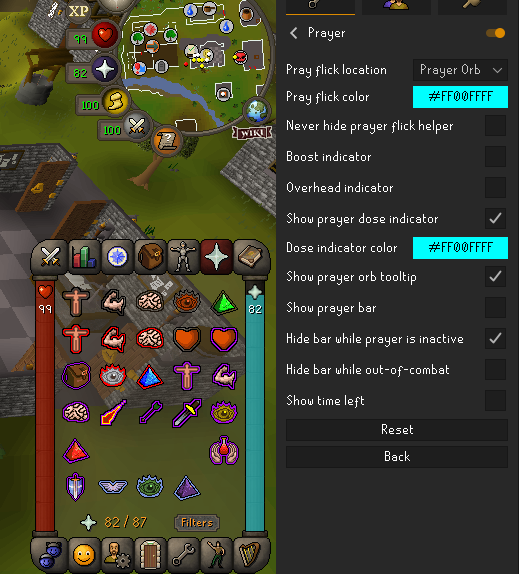
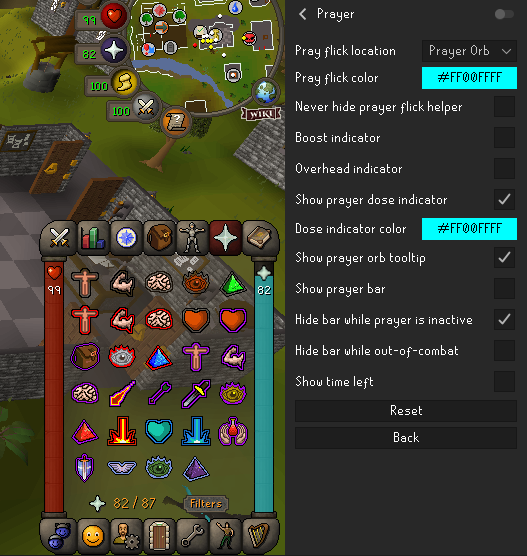
Hey y'all I am not sure if this has been addressed before, I have prayers missing while the prayer plugin is enabled. I dont see any setting that would hide the icons. When I turn the plugin off they come back. Am I missing something? https://imgur.com/St16sU6 https://imgur.com/2nlG1UK
 gilded kayak
you hid them with the prayer hiding feature
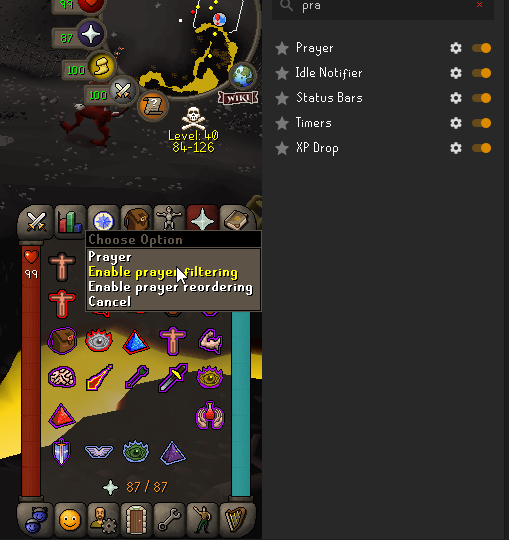
right-click the prayer book and enable whatever setting it's called
tall sentinel
https://imgur.com/H4C7UZV Still looks the same
 gilded kayak
well there's 2 settings there
so if the first one doesn't work i'd suggest trying the second one
tall sentinel
Both are not being used
gilded kayak
enable it...
tall sentinel
They show up now but are opaque https://imgur.com/qHLRmLu
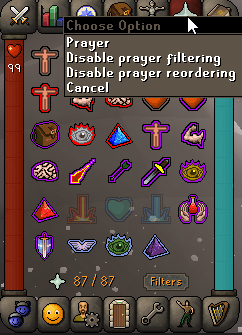 gilded kayak
now right-click it just like you did before when you hid them
tall sentinel
felan you are a lifesaver
gilded kayak
disable the reordering setting after you're done or they'll constantly be movable when you click them
and you'll probably die if u drag your mouse on an important prayer click
 delicate olive
why cant i find leagues animation fix anymore???
oblique plume
because there is no leagues
 brazen spade
This works and I genuinely appreciate it (sorry for the delay). I'm curious why this works/what it does though.
oblique plume
it reuses the same jvm from the launcher instead of making a new one to run the client in afaik
brazen spade
Neat!
 granite patrol
why does it keep unlinking my accounts from the profile
 zealous cedar
are you trying to link the same account to multiple profiles?
granite patrol
No, different accounts to that profile
ive got like 6 accounts that should be linked to that profile
zealous cedar
... is it?
granite patrol
oh it doesnt? it normally works for a few weeks but randomly it resets it
zealous cedar
that wouldnt make any sense, why would it be that way
gilded kayak
we very often have people come in here because they are running multiple clients with the same profile, and it overrides so i assumed this linking system would be intended to prevent that
but if it doesn't then yee haw
 humble oasis
does anyone know what plugin would be causing this? I downloaded some today, this showed up and now I don't know which one it is to get rid of it. It says "Screenshot ultracompost" when I hover

 sand parrot
anybody know what causes chat to get locked/unusable until reloading the client?
vast bone
humble oasis
does anyone know what plugin would be causing this? I downloaded some today, thi...
equipment screenshot
idk about the compost
vast bone
sand parrot
anybody know what causes chat to get locked/unusable until reloading the client?
did you alt-tab while holding down a hotkey from some plugin?
or click off the client
and does pressing that hotkey again fix it?
sand star
humble oasis
does anyone know what plugin would be causing this? I downloaded some today, thi...
Which ones did you download?
 vocal geode
lock window size on, client changing sizes after exit and reopening
gilded kayak
you want to set the size in the game size section, not manually drag it
lock window size is to lock the window so you don't accidentally resize it
 cursive cradle

same time everday my runelite has been crashing and not responding
same thing for regular client
does anyone know how to fix it?
its not my internet
gilded kayak
(yes it is)
this happens to people all the time, sometimes it's during the day so others in their area come in and report the same issue, when it's night time it's less common
general suggestion would be to VPN or use your phone data as a hotspot
gilded kayak
gilded kayak
this happens to people all the time, sometimes it's during the day so others in ...
the confirmation from others is less common, not the issue itself
cursive cradle
my other games are running just fine actually
gilded kayak
that's cool
gilded kayak
unfortunately they don't host runescape
cursive cradle
do you have a fix or not
gilded kayak
no
cursive cradle
then stfu
gilded kayak
lol
mossy swan
felan is saying there is a problem between you and jagex, most likely your internet service provider
gilded kayak
they are already certain it's not their internet so we cant help them
onto the next person 🧘
vocal geode
gilded kayak
you want to set the size in the `game size` section, not manually drag it
worked thanks 🤝
 honest hawk
Hi all, I am running Runelite on a 3080, 16gb or ram and Ryzen 5 5600x but when I enter new areas I have massive FPS stuttering. I believe its Runelite as I can't replicate the issue in the base Jagex client. All drivers are up to date. One example is after taking the boat from Ardy to Brimhaven my FPS drops to 2 for a while, and crashes if I try and do too many actions such as picking from the fruit tree patch. Another is the ladders on the way to Dag Kings, where after each ladder its back to 2 FPS. I had a look for previous people with this issue but most seem to be general fps concerns. Any help would be awesome, thanks!
gilded kayak
i would probably press the new profile button in the  tab, swap to that, obviously enable gpu on that new profile and see if your issue persists
honest hawk
Thanks! Wouldn't have thought to do that
In a new profile, the FPS entering Brim is much more stable. So I suppose this means i have too many plugins, or they're messing with it somehow
Great tip, cheers
gilded kayak
ye the issue definitely is coming from some hub plugin
honest hawk
I'll start uninstalling some and see how we go. Thanks for the quick help ❤️
gilded kayak
protonVPN tends to be the free one that gets tossed around in here, i don't have a paid recommendation
 brave yoke
Is there a way to highlight game objects by id??
gilded kayak
no, game objects aren't like NPCs they are a lot of the time different, it would probably take you the same amount of time to manually mark them as it would to input the IDs (if it existed)
 frank plume
where is lunar i got a question for him only he can awnser some one tell him i want to hear from him plz in game not on disc ty os fam
 thick estuary
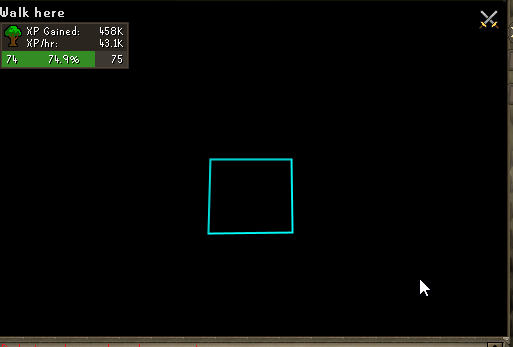
Anyone have any idea where this health bar in the top left of my client could be coming from? It seems to randomly appear, and whatever it's referencing seems to be taking damage. One screenshot is me hovering Kree but that's just a coincidence, second screenshot has nothing under the cursor.
Unrelated, but am I crazy or does the spacing between letters in the text in the top left change randomly? Been staring at the top left trying to get this health bar to appear again and just noticed this. "Walk here" in the second screenshot seems to have extra space between the "h" and "e" in "here", but not always. Sometimes it's extra spacing elsewhere in the text.


 royal thicket
Hey guys, ive got a problem running runelite in IntelliJ community edition - First I had the ultimate edition trail version and after following the wiki for installing everything worked fine. Now, after deinstalling the Ultimate version and installing the community version, the runelite client doesnt load the game correctly. (Im very new to coding, so Im afraid itll be any newbie error.)
WARNING: An illegal reflective access operation has occurred
WARNING: Illegal reflective access by net.runelite.client.util.ReflectUtil (file:/C:/Users/LarsK/IdeaProjects/runelite/runelite-client/target/classes/) to field java.lang.reflect.Executable.declaredAnnotations
WARNING: Please consider reporting this to the maintainers of net.runelite.client.util.ReflectUtil
WARNING: Use --illegal-access=warn to enable warnings of further illegal reflective access operations
WARNING: All illegal access operations will be denied in a future release
Thats a warning im recieving in my runelite run
leaden trail
That's normal
vast bone
That warning doesn't impact anything
leaden trail

GitHub
Open source Old School RuneScape client. Contribute to runelite/runelite development by creating an account on GitHub.
This channel is also for release client support, so maybe move to #runelite
 indigo wolf
leaden trail
That's normal
indigo wolf
leaden trail
That's normal
should that be fixed though? it's still a warning and in the future an error?
leaden trail
That's been like that for at least a year
 spice crow
okay so i have never used jagex launcher in my life and for some reason now i cant log into my account using runelite as i always have. instead i get a this message.
All i was trying to do was hop worlds and this has happened. what can i do to fix?
 humble oasis
vast bone
equipment screenshot
humble oasis
vast bone
equipment screenshot
I restarted the client and it was gone, must have been a glitch
spice crow
humble oasis
I restarted the client and it was gone, must have been a glitch
i did that and sadly it hasn't fixed the issue, maybe restart pc. i can still log in on mobile how ever
humble oasis
spice crow
i did that and sadly it hasn't fixed the issue, maybe restart pc. i can still lo...
oh sorry, i was replying to an earlier thread with a different issue.
round jacinth
spice crow
i did that and sadly it hasn't fixed the issue, maybe restart pc. i can still lo...
Mobile has a different login path that this bug can’t happen to.
You may want to wait it out or upgrade to a jagex account
Before you update to a jagex account, if you play on Linux based OS you may want to check into how you’d run it
spice crow
round jacinth
Mobile has a different login path that this bug can’t happen to.
it worked, restarting the pc seemed to help. 🤝
 violet fjord
Regarding Seaweed Spores interaction with the Ground Items plugin, they spawn and despawn rather quickly. It was throwing me off that they're always green.
I thought I'd put it out here for thoughts before I opened something on github.
Ground Items Despawn Timer with the Pie is either Green or Yellow. Pulled from the RL wiki:
Shows a yellow timer that counts down until items dropped or received as loot despawn.```
The issue is that Seaweed Spores are only shown to the player, and then they despawn. They're shown as green the whole time.
It feels wrong that when the green pie chart runs out, the item despawns, as that's different from normal behavior everywhere else in the game that I can think of, although I could be completely wrong about this.
In my mind, green is when it first spawns, and yellow is a warning that it's about to despawn. Perhaps it should be green for the first 15 seconds and then it switches over to yellow. Or should they immediately show as yellow, due to the descriptions stated above?
I'd love to hear other people's thoughts regarding thisyellow is when it's visible to other players
 wanton trench
Having an issue when using the integrated Wiki button. It's as if the Wiki button is an extended part of the minimap, and my player runs to that spot after clicking the wiki button.
Is anyone else encountering this?
round jacinth
i dont think any1 else having that issue, when was last time you restarted client?
and does it happen consistently?
you may want to see if it happens in safe mode too if it still happens after restarting client
wanton trench
Correction, it's just the top left of the wiki button.
Still happens after restart, trying safe mode.
round jacinth
top left?
wanton trench
When clicking the upper left portion of the wiki button
It acts like I'm clicking through it onto the minimap, but I'm still getting the wiki interraction
Suppose I should try it on the official client real quick lol
round jacinth
yes i understand that so you're clicking around here? if so i cannot recreate
 mossy swan
maybe you have the runelite wiki button disabled and the jagex one has that issue
 timid rock
are you using the wiki plugin or in game setting?
round jacinth
are you on fixed?
wanton trench
On fixed, checking on the wiki plugin vs game setting now
Ahh, I had the in game wiki button disabled, but had the wiki plugin enabled.
With both enabled, or just the in game enabled no issue. Thanks y'all
round jacinth
on fixed i can sorta recreate it but you gotta purposely not click the widget
oblique plume
its cuz jagex doesnt have a good click mask of the button
and our plugin makes it better afaik
 stark idol
Does anyone know what is the actual maximum interactable draw distance?
oblique plume
prob 90 tiles since thats the furthest you can be from something before hitting a load line iirc
stark idol
I believe with 90 you can see that far but can't interact (ran into that a few times doing soul runecrafting)
oblique plume
it can depend on camera angle at far distances
stark idol
where it might allow you to click but your character wont run
oblique plume
that can be from pathing
stark idol
Hmm. I mean from a soul runecrafting perspective its a pretty straight line and with 90 draw distance you can see the entire running route
gilded kayak
 oblique plume
maybe if i ask again tomorrow i can get an answer i like 
leaden trail
Felan can post this tomorrow and get ignored again
 gilded kayak
i was already hoping to honestly
 cloud quest
hey found a weird thing, entity hider doesnt hide people you've reported
gilded kayak
 cloud quest
nice
 cunning light
does someone know what plugiin this is?
 timid rock
cunning light
does someone know what plugiin this is?
timid rock
cunning light
does someone know what plugiin this is?
godbook
cunning light
thank you
 open jolt
leaden trail
Felan can post this tomorrow and get ignored again
open jolt
leaden trail
Felan can post this tomorrow and get ignored again
im getting this suddenly today?
pking and there's lag to the point it's freezing - then crashing my pc
leaden trail
!flow
haughty pumiceBOT
flowchart: Please refer to this flowchart for further troubleshooting.
leaden trail
Follow that^
 cerulean sedge
anyone know how to get your character in jagex launcher?
I try to login using my normal details but it keeps telling I tried too many times
sand star
Do you have a Jagex account?
cerulean sedge
I had to make one
it doesn't use the same email as the one associated to the account because when I tried that it says that its invalid
so I assumed that I can just make a jagex account and link my rs account to it seeing as it doesnt recognise my original
gilded kayak
that is what the process should have prompted you to do yes
cerulean sedge
to link my account to it?
gilded kayak
well technically it depends
what's the reason you're using a jagex account
did you just decide to migrate, is your account new
old accounts can still freely login with username/password, new and migrated accounts have to use the jagex launcher
cerulean sedge
no I have been playing on runelite but its now telling me I cant play on there and I must login via the launcher
gilded kayak
ah did you get "too many login attempts"?
cerulean sedge
I did at one point
gilded kayak
ah then yeah
you make the jagex account, link your normal account to that jagex account
and then once you've done that, you'll see your account in the jagex launcher
and then you click the dropdown menu and select runelite, then click play
cerulean sedge
when I went to manage character to try add my character it even said there I logged in too many times despite that being the first time
 sudden fossil
anybody else have gpu and 117hd not working? i click the button and it automatically turns off like that box that you cannon open
gilded kayak
sudden fossil
anybody else have gpu and 117hd not working? i click the button and it automatic...
!logs
haughty pumiceBOT
To find the logs, you can do one of the following:
- If your client failed to open, click the
Open logs folderbutton. - Open the screenshot directory by right-clicking 📷
Camerabutton, navigate 1 directory up, then open logs folder. - Navigate to
%userprofile%\.runelite\logson Windows or$HOME/.runelite/logson Linux and macOS.
Upload the log files named client and launcher by dragging them to Discord. If there are files prefixed with jvm_crash dated from today, upload them too.
gilded kayak
cerulean sedge
when I went to manage character to try add my character it even said there I log...
if the too many login attempts prompt is persisting to the actual website, that's something you'd have to ask in the osrs discord about, that's out of our area
!new
haughty pumiceBOT
newplayer: If you are new to OSRS, make sure to follow this excellent guide on OSRS wiki: https://oldschool.runescape.wiki/w/New_player_guide. You can also join official OSRS Discord here: https://discord.gg/osrs
gilded kayak
!configuration
haughty pumiceBOT
sudden fossil
config?
gilded kayak
ye
sudden fossil
 gilded kayak
o nice
change that hardware accel back to auto
and it should work
do you remember why you changed it from auto? OPENGL is not the default
sudden fossil
i think i tried experimenting with it few days ago cuz got tired of runelite just closing mid raids or randomly without any errors
leaden trail
Someone else had the same thing a few days ago
gilded kayak
yeah i see that
leaden trail
sudden fossil
i think i tried experimenting with it few days ago cuz got tired of runelite jus...
Do you have any jvm_crash logs in your logs folder?
gilded kayak
i stole your suggestion
leaden trail
Haha
haughty pumiceBOT

Ketner777
A fatal error has been detected by the Java Runtime Environment:
#
#  EXCEPTION_ACCESS_VIOLATION (0xc0000005) at pc=0x03d9c70d, pid=15208, tid=9740
#
# JRE version: OpenJDK Runtime Environment (11.0.4+11) (build 11.0.4+11)
# Java VM: OpenJDK Server VM (11.0.4+11, mixed mode, emulated-client, g1 gc, windows-x86)
...not sure my bios has such option but i will see
leaden trail
But yes probably a coincidence
gilded kayak
would it be wrong to have a green name just remove the #'s from that issue comment
so the embeds aren't always awful
gilded kayak
gilded kayak
would it be wrong to have a green name just remove the #'s from that issue comme...
or ron
leaden trail
Or just get a slash command for the specific issue maybe
gilded kayak
ya but then we'll hit the discord limit again
sudden fossil
leaden trail
Disable "Core Performance Boost"
could intel turbo boost be the same? im watching vid on my bios now to check the settings before going in
 leaden trail
Uhhhh
sudden fossil
its kind of old motherboard
leaden trail
It might be discussed in that GitHub issue, not sure offhand
 stone parcel
Says to try disabling Speedstep in there.
 gritty sable
Ive found a very minor bug. Pretty sure cluescroll helper is a baked in plugin of RL. Having a clue scroll helper dialog open prevents the arrow showing when doing 'Stealing Valuables' in Varlamore
gilded kayak
yes that's a known issue, jagex only supplies one arrow and a lot of hub plugins & the clue helper all use it
it's more common to run into a hub plugin stealing the arrow, but a clue hint can do it as well
 vague rover
hello, my runelite has suddenly crashed
 gritty sable
gilded kayak
it's more common to run into a hub plugin stealing the arrow, but a clue hint ca...
gritty sable
gilded kayak
it's more common to run into a hub plugin stealing the arrow, but a clue hint ca...
Alright thanks. I assume dropping the clue is the easiest way to remove clue helper
vague rover
ahh its owkring again
gilded kayak
vague rover
ahh its owkring again
that error comes from the client being unable* to load the bootstrap, so u might have had a quick internet hiccup that effected your connection to runelite's website
 bleak beacon
Hello,
I'm attempting to identify why I'm unable to see my wife's hiscores are not displaying. We have been messing with this for about an hour. Any assistance is appreciated.
(Account: IN II IC IK Total Level 384)
HiScores is on, along with wikisync and we have reset both multiple times, as well as played on the standard client....
gilded kayak
so
the hiscores that Jagex supplies are only for the top 2 million players in each skill
if she has no skills in the top 2 million, Jagex won't offer any info about her account and the hiscore plugin lookup wont work
bleak beacon
🫡
gilded kayak
if she gets 10 hunter she should show up, after a logout
for example
if she's f2p i'm not sure which skill would be best to train to show up, if she really wants to show up
 uneven thicket

Just wondering does anyone know the file/png name for the line ive circled
just modifying a resource pack
 hoary pewter
I'm looking at swapping to linux. What flavor works best with runelite?
mossy swan
any that runs the appimage i guess
i’ve been running pop without issues, would recommend it
viscid lantern
mint here, would recommend
gilded kayak
it also depends on whether or not you have a jagex account
hoary pewter
I have a jagex account
viscid lantern
bolt runs pretty well for me
gilded kayak
then you'll want to choose something that is well supported by the tools required to run it on linux
haughty pumiceBOT
Using Jagex accounts on Linux is not officially supported by Jagex, but there are some third party community guides to make it work https://help.jagex.com/hc/en-gb/articles/13413514881937-Downloading-the-Jagex-Launcher-on-Linux
gilded kayak
e.g. like Gamma said bolt works fine for them on mint
 hoary pewter
Well shit. Sounds like hoops needing to be jumped
viscid lantern
not if you just grab bolt
gilded kayak
for osrs currently the hoops are well lined up for you
viscid lantern
they have a discord so you can ask there as well
mossy swan
other games work better on linux than windows nowadays though which is crazy
except league because of anti cheat
hoary pewter
I will look into this. Windows 11 is increasing my blood preassure i swear. Need to swap.
mossy swan
i didn’t even bother with w11, jumped straight to linux 
hoary pewter
That's I should've done 😦
round jacinth
idk windows 10/11 is a bunch of "works on my machine"
it keeps working i keep using 🙂
hoary pewter
How well does linux do with multiple clients? I play on alts too
viscid lantern
https://github.com/Adamcake/Bolt have a look there
theres also a discord on there
mossy swan
runelite just works
 hoary pewter
I appreciate the help all.
 merry kraken
is there a possible way to have "key remapping" plugin disable the current keybind instead of just adding an extra mapping? basically trying to completely disable the control key and remap it , currently it just adds the extra mapping so both control and "v" do the same input
 zealous cedar
I dont think so. this maps v->ctrl but wont disable control
merry kraken
ahh trying to find a way to disable control
gilded kayak
this smells like something your keyboards software could do, if you have a keyboard with its own software
merry kraken
yea the issue is i'd want it disabled only at a RL level
basically a conflicting keybind issue 😦
gilded kayak
maybe power toys can do this????
sounds like something it could do but i'm not sure
actually ahk should be able to do this
gilded kayak
depends
hub plugin? could be anywhere between a day and 2 weeks, depending on how busy people are
core plugin could be longer or shorter, depends on how busy adam is
 elder sigil
it's just a plugin i created
sent a pull request about 3-4 days ago
wondering if it's all normal or i did something wrong
gilded kayak
does the pr have an ❌ next to it or a ✅
gilded kayak
then it's just because nobody has gotten around to reviewing it
the ones merged yesterday were from a week ago
elder sigil
what about updates to plugins
how long for that?
still around a week or it's shorter?
gilded kayak
the ones merged* yesterday were updates
new plugins have to take longer since the whole codebase needs to be reviewed
updates can be literally 2 lines
gilded kayak
for example the nylo plugin update actually was 2lines xd
elder sigil
lol
if i were to update the plugin before the pull request is reviewed would that make the entire process any longer?
viscid lantern
it would go to the back of the queue, but overall its probably the same to get that update out
elder sigil
oh welp
gilded kayak
if NFC's new-plugin-review-time gets cut short by something out of his control then u might get thrown to the back of the queue, but in most cases he'll look over all of the queue
gilded kayak
elder sigil
i just need to wait
Oh is your plugin the one adding Lens sound effect(s) to gauntlet?
gilded kayak
you would need to also include some proof you have permission from them to use that clip of them
elder sigil
i can send a screenshot of em sending me the audio file
viscid lantern
if you could ask them so also write that its ok, that would be appreciated
gilded kayak
if it includes confirmation that you (we) can use it then yeah just comment that on the PR
viscid lantern
screenshot of the dm is fine 
gilded kayak
ah yes that's what I meant
gilded kayak
then you'll have to just drop him a re-DM asking for confirmation to use the files in a RL plugin
elder sigil
ok
viscid lantern
just dm them: Is it fine if I use these sound effects in my plugin. and screenshot that+their response
elder sigil
will upload the screenshot as soon as he responds
elder sigil
gilded kayak
then you'll have to just drop him a re-DM asking for confirmation to use the fil...
ok just uploaded the screenshot
 calm falcon
hi guys, im not able to type in exclamation marks ("!") on runelite anymore. therefore cant use any chat commands either. can you help me out?
gilded kayak
install the debug helper plugin from the plugin hub, clock the green icon that appears on the sidebar, and then click display hotkeys
and see which plugin is bound to !
or 1 I guess maybe
calm falcon
solved, much appreciated!
 gaunt wolf
Would it be against the rules for a plugin to change the color of a menu option in pvp?
ornate kite
are there any events for when an actor's healthRatio changes?
zealous cedar
no. but there is one for hitsplats
hoary pewter
So I'm converting from w11 to linux mint. Using Bolt can I copy my settings from the w11 into the bolt runelite folder? Also, which files/folders do I copy over?
 muted mango
You can copy the whole .runelite folder to the other installation.
hoary pewter
Awesome thanks.
 dapper loom
hey, what is the rl plugin that animates items in inv/gear slot like infernal cape?
round jacinth
you wouldn't believe what i found when i searched for animate

 copper cedar
is there a plugin that makes disable placeholder in bank a right click? feel like i had this a while ago
vast bone
isn't that how it normally is?
round jacinth
it is but i think they menu swapped away from it
vast bone
or, if you left-click, it'll open the right click menu
round jacinth
or idk
 desert heath
Having some trouble, trying to import some object markers for tob but my settings.properties file is from 2022 and I haven't been able to find a way to "export" my current runelite settings
round jacinth
if the settings are older than feb 2023 they'll be in a folder called profiles anything more recent than that are in a profiles2 folder
desert heath
So the settings.properties in profiles is from feb of 2023
round jacinth
you do not export, you only import
gilded kayak
can object markers even be imported
desert heath
The guide says to open your settings.properities and import a big chunk of code
gilded kayak
what guide
desert heath
Pastebin
Pastebin.com is the number one paste tool since 2002. Pastebin is a website where you can store text online for a set period of time.
Guide is very old though
desert heath
This is what people say to do in the CA discord
gilded kayak
yeah just do it manually if you fuck it up you'll lose all your settings
round jacinth
we will not support the method you've been given
desert heath
Im not sure how I can manually tag every exhumed there are a ton of spots for it to spawn
round jacinth
ask the people who want to brick your config then
you just tag them as you get run itno them
desert heath
Fair enough, thanks for the help
gilded kayak
btw if u manage to do what they suggest it might break cloud sync also
since that's a lot of markers for a single area
desert heath
Yeah I'm not going to do it
The method clearly differs from the way runelite works now
 vast nebula
When I try the !kc command on runelite it wont display my kc, but it works with stats, andy idea why?
gilded kayak
stats do a hiscore lookup I believe but kc uses the value it has stored
so you'll need to look at the adventure log in the PoH/a ring of wealth or just kill the boss again
vast nebula
Oh so if I've redownloaded runelite it would erase the kc it has stored?
gilded kayak
if when you uninstalled runelite you also deleted some folders manually, probably yes
or if this is a new computer
vast nebula
Its the same computer, but I did redownload the client using the original runelite set up file
gilded kayak
since the !lvl command does a hiscore lookup, you could probably do !lvl ExactBossName as a workaround
 sharp warren
Anyone know why these are showing up twice for me?
 gilded kayak
i don't think it will fix the existing !kc problem but it should output the kc
vast nebula
Thats good enough! thank you!
gilded kayak
sharp warren
Anyone know why these are showing up twice for me?
i would assume because one is challenge time and the other one total time
but i'm not actually sure if that's normal
sharp warren
is there a way to turn it off?
gilded kayak
i dont know!
you could chat filter it out until someone tells you how to turn it off
round jacinth
One is your challenge time and the other is the total time
I didn’t know they both got posted
gilded kayak
same 🤷
gilded kayak
happens
round jacinth
I am single core too
 wet briar
Hey, I'm a web dev by trade, but am trying to learn Java and figured making a RuneLite plugin would be a fun project to help me learn.
How is the "Client" class and its methods created / defined? I see it referenced all over the place in each plugin. I see that it has an interface set up for it, but I don't see where the methods are defined.
I'm also wondering the same thing about "Player".
Just found an older message saying that those classes are built on startup. #runelite message
Correct me if I'm wrong 😅
hollow olive
some code is closed source. the best way to learn how to develop plugins is to follow the dev guide and use plugins from the core client as reference
haughty pumiceBOT
How to develop plugin-hub plugins: https://github.com/runelite/plugin-hub/blob/master/README.md
wet briar
Thanks @hollow olive
I have done a bit of playing around already and basically just step-by-step copied the bare necessities of another plugin until I was getting a UI element rendered and updating on screen. Are there any docs that contain what information is available from the API? Or is it just kind of poke around in the code and read comments until you find what you need?
hollow olive
i'd say look around for a plugin that is similar to what you want and use that to replicate. I haven't done much api reading personally. The barebones (like object highlighting, config options or similar logic) of the plugins that i have made mostly come from some other plugin. Also since this is a support channel, you can continue to ask questions in #runelite or #general .
wet briar
Okay, sounds good. Thank you so much for the info!
 foggy widget
Hello, I'm having problems with Idle Notifier not working in MLM specifically. I have Interaction Notify ON with a 1000ms delay. Seems to work fine everywhere but MLM

 gilded kayak
does it work if you bump the delay to 2000ms
hollow olive
mining should be idle animation, not interaction. check the idle animation box
foggy widget
Okay, that works - thank you very much
What defines an interaction though?
Are you not interacting with the vein?
hollow olive
i think interaction is npc
hollow olive
or "Actor" of some sort. i'm not familiar enough with that
i just peeked and the onAnimationChanged includes the mining stuff
foggy widget
thanks again for the assist
gilded kayak
oh i didn't even see those had been disabled
foggy widget
Fishing seems to come under Interaction
I think that's what led me to believe mining would be the same
 sonic birch
It's because the fishing spots are actually npcs
 silver bane
is there a way i can keep the runelite window the exact same size after i open and close the side panel? i'm having to readjust everytime i do that
silver bane
?
 gilded kayak
ye
silver bane
how would i know the dimensions
gilded kayak
check your runelite screenshots folder
silver bane
is it perhaps this?
 gilded kayak
no that's for when you open/close the sidebar
all the screenshots in your screenshots folder have either the correct client size or slightly smaller, if you right-click on them and click properties
silver bane
yeah thats what i want
gilded kayak
you as well
 fluid furnace
So I noticed Hold Your Ground is no longer compatible. Is there an alternative option? 🤔
gilded kayak
there's a PR to fix it it's just that nobody knows its broken
ur the first person to mention it in here
fluid furnace
That's too bad. It's such a godsend for aerial fishing
viscid lantern
fluid furnace
So I noticed Hold Your Ground is no longer compatible. Is there an alternative o...
it should be back in ~5min
 proven vigil
 cyan plank
Latest master: I am having problems with client.getWorldView returning an incorrect implementation of WorldView:
java.lang.AbstractMethodError: Receiver class dt does not define or inherit an implementation of the resolved method 'abstract boolean isInstance()' of interface net.runelite.api.WorldView.
 mossy carbon
Hi! I'm having problems with plugins not saving their settings 😦 Multilogging with two different account profiles, my main profile that i use to tob with doesent save my tob radius markers. I've tried with only having one client open and then closing it to "save" the settings, but they still keep disappearing. Any ideas?
oblique plume
are you syncing the profile
haughty pumiceBOT
To find the logs, you can do one of the following:
- If your client failed to open, click the
Open logs folderbutton. - Open the screenshot directory by right-clicking 📷
Camerabutton, navigate 1 directory up, then open logs folder. - Navigate to
%userprofile%\.runelite\logson Windows or$HOME/.runelite/logson Linux and macOS.
Upload the log files named client and launcher by dragging them to Discord. If there are files prefixed with jvm_crash dated from today, upload them too.
mossy carbon
oblique plume
are you syncing the profile
I dont dont think i am. Enabled it now from the profiles, you reckon this fixed my problem then? Thank you.
oblique plume
no, ive seen stuff fail to sync and reset like that before
but you could have lost permission to write to your user directory and itl do the same thing
cyan plank
cyan plank
Latest master: I am having problems with client.getWorldView returning an incorr...
it was cache problem
How do you clean cache in intellij between different branches
timid rock
i kinda got this to reproduce with a debugger and hub plugins, but nothing seems to be consuming the keypress. it usually fixes itself when i initiate the bank search hotkey, when i'm at a bank. anyone got any ideas.
fwiw something in BankSearch::layoutBank is fixing the behaviour. Coincidental that BankPlugin::shutdown calls it, which fixed the behaviour for me.
 arctic sand
Hello, I have a PR check that has been hanging in queue since yesterday.
https://github.com/runelite/plugin-hub/pull/6137

GitHub
Draws an overlay to display whether skull prevention is on or off.
I noticed pull request #5012 needed some clean up but was abandoned.
The changes asked for by @LlemonDuck have been applied along ...
zealous cedar
hmm maybe github broke
now it worked
net.runelite.pluginhub.packager.PluginBuildException: skull-prevention-reminder: Missing LICENSE file
 valid coyote
wow, I just had Runelite crash suddenly on me, without doing anything new about plugins or whatever
Could someone look into the client.log to help me find out what is wrong?
round jacinth
share the entire log here and the most recent jvm crash log if you have 1
valid coyote
oblique plume
@delicate bobcat might wana address that missing varbit ^
 timid urchin
hi, I'm having a lot of trouble getting my runelite account to synch up between computers. i have a desktop at home with all my settings on it and i sign in with the same google account but the runelite settings are different. How do i synch the two?
round jacinth
- make sure cloud icon is enabled on the machine you've got the settings on
- make sure you are using that profile on the other machine
 timid urchin
ahhhh
 trail swan
Hello I need some help, I can't add the runelite bot to my discord server and the GitHub part is making no sense to me on how to add it
zealous cedar
the runelite discord bot is private and cant be added to servers
 tall olive
Does anyone know why the brimhaven agility stuff is so inconsistent? Seems to be from the built-in agility plugin so I hope this is the right place to ask. Sometimes I get the tracking time thing, sometimes I dont. Sometimes the tag dispensers get the arrow marker, sometimes they dont. Sometimes the notification goes off when the dispenser changes, sometimes it doesnt. Is this a me thing?
 haughty pumiceBOT
3rdpartyissues: Many plugins from the pluginhub break the client in subtle or not-so-subtle ways, including causing issues like client freezes. We do not support pluginhub plugins because we do not make or quality control them, and do not recommend their use.
Run the RuneLite (safe mode) shortcut, or with a Jagex account, first run the RuneLite (configure) shortcut and tick the Safe mode box, then launch RuneLite via the Jagex launcher.
This temporarily disables the GPU plugin and all hub plugins which will allow you to confirm the issue is caused by one of those plugins and isn't a core RuneLite issue.
If the issue is caused by a hub plugin, you should isolate which plugin it is and then uninstall the plugin.
gilded kayak
try doing some laps in safe mode
tall olive
Thanks, ill try that
 atomic sphinx
I have forever had radius markers set up for hunleff to indicate whether to attack with ranged or magic. however, today he suddenly has this white line inside the radius marker

starting new run and its normal

but anytime i enter now he has that line
vast bone
atomic sphinx
but anytime i enter now he has that line
probably a new feature of that plugin
leaden trail
I'm surprised you can mark Hunllef with that
vast bone
also why is his prayer 8 miles above his head in your screenshot.
gilded kayak
he's really tall
atomic sphinx
likely something to do with the fact I entered the gauntlet that moment
everything seems messed up in that screenshot
and thanks, im pretty sure that was the issue
vast bone
gilded kayak
he's really tall
dating profile vs irl height
 jaunty hare
"A Kingdom Divided" Quest Helper Plugin-descriptions says "farming guild" it should say "woodcutting guild".
 haughty pumiceBOT
Visit Zoinkwiz's Quest Helper plugin discord (https://discord.com/invite/XCfwNnz6RB) for support, issues & feedback
viscid lantern
jaunty hare
"A Kingdom Divided" Quest Helper Plugin-descriptions says "farming guild" it sho...
I am fairly certain thats accurate, but yeah ask in their discord
jaunty hare
viscid lantern
I am fairly certain thats accurate, but yeah ask in their discord
I'll put it over there for them to fix. Thank you.
vast bone
I also would guess it's the farming guild shack
oblique plume
what you really should be wondering is what shack
because there is no shack north east of the woodcutting guild
so it just cant be the woodcutting guild
jaunty hare
Ah the plugin jumped from the current section I'm at to the one ahead you guys are correct
I'm in ruins, not a shack. Indeed I am mistaken.
vast bone
you got zoinked
jaunty hare
Reading is hard sometimes. Big F.
viscid lantern
GL with akd tho 
leaden trail
kinda banger quest tbh
 full fossil
anybody know which plugin is causing my time tracking to mess up within cox? it will always say the olm duration is the same as the whole raid length and the chatbox timestamp for each room is a few seconds different than my teammates
 vast bone
is that message from buchu's plugin cox additions?
or from the game itself
or a different cox plugin entirely
full fossil
this is the issue I'm trying to identify 😄
I'm not sure if there's an in game setting that's messing with it or one of the several cox plugins I have
full fossil
vast bone
is that message from buchu's plugin cox additions?
I do use this if that helps clear it up
vast bone
probably "cox timers"
full fossil
I have cox timers set to "respect ingame setting" and I've tried raids with different settings and the time difference is still there
 brittle harness
how do i import bank tag layouts and not a normal bank tag
zealous cedar
bank tag layouts in core when?
oblique plume

viscid lantern
would be a great addition
vast bone
do it adam
sand star
I think you have that backwards 🙂
viscid lantern
goodluck on the PR geheur
 prisma violet
Anyone know how to fix this? With the Key Remapping plug in, if you set your Keybind to any non number; (Example Prayer book set to "R" You can not left click for about half a second afterwards. You can spam open and close the Prayer book with "R" and you will not be able to left click at all.)
viscid lantern
not seeing that myself, does it happen in safemode?
haughty pumiceBOT
Windows
Run the RuneLite (safe mode) shortcut, or with a Jagex account, first run the RuneLite (configure) shortcut and tick the Safe mode box, then launch RuneLite via the Jagex launcher.
Mac
In Terminal, run:
/Applications/RuneLite.app/Contents/MacOS/RuneLite --configureTick the Safe mode box. Launch RuneLite.
If it's not working, download and install the updated RuneLite launcher from the website link in #welcome. You don't need to uninstall your current version. You will not lose any settings or plugins. Then try running safemode again.
prisma violet
Trying now, very strange
Makes no difference, still not able to left click when pressing a keybind
The weird thing is if I press and hold "CTRL" while spaming a keybind it will let me left click with no delay.
 loud fossil
im having issues with all of my plugins
quest helper disappeared, tried the delete it from plugins folder and restart, didn't work. decided to try to completely remove all files and start over, now not a single plugin will download 😦
haughty pumiceBOT
Delete your %userprofile%/.runelite/cache folder or run this command in command prompt run as Administrator:
rmdir /s "%userprofile%\.runelite\cache"
try running that command
deleting the folder inside that folder might fix your issue
gilded kayak
prisma violet
The weird thing is if I press and hold "CTRL" while spaming a keybind it will le...
that sounds like your control key is inverted honestly
arctic sand
zealous cedar
net.runelite.pluginhub.packager.PluginBuildException: skull-prevention-reminder:...
Thank you, updated and checks passed ✅
prisma violet
gilded kayak
that sounds like your control key is inverted honestly
like its always pressed down?
gilded kayak
that's how your issue reads to me but I could be wrong
when u press it down everything works fine, like it's not being pressed
when ur not pressing it there's an issue (tho I'm unsure if ctrl+R would cause this), like its being pressed
 somber rain
Hi, I have an issue with my runelite freezing occasionally. It has been happening for about a week. I used the debug plugin to dump threads while it was frozen and the sidebar still worked. Do I link logs and threads here?
prisma violet
Mmmm just tested my keyboard on a bunch of sites, it seems to be working fine, it's not showing as inverted but as it should.
Just did a fresh install of RL aswell, only plug in I turned on (other than default plug-ins) was Key remapping with "Remap F keys" activated, same issue still :/
I dont think it's a Runelite problem though, maybe you're right.
oblique plume
what if its also the screenshot key lol
prisma violet
Not set
somber rain
somber rain
Hi, I have an issue with my runelite freezing occasionally. It has been happenin...
ornate kite
my friend said he can get 300fps but mine still seems to be locked at 60fps. can anyone help?
 zealous cedar
its because your monitor is 60hz
you can turn vsync mode off to push it past 60fps anyway
oblique plume
somber rain
you ran out of heap space, i think probably because you have like a million audio clips open, the 267 hub plugins are also a lot
you can increase the allowed heap in here, or uninstall some plugins
haughty pumiceBOT
zealous cedar
lol you have 419 clips open
oblique plume
one off from greatness
brittle harness
vast bone
install the plugin
how do i import banktaglayout tags, i have the plugin
 loud fossil
im still unable to download most plugins. ill admit, my internet is slow, but anything 3mb or larger, i get to 2.4mb or so, and it just stops downloading it, as if i have downloaded the entire plugin. any ideas?
zealous cedar
do you have an example of a plugin you cant download?
loud fossil
quest helper
zealous cedar
oh that is rather large
loud fossil
yes, and i only get to 2.4mb, and it just stops downloading it, but it shows up in my plugins folder, as a tiny file (always different sizes) 2.9mb was the biggest it has been
i was able to get door kicker
zealous cedar
https://repo.runelite.net/plugins/jar/quest-helper_v2AKUq9tEJaXv4Ox3vWXeUNeZR3RmPBCtAELrTzIejM.jar what if you download it from here
prisma violet
Swapped keyboards, same results lol.
ornate kite
zealous cedar
its because your monitor is 60hz
what? I thought it was 144. well thanks 🙂
loud fossil
if this works, with consent, ill kiss you right in your beautiful face
so, i should be able to just drag this into my plugin folders, and restart runelite, correct?
somber rain
oblique plume
you can increase the allowed heap in here, or uninstall some plugins
ill try that, thanks 🙂
zealous cedar
i think so
loud fossil
i tried something like this earlier, so fingers crossed
mossy swan
ornate kite
what? I thought it was 144. well thanks 🙂
make sure it’s set to 144hz
loud fossil
adam, youre an absolute saint
ornate kite
mother fuck...
 loud fossil
im on runelites website, with their plugins, can i download my plugins from here? its saying to do it from the launcher 😦
zealous cedar
no
viscid lantern
ornate kite
mother fuck...
look at the bright side, you just got an unexpected 84hz buff! 
loud fossil
lets say i want the 117hd plugin and the resource packs plugins, how could i download the file like you had linked me, adam?
ornate kite
viscid lantern
look at the bright side, you just got an unexpected 84hz buff! <:HYPERS:91009725...
I was wondering why I've been so bad at fortnite lately. I thought I was just getting too old
zealous cedar
zealous cedar
https://repo.runelite.net/plugins/jar/quest-helper_v2AKUq9tEJaXv4Ox3vWXeUNeZR3Rm...
if you can get the jar id out of the client.log file you can just download it like this
full fossil
sorry post again but I don't know where else to ask, does anybody know why at the end of a raid my "olm duration" is the same as the total raid length? also my chat timestamps for each room are 2t off compared to my teammates every room
oblique plume
wernt you told it was a hub plugin earlier and you agreed
can you show it being wrong in safemode
haughty pumiceBOT
Windows
Run the RuneLite (safe mode) shortcut, or with a Jagex account, first run the RuneLite (configure) shortcut and tick the Safe mode box, then launch RuneLite via the Jagex launcher.
Mac
In Terminal, run:
/Applications/RuneLite.app/Contents/MacOS/RuneLite --configureTick the Safe mode box. Launch RuneLite.
If it's not working, download and install the updated RuneLite launcher from the website link in #welcome. You don't need to uninstall your current version. You will not lose any settings or plugins. Then try running safemode again.
loud fossil
ngl adam, i went to the .runelite folder, and looked around, but i have no idea what you said or what im doing 😅
oblique plume
the client log file
haughty pumiceBOT
To find the logs, you can do one of the following:
- If your client failed to open, click the
Open logs folderbutton. - Open the screenshot directory by right-clicking 📷
Camerabutton, navigate 1 directory up, then open logs folder. - Navigate to
%userprofile%\.runelite\logson Windows or$HOME/.runelite/logson Linux and macOS.
Upload the log files named client and launcher by dragging them to Discord. If there are files prefixed with jvm_crash dated from today, upload them too.
prisma violet
I've figured it out, it was not Runlite. I am running it on a Mini PC and for some reason I had to change a touchpad setting to get my left clicks to register when I am pressing keys.
Kinda random but it works now.
full fossil
oblique plume
can you show it being wrong in safemode
hey i've followed those, and I have the client file
 patent jewel
how come some people can see loot when they leave cave, but i can't?

I'm not sure if it's a runelite setting or something
oblique plume
full fossil
hey i've followed those, and I have the client file
then post the picture of it being wrong in safemode
full fossil
this file is 40k characters what do you want me to post 😄
oblique plume
pictures dont have characters
loud fossil
i am in my client log folder. how will i know which line of text is the jar id for the 117hd client?
would it help if i posted the lines here?
oblique plume
find the quest helper one and reverse engineer that
full fossil
oblique plume
pictures dont have characters
you've lost me also I'm not sure the plugin that the other person mentioned is even the issue
loud fossil
i dont believe the jar file is showing up in the client log for the plugins i have not downloaded
oblique plume
i think they should
you can post the log and i can see
since i cant replicate not being able to download them
loud fossil
2024-06-07 15:58:12 CDT [pool-3-thread-1] ERROR n.r.c.e.ExternalPluginManager - Unable to download external plugin "117hd"
okhttp3.internal.http2.StreamResetException: stream was reset: PROTOCOL_ERROR
at okhttp3.internal.http2.Http2Stream$FramingSource.read(Http2Stream.java:384)
at okhttp3.internal.connection.Exchange$ResponseBodySource.read(Exchange.java:286)
at okio.RealBufferedSource.read(RealBufferedSource.java:51)
at okhttp3.internal.cache.CacheInterceptor$1.read(CacheInterceptor.java:175)
at okio.RealBufferedSource$1.read(RealBufferedSource.java:447)
at java.base/java.io.FilterInputStream.read(Unknown Source)
at net.runelite.client.util.CountingInputStream.read(CountingInputStream.java:47)
at com.google.common.hash.HashingInputStream.read(HashingInputStream.java:67)
at java.base/java.io.FilterInputStream.read(Unknown Source)
at com.google.common.io.ByteStreams.copy(ByteStreams.java:106)
at com.google.common.io.ByteSink.writeFrom(ByteSink.java:126)
at net.runelite.client.externalplugins.ExternalPluginManager.refreshPlugins(ExternalPluginManager.java:247)
at net.runelite.client.util.RunnableExceptionLogger.run(RunnableExceptionLogger.java:41)
at java.base/java.util.concurrent.Executors$RunnableAdapter.call(Unknown Source)
at java.base/java.util.concurrent.FutureTask.run(Unknown Source)
at java.base/java.util.concurrent.ScheduledThreadPoolExecutor$ScheduledFutureTask.run(Unknown Source)
at java.base/java.util.concurrent.ThreadPoolExecutor.runWorker(Unknown Source)
at java.base/java.util.concurrent.ThreadPoolExecutor$Worker.run(Unknown Source)
at java.base/java.lang.Thread.run(Unknown Source)
full fossil
you want the whole thing?
loud fossil
i was only doing it from the moment i tried to download the plugin. would you need before that?
oblique plume
just do the whole thing
full fossil
oblique plume
not you
i asked you to verify it happens in safemode
so far you havent done that yet
loud fossil
ok, this is gonna be huge. so i am sorry xD
full fossil
and i've told you I don't know what that means man
oblique plume
i linked it to you
oblique plume
this isnt a picture showing it being wrong in safemode, so i wouild consider it incorrect yes
loud fossil
full fossil
oblique plume
this isnt a picture showing it being wrong in safemode, so i wouild consider it ...
are you asking me to do a raid again to show that the "olm duration" thing is still broke? i'm honestly not following
oblique plume
yes
hmm i thought it would complain that the file was wrong and spit out what it should be
i guess cuz you deleted them it doesnt even get to that and fails to even start making a file
so you should prob just tether from phone or something
loud fossil
wait, i have the old plugins, i think, should i drag and drop them in the plugins folder, and see if that does it?
oblique plume
yea maybe put them back and check the log again
patent jewel
how come other people can see loot when they leave cave, but i can't?
 loud fossil
nope 😦
which is weird, because its the original file that was in my plugins folder, when it was working 😦
viscid lantern
they might be too old then
viscid lantern
there is another way to get the links but its a bit painful
oblique plume
if i notices theres a new one itl try to dl it
when it does that im pretty sure it writes it to the log and you can get it from there
viscid lantern
oh maybe yeah
oblique plume
but maybe it writes something else and not that specifically
if you post your log we can see
loud fossil
so, i redeleted my entire runelite folder, then restored a different one i had downloaded when i started over with earlier, deleted that one, and restored my original one for the second time... i redownloaded all of my plugins without stopping halfway through, and now i have everything back... idk...
it redownloaded all of my plugins* automatically*
 humble ether
Could that be bannable in some way?
oblique plume
banable from what
loud fossil
WAIT if i had restored the cache, do you think it would have showed up in the logs?
sand star
humble ether
Could that be bannable in some way?
What data do you actually want to sync that isn't synced? Either way what you do with copy/pasting files should never result in breaking the rules
loud fossil
wasnt random, i did it to fix the quest helper
it was one of the things recommended to fix it
oblique plume
deleting your logs wasnt though
loud fossil
never deleted logs lol
oblique plume
i only see it complain about failing to dl quest helper, you mentioned multiple hub plugins
it logs each one it starts up
loud fossil
yes, i had deleted the entire .runelite folder twice, had two seperate ones (actually 3) in my recycle bin. and uninstalled runelite, to start over and redownload everything. once i realized that didn't work, i tried one more time (just in case). then restored my original .runelite folder, and came here. those were the logs you were seeing. then i saw my other .runlite folder in the recycle bin was pretty large, so i decided to delete and restart again (with the large .runlite folder), but when i deleted the one i was on, getting help from you guys, it showed up in the recycle bin, and was slightly larger than the other one. i decided to restore the smaller one, just in case, and it didnt work. deleted it, and restored the original one you guys were helping me on, and when i launched it, it restored all my plugins and filled in the plugins folder for me. maybe that makes everything more clear, but i promise, i never deleted my logs ❤️
full fossil
oblique plume
yes
well since that's a cox addition plugin and it won't show in safe mode I just did a raid for no reason 😄
oblique plume
then its a problem with that plugin
haughty pumiceBOT
Support for hub plugins should be directed to the author of the plugin.
You can find the support link by searching for the plugin in the Plugin Hub panel and clicking the ? button on the plugin, or by right-clicking the plugin in the plugin panel and clicking the Support menu option.
 tidal oriole
Where can I report a possibly malicious hub plugin?
oblique plume
heres fine, but you can use mod mail too by dming @haughty pumice
tidal oriole
Ive tried but my message does not go through :/
oblique plume
if its something the public doesnt need to know cuz it can be like exploited or something
tidal oriole
Message couldnt be delivered
oblique plume
it works afaik, are you sure you dont have dms off
tidal oriole
Ill check, and yes better not public
viscid lantern
@haughty pumice is definitely working
mossy swan
make sure you allow dms from members of this server
tidal oriole
Got it workings, thanks
 raven swan
Hey,
Is it possible to delete some startup plugins?
gilded kayak
you can remove some of the ones you installed on the hub, but not the default ones no
humble ether
oblique plume
banable from what
From OSRS.
raven swan
gilded kayak
you can remove some of the ones you installed on the hub, but not the default on...
why i cant ? alot of default plugins using my cpu-gpu etc i heff to fix optimization problem.
oblique plume
humble ether
From OSRS.
why would osrs care that you are copying and pasting files on a computer that you own
gilded kayak
if your computer is having an optimization problem specifically from the client loading its default plugins, it's time to give up on that computer
leaden trail
raven swan
why i cant ? alot of default plugins using my cpu-gpu etc i heff to fix optimiza...
Just turn them off
But also yeah
gilded kayak
loading the default plugins should take literally nothing
raven swan
leaden trail
Just turn them off
i did but still same problem
leaden trail
The core plugins are almost certainly not actually your issue
raven swan
gilded kayak
loading the default plugins should take literally nothing
i tested my own custom client its change alot
but problem is i dont wanna use that because maybe its not legal.
gilded kayak
if you've generated cheats in your custom client then that would break the rules sure
raven swan
i didnt add any extra plugin so i only deleted default plugins so still break the rules?
bad thing is everyupdate i heffto make another one so thats why i ask u guys maybe 1 chance i can delete legally 😦
oblique plume
the core plugins are perfectly fine
raven swan
oke thnkx all have a nice day..
sand star
Turned off core plugins are doing essentially nothing
humble ether
oblique plume
why would osrs care that you are copying and pasting files on a computer that yo...
Idk. I'm just retracing my steps.
 stuck minnow
Anyone familar with Chambers plugins to know which one should be displaying raid time + personal best? recently had the issue where it stopped displaying at the end of a raid but cant seem to pinpoint which plugin was handling that initially
 dapper loom
round jacinth
you wouldn't believe what i found when i searched for animate
dapper loom
round jacinth
you wouldn't believe what i found when i searched for animate
l0000l ty
 carmine bough
For the last week, I've been getting lag spikes in osrs. Never had this happen before, it happens up to 3 times an hour, sometimes only once every hour or two. Everything just freezes, and then after 8-20 seconds, I get control again. Any ideas? My internet doesn't go off during the spikes, I tried to check packet loss and nothing came up. Updated my drivers too
gilded kayak
!3rd
haughty pumiceBOT
3rdpartyissues: Many plugins from the pluginhub break the client in subtle or not-so-subtle ways, including causing issues like client freezes. We do not support pluginhub plugins because we do not make or quality control them, and do not recommend their use.
Run the RuneLite (safe mode) shortcut, or with a Jagex account, first run the RuneLite (configure) shortcut and tick the Safe mode box, then launch RuneLite via the Jagex launcher.
This temporarily disables the GPU plugin and all hub plugins which will allow you to confirm the issue is caused by one of those plugins and isn't a core RuneLite issue.
If the issue is caused by a hub plugin, you should isolate which plugin it is and then uninstall the plugin.
 west socket
There appears to be a semi-reproducible crash with runelite at the moment for me, whenever I hover something in the sidebar that produces a tooltip, i have a slight chance to crash This is by far the most common with the highscore-lookup when overing to see someone's rank/xp. Arch Linux, jre-openjdk 22. Can provide log files
gilded kayak
what wm
and yes a stack of the crash would be nice
but it might not get looked at with java22, we use java11 for a reason
carmine bough
I'll run in safe mode for a while and report back, thanks felan
west socket
gilded kayak
what wm
Plasma, KDE 6, Wayland
west socket
gilded kayak
and yes a stack of the crash would be nice
do you want me to upload them here just to confirm?
gilded kayak
ye sure
west socket
the crash that generated this stuff was when i was hovering over the hiscore lookups
carmine bough
Hmm no lag spikes on safe mode just yet
carmine bough
So with getting no lag spikes on safe mode, it's probably a downloaded plugin causing my issues? Is there any somewhat easy way for me to ascertain which one it could be without just disabling one by one?
vast bone
you can disable half at a time to narrow it down
carmine bough
True, I can try that. There aren't any known problem plugins for me to keep in mind, are there?
carmine bough
I have more installed then I def need lol but it's weird how it was no issues at all for a while, haven't downloaded any new plugins in over 2 months but yet now it acts up out of the blue, not a fun time lol. Appreciate the help
 sterile thistle
Whenever I try to run ToA with friends I have issues with DCs. It only happens at ToA, and it only happens when using Runelite. Any ideas?
zealous cedar
it could be a plugin crashing? try safe mode
 simple oar
sometimes when i right click and then try to left click the option i want it dead clicks, even if i spam the selection and move around on that option, only until i re right click it, it may work. any idea whats causing this?
zealous cedar
it could be a plugin? try safe mode
simple oar
safe mode?
haughty pumiceBOT
Windows
Run the RuneLite (safe mode) shortcut, or with a Jagex account, first run the RuneLite (configure) shortcut and tick the Safe mode box, then launch RuneLite via the Jagex launcher.
Mac
In Terminal, run:
/Applications/RuneLite.app/Contents/MacOS/RuneLite --configureTick the Safe mode box. Launch RuneLite.
If it's not working, download and install the updated RuneLite launcher from the website link in #welcome. You don't need to uninstall your current version. You will not lose any settings or plugins. Then try running safemode again.
simple oar
also it doesnt happen all the time, its pretty random
could be a couple of days and idk if id last 5 minutes without plugins
 twilit flume
hey lads and lassies i hope everyone is doing well i have a question to ask for gauntlet the whole boss is highlighted and covered in a white overlay for some reason i cant see which styles to change too because it is covering it
zealous cedar
try safe mode?
twilit flume
i will try safe mode adam but would you maybe know which plugin could be causing it
or which one it is
zealous cedar
it could maybe be npc indicators, if not that then idk
twilit flume
ok
haughty pumiceBOT
Windows
Run the RuneLite (safe mode) shortcut, or with a Jagex account, first run the RuneLite (configure) shortcut and tick the Safe mode box, then launch RuneLite via the Jagex launcher.
Mac
In Terminal, run:
/Applications/RuneLite.app/Contents/MacOS/RuneLite --configureTick the Safe mode box. Launch RuneLite.
If it's not working, download and install the updated RuneLite launcher from the website link in #welcome. You don't need to uninstall your current version. You will not lose any settings or plugins. Then try running safemode again.
 rotund fractal
hello is there option to switch between take and attack so if there is items under monster when i click left click my char will take the items not attack monster?
 final axle
Keep your questions to one channel
 viscid kelp

 vast bone
twilit flume
hey lads and lassies i hope everyone is doing well i have a question to ask for ...
vast bone
twilit flume
hey lads and lassies i hope everyone is doing well i have a question to ask for ...
it's the gauntlet plugin. it updated today.
twilit flume
ty my man ❤️
zealous cedar
definitely
twilit flume
adam my main man ❤️
vast bone
I can't wait for the adam podcast featuring cook
round jacinth
Slated to release after cook’s acc he is making content on
zealous cedar
I will do it as soon as he releases any one of the 5 youtube videos he has promised
 wraith cliff
Hey team any thoughts about why Runelite won't work through NordVPN app (with split tunneling to avoid VPN) but will work with NordVPN's OpenVPN connection?
Throws up error: Cannot assign requested address: no further information
gilded kayak
the jvm we use doesn't handle split tunneling correctly basically
gilded kayak
it doesn't work if any apps are split tunneled
wraith cliff
ahh gotcha thanks a bunch ur the goat ^_^
 cerulean barn
lads why has the global chat plugin been removed from off runelite
has the global plugin been removed for anyone else
cerulean barn
ok
vast bone
 devout plaza
anyone know I get discord to display im playing runelite and the time played?
this stuff
 cerulean barn
will the global chat plugin be getting re added in adam
 upper bay
Hello. Hope everyone is don’t great! Has the global chat plugin been removed?
gilded kayak
vast bone
only adam knows I guess
only adam and everyone who read the reason in the commit body
gilded kayak
upper bay
Hello. Hope everyone is don’t great! Has the global chat plugin been removed?
yes it was disabled
 bright canyon
anyone had an issue with rune on amd cards, put my RX7600Xt card in today coming from a 1660 super, ive picked up 100-150 frames all most games and osrs has tanked and can barley run in high loading areas
 vale dome
Do you have gpu plugin enabled?
bright canyon
@vale dome with both gpu / 117 hd its the same i can get decent frames zoomed right in, as soon as i zoom out it tanks