
#runelite
1 messages · Page 299 of 1

 somber aspen
!hw remove the software you have installed from this list
 indigo kilnBOT
Graphical artifacts? Try disabling hardware acceleration: https://github.com/runelite/runelite/wiki/Disable-Hardware-Acceleration
 shut obsidian
i use linux
somber aspen
hmmm typically that doesnt happen on linux. how are you running RL?
somber aspen
which commands?
somber aspen
i don't know what could cause that to suddenly start happening
shut obsidian
anything u could suggest me trying?
somber aspen
this is a chromebook?
shut obsidian
yes
somber aspen
https://github.com/runelite/runelite/wiki/FAQ#Linux-AppImage try these instructions instead
 versed scaffold
isnt hw accel already default disabled for linux
somber aspen
yes
versed scaffold
daheck is this menulibre stuff 
why do they not just say to execute the appimage
why do linux people have to over complicate things then make guides on how to do that
somber aspen
this looks like one of those auto generated spam sites
versed scaffold
yes
shut obsidian
ye im confused to what to do
 charred locust
can you make it not disappear if using other prayers than overheads?
EDIT: Nevermind, unchecking "hide bar while out-of-combat" gave me the desired functionality
 quick folio
we are aware of that one already, if you could remove it from your message so people aren't tempted to go there etc that would be nice 👍
quick folio
but yeah if you could report it on that website that would be appreciated ofcourse
 solid sun
doing it right now
quick folio
!ublock this will prevent thos ads from showing up for you in the future:
indigo kilnBOT
Install uBlock Origin to block phishing ads on Google and other websites
Chrome: https://chrome.google.com/webstore/detail/ublock-origin/cjpalhdlnbpafiamejdnhcphjbkeiagm
Edge: https://microsoftedge.microsoft.com/addons/detail/ublock-origin/odfafepnkmbhccpbejgmiehpchacaeak
Firefox: https://addons.mozilla.org/en-US/firefox/addon/ublock-origin
solid sun
true, but this way i can help spot them and i always watch like 4 times before clicking the link 😛
quick folio
true as well :p
 sand nova
just died to elvarg because someone baited him out of the safespot
last quest on f2p
fuck this
quick folio
wrong channel for that, this one is intended for runelite related talk. You will want to use either #general or #runescape
sand nova
sorry am just malding
thanks for the client tho, i can brainlessly click on bluestuff and my quests are complete
 sacred spindle
that’s more like it
 upper surge
sand nova
just died to elvarg because someone baited him out of the safespot
upper surge
sand nova
just died to elvarg because someone baited him out of the safespot
Isnt it instanced?
 grave wing
where can i find the quest helper?
 empty mesa
!hub
 young yacht
Any idea when the fps uncap on the gpu plugin will be releasing? And will it be raising the cap to 60, or uncapping altogether?
Just curious :p
young yacht
Pog
That was the one feature that would make me switch to the steam client as long as they released more plugins. Now that it'll be on rl I have no reason to switch 🙂 sick
 broken nymph
is there an ETA on the GPU fps uncap update?
broken nymph
aight
shut obsidian
would texture issue and game crashing using linux would it be runelite problem or a linux problem?
 mossy jetty
anyone know why my settings and plugins need to be redone each time i try to play?
versed scaffold
you prob dont have write access to %userprofile%/.runelite
you can delete that and let the client remake it with the correct perms and it should work again
if you have any screenshots you want to save they will be in there
so do that first
mossy jetty
how would that have changed? i have been using rl on the same pc for 2 years and its now an issue
versed scaffold
running as admin at one point
versed scaffold
thats the install directory
you can do rmdir /s "%userprofile%\.runelite in cmd to delete it
 jade cedar
would it be possible to prevent the inventory/prayer/etc tabs from closing if u rehit the F keys on resizeable?
NEVERMIND that available In the game settings wtf
 brisk acorn
is there a plugin to zoom out the minimap?
versed scaffold
no
 surreal gorge
Is there anyway to change runelite settings on the website? I was messing with HD settings and now my runelite wont load up.
versed scaffold
no
indigo kilnBOT
Windows: Run "%localappdata%\runelite\runelite.exe" --clientargs --safe-mode in command prompt
Mac: Run /Applications/RuneLite.app/Contents/MacOS/RuneLite --clientargs --safe-mode in terminal
surreal gorge
Im on mac (M1 chip) and i clicked something i shouldnt have on the HD settings. I clicked something along the lines of MacOS shading with intel or something like that.
 somber aspen
so go and disable the setting?
surreal gorge
I dont know what to do. Ive deleted runelite and redownloaded but it doesnt reset the setting’s
It wont even let me click the settings man it just has that loading wheel
somber aspen
launch in safemode like alex said
and then after that launch in regular mode
and then go into the plugin settings, undo the setting you changed

 quick folio
run that command in the Terminal app
versed scaffold


 upper summit
guys is it true runelite gonna have high fps soon?
 oblique sun
yes
versed scaffold
next release
surreal gorge
Ughh
Guys
Ok so everytime i remove HD in safemode, when i load normal mode up its fine until i try to download HD again, then it keeps doing the same thing as before
But its because of a setting i put on HD
oblique sun
you don’t learn from your mistakes do you
surreal gorge
Is there anyway to just reset all settinga
Settings
No its not that i dont learn from my mistakes i know what i did
oblique sun
just don’t try to download hd again
surreal gorge
Its the setting i put on in HD but i cant even load up HD to fix it, thats the problem
Is there anyway to just reset all settings?
Basically my question is how can i reset the HD settings in safe mode
Because thats the only way i can fix it
 vocal nimbus
In regards to uncapped FPS; how exactly does it internally work Adam? If you can divulge the details, that is. I haven't any experience, but I am curious to learn what's going on under the hood, in layman terms.
 young wadi
vocal nimbus
In regards to uncapped FPS; how exactly does it internally work Adam? If you can...
young wadi
vocal nimbus
In regards to uncapped FPS; how exactly does it internally work Adam? If you can...
 vocal nimbus
Cheers; most of it will be jargon to me, but I'll also look around to educate myself.
 noble knot
lol
 tight pewter
sacred spindle
tight pewter
sacred spindle
Wtf now no one will use Steam
 cloud locust
wow thats huge
somber aspen
for most people their monitor refresh rate will be the limiting factor
but i expect pretty much everyone to be able to get at least 60fps
which is still noticible
 gusty ice
 cloud locust
honestly, 50 to 60 is still a noticeable improvement
 hardy frigate
same
 ocean narwhal
is it possible to have gpu and hd enabled at the same time? its not letting me
cloud locust
your graphic settings might be too high for your hardware if your zoom out drops fps
 cosmic dust
cant use HD with unlocked fps right?
cloud locust
you dont have to. could be default gpu options like draw distance
 uneven glen
Yeah I was curious about that too @cosmic dust
quick folio
ocean narwhal
is it possible to have gpu and hd enabled at the same time? its not letting me
the hd plugin is the gpu plugin
but with extra spice added
 stone radish
can i set a custom cap? like 100 or whatever
quick folio
you can limit it with the fps control plugin
somber aspen
it would be much better to instead configure your monitor to be a specific refresh rate instead
ocean narwhal
quick folio
the hd plugin is the gpu plugin
but gpu is not enabled when hd is on. so unlocking fps in a plugin that isnt enabled wont do anything
 kind sequoia
UNCAPPED FRAME RATE LETS GOOO
stone radish
well my monitor is 144hz for fps games and shit
quick folio
ocean narwhal
but gpu is not enabled when hd is on. so unlocking fps in a plugin that isnt ena...
117 will have to add it to their plugin
ocean narwhal
gotcha
 austere bane
How about if you help us mobile players with a #RuneliteHdMobile please?
quick folio
!mobile
indigo kilnBOT
We will not be making a mobile client.
 versed scaffold
 ocean dew
is fps capped at 120?
 lost plover
ocean dew
is fps capped at 120?
lost plover
ocean dew
is fps capped at 120?
blog says it's capped at whatever you can handle
 wooden briar
ocean dew
is fps capped at 120?
wooden briar
ocean dew
is fps capped at 120?
uncapped
ocean dew
I mean
lost plover
60 FPS, unless you have a display and GPU which supports a higher refresh rate
ocean dew
my gpu is at 5% at 120
 crisp glade
does it not work with 117?
ocean dew
but its stuck there
lost plover
what's your display
quick folio
crisp glade
does it not work with 117?
not yet
 neon thistle
It maxes at monitor refresh rate
vocal nimbus
240 Refresh rate 👀
lost plover
ayy i'm in
 heavy sage
I called it just over a month ago
ocean dew
oh ye its 144 now
somber aspen
gj
ocean dew
is this true fps?
somber aspen
no they are fake fps
 violet orbit
cosmic dust
cant use HD with unlocked fps right?
violet orbit
cosmic dust
cant use HD with unlocked fps right?
yep
vocal nimbus
Lmao
somber aspen
we just change the number in the top right
versed scaffold
we just make the counter a bigger number
vocal nimbus
Big brain
versed scaffold
so it looks 
 ocean dew
I mean I wouldnt consider interpolation fps
heavy sage
Adam i imagine that the 117 HD plugin will allow the uncapped feature in a update?
somber aspen
yeah
 ivory dirge
YO UNCAPPED IS SICK BIG UPS
violet orbit
 neat talon
How come my max fps is only half of my monitor's max?
neat talon
How come my max fps is only half of my monitor's max?
because your computers bad
neat talon
violet orbit
because your computers bad
It's not
 fringe moss
Oh so we can't uncap fps if we use 117hd huh
ocean dew
look if ur monitor is set to 144 maybe
neat talon
ocean dew
look if ur monitor is set to 144 maybe
It is
Why would I ask that question otherwise
ocean dew
look in fps control then
 mortal lava
this is kinda a huge update
 pallid drift
fringe moss
Oh so we can't uncap fps if we use 117hd huh
pallid drift
fringe moss
Oh so we can't uncap fps if we use 117hd huh
Gpu plugin is 117 hd
 little pier
neat talon
It is
little pier
neat talon
It is
do you have more than one monitor and is that other monitor 60?
neat talon
little pier
do you have more than one monitor and is that other monitor 60?
Two monitors, both 144 hz
 zenith sable
mortal lava
this is kinda a huge update
zenith sable
mortal lava
this is kinda a huge update
except its not when it doesn't work on good pcs 😛
ivory dirge
neat talon
It's not
OSRS (and subsequently the core of most RL features) runs off only 1 cpu core so generally it can't extract the full potential of your cpu/gpu, main performance bottleneck around the game
 raven prawn
Check your nvidia control panel to see if you have the vsync set to half
mortal lava
im max render distance and im getting 80-90
zenith sable
ivory dirge
OSRS (and subsequently the core of most RL features) runs off only 1 cpu core so...
hmm
violet orbit
ivory dirge
OSRS (and subsequently the core of most RL features) runs off only 1 cpu core so...
yeah it stinks
zenith sable
so it isn't optimized correctly?
neat talon
ivory dirge
OSRS (and subsequently the core of most RL features) runs off only 1 cpu core so...
It's capped to 72, not dipping below at all
violet orbit
thats why we need the gpu plugin
zenith sable
so its basically rushed, got it
ivory dirge
although if it is hard capped at 72 definitely look into others' advice around vsync
neat talon
It's not a hardware issue
ivory dirge
yeah you might have something weird going on
lost plover
averaging 55 fps on a $3,000 PC
neat talon
I have current gen tier hardware
lost plover
i'll have to look into what i have enabled
ocean dew
look in fps control plugin
neat talon
5800x, 6800 XT
mortal lava
 neat talon
fps control is uncapped
wooden briar
Im getting 60 pretty solid on laptop lol
violet orbit
neat talon
fps control is uncapped
nonono the fps plugin
 grizzled crescent
capped at 72 with i7 8700k @5ghz 1080 ti and 240hz monitor
neat talon
grizzled crescent
capped at 72 with i7 8700k @5ghz 1080 ti and 240hz monitor
Seems like I'm not the only one
lost plover
I take it I should be using FPS Control for fps display instead of ::displayfps
violet orbit
you can try though
 lost plover
well they both have basically the same number i guess
pallid drift
lost plover
well they both have basically the same number i guess
They do.
It’s the same source of getting the number
I believe
quick folio
violet orbit
you can try though
turn off the plugin and turn it back on again, if you swap from hd->gpu or gpu->hd stuff can break, if it only happens on hd then its a problem you will have to report over there
!hd
indigo kilnBOT
Visit 117's HD plugin discord (https://discord.com/invite/U4p6ChjgSE) for support, issues & feedback
violet orbit
mortal lava
https://i.imgur.com/HhUdQ3D.png
what are your settings? I'm at the ge and getting around 60 fps
 sudden gust
this update broke the gpu plugin for me 😢
 delicate marsh
Uncapped FPS for 117hd will be pointless unless you have a 3080 or better tbh due to lack of multithreading
pallid drift
?
grizzled crescent
?
violet orbit
delicate marsh
Uncapped FPS for 117hd will be pointless unless you have a 3080 or better tbh du...
exactly
pallid drift
Many people enjoy osrs without a 3080
grizzled crescent
dont think you need a 3080 lol
violet orbit
i only get 24-40 fps with 117 hd
pallid drift
Osrs is on a 20 year old engine
raven prawn
At 1080 you can easily go past 60 on a 2060 or up
grizzled crescent
i literally have a 1080 ti
delicate marsh
My 1060 barely gets 45 FPS with 117hd
grizzled crescent
i get like 400+ fps on the steam client
raven prawn
2060
quick folio
its an option in the gpu plugin
violet orbit
does the steam client use multi threading?
grizzled crescent
and fps unlock
pallid drift
grizzled crescent
i get like 400+ fps on the steam client
That’s not a 20 year old engine
The Java one is
grizzled crescent
even then
lost plover
can pull 115 fps with the draw distance set to 0, nice
 violet orbit
yo windows xp
delicate marsh
Bro what
grizzled crescent
 violet orbit
this guy knows where its at
mortal lava
why joy emoji?
 dire grail
mortal lava
https://i.imgur.com/x06yxvU.png
dire grail
mortal lava
https://i.imgur.com/x06yxvU.png
what the fuck is that
mortal lava
what?
grizzled crescent
sounds like personal preference
lost plover
0 vs 16 doesn't make an fps diff for me anyway
mortal lava
dire grail
what the fuck is that
why did u say wtf
grizzled crescent
i have a great pc i dont care about fps
dire grail
mortal lava
why did u say wtf
windows xp?
neon thistle
on modern gpus anistropic filtering should have 0 gpu impact
 round flower
Nearest neighbor best scaling
mortal lava
what about it?
 stable locust
There's next to no reason not to use anisotropic filtering
violet orbit
grizzled crescent
i have a great pc i dont care about fps
then why are you complaining then?
violet orbit
lost plover
0 vs 16 doesn't make an fps diff for me anyway
ok thanks i thought it did
grizzled crescent
i did not once complain about fps being a problem
stable locust
Anti Aliasing can cause a dip in fps though
lost plover
how are you guys pulling more than 75 fps 🤔
violet orbit
stable locust
Anti Aliasing can cause a dip in fps though
not that much tho
 crude forge
Yeah I got a 1080 and averaging 75-80 fps lol
 gloomy wolf
I have a 2070 and a 144 hz monitor. Where frames?
stable locust
I mention it because the amount it can dip can be enough to turn off for some people
But if you have any modern gpu you're fine
wooden briar
Finding it hilarious all these people with decent gpus are struggling and im here using a random ass dell laptop getting 60 solid 😆
grizzled crescent
its not our fault
violet orbit
wooden briar
Finding it hilarious all these people with decent gpus are struggling and im her...
same im on a mac
crude forge
I'm fine with my 75-80 fps its much better than 50 but with a 1080 I shouldn't be struggling with osrs
mortal lava
 stone radish
gloomy wolf
I have a 2070 and a 144 hz monitor. Where frames?
stone radish
gloomy wolf
I have a 2070 and a 144 hz monitor. Where frames?
wv hast du und schwankt es oder ist es stabil?
violet orbit
chilling out here
mortal lava
max fps
quick folio
I love your winxp skin snap
grizzled crescent
he fuckin scaled it so tiny just for that
mortal lava
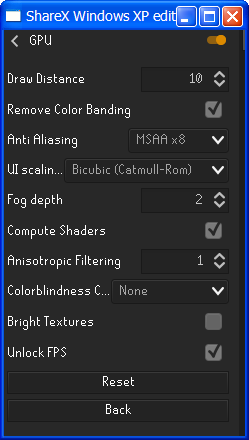 wooden briar
10 draw distance wat
mortal lava
10 draw distance 8)
 brittle flume
is it possible to to uncap fps while using the 117 hd plugin?
violet orbit
no multi-threading
neon thistle
brittle flume
is it possible to to uncap fps while using the 117 hd plugin?
not atm
wooden briar
I get 60 with this (monitor is capped at 60)
 violet orbit
😢
brittle flume
rip
 mortal lava
yeah any draw distance lower than 60 u start seeing huge fps gains
crude forge
the duality of gaming
 severe crown
osrs is different engine
wooden briar
Again runelite/osrs is made for one core processors lol
round flower
im getting 150 fps uncapped with my 10900k and 3080
violet orbit
guys does the steam client have mutli threading?
 severe tapir
getting 144 fps at vorkath, now we just need the option to turn on HD with the unluck
crude forge
Tell that to my 16 core ryzen that begs me for content other than osrs
 modern meadow
you don't
wooden briar
Man some people need to learn to read
violet orbit
esactly
severe tapir
2560x1440
violet orbit
same
severe tapir
HD isn't an option with unluck currently i dont think
quick folio
violet orbit
guys does the steam client have mutli threading?
yup
neon thistle
120fps only used about 18% GPU utilisation on my 3080, can't tell if that is good or not
 lilac elm
Do I win yet?
 violet orbit
quick folio
yup
violet orbit
quick folio
yup
how i wish it would come to mac
neon thistle
Unfortunately it turns my fan on my gpu which I don't like
modern meadow
no he said now we just need the option to turn on hd with the unluck
quick folio
violet orbit
how i wish it would come to mac
they are working on it, can already see they have the mac repositories ready for it on steam etc
grizzled crescent
instead of staring at 50 the whole time
severe tapir
I mean are you guys using stretched mode? I was having massive fps issues at certain % scalings
grizzled crescent
i am
severe tapir
maybe try messing with the % and see if you get an fps boost like i did
violet orbit
with the tools you guys have now would it be possible to use mutliple cores?
violet orbit
grizzled crescent
its not on their end
yeah I was just asking
severe tapir
i have constant 50 everywhere with HD ¯_(ツ)_/¯
grizzled crescent
i wish we could use the engine thats used on the steam client
severe tapir
and now constant 144 with unlock
wooden briar
Thats what the osrs team are doing with adam lol
violet orbit
grizzled crescent
and have runelite features on it
jagex are already doing that
wooden briar
Takes time
grizzled crescent
gonna take forever tho
wooden briar
ground items is probably the biggest thing i'll want
violet orbit
wooden briar
ground items is probably the biggest thing i'll want
didnt they show that in the stream?
crude forge
3 features a month only 6 years until steam client is worth using
 twilit lynx
anyone can help me out ? i cannot use my side menu in runelite, it bugs hard
crude forge
Restart your client
 inland shadow
You were already replied to in another channel
twilit lynx
did that already
delicate marsh
twilit lynx
anyone can help me out ? i cannot use my side menu in runelite, it bugs hard
Turn off msiafterburner
inland shadow
Also don't use cheat clients
lost plover
because then they'll have to decide what goes and it'd be worse than what we already have
violet orbit
crude forge
3 features a month only 6 years until steam client is worth using
what if they have a plugin store
like runelite
mortal lava
jagex are turning runelite into an offical client?
violet orbit
than people would be jumping on features
crude forge
Steam community page for plugins? 👀
violet orbit
yeah
grizzled crescent
they should just allow plugin entires and deem what is fit or not
 south lichen
holy, you wizard @somber aspen
violet orbit
and a whole other mod team just for moderating the community page so that no hacks or malicious software is there
grizzled crescent
so they dont have to do work and this can be sped up
crude forge
I feel like that's way too much work for them to keep watch over to make sure everything going on the hub would be okay for osrs
grizzled crescent
with everyone
crude forge
What with how bad Steam is at mitigating scam and straight doggy doodoo community posts
violet orbit
yeah that would be a piece of cake /s
lilac elm
I mean it's tough, what does Jagex do if they release an update and a community plugin breaks, and the plugin maintainer isn't around to fix it?
stone radish
they do nothing
neon thistle
I suppose they would handle it just like every other developer, nothing
They just give the user the freedom to choose plugins
lilac elm
For some games that's fine, it seems Jagex wants to have control over the plugins though, and ensure they work / are a consistent experience
so 3rd party plugins doesn't quite fit that
neon thistle
Well the users shouldn't be concerned about what Jagex wants
violet orbit
lilac elm
For some games that's fine, it seems Jagex wants to have control over the plugin...
yeah thats the whole reason why the steam client exists
stone radish
best they can do is post a hint in the blogpost under "hotfix" and say problem XXX is a 3rd party client problem
zenith sable
mortal lava
https://i.imgur.com/k2F5fxK.png
love it
lilac elm
It just adds more things for the client team to keep track of, and have to track interactions with for each update
zenith sable
whats the point of uncapped if most computers cant support it?
neon thistle
The best Jagex could do is run a beta client and have a set release schedule
so plugins can be updated beforehand
lilac elm
what if they release an update, and it causes some game breaking issue w/ a 3rd party plugin they didn't catch? Like client crashing or something
 wraith plank
zenith sable
whats the point of uncapped if most computers cant support it?
wraith plank
zenith sable
whats the point of uncapped if most computers cant support it?
for the computers that can support it
lilac elm
lol
wraith plank
if you couldn't hit 50 constantly, the cap didn't even matter to you anyways to begin with
stone radish
they do nothing because that isnt their problem and they said multiple times in the past they dont playtest around runelite. if u crash use vanilla client
thats their stance
 round flower
Damn can’t even fully utilize my 390hz monitor
young wadi
The commit you shared is for the FPS limit plugin. That commit isn't what enables unlocked fps
 desert iris
Any way to unlock fps with HD?
crude forge
No
violet orbit
desert iris
as long as im not at the GE
as with anything

 round flower
Actually running Windows XP??
quick folio
(read the "window" title)
mortal lava
whats wrong with xp?
violet orbit
OSBuddy 😂
mortal lava
im not using osbuddy
violet orbit
mortal lava
im not using osbuddy
im not talking to you, sorry
mortal lava
oh sorry
delicate marsh
mortal lava
whats wrong with xp?
That’s asking for a virus
Xps av stopped being updated many years ago
grizzled crescent
ah
i guess if u dont have higher than 75 fps on the unlock fps
you might be running 32 bit instead of 64
i just realized that i was.....
now i have 120 with my normal settings
grizzled crescent
i just downloaded 64 bit instead
and it updated my 32 bit
and replaced it
kept all same settings
well thats funny
and probably sad
i guess thats what happens you just hit the download button
32 bit is default lol
ez
did u go from hd to gpu
delicate marsh
Yeah they intentionally made it 32 bit for a long time because apparently it “runs better”
grizzled crescent
u have to turn one off first
turn off
restart
then turn on
yea
everything just
stabilized for me
as well
i guess if you have a really good pc
then 64 bit probably runs better
u can on steam client
lol
dont think so
versed scaffold
because it uses steam
wooden briar
🤦🏻♂️
somber aspen
fwiw Jagex has said they plan to make it available as a standalone download
versed scaffold
they want to make it not depend on it eventually afaik
but as of now its gonna be on steam
grizzled crescent
$$$
versed scaffold
because that was a good way to distribute it
probably
and they could test out a different login flow
 median cosmos
is it capped at 100fps?
versed scaffold
which actually allows people getting targeted by login spammers to play the game
 abstract nymph
with fps uncapped my fps seems to bounce from 60-80 back and forth constantly, no matter where i am
not sure what's going on there
grizzled crescent
are u on 64 bit
abstract nymph
ya
grizzled crescent
mine doesnt bounce
grizzled crescent
yea you can get runescape membership much cheaper on steam
depending on your country
abstract nymph
my hardware is pretty dated, with an i7 8700k and gtx 1660 6gb, but still kinda weird how it constantly fluctuates
grizzled crescent
i have an i7 8700k and 1080 ti
abstract nymph
i mean it's a fair few years old by now x) i've been meaning to upgrade for a year or so now but prices are rough
abstract nymph
either way i'm sure i should be able to reach my monitor's 144hz refresh rate i wonder what's stopping it
grizzled crescent
java
abstract nymph
never oc'd
versed scaffold
stock cooler oc 
grizzled crescent
liquid cooler is a must if you want 5+
abstract nymph
i'm very anti tech savvy, feel like i'll be doing something that will do more harm than good
round flower
Noctua
grizzled crescent
a small overclock is barely noticable though
grizzled crescent
@abstract nymph
you could just also not be using ur cpu at 100%
and you just have turbo on
which it will never enable for runescape
delicate marsh
grizzled crescent
you could just also not be using ur cpu at 100%
That’s definitely the case because it only uses 1 core
grizzled crescent
you can use 100% of 1 core
?
ive been oced at max ghz
for 3+ years now
lol
a risk of what
minus 2 years life?
out of like 10?
id upgrade by then
delicate marsh
The only cpu intel made for infinite boost is the 12th gen chips
I personally wouldn’t risk it on anything else myself lol
grizzled crescent
still
even then
you could just force a turbo when playing
and turn it off otherwise
i mean
"really really"
can be argued
it all depends how long you are playing for
or keeping it at max
i never said do it
i said could
abstract nymph
ty for the advice, i'm just not knowledgeable in that area at all, so i'd rather not touch it and play it safe considering i can't really afford for things to go wrong
wraith plank
basically it isn't really your fault or your pc fault
abstract nymph
i mean it's only slightly more noticable for camera movement, so it's not a huge deal but yeah
wraith plank
the game's just dated
grizzled crescent
ye
abstract nymph
just weird to see the performance fluctuate up and down is all
grizzled crescent
its prob the turbo
up and down
the intel boost
not an oc
how well is single core performance of your cpu
abstract nymph
glad it's not just me then x)
wraith plank
yeah it's not just you, dw about it
 primal cairn
anyone have issues with inventory tags plugin? when i turn it on and right click my invent i get no configuration options
sacred spindle
Suggestion: Have it so we can make display icons opaque. When I’m fishing the UI is nice to have up but a bit distracting when in the HD plug-in.
Oh
I see the suggestions channel now
Oh it’s read only
 vapid bane
Osrs players... Somebody help me. Come to Entrana with gear that you can craft full black dragonhide armour set. once you there craft it and trade it to me.. i'll give 50k.
 ocean gyro
I don't think that's a good argument for enforcing a cap without any kind of option for a user to set their own values
Yes, the cap reduces CPU load, but it also makes the game have a higher latency and worse smoothness than a higher cap
 heavy sparrow
vapid bane
Osrs players... Somebody help me. Come to Entrana with gear that you can craft f...
heavy sparrow
vapid bane
Osrs players... Somebody help me. Come to Entrana with gear that you can craft f...
Try asking in the IRC plugin 😉
ocean gyro
many players don't mind having a CPU core maxed out if it helps at all
and it certainly does, especially for users with lower monitor refresh rates
(120fps @60hz is much better than 60fps@60hz)
 austere hollow
rs does not work like modern games
ocean gyro
Part of the game is tick based, but that has nothing to do with the camera movement.
https://www.youtube.com/watch?v=msOWcvoIC8M&t=420s
Increasing FPS on a 60hz monitor between 60fps and 360fps causes the latency to drop from 28.9ms to 17.9ms, and reduces the interquartile latency from 14.9ms to 9.2ms
that's for Fortnite, but it's fundamental to pretty much everything
ocean gyro
Why doesn't it apply to camera movement in OSRS?
austere hollow
i can't answer for sure because the patch isn't public
but the client only polls for mouse changes every 20ms
and a lot of things have to be kept at 20ms to not explode
ocean gyro
I am one hundred percent sure that it updates the camera more frequently than every 20ms with the unlock FPS option checked. I've already proven that with a video recording.
austere hollow
those things are not necessarily attached
ocean gyro
Maybe it can't start and stop motion outside of a tick
austere hollow
gotta ask adam if the patch changes the poll rate
but he probably wants a break now
ocean gyro
Ya
I have to point out though
even if the input processing is completely decoupled from rendering and things like starting and stopping a camera movement only happen on ticks
the smoothness impacts will still be there
it seems like an extremely arbitrary decision to force certain FPS limits based on the monitor refresh rate alone
versed scaffold
its a pretty common practice to limit fps to refresh rate
ocean gyro
It is, by people who don't understand the interactions or who just want to save power. It's not something that we usually do on desktop
somber aspen
when you are dealing with runescape you have to throw most of your preexisting knowledge about how games and computers work out the window
versed scaffold

austere hollow
is the mouse polling still at 20ms?
somber aspen
all of the input polling is still at 20ms
austere hollow
👍
somber aspen
i tried changing it breifly but it didn't seem to impact much and is much easier to just not do it
so in this case, rendering frames past the monitor refresh rate is actually totally useless
ocean gyro
Why?
 umbral zodiac
you will not see an improvement in camera smoothness as the client effectively has an inbuilt input latency of up to 20ms
which you can't avoid by uncapping the fps
somber aspen
somber aspen
all of the input polling is still at 20ms
because of this
ocean gyro
improving framerate improves mouse movement latency even when the bad framerate was already faster than the polling rate of the mouse (e.g. going from 200 to 300fps with a 125hz mouse)
because those delays are added together
somber aspen
im sure that applies to most games or game engines but it doesn't apply to here
ocean gyro
I'm not really here to argue anyway, just confused more than anything. It seems like you've done extra work just to make it impossible for end users to test things or run it differently
fps caps that are different on different systems don't implement themselves
versed scaffold
huh
somber aspen
we don't technically implement the fps cap, we just set the gl swap interval to 1
versed scaffold
afaik the gpu sees it cant draw another frame yet, and so it just doesnt
thats why it caps at refresh rate
ocean gyro
Ah. You can't disable vsync?
somber aspen
he knows that, he's trying to ague that drawing frames which can't be seen help with input latency
versed scaffold
they do in most cases
ocean gyro
I'm a girl, and i'm arguing no such thing
somber aspen
despite the input being independent from frames
versed scaffold
for games not made a million years ago
everyone is a guy on the internet
first rule of the internet
somber aspen
osrs has no concept of input being faster than 50hz and cannot deal with it
umbral zodiac
ocean gyro
Ah. You can't disable vsync?
vsync is a swap interval of 1, effectively
somber aspen
and i can't really change that
versed scaffold
what would happen if we set the interval to 0
umbral zodiac
so setting the swap interval to 0 (permanently) would be disabling it
somber aspen
I could maybe at best split the camera input handling from the rest of the input handling
versed scaffold
other than the gpu catching fire that you eluded to earlier
ocean gyro
Even a toggle between interval 0 and 1 would probably be an improvement
i've never seen interval 1 not add latency, and if it really doesn't then we could prove it with the option
somber aspen
no
we're telling you because we understand how runelite works and how runescape works that it would have no effect
versed scaffold
you can edit the code and recompile it yourself, if you really want
ocean gyro
Ok i will look into
umbral zodiac
ocean gyro
Even a toggle between interval 0 and 1 would probably be an improvement
you would not want that as that would effectively be maxing out your gpu and cpu (well, whichever is the bottleneck). Even if you want a higher fps cap, truly uncapped fps is probably unwise
ocean gyro
My CPU is slower than my monitor, already have that and it works fine - but some friends are running 60hz monitors atm
which is why i was wondering
and looking to experiment
There was 1 other thing i was curious about, which is the FPS instability. Standing on the same spot without any visual change, it cycles periodically between displaying ~120fps and ~200fps - something in the engine causing that?
somber aspen
i don't think so
versed scaffold
gsync does stuff like that
somber aspen
if there are no things changing (like people walking by or something) then it should take ~the same time per frame
versed scaffold
itl flicker between two distinct values
ocean gyro
I had gsync off (because 50fps gsync is terrible) but i turned it back on after i saw that FPS fluctuation and higher FPS. It looked a bit better w/ gsync and didn't change the fluctuation at all
I'l take a frametime chart with sync off

something is happening there
 still compass
i am so hyped that theres an IRC plugin
sacred spindle
visible here as well, also, any idea why I'm not pushing closer to 144+ FPS when my hardware usage is so low?
 ocean gyro
sacred spindle
visible here as well, also, any idea why I'm not pushing closer to 144+ FPS when...
ocean gyro
sacred spindle
visible here as well, also, any idea why I'm not pushing closer to 144+ FPS when...
bottlenecked by one thread on the CPU
austere hollow
capped by your cpu core
ocean gyro

 steady hound
Can someone shed some light on the update?
It says uncapped frames but isn't Java limited to 50?
versed scaffold
it still basically is
inland shadow
How are you getting it to use so much cpu, with the hd plugin mine only sits at 40% load 30 fps 
steady hound
Gotcha. Just checking 😛
sacred spindle
ocean gyro
strange how yours is all isolated to the 1st
 ocean gyro
inland shadow
How are you getting it to use so much cpu, with the hd plugin mine only sits at ...
ocean gyro
inland shadow
How are you getting it to use so much cpu, with the hd plugin mine only sits at ...
you might be GPU limited
ocean gyro
The CPU display depends so much on the exact version of the OS and scheduler that you have, and if stuff like CPPC is on
sometimes it displays a thread being constantly worked on as being 20% on 5 different cores
Hm. I'm getting a stutter which comes at a different frequency depending on the FPS limit. With 60fps, it's ~1.4 stutters per second
With 120fps, it's ~2.7 stutters per second
With uncapped FPS, it's more like 3.5 stutters per second
I wouldn't entirely trust the frametime data by itself, but the game is visually stuttering too. I guess that the magnitude of the stutter is smaller with higher FPS but it's happening more frequently - they're really noticable with 60fps@60hz.
steps to reproduce: Just hold down right arrow key, camera jerks more than once per second
Data concurs with that as well

there is probably something going on engine side here
But first step, reproduce on another system - anyone can capframex 10s of nothing?
with unlock fps turned on
and spin the camera to see if they have those visual stutters as well
 frigid ore
i fucking knew my 144hz monitor would be good for something
this is actually so good
my gpu fan is screaming right now but so good
inland shadow
I wish mine would, neither my cpu or gpu go above like 40%
 leaden forge
Anyone know if the unlocked fps actually removes the cap or is using frame interpolation?
Sorry if it's been mentioned already I didn't see anything scrolling through
somber aspen
it doesn't increase the fps of animations
leaden forge
So it actually is removing the cap and not just doing some fancy outside smoothing
That's unreal, great job
violet orbit
what does the party plugin do?
 tranquil breach
Click the question mark and read it
violet orbit
I did and I dont get it
 tacit vigil
how is fps control's value determined? like, does it average across last 10 seconds, last 1 second, last frame?
somber aspen
I think it averages the last 4 frame times
 shadow coral
versed scaffold
itl flicker between two distinct values
shadow coral
versed scaffold
itl flicker between two distinct values
This is probably a stupid question whose answer is "no", but is there any way to make it always take the higher fps value?
I have one of the new macbook pros, which doesn't have gsync per se, so I can't just disable it. 🙁
tacit vigil
if it's showing the lower value doesn't that mean that it's unable to put out enough frames to reach the higher one?
shadow coral
I don't think so... The CPU/GPU usage aren't particularly high, yet it likes to switch between 60, (rarely 70?), 80, 107, and 120 fps without much really changing. Still, maybe? My understanding of how things work is not the greatest.
 torn onyx
anyone know why my fps drop to 30 after checking the option "unlock fps" normally its 50
got 30fps flat enabling it
tacit vigil
I have this too and my guess it that it's freesync. I can hit 60 fps sometimes if I put on low detail.
too lazy to download the software to disable it and see if it fixes it though 🤷♂️
ocean gyro
shadow coral
I don't think so... The CPU/GPU usage aren't particularly high, yet it likes to ...
Game just does that AFAIK. Frametimes are very unstable on everything i've tried. I'd gotten kinda used to it with the 50fps lock, and unlocked fps certainly makes it a lot smoother regardless. See #runelite message
shadow coral
shadow coral
I don't think so... The CPU/GPU usage aren't particularly high, yet it likes to ...
Update: I just found out I can lock the display to a one of a few options, the highest being 60hz (nothing above that though, thanks Apple 😠). Interestingly, the game doesn't seem to realize I did that and still gives fps > 60, but it seems to be much more stable. Apple jank 🤌
somber aspen
try restarting RL after changing what the display is locked to
versed scaffold
i got mine to report 151 once even though im only at 144
so i think it just is a bit overzealous at times displaying what it thinks youre getting
shadow coral
somber aspen
try restarting RL after changing what the display is locked to
That works; now I get a stable 60.
If only Apple would let me lock it to something above 60...
ocean gyro
Yeah, they really should
torn onyx
got 75hz monitor but dropping to 30 from 50 capped after enabling it. i restarted my client already still the same. imma stick capped for now
 bronze seal
Getting like 90 fps avg on a 144hz monitor at motherload mine. Rtx 3080
inland shadow
Seems pretty good to me
bronze seal
Yea no doubt it’s really really noticeable. Thank you guys for all the hard work. This is a game changer
 torn onyx
im having problems hitting over 35 fps with the fps unlock checked im running a gtx 2060 when its off i hit 40-50
 pastel prairie
hey
 hasty scarab
i dont see the option for uncapped
 loud dock
Yea I'm also having the issue were when turning on unlock fps it lowers my fps to around 30-35.
violet orbit
torn onyx
anyone know why my fps drop to 30 after checking the option "unlock fps" normall...
i have the same issue
tacit vigil
hasty scarab
i dont see the option for uncapped
you don't see "unlock fps" in "GPU" plugin?
violet orbit
shadow coral
Update: I just found out I can lock the display to a one of a few options, the h...
the new macbooks have higher refresh rates
shadow coral
violet orbit
the new macbooks have higher refresh rates
Yes, but they change to reflect the content you're viewing. You can lock them to one of a few refresh rates if you want to, but 60hz is the highest you can do that with even though the displays can go up to 120hz.
violet orbit
shadow coral
Yes, but they change to reflect the content you're viewing. You can lock them to...
but wouldn't it display the higher fps?
if the content is 120fps wouldn't it display 120fps
shadow coral
Ideally yes, but sometimes the display gets confused and still lowers it
violet orbit
also, is anyone's frames dropping to 30fps when I set the frame rate to unlimited? And im on mac
and its a stable 50fps without
 north flicker
what's chat command for rooftop laps?
tacit vigil
"draynor", "canifis", "al kharid", etc.
probably with !kc
so !kc canifis for example
 hearty escarp
does anyone know the ideal settings for 117's HD to make it look extra pretty
so many settings 😄
quick folio
!hd this server will be able to help with that:
indigo kilnBOT
Visit 117's HD plugin discord (https://discord.com/invite/U4p6ChjgSE) for support, issues & feedback
hearty escarp
cool thanks!
 shrewd yarrow
why does the kitten tracker plugin suck lol
it's just wrong always until my cat sais something or i manually check it myself
quick folio
the plugin isnt magic, it needs an interaction with the cat to know when to start tracking etc
shrewd yarrow
i get it needs to sync, but you'd think once would do it since it's not changing at varying speeds and i'm not logging in / out
but within 5 minutes it is unsynced
 grave valley
Is fps plug-in good for pvp
quick folio
shrewd yarrow
but within 5 minutes it is unsynced
!hubsupport then I suggest reaching out to the author of the plugin
indigo kilnBOT
Support for hub plugins should be directed to the author of the plugin. You can find the support link by searching for the plugin in the Plugin Hub panel and clicking the ? button on the plugin.
shrewd yarrow
aight
 buoyant wigeon
 tacit vigil
Never heard of anything like this but you could write a plugin to expose that information.
 upper acorn
Hello, do you have experience run runelite on linux ?
upper acorn
oblique sun
yes
is it running without lags and issues ?drop fps and so...
upper acorn
i am just thinking to instlal linux thats why iam sking
rly ?
skyrim ?
and withcer 3 ?
is there posibility to help and learn coding with runelite ?
shit..
where should i start to learn it
 random sundial
why is my ui looking like this
 oblique sun
all the hub stuff has to be open source yeah
 sinful inlet
Runelite mobile app with some of the features added to the game would be epic
The current osrs app is complete shit for most tasks
indigo kilnBOT
We will not be making a mobile client.
sinful inlet
Ahh rip
ivory dirge
The "GIMP Tracker" plugin on plugin hub has some of this functionality, but maybe not all of the data you want. "Status Socket" had a similar goal, of being a generic API, but some pvp-related events were left in a buggy state, although it has a bunch of other working events (I'm not sure how use-able it is tbh but it would definitely be a solid base rather than making something like that from scratch)
 vast peak
is there gonna be uncapped fps for 117 HD?
ivory dirge
You didn't hear it from him, but 117HD is built on top of the GPU plugin which is where uncapped fps was implemented, so I'd imagine we will see it eventually ITS OUT, under general settings
versed scaffold
its been a thing for an entire day
like he updated it prob <hour after we released
ivory dirge
ooh wow it is already out, my bad for misleading
I expected to see it at the bottom not in general settings whoops (though that does make sense lol)
@vast peak it's in general settings on 117hd
vast peak
Oh wow it is
 echo marlin
how is this even possible? i thought 50 was the highest it could go..
versed scaffold
 echo marlin
runelite mobile next? 😋
indigo kilnBOT
We will not be making a mobile client.
echo marlin
a man can dream
violet orbit
echo marlin
a man can dream
why? just use the c++ client
versed scaffold

violet orbit
its not like your phone is 4k 144hz you dont need all that stuff
and even even if you managed to run runelite on mobile the cpu and gpu is :concern:
quick folio
and jagex is planning on releasing the steam client features on mobile as well, just that tiny bit of QoL is all mobile needs imo
ivory dirge
Agreed, theres only so much extra ui you can reasonably include on mobile
echo marlin
its the gpu plugin i want the most
quick folio
mobile already has a "gpu plugin" allows full uncapped fps. and drawdistance will be a part of the steam client features once they get ported over
echo marlin
dont see how thats relevant but ok
ivory dirge
the steam client features are being ported over to mobile
echo marlin
oh damn are they making steam feature parity with runelite
ivory dirge
Unlikely it will ever include everything unless they add some kind of community plugin hub, but yeah that's their goal
echo marlin
look, it was a little joke about how unlocking the fps wasnt going to happen
and now it has
i know runelite isnt coming to mobile
 near parcel
Would a plugin that shows a timer counting down to your next attack be possible? Based on the attack speed of the equipped weapon? I like to flick my prayers on right before I attack, and when using slower weapons I can't always time it right.
indigo kilnBOT

Old School RuneScape
In this blog post we talk more about unofficial third party clients and the game's stance on specific features.
near parcel
Aw bummer
Oh well. It wouldn't be that useful, just using weird low level weapons again on my GIM is making me think about it.
quick folio
your own weapon wouldnt be right?
inland shadow
The wording is vague
near parcel
Can't master the timing of the battleaxe lmao
inland shadow
It just says 'Attack counters' in general
and 'Next attack prediction (timing or attack style) '
near parcel
Yeah it's a gray area and I'm sure Adam wouldn't go for it
I could see it being on the Plugin Hub but might cause some backlash from Jagex, not sure
 prisma matrix
I mean there's already a plugin (built in I believe) that shows ticks on the prayer icon
so changing its speed to match the current weapon's attack speed would be the same legality
ivory dirge
Visual metronome is another good one to do that, you can set it to cycle through e.g 4 colors, so if you started attacking on red (with a 4t weapon), every other attack comes on red
it's just a consistent visual metronome, your attacks wouldn't always be lined up on red
yeah you can change the color cycle to be more or less, i forget if it supports 6 though, i just use it with 2 all the time
fwiw it can be a bit... visually aggressive? I personally set my 2 colors to a dark grey/light grey and put it beside spec energy so it's very subtle (i play on fixed so that area is just grey ui)
wowee it supports up to 10 color cycles lol
yeah thats true, i personally prefer not to always be turning plugins on/off though so i prefer just making it subtle but yeah that works for sure
 junior ivy
Anyone know the runelite overlay for ham chests for the keys
violet orbit
wouldnt it be cool if there was a way to change the skybox color after some time?
 wild monolith
indigo kilnBOT
wild monolith
indigo kilnBOT
Visit 117's HD plugin discord (https://discord.com/invite/U4p6ChjgSE) for support, issues & feedback
 haughty mason
er
 pliant moth
Hello. I noticed the loot tracker groups together drops from deaths and kills in the Gauntlet. Anyway to separate the two?
austere hollow
afaik there isn't
vocal nimbus
It's been suggested on Github but as far as implementing, I don't think anyone has tried or done it
pliant moth
alrightt, thanks for the info
versed scaffold
i feel like i remember someone trying at one point
maybe it was only them asking for it to be done
or it was for screenshots
lemee see
pliant moth
corrupted gauntlet and regular gauntlet loot are grouped together too
pliant moth
looks like it, yes - its under "The Gauntlet"
versed scaffold
nightfirecat make a pr for the separating failed at least
so it is something in the works
its been a couple months though
i suppose you could comment on the issue showing your support
could revive the PR a bit
versed scaffold
reviewed and aprooved
theres a lot of PRs out there
and only one adam
so showing your support for something would help a decent amount in getting it noticed for him to priortize
also the fact that it was nightfirecat that made it
hes good about making well done PRs and adressing feedback
pliant moth
alright i commented on it, idk anything about how the dev process works, but i guess Adam is the admin of runelite code
 proud nymph
I just joined because I have a question and google didn't return me any good answers;
Is it possible to change the client's time format from 24-hour to 12-hour? For example, like the timers
versed scaffold
if there is itl be in the respective plugin
proud nymph
ah i found it, thank you anyways
 pure schooner
Does anyone know how to change the text colour of divines run out, imbued heart ect.
versed scaffold
force recolor plugin on the hub can do that
vocal nimbus
Is low detail supposed to remove the removes entirely with it's "Hide lower planes" option checked?

Start of seers village agility course.
somber aspen
yeah it can, sometimes
vocal nimbus
Jarring to look at; good thing im done with agility courses. and i'm only doing this for a clue step
It's a bit of a.. drag when the lower planes option looks nice in some places, but in others it just eats FPS
And by drag I mean, I'd like to keep it off, but it's switching it on and off constantly
pure schooner
Thanks alexsuperfly
vocal nimbus
Chambers and the POH being suspects but oh well.
 sly quest
hey any idea why runelite won't launch? for me
versed scaffold
describe wont launch
sly quest
uhh i click it? it loads and nothing happens
sly quest
nothing happens
versed scaffold
run "%localappdata%\runelite\runelite.exe" -c -v --console -- --debug in cmd and show what it says
sly quest
may I know what cmd is?
sly quest
let's gooooo

 wintry rune
question so where do i put in a suggestion on a plugin to be made?
versed scaffold
wintry rune
do i have to go to the link?
versed scaffold
what
wintry rune
the github in suggestions
versed scaffold
did you read what it says
sly quest

 versed scaffold
ye
sly quest
kk
wintry rune
im confused opn exactly how to put in the request i just trying to see if we could get a skill specs voice overlay that is like the c engineer one you currently have
versed scaffold
prob ask the guy that made the c engineer one
he could likely drop those clips in pretty easy to his existing plugin
wintry rune
ok thanks
versed scaffold
with skill spec's approval of course
wintry rune
it says m0bile btw by the plug in is there any particular way of getting in contact with him?
indigo kilnBOT
Support for hub plugins should be directed to the author of the plugin. You can find the support link by searching for the plugin in the Plugin Hub panel and clicking the ? button on the plugin.
versed scaffold
that typically links to their repo and you can make an issue there
wintry rune
ok ty
sly quest
versed scaffold
that typically links to their repo and you can make an issue there
ty it worked
versed scaffold
nice
torn onyx
do guys know the plugin where u can remove ground elements(dont know the term) by inputting the object codes? like removing all ground elemnts in corrupted gauntlet and turn the floor completely black. Couldn't find it in my plugins anymore and forgot the name.
inland shadow
I believe it was removed because people were abusing it
torn onyx
ohh i see makes sense now, thank you
 hearty harness
is there a way to move those notifactions somewhere else
they always appear on my inventory so if I am low health I cant eat
ocean gyro
Hey dudes, i figured out the stutter that i (and friends that i asked to test) were getting. Been toggling stuff on and off for the last couple days and i stumbled on it kinda by accident

orange = stretched mode plugin turned on
green = turned off
some kind of problem with the plugin?
as a side note, game is ridiculously smooth now
hearty harness
can I move inventory windows higher?
tacit vigil
no, but you can make it bigger with "stretched mode" plugin
hearty harness
why I cant move it
like it would start from top of the minimap
notifications block inventory and it sucks
and I cant move notifications because windows 10
tacit vigil
I don't think you can do much about that other than disable runelite from sending those popup notifications
(should be "enable tray notifications" in "runelite" plugin)
tacit vigil
You could try "request focus" "force"
idk if that meets your need, if not there's nothing else I can think of
hearty harness
what
tacit vigil
in "runelite" plugin. it makes the client pop up when a notification goes off.
tacit vigil
in runelite plugin under "notification settings"
 crystal viper
There's a hub plugin called RL Tray Notifications that creates native notifications and lets you choose where you want them.
oblique sun
wait how is that possible
sacred spindle
I can't believe people use this over the official, secure Jagex client... The plugins are nothing but gimmicks at best and buggy trash at worst...
oblique sun
ok 
 timber jungle
Are we able to re order prayers again? I see some videos on YouTube with people who have prayers switched around but not sure if its runelite or not, out of town with no pc so I can't check myself.
tacit vigil
runelite does not allow that, as it is against jagex's rules
oblique sun
!statement are you sure prayer is too?
indigo kilnBOT
Old School RuneScape
In this blog post we talk more about unofficial third party clients and the game's stance on specific features.
tacit vigil
yes
 oblique sun
oh yeah it’s both
tacit vigil
Also, if it was allowed, someone would have done it years ago.
that is the most compelling piece of evidence to me 😛
quick folio
I think it was removed when that statement got released as well 
ocean gyro
Green = stretched mode enabled, 0% stretch
Orange = stretched mode enabled, 1% stretch (anything 1% or above causes stutter)

 stray fossil
naive question -- is there a plugin that makes the minimap zoomable? or is that even possible
let me take this to #support sry
quick folio
nah #runelite is better suited for that question
there currently isnt a plugin for that
 civic zephyr
ocean gyro
Green = stretched mode enabled, 0% stretch
Orange = stretched mode enabled, 1% ...
civic zephyr
ocean gyro
Green = stretched mode enabled, 0% stretch
Orange = stretched mode enabled, 1% ...
you mean the resizeable scaling setting?
yeah but u mentioned a %
 lethal light
weapon animation replacer seems doesn't work right. there is black dhide body but no chaps and vamb
tacit vigil
lethal light
weapon animation replacer seems doesn't work right. there is black dhide body bu...
Odd. You're not f2p, are you?
lethal light
i am f2p
tacit vigil
You have to search by item IDs on f2p.
 quick folio
2503 body
2497 chaps
2491 vambs
lethal light
thanks, gamma
tacit vigil
I like this website (don't hurt me gamma): https://www.osrsbox.com/tools/item-search/
lethal light
where do you find codes
quick folio
on the wiki
lethal light
oh
quick folio
but that will work as well
lethal light
worked tyvm
is it possible to change my bronze arrow to green aura like crystal bow?
tacit vigil
No.
lethal light
shoot that would be cool
tacit vigil
Yeah. I want it so I can cast fire sure instead of a lame Trident
lethal light
any cool range weapon suggestion? tired of staring at my maple shortbow lol
quick folio
25867
tacit vigil
Dark bow and cbow are my favorite. But maybe fixed device or event rpg could be fun? Not sure what attack animation you'd set.
Snowballs have a fun animation.


 versed scaffold
tacit vigil
I like this website (don't hurt me gamma): https://www.osrsbox.com/tools/item-se...
versed scaffold
tacit vigil
I like this website (don't hurt me gamma): https://www.osrsbox.com/tools/item-se...

versed scaffold
ocean gyro
Green = stretched mode enabled, 0% stretch
Orange = stretched mode enabled, 1% ...
this is interesting, some other guy has been saying that if he has stretched mode on he lags real bad but that didnt make sense to me.
 keen cedar
Did they nerf the chance to get a marks of grace at Canifis?
versed scaffold
no
 soft mortar
Is there currently a plugin that lets you save different Runelite client sizes/positions and quickly switch between them?
versed scaffold
the profiles plugin would prob do that
it switches entire settings profiles i think
but ive heard that ahk is really good at resizing windows and tabbing between them
if thats all you want to do
soft mortar
I want to easily position my client or multiple clients when switching between doing stuff just on my main or also playing alts