#runelite
1 messages · Page 143 of 1
 ancient sonnet
ancient sonnet
ancient sonnet
I can change the name in the plugin without it saying it’s a new plugin yeah?
The bot
 elder reef
I'm using snapshot in the build.gradle on line 30 if thats what you're referring to and thats still not showing dev tools?
If this isn't the change I need to make can you give me more details please?

 half umbra
That's not the RuneLite snapshot
elder reef
Ok what is the runelite snapshot?
Where can I find it, what change do I need to make to be able to use dev tools again?
 versed scaffold
elder reef
I'm using snapshot in the build.gradle on line 30 if thats what you're referring...
versed scaffold
elder reef
I'm using snapshot in the build.gradle on line 30 if thats what you're referring...
scroll up
elder reef
so what line 16 need to set the runeLiteVersion to = 'SNAPSHOT' or '1.0-SNAPSHOT'?
It wont build now
versed scaffold
s/release/snapshot
elder reef
Could not find net.runelite:client:s/release/snapshot.
elder reef
versed scaffold
`s/release/snapshot`
wont compile with that
 oblique sun
alex tries to be smart
alex hurt itself in confusion
 pallid drift
lol
pallid drift
they literally also typed what you said
versed scaffold
thats funny
pallid drift
if you were using runeLiteVersion=latest.release, you can do latest.snapshot
or use the real hard value found in pom?
elder reef
latest.snapshot is just downloading loads of shite
versed scaffold
well it has to get the latest snapshot
pallid drift
1.10.46-SNAPSHOT would also be the same as latest.snapshot
elder reef
pallid drift
1.10.46-SNAPSHOT would also be the same as latest.snapshot
Thats worked thanks. I tried latest.snapshot and that didnt compile either
versed scaffold
hmm, they should be identical
elder reef
So everytime I want to use dev tools I need to find the explicit snapshot version and set it to that on line 16 in the build.gradle, got it.
@pallid drift where do you find the explicit version to use please?
versed scaffold
its fixed next release
pallid drift
i look at currentt version of the release client add 1 to the end and add -SNAPSHOT
then search for that in the disc
versed scaffold
lol
pallid drift
 versed scaffold
just look at master
versed scaffold
 pallid drift
yea
versed scaffold
its just right therer
pallid drift
read the pom too
elder reef
Ok great thanks for your help guys
ancient sonnet
updating that icon now, PR should be up in like 5
half umbra
Just be ready for the "SMH Dom" pings if it does generate support traffic 😛
ancient sonnet
all good, I said it might
Assuming Jagex didn't fuck something up (that's usually a mistake) this update should just "work"
I need some nerd to download and test it >:(
Get a streamer on it
half umbra
Sorry I'm the wrong kind of nerd to help with that
ancient sonnet
Yeah I had someone complaining about the perilous moons regions being visible in cam torum a couple days ago
 solemn ermine
is there a way to get bank tag fuzzy matching to not start creating extra slots when the item charges change?
half umbra
ancient sonnet
Yeah I had someone complaining about the perilous moons regions being visible in...
👀👀
ancient sonnet
-1
half umbra
No no the tiers are gone for me sorry
 lunar fog
oblique sun
lunar fog
oblique sun

 proud sonnet
ancient sonnet
proud sonnet
ancient sonnet
The name on the Plugin Hub is still showing Undying Retribution Timer. How can I change that to be Last Stand Timer?
 sonic grotto
not sure if i'm in the right chat, but does anyone knows how to fix this? i would like to get started into making my own plugins.. see the picture below (got it from internet but i have the same issue)
 half umbra
ancient sonnet
The name on the Plugin Hub is still showing Undying Retribution Timer. How can I...
half umbra
ancient sonnet
The name on the Plugin Hub is still showing Undying Retribution Timer. How can I...
I'm not sure but it looks like your description still says description = "A timer to keep track of undying retribution cooldown"
Let me take a look again
half umbra
sonic grotto
not sure if i'm in the right chat, but does anyone knows how to fix this? i woul...
Follow the build guide on GitHub
sonic grotto
half umbra
Follow the build guide on GitHub
do you mind giving me the link just to make sure?
ancient sonnet
I can't change the runelite-plugin.properties file without the bot saying it's a new plugin?
half umbra
ancient sonnet
The name on the Plugin Hub is still showing Undying Retribution Timer. How can I...
It should just be PluginDescriptor, maybe you're running into something being cached?
 half umbra
ancient sonnet
I can't change the `runelite-plugin.properties` file without the bot saying it's...
half umbra
ancient sonnet
I can't change the `runelite-plugin.properties` file without the bot saying it's...
I don't think this is true? People change the author field without that happening
ancient sonnet
alright I'll change that and push
 frank bone
who names their windows user after their cpu
half umbra
sonic grotto
not sure if i'm in the right chat, but does anyone knows how to fix this? i woul...
Why are you posting an image from a botting website here?
ancient sonnet
now it's on gamma if the plugin doesn't work, they merged it 😃
 hasty fulcrum

 quick folio
I merged a name change!
hasty fulcrum
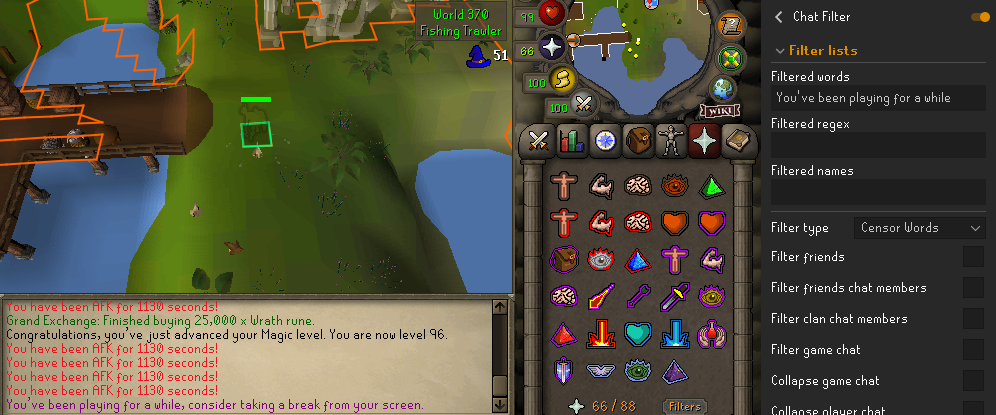
is there any plugin to stop seeing this? 😂
quick folio
uuhm, great question
you could try adding it to the chat filter maybe, no idea if that would work for that one
hasty fulcrum
will find out in 4 hours! 😄 ty
 stone lichen
Did you ever figure this out?
ancient sonnet
This is live now
 oak garden
stone lichen
Did you ever figure this out?
oak garden
stone lichen
Did you ever figure this out?
nope
hasty fulcrum
i dont mind that message because it's actually useful
chat filter didnt seem to work on the former message
 versed scaffold
maybe its not a game message
 hushed patrol
does that work with colored messages?
quick folio
well if it was gonna work you would have to enable game chat filtering
versed scaffold
perhaps the comma is breaking it
ohh
yes
that is sort of crucial

ohh hey
quick folio

 feral hornet
Is there a plugin that can hide the high alch animation? everybody around with golden god is a bit of an eyesore
frank bone
No, worship them
 magic shoal
No, insult them as they pass by
 green holly
ancient sonnet
This is live now
green holly
ancient sonnet
This is live now
ty!
hasty fulcrum
quick folio
well if it was gonna work you would have to enable game chat filtering
filter worked. ty!
 keen nymph
I have 1 account that is jagex launcher and all my others are legacy i logged into my jagex one and not runelite will only open with my jagex account loaded how do i get back to legacy runelite to log into my other accounts?S?!?!?
anytime i open just runelite not the laucher it opens my jagex account
 rich marsh
!logs
 indigo kilnBOT
To find the logs, you can do one of the following:
- If your client failed to open, click the
Open logs folderbutton. - Open the screenshot directory by right-clicking 📷
Camerabutton, navigate 1 directory up, then open logs folder. - Navigate to
%userprofile%\.runelite\logson Windows or$HOME/.runelite/logson Linux and macOS.
Upload the log files named client and launcher by dragging them to Discord. If there are files prefixed with jvm_crash dated from today, upload them too.
keen nymph
i just want my desktop runelite icon to open normally and not directly to my jagex account not sure why it changed something on my runelite startup
rich marsh
It looks like the cheats you installed configured your RuneLite to work this way
keen nymph
lol never cheated
rich marsh
keen nymph
lol never cheated

 tall sleet
cool
 sturdy dawn
i blame mod ash. somebody come move these barrels so i can get out.
 rich marsh
the compass stuck locations are suprisingly amusing
sturdy dawn
somebody in the official discord is stuck stuck.
 sturdy dawn
not sure how they are gonna get a mod to help. can be hard to contact them. big oof.
 weak tapir
versed scaffold
weak tapir
versed scaffold
what do you mean
oblique sun
better teleport menu
 sleek tangle
does anyone know how to get the button to automatically sort an inventory setup (for the inventory setups plugin)?
I used to have the green button in the bottom right that woudl give me an auto-sort
pallid drift
It should be automatic now, it no longer uses the bank tag layouts plugin but uses core’s bank tags
If it’s a real tag, you can right click the tag and apply a layout to it
sleek tangle
i'm not sure if we're talking about the same thing

I have this, and there was a butto nfor it to auto-make it into this
 pallid drift
Do you have tag tab on the left side of the bank
And I know what you’re talking about
The bottom right icons are gone if you’re using inventory set ups
sleek tangle
ok ok
no i don't have the tag for this setup

you mean to press import tab tab with layout there?
pallid drift
In the config of the inventory set ups
You should be be to default for layouts
“Layout options” maybe does it
sleek tangle
i feel like this should be like this?
 pallid drift
Idk, I know the plugin work for people but I don’t use it anymore lol
So I can’t help much
 proud zephyr
is the time tracking plugin going to be updated for leagues 5x increased farming tick rate?
half umbra
People have asked but I haven't seen anyone saying they're doing it
frank bone
 storm robin
<b> black d hide chaps<b>cooked karam(2)
And it goes on for the rest of my items and gear i died with
frank bone
?
storm robin
Idk really
I was chatting
And after i died at black chins i got this weird message
I had this stuff with me but idk why i get this message
quick folio
some hub plugin probably
storm robin
Any idea which one
quick folio
no
stone lichen
is there a way to adjust he farming timer for the leagues tick speed increase?
 light trail
storm robin
<b> black d hide chaps<b>cooked karam(2)
light trail
storm robin
<b> black d hide chaps<b>cooked karam(2)
There is some stupid hub plugin that does this lol
You just installed it very likely
light trail
stone lichen
is there a way to adjust he farming timer for the leagues tick speed increase?
No
storm robin
light trail
There is some stupid hub plugin that does this lol
how can i check ? i couldnt find it anywhere in my plug ins
half umbra
Look for something that seems relevant maybe?
There are over a thousand hub plugins so we can't all be super familiar with what every single one does
stone lichen
light trail
No
Thanks friend, I'll use the manual timer then
 median stone
does the mining respawn ore timers not work on leagues?
versed scaffold
what about them doesnt work
median stone
versed scaffold
what about them doesnt work
no green respawn timers etc
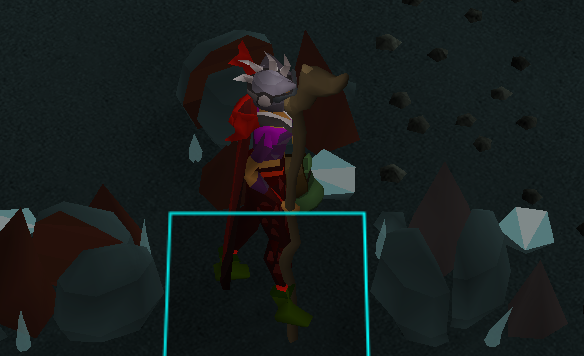
also tested coal etc
half umbra
Where is that?
light trail
prif mine if I had to guess
 ebon dust
why’re my runelite profiles resetting when I’m signed in
it has old backups, it happened 1x pre leagues— stopped happening— it’s happening every time I restart client.
I have the cloud+link enabled
 fickle atlas
does anyone know how to fix log in with runelite? same account works amazing on jagex launcher, but cant log in with runelite?
 zealous harbor
Use the Jagex Launcher to launch RuneLite.
fickle atlas
thanks a bunch!
 vagrant sundial
when does runelite save your plugins to the cloud? Is it when the application is closed?
 glacial flame
I'm not sure if this is client related but I'm having random massive lag spikes on where the game annimation is still playing, i don't get a disconnected message, my internet is fine but my character freezes for like 5-10 seconds and then rushes around to "catch up" any idea what this might be?
 somber aspen
its probably lag
glacial flame
lol fair enough
 orchid shard
 orchid shard
glacial flame
I'm not sure if this is client related but I'm having random massive lag spikes ...
orchid shard
glacial flame
I'm not sure if this is client related but I'm having random massive lag spikes ...
also getting this
light trail
Your connection is shitting the bed probs
 hearty harness
wasnt there a plugin that adds button to your work equipment tab
that opens dps calculator with your gear
i forgot how it was called but I remember using it
half umbra
It's in the "Wiki" plugin I believe
hearty harness
wiki plugin that is for opening wiki page for objects
quick folio
and it adds the button
half umbra
quick folio
and it adds the button
I thought so, I feel like I PRed something related to it 😅
oblique sun
chat filter
 night sable
when
quick folio
now
night sable
thx
hearty harness
quick folio
and it adds the button
where is the button for it?

 quick folio
ah no its on the bottom left button in there
 wicked spade
I’ve always been logged into runelite, after a system crash my profile is just gone is there any way to get it back?
indigo kilnBOT
wicked spade
indigo kiln
<https://github.com/runelite/runelite/wiki/FAQ#my-plugins-are-gone-or-my-config-...
thank you so much, that fixed it
 sonic elbow
Is there a way to "Link" a profile to my leagues character?
Whenever I switch to a regular world it takes me back to my main RL profile, but doesn't do so when going on leagues.
quick folio
click the little link icon

 sacred spindle
Whens curse of arrav quest going on rl quest helper?
indigo kilnBOT
Visit Zoinkwiz's Quest Helper plugin discord (https://discord.com/invite/XCfwNnz6RB) for support, issues & feedback
 brave field
Hey I'm doing barrows on league and my client is crashing when I go back upstairs
I tried lowering settings in gpu but it's still crashing
pallid drift
!logs
indigo kilnBOT
To find the logs, you can do one of the following:
- If your client failed to open, click the
Open logs folderbutton. - Open the screenshot directory by right-clicking 📷
Camerabutton, navigate 1 directory up, then open logs folder. - Navigate to
%userprofile%\.runelite\logson Windows or$HOME/.runelite/logson Linux and macOS.
Upload the log files named client and launcher by dragging them to Discord. If there are files prefixed with jvm_crash dated from today, upload them too.
indigo kilnBOT
safemode: Windows
Run the RuneLite (safe mode) shortcut, or with a Jagex account, first run the RuneLite (configure) shortcut and tick the Safe mode box, then launch RuneLite via the Jagex launcher.
Mac
In Terminal, run:
/Applications/RuneLite.app/Contents/MacOS/RuneLite --configureTick the Safe mode box. Launch RuneLite.
If it's not working, download and install the updated RuneLite launcher from the website link in #welcome. You don't need to uninstall your current version. You will not lose any settings or plugins. Then try running safemode again.
brave field
how do i run runelite in safemode in windows
 next fossil
The first words say “safemode: Windows”
sacred spindle
Does Safe mode disallow plugins like the Quest Helper? I am also having the client crash frequently.
pallid drift
safe mode disables all hub plugins and gpu plugin
the point of safe mode is it get it to see if base line runelite works, and if it does it means a hub plugin is the culprit (or you can't use gpu)
 icy badger
Does anyone know the plugin that lets you get this easier teleport menu for the construction cape?]

 kind crane
is this guerrilla marketing
icy badger
No i was just watching a stream and couldnt find the plugin anywhere
no one has been answering lol
icy badger
ah thanks
rich marsh
it might be called submenus not capes but yeah
icy badger
Thank you yeah thats it
 ancient viper
hi runelite nation
anyone have an idea why some npcs are hull and the others tile is highlighted ?
both npcs are cave horrors
 half umbra
Is it your task?
You probably have the slayer plugin and NPC indicators fighting each other
 grizzled dirge
is there a kc command for the echo bosses in leagues?
versed scaffold
no, its broken atm, but should be fixed whever the next release is pushed out
grizzled dirge
cool tyty
 icy forge
Is there small bug with the "Login Screen" or is it just me ?
Every time I log into RuneLite it's displaying the Christmas Theme login screen.. But I don't have Login Screen turned on. and when I turn it on and off again it displays the leagues login screen the screen I want. Dura resolved: Resource packs 3rd party hud overlay can do this

 half umbra
Resource packs maybe?
icy forge
half umbra
Resource packs maybe?
im a noob when it comes to this sort of stuff. there a pinned post or something to explain Resource packs to me 🙈
half umbra
do you have that plugin installed?
icy forge
half umbra
do you have that plugin installed?
Ohhhhhhhh yeah I have the Christmas Overlay enabled 🙈 thank you
 thorn salmon
Are you able to change the “no place like home “ image during a house teleport, or is that server side?
 hollow knot
is it possible to resize the runelite sidebar? i upgraded to a 2k monitor today and while ive got the game ui looking good again i cant get the side bar with the plugin settings/information to be a bit bigger
somber aspen
you can adjust the client scale in RuneLite(configure) from the start menu
hollow knot
is that the game size option under window settings in the runelite settings? doesnt seem to be making much of a difference but i may be in the wrong place
i found it, thank you. ill experiment with it and find something that works for me
 rancid beacon
what plug in is swapping my left click on all grimy herbs to use
i cannot find it
it's not custom menu swaps
or menu entry swapper
or menu swapper extended
light trail
rancid beacon
what plug in is swapping my left click on all grimy herbs to use
!flow it up baby
indigo kilnBOT
flowchart: Please refer to this flowchart for further troubleshooting.
 summer scroll
I've seen some streamers chats where it counts the message after the message, is that a setting or a specific plugin?
Example message (1)
Example message (2)
half umbra
Chat Filter, collapse game messages
summer scroll
ty
 vague stump
hi Under plugin "Ground items" there is a option in the bottom called Ownership Filter.

im playign Leagues and there is soo much clue items on the floor it covers the screen when ppl leave it
if i set it to Takeable, Will it hide those said Items for me?
vague stump
right
kk tyty
so it will hide the texts* of the words that i cannot take, Such as other players dropping clue items while i am a iron/leagues
oblique sun
yes
vague stump
tytyty
ancient sonnet
- 1:1 is a myth
- no that would probably be rejected because bot detection would trip (I could be wrong 🙂)
 spring verge
is there a way to remove runelite plugins?
for example i would like to remove zalcano plugin but i dont have the option
 tacit vigil
The Zalcano plugin has 45k active installations, how many of those installations were actively installed by users? I suppose none since that plugin is installed compulsorily when you install runelite, I don't understand how you can say "active installs" on plugin hub if each and every one of the installations were passive and obligatory, I can't imagine someone uninstalling zalcano to reinstall it and that the counter goes up to +1active install, which is not possible to do because you don't let us uninstall some plugins, and it is also unfair for other plugins such as bot detector with 52k active install to compete with plugins that are boosted by mantadory plugin installs that necessarily installed without asking the user
You can't remove default plugins though
 grizzled wasp
am I blind or is the gauntlet recolor plugin not in the plugin hub?
could have sworn it was in there
hushed patrol
been removed disabled for a while
ancient sonnet
grizzled wasp
am I blind or is the gauntlet recolor plugin not in the plugin hub?
There was a change to the API to better accomodate how the cg recolor worked and the author is working to move to this new API
 knotty topaz
any way to beautify the red and yellow Xs?
make em a little prettier
got hd plugin and all kinds of other cosmetic stuff and these Xs are the odd ones out
pallid drift
there probably is a hub plugin that replaces them but idk which would
Interface styles is a guess but that’s really all I’ve got
 bitter hare
are there any metronome plugins that can just do 1 single tick over and over? i dont want the minimum of the 2 tick "tick tock tick tock"
ahh nvm default metronome does do just the tick tick tick tick
 sharp wasp
Not sure if others feel the same but I wanted to know if I can do things that are less eye-straining when using object highlights in stretched mode. So because of stretched mode and the way interact highlight, markers, etc. work is kinda jittery when moving the character around, sometimes it's a bit hard on the eyes for me personally. Is there anything I can do from my end to make the markers smoother? I also play on a 60hz screen, is that a factor? Thanks.
oblique sun
stretched mode scales them, if you dont want that, dont use it
pallid drift
idk how to elaborate more than this picture

you use bank tags right?
it's that but for fairy rings
grizzled wasp
ancient sonnet
There was a change to the API to better accomodate how the cg recolor worked and...
ahh ok thanks!
knotty topaz
can i not use menu entry swapper for fairy ring
quick folio
use this option in the plugin
 knotty topaz
ah thank you
 crystal ravine
Program to help
Corrupted Gauntlet
oblique sun
not allowed
 rich marsh
it's not a better it's just that the 32bit one is for 32bit systems and the arm64 one is for arm64 systems
crystal ravine
 rich marsh
then u want the default one (64 bit)
crystal ravine
Which one of them will be better for me?
 sinful cairn
 undone pond
How do I put the second test at the first of the list?
 indigo kilnBOT
The Menu Entry Swapper, through various config options, allows you to hold shift+right click on items/NPCs/objects and configure new default left and shift click options on them.
 undone pond
TYY
grizzled wasp
I do wish it was allowed, I'd love to be able to just type in a destination and hit enter or something
fairy rings are still one of the clunkier methods of transportation
would have to get jagex approval for something like that and at that point it may as well be in vanilla (tho it def should be? maybe make a reddit post lol)
cause you'd be sending inputs for the player
next fossil
@paper oxide I don't think your update will work for people with animal wrangler which gives double chins and double xp
 paper oxide
Good catch
light trail
grizzled wasp
I do wish it was allowed, I'd love to be able to just type in a destination and ...
You can just type the destination in the search box and click on it?
paper oxide
next fossil
<@57348691459059712> I don't think your update will work for people with animal ...
Should be good now
 dusky plover
has anyone run into a weird issue where if your monitor's scale is 125%, runelite becomes super blurry?
light trail
Yes
dusky plover
any clue on how to fix it?
light trail
Lemme copy paste
It should make a big difference according to the people I've helped. Try the following:
- Close rl completely
- Open rl configure, set scale to 1.0, press save/ok.
- Open runelite
- Open the gpu plugin, make sure it's enabled, set the UI scaling algo to catmull-rom
- Use resizable instead of fixed if you're on fixed with stretched mode and think it's blurry. Alternatively, give integer scaling in the stretched mode plugin a try. This requires your client to be 1x, 2x, 3x etc the base size though. With integer scaling, xBR instead of catmull-rom is also a decent option.
You can increase the ingame ui size through the stretched mode plugin afterwards if you are in resizable.
dusky plover
I tried going into config and scaling but when i drag it to my second monitor which is a different resolution its blurry over there
rippp
no fix t hen i guess
dusky plover
nono the problem i have is different
light trail
Just do it again
dusky plover
im running a 1080p and 1440p monitor side by side
light trail
Yes i know babe
We get this question every week
My 5 step plan will fix it
It has fixed it for literally everyone except for a guy whose monitor was just broken lol
 light trail
A non-standard subpixel layout (e.g. bgr or oled) will always have e.g. text problems
dusky plover
i think the problem that im getting is just that it'll render runelite at 1440p but when i drag it over to the 1080p monitor it still tries to do it at 1440p hence why the ui is still the same size despite the resolution
dusky plover
 light trail
Assuming you mean the sidebar
dusky plover
just all of it
light trail
Did you relaunch the client?
dusky plover
yes
light trail
!logs
indigo kilnBOT
To find the logs, you can do one of the following:
- If your client failed to open, click the
Open logs folderbutton. - Open the screenshot directory by right-clicking 📷
Camerabutton, navigate 1 directory up, then open logs folder. - Navigate to
%userprofile%\.runelite\logson Windows or$HOME/.runelite/logson Linux and macOS.
Upload the log files named client and launcher by dragging them to Discord. If there are files prefixed with jvm_crash dated from today, upload them too.
light trail
That does look good

 light trail
The left does actually look meh on mobile
dusky plover
yeah idk
light trail
I'd have to compare on desktop with my own client though tbh
oblique sun
sounds like you need an upgrade!
dusky plover
😭 i thought 1440p next to a 1080p would seamlessly connect
light trail
Can you measure the sidebar width on the 1080p monitor in pixels?
dusky plover
is there a good way to do that
light trail
Just screenshot the panel without the icons and check the size of the image?
So the light grey part on your prev screenshot

 light trail
Ok now we kinda need someone to compare with a normal 1080p monitor, or someone with intellij open to find the correct size. I though pluginpanel should be 225 px but maybe im misremembering
It is weird that the amount of pixels differs though
Did you enable weird shit in the compatibility setting?
Please screenshot that
dusky plover
i dont even know where that is haha
oblique sun
measure this i guess
 light trail
Right click runelite and press properties
dusky plover
in task manager?
light trail
No in your explorer
dusky plover
oh huh you're onto something

when i drag this window over to the other monitor its also blurry
light trail
If you click change high dpi settings, what does it show?
dusky plover
 light trail
Hmm that should actually be fine. You could tick the bottom box, press ok and try it.
However, if that does not work, do not forget to disable that setting. Usually it's bad
light trail
If you do anything weird there, just remember to disable it if it does not work
dusky plover
alright
light trail
It seems like your pc is doing smth weird, as in overriding the rl scale parameter somehow
dusky plover
ill keep you posted if i get it working
light trail
At least there's a factor 1.25 scaling between those sidebar sizes you posted
It should not be there
dusky plover
haha yeah

its def something to do with this per-monitor scaling setting
im pretty sure its just a windows issue
thanks for the help though!
oblique sun
!lost
indigo kilnBOT
oblique sun
!transfer also if you just want to make it work
indigo kilnBOT
oblique sun
you can just copy those over then
 hazy sigil
Would anyone here be able to help with key remapping? I have it enabled and it prevents me from typing "6" on my keyboard in game ive looked around online and found nothing.
light trail
hazy sigil
Would anyone here be able to help with key remapping? I have it enabled and it p...
!key
indigo kilnBOT
keybinds: If one of your keys isn't working in game, you've most likely bound it to a feature of a plugin. The Debug Helper hub plugin can show what keys are bound to what plugins.
hazy sigil
light trail
!key
Thank you so much
 plain cairn
I have a question, the idle logout timer let's is extend logout to 25 min but what would happen if I were to extend it longer than that?
plain cairn
Okay but i can edit the settings manually to whatever i want, it is just a text file after all
quick folio
we dont support editing your settings like that, but it would still be limited at 25min
plain cairn
Okay
light trail
!new ask in the official discord
indigo kilnBOT
newplayer: If you are new to OSRS, make sure to follow this excellent guide on OSRS wiki: https://oldschool.runescape.wiki/w/New_player_guide. You can also join official OSRS Discord here: https://discord.gg/osrs
 umbral scarab
light trail
!new ask in the official discord
umbral scarab
light trail
!new ask in the official discord
where is the offivial at
light trail
Above your message...
 topaz goblet
anyone have an idle notifier that works for thieving?
i.e. when you stop thieving, runelite forces focus
versed scaffold
chat notifier im sure can
thorn salmon
Is it possible to replace the thrall skin in the companion follower plugin with random models? Like a blue eyes white dragon or Thomas the train engine?
Asking for a friend
half umbra
The API doesn't support that, no
I feel like the last time some asked a similar question they used the same examples
quick folio
The answer hasnt changed since you asked last time @thorn salmon
half umbra
Ah that would do it lmfao
pallid drift
The c in Dura stands for consistent
 velvet wraith
is there a way to recover loot tracker after deleting it by accident?
versed scaffold
No
velvet wraith
fr?
light trail
No cap on god fr fr
rich marsh
words
velvet wraith
meh, i've been playing for a couple of years, its a pitty
light trail
You have the clog. Loot tracker data is whateve
velvet wraith
yeah , but i like to see the amount profited or my history after faming big amounts of things
clog is just a raw number
anyway, thanks
 stoic patrol
hi guys whats the plugin for large icons on spellbook? i just want blitz and barrage
next fossil
Just click filters and turn off the ones you dont want to see
stoic patrol
can I enlarge the icons tho ?
rich marsh
no you cannot it's against the plugin rules
versed scaffold
The game will auto scale them if the filters remove enough space to
 fathom nest
is idle notifier supposed to send a notification when your auto retaliate stops?
kind crane
i think it only notifies when you're fully out of combat and that there's an open issue for when you stop attacking but are still being attacked
fathom nest
kind crane
i think it only notifies when you're fully out of combat and that there's an ope...
do you have a link to the issue I'd like to track it
somber aspen
there isnt a straight forward way to tell when you aren't attacking anymore so I am not sure that can be done
kind crane
https://github.com/runelite/runelite/issues/17863 that's the issue but yeah
fathom nest
gotcha. not that i even have a clue how to contribute but could you just not have a check whether the player's current animation is an attacking animation? if x amount of time as passed since, then trigger the notification?
somber aspen
youd have to know what the attacking animation of every possible weapon is
versed scaffold
what about just being in idle animation for an extended period?
somber aspen
you arent in idle anim, you would be going between idle and defence
fathom nest
somber aspen
youd have to know what the attacking animation of every possible weapon is
oh i see what you mean
somber aspen
you could maybe do something like observe lack of hitsplats on whatever is attacking you or something
 sudden tree
Is there a way to make the report button right click only?
fathom nest
somber aspen
you could maybe do something like observe lack of hitsplats on whatever is attac...
so for ex, if 0 dmg has been dealt over the course of x seconds?
somber aspen
or i guess that wouldnt work for splashing
fathom nest
yes that is true
versed scaffold
sudden tree
Is there a way to make the report button right click only?
maybe menu entry swapper extended can
fathom nest
so many cases with so many variables, i see how its problematic
versed scaffold
splashing prob wouldnt be hard to case out
look for spalsh graphic
but making it work correctly for everything isnt an easy task for sure
 slow kestrel
equipment screenshot not working? or is it just me?
light trail
slow kestrel
equipment screenshot not working? or is it just me?
!hubs
indigo kilnBOT
hubsupport: Support for hub plugins should be directed to the author of the plugin. You can find the support link by searching for the plugin in the Plugin Hub panel and clicking the ? button on the plugin, or by right-clicking the plugin in the plugin panel and clicking the Support menu option.
knotty topaz
any plugins that time slayer tasks?
 rapid barn
Is there a plugin other than collapsible modern chat that allows for hiding the minimap X in modern layout?
median stone
hy what was the plugin/option called again to show a progress bar under your skills in skilltab?
rich marsh
skills progress
light trail
what if you search the hub for that
rich marsh
it is indeed the first plugin that comes up if you search skill or progress
 lost verge
I feel like I am hitting a plateau on f2p. I am assuming it is worth to buy the membership with money rather than grind gp for a bond? Thanks in advance!
rich marsh
I'd personally say yes
you'll have a lot easier of a time making bond money in p2p than you would ever in f2p
lost verge
rich marsh
you'll have a lot easier of a time making bond money in p2p than you would ever ...
That is very true! So it is pretty possible to just buy one month of membership and just keep the ball rolling from there making bond GP?
light trail
not really as a new player, unless you treat it as a job
also, this is the #runelite (about the client), not the #runescape channel
lost verge
Apologies! Thanks for the replies though!
light trail
chat history plugin
 still urchin
@willow lance / @rich marsh can you disable the cache on the dynamic config okhttp client? I think that was part of my confusion in the prior convo since it frequently just doesn't pull
 scarlet bloom
is there anything planned / curr in the works to address the z fighting in the experimental gpu plugin?
 polar berry
He I've been seeing videos of where the prayer orb is animated with a line going across it, any idea how to enable it?
 light trail
prayer plugin
polar berry
Thank you
 warm prawn
hi
 unborn rose
Rs down?
 long pulsar
still urchin
<@85699361769553920> / <@323951080188936192> can you disable the cache on the dy...
long pulsar
still urchin
<@85699361769553920> / <@323951080188936192> can you disable the cache on the dy...
oh good point, yeah i can do that later tn
 primal timber
hey guys, is there a setting or addon to change the color or replace the black bars at the sides when keeping aspect ratio?

 summer torrent
primal timber
hey guys, is there a setting or addon to change the color or replace the black b...
summer torrent
primal timber
hey guys, is there a setting or addon to change the color or replace the black b...
whats wrong with black? u want anime girl instead?
oblique sun
hey that’s a good idea
 vital ferry
quick question - what's the currently best performing / best looking graphical setup overall? still 117 HD? it's kinda choppy on my machine compared to HDOS so I'm wondering if there's something else, or a setting I'm missing
pallid drift
It’s dealers choice, just sue what you like and works good for you. There are settings to change because it’s a flexible solution
indigo kilnBOT
@vital ferry Visit 117's HD plugin discord (https://discord.com/invite/U4p6ChjgSE) for support, issues & feedback
knotty topaz
how can i make these infoboxes anchor vertically instead of horizontally?
 indigo kilnBOT
You can configure horizontal/vertical orientation, infobox groups or split infoboxes into new groups with the menu options opened with Shift + right-click. https://runelite.net/img/blog/1.6.28-Release/infobox.gif
 versed scaffold
the flip option
versed scaffold
no reordering afaik
if you break them out into a group they sill stay in insertion order though
knotty topaz
great, thanks!
 uncut fog
Is there a way to 'update' a runelite profile? Like if I have a current profile but want to enable another plugin on the profile, is there a way?
pallid drift
the profile auto updates as you enable/disable plugins and change settings of the plugins
is that what you're wondering about?
uncut fog
pallid drift
is that what you're wondering about?
yes, so if im on a profile and I enable plugin C, next time I open runelite, C will be enabled?
 static grotto
light trail
chat history plugin
static grotto
light trail
chat history plugin
it still clears some stuff like the completion time of the raid I just finished
pallid drift
uncut fog
yes, so if im on a profile and I enable plugin C, next time I open runelite, C w...
yes it is saving your changes as you do stuff so when you load again it should reload the last saved settings
uncut fog
thanks
 bold oar
I’ve got a new pc and want to copy across all my settings I’ve got on the old one. What’s the best way to do this?
indigo kilnBOT
 iron star
no
pallid drift
ok
half umbra
If you won't tell us then we can't help you 🤷
 static nova
Anyone know if there's a plugin that makes falling objects more visible? Specifically I have a very hard time seeing the rocks falling at grotesque guardians. Even if it just changed the shadow color that'd be great.
half umbra
I believe that would be against the rules
kind crane
you can maybe mess with some settings in some of the graphics plugins. I know some of them make things like shadows harder to see
static nova
Oh, really? I just figured it'd be like a recoloring type deal. Well guess I'll just get good.
Thanks pine I'll dig through them
 cobalt nova
is there a way to make farming timer plugin work on the 5x league speed?
 woeful parrot
this might be a bit random, but does anyone if a loot tracker plugin exists that lets you see GE and HA for processed drops? for example gargoyle drops 15 mithril bars and I want to see the value of 3 mithril bodies instead that I will make with those bars.
half umbra
cobalt nova
is there a way to make farming timer plugin work on the 5x league speed?
There's a PR for it but it hasn't been reviewed
cobalt nova
half umbra
There's a PR for it but it hasn't been reviewed
thanks, good to know it might come
green holly
any1 know if theres a fix for hunter rumors plugin in leagues? seems to not count the catches
kind crane
there is some pr to fix it that is waiting for approval
green holly
oh nice ty!
static grotto
the equipment screenshot plugin is not working
next fossil
They have an update pending review https://github.com/runelite/plugin-hub/pull/7117
next fossil
green holly
any1 know if theres a fix for hunter rumors plugin in leagues? seems to not coun...
It got updated if you restart your client
 sage raft
when im in chambers of xeric, the potions on the ground dont have the ground item text on them until i pick them up and drop them again. does anyone know the setting for this? i tried hitting alt twice and alt highlight and it isnt not even showing up.
kind crane
ownership filter
sage raft
thank you
pallid drift
@cold spindle please just talk in here instead of dming me
 cold spindle
@pallid drift how to build my custom jar? for export to sideloaded plugins
indigo kilnBOT
Run the Maven builder to output a shaded JAR in /runelite-client/target/
Run gradle shadowJar to generate a runnable jar in build/libs/*-all.jar. You can run the jar with java -jar -ea jarName.jar. If you run into problems, update build.gradle to the latest plugin template version.
oblique sun
one of those
versed scaffold
You build the shaded jar with the plugin in it
 pallid drift
link the repo for the code, maybe its not side loaded
pallid drift
i cba to bring drama here, i blocked you for being harrassing then you dmed me on your alt and blocked me
i don't care
cold spindle
yes bro im a cheater, but im asking for help with runelite api
pallid drift
move on
cold spindle
can u explain that one
no bro you've been insinuating that im a cheater for asking how to build a jar?
crying for me to send you my plugin for the last hour
zealous harbor
Sounds like a cheater....
pallid drift
i think the alt dog pfp acc can attest they seem to dm me a lot and idk why
zealous harbor
They must like you. 😄
pallid drift
maybe they see my bio says dm me for discord bots adn think its for runescape bots/cheats
lol
oblique sun

 pallid drift
i mean it this time unmoon, im not farming
cold spindle
clearly zom loves drama
cold spindle
anyway my cheat still isnt working
long pulsar
skill issue
somber aspen
why would you think we would want to help you build cheats?
somber aspen
you said you were
cold spindle
why fight it
somber aspen
youre in at least 5 different botting discords so I think it is a safe assumption. Ive no idea why you would try to dm me to get me to help you abuse runelite to bot
cold spindle
somber aspen
youre in at least 5 different botting discords so I think it is a safe assumptio...
i'll send you my classes
somber aspen
i find that just insulting tbh
 calm wadi
@somber aspen clearly you're in those servers, is it safe to assume that you and zom are also cheaters?
i made a ticket to your runelite app 3 days ago asking if my plugin was safe, maybe if you had replied to it
somber aspen
what do you mean by you made a ticket?
sharp wasp
is there an update on when animation smoothing settings will return?
 indigo dock
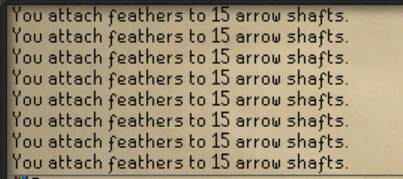
I can't remember if this is a thing or not but is there a plugin that collapses chat messages?
https://i.imgur.com/oUeg9zG.png Thought I remembered something that collapses that into 1 message
 somber aspen
the "collapse game chat" option in the chat filter plugin
indigo dock
Will that also make it so that my PMs last longer? Keep missing PMs and I think it's because I'm getting so many game messages.
somber aspen
i dont know
pallid drift
indigo dock
Will that also make it so that my PMs last longer? Keep missing PMs and I think ...
You can use in game settings to split the chat out
indigo dock
I don't like to use split private chat if that's what you mean
rich marsh
it's basically the best feature to not miss PM's
indigo dock
Yeah fair, I stream and I just like to have my PMs not shown to everyone (I stream DMM alot so I cover my chatbox.), but yeah. Was just curious if this would help on keeping my PMs longer.
zealous harbor
Maybe Chat Panel would be of use to you, you could have your PM's in their own chat window.
indigo dock
o wow didnt know that was a thing
Does that wipe messages like normal?
Or would that only be upon restarting my client
zealous harbor
It has a chat message limit, but otherwise on restarting.
indigo dock
Fair, I'd assume it's a much bigger limit though and wouldn't wipe from other types of messages
zealous harbor
Limit can be changed in the "Extras" area of config. Limit is 10,000 lines.
By default.
indigo dock
10,000 lines of PMs?
zealous harbor
For Chat Panel yeah, it should work like that.
indigo dock
O nice, tysm that's actually really nice
zealous harbor
Awesome, I hope you enjoy! 😄
indigo dock
I will, and my friends thank you also, since I keep missing their messages and ignoring them LOL
 ivory wagon
versed scaffold
ivory wagon
versed scaffold
yourself
indigo dock
Oh and one more thing this might be just me being dumb but if I have 2 clients open, what can I do to make sure one of those clients saves my plugin settings vs the other? Close the one I want to save last?
Then again idk what happens if PC turns off
knotty topaz
i'd really like to make ground tiles more immersive, is there a way i could change how the recolor is shaped? i'd like a radial gradient more than a box
indigo dock
light trail
Use different profiles
Ty didn't realize I could set a profile as default for a account
static grotto
next fossil
They have an update pending review https://github.com/runelite/plugin-hub/pull/7...
ty
now it works even less for me though
kind crane
report it to the plugin author then
 unique shuttle
is there a plugin where i can get a notif for a specfic item drop? i saw the item drop sound notifaction although idk how you use it
 spice zenith
Hey guys. Is there a plugin that greys out in obtained collection slot items? Like bronze man but just the log?
next fossil
unique shuttle
is there a plugin where i can get a notif for a specfic item drop? i saw the ite...
In Ground Items add it to Highlighted items and turn on Notify for highlighted drops
 regal topaz
does runelite working for yall ?
 keen wing
Not yet, osrs update.
 unkempt iron
Old School RuneScape
Check this post for planned downtime, routine maintenance and any live game issues.


 silent sluice
 small atlas
does runelite open up for you?
 winter breach
no
 fervent jetty
we back baby
 queen patrol
Runelite crashes when i login 😮
 dire bolt
same
 neat sphinx
same
 velvet nexus
same
 autumn zinc
yerp
quick folio
turn off the gpu plugin for now
 soft lotus
Turn off gpu plugin
dire bolt
works ty
queen patrol
Working turned off thanks ❤️
 sudden raft
quick folio
turn off the gpu plugin for now
sudden raft
quick folio
turn off the gpu plugin for now
goat
 drowsy sluice
no ?
 indigo cedar
that happens everytime stuff restarts
 wintry linden
 warped shuttle
LMAO they fucked karambwan spots
warped shuttle
LMAO they fucked karambwan spots
only once per world restart
indigo cedar
wait ur probably doing a bit
quick folio
they always move on restart, in a couple min they will be stuck again
warped shuttle
👽
 noble token
runelite keeps crashing. anyone else having same issue?
quick folio
turn off the gpu plugin for now
 upper galleon
i turened off gpu and it worked im in game
 kind current
quick folio
turn off the gpu plugin for now
kind current
quick folio
turn off the gpu plugin for now
.
 acoustic wave
Wheres my super high render without GPU now aaaaa 😄
upper galleon
but if u turn it back on you will crash
 plush patrol
gamma youre the strongest soldier
 median sigil
can someone ping me please when we can turn gpu back on this is icky <3
 fossil haven
any idea how long it would take for gpu to work again?
 edgy finch
Time to use some 117 again ig
quick folio
median sigil
can someone ping me please when we can turn gpu back on this is icky <3
there will be a notification in #announcements
 analog blaze
yeah 117 gpu working fine
 ripe hamlet
anyone same issue?
 acoustic wave
All i see is the black void, I try to jump off it but it keeps moving away
warped shuttle
look how shit the game looks
 quick folio
turn off the gpu plugin for now
 ornate mesa

 mortal cradle
ripe hamlet
anyone same issue?
mortal cradle
ripe hamlet
anyone same issue?
bro..
 sleek fable
warped shuttle
look how shit the game looks
sleek fable
warped shuttle
look how shit the game looks
unplayable tbh
 valid gorge
ripe hamlet
anyone same issue?
valid gorge
ripe hamlet
anyone same issue?
take ur gpu out of ur pc
warped shuttle
unironically unplayable, theres no way it looks like this normally
 zinc dirge
valid gorge
take ur gpu out of ur pc
zinc dirge
valid gorge
take ur gpu out of ur pc
thanks that worked +rep
warped shuttle
my RL must be bugged
 royal ingot
Everyone';s is doing this ^
 analog mortar
keeps crashing?!?!?!?!
 sharp moss
You people play without 117 HD?
autumn zinc
Start RuneLite. Do not click login. Switch to the RL profile you want to use. Turn GPU off in the plugin menu. Then login.
 languid elbow
sharp moss
You people play without 117 HD?
languid elbow
sharp moss
You people play without 117 HD?
always
sharp moss
I'm sorry you have to go through that then
 patent cave
Turning GPU off worked, thx
 alpine fog
i hate the "seasons" on 117 🤮
sharp moss
disable them?
alpine fog
dont think you can
autumn zinc
cant
analog blaze
do you?
 tranquil pendant
i think summer is just the default
analog blaze
sure you can't

 lunar fulcrum
alpine fog
dont think you can
lunar fulcrum
alpine fog
dont think you can

 autumn sun
autumn looks nice
alpine fog
summer is a season
autumn zinc
summer is closest but its still off
 serene rivet
knotty topaz
serene rivet
knotty topaz
i was just abt to say the same lmao
acoustic wave
makes no difference on my 2006 monitor
 worthy nest
117 HD still works
tranquil pendant
117hd is so bright, reducing the brightness makes colors grayish
different from the GPU
 buoyant spire
crashing after logging into world, anyone else have that issue?
 stoic geyser
cant login as well... any advise ?
 peak plank
turn off gpu plugin
quick folio
turn off the gpu plugin for now
 haughty spear
can someone pin the solution
quick folio
people dont read pins sadly
 mellow brook
autumn zinc
Start RuneLite. Do not click login. Switch to the RL profile you want to use. Tu...
mellow brook
autumn zinc
Start RuneLite. Do not click login. Switch to the RL profile you want to use. Tu...
^
buoyant spire
shiit hahahah ty
 oak iris
turning off gpu plugin freezes me
acoustic wave
its not that scary
 pale wedge
love you guys, ty for solve x
stoic geyser
turning off gpu plugin did the trick
warped shuttle
i turned on gpu plugin and runlite kidnapped my family
buoyant spire
ya ty gamma1991
 tight ether
great, i can play but the game looks like shit haha
 shrewd arrow
my runelite is bugged anyone else?
stoic geyser
turn off gpu plugin
 barren delta
probably after last osrs update runelite is not updated
 royal wraith
thanks all for the help
shrewd arrow
was it because a potato was thrown at my computer?
stoic geyser
shrewd arrow
was it because a potato was thrown at my computer?
probably
median sigil

 sly blaze
dragon imp kourend w 358
 queen socket
sly blaze
dragon imp kourend w 358
queen socket
sly blaze
dragon imp kourend w 358
that narrows it down
sly blaze
at the castle
acoustic wave
I saw an imp at Glielinor
 shy tide
I took out my gpu and it still crashes anyone have a solution?
quick folio
median sigil

 meager lintel
turn on 117 if you want GPU for now
warped shuttle
karambwan spots have stopped moving btw, i asked jagex to hotfix
 plain hinge
why does my game keep crashing?
 radiant sundial
guys 117 hd doesnt work everyone has to turn it off or use gpu instead!
knotty topaz
fake news
 minor helm
anyone else getting a crashed when trying to log in?
sly blaze
kourend castke,north entrance,i got the dragon imp traped if someone wants
 minor merlin
runelite keeps crashing, anyone else having problems?
shrewd arrow
TURN OFF GPU AND U ARE GOOD TO LOG IN
acoustic wave
what a legend
queen socket
plain hinge
why does my game keep crashing?
Start RuneLite. Do not click login. Switch to the RL profile you want to use. Turn GPU off in the plugin menu. Then login.
plain hinge
queen socket
Start RuneLite. Do not click login. Switch to the RL profile you want to use. Tu...
what
radiant sundial
minor merlin
runelite keeps crashing, anyone else having problems?
No i think you are on your own
shy tide
sly blaze
kourend castke,north entrance,i got the dragon imp traped if someone wants
Cheers for this one mate ill be sure to hop on that
quick folio
Either turn off the GPU plugin for now or try 117 HD.
 rich tapir
minor merlin
runelite keeps crashing, anyone else having problems?
rich tapir
minor merlin
runelite keeps crashing, anyone else having problems?
same
sly blaze
w 358
minor merlin
thnx for the help legends
vague stump
Either turn off the GPU plugin for now or try 117 HD.
 hot stag
Thx for the help!
queen socket
plain hinge
what
TURN OFF GPU PLUGIN
median sigil
quick folio
# Either turn off the GPU plugin for now or try 117 HD.
can u write this in glitter text i feel like ppl won't understand otherwise
plain hinge
OHHH
quick folio
median sigil
can u write this in glitter text i feel like ppl won't understand otherwise
If I could I would 
 untold charm
queen socket
TURN OFF GPU PLUGIN
untold charm
queen socket
TURN OFF GPU PLUGIN
i cant >c
 warm estuary
does anyone know how unlocked fps works in runelite? It feels like it makes the game smoother, but not more responsive.
shy tide

 haughty slate
queen socket
TURN OFF GPU PLUGIN
haughty slate
queen socket
TURN OFF GPU PLUGIN
thanks its work!
median sigil
quick folio
If I could I would <a:ahehe:811361960452292638>
Picasion GIF maker
 vernal trail
shy tide
vernal trail
shy tide
screenshot is too small, can you make the arrow bigger or maybe add a circle aroung GPU?
plain hinge
WHY DOESNT GPU WORK :((((
rich tapir
game looks so bad without gpu lol
untold charm
when i turn off gpu plugin it stops rendering the game
 molten wren
Either turn off the GPU plugin for now or try 117 HD.
vague stump
use 117 for now lads
 fallow shore
For all you people using 117 every day; you are mental
 neat terrace
mfw im in game playing with gpu on
untold charm
vague stump
use 117 for now lads
ty
 azure shale
my client is crashing with all plugins disabled
plain hinge
vague stump
use 117 for now lads
to shit pc 😭
quick folio
median sigil
https://picasion.com/get-glitter/ <3
 shy tide
vernal trail
screenshot is too small, can you make the arrow bigger or maybe add a circle aro...
shy tide
vernal trail
screenshot is too small, can you make the arrow bigger or maybe add a circle aro...

 rapid shard
everything is so pixelated
 full brook
I haven't played for years - is the GPU plugin the one that unlocks FPS going over 50?
 fast widget
117 working fine
median sigil
wow the message is so easy to understand when it's pink and pretty
 verbal lava
wow this game is hideous without gpu plugin
 stiff sapphire
what is 117 HD?
vernal trail
full brook
I haven't played for years - is the GPU plugin the one that unlocks FPS going ov...
it has an option, but theres also a plugin for that
 dense hemlock
every week i forget how bad the game looks without gpu
analog blaze
stiff sapphire
what is 117 HD?
this is 117
 fast widget
full brook
I haven't played for years - is the GPU plugin the one that unlocks FPS going ov...
fast widget
full brook
I haven't played for years - is the GPU plugin the one that unlocks FPS going ov...
yes
 formal bridge
molten wren
Either turn off the GPU plugin for now or try 117 HD.
formal bridge
molten wren
Either turn off the GPU plugin for now or try 117 HD.
thank you
 green charm
analog blaze
this is 117
green charm
analog blaze
this is 117
no thats leagues
shy tide
analog blaze
this is 117
nah thats osrs
vague stump
no thats shilo village
 quaint kindle
no this is patrick
 visual mesa
117 looks so bad compared to gpu rip
sly blaze
@shy tide your on the way?
tranquil pendant
visual mesa
117 looks so bad compared to gpu rip
with right settings there is close to 0 difference
shy tide
sly blaze
<@971275816375816282> your on the way?
Yeah bro walking over there rn
neat terrace
i feel for anyone who cant use gpu
 knotty topaz
the power
visual mesa
tranquil pendant
with right settings there is close to 0 difference
Any idea where i can find settings that dont look like theres a snow blizzard lol
quick folio
misc and seasons I think
 placid viper
Nice tetris graphics without gpu
rich tapir
visual mesa
Any idea where i can find settings that dont look like theres a snow blizzard lo...
you can on 117

 woven owl
shrewd arrow
TURN OFF GPU AND U ARE GOOD TO LOG IN
woven owl
shrewd arrow
TURN OFF GPU AND U ARE GOOD TO LOG IN
worked for me!
shy tide
visual mesa
Any idea where i can find settings that dont look like theres a snow blizzard lo...
Throw pc trough window
tranquil pendant
visual mesa
Any idea where i can find settings that dont look like theres a snow blizzard lo...
Seasonal Theme > Summer
vague stump
 quick folio
Either turn off the GPU plugin for now or try 117 HD.
shy tide
quick folio
# Either turn off the GPU plugin for now or try 117 HD.
where do it turn this off?
acoustic wave
 oak iris
neat terrace
i feel for anyone who cant use gpu
oak iris
neat terrace
i feel for anyone who cant use gpu
how?
thorn salmon
i just tried it twice and it worked
 limpid locust
hey guys I'm crashing but I'm refusing to read one single message in this channel, can anyone help?!
 rapid shard
limpid locust
hey guys I'm crashing but I'm refusing to read one single message in this channe...
rapid shard
limpid locust
hey guys I'm crashing but I'm refusing to read one single message in this channe...
turn on brain turn off gpu
limpid locust
rapid shard
turn on brain turn off gpu
wtf is gpu!!!
median sigil
gamma what's happening in ur pfp
 ionic oxide
a plugin
shy tide
limpid locust
hey guys I'm crashing but I'm refusing to read one single message in this channe...
Hey Loda tnx for the wholesome message so the thing is what u wanna do is pick up ur pc smash it against the wall and it should work then
 austere stag
guys how do i turn off my gpu
 lost cosmos
Omg thanks guys I was about to start removing things 1 by 1
quick folio
Should be ok again guys
hot stag
Why do people use runelite when they don't know plugins...
rich tapir
quick folio
Should be ok again guys
gpu is fixed?
dense hemlock
the venn diagram between this channel and reddit is just a circle
quick folio
restart and it should work yes
limpid locust
shy tide
Hey Loda tnx for the wholesome message so the thing is what u wanna do is pick u...
Hey I just did this but now my PC won't turn on and there's a whole in my wall. What plugin do I need to turn off to fix it?
- Sent from my iPhone
 distant viper
why they update the game and make my character short-sighted 😭
oak iris
quick folio
restart and it should work yes
actually facts
 split turtle
limpid locust
Hey I just did this but now my PC won't turn on and there's a whole in my wall. ...
split turtle
limpid locust
Hey I just did this but now my PC won't turn on and there's a whole in my wall. ...
door kicker
austere stag
turn off gpu before you log in and turn it back on after it works
rich tapir
quick folio
restart and it should work yes
thanks, gpu fixed, all is good with the world
shy tide
limpid locust
Hey I just did this but now my PC won't turn on and there's a whole in my wall. ...
Crawl into the hole and never come out again
oak iris
damn they fixed that fast
rapid shard
Why does the game have a minecraft texture pack without gpu
median sigil
hero ty
 austere stag
thats client resize affecting it i think
 deep fox
bye 117 👋
royal ingot
GPU FIXEDDDD legit ❤️
 violet cargo
does anyone know why that fixes it
shy tide
What is gpu?
acoustic wave
Fixed, heroes
warm estuary
yo got a question for yall. is it me, or does unlocked fps somehow feel slightly less responsive than locked 50 fps?
 balmy dome
Blessed, arigathank, 117 looks bad
austere stag
i love 117hd
 deft rivet
My antivirus mentioned the Jagex launcher was infected today with several virus..
shy tide
@sly blaze You still got that dragon imp trapped? omw was taking a detour
austere stag
osrs should never get scale of rs3 graphic updates
sly blaze
it teleported 3 secs ago :/
 vapid willow
😂
 sly blaze
i bought 115 red party hats for 1gp each, few weeks ago
 noble imp
is runelite down?
 naive seal
no
shy tide
i think i upset someone
 sullen sequoia
Garbage tho
deft rivet
 noble imp
oh im in
sullen sequoia
Keeps crashing my client when doing xmas event??????
limpid locust
LOL
quick folio
dm @indigo kiln @shy tide
acoustic wave
most sane osrs player
dense hemlock
shy tide
i think i upset someone
young man was very upset he couldnt play runescape on his day off
shy tide
dmd him stellas of that might cheer him up abit
languid elbow
the quickest way to restart the client is to enable the gpu plugin 😛
 serene flower
deft rivet
serene flower
deft rivet
noss
 latent zodiac
is there any way to change the highscore boss icons back?
quick folio
no
latent zodiac
yike, thanks
 wet flint
wow the game lookks terrible without gpu
quick folio
restart and you can turn it back on
 hollow anvil
are there any plugins for hiding loot from other players? To make it easier for Ironman to filter out unpickable items on the ground, for example
not sure if this is the correct channel or general
 agile wing
there is
quick folio
this in Ground Items
 agile wing
ground items > ownership filter
hollow anvil
tyvm!
what about a plugin that lets me know (more easily at a glance) if a fish is a cooked tuna or a burnt tuna? I have some trouble differentiating them
something like the plugin that adds labels to the herb seeds and herb types, etc
also salmon, etc
maybe just something that adds a label to those items, or improves the contrast
 south idol





 indigo kilnBOT
@hollow anvil The Inventory Tags plugin allows you to customize highlighted outline colors on items, you can pick the color by holding shift and right clicking on the item in your inventory then picking the color from the color picker window that appears, any previously used colors will already be available in the rightclick menu.

 fervent jetty
gpu can be turned on?
versed scaffold
thats what the announcement says
hollow anvil
agile wing
ground items > ownership filter
@quick folio the plugin does not seem to work... it's still showing me other players' items as you can see in this SS
 quick folio
there is no way to hide the nphysical item
hollow anvil
I did not drop those fish. Also, it's not showing, but I made sure that it's activated
quick folio
just the text
versed scaffold
it just hides text
hollow anvil
ah I see
I thought you could since we have entity hider for hiding NPCs and players and other stuff
 grand depot
is there a plugin to change the demon models back to their older forms? Image as an example
 versed scaffold
no
grand depot
😢
 thin flint
any way to get the old boss icons with the hiscore plugin?
versed scaffold
no
thin flint
thats unfortunate
 native herald
why did all of the boss kc icons on the hisocres get changed?
 tough hatch
Jagex changed them months ago, runelite just followed suit
versed scaffold
jagex made new ones
static grotto

would it be possible to make whatever happens when u change the size to also happen on startup
versed scaffold
if you have remember position on then it should already open correctly
it could perhaps think its opening offscreen though and reset itself
static grotto
I have it on
I just have to click up and down each time
I think it's because I'm not on windows
😢
pallid drift
i think it works regardless of system, tons of people use that setting with unix, it's maybe because the window was last off screen so it resets to a safe location
static grotto
so how do i do it
 grand chasm
I'm probably IE on this but are runelite update blogs no longer a thing?
I tried searching around the discord and the website and github, but couldnt find a succinct list of updates/changes/patch notes.
(just curious what updates i may or may not have missed)
rich marsh
they require someone (Adam) to write them so they tend to get thrown in the TODO pile
static grotto
not everyone likes them
 midnight forum
ik they are original sprites jagex did recently
but even the clue icon looks so much better
midnight forum
static grotto
not everyone likes them
a simple settings toggle could fix this with options "runelite version" & "official version" sprites. not that big of a deal really. the new version definitely looks more refined.
 neat trail
if you had left runelite open for the past week. Is it possible that all my plugins are now fked up after the gpu crash?
pallid drift
neat trail
if you had left runelite open for the past week. Is it possible that all my plu...
a crash can impact a config yeah
!lost
indigo kilnBOT
pallid drift
your best bet is to consult that
warm prawn
zom ur looking cute today
versed scaffold
Thanks
vague stump
i did the oopsue, and clicked this button rather then making new bank tab layout.
 versed scaffold
it do be like that
vague stump
is there a way to Completely remove or make that option not work? me biiiig sad rn
versed scaffold
i think custom menu swaps hub plugin can hide it
vague stump
versed scaffold
i think custom menu swaps hub plugin can hide it


thank yoyu SOOOOOOOOOOOOOOO MCUH
versed scaffold
Yw
summer torrent
grand depot
is there a plugin to change the demon models back to their older forms? Image as...
damn, bro needs to eat more
grand depot
leave him alone 😦 he strong enuf
vague stump
is there any way in 117 HD to make characters brighter?

i liek the moody lighting buut my character always very dim
compared to just GPU
 indigo kilnBOT
Visit 117's HD plugin discord (https://discord.com/invite/U4p6ChjgSE) for support, issues & feedback
vague stump
tyvm!
ancient sonnet
@timber portal I'll give it a whirl when it's merged, cba downloading source
Arch btw
 boreal lotus
Random question, is there any setting for toggling the old icons for the hiscores/lookup? If not all good 👍
somber aspen
no
 grim ridge
boreal lotus
Random question, is there any setting for toggling the old icons for the hiscore...
grim ridge
boreal lotus
Random question, is there any setting for toggling the old icons for the hiscore...
dude I want this too
rich marsh
using the new official™️ icons means we don't have to keep a copy of the old ones anymore
aka this change is something most devs would love
users on the otherhand... oops
boreal lotus
keep a copy in what sense?
tacit vigil
the new ones are apparently already downloaded from jagex as part of the base client
boreal lotus
ahh gotcha makes sense, where did the original/old ones come from?
boreal lotus
Can def see the developer value in that change then lol
although hoping some pluginhub plugin pops up that might be able to offer the old ones in some way shape or form. Not sure on the limitations there
tacit vigil
phub plugins can't really do that type of change.
boreal lotus
Darn, is it due in part to hiscores being a core plugin or extend further than that?
boreal lotus
I must accept the change then 😤
appreciate the info though big time - was curious on the limitations there
tacit vigil
well you can do it if you really want
idk if it'd be accepted, but it is possible to make a duplicate plugin.
oblique sun
you’ll get used to it
tacit vigil
btw adam if you see this, happy birthday!