#sonar
1 messages · Page 32 of 1
 neat mesa
I would like someone to help me test and config this thing, it's driving me up the wall trying to mess with this
my chatmix channels are not working properly and it boggles me why. Like why is it so hard to have my game and standard PC audio go through the Gaming Input, and my Discord to go through the Chat side
I have an Arctis 7 headset, original not +
 velvet walrus
neat mesa
I have an Arctis 7 headset, original not +
velvet walrus
neat mesa
I have an Arctis 7 headset, original not +
can you send a screenshot of your sonar mixer page? since the old arctis 7 has chatmix built in on-board, it can conflict with the software chatmix in sonar, so you need to set things up in a particular way depending on how you want things to work.
neat mesa
velvet walrus
can you send a screenshot of your sonar mixer page? since the old arctis 7 has c...
can I post images in this chat?
My chat thingy is disabled atm because if I enable it no audio on Discord or the audio is very quiet only comes through
 neat mesa
velvet walrus
can you send a screenshot of your sonar mixer page? since the old arctis 7 has c...
neat mesa
velvet walrus
can you send a screenshot of your sonar mixer page? since the old arctis 7 has c...
any response on stuff?
velvet walrus
sorry i'm bouncing between discord and work so i'll be slow to reply
but can you also send a screenshot of your discord audio settings?
 neat mesa
velvet walrus
sorry i'm bouncing between discord and work so i'll be slow to reply
neat mesa
velvet walrus
sorry i'm bouncing between discord and work so i'll be slow to reply
ur fine I thank u for actually providing assistance and hearing me out
I personally don't rlly know how to mess with the stuff on Discord, those settings can be a bit confusing
audio wise at least
velvet walrus
hmm okay, so i just want to be sure: for sonar, did you want to just use the EQ/audio processing stuff, but still use the chatmix on-board for the arctis 7?
neat mesa
velvet walrus
hmm okay, so i just want to be sure: for sonar, did you want to just use the EQ/...
I want my game audio and overall PC audio to flow through the Gaming Sonar thingy and the Game chatmix. Discord I want to have that work with the Chat chatmix thingy, I don't care about using the Chat Sonar but I will use it if I need to.
velvet walrus
but what sonar features in particular are you looking to use? since your headset has chatmix built in, there's already an Arctis 7 Game and Arctis 7 Chat output that should be available without Sonar. So I just wanted to make sure what other features you are planning on using so I know how best to explain things and how to get things setup.
neat mesa
velvet walrus
but what sonar features in particular are you looking to use? since your headset...
me personally I just want the Gaming Sonar to work for my standard PC audio/games I play except Discord, I could care less for the others
velvet walrus
so far everything you've explained to me is possible with the built in chatmix. again i'd like to reiterate and clarify that the old Arctis headsets like your Arctis 7 has chatmix built into the unit and does NOT require sonar to work. as much as I like Sonar, if you don't plan on using the other features in Sonar like the EQ, then I'd just suggest deactivating it in GG to reduce complexity and stick with your built in chatmix.
neat mesa
velvet walrus
so far everything you've explained to me is possible with the built in chatmix. ...
ik it doesn't need Sonar to work, that's why I just want the Game chatmix to have the Gaming Sonar use. I just want the game side to be enhanced with Sonar's stuff
I use the Game EQ stuff, tht's what I mean with Gaming Sonar
velvet walrus
Unfortunately the way Sonar works, you can't really do a piecemeal setup. If you plan on using Sonar Game, then you'd need to use Sonar Chat. You can still route the two in such a way that your built in chatmix still works, but keep in mind that once this is setup, you'd need to also route Discord into Sonar.
- Click the yellow error bar in Sonar to let it fix audio outputs and set itself correctly.
- Make sure "Game" output in Sonar is set to "Arctis 7 Game"
- Make sure "Chat" output in Sonar is set to "Arcits 7 Chat"
- Set the other outputs in Sonar to whichever you want, depending on which side of the chatmix you want them on
- Set the mic in Sonar to whatever mic you plan on using, such as your headset mic
- In Discord, make sure the input is "Sonar - Mic" and the output is "Sonar - Chat"
neat mesa
velvet walrus
Unfortunately the way Sonar works, you can't really do a piecemeal setup. If you...
I doubt we can VC to better explain stuff?
neat mesa
velvet walrus
1. Click the yellow error bar in Sonar to let it fix audio outputs and set itsel...
that bar is only there because the other devices like media and aux I disabled in Windows sound settings because I don't use em
I think I have it sorted now, messed with a setting on Discord, gonna test it out with a game
alr, everything works fine now
neat mesa
velvet walrus
1. Click the yellow error bar in Sonar to let it fix audio outputs and set itsel...
I'm good now, thx. Appreciate the help and u taking the time to assist
 rigid dew
Hi guys. Im getting audio clips with audio clipping disabled
It goes off at random times during iracing
 plain briar
how do i make myself not hear my self
 blazing palm
@violet grail You told me to DM you if support didn’t contact me back on the 17th, I just tried to DM.
 delicate burrow
Is there a way to turn off auto updates?
 median ember
How to fix the steelseries GG application not starting?
 steep haven


I can't select the SteelSeries Sonar - Mic as my microphone option. Does anyone know how to fix this?
 rocky crest
steep haven
I can't select the SteelSeries Sonar - Mic as my microphone option. Does anyone ...
rocky crest
steep haven
I can't select the SteelSeries Sonar - Mic as my microphone option. Does anyone ...
ur not supposed to
steep haven
oh okay, then I have the problem that my headphone mic is nowhere to be found in my settings
rocky crest
steep haven
oh okay, then I have the problem that my headphone mic is nowhere to be found in...
whats ue headphone mic
steep haven
rocky crest
whats ue headphone mic
im using a SteelSeries Arctic 2
but for some reason it can only be displayed on my pc as headphones and not as mic
the mute button on the mic also never interacts
 arctic quarry
Hello, I would like to know if it is possible to change the format of a virtual device on Steelseries Sonar please ?
from this

to be like this

but for the sonar gaming device
 violet grail
blazing palm
<@112973716362645504> You told me to DM you if support didn’t contact me back on...
violet grail
blazing palm
<@112973716362645504> You told me to DM you if support didn’t contact me back on...
👍
 shy beacon
Is anyone else still experiencing device switching bugs?
I have the headphones prioritized, but it still won't change automatically sometimes
 worthy vector
anyone find a fix for this yet?

 vernal walrus
i have infinite loding circle every time i opne the software steelseries gg how can i fix?
 night nebula
I had a power outage and since then I can't use the sonar. The Gaming and the Chat channels don't exist/work.

Although it does show in the list in windows??(but doesn't work)

Completely closing steelseries GG and opening as admin didn't help. Neither did restarting PC.
 delicate sun
id love to turn my massive device list into only a few, but every time i disable sonar virtual devices i dont want to use, i find them re-enabled next reboot.
 upbeat wraith
anyone knows how to fix GG if it isnt starting properly?
just stuck on the loading screen rn, tried reinstalling it aswell
sonar seems to be starting in the background but i cant open the panel itself so its quite useless
 warm copper
night nebula
Completely closing steelseries GG and opening as admin didn't help. Neither did ...
warm copper
night nebula
Completely closing steelseries GG and opening as admin didn't help. Neither did ...
👍 reinstalling worked for me
sonar wasnt loading correctly tried everything but reinstalling did it
 noble mason
guys does this happen to you, sonar resets my peripherals preferences every time i update my NVIDIA GeForce Driver? Every single time I update it it resets them
 timid storm
why is my sonar become like this

 lofty lodge
Why is it every time I try and get Sonar to play nice with Voicemeeter, Sonar crashes and needs reinstalling.
Seriously give me the Mic noise canceling AI outside of Sonar so I can ditch the rest of the Sonar stuff I don't need
I've now resorted to paying for a krisp license I did not really want as it's the only thing close to what Sonar AI can do. Nvidia Broadcast is also junk.
 hearty cliff
if i want to turn sonar off how would i do that? i like having options but not this many, it makes it more difficult to just put audio to the headphones
i dont want to go through windows and disable each individually
 green drift
does anyone have the same issue? sonar seems to lower sound quality quite a lot even if no sound eq/spatial is on
lofty lodge
hearty cliff
if i want to turn sonar off how would i do that? i like having options but not t...
there is an option in settings
or in my case the app is corrupt and the is a constant spinning circle where I can't even turn it off

off button is normally there
for me to fix this as it's happened many times recently I need to uninstall and reinstall the app
lofty lodge
green drift
does anyone have the same issue? sonar seems to lower sound quality quite a lot ...
Yes it is junk, best not to use it, I'm done with Sonar it's just too unstable.
It's a real shame because the headphones are good, they should just stick to hardware and forget about software
hearty cliff
Ah, thank you! I was looking in the sonar tab
lofty lodge
No they hide it because they don't want you to turn it off
like all app devs these days they like to ram bloatware no one wants down our PCs memory buffers
hearty cliff
Fair
shy beacon
Seems like a fix for the device switching issue
 bold temple
can i down load the sonar system from here/
 barren fractal
My devices switching isn't working at all anymore. Tried many different combinations and it never switches anymore.
Any advice?
 forest wolf
i have a question
for some reason my arctis nova pro wireless automaticly connects with steelseries sonar - gaming
but if i either play music or join a discord call or watch youtube you name it i cant hear anything so i manualy switch to the default device cause than i can hear something
is there a way that it auto connect to that?
 swift folio
is there no way to import an eq, from say a source like https://autoeq.app
Automatic headphone equalization
or is there a certain format from this site i can use to get the correct data for the parametric eq steelseries uses, like another app that is very similar
or is voicemeeter the best comparison
should really consider adding support to import these settings without needing a link
velvet walrus
swift folio
or is voicemeeter the best comparison
I think voicemeeter is best for that site, since sonar has all the same options for the EQ. don't forget you can click on each EQ dot on the graph to manually enter in numbers
swift folio
velvet walrus
I think voicemeeter is best for that site, since sonar has all the same options ...
i found that equalizerAPO parametric is slightly more accurate
since it has 10 points instead of 6
i guess i added the points myself so nvm
but we can add more points to use different eq profiles, ill try the voicemeeter one with less points
night nebula
Post this yesterday. I can see gaming and chat for 7+ on windows, but I can't see it on SS GG, and it doesn't work no matter what setting I do anywhere. They suggested completely new install ---- which I just did and no fix.


 polar swallow
I need some opinion on whether if not ARCTIS PRO + GAMEDAC really does have game changing gameplay
velvet walrus
night nebula
Post this yesterday. I can see gaming and chat for 7+ on windows, but I can't s...
nothing is wrong in your screenshots? the sonar devices are not supposed to show in the list in sonar. the list in sonar is for setting what you want your output to be, so it only shows things like headsets/speakers
if the sonar devices showed up as an output option in sonar then you'd be able to set sonar to output to itself which doesn't really make sense
night nebula
velvet walrus
nothing is wrong in your screenshots? the sonar devices are not supposed to show...
It's missing Sonar Chat and Sonar Gaming which are needed for dual channel on my 7+ (and were there up until recently). My issue is that I'm unable to get dual channel to work again. Indeed when I select Sonar Chat or Sonar Game through windows, it doesn't come out the headset at all, it come out random other option.
velvet walrus
night nebula
It's missing **Sonar Chat** and **Sonar Gaming** which are needed for dual chann...
to setup chatmix through sonar you just need to make sure that Game and Chat have their outputs set to your headset. from there the chatmix slider in sonar should say "use your on-board chatmix wheel" when you hover over it. you don't need the sonar outputs in the dropdown for that.
night nebula
Yes, that's how it was and worked for months. It doesn't work anymore.
They all say Arctis7+

but rotating the wheel in either diection has no effect (nothing gets lower, nothin gets louder)
velvet walrus
do you see the slider move in the mixer GUI when you use the wheel on the headset?
 velvet walrus
try unplugging/replugging the dongle to fix the wheel?
night nebula
Tried, doesn't work.
When I set it to Sonar-Gaming in Windows, it comes out my monitor speaker (which I have never set for anything ever, I even forgot the monitors have speakers)

before (for months) When I set it to sonar gaming in windows, it would just come out the headset and would then work with the headset slider as expected
same for sonar chat
onyl way to get it out my headset at all, now, is to set it to Arctis 7+ (not sonar)
Same issue if I put discord to sonar chat, or a game to sonar game (just like putting windows default to sonar -game/chat), either options comes out monitor speakers (?)
I can set the setting in the game itself or in windows settings. Same for all sonar options (game, chat, medua, aux) they all come out my monitor speakers
 austere sigil
night nebula
Tried, doesn't work.
austere sigil
night nebula
Tried, doesn't work.
same story for me
i hate tihs app now
devs should made anything ...

windows start, and sonar app run monitor speakers, in windows are headphone but not work when switch in app then
night nebula
Oh so it's not just me. I wonder what it is then. Yea anything sonar setting comes out monitor speakers -- can't use dual channel soanr which is the whole point of getting Arctis in the first place.
velvet walrus
austere sigil
in this screenshot it says your sonar outputs are set to your monitor. you should be able to just change them back. just click on the device under each VAD to change it
if it's switching to your monitor on start up, then you should check the fallback settings
 past hazelBOT
SteelSeries Sonar has “Device Fallback” that will automatically switch the outputs on Sonar.
Fallback can be triggered when a device is unavailable (such as when booting your PC or unplugging a device), or it can switch outputs if it detects if a Nova headset is turned off, and automatically switch to speakers.
This fallback functionality can be adjusted or turned off by going into the settings in GG. You can find it under Settings > Sonar > Backup Device Switch.
You can also adjust the order in which devices fall back to. This can be adjusted in the same options menu. Simply scroll down to see the full list of devices.
 haughty summit
suddenly sonar works again? all on its own it fixes itself? and no help from anyone here. but the volume is incredibly soft i have had to turn it way up. but .. sonar needs work folks
 vale zenith
worthy vector
anyone find a fix for this yet?
vale zenith
worthy vector
anyone find a fix for this yet?
I have the same issue and the new update doesn't seem to fix it.
 spiral prairie
Guys how do I fix my game audio playing from output and input but only want it to hear from output
spiral prairie
velvet walrus
in this screenshot it says your sonar outputs are set to your monitor. you shoul...
Can u help
 sharp mural
is anyone available to help a brother out setting up sonar? If so plse dm
im playing music from my browser and it keeps fading in and out and none of my apps are showing up, when they do i cant move them
 dim spire
Question for sonar users - are you finding the inputs/outputs changing themselves all the time?
last couple of days I constantly find myself without sound, go into the app, and see that all the inputs and outputs have switched away from my arctis headphones to something else
past hazelBOT
SteelSeries Sonar has “Device Fallback” that will automatically switch the outputs on Sonar.
Fallback can be triggered when a device is unavailable (such as when booting your PC or unplugging a device), or it can switch outputs if it detects if a Nova headset is turned off, and automatically switch to speakers.
This fallback functionality can be adjusted or turned off by going into the settings in GG. You can find it under Settings > Sonar > Backup Device Switch.
You can also adjust the order in which devices fall back to. This can be adjusted in the same options menu. Simply scroll down to see the full list of devices.
 placid flame
hey i need help, my steel series sonar has zero playback devices even though i have alll the sonar devices in the settings
dim spire
thanks @velvet walrus!!
 dense kestrel
Anyone have any good configs for Kings Field/Lunacid/Dark souls?
 gritty arrow
Hey, I'd need some help. I just installed and configurated my GG and Sonar for my setup. I am using hotkeys to switch volume and mute sounds completely. If I've set up everything, it worked fine. But at rebooting system or sonar or GG it switches my master audio device to "Steelseries Sonar Gaming". That switch doesn't allow me to use my volume keys anymore. It Prevents muting and does not let me change volume in Windows at all. Thats a major problem for me, can anyone help me? Or is there even a way to stop forcing the change of default audio device? Thank you
 inner quail
gritty arrow
Hey, I'd need some help. I just installed and configurated my GG and Sonar for m...
inner quail
gritty arrow
Hey, I'd need some help. I just installed and configurated my GG and Sonar for m...
There is no way to change the default device behavior in Windows. But you can setup volume hotkeys for Sonar in settings or disable Sonar entirely.
gritty arrow
inner quail
There is no way to change the default device behavior in Windows. But you can se...
I would like to change default device behavior in GG and the Hotkeys in Sonar are not working for the media keys of a keyboard.
Thank you for your advice, then I have to uninstall the software 😦
inner quail
gritty arrow
I would like to change default device behavior in GG and the Hotkeys in Sonar ar...
Either that or just disable Sonar in settings. Also feel free to upvote the feature request: https://discord.com/channels/299040363123965952/1142876936427815054
gritty arrow
inner quail
Either that or just disable Sonar in settings. Also feel free to upvote the feat...
I did, thank ya m8. Ill uninstall gg now until its "fixed"
 rotund tangle
anyone know why when i use sonar my friends cant hear my stream on discord?
 coarse bobcat
Hi. I am stuct in loading on sonar. It did work yesturday. Anny advice, og tips?
 coarse bobcat
rotund tangle
anyone know why when i use sonar my friends cant hear my stream on discord?
coarse bobcat
rotund tangle
anyone know why when i use sonar my friends cant hear my stream on discord?
still need help? I think i know.
Tjek windows sound settings, Discord sound settings and sonar settings. Mic have to be the same.
 celest agate
hello guys sorry i don t know where to put this message but i need help did someone have this bug recently ?

 real mural
Sorry I'm not gonna try to help anymore
violet grail
real mural
Sorry I'm not gonna try to help anymore
While appreciated, it's not required so that's okay :)
 prisma bay
The sonar channels disappeared randomly and I tried unistalling and renistalling unplugging the headset everything and it doesnt seem work does anyone knows a fix the channel exist in sound settings for output and input just not in sonar itself for some reason


 opal rune
sonar does not open . it happens randomly i dont know why they can not fix it
opal rune
prisma bay
The sonar channels disappeared randomly and I tried unistalling and renistalling...
exactly i have the same issue seems like Steelseries can not fix it's app
velvet walrus
prisma bay
The sonar channels disappeared randomly and I tried unistalling and renistalling...
the sonar devices are supposed to not show up in the dropdown in sonar.

 weak garnet
celest agate
hello guys sorry i don t know where to put this message but i need help did some...
weak garnet
celest agate
hello guys sorry i don t know where to put this message but i need help did some...
i've been in this situation for weeks
i contacted with steelseries support we mailed each other over 5 times
but they couldn't fix it
vernal walrus
vernal walrus
i have infinite loding circle every time i opne the software steelseries gg how ...
Repost
prisma bay
velvet walrus
the sonar devices are supposed to not show up in the dropdown in sonar.
But they used to why the change ? also they were a great help for selecting media channel and game channels now everything funnels to chat and game channel
velvet walrus
prisma bay
But they used to why the change ? also they were a great help for selecting medi...
it was always like this? the sonar devices have never been in the dropdown. the dropdown is for setting what physical device you want the various VADs to output to. if the sonar devices did show in this dropdown, you'd be able to set sonar to output to itself
prisma bay
All of these were appearing in the dropdown now they dont meaning My aux is set to game my media is set to game


And if its only for devices why its showing both arctis chat and game when theres only 1 headphones connected to the device ?
velvet walrus
the arctis 5 is an older headset that was released before sonar, so it has chatmix on-board. the headset will show as two separate devices in Sonar since that's how it shows up in Windows.
You can set the various sonar VADs to output to the hardware chatmix Game or hardware chatmix Chat based on how you'd like it to work
But you can still use the various VADs to separate audio and apply different EQs
prisma bay
Okay I dont think you get the conflict this creates Now I have Media set to game on sonar as you can see in the screenshot because theres no other option as it used to have all sonar chat, media, aux. game now when I use the chatmix to lower the volume of the game it also lowers the volume of media aux when it didnt use to do that it used to only lower the game volume not all three of them even tho I have my media program output divce set to "SteelSeries Sonar - Media (SteelSeries Sonar Virtual)"
velvet walrus
not to throw doubt on you, but I don't see how the setup you had before was even possible? the headset has both Arctis 5 Game and Arctis 5 Chat as outputs, correct? There's no magical third output that bypasses the hardware chatmix.
Have you always been using this headset and the hardware chatmix wheel? Or previously were you using the software chatmix slider?
prisma bay
Okay to make it super simple 2 weeks ago All the following:
SteelSeries Sonar - Gaming (SteelSeries Sonar Virtual Audio Device)
SteelSeries Sonar - Aux (SteelSeries Sonar Virtual Audio Device)
Hoparlör (Realtek(R) Audio)
Kulakllk i$tme Bölümü (Arctis 5 Chat)
Kulakllklar (Arctis 5 Game)
SteelSeries Sonar - Chat (SteelSeries Sonar Virtual Audio Device)
SteelSeries Sonar - Media (SteelSeries Sonar Virtual Audio Device)
SteelSeries Sonar - Microphone (SteelSeries Sonar Virtual Audio Device)
Used to appear in the dropdown bar for GAME CHAT MEDIA AUX Tabs in the "playback" Now they disappeared and its only showing only 3 options "Hoparlör (Realtek(R) Audio), Kulakllk i#itme Bölümü (Arctis 5 Chat), Kulaklßdar (Arctis 5 Game)"
Resulting in whenever I use the chatmix HARDWARE wheel NOT the Software chatmix that is in sonar itself to lower the volume of the game to also lower both AUX and MEDIA Sound volumes So NOT only Game Sound volume BUT all 3 MEDIA AUX GAME. When Before they disappeared I was able to ONLY lower the game sound volume and media and aux would continue playing JUST FINE without having their volumes also lowered
And to answer your question Yes I have been only using arctis 5 for the past year and never changed it
velvet walrus
But again, the chatmix on that model of headset is hardware based and works entirely separately from Sonar. So since there's Arctis 5 Game and Arctis 5 Chat in Windows, you have to choose to send audio to either side.
If you're saying that before you could turn down the game and not have it affect media/aux, perhaps you had them set to output to Arctis 5 Chat?
prisma bay
velvet walrus
If you're saying that before you could turn down the game and not have it affect...
Nope I had media playback to SteelSeries Sonar - Media (SteelSeries Sonar Virtual Audio Device) and aux to SteelSeries Sonar - Aux (SteelSeries Sonar Virtual Audio Device)
velvet walrus
so you had sonar outputting to itself?
prisma bay
I guesss So and it was working just fine
velvet walrus
definitely doesn't sound like it was working fine, lol. just sounds like you had a bug that fixed itself.
the way i see it there's two posibilities:
- you had the outputs set to either game/chat and didn't notice it
- the bug was causing some VADs to output to both game and chat at the same time, causing it to feel like there was VADs that weren't affected by the hardware chatmix
or i just thought of 3. you had streamer mode on and accidently was outputting the stream mix to one output and the personal mix to another
prisma bay
To be honest I dont know what to say
If it was a bug it was a good one
Because it used to allow me to lower only the game volume using the chatmix wheel whithout affecting aux and media
velvet walrus
again, are you sure you didn't have media/aux set to output to "Arctis 5 Chat"? Like, if you try to set it that way now and test it out, does it feel more like what it used to be?
prisma bay
velvet walrus
again, are you sure you didn't have media/aux set to output to "Arctis 5 Chat"? ...
I am sure but its alright setting the aux and media to chat would work out but it will also mute the chat not as good as just muting only game and chat without muting both aux and media
 opal nova
yoo my steelseries sonar keeps changing my windows default output device to steelseries gaming everytime i open my pc how do i stop this
velvet walrus
opal nova
yoo my steelseries sonar keeps changing my windows default output device to stee...
if sonar is running then it'll always try to set itself as the default output in windows. the only way to stop it is to turn it off completely
opal nova
ima turn off whatver backup device switch is
opal nova
velvet walrus
if sonar is running then it'll always try to set itself as the default output in...
well i need it so i cant have that happening
velvet walrus
backup device switch will change the behavior of how sonar will internally route audio to a headset/speakers/whatever, but it won't change it's behavior with windows
opal nova
its making my clips have no audio ):
i used to have a audio device setup for each channel. even when sonar would switch it to "gaming" it would still work
now when i do that it repeats the sound 2 times
velvet walrus
what are you using to record clips? have you checked the audio settings in that recording app to see what's being recorded?
 velvet walrus
i think it would still do the same thing, since "gaming" is the default in windows when sonar is running. what are all the other settings?
 velvet walrus
i mean in the audio devices, what do you have set for desktop audio 2 and mic and so on?

 velvet walrus
oh, you added the audio devices as sources too? that might be why it's doubling the audio, since you're recording "desktop audio" which is gaming, and then you have gaming as a second input
opal nova
normally i dont have it on
ik they cause doubling
it used to not
let me try again
output device as gaming and keep these on
 thorn goblet
Anyone's sonar not working after windows update 24H2
velvet walrus
opal nova
output device as gaming and keep these on
if you are trying that, make sure you have sonar set back up as "normal" with it being the main output in windows, otherwise any games that are set to go to the windows default might not be routed through sonar
velvet walrus
thorn goblet
Anyone's sonar not working after windows update 24H2
is 24H2 out to the public? i thought it was still on the insider program
thorn goblet
Not sure, it might just be insider but my friend I dont think is an insider and he just installed it
Now my Sonar isnt loading though 😦
velvet walrus
try downloading the latest GG installer and re-run it. it can sometimes help to repair broken installs but it'll also keep any settings you may have had previously
opal nova
i just tested it it sounds normal but a issue i see is the fact that when i change my presets in sonar only i hear it but not the stream
its enough ig
arctic quarry
hi how change the format of hz
velvet walrus
thorn goblet
Not sure, it might just be insider but my friend I dont think is an insider and ...
unfortunately i'm not able to see 24H2 in windows update so I can't check myself.
opal nova
desktop audio and those 3 sources are all on aswell no doubling
can i change the default output to media instead of gaming and its gonna stay that way?
thorn goblet
velvet walrus
try downloading the latest GG installer and re-run it. it can sometimes help to ...
Sick, it worked, thank youy
velvet walrus
opal nova
can i change the default output to media instead of gaming and its gonna stay th...
it'll stay until you restart your PC or GG. on the next boot it'll set gaming back to default in windows.
opal nova
velvet walrus
it'll stay until you restart your PC or GG. on the next boot it'll set gaming ba...
why ):
velvet walrus
i believe the logic of Gaming being the main output in Windows is so that when you load a game, you don't have to change settings or tab back out into Sonar/Windows to have the output set correctly. there are still a bunch of PC games that don't really handle tabbing out too well, so it's probably best to just let the game use the default output (which is Gaming)
median ember
how to turn off listening to your voice in the application
violet grail
median ember
how to turn off listening to your voice in the application
Sidetone usually :)
past hazelBOT
Many SteelSeries headsets come with Sidetone, which allow you to hear yourself through the headset’s mic for better clarity when talking.
For most headsets, the volume of the Sidetone can be lowered in SteelSeries Engine, which is part of GG. GG can be downloaded here: https://steelseries.com/gg
If you have a “Playstation” version of a headset (such as the Arctis Nova 7P) then your headset may have a physical wheel on the headset for turning the sidetone down.
For analog headsets that use the 3.5mm headphone port, sidetone may be generated by your on-board audio devices. Please refer to your computer manufacturer’s support for more help
 digital willow
did we find a fix for this?

 maiden pulsar
anyone else having a problem with sonar giving you the infinite loading screen? i havent been able to use it for over a week, i re installed it, it worked on launch and now that ive booted my pc a second time the infinite loading screen is back. countless closing the app and relaunching doesnt work either, rebooting doesnt work, also installed the latest version
 analog heath
hey hello, i am having issues with sonar, can anyone help ?
 snow torrent
Anybody know if this is intended? and if so, is there a way to expand options? looking for 24 bit 44.1

 chrome tartan
Hi i have a problem with backup device switch. Although i turn off my headphones if it's plugged in to the laptop new feature is not changing my output and mic automatically back to my Laptop's speakers and mic but as soon as i plug out my headphone's cable from my laptop it works and revert it to the Laptop speakers. If i plug in back even though my headphone is off, this feature still set all my outputs and mic to the headphone.Im using Arctis 7+ Wireless. Please help me!
Thanks
 dawn geyser
Hi guys, Anyone here that know if its possible to get the info from steelseries arctic novo pro to write into streamlabs in the stream?
 cold reef
y wont mt actics mic work
 charred bronze
guys do you know why my sonar audio keeps switching to my TV speakers and not staying on the arctis 7 ?
past hazelBOT
SteelSeries Sonar has “Device Fallback” that will automatically switch the outputs on Sonar.
Fallback can be triggered when a device is unavailable (such as when booting your PC or unplugging a device), or it can switch outputs if it detects if a Nova headset is turned off, and automatically switch to speakers.
This fallback functionality can be adjusted or turned off by going into the settings in GG. You can find it under Settings > Sonar > Backup Device Switch.
You can also adjust the order in which devices fall back to. This can be adjusted in the same options menu. Simply scroll down to see the full list of devices.
violet grail
@charred bronze ^
 vale crescent
Good morning, is there a way to mirror audio to multiple devices?
I really like the setting multiple audio devices that you can connect different apps to and set those to a specific device output. LIEK THIS FEATURE IS SO OP.
no one really knows the value of it because you giving it for free.
BUT is there a way to let an a program/app output to 2+ devices?
 north kettle
Hi, maybe i'm not in the right channel but i have a problem, all my friend can hear my internal sound on discord and i can't find a solution
If someone can help me pls
 potent terrace
Good Morning, im looking for help with sonar in the matter that when it is turned on and i have game set as default with chat set as communication there is no sound in my headset. I have to disable sonar to hear sound even if i set the headset as default again. My other problem is if i download the drivers for the headset off the app they stop working all together. I have to delete the drivers folder to make them work again. If anyone can help thank you.
 misty hearth
Would anyone happen to know why only the headset and not the virtual gaming/chat/media... are not showing up in sonar as options, but they show in my system sound list no problem?
 near lily
same....
misty hearth
lol dang, i was hoping you were typing a solution. heres hoping someone else knows
arctic quarry
snow torrent
Anybody know if this is intended? and if so, is there a way to expand options? l...
do you founded the soluce?
 radiant torrent
A problem have appeared in my sonar, i am getting far more audio through my left side then my right side
Any solutions?
 somber mortar
snow torrent
arctic quarry
do you founded the soluce?
somber mortar
snow torrent
arctic quarry
do you founded the soluce?
I haven't, no
near lily
misty hearth
lol dang, i was hoping you were typing a solution. heres hoping someone else kno...
sorry for that
velvet walrus
misty hearth
Would anyone happen to know why only the headset and not the virtual gaming/chat...
misty hearth
velvet walrus
the sonar devices are supposed to not show up in the dropdown in sonar.
You used to see them there... that is how you controlled what the dac did... if they do not show up anymore, then there is no point in having the dac
velvet walrus
misty hearth
You used to see them there... that is how you controlled what the dac did... if ...
what do you mean? the chatmix? that should work as long as the outputs in Sonar are set to the headset. here's a video
^ this is assuming you have a nova headset, the older arctis headsets that have chatmix built in are a bit different
 crystal flame
chrome tartan
chrome tartan
Hi i have a problem with backup device switch. Although i turn off my headphones...
crystal flame
chrome tartan
chrome tartan
Hi i have a problem with backup device switch. Although i turn off my headphones...
@violet grail
violet grail
chrome tartan
<@112973716362645504>
Please don't ping mods or staff for support :)
past hazelBOT
Please be aware that SteelSeries support staff does not actively monitor this Discord server.
For assistance with your SteelSeries product or software, we strongly encourage contacting SteelSeries directly via their website. For help from official support, please check out #support or click the link below.
If you'd like support from other community members, please make a post in #community-support.
Please be aware that community members are all volunteers and may not be able to answer some questions, so please be kind to those volunteering to help you, and remember to open an official ticket with SteelSeries if our community members are unable to solve your issue.
chrome tartan
sorry 🙂
 inner venture
Can someone help me, my audio is messed up I hear things in a game in the back buts its in the front
 rich aurora
does anyone know why sonar wont load. its literally been sitting for 2 days...

usually takes forever to load so i let it sit. still aint runnin
 ebon monolith
Has anybody figured out how to reliably fix Sonar ChatMix? It keeps randomly working then stops working every other week. It always picks up the chatmix wheel changes, however the volume mixing function is the part that randomly brokes and resumes working for no reason.
 rose stirrup
rich aurora
does anyone know why sonar wont load. its literally been sitting for 2 days...
rose stirrup
rich aurora
does anyone know why sonar wont load. its literally been sitting for 2 days...
My sonar is just stuck loading like this
 granite saddle
Why is the microphone delay in Sonar a whole second?
warm copper
rich aurora
does anyone know why sonar wont load. its literally been sitting for 2 days...
Reinstalling worked for me
Some dumb bug idk why
ebon monolith
rich aurora
does anyone know why sonar wont load. its literally been sitting for 2 days...
@rose stirrup
I have been able to resolve that by going into GG Settings -> General section -> GG SERVICES: Toggle Sonar off. Wait a minute for the software to try to shut it off. Close out of GG. Check task bar / system tray and right-click GG and Exit.
Then Open Windows Task Manager and kill off all SteelSeries processes.
Sometimes even have to unplug USB adapter, wait a moment, and plug it back in.
Then launch GG, go back to GG Settings -> General section -> GG SERVICES: Toggle Sonar back on. Give it some time for it load Sonar services. Exit GG settings and then see if Sonar section is working.
From there you'll probably have to recheck all the Sonar Game, Chat, Media, and such output / input devices are as expected.
delicate burrow
Hey guys. Does anyone have a configaration for warzone 3 on steelseries arctis 7 wireless? Really want clear foot steps.
 warm flicker
hey, does anyone know if you can save a configuration to a device and have another configuration for another device when you hot switch between the two within the game section
 marsh flint
Hello guys, does anyone have a problem with sonar to change devices alone. My problem is : When i watch a stream in Twitch and im playing a game ( for example Dota 2 with bots for fun) Sonar was still changing mine gaming device to SteelSeries Alias Pro Personal. Can i prevent that?
past hazelBOT
SteelSeries Sonar has “Device Fallback” that will automatically switch the outputs on Sonar.
Fallback can be triggered when a device is unavailable (such as when booting your PC or unplugging a device), or it can switch outputs if it detects if a Nova headset is turned off, and automatically switch to speakers.
This fallback functionality can be adjusted or turned off by going into the settings in GG. You can find it under Settings > Sonar > Backup Device Switch.
You can also adjust the order in which devices fall back to. This can be adjusted in the same options menu. Simply scroll down to see the full list of devices.
 stiff cloud
Does anyone have the same problem of like having to re-install Steelseries GG every month since Sonar isn't opening? How do I fix this?
 teal ingot
anyone else experiencing an issue where the volueme adjustment hotkeys can only adjust master volume up or down 5% and wont allow any further adjustment, liek if its ad 100% i press vol down once and it goes to 95 but it wont go below 95 unless i restart gg
 dense ridge
how do i fix sonar infinitley loading and everything like settings and engine are working fine only sonar?
 teal cloud
after the nvidia update the sonar has been completely terrible
volume randomly gets very loud or very quiet in your mic
idk if its the direct cause but its the timesatamp that I had
 sturdy saffron
Hello, does anyone has an issue where you try to screen share an app on discord but there is no sound sharing?
 eager patrol
Are you happy to DM me a screenshot of your GG settings?
eager patrol
teal cloud
after the nvidia update the sonar has been completely terrible
which update? Do you use any other audio software at the same time (like Nvidia suite?)
teal cloud
eager patrol
which update? Do you use any other audio software at the same time (like Nvidia ...
no
it only happened after the update tho so thats what im saying is the issue
 ripe rivet
for some reason my media tab in sonar is particulary de-sensitive, the reason i want to fix this is well i have an equalizer bar that takes volume data from steelseries and due to the media tab being so de-sensitive the bar wont work
the image shows music playing at MAX volume on BOTH headphones and pc , and yes the level is also maxed out


 untold prairie
does anyone have any issues using sonar with pcvr?
 weary elk
Hello! I have a problem with choppy audio while recording on Medal, and this is due to Sonar forcing sound output to "8 channels, 24 bit, 96000 Hz (Studio Quality), vs. my sound input which is "2 channels, 24 bit, 48000 Hz (Studio Quality)". Is there a way to lower sample rate on my sound output to match input?
 last blade
Hey guys does anyone know if I uninstall GG and reinstall it would it delete all my clips I have on it? Just having so much issues with this thing.
 untold spoke
mb i just saw a channel better suited for this
 stuck crane
Hi, since last windows update, i had no sound when sonar is activated. Sadly, re-install GG didn't do anything
 austere torrent
Does anyone know why Sonar will just stop working, Like the microphone will just stop getting picked up but yet it is getting picked up on my mixer.
 noble mesa
While I'm glad I'm not the only one that have strange issue when it comes to discord, but I noticed something else in thr sonar

 swift crown
my microphone on discord sounds baaad even if on "Noise Suppression test" it souds goood
can someone help
swift crown
noble mesa
While I'm glad I'm not the only one that have strange issue when it comes to dis...
ohohoh
whats ur problem
noble mesa
I'm not very good at explaining without baffling people, but I'll try
yesterday while I was talking to friends on discord, I've noticed that my microphone likes to pick up the background sound, even with the settings I put in to try to block the back ground
but while checking on the sonar mix, even when switch from stream mix to normal I saw this
there's that, but also an orange box with discord at the same time
I have no idea how that happens
and try to figure out how
but not much success
but at the same time, I wonder if this is some sort of visual glitch cause while in the call, I can hear my friends
swift crown
😔idk
 wild yacht
whats the correct sound output for the sonar thingy? I have the steel series artic pro with the game dac. i was just wondering because when I have sonar on and my sound output is on sonar gaming I cant hear any audio
 thick axle
i need help, this just hapened..im not getting audio from games, but its registering as if theres audio, i check all my settings and maybe i missed something but i cant fix it
 tacit pawn
where does GG get this info from  https://i.imgur.com/6XMeoJb.png
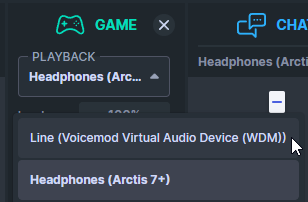
every time i turn my pc on its set to Voicemod. which is a virtual mic and it does it for everything https://i.imgur.com/hettMY1.png

its a little tedious to open the software and manually drop them all down to my headset
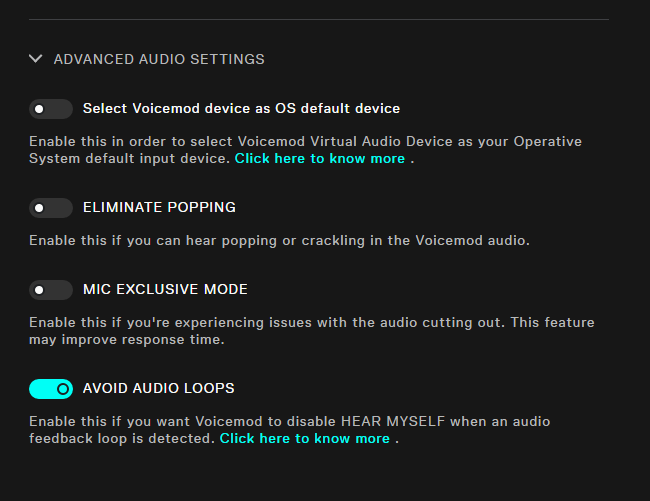
and i trie messing aorund with settings in voicemod like this stuff https://i.imgur.com/AEgTMRl.png

 agile trail
Where is the Sonar presets channel ?
tacit pawn
@keen niche do you know anyone that might know how any of this stuff works
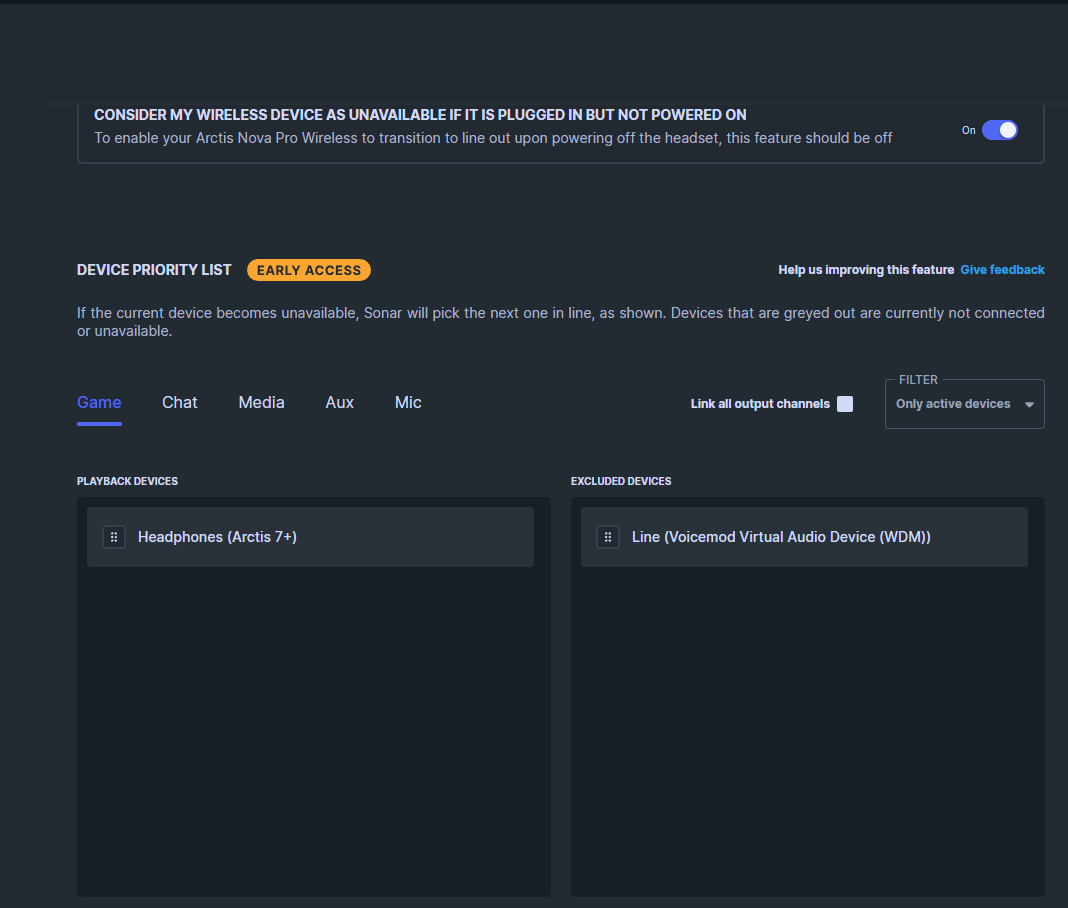
wait will this fix it entirely ? https://i.imgur.com/T0kAw86.png
 balmy junco
@tacit pawn yup should do it
 noble mesa
gonna try that for my end, and see if that make any difference for me.
 late dirge
Are there any plans for a smart sonar system that will change the sound profile of your audio systems based on what game you are playing so you don't have to change them manualy?
 proud cipher
Hello, maybe wrong channel but my sonar Game mode has the sound reversed. I can't seem to find where to flip it! Any ideas? If wrong place apologies
 dense yacht
hey i need some help
so i updated my pc yesterday and it kinda messed with my entire gg app and the settings but especially for the mic i cannot turn off the side tone and i dont wanna hear myself speak at all
i change the volume to zero but it does nothign
 hazy prawn
yo whats the best audio setting on sonar for warzone
 tulip sandal
guys, why does it keep chaing the output on this two things.
if my pc turns of or the hadsets die, they change to my speakers

how can i change this, to have it set to arctis 7 always?
 silver rapids
tulip sandal
guys, why does it keep chaing the output on this two things.
if my pc turns of...
silver rapids
tulip sandal
guys, why does it keep chaing the output on this two things.
if my pc turns of...
Go to Settings>Backup device switch>Automatic backup device switch and turn it off.
it is a weird thing. worked good for me for awhile then it just started sucking so i turned it off.
 cosmic vapor
hi ! i noticed that after a few minutes usage of sonar, i have lipsync issue on video played. i have to switch the google chrome app from game to chat, and set it up again une game, to have the issue fixed , but only for a new couple of minutes...
silver rapids
late dirge
Are there any plans for a smart sonar system that will change the sound profile ...

i hope they do that. would be so Awesome!!!!
 quiet sphinx
Hello, "Pending applications", all the applications here seem to intrude and interfere with each other, is there any conflict? The sound of the computer will be momentarily kaka, the CPU will rise abnormally, occasionally, intermittently, and this will also happen every time you open an application, what is going on, and who knows how to fix it?🥹
 velvet walrus
i think sonar and voicemeeter might conflict with each other so maybe try turning voicemeeter off?
quiet sphinx
Even if "VoiceMeeter" is turned off, the problem doesn't change 😭
 modest spear
Hello can anyone help me?
I have problem when I choose mixer mic
The microphone volume is very low
 acoustic bison
how do i stop sonar from switching devices every time
past hazelBOT
SteelSeries Sonar has “Device Fallback” that will automatically switch the outputs on Sonar.
Fallback can be triggered when a device is unavailable (such as when booting your PC or unplugging a device), or it can switch outputs if it detects if a Nova headset is turned off, and automatically switch to speakers.
This fallback functionality can be adjusted or turned off by going into the settings in GG. You can find it under Settings > Sonar > Backup Device Switch.
You can also adjust the order in which devices fall back to. This can be adjusted in the same options menu. Simply scroll down to see the full list of devices.
 coral lance
Hey guys, im on the nova pro wireless. I want to use the base station equalizer on the headset, but for my external microphone, i wanna use sonar.
Heres the problem, on the base station, whenever i have sonar open, its locked on sonar preset there.\
 junior osprey
Hello, anyone else experiencing audio delay while using sonar? I have nova 7 and youtube/twitch audio gets delayed to a point it is really noticeable and annoying. Without sonar the audio is not delayed.
 whole lance

 plain ember
 noble mesa
quiet sphinx
Hello, "Pending applications", all the applications here seem to intrude and int...
noble mesa
quiet sphinx
Hello, "Pending applications", all the applications here seem to intrude and int...
I only got that of Discord and even when I'm in a VC and can hear my friends talking anyways 😓
 muted oar
digital willow
did we find a fix for this?
muted oar
digital willow
did we find a fix for this?
im having the same problem, did you figure it out?
 hollow ibex
snow torrent
Anybody know if this is intended? and if so, is there a way to expand options? l...
hollow ibex
snow torrent
Anybody know if this is intended? and if so, is there a way to expand options? l...
Sonar only outputs to 24 bit 96000hz only. You need to use Engine for 24 bit 44100hz
 steep frost
honestly the worst software in the world, so good when it works but doesnt work 90% of the time....
 velvet moon
ITT: Sonar vs WaveLink?
I've been using WaveLink for a while now together with a Stream Deck+, volume control for each channel is great so I probably won't switch to Sonar, but I wonder what others think
 slate rose
ever since i started using sonar my discord sound (not the sound in voice call) is very quiet does anyone know how to fix this
 north blade
is it really that hard to just make chatmix a hardware level feature again? jesus christ this program is such trite just let me have this cool feature without this garbage software.
from crashing randomly, adding latency to audio inputs and forcing 96000hz audio, how do you mess up this bad??
 tame timber
so i uninstalled all the sonar drivers because i had an issue with it ouut of nowhere but now every time in enable/disable sonar the drivers dont get reinstalled again and they are forever missing
im getting this error ofc because the drivers dont get reinstalled, how can i force them to get installed again

 heady bluff
 digital willow
muted oar
im having the same problem, did you figure it out?
digital willow
muted oar
im having the same problem, did you figure it out?
nope only thing ive been able to do to fix it is turn off auto startup then turn on my pc and unplug my headset replug it in then start the software and it works
snow torrent
hollow ibex
Sonar only outputs to 24 bit 96000hz only. You need to use Engine for 24 bit 441...
The chat device runs at 48k for me though and is locked which is why I was confused but I did notice that you can’t modify sample rate in the app so was worried this was the case. Thanks for clarifying
cosmic vapor
junior osprey
Hello, anyone else experiencing audio delay while using sonar? I have nova 7 and...
Same here
 primal sundial
Hi,
I've got a problem, where, when I put discord in Chat in Sonar the voices of people that I'm in voice chat with suddenly gets distorted and it gets much worse, than in game channel. Do you guys have any preset EQ for Sonar to use with Discord?
velvet walrus
primal sundial
Hi,
I've got a problem, where, when I put discord in Chat in Sonar the voices of...
try turning off the noise cancelling on the chat channel, that can affect the sound
primal sundial
Thank you, I didn't notice that option
 noble hill
hey I need help routing AUX to a external monitor
Personal > Headphones
Stream > OBS
So I cant use the "Stream" channel,
I just want to send the AUX channel to my second monitr
velvet walrus
unfortunately i don't think that's possible when in streamer mode. when in normal mode you can set each VAD to a different output, but I think streamer mode locks all the VADs together to output to the same devices.
noble hill
Damn, So I cant even use third party software such as voicemeter?
voice meter is only showing "inputs" as an option, but AUX is strangely an output
velvet walrus
i'm not sure about third party software. i mostly meant it's not possible in the context of sonar.
noble hill
Alright
 hexed anchor
HI - so i have a steelseries sonar Arctis Nova 7P. So i normally had it in settings to use the gaming audio but I charged it and now none of the audios work besides "Headphones Arctis Nova 7P" But now if i wanted to change my mic settings on the headset it wont let me? unsure why and unsure why it wont let me use the other audio options :(
 calm stratus
There are a variety of sound effects/alerts in this clip. Are these from Sonar? and if so, what are they indicating?
 cunning horizon
Does anyone have any really good mic settings for high end microphone?
 grand jacinth
Hi! just a quick question is there a way to let sonar automatically switch between your game profiles?
 final moat
this app is the worse i swear
when he want he work when he dont want he just stop working and everything is connect and good
i close sonar the headphone work
why is soo stupid
 frank yarrow
acoustic bison
how do i stop sonar from switching devices every time
frank yarrow
acoustic bison
how do i stop sonar from switching devices every time
how to stop it fully i cant answer, but for example to stop it from switching to a controller mic and sound you can go into "sound controlpanel" and disable the device so it does not get used as a sound source. I hope this is a temp fix but i need to figure it out aswell
frank yarrow
calm stratus
There are a variety of sound effects/alerts in this clip. Are these from Sonar? ...
Sonar has a "moments" feature that allow you to capture a moment it has prerecorded to your pc and one of the sounds in just the " i have saved clip" its easy to turn off,

i understand the pain tho of hearing it all the time 😭
 opaque hedge
any fixes?

doesnt need an update, can her a single beep when turning the headset on by the button on theside
but it still isnt being detected by the software
and when plugging it in it still isnt detecting it
restarted my pc, still nothing
fixed it
no worries
 short hare
calm stratus
frank yarrow
Sonar has a "moments" feature that allow you to capture a moment it has prerecor...
short hare
calm stratus
frank yarrow
Sonar has a "moments" feature that allow you to capture a moment it has prerecor...
Thanks. I'll look at it later.
 agile mango
for some reason after myu windows update/upgrade frome 10 to 11 . seemt to mess with my sonar dousnt not load anymore after the upgrade . anyone know any fix pc reboot or some like that dousnt fix it
tame timber
agile mango
for some reason after myu windows update/upgrade frome 10 to 11 . seemt to mess ...
do u have the sonar drivers installed
agile mango
yea i do

 tame timber
agile mango
tame timber
agile mango
i had an issue like that before where it took ages to load
 tame timber
hmm
tame timber
u could try fully delete steelseries gg
agile mango
yea i'll try
agile mango
yea fuck it:)
tame timber
u might need to set up again
agile mango
not it dous not work anyway so yea
tame timber
if u got other devices like keyboards and headsets it could reset your settings for them yk
just making sure ur aware
agile mango
@tame timber it works again thanks:)
 red blade
I remember when I first started using Sonar. It was in beta, and I had so much trouble that I stopped using it for a while. I tried it again when it was officially released, but all the problems were still there, so I stopped using it once again. I gave it another try yesterday, and now it works like a charm. I recommend everyone to give it a try!
 young pewter
Sonar is still dropping the "something went wrong. check your device status or pick another one" Mic input bug. This is getting really old and it is making me look at other headsets now.
delicate burrow
Hello everyone, I started using sonar and I really love it, but I am having some confusion with setting it up with OBS. I had it going, but I would get DMCA violations. I need some help with taking the music out of my VODS. I really looked online, but I just dont get the global mixer settings and which channels to add or remove to make my VOD safe. Any help would greatly be appreciated.
 honest snow
Anyone know why, when I first boot up my pc and go to play a game steelseries sonar has the audio backwards? Like the right sound is coming out the left and vice-versa. The only way to fix it (only works sometimes) is to restart the game. (It happens on any game)
haughty summit
@opaque hedge HOW did you fix engine not detecting your headset? My arctis nova pro wireless has said not connected for a very long time. it connects to the base station, it has sound, sonar works just fine, but Engine says the dumb thing is not connected, when it very clearly IS. so what did you do to get Engine to see your headset?
i have asked for help on here before, plugging and unplugging the base station does not affect Engine at all it still says not connected
when it IS connected.
delicate burrow
Why have my recordings not been picking up my mic like it used to? It's only been capturing the Audio Device and Chat Device and ever since the stupid Sonar bug, now my mic isn't getting captured as well
 left mantle
ima say for it for all of us from the looks of it steelseries is trash af... i rather get my damn polaroid out and start snapping pictures every 15 sec and waiting for them to finish loading line them on the floor and watch my clip back frame per frame wtf is yall doing and me doing this I bet that shiii would still work better then this POS
eager patrol
calm stratus
There are a variety of sound effects/alerts in this clip. Are these from Sonar? ...
They are not, there is no such a feature in Sonar
eager patrol
opaque hedge
any fixes?
This is the wrong channel for this problem, you should post it in #engine
eager patrol
tacit pawn
wait will this fix it entirely ? https://i.imgur.com/T0kAw86.png

SteelSeries
Did you just turn off your headset and now sound is coming through your monitor instead of your desktop speakers? Annoying, I know! But now you can fix that. In this blog post, I’ll take you through how the new Backup Device Switch feature in SteelSeries Sonar addresses common audio setup issues when plugging in / un-plugging new devices.
 regal spear
I keep trying to update sonar through the app but it doesn’t work
eager patrol
regal spear
I keep trying to update sonar through the app but it doesn’t work
Weird, we're gonna look into it, meanwhile I suggest you do download the new version from https://steelseries.com/gg/sonar in this new version we got some very cool updates

SteelSeries
Crush the competition with pro audio settings for any headset. Use Parametric EQ, Spatial surround sound, and AI noise cancellation to master every sound.
regal spear
eager patrol
Weird, we're gonna look into it, meanwhile I suggest you do download the new ver...
Yh I went to the official site to get the update
I’ve been waiting for the xdefiant preset all week 😂
 eternal moth
having an issue with the Sonar mixer where i cant select a microphone or a chat device, using the arctis 7. has anyone else run into theis issue?

 opaque hedge
haughty summit
<@445649248176832512> HOW did you fix engine not detecting your headset? My arct...
opaque hedge
haughty summit
<@445649248176832512> HOW did you fix engine not detecting your headset? My arct...
i had plugged it in using the charging cable, restarted my pc, and turned the hesdset on and instantly unplugged it and it seemed to connect. Not a clue why or how that worked but it did haha
 knotty plinth
I had to completely uninstall steelseries.gg to have working chat/game channels again someone else had that problem and knows how to fix it with steelseries.gg actually running?
 wild laurel
Hello y'all,
A few months ago, Discord introduced a feature that allows you to share audio when you screenshare your entire screen. While this sounds great in theory, it hasn't worked as intended for me and my friends who use SteelSeries Sonar. The problem is that when you screenshare your whole screen, Discord's sound also gets shared, resulting in viewers hearing themselves and the streamer in the stream. I've tried various fixes, but none have worked. I even got in touch with the support, but so far I yet still don't have a solution for it.
The only workaround I've found is to avoid using this new Discord feature. Has anyone else experienced this issue with Sonar or found a fix for it? Thx in advance
vale zenith
eternal moth
having an issue with the Sonar mixer where i cant select a microphone or a chat ...
This has been an issue for a while now. None of the recent updates have fixed this issue. Its been there for over a month now. I tried installing an older version and it worked fine until it automatically updated to the latest version and is in the broken state ever since. Also the worst part is there is no way of getting an older version form Steelseries official website.
 hardy acorn
Even after the update if i switch off my arctis nova 4 (wireless) it switches my settings to default is there anyway to fix this
 nimble wyvern
wild laurel
Hello y'all,
A few months ago, Discord introduced a feature that allows you to s...
nimble wyvern
wild laurel
Hello y'all,
A few months ago, Discord introduced a feature that allows you to s...
this is the same problem i'm having.
young pewter
eternal moth
having an issue with the Sonar mixer where i cant select a microphone or a chat ...
This bug needs more attention
 cerulean zealot
Ok so for my 23rd birthday I received from my parents these artics nova pro wireless back in February.
However I just connected them to my PC to play Fortnight with friends, but the problem is that I can hear my friends in voice chat, but they can’t hear me. I’m basically trying to use the mic on my headset and I have tried everything that people have told me I could try to fix it including a video that my streamer friends have sent me, but I am just frustrated at this point!
So if anyone can help me, I would definitely appreciate it!
Thanks
 haughty nimbus
can anyone help in fixing sonar app routing only chat is working for me
tacit pawn
eager patrol
Check this out https://steelseries.com/blog/how-to-setup-sonar-backup-device-swi...
Yeh this was my issue an i found it by accident few days ago
 empty glen
Please have a, standalone or, SONAR minimal install option. No need for a bloated 382 MB + aim trainer, + shop, + recording, + macros, software.
haughty summit
@wild laurel under the share screen there's a checkbox that says "also share system audio" uncheck that box and you will not have your people hearing themselfs
wild laurel
haughty summit
<@477913496244191235> under the share screen there's a checkbox that says "also ...
yeah thats my work arround right now as well, but then I always need to turn it back on when I share an application where I need sound. would just love a way that I can use the new discord feature where u can just always share your whole screen and have sound.
haughty summit
my only suggestion would be to try it with sonar turned off, but i know, that defeats the purpose of having sonar
delicate burrow
I just downloaded it and im stuck on this...

 shut jasper
Am I the only one still having issues with getting audio through certain channels even after the update? I still can't get anything through my chat channel and it has been like that for weeks. What can I do about this if anything?
 thorny hamlet
Not sure if this is the correct place to ask but I got the nova pro wired headset, and for some reason in sonar the volume input is extremely loud. Constantly in the red (see picture). This makes sound fairly distorted and unstable, and only fix for this that I've found is manually turning down each programs volume in windows volume mixer. Do you guys know of any other way to fix this? Turning down the volume on the DAC and the headset does nothing.

 median geyser
Anyone else having issues with Sonar after updating Nvidia drivers? This morning everything was OK. Then I updated drivers and my mic (Alias PRO) stopped working. Now I have to select SteelSeries Alias Pro Input (SteelSeries Alias Pro 1) everywhere I want to use mic (steam, games, ...). SteelSeries Sonar - Microphone does not work any more...
velvet walrus
median geyser
Anyone else having issues with Sonar after updating Nvidia drivers? This morning...
check your inputs in sonar to make sure it's still set to the mic?
 median geyser
velvet walrus
check your inputs in sonar to make sure it's still set to the mic?
median geyser
velvet walrus
check your inputs in sonar to make sure it's still set to the mic?
in sonar everything works fine. I could test mic and hear myself. but in steam when using default input input device my friends cannot hear me

 inland obsidian
Hi, what are the best settings for SteelSeries Nova 7 headphones and how do I remove noise from them?
violet grail
empty glen
# Please have a, standalone or, SONAR minimal install option. No need for a bloa...
Use #1070392859125104660 :)
cerulean zealot
median geyser
in sonar everything works fine. I could test mic and hear myself. but in steam w...
This was the same issue I was having when playing in Fortnite with friends using voice chat
 dusk bough
how the hell do you turn off the moments updates on Nova Pro wireless dock?!?!?
 mystic lark
does anyone know why my headphones are super loud but when i make clips on steelseries or switch to my speakers its super quiet? im using the 2019 arctis 7's that have the aux connector to the wireless receiver.
 vestal musk
tf is with sonar, my mic doesnt work on discord
fix sonar
it has more problems every update
shut jasper
I really just want my chat channel back. If I could have that back I would be so happy.
 fringe pier
have there been any reports of Sonar not loading with Windows 11's 24H2 update?
fringe pier
thorn goblet
Anyone's sonar not working after windows update 24H2
mine isn't loading. Did you manage to fix this?
 past radish
sonar devs added the option to remove and de clutter windows audio devices
this is goated
apps now the best app ever
thanks guys
median geyser
cerulean zealot
This was the same issue I was having when playing in Fortnite with friends using...
Exactly. I have the same problem with Fortnite voice chat. But never had this problem. It started yesterday and the only thing I can think of is that I have updated Nvidia drivers
cerulean zealot
median geyser
Exactly. I have the same problem with Fortnite voice chat. But never had this pr...
Well I’ve tried everything and I just got these as a gift from my parents for my birthday back in February! I think I got it fixed but I hope to god I did it right! Because if not I’m buying a Logitech headset
median geyser
And what did you do? Because for me everything was working right until yesterday
 river abyss
median geyser
And what did you do? Because for me everything was working right until yesterday
river abyss
median geyser
And what did you do? Because for me everything was working right until yesterday
The latest nvidia drivers updated the hdmi sound driver, so it's probably reset your sonar backup device switch order. Check all is correct there. I had to reshuffle mine after the update.
 teal mulch
sonar not loading.... help?

 sudden bluff
Hi there, I'm new on this Discord and have a question about Sonar, especially Game, Chat and Micro.
I saw the game Helldivers 2 has a special equalizer setting and i want to test it. i cativated sonar and then started helldivers 2 but the app gets sent to Chat, not to Game. the equalizer setting is in game, not in chat.
Same with Discord, Discord is as App in Master, not in Chat and Micro
what do i do wrong? :D
as soon as i move Helldivers 2 to Game, i do not hear anythin ingame. then i quit the game and start anew, it gets back to chat, not to game.
oh and i have a Arctis 1 Wireless
 hasty rover
@sudden bluff For discord you need to set output device inside discord to chat! It might be same issue for your game? Go into audio settings in game and set it to the game channel if that's possible
for the game you could try drag and drop in Sonar.. But for discord you need to do it manually in audio settings

 misty berry
eager patrol
Check this out https://steelseries.com/blog/how-to-setup-sonar-backup-device-swi...
misty berry
eager patrol
Check this out https://steelseries.com/blog/how-to-setup-sonar-backup-device-swi...
Doesn't work at all for me, everything is same as before latest update. Once I turn on my PC+SteelSeriesGG, it switched my Audio output to Sonar (Arctic 7+ that are turned off).


 hollow night
misty berry
Doesn't work at all for me, everything is same as before latest update. Once I t...
hollow night
misty berry
Doesn't work at all for me, everything is same as before latest update. Once I t...
I'm having the same issue. It's super frustrating as it was workign flawlessly some updates back...
misty berry
hollow night
I'm having the same issue. It's super frustrating as it was workign flawlessly s...
I actually didn't even know this automatic switch was a thing because it never even worked for me in first place, I was just manually switching my output device defaults whenever I reset PC🤷♂️
 valid elm
once i start my pc, my headset will switch to the sonar output and i dont have any sound. every start i have to manually switch to my headset
misty berry
valid elm
once i start my pc, my headset will switch to the sonar output and i dont have a...
Go to SteelSeriesGG>Sonar and set a proper headset output here
 valid elm
misty berry
Go to SteelSeriesGG>Sonar and set a proper headset output here
valid elm
misty berry
Go to SteelSeriesGG>Sonar and set a proper headset output here
thank you 🙂
misty berry
valid elm
thank you 🙂
Do the same for "Chat" and "Mic" if needed, sometimes that randomly changes to different output for me as well🤷♂️
 flint anchor
 rough ocean
my sonar aint loading at all
cerulean zealot
median geyser
And what did you do? Because for me everything was working right until yesterday
Sorry I just now saw this, but what someone told me was that before opening up Fortnite make sure to un mute your headset because if you have it on mute it won’t work.
Here’s a few screen shots of some of what other people told me!


 inland yarrow
hey I am new here, just want to ask a question, is there any way to make sonar change automatically the game profile when opening a game?
 marsh heron
inland yarrow
hey I am new here, just want to ask a question, is there any way to make sonar c...
marsh heron
inland yarrow
hey I am new here, just want to ask a question, is there any way to make sonar c...
Not for now...
inland yarrow
ooookay, I usually use this application https://github.com/adirh3/Sonar.AutoSwitch, but for Helldivers 2 is not working I don't know why
 untold sigil
i have come here to complain a lot before about sonar.
latest update is phenomenal with the device switching! loving it
 latent forge
 shell niche
Why can't we duplicate presets to other audio channels? Seems kind of backwards having to screenshot one tab and then use the image to get almost the same preset on the next
 smoky turret
does anyone use sonar and record with medal?
i am getting my mic, and the game, but not the channel i have with game audio
liek people speaking. i use ts for that and have it on the chat slider
 spare flame
for some reason my headset doesnt want to sync any music
and its just extremely choppy
its like the singers are just spinning in circles and running around the mic
nvm i reverted it back to masters and it sounds fine
 narrow mango
Ive been having this issue sense the new update that my mic will work in GG but wont output in discord or any other application what uses voice. Anyone know a fix?
 buoyant lily
how do i download the app?
 patent schooner
I have a quick questing why am I seeing discord chat on my dual wireless base station
velvet walrus
you must have turned on the discord app in engine, you can turn it off if you don't want to see notifications on the oLED
patent schooner
oh okay lol
 rose plaza
can I use any usb a to usb c cable to update my stuff?
 fickle harbor
hi! there has been an issue with my headset in the sense of crackling when using it.. I play w.o bluetooth and sonar settings are enabled (yes, equalizer too).. my PC is connected via ethernet + the mix amp has the setting of 2.4G enabled, can someone help please? Thanks
delicate burrow
hello, i need help with the GG sonar mic. my headset mic volume is too low when i listen to sound settings recording. but my headset mic volume isn't that low when i'm not using the software
 rocky knot
is there a way to make the Game audio profile swap when i play different games without me going in to sonar and changing it?
 trail rampart
For the love of god, can anyone give me a great way to stop Sonar from changing my devices automatically? I just want the "game" channel to be activated for one specific app, leave rest as is
past hazelBOT
SteelSeries Sonar has “Device Fallback” that will automatically switch the outputs on Sonar.
Fallback can be triggered when a device is unavailable (such as when booting your PC or unplugging a device), or it can switch outputs if it detects if a Nova headset is turned off, and automatically switch to speakers.
This fallback functionality can be adjusted or turned off by going into the settings in GG. You can find it under Settings > Sonar > Backup Device Switch.
You can also adjust the order in which devices fall back to. This can be adjusted in the same options menu. Simply scroll down to see the full list of devices.
violet grail
Check that @trail rampart ^
trail rampart
Fairly certain I've already tried disabling that + choosing the channel manually for the game, but it still switches my devices around on other apps too
But, for the fun of it, I will now reboot my pc to check again
violet grail
Try reinstalling GG if you haven't
trail rampart
That's what caused my issue in the first place. Somehow I figured out how to fix it then, suddenly a couple days ago, GG just erased itself and I had to reinstall.. This reset my settings, and I now have no idea how I managed to find a solution :S
Last time I figured it out, the "Chat" and "Mic" channels had some sort of red text on them. You know what could do this?
 violet grail
trail rampart
Last time I figured it out, the "Chat" and "Mic" channels had some sort of red t...
violet grail
trail rampart
Last time I figured it out, the "Chat" and "Mic" channels had some sort of red t...
What's your windows sound set to output to?
 tacit pecan
Hello helpful people, I require assistance. Everything works fine when selecting outputs and such, however I am not able to get any audio at all. Sonar used to work, however it just stopped all of a sudden.
trail rampart
violet grail
What's your windows sound set to output to?
My headset ^^
violet grail
trail rampart
My headset ^^
There's your problem. Disable Sonar if you don't want to use it :)
trail rampart
huh? how is that the problem?
I want the channel to be used for specific apps, not all the time 🤔
delicate burrow
delicate burrow
hello, i need help with the GG sonar mic. my headset mic volume is too low when ...
up, i hope someone can help. thanks in advancee!
delicate burrow
delicate burrow
hello, i need help with the GG sonar mic. my headset mic volume is too low when ...
you can increase the volume
from Windows settings and also from Sonar settings
delicate burrow
delicate burrow
from Windows settings and also from Sonar settings
it's all on max vol but still low when i listen to my mic. but i'm gonna try to reinstall now
 drowsy lion

 dusk ginkgo
my sonar just actually isnt working anyone have a fix
 gloomy dove
Hello everyone! I have a problem that is giving me a headache. When I share the full screen on Discord, even if it is muted, I can hear everything through the microphone.
 minor sparrow
Is it possible to control Sonar with Arduino or smth like that?
velvet walrus
minor sparrow
Is it possible to control Sonar with Arduino or smth like that?
there's no public API, a few people have reverse engineered it but since it's all unofficial it could break at any moment https://github.com/wex/sonar-rev

GitHub
SteelSeries GG - Sonar API reverse engineering. Contribute to wex/sonar-rev development by creating an account on GitHub.
GitHub
Contribute to TotalPanther317/steelseries-sonar-api development by creating an account on GitHub.
delicate burrow
delicate burrow
it's all on max vol but still low when i listen to my mic. but i'm gonna try to ...
good luck 🫶
 fringe hawk
Can someone explain to me why my steelseries headset microphone/audio sound perfect with the steelseries app uninstalled but when I install the app both sound absolutely horrendous, is an issue since i'd love to setup sonar for streaming but this issue puts me off it
 dark sonnet
like an hour or so ago the mixers are showing theres audio but no audio is coming through the headset
 ember vortex
just got a headset and disc wont pick up the audio?
ember vortex
ember vortex
just got a headset and disc wont pick up the audio?
fixed it genuinely no idea what i did tho
 cosmic dust
why isnt the chatmix slider working? i have my arctis nova pro wireless plugged in and selected in sonar, but when i turn the chatmix dial nothing happens
ive already tried closing and restarting steelseries gg multiple times, restarted my whole pc like three times, even physically unplugged and replugged both the dac and the usb hub as well and nothing has fixed it
 neat ivy
cosmic dust
ive already tried closing and restarting steelseries gg multiple times, restarte...
neat ivy
cosmic dust
ive already tried closing and restarting steelseries gg multiple times, restarte...
same too and general volume decreasing on last update on nova 7
 simple kayak
anyone having audio problems with arma 3 i reinstalled it recently, and the audio with my Arctis nova pro wireless is all out of wack
the sound when i shoot is like its wayyy to the left, i took of the spatial sound then i cant hear my shots.
 brisk compass
how do I fix this? I'm stuck on this loading screen for quite a while

 dusty bison
Hi there! GG refuses to open on my Windows 11 and i kept reinstalling but still nothing
river abyss
dusty bison
Hi there! GG refuses to open on my Windows 11 and i kept reinstalling but still ...
Do you have multiple users? Check there aren't two logged in accounts in task manager.
 random vector
brisk compass
how do I fix this? I'm stuck on this loading screen for quite a while
random vector
brisk compass
how do I fix this? I'm stuck on this loading screen for quite a while
i had that to fix it i had update the app then restarting the pc
misty berry
past hazel
SteelSeries Sonar has “Device Fallback” that will automatically switch the outpu...
I'm not sure for how long this "automatic backup switch" is there, but it never worked out for me, and it still isn't
My headphones are off, and sonar is set to those offline headphones...

 violet grail
misty berry
My headphones are off, and sonar is set to those offline headphones...
violet grail
misty berry
My headphones are off, and sonar is set to those offline headphones...
Doesn't look like you have Nova Pro wireless? :)

 worthy crest
Someone didn't read labels 😛
misty berry
True true, got arctic 7+ wireless, didn't know it works just with 1 particular steelseries model 😮
Then again, my priority is set to my Speakers anyway, but seems steelseries headphones got prirority over everything even while offline😔 Guess I'll have to keep changing output devices manually 😊
river abyss
misty berry
Then again, my priority is set to my Speakers anyway, but seems steelseries head...
I have the nova 7 and this works as expected when the headphones are at the top, using the dongle.
misty berry
river abyss
I have the nova 7 and this works as expected when the headphones are at the top,...
I guess its for "nova" headphones, mine is arctic 7+ (no nova)🙃
 cyan dove
Is there any update on the issue where all the Sonar audio devices start crackling and stuttering unbearably after the computer wakes from sleep (Every output channel, such as headset or monitor speakers, whether Game or Chat Sonar devices)? The sound is only fixed after a reboot or choosing a non-Sonar device
 obsidian shoal
My case, after the new GG update (63) the sonar crashes every now and then, any ideas how to fix this?
violet grail
cyan dove
Is there any update on the issue where all the Sonar audio devices start crackli...
Contact support if you haven't :)
 fringe iron
Guys, who can help, what if someone had such a problem? Why peoples who watch my screenshare on discord can hear me on my own screenshare if I'm using the Sonar input device.
cyan dove
fringe iron
Guys, who can help, what if someone had such a problem? Why peoples who watch my...
There's an option in the Moments settings page where you can toggle voice capturing on/off during clip recording (also a hotkey to turn on/off on the fly)
 vapid otter
So I just got the Aerox 5 and put the dongle in my computer but it keeps saying the dongle is the aerox 3, is there any way to fix this issue?
velvet walrus
vapid otter
So I just got the Aerox 5 and put the dongle in my computer but it keeps saying ...
i'd suggest doing an exchange with the store/retailer you bought it from, it sounds like someone swapped the dongles.
vapid otter
Okay thank you I found the id and looked it up it was the Aerox 3 so once they are back in stock I’m going to order the new one
 errant tiger
yoo I got a steel series arctic nova 7 and I can't hear any audio are there any fixes @steelseries
need a fix now by the way
spent 200 on this headset just to have constant audio issues
dark sonnet
found the issue maybe need to update but it will not connect period

nvm looks like I found out how
how did I update the headset and still no audio 
 safe sable
Hello, I'm trying to set my sample rate to 48kHz or less (the game I'm playing comes through high pitched/sped up if I can't) but all I get the option for is 96kHz, is there any way I can change "gaming" to less?
 reef falcon
Having an issue recently where the Game audio won't play with Sonar. I can move the Apps under game to chat, media, and Aux, and they play just fine. The test sound won't even play in the Game tab. I managed to get it fixed once by force closing all steel series tasks and restarting it completely, but that hasn't worked the last couple times I tried. I completely lost access to sonar at one point, and when I got sonar to load again, I still had the issue with the game audio. Anyone run into this?
dusty bison
river abyss
Do you have multiple users? Check there aren't two logged in accounts in task ma...
no i only have one user and the OS (win11) is recently installed
delicate burrow
does anyone know how to fix the teammates mic volume? i'm using gaming in sonar and also in my pc sound settings but i couldn't barely hear my teammates mic cause it's too low even adjusted to max vol ingame. but when i watch twitch vod it was loud. i'm confused if the issue is from sonar or obs studio, but i already tried changing output audio in obs and ingame nothing changed
 worn pasture
why what I see is sonar or apps isn't good enough -_-"
 obsidian karma
My headphone's chat mix is working only if I set it up manually in application steelseries sonar
hewlp
 spice tiger
My sonar just keeps loading
 west anchor
spice tiger
My sonar just keeps loading
west anchor
spice tiger
My sonar just keeps loading
same
 astral bolt
hi I have a problem with my headphones when I plug it in sometimes I don't hear anything but my microphones work and sometimes I hear the sound and my microphones don't work
 stuck gulch
 quaint prism
I have a problem, before when I connect my headphones the output was automatically changed, but now I have to change it manually

 deft kite
Make Update Nova Pro
quaint prism
deft kite
Make Update Nova Pro
what's that
deft kite
To make it better sound and cracking of the sound would you play Fortnite? @quaint prism
quaint prism
deft kite
To make it better sound and cracking of the sound would you play Fortnite? <@121...
I don't have fortnite
deft kite
Okay
velvet walrus
quaint prism
I have a problem, before when I connect my headphones the output was automatical...
check the fallback settings or the order of fallback?
past hazelBOT
SteelSeries Sonar has “Device Fallback” that will automatically switch the outputs on Sonar.
Fallback can be triggered when a device is unavailable (such as when booting your PC or unplugging a device), or it can switch outputs if it detects if a Nova headset is turned off, and automatically switch to speakers.
This fallback functionality can be adjusted or turned off by going into the settings in GG. You can find it under Settings > Sonar > Backup Device Switch.
You can also adjust the order in which devices fall back to. This can be adjusted in the same options menu. Simply scroll down to see the full list of devices.
quaint prism
velvet walrus
check the fallback settings or the order of fallback?
That was it, thank you very much hehe
 quasi flame
I just installed sonar and I’m having problems signing in. Whenever I try to sign in, it says that my password is incorrect but when I reset it, it still says it’s incorrect. I have also tried deleting my account making a new account but when I make the new account, it says that there is an issue and try again in a minute or skip for now. I’m using windows 11 pro 22h2
 blissful hollow
Seems like a few issues are going on, but I just installed Sonar, I've been using it for a karaoke server
I factory reset my computer today, downloaded Sonar, logged in, and now Sonar is just stuck "turning-on"
quasi flame
blissful hollow
Seems like a few issues are going on, but I just installed Sonar, I've been usin...
I had that on another computer that I don’t have anymore but I just checked for updates and signed out and in again and that worked
blissful hollow
quasi flame
I had that on another computer that I don’t have anymore but I just checked for ...
Hm, It may be a bit different, because I've logged out, logged in, checked for updates, restarted, and uninstalled/reinstalled.
I'm here as a last ditch effort to help me out
 random moss
Anyone else getting this issue?
 blissful hollow
Trying to fix my issue by following the top pinned comment
@random moss
I'm having the same issue
velvet walrus
blissful hollow
velvet walrus
https://discord.com/channels/299040363123965952/1214694841003417641/121469592583...
Tried all the steps shown, still not working
Depressing, considering I really enjoyed using this app, and now not-by-choice I have to switch to something else
 terse coyote
@quaint roost i havent had this issue (thankfully& sorry to those who do) but i am now dealing with my sonar output switching from headset to digital output ? so now before i do anything i have to go into my sonar settings and reassign my choice of audio output. its a minor inconvience compared to others. but WTH.
 terse coyote
<@867866060850069522> i havent had this issue (thankfully& sorry to those who do...
terse coyote
terse coyote
<@867866060850069522> i havent had this issue (thankfully& sorry to those who do...
i also tried assigning the order of preference in settings to make sure it always selected my headset first and yet its still borken....
velvet walrus
terse coyote
i also tried assigning the order of preference in settings to make sure it alway...
why not just turn off fallback completely if you don't want it moving?
terse coyote
@velvet walrus I tried to go back in and see if there was something else I could do but now the sonar tab on my app is grayed out and can't be clicked on. I'm going to try it again tomorrow...
 mystic breach
kinda random question, but does anyone by chance got a list of settings that are good for apex legends?
 fathom umbra
why is my sonar just stuck loading
 white remnant
Can someone help me? I cannot hear anyone in VC on VALORANT with my headset on (Arctic Nova 3)
The settings are correct, I assume, but I cannot seem to hear them
sorted
 cunning marten
Has anyone encountered an issue with Sonar not launching after a Windows Update?
It messed up my audio settings, where OBS was not picking any audio for my stream, and I had to cancel it.
Sonar is stuck in loading state, never loads: https://czghost.is-a-virg.in/6Cts7esOY.png

 sinful zephyr
Help me pls
 fathom umbra
cunning marten
Has anyone encountered an issue with Sonar not launching after a Windows Update?
fathom umbra
cunning marten
Has anyone encountered an issue with Sonar not launching after a Windows Update?
yup (twice today) (if u have this problem try restarting ur pc it lets u back on)
 simple hound
Any configs for the Nova 1P?
blissful hollow
Finally got Sonar to work. It only took a factory restart
So, if you want to risk most of your files to get this done, it's tried and true
delicate burrow
white remnant
sorted
how?
cunning marten
fathom umbra
yup (twice today) (if u have this problem try restarting ur pc it lets u back on...
You know, I turned it off yesterday, and today turned it back on. Didn't help. There must be something else.
For a record, the wheel is still spinning.
delicate burrow
any fellow streamers that can help? what do u guys use as mic input? cause i used chat and gaming but my mic vol is too low and in valorant i couldn't barely hear my teammates mic
 stark phoenix
Sonar after updating now freezes on interval making it pretty much un-usable. It seems to be related to initializing a VAC. (guess)
(sorry it's bright, HDR monitor lol)
And yes, that's after a reinstall
It seems to happen only on the sonar tab
Audio doesn't function regardless however
 ocean schooner
anyone got a bug where sonar is just constantly loading?
white remnant
delicate burrow
how?
Just re-started VALORANT and it worked LOL
 tropic wigeon
hi all maybe someone could help me for some reason my firmware wont update i have the wireless arctis nova pro and every time i go to update i click through the menus to update and nothing happens, I've tried uninstalling gg and reinstalling it restarting my pc and using a different usb port and nothing works without the update i cant use my headset any help would be greatly appreciated.
vestal musk
idk why but when i use mic from sona my mic doesnt mute when i mute it from the headseat, is there a way to fix that_
?
velvet walrus
vestal musk
idk why but when i use mic from sona my mic doesnt mute when i mute it from the ...
do you mean as in "you're still getting heard in sonar" or "the mute button doesn't change in sonar"
vestal musk
in discord when i mute myself with the headset, it doesnt mute, they can still hear me, i got the headset mic for sonar, and thats connected with discord too
velvet walrus
if you go to the mic in sonar does it say it's using the headset mic?
 velvet walrus
can you send a screenshot like mine of what devices you have as mics in sonar?
vestal musk

 velvet walrus
if you set your mic in discord to just the mic on the headset instead of sonar, does it still have issues with muting?
vestal musk
sometimes idk why the mic suddenly turns off and on, it only happens with sonar, if i use the one without sonar they can hear me all the time.
vestal musk
velvet walrus
if you set your mic in discord to just the mic on the headset instead of sonar, ...
no
velvet walrus
what do you mean by "the mic suddenly turns on and off"
vestal musk
like i talk and the mic doesnt like doesnt picks it up, after some trys like moving the mic it picks up me talking. When it works im talking and from nowhere it doesnt pick up anymore
like that all the time
only if i have it with sonar, if i use the one without sonar it works
 ivory trout
Sonar broken again?
vestal musk
now it doesnt pick up anymore, ffs
violet grail
ivory trout
Sonar broken again?
There's been people with issues but it's never been broken
 low crown
how to move discord to game?

i have gaming equiped

whenever i set it to gaming in discord i can't hear anything, anyone know how to fix this?
 past hazelBOT
In order for apps to output to the other devices in Sonar, you'll need to route the apps to the specified device. Routing can be done in one of two ways:
-
Use the routing drag and drop interface underneath the audio outputs to simply move any apps playing sounds to the required output
-
Open the Windows sound device by going to Settings > Sound > App Volume and Device Preferences. From this settings menu you can use the dropdown to route any app.
If you are having issues with routing not working or apps moving back to another device after dragging them, you may need to check the app itself for any sound output settings. Some apps like Discord, Spotify, and Apple Music may need to have their outputs changed within their app settings rather than done through Sonar.
 grave lodge
My sonar is not working right, I'm not able to test gaming sounds or hear anything selected under gaming regarding the mixer
 wispy kraken
low crown
how to move discord to game?
wispy kraken
low crown
how to move discord to game?
Discord is considered communication software, why would you want to move it out of chat/communication?
eager patrol
vestal musk
like i talk and the mic doesnt like doesnt picks it up, after some trys like mov...
@vestal musk what effects have you activated in the microphone tab? Noise gate could do this if not set to the correct value
stark phoenix
violet grail
There's been people with issues but it's never been broken
Except me, which got ignored with a actual heavy issue
And it doesn't seem related to hardware or compat, as even violent uninstalling doesn't fix it (which purges regkeys, the lot; was so violent the installer pre-selected german lol), disconected countless devices, nothing helps.
violet grail
stark phoenix
Except me, which got ignored with a actual heavy issue
I think you're covered by "people with issues" :P
stark phoenix
That implies they are unique to said user
This seems something static based on something being the case contextually for it to happen
In the program itself
stark phoenix
update in testing; only the mixer tab is freezing repeatedly, but the VAC devices still do not function. In the legacy sound control panel, it seems to lag over and over in the recording tab, implying it is VAC output related (output of a cable, not playback)
Is there perhaps a edge case where the Mic/Stream VAC's can't init, or repeatedly re-init?
my guess is re-init, or extremely high latency when polling anything of the mic/stream vac recording devices
We also know whatever it is-is VAC/System level, as it makes the entire audio service crawl, with sound panels and windows settings panels not responding on interval
I do hope that's enough context to debug the issue; i can provide a memory dump if need-be.
I also may be of use in debugging, as I program with winforms c# too.
violet grail
stark phoenix
That implies they are unique to said user
To me broken would mean something that is broken for everyone or a vast majority of people.
stark phoenix
broken can occur based on context to trigger it. It still implies the issue can be in the program itself; thus broken in that context.
violet grail
There's definitely been bugs but nothing major
stark phoenix
I would argue this is major. When the context is right, this makes steelseries GG not function, audio in windows entirely not function while running, settings and audio panels in windows be unresponsive and any programs trying to output audio also unresponsive
and due to GG not closing when the window is closed (it docks to the bottom right panel in windows, needing clicking an up arrow to know as GG does not notify the user of this), a user may not even know how to close GG to make their programs work again.
As the issue does not seem to be in the client, but the sonar subprocess
or the core process
violet grail
stark phoenix
I would argue this is major. When the context is right, this makes steelseries G...
Make sure you reach out to support if you're having issues :)
My original comment wasn't towards you but a blanket statement about it simply being "broken" as in entirely unusable
Which is not the case
Nothing is preventing me from using it at least 🤷♂️
 jade ore
how to fix?
 stark phoenix
close the window and try again, being sure to wait approx 35 seconds each attempt
it seems to load eventually
violet grail
I kinda wish it'd happen to me so I can try to figure out a reliable way to reproduce it and hopefully more easily fix it
grave lodge
Anyone else having issues with sound coming from game sound mixer
violet grail
What kind of issues?
 toxic belfry
hey umm im not sure if this is a sonar issue but my right ear is much quieter than my left ear
 terse heron
uhh why aint sonar loading anymore? i updated to win11 and doesnt load now :/
median geyser
river abyss
The latest nvidia drivers updated the hdmi sound driver, so it's probably reset ...
So it seems I have finally figured out what happened. It is weird but after installing latest NVidia drivers my microphone volume in Windows was set to 10%. I have no clue how that had happened but that's why no one could hear me. Because my volume settings was to low. What was weird was that Sonar app kept showing 100%. Anyway, if that ever happens to anyone else and you see them asking for help, you might have a clue... Thanks everyone for trying to help.
low crown
hey uh, my friends can hear my sound sometimes whenever i have youtube playing in the background through my mic, sometimes when i have my headset itself unmuted they can hear it sometimes, but when its muted they can hear it always. Any way to fix this/
low crown
low crown
hey uh, my friends can hear my sound sometimes whenever i have youtube playing i...
^
grave lodge
violet grail
What kind of issues?
Issues like the game section of the mixer is not playing any audio even when trying to perform test sounds it doesn’t work
safe sable
Does anyone know why I can't set sonar gaming to lower than 96kHz or how to do so? An old favourite game of mine comes through sped up if it's above ~48kHz (it's a known issue), but when I go to control panel/audio device properties there's no option lower
velvet walrus
safe sable
Does anyone know why I can't set sonar gaming to lower than 96kHz or how to do s...
you can't since there's no option to, sonar is always at the higher rez.
safe sable
Well dang, that's no bueno. Thank you!
velvet walrus
i assume the only option is to route your game through Chat since that's at 48khz
safe sable
Oo I'll give that a go, thank you
delicate burrow
is there a way to auto config with the games that i load up so it switched between them?
safe sable
velvet walrus
i assume the only option is to route your game through Chat since that's at 48kh...
Is there an alternative way to do that other than the drag and drop routing? Every time I drag over the game to chat it disappears for a moment before reappearing in the game channel
velvet walrus
change the output in the game settings
safe sable
It's old enough to have no options to change output in game too
Bugger, is that the only option
velvet walrus
you can change your windows default output to chat, but keep in mind this can break a whole bunch of other things
safe sable
I'll have a poke online to see if there's anything else I can find, I'll use that as a last resort though, thank you for your time and help
delicate burrow
delicate burrow
is there a way to auto config with the games that i load up so it switched betwe...
^if there isnt then that would be a wonderful thing to add in for people that switch games often
 copper spindle
Sonar dont load only for me? should i reinstall?
vestal musk
eager patrol
<@290125578433200139> what effects have you activated in the microphone tab? Noi...
Hey sry for late reply, but what do you mean with effects? Do you mean in the sonar app?
Bc when i use the normal mic without sonar it has the same issue sometimes now
Is there some way to fix this issue? it show all the devices outputs if i go in sound, but in sonar app it only show gaming/chat, before it showed every output devices but after some update it doesnt show anymore


 patent tapir
another month another infinite loading sonar... why does sonar keep breaking so frequently?

 sturdy ember
Can I use sonars spatial audio turned on with dolby spacial sound on pc?
Or does one have to be turned off to use the other
violet grail
patent tapir
another month another infinite loading sonar... why does sonar keep breaking so ...
No idea, I've yet to try it. But I would think it's a difficult bug to fix since it hasn't been resolved yet
 winter hearth
Hello, has anybody find this issue?

 narrow salmon
hello guys
i have a probleme in my sonar
i have steelseries arctis 3 , and i just upgraded to windows 11

looks like this
narrow salmon
patent tapir
another month another infinite loading sonar... why does sonar keep breaking so ...
same as me
narrow salmon
winter hearth
Hello, has anybody find this issue?
check the cable or check the windows settings
 white isle
narrow salmon
white isle
narrow salmon
I have similliar problem i got my arctis nova 1 and it showes me this
winter hearth
narrow salmon
check the cable or check the windows settings
Both micros works fine without sonar, just sonar have this issue
inland obsidian
Hey guys, how do I put Mikey's voice on Sonar in Discord?
 carmine kettle
I was told to repost this
explanation: my default volume control for windows now only controls 'game' audio but I want it to cotrol 'master' audio instead. Also, whenever I take a clip from a game but I also want to capture the discord vc audio it doesn't capture discord but instead only the game and my mic input.
is there a way to change this?
 azure gull

 outer dew
Does anybody know how to fix when my PC goes into sleep mode, the audio doesn't come from my Steelseries headphones but rather my monitor speakers?
velvet walrus
outer dew
Does anybody know how to fix when my PC goes into sleep mode, the audio doesn't ...
change the fallback settings
past hazelBOT
SteelSeries Sonar has “Device Fallback” that will automatically switch the outputs on Sonar.
Fallback can be triggered when a device is unavailable (such as when booting your PC or unplugging a device), or it can switch outputs if it detects if a Nova headset is turned off, and automatically switch to speakers.
This fallback functionality can be adjusted or turned off by going into the settings in GG. You can find it under Settings > Sonar > Backup Device Switch.
You can also adjust the order in which devices fall back to. This can be adjusted in the same options menu. Simply scroll down to see the full list of devices.
outer dew
velvet walrus
change the fallback settings
Thank you 😄
 trim siren
Hello i need help my steelseries sonar dosen t strat its for ever in the loding screen pls i need help
 native skiff
My sonar will clip heavily when a new song starts on Spotify unless I'm tabbed into the gg window itself. Any ideas?
trim siren
NO SRY
 subtle sonnet
My sonar isnt working as when I put it on any of the modes such as game, it doesnt output any sound
it was working just fine the day before
 gusty rose
any1 been able to direct their google chrome to media?
I cant get the chrome to appear in apps tab in sonar
velvet walrus
you can try going into the windows audio settings and routing it there
 inland obsidian
velvet walrus
you can try going into the windows audio settings and routing it there
inland obsidian
velvet walrus
you can try going into the windows audio settings and routing it there
Excuse me, how do I move Discord to the chat section?
 past hazelBOT
In order for apps to output to the other devices in Sonar, you'll need to route the apps to the specified device. Routing can be done in one of two ways:
-
Use the routing drag and drop interface underneath the audio outputs to simply move any apps playing sounds to the required output
-
Open the Windows sound device by going to Settings > Sound > App Volume and Device Preferences. From this settings menu you can use the dropdown to route any app.
If you are having issues with routing not working or apps moving back to another device after dragging them, you may need to check the app itself for any sound output settings. Some apps like Discord, Spotify, and Apple Music may need to have their outputs changed within their app settings rather than done through Sonar.
 dense bramble
Hi, for some reason the sonar doesnt works for me and is still loading, does someone know how to fix that ?
 opal blaze
outer dew
Does anybody know how to fix when my PC goes into sleep mode, the audio doesn't ...
opal blaze
outer dew
Does anybody know how to fix when my PC goes into sleep mode, the audio doesn't ...
same with me
outer dew
velvet walrus
change the fallback settings
@opal blaze
 white spoke
is it possible to separate voice chat into a channel per player?
 gusty turret
inland obsidian
Excuse me, how do I move Discord to the chat section?
gusty turret
inland obsidian
Excuse me, how do I move Discord to the chat section?
See that headphones under the chat click that and put discord on it
gusty turret
inland obsidian
Excuse me, how do I move Discord to the chat section?
You’ll have to set sonar chat in output in discord
 vagrant rose
does sonar ai noise cancellation work for any mic? or does it only apply to steelseries products
dense bramble
vagrant rose
does sonar ai noise cancellation work for any mic? or does it only apply to stee...
Any
 golden briar
sorry in advanced, everyone long time listener first time caller. so anyone got any video or breakdown how to set up sonar and the little volume box (like a for dummies book) also what each setting does ima idiot when it comes to audio but im loving these artic nova pros
 timid venture
hey any1 have a fix for not being able to see or route apps to be routed in sonar
 steep vector
Hi there! Yesterday my new micro have arrived and i downloaded SteelSeriesGG and i configurate my micro and after this, my friends hearing me through screen sharing. Simply put, if they turned on the sound of the demonstration, then I could also be heard there me. And if you still don’t understand, I’ll explain it even simpler: if I turn off the microphone in Discord, then at my demonstration they will hear me. This problem appears when i downloaded and configure my micro through SteelSeries GG.
 knotty bane
Sonar just not loading nor connecting to my Nova 7's?

 hallow nest
@knotty bane check in engine, does your Nova 7's show there?
in settings under general do you have the toggle on for turn on sonar?
 hallow nest
timid venture
hey any1 have a fix for not being able to see or route apps to be routed in son...
hallow nest
timid venture
hey any1 have a fix for not being able to see or route apps to be routed in son...
what apps in partcular are you not seeing?
likely your answer is say for example your using xbox party chat and you dont see your output app anywhere or move it from say game to chat then. you need to go to xbox party audio settings and make sure your ouput is set to steel series sonar "chat" not say your speakers or headset because then it wont show atall. if its set to output to steel series sonar "media" you wont be able to drag it from media to chat to switch it because its being told nativley by the host app that it belongs in media
hallow nest
golden briar
sorry in advanced, everyone long time listener first time caller. so anyone got ...
i can make a short setup video later today from download to linking it to stream software
 turbid talon
My Steel Series Nova 7 headset just keeps flickering in yellow, doesn't turn off, doesn't hear sound, doesn't do anything
help me
golden briar
hallow nest
i can make a short setup video later today from download to linking it to stream...
That would be tight
turbid talon
My Steel Series Nova 7 headset keeps blinking. I can't hear anything
 opaque ledge
anyone have a good eq for gaming/in general for the arctis nova pros (wired)
 vestal sluice
This is getting a bit annoying, Sonar keeps doing this. I follow all the steps and it works for about a day and goes back to this and sometimes doesn't even start up when I start my computer up. Restarting doesn't help:

 stable vale
vestal sluice
This is getting a bit annoying, Sonar keeps doing this. I follow all the steps a...
stable vale
vestal sluice
This is getting a bit annoying, Sonar keeps doing this. I follow all the steps a...
have u found a fix?
vestal sluice
stable vale
have u found a fix?
Sadly, no, not yet.
stable vale
i literally cant hear anything unlesss it gets fixed, thankyou steel series!
 timber peak
what equalizer settings are good for horror games in general?
 lofty path
When I turn on the headset, the sonar does not engage with the automatic sonar settings. I have to do the sonar settings manually.
can someone help me?

 honest snow
My audio is playing backwards
Idk why
Any game I play, I have to restart the game multiple times
velvet walrus
lofty path
When I turn on the headset, the sonar does not engage with the automatic sonar s...
check fallback settings
past hazelBOT
SteelSeries Sonar has “Device Fallback” that will automatically switch the outputs on Sonar.
Fallback can be triggered when a device is unavailable (such as when booting your PC or unplugging a device), or it can switch outputs if it detects if a Nova headset is turned off, and automatically switch to speakers.
This fallback functionality can be adjusted or turned off by going into the settings in GG. You can find it under Settings > Sonar > Backup Device Switch.
You can also adjust the order in which devices fall back to. This can be adjusted in the same options menu. Simply scroll down to see the full list of devices.
lofty path
velvet walrus
check fallback settings
thx 
 vernal maple
Can I get some help?
When trying to lower the volume of Sonar. It only does the Gaming one.
How do I make it so it does all of them together?
 hallow nest
vernal maple
Can I get some help?
When trying to lower the volume of Sonar. It only does the...
hallow nest
vernal maple
Can I get some help?
When trying to lower the volume of Sonar. It only does the...
where are you adjusting from? the master slider to the left of the gaming slider is for all volume.
 coral dust
Why isn't the sonar working sometimes? I also had loading errors until yesterday. But today, the sonar is working. I didn't change anything. Does anyone know the reason?
 cinder dock
Seriously Sonar, fix your stuff. Again all settings defaulted. I'm so done with this software.
I've set up all in and outputs and every so often they default so I can setup everything again.
 naive bridge
is there any fix to the microphone setting just randomly stopped working?
steelseries sonar - microphone option no longer works for me ANYWHERE even with the right mic selected
 twilit quiver
Hi! Does anyone have GadgetryTech's Nova Pro Wireless Sonar WC Preset for Footsteps in Warzone as a download?
Unfortunately I can't manage to enter it by hand😩 ....
violet grail
English only please :)
violet grail
cinder dock
Seriously Sonar, fix your stuff. Again all settings defaulted. I'm so done with ...
Check your fallback settings, it's probably doing as designed :)
past hazelBOT
SteelSeries Sonar has “Device Fallback” that will automatically switch the outputs on Sonar.
Fallback can be triggered when a device is unavailable (such as when booting your PC or unplugging a device), or it can switch outputs if it detects if a Nova headset is turned off, and automatically switch to speakers.
This fallback functionality can be adjusted or turned off by going into the settings in GG. You can find it under Settings > Sonar > Backup Device Switch.
You can also adjust the order in which devices fall back to. This can be adjusted in the same options menu. Simply scroll down to see the full list of devices.
 fresh holly
My Sonar is stuck in a constant loop of doing this, anyone got any tips on how to fix it?
 naive bridge
steelseries sonar - microphone option no longer works for me ANYWHERE even with ...
naive bridge
naive bridge
steelseries sonar - microphone option no longer works for me ANYWHERE even with ...
anyone?
hallow nest
naive bridge
steelseries sonar - microphone option no longer works for me ANYWHERE even with ...
check fallback settings in settings, also check and make sure you dont have 2 stee series michrophone input sources when selecting in whatever app your setting up. i just had that for xbox game bar party chat. 1 didnt work. the othe did. not sure why theres 2 but maybe happened to you too?
hallow nest
golden briar
sorry in advanced, everyone long time listener first time caller. so anyone got ...

I do my best to go through the entire process from downloading so setting up and assigning inputs and outputs for casual users as well as the full setup for streamers and how to add it to your streaming software plus a bonus how to do audio ducking
naive bridge
hallow nest
check fallback settings in settings, also check and make sure you dont have 2 st...
my mic is highest priority, and i only have microphone enabled
hallow nest
naive bridge
my mic is highest priority, and i only have microphone enabled
im down to do a video call and screen share to help you figure it out if youd like
naive bridge
hallow nest
im down to do a video call and screen share to help you figure it out if youd li...
in 1 on 1 chat
hallow nest
ya
hallow nest
OKAY, so for everyone with the no mic audio when using steelseries microphone input. i just did a call with a lad and helped him get it to work. the fix, silly as it is. when in sonar select mixer, if you have the yellow dialog saying make defaults, obey it. click it to set defaults. then click the cog wheel on the mic by the sliders and change that device from what it is on to a secondary device if you have one. if not maybe unplug your mic so sonar forgets it then plug it back in. if you did switch it to a different mic, play with the sliders a bit then cog wheel and switch back to your prefered mic. now any application you have set input as steelseries michrophone should output properly
 maiden minnow
This is possibly a feature request, but is there a way already to change the virtual sources used by "Chatmix"?
I'd like to be able to use the dial on my Arctis 7+ (or the bar in Sonar) to mix between Game and Media. So being able to select which two sources you want the dial to mix between would be great.
 tulip vigil
Are there any plans for an official Stream Deck plugin? I currently use Wavelink and I would love to move over to Sonar but due to how well Wavelink integrates with Stream Deck (but also the number of inputs you can have - I have 9 in Wavelink) I can't. I saw there was a custom plugin someone created on Github but I'm having an issue with the setting of the output device button.
 waxen ruin
Is Sonar going to be added to macOS? I recently just purchased SteelSeries products for the first time and it annoys me that my PC supports Sonar, but my Mac (which is my primary computer) doesn't. I love the ability to control the audio level and such for different applications and channels.
violet grail
waxen ruin
Is Sonar going to be added to macOS? I recently just purchased SteelSeries produ...
I can't speak for them but I do have a fair bit of experience with the company and I wouldn't hold my breath for it.
It would most likely require a significant amount of time and resources to build for macOS and gaming on Mac is still niche compared to Windows.
With all that being said you can absolutely show your support for the idea in #1070392859125104660
And hi, fellow Mac user here 😄
hallow nest
i dont use mac but does this link not mean it already has mac supprt?
 velvet walrus
GG itself works on mac, but some apps inside GG like moments and sonar are windows only
hallow nest
gotcha
 median jolt
Anyone having issues with sonar right now?
 merry obsidian
why i cant open it

 thick cove
Same Here
merry obsidian
is any staff there?
past hazelBOT
Please be aware that SteelSeries support staff does not actively monitor this Discord server.
For assistance with your SteelSeries product or software, we strongly encourage contacting SteelSeries directly via their website. For help from official support, please check out #support or click the link below.
If you'd like support from other community members, please make a post in #community-support.
Please be aware that community members are all volunteers and may not be able to answer some questions, so please be kind to those volunteering to help you, and remember to open an official ticket with SteelSeries if our community members are unable to solve your issue.
merry obsidian
plz help us!
velvet walrus
merry obsidian
thx
 cosmic python
I'm having a brand new issue, before this weekend I never had this issue. A few of my games are staying stuck to exclusively my SS headset, I can see it in sonar. I didn't change anything, I want my sound to follow whatever my windows default is set to. Does anyone know how to disable this brand new thing that just happened?
velvet walrus
try changing the app routing in windows settings instead of sonar
cosmic python
i dont know where to find that
i might have found it in the volume mixer, the app isn't showing but im working on that now
weird, got it thanks
never used that before
hallow nest
I do my best to go through the entire process from downloading so setting up and assigning inputs and outputs for casual users as well as the full setup for streamers and how to add it to your streaming software plus a bonus how to do audio ducking
cosmic python
I've had it for almost 3 years never had this issue
cinder dock
violet grail
Check your fallback settings, it's probably doing as designed :)
I did, I had removed some devices and all of them are back. So clearly not as designed.
 wide surge
we can all agree stee;serie made their headsets way too hard to set up and work
it really should be as easy as i plug it in and there is minimal problems
but it doesnt fucking work
updated to windows 11 now i cant hear anything
mic is fine though
cinder dock
For me it has been working fine for over a year I think but since an update last month I keep having issues with the fallback devices. I can turn them off and they get turned on again after a reboot.
violet grail
wide surge
it really should be as easy as i plug it in and there is minimal problems
I mean, you can do that if you don't care about advanced features like Sonar. You don't even need to install GG if you don't want to change settings
wide surge
violet grail
I mean, you can do that if you don't care about advanced features like Sonar. Yo...
nope
violet grail
cinder dock
I did, I had removed some devices and all of them are back. So clearly not as de...
Make sure to reach out to support to report any issues :)
wide surge
for some reason its more advanced than plugging it in
violet grail
wide surge
nope
Ehm, yes you can?
Plug them in and use them
Done
Using Sonar is pretty dang simple
hallow nest
wide surge
for some reason its more advanced than plugging it in
sounds like a driver issue? are the headphones 3.5mm aux input or usb dongle? are you positive the output in windows sound control panel is selected?
violet grail
But you're not required to use it
wide surge
hallow nest
sounds like a driver issue? are the headphones 3.5mm aux input or usb dongle? ar...
theyre the arctis primes
been an issue since i got them
hallow nest
wide surge
theyre the arctis primes
would you mind doing a 1 on 1 screen share call with me and ill try to help?
wide surge
yeah why not
violet grail
wide surge
theyre the arctis primes
Ahh, yeah those are not USB but minijack. They play whatever you plug them into, so issues there aren't really the headset's fault. But I hope you get it working :)
hallow nest
@violet grail figured it out with him on a call Lennart
violet grail
hallow nest
<@112973716362645504> figured it out with him on a call Lennart
Great to hear :)
 digital tartan
hey for some reason
my mic

shows this on sonar
but on discord games etc
my mic is incredibly quiet
anyway to fix?
hallow nest
digital tartan
hey for some reason
You can add gain boost in mic tab on sonar. You can also right click your profile in audio channel and make sure the volume is up. Others can do that for you too. You can also adjust in discord settings under audio and video
velvet walrus
digital tartan
my mic is incredibly quiet
if sonar is showing the mic is peaking, then i'd check other apps like discord to make sure those apps aren't lowering the volume or applying some kind of attenuation/noise cancelling
 clever dust
anyone having this problem still? I contacted customer support and they have had me do so many things and nothing has worked.

 tight fable
anyone knows why does my mic have an echo and reberb when using sonar?
Idk what I changed
delicate burrow
try to reset your settings of sonar, maybe that helps
Does somebody have good settings of fortnite(sonar)?
haughty summit
i don't know much about audio settings, what to do to make the best sound for my purposes, but i have to say, i love the "chat" settings on sonar. i have it set for clarity, and it reeeeaaaaaally helps. ❤️
 unique anvil
 raw pulsar
WHY CAN’T I ACTIVATE THIS?

 placid tartan
how can i turn it on ?
 raw pulsar
WHY CAN’T I ACTIVATE THIS?
raw pulsar
raw pulsar
WHY CAN’T I ACTIVATE THIS?
help please
 timber belfry
please fix this bugs

 violet grail
placid tartan
how can i turn it on ?
violet grail
placid tartan
how can i turn it on ?
You can't, the feature has been discontinued
https://support.steelseries.com/hc/en-us/articles/360060420911-Where-is-Cloud-Sync-in-GG
violet grail
timber belfry
please fix this bugs
Contact support :)
 sage remnant
i can't not get discod in the chat. and i dont understant why, som ideres 


 fallen quarry
does anyone have a sonar preset for ready or not?
velvet walrus
sage remnant
i can't not get discod in the chat. and i dont understant why, som ideres <a:2_P...
change the output in the discord settings
past hazelBOT
In order for apps to output to the other devices in Sonar, you'll need to route the apps to the specified device. Routing can be done in one of two ways:
-
Use the routing drag and drop interface underneath the audio outputs to simply move any apps playing sounds to the required output
-
Open the Windows sound device by going to Settings > Sound > App Volume and Device Preferences. From this settings menu you can use the dropdown to route any app.
If you are having issues with routing not working or apps moving back to another device after dragging them, you may need to check the app itself for any sound output settings. Some apps like Discord, Spotify, and Apple Music may need to have their outputs changed within their app settings rather than done through Sonar.
sage remnant
velvet walrus
change the output in the discord settings
ty you are a genius xD

 jagged sentinel
raw pulsar
WHY CAN’T I ACTIVATE THIS?
jagged sentinel
raw pulsar
WHY CAN’T I ACTIVATE THIS?
Disable the Ai thing
It should be able to change then
velvet walrus
jagged sentinel
Changing preset based on game?
not currently a feature, you can ask about it in #1070392859125104660
jagged sentinel
Okay
 young cypress
Im getting a delay from when i speak using sonar to when it actually goes through to discord and have tried everything and sonar seems to be putting in latency in my audio does anyone know how to get rid of or minimize the audio latency?
 ripe isle
my sonar is not working. its load and load and load. can everybody help me?
 whole oar
ripe isle
my sonar is not working. its load and load and load. can everybody help me?
whole oar
ripe isle
my sonar is not working. its load and load and load. can everybody help me?
yh the same happening to me rn
 worthy echo
any way to get sonar mic to work with discord? it works while certified setting but wont detect in sonar setting
 paper osprey
ripe isle
my sonar is not working. its load and load and load. can everybody help me?
paper osprey
ripe isle
my sonar is not working. its load and load and load. can everybody help me?
same
 vivid walrus
Each time I get back onto my PC my sonar app changes the playback device in the "mixer" tab to my monitor rather than my headphones.
I have to manually choose my headphones every day. Is there a way to set my headphones as the default playback device?
past hazelBOT
SteelSeries Sonar has “Device Fallback” that will automatically switch the outputs on Sonar.
Fallback can be triggered when a device is unavailable (such as when booting your PC or unplugging a device), or it can switch outputs if it detects if a Nova headset is turned off, and automatically switch to speakers.
This fallback functionality can be adjusted or turned off by going into the settings in GG. You can find it under Settings > Sonar > Backup Device Switch.
You can also adjust the order in which devices fall back to. This can be adjusted in the same options menu. Simply scroll down to see the full list of devices.
 scarlet dagger
Anybody have a good sonar preset for apex feel like the current one is kinda meh
 gray laurel
is there anyway to make it where i dont hear myself tyhrough my headset mic??
nevermind finally found it ^
hallow nest
raw pulsar
WHY CAN’T I ACTIVATE THIS?
Ive noticed recently anytime i connect to discord or xbox chat or any chat. i have to go in, switch both input and output to any other source, then immediately switch it back to sonar chat and sonar mic and it fixes it.
hallow nest
ripe isle
my sonar is not working. its load and load and load. can everybody help me?
unfortunately that is a bug from the newest update that some people are getting, uninstallig and reinstalling seems to fix. i have tested multiple times on multiple computers and that always fixes it. kind of annoying but until a patch update comes out thats the fix. you can also watch my setup video if you need any help getting everything set.
I do my best to go through the entire process from downloading so setting up and assigning inputs and outputs for casual users as well as the full setup for streamers and how to add it to your streaming software plus a bonus how to do audio ducking
hallow nest
young cypress
Im getting a delay from when i speak using sonar to when it actually goes throug...
make sure your audio settings match this. i have no problem with delay and as far as i know in sonar theres no reason aside from maybe ai cancellation but i dont think thats it that could cause input delay


 hallow nest
worthy echo
any way to get sonar mic to work with discord? it works while certified setting ...
hallow nest
worthy echo
any way to get sonar mic to work with discord? it works while certified setting ...
Ive noticed recently anytime i connect to discord or xbox chat or any chat. i have to go in, switch both input and output to any other source, then immediately switch it back to sonar chat and sonar mic and it fixes it.
hallow nest
timber belfry
please fix this bugs
what action do you do to make that error pop up?
hallow nest
raw pulsar
WHY CAN’T I ACTIVATE THIS?
you have to disable Clearcast AI Noise Cancelation ^ directly above that setting. then you can manually adjust your own noise cancelation
young cypress
hallow nest
make sure your audio settings match this. i have no problem with delay and as fa...
Ok thank you so much I’ll try that
 quaint marsh
Hello everyone, could someone help me with this ? please https://discord.com/channels/299040363123965952/1249730611879477280
hallow nest
quaint marsh
Hello everyone, could someone help me with this ? please https://discord.com/cha...
1 on 1 screen share with me?
i assume you have input sources doubled but think i can fix it easily for you
quaint marsh
hallow nest
i assume you have input sources doubled but think i can fix it easily for you
free in like 3hours ? cause i'm at the gym rn
i dm
hallow nest
ummmm, i might still be awake lol. if not ill be up for sure in 8ish hours. im in hawaii. 3am here
quaint marsh
hallow nest
ummmm, i might still be awake lol. if not ill be up for sure in 8ish hours. im i...
ok 3pm here lol
live in france
if you're not up in 3h i'll wait np
hallow nest
if you could post screenshots of your sonar dash (where you master slider is) while in a screen share and speaking. and a screenshot of your discord audio input output settings
quaint marsh
hallow nest
if you could post screenshots of your sonar dash (where you master slider is) wh...
yea i can do that
when i'm home
hallow nest
cool. as soon as i see those ill give you a call. get pumped at the gym mate\
quaint marsh
hallow nest
cool. as soon as i see those ill give you a call. get pumped at the gym mate\
ahah thx mate
 median comet
Is Sonar and Spotify a known bug? This slider doesn't do anything and doesn't control the volume of the app
 hallow nest
median comet
Is Sonar and Spotify a known bug? This slider doesn't do anything and doesn't co...
hallow nest
median comet
Is Sonar and Spotify a known bug? This slider doesn't do anything and doesn't co...
not known to my knowledge. it wont adjust the volume slider in spotify, best to have spotify slider maxed, then it should work from slider in sonar
median comet
hallow nest
not known to my knowledge. it wont adjust the volume slider in spotify, best to ...
No it doesn't work which is why I stated if it was a known bug
hallow nest
like i said not a known bug as far as i am aware. spotify works fine with my sonar under media
1 on 1 and i can try to help?
 honest plank
hey
new to steelseries and I'm trying to tweak my arctis 9x for warzone and found that sonar settings are good. but...I've mac. Is sonar that good that I should search for my old windows laptop?
hallow nest
sonar with the arctis 9x definetly is an insane advantage in warzone as you can fine tune out any frequencies you dont want. (i.e, explosions, planes,killstreaks.) and boost foot steps. gun shots, parachutes. plus spatial surround sound with adjustments. for near xray like hearing of where everyone is around you
honest plank
cool, thanks for the quick response! In that case I'll set it up there 😄
hallow nest
also extreamly useful for clearing up audio of chat like discord or steam. as you can seperate the audio channels and tune each accordinly so that your voice and teammates voices are clean, no background noise. no distortion. and adjust audio individually as well
I do my best to go through the entire process from downloading so setting up and assigning inputs and outputs for casual users as well as the full setup for streamers and how to add it to your streaming software plus a bonus how to do audio ducking
here is my setup tutorial for initial setup
in the next few days i will be making videos for optimal settings for a few different games and apps as well
quaint marsh
hallow nest
if you could post screenshots of your sonar dash (where you master slider is) wh...


 hallow nest
quaint marsh
hallow nest
quaint marsh
you need to click the yellow bar in sonar to set sonar devices to your defaults. when it says that it means you have something else either input or output selected through windows. which is why you would be getting doubling. my guess is a different input mic or headset mic?
 vapid imp
I am not able to select any audio source for the chat channel, anyone know why?
 hallow nest
vapid imp
I am not able to select any audio source for the chat channel, anyone know why?
hallow nest
vapid imp
I am not able to select any audio source for the chat channel, anyone know why?
try going into chat tab and clicking the 3 dots and clicking reset. if that doesnt work unplug your headphones for 30 seconds. then plud them back in and see if it changes. if still not working i will 1 on 1 screen share with you to figure it ouT
vapid imp
hallow nest
try going into chat tab and clicking the 3 dots and clicking reset. if that does...
Tried it out, did not seem to fix the problem
whole oar
guys do u know why if i open the sonar there is no virtual output devices ?
hallow nest
whole oar
guys do u know why if i open the sonar there is no virtual output devices ?
do you have sonar turned on in settings and clicked the yellow bar in sonar that says set windows default devices?
whole oar
yh also the sonar output is in windows setting but not in sonar

also the chatmix is not working
hallow nest
you set windows to sonar gaming and sonar microphone. then in sonar pic what speakers/headeset and microphone you use for each mix
then each app you either setup to output to the specific sonar channel you want it in ie chat, media or under the master slider the un specified app will appear there and you can drag and drop it to the box bellow which output you want that app to follow the eq of
whole oar
yh actually its working now thx
hallow nest
👌
 crimson grotto
has anyone actually had a good experience with Sonar? I keep trying to give it a chance but it just sucks. My brand new headset keeps blowing out in games where I have to turn the headset off and back on, Sonar keeps re-adding devices that I have excluded multiple times.
 reef cargo
can any one help me in discord withh sonar i am not good a typing
hallow nest
crimson grotto
has anyone actually had a good experience with Sonar? I keep trying to give it a...
turn off the backup device feature. then it will stay as your primary. i use sonar daily to stream games and record different types of videos and for my daily media and pc use and absolutely love it
hallow nest
reef cargo
can any one help me in discord withh sonar i am not good a typing
sure, i can try to help
 reef glen
Yo is anyone else hearing a buzzing sound when playing back a moment? It’s the AI noise cancellation for sure because it’s not there when I turn it off. Any idea why it’s happening?
 acoustic canyon
Why does my sonar just not work sometimes?
like it doesnt load when i start my computer and when i start steel series gg manually, the sonar just shows an infinite loading loop
 jovial bison

 torpid stirrup
goddamn the arctis nova are comfortable
hallow nest
acoustic canyon
Why does my sonar just not work sometimes?
Is it actual infinite spinning? Mine sometimes with spin for about 60 seconds before turning on
cosmic python
sonar update last week was perfect. it changed all my channels to my tv for absolutely no reason. my tv is turned off 99% of the time.
 brittle yacht
Guys, I have this problem, sonar stopped working, I've already reinstalled the program several times, nothing helps, what should I do about it?

 icy ice
 neat creek
So i set my Game channel and media channel on sonar to match my audio outs to my speakers and to my headset and not all the time but pretty often it keeps happening when i turn my pc on its like sonar has reset and keeps changing the set audio for the Game channel and all the other audio channels back to my screen which is LG . so instead of the game channel set to Realtek speakers like it should be it keeps reverting back to LG . and then i have no sound until i open sonar back up and change it back to Realtek its really annoying!!! and i have my default audio settings on windows set to sonar Game as my default in windows setting so i don't get it ? Anyone else have this problem ?
 mild jewel
anyone else's OBS recordings really quiet?
I have OBS's sound output device set to Sonar Media but recordings are still quieter on playback despite them playing through Sonar Media
acoustic canyon
hallow nest
Is it actual infinite spinning? Mine sometimes with spin for about 60 seconds be...
I’ve left it running and it doesn’t turn on. Only thing that seems to fix it is a reinstall
 late obsidian


 tardy shadow
when is that going to be at mobile we need it ☠️
delicate burrow
how i can get discord in chat in steelserries gg
white remnant
can someone help me (maybe in DM)? but i have a feeling my right-ear is much harder than my left-ear, i have the arctic nova 3 wired.
 magic dove
neat creek
So i set my Game channel and media channel on sonar to match my audio outs to my...
magic dove
neat creek
So i set my Game channel and media channel on sonar to match my audio outs to my...
I also have this problem. Any time my computer turns off or goes to sleep sonar resets to the monitor, except for the mic. It is becoming real annoying.
velvet walrus
magic dove
I also have this problem. Any time my computer turns off or goes to sleep sonar...
change the fallback settings?
past hazelBOT
SteelSeries Sonar has “Device Fallback” that will automatically switch the outputs on Sonar.
Fallback can be triggered when a device is unavailable (such as when booting your PC or unplugging a device), or it can switch outputs if it detects if a Nova headset is turned off, and automatically switch to speakers.
This fallback functionality can be adjusted or turned off by going into the settings in GG. You can find it under Settings > Sonar > Backup Device Switch.
You can also adjust the order in which devices fall back to. This can be adjusted in the same options menu. Simply scroll down to see the full list of devices.
 fathom grove
Anyone else have audio artifacts when trying to rout Apex Legends audio through Sonar? The crackling quality goes away when I change the sound output to go directly to my headphones in the game settings.
Weirdly enough, this is also the case with Titanfall 2.
magic dove
past hazel
SteelSeries Sonar has “Device Fallback” that will automatically switch the outpu...
I didn't even know this existed, hopefully this fixes the problem. I feel this should be in the main menu of sonar and not buried. Like updating should be easier to find and not placed under "about," I always forget where it is.
hallow nest
delicate burrow
how i can get discord in chat in steelserries gg
in discord go to audio and video settings. select steel series sonar chat as output and steel series sonar microphoner as input
cosmic python
How do I stop this from happening? I didn't make this change, the last time I was in sonar I had to change it to my headset.
 violet grail
cosmic python
How do I stop this from happening? I didn't make this change, the last time I wa...
violet grail
cosmic python
How do I stop this from happening? I didn't make this change, the last time I wa...
Most likely fallback settings :)
past hazelBOT
SteelSeries Sonar has “Device Fallback” that will automatically switch the outputs on Sonar.
Fallback can be triggered when a device is unavailable (such as when booting your PC or unplugging a device), or it can switch outputs if it detects if a Nova headset is turned off, and automatically switch to speakers.
This fallback functionality can be adjusted or turned off by going into the settings in GG. You can find it under Settings > Sonar > Backup Device Switch.
You can also adjust the order in which devices fall back to. This can be adjusted in the same options menu. Simply scroll down to see the full list of devices.
cosmic python
Sexy, thanks so much
did something about fallback change recently? This never happened to me before this past weekend
violet grail
cosmic python
did something about fallback change recently? This never happened to me before t...
I think so yeah
 harsh echo
hey so i just got the SteelSeries 5 nova and I'm trying to set it up. i can get it to be able to hear others but i cant get it to talk. it is picking up the mic but no "connection". any idea on helping me solve this issue please?
 silent edge
hey someone can help me with this
