@worn stump Thank you for offering to help but I tracked down the issue. Shouldn't have bugged anyone here. If anyone else is having weird issues with sonar/cs:go I found out that for some reason the resolution switch was causing my CS:GO config files to be reloaded but my custom config was so old it didn't have a variable set for the CS:GO sound processing option which caused it to default to "1" or "on" in the menu. Readjusting the file and forcing it to read only has fixed my issue for the last day or so where before I was crashing ~3 times per hour.
#sonar
1 messages · Page 7 of 1
 pure girder
 tame mica
i hate this so much... https://i.imgur.com/DOcvZIK.png
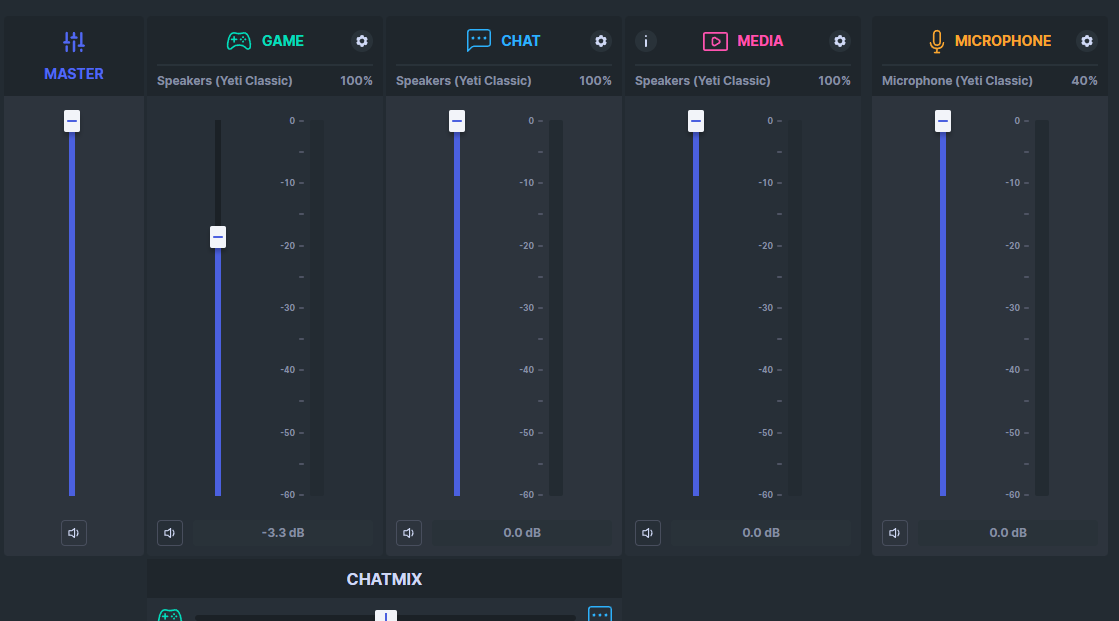
i have yeti mic, and then all of a sudden it fkn changes my settings??
wtf is this!!
this is my default stuff https://i.imgur.com/rAp7W79.png

like why did it change to that
gotta be a joke https://i.imgur.com/JE0ZmUT.png

i honestly regret buying this Steelseries headset
 rose osprey
tame mica
i honestly regret buying this Steelseries headset
rose osprey
tame mica
i honestly regret buying this Steelseries headset
i feel nothing but regret after giving steelseries another chance with nova pro
tame mica
literally so ass, the settings have been made so complicated for no reason
rose osprey
sure sound quality is good, everything else is meh at best and most of my problems stem from them using sonar for some weird reason
tame mica
exactly
rose osprey
the new gamedac requires sonar so you can't even not use their unreliable software
tame mica
sound quality is good, no complaints but bro, the fkn settings are so ass
the software is the worst i have seen
its so complicated, and not helpful
rose osprey
lol back when i first bought my arctis pros the software crashed my whole computer, had to uninstall it completely for it to work
tame mica
and dont get me started on the support 🤣
rose osprey
the support's ok
i honestly regret buying because i was looking forward to the new gamedac
just a big disappointment it needs crappy software to function as advertised
when the original gamedac didn't need software to be able to use the chatmix
now the chatmix doesn't even function, the software barely works 50% of the time and i get to sit here wondering why i afforded steelseries a second chance after their last expensive gaming headset was fragile enough for a whole earcup to snap off
tame mica
bro now the annoying bit for me is
every time i start my computer, i have to fkn change my settings in the app
..
 turbid nebula
I'm with you, man. this headset has so much potential to be great, but the software is SO buggy and frustrating. Sonar is constantly selecting the wrong device for me, etc. 😦
 worn stump
pure girder
<@133356582242091008> Thank you for offering to help but I tracked down the issu...
worn stump
pure girder
<@133356582242091008> Thank you for offering to help but I tracked down the issu...
Nice you found yourself a way out! Thx for sharing your case, it might help others!
@rose osprey @tame mica
Hard to fit to everyone's needs 😉
Doing our best here, thx for the feedback tho
 vast hedge
Anyone got a good preset for Hogwarts Legacy yet?
 pliant fable
when I try to set up sonar it doesn't show my devices at all, what do I do?
 nova cobalt
tame mica
every time i start my computer, i have to fkn change my settings in the app
nova cobalt
tame mica
every time i start my computer, i have to fkn change my settings in the app
glad i'm not the only one
tame mica
nova cobalt
glad i'm not the only one
We in this together twin 🤞🏽
 digital flicker
Anyone able to help me with Sonar and WZ2 footsteps with the DT990 Pros ? If you can please DM me.
 quaint schooner
does anyone know if sonar is coming to Mac OS ever? I really want to take advantage of the Sonar noise cancellation when in meetings on my Mac. It works great and nobody on my Windows PC can hear any background noise, but on my Mac it picks up everything. I guess if anyone has any suggestions for making background noise less prevalent on a Mac, that works for me as well.
 lost cipher
Doesn't smart volume defeat the purpose of an eq? Like it will boost what the eq lowered and compress what the eq increased, no?
 buoyant ingot
hey i have sonar but my microphone doesn't work with sonar. It work when i don't use sonar and sonar detects it. anyone know if i can fix this and how ?
 sterile roost
does anyone else have issues with the game/chat slider integrating with discord? I have my discord set to sonar: chat and the windows set to sonar: game, but the game/chat slider is seemingly non-functional
 lime bane
sonar literally unusable
any one else has to reinstall the engine like every other day because sonar cant seem to send sound to the headset
 velvet walrus
nope, works just fine. is the issue that sonar doesn't recieve/send the audio or that the audio doesn't play on the headset? as in, do you see the monitor going up/down when playing audio?
 worn stump
pliant fable
when I try to set up sonar it doesn't show my devices at all, what do I do?
worn stump
pliant fable
when I try to set up sonar it doesn't show my devices at all, what do I do?
can you please open a ticket to SteelSeries support? They will guide you to send us logs allowing us to analyze your issue!
 limber dock
so I was having a weird issue where all of the sonar channels showed up twice, and opening the sonar tab in GG would give an error message about sonar.exe not being running. I reinstalled sonar and now it's been stuck on the configuring screen for about 10 minutes
reinstalled 2x more times
this software blows
 limpid moon
Hey! Thanks for the response. Would you be able to link me to this forum? I cant seem to find it 🥹 I feel like my googlefu is letting me down here
 craggy narwhal
velvet walrus
nope, works just fine. is the issue that sonar doesn't recieve/send the audio or...
craggy narwhal
velvet walrus
nope, works just fine. is the issue that sonar doesn't recieve/send the audio or...
My Sonar on Windows 11 shows the monitor moving but I don't hear anything. This only happens on the game and media VADs. The chat VAD and microphone VAD work for some reason. I have to use the default instead of the game VAD to hear anything. The media VAD does not work even though I assigned it to programs for sound. I don't know if this is an issue with Windows 11. I have tried everything. I uninstalled every driver and the software multiple times.
 onyx mirage
Hey, I'm having an issue on both my Windows 11 PCs where all audio is routed on the "Game" output. Is this normal behavior? I'm expecting browser audio to go through Media, rather than Game.
worn stump
onyx mirage
Hey, I'm having an issue on both my Windows 11 PCs where all audio is routed on ...
yes it is. Default is game, for media usage, you need to manually set it up
 earnest widget
anyone got some equalization for modern warefare 2
vast hedge
Is Spatial Audio only good for competitive fps or can I use it for single player games?
 dreamy summit
vast hedge
Is Spatial Audio only good for competitive fps or can I use it for single player...
dreamy summit
vast hedge
Is Spatial Audio only good for competitive fps or can I use it for single player...
Personal preference honestly
 worthy vessel
worn stump
yes it is. Default is game, for media usage, you need to manually set it up
worthy vessel
worn stump
yes it is. Default is game, for media usage, you need to manually set it up
i did not like game mode with arena 7. Media mode is much clearer. Why should I change it everytime manually?
worn stump
worthy vessel
i did not like game mode with arena 7. Media mode is much clearer. Why should I ...
with same audio effects defined on both GAME/MEDIA VAD, the sound output should be the same
 delicate burrow
can someone give me some good sound settings for sonar on pc for steelseries 9x
 scenic arrow
hiii why sonar counts youtube as game is there a way to change it to media
scenic arrow
scenic arrow
hiii why sonar counts youtube as game is there a way to change it to media
and spotify
 quartz heron
start playing youtube/spotify (or anything else you want to change to media) and go to the windows sound settings (volume mixer) and find the app you want (would be the browser for yt) and click on it and change the output to Steelseries Sonar - Media
May be two for spotify, do both
(with spotify -maybe others too- you may need to close and reopen it once you have changed the output for it to output audio)
scenic arrow
i dont know where to change can u come to voice and help me? if u are available atm
@quartz heron
quartz heron
click the settings bit next to where it says media, then the app to device routing
 scenic arrow
i clicked but didnt work
quartz heron
you on windows?
quartz heron
scenic arrow
i dont know where to change can u come to voice and help me? if u are available ...
not comfortable with vc sorry
quartz heron
nice
 fallen hollow
Hey guys new to sonar and need some help with setting them up. I got them because of the noise cancelling and i did a test run on the program and worked great couldnt hear any of my background noise but when i get on COD its like if sonar isnt working
Any help would be greatly appreciated
 dry tangle
not sure whats happened but my headset is now not playing the sound correctly i have uninstalled and reinstalled sonar i have reset all windows sound devices and set sonar back up but no matter what i do i am mainly getting higher sound out of the left ear cup and when moving about in game i get no sound direction using the arctis nova pro wireless
 wet brook
How can I configure Sonar so that whenever audio plays from the Game channel, that it does not "dip" the audio coming from media?
By dip, I mean, for example, on an android phone, when playing media, it'll turn the media down for a second or so if a notification comes in.
Or also, settings like this in Windows:

I don't want my sound/volume to change because of another media source.
The feature to disable audio dip was removed back in Android 6 or 7.
And so many other things in the computing world these days are major annoyances because they're "helpful" without my consent, nor do they even give me the ability to turn it off.
 forest herald
2 quick questions: 8 channel, 24bit,96000 Hz OR 8 channel, 24bit,96000 Hz studio quality?
And are these first two supposed to be checked?

 dusky plank
Whenever I have warzone 2 open it does this. When it’s closed it goes back to normal
dusky plank
tame mica
i have yeti mic, and then all of a sudden it fkn changes my settings??
Just disable whatever it defaults to?
forest herald
wet brook
Either format is fine, and yes to the checkmarks
Thanks @wet brook
I use a different mic than the steel series headset mic. Is there a way to when it I make it not recognized in sound settings and/or disable in device manager for sonar going game/chat/media to stay. Every time I restart my computer I have to go in and disable it in sound settings. If I do the first two options sonar goes away for everything
wet brook
There's a setting in the regular settings menu which allows sonar to switch audio devices (ie, if your wireless headset disconnects) - you can disable that; that might help with what you're experiencing
forest herald
I know what you’re talking about and I do use that feature. I’m just saying is there a way to disable the sonar microphone without disabling sonar for the game/chat. Cause sonar mic always takes priority over my actual mic on a restart
 mint owl
Can sonar apply a game's EQ automatically? for example, can it use overwatch EQ when I open overwatch, and default to the normal EQ once it closes?
 upper lintel
why can't i enable ai noise cancel anymore ?
 worthy marlin
Hello, I just wanted to try sonar but unfortunately I have a strange problem under Windows 11, the microphone only works when I have the Windows Sound Settings active somewhere on my screens open, as soon as I minimize or close the window, the microphone no longer works. Known problem? Thanks in advance for help.
 tired plank
Are the media and chat volume %'s suppose to be linked? everytime I try to raise media the chat raises aswell?
 ancient compass
Has anyone found a EQ setting that’s better than the warzone 2.0?
 rotund junco
anybody got a good r6 config
 hidden kite
Hello can someone help me with sonar? I don't know if it's something wrong though
I want to hear game, chat and media but I can only hear game.
 grim wagon
The chat/game scroll doesnt work properly for me on warzone 2. anyone else with this issue?
 sleek mauve
I wish Sonar supported more than just the proprietary Spatial Audio because it sucks. DTS:X is much better and it is what was on the older headsets.
dusky plank
Yeah man im@having a hard time@with spatial audio in warzone 2 even with new nova pro’s
 blazing herald
I cant enable spatial sound settings.
 rose osprey
yet another day where sonar fails to work entirely, please fix the software
paid 200$ for a headset that has half of the features promised
 serene orbit
blazing herald
I cant enable spatial sound settings.
serene orbit
blazing herald
I cant enable spatial sound settings.
You enable Spacial audio in the Sonar app, not Windows settings
wet brook
wet brook
How can I configure Sonar so that whenever audio plays from the `Game` channel, ...
Any chance somebody has an idea about this issue?
 snow vessel
Hello, I have the same input device for the Game and Media, but when I try to enable it for the Chat it just says "Something went wrong. Check your device's status or pick another one"
 undone turret
wtf is dis

 rough surge
I have been having the same issue lately for the arctis nova 7
undone turret
200€ headset rip bcs of the software... ty. I mean the old artic 7 did not need any software and ran wonderfully
 stray zealot
??

I can't detect anything, something's broken, I don't hear a sound, I don't know what to do
 violet grail
English only please @quasi crystal
 final snow
Any reason my chatmix isn't working?
sleek mauve
serene orbit
You enable Spacial audio in the Sonar app, not Windows settings
You can only enable the trash spatial audio that comes with Sonar though. You can't enable Spatial audio on windows and use whichever spatial audio options you have.
The sonar app should allow you to use whichever spatial audio you want, if they won't let you choose through windows.
 rustic sigil
anyone else having reduced frames when sonar is active?
final snow
dusky plank
Yeah man im@having a hard time@with spatial audio in warzone 2 even with new nov...
warzones audio just sucks
app they're doing a revamp though
dusky plank
final snow
warzones audio just sucks
Managed to get decent audio
With an aggressive EQ and loud headphones lmao
final snow
Nice
 red sapphire
My sounds is all sorts of messed up when I started my computer today.
 mental grotto
could someone help out with my sonar? it says theres no output devices i can enter for it eventhough it was working like last week
 trail anchor
Is it me or the Sonar's Warzone 2 preset sounds quiet...
digital flicker
trail anchor
Is it me or the Sonar's Warzone 2 preset sounds quiet...
Not just you let me know if you find any decent ones
dusky plank
digital flicker
Not just you let me know if you find any decent ones
Just raise the 110hz to 7db and 870hz to 5db, spatial sound on, to performance and put the gain to 3db
Your welcome
If you can dip down the 155hz to -3db while maintaining 7db for 110hz
 inner mantle
can someone please send dm a goodquality build for my microphone its a razer siren mini and im tryna change the audio so its crystal clear and idk how to get the clear cast ai thing so anyone pls help becasue i also have a lot going on sometimes in the backround audio
 opal steeple
i downloaded voicemod (voice changer) but now sonar doesnt work anymore and i cant hear my mic when testing it
i think it made a new version of my headset or something because in the settings its called 'Headphones (2- Arctis Nova 3) now, im pretty sure there was no 2- before
does anyone know how i can like reset my headset or something
fixed it^
 rotund prawn
Can someone share their eq settings for apex legends, i use the moondrop chu iems and feel like the deafult apex legends eq doesnt work for me, i just want a pinpoint location of enemy cuz i cant make out tht if they are above or below me
sleek mauve
rotund prawn
Can someone share their eq settings for apex legends, i use the moondrop chu iem...
above vs below is going to be a game issue, eq change can't fix that. eq change will only make it easier to hear footsteps
rotund prawn
sleek mauve
above vs below is going to be a game issue, eq change can't fix that. eq change ...
Then what is the best eq for pin pointing distant and close footsteps?
 hoary cypress
rotund prawn
Can someone share their eq settings for apex legends, i use the moondrop chu iem...
hoary cypress
rotund prawn
Can someone share their eq settings for apex legends, i use the moondrop chu iem...
Above or below is apex problem. My problem is that when using sonar and turning on apex mode it all sounds so bad. It all sounds super flat
delicate burrow
Whats the best setting for just chatting and gaming. I play Cod Escape from Tarkov fifa etc
 sour mantle
Hello. I need help. Reainstalled 3 times already and restarted my system every time. Never had problems before....

it gets stuck here every time
Still trying and nothing working
I made a VC and I'm screen sharing waiting for help. I have no more ideas what to do in order for this to work
-Reinstalled
-Made a new account
-Restarted computer many times
-Made sure it was a clean install by deleting all temp files
@violet grail think you can help? Your the only support "green" atm
also made sure all drivers where up to date
violet grail
sour mantle
<@112973716362645504> think you can help? Your the only support "green" atm
There's no supporters here, mods don't work for SteelSeries and isn't support :)
Even if we do try to help here and there
I'm not sure what can cause that honestly
Plus I'm busy at work
sour mantle
Where should I report this then in order to get the problem fixed?
violet grail
You can only get help from SteelSeries through a #official-support ticket on the website
sour mantle
violet grail
You can only get help from SteelSeries through a <#303962546539462656> ticket on...
sent
sleek mauve
rotund prawn
Then what is the best eq for pin pointing distant and close footsteps?
IDK, I prefer balanced sound, so I EQed for that. I believe raising the upper end frequencies should help with footsteps as they are higher frequency noises. Lowering lower frequencies might also help. If you want a specific EQ I would google good gaming EQs for your headset or for Apex
 arctic rose
anyone know how to get the mic working without needing sound settings open?
sour mantle
violet grail
You can only get help from SteelSeries through a <#303962546539462656> ticket on...
all of a suden just started working. Didnt do anything to it.
violet grail
sour mantle
all of a suden just started working. Didnt do anything to it.
Great, make sure to close the ticket :)
sour mantle
violet grail
Great, make sure to close the ticket :)
Havent got a reply yet with a link or anythign to the tiket
violet grail
sour mantle
Havent got a reply yet with a link or anythign to the tiket
You should be able to see the ticket on the support page if you log in
 zealous apex
hello i bought steelseries arctis nova 1 yesterday. My mic was working but today it isnt working i didnt anything it is just doesnt working i need help?
 novel gulch
Hello, is there anyone who can help in Turkish?
I bought Steelseries arctis nova pro wireless today. However, I could not transmit my voice to the other party in discord in wired mode.
 fast sorrel
I recently got the arctis nova pro wireless headset and I think it's great. I use it for my pc and would use it for my phone if Sonar was available on mobile. The headset is, to my understanding, designed to give you the raw sound quality so that you can mixture with it much easier. Though the problem is that the raw sound sounds really bad and when there is no Sonar to make it better, I have better alternatives than these specific headphones.
Will Sonar eventually arrive to our phones?
quartz heron
fast sorrel
I recently got the arctis nova pro wireless headset and I think it's great. I us...
When it comes to mobile, you can create a config in the engine tab, and select it only when you are going to use your headset for mobile, as the engine EQ saves to the headset,
 tame timber
I just got new Arctics and Sonar won't toggle back and forth between the headset/default speakers when headset powers on and off.
I have to manually change it back and forth myself
Devcie Fallback is on
delicate burrow
hello is there a way for me to turn of sonar sound i use the mic but not the sound and it sets it as my default device everytime i restart
 frail cloak
delicate burrow
hello is there a way for me to turn of sonar sound i use the mic but not the sou...
frail cloak
delicate burrow
hello is there a way for me to turn of sonar sound i use the mic but not the sou...
i know you can turn off the equalizer for game and chat and such, maybe give that a try? Just go to sonar and click on game/chat and uncheck the equalizer option
trail anchor
digital flicker
Not just you let me know if you find any decent ones
here let me share you mine and let know if works fine for you.

 lime bane
day 42 of having to reinstall steelseries engine everyday to make sonar work on Arctis 7+
 empty glen
IF YOU ARE READING THIS, whether or not you play BF2042, the BF community would appreciate it if you shared your like to the feature request so it can get some recognition/attention from the devs.
https://discord.com/channels/299040363123965952/1071086244731306114
 hasty mason
i need help with sonar's mixer and im tryna hear chat audio and game audio at the same time. so when i trim or edit clips i can adjust the two so i can hear chat better than game
 pale remnant
fast sorrel
I recently got the arctis nova pro wireless headset and I think it's great. I us...
pale remnant
fast sorrel
I recently got the arctis nova pro wireless headset and I think it's great. I us...
Hey Edno ! Sonar for mobile is one of our big dream  Could you post it in our #1070392859125104660 channel to bump up the idea ?
pale remnant
 junior lion
why is my spotify displayed in games?
junior lion
why is my spotify displayed in games?
Hello ! Game is the default sound channel in Windows. You have to manually route sound (spotify, your browser or anything else...) to the media channel for now. To see how, head to your Mixer tab click on the "i" icon on your Media channel ! Have a great day 
 pale remnant
tame timber
I just got new Arctics and Sonar won't toggle back and forth between the headset...
pale remnant
tame timber
I just got new Arctics and Sonar won't toggle back and forth between the headset...
Hello Fox, sorry for the inconvenience. The fallback feature works only on our Arctis Nova wireless product line.
 tame timber
pale remnant
Hello Fox, sorry for the inconvenience. The fallback feature works only on our A...
tame timber
pale remnant
Hello Fox, sorry for the inconvenience. The fallback feature works only on our A...
Hey - thats what i have. Arctic Nova Pro Wireless
junior lion
pale remnant
Hello ! Game is the default sound channel in Windows. You have to manually route...
Oh thanks! The main thing that drew me towards Sonar is Ai sound canning, so for the moment, i don't need it, and thus i will keep it deactivated. Also, is there a way to connect one of your windows to your mic? I wanna blast music into my mic when my friends piss me off.
The post was helpful, btw
I'm just asking though
 civic stag
Hey, idk if my question is right in this channel, if not, im so sry, but i dont know where else to ask for :c
Is there anyway i can hear myslef over an external mic? i saw the option to hear myself over the inbuild mic, but i wanna hear myself over my external but i cant choose the option to switch mic :/
 storm gale
I can't hear anything
when i use the audio output of the app im not getting any audio
 floral gyro
civic stag
Hey, idk if my question is right in this channel, if not, im so sry, but i dont ...
floral gyro
civic stag
Hey, idk if my question is right in this channel, if not, im so sry, but i dont ...
Why do you want to hear yourself ?
civic stag
floral gyro
Why do you want to hear yourself ?
If i cant hear myself while talking, im talking louder 😅
And it's irretating if i cant hear myself idk
worn stump
civic stag
Hey, idk if my question is right in this channel, if not, im so sry, but i dont ...
what's your mic? Steelseries headset? If so, you can enable the sidetone, which could satisfy your need
civic stag
worn stump
what's your mic? Steelseries headset? If so, you can enable the sidetone, which ...
Im using a external mic, Rode Podcaster
civic stag
Its working for me rn, but its a strange way how i fixed it, thought there would be an easier method via Sonar or Engine :/
floral gyro
How ?
 sacred elk
Anyone expect the WZ2 equalizer settings to change when they fix audio occlusion today?
tame timber
pale remnant
Hello Fox, sorry for the inconvenience. The fallback feature works only on our A...
Any update on this? I have a wireless headset but it isn't using the fallback setting like it should
worn stump
plz open a ticket at steelseries support, they will give you instructions to send some logs helping us to understand what's happening in your case
 steel mountain
Does Sonar auto-change the profile when changing games or do I have to go to the Sonar menu to change it?
velvet walrus
currently it's manual only, but if you want the auto-change feature then you can add your voice here: https://discord.com/channels/299040363123965952/1071135769307132027
steel mountain
Thanks, already got my check!
Is Sonar supposed to be used with Engine with everything Default, including DTS off?
 shut summit
Got a simple question here. Can Eq's be copied between Media and Game?
Made a neutralizing eq for media but wondered can I save some time copying from media
 simple breach
guys i need help
 delicate burrow
an application for the update may have appeared in your taskbar
 gusty pine
windows auto updated and now i dont get any sound output from sonar?
 candid cedar
gusty pine
windows auto updated and now i dont get any sound output from sonar?
candid cedar
gusty pine
windows auto updated and now i dont get any sound output from sonar?
Make sure its set to correct output device in both windows settings and sonar settings
sometimes updates mess this up
gusty pine
yeah there's no difference from before in selected/default ios anywhere
candid cedar
Even in windows settings its set as default for sonar?
Try changing default device in Windows settings to your normal one and see if it works properly
gusty pine
i get an output to my headphones when i manually select them but get no passthrough from sonar when it's selected
 sick vale
Hey there, anyone has nice Sonar settings for Escape from Tarkov?
candid cedar
gusty pine
i get an output to my headphones when i manually select them but get no passthro...
Then go to sonar and select a Game/Chat/Media and test if audio works properly using the test sound (or if its not muted etc)
gusty pine
candid cedar
Then go to sonar and select a Game/Chat/Media and test if audio works properly u...
it does not, neither the in app sound test nor the windows one. it reads audio levels and says it should be outputting to headphones but isn't and i don't know why/dont see anything different
 candid cedar
Also.. a simple "fix" did you try restarting the Steelseries GG app? 😄
gusty pine
i've already restarted it and windows 
 cloud cargo
I have a problem with an application gg ،Speech seems unclear
It actually looks like this
 candid cedar
gusty pine
it does not, neither the in app sound test nor the windows one. it reads audio l...
candid cedar
gusty pine
it does not, neither the in app sound test nor the windows one. it reads audio l...
Did u try increasing volume level to 100 to see if maybe its just too quiet?
gusty pine
yes
candid cedar
Do you have the output put in properly (as in apps are directed to the media output) ?
The standard output is Game Output
If you had that set before, check if it wasn't reset
gusty pine
for testing purposes i reenabled and selected game and it does now ouput audio, but forcing it to output through media (the only channel i leave enabled/use) no longer appears to work
gusty pine
yeah when i manually select an app/windows to output through the media channel it stops outputting audio so im double checking the media settings now hm
yeah i dont see anything wack in any of my media settings 
candid cedar

gusty pine
ig i can just import all the eq settings and just use the gaming channel since it's the only one that works
that's not ideal though 
candid cedar
Unfortunately im out of ideas since usually these things work for me ;-;, you might get lucky and it'll somehow fix itself like usually stuff does ;d
gusty pine
yeah hopefully

 cunning oyster
anyone use sonar for mw2 competitively and have messed with the mw2 eq?
 calm bramble
Hi all, I have a question regarding Game DAC EQ in engine software vs Sonar. I have Arctis Pro wired headset with Game DAC. Being that the Game DAC has EQ presets and customization options, with DTS X support (7.1 virtual surround), am I better off using that or Sonar? Or do they work in conjunction with one another?
turbid nebula
is it just me, or has windows volume control when headphones are off gotten sillier with the new Sonar update?
it used to at least reduce the volume when I lowered it - but now it seems to do nothing? I can only control my speaker volume using the Sonar app, and have to manually edit the % value or drag the sliders?
all I want is to enjoy these headphones, but also not have an unbearably frustrating / cumbersome experience when I'm listening via speakers 😦 if I've just got something configured wrong, I'm open to suggestions.
candid cedar
turbid nebula
is it just me, or has windows volume control when headphones are off gotten sill...
Its not only you and here's a quick explanation ( I'm bad at explaining so sorry ❤️ )
The windows volume control works properly however it works for the "gaming" channel/device as that is the systems default which is what you're trying to lower volume of, however the app volume isn't decreasing on the "Media" channel/device (Or vice-versa), unfortunately I don't know if there is a workaround for this as of yet.
turbid nebula
candid cedar
Its not only you and here's a quick explanation *( I'm bad at explaining so sorr...
it actually doesn't seem to move any of the sonar volume bars when I use windows volume control, but maybe I'm just misunderstanding a bit... either way, thanks for letting me know it's not just me. This seems like a real shortcoming in a very expensive product 😕
candid cedar
turbid nebula
it actually doesn't seem to move any of the sonar volume bars when I use windows...
Just in case you misunderstood:
In steelseries GG the sliders shouldn't move using the volume controls of Windows, what changes is Windows volume however the volume is set to change on the default device. Think of it this way, what sonar does is create 3 different drivers:
+ Driver 1 - Gaming
+ Driver 2 - Media
+ Driver 3 - Chat
Windows then has two options, option 1 "Default Output Device" and option two "Default Communication Device", so Steelseries GG takes these two options and Sets Driver 1 - Gaming as the "Default Output Device" and Driver 3 - Chat as the "Default Communication Device", and Driver 2 - Media gets left alone for use only if you want it to. You can then add certain apps to use Media Driver as their output device (like spotify for music/web browsers for youtube etc) however for Windows that device is "invisible" so unless you make it visible for Windows (Changing the "Default Output Device") it won't recognise it .
Also Steelseries GG / Sonar is a free app, you are not required to have steelseries items in order to use it (as far as I'm aware). The only thing which requires the actual items are Engine (which is for customising stuff on the items)
quartz heron
candid cedar
Just in case you misunderstood:
In steelseries GG the sliders shouldn't move usi...
you are correct with your comments about GG/Sonar at the end
turbid nebula
candid cedar
Just in case you misunderstood:
In steelseries GG the sliders shouldn't move usi...
Sonar is free. But as far as I understand it the arctis nova pro wireless are functionally useless without sonar. At least many of the benefits the $350 msrp headset provides.
(chat mix etc)
 south valve
what’s a good spatial audio distance setting?
 sly coyote
dose anyone have a solution for this? my output dose not show here
 worn stump
sly coyote
dose anyone have a solution for this? my output dose not show here
worn stump
sly coyote
dose anyone have a solution for this? my output dose not show here
plz send me in DM the following file : "C:\ProgramData\SteelSeries\GG\Logs\gg-errorlogs.txt"
 tender mango
i need help pls
 eager patrol
sick vale
Hey there, anyone has nice Sonar settings for Escape from Tarkov?
eager patrol
sick vale
Hey there, anyone has nice Sonar settings for Escape from Tarkov?
yes there is a dedicated game preset for EFT
 crude forge
Holy mother of god
ClearCast AI Noise-Cancellation is just a whole new level of voice processing
Thanks for making it non-exclusive 🙂
I feel like my hair-loss is cured after using this AI Noise-cancellation
worn stump
@crude forge share it to the world 😉
Happy to make it available for everyone, thx for your feedback, will share it to the team!
 round slate
Hello ! When Sonar is enabled, I don't hear any sounds from my game, but I didn't changed anything in my settings as it worked 10min ago. Why ?
Since the Media update, I have a lot of bugs
Alright I'm just dumb, I muted the game
eager patrol
round slate
Alright I'm just dumb, I muted the game
sometimes it happens 🙂
tame timber
Do I need to open a ticket in regards to the Fallback feature not working? I bought the Arctic Wireless Pros and one of the main features I wanted was the ability for it to switch between speakers/headset when powered on and off. Currently I have to manually change it everytime.
sly coyote
worn stump
plz send me in DM the following file : "C:\ProgramData\SteelSeries\GG\Logs\gg-er...
okay
 frail hamlet
worn stump
plz send me in DM the following file : "C:\ProgramData\SteelSeries\GG\Logs\gg-er...
frail hamlet
worn stump
plz send me in DM the following file : "C:\ProgramData\SteelSeries\GG\Logs\gg-er...
i have the same problem
 turbid mica
simple breach
guys i need help
turbid mica
simple breach
guys i need help
I am experiencing the same. Bumping for visibility.
 hollow phoenix
I have this problems, someone can help?

 worn stump
turbid mica
I am experiencing the same. Bumping for visibility.
worn stump
turbid mica
I am experiencing the same. Bumping for visibility.
Please shutdown GG and relaunch it => should solve the issue
turbid mica
worn stump
Please shutdown GG and relaunch it => should solve the issue
Just tried that but still failed. Will restart PC to see if that help
OK it appears the update had been installed but it did not reflect it in the GG app until after PC reset. Now it shows that I'm on 32
 orchid flume
Hello guys so when i'm using only "GAME" everything is okay but when i'm using "GAME, CHAT, MEDIA, MICROPHONE" my CPU usage is like 6-11% and fps dropping in games so much
Is there way to disable all of these ? I only need GAME to better hear steps i was trying to disable audio device (SONAR CHAT, MEDIA, MICROPHONE) in windows sound but every restart still returning or any FPS drop fix for sonar
i5 9400f
Arctis 7
 compact rover
i have some problems on my arctic nova pro wireless
I dont know if the chat mix works i have tried everything
 foggy wasp
could someone help me somehow my 96000 Hz 24 bit doesnt work anymore
like on my Gamedac it shows me 48khz /24 bit
but on my microsoft it should be 96000
 junior notch
ah j'avais pas vu le canal dédié ! c'est de la grosse merde SONAR on est d'accord ?
 proven eagle
Is Sonar able to detect what game Im playing?
Because I feel like I need to select the game manually now
serene orbit
You do. Sonar currently doesn't have an auto-detect feature to switch EQs depending on the game. For now you have to do that manually. Hopefully that'll be a feature added in the future though
 stiff spear
Is it normal that sonar detects spotify, chrome and such as "Game" instead of media?
How do I set up sonar so that for example when I'm playing a game, listening to spotify and speaking with friends, all 3 of the sounds get sorted into their own categories and not just chat & media
 limber dagger
hey. i need some help, just updated to the newest windows, when i turn sonar on all the sound comes out of my monitor instead of the headset, any1 else had the same issue?
quartz heron
limber dagger
hey. i need some help, just updated to the newest windows, when i turn sonar on ...
Can you check in the sonar menu what output devices you have selected?
limber dagger
quartz heron
Can you check in the sonar menu what output devices you have selected?
yeah just did, they were switched over to the nvidia screen settings, had to switch them back, everything works now
quartz heron
nice
limber dagger
quartz heron
nice
yes yes, thx for help even tho i found it out myself<3
quartz heron
haha nw
south valve
worn stump
Happy to make it available for everyone, thx for your feedback, will share it to...
holy i use ai noise-cancellation and it’s so good especially since i have birds that love to sing on my shoulder when playing
it saves me SO much time
 true oar
Hello, i did the recent update, and it has been stuck at "loading screen". https://i.imgur.com/PcN60JI.png
 crude forge
true oar
Hello, i did the recent update, and it has been stuck at "loading screen". http...
crude forge
true oar
Hello, i did the recent update, and it has been stuck at "loading screen". http...
Hey, have you tried a system restart?
 short crane
is there any way to disable just the microphone part of sonar
true oar
crude forge
Hey, have you tried a system restart?
Thank you, it did help.
 frozen nova
Hey y’all, question, if I setup sonar on my PC with let’s say the destiny 2 by bungie EQ on my headsets, and then proceed to connect my headsets to my ps5, will the settings remain? Or go back to whatever is default EQ for the headsets
 somber rock
Hello guys. A question I just bought Arctis 7+ for my PS5 does Sonar works on consoles or only PC?
 frigid igloo
true oar
Hello, i did the recent update, and it has been stuck at "loading screen". http...
frigid igloo
true oar
Hello, i did the recent update, and it has been stuck at "loading screen". http...
same for me, since the last update.... reboot doesn't work 😦
crude forge
short crane
is there any way to disable just the microphone part of sonar
Not sure about disable, but you can just change your PC's default microphone
So you basically not using the Sonar Microphone
 vital drum
Is there any way yet to "lock" the devices in Sonar? Every time I restart my pc I have to change my devices that I want to use in Sonar.
This is what I want it to look like

This is what it looks like after every reboot
 worn stump
stiff spear
Is it normal that sonar detects spotify, chrome and such as "Game" instead of me...
worn stump
stiff spear
Is it normal that sonar detects spotify, chrome and such as "Game" instead of me...
Hi @stiff spear
Apps must be manually routed if you want to use MEDIA VAD. This means you should open windows settings with this nice button and select which app you want to be in Media.
 worn stump
vital drum
Is there any way yet to "lock" the devices in Sonar? Every time I restart my pc ...
worn stump
vital drum
Is there any way yet to "lock" the devices in Sonar? Every time I restart my pc ...
Hi @vital drum
Have you tried disabling the automatic fallback feature? You can disable it in settings

 lethal drift
Hello every one,
got yesterday my Arctis Nova Pro (wired) w GAME DAC.
Having issue, that people over the voice (any application) hear "my headphone sound". If I play FPS, they hear shooting as example. This is happening only when I use Sonar application. Any suggestion please?
worn stump
Hi @lethal drift
please make sure no redirection is made into this device =>
 velvet walrus
lethal drift
Hello every one,
got yesterday my Arctis Nova Pro (wired) w GAME DAC.
Having i...
velvet walrus
lethal drift
Hello every one,
got yesterday my Arctis Nova Pro (wired) w GAME DAC.
Having i...
i'd also check that the cables are connected correctly with the angled end plugged into the DAC, having it backwards can cause the mic to echo a bit
 lethal drift
thank you I will try
stiff spear
worn stump
Hi <@396304768680853515>
Apps must be manually routed if you want to use MEDIA ...
I did it a little different but thanks anyway
 desert rune
Hello, i just bought my first big name headset(arctis 7p+) and the question is, if i play league of legends the sound on my right ear sounds numb, is it a personal problem or just 7.1 kind of stuff?
 cunning sparrow
Any chance we can swap options wirelesly from mobile devices?
 sly leaf
frigid igloo
same for me, since the last update.... reboot doesn't work 😦
sly leaf
frigid igloo
same for me, since the last update.... reboot doesn't work 😦
same for me
did u find any solution to solve this?
 lethal drift
@velvet walrus I did tried your tips, and nothing like that seems to be issue. There is nothing routed to Playback - Microphone or cables are connected improperly. People hear from me nearly 1:1 what I hear from my headphones
earnest widget
anyone have good equalizer settings for modernwarfare 2
 versed root
my sonar isnt working after update :/
lethal drift
earnest widget
anyone have good equalizer settings for modernwarfare 2
I am using sonar preset its awesome on Arctis Nova Pro (wired) w GAME DAC.
 thick compass
Hello, steelseries and sonar programs make me crash my game since the new version 32.0 I am a role play player on fivem and since this update my game crashes, I have uninstalled steelseries sonar and no more problem I think the problem is due to the audio system of sonar possible to fix the problem quickly please
 teal belfry
Steelseries... please stop making messed-up updates that end up screwing with my settings.
 supple umbra
this new update broke my audio...
all same setting as ive always had that worked good. update now sounds broken.... ooof SteelSeries
 fallow umbra
anyone else having this issue with Sonar? i was literally in a game and the headset beeped, it was at 50% battery, it shut down then kicked back in and now i get no sound through sonar, i tried to update the firmware but that done nothing.

i have checked all settings and they are exactly how they should be but no sound unless i select sonar chat for some reason
 stuck jackal
i had the same issue unless i switch to a different usb port
I get no sound unless i turn off Sonar
nova cobalt
vital drum
Is there any way yet to "lock" the devices in Sonar? Every time I restart my pc ...
This is an issue I'm having too, and I've spoke to someone previously in here who was having the same problem, I don't think there's a fix for it
 analog sentinel
hey i have a problem with sonar. I can't hear anything when i turn the option steelseries Gaming - my headphones
 shut spruce
Thanks for the update on Sonar. The mic is perfect now
 sterile mortar
temporary fix


 real spindle
Now mixchat works without the sonar sound
delicate burrow
who can give me settings to not hear the voices of others in the background
 tranquil cedar
Anybody got some good settings for Tarkov?
 rocky trail
can anyone help me with this problem please??
 vital drum
worn stump
Hi <@242330671819784192>
Have you tried disabling the automatic fallback featur...
vital drum
worn stump
Hi <@242330671819784192>
Have you tried disabling the automatic fallback featur...
I´ll try that, thanks.
 velvet hollow
Anyone know if there is a way to control sonar with a streamdeck? or hotkeys in general? Some games are a pain to alt tab from just to adjust a slider
 fading meadow
Hi everyone,I update my engine to 32.0.0,and now my system audio not working,not sure what's wrong,but when I close down SS engine,audio start working again,does anyone here knows how to fix it?or any FAQ here I can read?
steel mountain
velvet hollow
Anyone know if there is a way to control sonar with a streamdeck? or hotkeys in ...
 cinder walrus
I am using sonar for my microphone (quadcast) but I would like to leave it active only for the microphone, but when I restart the pc my headset is also active with the sonar settings. Can I use sonar for just my microphone?
steel mountain
cinder walrus
I am using sonar for my microphone (quadcast) but I would like to leave it activ...
I mean, if in all your settings you don't use the sonar's virtual devices, that's effectively not using sonar.
Just set your normal devices as default
cinder walrus
even if I make my headset the default it goes back to sonar settings after restarting the pc. But I don't want to uninstall sonar because it made my microphone audio very good
opal steeple
does anyone know why im hearing a kgggggggggggggggggrgrgrg sound on the background when sound is playing? how do i fix this
velvet hollow
steel mountain
https://discord.com/channels/299040363123965952/1070448147324735560/107044814732...
thanks, totally missed it
 long spruce
 livid ocean
I'm cautiously optimistic this has improved it for me; still some scenarios where it gets blurry. Will keep iterating and let you know of any further improvements.

 chilly valve
hello, does anyone have a good configuration for the fifine k669b microphone
 limpid flame
chilly valve
hello, does anyone have a good configuration for the fifine k669b microphone
limpid flame
chilly valve
hello, does anyone have a good configuration for the fifine k669b microphone
Less nasal preset
chilly valve
limpid flame
Less nasal preset
I didn't understand
 lapis jasper
Hello! Today i turned on my pc, and no sound trough sonar... only if i select my headphones (nova 3)
any have this issue?
 frozen gate
fix ?

 south crater
hey got a question, how can i put chrome/opera etc to sonar to the media route instead of gaming?
nvm found it
violet grail
English only please @fluid turret
 wet kayak
Hello I play basically only warzone 2 was looking for the best sound options for it using sonar I can hardly hear footsteps rn.
 eternal kayak
Guys I have an issue so
When I click my audio devices for sonar to gaming the audio doesn't work but it work with different types like media
I tried switching the game audio output to the same as the one in using so like for val
I change it gaming and my audio output to gaming
No differencr
When I go to sonar the audio meter thing goes up and down so the sound is being received idk why it's not being played
 rugged hedge
wet kayak
Hello I play basically only warzone 2 was looking for the best sound options for...
rugged hedge
wet kayak
Hello I play basically only warzone 2 was looking for the best sound options for...
Deadly, which headset do you use?
 copper gust
why is it everytime sonar updates it doesnt work for a few days
latest update made it so the driver doesnt even run
sonar wont even open in steelseries gg
wtf
rugged hedge
wet kayak
Hello I play basically only warzone 2 was looking for the best sound options for...
Deadly, here's what I recommend if you've got an Arctis Pro or Arctis Nova Pro:
In-Game Settings
- Go to [ Settings ], then [ Audio ]
- Set "Audio Mix" to "Home Theater"
- Under "Master Volume" click [ Show More ]
- Set "Music Volume" to 0
- Set "Dialogue Volume" to 50 or less
- Reduce "Effects Volume" or "Voice Chat Volume" as necessary, if you can't get the balance right elsewhere
- Ensure "Speakers/Headphones Game Sound Device" is set to "...Sonar - Gaming..."
- Set "Speaker Output" to "Stereo"
- Ensure everything under "Voice Chat" is enabled, with "Game Voice Channel" set to "All Lobby"
- Set "Voice Chat Output Device" to "...Sonar - Chat..."
- Under "Microphone", set "Microphone Mode" to "Open Mic" unless you're using a 3rd party app to communicate with your team.
- If using a 3rd-party app, like Discord (I highly recommend this!), then set "Mic Mode" to "Push to Talk" so that you don't give away your voice comms unless you mean to. Be sure to set a button for PTT if you enable it.
- Set "Microphone Input Device" to "...Sonar - Microphone..."
- Turn on "Reduce Tinnitus Sound"
Sonar Settings
- Game tab
- "Configuration" try out the Warzone 2 and Modern Warfare II EQ settings. If you like them, great! If not, Flat EQ is a good neutral setting.
- Enable "Spatial Audio"
- Set the Tuning sliders to full "Performance" and minimum "Distance" (0)
- Raise the Gain as necessary to boost volume
- Try out "Smart Volume." I don't notice a difference, but it sounds good in theory!
- Chat tab
- Enable Clearcast AI Noise Cancellation
- I have the slider maxxed out
- Test out "Smart Voice." Again, I don't notice a difference, but maybe you will
- Microphone tab
- Enable "Clearcast AI Noise Cancellation"
That's a good start! Obviously you should feel free to experiment with all of these settings. GGs!
rugged hedge
eternal kayak
Should I make a ticket
Derpy, join me in my voice channel. I'll see if I can help you.
 torpid tulip
Sonar is broken for most people rn aperantly it’s not just you
 unreal perch
is there a way to set the gamedac to show me system info like CPU and GPU temps
 mossy lance
Hello, I have a question! I would like to make my friends listen to music through my microphone with the GGSonar. Is there a solution? I know that when I record a sound to set my mic to Sonar, my friends hear the recording like a soundboard
 shell swift
sonar is working when I try and set up
stuck jackal
did they fix it? yea i think its kind of working for me. my mic still doesn't work for Xbox game bar.
 strange kestrel
I cant be the only one having problem that Sonar quite literally KILLS all audio on my computer
 stiff plaza
Hi!, I seem to have a problem using in game on Warzone2. everytime i setup the mic input and turn on ANC in sonar and on the headset itself, it seems to not work in Warzone. anyone here plays WZ2 and have the same issue?
 lofty kite
strange kestrel
I cant be the only one having problem that Sonar quite literally KILLS all audio...
lofty kite
strange kestrel
I cant be the only one having problem that Sonar quite literally KILLS all audio...
Check the inputs in the mixer, mine had changed
 oblique jackal
I need help with Sonar. The Gaming Sonar doesnt work, i hear nothing, but if i change on Media or other, than i hear a sound, but just by Gaming i doesnt hear anything, what can be?
eternal kayak
oblique jackal
I need help with Sonar. The Gaming Sonar doesnt work, i hear nothing, but if i c...
I have the exact same issue
I've reinstalled the software, tried everything and nothing seems to work
oblique jackal
eternal kayak
I've reinstalled the software, tried everything and nothing seems to work
yeah, me too...
eternal kayak

Are these the same playback devices as urs
Just want to make sure everything is the same
On a vid I saw where each playback devices selected had either gaming, media, chat, etc
oblique jackal
eternal kayak
yeah, is the same
eternal kayak
I'm going to see more to check if it's right or not
Regardless I don't see any other options for playback devices
Ok it's correct
So it's not the issue
It's just so annoying that the gaming audio, the one I need the most and got the headset for isjt working
Everything else is great especially comfort
oblique jackal
I have the problem with Sonar Gaming 5 days, before it works perfectly...
eternal kayak
What steelseries headset u have
oblique jackal
Arctis Pro Nova Wireless
eternal kayak
Ok I have nova 7 that's close enough
oblique jackal
Where are the Mods and Tec. Support now?
stiff plaza
clearcast ANC doesnt seem to work in Warzone
oblique jackal
I think the update is the problem...so w8 few weeks and after update will go...:)
 past pike
is there a way to copy eq between computers? or save to my account?
 spare smelt
Hi do you have sonar plan for hunt showdown?
 river nexus
does any one have issues with the mixer? if i mute everything in the engine, it doesnt actually mute
 pale raptor
problem loading sonar
eternal kayak
oblique jackal
Where are the Mods and Tec. Support now?
A new update for gg roled out but it did nothing
Idk if it's just my PC and urs
Idk others share the same
 magic aspen
eternal kayak
Are these the same playback devices as urs
magic aspen
eternal kayak
Are these the same playback devices as urs
My sonar works - settings are the same as there... except chatmix
Looks like your dial is set to "chat only" - this'll mute everything, unless it is set to output on chat (prob only discord is, and perhaps not even that)
dial is a physical wheel, probably on right side of earphone
magic aspen
oblique jackal
I need help with Sonar. The Gaming Sonar doesnt work, i hear nothing, but if i c...
good chance it could be the same for you... check chatmix dial
 nocturne hawk
this might be a stupid question but is it possible to change my microphone frequency to 96khz instead of the default 48khz?
when routing my mic through sonar it limits a frequency of 48khz
 honest oriole
question is, do you need 96khz? that level of fidelltiy is never used outside of a studio setting to record the highest amount of data from your mic. Nearly everything you use for comms - will always compress the heck out of that down to whatever codec its using
 tribal pasture
strange kestrel
im literally 🤌 close to just uninstalling sonar
tribal pasture
strange kestrel
im literally 🤌 close to just uninstalling sonar
Real
delicate burrow
you have the best sonar for ape legend ?
 faint portal
Hi! How can I get a direct feedback from the microphone with Sonar please?
copper gust
how is it every update that gets pushed out screws with sonar
I cant even open the sonar tab now
it doesnt load
if it helps I have razer synapse running in background once in a blue moon


I'd rather not lose all my settings by having to uninstall and reinstall to potentially fix this
32.1.0
I downloaded the software when sonar was still in beta if that helps
reinstalling now
ok so far problems have been fixed
yeah restarted and problems resolved
faint portal
Hi! How can I get a direct feedback from the microphone with Sonar please?
 fair dew
Hello newbie here, I just got my arctic 7P and can someone recommend a good configuration for microphone? I bought this for gaming purposes but it sounds very awesome during work meetings. I would like to ask for a better configuration with the microphone.
 grim valve
Steelseries, for the love of all that is holy, FIX THIS DAMN SETTING

I HAVE IT OFF, ITS BEEN OFF SINCE I GOT MY HEADSET, YET EVERY TIME I BOOT UP IT AUTO CHANGES FROM MY HEADSET TO MY SPEAKERS IN SONAR

game, chat, media, microphone, all of it gets messed up
I get that its supposed to be cool and convenient, oooh look at my sound software its adjusting for me so I don't have to worry about it! Except for when I don't want it to do that because I just need 5 seconds to turn on my headset and it keeps jumping the damn gun
velvet walrus
I think the problem is that there's two different "fallback" settings:
-
Sonar has basic fallback logic to always try to output to an available device. According to the patch notes, it tries to mimic Windows logic. So if Sonar doesn't see you device at all (i.e it's disconnected or hasn't been booted by windows/USB yet) then it'll pick the next item on the list. I don't think there's any way to turn this fallback off.
-
Sonar also has "advanced" fallback just for wireless Nova devices that can read the headset's power state and can change the output in Sonar based on if the headset is on/off. This is the function that can be toggled on/off in the settings. But fallback #1 above still has priority since, you know, devices being unplugged/plugged in probably is more important, plus you can't read on/off state if something is unplugged.
velvet walrus
grim valve
I get that its supposed to be cool and convenient, oooh look at my sound softwar...
so I'm wondering if, like, you're dealing with fallback logic #1 since you're plugging in the headset only when you're using it?
Actually I think what might be happening is:
-GG/Sonar is closed and you're using your speakers as your main device on Windows
-You want to start gaming so you turn on GG/Sonar
-Sonar wants to follow Windows logic, so it'll look at what your main device currently is, and then sets the output in Sonar to the speakers
So if you have a wireless headset, I wonder if turning that fallback to ON would actually make Sonar behave the way you want? Not sure, since I just use Sonar all the time and have my Sonar output to the speakers when needed.
sly leaf
copper gust
reinstalling now
yeah i did same as you, but for me is not fixed 😦

how can i solve this?
stiff plaza
hi just bought nova pro wireless and I saw this update on sonar engine. should I update this? or just ignore it for the meantime?
 sly leaf
hollow phoenix
On w10 everything works fine
sly leaf
hollow phoenix
On w10 everything works fine
lol i am on w10 😦
 night hedge
hii, apparently there's a bit of static coming out of my mic while using sonar, any help?
 warped adder
is there a way to fix this?
i find it super annoying having all those options there when i only use 1.
And if i turn off sonar i can not use the chatmix

 drowsy coyote
im having the same issue as the earlier folks where selecting game output does nothing and its just quiet whereas the other ones are fine
 serene dew
is sonar good for mw2?
drowsy coyote
i also cant adjust chatmix in the app and my DAC doesn't seem to want to let me do it either
serene dew
this might be a dumb question but how do i charge my headset?
 olive sleet
copper gust
olive sleet
copper gust
u wont lose your settings dumbass
olive sleet
stiff plaza
hi just bought nova pro wireless and I saw this update on sonar engine. should I...
Update it
Please
it takes like a min
and it helps alot
 dusky burrow
do you guys thing spetial audio is good on nova 7
copper gust
olive sleet
u wont lose your settings dumbass
yeah i kinda did when i reinstalled. dumbass
olive sleet
dusky burrow
do you guys thing spetial audio is good on nova 7
yeah i like it on valorant
 serene holly
eternal kayak
magic aspen
My sonar works - settings are the same as there... except chatmix
Looks like you...
serene holly
eternal kayak
magic aspen
My sonar works - settings are the same as there... except chatmix
Looks like you...
BRI I JUST TURNED IT UP IT WORKS WTF
That's so weird
magic aspen
eternal kayak
BRI I JUST TURNED IT UP IT WORKS WTF
Glad to have helped, I hit this dial a few times meaning to hit the volume
Right in the middle there is a sort of "click" where the dial will be happy to stay - usually good to leave it there and get max volume on chat and game (dialing if chat or game is too loud to hear what you need)
 woven robin
did a fresh install of W11. I still have my W10 hard drive intact. How can I get all my previous custom eq settings for sonar? I couldn't use the sync to the cloud for some reason?
steel mountain
woven robin
did a fresh install of W11. I still have my W10 hard drive intact. How can I get...
Is there even any cloud sync?
https://support.steelseries.com/hc/en-us/articles/360060420911--Where-is-Cloud-Sync-in-GG-
woven robin
steel mountain
Is there even any cloud sync?
https://support.steelseries.com/hc/en-us/articles/...
yes there is a cloud sync but it says its down. Edit. Thanks for the article. So is there a way to backup settings? Or retrieve my old profiles from my previous install?
woven robin
serene dew
this might be a dumb question but how do i charge my headset?
If you didn't find your answer. If you have the Nova Pros. You have to take off the round cap on the outside of the ear piece.
I upgraded to win11. Now when I'm trying to use sonar for everything I can't get it to do so. before in win10 I could use my music on the media channel and games on the game channel. Now it won't play sound when I select it as my device. 🤦🏿♂️
 woeful mirage
does new driver update break anyones audio?
 untold viper
anyone know how i can get sonar into my voice meeter??
craggy narwhal
woven robin
I upgraded to win11. Now when I'm trying to use sonar for everything I can't get...
I have the same problem in Windows 11. I thought the new update would fix it but it is still the same as before.
 jade snow
i just downloaded the GG app, and I try to log in and it says invalid information, i check my info on my account on steelseries website and i can log in there no problem. I try to make a new account and it says something about their service is having trouble
responding, is there any way i can get into sonar some how?
 pseudo ridge
guys, my sonar isn't loading :((
tried restarting my pc, but it still won't load
i don't wanna have to reinstall gg, i just got all my configs back

 onyx spear
Guys is there a way to make sonar not automatically take control of my outputs whenever I boot my pc up
There is so much latency with sonar and instead of booting up to my speakers it boots up to sonar even when I set speakers to automatically be the primary source
stiff plaza
can someone here share custom sonar preset for warzone2? currently having a hard time doing custom presets 🥹
sonar presets for WZ2 doesnt seem to be good 😂
violet grail
onyx spear
Guys is there a way to make sonar not automatically take control of my outputs w...
I don't think there is. It's done this way to minimize user error as it's intended to be used as the main hub for audio
(AFAIK)
onyx spear
🥹
 vast wind
Hi, I came here for the sole reason to ask dear SteelSeries to stop being butt-heads and allow me to use Dolby Access/Dolby Atmos with Sonar. That is all, thanks & bye.
delicate burrow
sonar is really useless and it is just ruining everything
it just breaks my mic for no good reason
violet grail
So don't use it? It's been fine for me :D
 cinder bramble
For me, Sonar is gamechenger.
delicate burrow
it was wokring fine but now my mic volume is so quiet and everything is maxed out on sonar
i think it might just be the arctic 3 mic being "directional"
or just poor
 still trellis
sup, how to turn off sonar?
i wanted just to try it but now its getting kinda annoying
sly leaf
worn stump
Hi <@295475426816688128> ,
Would you be available to try something in DM?
sure
 fair ermine
Are there any tarkov players here that know how to finetune the equalizer to reduce ambient in the game?
pale remnant
still trellis
sup, how to turn off sonar?
GG Settings > General
untold viper
pale remnant
https://tenor.com/view/face-palm-gif-20569409
Believe it or not I got it to work and it sounds amazing \
 orchid tartan
Hey guys, is there any plans for an API to control sonar using Stream Deck or others?
 late obsidian
why do i hear myself while mictest when the mic sidetone is off in engine?
still trellis
pale remnant
GG Settings > General
thx
 summer epoch
Hi, Does anyone have sonar settings for Battlefield 5.
 signal pumice
I need help fixing my headset
the sonar page wont load and i dont have any sound coming but people can hear me
late obsidian
signal pumice
the sonar page wont load and i dont have any sound coming but people can hear me
try reinstalling sonar
 kindred warren
Hello all was wondering if there is away to direct the sidetone or mic monitoring what ever you want to call it to the media on sonar? I have a hearing problem and need more sidetone to i'm not yelling into mic when playing. Would love to diect it to media so i can leave that up abd turn other down. Thanks
 civic lily
can someone tell me why smart volume seems to do nothing for me ? well let me correct that i think it did the first time but then never again ...
round slate
Is there a way to lock the chatmix setting ?
worn stump
round slate
Is there a way to lock the chatmix setting ?
nope. Are you using a steelseries headset with chatmix wheel?
jade snow
Is there any issues right now for first time users trying to log into gg.? And or create an account?
 graceful ore
anyone know a good sonar setup for rust?
delicate burrow
any setup for dayz?
 timber shell
Anyone have a good setup for Dead by Daylight or Battlefield 2042? I have no idea how to set up my own setups for Sonar
 frigid parcel
hi, im having some issues with sonar and OBS
I am trying to use the microphone from sonar on OBS but for some reason when recording the audio is just not there from my microphone
 unreal lynx
Hey Guys i Just bought the arctis 7p+ for playing MW2 on my ps5 and i am expiriencing very Bad Sound, doesnt Matter what i do. Can anybody give me a good Setup for eq. I dont want top Return the headset
copper gust
signal pumice
the sonar page wont load and i dont have any sound coming but people can hear me
As the other chap said reinstalling fixed the problem. Mine slowly died over the course of a week but that reinstall fixed everything.
magic aspen
round slate
Is there a way to lock the chatmix setting ?
bit of sticky tape over the wheel? 😄
(though, it's actually quite handy, mostly I use it to quieten an individual game when comms should be clearer)
sterile mortar
AND.... my Sonar broke again after working following yesterday's patch lol..... o fam!
round slate
magic aspen
bit of sticky tape over the wheel? 😄
XD
 atomic phoenix
i just bought the hyperx stinger II and i wanted to know if anyone had a good mic setup for it
 eager wagon
Hey looking for some help. Just got the Nova 7p’s for Christmas. And yesterday they just stopped working. Won’t power on at all. When I put the charger on it it gives me a green light but it still doesn’t power on.
Tried connecting to my Mac but GG software app doesn’t recognize it
 junior pebble
Hello, I have just installed Sonar but it doesn't see any of my headsets / microphones , anybody knows why ?
 primal gazelle
Just got my Nova pro wireless for bday from wifey and its amazing so many features and quality is good, just out of curiosity is the headphones high res? and also watching recent released Audeze Maxwell and it can support 24bit/96khz wireless but the nova pro wireless cant why is that?
 manic dragon
just setting up sonar, is there a way for me to hear my own mic using it?
velvet walrus
manic dragon
just setting up sonar, is there a way for me to hear my own mic using it?
not in real time but you can record a sample within Sonar and listen back to it
 manic dragon
i was hoping i could hear it in real time, i guess im weird like that lol
velvet walrus
well the problem is that Sonar does take some amount of time to process the audio and send it out to discord/games, so if you were trying to listen in real time it would sound echo-y almost like a speech jammer and that would probably make it hard to listen to your changes
that's why a lot of SS headsets have sidetone to be able to hear yourself, but that sidetone just goes straight from mic>speakers so there's no echo/delay
manic dragon
yeah fair enough, thanks boss!
junior pebble
How can I enable Media VAD ? the "click here to activate" thingy doesnt work
 near parrot
I was on here back when Sonar was alpha or beta, just wondering.. Anyone use Sonar for third party condenser mic? There's a lot of low end garble on the audio, I thought it was an OBS Studio issue but then was told it does it in Discord too.. Figured out it was Sonar doing this to my mic, no idea why.. Haven't changed my settings since Sonar got out of beta.. I've tried turning off noise compression and other sliders, messed with EQ.. The only thing fixing my audio quality is not using Sonar 👀 Anyone have any ideas why and how to fix it?
limpid flame
near parrot
I was on here back when Sonar was alpha or beta, just wondering.. Anyone use Son...
do you have an audio example of it?
.
Also can we have Parametric Eq like what a the other mixers have in solar gg while still keeping a graphic eq option thag we have already
pale remnant
junior pebble
How can I enable Media VAD ? the "click here to activate" thingy doesnt work
Hey K2 you need to route sound manually to it, here's a 'how to' guide : https://support.steelseries.com/hc/en-us/articles/11507873720717-Setting-up-Sonar-Media-
Hope that helps

Support
We are so excited to introduce the new Media track to the Sonar mixer, you'll be able to add any source of media to this option whether it's from Spotify, iTunes, or even from a web browser with th...
pale remnant
near parrot
I was on here back when Sonar was alpha or beta, just wondering.. Anyone use Son...
Hey Jarmix,
We do not recommend using 3rd party softwares because of possible sound distortion issues.  Some advanced mic settings are coming out later this year, in the meanwhile ... -soft elevator music playing-
pale remnant
untold viper
Believe it or not I got it to work and it sounds amazing \
I am not doubting, you must have some McGyver level sound tinkering skills there.  Could you drop me a DM to explain what kind of issue you're trying to solve using Voicemeter and Sonar together ?
 verbal nacelle
Hey guys,
I have some trouble making sonar output sound to my headset.
verbal nacelle
verbal nacelle
Hey guys,
I have some trouble making sonar output sound to my headset.
After enabling Dolby Atmos in windows, I cant get sonar to output sound to my headset.
I have tried disabling 'Dolby Atmos', but still no sound.
verbal nacelle
verbal nacelle
After enabling Dolby Atmos in windows, I cant get sonar to output sound to my he...
It was working without any issues until I enabling 'Dolby Atoms'
verbal nacelle
verbal nacelle
It was working without any issues until I enabling 'Dolby Atoms'
I reinstalled Steelseries GG. Now everything works 🙂
violet grail
verbal nacelle
I reinstalled Steelseries GG. Now everything works 🙂
Great to hear :)
verbal nacelle
violet grail
Great to hear :)
So I guess you should never enable that stuff in windows if you aim to use sonar ^^
violet grail
Might not be compatible 
 vast gazelle
hello i have question why sonar is using 40% cpu?
 wild trail
Hello my sonar is putting my everything in the game configuration and not in the media configuration and i dont know why.
 brave isle
that happend for me but over time it fixed itself
@wild trail
try manually switching it in your applications and it might fix it
wild trail
Ok thanks
 opaque ermine
hello. yesterday i noticed that in discord i cant get any sonar input from my mic. the gg app shows everything fine receiving mic input but in discord there is none
what could i do
pale remnant
vast gazelle
hello i have question why sonar is using 40% cpu?
You might see a little more CPU usage for a very limited time (seconds) only the first time you startup Sonar after a boot/re-boot of your PC and when you completely close GG.
pale remnant
wild trail
Hello my sonar is putting my everything in the game configuration and not in the...
You need to route manually sound to your media channel. Here's how : https://support.steelseries.com/hc/en-us/articles/11507873720717-Setting-up-Sonar-Media-
Support
We are so excited to introduce the new Media track to the Sonar mixer, you'll be able to add any source of media to this option whether it's from Spotify, iTunes, or even from a web browser with th...
pale remnant
opaque ermine
hello. yesterday i noticed that in discord i cant get any sonar input from my mi...
Have you checked your Discord settings ? https://support.steelseries.com/hc/en-us/articles/4412048537869-How-do-I-setup-Sonar-on-Discord-
Support
Step 1: Set your headset as the output device in Sonar
Step 2: In Discord, set your input device as SteelSeries Sonar - Microphone
Step 3: Set your output device as SteelSeries Sonar – Chat ...
opaque ermine
pale remnant
Have you checked your Discord settings ? https://support.steelseries.com/hc/en-u...
i tried changing the mic and both my built in mic and my headset mic work fine while the only sonar one is non working. its only in discord like this
 rustic galleon
Hello, I have an update for the sonar. But every time I click "update" it doesn't happen. What should I do? I can't use the headset with sonar like this.
Sorry for my bad englisch
delicate burrow
Anybody knows why the nova pro sounds like an tincan in valorant? Every other game is fine it feels like an downgrade from my old pro wireless
 vital rapids
Hello there i got some issues and questions. I'm trying to use wavelink audio routing with Sonar and it seems like the two don't play nice with eachother. Is there a way to still route audio through the headset and wavelink?
Or is it best disabling Sonar and just using the engine to do sounds then windows spatial sound
verbal nacelle
delicate burrow
Anybody knows why the nova pro sounds like an tincan in valorant? Every other ga...
Try turning off sonar, it gave my friend better sound overall :=)
 nocturne garnet
Hey all, just replaced my Arctis Pro with the Nova Pro and installed Sonar. I can't seem to control the mixer master volume from the win10 taskbar. Is this a bug, bad design, or am I doing it wrong?

The win10 volume bar will not move
So I cannot control volume from my keyboard
vital drum
worn stump
Hi <@242330671819784192>
Have you tried disabling the automatic fallback featur...
This seems to work. So far nothing has changed without my consent. Thank you very much and have a great weekend 🙂
vital drum
nova cobalt
This is an issue I'm having too, and I've spoke to someone previously in here wh...
Hey there, I think @worn stump told me the solution "Have you tried disabling the automatic fallback feature? You can disable it in settings"
Worked for me so far 🙂
velvet walrus
nocturne garnet
Hey all, just replaced my Arctis Pro with the Nova Pro and installed Sonar. I ca...
not a bug. there's no "master" output in Windows due to how Sonar is designed. If you let Sonar select the defaults then the Gaming output will be the main one that you can control with Windows if needed, or if you want to turn everything down, it's probably best to use the volume wheel on the headset/base station
nocturne garnet
Yeah im just gonna have to completely change how I do things. I don't like how media sounds when put through the Sonar Game because the EQ is set up for games obviously. But if I my media is not set to default I cannot easily change the sound output to external speakers. If there was a Sonar Master that all others fed into for win10 control that would be a perfect solution.
velvet walrus
nocturne garnet
Yeah im just gonna have to completely change how I do things. I don't like how m...
I understand why it wanted, but the problem with there being a "Master" media output is that it would bypass all other VADs like the Game & Media output. Windows would always want to output to the main audio device, so having a Master output would mean that you would have to go into Windows and redirect the output of EVERY app you use, which sounds like a huge PITA and would just cause way more trouble.
I think the posts in #1070392859125104660 asking for keybinds to turn things up/down/off is the best middleground for this, since it's a quick way to change without having to open Sonar
 polar frigate
Hey all, my sonar just decided to not send audio to my headset. Like, the sound indicator shows there's sound coming through the channel, but I can't hear it. It's only in the Game channel though, Chat and Media work fine. Any ideas?
nocturne garnet
velvet walrus
I understand why it wanted, but the problem with there being a "Master" media ou...
A toolbar that can be added to the taskbar for Sonar control would be the best option. It would need to include Output selection.

 onyx shard
So I would expect device fallback to use my speakers if my headset (Nova Pro Wireless) isn't on, but on boot it will always try to use the headphones. Is there a workaround for this? If I turn my headset on and then off, it'll switch but that's inconvenient
velvet walrus
nocturne garnet
A toolbar that can be added to the taskbar for Sonar control would be the best o...
that would be great too, but just FYI there's a program called eartrumpet that can kinda do the same https://github.com/File-New-Project/EarTrumpet

GitHub
EarTrumpet - Volume Control for Windows. Contribute to File-New-Project/EarTrumpet development by creating an account on GitHub.
near parrot
pale remnant
Hey Jarmix,
We do not recommend using 3rd party softwares because of possible so...
It's not a third party software, it's third party hardware, meaning not from SteelSeries. Sonar handles 100% software side
near parrot
limpid flame
do you have an audio example of it?
Don't know if it'll let me post here, go to 8:02 and ironically I'm saying I fixed it which apparently I didn't lol
https://www.twitch.tv/jarminx/v/1746524034?sr=a&t=481s
 golden pewter
does anyone know of a way within sonar to attenuate other audio when chat input is detected? i'm trying to set it up so my spotify will decrease in volume when someone talks in discord, and i think the discord software attentuation is only affecting the chat mix
near parrot
golden pewter
does anyone know of a way within sonar to attenuate other audio when chat input ...
I think VoiceMeeter Banana does this or has the ability too.. I think.. I may be mistaken, worth a Google search though to confirm 🙂
-Actually I did just that and found this: https://youtu.be/K8DcLzYnc4s It's mainly for live streaming, but I'm sure it can be adapted to possibly do what you are needing maybe.. I don't use VMB myself, but many do and can do some crazy stuff with it.. Hope it helps 😁
 undone mulch
got the nova pro wireless for sonar for my birthday but didn’t know i wouldn’t be able to use the sonar feature from Mac, to use for my ps5. could anyone help me out?
 spiral summit
shut up
nocturne garnet
velvet walrus
that would be great too, but just FYI there's a program called eartrumpet that c...
I've just given Ear Trumpet a go, its pretty good. A drag and drop to move programs to different outputs would make it better. Thanks.
golden pewter
 arctic mason
DOESNT WORK ABOUT 2 DAYS
arctic mason
DOESNT WORK ABOUT 2 DAYS
what specifically isn't working?
arctic mason
sonarrrr
sound
sonar
like when i put sound imput on sonar
doesnt workinggg
about 2 days
i can t understand whyyy
after update i think
arctic mason
its biggg issues
with update
to new version gg
facking 60 cpu usage for no reason
just sonar on backround
fixxxxxxxxxxx
violet grail
arctic mason
facking 60 cpu usage for no reason
Not for everyone it seems

Not for me at least
That's from 20 minutes ago right after turning it on, it's the same now
orchid flume
violet grail
Not for everyone it seems
when im using only Sonar "game" it is like you have on screenshot 0%, but with discord (Chat, Game, Microphone) or even Media is like 7-20% he is right Sonar using way too much cpu.
violet grail
Have you sent in a ticket about it?
 ivory pasture
How do i increase my mic volume using sonar
 zenith canyon
So between yesterday and today my game channel stopped outputting audio, media and chat work just fine? Anyone know how to fix this? i hadn't touched any settings in between and gave my pc a restart to see if that fixes but it doesn't
ancient compass
@pale pumice Hey I remember you saying around 2.5 months or so ago you was working on a wz2 sonar setting. I’ve been keeping up with the channel, any luck so far? If you need any help in game I’d be more than happy to. Just lmk
velvet walrus
isn't there already a premade warzone preset in Sonar?

 small rune
but that's not warzone 2
im guessing they have a different soundscape in wz2 compares to wz
velvet walrus
what about the one immediately under it
ancient compass
I know there are a lot of people that tend to just get on here and ask questions without reading or doing any digging. I’m not one of them. There’s a reason I’m asking 😂
 celest epoch
how do i disable sonar
 brazen juniper
celest epoch
how do i disable sonar
brazen juniper
celest epoch
how do i disable sonar
Settings -> General
celest epoch
thank you
delicate burrow
Hey Guys, people do hear my game/themselves through my headset. I thought Sonar would be the solution, but they still can hear themselves. How do I fix it?
 cosmic grove
Heyo, i saw this problem several times here now and wanted to share my findings.
Its about the issue, that Sonar is loading forever when autostarting with windows.
For me personally that mainly happens when the output goes through my interface - when i just have my headphones connected via jacks, it usualy doesnt happen. Would be great to have others share the devices/connections on which that happens too... (maybe a problem with ASIO's?)
Next problem... when trying to fix this via restart of the program, it sometimes (!) isnt closing correctly, leaving tasks behind - GG Core, Prism Sync - that need to be manually ended then. If not, a restart of the program will cause the same problem.
But after a clean restart of Sonar, it usualy is "fixed" for the running session. 🙂


 fathom dome
Having issue where although the steelseries sonar virtual audio devices show in windows settings they dont show in sonar :/

Was working fine first day I used it
Using Arctis nova pro wireless
 real tusk
fathom dome
Having issue where although the steelseries sonar virtual audio devices show in ...
real tusk
fathom dome
Having issue where although the steelseries sonar virtual audio devices show in ...
are they active or set to default in sound settings ?

Hi
anyone has good preset for hogwarts legacy or Nioh 2 ?
 tired trail
fathom dome
Having issue where although the steelseries sonar virtual audio devices show in ...
tired trail
fathom dome
Having issue where although the steelseries sonar virtual audio devices show in ...
They wont show up in sonar cause they are the sliders
fathom dome
real tusk
are they active or set to default in sound settings ?
mine looks same as that
tired trail
 fathom dome
So I shouldnt have been able to select the virtual audio drivers in sonar when selecting a device?
 fathom dome
okay I think I'm good then thanks for quick replies
tired trail
yw
 strong barn
hey does anyone have some good sonar settings for r6? I feel like the ones prebuilt for r6 are kinda iffy
 frozen rapids
Hey guys.
Can I still get the hi res 96k audio if I plug my new steelseries Arctis nova pro wireless into a GAMEDAC GEN 1 or does it work with gen 2 only?
 plucky lantern
Anyone have fortnite configs having problems with ear piercing sounds of gold from chest and not loud enough footsteps and shooting... arctis 7+
 stuck bridge
i need help with getting background noise out from my quad cast s
limpid flame
stuck bridge
i need help with getting background noise out from my quad cast s

Use this
and find a good eq to remove it
stuck bridge
do yiu have any you can recommend?
limpid flame
everyones voise is diferent and mic
I would use the nasal preset
and just customize it
maybe taking off the bass at 125 hz
stuck bridge
alright i can try that thanks
limpid flame
np
put 8k at -5.0 db
and 16k at 5.0 db
for 125 go to -6.0
and listen to it
and you can adjust up to the sound you want for 125HZ
the rest of the Frequency's will depend on your voice
but keep 31HZ at -12.0 db
stuck bridge
alright preciate bro
limpid flame
np
I use the solocast
there close enough
but like
voices can vary for an eq
but the nasal preset is the best sounding in my opinion
a bit too much bass
because its muddy
and its a good one to customize off of
 wicked wolf
Hi isit true that nova pro wireless xbox version not able to use sonar
 left schooner
hi, anybody playing Valorant and having this issue as well: after some minutes in game voice (in/out) mute, game sound still avail. Tried to deactivate Sonar but no difference. Using Arctis Pro Nova headset - I am clueless...
 minor granite
left schooner
hi, anybody playing Valorant and having this issue as well: after some minutes i...
minor granite
left schooner
hi, anybody playing Valorant and having this issue as well: after some minutes i...
Valorant is the problem
 meager ruin
anyone having an issue with the arctis pro wireless not being detected for sonar
 stuck quarry
has anyone ever had the issue where steelseries sonar equalizer etc does not have any effect at all on an arctis nova pro wireless?
stuck quarry
meager ruin
anyone having an issue with the arctis pro wireless not being detected for sonar
try unplugging
meager ruin
stuck quarry
has anyone ever had the issue where steelseries sonar equalizer etc does not hav...
i think its an issue with both the arctis pro wireless and the nova pro wireless ive tested both and they are the only ones with the issue
stuck quarry
what issue are you referring to?

for me, this is what i have
literally nothing i do changes anything
it does change if i switch audio device to the headset in windows and then switch it back to steelseries sonar
it's like sonar has to restart but it can't
 livid wasp
I use Sonar with my Arctis Pro Wireless flawlessly and love it...I had been using Nahimic for years for my speaker setup, which is a 2.1 setup with 2x bookshelf speakers each with 4" woofers and 1.5" tweeters and an 8" subwoofer. I use RCA to 3.5mm cables to connect my speakers to the standard line out jack/channel and my subwoofer to Sub/Center Out Jack/channel on the rear I/O of my MSI MEG X570s Ace Max motherboard as pictured above (I use SPDIF/Optical for the Arctis Pro Wireless base station/wifi transmitter). When I switch sonar playback device to speakers under any of the virtual output channels (game, meedia, etc) I get audio from my Line out/speakers just fine, but I do not get any audio from my subwoofer at all. Anyone know why that is or how to resolve this? Nahimic has treated me just fine for a couple years now so it's not a huge deal, but it just seems odd thatSonar wouldn't playback audio from all audio channels selecting the same output I would normally select in Windows.
 livid wasp
stuck quarry
it does change if i switch audio device to the headset in windows and then switc...
livid wasp
stuck quarry
it does change if i switch audio device to the headset in windows and then switc...
Make sure you have playback set to your wireless headset under the Game output in sonar, make sure your windows playback device is set to SteelSeries Sonar - Gaming, SteelSeries Sonar - Gaming is set as default playback device in your sound settings and that the output of your application is set to either SteelSeries Sonar - Gaming or Default.

 livid wasp
stuck quarry
literally nothing i do changes anything
livid wasp
stuck quarry
literally nothing i do changes anything
Also make sure that Enable audio enhancements is checked/enabled.

 frail sphinx
so ive been having some issue, can anyone help?
so i have everything from my desktop to play though the "gaming" in GG but recently its not working. but i can change my settings to MEDIA and i can hear but anything thats set to Gaming i cant hear
frail sphinx
frail sphinx
so ive been having some issue, can anyone help?
so i have everything from my des...
update it magically started working without me doing anything.
 livid wasp
 winged tapir
I need help
winged tapir
I need help
Is your headset turned on and connected to your PC currently?
stuck quarry
for anyone that sees this in the future, my sonar issue was fixed by fully uninstalling dolby access and thus dolby atmos
 smoky locust
my sonar was working i restarted and now my music is registered as game
 teal furnace
Hey.
I got a sound lag when I'm watching videos. Any idea how to fix it?
 waxen gale
hi! I restarted my PC and now suddenly my Chatmix dial is turned up all the way on chat and muted the game audio, when I scroll the chatmix dial on my headset, nothing happens anymore. I already tried reinstalling the software and resetting the headset (Arctis 7+)
 crystal canyon
First day working with Sonar and
I'm getting this, it looks like its trying to connect to the internet to do basic functionality with mixing.

Definitely a big L if that's the case
 crimson crown
I turned off my computer and, when turning it back on, noticed my device settings "reverted" back. My mixer was essentially reset - any ideas why this might happen? Is there a way to "Save" your Sonar mixer and default inputs?
 ocean ravine
Yo. I wanted to buy SteelSeries Arctis 9 headphones, and I wonder. Do I still need to install SteelSeries Engine while having SteelSeries GG?
 shy herald
Heya, Im in a discord call but it seems to be still under Game audio as i cant chaneg the volume of them seperatley
 teal canyon
crystal canyon
First day working with Sonar and
I'm getting this, it looks like its trying to ...
teal canyon
crystal canyon
First day working with Sonar and
I'm getting this, it looks like its trying to ...
Does the same thing for me too
torpid tulip
ocean ravine
Yo. I wanted to buy SteelSeries Arctis 9 headphones, and I wonder. Do I still ne...
Not worth
ocean ravine
torpid tulip
Not worth
not worth what?
torpid tulip
Getting steelseries
ocean ravine
and why is that?
winged tapir
livid wasp
Is your headset turned on and connected to your PC currently?
It is
 bleak ether
Hi guys, is anyone using Arctis 5 and playing Warzone 2? Can you share your sonar? I always can't tell the direction of footsteps when I use the default
 naive drift
shy herald
Heya, Im in a discord call but it seems to be still under Game audio as i cant c...
naive drift
shy herald
Heya, Im in a discord call but it seems to be still under Game audio as i cant c...
I also can't seem to change them separately either but everything else works.
 glad raven
Guys, when i switch Discord on Sonar Chat channel all the audio of my PC is muted automatically, i cannot hear anything, i have Arctis 9
 ebon vale
does sonar impact performance?
velvet walrus
it does take some extra CPU power to run it but it shouldn't be a major contributor to power consumption and shouldn't impact performance unless you're already maxing out your CPU
 vocal moat
I recently resetted my pc and now my sonar won't detect my monitor or headphones what do i do?
 wanton vapor
I just purchased a Nova Pro Wireless after my Arctis Pro Wireless broke. The sound quality is so bad games are actually unplayable. Anybody who has the same headset who got the sound to be "OK"?
I've tried messing around with the equalizer presets, with and without sonar, but it feels like living in a paper bag
 scenic bay
hello, I've got an arctis 7 and I was wondering if anyone has a profile for r6 ? i've been playing with the default r6 profile but I've been told that he wasn't very accurate...
don't mind pinging me if you have anything for me
delicate burrow
@scenic bay
scenic bay
delicate burrow
<@500346692860772353>
i'm here
delicate burrow
I have nothing
scenic bay
and so ?
 graceful adder
Hey Mates, Just got the Arctic Wireless pro after my razer tiamat died. can use the dac and hte headset to adjust volume. If it possible to link the master volume of Sonar to the keyboard volume roller??
 scenic lantern
i have a lenovo legion 5 laptop, and it came with nahimic. nahimic just sent me a notification to install sonar. so i did. i'm using a corsair void elite wireless headset, and it doesn't seem like there's a big difference in the audio quality (this is good, i wasn't expecting it to be different). i have however noticed that nahimic has a sound sharing feature where i can connect and use more than one audio output device at once. for example, i can (with nahimic) use two usb headsets, or use my usb headset and my laptop speakers, or the headphone jack on my laptop. it doesn't seem like sonar has a feature like this (or maybe i just haven't found it?). am i missing it somewhere? or will it be added in the future? i've used the sound sharing in nahimic quite a bit and would hate to lose it by switching fully to sonar.
 low lynx
Anyone knows how to keep Sonar from selecting Sonar Chat as my standard Windows sound output? I change it to my speakers and after a restart Sonar changes it back.

 low lynx
Though this doesn't keep it from setting it back when i restart, does it?
low lynx
for specific apps or the whole system?
low lynx
 fallow mantle
Always gaming
fallow mantle
Always gaming
yea, i want my normal speakers though and bypass Sonar
fallow mantle
You can set for specific apps for specific audio device
low lynx
yea, i want it for the whole system though
fallow mantle
Click to this

Both of you
Then to the blue button

Select your game and click gaming virtual device

Idk my windows is not English
low lynx
man hear me out i want this to be my normal speakers even after i restart

 low lynx
yes
 dense kettle
is it a bad idea to use voice meeter and sonar at the same time?
low lynx
low lynx
Anyone knows how to keep Sonar from selecting Sonar Chat as my standard Windows ...
wrote a powershell fix for it 🙄
# IMPORTANT! Run "Install-Module -Name AudioDeviceCmdlets" in powershell as admin first

function Wait-ForProcess {
    param (
        $Name = 'notepad',

        [Switch]
        $IgnoreAlreadyRunningProcesses
    )

    if ($IgnoreAlreadyRunningProcesses) { $NumberOfProcesses = (Get-Process -Name $Name -ErrorAction SilentlyContinue).Count }
    else { $NumberOfProcesses = 0 }

    while ((Get-Process -Name $Name -ErrorAction SilentlyContinue).Count -eq $NumberOfProcesses) { Start-Sleep -Milliseconds 400 }
}

# the name of the audio device you want as default
$speakers = "Lautsprecher (Realtek(R) Audio)";

Wait-ForProcess "SteelSeriesGG";
while ((Get-AudioDevice -playback).Name -notlike "*SteelSeries*") { Start-Sleep -Milliseconds 400 }
Get-AudioDevice -list | Where-Object Name -like ("$speakers*") | Set-AudioDevice;
 lavish thicket

 grim fog
My sonar keeps doing this - microphone works fine outside of this, but it does this with every input too

it is only for microphone as well; anyone know any fixes? the SteelSeries Sonar Microphone input doesnt detect anything but the software does when I record something in the microphone session
ping me if anyone can help
🙏
delicate burrow
my sonar is just infinitely loading
 kind pendant
Hello!
Sonar does not correctly identify the type of application. When I run a desktop music app, Sonar thinks it's a game, which causes it to apply a different equalizer setting. How can I manually tell Sonar to define a certain app as MEDIA?
worn stump
Hi @kind pendant
Sonar is not meant to automatically define which app should go on which output.
You have no choice to manually define it using the blue button you'll find under "Media" settings
More info here => https://support.steelseries.com/hc/en-us/articles/11507873720717

(sorry @fallow mantle stole your screenshot 🙂 )
fallow mantle
😌
Wish we can add new media types like music, movie etc.
I mean I want to use different EQ settings while I use spotify and youtube
Is there any way to create our own custom virtual sounds? @worn stump
worn stump
nope, but it has been taken into consideration as many of you guys asked for it. May appear one day :°
fallow mantle

kind pendant
worn stump
Hi <@212316303954804738>
Sonar is not meant to automatically define which app s...
I see, it turns out I'm just blind. Tonight I did not notice this button, although I was just looking for its functionality.
Thank you so much, bro.
ocean ravine
Question. Does Sonar work with non-USB headphones?
I've came across good headphones from Sennheiser and I was wondering if sonar would work with them
 full grove
What is the best way to disable Sonar and uninstall the virtual devices?
 meager halo
It's possible to install Sonar on the last version of Ubuntu ?
 mystic portal
game engine?
full grove
Let the game manage your audio
mystic portal
so dont use sonar?
full grove
Don't use third party programs to enable spatial/surround sound.
If you are trying to use an equalizer, it is likely that the manufacturer's driver for you audio device already does that.
 twilit quiver
hi, does anyone have rly good sonar eq settings for Hunt Showdown ?
 sudden warren
mystic portal
i see online everyone suggest to use
sudden warren
mystic portal
i see online everyone suggest to use
I have the arctis pro wireless too. If you go to the Game tab on sonar and click presets, you can scroll down to the bottom and there is a valorant preset already made 🙂
Seeing as some of you are new here. There is nothing wrong with sonar and using the sonar channel to suggest users don't use sonar is counter productive. If anyone would like help in using sonar or any other features in the GG software, feel free to @ me and i will try my best to help.
sudden warren
mystic portal
i see online everyone suggest to use
The headset you are using utilizes Steelseries GG (formerly, Steelseries Engine) which the Engine is now combined into the GG software as an All-In-One. You can use the engine and disable sonar within the GG software or you can use Sonarr which has presets like EQ for Valorant which i think was your question 🙂
You won't be able to make use of the "DTS:Headphone:X V2 w/ 7.1 surround sound" feature that comes with those headsets unless you use the steelseries engine to activate it.
But, saying that, if you use sonar, it will disable that feature, so, it's worth trying both out to see which one sounds best for you.
mystic portal
ahh but im having issue identifying
where the footsteps with coming
nvr had this issue previously on my hyperx cloud 2
any idea why @sudden warren
full grove
It's because Sonar, like all third-party "surround" audio layers mess with the game engine audio causing issues with your interpretation of positional audio. If a game has binaural audio, use it and don't use other programs to change it; if it doesn't have binaural audio and only 2 channel (left + right) output then other software can have negative effects. Your headphones only have 2 drivers/channels.
@sudden warren Can you please tell me the best way to remove the virtual devices and disable the Sonar feature in GG?
mystic portal
i have a question then since is a bluetooth headphones can u use it as a headphones to go out?
 hard hare
mystic portal
guys any idea how to tune nicely for valorant
hard hare
mystic portal
guys any idea how to tune nicely for valorant
Try different presets, if that dosen´t work ask people what they use for valorant or look on youtube, there should be enough videos about sound in valorant.
mystic portal
can it be used for outdoor like connect to phone? do u need to bring the base station as well?
@sudden warren
opaque ermine
idk why my discord not picking up microphone from sonar
 slow sapphire
Got an update today and after that I can't access sonar. I've rebooted my pc, but still the same. It just tries to load.
Just keeps spinning...

Reinstalled GG and now it works. 🙂
worn stump
ocean ravine
Question. Does Sonar work with non-USB headphones?
Hi @ocean ravine
Works with all audio endpoint including jack headsets.
worn stump
meager halo
It's possible to install Sonar on the last version of Ubuntu ?
@meager halo nope :x
meager halo
worn stump
<@365145561550159874> nope :x
😭 , thanks for your answer. I was afraid of that. I couldn't find a solution. Shame for the price...
 little pasture
Hi guys, are there any Sonar settings for Hunt: Showdown?
worn stump
meager halo
😭 , thanks for your answer. I was afraid of that. I couldn't find a solution. ...
well, sonar is free so... 🤔
 meager geyser
anyone knows if there is an option to heard my microphone in Sonar? Don´t like to go to Windows sound setting and enable/disable the option all the time.
 valid patio
What does sonar do? I have the arctis pros and I've been using surround sound+immersive audio settings. Does sonar replace surround sound or does it just improve upon it? And if it does replace it, is sonar better than surround?
fallow mantle
meager geyser
anyone knows if there is an option to heard my microphone in Sonar? Don´t like t...
 meager geyser
fallow mantle
meager geyser
fallow mantle
That´s to test the mic. I used to rec a few seconds for testing but I mean when I´m playing I can heard my voice when talking
fallow mantle
What about this
 meager geyser
fallow mantle
What about this
meager geyser
fallow mantle
What about this
Yeah, but not using steelseries headset. Would be nice to have that option in Sonar also, thanks for your replies @fallow mantle
velvet walrus
i think it's not in sonar since sonar does some audio processing on the mic before sending it to apps. so it would have a pretty nasty delay if you tried to listen live.
meager geyser
velvet walrus
i think it's not in sonar since sonar does some audio processing on the mic befo...
I noticed a little bit of delay when enable the option in Windows, so you´re right
 warm herald
how to get nitro
valid patio
warm herald
how to get nitro
You buy it
little pasture
Anyone has Sonar settings for HUNT SHOWDOWN? Thank you
 knotty elm
Quick question. Would EQ settings work the same on the nova 7 and nova 7 pro (both wireless)? From what I can tell the drivers are the same
 wheat talon
is there a way to raise volume higher? system volume at 100 and GG master volume at 100 w/ sonar is equivalent to like 20% volume without sonar
 gloomy gull
Music Configuration:
The Arctis Pro was used to create this
Low Shelving | -12 dB | 20.0 Hz | 5.000
High Shelving | 0 dB | 20.0 Hz | 0.700
Peaking EQ | -12 dB | 70.0 Hz | 2.000
Peaking EQ | 3.7 dB | 400.0 Hz | 3.000
Peaking EQ | 2.0 dB | 700.0 Hz | 2.700
Peaking EQ | -4.0 dB | 2000 Hz | 3.500
Peaking EQ | -6.0 dB | 8000 Hz | 4.000
High Shelving | -12.0 dB | 20000 Hz | 1.5000
Bass 0.0 dB | Voice 0.0 dB | Treble 0.0 dB
Spatial Audio: Disabled
Gain: 0.0 dB
Smart Volume: Disabled
Please give feedback on what you think and what songs you used to come to this opinion
gloomy gull
wheat talon
is there a way to raise volume higher? system volume at 100 and GG master volume...
do you have spatial audio enabled?
if so, set distance to 10
or disable it
you also have gain below it
gloomy gull
you have sonar enabled?
wheat talon
ye
 wheat talon
is spatial audio not worth enabling?
gloomy gull
depends what you use it for, but for music it can make things very unbalanced
gloomy gull
also don't forget, there's the game and media channels which are different
so you might make changes but not hear any changes because you're changing the wrong one
wheat talon
dont u just select one at a time?
and thats all u hear
im not sure how the system works yet
gloomy gull
I would show you, but my system is very different/advanced
so it wouldn't help at all lol
wheat talon
xd
gloomy gull
but in the mixer, you choose which tab is what
the media option is new though, you don't have to use it
wheat talon
what do i keep selected in the windows options?https://i.imgur.com/VZLPGtm.png
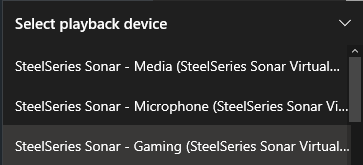 gloomy gull
Media I'd say
but go through your main apps to make sure they're on the right one

then make sure the playback is your main sound device

that's where my system gets confusing lmao cus it isn't my headphones
but select your headphones
 gloomy gull
yeah
wheat talon
so windows default setting is set to media
when doesi t use game/chat settings?
gloomy gull
if you don't want it to be media, that's when you'd use volume mixer
and manually set an app to use steelseries sonar - gaming
or chat
gloomy gull
gloomy gull
but go through your main apps to make sure they're on the right one
this screenshot
wheat talon
gotcha
gloomy gull
if you think most of your audio is from games, then you can set your default sound device to the gaming one instead of media

 midnight patio
does spatial just sound the same in all directions to anyone else?
gloomy gull
midnight patio
does spatial just sound the same in all directions to anyone else?
have you tried changing the distance
I usually have it set to either 10 or 50
or I disable spatial audio completely
midnight patio
im just having a hard time figuring out the direction of footsteps
gloomy gull
yeah what's your distance set to?
midnight patio
i have it at 30 now
gloomy gull
as in like, you just changed it to 30? or that's what it's been like for a while
midnight patio
i just changed it was at default
gloomy gull
ok yeah see what it's like at 30
wheat talon
does the pinned app change the windows system output on a per app basis, or just the profiles in the game bit
gloomy gull
which steelseries do you have?
midnight patio
i dont im using in ears
gloomy gull
well that'll be your issue then lol
midnight patio
lol maybe i need different software for my inears
gloomy gull
yeah most likely, you could try checking the control panel though
midnight patio
control panel?

 midnight patio
ahh kk


 wheat talon
what is sonar exactly anyways
hows it work actually
midnight patio
lol its off
gloomy gull
midnight patio
lol its off
👍
gloomy gull
wheat talon
what *is* sonar exactly anyways
hows it work actually
sonar is basically a way of controlling every 'band' of frequencies
instead of just boosting 'bass' in general, you can control exactly what range of frequencies you wanna boost
wheat talon
cant u do that with the eq slider in the engine?
gloomy gull
the engine is extremely good, but if you're willing to spend a long time understanding sonar, you can make it sound a lot better vs engine
because there's so many different EQ patterns
 wheat talon
i am SO dumb when it comes to sounds
i tend to just leave stuff close to defaults or presets
gloomy gull
also the Q option controls how 'steep' it is


it's just significantly more accurate to what you want, rather than just 6 dials
midnight patio
its off but i have no choice to turn it on
wheat talon
what if what i want is presets
how close will the game presets get me to decency
gloomy gull
midnight patio
its off but i have no choice to turn it on
what's off?
gloomy gull
wheat talon
what if what i want is presets
how close will the game presets get me to decency
the game presets is for every single headset so there's a very good chance it won't make it sound as good as possible for your specific headset
I basically always make sure games use the preset 'flat'
so it's not adding or reducing from what I've already changed
and make things sound stupid
gloomy gull
midnight patio
all the levels are the same
so you got it all balanced now?
midnight patio
it was already
wheat talon
gloomy gull
so it's not adding or reducing from what I've already changed
if u set ur games preset to flat, wont your games just be flat regardless of ur other options elsewhere
gloomy gull
I thought you said the balance is off
midnight patio
nope i miss read
gloomy gull
wheat talon
if u set ur games preset to flat, wont your games just be flat regardless of ur ...
nah because of the routing of sound
so the sound goes
application --> sonar --> headset
well for me its
application --> sonar --> voicemeeter --> headset
I got all this too lmao
 gloomy gull
hahaha
sound is literally everything to me
unfortunately I do have ear damage at this point tho
lol
wheat talon
ive had tinnitus for as long as i can remember
gloomy gull
I can't go to concerts because it literally sounds like screaching
wheat talon
idk if i caused it or if its just smth ive always had
gloomy gull
yeah me neither tbh, I probably haven't helped but
it's strange I can listen to music really loud and it sounds fine, but in concerts it literally is painful and I can't even understand the words
wheat talon
u broke something
gloomy gull
you know that sound where you have unbelievably cheap headphones and you blast must at 200% volume
and it just sounds really muffled and screechy
that's kinda like how sound is for me irl lol
wheat talon
wild
gloomy gull
it's like my ears aren't good enough, really strange
wheat talon
luckily for the games that i play most audio isnt really a concern
id care more if i was trying to be a god gamer at an fps
but i play 2d fighters and wow so xd
wheat talon
my game audio settings have been fine tweaked over years until "it just sounds right yknow?"
gloomy gull
I'll probs try my music preset for a game soon, see if it's alright
wheat talon
i tried updating to windows 11 and it didnt save any of it and it sounded like i was trying to play video games in a submarine
easiest downgrade of my life
gloomy gull
lmfao
I'm on w11
there was deffo a couple things I had to fix
it broke voicemeeter completely for me
and cus that controls literally everything, I had 0 sound on my PC
wheat talon
i couldnt figure out how to fix em so i just gave up and reverted, and it fixed it
makes me wonder if it wasnt just a driver issue
gloomy gull
yeah god knows honestly, w11 was a buggy release but it looks pretty ig lol
and free
wheat talon
i REALLY liked how w11 felt
but os doesnt matter when im god gamering so id rather keep my good audio than a slightly better os
gloomy gull
yeah strange
wheat talon
and by "good audio" i just mean "it doesnt sound different, different is bad"
gloomy gull
lol
wheat talon
my settings r prob objectively bad for something like csgo or valorant or other fps but theyre what im used to and i dont like change
gloomy gull
check out #config-discussion to see my EQ's if you wanna test what it's like
gloomy gull
yeah I gotta sleep too haha
wheat talon
though u have so many external factors at play theyd probably sound totally different
gloomy gull
nah tbh I made it so sonar has complete control of how it sounds, nothing else affects it
voicemeeter is just extra control of where the sound goes
gloomy gull
so like, I could make spotify my microphone
so everyone can hear me talk + my music at the same time
using audio channels
oh arctis pro
gloomy gull
still decent though
but yeah I can make music quiet to other people but keep the volume the same for me
it gives that sorta customisation
gloomy gull
lmfao
wheat talon
you WILL hear my clacky keyboard
 timber steeple
Howdy all, so I'm using Sonar for the first time and I think it's pretty neat. I have a question about the "Game" tab though. Is this configuration and game preset for that specific game?
For example if I want to individually tweak how Apex Legends sounds I will scroll down and select Apex Legends and customize that? Then if I want Sea of Thieves to have it's equalizer and sound customized, I'd scroll down to it and so on?
 sweet orchid
timber steeple
Howdy all, so I'm using Sonar for the first time and I think it's pretty neat. I...
sweet orchid
timber steeple
Howdy all, so I'm using Sonar for the first time and I think it's pretty neat. I...
you've to change your game preset manually, and you can use any preset for any game
like I can use my rainbow six siege preset for, say, minecraft
timber steeple
sweet orchid
you've to change your game preset manually, and you can use any preset for any g...
Ah ok, makes sense now. I didn't know if it was something that automatically detects the game you play and applies to proper sonar profile.
thanks