#archive-user-support
1 messages · Page 64 of 1
 scenic valve
 glass light
hello i have troubles with my combo from my arctic9 and my go xlr cane i sombody help my???
 undone gale
hello, my steel series fell into my bathtub while i was bathing, and i died. How do i fix?
 fiery nova
Your steelseries what
glass light
i buyed a go xlr for the stream on a dual setup butt i have troubles with my sound on my arctic 9
fiery nova
The app itself works, you just can't view your gpu info
 atomic ridge
 bleak jetty
troubles how
bleak jetty
troubles how
How to find all steelseries drivers versions?
 fickle sleet
I can't figure out how to get imagesync to play, can someone help?
fiery nova
atomic ridge
How to find all steelseries drivers versions?
For your device? You cant afaik
atomic ridge
fiery nova
For your device? You cant afaik
Arctis 5
fiery nova
Still no
glass light
bleak jetty
you can't hear?
YES butt on the stream its normal butt in my headphone the discord is verry still
 hasty carbon
having trouble with my arctic 5s headset not being recognized on engine any tips?
 tender rapids
Guys can someone help me I don’t have 3d Sounds on my Arctic 7 I reinstall the software for a few times but it still doesnt work can someone help me pls ❤️
bleak jetty
windows sound settings > right click > spatial sounds
bleak jetty
contact #official-support
 weak scroll
So pretty much the sound sounds crunchy, and very quiet. It’s like this on both pc and hi res input. I’ve tried switching USB ports, I’ve tried disconnecting the cables, nothing works so far. (Arctis pro+ dac)
 viral vapor
yeah..
 leaden sphinx
So, does anyone know how to actually enable DTS surround on the arctis pro wireless? 'Cause every time i try to switch it on and off nothing changes.
(the only time i noticed any difference was enabling it from the DTS unbound software)
 teal heron
okay so i just got the rival 600 and was wondering if there was a way to get an exact CPI, i use 1350 but it automatically sets it to 1400 every time i try to change it?
 prisma axle
can anyone help me? My arctis pro wirless transmitter is not receiving power over micro usb
only over the (optional) port
teal heron
teal heron
okay so i just got the rival 600 and was wondering if there was a way to get an ...
can someone help me out with this 
leaden sphinx
i guess none of us will get any answer
teal heron
lol
leaden sphinx
prisma axle
can anyone help me? My arctis pro wirless transmitter is not receiving power ove...
anyways, check the port with something else and try disabling selective usb power off (or how is it called, i can't remember) if on windows
if on console i can't help you further
 quartz river
hey can someone help me? The software isn't detecting my keyboard (apex pro tkl)
 topaz furnace
Has anyone picked up one of these: https://steelseries.com/gaming-accessories/arctis-cable-for-quest? ? Curious if it works with the mic on the headset too

SteelSeries
Short Arctis cable optimized for use with the Oculus Quest and Quest 2. Works with all Arctis headsets with an 8-pin connector on-headset (Arctis 3 series, 5, 7 series, Pro series)
Also curious if it works with an Arctis 9 (not listed but pretty sure the 9 has a 8-pin connector)
 analog blade
my i, r, h, and j keys are acting weird. they dont register if theyre tilted a little bit. i have to hit them straight on.
 inner stream
Does anyone have an amazon listing of an official arctis 3 cable or an unofficial on with the weird usb end? My current cable is fraying but i want to spend 39 bucks ob shipping
 cinder lintel
can you use steelseries engine to change the color of your keyboard msi laptops?
 lean zenith
cinder lintel
can you use steelseries engine to change the color of your keyboard msi laptops?
lean zenith
cinder lintel
can you use steelseries engine to change the color of your keyboard msi laptops?
Yes you can
Hello, how can I set when it's a reactive mode to light up the key I pressed and not some other key? Or is it a bug in my case?
 dense bloom
Does anyone know what replacement ski goggle band I need to buy for my black arctis pro wireless? Mine is getting loose.
 obtuse forum
I think they’re on the website
 meager compass
leaden sphinx
So, does anyone know how to actually enable DTS surround on the arctis pro wirel...
meager compass
leaden sphinx
So, does anyone know how to actually enable DTS surround on the arctis pro wirel...
I'm having the exact same problem (Arctis 9). I tried to reinstall GG and install additional required DTS software from the notification in the GG app – no change. I can enable and disable DTS and modify its settings, but no audible difference whatsoever.
I haven't installed DTS Unbound as Steelseries advises against that.
I am able to modify other settings and hear a difference (mic settings and basic EQ).
To be fair, I have installed the Windows 11 preview, so that might have an impact. Thought I'd mention it
meager compass
meager compass
I'm having the exact same problem (Arctis 9). I tried to reinstall GG and instal...
Update, after repeating the uninstall/install process and doing a full computer restart DTS is working again
leaden sphinx
meager compass
Update, after repeating the uninstall/install process and doing a full computer ...
idk, I've already uninstalled and reinstalled it 2 times. Nothing has ever changed...
 main mist
fixed my headset

 languid elbow
So the manual says that I need to downgrade my Mac OS software to configure my laptop?

Also when I load the engine it says that my keyboard isn’t connected but it’s on and lighting too but doesn’t work
 potent knoll
cant switch profiles in the new software. arctis pro
 dusk stirrup
Hello everyone, does anybody here have the rival 650? I want to see if anyone else gets the same problem i do
So whenever i have my rival 650 connected, this driver error appears, the funny thing is, the mouse works perfectly fine, no problems, but windows does register it as a driver error, can anybody else confirm it happens to other rival 650? Thanks in advance for the help

 stiff canopy
can someone help me yet?
my microphone on a arctis 5 headset isnt working
the sound is fine but it doesnt pick up my mic
dusk stirrup
stiff canopy
my microphone on a arctis 5 headset isnt working
have you checked which default device is selected in your sound properties?
stiff canopy
 stiff canopy
dusk stirrup
have you checked which default device is selected in your sound properties?
stiff canopy
dusk stirrup
have you checked which default device is selected in your sound properties?
its always been this and theres no other option
dusk stirrup
Go to control panel > hardware and sound > sound
In the new window select the recording tab, and screenshot it
 dusk stirrup
Is it also default communication device?
stiff canopy
how do i check that
dusk stirrup
right click on it
if it says you can set it as default communications devices, then click on it
if it doesn't show it then its already default as both options
stiff canopy
it doesnt show anything
it just says
configure speech
disable
show disabled devices
show disconnected devices
and propertiees
the show disabled and disconnected is just for the table of stuff
doesnt affect the microphone
so im guessing it is default as it always has been
dusk stirrup
Alright so software side might not be the issue, are you using the original cables it comes with?
you could try checking your mute button, and see if it clicks normal or if you feel any anomaly
stiff canopy
mute button clicks normally
red light still comes on when its pressed down
im using the same cables from when i bought it
they arent twisted or broken
stiff canopy
dusk stirrup
Alright so software side might not be the issue, are you using the original cabl...
all of the cables are fine on the outside and everything seems normal
dusk stirrup
are the artic 5 usb or aux?
 stiff canopy
ill try now
plug the aux into the pc or the headset?
if i plug the aux into the headset nothing happens
cant hear anything either
nor does it give me the option to do anything
if i plug it from the headset into the PC using aux
the hearing works
not the microphone
oh wait
it does
but i cant hear anything when the mic works

when i plug it into either headset or microphone slot i get this
 dusk stirrup
the aux has two entrances right?
dusk stirrup
can i see the aux adaptor?
 lyric cipher
got a question how do you save your clip that it acually shows in your galally it doesent show for me
 vapid glade
just bought an arctis prime headset, the audio is working fine but the microphone doesn't work. it's not muted and it's detected by my pc but it won't pick up any sound
stiff canopy
vapid glade
just bought an arctis prime headset, the audio is working fine but the microphon...
Same problem huh
vapid glade
apparently
 copper hound
can somebody help me? I just got a rival 600 mouse and its not turning on
I alr have the steelseries engine installed as I have the apex 7
 rose flare
copper hound
can somebody help me? I just got a rival 600 mouse and its not turning on
rose flare
copper hound
can somebody help me? I just got a rival 600 mouse and its not turning on
check that if your system recognized it in device manger
wait nvm, it's not even turning on
vapid glade
vapid glade
just bought an arctis prime headset, the audio is working fine but the microphon...
LMAOO nevermind the microphone was working it was just so quiet I wasn't able to hear anything in playback
rose flare
copper hound
can somebody help me? I just got a rival 600 mouse and its not turning on
uhh have you tried a different port
copper hound
rose flare
uhh have you tried a different port
4 different ports
even the one on my keyboard
rose flare
then it might be something wrong with the mouse
rose flare
there are problems with products
rose flare
copper hound
got it from canada computers
do you have a warranty or anything like that?
copper hound
rose flare
do you have a warranty or anything like that?
yeah the 3 year one
tho I just got it today
rose flare
go back and talk to them
copper hound
rose flare
go back and talk to them
aight
rose flare
canada computers have some cool tech people, they should be able to help if they see the problem irl, helping over text is kinda difficult
copper hound
I know its not a port problem bc I have my old mouse hooked up to it rn
rose flare
yep it's the mouse then
go back to the store and ask for help
if it is the mouse you can just use your warranty
rose flare
it happens
 rare steeple
@copper hound check if the cable is on fully
My rival 600 didn't turn on because it wasn't there propely
copper hound
no its in properly Im getting resistance when trying to pull out the cable
 slate moon
Anyone know why my Artics 1 Wired is bleeding sound from the headset to the mic?
fiery nova
Because it doesn't have great sound isolation?
 open violet
hi so my rival just stopped working and i added new batteries and tried but connection and it not working at all
slate moon
so how would I fix that? cus my buddies are hearing what im watching
and its getting pretty annoying
fiery nova
Try turning down input volume in the engine, windows, discord etc
And enable discord noise isolation
open violet
i tried resetting the mouse and still nothing
it just blinks for a long time
anyone?
fiery nova
#official-support might be of help
 obsidian haven
Hello all, who would I talk to about returns? I'm unable to initiate tickets via the website

 sage sphinx
Hey folks, sorry to bother. I'm trying to connect my Arctis pro wireless to the new GG software but it isn't getting detected. How does it work?
tender rapids
some1 can help me maybe?
my steelseries engine/gg wont change/do nothing
dusk stirrup
slate moon
and its getting pretty annoying
are you using front panel io or rear panel io_
?
slate moon
im not sure i think its in the front panel?
slate moon
how would i do that?
dusk stirrup
connect your headphones to your rear io
are your headphones usb or aux?
theyre aux
as in jacks
so connect your headphone jacks into the back of your pc \
slate moon
i have aux
dusk stirrup
 slate moon
aight ill try that
dusk stirrup
make sure theyre in the correct jack
theyre usually color coded
i had the same issue, front io always had interference
dusk stirrup
stiff canopy
its just 2 aux things
did you get it to work with the aux adaptor?
stiff canopy
well its either one or the other
the mic works but i cant hear anything
and if i put it in the other slot the headset works but not the mic
 dusk stirrup
stiff canopy
and if i put it in the other slot the headset works but not the mic
dusk stirrup
stiff canopy
and if i put it in the other slot the headset works but not the mic
the jacks are split, correct?
 snow robin
On the issues, after the reset and replugging, keyboard has not failed again. So it seems it was indeed a software issue that got solved.
dusk stirrup
slate moon
its the artic 1 wired so
that question was for blue hah
slate moon
oh
dusk stirrup
slate moon
i cant hear any sound or use my mic
restart your pc
slate moon
aight
stiff canopy
dusk stirrup
the jacks are split, correct?
it only includes 1 aux
which is suppose to be used for phones
dusk stirrup
thats the problem lol
stiff canopy
i think what i might buy is a split one that goes into 2
dusk stirrup
stiff canopy
i think what i might buy is a split one that goes into 2
headphone jack splitter
dusk stirrup
weird that the headphones doesn't include one
 slate moon
ok it doesent look like discord is feeding anything hopefully when i use Xbox party it wont either thans
thanks
dusk stirrup
slate moon
ok it doesent look like discord is feeding anything hopefully when i use Xbox pa...
as long as its connected in the back of your pc youll be fine
slate moon
yeah the cable is pretty small but it should be fine
hopefully i dont accidentally yank it
dusk stirrup
is your pc on your desk?

 deft patrol
is it possible to get the engine apps to work ONLY on a specific profile?
dusk stirrup
Context
?
like you want a profile for discord, with the discord app?
something like that?
if so, thats a no
tender rapids
hey is it possible to sett a maximum volume on what your mic feeds dicord?
deft patrol
dusk stirrup
Context
Apex pro - I wanted to have the system monitor only play on a specific profile, and then have a gif on another profile.
fiery nova
Not directly, apps are isolated from profiles
fiery nova
deft patrol
Apex pro - I wanted to have the system monitor only play on a specific profile, ...
However, you can bind the same shortcut to change profile as to toggle the app.
deft patrol
oh you can create a keyboard shortcut to toggle the apps?
dusk stirrup
tender rapids
hey is it possible to sett a maximum volume on what your mic feeds dicord?
im pretty sure you can
dusk stirrup
tender rapids
hey is it possible to sett a maximum volume on what your mic feeds dicord?
i think youre looking for sensitivity
its called input sensitivity
set it manually
tender rapids
okay thank you I will ahve a look at it ^^
fiery nova
deft patrol
oh you can create a keyboard shortcut to toggle the apps?
Yeah, you can bind the shortcut to any key as well as the meta layer
deft patrol
is that from the apps menu? or in the keybinding menu
fiery nova
Keybinding menu
deft patrol
fiery nova
Keybinding menu
found it, thanks
tender rapids
@dusk stirrup hey, yeah it makes everything quieter but not just puts a cap on :/
dusk stirrup
it shouldnt make everything quieter
it just makes your audio not go below or above a designated DB level
if you move it to the right, your mic will pick up everything thats in your room
if you move it to the right, youll need to speak louder to talk
maybe youre looking for something else
with more context i can help
tender rapids
can can someone help me?
dusk stirrup
Sure
tender rapids
when i clip moment but clip wont save
dusk stirrup
Have you verified where exactly the clip is being saved in your pc?
dusk stirrup
in steelseries gg
click settings
then under moments click on clips
it should say storage location
tender rapids
ok
dusk stirrup
check that folder and see if your clips are there
tender rapids
no there arent
dusk stirrup
try reinstalling steelseries engine
and go through the whole tutorial again
when in doubt, uninstall
dusk stirrup
try uninstalling
empty your temp folder
and then reinstall it
to empty your temp folder, hold windows key and press r at the same time
type %temp%
and then delete everything in that folder
I can assure you its safe
if you get an error that it doesnt let you, just click on skip all
after all that reinstall steelseries gg, and see if you get the tutorial and try capturing a game again
try to at least be a min or two in the game before using moments
dusk stirrup
dusk stirrup
if you get an error that it doesnt let you, just click on skip all
if it says you need admin privileges, click on accept
tender rapids
ok tnx
dusk stirrup
youre welcome
 lunar anchor
my Arctis Wireless Pro is not syncing profiles, and if sync it will half sync, for example i have a game profile, if i select it it will take like 5 or more minutes to sync, then will sync all except the equalizer profile i selected.
and sometimes will not sync no matter i do.
i uninstalled the software (gg), reinstalled the software (gg) , uninstall the drivers by device manager, but no luck
 gray junco
hello guys. i need some help with my arctis pro + gamedac. i can`t control the microphone noise reduction like the arctis 5. only way is to reduce the mic volume...
 frosty lichen
Anyone else with a Stratus Duo having nothing but problems with it? I'm on my third RMA now
First one stopped charging, second one would randomly assign itself as player two when only one pad was connected (receiver was being detected as Pad 1) - now my third one has lasted 10 months with light use and has stick drift
I'm ready to give up but RMA process just gets you an identical product sent out, starting to think the quality of this controller line is a bit flaky
tender rapids
question for fellow apex pro/apex 7 users. when you rest your thumb on your spacebar does it feel "scratchy" then it smoothens out. it's annoying me like hell.
dusk stirrup
Thats probably wear
i mean
its normal
if it really bothers you that much
buy new keycaps
tender rapids
i've had it for a week though and tried fixing it, new keycaps, lubing, band aid mods didn't help at all fyi
fiery nova
tender rapids
question for fellow apex pro/apex 7 users. when you rest your thumb on your spac...
But yeah kind of
fiery nova
tender rapids
i've had it for a week though and tried fixing it, new keycaps, lubing, band aid...
You desoldered your board?
fiery nova
How does one bandaid mod without desoldering
fiery nova
Perhaps not the best idea
But lube should fix scratchiness if it's in the right place, but that's not really possible without desoldering
tender rapids
i feel like my stabilizer bar is wonky, that could be it
as one side is more "scratchy" than the other
fiery nova
Wire balancing helps with rattle, but again, you have to desolder
tender rapids
I'm getting a new unit as a replacement anyways from my previous apex pro which developed the same issue after a year
i only found the reciept the other day so that's why i have this one, i guess it's going back lol
@fiery nova here's a video
fiery nova
Looks like it's not even clipped in properly
tender rapids
does yours not do that?
fiery nova
It did not
dusk stirrup
nope, not mine
tender rapids
damn well that's it
dusk stirrup
i think this is more bc of the mod you did
you did the band aid mod?
was it too thick?
tender rapids
nah it was like that when i got the keyboard
fiery nova
dusk stirrup
i think this is more bc of the mod you did
Most likely not
dusk stirrup
you could have broken the stabilizer clip
tender rapids
I basically put something in between the moving parts but then i took it out bc it didn't work
dusk stirrup
fiery nova
Most likely not
if he didn't desolder the switch he could have damaged the stabilizer
maybe he applied too much force, anything really
tender rapids
it did the same thing before I modified anything
dusk stirrup
Alright
fiery nova
Hurt the stabiliser?
tender rapids
the same happened on my old apex pro
fiery nova
Yeah I get that, but still difficult to do
It can mostly be put down to the unbalanced stab housing, hopefully your next unit works better for you
dusk stirrup
fiery nova
Yeah I get that, but still difficult to do
But not impossible
fiery nova
I guess not
tender rapids
hopefully yeah, they are both UK boards so idk if that has to do with anything as both units i've owned developed the same issue
obviously I doubt it but it's weird that it happened twice only to me
I tried googling it and nobody has ever had the same issue
fiery nova
tender rapids
hopefully yeah, they are both UK boards so idk if that has to do with anything a...
Won't have anything to do with the spacebar
Just bad luck I guess
tender rapids
damn
dusk stirrup
When you got them
Did you take the kayboard out with one hand or both hands?
and also when you pick it up do you use one hand or both?
fiery nova
Huh
tender rapids
both hands, i'm gentle?
tender rapids
ight
dusk stirrup
ive seen my brother lift his keyboard with one hand
and his ALT key eventually broke
tender rapids
ah yeah I understand
dusk stirrup
the keycap itself did
 mint forum
which mouse is better the aerox 3 or rival 710?
dusk stirrup
Theyre both great mice
It really depends on what your preferences are
Personally i would pick aerox 3 due to its lightweight design
 naive thicket
Hello everyone I just had a couple of questions regarding the mute button on the SteelSeries Arctis 3 which I recently just bought, so when I ever play on my console and say I wanna go do something I mute my mic and it works perfectly fine no one car hear me, but when I play on my pc and try muting my mic nothing happens and people can still hear me, I even bought another set of the same pair of headphones but no change, I hope I can get help thanks.
 solid badger
is there anyway to use the arctis 7 wireless mic while wired?
https://www.reddit.com/r/steelseries/comments/66f527/arctis_7_microphone_wired_connection_on_pc/ i saw this post, but i want to make sure before i buy anything
reddit
1 vote and 12 comments so far on Reddit
 granite ermine
Hey, So i recently got a SteelSeries Arctis 1 - wired (so no bluetooth connectivity problems) and was trying to use it on discord. Currently, I can hear sound from the headset but my computer can't detect the mic. What input/output device name should i look for on discord? I've download the steelseries engine - do i need to do configurations on that? Is Realtek Audio Drivers a requirement? I'm trying to download the Realtek Audio Drivers, but the estimated time to download is 4 hours even though my download speeds are 300+ mbps.
Some things I've checked:
- the mic is not muted on the headset
- discord does have access to my mic
- I pushed the mic in firmly so i assume it should be plugged
 sour cave
granite ermine
Hey, So i recently got a SteelSeries Arctis 1 - wired (so no bluetooth connectiv...
sour cave
granite ermine
Hey, So i recently got a SteelSeries Arctis 1 - wired (so no bluetooth connectiv...
Make sure it's not a USB port first off, sometimes motherboards are wonky. Discord should detect it
 mortal gyro


My Apex Pro's 5 key recently defaulted to this yellow
Changing the color gives whatever i select a yellow tone
so blue's are green
anyone have any idea or have any solution?
sour cave
It's possibly a dead color?
mortal gyro
that's what i thought but it's a very bright yellow
the camera doesnt show it properly
sour cave
If you're thinking it's software I'd try using the keyboard on another computer
for example if ya got a laptop plug it in there & try to change there
mortal gyro
i'm gonna try my drivers first and then i'll get my laptop
sour cave
alright
I've noticed my Aerox 3 is reactive to some of my clicks, different between left / right etc
Is it possible to change this?
 split mulch
lmao is this a joke? got a coupon from support but when i try using it, it already has been used
fiery nova
request another
 untold shale
does moments.gg work on geforce now?
 restive haven
everytime i plug in my arctis 7x into my pc after around 3 seconds i hear a beep and it doesnt stop, i have to disable and enable the headphones to fix it, any idea how to prevent this from happening?
untold shale
untold shale
does moments.gg work on geforce now?
because its not working how to fix it?
restive haven
restive haven
everytime i plug in my arctis 7x into my pc after around 3 seconds i hear a beep...
it also happens when i open the steelseries gg app, go to the engine and click on my arctis 7x
fiery nova
untold shale
does moments.gg work on geforce now?
Maybe if you can add the gfn client as a game. But you might be better off just using its own clipping software
untold shale
fiery nova
Maybe if you can add the gfn client as a game. But you might be better off just ...
i dont like its clipping software if i dont have it open i have to open it even if i find the folder i cant see videos something wrong with my laptop
untold shale
fiery nova
Maybe if you can add the gfn client as a game. But you might be better off just ...
do you know how to add it as a game?
fiery nova
Yeah, click add game
untold shale
fiery nova
Yeah, click add game
then?
i firguired it out anyways thank you for the help
untold shale
if i press my shortcut it just makes a sound it wont clip it how to fix?
 azure magnet
Has anyone had issues with the engine not seeing the arctis pro wireless? it shows up in audio devices and works perfectly in every other way, but I can't get it to appear for the life of me in engine. I've literally even done a fresh windows install and it still wont appear
 real elbow
I just got a rma code for a replacement for my arctis pro wireless and I just wondered because the code expires after 60 days and the arctis pro wireless isn’t in stock and it hasn’t been in stock in a while as I know of but if the product is not back in stock for the next 60 days do I get a new code or what happens?
 shut sleet
I obviously can't make any promises (I don't work for them) but I'd be surprised if they won't renew it
fiery nova
They have done so in the past so it's likely they will again
gray junco
hello guys. i need some help with my arctis pro + gamedac. i can`t control the microphone noise reduction like the arctis 5 2019. only way is to reduce the mic volume. any advices?
untold shale
untold shale
if i press my shortcut it just makes a sound it wont clip it how to fix?
can someone help it shows its capturing but after some time it goes and come sback for geforce now and if i press my shortcut it wont clip
 glad token
I have a arctis 9 and the white light on the dongle starts to slowly blink when my headset is connected but sometimes when my headset is connected, the white light stays solid. Does anyone know what it means?
 floral root
What does this mean?
 tender rapids
hey guys i jsut bought the apex pro and this keyboard is amazing! but one question. How do i make this even faster? What number should my actuation be on? 1 or 10? for the fastest performance\
snow robin
Nope, keyboard failed again. And this time the reset didn't do anything. In fact, it made the old keyboard unable to send inputs when I connected it.
tender rapids
my mouse rgb lighting is not working properly can anyone help?
snow robin
Ok, it seems it may well be a bad USB port instead of the keyboard.
 spiral leaf
on the arctis headphones how good are is the microphone if it is just to the left of my cheek?
 sterile spire
i have an artcis 5 and i keep hearing a buzzing noise can someone help
 old panther
my brand new artic 9 keeps disconnecting randomly and beeping non-stop. I can only get a constant connection in blue tooth mode but when using to dongle that plug into my pc the connection is terrible
potent knoll
Arctis pro want change profiles
wont
everything was fine until this engine update
 thorn tapir
Hi, is there any shortcuts for opening/closing the keyboard leds immediately?(like laptops) i use apex 3
bleak jetty
set two different profiles, have a hotkey to switch profiles, have one profile have lighting and one without
 unique sequoia
i was using steel series moments but my clips from the past 2 hours are in 704p and are unplayable unless i watch them on a mobile device and upload them to youtube and because of this i cant edit them
 empty goblet
Hi, i have a Nimbus+ controller and have the issue that the focus of the left stick starts drifting after some weeks. I have rotated the stick to stop the drifting and have cleaned the controller but all that only helps for a short time. I’ve returned the controller and got a replacement but had the same issue all over again. Any tips on how to fix this? Thanks in advance
 fleet gust
Hello, was wondering how to change the backlight for the keyboard on my MSI laptop with the SSE4? I looked up a tutorial and they are all for the SSE3
prisma axle
i got arctis pro wireless
but usb doesnt give it power
only data
for the transmitter
helpppp
 compact sequoia
Can anyone help me. I turn my headset on and after 10 seconds it disconnects
prisma axle
a saucy
untold shale
can someone help i added geforce now i pressed my shortcut button and it says rec after sometime it goes and comes back and it wont clip
 molten chasm
i got steelseries arctis 7p's, whats a good eq setting for apex legends
 crude cypress
Anyone experience the software not updating DTS? It tells you it needs an additional update, you update, it says it is done, but it still tells you it needs an additional update. 
deft patrol
honestly, my apex pro is kinda a buggy mess, they range from little nbd bugs to pretty annoying bugs
 neat ridge
hi can anyone help me with my arctis 5
whenever i put game mode on default i wouldnt be able to hear anything nor anything i say couldnt be heard
 devout hawk
wtf I was thinking of buying from them, but in the end, I won't do it
I have the impression that everyone has problems at steelseries 😦
 lilac canyon
Hi, the aerox 3 mouse with a cable has a lot of deley and I have 1000hz set, so I sent a complaint and they sent a second one and in the latter I also have 1000hz set and it still has a lot of deley

 snow marsh
Hello, im having a problem with my Arctis 5 game/chat mix dial when i go to lower the game volume it also lowers my friends in discord and thats never happened before until about 2days ago.
 simple breach
Warranty repair not being updated... Sent all required files in and nothing back at all.. I have tweeted as well. I spent 200 plus on a headset and its falling apart more and more every day
 mossy loom
do steelseries gg/engine 3 update the component drivers? just got a BSOD with the failed element sshid.sys and it seems to come from steelseries. I only have a mice from them
 bright canopy
i think my keyboard has a dead blue led but after googling, some people say that it might just be firmware problem. is there anything i can do to see if i can fix it?
 novel sparrow
Does anyone know the specs of apex pro tkl
bleak jetty
i recommend looking at the product page for that
it tends to display things like the specs of the product
novel sparrow
I didnt saw the specs on the product page
fiery nova
novel sparrow
Does anyone know the specs of apex pro tkl
What 'specs' do you want
fiery nova
novel sparrow
Case, pcb, keycaps, plate, oled screen, stabilizers
"Aircraft Grade Aluminum Alloy" case and integrated plate, (what do you want to know about the PCB, it's a soldered PCB), printed ABS keycaps, 128x40 oled display and stock clip in stabilisers.
novel sparrow
Thx
 granite niche
Hi :D, I have a question about making macros on the mouse and keyboard there is any kind of tuto that I can follow?
thanks
fiery nova
Click on record a macro, record the sequence, then add it as a keybind
novel sparrow
fiery nova
"Aircraft Grade Aluminum Alloy" case and integrated plate, (what do you want to ...
Can you send the pictures of it if you cant its ok
And what kind of soldering pcb
granite niche
but i have tried to make the autorun on some games bit it doesnt work
novel sparrow
Which game
fiery nova
novel sparrow
Can you send the pictures of it if you cant its ok
Of the keyboard? There are plenty on the internet
novel sparrow
fiery nova
Of the keyboard? There are plenty on the internet
Of the specs
fiery nova
I just told you the specs from memory
granite niche
novel sparrow
Which game
Hunt Showdoen
fiery nova
novel sparrow
And what kind of soldering pcb
How many different kinds of soldered PCBs are there
novel sparrow
Idk
fiery nova
So what do you need me to specify about it
novel sparrow
Apex pro tkl had usb connection right??
fiery nova
It does not have a removable connector
But it does have a passthrough if that's what you mean
fiery nova
No problem
tender rapids
guys
my mic in steelseries arctis 1 isnt working
plugged both connectors
only headphones works
idk what to do
help!!!!!!!
 valid trench
 scarlet atlas
Hey is there a channel for stock updates? Trying to find restock notif of apex pro tkl. i saw something on twitter of a month ago but couldnt find whether it has already been restocked or not
fiery nova
scarlet atlas
Hey is there a channel for stock updates? Trying to find restock notif of apex p...
There is no channel for stock updates, but you can sign up for restock notifications on the website
scarlet atlas
Alright ty
novel sparrow
fiery nova
"Aircraft Grade Aluminum Alloy" case and integrated plate, (what do you want to ...
Are the buttons of the oled screen with it??
fiery nova
Mad? Why would I be
fiery nova
novel sparrow
I woulb be mad if someones asked this questions
Nah it's no problem
But thanks
novel sparrow
Np
 worn remnant
How do you get higher roles?
fiery nova
worn remnant
How do you get higher roles?
Be active for the Newbie -> Rookie -> Elite -> Superior roles
worn remnant
Ok thx
 unique spoke
can someone help me with Headphones artic pr game - Headset earphones artic pr chat please ?????
 hot dawn
i just wanna make the whole thing white
bleak jetty
so select them all
hot dawn
pls share a ss of what i need
bleak jetty
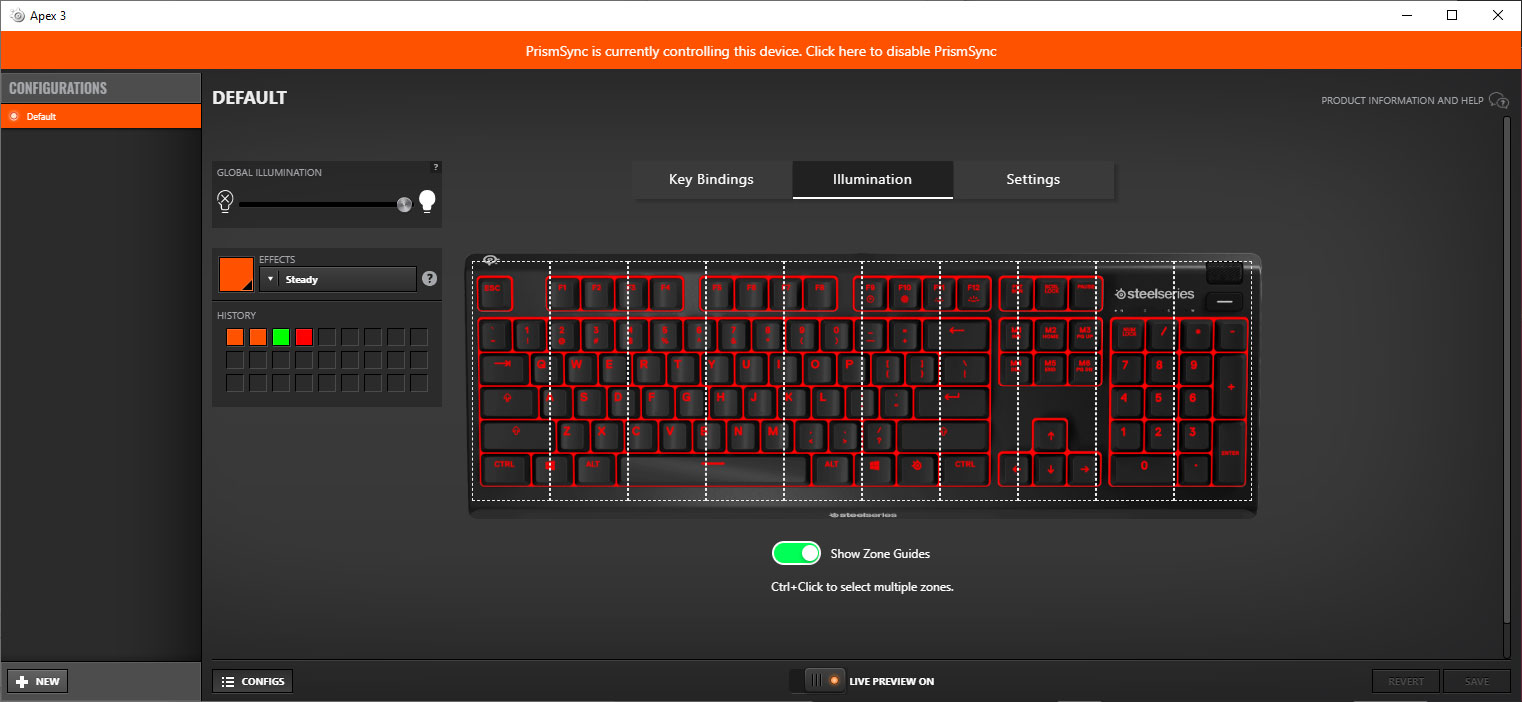 hot dawn
ty you
bleak jetty
np
 civic basin
Dropped a ticket, but curious if anyone else has any off the cuff insight. Decently beefy PC, but moments captures with some games have MASSIVE FPS drop (see my recent post in rate my clip). Capture settings are at 1 minute with all other settings being maxed. Lowering settings helps some, but only such that the capture is so low quality I wouldn't want to keep it anyway. Anyone see anything similar to this?
 dense condorBOT
 Serdel TM Gaming#0759 has been warned
Reason: Posted a link
 sonic wedge
my DPI on my mouse is locked to 400 no matter what I change it too, nothing happens. anyone else have this issue, or a fix for it?
civic basin
sonic wedge
my DPI on my mouse is locked to 400 no matter what I change it too, nothing happ...
Not really, though I know some troubleshooting steps if you haven't already tried em. I had some different mouse issues a while back and step 5 fixed mine. 0) Check mouse buttons to make sure they aren't stuck 1) Reboot PC 2) Update Steelseries GG or the relevant program 3) If you're opted in to the beta program for GG, opt out and restart the app 4) Update mouse firmware and restart your PC 5) Uninstall mouse driver, restart, install mouse driver fresh from SteelSeries' website
 cyan trail
Hi. My Macro Editor does not appear to be working correctly. When I start recording, type test, and then stop recording I see this. I am using a mac, and my security preferences are configured correctly for the Steel Series Engine. Does anyone know what the issue is?
 sonic wedge
civic basin
Not really, though I know some troubleshooting steps if you haven't already trie...
sonic wedge
civic basin
Not really, though I know some troubleshooting steps if you haven't already trie...
I want to thank you, I uninstalled my mouse plugged it back in. then restarted my pc and it worked.
 cursive hare
Need help, ive updated the software for my steelseires pro headset and now cant re-pair the headset to the mixer
 warm onyx
would anyone know my pro wirless keeps fading out?
tender rapids
hey where is the macro folder located ?
tender rapids
warm onyx
would anyone know my pro wirless keeps fading out?
probably a configuration error
check your lighting configuration isnt on breathe
 visual sand
Have a question. I have the Arctis pro wireless and my transmitter will randomly keep connecting and disconnecting and then it will work ok and then do it again. I’ve tried repairing my headset to the transmitter, I’ve tried uninstalling and reinstalling steel series GG, I’ve tried uninstalling and reinstalling the drives. Nothing is working. Anyone know what to do or has had this same issue?
warm onyx
tender rapids
probably a configuration error
how do i fix it then lol
tender rapids
show me your light configuration in steelseries engine
tender rapids
bruh how not
dense condorBOT
 kvass#7777 has been warned
Reason: Posted a link
tender rapids
go to engine

then click gear
click ur headphones
and then go to the RGB settings
warm onyx
ok hold on let me dm you
tender rapids
i have them turned off
i have an arctis 7 (2019)
5 months old
the mic
is having a hard time retracting
i have to force it in
i have to force the mic back in
its kinda stiff
what do i do?
 novel sparrow
fiery nova
"Aircraft Grade Aluminum Alloy" case and integrated plate, (what do you want to ...
novel sparrow
fiery nova
"Aircraft Grade Aluminum Alloy" case and integrated plate, (what do you want to ...
I cant find the case and the oled display
Thats a big rip
 severe moth
After installing GG, the headphones (Arctis 7 Game) stop working 😦
Movies get freeze.
 desert reef
Hi, I have submitted a ticket, but I'll send it here as well.
I'm struggling to get my Arctis Pro (no DAC, wired) to change settings via Steelseries GG v4.0.0.
The headphone will not respond correctly to my RGB settings (one ear will turn off RGB and the other stays in colourshift) and the audio will not switch to 7.1 surround sound even though the software shows it has.
Note this is running on a freshly installed Windows 10 Pro v21H1 fully updated.
All drivers are up to date, windows update checked and Microsoft's subsidiary apps fully updated via the Windows store
PC spec are as follows:
AMD Ryzen 7 2700x
16GB RAM Corsair Vengeance RGB Pro 3200MHz
RTX 2070 GPU
MSI x470 Gaming Pro motherboard
500GB SSD
 inland surge
I have problems with Arctis Pro Wireless... First it started by not being responsive when changing settings. Now it says not connected in engine. What the hell is going on? I have feeling that with every new update, things get worse.
 spare pelican
do we have any updates on fixes with the new gg software? I need to wake up early before working just to see if its working. 😦
RGB reverted back to the colorshift. even if I change it, it wont capture it. uninstalling/reinstalling didn't work
fiery nova
novel sparrow
I cant find the case and the oled display
Find? You won't be able to buy them standalone unfortunately
fiery nova
They design and produce them themselves
fiery nova
They use a factory in china. Not sure what else to say about it
fiery nova
It's ok
lilac canyon
Hi, the aerox 3 mouse with a cable has a lot of deley and I have 1000hz set, so I sent a complaint and they sent a second one and in the latter I also have 1000hz set and it still has a lot of deley

 faint otter
Does anyone have any help towards my issue. I have the Arctis Pro Wired and no matter what i change in the engine, it does not change on the headset itself. This could be the colour of the lights or the equalizer none of the changes apply to the headset itself. I've tried to uninstall and reinstall and nothing changes.
 copper dirge
my sensi ten neon rider mouse is taring apart. Is there a way i can save it to make it not damaged?
granite niche
hi i need help pls with the macros on the mouse and keyboard i cant achieve making one for hunt showdown for autorun


 acoustic patrol
hi guys anyone having issue on their mice just stop moving sometimes
i have rival 600
unplug-plugging sometimes doesnt work
lilac canyon
Hi, the aerox 3 mouse with a cable has a lot of deley and I have 1000hz set, so I sent a complaint and they sent a second one and in the latter I also have 1000hz set and it still has a lot of deley
 tight glen
hey guys, i binded my insert to printscreen on my apex pro tkl. however when i press windows + insert it doesn't screenshot.
 ornate hamlet
I am having issues with my mic connecting to pc on my arctis 1. I’ve downloaded the engine and it says not connected. I can hear hear though the headset. I’ve updated drivers. I have the Xbox version with the dongle.
 keen trout
can someone help me with my arctis 9x for pc, the mic isnt working, its brand new and i havent broken it or anything
fiery nova
I guess it could be any number of reasons
 rotund karma
anyone know does Arctis prime need any additional software or is it plug n play?
fiery nova
Plug and play
rotund karma
thanks
visual sand
Does anyone know if there is a way to go back into an older version of Steelseries Engine? so that i may redownload that firmware to see if i can get the transmitter for my Arctis Pro Wireless working again. It keeps going into these cycles of Disconnecting and Reconnecting.
fiery nova
Downloading the old engine won't help with that
visual sand
do you know what will?
fiery nova
Maybe if you contact #official-support for a recovery tool
shut sleet
And you have done the re-pair procedure right?
visual sand
yep
shut sleet
Then a support ticket would be next
visual sand
ive re-paired it, ive uninstalled the drives, the GG engine, ive tried just about everything i can think of.
shut sleet
@visual sand you can download an older version of Engine here: https://steelseries.com/engine
Download the SteelSeries Engine 3 software for the best gaming experience on Windows and Mac.
 visual sand
Thank you i just sent in a ticket but will see if an older version may help
real elbow
And it started today?
 atomic latch
No
real elbow
When did it for the first time not work?
atomic latch
Idk i tried mic today
fiery nova
How are they connected
atomic latch
U mean USB?
fiery nova
And you've checked windows/discord audio settings?
 analog falcon
So did anyone's chat mix stop working with the latest firmware update? I can't seem to get it working with Arctis Pro + GameDAC, going crazy 😩
tender rapids
My artic 1 wireless mic has never worked, I still dont know why
 lapis mantle
arctis pro wireless doesn’t show up in audio settings and is unspecified in devices and printers
 dull glade
Apex Pro is not turning on and one key is red
 warm onyx
lapis mantle
arctis pro wireless doesn’t show up in audio settings and is unspecified in devi...
warm onyx
lapis mantle
arctis pro wireless doesn’t show up in audio settings and is unspecified in devi...
i ahve that same headset and the damn things keep fading out
dull glade

 vapid tinsel
Anyone know how to create a follow-up case that won't automatically be closed?
keen trout
why isnt my mic working steelseries arctis 9x pc through bluetooth
analog falcon
So I've got ChatMix working somehow, but now my mic won't work 🙃 looks like I can use the chat or game channel, but not both at the same time
 junior stratus
So my ticket to steel series keeps getting auto closed and I have no way to submit a ticket. what do I do
I have a coupon from them for an RMA for something that hasnt been in stock for almost the entire duration of the coupon. every ticket i try to open following that is auto closed

I have absolutely no way to reachout and the links they supply in these emails just send me back to the help page where I have no option to do anything at all
every link keeps sending me to the useless support page where these absolutely no way to contact steel series! I bought a "premium" product and I cant even get my warrenty taken care of because they keep auto closing a ticket when I am able to get it open
fiery nova
What's the reason for closure
junior stratus
the first or the following 4
fiery nova
All of them
junior stratus
the first was "solved" by offering me a coupoin for a replacement arctis pro wireless almsot 2 months ago, it hasnt been back in stock and the coupoin is about to expire.
every other one is because its an "out dated web form"
fiery nova
And you've been opening them through #official-support?
junior stratus
anything in there just takes you to the support page. the first 3 were through the link to open a followup at the bottom of every ticket these guys have
the fourth was through the useless solvy system that pops up
fiery nova
junior stratus
anything in there just takes you to the support page. the first 3 were through t...
Click on the icon in the bottom right and type open/create ticket a few times
junior stratus
and auto closed again
since may my headset has been an issue. I have been fighting support to help me. this is insane
fiery nova
Try using another email I guess, must be bugged
junior stratus
the 5th isnt registering but jesus come on

After this is done and I get something for the value of this headset, I dont even care if its cookies at this point. I will never buy another steel series product. Not because quality of the product, no the quality is solid. Support is horrible. Absolutely terrible through the entire experience with these guys. Closing tickets after giving me a canned response when I have submitted audio clips that clearly are giving the issue as well as tons of links to them showing that this hissing on the aux port is not isolated at all
Im not being nasty with them, I get support, hell I worked in it for years. I will work with you and be polite and provide you anything I can and work the steps needed but lord this is just bad.
this company actively does not want to support me
fiery nova
Or it's bugged
junior stratus
im going back to even the work with the techs
you can call it bugged all you want, when the techs are fighting what you can clearly prove as a known issue with a baddly made aux port on the base station of the pro wireless then im sorry, you just don't want to deal with the support side of the business
fighting saying that it cant be bad. well I can find proof in a single google search that says otherwise from many people
anythign mass produced can be bad, its not uncommon.
shut sleet
@junior stratus what white noise issue have you had?
 tender rapids
i have a question, is the rival 710 really that much better? cause i dont need the dispaly or the vibration, any other differences?
fiery nova
tender rapids
i have a question, is the rival 710 really that much better? cause i dont need t...
No, in my opinion it isn't.
I think most people would agree
tender rapids
any oppinion on the Prime+? is it to light or is it okay
fiery nova
Definitely not too light, it's a good mouse
tender rapids
i have a huge hand and it looks kinda small
rival 600 fits perfectly tho
but it broke
😦
junior stratus
shut sleet
<@!572117330121981970> what white noise issue have you had?
Hissing and buzzing when I switch from any input to Aux explicitly to the point where it gives me a headache. I could actually record how loud it was
 rose tapir
Does anyone know a fix to my mic on the arctis pro wireless not working when i'm on bluetooth?
 plain wraith
I'm having an issue where I can't change the on-board profiles for my rival 710. Right now I have my mouse plugged into my computer as well but it says that it isn't under the configs menu. Does anyone know what I might be doing wrong or what the issue might be?
 tender rapids
Can I have help with something please
Dose the PRISMCAPS Work For The APEX 3?
Ping me if you got a response.
 valid chasm
anyone else's windows keys not work on the apex pros?
 weak geyser
Do you have the windows key lock on?
 young matrix
So I have a arctic 1 wireless and it cannot charge how do I fix it?
The charger works on other things just not that
 strong elm
I need some help I have a Aerox 3 and it likes to like stop moving, I can be playing a game and the mouse will not respond into my inputs but the mouse is still on. The way I fix it is to unplug it and plug it back in, but that doesn't stop it from still disconnecting on its own. I think its the mouse or the my pc, my pc is old and sometimes when I turn it on my keyboard doesn't as well so i'm thinking its just my mouse or my ports of my pc.
I would of returned it, but when I got it, it was working fine until later. I have done nothing to the mouse to break it. So there WAS NO WAY that I have broken the mouse already.
fiery nova
tender rapids
Dose the PRISMCAPS Work For The APEX 3?
You've already received an answer but you won't be able to replace the keycaps on the apex 3 as they use a proprietary mounting system, there's no standard slider design for rubber domes.
 dusky badger
whoy doesnt my arctis 5 add to steelserier engine 4.0
 stiff jasper
Any way to fix this?
 fiery nova
You can toggle the dither setting, but there just aren't enough pixels to create a detailed image
 royal needle
hi i have a question i just bought the rival 600 what tipe of click can it do (i play mc)
 mellow dew
give them time
fiery nova
royal needle
why no one talk
Because they don't know the answer?
royal needle

 misty rose
i have the steel series artics pro and i cant turn off the rgb lighting through the software
i even set the colour to black and it didnt change
wont even allow new colours on
fixed it, changed the colour through the game dac
 dire hawk
If I change my pc, is there a way to transfer all my settings and clips ? (I know some settings are saved in the devices directly but prism sync isn't for example)
 jagged peak
Hello everyone, is it possible to use text macros on meta bindings for Apex 7 TKL
 nova shard
dire hawk
If I change my pc, is there a way to transfer all my settings and clips ? (I kno...
nova shard
dire hawk
If I change my pc, is there a way to transfer all my settings and clips ? (I kno...
It will save the settings if you saved to the cloud but not the clips
You would have to back up your clips on another drive
dire hawk
thanks
nova shard
I had to offload some clips to get GG to load faster
Otherwise it would sit loading over 1K thumbnails
I srsly think it needs to cache the thumbnails so it loads faster
dire hawk
yep
 carmine flax
Anyone discovered a fix/solution for Apex Pro switches not displaying the correct colors? Have 3 of them now after ~18mo of use. 1st started going bad after 6mo. SS just says "Too bad"
fiery nova
carmine flax
Anyone discovered a fix/solution for Apex Pro switches not displaying the correc...
Not much you can do to fix developing colour inconsistency other than to RMA I'm afraid
You've asked maybe 5 times, maybe nobody knows the answer?
carmine flax
fiery nova
Not much you can do to fix developing colour inconsistency other than to RMA I'm...
Yup, they told me to kick rocks and go to a 3rd party repair shop. Done with SS, been nothing but issues with this last purchase and SS support has been remarkably unhelpful. Super frustrating from a company that used to be a lot better. 😦
carmine flax
fiery nova
Not much you can do to fix developing colour inconsistency other than to RMA I'm...
Cant sync my configs, $200 keyboard no longer fully working (100 million presses though right?) and a desk mat that's starting to fray/roll after 3-4 mo. Super awesome!
fiery nova
The keypress rating is for the switches, not other inconsistencies but obviously it's annoying
carmine flax
right but the LED is part of the switch so as a whole the switch is defective.
fiery nova
Well really it's not
fiery nova
Not much I can do about it lol
young matrix
So I have a arctic 1 wireless and it cannot charge how do I fix it?
fiery nova
young matrix
So I have a arctic 1 wireless and it cannot charge how do I fix it?
If it's a hardware issue, your best option is to RMA
 knotty hill
I need help with my new artics 5
bleak jetty
don't ask to ask, just ask
knotty hill
oh can u help me
bleak jetty
i don't know
knotty hill
ok
bleak jetty
you haven't said what the problem is
obsidian haven
Hello. I am looking to return a few items from a recent order. The web form for returns states that it's unable to create a return ticket. When filling out the regular web order help form, it's not accepting my order number. I just need to speak with a customer service rep. Thanks
bleak jetty
^^
obsidian haven
Okay thank you @bleak jetty!
knotty hill
nvm I fixed it
 unkempt magnet
Anyone getting a delay with their arrow keys?
unkempt magnet
Might be obvious but try setting another keybind
 coarse bluff
i did
 velvet storm
Hi, I have an Apex 5 hybrid mechanical gaming keyboard, but the keyboard lights sometimes turn itself off and unresponsive, keys work but lights and screen turn off. this problem happened after installing steelseries GG. Has anyone encountered such a problem or a solution to the problem?
coarse bluff
velvet storm
Hi, I have an Apex 5 hybrid mechanical gaming keyboard, but the keyboard lights ...
checked afk setting?
velvet storm
yes it is off but it switches to this mode
unkempt magnet
coarse bluff
i did
Tried everything on their support website for the SS moments?
unkempt magnet
Hmmm the only game that my moments doesnt work on is GTA 5
I think its the fullscreen exclusive setting, but I changed it to windowed and it worked
 full apex
my arctis pro wired sometimes produces a sort of grainy sound, it happens often when i play bf1. it goes to grainy effect and then back to normal sound. but the normal sound is still playing while the grainy noise is there
idk if it is a setting or the headset itself
maybe i need a new wire
the headset is very old its like 4 years old
 round bronze
i have a rival 3 wireless and it keeps flashing yellow then turning off not just the rgb the whole mouse i have to turn it off on the button and back on again to get it to work but it only does for max 2 minutes ive tried switching out the batteries and it solved the problem for a day or two but it went back ti doing it again and ive only had it 3 weeks i dont want to return it cuz i like it and hope the issue is solvable but i havent found any solutions online
real elbow
Well when you contact support they are gonna ask for the serial number for the product and proof of purchase etc
 grave sand
So this was a problem that happened a while ago and it still never got fixed so what happened was I got the Stratus XL and played it on my phone and it worked pretty well and after I got it to work with my pc it started acting weird. The controllers 4 LEDs were just on continuously and i tried to click pairing mode and everything and nothing happened. I still have this problem today. Is there anyway I can fix this? I tried to see if it needed to be updated and nope.
 weak geyser
mint forum
is it supposed to flash like that, i never remember it doing that
weak geyser
mint forum
is it supposed to flash like that, i never remember it doing that
Both my Apex Pro TKL and Apex M750 TKL do that on startup now. Most likely something do to with the new GG software hooking the keyboard to set the correct profile or something like that
mint forum
weak geyser
Both my Apex Pro TKL and Apex M750 TKL do that on startup now. Most likely somet...
ty
 tidal trench
How do I update my stratus xl frimware
tender rapids
Guys, I'm preparing a gif for the oled screen of apex 5. What is the maximum size gif can i put on an oled screen?
can you help please?
weak geyser
128px x 40px is the maximum size for a gif on the OLED
tender rapids
so it doesn't matter how many mb it is?
tender rapids
weak geyser
128px x 40px is the maximum size for a gif on the OLED
You say that just having that much resolution is enough.
tender rapids
tender rapids
You say that just having that much resolution is enough.
?
apex 3 is a membrane keyboard so the gif won't work on that keyboard because the rgbs are separated by regions and also there is no oled screen in apex 3
bleak jetty
don't ping mods please
tender rapids
tender rapids
You say that just having that much resolution is enough.
by the way, is only the resolution important or the file size is also important, if the file size is important; how many mb should it be in a gif file?
bleak jetty
file size is a consequence of the other properties of the gif
there's not a minimum size you should try to hit
tender rapids
Oh that's really nice tho
Thank you so much
thanks to this answer i saved a lot of hassle
bleak jetty
there may be a maximum file size but i don't own the keyboard so i couldn't tell you
tender rapids
ok i'll find it myself now, when the keyboard is arrived to me.
stiff jasper
So, I'm having this issue that the OLED screen will just change back and I don't know how to fix it.
tender rapids
stiff jasper
dude i'm a bit of a having no-life person nowadays so i can spot the cause of the problem. I already ordered apex 5 last week. If I have the same problem as you when I receive the keyboard, I will both submit a ticket and try to solve it. But if I don't have the problem in my apex 5 unfortunately I can't help you enough. Then at best you can submit a ticket to steelseries for this problem with your keyboard.
tender rapids
then there may be a problem with your steelseries gg software, can I dm you?
 chilly beacon
My Qck Prism XL only has lights on the left (short) side all of a sudden. It's been dim on the right side for a bit, but now there's nothing at all. Tried other usb ports, other colors in GG, it seems like half of it is just turned off. I'm okay if it's died on me, but if it's fixable I'm keen on fixing it 🙂
fiery nova
chilly beacon
My Qck Prism XL only has lights on the left (short) side all of a sudden. It's b...
Maybe not fixable by yourself, but you can contact #official-support to RMA.
 broken kettle
I'm looking to buy a wireless headset. The most important thing for me is that my microphone does not retransmit noise coming out of my headset, but this page only talks about technology that filters out noise 8+ inches away. I want tech that filters out noise that's closer than that. Anybody here with experience using one of their headsets while sound is playing in your ears? Any of your coworkers or friends complain about being able to hear the noise from your computer? https://steelseries.com/blog/the-miseducation-of-gaming-mics-1

SteelSeries
The microphone is the key feature that separates a gaming headset from a pair of headphones, so why are the majority of them such a disappointment? For years gaming headsets have under delivered on performance, constantly lowering gamers’ expectations as they settle for mediocre communication clarity and volume.
fiery nova
They don't provide a perfect seal to there will be some sound leakage
copper hound
can somebody help me my apex 7 tkl keyboard had some of its keys turn cyan for no reason, these are the f2,f3, both windows buttons, space, alt, the steelseries button, ctrl and the left and down arrows on my keyboard
now it just turned off for now reason
 sharp nebula
hey i have a big problem with my artics pro wireless anyone can help me?
I am a csgo player and I bought the steelseries artics pro since I heard that they were very good helmets, but in my case, I don't know how to differentiate where the enemies come from, I'm very tired of my teammates telling me where they shoot me from I do not differentiate any sound within the game and it makes me very angry to spend so much money on some helmets so I don't even know where they are shooting me, if someone can help me with the configuration, I would be very grateful
sharp nebula
yeah i know i want this headsets for play csgo
not for studio bro
but if I can't tell where the steps come from, they are totally useless
any mod here guys?
fiery nova
Mods can't necessarily answer your questions better than anyone else
bleak jetty
The user list on the right displays all the currently online mods
weak geyser
It's been handled
 drowsy quartz
Can anyone please help, my Arctis 9x is having microphone issues making it so that I can’t speak in game chat, or in my Xbox party. It’s connected to my controller as well as Xbox as I can hear in game audio and music just fine. When the mic is on, I can hear myself talking in my headset, but it’s not relaying to game or party chat. I’ve reset the headset as well as done multiple configurations of Xbox game audio, but nothing has worked. I’m really hopeless atm
grave sand
I saw alot of people have the same problem like I do with my Stratus XL
drowsy quartz
grave sand
I saw alot of people have the same problem like I do with my Stratus XL
It’s just so weird. I get a new controller and the microphone just doesn’t want to relay anything. I watched videos and read Reddit articles for 6hrs last night tryna fix it. Nothing has worked.
broken kettle
fiery nova
They don't provide a perfect seal to there will be some sound leakage
Which models are you familiar with?
 tulip totem
unless you're listening super loud, I've never had issues with the audio from the headset repeating into the mic
 raw lily
Today I tried to update GG and it wouldn't open again. After various restarts I uninstalled GG, downloaded it from the website and reinstalled it. Now the media control Button on my Apex 7 wouldn't work anymore if I'm in any other window than the media window. The volume wheel works nevertheless.
I also tried it with reinstalling the old Engine and updating it but it didn't change anything
 wise root
I found out you can't bind a keyboard key to the DPI switch button. It won't work and will use the dpi settings from your default profile (at least in my experience).
This is what my settings are in the engine:
Mouse: Rival 710

Default Profile:
1: 1000dpi
2: 1600dpi

DPI switch: default setting

Rainbow Six Profile:
1: 1000dpi
2: 1000dpi

DPI switch: Keyboard -> Alphanumerical -> "Z"
Pressing the DPI switch button in-game should send the keyboard "Z" press and thus place a ping, as this is what the key does on my keyboard. But instead it switches DPI to a higher one (and back to a lower on pressing it again). I assume this is the mouse/engine using the DPI settings from the default profile instead...
Shall I open a ticket for this? Or is there anyone who has had the same issue and maybe has found a solution?
fiery nova
broken kettle
Which models are you familiar with?
Arctis 7/9, arctis pros
tulip totem
wise root
I found out you can't bind a keyboard key to the DPI switch button. It won't wor...
that's a firmware bug, there was a similar bug on other SS mice that was fixed, but the rival 710 is discontinued so I doubt it'll ever get fixed
 uneven turret
Hiya! So, whenever I charge my (steel series arctics 7) headphones, they dont actually fully "charge"
they are just "red"
even though I can use them for another
8-10 hours or so
 sonic cape
Hey uh Im having problems with my new steel series arctis 7 they are too quiet like very quiet and have this weird like beep sound and i have put my mic aiming straight towards my face but it still is very quiet
 steady cobalt
Hey, my rival 110 was working last night but today I woke up it didn't work (My pc is not detecting it). I tried to update drivers, un/installing software, etc. I managed to bring it to life a couple of times but either it was turning on and off within 2 seconds or completely stop(And when installing gg5.0 it also stopped my unrelated keyboard and couple of USB ports too). I'm using a 2 dollar mice rn and its works fine.
 reef token
does anyone know why moments is signing me out and making me sign in every 5 or so pc startups?
 fervent pagoda
Has anyone had this problem before? When I restart it, all is well again. Is the second time now happened
 weak geyser
English only, please
weak geyser
Lol it happens
fervent pagoda
xd
 real pewter
Is there an Engine Software for windows 7? I just got a new Rival 710 mouse and am still using windows 7.
fiery nova
Nope
 noble ether
How can i get moments to detect lunar client? Can't figure it out...
weak geyser
Go to Game Detection -> Add Game Manually -> find wherever Lunar is installed and add the .exe
 indigo reef
Is there anyway to purchase a replacement speaker for an Artics pro wireless directly from SteelSeries?
fiery nova
indigo reef
Is there anyway to purchase a replacement speaker for an Artics pro wireless dir...
You can contact #official-support but I wouldn't think so.
indigo reef
Gotcha thanks
dense condorBOT
 xɐus ɯǝʇsǝɾ#8136 has been warned
Reason: Posted a link
 grand cove
Hello I recently bought a new gaming laptop and for some reason my chatmix is not working, My chatmix seems to only work on my desktop! I changed all the settings to have the game dac be the default device and the head set as a communication device. However, it still is not working so I am confused! Any help would great thank you!
 lyric plank
Hello, not sure how many people also asked this, but scrolling up this does appear to be a common issue. My detachable microphone simply does not work for me. I use an Arctis 1 Steelseries Headset and the headset still works for speakers. But I'm trying to get the mic to receive the input instead of the default built in mic in my laptop. Just some notes, I did try the list of things and non of them fix the issue.
Laptop I use is Windows 10
I do have app access to microphone turned on
I also have my mic switch set to on
My Audio Driver is up to date, and have tried restarting the PC multiple times
On the sound control panel and on the "Recording" tab, even with "Show Disabled Devises" and "Show Disconnected Devises" both turned on, my only 2 options are Microphone Default Devise and Stereo Mix. The latter gives me no sound at all being detected, while the former is actually my built in laptop. I do not see a Headset option that I see on other videos.
Is there anyone here who can help with the issue? Thank you in advance!
It's also worth noting that the mic seems to work when I connect it to my smart phone but not my laptop
 ashen night
can I somehow get into the Affiliate Program?
 final coral
Help. :((
My mouse isn't working. AT ALL
Like it turns on and stuff but it won't connect through Bluetooth or 2.4 GHz.
The mouse is a Rival 3 Wireless
it says this in the software

 ebon tapir
my steelseries mouse is broken im troubleshooting. My mouse's cursor speed is so high even the cursor settings is in the lowest
Message
anyone help
otherwise i have to switch mice
its a teelseries aerox 3
solved
tender rapids
I spilled a drink over my apex pro a while ago and now some switches are sticky, is there a way to fix this?
fiery nova
tender rapids
I spilled a drink over my apex pro a while ago and now some switches are sticky,...
Desolder, remove the switches, stick them in an ultrasonic cleaner
tender rapids
Aight thx
wise root
tulip totem
that's a firmware bug, there was a similar bug on other SS mice that was fixed, ...
Thanks for he response, I contacted support and they told me to reset the mouse via the oled screen's menu (didn't even know this was a thing although I've had the mouse for 2 years lol). After doing this and rebinding the configs via de engine it worked! So it seems like there is a fix fortunately!
 sinful nexus
does the arctis pro booster pack fit the arctis prime?
 crimson dove
Hello, I have a problem with my steelseries arctis 7 wireless headphones for PC, the microphone no longer emits any sound whether it is muted (red led) or not, and this is the case on discord or on the steelseries software GG via the live preview.
In addition, I tried everything, update of the audio drivers, update of steelseries GG, unpairing / Re-pairing, reinstallation of steelseries GG, ...
The only thing I haven't tried is resetting the headphones
Finally, my headset dates from early July 2021 and the microphone suddenly dropped (without sound or light signal) during a voice communication on discord yesterday (07/20/21).
He never received any shock.
I don't know how to fix this problem.
If there is no solution, I would ask for an exchange via amazon
Thank you
 severe anvil
Why can I not change the settings when in bluetooth mode? https://i.imgur.com/astsbbr.png
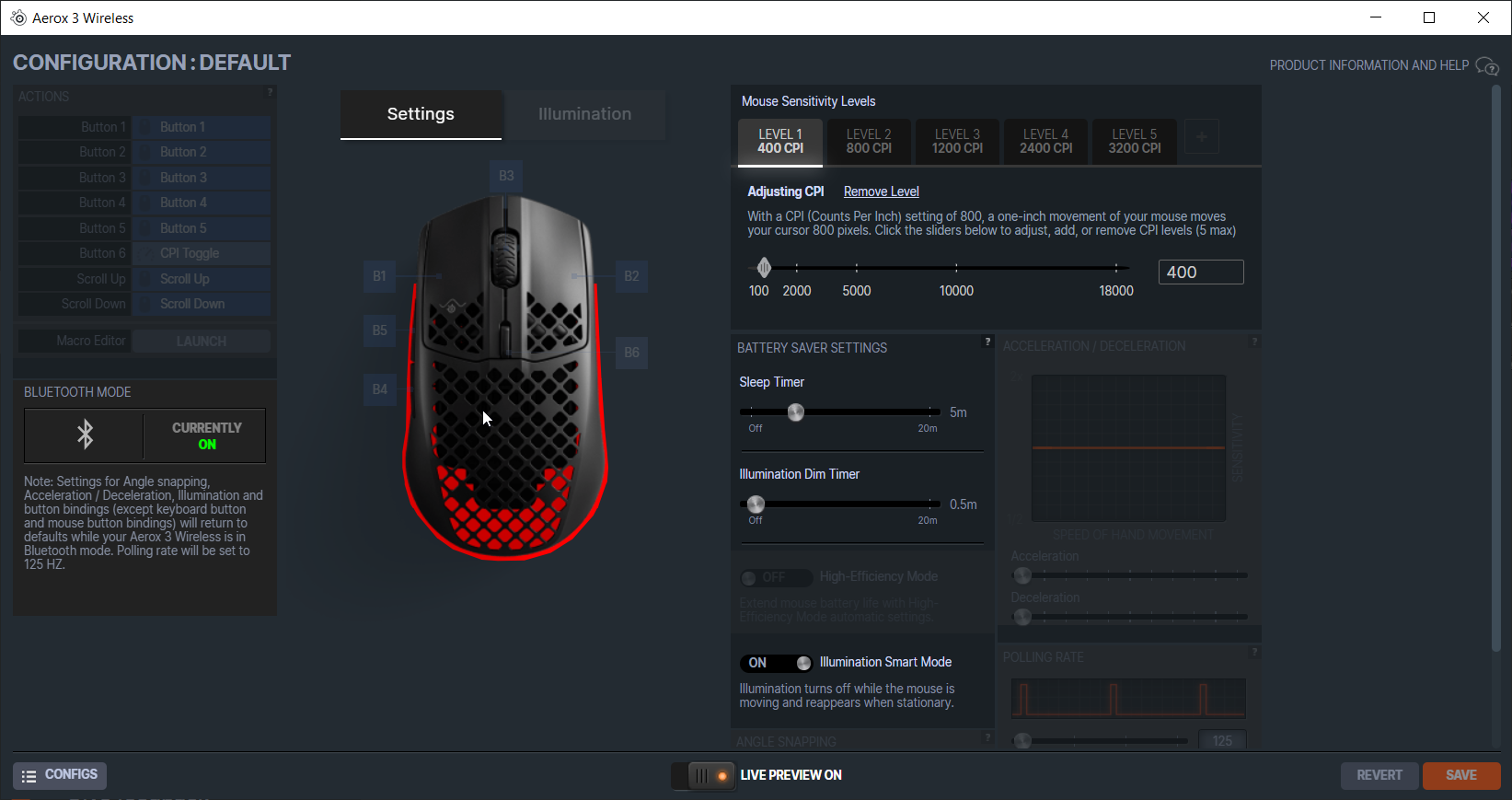
 quiet venture
raw lily
Today I tried to update GG and it wouldn't open again. After various restarts I ...
quiet venture
raw lily
Today I tried to update GG and it wouldn't open again. After various restarts I ...
I'm having the exact same problem, have you found a solution yet?
raw lily
quiet venture
I'm having the exact same problem, have you found a solution yet?
I reinstalled GG various times now and now it works again. I think what helped was, that I deleted the complete program folder instead of uninstalling it via windows
quiet venture
do you lose your profiles if you do that?
yep lost all my profiles...
but it worked
tender rapids
why does it keep saying this? i don't know how else to open the app

 dusty crag
quiet venture
yep lost all my profiles...
dusty crag
quiet venture
yep lost all my profiles...
Isn't there a way to save your profiles to Steelseries cloud or even elsewhere on your computer? Isn't there a directory location to access them even if you can't open up the App?
undone gale
did you guys fix the software yet? its kinda doggy
tender rapids
Would anyone be able to help me? I am having issues with my Rival 600 and the left click not working properly
 vivid escarp
One message removed from a suspended account.
 primal estuary
dusty crag
Isn't there a way to save your profiles to Steelseries cloud or even elsewhere o...
primal estuary
dusty crag
Isn't there a way to save your profiles to Steelseries cloud or even elsewhere o...
you have to manually click the sync button in the settings.
 tepid sphinx
where can i download SteelSeries Engine? not GG, but Standalone Engine
GG has always given me tons of issues, I'd prefer to only use Engine
oh great, just read that standalone Engine isn't supported anymore
 flat gulch
fiery nova
tepid sphinx
oh great, just read that standalone Engine isn't supported anymore
flat gulch
fiery nova
tepid sphinx
oh great, just read that standalone Engine isn't supported anymore
You can still find it in some places I believe, or if someone's saved the original setup file
tepid sphinx
fiery nova
You can still find it in some places I believe, or if someone's saved the origin...
ended up giving the newer build of GG a shot, and it actually had my profiles backed up, so even without messing with any files, I got my profiles working again
fiery nova
Great
 cyan nimbus
Hi. Does anybody know why when I have the Engine installed, my headset wont play any sound and it also breaks videos and streams. they chug unless I mute the sound. I have tried reinstalling everything and as soon as the gg engine is installed and enabled for my headset it stops working. The only way I can use the headset is if I remove all the steelseries software but then I am unable to use sidetone. Its such a weird issue that googling hasnt brought up anything. Ive made a video of the issue https://www.youtube.com/watch?v=VZQBDVX39SE

 tulip totem
cyan nimbus
Hi. Does anybody know why when I have the Engine installed, my headset wont play...
tulip totem
cyan nimbus
Hi. Does anybody know why when I have the Engine installed, my headset wont play...
try some of the things listed here? https://support.steelseries.com/hc/en-us/articles/360061293571-Issues-on-headsets-with-DTS-support-

Support
Issues with audio playback or config switching on headsets with DTS support?
If you have any of these products:
Arctis 5, Arctis Pro Wireless, Arctis 7, Arctis 9, Arctis Pro, or GameDAC
And...
cyan nimbus
tulip totem
try some of the things listed here? https://support.steelseries.com/hc/en-us/art...
Thank you so much. This has been driving me insane. All back up and running 👍
tender rapids
Hi there can i get support with the arctis 3 headsets. I have major cross talk on all devices uses the headphones and i have 2 separate arctis 3 with the same issue. can anyone help with this issue.
 rough glade
when i clip something on steelseries moments there is always a loud noise that sounds like a fan. It's not my mic, or my room.
 round igloo
i recently got the arctics 3 and when i watched the official video on how to set it up, i didn't receive an adapter. Is there a new way to set it up now or
tender rapids
round igloo
i recently got the arctics 3 and when i watched the official video on how to set...
you're missing the 3mm splitter?
Honestly best getting a refund they have massive cross talk issues which means all speaker audio comes out the microphone output anyway.
I bought two Arctis 3's and they both have the same problem.
tender rapids
the arctic 1 wireless mic doesnt work. thats some bs
dense condorBOT
 Jack1996#2309 has been warned
Reason: Posted a link
tender rapids
ofc cannot post links 😫
round igloo
?
tender rapids
i tried posting video of the issue and the mee6 bot warned me lol
round igloo
wow
 humble haven
can someone please help me for some reason i cant hear audio its wierd
i can hear people in my game and in discord but i cant hear any notifications or any other sounds
 viral mason
Hi people(( Can help, what i can do after this??
 tulip totem
round igloo
i recently got the arctics 3 and when i watched the official video on how to set...
tulip totem
round igloo
i recently got the arctics 3 and when i watched the official video on how to set...
if you bought the Arctis 3 Console edition, it doesn't come with the splitter for PC
humble haven
viral mason
Hi people(( Can help, what i can do after this??
isnt there a 2 year return policy
like cant u just get another one?
gurantee thingy they have idk if u got it on ur headphoens tho
fiery nova
humble haven
isnt there a 2 year return policy
Warranty rather than return policy
But you should be able to RMA
humble haven
yea thats what i meant my baD
humble haven
i just updated my drivers woudl that break my headset caquse its not working now
 serene goblet
rival 650 refuses to work in wired mode ?

whenever i plug it in it just stops working all together
 thorny crest
Hey, my micro usb port that charges my wireless headphone just moved inside of the casing. I only purchased my arctis 7's on 4/2020, do you thibk the company will do anything for me since the 1 year warsnty period is over?
tender rapids
my rgb wont change
 elder bramble
vivid escarp
One message removed from a suspended account.
elder bramble
vivid escarp
One message removed from a suspended account.
I use these settings both For Listening to music and gaming, Sounds great.
 tender rapids
the number 3 only show de red light, i try all de options, can any help me pls
 vivid escarp
One message removed from a suspended account.
fiery nova
vivid escarp
One message removed from a suspended account.
The arctis primes use the same drivers as the arctis pros so yeah (DTS:X on the 5s vs Hi-Res drivers on the primes)
 trim canopy
if I were to buy a QCK Mouse pad that is larger than my desk and cut it to size, would there be any issues? I would like a full desk pad but apparently my ikea desk is not a common size.
fiery nova
trim canopy
if I were to buy a QCK Mouse pad that is larger than my desk and cut it to size...
That's really not recommended, it will fray and could gradually fall apart
trim canopy
fiery nova
That's really not recommended, it will fray and could gradually fall apart
Is there anything I could do to the edges to try and prevent fraying? I'm willing to make a few modifications if needed.
bleak jetty
there's probably an industrial binder you could use
fabric glue for arts and crafts is a thing
vivid escarp
fiery nova
The arctis primes use the same drivers as the arctis pros so yeah (DTS:X on the ...
One message removed from a suspended account.
trim canopy
@fiery nova @bleak jetty thank you both for the suggestions ill do some more looking to try and find the best options but I though here was a great place to start.
bleak jetty
np
vivid escarp
One message removed from a suspended account.
bleak jetty
no
vivid escarp
One message removed from a suspended account.
bleak jetty
?
vivid escarp
One message removed from a suspended account.
vivid escarp
One message removed from a suspended account.
bleak jetty
is your computer old
vivid escarp
One message removed from a suspended account.
bleak jetty
then it's probably fine
vivid escarp
One message removed from a suspended account.
bleak jetty
most modern onboard audio is perfectly acceptable to most people
vivid escarp
One message removed from a suspended account.
One message removed from a suspended account.
rough glade
How do I use the function keys on a apex pro tkl
bleak jetty
you press them
rough glade
It doesn't have a fn button
bleak jetty
the steelseries button
bleak jetty
probably because you haven't assigned anything to f1-f8
rough glade
So where can I do that? The engine?
fiery nova
Yes
rough glade
Okay thanks a lot
bleak jetty
np
vivid escarp
bleak jetty
np
One message removed from a suspended account.
fiery nova
Feature requirements, budget etc?
vivid escarp
One message removed from a suspended account.
One message removed from a suspended account.
bleak jetty
well you can always eq, whether in engine or by third party app, but most of them share drivers
so they're gonna sound pretty similar
vivid escarp
One message removed from a suspended account.
 tepid pine
Thanks man
fiery nova
They aren't showing up in windows or discord settings?
tepid pine
Discord settings
When i mic check in windows settings, it says it can hear me talk. not discord though
I have the Artics 9x
fiery nova
I think you need an adapter to use them with your PC
 untold idol
hey guys, I submitted a report ticket but I'm going to ask here too
so i recently purchased a rival 600
however, when i plug it in it does not work but is detected by the software, and it says it required a firmware update, this update never gets past 0%
fiery nova
tepid pine
Would you know how much that would cost off the top of your head?
Yeah, $24.99
untold idol
however if i unplug it and plug it back in while holding 2 side buttons and the cpi button then the rgb on the logo only turns on and the mouse starts to work
however when i unplug it and plug it back in it wont work
unless i repeat the process
when the rgb on the logo turns on and the mouse works i was estatic to see my gaming mouse work!
however that soon turned into sorrow after i learned the software needs a firmware update on the mouse or else it wont let me use the software, clicking start this time will actually complete but the mouse sadly stops working

I'm going to RMA it tomrrow if i cant get it to work but i really dont want to do that
I mean, the mouse is functional but when its functional it wont let me use the software
if i restart my pc then my mouse works but the rgb does not turn on
tried reninstalling the software also
pwease help
fiery nova
You can try to use a recovery tool, might help