#💻-building-a-pc
1 messages · Page 4 of 1
 weary flame
I know that that's the sweet spot
But AMD likes higher frequency ram, but you'll have to look at which speed and timings perform better
 bitter void
weary flame
I know that that's the sweet spot
But AMD likes higher frequency ram, but you'l...
bitter void
weary flame
I know that that's the sweet spot
But AMD likes higher frequency ram, but you'l...
got it
 arctic panther
I think I'll buy 7600x, I don't need 7700x that much, I think if necessary in the future I will sell 7600x and buy 7700x
weary flame
arctic panther
I think I'll buy 7600x, I don't need 7700x that much, I think if necessary in th...
Get a 7600 if you can get
Enable PBO
You'll spare probably 25-50 bucks
And with PBO they're nearly identical
arctic panther
@weary flame
arctic panther
How many MHz with 6000MHz ram expo?
weary flame
arctic panther
How many MHz with 6000MHz ram expo?
DDR5?
And I'm sorry
I do not understand the question
 twin kiln
which processor is compatible with a GTX 960 DE 2G
?
 noble oak
Gpus are always compatible with any processor supporting pcie x16
As long as there is a pcie x16 slot any gpu should run
weary flame
Not really
Not all GPU's are compatible with all CPU's
Regardless of the PCIe size
But you should be fine with any recent CPU
Even Ryzen 1000 and Intel like, idk, 6th gen will be fine
Probably earlier
 split atlas
do u think a laptop with amd ryzen 7-6800H and rtx 3060 is good for a price of £1250?
Or a laptop w intel i5-12500H and rtx 4060 for £1400
?
 rancid zinc
split atlas
Or a laptop w intel i5-12500H and rtx 4060 for £1400
rancid zinc
split atlas
Or a laptop w intel i5-12500H and rtx 4060 for £1400
this one for sure
imo
split atlas
Kk
 wispy jolt
Saved Part Lists
 shut bluff
wispy jolt
https://pcpartpicker.com/user/RV_Alt/saved/#view=NRZJwP build plan 👍
shut bluff
wispy jolt
https://pcpartpicker.com/user/RV_Alt/saved/#view=NRZJwP build plan 👍
I like that you invested in anti vibration pads
 slim stream
Heyooo i'm getting my pc in the next couple weeks and i am planning on streaming, gaming and making vids with it, i am thinking of getting a new headset but i need it to work on pc and ps5 i think i do anyway, what would be a good option to get
 tepid marlin
arctic panther
How many MHz with 6000MHz ram expo?
tepid marlin
arctic panther
How many MHz with 6000MHz ram expo?
6000?
I have ddr5 ram 6000MHz, have to turn on expo for it to be 6000 though
 storm pond
whats a good gpu match for a i5 9400f
split atlas
slim stream
Heyooo i'm getting my pc in the next couple weeks and i am planning on streaming...
A steelseries arctic headset
either 3 series or 5 series
idk about nova pro or arctic 7
split atlas
split atlas
either 3 series or 5 series
But I recommend this one
split atlas
storm pond
whats a good gpu match for a i5 9400f
Maybe a 3080 or lower
but u could go for a higher one like a 4060
if u want
In terms of price I would choose a 3060ti
 halcyon sand
split atlas
Maybe a 3080 or lower
halcyon sand
split atlas
Maybe a 3080 or lower
3080 will probably be bottlenecked by cpu
even 2060 has >20% bottleneck afaik
I'd think about upgrading cpu
split atlas
oh
 cunning vigil
4070 ti is the best
split atlas
Yeh thats what im thinking to buy
cunning vigil
in the pubg u have 400fps stable 🙂
storm pond
I5 13600k and a 3070 is what im thinking to get just not sure which mobo
split atlas
mobo?
weary flame
storm pond
I5 13600k and a 3070 is what im thinking to get just not sure which mobo
Depends
What do youi want for connection, etc
You will 100% hav eto go with an Z790 with the k model
But dependant on how much USB-C, USB and other things you want, it changes
Probably also front IO
storm pond
Is there much reason to get 790? I could just get 690 to save some money
weary flame
You need to do a bios update
noble oak
storm pond
I5 13600k and a 3070 is what im thinking to get just not sure which mobo
4090?
I5 13600k and 4090 or 4070
maybe 3090
storm pond
Was looking to get 3070
 bold parrot
weary flame
storm pond
Was looking to get 3070
bold parrot
weary flame
storm pond
Was looking to get 3070
Anyway, what do you want in terms of IO?
weary flame
oooooooooooh
Yes
My favourite case as of late actually
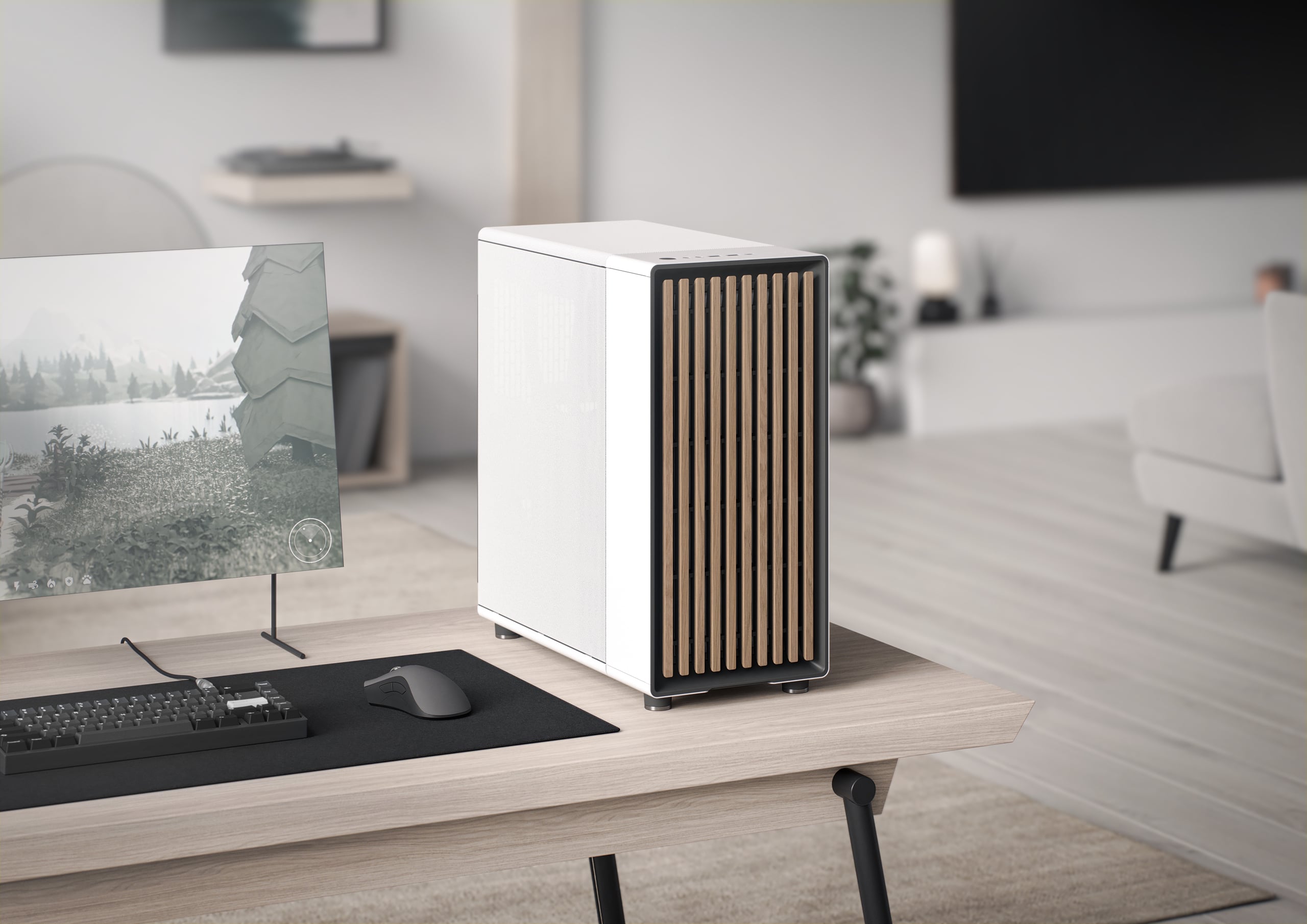
Fractal Design
North reimagines the gaming PC, introducing natural materials and bespoke details to make gaming a stylish addition to the living space. Fusing design and airflow engineering, the case features fine-patterned mesh ventilation and an open front with real walnut or oak panels. The design is complemented by sleek brass or steel details and an integ...
Has a couple of colour options
halcyon sand
weary flame
https://www.fractal-design.com/products/cases/north/north/chalk-white/
It's so clean
I love it
weary flame
You're welcome
Cooling is on par with the Meshify, obviously worse as that one's full mesh, but this one just looks nicer
There is a black and gold version btw
 reef stump
Hey! Anyone a computer genius and can help me with my pc
Doesn’t find any boot device even tho I have my m.2 in.
In bios is reads there’s a m.2 in storage info but no where else does a read a drive
weary flame
Did you initialise it in bios?
reef stump
Wait sorry I think I might have just got it
It finally showed in the ssd erase
Tried that and now it’s showing on windows set up
Wish me luck!
I’ve been at this for 2 days 
I think my octane was messing something up in bios
reef stump
Idk I took out my octane then erased my m.2 from bios and it started showing up
I was upgrading my CPU and motherboard. Using my old drives from my pc
Anyway it’s installing windows now so I hope this works
weary flame
I hope it works for ya too <3
noble oak
weary flame
My favourite case as of late actually
Love it, and it's soon in stock for me. I'm just torn between mesh or glass
weary flame
Ah, fair
The mesh is okay, but it can have backwards effects
At least for airflow
The glass does not
But then you have the "do i wanna see or not" dilemma

Sponsor: Arctic Liquid Freezer II ARGB on Amazon https://geni.us/8BokJ
Our review of the Fractal North looks at build quality, thermal performance, cable management, and features of the new Fractal case. The Fractal North follows-up Fractal's Pop Air, which we liked, and its Torrent, which we recommended as the best case when it launched. The co...
GN's review
I think they do sell a metal plate tho
reef stump
weary flame
I hope it works for ya too <3
It works! Thanks for listening I guess 😂
 storm pond
Part List - Intel Core i5-12600K, GeForce RTX 3070 LHR, NZXT H510 Flow ATX Mid Tower
any opinions or suggestions on this build? storage and ram are just place holder since i will be using those parts from my old build?
 twin hare
storm pond
any opinions or suggestions on this build? storage and ram are just place holder...
twin hare
storm pond
any opinions or suggestions on this build? storage and ram are just place holder...
Great value build for sure
This was last gens mid-high end but current gens highly efficient bang for buck
The modern gaming environment hasn’t been something demanding the “latest and greatest for a good experience” dynamic either. So don’t think going previous Gen is harmful
weary flame
storm pond
https://pcpartpicker.com/list/MZRVk9
If possible
Maybe an NVMe drive, you probably don't need a hardrive, no?
Oh
Nvm on the storage
Do suggest an M.2 SSD
 stiff sierra
Hello guys, could you please tell me if my build is good enough?
https://pcpartpicker.com/list/sQCrNc
I live in France so pricing is off.
The total is at 1000 EUR = $1084,40
haven't decided if I need to buy a better cooler other than the stock one (Wraith stealth)
pcpartpicker doesn't recognize the power supply: it's an Aerocool Lux 750w 80+ Bronze (https://www.amazon.fr/gp/product/B07VL3BYGP/ref=ox_sc_act_title_3?smid=A1X6FK5RDHNB96&psc=1) at $76,88
Usage for gaming (COD,Warzone 2,), no idea if I should aim for a 1440p monitor with at least 144hz
Thanks!
Part List - AMD Ryzen 5 5600, Radeon RX 6750 XT, Cooler Master N300 ATX Mid Tower

Doté d'un design élégant et élégant, le bloc d'alimentation LUX offre l'équilibre parfait entre puissance et luxe. Cette alimentation de qualité supérieure alimente efficacement votre système tout en rehaussant l'apparence de votre configuration. Certifié 80Plus Gold, le LUX offre jusqu'à 90 % d'...
weary flame
Yes
Get a better cooler
And up to a 5700 maybe
The price differences are almost minimal iirc
stiff sierra
Alright thank you I'll check on that 🙂
 kind pivot
hey guys
weary flame
split atlas
do you think a ryzen 7-76800H and a rtx 3060 is a good combo?
If you can up the GPU
But that's not bad
Ryzen 7000 has been amazing for energy consumption and heat for what it does
split atlas
wb a ryzen 7-7735HS and a 4060?
split atlas
K
 keen portal
Best ram for ddr4 (32 gigs) and best overkill CPU cooler for 5600x (why overkill Bc i could change it to 5800x3d
Anyone can give me some options
weary flame
CL 16, 3600
Save money on the 5600, as PBO will give it X series power
And 5600x isn't overkill
It's pretty much the standard nowadays
twin hare
keen portal
Best ram for ddr4 (32 gigs) and best overkill CPU cooler for 5600x (why overkill...
Its not the best value ram out there but Corsair Vengence Pro SL is what I have, their XMP by default gets them 3200Mhz and easily OC'd beyond. Timings did not need tuning at all with 5800x in memtest64
 weary flame
Any AIO that's at least 240mm
But you can get a good air cooler anyway
5000 doesn't run hot
 vale plover
twin hare
Its not the best value ram out there but Corsair Vengence Pro SL is what I have,...
vale plover
twin hare
Its not the best value ram out there but Corsair Vengence Pro SL is what I have,...
im pretty sure the like normal G.skill stuff is the best value
definitely doesn't look the best tho
i have the g.skill trident ram however
weary flame
G.skill is far from the best ram, especially bang for buck
It also depends on what you have in the country you arer
Lemme pull some 3600 CL16
Kingston Fury Renegade KF436C16RBK2/16 is for me the best one
16 GB, 2 sticks, 3600MHz CL16
It depends is what I mean
vale plover
fair enough
weary flame
I am fairly lucky that my country has a site where you have so much stats you can change, like even price/mb
 sturdy bramble
Hi everyone! I just built my first PC in over a decade.
(1) Samsung Pro SSD 2TB M.2 NVME
(10) Noctua NF-F12 PWM 120mm Case Fans
Corsair iCUE H150i ELITE RGB 360mm AIO
Corsair1200 80 Plus Platinum ATX modular PSU
Asus X670E-E ROG Strix Gaming WiFi
(2) 32GB Corsair Vengence RGB DDR5 5600 MHz RAM
Gigabyte GeForce RTX 4090 TUF Gaming Overclocked 24GB GDDR6X
AMD Ryzen 9 7900X3D 4.4GHz 12 core
Corsair 5000D Airflow Mid-Tower ATX Computer Case
AORUS FV43U 43" 4K Gaming Monitor
(2) SilverStone CPF04 PWM Fan Hubs
Anyone using the Asus x670E-E mobo?? I need some advice on an issue.
twin hare
Post box stack
sturdy bramble


 weary flame
sturdy bramble
Anyone using the Asus x670E-E mobo?? I need some advice on an issue.
weary flame
sturdy bramble
Anyone using the Asus x670E-E mobo?? I need some advice on an issue.
What's the issue?
The built itself is nice, maybe a tad overboard on the PSU, even with the 4090
But it's really nice
 brave ravine
PSU could be ATX 3.0 if going that much overboard, tbh (unless it is and I saw wrong)
noble oak
I'm kinda dumb so is ram supposed to be shared with the gpu cuz I'm using 4 slots
 brave ravine
this is just GPU ram
weary flame
@sturdy brambleCan you please tell me the board issue?
i'd love to help, but like
weary flame
noble oak
I'm kinda dumb so is ram supposed to be shared with the gpu cuz I'm using 4 slot...
So, the 8GB is the VRAM on the GPU
The 16 "shared" is from your PC itself (might I suggest 2 8GB sticks or even 2 16GB sticks)
The ram in your slots will give data to your GPU to well, make it do what a GPU does, and the GPU can use the ram sticks in your slots, but it generally won't because of latency
sturdy bramble
brave ravine
PSU could be ATX 3.0 if going that much overboard, tbh (unless it is and I saw w...
Hey! I appreciate that bit of info. It is absolutely NOT a ATX 3.0. I have a grace period to return the PSU I have. I was just looking for a better cable to use instead of two split 8 pin PCIe's to a the adapter that came with the 4090 because cable management... so, two of the yellow and black sheathed to the pictured "squid" into the RTX 4090... not attractive or efficient.

 sturdy bramble
weary flame
The built itself is nice, maybe a tad overboard on the PSU, even with the 4090
B...
sturdy bramble
weary flame
The built itself is nice, maybe a tad overboard on the PSU, even with the 4090
B...
Thanks, @weary flame! I purposefully went a bit higher on the PSU wattage.
weary flame
sturdy bramble
Hey! I appreciate that bit of info. It is absolutely NOT a ATX 3.0. I have a gra...
Oh
Do get a 3.0 onr
Corsair has one
That's it
Maybe seasonic?
I don't keep up with PSUs tbh
Also not behind pc to look
sturdy bramble
weary flame
What's the issue?
And, to address the issue I'm having... first of all I appreciate you responding.. and, let me preface this issue by saying that I need to try reversing the polarity on the plugs, so, it's not a MOBO issue per se. I built an entire computer without any major issues, except for one small one... the power button LED won't light up! So, as I said, I still need to see if I connected the polarity correctly, but it seams pretty straight forward... plug the negative into the negative and positive into the positive. I just need to check again I think, but if it doesn't light up then do I need to RMA my hub on my case?
Oh, wait... one more thing I need to figure out the best way to wire up the fans. I've got all of these fans.. should I use a controller? Or, is it best to try and connect my fans to the headers on mobo? Will that give me better flexibility, or control? I want to utilize as many of the mobo's features as possible. Any advice on that would be appreciated!!
 sturdy bramble
weary flame
Oh
Do get a 3.0 onr
sturdy bramble
weary flame
Oh
Do get a 3.0 onr
I'm going to see what I can find, and return the PSU. Thank you!
weary flame
What you can do is use multiple controllers
Let's say for intake and outtake, separately
But the controllers you can wire one cable to the back of the case, where wires are hidde , and from there plug a lot more
Lemme see something rq

I have been asked for YEARS to make this video... so I finally did. Today you will learn how to cable manage like a PRO!
See the full spec list of the Vengeance A4100 from Corsair at https://www.corsair.com/us/en/Categories/Products/Systems/VENGEANCE-220T-Series/p/CS-9030011-NA
○○○○○○ Items featured in this video available at Amazon ○○○○○○
►...
J2C probably went over it
I'm a tad tired rn
But it's basically running one cable to the back of the tray where your controller is, and splitting off from the controller to individual fans
I don't suggest using all fan headers, it's not really useful, and if you want a nice, tidy look, don't
sturdy bramble
And, because my fans and the controller is PWM that means I should be able to control groups of them or each one individually via the mobo's software. That's my concern, I want all of the control and I want all of the fan speeds to be read correctly.
weary flame
You do you
I don't know exactly how etc
You'll have to experiment
Anyway
Gn
If you ever have issues or questions
I do be existing, I guess
But now I'll sleep
So I'll be half existing
sturdy bramble
HAHA Okay. You get some sleep, sir. ...Thanks, Berry. Much appreciated for the advice.
brave ravine
And you're 100% sure you don't have the controller for fans inside the chassis anyhow? I got one of the newer ones from Bequiet and I got the controller on the backplate, for tidy plugging in
brave ravine
sturdy bramble
Thanks, <@796370653929930752>! I purposefully went a bit higher on the PSU watta...
yeah I did a similar thing, seemed silly to risk any possible surges for a few euros of difference, even with high efficiency
weary flame
Eh, OCP and OTP is better than it was 30 series launch
Let alone
If you truly want "future proof" and "safety"
ATX 3.0 is sorta the way to go
If more board give us the 10 pin on the board itself, that'd be even better
brave ravine
hehe agreed
weary flame
I think Corsair will give at least a 24 to 10 pin adaptor
But I hope it becomes the basic standard for the board
It can give like, ~200 watts
Over the board
And you should still have the 12v CPU ones anyway
It's like those sideways or backwards plugs I want to become standard on boards
It not only looks nicer
But it also is nicer
Also the 180° bend cables have to make sometimes is just D:
One wrong thing and my 24 pin could poof
brave ravine
haha yeah sweating profusely
I hope we standardise some things that should be just ... standard
weary flame
Yup
Debug LED
Sideways or backwards plugs
Hell
If there was space to plug the GPU cable from the back
With how long most are nowadays, linger than the board, we could easily put plugs right back side, so they directly go into a grommet
brave ravine
weary flame
If there was space to plug the GPU cable from the back
yeah, I have a large chassis but 4080 is right up against the glass, doesn't feel good
but these new chassis changes are pretty sweet, inbuilt controller on some, very nice cable management, modular components, was a nice upgrade from a quite old one
hopefully we won't have just proprietary sheet locked behind companies and poorly implemented, as usual
sturdy bramble
brave ravine
yeah I did a similar thing, seemed silly to risk any possible surges for a few e...
Exactly. And, I want power for future expansions.
weary flame
Fractal has been putting an addressable RGB/WPM controller in their cases for ages iirc
It's quite nice
And I love the look of the Torrent, meshify and especially North
weary flame
weary flame
Fractal has been putting an addressable RGB/WPM controller in their cases for ag...
Hell, they even gave you a new fan controller when they messed up in the torrent, with a recall campaign where they contacted you if possible
Before any drama came of it, without ignoring it
Just, before there really was news "hey, we know about the controller, we'll give you a free one, just contact us"
sturdy bramble
brave ravine
And you're 100% sure you don't have the controller for fans inside the chassis a...
The case came with a PWM controller on it! I just want to make sure I can adjust fan speeds and that my read outs for fan RPM on my utilities software is showing correctly... There's an AI controlled fan software that I want to make sure can utilize the fans to their best capabilities for overheating situations.
The monitor I got The Aorus FV43U has some OSD software, and it keeps crashing. The worst part is that without that software I can't adjust some of the settings. I still need to run benchmarks, and stress test the system, but, right now, that is the worst thing about this set up. I'm missing out because of crap software.
 primal ferry
what aios are recommended?
weary flame
Uuuuh
Galahad, Liquid Freezer 2, the Fractal one
Dependant on the CPU
But try to get at least a 240mm one
brave ravine
Liquid freezer is indeed good, and quite cheap
 noble lintel
hi
i need help with my keyboard steel


What is the difference between these two options? is buneo if I have both at 0.02?
weary flame
noble lintel
So, if you look at the press, one is .2
The other is 1
The second is the second actuation, you can put a trigger distance for a second actuation, which means that a shorter press is, let's say, walking, while a longer is running
 vital pollen
A question ryzen 7 5700x . 32gb ram , rtx 3070 vs ryzen 5 5600x , 16 gb and rtx 3060 ti
is it worth paying 300$ more for first built ?
sturdy bramble
noble lintel
That's awesome! IS the keyboard model called Steel?
sturdy bramble
vital pollen
A question ryzen 7 5700x . 32gb ram , rtx 3070 vs ryzen 5 5600x , 16 gb and rtx ...
If you're looking to save money, I don't think the marginal difference in performance between 3060 ti and 3070 is going to make that much of a difference, but I'd need to look at specs! In other words that ti should be so close in performance to 3070 that it might make the most sense to keep the cash!
Looking at both build as a whole and just picking between the two.. in my humble opinion, I'd think the first one's performance might warrant an extra $300 because of the upgraded CPU and 32 Gb of ram coupled with a better graphics card. It's a tight race!
Isn't there a website you can "build" a PC and see performance stats? I thought there was a site like that? Anyone know of one? I'm sure you could find similar builds on https://pcpartpicker.com/ that has been tested, right?
Also, I think you might need to be more specific about the RAM.. exactly what the speed is. DDR4 I assume?
LEt's just say DDR 4 at 3200 MHz. I found Corsair Vengence for $42.99
vital pollen
sturdy bramble
If you're looking to save money, I don't think the marginal difference in perfor...
its actually pre built i know lot of people gets mad when you mention that you wont built pc hahahah
yeah i didnt want to get into to much details ig i just said 3 4 thing so it wont be to long , but thank you for your time im still considering both options cus if i want cheaper one i can get it right now and for this first one i would need to wait another month or so
sturdy bramble
What's your budget?
vital pollen
but ig spending more on something you gonna use for a long time is worth it , i got this pc im using rn in 2018 and im just upgrading rn from that one
sturdy bramble
No shame in buying a quality pre-built! I was contemplating it! And, I've built many PC's.
vital pollen
around 1200-1500 euros
sturdy bramble
oh, you can get a good one! I think you'd be happy with the 3060ti versus the 3070 if that's the performance range your looking at. Do you have the website for the place your thinking about buying each one from? I can get more info from them
vital pollen
well its Croatian website so ... you dont need to waste your time on that but i really appreciate it , thank you
sturdy bramble
HEre's one with your top tier equipment for $1,200 USD, so it might be cheaper in Euro, and this one is pretty great! https://pcpartpicker.com/b/7jHzK8

360 PC by WavyGamer - AMD Ryzen 7 5700X, GeForce RTX 3070, Corsair 5000D AIRFLOW ATX Mid Tower
sturdy bramble
vital pollen
well its Croatian website so ... you dont need to waste your time on that but i ...
Croatian or not... all the tech specs are the same! Tech specs are universal hahaha
vital pollen
sturdy bramble
Croatian or not... all the tech specs are the same! Tech specs are universal hah...
yeah i know but i wanted to save you the trouble 😅
 feral fractal
I agree, the difference is performance of those graphics cards isn't going to be very large. I'd go for the better deal.
The difference between a Ryzen5 and Ryzen7 is one to consider much more, in my opinion.
My initial build was with a R7 2700X (8 core), which I later upgraded to my R7 3900XT (12 core). They're completely different generations, but the amount of total processing power was worth it to me.
A year ago I upgraded my 16GB-3200 ram to 32GB-3200. I found it to be quite worthwhile, as I sometimes saw over 20GB being used while running certain games or applications.
sturdy bramble
Evan knows.. The upgraded CPU is going to make your experience better out of those two choices.
So maybe the first build with the 3060ti?
feral fractal
I was lucky enough to pay retail prices for everything, so my build is around $2000 not including storage. This was over several years though, my initial build was less than 50% of the current performance.
feral fractal
sturdy bramble
So maybe the first build with the 3060ti?
^ I'd do this
I've had a few different RTX cards and they perform very well
(not to mention, I personally like all of the nvidia software a lot)
sturdy bramble
RAM speed and CPU are going to make a world of difference. I upgraded a 12 year old PC with double the RAM... night and freakin' day!
feral fractal
And the performance of the Ryzen 5000 series is wonderful. I'm a little bit regretful that I bought a 3900XT over a 5000 series.
vital pollen
sturdy bramble
So maybe the first build with the 3060ti?
yeah i believe its possible to change couple of things in that store
and the thing is that i play valorant a lot and its more of cpu than gpu game so better cpu will be helpful cus i want to be able to capture things without my fps to go lower than 150 at least
feral fractal
you'd thank yourself later on for getting the 5700X
and if you're playing on 1080p or 1440p, a 3060Ti will be plenty
feral fractal
sturdy bramble
HEre's one with your top tier equipment for $1,200 USD, so it might be cheaper i...
the price to performance you get anymore is super impressive if you can manage to pay retail prices
storm pond
Rtx 3070 or 3070 ti?
brave ravine
sturdy bramble
RAM speed and CPU are going to make a world of difference. I upgraded a 12 year ...
afaik there isn't much difference between hz in gaming use-cases, if you aren't going with slowest vs the fastest? You probably get a few fps max if you would upgrade from, let's say 3200mhz CL16/18 to some 4000+ mhz ram, amount of ram might be more noticable if you don't have enough I think. CPU goes without saying, yeah, but even that stops at some point, my CPU just goes between 7 and 15% in most non-cpu exclusive tasks
brave ravine
vital pollen
yeah i believe its possible to change couple of things in that store
and the th...
if you want, you can link the site and I check out what can be changed 🙂 mogu da razumem
weary flame
vital pollen
A question ryzen 7 5700x . 32gb ram , rtx 3070 vs ryzen 5 5600x , 16 gb and rtx ...
Nope
Not at all
weary flame
sturdy bramble
That's awesome! IS the keyboard model called Steel?
It's the steelseries Alex 9 or pro iirc
Apex*
weary flame
sturdy bramble
RAM speed and CPU are going to make a world of difference. I upgraded a 12 year ...
Not in this case
5600 and 5700 is just
Not that big
Even with ram speeds
They're just good enough that difference barely will matter
keen portal
vital pollen
A question ryzen 7 5700x . 32gb ram , rtx 3070 vs ryzen 5 5600x , 16 gb and rtx ...
U dont need to change CPU but its worth
 obsidian schooner
yo
i just bought a pc with rtx 3060 12gb, i5 12400f , and geil evo potenza 8x2 ram for 880 bucks is it expensive or deal?
880 usd
weary flame
oof
Try to get at least an uh
I need to check rq
I think B660
The H board will just, not really be good
You're leaving a lot of PCIe on the board
Not
the same board
 native temple
yeah that is a rip off
you can buy a new rig for that with alot more in it that would include the new I7 or I9
check out micro center
 snow prawn
Trying to decide between asus strix z690e or the newer model the z790e anybody got any thoughts on them? Or is the 790e actually worth the extra 150 bucks or so?
 solemn wagon
native temple
you can buy a new rig for that with alot more in it that would include the new I...
solemn wagon
native temple
you can buy a new rig for that with alot more in it that would include the new I...
where does any store have anything with a 13th gen (or 12th gen for that matter) i7/9 cpu for 900 usd?
native temple
Like I said go to microcenter
solemn wagon
i go to microcenter on a regular basis and chceking their site the only things they have in that price range are 12th gen i5s with igpus lol
you're comparing apples to oranges
native temple
Ok good luck
solemn wagon
man i'm really glad i taught myself about this stuff when i was a kid so i don't have to rely on strangers online that don't know what they're talking about lol, him getting that for 880 usd is a decent deal, straight up
this is the closest thing i can find and it has an IGPU

and that only has 16 gigs of ram
and an individual store's inventory will vary wildly
that being said microcenter usually has great deals, i picked up a 7900x/mobo/32 GB ram bundle for $550 a few months ago when they had a flash sale on a bundle
if you are near one, it's your best bet for (new) PC parts in my estimation, you can always find better deals on used stuff on the secondary market
ask for proof of your wildly incorrect claims -> "like i said go to microcenter" 
this deal was bussin

actually i dug up my receipts and it was a little over 600 with the motherboard i got but still that was a great deal
weary flame
snow prawn
Trying to decide between asus strix z690e or the newer model the z790e anybody g...
Depends on the CPU you have and how comfy you are with bios updates
weary flame
solemn wagon
this is the closest thing i can find and it has an IGPU
And that's not a good deal?
And, like I said, H series boards just kinda suck
solemn wagon
weary flame
And that's not a good deal?
you put a decent gpu in it and you're 1200-1300 which is getting way above 900
and i doubt many people are gonna put a 3060 in a 12700k rig
weary flame
Yeah no, but anything higher will add more than 3-400 bucks
You probably shouldn't buy a rig that's 1k and doesn't have a dedicated GPU
Bit for gaming related things anyaay
solemn wagon
i dunno why you would be buying a 12700k rig and not planning on gaming on it
so i don't even think that's really a valid point for me to have linked that anyway
weary flame
That's my point
solemn wagon
yes
weary flame
It doesn't have a dedicated GPU
solemn wagon
ergo the 900 for the i5 rig and 3060 was a good deal
weary flame
And prebuilt companies are so stingy on modifying anything
weary flame
solemn wagon
ergo the 900 for the i5 rig and 3060 was a good deal
It would be
If the board was actually good
A big reason I don't call it a good deal, is because it has a H610 board
solemn wagon
who cares? it's an i5, and i highly doubt the dude who bought it would be looking to over clock anyway
so why a z690 board?
solemn wagon
i really don't see any reason to get anything but the most affordable board that will give your cpu enough juice and have enough ports for what you need for a budget built
weary flame
That's my point
solemn wagon
i don't understand the insistence on upgrading a board that won't do anything for performance
weary flame
It doesn't really give that
solemn wagon
who cares if it is a "gaming board"
weary flame
It will do things for performance
hence you have people benchmarking with those boards
solemn wagon
as long as the board hits your RAM/CPU speeds performance is virtually indistinguishable from board to board
obviously some boards overclock better than others but that's again not relevant here
weary flame
Further, H series has limited IO and connectivity to things like M.2 and sata, and lower supported memory speeds
weary flame
solemn wagon
as long as the board hits your RAM/CPU speeds performance is virtually indisting...
No?
It is relevant
solemn wagon
so you're telling me a b610 and z690 board hitting the same speeds perform differently?
everything else the same
solemn wagon
you take that i5 and put it in both boards
weary flame
Let alone, H series doesn't support memory OC
solemn wagon
they will perform appreciably differently?
weary flame
Which means xmp
weary flame
solemn wagon
they will perform appreciably differently?
Yes
solemn wagon
can you read? same cpu clocks, same memory clocks
weary flame
Like I said, there is a reason people test these boards
solemn wagon
they will perform differently
weary flame
solemn wagon
can you read? same cpu clocks, same memory clocks
H610 cannot reach the same memory speeds to begin with
weary flame
No
solemn wagon
take some very slow ddr5 and put it on both boards
weary flame
You are ignoring how limited H series boards are
solemn wagon
at a speed both boards supporty
weary flame
Just to prove "it's as good"
solemn wagon
of course it's stupid to get a motherboard that doesn't support the specs of the other parts you're getting
weary flame
And then you're surprised when the H series performs worse because it's missing things like phases
You also have so much less connectivity
Ram isn't great, you're stuck at default speeds
solemn wagon
jesus christ
brave ravine
snow prawn
Trying to decide between asus strix z690e or the newer model the z790e anybody g...
don't think it is worth it
brave ravine
obsidian schooner
i just bought a pc with rtx 3060 12gb, i5 12400f , and geil evo potenza 8x2 ram ...
I'm not sure about the prices in the US, but I think that is somewhere in between, an average price for that build right now. You didn't mess up anything, but you didn't hit the lotto. No worries it's a fine pc 🙂
brave ravine
weary flame
The board is fine if you don't game
it's fine if you game, it just doesn't have all the bells and whistles you might want on a MOBO. For midrange processors it's perfectly fine, and that processor (i5-12400f) is exactly that. XMP is a thing you want though, as is the Q-flash and stable PCI lanes
weary flame
brave ravine
it's fine if you game, it just doesn't have all the bells and whistles you might...
It's more a work PC, like those light ones in cubicles, than anything for gaming
As expected, no OC on the CPU itself (I hate that Z series exclusive thing myself)
No memory OC, which isn't great if you do gamiing, you really want those timings
Only PCIe 3.0, and from that you get 8 lanes
Sata ports still exist
Max 6 USB ports, but in all likelihood will be a lot less
And that's just the main thing
That's also ignoring barely any price difference between a H610 and a B660
brave ravine
yeah I am not disagreeing with you on other parts, if you have a choice, take B660 all of the times, I'm just saying it's not the end of the world and stuff still works fine. You won't be upgrading anything with that MOBO though.
weary flame
I'd honestly just, replace the board
also I still feel it's too expensive with the H610
brave ravine
I think if person is buying a budget PC, they won't be replacing the mobo just for those features you wrote down. Yeah same, a bit, classic baiting from companies trying to sell off stock that doesn't sell that well
weary flame
Oh, these boards sell amazingly well
brave ravine
I did also use a $100 mobo for 7 years with no big troubles, but I think I did go for B660 or something similar, not sure from the top of my head. The PC still works, I use it as a secondary gaming machine
brave ravine
weary flame
Oh, these boards sell *amazingly* well
haha, for office pc's?
weary flame
Because that's what goes into those PC's bought by the hundreds for companies
Yup
Office pc's is where money is at really
brave ravine
good point, maybe some leftover stock then? Not really sure why they build those pcs with config like that, b660 would be tad more expensive, and people would be satisfied
weary flame
B660 really isn't much more expensive
As 12th gen, while can run PCIe 5, was made during PCIe 4 era
But yeah, if you game, XMP is basically required
It's also bs it isn't automatically enabled
But that is one of my many pet peeves
Oh yeah, no M.2
I forgot that
H610 has no place for an M.2 SSD
I changed my mind
Get H670
God it's cheap, and it has more stuff than a B660
Most B660 is also more expensive

brave ravine
yeah xmp not being a standard is wack
weary flame
Yeah
And M.2 too
Everything benefits from M.2
Also for gaming just, the Mosfets, heatsink etc just, isn't there
And they're sorta "eh"
brave ravine
yeah agreed, some stuff is just weird/regressing I'm thinking :/ or good hardware and shoddy software
weary flame
The low end H series should have an M.2 slot tho
It just should
But yeah
Motherboards need some just, QoL upgrades
Sideways plugs
"Expensive" boards having barely anything to protect the stuff on the board, but generally it's just a couple of metal pieces, if there even are any
It's so easy to knock anything off
12VO 10 pin should also be there
 prime grail
https://www.msi.com/Motherboard/MPG-Z690-EDGE-WIFI-DDR4 yall opinion on this board for $130 as a refurbished?
MPG series motherboards offer colorful customization with MSI Mystic Light RGB and Ambient Link, tuned for better performance by direct 16 phases VRM power, Memory Boost, Lightning Gen5 solution, Premium Thermal Solution, Wi-Fi 6, USB 3.2 Gen 2x2
weary flame
prime grail
https://www.msi.com/Motherboard/MPG-Z690-EDGE-WIFI-DDR4 yall opinion on this boa...
Which CPU btw?
That's a lot cheaper tho, ngl
prime grail
weary flame
Which CPU btw?
13600k moreso the KF sku tho.
weary flame
prime grail
13600k moreso the KF sku tho.
I'd say
Yes
It's quite good, you loose like, over 150 bucks
At least USD or EU
Idk how much the difference is if you're not there
But that's a good deal
Do make sure you can return it
prime grail
It’s from Newegg so I could probably refund when it’s doa but I’m currently running 5600G huge improvement I assume
noble oak
Hello, I'm upgrading my ram, anything I should know other than to match my current ram model? Anything I have to do once I have inserted the new ram?
brave ravine
prime grail
It’s from Newegg so I could probably refund when it’s doa but I’m currently runn...
your assumption is correct
weary flame
prime grail
It’s from Newegg so I could probably refund when it’s doa but I’m currently runn...
Be careful with Newegg tho
Tell GN if they do something funny
weary flame
noble oak
Hello, I'm upgrading my ram, anything I should know other than to match my curre...
Which spec?
As in
No
Which DDR version
prime grail
Should I just take the risk on it doing it a cc so I have decent protection
noble oak
weary flame
Which DDR version
ddr 4
weary flame
noble oak
ddr 4
DDR4 CL16 3600
It's somewhat sweet spot for performance
Which CPU do you have btw?
weary flame
prime grail
Should I just take the risk on it doing it a cc so I have decent protection
Yes
However, take pictures when it arrives and how it looks
If they don't take it back if it's broken, send those pictures to Gamer's Nexus, they dealt with these things before
 sudden ether
I bought a prebuilt PC and people tell me my specs are good enough to run cod on good quality but I can't figure out why it looks like cod mobile
weary flame
sudden ether
I bought a prebuilt PC and people tell me my specs are good enough to run cod on...
Do you have adaptive supersampling on?
brave ravine
sudden ether
I bought a prebuilt PC and people tell me my specs are good enough to run cod on...
take a pic of graphics menu in the game, probably some sampling set to wrong settings, as Berry suspects
 woeful grove
ive currently got DDR4 3200Mhz Corsair Vengence what ram shall i upgrade to
i want 64gbs
only got 16 gb rn
 static pecan
Is there any reason you actually need 64? If you're mainly gaming then 16 is more than enough. If you're editing videos or doing some other RAM-intensive task then 32GB would be plenty for that. There really isn't a reason outside of 3D modeling and professional work that anyone would need more than 32GB of RAM. It's basically throwing away money that could be better spent towards a CPU/GPU/SSD upgrade that would actually get you more performance
woeful grove
static pecan
Is there any reason you actually need 64? If you're mainly gaming then 16 is mor...
the only thing that is kinda holding my pc back
is ram
got a 3070ti and i7 12700k
i edit videos on the occasion
and create cars for Fivem
static pecan
If you're consistently hitting 14-15gb of RAM usages then sure, jump to 32. But 64 is pretty much a waste of money unless you find a crazy black friday deal on a solid 64 kit
woeful grove
ah ok
my pc uses around 3/4 of my ram before even going into a game
it uses like 9gb
not 3/4s but
it uses alot without doing anything
static pecan
I have 32gb in my system and it never uses more than 20 for gaming, streaming, and video/photo editing. This is the kit I'd use: https://www.newegg.com/g-skill-32gb-288-pin-ddr4-sdram/p/N82E16820232906?Item=N82E16820232906&nm_mc=AFC-RAN-COM&cm_mmc=afc-ran-com-_-PCPartPicker&utm_medium=affiliate&utm_campaign=afc-ran-com-_-PCPartPicker&utm_source=afc-PCPartPicker&AFFID=2558510&AFFNAME=PCPartPicker&ACRID=1&ASID=https%3A%2F%2Fpcpartpicker.com%2F&ranMID=44583&ranEAID=2558510&ranSiteID=8BacdVP0GFs-JRaRdFWB5IkpZVgeIFuxtQ
Works great, never had any issues with stability or anything on my AMD system so it should work just as well with an Intel system
Plus the timings will be better than Vengeance kits lol
woeful grove
ah ok ty
weary flame
try to get 3600 CL 16
THat's somewhat the main thing for performance of the kit, not the size
sudden ether
weary flame
Do you have adaptive supersampling on?
i fixed it. i didn't notice the quality tab in the graphics options lol
 vivid gyro
bru never buy prebuilt pcs
weary flame

 loud shore
6 hour

 delicate heart
is that a 40 series?
 upper slate
woeful grove
ah ok ty
upper slate
woeful grove
ah ok ty
If you think ram is your issue and/or you don't want to spend the money to upgrade the other stuff, get faster ram speed with a tighter timing. Like they said, 32 GB is more than enough.
vivid gyro
i think ya
weary flame
Look for the same price through the Radeon line
Radeon 6000
I think you'll end up with a better deal for the same price
weary flame
I mean fair
But RTX on 3060 isn't too great, and performance is better on lower end
Hence I say
 sinful plaza
What would be a good NVMe SSD that will help my pc/laptop load up faster and have more storage I currently have 512 gigabytes installed and I don't know much about wifi cards and sound cards because should I get them and can I upgrade sound cards and wifi cards if they are integrated into the motherboard?
weary flame
Do you have a PC or a laptop
I assume a PC
If so, anything for an SSD that's from
Samsung
Western Digital
Crucial
Kingston
Those are good
Samsung tends to be very reliable, even with the 980 and 990 incidents, which they send new ones, without the bug, for back if yours failed
Otherwise, I'd put Crucial right under that
weary flame
I need to see then
You cannot change sound cards
Wifi would mean you need to open it, which I wouldn't suggest
You can put in a second SSD so it seems
But it still means having to open the laptop
I'd check with Gigabyte first if it voids the warranty, if said warranty is still active
If it isn't it helps with the wifi card changing
But even then
sinful plaza
Where can I buy wifi cards I want the newest and best one I could buy right now to this day.
sinful plaza
Where can you buy them?
I have looked on intel’s official website and haven’t been able to see them and idk where it can be located in a laptop
 nimble charm
9600k 16gb 2666 ram 1660 super 1.5tb of storage has dedicated network card mobo is a B365 ASROCk, upgrading to a 1080 ti, will this cause any issues
sinful plaza
Just make sure that you have enough power (power supply psu) because you are going to be increasing power by upgrading cards
weary flame
nimble charm
9600k 16gb 2666 ram 1660 super 1.5tb of storage has dedicated network card mobo...
Not really, it's a GPU change
You'll be fine
 spring agate
nimble charm
9600k 16gb 2666 ram 1660 super 1.5tb of storage has dedicated network card mobo...
spring agate
nimble charm
9600k 16gb 2666 ram 1660 super 1.5tb of storage has dedicated network card mobo...
tbf, it can cause issues depending on your PSU. After all the 1080 Ti can take 300W with stock settings and 375W overclocked at 2000 MHz Core Clock and 6000 MHz (boosted) Memory clock. Just to be anywhere near your efficiency curve you'd need at least a 650W PSU
weary flame
Efficiency curve is
Sort of overrated
Especially on new(ish) PSU's
Most PSU's atm are constantly efficient on most ranges up over 90%
It's rather when it reaches it's peak
spring agate
false
take a look at cybernetics and their stats, most PSUs don't even reach their advertised efficiency curve and have an efficiency of 80% or even less at over 70% load
weary flame
Their own site
Says 82% at the least
And most are still over 90%
And it doesn't change my point of, efficiency curves are overrated as the % change so little you don't need to shell out of the best one, because the difference, in the end, will do much different, especially if you can put money into more worthwhile components
Just because a 650W PSU's efficiency at 300w is 92% and at 500w is 87% isn't really weird
Nor should it say that "this PSU is kinda bad"
What these graphs are trying to show, is a more trustworthy efficiency metric that you can't use tricks to get around, which the old commonly used system had
The fact most PSU's are over 80% is impressive as hell
Especially if you know the PSU market, let's say, 10 years ago
Then efficiency curves, and knowing them was a good thing
Because half the time it was a gamble of "will I pay several hundred more for a good one or will this cheap one not blow up"
spring agate
yep, definitely above 80% 

and that was just a quick look at the casual 80+ gold PSUs
spring agate

still the same picture
and let's be honest, most people don't bother buying a platinum PSU or even better
weary flame
Still an efficiency over 80%
And the 5V rails have become redundant sort of
If you want to nitpick on the fact one % is under the 80 mark
spring agate
uh... WHAT?
weary flame
yes, since the board can handle that using 12V
And purely because 5V is under the 80%
It doesn't make the actual efficiency under 80%
Let alone
It's still overrated in this climate
All PSU's these days have an overall efficiency around 80%, that is if you buy one from a brand and not from, Ebay or something
This was such an important thing 5-10 years ago
THis whole Cybenetics thing hasn't been about "the old rating lied to you, we're giving you the truth in how bad PSU's are because curve dips under 80%"
It's a "We want to show you the actual effectiveness of these PSU's using a rating system with clear marks"
Which the old system lacked
and if you really want to hammer down on the "under 80%"
The lowest bronze, on the 5V, is 78.172, which, still isn't bad anyway
spring agate
Sry, but even the GN server disagrees with you
sinful plaza
spring agate
yep, definitely above 80% <:Kappa:902207856718278727>
Nothing will be 100% efficient
All power supply units are given a certain voltage/wattage but it’s like ssd’s your pc won’t get the full use out of if you have a 500 watt power supply you may only get 450 or 400 watts because the power supply has to also use it’s own power for other places (examples include fans located on your power supply).
spring agate
don't have to tell me
woeful grove
anyone got an idea on how to make it so i can stream on 16gb ram
it lags alot when trying to stream
spring agate
depending on your GPU you can use NVENC as your encoder, so your GPU does the heavy lifting when you stream
sturdy bramble
I'm thinking about buying cablemod custom full length cables, and I'm concerned about what lengths to get... if I buy "X" length, will that be too much, or what if I buy that "x" length for a predetermined route, and then I find a better route once I begin to really cable manage , and it's too short... If you've ever heard of the term "analysis paralyzes", I have a permanent seat at that table.
I saw the lengths of the cables for my modular power supply listed in PSU manual... I think I'm just going to add some more length based on the measurements I took when predetermining the cable lengths, and pull the trigger.
Any input, comments, advice, opinions, suggestions, inputs, judgements, directions, recommendations, encouragement, discouragement on making a decision would be appreciated!!!!
For reference;
Corsair1200 80 Plus Platinum ATX modular PSU
Corsair 5000D Airflow Mid-Tower ATX Computer Case
Asus X670E-E ROG Strix Gaming WiFi
Gigabyte GeForce RTX 4090 TUF Gaming Overclocked 24GB GDDR6X
 keen portal
@mystic folio
spring agate
sturdy bramble
I'm thinking about buying cablemod custom full length cables, and I'm concerned ...
first of all you should use the cables you have and do a proper cable management job. That's when you see which cable requires what length
i.e. lay the cables the way you want them without connecting them, then measure what's missing if it's not long enough
however, the only cable which would need a replacement are your EPS, ATX24 and PCIe power cables. Everything else won't be visible anyways. Barely saw any new case showing the drives
 reef temple
Jw, how often should I clean my pc and whaty do I clean it with? I ususally just come in my room with a leafblower and go at it every couple of months
halcyon sand
Depends on environment you have in your room
If it gets dusty quickly, you should do that more often. I personally use compressed gas for it, I have a laptop tho.
spring agate
compressed gas does the job, just make sure to fixate the fans or disconnect them entirely. Inserting voltage by spinning the fans when the PC is off is a thing
after all an electric motor becomes a generator when you turn it
 nocturne folio
reef temple
Jw, how often should I clean my pc and whaty do I clean it with? I ususally just...
nocturne folio
reef temple
Jw, how often should I clean my pc and whaty do I clean it with? I ususally just...
I haven't cleaned mine in a year
spring agate

 devout wolf
fancy seeing you here
spring agate

spring agate
devout wolf
fancy seeing you here
tbf, i ranted about my 100€ mouse being Prism supported (but not working) while my 200€ top of the line keyboard isn't
after that i decided to stay
sturdy bramble
Hi! I ground these two connections on my mobo, and the manual doesn't say anything about them, and I read the entire manual and I have the diagram in front of me. It's a 9 prong connection. Any ideas what these could be?


There's one right below the CPU and one at the bottom of the mobo.
USB? Maybe?
sturdy bramble
spring agate
first of all you should use the cables you have and do a proper cable management...
I did it. It took me a bit, but here's the basic layout mins the two 8 pin CPU connections. Those are going a different route once I get my custom cables.

 spring agate
by all honesty? Stay away from NZXT.
Their motherboards are extremely undercut in terms of performance AND features. I mean it's a Z590 without CPU and RAM overclocking Features after all. Like lol, what's the point of having Z590 if you can't OC anything that's worth overclocking?
besides all that, you'll mostly get away cheaper with the same specs and/or even better ones
noble oak
soemone plz find me a gaming laptop under 650$?
spring agate
what on earth is so hard to read the channel name? It's about building PCs, not Laptop
 subtle eagle
ja
 crimson scroll
spring agate
what on earth is so hard to read the channel name? It's about __building PCs__,...
crimson scroll
spring agate
what on earth is so hard to read the channel name? It's about __building PCs__,...
It's fine
Laptops are fine to talk about
 sand aspen
Hello
 weary flame
If you can get a DDR5 B series maybe
If you want to spare money, which makes it look like with the 13400, don't g 40 series
 trim ridge
whats a ddr5 b series
is that ram or the motherboard

this is the cheapest ddr5 motherboard
spring agate
uhmmm...

MSI SPATIUM PCIe 4.0 SSDs: https://msi.gm/ChargeAhead
Support us on Patreon: https://www.patreon.com/hardwareunboxed
Join us on Floatplane: https://www.floatplane.com/channel/HardwareUnboxed
Buy relevant products from Amazon, Newegg and others below:
Radeon RX 7900 XTX - https://geni.us/OKTo
Radeon RX 7900 XT - https://geni.us/iMi32
GeForce RT...
not to mention that you'll run into issues sooner or later with those 12 GB
trim ridge

came back with this
do you think its better
i wont change the ram or the motherboard cause it too expensive
spring agate
trim ridge
do you think its better
well, it is better, but i have my doubts about the cooler
and don't get me wrong, but the 13400F will cause issues. You should go with a 13600F if can afford it
another option would be to slowly build up the PC
not getting everything at once but slowly getting the pieces you really want one by one each month
i.e. that's what i started with. I got a Case and PSU first

and month after month i bought the parts i REALLY wanted
and over time it became this

5800X3D
G.Skill Trident Z Royal Elite 4x8 4000 MHz CL 14-14-14-34-89 at 1:1 2000 FCLK
2080 Ti Aorus Xtreme
3x 1 TB NVMe PCIe 4.0 Aorus SSDs
4x 2 TB Crucial MX500 Sata SSDs
Elgato 4k60 Pro Mk. II
Arctic Liquid Freezer II 360
Fractal Design Prisma AL-12 x3
Fractal Design Prisma AL-14 x3
Fractal Design Define 7
Fractal Design Ion+ 860P
and the Lian Li Strimer+ cables ofc
 warped scaffold
spring agate
5800X3D
G.Skill Trident Z Royal Elite 4x8 4000 MHz CL 14-14-14-34-89 at 1:1 2000...
warped scaffold
spring agate
5800X3D
G.Skill Trident Z Royal Elite 4x8 4000 MHz CL 14-14-14-34-89 at 1:1 2000...
The eleven TB hard carry
 quartz path
Hey
Im going to build a pc is this a good one
@warped scaffold
Can you rate it and tell what I need to change
quartz path
weary flame
spring agate
is it just me or is the motherboard missing?
CPU combo
 wild hawk
u can get it for way cheaper as wel
warped scaffold
M idk about the 3060 i think the ti could be a better build in it but im not 100% sure
And i think maybe a little more storage ssd or hdd depends on ur price range
weary flame
Anyway, if you want to go with a white build, where a big part of costs will add more, maybe do get a white motherboard, it'll stand in big contrast
weary flame
Check the CPU
It's a combo
warped scaffold
I got my gpu for free bc the shipping was like 3 weeks off
So they gave me my money back
warped scaffold
Nope
weary flame
quartz path
I see you want to go with a white build, that's fine, but parts will be pricier
My only two things, if you don't care that much about price is, get a white motherboard instead of the combo you have atm, that's a black board in it
Get another PSU, 100+ bucks for a 650 is too much
wild hawk
warped scaffold
Nope
lucky monkey
wild hawk
weary flame
I see you want to go with a white build, that's fine, but parts will be pricier
...
fr
specially when it’s from red dragon tf
💀
warped scaffold
But isnt the ryzen 7 like better then the 3060 wont it bottleneck?
weary flame
Then what they have to pay isn't that weird
At 30-50 because currency exchange
So about 330-350
Then add 20-40 bucks because it's a white GPU
You're easily above what he has to pay
White pc parts sell significantly worse than black ones, it's why they are more expensive
warped scaffold
m could be i just dont trust amazon
weary flame
Eh it is
They just sell worse, so they sell less and as such they order less, which makes the price higher as they need to cover the costs
Bulk buying makes things really cheap
If you can't buy something in the same bulk size and have to go smaller, it becomes more expensive
Anyway
GPU price isn't outrageous or anything
warped scaffold
I dont think it is
Last year
I wantwd a pc so bad
I payed 300 euros for a gtx 1060 6gb second
warped scaffold
Ye that was the best option for that price
Wanted a 6gb
And now im gonna change after this gpu cant play normal games normally
weary flame
Which games?
Also, if you want to go current gen and not pay too much
I'd say the 4070 is a great value for it's performance, still a tad overpriced imo, but not as badly as the other cards
Otherwise
Last gen
There are a lot of card
Up until high end, AMD tends to perform quite well for the price, they cut theirs very aggressively, and in the higher end, 3080 and higher and 6800xt and higher it depends on use case and price
warped scaffold
4070 will become alot more expensive due to new cpu and everything
warped scaffold
weary flame
Which games?
Rainbow: 144 fps
apex 90-120 (60 sometimes)
Overwatch: 120
Fortnite: 120
Warzone 2: 60
Ark: 70
Valorant: 200
warped scaffold
weary flame
The 5800X3D will do just fine
Thats the other guy
warped scaffold
Ryzen 5 3600
weary flame
Fair
Plug in like, idk, 5600?
You don't have to go with the X SKU
Just enable PBO
warped scaffold
Ye prob but idk why its very good for a 3600
weary flame
Because the CPU is good....?
warped scaffold
Ye i dont know why
weary flame
It's not a bad CPU at all
Because it's a good CPU
That's it
There is no magic why your sample is 10% better than everyone else's, it probably is basically the same performance
If you want to upgrade the 5600 has been really cheap, just enable PBO and you've the same performance as a 5600x
spring agate
agree, the 3600 is a solid choice
and the 5600X is without a doubt just a waste of money unless you get it cheaper than a 5600
weary flame
If it's the same price the 5600x isn't bad either
spring agate
warped scaffold
Ye i dont know why
It's simple to understand. It's a solid 6 cores, 12 Threads CPU and can be compared to a i7 8700k in terms of performance and it's way cheaper than the 8700k ever was. 6 cores and 12 threads with that core clock (and yes, there could be better, my 3600 ran at 4.8 GHz) for a price like it is currently is an unbeatable budget choice which will last for quite some time given how long Intel clinged to their 4c/8t 11nm++++++ technology
and i mean it. Intel ran with 11nm and 4C/8T for how long now? 6 years?
warped scaffold
I got it now it feels good


 warped scaffold
I got the same motherboard
spring agate
not imo
warped scaffold
Its good
spring agate
not really. It won't look nice nor will it perform nice
warped scaffold
Idk how not
spring agate
the AiO is too expensive for what it's supposed to be
quartz path
What should i change
spring agate
the NVMe drive is also just overhyped
quartz path
So what should i change
spring agate
well... everything... None of that is a nice choice
spring agate
except the board maybe, that can technically stay
quartz path
You dont have to can you make me a pc under 1580$
warped scaffold
Sure
quartz path
I’ve been doing pcs for 2 week all my friends say they suck
warped scaffold
I got my friend a pc for 1200 with a rtx 3060ti
quartz path
Dang
spring agate
a.e. you can get a Liquid Freezer II 360 in white with RGB for around 120 bucks
quartz path
spring agate
a.e. you can get a Liquid Freezer II 360 in white with RGB for around 120 bucks
Ok
Can we use a hyte y60 tho
I love it a lot and I already ordered it
spring agate
Well, it seems like he wants it
and i didn't see an issue with the Y60
other than being a bit pricey
quartz path
Ok
 quartz path
 spring agate
not really once you OC a 1080 Ti
and especially at the prices for one of them used nowadays
they're what? 200 USD?
250 at best
warped scaffold
which one u got?
quartz path
If you guys can dm on what parts i should use to build a white pc
I gotta go to school in 20 minutes
spring agate
i had a ton of them, EVFA FTW, Aorus Xtreme, Asus Rog OC
warped scaffold
i mean which gpu atm
quartz path
What is a good cooler
warped scaffold
I use air not water so idk
quartz path
Yea that
spring agate
Air or water?
quartz path
Air
warped scaffold
In a few years imma build one again
spring agate
Dark Rock Pro 4
quartz path
How abt a water cooler
spring agate
for water i'd go with a Liquid Freezer II 240+
cheap, extremely competitive in terms of cooling and easy to install
warped scaffold
Aint noctua fans good?
spring agate
yep, they are
spring agate
well, if it's your first PC overall i'd say you can't go wrong with a 5800X3D
warped scaffold
Tbh it depends on his gpu
quartz path
I have a pc rn but i wanna upgrade
warped scaffold
Intel core i5-13600k is good for 3060 ti i think
spring agate
warped scaffold
Tbh it depends on his gpu
not really, a good CPU can still squeeze more FPS out of a bad GPU than counterwise.
and a solid CPU gives you the freedom of not replacing the board, RAM and CPU for quite some time
warped scaffold
ye but if u have a gtx 1650 u not good off with an late ryzen 9
spring agate
a GPU swap is way easier at this point
warped scaffold
Ask nyumi he knows more ig
quartz path
Ok
spring agate
she*
quartz path
Nyumi
warped scaffold
She knows more ig
quartz path
Sorry
spring agate
and no, i won't, because everyone has his/her own taste. I can only tell you what's worth buying and what isn't
and the 3060 definitely isn't
warped scaffold
See u tell whats worth buying or what isnt
quartz path
Uh can you at-least show what are good picks on a budget
warped scaffold
Thats more usefull
quartz path
Ye
spring agate
especially not at a price of 450 bucks when you find a 3080 for 500 bucks on ebay and Craigslist
warped scaffold
Hes desperate help himmm
spring agate
well, a bad source of informations, but it's at least something
warped scaffold
m atm i got a decent pc
I searched for combinations and then went for gameplay with those combinations
spring agate
or just dive deeper into the whole topic by watching Hardware Unboxed and GamersNexus
those are channels i can recommend
sure, they might be boring due to the numbers they throw at you first, but the more you understand the more interesting it gets
and hilarious when it comes to tech fails
but still, i can only tell you guys what's worth buying and what isn't. Like the GPU and AiO since you get better stuff for a similar if not lower price
because 480 bucks for a 3060/Ti when you can get a decent 3080 for 500 bucks but used for a single year?
Sry, but everyone with a healthy mind would agree that these 20 bucks more would be worth it
And who cares if it's white or black or rainbow puke from a unicorn inside your PC? You'll fiddle around with that stuff for about a month and then don't give a f*ck about it
quartz path
Oh
warped scaffold
spring agate
And who cares if it's white or black or rainbow puke from a unicorn inside your ...
he does
so respect that..
spring agate
focus on the price to performance first and then go for the looks. You wouldn't mind driving a Ferrari hunting monster with the looks of an old Chevy, would you?
spring agate
warped scaffold
he does
I did too, so does everyone first when upgrading from an old ass rig not worth selling or scrapping. But then again, would you rather have the best performance ingame and a PC that just "looks" like it's falling apart or a gorgeous looking PC but terrible performance?
quartz path
Yea
warped scaffold
spring agate
I did too, so does everyone first when upgrading from an old ass rig not worth s...
not everyone is like u yk
spring agate
i'm just saying that people should do a proper research first and then decide for the parts rather than decide for the parts and be disappointed at the performance at the end
besides, who else will look at your PC? Your friends, your family, your known ones? Exactly, none of them would look at it. You'd be the only one at the end
warped scaffold
just stop about the fact he wants his pc white yee?
warped scaffold
ik ik
but u say its dumb for someone who wants to spend more money just for it to be white
spring agate
just saying: Research, configure, check again, order, build, don't care about the others
that's all
and @warped scaffold? I come from an era of PC building where motherboards had all kinds of colors
warped scaffold
sooo?
spring agate

 warped scaffold
sooo?
spring agate
just respect the old ones with more experience. We had a much tougher time building good looking PCs
warped scaffold
my dad has one with ddr3 lol
crimson scroll
If someone wants a specific theme to their build, please don't say that that's irrelevant
warped scaffold
ikr
weary flame
spring agate
It's simple to understand. It's a solid 6 cores, 12 Threads CPU and can be compa...
They're just now at 11 iirc
4 gens was 14 or so
spring agate
true... It was 14nm+²³⅞, sry
weary flame
It is impressive what they can push out of 11nm
Or 7 maybe?
I forgot what they are
spring agate
didn't use an Intel CPU since Zen 2 came out
weary flame
I'm planning to go Zen 4
spring agate
my last Intel CPU was a 4770k
weary flame
I'm mainly looking forward to upgrade path
spring agate
weary flame
But I'm also sorta done with Intel
weary flame
A lot of people being salty about AMD
Btw
Nyumi
Just a thing
Please don't criticise someone if they want to pay more for white components
The intent is quite clear why it's white, adn they're more expensive by default
I do get pointing out other products that are also white and cheaper
spring agate
i don't get why anyone should be salty about AMD. They forced Intel to come up with something new. Imagine if AMD became bankrupt stuck with their Bulldozer CPUs
we'd have Intel only for the rest of our lifes and would still be stuck with 4c/8t
weary flame
uuuuuuuugh
True
Also
To show stagnation:
I have a 7100 because money
It performs worse than a 2th gen 4 core CPU
way worse
And that part didn't have hyperthreading
weary flame
Depends on the motherboard
5800x, at it's cheapest, is 242 in the US
That's really good
Nvm
5800X3D is 330
That's an amazing deal
 weary flame
That makes sense
Get it
It's an amazing CPU
Lemme look btw
Yeah, that's the cheapest in the Benelux
~200 euro cheaper compared to launch
weary flame
There def are cheaper white cases and AIO
Idk for the rest?
What's the ram speed?
Try to get, iirc, DDR4 3600 CL16
warped scaffold
Maybe more storaaaage
spring agate
weary flame
Try to get, iirc, DDR4 3600 CL16
i'd rather pick a G.Skill Kit 3200 14-14-14-34, sweet sweet B-Die
tbf, they don't have any pure white kits, but i think the Neos would be fine since they're a mix of black and white
warped scaffold
Only 90 for 32 gb..
Nyumi
@spring agate
The corsair
Vengeance
Ia it good?
spring agate
are they cl 14-14-14-34?
warped scaffold
Ehhhhh whats that
warped scaffold
Dont knoq that much about ram
spring agate
what are the timings?
spring agate
gimme a link so i can take a look at it
warped scaffold
Nah they be scamming
Name says 3200mhz
In info it says 2133
Or its overclocked
 spring agate
3200 is always the Docp/XMP speed
2133 is the standard DDR4 speed if you don't activate XMP/Docp in your BIOS
spring agate
3200 CL 16... No
warped scaffold
Huhhh?
spring agate
CMK__32G__X4M2E__3200__C16
32 GB
3200 MHz XMP
CL 16
you won't end up being happy with that kit, let's be honest
spring agate
imagine RAM storing data in a raster
CL timings determine how fast your RAM finds the right column and line for the data your CPU needs
warped scaffold
quartz path
Tbh on extra storage he will find a cheaper pc bc of what he wants in it
warped scaffold
spring agate
CL timings determine how fast your RAM finds the right column and line for the d...
And whats "fast"
spring agate
3800 14-14-14-34 would be fast
but for that you'd pay like crazy or buy a proper 3200 14-14-14-34 @twilit dome35V kit and overclock it
wait... How dafuq did i ping someone now?

spring agate
it's 1.
spring agate
Well, my apologies for the ping, Sir
anyways, if you're using a Ryzen CPU then 3600 16-16-16-36 are also fine
because you can set FCLK to 1800, so the RAM ones 1:1 with your FCLK. Giving you a nice free boost in performance
it's not significant, but it's still free performance
once you dig deeper and get kits capable of running 3800 14-14-14-34 without issues you get a serious boost of performance
not only does your RAM start to access data faster
it executes it faster as well
and compared to 3200 14-14-14-34 it's about a 5-10% uplift depending on the rest of your PC
warped scaffold
Yes.
weary flame
spring agate
you won't end up being happy with that kit, let's be honest
The performance difference isn't that big tho ...?
And if you can't find it with those timings, it's not too big
spring agate
weary flame
The performance difference isn't that big tho ...?
to a common, casual user like you it doesn't seem like a big difference, but there's a reason why the same kit from another manufacturer costs more. B-Die tax is a thing
weary flame
weary flame
I know why
warped scaffold
🐐
weary flame
But your persistence to keep saying to everyone why X isn't too great
Even tho they might have their reasons, is quite irritating
spring agate
ok, fine. Another example. What would you rather pick? A used 3080 for the price of a new 3060 or the new 3060?
warped scaffold
Gt 1030
spring agate
or even a 6800 XT?
it's a freaking no brainer why i don't recommend the 3060
especially since he's warranty covered, even with a used GPU, because every warranty lasts at least 2 years legally
weary flame
Your complaints
About the 3060
Was that it was too expensive
warped scaffold
Bc its way better
spring agate
weary flame
Your complaints
About the 3060
Was that it was too expensive
because it is
weary flame
And I pointed out "they wanted a white card for their built, so let them have it"
I never said a 6800xt is not a good suggestion
It is
spring agate
i don't have an issue with the color at all, ffs. If he'd have done his homework he'd have found a 3080/6800 XT for almost the same price in white too, just used
weary flame
And what if they don't want it used
warped scaffold
Not everyone wants to
weary flame
That's a valid thing
weary flame
The fact the whole list is on Amazon shows more "I want new stuff"
You can say "if you go secondhand, you can get a 3080/600xt for the same price"
But instead you just went "that's too expensive"
spring agate
if you read his first post you'd know he's still in school
weary flame
My issue isn't what you are saying
It's the way you are
weary flame
spring agate
if you read his first post you'd know he's still in school
And that's relevant because?
Hell, I'd wager it's even more reason to not go second hand if you don't know anything about how to check a card if it's still good and don't want to deal with warranty and if you maybe bought a faulty card
spring agate
besides, why do we argue about it btw? It's his money he's wasting after all while we're bashing each others head over nothing

spring agate
essentially we agree to each other, but keep arguing about details... like lol, we should just drop it and call it a day

warped scaffold
How to drop it?