#Laravel Event not being broadcastet from Worker-Server to Web-Server
135 messages · Page 1 of 1 (latest)
 distant canopy
We'll need some info to help you, try to share things like config with us without sharing sensitive info if you can
This sounds (to me) like a config issue somewhere, but we don't have any clue how you've set things up, the more info you can provide, the better
Also: let us know where you're hosting things, if it's on Laravel Forge for example, there might be more people who can help
 bright canyon
Hey danmatthews, are we talking about the nginx config of the load balancer?
Nginx config load balancer:
FORGE CONFIG (DO NOT REMOVE!)
include forge-conf/mysite.com/before/*;
FORGE CONFIG (DO NOT REMOVE!)
include upstreams/mysite.com;
server {
listen 443 ssl http2;
listen [::]:443 ssl http2;
server_name .mysite.com;
server_tokens off;
FORGE SSL (DO NOT REMOVE!)
ssl_certificate /etc/nginx/ssl/mysite.com/1652307/server.crt;
ssl_certificate_key /etc/nginx/ssl/mysite.com/1652307/server.key;
ssl_protocols TLSv1.2 TLSv1.3;
charset utf-8;
access_log off;
error_log /var/log/nginx/mysite.com-error.log error;
FORGE CONFIG (DO NOT REMOVE!)
include forge-conf/mysite.com/server/*;
location / {
try_files /nonexistent @$http_upgrade;
}
location @ {
proxy_set_header X-Real-IP $remote_addr;
proxy_set_header X-Forwarded-For $proxy_add_x_forwarded_for;
proxy_set_header X-Forwarded-Proto $scheme;
proxy_set_header Host $http_host;
proxy_set_header X-NginX-Proxy true;
   proxy_pass http://1856761_app;
   proxy_redirect off;
}
location /socket.io {
proxy_pass http://wss_app;
   proxy_set_header Host  $host;
   proxy_read_timeout     60;
   proxy_connect_timeout  60;
   proxy_redirect         off;

   # Allow the use of websockets
   proxy_http_version 1.1;
   proxy_set_header Upgrade $http_upgrade;
   proxy_set_header Connection 'upgrade';
   proxy_set_header Host $host;
   proxy_cache_bypass $http_upgrade;

   add_header 'Access-Control-Allow-Origin' 'https://mysite.com' always;
   add_header 'Access-Control-Allow-Methods' 'GET, POST' always;
   add_header 'Access-Control-Allow-Credentials' 'true' always;
   add_header 'Access-Control-Allow-Headers' 'Content-Type' always;
}
}
FORGE CONFIG (DO NOT REMOVE!)
include forge-conf/mysite.com/after/*;
upstreams:
upstream 1856761_app {
ip_hash;
server 10.110.0.4:80;
}
upstream wss_app {
ip_hash;
server 10.110.0.4:2053;
}
Im hosting on digital ocean through laravel forge's provisioning 🙂
If you look into the question at: https://laracasts.com/discuss/channels/laravel/laravel-event-not-being-broadcastet-from-worker-server-to-web-server
Then there are lots of details about my setup, im glad you are interested in helping me
distant canopy
Ah great, sorry i didn't click the Laracasts link, just so used to asking people for more details!
bright canyon
No problem 😄
distant canopy
ooh there really is, nice one 👌
I love a good thorough question asker
Ok first thing:
which server is socket.js running on
and have you opened those ports so the worker server can communicate with it on the right port
bright canyon
Its running on the web-server directly
distant canopy
I can see your Nginx upstreams, did you set those directly yourself or use the network tab in forge?
bright canyon
I set this part myself:
upstream wss_app {
ip_hash;
server 10.110.0.4:2053;
}
and this part:
location /socket.io {
proxy_pass http://wss_app/;
   proxy_set_header Host  $host;
   proxy_read_timeout     60;
   proxy_connect_timeout  60;
   proxy_redirect         off;

   # Allow the use of websockets
   proxy_http_version 1.1;
   proxy_set_header Upgrade $http_upgrade;
   proxy_set_header Connection 'upgrade';
   proxy_set_header Host $host;
   proxy_cache_bypass $http_upgrade;

   add_header 'Access-Control-Allow-Origin' 'https://mysite.com/' always;
   add_header 'Access-Control-Allow-Methods' 'GET, POST' always;
   add_header 'Access-Control-Allow-Credentials' 'true' always;
   add_header 'Access-Control-Allow-Headers' 'Content-Type' always;
}
}
The socket s running and being proxied
distant canopy
and there's no error on your worker servers logs?
bright canyon
The broadcast on the worker-server are however not being recieved on the web-server
2sek
This is the only error there is in the php error log in forge: [29-Jan-2023 00:00:44] NOTICE: error log file re-opened
distant canopy
And that's on the worker server?
what about the laravel logs on there?
if Laravel's failing to broadcast it should be logging something in storage/log/laravel.log
bright canyon
2 sek
distant canopy
Also: how are you running your socket.js file? is that running with supervisor?
bright canyon
I dont see any failed broadcasting, only another job that has been ran for too long: App\Jobs\Assets\AssetSnapshotJob has been attempted too many times or run too long
Which is not the job broadcasting the event
Daemon
distant canopy
Is there anything in the logfile for that daemon that indicates it's been receiving events but throwing an error?
Does the server socket.js is sitting on have a clear path through to the redis server (is that your cache server?)
bright canyon
No it starts the connection and logs when a user is connecting
THe worker-server is my redis server
Im unsure what clear path means but it is configured like this:
BROADCAST_DRIVER=redis
CACHE_DRIVER=redis
FILESYSTEM_DRIVER=local
QUEUE_CONNECTION=redis
SESSION_DRIVER=database
SESSION_LIFETIME=120
MEMCACHED_HOST=10.110.0.7
REDIS_HOST=10.110.0.7
REDIS_PASSWORD=null
REDIS_PORT=6379
the IP is the private ip of the cache-server (redis server)
The webserver has access to: Load-balancer, database-server and cache-server in the networks tab
Do i need to add the REDIS_PORT 6379 to the firewall rules for the web-server ?
and allow any ?
Ohh nvm it is already added
Maybe it should be added to the worker-server ? open the port 6379 to any on the worker serveR?
because it is not
bright canyon
Allow any ?
distant canopy
i would say something like that will be the ticket
for now? then lock it down later?
Depends if you've got auth on your redis connection
to be fair, if the socket.js and worker are running on the same server, it should be fine
bright canyon
I do not currently, the config pass for redis is null
socket.js is running on the web-server
worker has its own server
distant canopy
ok gotcha, yeah make sure that they can all communicate across the right ports in the right directions then
bright canyon
Should i restart anything when addind this port to the worker-server ?
distant canopy
Web Server Sends Job To Redis (web server) -> worker server listens for job in redis (worker server) -> worker broadcasts event to redis server (worker server) -> Socket.js server is listening to redis (socket server) -> socket broadcasts event to load balancer -> load balancer proxies it to web servers.
That sounds about right?
distant canopy
bright canyon
Should i restart anything when addind this port to the worker-server ?
Don't think so but it never hurts right?
bright canyon
Did a restart, witing to see if anything is getting updated live
Does not look like it is recieving the events hmm
distant canopy
There's a lot of travel of messages going here, i'd suggest breaking it down step by step if you can:
- Does it get to the worker server
- Does it get to redis
- Does it hit the load balancer (maybe turn on access logging)
sorry if that seems stupidly simplistic
bright canyon
The worker-server only has php installed as it is provisioned with laravel forge, im a bit unsure on how to track this down per your request but i will try 😄
distant canopy
That should be fine!
It's just about determining:
Are the messages reaching the right servers
And if they are, then you can look at why they might not be processed by each separate piece of infrastructure
Logging is your friend! Just stick logs everywhere
bright canyon
Hmm im not sure if this has something to do with it?
464480:C 30 Jan 2023 14:48:09.057 # Failed opening the RDB file crontab (in server root dir /etc) for saving: Read-only file system
29586:M 30 Jan 2023 14:48:09.156 # Background saving error
Redis logs
bright canyon
Me neither, im a bit lost 🧐 😂
distant canopy
Sorry, i've been stuck in meetings all afternoon!
Unfortunately, there's just so much that could be going wrong here it's hard to debug from afar
best approach is definitely to go step by step following a message across your system, checking that it gets from one place to the next
Logging is your friend! Just stick logs everywhere
This especially
put logs everywhere so you can see in your laravel logfile when things are hapenning
One thing i've just thought - your socket.js
that's broadcasting the event
bright canyon
Well, im unsure how i would log anything between the worker-server broadcasting the event "event(new UpdateAssetPrices($asset));" to the redis server to the web-server
I can see that the jobs are running
but what happens when the event is fired i have no idea where to go from that
distant canopy
So you don't need to, all you need to is check that there's no errors from that, which means it sent it, then - check that the event has been saved to redis
one thing i did notice
One thing i've just thought - your socket.js that's broadcasting the event
Back to this
You're listening to window.io = io("wss://mysite.com", {
why not just listen directly to the IP of the server the socket.js script is on?
bright canyon
Well the actual event is this part:
var Redis = require('ioredis');
var redis = new Redis();
redis.subscribe('asset-channel', () => {
console.log('asset-channel: started');
});
redis.on('message', function(channel, message) {
const msg = JSON.parse(message);
console.log('WE GOT A MESSAGE: ', msg);
io.to(msg.data.id).emit(channel + ':' +msg.event + ':'+ msg.data.id, msg.data);
});
distant canopy
that would cut out the nginx proxying
bright canyon
The socket server is running and perfectly fine with 101, i can see it establish conncetion andn all
distant canopy
ok cool, so we know that part works ❤️
bright canyon
Its the broadcasting of the event to the redis on web-server that is not working 🙂
distant canopy
so try emitting an event from your worker server, and see if it shows up in redis
so web-server is where redis is running too?
bright canyon
Im so bad at redis, how do i even check this? with the redis-cli ?
No, redis has its own server 🙂
Cache-Server
distant canopy
Yeah, or get tableplus free trial, it can connect to redis servers
bright canyon
Is it called in forge 🙂
bright canyon
Which port? while you were gone i have opened every port on Redis 😄
on the cache-server* which is where redis runs
distant canopy
If you wanna use tableplus, you can choose to use the SSH connection option to connect via SSH then open redis as if you're local on the server
OR you can open the redis port on the cache-server to everyone so you can connect directly while you debug
and connect directly with Tableplus
OR you can use redis-cli on the server, if you SSH in
i think you might have to install it though, can't remember if it's installed by forge
bright canyon
I'm running dbeaver on linux, it looks like it has something for redis ill check
distant canopy
Cool
bright canyon
It kinda says it has redis: https://dbeaver.com/databases/redis/
but it is not showing up anything redis when searching in connection's, sec
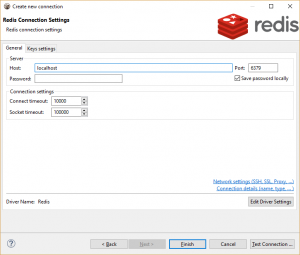
Overview DBeaver EE supports Redis key browser, key value viewer and Redis commands shell. DBeaver uses Jedis driver 2.9.0 to operate with Redis server. It supports Redis servers of any version. Connecting to Redis Server You can connect directly to a server or use SSH tunneling or SOCKS proxy. Browsing Redis keys You can view/edit […]
I ssh'ed into the Cache server and started redis-cli
What i find weird is that the worker-server perfectly runs with the redis server as the jobs are being ran with redis
distant canopy
so it could be a breakdown in communication between the redis server and the socket.js server
bright canyon
If i do KEYS *. i get a huge list of all the horizon keys
I think so yes, but how do i test this? do i need to add something to the loadbalancers nginx config like i did with the websocket ?
And what would be the location looking at? i mean the web socket location looks like this:
location /socket.io {
proxy_pass http://wss_app/;
   proxy_set_header Host  $host;
   proxy_read_timeout     60;
   proxy_connect_timeout  60;
   proxy_redirect         off;

   # Allow the use of websockets
   proxy_http_version 1.1;
   proxy_set_header Upgrade $http_upgrade;
   proxy_set_header Connection 'upgrade';
   proxy_set_header Host $host;
   proxy_cache_bypass $http_upgrade;

   add_header 'Access-Control-Allow-Origin' 'https://mysite.com/' always;
   add_header 'Access-Control-Allow-Methods' 'GET, POST' always;
   add_header 'Access-Control-Allow-Credentials' 'true' always;
   a
potentially yes
bright canyon
How do i figure out what the location is? because then i could trial an error my way out, maybe 😬
For the websocket it was "quite easy" (spend days) as i could see what path it tried to connect to
distant canopy
i think potentially one thing you could try is running your socket.js server on your worker server temporarily
see if that works
unless there's loads of config
tbh - socket.js shouldn't need ANY nginx config as far as i'm aware
if it's JUST running that, it should be able to accept connections on it's own port, and handle them without Nginx
in fact, nginx doesn't need to be on your socket.js server i don't think
bright canyon
It needed configuration on the load balancers nginx file to proxy the traffic to the right place
Otherwise it woud "connection is closed before being open"
ChatGPT tought me how to do that part in nginx config xD
After reading 100's of similar problems 😄
articles, etc etc
But its the last thing i need to solve (event emitting from worker-server to web-server) before i can use this setup, was so excited when the socket went live
Here is ChatGPT's take on my problem:
It looks like the issue is with the communication between the worker server and the web server. The event is emitted on the worker server, but not received by the web server.
Here are a few reasons this could be happening:
The worker server and the web server are not connected to the same Redis instance
The worker server is not emitting the event with the correct channel name (check if the channel name is "asset-channel")
The web server is not subscribed to the same channel (check if the channel name is "asset-channel")
The event is emitted on the worker server, but the web server is not listening for the event (check if the event name is "asset-channel:app.assets-updated:" + props.dataset.id)
The firewall settings on the web server or worker server are blocking the communication.
Try checking these issues one by one to find the root cause of the problem.
distant canopy
Glad you got it sorted :+1 and sorry i wasn't as much help as was needed