#Track Creator Plus Mod [old thread]
107 messages · Page 1 of 1 (latest)
 regal plaza
CREATE TRACKS
- Create race tracks just by walking, driving, flying or diving across any TrailMakers sandbox map
- Tracks have a start line, optional edges, optional checkpoints and a finish line
- Customise the track width, checkpoint frequency, track edge objects, and more...
- Auto place checkpoints as well as manually place checkpoints
- Advanced track editing now added
- Add decoration objects around your track
- Save tracks, load tracks and share them with others
- Tracks are autosaved as a backup the moment you finish creating a track
- Save custom settings as presets and share them with others
- Load tracks with completely different Edge Objects (eg. Trees, huge mushrooms, chirpos!)
- Create special tracks like a "checkpoint hunt" by making checkpoints hard to find
RACE THEM IMMEDIATELY
- See lap information while racing such as your lap time, personal best lap, the lap record, lap record holder, etc.
- Choose how many laps to race from 1 to 100
- Race with special modes like:
- Checkpoint Mines (Mine-Point)
- Drift Mode
EDIT YOUR TRACKS
- add, move, rotate and delete objects using your mouse, buttons, input fields and player
https://youtu.be/u7wixYaCaEw?si=AtbMSTMBr4pIzvxw
https://youtu.be/Zk2OmoLqG6M?si=YjRf-2VHvMdYc18P
https://youtu.be/aawMV_414z0?si=1Nij3_CpheF79LaC
https://youtu.be/FOPXxn5I25c?si=JrHLFWoT24hYolSi
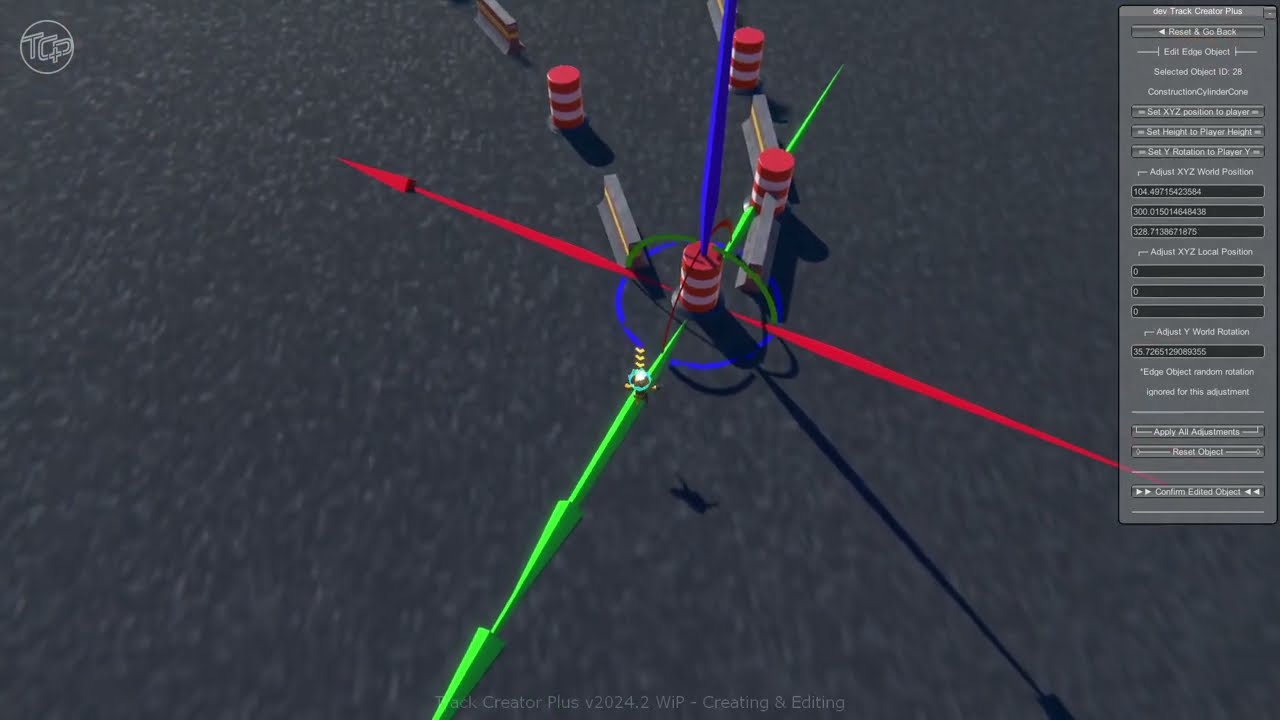
With Track Creator Plus you can create race tracks then edit them using new editing features such as deleting, moving, rotating and adding objects.
This is Part 1 which shows track creation and editing edge objects. Part 2 will show adding and editing decoration objects.
Music: "The Way" by Michael Hildreth
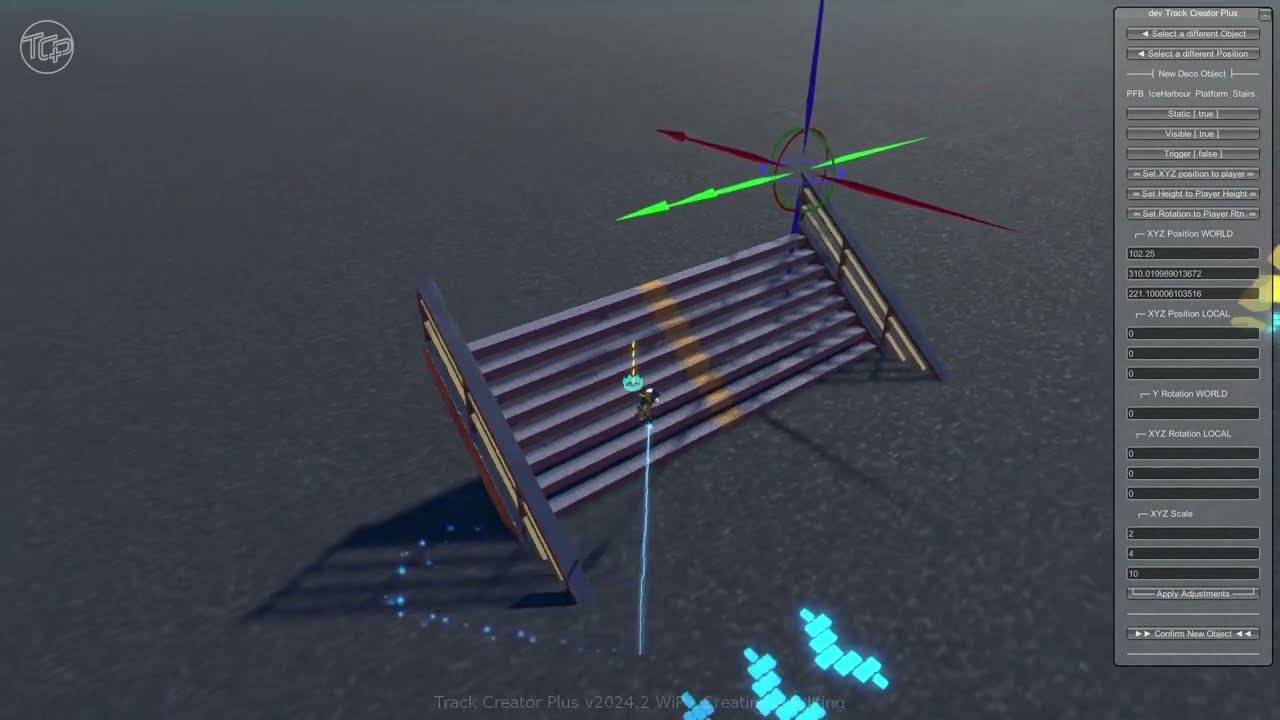
With Track Creator Plus you can create race tracks then edit them using new editing features such as deleting, moving, rotating and adding objects.
This is Part 2 which shows adding and editing decoration objects. Part 1 showed track creation and editing of edge objects.
Music: "The Way" by Michael Hildreth
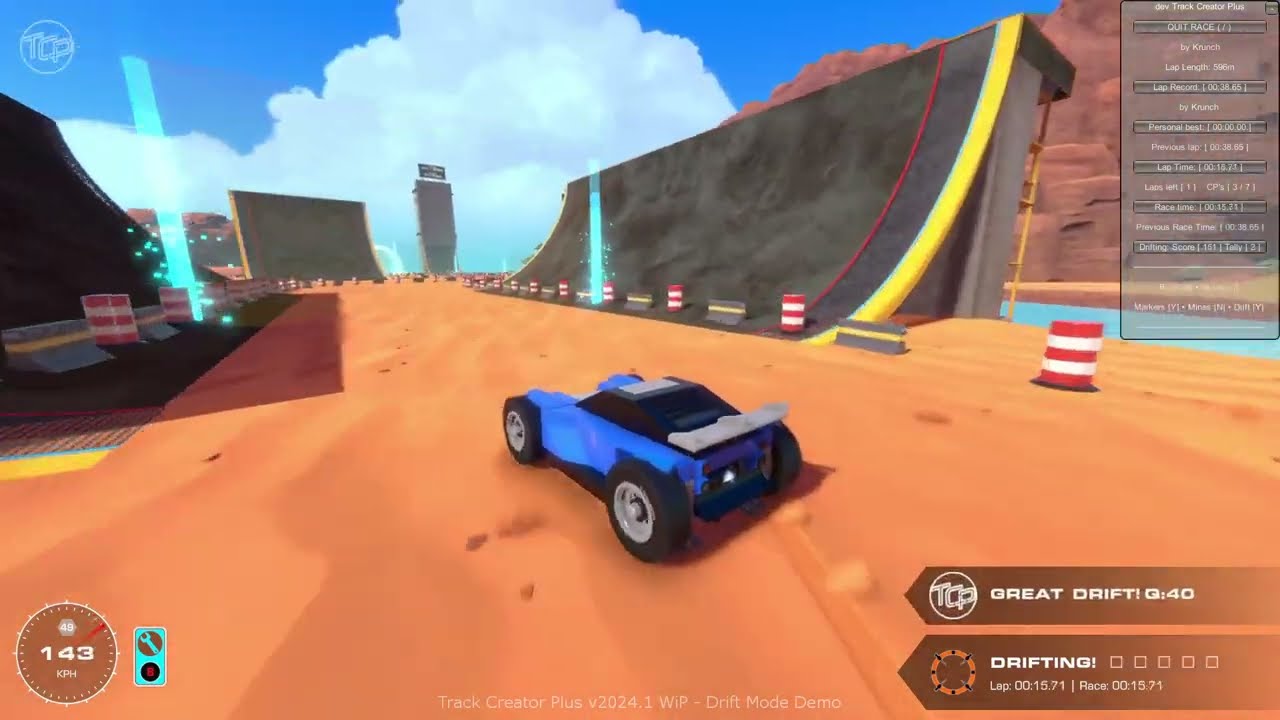
A short video showing the new "Drift Mode" in my Track Creator Plus mod (TCP). You can get the mod from the Trailmakers Steam Workshop either in-game or directly from Steam.
TCP is a mod for Trailmakers (by Flashbulb Games)
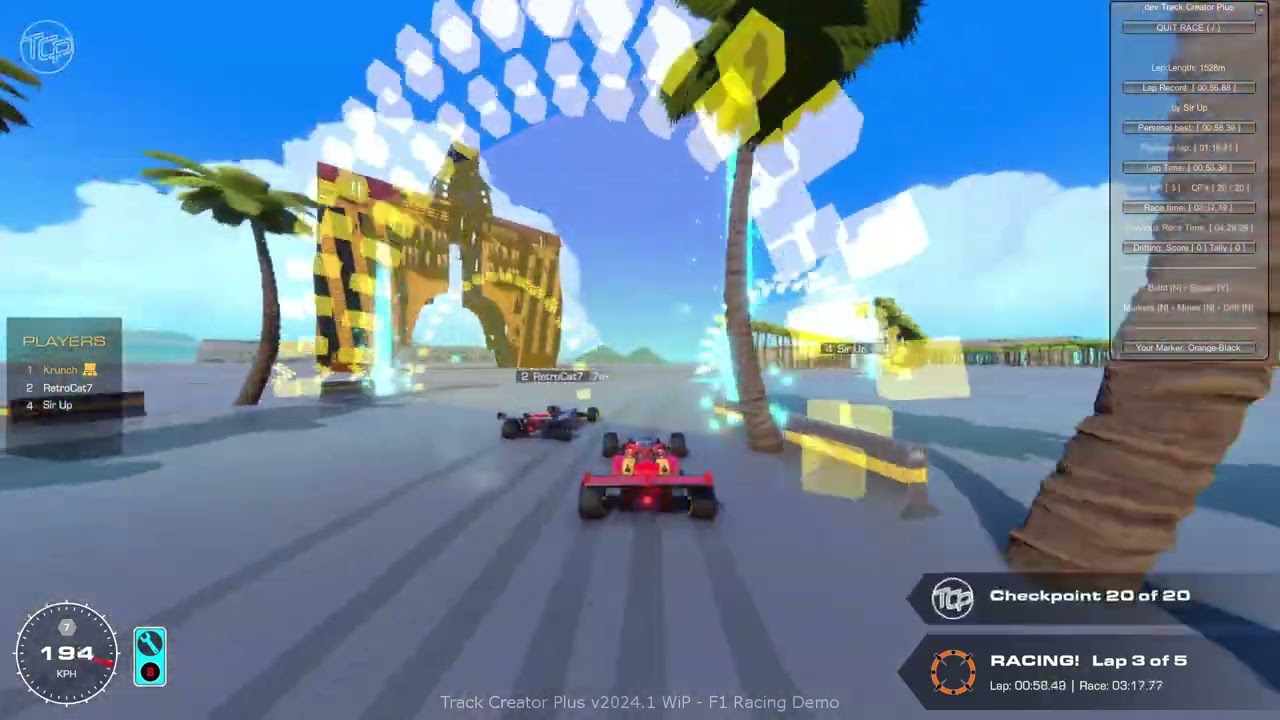
F1 style multiplayer racing is heaps of fun in the Track Creator Plus mod (TCP). You can get the mod from the Trailmakers Steam Workshop either in-game or directly from Steam.
Note: The "Safety Car" text that appears in this video is not part of the TCP mod. It was added to the video to explain why we slowed down.
TCP is a mod for Trailmakers ...
 desert gale
regal plaza
https://youtu.be/u7wixYaCaEw?si=AtbMSTMBr4pIzvxw
https://youtu.be/Zk2OmoLqG6M?si...
desert gale
regal plaza
https://youtu.be/u7wixYaCaEw?si=AtbMSTMBr4pIzvxw
https://youtu.be/Zk2OmoLqG6M?si...
hey why does this ones sections not have bold
this is unusable
regal plaza
desert gale
hey why does this ones sections not have bold
Human error
regal plaza
Here's a short video showing the new Drift Mode in the upcoming update of the mod: https://youtu.be/aawMV_414z0
A short video showing the new "Drift Mode" in my Track Creator Plus mod (TCP). You can get the mod from the Trailmakers Steam Workshop either in-game or directly from Steam.
TCP is a mod for Trailmakers (by Flashbulb Games)
 remote timber
regal plaza
Here's a short video showing the new Drift Mode in the upcoming update of the mo...
remote timber
regal plaza
Here's a short video showing the new Drift Mode in the upcoming update of the mo...

does it know to update the drifting timer based on velocity of creation in left/right directions to the seat?
if so that could mean one can just rotate the seat and not drift
regal plaza
remote timber
<:chirpowow:1168531027279499345>
does it know to update the drifting timer based...
Yes the angle detection is pretty basic. It just calculates the difference in angle between the bearing of the player and the direction the player is facing, but they must be in a seat and moving. Also there's a basic vehicle check to ensure there are wheels/skis and an engine. Whether a drift is awarded though is based on other factors mentioned above.
You could easily 'farm' drift points with a rotating seat etc but it's just a fun mode for those who want to do proper drifts 🙂
remote timber
regal plaza
You could easily 'farm' drift points with a rotating seat etc but it's just a fu...
🤔 I guess what you could do (but is probably a lot more complicated, needing to store and update another value) is get the direction of the velocity when the race starts, and use that as the direction as forward
regal plaza
Do you mean calculating and saving the alignment between the player and the vehicle at the start?
 crimson birch
Insane work. I love all you done with the subtle messages.
regal plaza
The new version of the mod is now live on Steam. If anyone gives it a go please let me know of any bugs or issues.
regal plaza
This video shows some F1 style multiplayer multi-lap racing in TCP. Lots of fun!
https://youtu.be/FOPXxn5I25c
F1 style multiplayer racing is heaps of fun in the Track Creator Plus mod (TCP). You can get the mod from the Trailmakers Steam Workshop either in-game or directly from Steam.
Note: The "Safety Car" text that appears in this video is not part of the TCP mod. It was added to the video to explain why we slowed down.
TCP is a mod for Trailmakers ...
regal plaza
A new version of the mod is coming very soon. It now includes more advanced editing. Here's a video showing some basics:
https://youtu.be/u7wixYaCaEw?si=thYYw4Y_67ktxttt
With Track Creator Plus you can create race tracks then edit them using new editing features such as deleting, moving, rotating and adding objects.
This is Part 1 which shows track creation and editing edge objects. Part 2 will show adding and editing decoration objects.
Music: "The Way" by Michael Hildreth
regal plaza
The new version is now live on the Steam Workshop!
Update v2024.2
NEW FEATURES:
EDIT EDGE OBJECTS
- add, move, rotate and delete edge objects using mouse, buttons, input fields and player
- 1 level of undo for deleting edge objects
- reset an object while editing
- selection 'gizmo' to help with editing
regal plaza
CREATE & EDIT TRACK DECORATION (DECO) OBJECTS
- add, move, rotate, duplicate and delete deco objects using mouse, buttons, keyboard and player
- use both global and local coordinates
- 1 level of undo for deleting deco objects
- reset an object while editing
- change 'static', 'visible' and 'trigger' attributes of deco objects
- special origin point indicators to help with mouse selection
- selection 'gizmo' to help with editing
RACE START COUNTDOWN
- the host can activate the optional "Start Countdown" feature
- a 5 second countdown to the race begins
- when the countdown reaches zero player's can cross the line to start their race
- any player crossing the start line before the countdown gets to zero:
- gets a false start message
- needs to go back and re-cross the start line for their race to start
RANDOMIZED CAR HORN
- while in a seat press the "right shift" key to play a random sound
- randomly chooses from 12 sounds
- spam protected with 2 second delay before it plays another sound
FIXES & OTHER CHANGES:
- fixed occasional missing edge objects when creating a track
- removed unusable objects from object lists
- fixed mine trigger being somewhat hittable (using trigger boxes as a workaround for TM collision bug)
- fixed mine explosion being silent (added additional SFX as workaround for TM audio bug)
This video is Part 2 which shows adding and editing decoration objects:
https://youtu.be/Zk2OmoLqG6M
With Track Creator Plus you can create race tracks then edit them using new editing features such as deleting, moving, rotating and adding objects.
This is Part 2 which shows adding and editing decoration objects. Part 1 showed track creation and editing of edge objects.
Music: "The Way" by Michael Hildreth
desert gale
regal plaza
# FIXES & OTHER CHANGES:
- fixed occasional missing edge objects when creating a...
suggestion for patch notes: use #, ##, or ### and put a space, then whatever text for headers; or put ** around the text for bold on the categories
regal plaza
desert gale
suggestion for patch notes: use #, ##, or ### and put a space, then whatever tex...
Thanks for the feedback 🙂 I did mean to do bold parts but forgot 🤦♂️ I'll try your suggestions.
regal plaza
Thanks
@livid crater My original post for this topic channel deleted itself when I tried to edit it earlier. Is there any way to bring it back?
 livid crater
which one are you referring to? this post has messages from 3 months ago
regal plaza
livid crater
which one are you referring to? this post has messages from 3 months ago
It was the very first message that was created when creating the channel.
 livid crater
I didn't see any deleted message logs, so it can't be restored
regal plaza
OK thanks. It's very strange that it self deleted! I added some description text, clicked "save" and it just disappeared 😕 I now can't show a logo image for this topic in the topic list. Ah well.
remote timber
regal plaza
OK thanks. It's very strange that it self deleted! I added some description text...
dyno might've thought spam or smth when you edited it, that is rather unfortunate though
regal plaza
remote timber
dyno might've thought spam or smth when you edited it, that is rather unfortunat...
Yes that's possible. There definitely wasn't any Dyno message - but maybe that's something to do with it being the initial topic message/description thingo 🤷♂️
regal plaza
A new version is now live on the Steam Workshop.
Update v2024.3
NEW FEATURES:
RECENT LAPS LIST
- in Race Mode a 'Recent Laps' button appears once a player has done at least two timed laps
- this allows players to view up to 20 of their most recent laps
TWEAKED SELECTION GIZMO
- now includes axis labels (X, Y, and Z)
- no longer has collision with player
PLAYER JOIN MESSAGES
- A random humorous message is displayed whenever a player joins

 desert gale
regal plaza
A new version is now live on the Steam Workshop.
**Update v2024.3**
## NEW FEAT...
desert gale
regal plaza
A new version is now live on the Steam Workshop.
**Update v2024.3**
## NEW FEAT...
you can put 1 or more spaces before a dash ( -) to get 1 indent
- 0 space
- 1 space
regal plaza
desert gale
you can put 1 or more spaces before a dash ( -) to get 1 indent
- 0 space
- 1 s...
Yep I know about that one but thanks all the same 👍
 hard thicket
Nice mod!
I am waiting for roller coaster and train rails!
regal plaza
hard thicket
Nice mod!
I am waiting for roller coaster and train rails!
Cheers 🙂
You can use the TrackMaker mod by JESS2005 for train rails and maybe even to make some sort of rollercoaster
regal plaza
 heady belfry
I am going to use this for my karting league!
heady belfry
I am going to use this for my karting league!
Cool 🙂 Let me know how it goes!
regal plaza
A new version is now live on the Steam Workshop.
Update v2024.4
NEW FEATURES:
CHECKPOINT SPLIT TIMES
- while racing, passing through a checkpoint now displays the player's split time
- this is displayed via a subtle message and also on the Player's Race mode UI (most recent split only)
NEW MAP SUPPORT
- Added "Great Carrier Reef" to the mod's map ID system
desert gale
regal plaza
A new version is now live on the Steam Workshop.
**Update v2024.4**
## NEW FEAT...
would it be possible to add a replay-ghost type thing where the track author or yourself can record a time and the mod plays it back? not sure how you'd display it besides also having a copy of the blueprint and somehow spawning that, then setting its position / applying forces
cause if you dont have friends, might as well race against author times on tracks
regal plaza
desert gale
would it be possible to add a replay-ghost type thing where the track author or ...
Interesting idea 🤔 A friend suggested I add a fastest lap ghost system with just a simple orb as the ghost. Adding an actual blueprint would be cool but might be a bit beyond my ability though.
I'm currently in final testing of my new drafting (slipstream) mode so when that's done I might look into that ghost idea 🙂
regal plaza
Here's a quick look at the drafting system (it's only a visible trigger box when I'm testing things).
When in a race, each player drags their own variably sized invisible trigger box around. Any driver that enters a draft box gets a small force added in their direction of travel. There's also a visible effect to show when you are drafting, but it' an option that can be turned off.
So far in testing the drafting has been working very well. It really livens up the racing by keeping everybody close.


 violet yacht
You’re crazy, great work 😆!
regal plaza
A new version of TCP is now live on the Steam Workshop.
Update v2025.1
NEW FEATURES:
DRAFTING
- When in a race, each player has a drafting 'zone' behind them
- Any driver that enters that zone gets a small boost in their direction of travel
- Drivers keep that boost whilever they are in a drafting zone but it has less effect when at a lower speed
- There's also a visual effect to show when you are drafting (can be toggled on or off in the settings)
SHUFFLE GRID
- the host can press the "Shuffle Grid" button to re-randomise all grid spots without having to reload the track
regal plaza
Here's a sneak peek at some of new things coming soon to TCP
Next update will include:
- custom models: Pit Garage, multiple Grandstand variants, spectator bridge, billboards
- pit lane support with place-able pit-in and pit-out triggers plus configurable auto pit speed limiter
- start and finish now have a visible line on the ground (can be turned off)
- edit start and finish: reposition them anywhere, toggle cosmetics visibility, toggle trigger visibility, toggle line visibility
- new way of timing laps in races: in multi-lap races the finish now also starts the timing of the next lap instead of the next lap starting at the start line
- other little tweaks
 regal plaza
A new version of TCP is now live on the Steam Workshop.
Update v2025.2
NEW FEATURES:
CUSTOM DECO OBJECTS
- Pit Garage Building
- Grandstand Covered
- Grandstand Open
- Grandstand Over-track covered
- Grandstand Over-track open
- Spectator Bridge
- 2 x doublesided Billboards (4 designs overall)
PIT LANE SUPPORT
- add/remove a pit-in trigger and a pit-out trigger
- configurable auto pit speed limiter
EDIT MODE TWEAKED
- the XYZ edit mode gizmo has been tweaked for better visibility
- a smaller 'clone' of the gizmo now appears above the player's head to allow it's orientation to always be in view
START/FINISH CHANGES
- in multi-lap races the finish trigger now also starts the timing of the next lap instead of the next lap starting at the start trigger
- the start and the finish now have a visible line on the ground (can be toggled on & off)
- the start and the finish can now be repositioned anywhere
- cosmetics visibility can be toggled on or off
- trigger visibility can be toggled on or off
- line visibility can be toggled on or off
TRACK ARROWS EDITOR
- add, edit or delete track direction arrows
FIXES & OTHER CHANGES:
- various tweaks and bug fixes
 regal plaza
I'd love to hear feedback from anyone who's given this mod a try 
I've no idea if anyone really uses it, or whether there are any issues etc. I want to hear the good the bad and the ugly 
 plucky moss
regal plaza
I'd love to hear feedback from anyone who's given this mod a try <:WhatTheFrog:1...
plucky moss
regal plaza
I'd love to hear feedback from anyone who's given this mod a try <:WhatTheFrog:1...
Sadly I'm on Xbox lol but it looks awesome, and this adds to my list of reasons to get a PC lol
regal plaza
A new version of TCP is now live on the Steam Workshop (17th March).
Update v2025.3
NEW FEATURES:
EXCESS STRUCTURES REMOVAL
- each time a player passes through a checkpoint or the the start line (while in a race) any of that player's un-occupied structures are removed
- this helps maintain performance by removing unoccupied spawned builds and left over broken structures
FIXES & OTHER CHANGES:
- fixed missing sounds caused by the TrailMakers v2.0 update
desert gale
you should add trailmappers support so you can save tracks alongside or even within maps
desert gale
after making a track with tcp i have some feedback:
-
more options/presets for track borders (and custom prefab sets)
-
option to lock checkpoints to the ground (image 1)
-
customize track width and tune height detection for track borders (images 2-5)
-
realtime deco object adjustments
-
allow no value for deco object adjustments in the ui, instead treat nothing as 0
-
add bind for deleting edge objects (delete, backspace?)
-
"fast" object placer, left click in world to place, arrow keys to rotate
-
option to use racing prefabs (start, checkpoint, finish, water/air variants of those) instead of yellow box and beacon


 regal plaza
desert gale
after making a track with tcp i have some feedback:
- more options/presets for t...
regal plaza
desert gale
after making a track with tcp i have some feedback:
- more options/presets for t...
Great feedback! Thanks 🙂
regal plaza
- more options/presets for track borders (and custom prefab sets)
Shouldn't be too hard for me add more presets. You can at least still save your own at this stage.
- option to lock checkpoints to the ground (image 1)
Currently checkpoints are a square that spawn centred on the player (useful for sky/space tracks too). Are you finding it causes a problem?
- customize track width ...
Great idea. It has crossed my mind but seems like a lot of work for lazy me to implement. Can be done using editor mode afterwards (takes a bit of time I guess).
... and tune height detection for track borders (images 2-5)
There are 2 settings for height detection - "From High" and "From Low". Would you like more control over that? What do you suggest might work?
- realtime deco object adjustments
Yeah really good suggestion. I'll see if I can get on to that soon.
- allow no value for deco object adjustments in the ui, instead treat nothing as 0
Ah good point. I've tried hard to make the text fields work better (eg you can type a minus or a deciaml point as the first item and the zero goes away). I guess you are saying it can be annoying that when it's empty a zero appears. I'll look into that for sure.
- add bind for deleting edge objects (delete, backspace?)
Another good idea. I'll add that.
- "fast" object placer, left click in world to place, arrow keys to rotate
Good one and I had thought of that. Just building the editor stretched my limited skills. Might need a few months to do this one lol.
- option to use racing prefabs (start, checkpoint, finish, water/air variants of those) instead of yellow box and beacon
Again good suggestion. Can be done in the edit mode of course but I guess that's not as convenient if you have a lot of checkpoints to change.
I'd like to add all these things but one thing I'm aware of is not over-complicating the mod. If I can manage these suggestions without cluttering and complicating the simple track making and quick racing it would be ideal. Tricky balance 🙂
Thanks for feedback 👍
desert gale
regal plaza
> - more options/presets for track borders (and custom prefab sets)
Shouldn't be...
Currently checkpoints are a square that spawn centred on the player (useful for sky/space tracks too). Are you finding it causes a problem?
i flew off the ground with auto checkpoints enabled; i believe i flew too high, meaning the checkpoint was off the ground and inaccessible. being able to lock checkpoints to the ground would solve this problem (admittedly my fault tbh) and potentially help with the vertical position of smaller checkpoints
Can be done in the edit mode of course but I guess that's not as convenient if you have a lot of checkpoints to change.
unless i missed being able to edit checkpoint size, wouldn't players be able to go around the checkpoint prefab?
There are 2 settings for height detection - "From High" and "From Low". Would you like more control over that? What do you suggest might work?
i didn't even know those settings existed lol. my idea was to tighten/customize the threshold when border objects are placed, to help prevent track borders from climbing up cliffs like in my case
I guess you are saying it can be annoying that when it's empty a zero appears. I'll look into that for sure.
what i meant to say was forcing a valid number caused issues when trying to modify the number without entirely retyping it
regal plaza
Yep with editing checkpoints you can delete the checkpoint then place a new one. You can first change the width value (which also affects the height).
desert gale
oh because the checkpoint hitbox is a square and the checkpoint prefabs aren't... would that mean bug cps from Trackmania Nations Forever be here too lol
regal plaza
haha yeah can't do much about that
Basically though going around a checkpoint isn't an issue. The point of a checkpoint is for the player to make sure they hit it.
Also the "From High" (default) and "From Low" settings are to allow you to make tracks with edges in caves or under bridges (From Low) or on very sloped or bumpy ground (From High).
desert gale
i can already see the potentialllll

 regal plaza
desert gale
i can already see the potentialllll
regal plaza
desert gale
i can already see the potentialllll
Yeah for sure! Mud hopping area. There's endless locations for tracks in all the maps 🙂 You can even make your own tracks in Race Island.
desert gale
regal plaza
Yeah for sure! Mud hopping area. There's endless locations for tracks in all the...
i think a lot more routes could be viable when i finish my treasure island update mod. most places will be much prettier, meaning its feasible to direct players there and still have it feel good
desert gale
idk why but TCP doesnt use the actual checkpoint sound UI_Race_CheckPoint. i edited the mod to use it and it sounds much nicer to me
regal plaza
Fair enough. I found that sound to be a bit hard to hear over the engine and other sounds.
desert gale
not for me
regal plaza
🙂
desert gale
suggestion: wall at the start line before the race countdown finishes, so people are unable to jump the start
regal plaza
Not needed. Your race doesn't start if you jump the start. You have to back up and go through the start again.
desert gale
i feel like thats worse than a wall preventing that behavior entirely but okay
desert gale
i got the expedition signup prefab to look correct enough to maybe use in TCP
coordinate offset (for xyz 0,300,0): -510,-810.5,430
Z rotation: 25
dont scale it because the checkerboard pattern's edge wont scale
dont rotate it besides yaw because the giant signup billboard won't be centered (needs testing)


and because the signup area is so far from the origin, any rotation will move it a LOT
regal plaza
desert gale
i got the expedition signup prefab to look correct enough to maybe use in TCP
co...
🤔 Nice effort and could be useful for someone.
TBH I'm not that keen on it for TCP. Apart from the difficulty getting it to appear and rotate into the correct position, TCP uses a 'starting grid' rather than a 'starting zone'.
regal plaza
A new version of TCP is now live on the Steam Workshop (29th April).
Update v2025.4
NEW FEATURES:
REVERSE DIRECTION MODE
- with the click of a button any track can be instantly run in the reverse direction
- the same button will instantly un-reverse the track again
- you can save the reversed version as a new track if you wish
RACING HUD FIX
- new button and hotkey added to bring back the Racing HUD when it disappears (caused by TM subtle messages bug)
- the hotkey is the "back quote" (`) which on a US keyboard is the same key as the tilde key (~)
DELETE KEY
- while editing edge objects, deco objects, or arrow objects the delete key (Del) can now be used to delete the currently selected object
FIXES & OTHER CHANGES:
PIT LANE SYSTEM
- when a driver pits the current lap no longer ends at the pit-in trigger but instead ends at the pit-out trigger
- as this makes an out-lap potentially much shorter than a normal lap the "pit transit time" is added to the out-lap time
MISC
- tweaks to text input fields to make them easier to use
- general bug fixes
regal plaza
A new update is now on the Steam Workshop!
Update v2025.5
NEW FEATURES:
DECO EDITOR UPGRADE
- Deco placement & editing is now available BEFORE a track is created or loaded
- Eg. place bridges, buildings, hills, trees, etc. then create a track over/under, around or through those objects
- as before, Deco placement & editing can still be done after a track is created or loaded
- Save & Load Deco Files
- Deco can now be saved to separate Deco files for re-loading later or for sharing (even if it's already part of a track)
- Track Deco is still always saved with a track but can now also be saved separately
- Deco files can only load if there is no Deco currently in the game world
- Track loading is disabled if Deco is currently in the game world
REALTIME SPLIT DELTAS
- the 'delta' time to a player's personal best lap (PB) and the current session's fastest lap (FL) are now on display and updated at each checkpoint (and the finish line)
- this allows a player to see whether they are up or down on their PB and the FL during a lap
- also includes coloured up/down arrows for checking deltas at a glance
MANUALLY ADD A TARGET LAP TIME WITH SPLITS
- ability to type in a lap time and splits to act as a target lap (fastest lap)
- useful when players want to try to beat a PB or FL from an earlier session
- NOTE: players will need to keep a record of laptimes and splits if they want to use them in a later session
FIXES & OTHER CHANGES:
MISC
- addition of bold, italic and colour text elements in editor UI
- general bug fixes & tweaks
desert gale
"packing heat" ahh update this is fire

 regal plaza
 desert gale
regal plaza
desert gale
regal plaza
dev Track Creator Plus
regal plaza
desert gale
dev Track Creator Plus
Indeed 🙂
regal plaza
Here's a preview of some of the new Custom Objects I've made for the next update

And here's some of them in use
 regal plaza
Track Creator Plus Mod [old thread]
desert gale

regal plaza
Creating a new thread that doesn't have a dino deleted first post
desert gale
regal plaza
Creating a new thread that doesn't have a dino deleted first post
dino deleted ?
sorry
sorry for deleting the first message
mb
regal plaza
Yeah thought it was you. You're a menace!
desert gale
ill try not to do it again
regal plaza
There is no try - only do