#Fans
1 messages · Page 1 of 1 (latest)
 amber moat
I really don’t know how can I see that ?
 topaz falcon
amber moat
I really don’t know how can I see that ?
topaz falcon
amber moat
I really don’t know how can I see that ?
If they are reverse blade fans they give air inside the case but if they are not it will vacuum the air out
amber moat
Idk man but what I know is that the case is fucking cold
But it’s starting and turning off
Do you know how to fix that problem ?
topaz falcon
amber moat
Idk man but what I know is that the case is fucking cold
just put your hand on the top of bottom fans and see that if the air is coming in or going out...
or just see the fan box..
topaz falcon
amber moat
But it’s starting and turning off
What's the cpu temperature?
amber moat
Don’t know I just downloaded windows yesterday
Then it started
Went back off
Tried again
30+ seconds later it goes off again
topaz falcon
amber moat
30+ seconds later it goes off again
then just show it to a professional
I don't have any reverse blade fans so I put the bottom fans upside down

@amber moat

 lapis wagon
I'm pretty sure your fans are pushing air out of the case from all directions so you're not getting any cool air at all
lapis wagon
amber moat
But it’s starting and turning off
Did you put thermal paste on the CPU before applying the cooler?
And is your PC plugged directly into the wall or is it plugged into a power strip?
amber moat
The cpu is 100 degrees Celsius man
amber moat
lapis wagon
Did you put thermal paste on the CPU before applying the cooler?
I think I installed the cooler wrong
I just went into the bios and saw
amber moat
lapis wagon
I'm pretty sure your fans are pushing air out of the case from all directions so...
Yes I think so to because I don’t feel air coming in at all
And there’s a lot of cold air coming out
 idle locust
Easy way to check the orientation of fans is put tissue paper in there and see the air flow.
lapis wagon
amber moat
I think I installed the cooler wrong
Did you apply the thermal paste onto the CPU though? Also is the AIO cooler pump plugged in?
 lapis wagon
amber moat
Yes I think so to because I don’t feel air coming in at all
lapis wagon
amber moat
Yes I think so to because I don’t feel air coming in at all
Yeah you'll need to flip the ones at the bottom and on the right side the other way. Basically just flip it to the 'ugly side' sadly. Unless you got reverse fan blades but it looks like yours are not reverse
 lapis wagon
Is there a gap between the AIO and CPU?
amber moat
What is Aio?
lapis wagon
It's that pump that attached to the cpu
amber moat
 lapis wagon
Ok it looks like it's making contact but there's not enough thermal paste so you're getting hot spots and it's overheating
@amber moat It should've looked like this if you took it off

If you're having trouble getting full coverage of paste on the cpu, try manually spreading it like this. https://youtu.be/1J9TLFWuX-c?si=XwoFQxTIAPYBjzWm
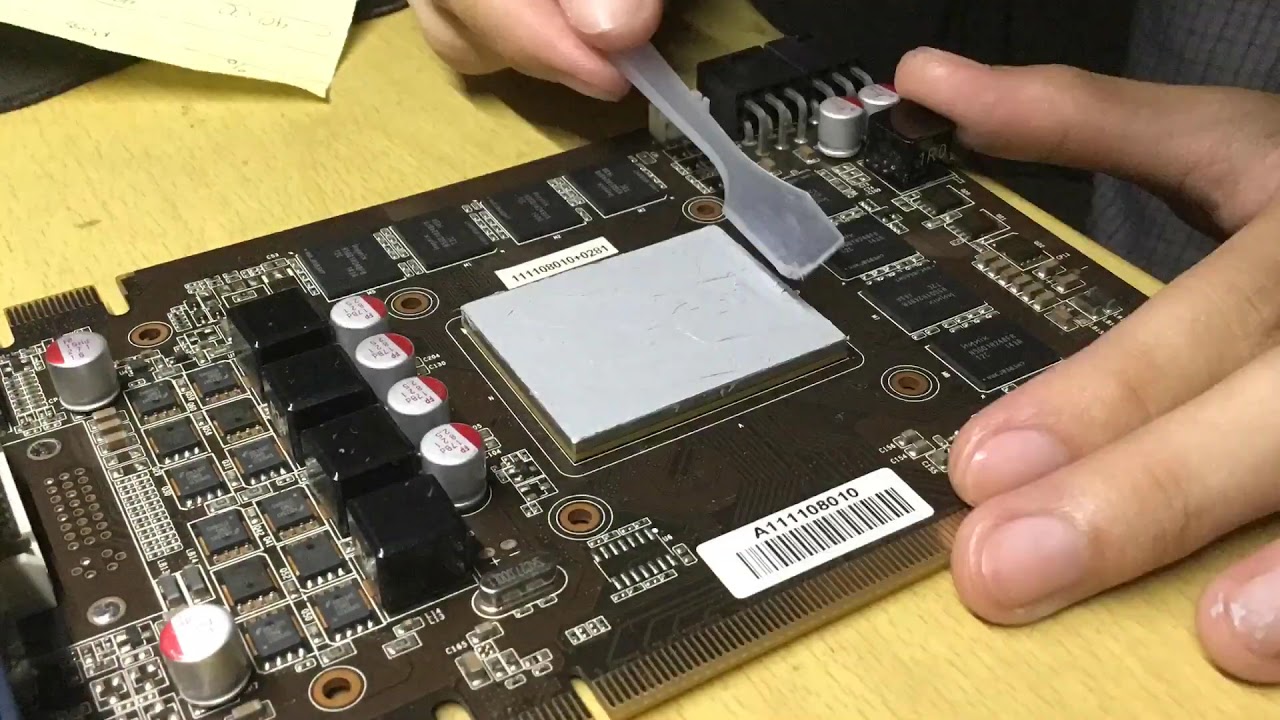
This called the “SPREAD METHOD” that can cool enough the processor rather than the “PEA METHOD” and I have a experience that the thermal paste is dry in the center and the around the paste is having a wet grease around it.
And special Thanks to Deepcool Z5 with Spatula in it, and I trusted them that, all of these processors are cooled down so m...
But just don't drop any over onto the other components it should only be on top of the CPU the flat part
 lapis wagon
I would spread it a little more to the edges
amber moat
The cpu itself?
lapis wagon
Then it should be fine
amber moat
Or the aio
lapis wagon
Yeah the paste on the cpu
amber moat
Oké
lapis wagon
Never apply it to the AIO
lapis wagon
It should be fine, you can also just wipe it off but not necessary since it's new paste
Also make sure your pc is plugged directly into the wall and not a power strip, if it's a power strip it won't get full power for the PSU and it will shut off
amber moat
 amber moat
lapis wagon
It should be fine, you can also just wipe it off but not necessary since it's ne...
amber moat
lapis wagon
It should be fine, you can also just wipe it off but not necessary since it's ne...
Is this oké
amber moat
lapis wagon
Also make sure your pc is plugged directly into the wall and not a power strip, ...
Yes
Im going to start it up now
lapis wagon
amber moat
Is this oké
That should be okay. Just make sure when applying the AIO it's fully onto the cpu
And also make sure you flip those fans
amber moat
Yes but the cooler isn’t going full inside
1 Side goed in the other one is on the black sides
lapis wagon
amber moat
1 Side goed in the other one is on the black sides
Like one side is hitting the black brackets?
amber moat
lapis wagon
Are you sure those cpu brackets are not installed backwards?
Maybe flip the brackets around?
amber moat
No otherwise I can’t screw

Then I can’t screw that thing
And this is how they said in the Manual and YouTube guides
That’s how the brackets should be
amber moat
Master liquid 360l core white
Cooler master
I think this should be put up and not on the downside

You see that iron part where the 2 screws are in
I think they need to be put above it and not under it

I think the pasta is good on it now
lapis wagon
Maybe loosen the brackets, put the AIO down, tighten the brackets?
