#archived-modding-help
1 messages · Page 290 of 1
 haughty quiver
 void saffron
where
haughty quiver
Top left of the main menu
EnemyRandomizer
A working version of Kerr1291's Enemy Randomizer mod for Hollow Knight.
Installation
If you can find it, move the EnemyRandomizer.dll file into <Path-To-Hollow Knight>\Hollow Knight\hollow_knight_Data\Managed\Mods\.
Otherwise, either:
Download the mod installer from the HK discord and use that to install it, although it may not be up-to-date.
OR
Find the .dll file on the modding drive from the HK discord.
This mod requires both the modding API and ModCommon, both of which can be found on the discord.
Usage
Click the [LOAD ENEMY RANDOMIZER] button in the top-left of the main menu to load the randomizer.
By default, the randomizer will change each enemy type into another random type, and this will remain constant between rooms. This behaviour can be changed, as below.
Settings
- Chaos Mode - Each enemy will be fully randomized with no restrictions when you enter a new room. Enemies of the same type can be changed into different things.
- Room Mode - Each enemy type will be re-randomized each time you enter a new room, but it will still change every enemy of that type.
- Randomize Geo - Randomizes amount of geo dropped by enemies
- Custom Enemies - Allows custom enemies to be added to the randomizer
- Godmaster Enemies - Allows enemies from the Godmaster expansion to be included in the randomizer. This includes Absolute Radiance, Pure Vessel, Winged Nosk, Mato, Oro, Sheo, Sly and Eternal Ordeal enemies.
- (Cheat) No Clip - Turns on no clip - to be used in case of a bug that blocks progression by normal means, e.g. a door not opening after a boss has been killed.
Known Bugs
Certain bosses will not spawn if they have been killed elsewhere, such as Flukemarm, but their item drops will still function as normal and be found in the empty boss arena.
Trial of the Fool is broken - don't do it.
If you have any other problems, feel free to ping me (@Fireball248) on the HK discord.
Development
If you load the project file into an IDE, you will get many missing reference errors. To fix, add <Path-To-Hollow Knight>\Hollow Knight\hollow_knight_Data\Managed\ to the project's references.
If you still have issues, ensure that the modding API and ModCommon are installed in your HK directory.
Credits
Original Code - Kerr1291 (https://github.com/Kerr1291/EnemyRandomizer)
Fixes and Current Developer - Fireball248
Fixes to the Modding API that allow this to work with certain other mods - 56 (https://www.twitch.tv/5fiftysix6)
 fair briar
whaaaa
 void saffron
alright yeah it works
 fair briar
@haughty quiver
Some tips:
- Do <> around a link (example: <link>).
- Just link the readme, don't copy it over.
haughty quiver
fair briar
<@761436009816653824>
Some tips:
1. Do <> around a link (example: <link>).
2. J...
Oh ok thanks
 gloomy coral
why did kerr links 56's twitch
fair briar
for credit
gloomy coral
why not just link the github
fair briar
idk
 hardy stag
Oh my god i found out why my mod logs were so massive

some of my old modlogs i cant even open bc theyre too large
fair briar
ah bonfire
hardy stag
i wonder
does this happen every frame
or tick
bc it seems like it
fair briar
frame
hardy stag
ah
fair briar
no tick
hardy stag
i dont wanna say this is bad programming but like
this reminds me of yanderedev's code lol
fair briar
well it could be only triggered on a button press, but that is also called alot
did you read what i said?
 dense thistle
?pins
fair briar
you need to type?pins
 dense shuttleBOT
Check the pinned messages for more information - https://cdn.discordapp.com/attachments/187137504393035776/823796522751623168/unknown.png

 novel bronze
hey i just downloaded enemy randomizer but i dont see the [LOAD ENEMY RANDOMIZER] button
gloomy coral
reload the game
fair briar
go to options>mods (in-game), disable it, enable it and restart the game
novel bronze
oh thanks
 fair briar
idk it works for Dwarf so why not for me
 distant vector
i`m not know how install mods :-:
fair briar
?i
dense shuttleBOT
Reminder: The mod installer (https://radiance.host/mods/ModInstaller.exe) and other modding resources can be found from the pinned messages. 
distant vector
 dense shuttleBOT
Reminder: The mod installer (https://radiance.host/mods/ModInstaller.exe) and other modding resources can be found from the pinned messages.


 fair briar
this
distant vector
:-:
 fair briar
search on google "how to download newest .net framework"
distant vector
this?
 distant vector
ok
fair briar
now lets hope that 4.7 has backwards compatibility for 4.0
 latent spire
hello, is there a list of what the individual mods do?
dense shuttleBOT
Mods
Google Drive with Mods - https://drive.google.com/drive/u/0/folders/1lnjtSYMfRe1LyA_qSq2CoXKI6NRm_I-e
Installer - https://radiance.host/mods/ModInstaller.exe
Mod Summaries - https://docs.google.com/document/d/1cz5tcggpGofrBcM90XyTkMWjMelDHzugvQM6HpB13Ew
latent spire
Thank you so much!
fair briar
the readme doc has descriptions made by the creator(s) of the mods, while the ones on the summaries are more descriptive
latent spire
so with this mod, I don't have to download the mods themselves? or do i still need to search nexus for the correct software>?
dense shuttleBOT
Reminder: The mod installer (https://radiance.host/mods/ModInstaller.exe) and other modding resources can be found from the pinned messages.
fair briar
has most mods
latent spire
Uh, so now the game itself wont load
fair briar
?pins
dense shuttleBOT
Check the pinned messages for more information - https://cdn.discordapp.com/attachments/187137504393035776/823796522751623168/unknown.png
fair briar
latest one
latent spire
Oh
Awesome!
and these mods are okay to stack, mostly yeah?
im apologize for all the questions, im really new to mods and I dont wanna ruin my game
fair briar
mostly ye
fair briar
latent spire
im apologize for all the questions, im really new to mods and I dont wanna ruin ...
There are some mods who do wierd things, i'll tell you which best to avoid:
1. easy mode, messes up some saves (mostly fixable).
2. MoreSaves, messes up other mods menu's so it can be hard to control some mods.
3. Randomizer (1, 2 and 3), after a save is made with this one, it cannot be played without it.
4. inf notches, once you use the mod once you'll always keep inf notches (regardless if the mod is removed or not).
5. Hollow Point, once used on a save has a high chance to mess up healing (fix for it in pins).
 lean summit
is there a hollow knight/pure vessel sprite sheet i can use with the custom knight mod?
 slow quiver
Um... so I tried to use a mod installer and it asked for a directory and i gave it the one of my current steam version of the game and now learned that that won't work. I downloaded a 1.4.3.2 version off of a website but now the mod installer won't take a new directory
I can't open it and change settings so what do I do?
It won't even work when I delete and reinstall it
 limber egret
Do this
 wheat orchid
slow quiver
Um... so I tried to use a mod installer and it asked for a directory and i gave ...
wheat orchid
slow quiver
Um... so I tried to use a mod installer and it asked for a directory and i gave ...
Don’t get hk from some website, follow the instructions in the pins to downgrade your ver of hk
novel bronze
Hey guys I'm not sure if this should be in the modding help or not but when I heal it is taking up a way less amount of soul and is doing the animation way faster. Got rid of all of my mods I think and it still is healing the wrong way. Does anybody know a fix?
wheat orchid
novel bronze
Hey guys I'm not sure if this should be in the modding help or not but when I he...
Pins
You probably used hollow point
Does that to save files it’s used on
novel bronze
Ok
 pliant lantern
novel bronze
Ok
pliant lantern
novel bronze
Ok
Look through the pins for fixes
 cyan siren
Hello, does anyone know why when I pass the fourth pantheon, my screen get stucked in the timmer I try to reinstall my game and I have checked the files. Need help pls.
here my screen freeze

 somber prawn
 fair briar
?pins
dense shuttleBOT
Check the pinned messages for more information - https://cdn.discordapp.com/attachments/187137504393035776/823796522751623168/unknown.png
fair briar
latest one
 sleek vale
idk if this is caused by Skin mod, but my keybinds dont save
 keen radish
while in game? its best to change them on the main menu
sleek vale
oh thanks
 lost light
Whenever I launch with the modinstaller this happens:
It show a red loading bar and then crashes
 vernal rain
first pin? though you probably mean hollow knight, not the modinstaller, as that one doesn't have a read loading bar
fair briar
?pins
dense shuttleBOT
Check the pinned messages for more information - https://cdn.discordapp.com/attachments/187137504393035776/823796522751623168/unknown.png
fair briar
latest one
slow quiver
wheat orchid
Don’t get hk from some website, follow the instructions in the pins to downgrade...
I own the game already and this works fine. I just tested it
lost light
vernal rain
first pin? though you probably mean hollow knight, not the modinstaller, as that...
I think, yeah.
slow quiver
In fact I own the game twice
Additionally: I didn't find a link to the download command for the 1.4.3.2 version
 fickle parrot
It’s not a command it’s in steam betas
Made so people with 32 bit comuters can play iirc
slow quiver
But you got what i meant
Are yall that uncomfortable with me using a downloaded version?
slow quiver
Well fine
 vagrant sand
fair briar
There are some mods who do wierd things, i'll tell you which best to avoid:
```1...
vagrant sand
fair briar
There are some mods who do wierd things, i'll tell you which best to avoid:
```1...
#4 is not correct. I've used it and don't still have it
also does anyone know what id grimmchild is
novel bronze
@vagrant sand maybe this helps?
vagrant sand
ah, thanks
novel bronze
yep
 wooden aurora
Hi! Im having a small problem with the ModInstaller.exe
The app used to work fine but one of the last updates kinda broke it? It asks me to update the game even if the game is already updated to the latest patch!
This is the message that pops up, if anyone could give me a hand i would appreciate it! ^^

 ivory karma
?pins
dense shuttleBOT
Check the pinned messages for more information - https://cdn.discordapp.com/attachments/187137504393035776/823796522751623168/unknown.png
wooden aurora
ivory karma
?pins
Oh, ty very much!
 empty flame
Is there a way you can bench-warp to every pantheon benches rest?
vagrant sand
Atm I have base grimmchild, but the grimmkin flames won't show up on the map
can someone suggest a fix
limber egret
Do you have it equipped
vagrant sand
yes
limber egret
What mods do you have on?
vagrant sand
benchwarp, blind radiance, debug,custom k, deathcounter, hp bar, modcommon, qol, moresaves, added maps, discord rpc
 honest flax
wait so do you have lv1 grimmchild
hm
dunno i doubt any of those mods have made that
limber egret
Did you give yourself Grimmchild through debug or get it the normal way?
 worldly sedge

 near wharf
?i
dense shuttleBOT
Reminder: The mod installer (https://radiance.host/mods/ModInstaller.exe) and other modding resources can be found from the pinned messages.
near wharf
i forgot when i last had mod installer but do you need to put the game to 1.4.3.2?
before you install it
 wild whale
how do i put it in that version?
limber egret
The first pin
limber egret
near wharf
i forgot when i last had mod installer but do you need to put the game to 1.4.3....
Yep
near wharf
k
vagrant sand
limber egret
Did you give yourself Grimmchild through debug or get it the normal way?
normal
limber egret
It could be a problem with additional maps
fair briar
?pins
dense shuttleBOT
Check the pinned messages for more information - https://cdn.discordapp.com/attachments/187137504393035776/823796522751623168/unknown.png
fair briar
There are 2 drives pinned
 plucky meadow
im new to modding and wanted to ask why is the font like that. how do i change it back to regular font

changing the language doesnt work
 golden marsh
Launch the downloaded executable to patch Steam
wtf does this mean
and is three like an actual NOT outdated video for downpatching
vernal rain
plucky meadow
changing the language doesnt work
uninstall arts mod
plucky meadow
vernal rain
uninstall arts mod
thanks
 fossil briar
what is the name for flying/invincibility mod?
near wharf
uh so when i try to heal in hk with custom knight enabled it doesnt work
i can just click the focus to let out a spell but i cant heal
but when i delete all mods healing works again
im not sure how to fix this\
vernal rain
fossil briar
what is the name for flying/invincibility mod?
debug mod
fair briar
near wharf
i can just click the focus to let out a spell but i cant heal
Hollow point fix, if you used hollow point before.
Install midcommon if you havent used hollow point.
near wharf
ok
i use hollow point before so thats probably why
is it hollowpointdprc?
i mean drpc
 native ice
near wharf
is it hollowpointdprc?
native ice
near wharf
is it hollowpointdprc?
HollowKnightDRPC* and that’s for gave a detailed discord status
HollowPoint is the mod that adds guns
native ice
near wharf
im trying to look for hollowpoint fix
It’s not a mod it’s a pinned message. Here #archived-modding-help message
near wharf
there
nope
didnt work
its like
i get full soul
but its blanked out like i have only a little bit of soul
normal spells work but for some reason i cant heal which is annoying
native ice
Uh
near wharf
and i can heal in the godseeker game mode
native ice
What mods do you have
near wharf
custom knight, mod common
 west bane
what is the focusMP_amount value set to in your save
near wharf
uh
im not sure
i didnt mess with the ammount
all i did was install some mods and it stops working
west bane
near wharf
?saves
dense shuttleBOT
Saves
Windows File Paths: (Assumes Default Steam Install Path, Adjust accordingly for DRM Free or Non-Standard Steam Path)
Game Files: C:\Program Files (x86)\Steam\steamapps\common\Hollow Knight\```
** **
Mac File Paths:
```Save Files: ~/Library/Application Support/unity.Team Cherry.Hollow Knight/
Game Files: ~/Library/Application Support/Steam/steamapps/common/Hollow Knight/hollow_knight.app/```
** **
Linux File Paths:
```Save Files: ~/.config/unity3d/Team Cherry/Hollow Knight/
Game Files: ~/.local/share/Steam/steamapps/common/Hollow Knight/```
native ice
Do the one labelled Save Files
near wharf
where is this save files
native ice
What OS are you on
novel bronze
can i have some help?
novel bronze
its making me select the install location even though it instatly found it for my friend
fair briar
near wharf
to install hk
?saves
dense shuttleBOT
Saves
Windows File Paths: (Assumes Default Steam Install Path, Adjust accordingly for DRM Free or Non-Standard Steam Path)
Game Files: C:\Program Files (x86)\Steam\steamapps\common\Hollow Knight\```
** **
Mac File Paths:
```Save Files: ~/Library/Application Support/unity.Team Cherry.Hollow Knight/
Game Files: ~/Library/Application Support/Steam/steamapps/common/Hollow Knight/hollow_knight.app/```
** **
Linux File Paths:
```Save Files: ~/.config/unity3d/Team Cherry/Hollow Knight/
Game Files: ~/.local/share/Steam/steamapps/common/Hollow Knight/```
fair briar
save files
near wharf
im really stupid so i dont know where appdata is
fair briar
Press win+R and paste: %appdata%\..\LocalLow\Team Cherry\Hollow Knight
native ice
You should be in your save files so follow the rest of the steps
fair briar
Do what the pin says
fair briar
Yeah, the # is for the save number
near wharf
oh
fair briar
So if save 1 is affected you need user1.json
near wharf
ok im in
fair briar
Seems like a nice number
native ice
Lmao
fair briar
Did you also attempt the hollow point fix or did you not do that?
native ice
To 33
native ice
Thats not what they meant
near wharf
oh
native ice
In this pinned message for the Hollow Point fix theres a possible fix where you download a mod that automatically sets your focus amount back to normal
It woulda been easier but we assumed you’d already tried and it didn’t work
near wharf
this one isnt really a modding problem but how do i stop hollow knight from changing my keybinds everytime i open it and close it
also btw i can now heal
fair briar
Only change keybinds on the main menu
near wharf
ok
fair briar
?pins
dense shuttleBOT
Check the pinned messages for more information - https://cdn.discordapp.com/attachments/187137504393035776/823796522751623168/unknown.png
fair briar
Latest one

 last iron
i can
novel bronze
hi, is there a mod that can change how many masks you have? if there is can you please send it
last iron
novel bronze
can someone help?
in steam yo need to go to local files
gloomy coral
novel bronze
i cant find the correct installation path
Game Files
Go to steam -> right click hollow knight -> click on properties-> click on local files -> click on browse
gloomy coral
last iron
pls can you tell me how to fix this?
This shouldn't be a problem unless it happens regularly
last iron
if it is pirate youll only need to go to the file location and copy the address
last iron
gloomy coral
This shouldn't be a problem unless it happens regularly
it doesnt let me open it
novel bronze
yeah but how do i find it in the modinstaller
gloomy coral
last iron
it doesnt let me open it
Where did you get the game from
novel bronze
novel bronze
hi, is there a mod that can change how many masks you have? if there is can you ...
hello???
cuz i cant find the location there
 stray heart
hi, i need help with this, when i open the mod installer it goes to this thing and idk what to do
 gloomy coral
novel bronze
cuz i cant find the location there
gloomy coral
novel bronze
cuz i cant find the location there
Screenshot what comes when you follow the instructions from my message above
last iron
gloomy coral
We don't support pirates
i was telling it to tamaki x'd
gloomy coral
stray heart
hi, i need help with this, when i open the mod installer it goes to this thing a...
What's the error you get before this
gloomy coral
last iron
i was telling it to tamaki x'd
Doesn't matter
last iron
gloomy coral
Where did you get the game from
steam
gloomy coral
Verify integrity of game files and then try opening game
last iron
goin
novel bronze
novel bronze
yeah but how do i find it in the modinstaller
?
last iron
novel bronze
?
search in windows C: then in games and then in hollow knight
there is where i found it
gloomy coral
novel bronze
?
Screenshot what comes when you follow the instructions from my message above
 potent leaf
It'll probably be in "Steam library" and then common or something like that
novel bronze
dude i need to use the benchwarp mod but i cant pause my game
gloomy coral
novel bronze
dude i need to use the benchwarp mod but i cant pause my game
Wdym you can't pause?
stray heart
gloomy coral
What's the error you get before this
this one that translates to: an unhandled exception occurs in the application. if you click continue the application will ignore this error and try to continue. if you click terminate, the application will terminate immediately.
a string contains no matching elements.
 novel bronze
i hit the pause button but it doesnt do anything
what i mean is when i open mod installer it says it cant find a correct installation path so i have to find it manually and i just cant
gloomy coral
stray heart
this one that translates to: an unhandled exception occurs in the application. i...
Look at pins for the fix of the error "sequence contains no matching elements"
novel bronze
novel bronze
what i mean is when i open mod installer it says it cant find a correct installa...
oh do u have internet?
potent leaf
Do you have an external drive?
gloomy coral
novel bronze
i hit the pause button but it doesnt do anything
Which mods do you have
 cinder sage
after installing mods i cant click it off of full screen. ive already tried f11
novel bronze
yeah i have it downloaded on an external
stray heart
gloomy coral
Look at pins for the fix of the error "sequence contains no matching elements"
k thanks
gloomy coral
cinder sage
after installing mods i cant click it off of full screen. ive already tried f11
Press alt + enter
cinder sage
tysm
novel bronze
novel bronze
yeah i have it downloaded on an external
@potent leaf
gloomy coral
novel bronze
what i mean is when i open mod installer it says it cant find a correct installa...
Do this and screenshot
Go to steam -> right click hollow knight -> click on properties-> click on local files -> click on browse
potent leaf
novel bronze
yeah i have it downloaded on an external
Ok then you should be able to click on manual, scroll down the left menu untul there is something like external - , click on that and then look for Steam / Steam Library
potent leaf
External Storage?
gloomy coral
And since modinstaller didn't auto detect it
potent leaf
I have my games on that typa thing too.
gloomy coral
It's not in C:/program files
potent leaf
Yeah it'll be in F:/(something Idk)
novel bronze
ill just delete it and download it onto c
potent leaf
Thats the easy way true
gloomy coral
novel bronze
ill just delete it and download it onto c
That's the hard way lol
last iron
still appearing
 gloomy coral
What does the crash report say
novel bronze
bench warp, charm notch, qol, custom knight, debug, item changer, mod common, more saves, sere core, sf core, and randomizer
gloomy coral
So you can't press esc?
 mortal tulip
last iron
still appearing
mortal tulip
last iron
still appearing
you use mods?
novel bronze
i can but it just doesnt do anything
novel bronze
ive reloaded it many times
last iron
gloomy coral
What does the crash report say
a lot of things
novel bronze
ok so i fixed it and it works, but now it says i need the most stable version even tho i have it updated
gloomy coral
last iron
a lot of things
I've seen that a few times, and from what I've read, common fixes are:
- Checking for computer updates, including OS and Drivers (as Gfx drivers seem to sometimes cause it), then doing a full reboot
There was some some software (Citrix) from a few years ago that was apparently also commonly causing it for awhile, but it was virtual desktop software, and possibly similar software being on could be making Unity have an issue.
gloomy coral
novel bronze
ok so i fixed it and it works, but now it says i need the most stable version ev...
Check the first pinned message
novel bronze
oh i think i switched it to beta a bit ago
last iron
gloomy coral
I've seen that a few times, and from what I've read, common fixes are:
- Checkin...
y played the game perfectly before the mod installer, if i instal that it might work?
novel bronze
so should i wait
gloomy coral
last iron
y played the game perfectly before the mod installer, if i instal that it might ...
I can't really help you if you do what you want
gloomy coral
novel bronze
oh i think i switched it to beta a bit ago
Which beta?
 winter wagon
@novel bronze If you have debug, you can force a hazard respawn and that will let you use the menu.
last iron
gloomy coral
I can't really help you if you do what you want
you said that citrix helps
im following what you said nmms
gloomy coral
I thought you meant delete modinstaller
winter wagon
Usually having Citrix open is what causes that error.
last iron
i dont have citrix
gloomy coral
Check for driver updates then
last iron
where?
novel bronze
i got the update i needed but it still says it needs a stable version
wait nevermind
it says the installer needs a patch
how do i get that??
gloomy coral
last iron
where?
Ask googke how to do it
gloomy coral
novel bronze
how do i get that??
novel bronze
question, my main save file is on 1.5.72 and if i downpatch to 1432 with the steam beta thing will my file corrupt
winter wagon
Only if you open it iirc
novel bronze
open what
my save?
winter wagon
Yes
novel bronze
winter wagon
<@456226577798135808> If you have debug, you can force a hazard respawn and that...
i did it didnt do anything tho
hmm
winter wagon
Then dunno what to do.
winter wagon
It's in the pins.
 orchid swallow
mine says i need the most stable version to do the launcher
novel bronze
yeah same
orchid swallow
i mean installer
 ripe geyser
i need help downloading the mod installer, ive downloaded the file but when trying to install it say the i need to update hk to the most recent stable patch. and i dont know what it means.
winter wagon
You need to downpatch to 1.4.3.2. Instructions for that in pins.
limber egret
What is the problem you're having exactly
I scrolled up bit couldn't pick it out from the rest of the messages
limber egret
novel bronze
i got the update i needed but it still says it needs a stable version
Is it this?
limber egret
The first pinned message is what you need. You don't want the most recent, you want patch number 1.4.3.2
If you got the game from Steam or Good Old Games, it's as simple as just right clicking on your install in Steam or GoG and going through the options.
limber egret
There you go. 😉
novel bronze
is there a randomizer mod pre installed?
gloomy coral
You can get Randomizer 3 from the installer
limber egret
You will need Randomizer 3, QoL, Benchwarp, Randomapmod, Serecore, Vasi, and Mod Common
That will give you everything you need to play Rando
Probably also want transtrans
novel bronze
hey anyone know how to get rid of random spawn
gloomy coral
Wdym random spawn?
novel bronze
ok so i try to make a new game and it randomly spawn me somewhere but the knight isnt there and i cant jump or attack
 fading edge
It says I need the most updated version of the game to run
limber egret
fading edge
It says I need the most updated version of the game to run
First pinned message
 quartz sandal
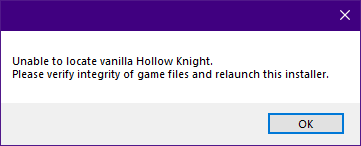
Wanted to revert to unmodded but this happen, I already verified the files
https://i.imgur.com/BX4rU6t.png
 fading edge
How do I go back to the previous version?
limber egret
Just verify integrity then don't reopen the mod installer.
limber egret
fading edge
How do I go back to the previous version?
That's what the first pin describes
It shows you the easiest method and which version you need
quartz sandal
limber egret
Just verify integrity then don't reopen the mod installer.
? Ok I verify, but then, I don't reopen the installer? Then what do I do after verifying the game files?
limber egret
You're done! Your game is now unmodded
quartz sandal
oh.. right
 heady apex
the mod installer says that my game needs to be updated to the newest stable release, but I just did
any tips?
vernal rain
look at the latest pin
limber egret
Check the first pinned message
cinder sage
how do i open the mod installer again? the exe doesnt work
it says like sequence contains no matching element
oh wait my bad sorry it was in pins
 stray forum
is there any way to mod now that the mod installer no longer works?
 short silo
Can someone help me? Whenever I put a skin into the custom knight file, I suddenly just can't open hollow knight
wheat orchid
What happens when you open it and where did you purchase hk
short silo
There's a small window that opens for a split second then disappeared. hk?
wheat orchid
Hollow knight
short silo
Oh, sorry. On steam
wheat orchid
short silo
Oh, sorry. On steam
Did you follow the instructions in the pins to go back to ver 1.4.3.2
wheat orchid
novel bronze
can someone help?
Maybe, define broken
short silo
I didn't get instructions
native ice
short silo
I didn't get instructions
?pins The top one
dense shuttleBOT
Check the pinned messages for more information - https://cdn.discordapp.com/attachments/187137504393035776/823796522751623168/unknown.png
novel bronze
the game slows down controls sometimes invert i take damage randomly
wheat orchid
short silo
I didn't get instructions
You can’t use mods with the new hk update so follow the instructions in the pins for downgrading
wheat orchid
novel bronze
the game slows down controls sometimes invert i take damage randomly
What other mods are enabled
novel bronze
only hpbar and custom night
dense shuttleBOT
Saves
Windows File Paths: (Assumes Default Steam Install Path, Adjust accordingly for DRM Free or Non-Standard Steam Path)
Game Files: C:\Program Files (x86)\Steam\steamapps\common\Hollow Knight\```
** **
Mac File Paths:
```Save Files: ~/Library/Application Support/unity.Team Cherry.Hollow Knight/
Game Files: ~/Library/Application Support/Steam/steamapps/common/Hollow Knight/hollow_knight.app/```
** **
Linux File Paths:
```Save Files: ~/.config/unity3d/Team Cherry/Hollow Knight/
Game Files: ~/.local/share/Steam/steamapps/common/Hollow Knight/```
ivory karma
novel bronze
the game slows down controls sometimes invert i take damage randomly
did you turn on chaos mode?
wheat orchid
ModLog.txt, don’t send one named ModLog_numbers.txt
wheat orchid
ivory karma
did you turn on chaos mode?
That’s what I was thinking
ivory karma
you mightve clicked it accidentally
ivory karma
lmao good
 pure obsidian
In that case, how do I use Mods on 1.2.2.1? I want to use save states and stuff to practice my speedrunning.
wheat orchid
You manually replace the assembly-CSharp.dll file with the modded one and create a mods folder in the same location where you put mod .dll files
Oh also you need a old version of debug
So get the ModdingApi for 1.2.2.1 and debug mod for 1.2.2.1
pure obsidian
I also guess I should ask here because you people would know, but I have two installations of HK - the 1.2.2.1 and a current patch. The only problem is the current patch is on 1.4.3.2 and I never enabled the beta. I have installed the most recent update (the one that came out today) but it still says im on 1.4.3.2....
pure obsidian
wheat orchid
So get the ModdingApi for 1.2.2.1 and debug mod for 1.2.2.1
Do I need the modding console?
pure obsidian
pure obsidian
Do I need the modding console?
Also, does Benchwarp work on 1.2.2.1? I don't see any older versions.
pure obsidian
No. 1.2.2.1 is for Any% NMG
last iron
i was worried
pure obsidian
To use mods you need to be on 1.4.3.2 at the moment
quartz sandal
Is this CSharp one of the CSharp that I am supposed to delete, mentioned in one of the pins?
 last iron
pure obsidian
To use mods you need to be on 1.4.3.2 at the moment
last iron
pure obsidian
To use mods you need to be on 1.4.3.2 at the moment
i have the 1.4.2.4
is that why the game crashes with the mods?
pure obsidian
last iron
pure obsidian
<@!463524433236197376> https://discordapp.com/channels/283467363729408000/462200...
what is that?
pure obsidian
Thats the pinned message to get to 1.4.3.2
quartz sandal
tutorial
last iron
pure obsidian
Thats the pinned message to get to 1.4.3.2
THANKS
pure obsidian
NP
 last iron
pure obsidian
NP
last iron
pure obsidian
NP
The other option for mac is not pirate? :v
pure obsidian
quartz sandal
Something must be wrong with your folders. Make sure everything is in place
pure obsidian
last iron
The other option for mac is not pirate? :v
???
quartz sandal
pure obsidian
Something must be wrong with your folders. Make sure everything is in place
how
pure obsidian
quartz sandal
how
IDk man. Find you HK folders
pure obsidian
last iron
just asking xD
nah man I dont understand what ur saying lol
quartz sandal
pure obsidian
IDk man. Find you HK folders
I know where it is, but how do I check, everything seems good, idk
 hard widget
does mods work with\ the current version or do i have to go back to the last version
pure obsidian
hmmmmm
pure obsidian
hard widget
does mods work with\ the current version or do i have to go back to the last ver...
Mods work on 1.4.3.2
Or earlier versions but thats complicated
hard widget
ok thanks
quartz sandal
last iron
The other option for mac is not pirate? :v
are saying like, pirate? like not bought? did you pirate the game?
pure obsidian
quartz sandal
I know where it is, but how do I check, everything seems good, idk
Do you have the game on the right version?
Namely, 1.4.3.2
quartz sandal
yes
pure obsidian
Try launching directly using the .exe file
quartz sandal
it open normally, in 1.4.3.2
native ice
What’s the problem?
quartz sandal
 last iron
quartz sandal
are saying like, pirate? like not bought? did you pirate the game?
last iron
quartz sandal
are saying like, pirate? like not bought? did you pirate the game?
i will if it still dont working xDDDDD
pure obsidian
quartz sandal
I'm afraid I don't know how to help. Sorry! Somebody will come along and probably help.
native ice
quartz sandal
Try resetting the mod installer using the .bat at the bottom of this #archived-modding-help message
quartz sandal
native ice
Try resetting the mod installer using the .bat at the bottom of this https://dis...
 still not working
native ice
Does it give you the same message?
quartz sandal
yes
native ice
Are you sure? Cause it should have asked something like “Is this your installation” or asked you to path it
 native ice
Did you close the installer before resetting it?
quartz sandal
no I open the .bat, it said some like fast, and then Done. and then press any key to close
oh wait

it says not found
I remember now its in portuguese
the system couldn't located
quartz sandal
I think its saying it can't locate mod installer
can't I delete modinstaller and install it again?
native ice
No it’s about deleting the root files
Trying to remember where those are usually to do it manually
native ice
quartz sandal
I think its saying it can't locate mod installer
Are you on windows or mac?
quartz sandal
windows
limber egret
This message
This tells you how to delete the appropriate files
The .bat won't work if your mod installer stuff isn't all in default locations, which may be the issue you're having. With this message you might be able to figure out what's different.

 native ice
 crude elm
hey uhh, what do i do about this?
crude elm
hey uhh, what do i do about this?
?pins
dense shuttleBOT
Check the pinned messages for more information - https://cdn.discordapp.com/attachments/187137504393035776/823796522751623168/unknown.png
quartz sandal
limber egret
This message
Thx but.. I really need to follow the order right? I did the Windows Installer 1, deleted the folder mod installer, NOW I need to run the modinstaller again? that seems strange
crude elm
ah, i cant use it for now?
native ice
quartz sandal
Thx but.. I really need to follow the order right? I did the Windows Installer 1...
Yes that’s correct
native ice
crude elm
ah, i cant use it for now?
No, this one #archived-modding-help message
crude elm
oh
native ice
quartz sandal
Thx but.. I really need to follow the order right? I did the Windows Installer 1...
After resetting it it’ll ask you (or find it itself) where your game files are instead of just telling you somethings wrong
quartz sandal
native ice
After resetting it it’ll ask you (or find it itself) where your game files are i...
Yes it asked me, I said yes, bcs it is, and now I need to do the second part right?
native ice
Second part of what? I missed some of the conversation
quartz sandal
the windows installer 2
limber egret
Yeah, there's two versions of mod installer. That post has instructions for both.
native ice
quartz sandal
Yes it asked me, I said yes, bcs it is, and now I need to do the second part rig...
If you did the first one and modinstaller asked for your gamefile path then you should be good to go, just path it to the file that has the hollow knight application in it and try installing some mods
 elfin atlas
modinstaller is telling me to update my game but i just updated it this morning can someone help?
native ice
elfin atlas
modinstaller is telling me to update my game but i just updated it this morning ...
?pins
dense shuttleBOT
Check the pinned messages for more information - https://cdn.discordapp.com/attachments/187137504393035776/823796522751623168/unknown.png
native ice
The top one
elfin atlas
okay thank you
 frank belfry
hi there is anyone online who can help me install the mods
tried it and it said i needed to update the game but I literally just bought the game on steam so its the latest version
native ice
frank belfry
tried it and it said i needed to update the game but I literally just bought the...
Check the top pin
 pliant gorge
whats the name of the gun mod?
native ice
pliant gorge
whats the name of the gun mod?
HollowPoint
pliant gorge
thanks
 wintry fox
what are these zips for
 fast kayak
im reverting hollow knight to beta so i can use mods, but im not sure which one to revert to, should i use the public beta or the 1.4.3.2?
 strange jewel
1.4.3.2
fast kayak
also, what do the split cloak, split claw, and cursed nail do in randomizer?
native ice
fast kayak
also, what do the split cloak, split claw, and cursed nail do in randomizer?
Split cloak means you can pick up dash left or dash right which means you can only dash in that specific direction, same for claw, and similar for cursed nail but you start with down swing
native ice
wintry fox
what are these zips for
Those are for Modinstaller2
native ice
How so?
 hidden basin
nvm i was just dumb lol
native ice
Oh okay lol
hidden basin
native ice
Oh okay lol
you said something about modinstaller2 is there a different mod installer
native ice
hidden basin
you said something about modinstaller2 is there a different mod installer
They’re essentially the same but modinstaller 2 occasionally works better for some people, theres also a slight ui change. Modinstaller 2 can be found in the pins labeled by what OS their for
hidden basin
native ice
They’re essentially the same but modinstaller 2 occasionally works better for so...
ok thank you for the help
native ice
Np
 livid narwhal
Out of curiosity, can you create a hollow knight skin by editing the pngs for the default?
Or do you need something like spritepacker
 rough seal
I can't get anything to work. I have uninstalled and reinstalled both the mod installer and main game, I have verified the game a few times and I also can't seem to revert to unmodded.
It happened before the 1.5 update happened, and today I tried again after reverting to 1.4.3.2
native ice
rough seal
I can't get anything to work. I have uninstalled and reinstalled both the mod in...
Does it give you an error?
native ice
What exactly is happening?
rough seal
so I open Hollow Knight, and my mods arent there.
native ice
Did you do the part about “If mods still aren’t working” in the first pin?
rough seal
I look back at mod installer, hit revert back to unmodded, and it says verify integrity files
I don't see that pin
 violet rain
any eta for 1.5 update?
native ice
violet rain
any eta for 1.5 update?
Not as far as i know
rough seal
I didnt see that
violet rain
?mods
dense shuttleBOT
Mods
Google Drive with Mods - https://drive.google.com/drive/u/0/folders/1lnjtSYMfRe1LyA_qSq2CoXKI6NRm_I-e
Installer - https://radiance.host/mods/ModInstaller.exe
Mod Summaries - https://docs.google.com/document/d/1cz5tcggpGofrBcM90XyTkMWjMelDHzugvQM6HpB13Ew
violet rain
will downpatching mess up any previous saves
native ice
It shouldn’t but since you’re using mods i suggest you back up your saves before hand
latent spire
So, now its loading into the game finally but it just gives me this screen with no options

Wait I fixed it
rough seal
I am still having issues. It's not very great.

 brave dagger
 humble bear
?pins
what version of your game do you have installed?
native ice
humble bear
?pins the first one
dense shuttleBOT
Check the pinned messages for more information - https://cdn.discordapp.com/attachments/187137504393035776/823796522751623168/unknown.png
native ice
rough seal
I am still having issues. It's not very great.
What kind of issues
humble bear
 rough seal
mods still dont load good
humble bear
;/
native ice
humble bear
Betas
rough seal
I'm gonna try to figure this out tomorrow.
native ice
rough seal
mods still dont load good
Try going to your save files and deleting benchwarp.globalsettings.json
native ice
humble bear
Update notes for v1.5.72.11824
What??
rough seal
I don't think that's the issue, with all mods disabled and the only thing that should be loaded is modding api, nothing is loaded
I've been trying to figure this out for a couple hours today
native ice
rough seal
I don't think that's the issue, with all mods disabled and the only thing that s...
The “If mods still aren’t working” didn’t work? And it doesn’t matter if mods are disabled, go to saves and look for it, while you’re at it also delete all the other “.globalsettings” files
rough seal
I forgot how to access the saves
native ice
?saves
dense shuttleBOT
Saves
Windows File Paths: (Assumes Default Steam Install Path, Adjust accordingly for DRM Free or Non-Standard Steam Path)
Game Files: C:\Program Files (x86)\Steam\steamapps\common\Hollow Knight\```
** **
Mac File Paths:
```Save Files: ~/Library/Application Support/unity.Team Cherry.Hollow Knight/
Game Files: ~/Library/Application Support/Steam/steamapps/common/Hollow Knight/hollow_knight.app/```
** **
Linux File Paths:
```Save Files: ~/.config/unity3d/Team Cherry/Hollow Knight/
Game Files: ~/.local/share/Steam/steamapps/common/Hollow Knight/```
rough seal
omg
rough seal
revert to a old version, 1.4.3.2
rough seal
in steam you go to properties and click on betas, and choose 1.4.3.2
pliant gorge
rough seal
in steam you go to properties and click on betas, and choose 1.4.3.2
just so you know for sure
 humble bear
am new sorry
on the mods xd
ademas de que hablo español la concha de la madre
😄

ty guyys
pliant gorge
👍
rough seal
native ice
The “If mods still aren’t working” didn’t work? And it doesn’t matter if mods ar...
yo thanks for the help, I didn't really know what to do.
humble bear
xd
 subtle oyster
need modinstaller 2 download link
 subtle jackal
how download mod
native ice
subtle jackal
how download mod
?pins Downpatch using instructions in the top pin.
dense shuttleBOT
Check the pinned messages for more information - https://cdn.discordapp.com/attachments/187137504393035776/823796522751623168/unknown.png
native ice
?i then download and run this
dense shuttleBOT
Reminder: The mod installer (https://radiance.host/mods/ModInstaller.exe) and other modding resources can be found from the pinned messages.
pliant gorge
what do you mean?
subtle jackal
he said hollow knight recently updated and cant be modded
 pliant lantern
subtle jackal
he said hollow knight recently updated and cant be modded
pliant lantern
subtle jackal
he said hollow knight recently updated and cant be modded
I mean, that's very much not what that whole message says
subtle jackal
:o
pliant lantern
If you only read one sentence and then ignore the rest, then sure
subtle jackal
reading is hard
pliant gorge
lol
subtle jackal
poggering
now i cant find the randomizer mod in the mods list in google drive
is it still there?
if not where
whats it called
native ice
You don’t need to use the google drive, all the mods are on the installer
?i Which is found here
dense shuttleBOT
Reminder: The mod installer (https://radiance.host/mods/ModInstaller.exe) and other modding resources can be found from the pinned messages.
native ice
subtle jackal
oh
Make sure to move the installer to your desktop don’t keep it in downloads
subtle jackal
is room randomizer in the list?
native ice
subtle jackal
is room randomizer in the list?
Randomizer 3 does rooms and items
subtle jackal
thanks
native ice
violet rain
how do i remove mods?
Verify the integrity of the game, that’ll leave some mod files but will be vanilla
 hoary berry
how do i use the language support mod to change it to english
hoary berry
im trying to play modded and my game is currently in a foreign lanuage and theres no english option
haughty quiver
You can change it in options
hoary berry
tried that, there was no english option
haughty quiver
?
limber egret
They may have replaced English as part of the mod
haughty quiver
Huh
native ice
The mods are initially in english, you either enabled “Arts” mod, or you changed it in the base game
limber egret
So turn the mod of
limber egret
Oh
hoary berry
i was going to disable that now
limber egret
That's not a language
fair briar
@gloomy coral, so i have a few requests/ questions about hollow point fix.bat
- Does it copy it to the mods folder or move it? If it moves it can it be copied over?
- Can you also make a bat to delete it from the mods folder?
(I don't know much about bat)
gloomy coral
- Can you also make a bat to delete it from the mods folder?
why
 neon marten
Should be possible
fair briar
gloomy coral
> 2. Can you also make a bat to delete it from the mods folder?
why
i'm working on something, and i thought it would be easier then asking the user to got to the mods folder to delete it everytime they use hollow point again
 dusty ether
Hey guys do you know where to instal the mod with the primal aspids that shoot crystal hunter projectiles through a gatling gun?
Like the one in this vid: https://m.youtube.com/watch?v=oucz_R5g4rU
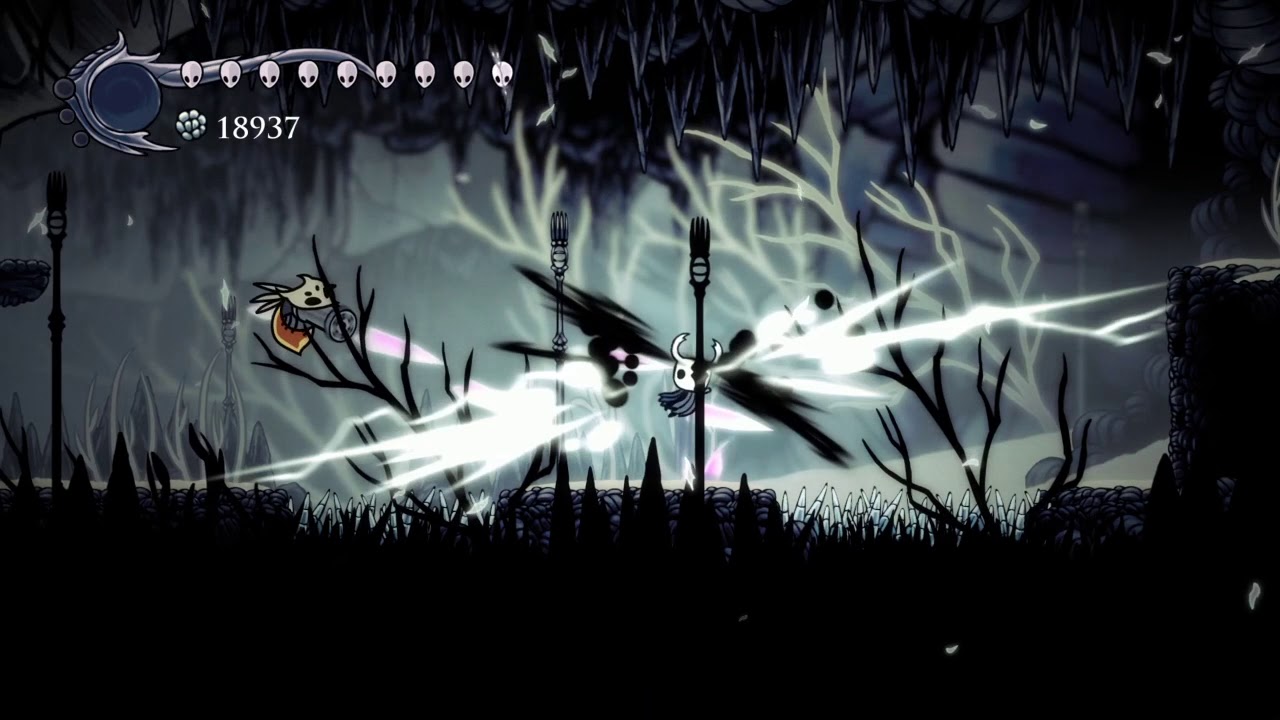
comments that say "you nerfed it" or "i dont see any differences" are not funny thanks
credit to jngo from hollow knight discord server
fair briar
doesn't the pantheon of nightmares do that?
limber egret
fair briar
i'm working on something, and i thought it would be easier then asking the user ...
But if they delete it they have to redownload it the next time, right?
fair briar
thats why i ask it to be copied over
so it remains in the same place
and can be used multiple times
limber egret
Oh, so you specifically want it to create a version of itself in the mod folder and then delete the original version?
gloomy coral
fair briar
thats why i ask it to be copied over
It is being copied
fair briar
oh ok
fair briar
limber egret
Oh, so you specifically want it to create a version of itself in the mod folder ...
...?
gloomy coral
But that only works for people in steam and windows
fair briar
limber egret
Oh, so you specifically want it to create a version of itself in the mod folder ...
no, i mean that it is in dir 1, it makes a copy of it, places that copy in dir 2, and a seperate bat file just to delete it using all the registry magic or whatever is going on there
dense thistle
can i download the mods not from the app?
gloomy coral
Downloading from installer is the best way to do it
gloomy coral
fair briar
no, i mean that it is in dir 1, it makes a copy of it, places that copy in dir 2...
Idk what you mean by resitry magic
Probably should figure out the gog path as well
fair briar
or whatever you did to make the thing not ask for a path...
gloomy coral
I just copied that from google
dense shuttleBOT
Reminder: The mod installer (https://radiance.host/mods/ModInstaller.exe) and other modding resources can be found from the pinned messages.
 fleet oasis
:0
 silver dew
does anyone know how to fix this thing? it happens when i try to open the mod installer

i have tried turning my pc on and off, i have also unistalled and installed again
haughty quiver
.
silver dew
haughty quiver
.
imma try this thanks
haughty quiver

 somber orchid
when i try to run the installer it says "This installer requires the most recent stable version to run.Please update your game to current stable patch and then try again." what i have to do?
fair briar
?pins
dense shuttleBOT
Check the pinned messages for more information - https://cdn.discordapp.com/attachments/187137504393035776/823796522751623168/unknown.png
fair briar
latest one
somber orchid
thx now its working 🙂
but when i try to open the game it says "Another instance is already running"
nvm now its working
 sand idol
can someone help me when i try installing the modinstaller it says i have to select the hollow knight folder but i cant see it anywhere im on the 1.4.3.2 Beta version of hk on steam
fair briar
sand idol
can someone help me when i try installing the modinstaller it says i have to sel...
- if you want to go back to selecting the path you can reset the installer (see pins)
- got to steam > right click hk > properties > local files > browse
 limber geyser
hi i want to install invincibility but i can figer out how to
can some on help me plz
haughty quiver
Have you installed Debug Mod?
limber geyser
k thanks
haughty quiver
Np
limber geyser
ima test it now
haughty quiver
K
novel bronze
hey, I've got a qiuck question
haughty quiver
Yep?
novel bronze
so I modded my game, but unfortunately for some reason my save isn't even showing up and the mods are not working either.
I've opted into 1.4
so I'm a bit confused.
haughty quiver
Which mods did you install?
haughty quiver
Huh
novel bronze
Yeah it's a bit confusing.
haughty quiver
Did you try opening it again?
novel bronze
I did
I reinstalled the game three times now, also deleted the entire HK folder
and then reinstalled fresh
haughty quiver
My mods not working, you mean the mod list isn't coming up in the top left?
limber egret
There's a fix for that in the pins
limber egret
I'm going to snail myself even though I didn't actually post it
But yeah, check that message out
novel bronze
Yeah, I thought it was a benchwarp thing too
haughty quiver
Lel
novel bronze
Hence my confusion.
 sweet garden
custom knight isn't working
fair briar
you have modcommon?
sweet garden
lemme check
haughty quiver
fair briar
you have modcommon?
Isn't that preinstalled?
fair briar
the modinstaller is a wierd thing sometimes
sweet garden
I have the "change skin" menu when I pause, the different skins appear but it doesn't do anything when I pick one
haughty quiver
Kek
fair briar
sweet garden
I have the "change skin" menu when I pause, the different skins appear but it do...
assuming you have modcommon, make sure you ahve the skin files the same as the default folder
that is,
customknight > skinname > png's
sweet garden

 brazen pasture
What's inside the folder?
haughty quiver
Open the folder and take a screenshot
haughty quiver
Ah
brazen pasture
That's the problem
sweet garden
 brazen pasture
Inside the folder should be pngs directly
haughty quiver
Cut the pictures and paste it in the firsy folder
sweet garden
done
haughty quiver
It should work now
haughty quiver

sweet garden
I'm pretty now
haughty quiver
Kekw


 haughty quiver
Nice
fair briar
sweet garden
owo
sweet garden
why
fair briar
its owo lol
sweet garden
I hate it thank you
 flint jackal
since modinstaller is not yet updated, how can i change back the nail damage in my save file?
 iron stag
hi, i wanted to know if there's a green knight mod that looks like mine

i made this myself like half a year ago but i want a cleaner version
fair briar
flint jackal
since modinstaller is not yet updated, how can i change back the nail damage in ...
do the hollow point fix, but instead of fucus_mp, you cahnge naildamage
novel bronze
why doesnt my qol mod work?
flint jackal
hollow point fix?
brazen pasture
iron stag
i made this myself like half a year ago but i want a cleaner version
cleaner in what sense ? you could try the skin remixer to see if it's results are better for you
fair briar
flint jackal
hollow point fix?
its in pins
fair briar
novel bronze
why doesnt my qol mod work?
do you have vasi?
novel bronze
fair briar
do you have vasi?
no
flint jackal
ah ok
fair briar
get it
honest flax
Install Vasi
iron stag
brazen pasture
cleaner in what sense ? you could try the skin remixer to see if it's results ar...
my version still had some weird green particle in a couple places, but can you tell me what the skin remixer is?
 ionic grove
hello, my game keeps launching and then the save file won't load and sometimes the menu bugs out if I try to launch after running modinstaller.
fair briar
?pins
dense shuttleBOT
Check the pinned messages for more information - https://cdn.discordapp.com/attachments/187137504393035776/823796522751623168/unknown.png
iron stag
fair briar
https://prashantmohta.github.io/HollowKnight.SkinRemixer/
thanks, i'll check that out
ionic grove
I tried verifying game files, uninstalling all mods and reinstalling, uninstalling all and only having modcommon then launching, and deleting csharp and reverifying.
limber geyser
@haughty quiver THX
fair briar
ionic grove
I tried verifying game files, uninstalling all mods and reinstalling, uninstalli...
?pins
dense shuttleBOT
Check the pinned messages for more information - https://cdn.discordapp.com/attachments/187137504393035776/823796522751623168/unknown.png
 rocky silo
can someone help me with the modinstaller link? i cant find it
ionic grove
 desert nest
im using the customknight mod and when i click change skin it disappears
and then i turned into a white box
 blissful frigate
where is the link to mod installer 2.0?
 rocky pulsar
desert nest
im using the customknight mod and when i click change skin it disappears
rocky pulsar
desert nest
im using the customknight mod and when i click change skin it disappears
have you tried turning the game off an on again?
no joke that worked for me
 main rose
sooo i have a question i wanted to get started with randomizers the problem is and the randomap mod only shows grubs and essence locations
fair briar
blissful frigate
where is the link to mod installer 2.0?
?pins
dense shuttleBOT
Check the pinned messages for more information - https://cdn.discordapp.com/attachments/187137504393035776/823796522751623168/unknown.png
fair briar
desert nest
im using the customknight mod and when i click change skin it disappears
Make sure the file structure of your skins is the same as the default one
That is, customknight>skinname>png's
desert nest
where do i check that
fair briar
You downloaded skins right?
desert nest
yeah
fair briar
So... you should know where your skins are
 nova sinew
Who got the hollow knight hacks
fair briar
...
nova sinew
Umm
fair briar
?
main rose
and my problem is the mod is supposed to show more than just that if someone could help me it would be really appreciated
nova sinew
Do they even ecist
fair briar
Debug mod?
fair briar
In what sense
nova sinew
Umm the good one
fair briar
Rainbow?
nova sinew
Rainbow nail
fair briar
Did you see a yt vid containing this or do you just make it up?
sweet garden
That's custom knight
nova sinew
I made it up
sweet garden
Gl to find the hk folder in your desktop tho
fair briar
Why?
nova sinew
I'm on ps4
sweet garden
It took me more time than I'd like to admit
fair briar
Ps4 has no mods
ivory karma

nova sinew
EXACTLY
fair briar
sweet garden
It took me more time than I'd like to admit
Go to steam>right click hk>properties>local files>browse
Ez as that
sweet garden
I wish I knew this earlier 🥴
main rose
ok got it needed a newer version of the mod thx anyways
 distant crest
Hi everyone ! I'm new to modding and since the last Hollow knight update i can't make the modding api works ... like the game launches itself but the modding api informations doesn't shows up. I'm using the latest release (1.4.3.2-60) on the hollowKnight-Modding repo on github. Can somebody help me ? 🙂
fair briar
?pins
dense shuttleBOT
Check the pinned messages for more information - https://cdn.discordapp.com/attachments/187137504393035776/823796522751623168/unknown.png
fair briar
latest one
distant crest
As i see the latest post is related to the 1.4.2.4 version of the game but i'm using the 1.5.x version
fair briar
so?
the 1.4 api doesnt work with 1.5
so, either go back to 1.4 to get all the mods. or get the 1.5 api and use the 1.5 updated mods (of which are few)
distant crest
I just tried using the pre-release 1.5.68 version of the api but the game just instantly crash
gloomy coral
on .72?
distant crest
yes
gloomy coral
if you use .68 api on .72 your asking for the crash
 floral mist
Sorry to interrupt but this is the installation path I want to use for the mod installer right?
 fair briar
no?
gloomy coral
floral mist
Sorry to interrupt but this is the installation path I want to use for the mod i...
where did you get the game from?
floral mist
gloomy coral
where did you get the game from?
Steam
distant crest
gloomy coral
if you use .68 api on .72 your asking for the crash
Well is there a place where i can find the .72 then ?
floral mist
I got it legitimately
floral mist
So is it just the folder I have the game/steam in then?
floral mist
I have no idea what I’m doing lol
 urban sand
i cant seem to get the modding instaler running
distant crest
fair briar
<https://drive.google.com/file/d/1EcqPY6qldQLkaAoUGchjP0yomJG_vPxG/view?usp=shar...
Perfect ! Thank you so much
fair briar
thank mulhima
fair briar
urban sand
i cant seem to get the modding instaler running
?pins
dense shuttleBOT
Check the pinned messages for more information - https://cdn.discordapp.com/attachments/187137504393035776/823796522751623168/unknown.png
urban sand
fair briar
?pins
thank you
 runic sand
hello i'm new to this
i m trying to mod the game i have it on steam and i just wanted to ask if there is a mod client for this current version and where because all the others i downloaded say i should have the newest version installed
fair briar
?pins
dense shuttleBOT
Check the pinned messages for more information - https://cdn.discordapp.com/attachments/187137504393035776/823796522751623168/unknown.png
fair briar
latest one
blissful frigate
how can I install ModInstaller 2.0?
fair briar
?pins
dense shuttleBOT
Check the pinned messages for more information - https://cdn.discordapp.com/attachments/187137504393035776/823796522751623168/unknown.png
fair briar
for windows: windows.zip, for mac: modinstaller.zip, for linux: linux.zip
blissful frigate
dense shuttle
Check the pinned messages for more information - https://cdn.discordapp.com/atta...
I can't find anything there on modinstaller 2.0...
fair briar
for windows:
windows.zip, for mac:modinstaller.zip, for linux:linux.zip
blissful frigate
fair briar
> for windows: `windows.zip`, for mac: `modinstaller.zip`, for linux: `linux.zip...
what do u mean by that?
blissful frigate
win
dense shuttleBOT
Reminder: The mod installer (https://radiance.host/mods/ModInstaller.exe) and other modding resources can be found from the pinned messages.
runic sand
 fair briar
?pins
dense shuttleBOT
Check the pinned messages for more information - https://cdn.discordapp.com/attachments/187137504393035776/823796522751623168/unknown.png
fair briar
latest one
haughty quiver
Quick boi
runic sand
that's the latest one
fair briar
no
haughty quiver
The latest pin
fair briar
latest pin
haughty quiver
Kekw
fair briar
haughty quiver
Quick boi
we just need a bot to send send ?pins every 5 min lol
ah yes a bot to make a bot send a message
haughty quiver
Lmao why not just copy and paste it every time
blissful frigate
fair briar
1. you can get modinstaller 1,
2. see the message i responded to
is it possible to install the latest version?
haughty quiver
You mean is it possible to install modinstaller with the latest version? no
blissful frigate
I ment is it possible to install the latest version of modinstaller?
fair briar
?i
dense shuttleBOT
Reminder: The mod installer (https://radiance.host/mods/ModInstaller.exe) and other modding resources can be found from the pinned messages.
fair briar
thats the latest version
blissful frigate
ohhhhhhhh, sorry...
neon marten
But it doesn’t support the latest HK version
 indigo canopy
why wont mods work anymore?
fair briar
?pins
dense shuttleBOT
Check the pinned messages for more information - https://cdn.discordapp.com/attachments/187137504393035776/823796522751623168/unknown.png
fair briar
latest one
indigo canopy
what about my skins
fair briar
?
indigo canopy
customknight
fair briar
all mods are unaffected
novel bronze
so like when i try to go back to the 1.4.3.2 version it asks for a code thing 
haughty quiver
novel bronze
so like when i try to go back to the 1.4.3.2 version it asks for a code thing <:...
?
fair briar
leave it empty