#archived-modding-help
1 messages · Page 267 of 1
 eternal crest
 native ice
?pins
 dense shuttleBOT
Check the pinned messages for more information - https://cdn.discordapp.com/attachments/187137504393035776/823796522751623168/unknown.png

 restive barn
where is the kaizo mod that skurry used in "hollow knight but impossible" video
 ivory aurora
I don't know what the video is but most likely DecorationMaster
eternal crest
thanks I fixed it
 north bear
I'm getting this warning and I don't know what it's talking about
 native ice
north bear
I'm getting this warning and I don't know what it's talking about
native ice
north bear
I'm getting this warning and I don't know what it's talking about
Are you on steam and did you downpatch the game?
north bear
I am on steam and I don't know what to do to downpatch it
native ice
Try verifying the integrity of your game
north bear
What?
native ice
Go to steam library, right click on hollow knight, go to properties, go to local files, verify the integrity of game files
 fair briar
north bear
What?
fair briar
north bear
What?
screenshot your main menu (of the game)
north bear
alright
gimme a second
I've validated the integrity and then I'll go take a screenshot of the main menu
 native ice
run the installer again
north bear
there we go now it's downloading
native ice
 regal junco
i cant heal
regal junco
i cant heal
Did you have HollowPoint/Are using HollowPoint rn?
regal junco
i used to have it installed
native ice
Did you run it on the save that you can't heal on?
regal junco
yes
native ice
Check the pins
regal junco
?
native ice
?pins
dense shuttleBOT
Check the pinned messages for more information - https://cdn.discordapp.com/attachments/187137504393035776/823796522751623168/unknown.png
 regal junco
?saves
dense shuttleBOT
Saves
Windows File Paths: (Assumes Default Steam Install Path, Adjust accordingly for DRM Free or Non-Standard Steam Path)
Game Files: C:\Program Files (x86)\Steam\steamapps\common\Hollow Knight\```
** **
Mac File Paths:
```Save Files: ~/Library/Application Support/unity.Team Cherry.Hollow Knight/
Game Files: ~/Library/Application Support/Steam/steamapps/common/Hollow Knight/hollow_knight.app/```
** **
Linux File Paths:
```Save Files: ~/.config/unity3d/Team Cherry/Hollow Knight/
Game Files: ~/.local/share/Steam/steamapps/common/Hollow Knight/```
regal junco
am i supposed to open the attachment?
regal junco
native ice
<:upvote:618975140696424448>
this attachment i mean
native ice
Sorry what?
native ice
did it download?
native ice
did you put it in your mods folder with modding api installed?

 gloomy coral
regal junco
ill do that now
gloomy coral
regal junco
ill do that now
this is the wrong folder
put it in content/resources/data/managed/mods
this is probs in the wrong content/managed/mods location
native ice
The mod's folder should be at the top, if not then change the sort by or search for it
 native ice
Yea that looks right
regal junco
what do i do next?
native ice
Follow the next step, launch the game
regal junco
launched
native ice
test if it works
regal junco
nup
native ice
It didn't work?
regal junco
i cant heal no
native ice
I'm not sure then
regal junco
yikes
gloomy coral
regal junco
i cant heal no
you have soul?
regal junco
yes
 shut scaffold
can i mod the game without the installer?maybe manually or something
 limber egret
Just use the installer
limber egret
Screenshot your main menu of hollow knight for me
shut scaffold
its the normal menu,nothing different
limber egret
Please
 limber egret
Okay so if you can't get the mod installer working then you'll need to get the modding API. I'm not sure if that's just hosted here or what the link is to it, though. If somebody else can grab it for you, then you'll be able to start. Failing that, I could try to help get the mod installer working for you.
You said you got this through steam last time, right?
fair briar
what does the installer say
shut scaffold
limber egret
You said you got this through steam last time, right?
yes
fair briar
it must have given an error
limber egret
Download this.
limber egret
fair briar
it must have given an error
Fwiw they've been through this like twice before
You can find their old messages with the search function
fair briar
oh ok i've been gone for longer then i thought then 👀
limber egret
Once you have downloaded the above file, go into your downloads folder and drag it to your desktop.
shut scaffold
ok
limber egret
Don't open it yet though, we need to make sure you don't have the old one still
shut scaffold
ok
shut scaffold
ok its ready
limber egret
Okay first let's make sure you don't have the old installer you downloaded last time.
Wherever you ended up downloading the original one; delete it if you still have it.
shut scaffold
opk its the newest one
limber egret
Did you delete the one you downloaded the last time you tried?
shut scaffold
yea
limber egret
Okay, that's a good start
gloomy coral
regal junco
yes
Try the other method listen in pins then
limber egret
Secondly we need to delete your mod installer config files
shut scaffold
where is it
gloomy coral
#archived-modding-help message
Run this .bat file
limber egret
Follow these first three steps
fair briar
limber egret
Follow these first three steps
it doesnt contain removing the config files of the installer?
thats the api
fair briar
gloomy coral
https://discord.com/channels/283467363729408000/462200562620825600/8424277212202...
just run that .bat file
shut scaffold
ok im confused
fair briar
the bat should do the trick
shut scaffold
i dont have a mods folder
limber egret
Oh, that's my bad. I thought that .bat file needed to be in mods
Ignore the rest of the message, you just want to download the file and run it
fair briar
what error?
shut scaffold
it just doesnt open no errors or anything
fair briar
you double clicked it and it did nothing right?
shut scaffold
yea
gloomy coral
Is it on desktop?
shut scaffold
yes
gloomy coral
Try right clicking and running as admin
fair briar
try to restart your pc, run the installer as admin
shut scaffold
gloomy coral
Try right clicking and running as admin
i tryed but didnt work
fair briar
well lets try to install all of it manually i guess
is the api somewhere online?
or just download daugther of hallownest
shut scaffold
wasnt that a mod that makes hornet2 impossible?
shut scaffold
ok
fair briar
then place it in the managed? folder
fair briar
it will ask you to overwrite something
fair briar
shut scaffold
enhtire zip file or folder in it
the assembly-Csharp.dll
shut scaffold
it didnt ask me to overwrite something
fair briar
did you get the assembly-Csharp.dll?
shut scaffold
ok
there is just the title now,no options to do anything
what am i supposed to do
title screen is just this
 shut scaffold
ok
shut scaffold
there is no bat file there
gloomy coral
I don't get you?
shut scaffold
what am i supposed to download?
fair briar
gloomy coral
and run this bat file
this....?
shut scaffold
from where
limber egret
That message contains the file
fair briar
it has a download button down right
shut scaffold
ok i didnt see the download button
fair briar
discords viewer is good but it has some problems 
shut scaffold
so its supposed to work now?
 vernal rain
fair briar
discords viewer is good but it has some problems <:feelspkman:639636442821165056...
vernal rain
fair briar
discords viewer is good but it has some problems <:feelspkman:639636442821165056...
it fucking sucks
fair briar
for text files i like it
shut scaffold
ok its doing the i wont open until you try for 20 times thing,thats a good sign
shut scaffold
game itself
fair briar
i am very confused rn
gloomy coral
Define same
fair briar
verify integrity i guess
gloomy coral
Screenshot this
Save files
Press win + r and then paste this
%AppData%\..\LocalLow\Team Cherry\Hollow Knight
shut scaffold
ok im in that folder
gloomy coral
Screenshot this
shut scaffold
screenshot what
gloomy coral
folder
fair briar
the folder you're in

 shut scaffold
ok
gloomy coral
also you have controller?
shut scaffold
no
shut scaffold
empty
gloomy coral
try opening the game
gloomy coral
Screenshot title screen
shut scaffold
ok there is a mods option in the settings too
thank you guys very much
also question,can i just put mods in the mods file and use it lke that?
gloomy coral
Yes
That's what installer does
But you have to make sure you have the correct dependencies installed also
ivory aurora
Modcommon and that's iirc
shut scaffold
ok
ivory aurora
you already have modcommon right
fair briar
ye
fair briar
wierd
 worthy gorge
Hello
I'm trying to use the custom skin mod but whenever i load the game and click on the skin name it does not work
does anyone know how to fix this problem?
fair briar
make sure that your file structure is: customknight -> skinname -> png's
and you have modcommon
worthy gorge
It seems like i have the files in the right locations
limber egret
Screenshot your image files, including the address bar at the top
worthy gorge
when i click the skin i want to use, my character blinks and then it just stays as the default
worthy gorge
limber egret
Screenshot your image files, including the address bar at the top
Okie dokie
worthy gorge
limber egret
Screenshot your image files, including the address bar at the top
Do you want me to DM you the images?
limber egret
Either post them here or DM if you don't want to
I know some people don't like to show their PC username (though I'm not entirely sure why)
I suppose if it's you're actual full name that might not be a great idea, actually
fair briar
yeah

 fair briar
ah
hollow point doesn't allow skin usage
sadly
otherwise the gun will disappear iirc
worthy gorge
darn
After crashing a couple times it finally decided to work
thank you very much
 livid tangle
i am having some issues with the Randomiser mod
the spawns are all jacked up and i spawn out of bounds

i dont have rando rooms installed
 real jacinth
Screenshot your title screen
Looks like you're in bounds but missing textures
Camera doesn't follow you out of bounds
livid tangle
i forced the camera to follow me the ground is there
just not on the camera
i cant use benchwarp because the pause menu wont show

 wheat orchid
- Qol failed to load 2. That isn’t the pause menu?
livid tangle
k
real jacinth
Usually when something says it failed to load....it's a good idea to check that out
livid tangle
how do i check that out?
real jacinth
Install vasi
wheat orchid
Most likely you’re missing a dependency, in this case, Vasi
livid tangle
ah i see
wheat orchid
It’s a good idea to keep library mods such as modcommon, Vasi, serecore, SFCore, frogcore, and weavercore on (wow this list is getting long)
livid tangle
thankyou its working now
 dusk folio
how would i unmod the game?
real jacinth
Verify game file integrity
dusk folio
ok
 vivid marsh
is there a reset all button for the debug mod? Somehow I accidentally increased the nail damage to like 200 or something because I'm one shotting everything and I don't really want to do that, but I also don't know how much to decrease it. Please help?
real jacinth
Dmg is shown in the menu on the left
Press the dmg decrease button until it's back to normal
 solid wharf
ok so, whenever i try to manually install a mod into the mod installer, it accepts the file, but it never shows up in the menu or in the game
real jacinth
You have to select the dll file. Not a zip
And manually added mods will show on the installer if you close and open it
 sinful hemlock
Do I use my own ip to allow someone to join using multyplayer mod?
 rancid crane
What folder are mods even supposed to go to?
 novel bronze
everytime i open modinstaller 2 these two mods are always out of date i don't know how to fix it
 real jacinth
Click the orange box
novel bronze
i did but when i close the installer and re-open it same thing happens
real jacinth
Then just leave it
novel bronze
but rich presence mod doesn't seems to work in game :(

 vocal moat
limber egret
vocal moat
limber egret
It's in the pins
 pliant lantern
sinful hemlock
Do I use my own ip to allow someone to join using multyplayer mod?
pliant lantern
sinful hemlock
Do I use my own ip to allow someone to join using multyplayer mod?
There's a Multiplayer Help message in the pins, that has all of the info you need if you plan on using the multiplayer mod(s) that are on Mod Installer
 fallen skiff
I just completed the game in 4h 15min, but steam didnt give me both the speedrun achievements. I heard mods dont disable achiemevents, and i got the "game completed" achievement, but i dont know why i didnt get the other two. what am i missing?
pliant lantern
I've heard of people having bugs with getting achievements, both in vanilla and with mods. I accidentally got one of speedrun achievements while playing Randomizer though, so you definitely can get them while modded.
 neon marten
What mods do you have installed?
novel bronze
just the API and the debug mod
pliant lantern
- What version of Hollow Knight are you on, and where did you get it?
- Did you use Mod Installer?
novel bronze
will i get into trouble if i say its cracked
neon marten
Better question: will you get support if it’s cracked? No.
novel bronze
ok sry my b
pliant lantern
novel bronze
~~will i get into trouble if i say its cracked~~
Unfortunately, that version isn't moddable. Only the Steam and GOG versions are.
You can keep an eye on this site for a sale on a compatible version: https://isthereanydeal.com/game/hollowknight/info/ (note that many sites like Humble Bundle sell the games on the form of steam keys)
novel bronze
pliant lantern
Unfortunately, that version isn't moddable. Only the Steam and GOG versions are....
i was able to mod it before
sinful hemlock
pliant lantern
There's a Multiplayer Help message in the pins, that has all of the info you nee...
didn't have the ability to say thanks so I am doing it now, thanks
neon marten
Why doesn’t anybody read the pins?
novel bronze
i am so sorry
sinful hemlock
I don't do it since I am dumb
neon marten
novel bronze
i am so sorry
Next time that you download a cracked version, just remember that the developers have worked hard to make that game. By not paying them you are declining them money for their hard work.
^
limber egret
STOP TELLING PEOPLE THEY CAN GET MODS TO WORK ON THEIR PIRATED COPIES
Just tell them they can't, FFS
 shy cipher
I want to revert back to unmoded/vanilla Hollow knight but the modinstaler said something of not finding the path to the hollow knihgt and asked to check it's integraty, then I went around trying to see the problem and not understanding what I should do I just unistaled all the mods I had isntaled. then I tryed again and It still wouldnt do it. I closed it reopened and It is now with a blanck box but a corner were it says manualy.
what seems to be my problem here
limber egret
Verify integrity of game files in Steam or GoG, then don't open the mod installer again
Opening it will mod your game again.
(I know the pop-up tells you to open it again but don't. I don't know why it says to do that.)
shy cipher
thanks, I´ll try to find verefy integrity on steam then.
limber egret
Right click on hollow knight and then click properties
I think it's under "local files" but I'm not sure because they changed the layout recently
shy cipher
it is in local files indeed
it's at 90 percent, a mmt
1 file failed the validacion and will now be reaquired
I'm from another contry, so thats my best traslacion
limber egret
That's worked then
That's word for word the English text that comes up
So that's good
shy cipher
great, I wanted to unmod the game to finaly do patheon of hallownest legit
limber egret
Good luck. P5 is real hard
 charred hollow
how do i find the right file to put the mod installer in
limber egret
Mod installer itself can just go on your desktop or whatever
charred hollow
ok
limber egret
If you mean when it asks you to locate your game files, you can type ?saves here to find it
charred hollow
yes but i cant type
dense shuttleBOT
Saves
Windows File Paths: (Assumes Default Steam Install Path, Adjust accordingly for DRM Free or Non-Standard Steam Path)
Game Files: C:\Program Files (x86)\Steam\steamapps\common\Hollow Knight\```
** **
Mac File Paths:
```Save Files: ~/Library/Application Support/unity.Team Cherry.Hollow Knight/
Game Files: ~/Library/Application Support/Steam/steamapps/common/Hollow Knight/hollow_knight.app/```
** **
Linux File Paths:
```Save Files: ~/.config/unity3d/Team Cherry/Hollow Knight/
Game Files: ~/.local/share/Steam/steamapps/common/Hollow Knight/```
charred hollow
ok
novel bronze
my mods just arent loading, i have tried uninstalling hk and each mod individualy then reinstalling all of it and its still just not loading when i load hk
but if i try to revert to unmodded it just says it cant locate hollow knight
gloomy coral
novel bronze
my mods just arent loading, i have tried uninstalling hk and each mod individual...
Screenshot main menu
gloomy coral
novel bronze
but if i try to revert to unmodded it just says it cant locate hollow knight
If you wanna go unmodded, use steam to verify integrity
regal junco
So I got a problem that I can't heal with soul
I can still use spells with the a button
But when I hold it I can't heal
D:
I tried that
Didn't work
 charred wren
i can't get the custom knight mod working. i downloaded the custom knight mod from the API, moved the skins i wanted to use to the CustomKnight folder, i did everyhing correctly but when i choose a skin in game, my character glows then nothing happens. can anyone help me?
gloomy coral
regal junco
I tried that
since the first fix didn't work, try the other fixes in that pin
gloomy coral
charred wren
i can't get the custom knight mod working. i downloaded the custom knight mod fr...
screenshot main menu and how you put the skins
charred wren
i put the skins exactly the way API told me to
gloomy coral
screenshot
charred wren
of the folder? or in game screenshot?
real jacinth
Not sure what you're referencing as the API. The API just hooks mods into the game. It doesn't tell you anything
charred wren
i mean the readme text file of the custom knight mod
real jacinth
gloomy coral
screenshot main menu and how you put the skins
.
dense shuttleBOT
Saves
Windows File Paths: (Assumes Default Steam Install Path, Adjust accordingly for DRM Free or Non-Standard Steam Path)
Game Files: C:\Program Files (x86)\Steam\steamapps\common\Hollow Knight\```
** **
Mac File Paths:
```Save Files: ~/Library/Application Support/unity.Team Cherry.Hollow Knight/
Game Files: ~/Library/Application Support/Steam/steamapps/common/Hollow Knight/hollow_knight.app/```
** **
Linux File Paths:
```Save Files: ~/.config/unity3d/Team Cherry/Hollow Knight/
Game Files: ~/.local/share/Steam/steamapps/common/Hollow Knight/```
charred wren
whenever i click one of these, options dissapear and when i unpause, my character glows but nothing happens, and yes there is png files in the skin folders
 real jacinth
You don't have modcommon
charred wren
what is that?
novel bronze
gloomy coral
Screenshot main menu
here it is, looks vanilla lol

if i go into options then mods some of them show up there, but dont work, like itll say tribe of battle or qol is on, but text doesnt go fast and SoB is vanilla
north bear
I tried going into the mods menu it sometimes just only works for customskin
pliant lantern
novel bronze
if i go into options then mods some of them show up there, but dont work, like i...
The Mods option in the main menu isn't used for very much
Look in the pins for the Benchwarp fix
Direct link: #archived-modding-help message
 eternal tiger
Hey, I need some help getting the impossible hollow knight mod by kaizo running
I've downloaded the files but I'm not sure how to import them into the modsintaller
or if that's even the way I'm supposed to go about it
 west bane
there should be a fireb0rn video on it
vernal rain
https://www.youtube.com/watch?v=-04JcalmOtg first 2 chapters

Here's my guide on installing and using the DecorationMaster Mod, a mod which lets you both customize levels and play other people's customized levels! Credits to Sawyer and shoutouts to 56.
DOWNLOADS:
https://github.com/a2659802/HollowKnight.Decoration/releases
Under "Assets", download DecorationMaster.dll.
 woven mulch
when i try to open hollow knight with custom knight i get crasher error
native ice
Can you send a picture of the error?
 vital valley
so uh, you guys know any good choices of making hollow knight skins
I'm thinking of making cool hollow knight skin
not recolor, im talking h a i r
 brave dagger
it's the same process as a recolor, you just edit the sprites
sinful hemlock
How does the multiplayer mod and bosses work?
pliant lantern
sinful hemlock
How does the multiplayer mod and bosses work?
No Hollow Knight Multiplayer mods have any form of Synchronized Enemies right currently.
HKMP, which isn't on the installer, is working on getting Bosses to be synchronized, and has a dev build that only works on 3 bosses (and only in GodHome) currently.
Other than that, all Multiplayer mods will lock the gate on any players that don't have the boss defeated yet when any player walks over the trigger zone.
pliant lantern
regal junco
i have to ditch a save
Is this a question?
regal junco
i cant heal with soul
healing got disabled somehow
i can use the a button for spells
but i cant heal
(mac)
pliant lantern
It's because you opened that Save with a mod, without reading the "ReadMe" for the mod, even though it was in the mod's title
regal junco
ok
pliant lantern
Look through the pins for the "Hollow Point Fixes" one
regal junco
tried that
pliant lantern
Tried what?
There's three different methods.
native ice
I believe they tried atleast 2 of the three
pliant lantern
I don't see anything that indicates that they tried manually fixing the save. It just looks like they tried using the .dll (which, idk if it was ever tested with Mac, so it may not work on Mac for some reason?).
gloomy coral
Maybe the playerdata value got changed but the game didn't recheck for it so the game played at it's old (wrong) value until the next quitout
So @dwarfwoot maybe add in a line in that pin that goes along the lines of "may require loading save 2-3 times for changes to occur"
pliant lantern
gloomy coral
So @dwarfwoot maybe add in a line in that pin that goes along the lines of "may ...
So they should add the .dll, load the save, then save and quit. And may need to do it again?
gloomy coral
pliant lantern
So they should add the .dll, load the save, then save and quit. And may need to ...
Not save and quit, reload the save 1-2 times
pliant lantern
Wouldn't Save+Quitting be part of reloading a save?
Open the file, save+quit to menu, then reopen it?
I need a reverse- , for when I'm tired and not understanding things.
gloomy coral
pliant lantern
Open the file, save+quit to menu, then reopen it?
Save quit could mean closing the game but I think that isnt required. I think reloading save would be enough
native ice
I believe they closed the game in between trying, they said they restarted the modinstaller, maybe ask them exactly what they mean?
gloomy coral
Restarting mod Installer doesn't really affect mods
And definitely can't affect save file values
native ice
Which is why I suggest we ask them to clarify exactly what they did
gloomy coral
regal junco
fixed it by restarting the mod installer
Wdym restarted the Installer?
regal junco
i browzed game files
verified the integrity of them
and the mod installer stopped
so i made it work again
😄
native ice
So you did the fixes, then went back to vanilla, then reinstalled mods?
 silent portal
how HollowKnightDRPC works?
gloomy coral
Read readme
 flint pagoda
how can i install skins
 fair briar
read the readme
regal junco

A guide that explains how to install the CustomKnight mod and add your very own custom sprites to the game!
ModInstaller: https://radiance.host/mods/ModInstaller.exe
CustomKnight Skins: https://drive.google.com/open?id=1VlXmvI6KT2vzsGItY2w3rHjeCFx8DN0n
CustomKnight Skins (The White Palace Group): https://drive.google.com/open?id=16BUDS5e4_5eRI...
fair briar
silent portal
there's no txt.
 zinc slate
Hey people, anyone know if there is a way to remove all of the UI elements?
Things like the <Ascend> at the Crossroads chain and the <Rest> at benches?
Had a look at debug but it seems to only remove things like the HP bar
zinc slate
I mean specifically the ascend prompt here, if there is a way to remove that

Cause you can remove the soul meter and masks
And the area prompt goes away after a bit
But the ascend prompt isnt hidden by that
fair briar
it only changes things of the knight, not its surroundings
zinc slate
Hence me asking if there is a way to hide it
limber egret
You would have to make your own mod for that, one does not currently exist
silent portal
fair briar
<https://kaangaming.github.io/HollowKnightDRPC/guide/Guide.html>
done already but thx
zinc slate
Hmmm right. Wonder how hard that is
limber egret
You'll have to check out the pins in #archived-modding-development. There's some guides on how to do stuff in there.
zinc slate
Ah thank you!
gloomy coral
zinc slate
https://lh3.googleusercontent.com/proxy/1A7ZXFYpO6kZ1u0EqDxyb7Hl3O_LxNFIZaNfbC1M...
Probably you could zoom out and place the knight a but to the side to remove the prompt and crop the image to make it semetrical
Also probs wanna remove the light from player to make it less obvious
zinc slate
I would do so if I didnt need the Knight visible
I might just have to swallow my pride and resign myself to having the ascend prompt visible
limber egret
If you're just trying to make the image you could do invisible Knight like above, then just grab the sprite and paste it in
The sprites are in the pins of... #art-discussion ?
Not 100% sure which channel
limber egret
?pins
dense shuttleBOT
Check the pinned messages for more information - https://cdn.discordapp.com/attachments/187137504393035776/823796522751623168/unknown.png
 void parcel
Ok thanks
vernal rain
on steam
novel bronze
Wait what
novel bronze
Ah ok i was very confused
novel bronze
In the pins is a download link to a modinstaller, there are 2 versions, modinstaller and modinstaller 2, modinstaller 2 is for mac iirc, download whatever version you need, run it( not from your downloads folder, drag it onto the desktop) in there are all the mods
 median tendon
hey guys i was wondering how exactly do u remove the mods from the game? i uninstall the mod installer already but the mod seems to stay within the game
 tulip nacelle
I think that's it
 median tendon
tulip nacelle
I think that's it
median tendon
tulip nacelle
I think that's it
urm should i reinstalll the mod installer ? i kinda delete them already lol
tulip nacelle
lol
tulip nacelle
median tendon
urm should i reinstalll the mod installer ? i kinda delete them already lol
yea
median tendon
tulip nacelle
yea
does this channel have the link?
median tendon
okok thanks
tulip nacelle
you're welcome man
vital valley
brave dagger
it's the same process as a recolor, you just edit the sprites
no like, I wanna know what is more preferable
right now, I'm using paint 3d because I have no other app to edit
this is what i'm at

it doesn't really fit the atmosphere of the game
gloomy coral
vital valley
right now, I'm using paint 3d because I have no other app to edit
You could use krita
real jacinth
You could use Photoshop
You could use paint.net
You could use gimp
You could use anything that exports PNG files
sinful hemlock
I followed the pins relating to the multiplayer mod yet it doesn't work
real jacinth
Follow them moar better
sinful hemlock
game says no
real jacinth
That sucks. Good luck figuring it out
 mighty pawn
for some reason I cant heal anymore

My soul is greyed out
have you seen this before?
real jacinth
What mods do you have
mighty pawn
I unistalled them but it was Hollow point, qol, modding api, debug
novel bronze
where can i download the silksoon sprites?
median tendon
guys ive download the custom knight but how do i change it
mighty pawn
vernal rain
<https://github.com/TTacco/Hollow-Point#known-issues-extremely-important-to-read...
thank god it works again
I can finally do path of pain properly 
 undone vault
room name for Colosseum of fools?
thinking about doing last trial without computer lagging like crazy cuz of the audience animations
fair briar
you'll have better luck in #archived-modding-development
west bane
?mods
dense shuttleBOT
Mods
Google Drive with Mods - https://drive.google.com/drive/u/0/folders/1lnjtSYMfRe1LyA_qSq2CoXKI6NRm_I-e
Installer - https://radiance.host/mods/ModInstaller.exe
Mod Summaries - https://docs.google.com/document/d/1cz5tcggpGofrBcM90XyTkMWjMelDHzugvQM6HpB13Ew
west bane
summaries
 empty cave
it's not there
west bane
thought you typed uuwuu at first


 livid nexus
Hello guys, i come here again for my grimmchild charm issue....
anything i can do? already reset the binding but doesn't work
should i tried to install an older version of debug mod? Thx~
west bane
that is some weird old version of the summaries
livid nexus
sorry for interrupt
 spring bane
novel bronze
where can i download the silksoon sprites?
spring bane
novel bronze
where can i download the silksoon sprites?
Little hornet + dialogue changes? TWP skin drive in pins
novel bronze
Thanks
 rugged crest
How do you decrease health with debug
west bane
you dont
rugged crest
Damn
 rose vale
Does anyone know what this mod is called in the modinstaller that gives you stuff in the game?
 vernal rain
debugmod
 keen radish
debug
rose vale
Thank you
 sinful zealot
so with multiplayer, i set up a server and my friend can join but we can't see each other move around
is that just how buggy the mod is or am i doing something wrong?
west bane
sinful zealot
is that just how buggy the mod is or am i doing something wrong?
use this it's easier https://github.com/Extremelyd1/HKMP
sinful zealot
thanks
 pallid canyon
i have a question
why when i create a new game i have -99999 something and im oneshoted by everything ?
west bane
we dont know anything about what mods you have or anything likje htat
pallid canyon
i have hollow point
Debugmod
Customknight
QoL
Benchwarp
Charmnotchmod
Modding API
Modcommon
that's all
 river reef
what is mod that makes me equip infinate charms
real jacinth
Infinite notches
undone vault
@gloomy coral is opening a dll in dnspy supposed to look like this?
 river reef
do you have anything simpler
undone vault
river reef
do you have anything simpler
wdym? should be easy enough to install through the modinstaller
 misty briar
Hello, does anyone know what this mod is? I downloaded dubug mod but the hitboxes can only be seen on enemies.
 fair briar
undone vault
<@!724954591602671628> is opening a dll in dnspy supposed to look like this?
fair briar
undone vault
<@!724954591602671628> is opening a dll in dnspy supposed to look like this?
#archived-modding-development and yes, but there should be more on the left
something like a list
undone vault
my apologies, I thought development channel was for modders lol
yeah there's a sidebar
it's just for selecting dll stuff right
fair briar
dw its a bit confusing
undone vault
misty briar
Hello, does anyone know what this mod is? I downloaded dubug mod but the hitboxe...
this one?
 undone vault
fair briar
dw its a bit confusing
undone vault
fair briar
dw its a bit confusing
yeah I was wondering where was the code mulhima actually made
confused me for a while
misty briar
@undone vault yes, this one, after seeing your screenshot I googled about "mod manager" and figured it out, thank you^_^
west bane
pallid canyon
i have hollow point
Debugmod
Customknight
QoL
Benchwarp
Charmnotchmod
Modding AP...
hollowpoint and or debug
 strong rapids
I'm trying to change my defualt install path because my mods aren't working and i think the path is the problem but I don't know if im supposed to choose a folder in the hk folder or choose the the hk folder.
novel bronze
guys i installed the enemy randomizer but when i create a new save there isn't the option to randomize the enemies
real jacinth
novel bronze
guys i installed the enemy randomizer but when i create a new save there isn't t...
Because it doesn't have that there
You just press the load enemies button on the title screen. That's it
gloomy coral
undone vault
<@!724954591602671628> is opening a dll in dnspy supposed to look like this?
Yea it should. But why use dnspy?
I sent the code I used
undone vault
oh I was just testing stuff out
 quaint prawn
Any skin i download wont work, it will show up in game on the select menu but it will only reset the knights model, not replace it with the new skin. Thoughts? Please ping me if you know.
 rocky pulsar
quaint prawn
Any skin i download wont work, it will show up in game on the select menu but it...
rocky pulsar
quaint prawn
Any skin i download wont work, it will show up in game on the select menu but it...
- did you download modcommon?
- are the files in the correct place?
limber egret
river reef
idk how to really use modinstaller
Download it from the pinned messages.
Move it out of your downloads folder to your desktop.
Open it.
quaint prawn
Ive seen modcommon in my files, so i think so. And yes, they did work a while ago but after trying to download more and potentially messing something up none of them work anymore, not even the ones that did before
However most of them never worked to begin with
limber egret
Screenshot the inside of one of your skin's folders, including the address bar
quaint prawn
I got it, my bad lmao thank u!
 soft wasp
does anyone know anything on how to fix not being able to focus? i was using the gun mod and accidentally went on my main save and messed it up
 soft wasp
undone vault
soft wasp
undone vault
i tried that but it doesn't work :(
gloomy coral
What did you try?
soft wasp
adding the dll file into the mods folder
gloomy coral
Did you run the affected save file?
soft wasp
yep
gloomy coral
Could you send a video of it not working
undone vault
why not
soft wasp
sorry bout the super low res. had to compress it
but as you can see, my soul vessel looks weird and i cant focus
gloomy coral
Screenshot main menu
 gloomy coral
You don't have the modding API installed
soft wasp
i uninstalled it
gloomy coral
Without it that mod wont work
soft wasp
yeah i don't want it to work anymore, i just wanted to fix my messed up save. so i decided to uninstall all the mods and the api
gloomy coral
What
gloomy coral
hollow point messed up save, this mod fixes save. but the fix mod won't work without the modding api because that's how mods work
gloomy coral
run the game with the fix mod installed
soft wasp
i think i know
thank you so much! it works now
do i have to keep the fix mod running now?
can i disable it or delete it?
pliant lantern
You can delete / disable it now
and you can "Go back to Unmodded" if you want
Hollow Point just makes a change to your save file itself, which that mod un-does
soft wasp
that sadly doesnt work as it apparently cant locate vanilla hk
pliant lantern
That can also be fixed if you want to
soft wasp
oh, how?
gloomy coral
Go to steam -> right click hollow knight -> click on properties-> click on local files -> click on verify integrity
soft wasp
oh i did that yesterday and it still doesn't work
ill try again
it said this

still says this

same thing happened yesterday
gloomy coral
soft wasp
it said this
this means it worked
pliant lantern
After Verifying Integrity, don't open Mod Installer
soft wasp
so my hollow knights vanilla now, right?
pliant lantern
Instead, unless you opened Mod Installer again
soft wasp
oh
pliant lantern
Mod Installer automatically makes it modded whenever you open it
pliant lantern
After you use Verify Integrity, you need to rename a file in order to get the "revert to unmodded" button to work
you'd need to copy Assembly-CSharp.dll,
then rename the copy Assembly-CSharp.vanilla
regal junco
soft wasp
does anyone know anything on how to fix not being able to focus? i was using the...
what i did, was i stopped the hollow point mod on the installer, viewed the integrity of the files on steam, had it fix it, went back on the installer, let it get fix, and it worked
 polar forge
 strong stone

 frail trail
Hm
 wheat pulsar
How do you use multiplayer mod?
pliant lantern
wheat pulsar
How do you use multiplayer mod?
Check the Multiplayer Procedure message in the pins  if you're using the version that's on the Mod Installer, and make sure that you both followed each step.
Personally, I'd recommend using HKMP (https://github.com/Extremelyd1/HKMP) instead, which isn't on the installer at this time, but is a lot easier to use and is actively being developed. If you choose to use it, it does have a dedicated support server linked in that GitHub page.
 sweet pecan
Does anyone know what the "AdditionalMaps" mod does? It doesn't have a "Readme" nor does it have a description in the google drive.
pliant lantern
It adds obtainable maps for GodHome and Whitepalace iirc
No idea why the ReadMe wasn't wherever you looked-- it does have one:
https://github.com/SFGrenade/AdditionalMaps
sweet pecan
Oh cool, I like that, thank you!
vernal rain
pliant lantern
It adds obtainable maps for GodHome and Whitepalace iirc
No idea why the ReadMe ...
yep
novel bronze
Hello, i tried playing with a friend with the multiplayer mod
but once he joins he doesnt move on my screen
and i dont move on his screen
what could be the problem?
Oh nvm it got fixed lol we restarted the game
 faint hare
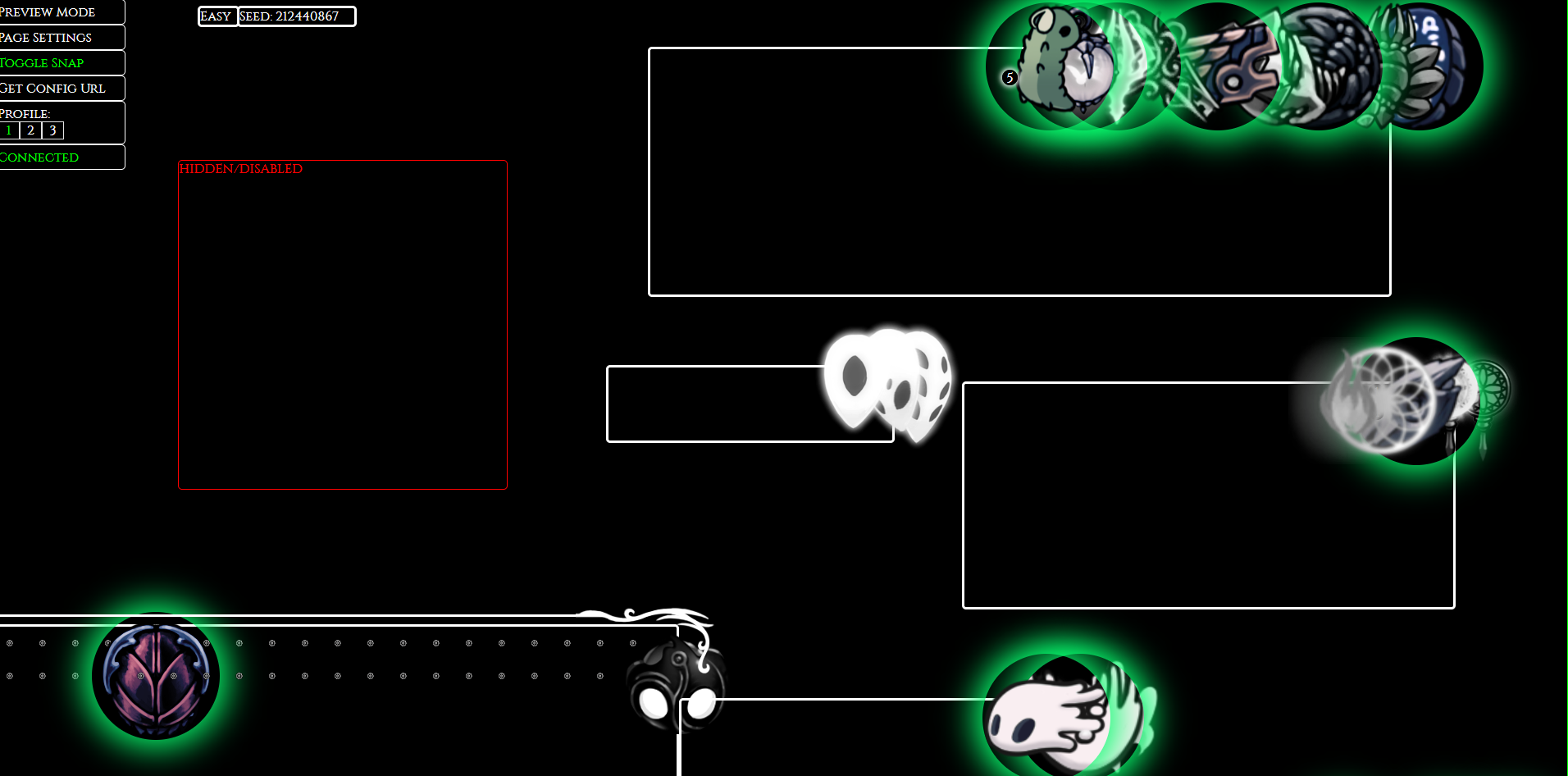
im trying to set up the tracker for randomizer but the icons are all huge and dont change with the scale option https://i.imgur.com/ak4h6gB.png
 neat prairie
I cant figure out how to get the skins for custoum knight how do i get skins
undone vault
neat prairie
I cant figure out how to get the skins for custoum knight how do i get skins
check fireb0rn's custom knight video, he has a google drive link in description
neat prairie
ok thx
dense shuttleBOT
Check the pinned messages for more information - https://cdn.discordapp.com/attachments/187137504393035776/823796522751623168/unknown.png
spring bane
That worked the first time.
 wispy arrow
I can't get the multiplayer mod to work. is there a guide I could follow?
pliant lantern
wispy arrow
I can't get the multiplayer mod to work. is there a guide I could follow?
Check the Multiplayer Procedure message in the pins if you're using the version that's on the Mod Installer, and make sure that you both followed each step.
Personally, I'd recommend using HKMP (https://github.com/Extremelyd1/HKMP) instead, which isn't on the installer at this time, but is a lot easier to use and is actively being developed. If you choose to use it, it does have a dedicated support server linked in that GitHub page.
 brazen tree
Is there a guide to install the randomiser 3 mode !?
wispy arrow
pliant lantern
Check the **Multiplayer Procedure** message in the pins <:pinknight:816762055322...
thank you
pliant lantern
brazen tree
Is there a guide to install the randomiser 3 mode !?
Uh, not really? There's a wiki page for it, but it's very easy to install
You just need Mod Installer, and then install it
?i
dense shuttleBOT
Reminder: The mod installer (https://radiance.host/mods/ModInstaller.exe) and other modding resources can be found from the pinned messages. 
brazen tree
i have it but like where do i put it in my mod folder ?
pliant lantern
When you install it with Mod Installer, MI will tell you what other mods you need
Is there a reason you can't use the installer?
pliant lantern
The current version of Rando3 is on the installer, and it's the easier method to use.
Steam shouldn't give you any issues with it. Just make sure that you use the one from the message I linked ☝️ , and after you download it, you need to move it to you desktop and run it
brazen tree
oooh okok tyty
 vocal spoke
can you mod if you have it from the microsoft store?
 distant bear
hello, I just installed the debug mod because I want to see collision boxes, but once I get into the game I can't find it in the UI/find a bind for it. anyone know how that works?
as soon as I ask I immediately find it, figures lol
pliant lantern
vocal spoke
can you mod if you have it from the microsoft store?
Unfortunately, that version isn't moddable. Only the Steam and GOG versions are.
You can keep an eye on this site for a sale on a compatible version: https://isthereanydeal.com/game/hollowknight/info/ (note that many sites like Humble Bundle sell the games in the form of steam keys)
pliant lantern
distant bear
hello, I just installed the debug mod because I want to see collision boxes, but...
If you haven't yet, you may also want to install the "HitBox"mod. I don't remember the exact name offhand
vocal spoke
well guess ima buy the game again
 ember beacon
Hi guys! As someone who's pretty stupid and wants to create their first mod, how would I go about changing the sounds in the game? Would it be simply naming the audio file the same thing or something more?
pliant lantern
ember beacon
Hi guys! As someone who's pretty stupid and wants to create their first mod, how...
Something more.
I think that someone was working on a mod to help with replacing sound files, but I don't remember the specifics. You'll most likely need to make a mod file for it though, which will require learning the modding tools/API a bit. Info for that is in the pins in #archived-modding-development
ember beacon
pliant lantern
Something more.
I *think* that someone was working on a mod to help with replaci...
Alright! I'll have to figure it out. Thank you!
 astral sierra
Trying to get the enemizer to work, but haven't had much luck.
Aside from the no-clip setting that comes with it, all of the other options don't seem to do anything.
Is it just broken in the current patch, or am I missing something to get it set up properly?
Thought it might be because of item randomizer interfering, but I turned that off for the time being and enimizer still doesn't function.
All the other mods I have are just UI and skins related aside from QoL, so I don't think they'd affect it.
gloomy coral
Did you click on the randomize enemy button on the title screen
astral sierra
oh!
ah, I guess not ^^;
I suppose I was expecting it to be when you chose a file, or it randomized them in the game from the options.
Also for some reason it didn't do anything when I clicked at first from there, had to exit and relaunch
seems to be what I'm looking for, so thank you.
By the way, does it function with item rando on, then?
(I mean, certain rooms might not have skips working properly with the wrong enemies, but aside from that?)
hmm... I can generate a different enemizer seed from that start menu... but I still can't seem to launch one with it?
gloomy coral
astral sierra
Also for some reason it didn't do anything when I clicked at first from there, h...
Why did you exit and relaunch
If it lags it is because it needs to load 150+ enemies
And yes it does work with normal rando
pliant lantern
Fwiw, Enemy Rando has a weird first-time use bug, and you do have to exit and re-launch for the "Randomize Enemies" button to be there. (specifically, you have to go to Options > Mods and toggle "Enemy Randomizer" Off then On; then restart HK)
astral sierra
I relaunched it because originally when I clicked on the enemizer from the options it didn't do anything for some reason.
But I haven't gotten any lag, or loading screens outside of the usual mod stuff.
Hm, ok, I'll try that
Aha! took a...couple tries, but this one seems to have worked
Seems like I needed to force quit it instead of just exiting from the main menu. Either that or it was just coincidence. But I'm actually loading it in now, so thank you both for the help o/
Thanks, I hate it xD
Nah but seriously, should cause some good shenanigans.
Thanks again ^w^
 limber egret
faint hare
im trying to set up the tracker for randomizer but the icons are all huge and do...
limber egret
faint hare
im trying to set up the tracker for randomizer but the icons are all huge and do...
Fwiw, it looks like you're using the wrong tracker. There's been some updates.
GitHub
Simple Randomizer Tracker for HollowKnight. Contribute to slaurent22/HollowKnightRandomizerTracker2.8 development by creating an account on GitHub.
Use these ones
 haughty sonnet
Is Lightbringer compatible with CharmOverhaul and EnemyHPBar?
also, do you need to Launch Vanilla Hollow Knight first before adding mods?
native ice
haughty sonnet
Is Lightbringer compatible with CharmOverhaul and EnemyHPBar?
Lightbringer changes charms so best avoid using it with charmoverhaul, hp bars works fine
gloomy coral
haughty sonnet
Is Lightbringer compatible with CharmOverhaul and EnemyHPBar?
Probs not, yes
haughty sonnet
tysm for the help
novel bronze
yo does anyone know how to get the mod that shows you how many geo you spent, i saw skurry use it but cant find it anywhere
limber egret
I believe it is BingoUI
novel bronze
ty
 merry matrix
?saves
dense shuttleBOT
Saves
Windows File Paths: (Assumes Default Steam Install Path, Adjust accordingly for DRM Free or Non-Standard Steam Path)
Game Files: C:\Program Files (x86)\Steam\steamapps\common\Hollow Knight\```
** **
Mac File Paths:
```Save Files: ~/Library/Application Support/unity.Team Cherry.Hollow Knight/
Game Files: ~/Library/Application Support/Steam/steamapps/common/Hollow Knight/hollow_knight.app/```
** **
Linux File Paths:
```Save Files: ~/.config/unity3d/Team Cherry/Hollow Knight/
Game Files: ~/.local/share/Steam/steamapps/common/Hollow Knight/```
 lunar oak
https://www.nexusmods.com/hollowknight/mods/9?tab=description
will this disable acheivements?

Nexus Mods :: Hollow Knight
This Is a mod installer for hollow knight - designed to make mod installation a breeze. It grabs mods from the community drive, and puts them automatically in the correct folder. it is designed to mak
dense shuttleBOT
Reminder: The mod installer (https://radiance.host/mods/ModInstaller.exe) and other modding resources can be found from the pinned messages.
vernal rain
but it will not disable achievements
lunar oak
ok thanks
 coarse gorge
how do i install the multiplayer mod?
real jacinth
With the installer
fair briar
?i
dense shuttleBOT
Reminder: The mod installer (https://radiance.host/mods/ModInstaller.exe) and other modding resources can be found from the pinned messages.
pliant lantern
@manic monolith probably better to come in here, so as not to clog up the other channel
 manic monolith
yeah ok
so whenever i try to open the mod installer it says are you sure cause it was downloaded from the internet
pliant lantern
Did you take the .app file out of the .zip that you downloaded?
manic monolith
pliant lantern
Did you take the .app file out of the .zip that you downloaded?
huh?
the one with the blurry screaming thing with small limbs?
pliant lantern
The file you downloaded was a .zip, and it had another file inside of it
wheat orchid
manic monolith
the one with the blurry screaming thing with small limbs?
(Maggot prime  )
)
manic monolith
yes
pliant lantern
The Mod Installer itself should be on your desktop

And this is what you need to do to allow the app the run
 pliant lantern
Looks like it
wheat orchid
Maybe try modinstaller 2 or modinstaller.exe?
pliant lantern
It shouldn't be exe
manic monolith
wheat orchid
Maybe try modinstaller 2 or modinstaller.exe?
modinstaller 2 is the same i accidentally downloaded it twice
manic monolith
its in downloads
wheat orchid
Try putting it on your desktop
wheat orchid
not good with macs ¯_(ツ)_/¯
pliant lantern
Ideally, the app itself should be on the desktop. But it should be fine in a folder on the desktop
manic monolith
didnt work :|
pliant lantern
Just not in Downloads, because most OSs put extra security on that folder
manic monolith
i did it from desktop but it didnt work
gloomy coral
wheat orchid
(Maggot prime <:maggotprime:585690467505668107>)
its not maggot prime, its omega maggot prime
 pliant lantern
I'm trying to remember where the mod installer 2 log gets saved on Mac
gloomy coral
right click on the modinstaller and click on open package contents. then open the execuatble named modinstaller
manic monolith
gloomy coral
right click on the modinstaller and click on open package contents. then open th...
i had a feeling package contents would help, i was just looking at it
pliant lantern
gloomy coral
right click on the modinstaller and click on open package contents. then open th...
Wait is there an archive inside of the .zip‽

manic monolith
gloomy coral
right click on the modinstaller and click on open package contents. then open th...
 pliant lantern
Yeah, but then why would they need to show package contents?
manic monolith
i clicked show package contents and clicked contents and it gave me this
gloomy coral
pliant lantern
Yeah, but then why would they need to show package contents?
Bugs 🐛
for some people they need to open, for others it works 
pliant lantern
Anyone know of a good way to have a free/low cost MacOs VM?
I genuinely want to have a lil' one just to better understand the environment.
gloomy coral
Buy a macbook 
pliant lantern
gloomy coral
Buy a macbook <:smirkrad:588018548895645706>

manic monolith
can i close any of these tabs? also how do i work this thing lol
gloomy coral
you can close the finder window
manic monolith
gloomy coral
you can close the finder window
is that the one on the right
gloomy coral
the other window I'm not sure about just keep it open
pliant lantern
manic monolith
can i close any of these tabs? also how do i work this thing lol
The tabs stay open, but you can close the installer wherever you're done picking mods.
Click to install any mods that interest you (ideally you want to only do a few "game affecting" mods at a time, to prevent conflicts)
They should automatically get their dependencies (those you can have lots of without worry), like ModCommon, Vasi, and SereCore
You may need to click "update" on the API once, as I can't remember if that has been fixed yet or not, but if it keeps asking to update after, then ignore it
And there should be an arrow next to each mod name, that gives you a description of what the mod does
 dapper egret
well you can use the modinstaller in the pins
and the location of the mods folder is also in the pins
gloomy coral
manic monolith
how do i install a mod?
click on the box named installed
dapper egret
now for a qustion: my sister is trying to use custom knight but when launching into the game and pausing she sees no skin selection window
the mod seems to have loaded fine and there are 2 custom skins in the directory but it doesn't seem to appear
gloomy coral
screenshot the directory
dapper egret
it's mac, blabla/managed/mods/custom_knight
gloomy coral
the "blabla" is the reason for the issue
for mac the path is content -> managed -> mods
dapper egret
oh really
 manic monolith
gloomy coral
click on the box named `installed`
manic monolith
gloomy coral
click on the box named `installed`
sorry had to go for a bit
i clicked that box
it just says modding api is installed
gloomy coral
i dont get you
 dapper egret
yeah so if you launch the game you should have rando installed now
dapper egret
you can close the modinstaller now
manic monolith
and terminal?
dapper egret
yeah
dapper egret
I mean if you want to install/uninstall mods in the future
manic monolith
ok
any suggestions for enemy randomizer settings?
im using enemy randomizer and randomizer 3
if randomizer 3 is already randomizing rooms should i turn off room mode setting
or is that different
dapper egret
that is different
manic monolith
ok so i should just leave the settings?
dapper egret
leaving settings to default always works
pliant lantern
manic monolith
im using enemy randomizer and randomizer 3
For Enemy Randomizer, you may need to "activate" it
manic monolith
pliant lantern
For Enemy Randomizer, you may need to "activate" it
yeah got it :)
pliant lantern
Kk
 void hawk
Idk why but custom skins don't work for me. I have followed all the steps that multiple HK youtubers have shown but they still don't work.  Is there something specific I need to do to make them work?
pliant lantern
void hawk
Idk why but custom skins don't work for me. I have followed all the steps that m...
What OS are you on? And post a screen shot of one of your skin folders, including the path to it at the top
Also, a screenshot of your HK main menu can help
void hawk
I'm on windows
 fair briar
unzip them
pliant lantern
Yeah, you didn't follow the videos lol
All skins need to be structured exactly like the default one
So, not in .zip folders, and the pngs need to be the only thing in them
void hawk
Ok. I guess Fireb0rn lied to me
void hawk
I guess
limber egret
Ah yes. Fireborn lied. It's definitely not user error.
fair briar
just ask the question here
 reef mesa
is that I download the mod but it does not let me in so I think if there is another application to put mods
reef mesa
 reef mesa
how do I do that
real jacinth
what patch number is your game
reef mesa
wait a moment I'm in the hollownest pantheon
limber egret
...
gloomy coral
 ?
?
limber egret
Why would you ask while you're mid game 🙃
vernal rain
so?
reef mesa
start over all pantheon by hallownest
vernal rain
then #hk-general is the channel to go
fair briar
and the screenshot?
reef mesa
my game version is 1.4.2.4


 real jacinth
buy the game
vernal rain
then get out of this channel/server
limber egret
Then you can't mod it
Lol
Why would you ask for help when you didn't buy the game?
 bleak belfry
ayo im on mac trying to mod hollow night but like honestly im new to moding. can someone help me with an invincibility mod or something?
limber egret
Download the mod installer for Mac from the pins
bleak belfry
word
limber egret
Then you want debug mod
bleak belfry
can i find that in the pins too?
limber egret
No, that's on the mod installer
When you download it, move it to your desktop, then open it
bleak belfry
check
limber egret
There's a bunch of mods on there
manic monolith
hi guys
im using the randomizer
and the miniboss fight in crossroads
before hot spring
is broken
nothing spawns
real jacinth
reload the game and go back to there. or noclip through the doors
that's why that option is part of enemy randomizer
manic monolith
can i change options to noclip and then change back in the game?
fair briar
Yes
manic monolith
ok i didnt know that cool
 storm rose
ok so here is my question.... how do i install the gun mod?
pliant lantern
- Mod Installer
- "Hollow Point (SEE README)
- Read the readme (you can view it from mod installer, or in the pinned ReadMe list)
 jovial adder
How would I go about changing the in-game text?
 fickle parrot
Modding discussion is prolly a better place to ask imo
gloomy coral
jovial adder
How would I go about changing the in-game text?
what do you wanna change?
if you wanna change it for yourself you could use this https://github.com/TheMulhima/HollowKnight-ChangeIngameTextMod/blob/main/README.md
jovial adder
thank u
 lavish zodiac
does hollow knight on steam have a workshop
 orchid stone
hey nice i was about to ask what mod relyea used to get noclip and items and stuff but i scrolled up and found it
i dont think it does
lavish zodiac
ok
novel bronze
Hey guys I need a bit of a help
I installed some mods and now my game language is in some weird symbols
vernal rain
disable/uninstall arts mods
novel bronze
Thanks a lot!
 fading canopy
Hello, i used the wondows mod installer i choose the path for the mods but now, my game don't have the mods.
pliant lantern
fading canopy
Hello, i used the wondows mod installer i choose the path for the mods but now, ...
- What OS are you on?
- Where did you get Hollow Knight from?
- Which Mod Installer are you using, and where did you get it from?
fading canopy
Os ?
 tame badger
Hi guys! What is the mod to have ennemies totally randomized (the one I have currently is that all mob of one kind are the same)
 crimson copper
Can someone plz tell me how do I download the AK-47 mod? I saw it in a YT video and I thought it would be funny to try
pliant lantern
fading canopy
Os ?
Operating System, although I assume it's windows, since you used the Windows Mod Installer.
real jacinth
There's like 3 pinned
tame badger
real jacinth
Read the readme. Change your randomization settings

I don’t find the place to change enemy rando settings
Just items
pliant lantern
crimson copper
Can someone plz tell me how do I download the AK-47 mod? I saw it in a YT video ...
Use the Mod Installer. Read the Mod Summaries in the pins to see what you want.
Hollow Point has a lot of extra info you'll need to read in the ReadMe too
pliant lantern
tame badger
Read the ReadMe of Enemy Randomizer. All ReadMes are pinned if you have an issue opening/finding them.
tame badger
Ok thanks
 novel heart
Hi, im having some issues getting modinstaller2 to work under linux using Hollow knight 1.2.2.1. My game runs fine prior to running modinstaller2 to install the modding api and debug menu but after i install them the game black screens on start up. So far i've tried removing both mods (modding api and debug menu) and my game still blackscreens, i tried opening the game from command line to see if there were any messages i could use to debug but there's nothing that sticks out, the game gets stuck after initializing my controllers.
pliant lantern
novel heart
Hi, im having some issues getting modinstaller2 to work under linux using Hollow...
You can't use a Mod Installer for 1221
The Mod Installers only work for CP
novel heart
Ah ok that's what i thought you were going to say, hadn't read any documentation on it
Do you happen to know where i can get the modding api separately? I've tried to use the link from speedruns.com in the tutorial section but it seems the drive link is dead
pliant lantern
Are you using 1221 for speedrunning?
novel heart
Trying to at least
pliant lantern
Check #resources for some of the stuff you'll need. There are some specific 1221 mods for speedrunning. The current GDrives are pinned in this channel and #modding-discussion (IDK why the ones on SRC aren't updated )
The Mods GDrive is sorted by author, so you'll probably want to view it in List mode, and then there should be a folder with the older versions in it