#archived-modding-help
1 messages · Page 203 of 1
 novel bronze
Thanks
 west bane
should see something like this https://i.imgur.com/47SEMjb.png
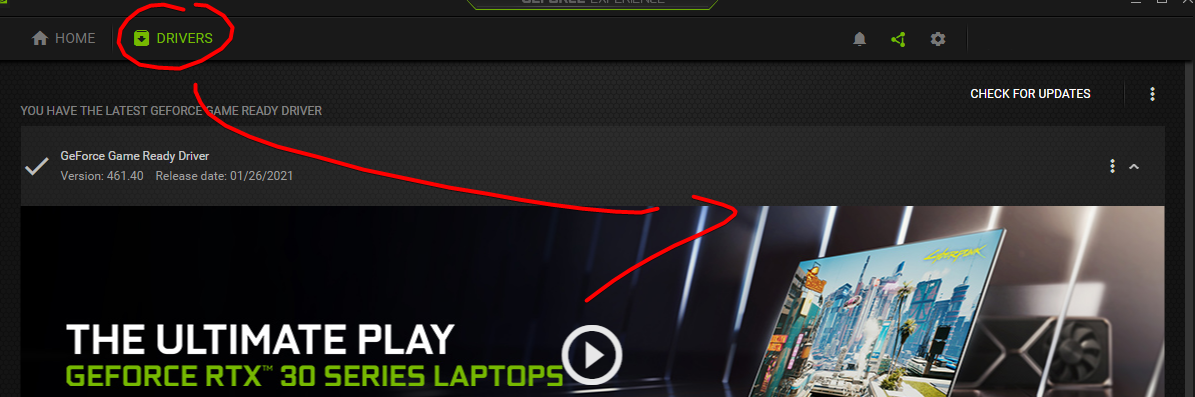
itll prompt you to dl drivers if you dont have them all the way up to date
 spring bane
I don't know exactly what easymodes does to healing, but you can probably fix it with save editing; check out qol's save editing features
west bane
make sure vsync is turned off in HK, that thing is ass
novel bronze
Ah ok
 warped gorge
is qol's save editing features in the mod installer?
perfect thing for me would be being able to revert values back to normal then redoing sage pantheon again but legit
 chilly prawn
quick q on 1221 debug - what's the easiest way to turn it off/on for switching between runs and practicing?
west bane
debug or the modding api cause you can't do actual runs if you still have the modding api installed
chilly prawn
oh modding api I guess then
west bane
in either case you can just duplicate the folder and have a vanilla one and a modded one, personally i have a vanilla and modding api and just swap the 2
west bane
since the actual modding api is just the assembly c-sharp if you saved the vanilla one you can just swap between the 2
spring bane
warped gorge
is qol's save editing features in the mod installer?
QOL is a mod on the installer. The gist is that you install the mod, load the save with it installed, then there's a json among your save files with values you can edit
I haven't used it personally, so you should probably read the readme for better instructions. There are also online save editors if you want.
spring bane
Compare the focus related values to those on a vanilla save and change then to match, I guess
warped gorge
so ive been winging it
spring bane
?mods
 dense shuttleBOT
Mods
Google Drive with Mods - https://drive.google.com/drive/folders/0B_b9PFqx_PR9Um9MeFZMV21oWGs
Installer - https://radiance.host/mods/ModInstaller.exe
Mod Summaries - https://docs.google.com/document/d/1cz5tcggpGofrBcM90XyTkMWjMelDHzugvQM6HpB13Ew
warped gorge
honestly this is my own fault LMAO
 real jacinth
Readmes are .md files
west bane
is there even focus speed values? 🤔
spring bane
I know readmes are on the Google drive; they are probably somewhere on your computer as well
real jacinth
Go into your OS settings and associate md files with notepad
warped gorge
ye they need them for stuff like quick focus and deep focus
spring bane
Uhhh there's whatever hollow point messes up
warped gorge
ye i was using hollow point also so that might also be the issue
not at the same time
spring bane
Ahh, then hollow points readme should have a good explanation of how to fix it
warped gorge
didnt know there was a big google drive thank u
west bane
what's the value called
 broken timber
THis always happens whenever I try to load mods in after verifying game files (using mod loader 2)
warped gorge
"Backing up your save is highly recommended**, due to some code changes left over modifications stay on the save file and I dont have the time anymore to fix it in the near future. This is mostly related to the focusing cost so please, please, please backup your saves first before installing it in an existing save so you wont end up needing to modifying your save just to fix it. **If you have the focus bug on your save file with the mod uninstalled, you'll need to manually edit your save file to the default values."
LOL
broken timber
oh, sorry for that
west bane
that's just the amount
warped gorge
ye it needs to be set to 33
this is the fix the modder suggests
using save file editor let me see if i can figure out what a json file is lmao
west bane
json doesnt generate til you run the game with qol
warped gorge
aye thanks v much
 vernal rain
let me see if i can figure out what a json file is lmao
a special formatted text file
 hasty raven
I suppose you're not wrong
dense shuttleBOT
Saves
Windows File Paths: (Assumes Default Steam Install Path, Adjust accordingly for DRM Free or Non-Standard Steam Path)
Game Files: C:\Program Files (x86)\Steam\steamapps\common\Hollow Knight\```
** **
Mac File Paths:
```Save Files: ~/Library/Application Support/unity.Team Cherry.Hollow Knight/
Game Files: ~/Library/Application Support/Steam/steamapps/common/Hollow Knight/hollow_knight.app/```
** **
Linux File Paths:
```Save Files: ~/.config/unity3d/Team Cherry/Hollow Knight/
Game Files: ~/.local/share/Steam/steamapps/common/Hollow Knight/```
 vague ravine
warped gorge
vague ravine
warped gorge
aha brilliant
thanks so much
this is the bit that was modified i think
by easymode and hollow point respectively
i wont be making this mistake again lmao
hasty raven
Oh, is there an issue that causes all geo to become invisible when switching Custom Knight skins? Happened to me every time before I just disabled it
Oh yeah, I've seen that as well
west bane
yeah, just switch off the skin and switch back, though not guaranteed to solve it
hasty raven
That's what I was doing initially, except it seemed to get worse the more often it happened. I think it could be a mod interaction, but I haven't debugged it to try and find out yet.
west bane
mem issue if i'm not mistaken
hasty raven
I could believe that. I do usually have other programs open and something could be getting confused about allocating vram
west bane
HK has an issue with vram
 brittle stump
hey folks, i'm having this issue and i'm unable to find an answer to it in past messages / online, can anyone give me a hand?
warped gorge
hmm strange
save is fixed but obviously game requires a save and quit which will then revert the value of focus needed to 3
gonna keep trying
sorry to stick about with this issue you guys have been super helpful so far
i really appreciate it
 true pendant
how do i access %APPDATA%
vernal rain
copy paste it into the address bar at the top of the file explorer
true pendant
is it acessible through regedit
warped gorge
let me try an uninstall
one second mrdead they posted above
just paste the line into your document
true pendant
thanks
hasty raven
You can also paste it into the win+r prompt
warped gorge
YES NORMAL FOCUS VALUES
ok im never cheating in a video game again lmao
this has taken hours
thanks massively for your help
that fella on youtube was not lying modding community on this discord exceptionally understanding
true pendant
broken timber
THis always happens whenever I try to load mods in after verifying game files (u...
this is happening with me as well
brittle stump
brittle stump
hey folks, i'm having this issue and i'm unable to find an answer to it in past ...
sorry to post this again i'm just really having trouble. been working on it for an hour and whenever i try to link hollow_knight through the modinstaller it just crashes and gives me an error :(
real jacinth
Show the menu where you're selecting the file location
 bitter rivet
i keep getting this screen when opening the game
the bar loads and then stops here
west bane
are you using a controller
bitter rivet
i have 1 plugged in
west bane
unplug then see you hit the title screen when relaunching
after that you can plug it back in if you desire
 fathom flare
west bane
fathom flare
west bane
?i
dense shuttleBOT
Reminder: The mod installer (https://radiance.host/mods/ModInstaller.exe) and other modding resources can be found from the pinned messages.
 unique kite
A question about the bench warp, according to the readme, there is a bench warp button, which would that be?
 limber egret
Press pause
unique kite
pause by controller or by keyboard?
spring bane
It's something on the pause screen you click
 glass nexus
the modding api text isnt showing up when i launch hollow knight, when i extracted the api i replaced all of the files it asked for too
too my knowledge i havent done anything wrong yet it isn't launching with the text in the topleft
glass nexus
yes
glass nexus
that is the api im using
limber egret
Oh
That's awkward 👀
Did you get the most recent one? There was one with an issue.
glass nexus
in the google drive right?
glass nexus
do i extract it to hollow_knight_Data?
limber egret
It's just a dll file no extracting necessary
But you put it in that folder I believe, yeah
It should already have one in it that you're replacing.
 potent zodiac
I am having the same problem as yesterday where in HK mp servers my friend is frozen
 rustic sierra
hello there
so i was playing with mods, it was great, but i want to uninstall them so i can teach my brother how to play. most of the mods i had on unenabled and uninstalled just fine, but the one called "Modding API Windows" doesnt seem to comprehend that, as whenever i try to take it off it just re installs itself. is there any way i can get rid of it and keep it from turning itself back on again? Thank you. (I am using ModInstaller 2 for mac)
 wheat orchid
rustic sierra
hello there
so i was playing with mods, it was great, but i want to uninstall th...
wheat orchid
rustic sierra
hello there
so i was playing with mods, it was great, but i want to uninstall th...
Go to steam, right click hollow knight, click properties, click local files, click verify integrity, I don’t care that files didn’t validate afterwards, that’s expected. Just don’t open mod installer until you want mods again and you’re good
rustic sierra
wheat orchid
Go to steam, right click hollow knight, click properties, click local files, cli...
alright. thank you!
 elder galleon
Hey does anyone know how to reset my nail damage in the debug mode? I have no idea what it was before I started messing with it
west bane
elder galleon
but I don't know the original value
west bane
look it up
 barren locust
When I select the hollow knight file path on ModInstaller2 for mac I get this error
Pastebin
Pastebin.com is the number one paste tool since 2002. Pastebin is a website where you can store text online for a set period of time.
I used this file path:
~/Library/Application Support/Steam/steamapps/common/Hollow Knight/hollow_knight.app/
brittle stump
barren locust
I used this file path:
~/Library/Application Support/Steam/steamapps/common/Holl...
i just fixed it for myself, follow the chat from here!! it is a wonderful thing haha
 slim beacon
can anyone link me to the most recent updated mod installer for hk?
 nimble sky
the pins?
slim beacon
bc whenever i play the gun mod theres just a random 99999 and my gun immediately turns into a shotgun
pins?
spring bane
?i
dense shuttleBOT
Reminder: The mod installer (https://radiance.host/mods/ModInstaller.exe) and other modding resources can be found from the pinned messages.
slim beacon
kk
spring bane
Or yea, the pushpin in the top right
slim beacon
does anyone know why thats happening to me?
that theres just a random 99999 and my gun immediately turns into a shotgun
west bane
no visual representtion i sleep
 craggy perch
where api
west bane
should isntall automatically when you launch modinstaller 1, if 2 it's listed on the installer
 warm helm
Are there any good resources for someone who has little to no experience coding to learn how to mod this game? I've already thrown together art assets for a few new weapons but I'm not sure where to go from there
warm helm
thanks!
 pastel bone
warm helm
Are there any good resources for someone who has little to no experience coding ...
pastel bone
warm helm
Are there any good resources for someone who has little to no experience coding ...
I'll never pass up the opportunity to recommend Sebastian's beginner C# tutorials involving Unity https://www.youtube.com/watch?v=_cCGBMmMOFw&list=PLFt_AvWsXl0fnA91TcmkRyhhixX9CO3Lw

Welcome to this introduction to game development. We'll be starting from the beginning, so no prior knowledge of programming or the Unity game engine is required.
Unity can be downloaded here: http://unity3d.com/get-unity
Watch episode 01: https://youtu.be/9iCnjdXEfMA
If you'd like to support these videos, you can make a recurring monthly don...
warm helm
thanks!
 stark saddle
when making sprites is it possible to increase the size of the red box?
 smoky skiff
Sebastian Lague is a god
pastel bone
His videos are fantastic
stark saddle
trying make a Hollow knight customknight but his horns are too tall
dense shuttleBOT
Reminder: The mod installer (https://radiance.host/mods/ModInstaller.exe) and other modding resources can be found from the pinned messages.
barren locust
brittle stump
i just fixed it for myself, follow the chat from here!! it is a wonderful thing ...
wait but how did you fix it?
warm helm
@west bane to make a mod
real jacinth
you don't need unity at all to make mods
 thin glade
so i was doing a room + item randomizer run and i was able to break the black egg seal despite never obtaining herrah (i checked in the log just to be sure i didn't forget about picking it up). is this intended?
 twilit crescent
thin glade
so i was doing a room + item randomizer run and i was able to break the black eg...
twilit crescent
thin glade
so i was doing a room + item randomizer run and i was able to break the black eg...
Did you pick up the “dreamer” item? If you play with duplicate major items it gives you an extra dreamer in the world (as well as a few other extra items) and you only need 3 of the 4 dreamers
 hallow granite
can i play this game on an intel i5 laptop?
kinda wanting to play around with mods
 gloomy coral
hallow granite
can i play this game on an intel i5 laptop?
gloomy coral
hallow granite
can i play this game on an intel i5 laptop?
which i5 gen and which gpu
i have a i5 8th gen and mx 130 and i can run the game (and mods) smoothly
hallow granite
gloomy coral
i have a i5 8th gen and mx 130 and i can run the game (and mods) smoothly
inside core i5 and windows 7 idfk what the other stuff is
hallow granite
gloomy coral
i have a i5 8th gen and mx 130 and i can run the game (and mods) smoothly
pls help
west bane
what exactly do you need help with
 abstract moss
 hard moon
hello,can i ask something
whats the difference of installing modinstaller to modinstaller 2
west bane
mi2 better for mac, for windows no real diff i prefer mi1
hard moon
ok thank u
 blazing stump
Do you know how you can get flames for grimmchild with debug mod without instantly upgrading it?
Or better said I want to fight nkg, but I have bannished the troupe in my original playthrought so I now want to fight him earky, because I don't wanna play through the whole game again just for this fight.
limber egret
You can fight him in Godhome on your original play through if you want
But if there's not a button for Grimm Flames then no there isn't.
blazing stump
Okay I don't find him in Godhome so I'll go to the regular community thanks for your help😃
gloomy coral
hallow granite
pls help
Match your computer specs with the specs on Steam. You can find your specs on the about tab in settings
 chrome bridge
can you mod on mac?
brittle stump
barren locust
wait but how did you fix it?
you need to download publish and use terminal commands to run mod installer from there
wheat orchid
slim beacon
does anyone know why thats happening to me?
When starting a new save, start the save, exit and save, restart the game, load the save. The mod temporarily breaks on save creation
 real helm
Hi! I'm sorry if it's the wrong channel... Is there a mod wich display what you have collected? In order to keep up progresses?
wheat orchid
Player data tracker can do that.
Doesn’t display in game though
Meant for use for streaming or recording with obs
limber egret
You could potentially use RandoMapMod?
I have no idea if that works outside of rando
real helm
I tried using player data tracker but I couldn't understand how to display them... So it's only for streaming? Damn...
hallow granite
gloomy coral
Match your computer specs with the specs on Steam. You can find your specs on th...
thank you so much man
real helm
limber egret
You can download OBS to look at it
So the only way would be having obs on a second screen and check that?
real helm
Thank you everyone, btw 
limber egret
real helm
So the only way would be having obs on a second screen and check that?
You can also just look at it on the website
real helm
limber egret
You can also just look at it on the website
Excuse me, which one?
limber egret
The link you would put on OBS for the browser source is an actual web page that you can open and view
 exotic grotto
me and my friend have typed in the same thing on both our games and we still aren't together when we click connect can you guys help. I'm on windows and my friend is on mac if that has anything to do with it
multiplayer mod
wheat orchid
Are you doing hamachi, port forwarding, lan, or something like hamachi
wheat orchid
You need to do one of them or you can’t connect
wheat orchid
wheat orchid
Are you doing hamachi, port forwarding, lan, or something like hamachi
This message
Did you watch everything
exotic grotto
yes
wheat orchid
Well I know you didn’t
exotic grotto
what is port forwarding tho?
wheat orchid
Because if you did, then you would know there was a link to a discord server for help with this in the description
wheat orchid
exotic grotto
what is port forwarding tho?
Look it up
exotic grotto
kk
nimble sky
4:40 there's a section called "Hamachi guide"
wheat orchid
Hamachi is suggested because you don’t use real ips
exotic grotto
thx
wheat orchid
While port forwarding does use real ones
spring bane
real helm
Thank you everyone, btw <a:shadebob:682779302240190514>
If you're stuck on a vanilla save someone posted a save analyzer in discussion i think... and I swear there was a mod that displayed grubs saved / charm notches / some other stuff for bingo on the pause screen, but I can't find it on the installer
 thorn trench
So I've been trying to use hollowpoint lately and every single time I start a new game it's always bugged, by that I mean the gun has like a 6 second cooldown where I can't shoot and when I am able to, it doesn't shoot out anything nor does it do damage, any way I could fix it?
wheat orchid
spring bane
If you're stuck on a vanilla save someone posted a save analyzer in discussion i...
Bingo ui mod? 90% sure it’s on the installer
wheat orchid
thorn trench
So I've been trying to use hollowpoint lately and every single time I start a ne...
Creating new games is bugged. Create, exit the game, load the created save
thorn trench
It worked, thanks a lot, can't believe I couldn't think of that 
spring bane
wheat orchid
Bingo ui mod? 90% sure it’s on the installer
I'm probably just blind; thanks for remembering the name
 dry flax
Hey, so I'm trying to install the Enemy Randomizer mod, but either:
- The save files get bugged.
- The mods UI doesn't even show up.
Are there any basic operations which I'm not doing that may be causing this? ModCommon, ModConsole, Modding API Windows, SeanprCore and WeaverCore are all installed and enabled.
Everytime I run the ModInstaller2 the return is basically this:
(they never load, btw)
The way I have to deal with this is to go to the local files, check for integrity and steam redownloads two of them, which always seem to be corrupted by the modinstaller.
limber egret
Go delete the two files named moddingapi in your saves
limber egret
?saves
dense shuttleBOT
Saves
Windows File Paths: (Assumes Default Steam Install Path, Adjust accordingly for DRM Free or Non-Standard Steam Path)
Game Files: C:\Program Files (x86)\Steam\steamapps\common\Hollow Knight\```
** **
Mac File Paths:
```Save Files: ~/Library/Application Support/unity.Team Cherry.Hollow Knight/
Game Files: ~/Library/Application Support/Steam/steamapps/common/Hollow Knight/hollow_knight.app/```
** **
Linux File Paths:
```Save Files: ~/.config/unity3d/Team Cherry/Hollow Knight/
Game Files: ~/.local/share/Steam/steamapps/common/Hollow Knight/```
limber egret
This one
dry flax
oh, thanks, didn't know that
limber egret
Np
dry flax
Thanks, that did make the interface come back up and the saves to be restored. But there's a dark translucent square at the top right corner now, which does not disappear.
What's up with this?
dry flax
Hang on
 limpid root
can someone send me a link to a enemy randamizer mod
wheat orchid
Get it from the mod installer
limpid root
where
limber egret
Did you look on the mod installer?
limpid root
no i want to know where mod installer is
vernal rain
wherever you downloaded it to
dry flax
Pinned messages
vernal rain
or that
dry flax
limpid root
ok
real jacinth
bahahahaha. did you seriously just press E here expecting the mod to show up? hahaha. omg
limber egret
What site?
limpid root
the mod installer site
dry flax
'-'
Dude, you must be either 8 or 68, all due respect.
Just download the file at "pinned messages"
install it, and then you're gonna have a list with all possible mods to install
amongst which there will be enemy randomizer
 storm bough
please be sure to read the Readme tab on the enemy randomizer inside the mod manager as well. there are clear instructions for you to follow for setup inside there
limpid root
nvm
 tough anchor
I’m trying to mess around with debug but when I try to use cheats, it doesn’t enable them. When I click on them, nothing happens (IE the text doesn’t turn orange). The strange thing is that (to my knowledge) everything else works, including charms, skills, and items.
wheat orchid
tough anchor
I’m trying to mess around with debug but when I try to use cheats, it doesn’t en...
Disable more saves
 mystic swift
is it safe to download mod installer for windows?
tough anchor
mystic swift
is it safe to download mod installer for windows?
Yeah
wheat orchid
Yes
tough anchor
I did it myself
mystic swift
is the game?
wheat orchid
It says it’s a virus bc we don’t have it signed
Why would we pay for that when we have proof it’s not a virus by making it open source and it’s on the official hk discord which is also partnered with discord
mystic swift
a k thank y
 tight iron
Ive been trying to use the HollowPoint mod but whenever i use it, i can see the gun on my back but when i press focus to switch to it, it doesnt allow me to
limber egret
Did you read the readme?
tight iron
yes i have
limber egret
Did you create the save file, then close it, then reopen it?
real jacinth
did you comprehend the readme?
tight iron
sweet, i think it works now. thank you
 plain loom
which mod is the gun mod on the mod launcher?
wheat orchid
Hollow point
plain loom
thanks!! why does it say readme when there arent any applications that open it?
real jacinth
because there are
plain loom
ahh gotcha thanks
 prime ibex
suggest mods for Hollow knight pls
novel bronze
help guys how do i shoot my gun in hollow point mod
novel bronze

slim beacon
can anyone help me?
 tranquil copper
probably
slim beacon
so whenever i use the hollow point theres a random 99999 andmy gun turns into a shotgun when i take it out when i start a new game
and it doesnt shoot
or do damage
tranquil copper
so youve not readen the readme
tranquil copper
so youre not starting a new file?
slim beacon
iam but it still gives me a shotgun
tranquil copper
probably because youre supposed to continue a started game
slim beacon
i have modcommon and andhollow point
and its a newfile
oh ok really?
im pretty sure u dont have to
oh u do
tranquil copper
This mod doesnt work on a new save, To fix this you must first create the new save, quit to main menu, and load the save again. This will then make the mod work as intended, this applies to both Regular and Godmaster new saves.
mfw you read the readme
novel bronze
i Cant Found the Folder to Install Mods in my mac
 junior cedar
Is there a custom Knight skin that works with hollowpoint?
brittle stump
novel bronze
i Cant Found the Folder to Install Mods in my mac<:hollowcry:648960980000440400>
have you got the modinstaller set up?
novel bronze
yep
brittle stump
have you followed the filepath in pins inside modinstaller2?
brittle stump
when you open modinstaller2, does it prompt you to select a filepath?
novel bronze
yes
brittle stump
and are you able to go library > application support > steam > steamapps > common > hollow knight > hollow_knight?
novel bronze
yes
brittle stump
what happens when you hit "open"?
brittle stump
like, select the game and then hit "open" in the modinstaller's menu
that opens the game?
novel bronze
yep
brittle stump
hmmm
novel bronze
i will try again
brittle stump
okay
what worked for me was following the steps from here #archived-modding-help message
let me know, ping me as i might not be around immediately
 true pendant
im trying to start hk but the saves disply "Loading..."
it started to go wrong out of nowhere
i was playing ti with randomizer just fine
until today
brittle stump
novel bronze
it Worked Txzzzzzzz Herm <:sherma:547359429234917376>
i'm so glad it did!! enjoy your mods 
novel bronze
real jacinth
true pendant
until today
do you have a question, or are you just sharing?
true pendant
im looking for a fix if you know one
dense shuttleBOT
Saves
Windows File Paths: (Assumes Default Steam Install Path, Adjust accordingly for DRM Free or Non-Standard Steam Path)
Game Files: C:\Program Files (x86)\Steam\steamapps\common\Hollow Knight\```
** **
Mac File Paths:
```Save Files: ~/Library/Application Support/unity.Team Cherry.Hollow Knight/
Game Files: ~/Library/Application Support/Steam/steamapps/common/Hollow Knight/hollow_knight.app/```
** **
Linux File Paths:
```Save Files: ~/.config/unity3d/Team Cherry/Hollow Knight/
Game Files: ~/.local/share/Steam/steamapps/common/Hollow Knight/```
real jacinth
reading is hard
true pendant
im kinda dumb
true pendant
real jacinth
reading is hard
true
thank you so much
it worked
btw do you know what can cause this issue?
novel bronze
'-'
real jacinth
the moddingAPI
they are settings files. if they don't get generated correctly, they break stuff
so deleting them makes them generate again
 night ember
Hey guys! I wanna make a mod, what sould i do?
real jacinth
go to #archived-modding-development, read https://radiance.host/apidocs, look at other mods for examples
night ember
real jacinth
go to <#327461802311155714>, read https://radiance.host/apidocs, look at other m...
Ok thanks
glass nexus
the modding api text isnt showing up when i launch hollow knight, when i extracted the api i replaced all of the files it asked for too
too my knowledge i havent done anything wrong yet it isn't launching with the text in the topleft on 1.2.2.1
someone told me yesterday to use the csharp in resources and that also didnt work
real jacinth
too my knowledge i havent done anything wrong yet it isn't launching
by definition this means you didn't do something right
real jacinth
I don't either. without seeing what you did
and people misread all the time
so....
 spark elm
does hollow knight multiplayer mod work on Mac?
 frozen forge
still having problems connecting in multiplayer mod
real jacinth
yes
frozen forge
we can see each other, but are stuck standing still
real jacinth
try again
frozen forge
we tried everything
real jacinth
make sure you're following the correct procedure
frozen forge
reconnecting, reloading the save file
we're both connected to a hamachi network, i'm the one hosting and have both Client and Server mod installed, friend has Client only
nothing works
real jacinth
Connect with people in hamachi.
host: has server and client mods. connects first to their own IP
guest: has only client mod. connects second to the host's IP
IP being the IP listed in hamachi
and make sure your internet connections are stable
frozen forge
real jacinth
Connect with people in hamachi.
host: has server and client mods. connects first...
that's exactly what we did
frozen forge
my friend is using mobile internet, could that be the problem?
real jacinth
any type of mobile connection is not stable
frozen forge
i saw him moving earlier though
real jacinth
wifi or otherwise
frozen forge
but he couldn't see me at all
after we both reconnected, we can see each other but are stuck
wheat orchid
Probably just bad connection then
frozen forge
i'll ask him if he can do anything about that
junior cedar
i've seen vids of hollowpoint and custom knight mods working, but everytime i choose a skin from my list the sprite either turns white or theres a floating gun, what am I doing wrong?
real jacinth
dunno. need more info
junior cedar
okay, running hollowpoint, customknight, QoL, Randomizer3, debug, enemy rando. load a save, run around as vanilla knight firing the gun, playing normally, but when i decide to choose another skin by pausing and selecting the skin, either the skin wont change, or the knight disappears entirely leaving a floating gun, or the knight becomes a white box as does any animation art
spring bane
Get modcommon?
real jacinth
show your skin folders?
junior cedar
it shows the folders, and where is mod common?
junior cedar
junior cedar
i dont see it on the installer i got from the nexus, lools like im gonna have to track it down
junior cedar
im missing it..the list is in alphabetical order it goes mantisgods, modconsole, moresave
junior cedar
lmao!
real jacinth
not sure why that's funny.
we don't endorse anything on that site or keep it up to date
so anything that's there is from random people placing it there
junior cedar
i like to laugh at my pain and suffering, it helps ease it
k, the new one has modcommon
lets go see whats broke
unique kite
not sure if this is the place to ask but what if a mask shard is missing?
Cause I'm at a location in which you should find one and its not there
well I'll first collect the others and figure it out
junior cedar
fun times lol
everything is normal till i switch skins, then knight disappears, i quit to menu and come back into game to this lol
real jacinth
well did you delete everything you had before? from the other installer
you also could just be running out of processing space. make sure your fps is capped
real jacinth
unique kite
Cause I'm at a location in which you should find one and its not there
Did you have any mods at any point? did you have any glitches? Did you alt+f4 at any point or have a game crash during pickups? if not, you probably just already got that shard
 minor quartz
Just wondering can you edit the Monarch Wings particles for Custom Knight. If not then we should make it a thing IF possible
real jacinth
a lot of customknight sprite changes do change the wings animation already
since the wings are part of the sheets that the mod loads
unique kite
well, I do have some mods, would that affect how if the mask shard at deepnest would be there?
spring bane
?i
dense shuttleBOT
Reminder: The mod installer (https://radiance.host/mods/ModInstaller.exe) and other modding resources can be found from the pinned messages.
spring bane
Fuck sorry I cannot reaf
unique kite
Mask Shard 12 would be found in Deepnest near the entrance via Fungal Core
according to a save file analyzer, I am missing it and its not there either
real jacinth
are you sure you're missing it
and didn't get it already
mask shards are an integer. there's no way to track which one's you've collected just by looking at your save
you'd have to look at scene data. which would only show which ones are gone
and again.... what mods do you have, because some mess with items and others dont
so whatever ones you're using would matter
unique kite
oh so the Hollow Knight Analyzer that someone here posted some time ago isn't accurate?
real jacinth
no clue what you're even talking about.
you can collect multiple mask shards from 1 pick up and it works just fine
b/c like I said.... the actual value is just a number
so what I said before still stands
Did you have any mods at any point? did you have any glitches? Did you alt+f4 at any point or have a game crash during pickups? if not, you probably just already got that shard
unique kite
Well I do have mods, give me a sec I'll show you what's active
As of currently these are the currently active mods I have on
real jacinth
and before?
"currently active"
what did you use before on this save
also also, this is way too many mods
you have like 3 alone that change charms
unique kite
really? I didn't encounter any major problems, also l do remember not checking one of the areas before so I'm going to check Stone Sanctuary
I found out the issue now
what I was doing was using the wikia to find out where I was missing any mask shards, and the "12th" one was located in Deepnest which I did get
the one I missed was in Stone Sancutary, sorry for causing issues about this
 blissful shard
Anybody got that problem where stag stations don't work after modding? it just doesn't let me buy them
real jacinth
what mods
blissful shard
I messed around a bit, but even when I uninstall everything it doesn't work
bit of progress though: when I use the "revert back to unmodded" dedicated button for safety, it says it's unable to locate vanilla hollow knight soooooooooo I guess fixing that might help XD
real jacinth
you didn't answer my question
blissful shard
I have no mods installed
I installed and uninstalled many, I don't know exactly which ones, but they were all from the same installer
 low saddle
um I just installed debug mod and accidentally bound load savestate to left click and I can't click the circle to change it
oh nevermind I fixed it
 strong basin
hey could anyone help me
I am trying to set up a randomizer where I am able to use the HollowPoint mod
I have the randomizer 3 mod in and all of the its required mods, a random enemy mod, and hollowpoint mod
only the randomizer seems to be working
though everything is enabled and shows in game under mods
novel bronze

 high elbow
can anyone help me using CustomKnight? when I try to change my skin in game, the skin doesn't change. the mod claims to be loaded, but when I select a different skin it doesn't change.
is there a step I'm missing?
@ me if someone can help, thanks!
strong basin
also jk I disabled and enabled it and it started to work
 keen radish
high elbow
can anyone help me using CustomKnight? when I try to change my skin in game, the...
keen radish
high elbow
can anyone help me using CustomKnight? when I try to change my skin in game, the...
can i see the file directory for the PNGs?
high elbow
nvm, fixed it, used the wrong folders
keen radish
alright!!
plain loom
i feel dumb asking but how do i pull out the gun in hollow point?
i feel like i tried everything on the keyboard
high elbow
thank you though!
keen radish
plain loom
i feel dumb asking but how do i pull out the gun in hollow point?
you use the focus button, just tap it
plain loom
its just the spell
just cuz i see the gun, does that still mean i correctly installed the mod or could i have messed up still?
 fair ibex
make sure you have modcommon
real jacinth
and leave the save and go back into it
like the readme says
the readme is very important to read
plain loom
i had modcommon off and when i turned it on, it didnt work still. i ended up turning off all of them and then starting from the start and it worked now lol
thanks so much for the help!!
can i stand still w hollow point or nah?
 white sage
how to get the jojo skin? my friend was not playing the game and he is a weeb so i asked him if he will play if he got a jojo skin and he said yes but now i see that jojo skin needs a challenge to be completed
fair ibex
jojo skin is private afaik
also your friend would have to do the challenge for the skin, not you 
keen radish
isnt there a kakyoin(or however its spelled) skin?
fair ibex
oh yeah right, that's public
 real jacinth
installer
real jacinth
attack
real jacinth
what a great screenshot that tells me nothing
novel bronze
Do I need to do some options to shoot
real jacinth
no
you press the focus button
if you read the readme, you will understand
it's the manual for the mod
spark elm
So how do I go about installing multiplayer mod on Mac I was going to use fireb0rns video but the installer doesnt seem to work
should I use the mod installer for mac that is pinned?
 little igloo
Are there cases where using some mods sends your game into loading hell?
even though I'm only using custom skin and dab mod lmao?
 kind cliff
I'm having some trouble with the mod installer
 ivory aurora
novel bronze
I have enough soul but still can't shoot
ivory aurora
novel bronze
I have enough soul but still can't shoot
Did you read the readme file?
ivory aurora
spark elm
should I use the mod installer for mac that is pinned?
Well, if you're on mac, I think the mac modinstaller would be a good idea
ivory aurora
little igloo
Are there cases where using some mods sends your game into loading hell?
As in, white rectangle loading bar, or something else?
ivory aurora
kind cliff
I'm having some trouble with the mod installer
Aight, what troubles
be a bit more specific
little igloo
it only happened once but it was in mid-game, loading screen with the knight on the bottom right
ivory aurora
Hm
I'm not sure what caused that
When did it happen?
I know customknight does a big loading bar at the start of the game
But idk what could do a weird load in the middle
you sure it wasn't just supposed to happen?
little igloo
idk man, I had to force close my game to get out of it
ivory aurora
Damn, that's weird
limber egret
If it was before THK that's a thing that sometimes happens with custom Knight on
west bane
?i
dense shuttleBOT
Reminder: The mod installer (https://radiance.host/mods/ModInstaller.exe) and other modding resources can be found from the pinned messages.
 dim stump
it says that it needs the most recents version
west bane
of what 🤔
dim stump
ModInstaller
west bane
that is the most recent version
west bane
what does this mean
west bane
depends how many mods you just installed lmao, if you have a controller unplug til you reach main menu
dim stump
so I unplug the controller until the main menu?
west bane
yeah
 burnt widget
and they were never seen again
little igloo
limber egret
If it was before THK that's a thing that sometimes happens with custom Knight on
it happened when I was just done crossing the lake, so idk, just after the shade skip, before getting the dream nail
at this point, i'm just gonna assume its a one-time thing and custom knight probably did some things
because I doubt a mod that let's you dab for 1 second is the reason for breaking room transitions to an endless loading hell
lmao
 teal horizon
so i got a question im trying to install the mod launcher but it says i have the incorrect path and i dont know how to fix that
little igloo
you double checked the correct path, right?
teal horizon
ummm
not really
i went in a chose hollow knight through the files but it still would not work
limber egret
Where did you get Hollow Knight?
teal horizon
steam
limber egret
Did you move hollow knight when you installed it?
teal horizon
nope
little igloo
it should've auto-detected where the game location is
limber egret
The only thing I can suggest is that you make sure you select the folder HK is in and not the HK app itself
This is a very common error
little igloo
Oh? well then
limber egret
Yeah, it should do it automatically, but yaknow.
Pretty sure my mod installer hasn't worked in the past six months so I don't mess with it anymore
teal horizon
i have no clue where i should put it tho
limber egret
Put what?
teal horizon
i dont even know how to tell you what im doing lol
limber egret
teal horizon
i went in a chose hollow knight through the files but it still would not work
You implied you know where your HK installation is here. Just select the folder, not the file itself.
little igloo
select the folder "Hollow Knight" not "hollow_knight_data"
teal horizon
yea i did that
little igloo
idk then, the only other thing I can think of is that you probably have the wrong version
teal horizon
im gonna move it and see if that works
so i moved it and now it works
idk why it was not working before
thanks for your help tho
limber egret
Oh, yeah, mod installer shouldn't be left in the downloads folder
 glacial patrol
i tried to run the mod installer and this pops up
wheat orchid
glacial patrol
i tried to run the mod installer and this pops up
Make sure you are on the most recent system update
glacial patrol
system update ?
wheat orchid
glacial patrol
system update ?
Windows/system update
 lime gulch
hello, does anyone know how to fix the game launch error when you install mods and the games stay on loading forever?
 pulsar egret
how do i regen in hollow point
wheat orchid
You continuously shoot enemies without getting hit
pulsar egret
ok
wheat orchid
lime gulch
hello, does anyone know how to fix the game launch error when you install mods a...
Is a controller plugged in/connected with Bluetooth
lime gulch
No
wheat orchid
What mods are on
lime gulch
Only the ones that install automatically
wheat orchid
So you didn’t install anything yourself?
lime gulch
wheat orchid
So you didn’t install anything yourself?
Only multiplayer client
lime gulch
But uninstalled the problem persists
wheat orchid
Are you on windows Mac or Linux
pulsar egret
and i cant sit at benches and the gun is making sounds and showing a white thing at the end of it but not working
wheat orchid
pulsar egret
and i cant sit at benches and the gun is making sounds and showing a white thing...
Are you starting a new save or loading a save
pulsar egret
starting a new save
lime gulch
Windows 10 Home single language build 20270.fe_relase.201124-1440
wheat orchid
pulsar egret
starting a new save
It breaks when doing that. Exit and save, exit the game, open the game, load the save
@lime gulch are you using mod installer or mod installer 2
lime gulch
wheat orchid
<@!638465518201733140> are you using mod installer or mod installer 2
Mod installer
wheat orchid
Ok
lime gulch
one
wheat orchid
Are you sure every mod is uninstalled
lime gulch
lime gulch
I've been there like 1 hour
wheat orchid
Go to your save files path and delete all files with ModdingApi in their name
?saves
dense shuttleBOT
Saves
Windows File Paths: (Assumes Default Steam Install Path, Adjust accordingly for DRM Free or Non-Standard Steam Path)
Game Files: C:\Program Files (x86)\Steam\steamapps\common\Hollow Knight\```
** **
Mac File Paths:
```Save Files: ~/Library/Application Support/unity.Team Cherry.Hollow Knight/
Game Files: ~/Library/Application Support/Steam/steamapps/common/Hollow Knight/hollow_knight.app/```
** **
Linux File Paths:
```Save Files: ~/.config/unity3d/Team Cherry/Hollow Knight/
Game Files: ~/.local/share/Steam/steamapps/common/Hollow Knight/```
wheat orchid
They will be regenerated correctly on opening the game
 sharp light
i restarted and turned off all mods (pressgtodab, debug,)
sharp light
isnt voidheart not supposed to take up 5 slots
wheat orchid
I’m guessing you turned kingsoul into voidheart with debug
sharp light
i only used debug for ss tho
lime gulch
I already solved the problem but if I use the mod installer 2 will it happen again?
wheat orchid
?
wheat orchid
lime gulch
I already solved the problem but if I use the mod installer 2 will it happen aga...
No
sharp light
screenshots
wheat orchid
Seems to happen randomly
sharp light
how can i do that?
wheat orchid
wheat orchid
Seems to happen randomly
This was meant towards @lime gulch
sharp light
oh
lime gulch
Well if a lot happens to me
lime gulch
I usually just uninstall the game
lime gulch
Because this is how the error is fixed
lime gulch
I wanted to see if I could definitely fix it so that it would stop happening to me
:3
wheat orchid
One way to fix it is not using mods, which uninstalling and reinstalling does
wheat orchid
lime gulch
I wanted to see if I could definitely fix it so that it would stop happening to ...
It’s not common, plus it’s really easy to fix
Just something mod users have to deal with
pulsar egret
what does the three white circles do?
wheat orchid
sharp light
how can i do that?
Get the Qol mod
pulsar egret
pulsar egret
what does the three white circles do?
in hp
wheat orchid
pulsar egret
what does the three white circles do?
Read the readme
pulsar egret
ok
lime gulch
sharp light
isnt voidheart not supposed to take up 5 slots
Have steam check files
wheat orchid
That won’t work
Uninstalling and reinstalling won’t fix that
Those are stored in the save files
That is why I’m suggesting save editing
sharp light
so how do i use QoL
lime gulch

wheat orchid
Run the save, save and exit the save
Exit the game
Go to your save files path
Open user#.json in notepad where # is the save slot
pulsar egret
wheat orchid
Read the readme
it doesnt work 
wheat orchid
pulsar egret
it doesnt work <:grubsad:316743976474509314>
I’ll give you a link in a min
sharp light
wheat orchid
Go to your save files path
in %appdata%?
wheat orchid
sharp light
in %appdata%?
Yes
lime gulch
Mod installer 2 is used in the same way as 1?
wheat orchid
pulsar egret
it doesnt work <:grubsad:316743976474509314>
GitHub
A Hollow Knight gun mod. Contribute to TTacco/Hollow-Point development by creating an account on GitHub.
sharp light
where are the save files in %appdata%
wheat orchid
?saves
dense shuttleBOT
Saves
Windows File Paths: (Assumes Default Steam Install Path, Adjust accordingly for DRM Free or Non-Standard Steam Path)
Game Files: C:\Program Files (x86)\Steam\steamapps\common\Hollow Knight\```
** **
Mac File Paths:
```Save Files: ~/Library/Application Support/unity.Team Cherry.Hollow Knight/
Game Files: ~/Library/Application Support/Steam/steamapps/common/Hollow Knight/hollow_knight.app/```
** **
Linux File Paths:
```Save Files: ~/.config/unity3d/Team Cherry/Hollow Knight/
Game Files: ~/.local/share/Steam/steamapps/common/Hollow Knight/```
wheat orchid
Also not in %appdata% actually
sharp light
alright im in save files
wheat orchid
They are in AppData, %appdata% brings you to roaming which is inside AppData
Ok
Open the file I told you to in notepad
sharp light
did that
wheat orchid
Use ctrl + f to find charmCost_36
Then change the number next to it from 5 to 0
Then save the file
Then open the game, load the save, then save and exit the save
Now it’s fixed
You can disable Qol if you want
sharp light
tysm
wheat orchid
Np
 glad cedar
Hello, folks. Can someone please help me with the Darkness mod? I downloaded the folder and put the mod file into, obviously, the mods directory. The modinstaller says that the mod is installed and enabled but it doesn't work in the game. I even started a new save file for it but it didn't do anything.
 silent kite
hey can anyone help me with a problem that i'm having with the debug mod? Basically I have my left click set as my attack button in game, and i also accidentally set it to load the knight back to the last bench sat at (aka reload). If I pause the game and then try to click on something then the game will freeze and crash, and I don't know how to fix it since I can't click on anything in the mod settings. I have also tried reinstalling the mod, the mod installer, and the game itself, nothing has worked so far.
 main grail
can anyone help with the hollowpoint i can shoot but there is no projectiles it only does damage if they are almost on top of me
fixed it
 oak patrol
hello, i was going to install the hollow point mod on the mod installer and i would like to know if the "(see readme)" is the readme.md and how do i read the .md file?
 rancid crane
My HK uninstalled itself on steam today while i was sleeping and all my mods are uninstalled. when i reinstall one, nothing happens. Does anyone know a reason or a fix for this? Thank you
silent kite
yep
you have to reinstall the mod installer, the problem is that it created a route when it originally was installed but you removed the game
so as long as you reinstall the mod installer everything should be good
and it'll also remember what mods were installed/enabled
rancid crane
hmm i do love it when modinstaller has 134% download completion
silent kite
lmao
rancid crane
oH nO iTs a ViRuS
silent kite
i just wish there was some way to reset the debug mod settings, cuz now i can't play the game with it enabled :/
unless there is one and idk about it
rancid crane
well you can just make a new file, debug in the things you had, and noclip everywhere you had already been to fill in the map
then uninstall
also i still dont have mods, how do i change install path
silent kite
i would do that but i can't click on anything without it crashing the game lol
if that doesn't work then idk, when i reinstalled it it had no problem finding the game
rancid crane
Yea, but my hollow knight path probably changed when steam uninstalled it
when i opened it it didnt occupy the space where my bookmark was
it made a new HK app
silent kite
bruh
rancid crane
heres an amazing Photoshop of it after i removed the old hollow knight app
thats what it did, it didnt recognize that it was the same app
When someone knows how to change the modinstaller 2.0 mod install path, ping me
 low pike
@ me too bc i cant figure out how to work it on mac
searched in chat for the same question and ppl were like just checky checky the boxy but i think there's another step im missing
 spice oasis
hi every one
i have a question in new to hollow knight being modded and i was wondering is any of you knew what website you have to go on to get custom skins?
brittle stump
spice oasis
i have a question in new to hollow knight being modded and i was wondering is an...
spice oasis
thank you
brittle stump
low pike
@ me too bc i cant figure out how to work it on mac
i just did it on mac a few days ago so i may be able to help
are you not able to select hollow_knight as filepath?
brittle stump
oh i was talking to munchsnax haha
brittle stump
no worries!!
low pike
brittle stump
oh i was talking to munchsnax haha
no i did the filepath thing im at the point where i see the list
real jacinth
spice oasis
i have a question in new to hollow knight being modded and i was wondering is an...
check the pinned messages
real jacinth
low pike
no i did the filepath thing im at the point where i see the list
you literally just click boxes. that's it
low pike
i check the boxes i want, i open the game and i dont see the modder UI
real jacinth
make sure you have modding api, modcommon, and any other dependencies checked
real jacinth
modding api might be at the top of the list with an orange box. if so, click the orange box
otherwise it'll be in the Ms
low pike
once I put on Vasi it moved down to the Ms
low pike
holy cow it works, thanks mickely!
next task, trying to get hollow point to work haha :V
spring bane
low pike
next task, trying to get hollow point to work haha :V
Read it's readme, it's got weird stuff
 abstract hemlock
I was wondering if using mods could ruin my existing save files. I recently played the room randomiser and then tried to play the unmodded game (without remembering to disable the mods). Now it seems i cant unlock the awoken dream nail in my normal save (the moth has despawned and i have 2400 essence) among other things. Is there anything i can do or am i missing something?
wheat orchid
Not much you can do. It’s recommended to back up your saves before modding
abstract hemlock
Damn. should have looked more into it before doing it :/ thanks anyways
real jacinth
if that's the only item you need, you can give it to yourself by save editing or using debug
low pike
spring bane
Read it's readme, it's got weird stuff
thanks!
 uneven pike
i need help to install a mod
 pastel moth
Hello guys, do you know if there is a way to install items randomizer and rooms randomizer without modinstaller?
wheat orchid
Yes, manually installing them
pastel moth
Thanks ❤️ ❤️
wheat orchid
Why not use it though
pastel moth
Cuz it doesn't recognize the folder
wheat orchid
Then just lead it to the path
You will have to do that anyways for a manual installation
Where did you purchase hk
pastel moth
GoG
wheat orchid
Ok
wheat orchid
Nah it works with gog
Screenshot what it says
@ me when you send the screenshot, my phone’s gonna die soon
 slow sinew
Is there a way to install the mods for the game pass version?
low pike
pastel moth
Let me try like u said
?saves
dense shuttleBOT
Saves
Windows File Paths: (Assumes Default Steam Install Path, Adjust accordingly for DRM Free or Non-Standard Steam Path)
Game Files: C:\Program Files (x86)\Steam\steamapps\common\Hollow Knight\```
** **
Mac File Paths:
```Save Files: ~/Library/Application Support/unity.Team Cherry.Hollow Knight/
Game Files: ~/Library/Application Support/Steam/steamapps/common/Hollow Knight/hollow_knight.app/```
** **
Linux File Paths:
```Save Files: ~/.config/unity3d/Team Cherry/Hollow Knight/
Game Files: ~/.local/share/Steam/steamapps/common/Hollow Knight/```
low pike
oh shit u said gog nvm my b
 gilded talon
Where should I put the impossible any% mod? I got hollow knight on steam and the game is in the default directory, for your knowledge.
nimble sky
do you know how to manually install mods
nimble sky
you use the manually install mod button on the modinstaller
fireb0rn made a tutorial on how to use decoration master
you should probably check it out
gilded talon
Ok
mystic swift
yoo can someone helo me ?? i download the game it opens an app and says me to select a file
mystic swift
on pinned messages
nimble sky
you downloaded the modinstaller?
mystic swift
yes i open it and it shots me to put a file
after i put it says me an error and i should me a file named hollow_knight_Data.
put
nimble sky
do you own the game on Steam?
mystic swift
no
west bane
Well where did you buy the game then lol
real jacinth

pastel moth
wheat orchid
@ me when you send the screenshot, my phone’s gonna die soon
I made it work, I had only a problem with the permissions to overwrite inside the game folder, so I had to change them
Thanks the same ❤️ 👍
How can I see what every mod does?
nimble sky
?mods
dense shuttleBOT
Mods
Google Drive with Mods - https://drive.google.com/drive/folders/0B_b9PFqx_PR9Um9MeFZMV21oWGs
Installer - https://radiance.host/mods/ModInstaller.exe
Mod Summaries - https://docs.google.com/document/d/1cz5tcggpGofrBcM90XyTkMWjMelDHzugvQM6HpB13Ew
nimble sky
the latter
pastel moth
Thank you 👍
 oblique topaz
Can you mod on xbox?
nimble sky
no
oblique topaz
ok
 cyan plinth
how does the co-op mod work?
west bane
which one
cyan plinth
the dreamshield one
west bane
i believe the numpad does the movements
cyan plinth
I meant like, how does the 2nd player work
does it just spawn when you equip the dreamshield?
real jacinth
there is no second player. it's the dreamshield
you control where it is around the player
 slender marsh
Is there like documentation for the mods? so I know which one does what prior to installation?
Oh sorry I just scrolled up and saw the bot
 true crest
Jesus Christ, one of my marks are gone permanently after I uninstall the mod manager... Now I only have 5 red mark...
I just wanted to play with Rick
 hard sierra
How do I get mod installer to find Hollow Knight on Mac?
I looked through my local data and found nothing
"The first time you launch ModInstaller, it will prompt you to set the filepath if it can't find the game. If you skipped past the prompt before, you can reset the ModInstaller's settings by deleting the "ModInstaller" folder at %appdata%..\Local" I know
There's no folder
west bane
screenshot what you're doing
hard sierra
Im so confused now. It won't let me even go to application support
now its just giving me this
 alpine lagoon
Hi! I cant fuckin remove all my mods
i've verified my falls
files
it wont let me
west bane
what does steam say jwhen you are verifying the files
alpine lagoon
no files are fucked up
 rocky pulsar
 west bane
hard sierra
west bane
hard sierra
this doesn't look like the right directory at all 🤔
hard sierra
Then I'm not sure where to go? Theres no other files related to Hollow Knight in here
west bane
alpine lagoon
no files are fucked up
can you screenshot inside this folder C:\Program Files (x86)\Steam\steamapps\common\Hollow Knight\hollow_knight_Data\Managed
west bane
hard sierra
Then I'm not sure where to go? Theres no other files related to Hollow Knight in...
game files
?saves
dense shuttleBOT
Saves
Windows File Paths: (Assumes Default Steam Install Path, Adjust accordingly for DRM Free or Non-Standard Steam Path)
Game Files: C:\Program Files (x86)\Steam\steamapps\common\Hollow Knight\```
** **
Mac File Paths:
```Save Files: ~/Library/Application Support/unity.Team Cherry.Hollow Knight/
Game Files: ~/Library/Application Support/Steam/steamapps/common/Hollow Knight/hollow_knight.app/```
** **
Linux File Paths:
```Save Files: ~/.config/unity3d/Team Cherry/Hollow Knight/
Game Files: ~/.local/share/Steam/steamapps/common/Hollow Knight/```
hard sierra
Theres nothing
west bane
browse local files on steam then cause you installed in a diff place
west bane
you selected a different path to install it on
west bane
browse local files on steam and get the path
 fallow flower
heyo could i get some help? for some reason i didn't take the warning to back up my saves and accidentally, im assuming after uninstalling the gun mod, the soul meter has been completely broken. I cant focus, soul is always shown dark, and soul from the reserves aren't going into the main reserve. Is there any known way i could fix this?
west bane
read the readme
west bane
instead of using a save editor, install qol and vasi, run the game, then exit the game, it will generate a .json in your save folder that you can edit instead of using a save editor
fallow flower
gotcha
dense shuttleBOT
Saves
Windows File Paths: (Assumes Default Steam Install Path, Adjust accordingly for DRM Free or Non-Standard Steam Path)
Game Files: C:\Program Files (x86)\Steam\steamapps\common\Hollow Knight\```
** **
Mac File Paths:
```Save Files: ~/Library/Application Support/unity.Team Cherry.Hollow Knight/
Game Files: ~/Library/Application Support/Steam/steamapps/common/Hollow Knight/hollow_knight.app/```
** **
Linux File Paths:
```Save Files: ~/.config/unity3d/Team Cherry/Hollow Knight/
Game Files: ~/.local/share/Steam/steamapps/common/Hollow Knight/```
fallow flower
ah
hard sierra
Once I install the mod installer, how am I supposed to load the mods into the game?
ivory aurora
Open the modinstaller
hard sierra
...
ivory aurora
Once you do, it'll tell you to select the game location
hard sierra
I did that already
ivory aurora
Wonderful
hard sierra
I mean once I get to the screen with all the mods
ivory aurora
Now click install on whichever mods you want
hard sierra
But where do I put them?
ivory aurora
It autoinstalls them to the Mods folder, where they need to be
wheat orchid
the installer installs them for you
hard sierra
It isn't
wheat orchid
wdym
ivory aurora
Isn't what?
hard sierra
It's just dropping it wherever
ivory aurora
wdym
hard sierra
ivory aurora
what is that?
wheat orchid
that is not a mod
ivory aurora
I have no idea what that image is
wheat orchid
no mod files are named that can confirm
wheat orchid
?
ivory aurora
where exactly are you looking?
hard sierra
just on the desktop
ivory aurora
Why the desktop?
hard sierra
I don't know?
wheat orchid
so let me get this straight, you click install on a mod, the file under that name appears there
?
hard sierra
?
ivory aurora
Did you check the Mods folder?
hard sierra
Where is the mods folder...?