#archived-modding-help
1 messages · Page 195 of 1
 real jacinth
 hidden blade
 merry rover
what do i do
real jacinth
merry rover
what do i do
reset the installer
 wheat orchid
like the 3rd time you have been told that
 echo vessel
yo. sorry that you have to deal with 3 people at a time with modding help, but i cant seem to get my game to go back to the unmodded state with the first mod installer, i own the game on steam if that helps with anything
 tranquil copper
verify intergrity of game files in properties local files
wheat orchid
click local files
echo vessel
ive tried that but it keeps reinstalling mods and tells me the same thing over and over again
wheat orchid
don't open it until you want mods again
wheat orchid
unplug the controller until the main menu
merry rover
Grimchild Upgrades
'Art' Mods
Benchwarp
Bonfire Mod
Charm Notch Mod
CharmOverhaul
Crystalblobbles
Custom Knight
Daughter of Hallownest
DeathCounter
Elderbug God
EnemyHPBar
Exaltation
FrogCore
Indie Crossover
Inferno King Grimm
Infitite Grimm
Lifeblood Master
Lost Lord
Mantis Gods
ModCommon
ModConsole
Modding API Windows
Pale Champion
Pale Prince
Path of Pure Vessel
Redwing
Redwing Assets
SFCore
The Pain of the Path
Traitor God
Tribe of Battle
Uuwuu
Vasi
WeaverCore
wheat orchid
I see why it isn't working
that is WAY too many
also a bunch are probably conflicting with eachother
merry rover
oh wait i dont have blackmoth any more
merry rover
k
wheat orchid
so just disable a lot of them
real jacinth
adds every ingredient in the kitchen
wheat orchid
lol
real jacinth
"wow, why does this soup taste like shit"
 woven zinc
i have accidentally bound kill self to escape in debug mod and i cant open the menu without killing myself
what do i do
 vernal rain
alt+f4, navigate to save files, delete debugmod.globalsettings.json
 dense shuttleBOT
Saves
Windows File Paths: (Assumes Default Steam Install Path, Adjust accordingly for DRM Free or Non-Standard Steam Path)
Game Files: C:\Program Files (x86)\Steam\steamapps\common\Hollow Knight\```
** **
Mac File Paths:
```Save Files: ~/Library/Application Support/unity.Team Cherry.Hollow Knight/
Game Files: ~/Library/Application Support/Steam/steamapps/common/Hollow Knight/hollow_knight.app/```
** **
Linux File Paths:
```Save Files: ~/.config/unity3d/Team Cherry/Hollow Knight/
Game Files: ~/.local/share/Steam/steamapps/common/Hollow Knight/```
woven zinc
okay
wheat orchid
and delete all files with debug in their name
woven zinc
ok, but isn't there a debug file in vanilla?
wheat orchid
is hollow knight open
merry rover
no
wheat orchid
is another instance of mod installer open
merry rover
no
wheat orchid
is something like winrar open
merry rover
no
wheat orchid
try restarting your pc
merry rover
wait
lemme try reinstalling modinstaller first
ok ill restart my pc
ok it worked
 fathom salmon
I could finally test it. But it doesn't work. :/
Spoke with him like 20 times. But no maps
wheat orchid
did you get a map before speaking to them
fathom salmon
Nope
wheat orchid
¯_(ツ)_/¯
wheat orchid
again, you don't want to have arts mods
 ionic mantle
hello
i'm trying to get mods for mac. i downloaded modinstaller 2 but when i boot up the game after selecting the box to install some mods, nothing is different.
i'm not sure what i set the file path to as i first downloaded it a few weeks ago, and i'm also not sure how to reset the path in case i messed it up (sorry, pins and searched messages were confusing)
ionic mantle
that's the radiance.host one?
wheat orchid
try searching for it on mod installer
the radiance.host one is just another installer
wheat orchid
click the check box
merry rover
oh
wheat orchid
becomes godlynightmares after installing
 limpid shore
can someone help me with the process of setting up a modded current patch installation?
wheat orchid
windows, mac, or linux?
limpid shore
windows
dense shuttleBOT
Reminder: The mod installer (https://radiance.host/mods/ModInstaller.exe) and other modding resources can be found from the pinned messages.
limpid shore
i know i can relatively easily do it with the mod installer but i want to keep both a regular installation and a modded one
wheat orchid
nvm
limpid shore
unless im misunderstanding, which in hindsight is probably the case
wheat orchid
you can direct the installer to a different installation
it has a button for it on the mods list menu
limpid shore
that makes sense, but how do i get the different installation in the first place
sorry if im being dumb, i probably am, ive never really messed with modding like this
wheat orchid
copy the game files to a different place
wheat orchid
but if you have it on steam there's a extra step
wheat orchid
yes
wheat orchid
np
merry rover
why can i already dash before i have beaten hornet
wheat orchid
¯_(ツ)_/¯
limpid shore
Upon loading the modded copy of the game, I get the error
The code execution cannot proceed because UnityPlayer.dll was not found. Reinstalling the program may fix this problem.
How do I fix this
wheat orchid
limpid shore
Upon loading the modded copy of the game, I get the error
```The code execution ...
you missed a file when copying
wheat orchid
merry rover
i am also on fire
you do know the mods you install(redwing in this case) actually do what they are supposed to do, right?
wheat orchid
merry rover
also its not using up soul when i regen
is hollow point on, or have you used it on this save before?
 celest flower
Im trying to use the mod installer but keep getting this error
I have installed Hollow Knight to a harddrive on steam
Idk if thats what causing it but if anyone can help me fix this problem that would be great
 west bane
there's a message in the pins on how to reset the installer, try that
celest flower
ok
wheat orchid
merry rover
i have used the save before
hollow point edits the stuff in your save to make the healing thing happen
 nova pelican
Hellow
I have installed the ''more saves'' mod
but i am clueless how to make the extra pages appear
 wise oak
so how do i mod hk
dense shuttleBOT
Reminder: The mod installer (https://radiance.host/mods/ModInstaller.exe) and other modding resources can be found from the pinned messages.
nova pelican
Is that a button @west bane
west bane
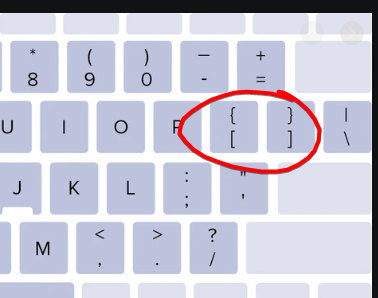
yes they are called brackets
west bane
that came across really passive aggressive  didn't mean it like htat, but yeah the bracket keys
nova pelican
Yeah i am just not very magical with Computers
Got no clue how to make the bracket ):
west bane
are you on a US keyboard
wise oak
so how do i use the modinstaller
nova pelican
I suppose yes
wise oak
its got all the enabled boxes checked
west bane
click install on the mods you want, run the game
these 2 keys https://i.imgur.com/ONN4iwK.png
 nova pelican
ok they are not here
wise oak
the one that looks like this?
nova pelican
those icons are on 8 and 9
west bane
okay you're on a german layout i think, but yeah try shift 8 and shift 9 or just 8 and 9 not sure
west bane
wise oak
the one that looks like this?
if youre on windows just use modinstaller 1
wise oak
customknight time
nova pelican
oh it turned out to be alt gr + the buttons
though
i get now the brackets as result
[]
but the game does still not swap the saves
nova pelican
I don't have that c.c
I can type the letter by ¨ + u
aka
ü
but i don't have the key itself on my keyboard
 novel bronze
B
west bane
whatever is around that position like in the circled screenshot above, also you can just manually back up saves and whatnot, moresaves can be kind of problematic anyway
novel bronze
is there a video to get the ModInstaller2 to work?
west bane
if you have debug you cant click on like any of the UI stuff, dunn about other mods that have UI like benchwarp
just run the exe
dense shuttleBOT
Reminder: The mod installer (https://radiance.host/mods/ModInstaller.exe) and other modding resources can be found from the pinned messages.
wheat orchid
just click the installed? checkboxes....
west bane
otherwise yeah just click the checkbox
west bane
F1
novel bronze
got it work
wise oak
THX
novel bronze
thanks for the help
west bane
you're welcome
 vague ravine
yo dose anyone know how to add the gun mod?
west bane
?i
dense shuttleBOT
Reminder: The mod installer (https://radiance.host/mods/ModInstaller.exe) and other modding resources can be found from the pinned messages.
wheat orchid
it's name is hollow point
vague ravine
thanks
wise oak
is there any way to give self masks + vessel frags?
west bane
not with mods no
wise oak
damn
 potent zodiac
Whenever I pick the custom skin in the selection, the options disappear and it doesn't change my skin. Anyone know a solution?
potent zodiac
I already have that mod but it doesn't work
wheat orchid
screenshot the pause menu
wheat orchid
try taking hollow point off
potent zodiac
ok
wheat orchid
for some reason it has a random conflict with customknight
wise oak
ok please help im using debug mod and now everything is white boxes please how do i fix this
potent zodiac
Thanks, its working now!
wise oak
please help i have no idea what to do
wheat orchid
?
 sinful lance
where i can get information about the mods in the mod manager?
wheat orchid
?mods
dense shuttleBOT
Mods
Google Drive with Mods - https://drive.google.com/drive/folders/0B_b9PFqx_PR9Um9MeFZMV21oWGs
Installer - https://radiance.host/mods/ModInstaller.exe
Mod Summaries - https://docs.google.com/document/d/1cz5tcggpGofrBcM90XyTkMWjMelDHzugvQM6HpB13Ew
wheat orchid
mod summaries
sinful lance
ok thx
wheat orchid
or installing the mods then using the readme button on the installer
sinful lance
hollow point is the ak mod?
wheat orchid
yes
 scarlet lichen
the debug mod crash my game when i press respawn...help u-u
woven zinc
I downpatched to 1221, and noticed there is no cursor in the main menu. is that normal? also my first time playing on gog
i restarted the game and it worked fine nvm
when you are creating a practice installation, it says to "take the hollow knight folder". is this the folder with the hollow knight executable? i am on gog
real jacinth
the whole game folder, yes
 gray cipher
does downpatching hollow knight through windows still work with patching steam? ive had problems using depot downloader
 thorny grove
hey so i modded my game and when i started a new playthrough it spawned me on this weird screen in kings pass and i can only watch the knight is nowhere to be seen and its broken
real jacinth
gray cipher
does downpatching hollow knight through windows still work with patching steam? ...
yes
gray cipher
thanks
real jacinth
thorny grove
hey so i modded my game and when i started a new playthrough it spawned me on th...
you are missing dependency mods
thorny grove
are those in the mod installer list?
wheat orchid
yes
thorny grove
ok thx
woven zinc
@real jacinth so it would be %appdata% -> LocalLow -> Team Cherry and then you copy the entire "Hollow Knight" folder?
woven zinc
oh ok, program files (x86) -> GoG Galaxy -> Games -> copy the entire "Hollow Knight" folder?
sorry
thats the path right?
wheat orchid
idk, we don't know where you installed it
woven zinc
why would the location of said installation folder affect determining whether the folder that I am talking about is, in fact, the correct folder
 feral flower
Is the enemy/boss hp bar supposed to match with the bosses phases? On NKG the life bar perfectly syncs with when he goes into a baloon, but with other bosses it doesnt split up the life bar
wheat orchid
woven zinc
why would the location of said installation folder affect determining whether th...
because we don't know if that's the actual installation folder. for all we know you created a Hollow Knight folder in that path. it's kind of up to you to determine if it's right
wheat orchid
feral flower
Is the enemy/boss hp bar supposed to match with the bosses phases? On NKG the li...
no tmk
woven zinc
wheat orchid
because we don't know if that's the actual installation folder. for all we know ...
ah okay, thank you. i did some more research and the files match exactly, so thats what ill use for the modded practice install
 next kiln
is there any tool or mod that tells you the location of the remaining mask and vessel shards that you haven't gotten yet? like... I know you can easily google the location of all of them, but if you're missing 1 or 2 but can't remember which of those in the list you've already gotten, it can be tedious to check every location
 velvet thistle
Okay, weird question that might have an obvious answer I just can't figure out right now: I seem to have accidentally done something to change my damage output to one-shot literally everything in the game, and I have no idea how to turn it off. Turning on the nail binding in the pantheons gets rid of it for my nail, but sharp shadow still one-shot Hive Knight. I was poking around at the debug mod before it happened, but I haven't done much with the mod except to let me clip through gates that don't go up after I clear ambushes in the enemy randomizer so I'm not sure what I could have done that caused this. I've tried uninstalling the base game and mods, playing the base game unmodded, and re-dowloading all my mods, but nothing's worked so far. Any ideas?
wheat orchid
Did you press the + button at all?
Could you screenshot hk with the debug menu up?
Unloading won’t work bc nail damage is stored in your save
 plucky tinsel
Hi I tried downloading Hollowpoint through the Modinstaller and it's not working right? The gun doesnt work correctly and there's a bunch of weird icons at the top of the screen
wheat orchid
Save and exit the new save, exit the game
Load the save
Fixed
Bugs on save creation
 fiery sparrow
Can someone help me with downloading mods?
west bane
?i
dense shuttleBOT
Reminder: The mod installer (https://radiance.host/mods/ModInstaller.exe) and other modding resources can be found from the pinned messages.
 sleek oriole
Hey anyone know why when I try to play the impossible any% the game is still the same?
I've extracted the .zip file (impossible any% 1.7.zip) and put the folder with all the .json files on DecorationMasterData and it won't work
 hearty path
Can someone help me with the charm overhaul i instaled this mod witch mod installer but it doesnt work
 polar topaz
so im playing multiplayer with a friend but he cant see me does he have to have the same mods as me or is there another way for him to see me?
 obsidian badger
hello, even after hitting uninstall on the modinstaller they will still be their after opening agian
 limber egret
Did you click disable first?
obsidian badger
yes their disabled
limber egret
Well I can't help you with the actual issue, but if you had to your mods file you can move them out of there manually which will fix the problem.
?saves
dense shuttleBOT
Saves
Windows File Paths: (Assumes Default Steam Install Path, Adjust accordingly for DRM Free or Non-Standard Steam Path)
Game Files: C:\Program Files (x86)\Steam\steamapps\common\Hollow Knight\```
** **
Mac File Paths:
```Save Files: ~/Library/Application Support/unity.Team Cherry.Hollow Knight/
Game Files: ~/Library/Application Support/Steam/steamapps/common/Hollow Knight/hollow_knight.app/```
** **
Linux File Paths:
```Save Files: ~/.config/unity3d/Team Cherry/Hollow Knight/
Game Files: ~/.local/share/Steam/steamapps/common/Hollow Knight/```
limber egret
Head to your game files, then click through the folders until you hit managed\mods. You can then move any mods into a folder named disabled and that will turn them off.
If you're trying to revert to a totally unmodded version of the game, you will want to click the "Revert to unmodded" button on the installer, then click "verify integrity of game files" on the game on Steam
 molten ether
I'm just wondering, can you use the mod installer on the game pass version of Hollow Knight
vernal rain
sadly no
 rigid pewter
hey i have a problem when i use the custom knight mod the preload icons for the skins don´t apear, what i can do?
limber egret
The icons were turned off
They don't work at all any more
They were causing issues
rigid pewter
ah ok thanks
 random badger
I need help, ive accidently bound load savestate to my left click, and i have no idea how to bind it to something else or unbind it.
woven zinc
okay, what you want to do is go to your save folder, delete the two (i think) files at the top that say debug mod. verify the integrity of the game (if you're on steam) and then reinstall debug mod. this worked for me
random badger
thanks alot that seemed to work
novel bronze
For making mods is there a big difference between 1221 and CP?
 versed remnant
you can also just delete the debug mod globalsettings and it will clear your binds
velvet thistle
Here's the screenshot requested last night with my debug menu up. I've also started a new file to test if the issue is transferring between files, which it is. I noticed the number attached to Naildmg keeps going up indefintely without ever coming back down; every time I swing the nail it goes up, even if I don't hit anything. Should that be happening?
versed remnant
You have nail dmg up blind to what I assume is your nail button
In the binds panel, if you change the binding to something else that you don't use to play the game you should be fine
wheat orchid
velvet thistle
Here's the screenshot requested last night with my debug menu up. I've also star...
Look on the binds menu and do what insomnia said. The key for lowering the nail damage is on the binds menu
 rapid stone
whenever loading up the hollow knight mod manager it always tells me to update the HollowPoint mod and I always press yes but it happens every time the application is launched
rapid stone
ok
also when i use the HollowPoint mod i don't have the ak but a different gun I think its a shotgun but couldn't tell
it shoots slow and never hits as well
rapid stone
its on a new save I don't have any charms yet
rapid stone
ok
 topaz shoal
Hi sorry if my question is a bit stupid but... I Complete Hollow Knight long time ago on Switch and I'm playing again on Steam, I wanted to add some minor mod (Cosmetic, life bars) but I want to know if that affects the achievements. I have not found information about that, thank you very much!
west bane
steam : no
gog : yes
topaz shoal
So if I play on Steam and use mods will achievements be disabled? >.<
 keen flint
So...
west bane
you wanted to know if it affects the achievements, no, not on steam
topaz shoal
Oh, thanks!
topaz shoal
Thank you very much, sorry for asking the same thing twice. I wanted to be very clear


 potent zodiac
I just figured out that installing Hollow Point sometimes creates a focus bug. This bug is still in the game after I uninstalled Hollow Point. Anyone know a fix?
vernal rain
west bane
you wanted to know if it affects the achievements, no, not on steam
i figured out that gog achievements also still work while modded, it's just that gog's overlay doesn't work, but you still get the achievement on your account
which for a totaly unrelated reason kinda makes me not want to do p5 anymore...
west bane
ill forgive you for not doing p5 if you fix pc bugs 
 bright meadow
Hi
I have an old version of hollow that for some reasone I can´t update and I would love to put the mods, is there anything that I can do?
west bane
buy the game
west bane

Hollow Knight Expands with Free ContentGodmaster - Take your place amongst the Gods. New Characters and Quest. New Boss Fights. Available Now!Lifeblood - A Kingdom Upgraded! New Boss. Upgraded Bosses. Tweaks and Refinements across the whole game.The Grimm Troupe - Light the Nightmare Lantern. Summon the Troupe. New Major Quest. New Boss Fights. ...
Price
$14.99
Recommendations
117246
Metacritic
87
real jacinth

GOG.com
Hollow Knight Expands with Free Content
Godmaster - Take your place amongst the Gods.
 jaunty stirrup
 strong sapphire
Where do i put skins for the custom knight mod? I read the readme, and the only skin in the menu is the default one.
 keen radish
in the mods folder, there should be a folder within called "customknight"
click in there, if you already have the pngs ready, create a folder within customknight and place the pngs in.
strong sapphire
thanks
 glacial drift
How do I disable mods completely? For some reason my character heals very quickly like he has a charm on, so I'm trying to unmod my game to see if it fixes, but even when I uninstall everything, it says modding API is installed ingame
west bane
sounds like you had hollow point installed, read the readme
 spring bane
You can save edit your healing back to normal if you didnt
glacial drift
Yep, looks like I backed them up, yeet
I still am unsure about how to unmod my game though, even though I don't need to, it would be helpful for me to know
west bane
verify integrity fo game files on steam
glacial drift
ah, makes sense, thanks!
west bane
or just hit revert to unmodded on the installer
glacial drift
I don't have that option, was that on the older installer?
west bane
if youre using windows yeah you should be on modinstaller 1
glacial drift
ah ok
west bane
if youre on modinstaller 2 just yeah just do the steam method
glacial drift
I'll just re-download 1, thanks for the help!
west bane
sometimes modinstaller derps and that button doesnt even work so you might have to do the steam option if tht fails
glacial drift
Yep, I'll just verify xd
 slim hill
How do I use mods
 cinder snow
i need link to modding tool
 fair ibex
check pins 
 fathom root
eeelo
i have a question so well uhm
i dowloaded my first mod
and i got the mod tab in the loading screen and it says its on
its just not there
its the daughter og hallownest one
 spring lichen
is there a way to no glitch grimmchild upgrade mod? its glitch everytime
topaz shoal
bright meadow
Its impossible to buy the game
https://humblebundle.com/store/hollow-knight 😉 Work for me 4 hours ago

Humble Bundle
Hollow Knight Expands with Free Content Godmaster - Take your place amongst the Gods. New Characters and Quest. New Boss Fights. Available Now! Lifeblood - A Kingdom Upgraded! New Boss. Upgraded Bosses. Tweaks and Refinements across the whole game. The Grimm Troupe - Light the Nightmare Lantern. Summon the Troupe. New Major Quest. New Boss Fight...
 vagrant prism
alright i have no experience modding, how do i replace a texture
 tired salmon
The ModInstaller2 should work with macOS Mojave correct?
 timid horizon
i need help. i've tried re-installing hollow knight, restarting my computer, deleting and re-installing the mod installer, everything. but no matter what, it ALWAYS stops working when i add any mods! the save files just infinitely say "Loading...", and never stops. i've had it running for atlet half an hour since i tried fixing it, and i need help
i even tried verifying the integrity of the files.
tired salmon
timid horizon
i even tried verifying the integrity of the files.
doing that will reset it to just the base game
timid horizon
yeah. then i re-install it and it all begins to break again
dense shuttleBOT
Saves
Windows File Paths: (Assumes Default Steam Install Path, Adjust accordingly for DRM Free or Non-Standard Steam Path)
Game Files: C:\Program Files (x86)\Steam\steamapps\common\Hollow Knight\```
** **
Mac File Paths:
```Save Files: ~/Library/Application Support/unity.Team Cherry.Hollow Knight/
Game Files: ~/Library/Application Support/Steam/steamapps/common/Hollow Knight/hollow_knight.app/```
** **
Linux File Paths:
```Save Files: ~/.config/unity3d/Team Cherry/Hollow Knight/
Game Files: ~/.local/share/Steam/steamapps/common/Hollow Knight/```
vagrant prism
oh thanks mr moderator
 high turtle
Hewllo, I can use some help. I cant seem to get the enemy randomizer to work. i got the mod through the mod manager
west bane
there is no mod that lets you do it you're gonna have to mod yourself to replace assets
high turtle
Hello*
west bane
screenshot your main menu
tired salmon
Okay - modinstaller2 crashes when I try to load it - it reopens at file path needed, and crashes after I add the file path. I bought the game through Steam and downloaded the mac version of installer through the pinned message.
high turtle
west bane
try dragging it over to your desktop, mac version is a bit weird sometimes
timid horizon
west bane
delete moddingapi.globalsettings.json and .bak in your save files
so go into save files, and delete any files with those names or file types?
west bane
try turning off unnoficial HK patch
high turtle
ok
west bane
timid horizon
so go into save files, and delete any files with those names or file types?
yes there's only 2 files so you just delete those 2
timid horizon
k
west bane
then just restart
west bane
high turtle
ok
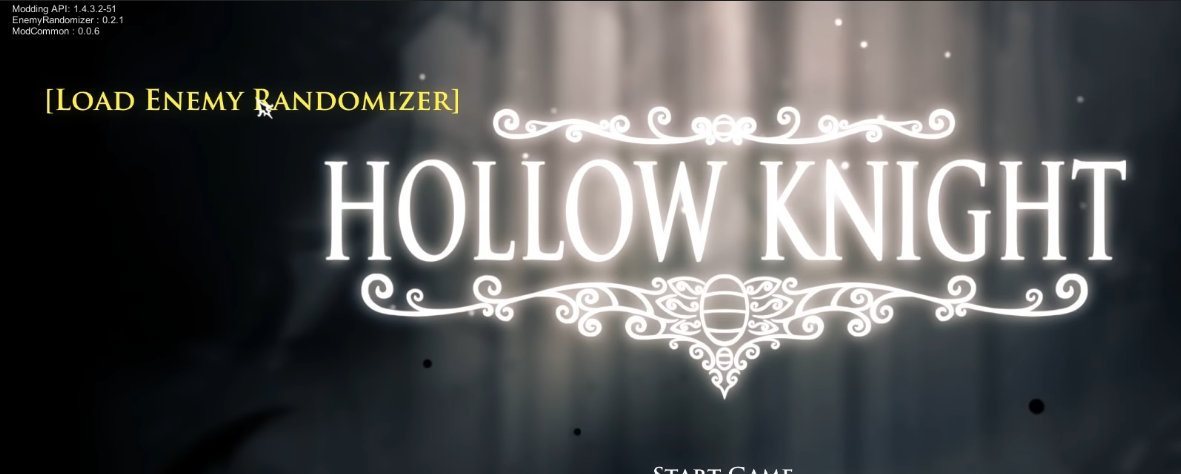
there will be a button on the main menu that prompts you to load the enemy randomizer, if you don't see it, there's some mod conflicting, try eliminating mods 1 by 1 til then
west bane
timid horizon
wait where do you find saves?
there's a bot message with the paths, scroll up a bit, itll be in save paths not game paths
timid horizon
wdym,
west bane
tired salmon
west bane
try dragging it over to your desktop, mac version is a bit weird sometimes
I have it on my desktop
west bane
yeah save path you were in game path
west bane
tired salmon
I have it on my desktop
@wheat orchid you know about mac right can you help thep erson quoted?
timid horizon
aight i deleted all old mods
west bane
deleted all old mods?
timid horizon
i had multiple install mod json and bak for some reason
like custom knight, debugmod, etc
west bane
 west bane
oh okay, you don't have to but i guess if you want to you can
you should be able to relaunch and your saves will be there again
high turtle
So i dont know what im doing lol
timid horizon
kk
high turtle
i saw enemy randomizer in the options menue and clicked on that
west bane
it should "freak out" for a bit while it loads
high turtle
but nothing is showing to load enemy randomizer.
 normal vessel
Its not installing for me
high turtle
i turned off the other mods
west bane
okay you still dont see the menu then
novel bronze
do you see this
wheat orchid
west bane
<@!566029907264667657> you know about mac right can you help thep erson quoted?
I know a bit
west bane
high turtle
i turned off the other mods
it will look like this https://i.imgur.com/zjWc7pP.png
 west bane
if you dont see that there's still a mod that's conflicting with it probably
you dont need to uninstall just disable if you dont want it
vagrant prism
hold on what mod is causing me to die in one hit
i have bechwarp, elderbug god, g to dab, and enemy rando
west bane
elderbug god
wheat orchid
Elderbug god
vagrant prism
ok
high turtle
hmm i disabled all the mods but its not working for some reason
west bane
can you screenshot your title screen again
high turtle
sure
wheat orchid
high turtle
hmm i disabled all the mods but its not working for some reason
You are probably missing dependency mods then
high turtle
wheat orchid
You are probably missing dependency mods then
what are those?
high turtle
 viscid elk
hey can someone help me to delete my ingame achievements?
wheat orchid
Can’t tmk
west bane
try disabling exaltation
 nova iris
i need help my mod wont load all it show is mod api
west bane
viscid elk
hey can someone help me to delete my ingame achievements?
steam achievement manager
high turtle
everything is disabled except enemy randomizer
wheat orchid
nova iris
i need help my mod wont load all it show is mod api
What mod is it
wheat orchid
west bane
steam achievement manager
Oh
high turtle
oh and debug
wheat orchid
high turtle
everything is disabled except enemy randomizer
Even disabled modcommon and seanprcore?
west bane
idk if it can take away achievo's but 
nova iris
wheat orchid
What mod is it
i well be on general 2
west bane
high turtle
oh and debug
turn off exaltation and charm overhaul, then relaunch
wheat orchid
nova iris
i well be on general 2
Can’t join vc rn
high turtle
wheat orchid
Even disabled modcommon and seanprcore?
i dont have those mods
nova iris
oh well then i just take a photo
west bane
you have modcommon
viscid elk
steam's achievement manager didn't work
wheat orchid
high turtle
i dont have those mods
Well that’s the problem with enemy rando
west bane
SAM works
high turtle
i didnt have sean core though
viscid elk
neither does deleting regestry
wheat orchid
Tmk you need it for enemy rando
west bane
did you take off the mods i instructed you to ambroses?
high turtle
yes im working on that now
nova iris
hey can some help me i well be in gen 2
west bane
you can type it out if you want help
west bane
high turtle
yes im working on that now
thx launch the game after disabling those 2 and gimme an update from there
nova iris
ok
high turtle
well downloading the seanpcore mod seemed to have worked
west bane
was it seanprcore or disabling the other 2 mods
nova iris
some of my mods
west bane
alright good to know then for later
west bane
nova iris
some of my mods
none of these are enabled they're disabled
timid horizon
is mod common needed?
high turtle
west bane
alright good to know then for later
indeed. ty for all your help
also, is there a way to download skins?
wheat orchid
Yes
west bane
there's a link to 2 drives in the pins for skins
wheat orchid
Fireborn has a tutorial on skins
west bane
timid horizon
is mod common needed?
some mods depend on it i pretty much always have it on
nova iris
more
wheat orchid
Still none are enabled
novel bronze
Hello, my friend is on a a mac and he's trying to download mods. But it takes him to this thing where he needs to open hollow knight's file. When he does, it says "assembly C sharp or manager missing" So I'm wondering how to fix it
west bane
nova iris
more
where did you buy the game
tired salmon
novel bronze
Hello, my friend is on a a mac and he's trying to download mods. But it takes hi...
Where's he using the mods from? ModInstaller2?
novel bronze
yes
high turtle
steam
wheat orchid
nova iris
more
that’s kind of sus
high turtle
sorry brb
novel bronze
does anybody know the answer to my problem?
wheat orchid
They are selecting the wrong path
novel bronze
what would they do to select the right one
wheat orchid
?saves
dense shuttleBOT
Saves
Windows File Paths: (Assumes Default Steam Install Path, Adjust accordingly for DRM Free or Non-Standard Steam Path)
Game Files: C:\Program Files (x86)\Steam\steamapps\common\Hollow Knight\```
** **
Mac File Paths:
```Save Files: ~/Library/Application Support/unity.Team Cherry.Hollow Knight/
Game Files: ~/Library/Application Support/Steam/steamapps/common/Hollow Knight/hollow_knight.app/```
** **
Linux File Paths:
```Save Files: ~/.config/unity3d/Team Cherry/Hollow Knight/
Game Files: ~/.local/share/Steam/steamapps/common/Hollow Knight/```
wheat orchid
Select the game files path
tired salmon
novel bronze
does anybody know the answer to my problem?
When they launch ModInstaller it should ask for the path - if they click and then copy/paste "~/Library/Application Support/Steam/steamapps/common/Hollow Knight/hollow_knight.app/" it should get the file
novel bronze
how do you go to library?
tired salmon
:)
tired salmon
Yep heh. Yw!
nova iris
hi i need help the only mod that show the api mod i have more mod
west bane
where did you buy the game
nova iris
steam
west bane
can you screenshot that
wheat orchid
You already showed us what the problem was
nova iris
wheat orchid
none of your mods are enabled
You sent now 3 screenshots of the installer. In none of them there was a mod enabled
nova iris
what do you mean?
west bane
hollow knight rest loader 🤔
tired salmon
Okay so after looking through the firewall settings and trying to redownload the ModInstaller2, it still isn't working. I'm on MacOS Mojave, using Steam. Any ideas on what the problem is? (it's crashing)
west bane
nova iris
what do you mean?
none of your mods are enabled, lol
wheat orchid
west bane
none of your mods are enabled, lol
4th time that’s been said lol
nova iris
wheat orchid
*none* of your mods are enabled
but they said enable
wheat orchid
Enable is not the same as enabled
nova iris
oh
wheat orchid
Get a dictionary
nova iris
oh
wheat orchid
Not the coding one
 full acorn
This is what happens when I copy and paste it
novel bronze
thats my friend
full acorn
nothing pops up
wheat orchid
Searching lol
tired salmon
Oh shoot. Do "CMD+Shift+G"
wheat orchid
I do not believe you have any files in your recents folder named the path
tired salmon
and then another window should pop up in the center
fair ibex
i think you can manually set the path
full acorn
how
fair ibex
~/.config
west bane
would this be relevant for the mac thing? #archived-modding-help message
fair ibex
there should be a file called HKInstallerSettings.json
tired salmon
full acorn
that hapened 5 times already
It keeps doing that to me
fair ibex
edit that
full acorn
how and were
wheat orchid
west bane
would this be relevant for the mac thing? https://discord.com/channels/283467363...
Pretty sure that it is
west bane
person had the same issue
novel bronze
hmmmm
wheat orchid
I’ve been linking it for a while
nova iris
@wheat orchid how do i enabled
wheat orchid
...
novel bronze
It doesn't seem to do this on windows computers
wheat orchid
Remember how you got the mods to say “enable” instead of “disable”
novel bronze
how does that work
wheat orchid
Repeat that process of clicking the button
slim hill
ok i have the mod installer and i set my game path whatd i do now?
wheat orchid
wheat orchid
Repeat that process of *clicking the button*
Real hard thing to do
west bane
install the mods you want and launch the game
wheat orchid
slim hill
ok i have the mod installer and i set my game path whatd i do now?
Install ModdingApi
nova iris
wheat orchid
Repeat that process of *clicking the button*
so it say disable
fair ibex
click the button that says “enable” to enable the mods
wheat orchid
nova iris
so it say disable
Yes
west bane
any process of elimination or
wheat orchid
lol
slim hill
wheat orchid
Install ModdingApi
where is that
west bane
which insatller are you using, 1 or 2
nova iris
ok its done
slim hill
west bane
which insatller are you using, 1 or 2
2
wheat orchid
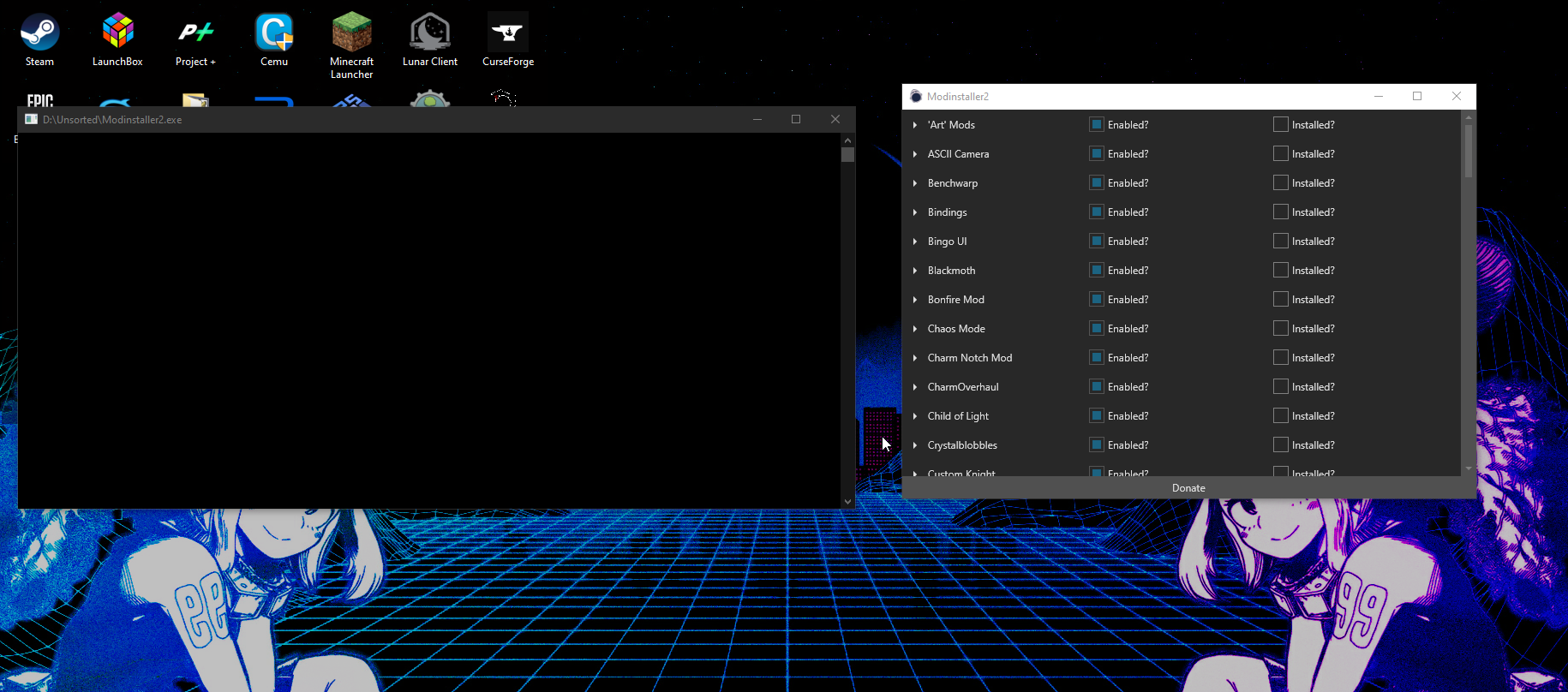
Install the ModdingApi then
west bane
modding api is on the installer menu then
 daring burrow
novel bronze
daring burrow
novel bronze
Im here with a problem of my own now. Im on a windows 10 computer, and when i go into hollow knight with modinstaller, infinite charms and hollow point, it doesnt show anything
slim hill
west bane
modding api is on the installer menu then
https://i.imgur.com/CntGF0p.png this is what i have
 slim hill
oh ok
west bane
novel bronze
Im here with a problem of my own now. Im on a windows 10 computer, and when i go...
can you screenshot the main menu plis
novel bronze
sure
slim hill
now what
west bane
that's it, other than enabling the mods you want
west bane
when you hit start are all your saves "loading"
slim hill
do i just launch the game now? can i do it through steam?
novel bronze
doesnt seem like it
west bane
all your saves are there?
west bane
in the options or extra tab do you have a "mods" menu option
slim hill
west bane
all your saves are there?
thanks so much
novel bronze
wdym extra tab
west bane
in either options or extras, there might be another menu there for "mods"
novel bronze
nope
west bane
you're using modinsatller 1 or 2
novel bronze
2
west bane
and you've installed and enabled modding api right?
slim hill
how does custom knight work
west bane
coding magic
novel bronze
still does not work
west bane
can you screenshot your installer, on the modding api
slim hill
west bane
coding magic
i mean like how do i change skins lol
novel bronze
what does charm overhaul mod do
wait
is it because i'm playing hollow knight through family sharing
west bane
slim hill
i mean like how do i change skins lol
there should be a fireb0rn tutorial in the pinned messages, not sure, if not it's on youtube
west bane
?mods
dense shuttleBOT
Mods
Google Drive with Mods - https://drive.google.com/drive/folders/0B_b9PFqx_PR9Um9MeFZMV21oWGs
Installer - https://radiance.host/mods/ModInstaller.exe
Mod Summaries - https://docs.google.com/document/d/1cz5tcggpGofrBcM90XyTkMWjMelDHzugvQM6HpB13Ew
west bane
^ summaries
west bane
novel bronze
is it because i'm playing hollow knight through family sharing
doubtful
slim hill
west bane
there should be a fireb0rn tutorial in the pinned messages, not sure, if not it'...
thanks homie
west bane
novel bronze
how does charm over haul DO
read the summaries
west bane
just would like to have a screenshot of the modinstaller where it says modding api
novel bronze
sure...
west bane
not you
west bane
read the mod summaries
novel bronze
there
novel bronze
novel bronze
whats the mod that allows you to put all charms on at ONCE?
infinite charm notches I think its called
slim hill
bro lightbringer playthrough bouta slap
west bane
novel bronze
there
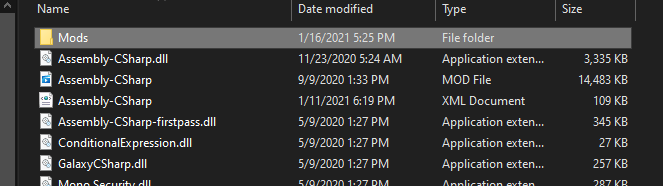
do me a favor, go to your game files, this folder, and tell me how large your assembly-csharp.dll is https://i.imgur.com/felrFSt.png
 novel bronze
ok
i STILL CANT FIND THE MOD THAT ALLOWS U TO PUT ALL CHARMS ON AT ONCE :(((
I went to the hollow knight directory and there is no mods folder there o:
west bane
novel bronze
i STILL CANT FIND THE MOD THAT ALLOWS U TO PUT ALL CHARMS ON AT ONCE :(((
https://i.imgur.com/8D7mMTa.png you already were told, please read lol, and dont spam caps
 west bane
novel bronze
I went to the hollow knight directory and there is no mods folder there o:
west bane
novel bronze
I went to the hollow knight directory and there is no mods folder there o:
alright and how big is your assembly-csharp.dll file
novel bronze
I went to %AppData%..\LocalLow\Team Cherry\Hollow Knight and it doesnt show that file anywhere
west bane
its in your game files, wont be in saves
west bane
do you have an assembly-csharp xml file in that same folder
novel bronze
dont see it
west bane
drag that in there then
west bane
alternatively, modinstaller 1 usually works better with windows
west bane
?i
dense shuttleBOT
Reminder: The mod installer (https://radiance.host/mods/ModInstaller.exe) and other modding resources can be found from the pinned messages.
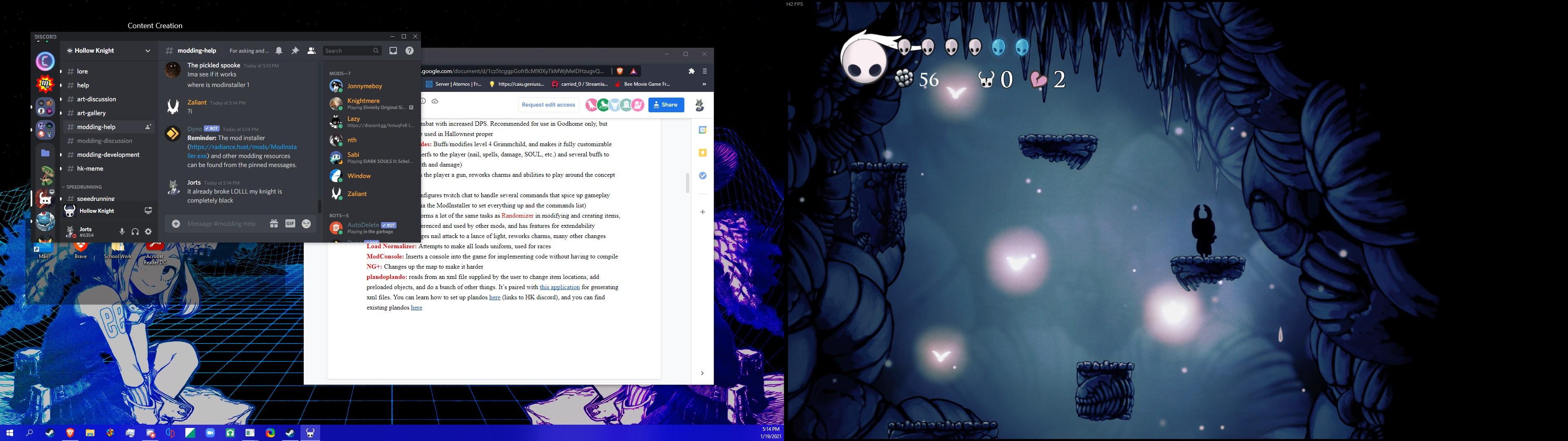 west bane
screenshot the skin folder
slim hill
where is that sir
west bane
?saves
dense shuttleBOT
Saves
Windows File Paths: (Assumes Default Steam Install Path, Adjust accordingly for DRM Free or Non-Standard Steam Path)
Game Files: C:\Program Files (x86)\Steam\steamapps\common\Hollow Knight\```
** **
Mac File Paths:
```Save Files: ~/Library/Application Support/unity.Team Cherry.Hollow Knight/
Game Files: ~/Library/Application Support/Steam/steamapps/common/Hollow Knight/hollow_knight.app/```
** **
Linux File Paths:
```Save Files: ~/.config/unity3d/Team Cherry/Hollow Knight/
Game Files: ~/.local/share/Steam/steamapps/common/Hollow Knight/```
west bane
game files, in mods, in custom knight, in the skin
west bane
can you screenshot your game files
novel bronze
sure
west bane
specifically here C:\Program Files (x86)\Steam\steamapps\common\Hollow Knight\hollow_knight_Data\Managed
 west bane
do you have modcommon
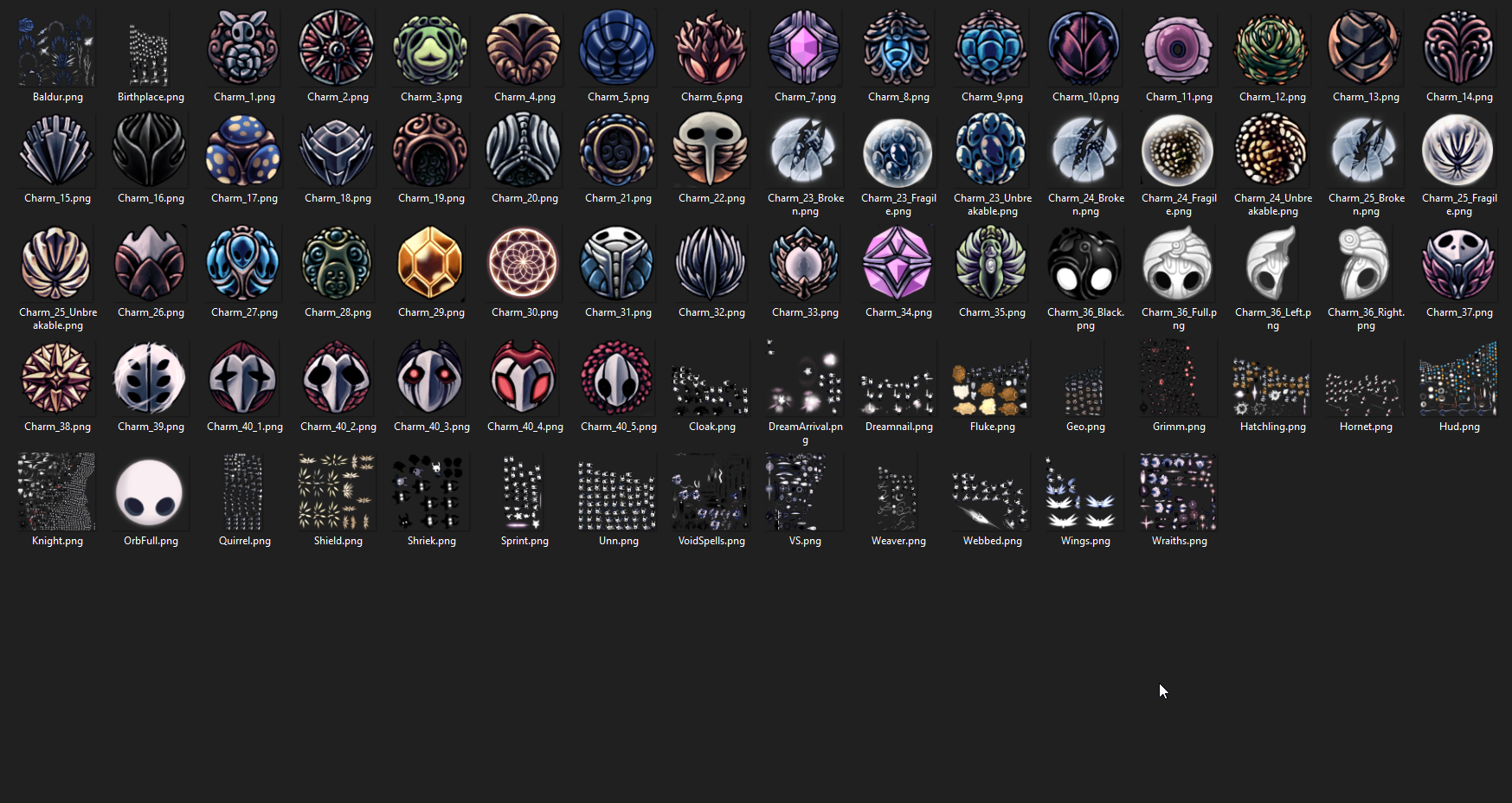 slim hill
west bane
do you have modcommon
slim hill
west bane
do you have modcommon
lemme check
slim hill
west bane
do you have modcommon
yes
west bane
in managed
novel bronze
ok
west bane
slim hill
https://i.imgur.com/8ebGZYd.png
this is the skin you have selected right? can you drag the knight.png here
slim hill
west bane
in managed
yes
slim hill
west bane
this is the skin you have selected right? can you drag the knight.png here
thats just the base game skin
novel bronze
there
slim hill
west bane
this is the skin you have selected right? can you drag the knight.png here
i didnt install any skins
west bane
novel bronze
there
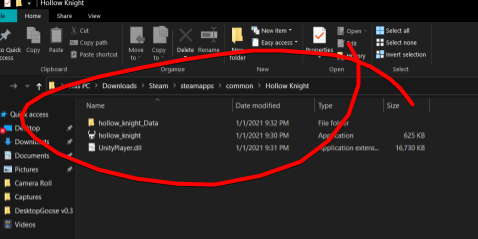
your game would not function if it was like this, your game is probably installed somewhere else
go into steam > right click HK > properties > browse local files
novel bronze
west bane
your game would not function if it was like this, your game is probably installe...
these are my local files.
west bane
yeah this is a different directory
novel bronze
I think it may be because I'm using family sharing
slim hill
west bane
what all mods you have installed again? sorry
https://i.imgur.com/6eZH4mW.png
if you cant see that its ModCommon
Modding API windows
Lightbringer
enemy health bar
and customknight
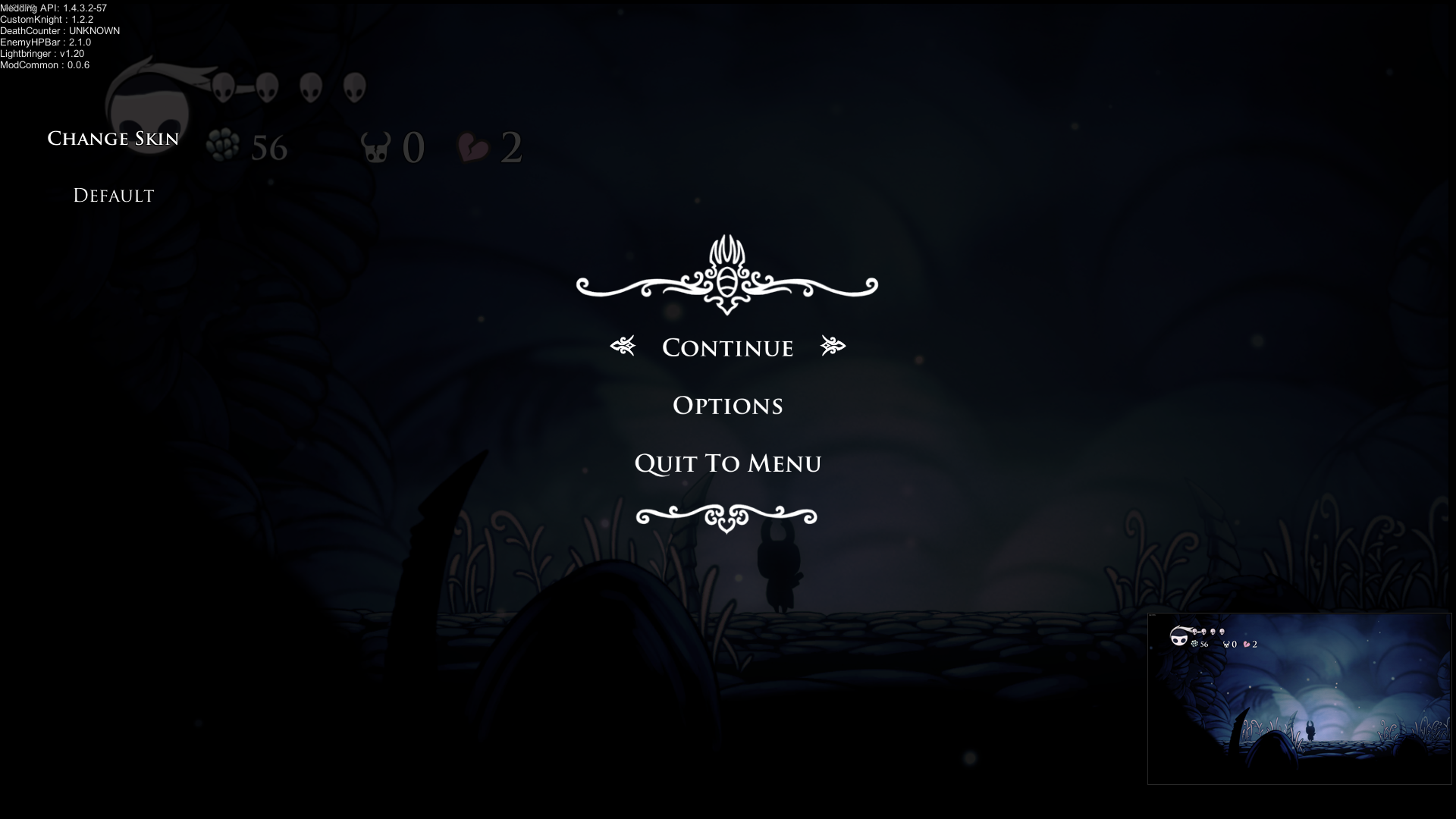 west bane
i would recommend deleting this https://i.imgur.com/EwofWaZ.png
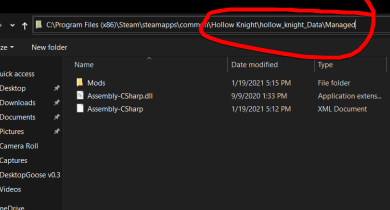
then after that, there are pins on how to reset the installer, after you do that, run the installer again, itll ask you to select your installation path, you want to select what you have here https://i.imgur.com/6wKWulj.png
 west bane
slim hill
https://i.imgur.com/6eZH4mW.png
if you cant see that its ModCommon
Modding API w...
west bane
slim hill
https://i.imgur.com/6eZH4mW.png
if you cant see that its ModCommon
Modding API w...
might be deathcounter
slim hill
oof forgot about that one lemme try disabling it
west bane
oh wait, i forgot, lightbringer and customknight conflict, there's probably a lightbringer charm that you have on that causes the knight to be completely black
slim hill
i have no charms on but i did attempt to put on a charm while not on a bench
west bane
i do know that lightbringer and customknight conflict so it might be 1 or the other
slim hill
kk thx homie
west bane
you can still try deathcounter though but i dont think that is the problem
slim hill
im trying to make a shortcut for the mod installer rn but for somereason i cant so thats fun but ill try it soon
west bane
you can think of the modinstaller as a shortcut already, so you can just drag it anywhere
slim hill
ah thats helpful
west bane
some people have problems with it when it's not on their desktop so if you ever have a problem with it for some reason, just throw it to your desktop
slim hill
why does it close everytime i turn off a mod
west bane
try putting it on your desktop and see if that's the problem
slim hill
nvm its cause i was clicking enabled instead of installed
its fixed Pog
thanks for the help
tired salmon
west bane
would this be relevant for the mac thing? https://discord.com/channels/283467363...
Okay so if it isn't too much effort, can you let me know if I'm doing this correct. I download the publish folder, extract it, and then put the command [cd ~/Downloads; chmod +x ./Modinstaller2; ./Modinstaller2] into terminal. Is that correct?
 wraith beacon
I was playing around with hollow point then decided to stop and now when ever i try to heal it uses up no soul and is very short
west bane
yeah it says so in the readme
west bane
tired salmon
Okay so if it isn't too much effort, can you let me know if I'm doing this corre...
would love to help but idfk a thing about mac lmao
west bane
game files folder
slim hill
rip
west bane
?saves
dense shuttleBOT
Saves
Windows File Paths: (Assumes Default Steam Install Path, Adjust accordingly for DRM Free or Non-Standard Steam Path)
Game Files: C:\Program Files (x86)\Steam\steamapps\common\Hollow Knight\```
** **
Mac File Paths:
```Save Files: ~/Library/Application Support/unity.Team Cherry.Hollow Knight/
Game Files: ~/Library/Application Support/Steam/steamapps/common/Hollow Knight/hollow_knight.app/```
** **
Linux File Paths:
```Save Files: ~/.config/unity3d/Team Cherry/Hollow Knight/
Game Files: ~/.local/share/Steam/steamapps/common/Hollow Knight/```
slim hill
is it important
west bane
all readmes are important yeah
tired salmon
west bane
would love to help but idfk a thing about mac lmao
All good haha
west bane
looks like it's through terminal yes
wraith beacon
in the read me it says to change a line of code with a save editor where do I find the focusMP_amount code
vagrant prism
when i try to load my enemy randomizer it freezes at 35%
west bane
wraith beacon
in the read me it says to change a line of code with a save editor where do I fi...
ctrl+f focusMP_amount
west bane
vagrant prism
when i try to load my enemy randomizer it freezes at 35%
let it do it's thing
vagrant prism
it stops responding tho
west bane
do you have modcommon and seanprcore
vagrant prism
not seanprcore
vernal rain
wraith beacon
in the read me it says to change a line of code with a save editor where do I fi...
vagrant prism
i installed it now
wraith beacon
where do i find user1.dat
vernal rain
?saves
wraith beacon
ok
west bane
?saves
dense shuttleBOT
Saves
Windows File Paths: (Assumes Default Steam Install Path, Adjust accordingly for DRM Free or Non-Standard Steam Path)
Game Files: C:\Program Files (x86)\Steam\steamapps\common\Hollow Knight\```
** **
Mac File Paths:
```Save Files: ~/Library/Application Support/unity.Team Cherry.Hollow Knight/
Game Files: ~/Library/Application Support/Steam/steamapps/common/Hollow Knight/hollow_knight.app/```
** **
Linux File Paths:
```Save Files: ~/.config/unity3d/Team Cherry/Hollow Knight/
Game Files: ~/.local/share/Steam/steamapps/common/Hollow Knight/```
vernal rain
what the fuck dyno
gray cipher
?saves
dense shuttleBOT
Saves
Windows File Paths: (Assumes Default Steam Install Path, Adjust accordingly for DRM Free or Non-Standard Steam Path)
Game Files: C:\Program Files (x86)\Steam\steamapps\common\Hollow Knight\```
** **
Mac File Paths:
```Save Files: ~/Library/Application Support/unity.Team Cherry.Hollow Knight/
Game Files: ~/Library/Application Support/Steam/steamapps/common/Hollow Knight/hollow_knight.app/```
** **
Linux File Paths:
```Save Files: ~/.config/unity3d/Team Cherry/Hollow Knight/
Game Files: ~/.local/share/Steam/steamapps/common/Hollow Knight/```
tired salmon
Trying to install and add randomizer mod, through ModInstaller2 - it keeps not launching with it, even though the boxes for installed and enabled are checked. Any ideas?
west bane
rando 3?
tired salmon
Yep
west bane
do you have seanprcore?
west bane
can you verify it in your mods folder
tired salmon
Where do I find that?
west bane
should be in game files
tired salmon
Okay
west bane
should bea mods folder
tired salmon
There isn't one
west bane
does ~/Library/Application Support/Steam/steamapps/common/Hollow Knight/Hollow_knight_data/managed exist?
west bane
is there a mods folder in managed
tired salmon
Not when I open it, I only have a contents folder, and inside that there isn't a Mods folder either
west bane
when youre in the main menu does anything else show up in the top left? modding api?
tired salmon
Yep. Let me launch it again and list off what's there
west bane
rather is there anything else besides modding api
doesnt matter what as long as there's something
west bane
ok so you have a mods folder i guess it just comes down to finding it lol
tired salmon
Lol
vagrant prism
yea i am also having that problem
seanprcore is downloaded
but it isn't showing up ingame
west bane
seanprcore i dont think will show up
vagrant prism
oh
west bane
rando 3 however should
tired salmon
Yeah
vagrant prism
well my enemy rando isn't working still
west bane
can you screenshot your title screen for me
tired salmon
Let me try watching the Relyea video and then I'll see if anything there works Zal
west bane
also shade ill try to dig around see what i can find
tired salmon
Okay, tysm Zal
vagrant prism
west bane
try loading and if it freezes again juust let it sit for a while
@tired salmon does hollow_knight.app/Content/Managed/Mods exist
tired salmon
I actually just got it working lol - left ModInstaller2 open while launching (after installing Rando mod again)
@west bane
I appreciate the time!
west bane
ah yeah
tired salmon
Yeah, the mod folder isn't there lol. That's so weird xD
west bane
well it's definitely somewhere lmfao, i just dont know a thing about mac
at least it works
@vagrant prism it still freeze for you?
vagrant prism
yep
west bane
is your system on the older side?
vagrant prism
kinda
west bane
try closing everything else but holow knight and try, maybe run as admin too
limpid shore
Is there any reason that randomizer wouldn't let me use a simple key?
We're trying to use a simple key to get shade cloak from the godhome entrance person but it says "not enough" or something like that even though we have a key
 merry lion
Hey all, having some modding strugles. Running window's 7, latest version of hollow knight, game files verified, tried rebooting several times, but whenever I run the installer I get this error
limpid shore
If it matters, we're doing room rando
 random karma
can someone link the mod website
west bane
?i
dense shuttleBOT
Reminder: The mod installer (https://radiance.host/mods/ModInstaller.exe) and other modding resources can be found from the pinned messages.
random karma
west bane
?i
thanks
random karma
idk
im having troble
it says put the hollow file in the thing
it does not let me
 cyan jackal
i can't find the filepath
random karma
me too
random karma
windows
cyan jackal
oh
random karma
IBUYPOWER
random karma
ill try
cyan jackal
?saves
dense shuttleBOT
Saves
Windows File Paths: (Assumes Default Steam Install Path, Adjust accordingly for DRM Free or Non-Standard Steam Path)
Game Files: C:\Program Files (x86)\Steam\steamapps\common\Hollow Knight\```
** **
Mac File Paths:
```Save Files: ~/Library/Application Support/unity.Team Cherry.Hollow Knight/
Game Files: ~/Library/Application Support/Steam/steamapps/common/Hollow Knight/hollow_knight.app/```
** **
Linux File Paths:
```Save Files: ~/.config/unity3d/Team Cherry/Hollow Knight/
Game Files: ~/.local/share/Steam/steamapps/common/Hollow Knight/```
 mental mason
so, im not sure exactly whats wrong. I have the correct path (i think?) but when i load up the game no mods happen, nothing in top corner
real jacinth
things that could be wrong:
- we have no information on what you did
- you have no modding api
- we have no information on your OS
- we have no information on your installer version
mental mason
all fair points. one moment
 uncut summit
Is it possible to mod hollow knight on the ps4?
real jacinth
no
uncut summit
Ok
mental mason
- When i installed the Modinstaller it asked if it had the correct path to the game files, so i said yes.
- is that the Modinstaller? if so i have that
- windows through steam
- uhhhhh... im not sure....
..im not the sharpest crayon in the bunch im aware...
real jacinth
but was the path it asked for the proper one
is that actually where your game is
screenshot your installer
and post it here
and the api is not the installer
very very different things
real jacinth
screenshot your installer
real jacinth
hit that blue button at the bottom
mental mason
the enable all
real jacinth
that would be the blue one, yes
 modest falcon
Hi there! Because the Glass Soul option isn't part of the ModInstaller, where should I put the dll file? I'd appreciate the guidance!
 potent atlas
I believe you can just throw the .dll in D:\Steam\steamapps\common\Hollow Knight\hollow_knight_Data\Managed\Mods
 whole rampart
west bane
whole rampart
west bane
youre good to go then
modest falcon
potent atlas
I believe you can just throw the .dll in ``D:\Steam\steamapps\common\Hollow Knig...
Ah, thank you! It's working, but do you happen to know where I can find the special HUD for it, like the one Fire used in the Glass Soul video?
potent atlas
I don't think there is one that works for the current version of the game, it would have to be remade. Could be wrong though.
 plush wyvern
does anyone know where i can get get the hollow knight boss rush mod i cant seem to find it :p
 fathom owl
Hey I have questions regarding mod installer in Hollow Knight? Can anyone help me?
 pastel bone



 high gyro
for some reason my pc wont let me open read mes
 maiden abyss
The EnemyHPBar mod says to be customizable but it doesnt say how, help please?
 empty epoch
what does the easy mode mod do fellas?
 abstract oasis
is downpatch required for impossible any%
west bane
no
abstract oasis
like the steam community page says there are required inventory drops and lever skips and stuff
does the qol mod enable those or are they not actually required
tranquil copper
they are required
west bane
high gyro
for some reason my pc wont let me open read mes
open your game files just right click any MD file and open with wordpad or something
high gyro
thanks
abstract oasis
wait nvm fireb0rn's tutorial video says qol lets you use the patched speedrunning glitches
when I open the game there's a big green rectangle thing that says "mod license" and a bunch of chinese words
abstract oasis
nice
the esc key doesnt work either
it worked fine until i closed it and tried to enable the qol mod
 ivory aurora
Quite the quality 
 twilit harness
Is there a way to get custom knight to work with lightbringer?
 tiny steppe
Anyone can tell me what should i do next?
 mystic breach
With exaltation why are sprintmaster and dash master not glorifying?
mystic breach
same with glowing womb
 brave canyon
hi guys, im downloading hollow knight on microsoft store, what folder is it in
 rocky pulsar
 frosty grail
i downloaded the mod for more saves but i dont know how to acces them
what do i do?
dense shuttleBOT
Mods
Google Drive with Mods - https://drive.google.com/drive/folders/0B_b9PFqx_PR9Um9MeFZMV21oWGs
Installer - https://radiance.host/mods/ModInstaller.exe
Mod Summaries - https://docs.google.com/document/d/1cz5tcggpGofrBcM90XyTkMWjMelDHzugvQM6HpB13Ew
frosty grail
limber egret
Right bumper
what?
limber egret
You need to press right bumper on the controller
frosty grail
uuuuuh
limber egret
I think you can also do it with ]
frosty grail
im on pc with keyboard
limber egret
Yeah, I keep a controller plugged in just for this
limber egret
You will just have to backup your saves
Lots of mods don't work properly with More Saves installed, anyway
spring bane
[] works for me
 leaden dirge
Guys, how can I install a mod manually?
 dusty lodge
How do i install the tracker for the randomizer overlay?
It keeps saying not connected and i don't know if it's because i installed it improperly
Figured it out. Didn't realize where i needed to install the tracker.
limber egret
leaden dirge
Guys, how can I install a mod manually?
Find the .dll file for the mod and just put it in the mods folder
?mods
dense shuttleBOT
Mods
Google Drive with Mods - https://drive.google.com/drive/folders/0B_b9PFqx_PR9Um9MeFZMV21oWGs
Installer - https://radiance.host/mods/ModInstaller.exe
Mod Summaries - https://docs.google.com/document/d/1cz5tcggpGofrBcM90XyTkMWjMelDHzugvQM6HpB13Ew
hearty path
I downloadet the charm over haul from nexus but it doesnt work if i copy the assembly csharp file in all mods stop working and the mod itself doesnt work too
wheat orchid
plush wyvern
does anyone know where i can get get the hollow knight boss rush mod i cant seem...
Why do you need it? It’s for a old version of the game, and we have godhome for boss rushes now
wheat orchid
tiny steppe
Anyone can tell me what should i do next?
When and where did you get the installer
wheat orchid
hearty path
I downloadet the charm over haul from nexus but it doesnt work if i copy the ass...
That is for a very old version of the game. Charm overhaul is on mod installer, don’t get hk mods from nexus
hearty path
@wheat orchid ok thanks are there other sides where i can get hk.mods?
 scenic crown
hey i need help i dont have heal i my randomizer run any help?
real jacinth
Don't use cursed mode
ivory aurora
I have a savefile for a skin challenge, I know I'm supposed to replace is with userX.dat (2 in this case) but what do I do with the other files?
hearty path
Anyone knows where i can get a pure vessel skin
ivory aurora
wheat orchid
ivory aurora
I have a savefile for a skin challenge, I know I'm supposed to replace is with `...
You put the json in another spot if Qol is enabled. Otherwise just leave em
ivory aurora
the json is created by QoL?
wheat orchid
Yes
random karma
what button do i press to shoot in hollowpoint mod im on pc
wheat orchid
Just attack. Also you can only get mods on pc so it doesn’t really help by specifying it
random karma
if i attack it hits the nail
wheat orchid
Tap quick cast
random karma
but the gun is on my back
wheat orchid
Switch to the gun
wheat orchid
Look a couple messages above