#archived-modding-help
1 messages · Page 194 of 1
 limber egret
Step 1: Navigate to your saves
Step 2: Create a folder basically anywhere you want just named "backups" or whatever you want to name it.
Step 3: Copy and paste every file that is in the saves folder named "UserN" into this new folder. If it has something after UserN in its file name, also copy that.
Step 4: You have successfully backed up your saves.
 outer dirge
limber egret
Step 1: Navigate to your saves
Step 2: Create a folder _basically anywhere you w...
outer dirge
limber egret
Step 1: Navigate to your saves
Step 2: Create a folder _basically anywhere you w...
ok, thx
 ivory inlet
Anyone knows why speeding up time in debug resets when you get hit or parry or knock out someone?
outer dirge
@limber egret @gloomy coral everytime i clear all saves and try launching the game again they just magically come back
when i clear a save it only deletes the "user#" file, and not the other "user#.dat" files
should i delete those manually?
limber egret
ivory inlet
Anyone knows why speeding up time in debug resets when you get hit or parry or k...
That's just the way it's programmed
 gloomy coral
how about you take the save files that you liek and copy them into a seperate folder and then directly paste the new files into the folder
dont clear save from the game
outer dirge
how do i know which save files are the correct ones tho??
gloomy coral
go to the game and check
 vernal rain
ivory inlet
Anyone knows why speeding up time in debug resets when you get hit or parry or k...
vernal rain
ivory inlet
Anyone knows why speeding up time in debug resets when you get hit or parry or k...
because that also changes timescale of the game, which overrides the setting from debug mod
ivory inlet
vernal rain
because that also changes timescale of the game, which overrides the setting fro...
is there any similar mod that doesnt do that?
vernal rain
i think sanic sets it more permanently
outer dirge
gloomy coral
go to the game and check
wdym
 half gull
how to get Multiplayer Hollow Knight
outer dirge
how do i check which ones
half gull
idk
ivory inlet
half gull
how to get Multiplayer Hollow Knight
theres a mod server in modinstaller
gloomy coral
outer dirge
how do i check which ones
you should know which one you have and which one you want
gloomy coral
try to do tht and then see if it works
outer dirge
gloomy coral
you should know which one you have and which one you want
wdym i should know
ivory inlet
vernal rain
i think sanic sets it more permanently
so i installed sanic, but how do i use it in-game?
outer dirge
how should i know
ivory inlet
the readme doesn't have instructions
gloomy coral
like the old save has this much progress and the new save has this much progress
outer dirge
there are two on save 1, two on save 2, and two on save 4. but theres only 1 each time it seems
ivory inlet
@vernal rain found it it's + and -
outer dirge
outer dirge
there are two on save 1, two on save 2, and two on save 4. but theres only 1 eac...
how can i differentiate between the two accounts
gloomy coral
i dont understand can you send ss
vernal rain
ivory inlet
so i installed sanic, but how do i use it in-game?
afaik: start game once (with sanic installed), close it again, go to save files, locate a file with sanic and globalsettings in its name, open it in any text editor, then there should be a value with like speed or something, never looked at it though
vernal rain
ivory inlet
<@!202560032712163329> found it it's + and -
that's just debug mod
ivory inlet
vernal rain
that's just debug mod
my debug is disabled
outer dirge
gloomy coral
i dont understand can you send ss
this is everything. it seems that there are two save states on one save somehow
gloomy coral
how can there be 2 save state on one save
vernal rain
ivory inlet
my debug is disabled
then it may be sanic, have actually never tested it, just assumed it did it with globalsettings
gloomy coral
the user 1 is the main file
ivory inlet
@vernal rain it works fine now
vernal rain
pog
gloomy coral
the next 3 are backup i think
outer dirge
wait
ivory inlet
pure vessel on 150% speed gon be fun
outer dirge
OH
outer dirge
gloomy coral
the user 1 is the main file
thats how it works???
gloomy coral
and the 4th one doesnt affect this process
vernal rain
yes
outer dirge
because in the game i have 1,2, and 4. and here there are also user 1,2, and 4
half gull
its saying dont run the thing
outer dirge
vernal rain
yes
yes to me?
half gull
i got it from pinned messages
vernal rain
yes
gloomy coral
outer dirge
i thought it was user1 was save slot 1
it is
user 1.dat is save file 1
user2.dat is save file 2
and so on
outer dirge
then what do i do
vernal rain
half gull
its saying dont run the thing
that's because the program isn't signed by anyone, but you can click bottom left or right, then "run anyway"
half gull
oh oko
outer dirge
if i open it on my account save slot 1 is the 112% file. but if i open it on the other account save slot 1 is the 111% file
half gull
phew
outer dirge
i must be missing something
gloomy coral
outer dirge
if i open it on my account save slot 1 is the 112% file. but if i open it on the...
becuase the save files are different
vernal rain
steam cloud sync
outer dirge
i turned steam cloud sync off on one of them
still does it
is it because im borrowing?
gloomy coral
if you put the 112%'s user 1 into the folder location of second person then both will be 112%
outer dirge
like one account is borrowing from the other one
but i tried reborrowing and it didnt fix it
gloomy coral
idk how steam cloud affects this
half gull
is it dream shield co-op
outer dirge
gloomy coral
if you put the 112%'s user 1 into the folder location of second person then both...
yes, the problem is idk which one is the 112% one and which one is which's account
half gull
is it dream shield co-op
gloomy coral
open the game and find out
outer dirge
and i only see one folder location, idk where the other user's folder location is
half gull
can i remove the mod
outer dirge
vernal rain
steam cloud sync
should i turn it off on both accounts?
i only turned it off on one
vernal rain
it could be worth a try
outer dirge
the only thing im missing is the other account's file location. but it seems to be nonexistant
half gull
nope didnt try
outer dirge
like where do i find it
half gull
didnt work
never minf
if you have a friend
they can add there controller and could be dream shield
gloomy coral
outer dirge
like where do i find it
how is it saved
outer dirge
@gloomy coral lets say i cleared everything. what do i do with these?
the ones that are left over
gloomy coral
i use a program called everything. it searches through files
try to use it
type "user1.dat" and see where all its saved
maybe it will help you find the other ones file location
outer dirge
@gloomy coral you see, i can find it on the other user account on the pc. but that only has user1, not user1, user2, and user4 which appear in both accounts of the game
i already found it before but it doesnt make sense that that would be where the other saves are stored
wait
i actually find it in program files
oh
i think i found it
:0
but this is all so strange
gloomy coral
outer dirge
but this is all so strange
why
outer dirge
its in userdata, but then i think the users are number id's
so idk which one is the correct one
its just random numbers
gloomy coral
gloomy coral
i use a program called everything. it searches through files
try this
gloomy coral
so whats weird then
outer dirge
@gloomy coral ok i have both folders, and i know which one is which's account
it looks like this tho
gloomy coral
i think thats normal
outer dirge
so the other one wasnt normal?
gloomy coral
only thing thats missing is the backup files
mine looks like the before one
with backups
outer dirge
oh thats what those were
yeah i couldnt get it to work
copying and pasting it didnt change anything unfortunately
outer dirge
outer dirge
it looks like this tho
these ones
gloomy coral
it worked for me
gloomy coral
outer dirge
these ones
I don't understand why it doesn't work
You changed the games save file so that save fil should open
outer dirge
i also dont
it seems it only affects the steam cloud
so when i turn on steam cloud it says that the files dont match in the cloud and in the game
gloomy coral
Is the game open when you do the transfer?
outer dirge
gloomy coral
Is the game open when you do the transfer?
no
gloomy coral
outer dirge
so when i turn on steam cloud it says that the files dont match in the cloud and...
Then what does it do?
outer dirge
i can cancel or play anyways and then it just launches it without any saves. the saves stopped reappearing magically also so it probably launches that version
since i cleared all saves there
gloomy coral
When I play and they say there is conflict steam asks me which one is correct
outer dirge
huh
gloomy coral
Maybe take all the backup files and move it to another folder and the. Move the new user1.dat into the folder
outer dirge
i did that and it didnt work
gloomy coral
Maybe just close WiFi and try
 crimson mauve

outer dirge

gloomy coral
outer dirge
like try it when wifi is off or after restarting
Steam cloud is affecting so then turn if WiFi so Steam cloud can't affect
Idk it's worth a shot
outer dirge
i can just turn off steam cloud
i tried it and it just launches the game without the save files
tbh i give up im scared im gonna mess anything up so im just gonna keep it on the other account and be a little more annoyed
 dark veldt
how do i install the mod installer?
gloomy coral
Download the first file in the pinned comment
dark veldt
ok thx
but i have another problem
but this is very bad
my game shows me this and i cant play modded
 wheat orchid
Go to your save files path and delete all files with ModdingApi in their name
?saves
 dense shuttleBOT
Saves
Windows File Paths: (Assumes Default Steam Install Path, Adjust accordingly for DRM Free or Non-Standard Steam Path)
Game Files: C:\Program Files (x86)\Steam\steamapps\common\Hollow Knight\```
** **
Mac File Paths:
```Save Files: ~/Library/Application Support/unity.Team Cherry.Hollow Knight/
Game Files: ~/Library/Application Support/Steam/steamapps/common/Hollow Knight/hollow_knight.app/```
** **
Linux File Paths:
```Save Files: ~/.config/unity3d/Team Cherry/Hollow Knight/
Game Files: ~/.local/share/Steam/steamapps/common/Hollow Knight/```
wheat orchid
Then open the game and it’s fixed
outer dirge

wheat orchid
dark veldt
it does not work
Screenshot where you deleted the files
wheat orchid
Wrong path...
dark veldt
?
wheat orchid
I’m actually just done with people doing this
dark veldt
ooo i see now
wheat orchid
I SAID SAVE FILES
outer dirge
save files, not game files
dark veldt
ok i deleted
 polar topaz
how do i use multiplayer mod?
wheat orchid
Fireborn has a tutorial
polar topaz
ok
 outer fable
I downloaded the item changer mod
But how do i open the item changer menu
wheat orchid
Tmk it’s a separate app
outer fable
Oh ok
wheat orchid
Have you read the readme
outer fable
Ye
wheat orchid
Does it link anything
outer fable
Oh ok
wheat orchid
Other mods use it to change items
Except the only one that uses it tmk is plandoplando(?)
 pure coyote
=help
 upper leafBOT

ModMail Help Menu
Thank you for using ModMail! Please direct message me if you wish to contact staff. You can also invite me to your server with the link below, or join our support server if you need further help.
We released Wyvor - The best feature rich Discord music bot! Check it out now: https://wyvor.xyz.
Invite
Support Server
Use the reactions to flip pages. (Page 1/9)
 gloomy hedge
Does anyone know if you can mod hollow knight on mac’s?
wheat orchid
pure coyote
=help
Why
wheat orchid
gloomy hedge
Does anyone know if you can mod hollow knight on mac’s?
Yes look in the pins for mod installer 2 for Mac
 fluid jetty
can you still get the steam achievements if your game is modded?
wheat orchid
Yes
wheat orchid
Yes you can still get them
Doesn’t matter what mods are on, you always get steam achievements
Can’t get gog achievements
gloomy hedge
hey really quickly
when i downloaded the mod installer for mac
and launched the exe
it said it “ModInstaller 2” cannot be opened because the developer cannot be verified.
fluid jetty
wheat orchid
Can’t get gog achievements
what are gog achievements?
limber egret
Good Old Games
wheat orchid
Gog is another online game store like steam
wheat orchid
gloomy hedge
it said it “ModInstaller 2” cannot be opened because the developer cannot be ver...
Just let it through
gloomy hedge
it says cancel and move to bin
wheat orchid
Don’t think the developer has $100 to spare to digitally sign the software
gloomy hedge
lol
also i figured it out
but thanks for the help
just have to go to system prefrences
fluid jetty
is there a way to download a save file with max progress?
limber egret
Did you click resources?
fluid jetty
oh thx i downloaded it
 merry rover
how do i know if mods are on?
wheat orchid
You look on mod installer if they are enabled and installed
merry rover
i mean in game
wheat orchid
Top left corner of the main menu and pause menu
wheat orchid
What’s not on
wheat orchid
You have every mod enabled?
merry rover
well not all mods
i mean like
the ones that i have on arent
so how do i get it to turn on the mods
wheat orchid
So not even the modding api appears there?
merry rover
yes
 spring bane
try hittin 'enable all installed mods' on the installer
spring bane
if that doesn't work it's what someone said
merry rover
there isnt that option
spring bane
oh do you have 2?
merry rover
yes
merry rover
modding api windows?
wheat orchid
Yes
merry rover
ok
thank you
its still not there
do i have to do something with the files?
do i have to put modinstaller2 into the files of hollow knight?
or something?
merry rover
merry rover
limber egret
You need to tell us your problem
merry rover
i still need help
 vital dragon
one sec
limber egret
merry rover
i still need help
What OS are you on, Windows or Mac?
merry rover
windows
limber egret
Okay, go to your save files and delete both the files with "moddingapi" in their name
Also
I assume Hollow Knight is closed while you're doing this stuff
vital dragon
this happens when i install any mod including mod common and mod api(when i disinstalling them everything turns back) (sorry for mistaces i am russian)
merry rover
yea
limber egret
vital dragon
this happens when i install any mod including mod common and mod api(when i disi...
Disable all of your mods except modding api.
vital dragon
ok one secv
limber egret
Then try again and see what happens
merry rover
where are the save files
limber egret
?saves
dense shuttleBOT
Saves
Windows File Paths: (Assumes Default Steam Install Path, Adjust accordingly for DRM Free or Non-Standard Steam Path)
Game Files: C:\Program Files (x86)\Steam\steamapps\common\Hollow Knight\```
** **
Mac File Paths:
```Save Files: ~/Library/Application Support/unity.Team Cherry.Hollow Knight/
Game Files: ~/Library/Application Support/Steam/steamapps/common/Hollow Knight/hollow_knight.app/```
** **
Linux File Paths:
```Save Files: ~/.config/unity3d/Team Cherry/Hollow Knight/
Game Files: ~/.local/share/Steam/steamapps/common/Hollow Knight/```
limber egret
Yep
The easiest way is to type %appdata% in the address bar which will send you to appdata\roaming
vital dragon
limber egret
Disable all of your mods except modding api.
nothing hapenned
limber egret
Okay do the same thing I asked tofu chan to do. Go to your saves path (listed above) and delete both the files named moddingapi
vital dragon
where is appdata
limber egret
I just explained how to do this pls read that
merry rover
nothing showed up
spring bane
you put it i the address bar not the search bar
merry rover
wheres that
vital dragon
there are 10 copies of json files of almost all mods
merry rover
im just gonna stream this in general
nvm
idk where the saves are though
i cant find them
its just the mod files
and user.dat
vital dragon
limber egret
Okay do the same thing I asked tofu chan to do. Go to your saves path (listed ab...
oh god Tamijo thank you for unlocking me the path to this beatiful island of HK mods
spring bane
user.dat are the saves
merry rover
oh
so what do i get rid of
and i only have 2 saves so why are there like 6 of them
merry rover
oh
spring bane
if you need a reminder
 west bane
Have you tried modinstaller 1
merry rover
no
west bane
It's better for windows
merry rover
i deleted the two files with moddingapi in the name and it didnt do anything
ill try modinstaller 1
west bane
You relaunched the game after deleting those 2 files?
What all mods do you have installed
 slow apex
I think my game is loading with out mods but the mod installer seams to be fine and the path is fine?
west bane
There's no loading bar at game start up?
slow apex
pretty much
merry rover
Grimchild Upgrades
'Art' Mods
Benchwarp
Blackmoth
Bonfire Mod
Charm Notch Mod
CharmOverhaul
Crystalblobbles
Custom Knight
Daughter of Hallownest
DeathCounter
Elderbug God
EnemyHPBar
Exaltation
Fragile Strength for Nail Arts
FrogCore
Indie Crossover
Inferno King Grimm
Infinite Grimm
Lifeblood Master
Lost Lord
Mantis Gods
ModCommon
ModConsole
Modding API Windows
MoreSaves
Pale Champion
Pale Prince
Path of Pure Vessel
Redwing
Redwing Assets
Sanic
SeanprCore
SFCore
The Pain of the Path
Traitor God
Tribe of Battle
Uuwuu
Vasi
WeaverCore
those are the mods i have
west bane

limber egret
Turn some mods off
slow apex
8.6.0
west bane
It'll be either 1 or 2 depending on what you downloaded. In the . exe name not the version number
merry rover
what does elderbug god even do?
limber egret
Read the readme
merry rover
where is the readme
limber egret
slow apex
8.6.0
Try deleting the 2 moddingapi files in your saves
dense shuttleBOT
Saves
Windows File Paths: (Assumes Default Steam Install Path, Adjust accordingly for DRM Free or Non-Standard Steam Path)
Game Files: C:\Program Files (x86)\Steam\steamapps\common\Hollow Knight\```
** **
Mac File Paths:
```Save Files: ~/Library/Application Support/unity.Team Cherry.Hollow Knight/
Game Files: ~/Library/Application Support/Steam/steamapps/common/Hollow Knight/hollow_knight.app/```
** **
Linux File Paths:
```Save Files: ~/.config/unity3d/Team Cherry/Hollow Knight/
Game Files: ~/.local/share/Steam/steamapps/common/Hollow Knight/```
merry rover
its not there though
limber egret
(two for one 😎)
Screenshot for me
Wait
don't
It's there, then \managed\mods
Is it there?
limber egret
You have two installations on your computer
west bane
Idk if saleh made a readme for elderbug god
slow apex
ty
merry rover
wdym two installations
limber egret
Wait
It's inside hollow_knight_data
Please tell me you didn't just go "Not here, probably isn't in that folder either"
limber egret
Screenshot your mod installer for me?
 spring lichen
what bingoUI do?: i read the readme but still dont get it
slow apex
limber egret
It just adds a bunch of counters to the pause menu
west bane
It's for rando racing
slow apex
oh
merry rover
ill just use modinstaller 1
limber egret
Check your game files for the mods themselves for me @slow apex
west bane
^ see if you have mods in the mods folder
 wraith beacon
I got the mod installer so I could use the multiplayer mod with my friends and it was working just fine. But then I turned off my computer to go do other things. When I came back I decided to get Hollow Point. When I did it said that there was too little space on disk to run game. So after I cleared out some space I tried opening the game It worked but it wouldn't show any mods in the top left hand corner of the screen, and when I looked at my saves they were all blank and after a while said loading. I waited for some time and it still said loading. I had to verify the integrity of the files to see my saves again. I tried uninstalling the mod installer and deleting all of the files that had to do with it and then downloading the mods again but it didn't work can anyone help me?
slow apex
Wheres the mods folder?
limber egret
?saves
dense shuttleBOT
Saves
Windows File Paths: (Assumes Default Steam Install Path, Adjust accordingly for DRM Free or Non-Standard Steam Path)
Game Files: C:\Program Files (x86)\Steam\steamapps\common\Hollow Knight\```
** **
Mac File Paths:
```Save Files: ~/Library/Application Support/unity.Team Cherry.Hollow Knight/
Game Files: ~/Library/Application Support/Steam/steamapps/common/Hollow Knight/hollow_knight.app/```
** **
Linux File Paths:
```Save Files: ~/.config/unity3d/Team Cherry/Hollow Knight/
Game Files: ~/.local/share/Steam/steamapps/common/Hollow Knight/```
merry rover
the modding api thing in the top left isnt showing for modinstaller 1 either
limber egret
Game files then \hollow_knight_data\managed\mods
slow apex
Ah yeah
nothing is installed but common
but the mod launcher says things are installed
merry rover
if i have 2 modinstallers installed like modinstaller 1 and modinstaller 2 will it not work
spring lichen
west bane
It's for rando racing
is there a mod that show me what skill i have and what i need?
slow apex
yeah its not installing stuff to the right place, is there a place i can wipe the mod managers cached data its obviously wrong
limber egret
spring lichen
is there a mod that show me what skill i have and what i need?
What do you mean?
merry rover
one sec lemme reset the game files
limber egret
slow apex
yeah its not installing stuff to the right place, is there a place i can wipe th...
Click "Revert to unmodded" and then (assuming you're on steam) go to steam and click "Verify integrity of game files"
I think GoG also has a similar button
Errr, this is a good point, you can only mod Steam or Good Old Games versions of Hollow Knight. I don't know if this was mentioned.
merry rover
im using steam
slow apex
Will do ty
Doing that does not clear the mod manager's cache
its still thinking stuff is installed thats not
west bane
i suppose he means what he needs for next progression or whats in logic but no there's no mod for that
merry rover
the only thing i am feeling right now is auto-tuned baby crying
limber egret
I might be at suggesting you reset mod installer
slow apex
i can not figure out how to reset the mod launcher
west bane
tofu do me a favor, launch the game and either in options or extras, see if there's a mods tab
slow apex
Perfect ty
merry rover
it says to verify integrity of game files and i did
but it still wont revert to unmodded
west bane
oh you did that, you're back on vanilla then
limber egret
merry rover
but it still wont revert to unmodded
Delete Mod Installer (both if you have them both) then download the one from the pins
merry rover
k
slow apex
Okay
that didnt work
its still remembers everything lol wtf
theres no mods installed in the hollow knight directory, i removed the modlaunchers cache in local/modinstaller
limber egret
Did you delete mod installer entirely?
slow apex
Yes
west bane
wtf is up with the installer lately 
slow apex
I don't understand where its pulling this data from, i deleted everything
limber egret
This is a great issue and I totally understand what's going on.
I could send you a modding api file and you could download mods manually. I'm very much at a loss right now
west bane
yeah i would suggest manual at this point
merry rover
how long would that take
slow apex
It forgets the install bath but not what mods i have installed, but theres nothing in the hollow knight directory
i wonder if my registry has some messed up install path for hollow knight
west bane
have you ever pirated or just installed the game at a different path before
merry rover
no
slow apex
Im gonna uninstall and reinstall hn
west bane
sometimes that happens with multiple installs
west bane
nah wont happen with that, just of the game
merry rover
so uninstall hollow knight?
dense shuttleBOT
Mods
Google Drive with Mods - https://drive.google.com/drive/folders/0B_b9PFqx_PR9Um9MeFZMV21oWGs
Installer - https://radiance.host/mods/ModInstaller.exe
Mod Summaries - https://docs.google.com/document/d/1cz5tcggpGofrBcM90XyTkMWjMelDHzugvQM6HpB13Ew
west bane
go to google drive and search for modding api
download the universal i assume youre on windows
west bane
what reg did you wipe, could be useful to know for future troubleshooting
slow apex
Just ran a registery cleaner to find issues
merry rover
fml
slow apex
Ran CCCleaner its free
cleaned all invalid entries in my registery
I also reinstalled HN to a new drive
west bane
merry rover
fml
?
the reinstall is prob what did it, but who knows lol
at least it works now
merry rover
so then do i put the mods into the mods folder in modding api?
west bane
if your mods folder is already set up dw about it, you just need the assembly c-sharp
slow apex
Is there any mods where i can just increase all enemy hp by a flat amount? and maybe increase geo drops
west bane
debug does both
merry rover
whats assembly c-sharp
slow apex
Oh sweet ty
west bane
it's in the modding api folder
merry rover
the modding api thing still isnt in the top left
west bane
what did you do after you downloaded the modding api from the drive
merry rover
nothing
slow apex
wtf
it just installed frogcore
i didnt tell it too
but it did
and its not a requirement i dont think
west bane
if a mod is a dependency it automatically grabs it
slow apex
i can see it in the new mod folder but its not registering in the mod launcher
west bane
after you get the moddingapi .zip just extract it and follow the path matching yoru HK game files
afaik it's a dependency for uumuu modded boss
slow apex
ahh oki
btw dumb question but do u know anyone who did the ultra wide edit that got it to work for super ultra wides>#
west bane
that idk, could try adjusting it in windowed mode (doubt that even changes the res) but beyond that dunno
merry rover
i cant extract it
should i just uninstall hollow knight and reinstall it
and delete modinstaller
west bane
you should be able to extract it it's just a .zip
merry rover
i cant extract it
west bane
what does double clicking the zip file do
west bane
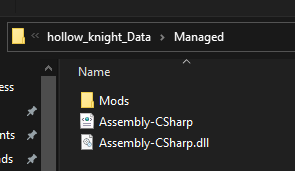
follow the directory path to the assembly c-sharp
west bane
can you screenshot inside the managed folder in the zip
west bane
match the path in your game files https://i.imgur.com/pGac9fc.png
 merry rover
wdym
dense shuttleBOT
Saves
Windows File Paths: (Assumes Default Steam Install Path, Adjust accordingly for DRM Free or Non-Standard Steam Path)
Game Files: C:\Program Files (x86)\Steam\steamapps\common\Hollow Knight\```
** **
Mac File Paths:
```Save Files: ~/Library/Application Support/unity.Team Cherry.Hollow Knight/
Game Files: ~/Library/Application Support/Steam/steamapps/common/Hollow Knight/hollow_knight.app/```
** **
Linux File Paths:
```Save Files: ~/.config/unity3d/Team Cherry/Hollow Knight/
Game Files: ~/.local/share/Steam/steamapps/common/Hollow Knight/```
merry rover
but what do i do
slow apex
Sorry to repeat my self but how do i increase geo drop and enemy health etc again? was it a config file?
west bane
you cant increase those, just lower or increase nail damage, and there's a button that just gives you incriments of geo
merry rover
i dont understand what you mean by match the paths
 severe merlin

Modding on Hollow Knight is pretty easy and straight forward. In this video I will go over the basics of modding and how to play with several different mods.
This is only the beginning to modding. If you have questions on how to install mods outside of the mod installer, that is beyond the scope of this video.
Thank you to all the help answeri...
this will help you
west bane
open up the zip file, what folder do you see
severe merlin
its a step by step on how to install mods
west bane
hollow_knight_data
severe merlin
oh sry
merry rover
the problem is that the modding api thing in the top left isnt there
west bane
so we match that in our game files by going to hollow_knight_data
severe merlin
oh
merry rover
but HOW do i match them
dense shuttleBOT
Saves
Windows File Paths: (Assumes Default Steam Install Path, Adjust accordingly for DRM Free or Non-Standard Steam Path)
Game Files: C:\Program Files (x86)\Steam\steamapps\common\Hollow Knight\```
** **
Mac File Paths:
```Save Files: ~/Library/Application Support/unity.Team Cherry.Hollow Knight/
Game Files: ~/Library/Application Support/Steam/steamapps/common/Hollow Knight/hollow_knight.app/```
** **
Linux File Paths:
```Save Files: ~/.config/unity3d/Team Cherry/Hollow Knight/
Game Files: ~/.local/share/Steam/steamapps/common/Hollow Knight/```
merry rover
now what
west bane
now these are the same right? https://i.imgur.com/yemg0HQ.png
 merry rover
yes
west bane
ok now you follow your zip folder in while doing the same in your game files
until you get to the assembly c-sharp file
merry rover
mhm
west bane
merry rover
now what
merry rover
including the mods folder?
west bane
nah not needed
merry rover
ok
west bane
if modding api doesnt show up top left lemme know
merry rover
its not there
west bane
alright can you show me whats in your mods folder
merry rover
where
west bane
C:\Program Files (x86)\Steam\steamapps\common\Hollow Knight\hollow_knight_Data\Managed\Mods
west bane
thats fine
slow apex
wth i dont have config bar for enemy health bars in my save folder
west bane
did you launch the game when you installed
west bane
i thought it was on launch ¯_(ツ)_/¯
merry rover
it still isnt in the top left
west bane
go back to your game files and screenshot mods folder
slow apex
Is bingo UI good?
west bane
yeah but it's mainly used for rando racing, could be useful for casual play though i spose
slow apex
ahh oki
merry rover
there isnt a mods folder in managed
merry rover
now what
west bane
alright now go back to your saves folder and see if there's a moddingapi.globalsettings.json and .bak
west bane
and you launched the game already yeah? when you said "it still not in the top left"
oh ok
try deleting it again and then launching
west bane
You can play the game as you wish. Your modinstaller should work normally with installing mods
merry rover
thx
west bane
"should" hopefully. Lol
merry rover
so the mods from modinstaller 1 should work?
west bane
Yeah either one.
merry rover
i checked the mods tab and the mods arent there
 heavy ivy
where were all the original room names, I have checked all the pins in every channel and I have not found it
west bane
Some mods might not show in the game tab. If they're in the mods folder they're installed though
west bane
heavy ivy
where were all the original room names, I have checked all the pins in every cha...
#archived-modding-development pins all the way down you'll see it
Most of the way down anyway
slow apex
Last question, anyone know how to fix the overlap in the top left corner?
heavy ivy
simplest solution: less mods
suggest loading the boss edits when you actually fight the bosses
slow apex
That is way too much of a pain
syncing mods to friends and playing multiplayer so thats a big no
west bane
even with installing them via the installer?
merry rover
@west bane should i uninstall and reinstall the mods?
west bane
yeah, reset the installer too
west bane
 pliant path
how do i get the gun mod its not working with modinstaller
pliant path
how do i get the gun mod its not working with modinstaller
elaborate on "not working"
west bane
thre's a pinned message on it
merry rover
so just delete modinstaller?
west bane
merry rover
what folder
west bane
the one labeled "ModInstaller"
merry rover
where
west bane
pliant path
the mod is not showing anything relating to the mod and is only showing that it is installed(i moved the folder to the mods section in the hollow knight mods folder where the hp bar is for enemies but not in the hp bar's files) and with mod installer its just now showing or doing what it is supposed to
west bane
screenshot your mods folder
pliant path
west bane
all that goes in the mods folder is the .dll, just use the installer to install
pliant path
i tried
west bane
can you show what the installer does then
pliant path
the installer shows that hollow point is installed and enabled but it doesnt work
west bane
what does uninstalling do
pliant path
as far as i have seen nothing
 real jacinth
did you initially press the install button for hollow point on the installer? why are you putting files there yourself?
pliant path
mod installer wasnt loading the mod
real jacinth
what does that even mean
pliant path
the mod wasnt running
west bane
the mod installer does not load mods, it installs them
real jacinth
did you click install on the installer
pliant path
yes
real jacinth
okay, so then after that you put a zip file in the mods folder yourself?
or are you saying you clicked manual install on the installer
cuz that's not the same thing
merry rover
why does it say Central Directory corrupt when i try to install mods
real jacinth
which one
merry rover
it wont let me install any more mods
real jacinth
any mods? or poorly translated only
merry rover
any mods
real jacinth
where is your installer
merry rover
i installed a few mods but now it wont let me install any more
real jacinth
if it's still in downloads, move it to desktop
real jacinth
what mod are you trying
merry rover
lost lord
it said the same thing for moresaves
wait
the other mods work
just not moresaves and lost lord
real jacinth
close and reopen it as admin. see if that helps.
moresaves you shouldn't use anyway
merry rover
its fine i dont need lost lord
what does lost lord even do?
pale prince doesnt work either
neither does path of pure vessel
west bane
did you read the readme
merry rover
royal dreamer doesnt work
sanic doesnt work
the pain of the path doesnt work
how do i open it in admin mode
@real jacinth how do i open it in admin mode
west bane
For all those people who find it more convenient to bother you with their question rather than search it for themselves.
merry rover
its blank
merry rover
that just gives me the link that you gave me
i figured it out
uh
there isnt anything in the mods folder
what do i do
@west bane^
west bane
hit install on a mod after running it as admin
west bane
make sure your pc is up to date with any windows updates, make sure you have .net framework 3.5, make sure youre running the latest versions of the installer (either 1 or 2) (found in pins) make sure you have only 1 instance of the game installed.
you can try..
restarting your pc, re-installing HK, potentially wiping the entire saves folder after backing up saves, making sure only 1 instance of the modinstaller open
real jacinth
show your installer and your title screen
merry rover
real jacinth
merry rover
merry rover
what zaliant told me to do
real jacinth
there's no reason assembly csharp should be showing up on your mod list
west bane
i did not say to do that
real jacinth
what did you do
merry rover
idk why its there


 merry rover
idk why its there though
merry rover
i didnt do that
real jacinth
you did
merry rover
i dont know how to do that
merry rover
i replaced the other one so the modding api thing would show up in the top left
maybe because of this?
merry rover
real jacinth
so go in mods folder
merry rover
theres nothing in there
real jacinth
show me
merry rover
real jacinth
okay, so you have 2 copies of the game
especially since this is on the E drive, which is a weird place to have it
merry rover
yes?
real jacinth
surprise.... you're not changing the one on E
wheat orchid
oh i feel like I same to the same conclusion hours ago, unless it was a different person
real jacinth
so of course mods aren't showing up
merry rover
do i have to reinstall all the mods
real jacinth
well what do you want to do?
merry rover
and do i have to delete the other hollow knight in C?
real jacinth
why do you have 2 games
merry rover
idk
real jacinth
do you intend to use both
merry rover
idk why the 2nd one is there
real jacinth
b/c you installed it
strange thing about computers, they do exactly what you tell them to
limber egret
Over three hours ago
wheat orchid
lol
merry rover
o
real jacinth
gottem
wheat orchid
I was right
real jacinth
well you just deleted them
and now your installer won't work b/c you got rid of where it was installing shit
so you have to reset the installer
wheat orchid
look in the pins for how to
real jacinth
and direct it to your E game version
merry rover
the central directory corrupt thing is happening again
wheat orchid
poorly translated mod?
merry rover
no
wheat orchid
which mod
wheat orchid
try restarting your pc
merry rover
and i already tried administrator mode
and moving it to desktop
k
still doesnt work
wheat orchid
¯_(ツ)_/¯
 lavish bloom
Anyone know how to get the impossible mod up and running? I already have modinstaller + QoL and just extracted the zip. Unsure of where to go from here
wheat orchid
it's not a mod
lavish bloom
Fireborn said there was a tutorial but i can't seem to find it
wheat orchid
there is a decoration master tutorial
decoration master lets you edit rooms and was used to create the imposibble any %.
it's required for the changes to take place
lavish bloom
I see, this video makes more sense then. Should be able to set it up now, thank you 🙂
 gray cipher
no
 shy fable
my custom knight skin has custom charms but they don't work pls help the skin works in it's own it's just the charms
merry rover
nvm
wheat orchid
shy fable
my custom knight skin has custom charms but they don't work pls help the skin wo...
screenshot the skin folder
shy fable
ok
merry rover
i just had to download a different mod then try again
shy fable
here
shy fable
ok
real jacinth
you need to use the customknight dll that came with the skin pack
the normal customknight on the installer does not change charms
wheat orchid
wait it doesn't?
real jacinth
no
wheat orchid
huh
shy fable
ok
real jacinth
TWP group has their own fork of the mod that they pack with the skins
wheat orchid
I thought jngo added it a while ago
shy fable
i am ganna downloaded an thanks
and one qustion does the dll of the skin work with other custom charms
wheat orchid
yes
real jacinth
wheat orchid
I thought jngo added it a while ago
did he? thought it was added after jngo left the server
shy fable
i have void heart equbed and it doesn't have the custom skin how to fix it everthing else works
real jacinth
¯_(ツ)_/¯
 glossy surge
Hey where are the mods stored on Mac? I'm trying to help my friend out with something, but I can't find it at the game files location nor the save files location.
 nimble sky
is there any way to get carefree melody through debug or do i have to file edit
real jacinth
did you take it off and put it on again
nimble sky
just gives me a level 2 grimmchild
it was off when i changed it
but yes, i did that
real jacinth
if the icon changes to carefree melody, then it's changing it
you might need to quit out and go back in the save again
nimble sky
done.
real jacinth
glossy surge
Hey where are the mods stored on Mac? I'm trying to help my friend out with some...
game files
nimble sky
didn't quit out the game completely, maybe i'll try that
glossy surge
real jacinth
game files
Even with hidden files showed his folder just shows as:
gray cipher
MacBook > Macintosh > Users > Library > username > Application Support > Steam > steamapps > Common > Hollow Knight > Show Package Contents >
Manually Installing Mods: Contents > Resources > Data > Managed > Mods >
@glossy surge
nimble sky
https://youtu.be/9RjFmfNaEMU what am I missing
glossy surge
real jacinth
or whatever the wording is
Apps are an all in one? I thought they were just like an exe or something. I should have probably learned that before trying to help. Thanks!
real jacinth
nimble sky
https://youtu.be/9RjFmfNaEMU what am I missing
you never tested the effect of the charm
sure the grimmchild is showing up, but you never got hit
to see if the melody charm is still working
real jacinth
you didn't get hit
nimble sky
yeah but if it shoots and deals damage that's two charms in one
real jacinth
cool. bonus
real jacinth
you could try setting it to 0 to get rid of grimmchild
save it that way, then save it as 5
merry rover
hollow knight keeps crashing when i try to play with mods
and i tried to get rid of some
 fathom salmon
Hey guys,
Having trouble to run RandoMapMod.
Ending up with no map at all...
Am I right here? 🤔😬
merry rover
but it still crashes
real jacinth
unplug controller, launch game, plug in again at title
real jacinth
what does it look like when crashing
merry rover
like it freezes
merry rover
and then it showes the "blank is not responding"
real jacinth
are you trying to enter a save?
real jacinth
what exactly are you doing
real jacinth
what are all the mods that you have installed
have you tried going down to like 1 or 2
and trying that?
real jacinth
fathom salmon
Hey guys,
Having trouble to run RandoMapMod.
Ending up with no map at all...
A...
talk to elderbug like 8 times
real jacinth
merry rover
still doesnt work
go to saves. delete moddingapi.globalsettings files
merry rover
k
fathom salmon
real jacinth
talk to elderbug like 8 times
Right ahead or after getting a map first?
fathom salmon
Ok will try that! Thank U! ☺️
wraith beacon
I got the mod installer so I could use the multiplayer mod with my friends and it was working just fine. But then I turned off my computer to go do other things. When I came back I decided to get Hollow Point. When I did it said that there was too little space on disk to run game. So after I cleared out some space I tried opening the game It worked but it wouldn't show any mods in the top left hand corner of the screen, and when I looked at my saves they were all blank and after a while said loading. I waited for some time and it still said loading. I had to verify the integrity of the files to see my saves again. I tried uninstalling the mod installer and deleting all of the files that had to do with it and then downloading the mods again but it didn't work can anyone help me?
real jacinth
go to saves. delete moddingapi.globalsettings files
wraith beacon
ok
vernal rain
?saves
dense shuttleBOT
Saves
Windows File Paths: (Assumes Default Steam Install Path, Adjust accordingly for DRM Free or Non-Standard Steam Path)
Game Files: C:\Program Files (x86)\Steam\steamapps\common\Hollow Knight\```
** **
Mac File Paths:
```Save Files: ~/Library/Application Support/unity.Team Cherry.Hollow Knight/
Game Files: ~/Library/Application Support/Steam/steamapps/common/Hollow Knight/hollow_knight.app/```
** **
Linux File Paths:
```Save Files: ~/.config/unity3d/Team Cherry/Hollow Knight/
Game Files: ~/.local/share/Steam/steamapps/common/Hollow Knight/```
merry rover
well now the modding api thing isnt in the top left
so mods dont work at all anymore
west bane
do the same as the guy above
real jacinth
and also delete the benchwarp.globalsettings ones too
merry rover
now im back with two different installations of hollow knight again
real jacinth
so you know how to fix it
real jacinth
so stop installing multiple copies of the game
merry rover
im
not
it auto installed
i verified the integrity of the game files
and that probably did it
wraith beacon
where do i find moddingapi.globalsettings?
west bane
verifying integrity of game files does not just redownload the whole game unless your game install directory is mega fucked
west bane
wraith beacon
where do i find moddingapi.globalsettings?
in your save files listed above
wraith beacon
ok
merry rover
not a third copy
getting rid of the one in E
and the old one in C
and uninstalling it gets rid of both of those files
wraith beacon
i deleted the moddingapi.globalsettings files do i just run the game now?
real jacinth
yeah
wraith beacon
ok thanks for the help
 hidden blade
can anyone help me_
i opened hollow knight after i opened the mot client
then i go to start a game
but my laod files dont hsow up
they have the outline
but have no text
and the first one only has a 1 on it
and i need to revalidate my files on steam in order to open it normally
dense shuttleBOT
Saves
Windows File Paths: (Assumes Default Steam Install Path, Adjust accordingly for DRM Free or Non-Standard Steam Path)
Game Files: C:\Program Files (x86)\Steam\steamapps\common\Hollow Knight\```
** **
Mac File Paths:
```Save Files: ~/Library/Application Support/unity.Team Cherry.Hollow Knight/
Game Files: ~/Library/Application Support/Steam/steamapps/common/Hollow Knight/hollow_knight.app/```
** **
Linux File Paths:
```Save Files: ~/.config/unity3d/Team Cherry/Hollow Knight/
Game Files: ~/.local/share/Steam/steamapps/common/Hollow Knight/```
vernal rain
just paste it into the bar at the top of the file explorer
hidden blade
thanks
 limpid shore
When I first downpatched to 1.2.2.1 someone helped me set up a “hot swap” between vanilla and modded so that I could load up either on the same installation of the game. if i have the game on steam, is there a way to have a similar “hot swap” on the current patch instead of making another installation?
wheat orchid
tmk I guess you can replace the game files with the downloaded ones, but switching would have to download it again so it would really just be easier to use multiple installations
windows, mac, or linux?
vernal rain
?i
dense shuttleBOT
Reminder: The mod installer (https://radiance.host/mods/ModInstaller.exe) and other modding resources can be found from the pinned messages.
real jacinth
yes
 tranquil copper
i smell a 
wheat orchid
real jacinth
shall i ping the devs
WE HAVE ANOTHER ONE
lol. nice. as if we don't have chat logs
buy the game
nimble sky
Good ending
tranquil copper
you should be thinking about buying the game before mods
merry rover
it still says it
 barren thistle
hi, im having trouble installing the decorationmaster mod onto my 1221 file, is there a place with a guide to specifically that or someone who knows how?
wheat orchid
you can't
barren thistle
oh alright
wheat orchid
new mods don't work on older versions
merry rover
it still says it what do i do
barren thistle
was just trying the impossible one and wasnt sure how to do the inventory drop tricks on current patch
west bane
qol
wheat orchid
it enables glitches again
merry rover
i still need help
real jacinth
did you reset the installer
wheat orchid
please don't tell me you just reinstalled it instead of resetting it.....
hidden blade
@real jacinth i tried searching for the save file i couldnt find it, any idea where it might be?
real jacinth
?saves
wheat orchid
?saves
dense shuttleBOT
Saves
Windows File Paths: (Assumes Default Steam Install Path, Adjust accordingly for DRM Free or Non-Standard Steam Path)
Game Files: C:\Program Files (x86)\Steam\steamapps\common\Hollow Knight\```
** **
Mac File Paths:
```Save Files: ~/Library/Application Support/unity.Team Cherry.Hollow Knight/
Game Files: ~/Library/Application Support/Steam/steamapps/common/Hollow Knight/hollow_knight.app/```
** **
Linux File Paths:
```Save Files: ~/.config/unity3d/Team Cherry/Hollow Knight/
Game Files: ~/.local/share/Steam/steamapps/common/Hollow Knight/```
Saves
Windows File Paths: (Assumes Default Steam Install Path, Adjust accordingly for DRM Free or Non-Standard Steam Path)
Game Files: C:\Program Files (x86)\Steam\steamapps\common\Hollow Knight\```
** **
Mac File Paths:
```Save Files: ~/Library/Application Support/unity.Team Cherry.Hollow Knight/
Game Files: ~/Library/Application Support/Steam/steamapps/common/Hollow Knight/hollow_knight.app/```
** **
Linux File Paths:
```Save Files: ~/.config/unity3d/Team Cherry/Hollow Knight/
Game Files: ~/.local/share/Steam/steamapps/common/Hollow Knight/```
real jacinth
🐌
wheat orchid
🐌
hidden blade
real jacinth
?saves
yeah i tried searching there but i couldnt find it
merry rover
how do i reset it again?
real jacinth
check the pins
real jacinth
hidden blade
yeah i tried searching there but i couldnt find it
screenshot where you went
there's 2 lines in each of these
game and save
make sure you're going to save
not game
hidden blade
anyone told me to search for the appdata part on the search bar on file explorer
said there was np such thing
no*
west bane
copy paste the path
real jacinth
put the whole thing
hidden blade
i did