#archived-modding-help
1 messages · Page 177 of 1
 upbeat wagon
 ivory aurora
Ah
like I said, I can't help you there, all I can say is make sure you followed all instructions correctly
wdym
upbeat wagon
i saw someone streaming here
ivory aurora
Yeah?
upbeat wagon
all the abiklitys like dash are different they had a different skin and there masks wher stars and the soul thingy was different
no steel soul
something elses
else
ivory aurora
You'll want this, I believe
ivory aurora
Skins can be found in the pinned messages
ivory aurora
Yes
upbeat wagon
ok ty
ivory aurora
If you need help with the customknight ping me
It's one of the only things I actually know what I'm doing, mostly
upbeat wagon
ok
is comstum knight the one that changes ur skin
i want a hornet skin
@ivory aurora sorry for the ping but can you help me?
ivory aurora
I knocked my audio stuff over
ivory aurora
Now, do you know how to find the game's files?
upbeat wagon
run, %appdata%
ivory aurora
You're using steam, right?
upbeat wagon
what does the darkness mod do
ivory aurora
Darkness
upbeat wagon
?
ivory aurora
You know how there are some areas that you need the lantern to see in?
upbeat wagon
ohhh
ivory aurora
The mod does it to the entire game
ivory aurora
It's a challenge mod
upbeat wagon
ooook
ivory aurora
Anyways, to get the customknight to work, you need skins
go into hollow_knight_Data
then into > Managed > Mods
ivory aurora
You see a folder Customknight?
upbeat wagon
yep
upbeat wagon
yep
ivory aurora
Any skin you want to use must be downloaded and placed next to default
upbeat wagon
ok just drag it in
ivory aurora
Like this
upbeat wagon
can i have hornet
ivory aurora
upbeat wagon
ok just drag it in
The skin folder you dowloaded, yes
ivory aurora
upbeat wagon
can i have hornet
Of course
upbeat wagon
where
ivory aurora
Just go into the pins
upbeat wagon
there is hornet?
ivory aurora
There's a link to a Drive folder with skins
upbeat wagon
none says hornet
ivory aurora
Where are you looking?
upbeat wagon
ok
ivory aurora
I myself never tried to get a hornet skin, so I'm not sure
Ah, alright
It seems like there's a bit more in there
you'll want these only, I believe
upbeat wagon
how do i get the hornet in my folder
yeH
which one
do i choose
wait i cant drag any
confusion intensifies
upbeat wagon
uh
ivory aurora
Although
ivory aurora
idk, like I said, I never tried hornet specifically
If I may suggest, there's a much more large-scale hornet skin
Daughter of Hallownest
ivory aurora
No, not that
upbeat wagon
o
ivory aurora
Lapis Lightning
ivory aurora
It's in TWP's folder
ivory aurora
second is TWP's skins
upbeat wagon
idk what tja is
ivory aurora
...yes
ivory aurora
Get the folder containing these images
upbeat wagon
which images
ivory aurora
upbeat wagon
These
upbeat wagon
where do i put it
ivory aurora
Download and place it inside the Customknight folder
ivory aurora
...yep
upbeat wagon
and then drag into folder
ivory aurora
mhm
upbeat wagon
once i opnen the game what do i do
ivory aurora
when you pause the game, it should show you skin selection
ivory aurora
I see no reason not to
upbeat wagon
ok
ivory aurora
Just be sure you don't wreck your savefile with it
Somehow
idk
I used it only to hide the HUD and stuff, for screenshots
upbeat wagon
ivory aurora
yep, like that
upbeat wagon
idk what de bug does
ivory aurora
Debug allows you to basically be god
upbeat wagon
how do you toggle the abilitys
ivory aurora
You can turn on/off any ability, charm, upgrade, etc.
upbeat wagon
but how do you toggle it
ivory aurora
duplicate enemies, instakill, etc.
Uh
It should say it in the readme file
F3 or something iirc, but you should check
upbeat wagon
went onto random save
ivory aurora
And?
ivory aurora
by turning it off
 slender jacinth
try pressing f1
slender jacinth
ok
ivory aurora
upbeat wagon
also how do i change the skin
Pause game, select skin from menu
ivory aurora
crystalblobbles?
upbeat wagon
ivory aurora
yeah, that's a modded boss
ivory aurora
yes
it says
makes them shoot crystal hunter projectiles
upbeat wagon
where is the thin that makes me and my spells look different
ivory aurora
customknight
ivory aurora
upbeat wagon
i cant
?
upbeat wagon
when i clock pause
upbeat wagon
hmm
ok
wtf
why are there red numbers counting
and how
do i equip the sin
skin
ivory aurora
turn off the debug to equip the skin
also
I have no idea what the number is, I need more context
Like I said, barely used debug, you saw I even forgot the hotkey
ivory aurora
And does it work?
ivory aurora
Wait didn't you say you turned off debug
upbeat wagon
upbeat wagon
i think benchwarp
ivory aurora
Like, I don't know the interface of the others, so I don't know what that is
If you say so
point is
just click the skin you want
ivory aurora
wait what
is that a
oh custom knight
I though you meant some kind of halloween mod
anyways
ivory aurora
and does it work?
upbeat wagon
only the other stuff...
ivory aurora
It should change almost everything, except for charms
upbeat wagon
ivory aurora
Yeah, you're blue now
ivory aurora
Also you have cool spells
ivory aurora
I don't get what are you looking for when you say "dramatic"
you mean something like this?
ivory aurora
Look, now that you know how to use it, just get whatever skins you want
ivory aurora
No problem
upbeat wagon
ok i found the one they had
ivory aurora
What was it? I'm interested now
 mossy thistle
does anyone else also have a problem with benchwarp or just me?
upbeat wagon
what does more saves do?
upbeat wagon
also how do you use benchwarp?
mossy thistle
Is there other mods that have to go with bench warp to make it work?
 wheat orchid
Seanprcore and modcommon I think
mossy thistle
Because when I install it, it takes off all my other mods
wheat orchid
In game?
mossy thistle
yeah
wheat orchid
Are you using a controller?
wheat orchid
Unplug until title screen
mossy thistle
okay I'll try it
 royal badger
if you have clicked ''get all charms'' in debug mod, is there any way to reverse it
 real jacinth
save editing
royal badger
and how do you do that
real jacinth
depends on which way you do it
royal badger
the easiest way
upbeat wagon
this is it @ivory aurora
real jacinth
that depends on your opinion
with mods, you install QoL
then run the game
then close the game
then go to saves location and edit the .json associated with the save you're editing
then run the game
with QoL still installed
mossy thistle
@wheat orchid I tried unplugging and it still didn't work
@real jacinth Do you know how to fix benchwarp not working?
wheat orchid
Do you have moresaves enabled
mossy thistle
No
wheat orchid
And it causes no mods to load in game?
mossy thistle
yeah
real jacinth
show your installer
and title screen
mossy thistle
wdym
royal badger
what do you change to not have any charms in the save .json
real jacinth
so we can see
mossy thistle
okay give me a sec
real jacinth
royal badger
what do you change to not have any charms in the save .json
you change all charms to false
royal badger
ohhh, ok thanks
real jacinth
well, looks like you have 2 game installs then
mossy thistle
wdym
real jacinth
you have 2 copies of the game on your pc
the installer is changing one, but you are launching the other
right click your game in steam->properties->local files. see where that takes you, then change default install path in the installer to match that
real jacinth
and they all show up top left?
mossy thistle
yes
real jacinth
get rid of itemchanger and show hitboxes
mossy thistle
okay
real jacinth
could get rid of infinite notches too
mossy thistle
I took all off and it didn't work
real jacinth
you'll need modcommon still
 shy fable
does vanilla in randomizer mod make the game back to normal
wheat orchid
Wdym
real jacinth
did you scroll down
real jacinth
no
 torpid drum
how do you install hollow point mod
real jacinth
with the installer
torpid drum
no d
wheat orchid
?
 nova tendon
The mod installer broke my hollow knight game.
I already tried verifying files integrity and disabling anti viruses.
And when I try to use The Mod Installer it says that it was unable to locate the game files
real jacinth
so what's the actual problem
nova tendon
The mod installer isn't working.
real jacinth
did you try resetting it following pinned instructions
 cunning lagoon
^^^ having same problem
cunning lagoon
saves wont load, nor will achievements, meny music wont even play
 dense shuttleBOT
Saves
Windows File Paths: (Assumes Default Steam Install Path, Adjust accordingly for DRM Free or Non-Standard Steam Path)
Game Files: C:\Program Files (x86)\Steam\steamapps\common\Hollow Knight\```
** **
Mac File Paths:
```Save Files: ~/Library/Application Support/unity.Team Cherry.Hollow Knight/
Game Files: ~/Library/Application Support/Steam/steamapps/common/Hollow Knight/hollow_knight.app/```
** **
Linux File Paths:
```Save Files: ~/.config/unity3d/Team Cherry/Hollow Knight/
Game Files: ~/.local/share/Steam/steamapps/common/Hollow Knight/```
cunning lagoon
ok
nova tendon
what should I do after deleting the ModInstaller folder in appdata?
real jacinth
run it again
cunning lagoon
thanks it works!
nova tendon
the game broke again.
nova tendon
The main menu theme song is not playing and I can't run my save file
real jacinth
do what I just told ultrover above
nova tendon
there is a lot of modding api global setting files should I delete all of them?
real jacinth
there should only be 2
nova tendon
what are their names?
real jacinth
globalsettings.moddingapi
nova tendon
what should I do next? relaunch the mod installer?
nova tendon
thank you it worked
 spice depot
what's up broskis, how does one go about playing the multiplayer mod?
wheat orchid
Host: both multiplayer mods and modcommon
Everyone else: multiplayer client and modcommon
You must keep the port(middle setting) in the settings at the top right to the value of 26950. The setting on top of it is the ip of the host. The setting below it is the name other people will see.
Either the host needs to port forward port 26950 or everyone uses hamachi(or a program like hamachi) to connect to a hamachi network(you can create networks of up to 5 people for free), then use the host’s hamachi ip instead of their real one
If you are going to use hamachi and have more than 5 people playing, tell me
wheat orchid
?
I was saying make multiple networks
Have different people join each one
Had it work before
wheat orchid
that’s a lot
wheat orchid
I thought it would be monthly or yearly
wheat orchid
lol
 last linden
pffft
 vagrant bramble
need a bit of help with something. I'm trying to install a mod and it just gives me an "Unhandled excepting has occurred" message with Details, Continue, and Quit, what does this mean? And would this place be where I would ask about this?
It says Central Directory corrupt, what does this mean?
 vernal rain
try to download the zip from the mods gdrive, then the button that says "manually install mods"
?mods
dense shuttleBOT
Mods
Google Drive with Mods - https://drive.google.com/drive/folders/0B_b9PFqx_PR9Um9MeFZMV21oWGs
Installer - https://radiance.host/mods/ModInstaller.exe
Mod Summaries - https://docs.google.com/document/d/1cz5tcggpGofrBcM90XyTkMWjMelDHzugvQM6HpB13Ew
real jacinth
Which mod
vagrant bramble
every mod I try to install after Dreamshield Coop, including ones I uninstall
I'll try manually doing it I guess
real jacinth
Where did you get the installer
If it's doing it for all mods, that's an issue
If it's just 1, then meh
vagrant bramble
from the link of a Youtube video's description, showing that you can get the link from here
real jacinth
?i
dense shuttleBOT
Reminder: The mod installer (https://radiance.host/mods/ModInstaller.exe) and other modding resources can be found from the pinned messages.
vagrant bramble
alright
vagrant bramble
it gives the same error message
vagrant bramble
I did not, lemme try that
same error message
guess I'll just try doing manually
I guess I did something that fixed it or something, thank you for the help you gave
 flat void
Does anyone happen to know if it's possible to adjust the speed settings for the DreamShield coop mod to make it a bit slower?
vagrant bramble
I'm trying to open the manager but it keeps saying something is outdated instead of opening the manager
 zinc comet
so I warped betwen pain of path and WP too fast and I'm now stuck here, I here buzzsaw, there's WP music and I can swing my nail
welp nevermind I manage to find path of pain entrance and got out of that bug
wheat orchid
@flat void you can toggle slow or fast mode with 0
flat void
wheat orchid
<@95697462106259456> you can toggle slow or fast mode with 0
I mean any way to make it a bit slower than the default slow cause it still feels really fast even on slow lol
wheat orchid
The only way is editing the code
I should really update it with a way to do that and change the controls
But I have a headache so no
 spring bane
just modcommon i think
spring bane
vagrant bramble
I'm trying to open the manager but it keeps saying something is outdated instead...
that's just what it does. after it runs through all your out of date mods the installer opens
vagrant bramble
Ah ok
wheat orchid
@novel bronze mod installer or mod installer 2?
Brb
Oh btw the problem is you need to install ModdingApi
It’s on the list
wheat orchid
That just means the version you have installed is out of date. Click the out of date button to update it
?saves
dense shuttleBOT
Saves
Windows File Paths: (Assumes Default Steam Install Path, Adjust accordingly for DRM Free or Non-Standard Steam Path)
Game Files: C:\Program Files (x86)\Steam\steamapps\common\Hollow Knight\```
** **
Mac File Paths:
```Save Files: ~/Library/Application Support/unity.Team Cherry.Hollow Knight/
Game Files: ~/Library/Application Support/Steam/steamapps/common/Hollow Knight/hollow_knight.app/```
** **
Linux File Paths:
```Save Files: ~/.config/unity3d/Team Cherry/Hollow Knight/
Game Files: ~/.local/share/Steam/steamapps/common/Hollow Knight/```
 soft vector
the mod manager is saying "The process cannot acces the file 'C:\tmp\hkmodinstalle\hollow_knight_data\managed|mods\customknight\default/baldur.png' because it is being used by another process." i have no clue what that process is and how to stop it
ok i got stuff working now nvm
 abstract venture
How can I get skins with the custom night mod?
abstract venture
Thank you so much.
le'me check
Do I need to extract it?
Checking
pure vessle
kinda
it appeared but doesn't work
in the menu
yup
yup
yes
tried with a different skin and it also didn't work
I needed to reinstall the custom night folder
no I deleted and then reintsaled it
earlyer today
about to challange the sun
it caused the dream infection!
okay
how?
?
oh
mickely

?
i don't understand
ok
Here it is
it only recorded crome
just a sec
no
im using xbox live recording
no
xbox game bar (on windows 10)
ok how
ok
wich mod menu
ah
I didn't have mod common 
 daring ibex
Lol
 edgy tapir
should I use the modinstaller that's on radiance.host or the new modinstaller 2?
somehow I can't disable my ascii camera mod through modinstaller 2, it throws an exception in the command line and crashes without disabling the mod
I only have vasi and ascii camera installed
here is the exception that it threw that I retrieved before the modinstaller crashed
 limber egret
You could head to the folder where your mods are stored and just either delete or move the file yourself if the mod installer isn't working
limber egret
There may well be a way to fix the installer but I don't know about that
 shell tide
Me and my friend are trying to play the multiplayer mod using hamachi and whenever one of us connects the other cant and instead the disconnect button turns back to connect
 knotty scroll
Can you only mod on pc?
vernal rain
yes
even more restrictive: only the steam, gog and humble bundle versions are moddable
wheat orchid
@shell tide screenshot both pause menus and the host’s hamachi and @ me when you send them
shell tide
@wheat orchid
https://cdn.discordapp.com/attachments/557465194654072848/791672747427889152/unknown.png
https://media.discordapp.net/attachments/557465194654072848/791672433488297984/unknown.png?width=1191&height=670
https://media.discordapp.net/attachments/781985234655903764/791671949331923014/unknown.png?width=1191&height=670


for my friend who is the top screen
when he exits the pause menu
its disconnects him
wheat orchid
I see the problem
Only the host can have multiplayer server
It prevents you from joining anyone but yourself
shell tide
ah so should my friend uninstall the multiplayer server mod
wheat orchid
Well, who’s hamachi is the screenshot?
shell tide
mine
wheat orchid
So you are the intended host?
shell tide
yes
wheat orchid
Well both of you are using your friend’s ip
shell tide
alright thanks
wheat orchid
The reason it might have been swapping who it disconnects is because the interaction with the server mod is a little more complicated than how I explained it
shell tide
alright
also theres another problem now
we managed to connect
my friend sees me moving ingame
but i cant see him moving ingame even though hes saying he is
wheat orchid
Ok
Both of you close hk. Then the host opens hk and connects. Then you open hk and connect in this order.
shell tide
k
wheat orchid
If it still doesn’t work, you can try swapping who is hosting(both of you use your ip, you get the server mod, then your friend disables the server mod
shell tide
alright
thanks ill try it
btw is my ip the numbers next to the hamachi on and off button
ayy it works
thanks
wheat orchid
Np
wheat orchid
shell tide
btw is my ip the numbers next to the hamachi on and off button
Yes
Click them then click copy ipv4 to copy it
shell tide
k thanks
 lone path
what is the link for hollow knight mods
shell tide
for the mod installer?
lone path
yes
shell tide

Nexus Mods :: Hollow Knight
This Is a mod installer for hollow knight - designed to make mod installation a breeze. It grabs mods from the community drive, and puts them automatically in the correct folder. it is designed to mak
lone path
thanks
ho ho ho merry christmas and i hope all of you have a wonderful new year (:
❤️
😄
shell tide
thanks you too
shell tide
i got it from there
wheat orchid
@lone path that is a extremely old mod installer
shell tide
ah sorry
wheat orchid
The new one is in the channel description
You can also get mod installer 2 from the pins
 spice herald
I have a serious problem with the mod installer
Whenever I attempt to run the exe, it downloads 0 MB of 0 MB of mods, then Microsoft .NET pops up and says "Unhandled exception has occurred in your application." and "Central Directory corrupt"
I have the latest Microsoft .NET Framework
is there anyone who can help?
ivory aurora
Hm
spice herald
I've also downloaded the mod installer from the link provided by the bot
ivory aurora
Aight I can help with lots of problems but this ain't one of them
spice herald
I've never had this kind of trouble downloading mods for anything else
ivory aurora
You probably already tried deleting and reinstalling the installer
spice herald
Indeed
I havent tried completely reinstalling the game, but it doesn't seem connected
ivory aurora
It most likely isn't
Almost entirely likely it isn't
Well, I have no idea where to even start
You'll need to wait for the others
spice herald
Alright
ivory aurora
Redfrog passed here a while ago 
spice herald
Weird that I can get minecraft mods and KSP mods without issue
ivory aurora
And haven't seen any of the modding staff
spice herald
Hell, even Far Cry
ivory aurora
You might need to wait a long time, depending on your luck
spice herald
lovely
ivory aurora
...
Good luck, I suppse.
spice herald
Do you know how to manually install mods and where to find them>
ivory aurora
yep
I don't know where to find them though
Not most of them
What mods were you planning to get?
Ah, nevermind, I probably can't help anyways
 lilac torrent
Hello can someone help with my issue in #modding-discussion
ivory aurora
Oh boy, it's like my game only worse
I have that only in the actual game
Wish I could help you, it would mean I know how to solve it
real jacinth
spice herald
Whenever I attempt to run the exe, it downloads 0 MB of 0 MB of mods, then Micro...
Are you trying to get a specific mod when this happens, or just open the installer
 scenic temple
what mod randomizes enemies
 woeful heron
enemy randomizer
 fair willow
does anyone know where i can get the latest version of the hollow point mod?
fair willow
thank ypu
 undone forge
yo any one know wher to fined a dbug mode mod and how to instal it manualy
i wana take screen shots
if u see this and know the answer dm me with it i am going to bed
wheat orchid
Bruh
Both are exactly the same
They say outdated because you refuse to let the installer update them
wheat orchid
undone forge
yo any one know wher to fined a dbug mode mod and how to instal it manualy
Ever heard of checking the pins or channel description? It’s on both mod installers
 novel bronze
can i use the MultiplayerServer mod without haimachi?
and do i need to have client installed too?
 sacred barn
ModInstaller2 is it just a new gui for the mondsintaller or new functionality? There's no linux version from what I can tell, can I get by with the old one?
wheat orchid
novel bronze
can i use the MultiplayerServer mod without haimachi?
You can do it without hamachi but then you need to port forward the port 26950(look up how to port forward. It isn’t safe with internet strangers btw)
Host: both multiplayer mods plus modcommon
Everyone else: multiplayer client plus modcommon
novel bronze
alright
wheat orchid
@sacred barn you can use the original. 2 was just made for easier use on Mac
sacred barn
@gleaming quiver Thanks!
novel bronze
thank
 pure igloo
im having trouble changing my skin in custom knight can anyone help
ive already installed the skin i want but when i try to switch i become either a box or invisible
 keen radish
easy question, do you have modcommon?
keen radish
modcommon is a dependency for customknight
keen radish
oh, i meant the path to the customknight skin itself
if you dont have modcommon, you can get it, i think that might fix it
abstract venture
same problem
keen radish
is it in a folder?
abstract venture
yup
pure igloo
where do i find mod common
keen radish
on the mod installer
abstract venture
I cant do any more work on it right now, can I dm you on saterday.
?
cheembot
cheembot?
novel bronze
ive setup hamachi and all that
so to host do i still type in the ip and click connect?
or is that only client
novel bronze
guys I closed the mod manager and I cant find the file can anyone tell me the location file?
spring bane
wherever you downloaded it to
novel bronze
spring bane
wherever you downloaded it to
I mean the mod manager not the installation
vernal rain
so probably in your downloads folder
yeah, it doesnt install a mod manager, it is the mod manager
novel bronze
so do I open mod installer again ?for the download mods?
vernal rain
yes
wheat orchid
The host needs both mods
wheat orchid
And either the host needs to port forward the port 26950 or everyone needs to use a program like hamachi
wheat orchid
Are you port forwarding
 tulip sand
how do i do that
novel bronze
How to get Installer
wheat orchid
Pins and channel description
novel bronze
Where is that?
wheat orchid
On pc top right pin icon, and channel description is at the top center
 wispy scarab
Is there a up to date guide on the multiplayer mod?
 livid sentinel
So
I have this weird issue where my mod browser won’t let me update and download stuff, since I don’t have a jit thingy.
I fixed it kinda, since all I do is run it as a administrator, through my files
 slate mountain
May I please ask, how do you shoot in the hollow point mod?
 west bane
if only there was a readme or something that explained everything
slate mountain
Thank you.
 wraith owl
I was trying to select the installation path for the ModInstaller. I knew where the path was supposed to go and what folders I needed. However, some of the folders just didn't show up on the "path finding process"? I was confused since i couldn't find steam when it asked me to find a directory, the folder was there, but the ModInstaller wasn't picking it up (as well as many other folder) Why is this happening?
novel bronze
how do you download that big menu with noclip and items?
wraith owl
it's the Debug Mod, you can find it in the Installer
wraith owl
pinned messages
novel bronze
witch one in pinned?
oh wait
omg
ty
@wraith owl is the best!
once the mod is enabled do i just launch from steam?
wraith owl
yes, it should be there
you'll be able to tell from the main menu in the top left corner
wraith owl
If you mean the installer with all the mods, you can open it again since it's only an executable
wheat orchid
wispy scarab
Is there a up to date guide on the multiplayer mod?
All guides should be up to date
wispy scarab
wheat orchid
All guides should be up to date
I meant like a video
wheat orchid
Fireborn has a vid on multiplayer
There’s also this made by a friend I used to play multiplayer with: https://youtu.be/XMTyCr8x4uY

1 - https://github.com/jngo102/HollowKnight.Multiplayer
modinstaller - https://radiance.host/mods/ModInstaller.exe
it sias this site might be harmhull for the mod installer link its not ,ok
If you encounter any problems go to this discord and well try to help u out - https://discord.gg/SdVyrys
my dicord - https://di...
Skip the part where they download from github and manually install the multiplayer mods since 1. They didn’t explain it correctly 2. The mods are automatically on the installer now
wispy scarab
do you need a vpn if your on the same wifi network
wheat orchid
I think you can do lan but I don’t know everything on how
wispy scarab
f
wheat orchid
I don’t know anyone irl who plays hk
 fiery hornet
Ok so I got the mod installer but everytime I go to use the readme to figure out what the mod is it just gives me a error messege and it wont let me read it
Send help
wispy scarab
fiery hornet
Ok so I got the mod installer but everytime I go to use the readme to figure out...
this place is ass, give up
fiery hornet
Rip
west bane
fiery hornet
Ok so I got the mod installer but everytime I go to use the readme to figure out...
it should be in your game files
?saves
dense shuttleBOT
Saves
Windows File Paths: (Assumes Default Steam Install Path, Adjust accordingly for DRM Free or Non-Standard Steam Path)
Game Files: C:\Program Files (x86)\Steam\steamapps\common\Hollow Knight\```
** **
Mac File Paths:
```Save Files: ~/Library/Application Support/unity.Team Cherry.Hollow Knight/
Game Files: ~/Library/Application Support/Steam/steamapps/common/Hollow Knight/hollow_knight.app/```
** **
Linux File Paths:
```Save Files: ~/.config/unity3d/Team Cherry/Hollow Knight/
Game Files: ~/.local/share/Steam/steamapps/common/Hollow Knight/```
fiery hornet
Relatively new to pc gaming so I dont know how to find those files
Nvm I figured it out
 storm flare
hey guys, when I install the hollow point mod, I noticed that my nail got debuffed by 50%?
enemies that normally take 2 hits of starting nail to kill now take 4
is that intentional?
would be great to do a play through of HK with the nail doing normal damage and just having the gun to switch to as another attack option
huh, I just read the FAQ and it says the nail can be scaled up over time too, cool, looking forward to it 🙂
 minor quartz
Hi Guys
 trail flint
@storm flare i reduced the base damage to give the gun an edge
but the scaling is a little bit higher to compensate
so basically
mod lvl 1 nail is weaker vs vanilla lvl 1 nail
mod lvl 5 nail is stronger vs vanilla lvl 5 nail
 rustic sun
Do I need to buy HK on Steam to use mods?
Becuase I got a pc today and I wanna try some mods
 fervent lantern
(Sorry not an expert) If you don’t have it already then yes I’d recommend steam to buy it. Microsoft store doesnt work with mods and I’m not sure on gog, I’m mostly familiar on steam
rustic sun
Alright after I set up everything I'll get HK on Steam and then figure out how to get the mod installer
rustic sun
Thanks
fervent lantern
Np
 uncut galleon
Last time i tried the mod installer the game just stops for a second whenever i use my nail
No not at all lol
260 fps normally- it aint my pc
No but i should reinstall it and it might work
Lul ill do it sometime, rn im in bed tho
woeful heron
guys I have problems with mods
when I install modding api my game goes crazy
savefiles loading forever
rustic sun
I just installed the mod installer 2 (windows) and its recognized I have HK
what do I do now
Ok I got the mods working
 shell light
i cant find atomic radiance
rustic sun
ok so now im trying to use hollow point but the gun shoots nothing
and the ui is messed up
Why is it happening
 gloomy coral
rustic sun
ok so now im trying to use hollow point but the gun shoots nothing
gloomy coral
rustic sun
ok so now im trying to use hollow point but the gun shoots nothing
Check your charm setup
And Google hollow point mod and read the GitHub page
gloomy coral
gloomy coral
Check your charm setup
Some charms can change your gun so like you can only have one of them equiped. If you have more than one then you can't shoot
rustic sun
I just turned the game off and on and it's fine now
ivory aurora

 grizzled gust
that face is just so sad
 fervent vale
custom knight mod not working...
I followed fireb0rn's video exactly but when i press esc there are no skins
west bane
what text is there
west bane
can you screenshot your customknight folder
west bane
whats inside pink bow
fervent vale
just images
fervent vale
LOL
i knew it was time to get a new computer
all other mods i tried out works fine
it's only this one
limber egret
Not too be patronising
west bane
yeah that mod has a diff directory, ill try and find it
limber egret
But it's definitely just images, not another folder THEN images?
limber egret
Okay
fervent vale
not that stupid
limber egret
I had this same conversation with somebody last week and it turned out that were just straight up lying to me about it. 🙃
west bane
contents/managed/mods/customknight
limber egret
So I wanted to just be sure
west bane
i believe that's where the customknight folder needs to go
fervent vale
west bane
`contents/managed/mods/customknight`
mac is a bit weird so it's contents/resources/data/managed/mods/customknight
thats where all my mods installed themselves
west bane
yeah, that's normally where it goes, though i believe the customknight folder needs to go to the other directory
west bane
i can also do this, but it'll take a while
@wheat orchid ^ mac directory custom knight stuff
he knows for sure but christmas is a thing
spring bane
I think you have to create the windows file path yourself, something like that
spring bane
I mean, create the path and put the skins there, don't move any mods. I swear I saw the exact path somewhere. But idr where
novel bronze
does anyone know where to find the mod installer for mac
thanks
How do I switch to the gun in Hollow Point? I am on controller
limber egret
Have you tried disabling it first?
 signal dove
real jacinth
signal dove
real jacinth
Does it do this for other mods too? Or just that one? And what installer do you have. And where did you put the file
Did you have the game or installer open when you did
Are you on windows
?i
dense shuttleBOT
Reminder: The mod installer (https://radiance.host/mods/ModInstaller.exe) and other modding resources can be found from the pinned messages.
real jacinth
Could try this one too
 ornate slate
the Fireb0rn guide didnt explain hosting a game very well plz help
novel bronze
Does Custom Skins mod need ModCommon?
Which mods does Custom Skins need?
Okay, installed it, thank you!
Can you install mods on Microsoft Store version of Hollow Knight?
wheat orchid
no
only versions: Steam, Gog, humble bundle, that one rare pirated version(don't get any ideas about pirating)
 scenic crown
my bench warp isnt working it says chyeck mod txt idk what that is
scenic crown
what
what is that and how do i get one
also i rechecked it i t says check mod log txt
what is that
novel bronze
my Hollow Point seems to be broken.... the gun does NOT shoot. its reloaded and stuff but when I press attack it just makes a weird noise
real jacinth
scenic crown
what is that and how do i get one
the mods required for it to run. most likely modcommon
scenic crown
no thats installed
wheat orchid
@novel bronze exit out of the new save and go back in
scenic crown
i strill need help
scenic crown
scenic crown
my bench warp isnt working it says chyeck mod txt idk what that is
help please
 weary wren
Does hollow knight not work with a switch pro controller on Big Picture?
 dry salmon
hi, so i tired doing the mod here https://docs.google.com/document/d/e/2PACX-1vTXjwmjpzMcm4GuZNeiSiX8rp2neYwHeX1IwNn0mi7xnvCxBzEJlnlLnkp_HvVf4u4S6vhAJQTVH8xE/pub#h.of440xblyi0 and i just can't figure it out. i feel like i followed the directions right, but my game never even shows the mod.
scenic crown
nvm i fixed it
real jacinth
dry salmon
hi, so i tired doing the mod here https://docs.google.com/document/d/e/2PACX-1vT...
use the installer
dry salmon
@real jacinth so i do. it says it already has the mod api in it right? so i don't do that one. i make sure the directory is right. it's the base hollow knight folder in steam steam apps common right? then i activate the ones that it says are required. boot up hollow knight through steam and no mod
real jacinth
show me the installer you're using
dry salmon
so i have a fresh install of hollow knight just in case i was fucking up. on that docs page i click the download link next to modinstaller
dense shuttleBOT
Reminder: The mod installer (https://radiance.host/mods/ModInstaller.exe) and other modding resources can be found from the pinned messages.
real jacinth
if this is the one you have, then screenshot it
real jacinth
screenshot the whole thing
scenic crown
what is themod that you can get stuff like the dream nail?
 kindred trench
is there a mod for Myla?
vernal rain
afaik no
 runic heron
i havent been here in a bit and still have the old mod installer
do i just download the new one and delete the old one?
and what about the mods that i have currently running
runic heron
alright thanks
real jacinth
dry salmon
have it to the folder, and it's open
why are you not showing the whole thing
and you just click the install buttons for what you want
so scroll down to randomizer 3
and click install
real jacinth
You're cutting out the buttons on the bottom
And did you scroll down in it
And press randomizer 3
dry salmon
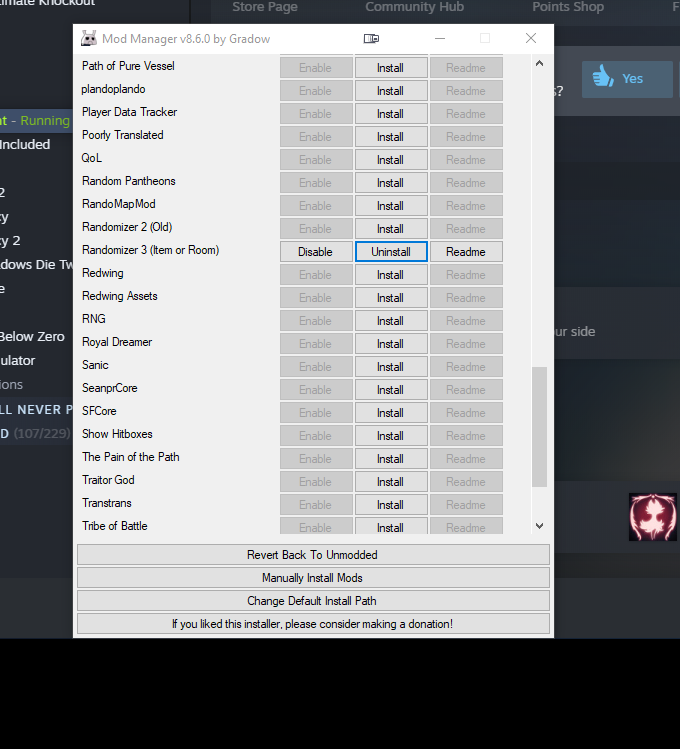
like that?
and when i open the game it asks me to choose a language but won't let me click ok
real jacinth
Did you let it download other mods
dry salmon



 real jacinth
Or did you say no to each
real jacinth
You can't click anything?
dry salmon
i can click the languages. it asks yes or no
if i click yes nothing happens
i had same problem yesterday. i can validate the game files and 1 file is lost or w/e
and when i do that and open, it lets me click ok
real jacinth
Okay. So do that to get past this opening stuff. Then open the installer again
The mods are probably not set up to handle a first time playing the game


 real jacinth
just post the pictures here
i can't open that shit on my phone
what does the bottom of your installer say now
does it say "enable all installed mods" or "revert to vanilla"
dry salmon
revert back to unmodded
real jacinth
are you sure you're modding the right version
you said you reinstalled the game
is it possible you have 2 installs now
on different drives
dry salmon
1.4.3.2 is the hollow knight version
real jacinth
that's not what i asked
right click the game in steam that you're launching
and click this
where does it take you
dry salmon
D drive
it's literally the only thing on that drive
also no hollow knight install on the main drive
real jacinth
you closed the game when installing mods right?
real jacinth
what do you mean
dry salmon
steam is open while i install the mods
dry salmon
real jacinth
that is not what i circled