#archived-modding-help
1 messages · Page 174 of 1
 rustic junco
I was starting a boss fight in god home and suddenly lights went out and when it came back that was there
 wheat orchid
So I’m guessing the pc lost power while it was saving?
rustic junco
yes
 dense shuttleBOT
Saves
Windows File Paths: (Assumes Default Steam Install Path, Adjust accordingly for DRM Free or Non-Standard Steam Path)
Game Files: C:\Program Files (x86)\Steam\steamapps\common\Hollow Knight\```
** **
Mac File Paths:
```Save Files: ~/Library/Application Support/unity.Team Cherry.Hollow Knight/
Game Files: ~/Library/Application Support/Steam/steamapps/common/Hollow Knight/hollow_knight.app/```
** **
Linux File Paths:
```Save Files: ~/.config/unity3d/Team Cherry/Hollow Knight/
Game Files: ~/.local/share/Steam/steamapps/common/Hollow Knight/```
wheat orchid
Aaaaa Dyno has a new pfp
This is very illegal
Wait what
Anyway, have you gone to the save files path in file explorer @rustic junco
wheat orchid
Ok
Move user1.dat to a safe location in case there is a way to recover it
Then rename the most recent user1.dat.bak file to user1.dat
Then open the game and see if it’s fixed
wheat orchid
Np
rustic junco

wheat orchid
It’s going to be at least a bit before you last saved, so you’ll have to redo a bit of stuff, but at least you have it
rustic junco
every thing is there where they should be
 trail flint
wheat orchid
Wait what
trail flint
wheat orchid
Wait what
dyno premium
 vernal rain
𝒻𝒶𝓃𝒸𝓎 𝓉𝑒𝓍𝓉
wheat orchid
𝓜𝓪𝓴𝓮𝓼 𝓼𝓮𝓷𝓼𝓮
 coral swallow
Ok so I downloaded debug mod so that I can respawn right before hive knight. The debug menu was there when I opened the game after installing it and it says modding api and debug mod in the top left of the home screen. But I can't bring the menu back after hiding it and I tried setting a respawn point with f7 but it didn't work. (nevermind I'm dumb Fn+f keys worked)
 proper salmon
i removed the mod and i still can't heal...
 novel bronze
Um
proper salmon
wheat orchid
<@!416934970825637889> did you use hollow pointat all
yeah but i removed it
do i need to put it again?
wheat orchid
It saves stuff to your save file
novel bronze
I thought if I asked a mod theyd be able to help
proper salmon
ohhhh
novel bronze
sorry
wheat orchid
Wrong type of modding
wheat orchid
Np
proper salmon
yeah i remember it modified things
wheat orchid
It’s fine
proper salmon
so can I fix it?
wheat orchid
No
novel bronze
I-I didnt know...
wheat orchid
Well
novel bronze
but I do need help eith this too
wheat orchid
You can try re installing it and saving with it.
novel bronze
like modding the game right?
wheat orchid
Ok
proper salmon
wheat orchid
You can try re installing it and saving with it.
the hollow point mod right?
wheat orchid
Yes
proper salmon
ok gonna try that
novel bronze
I wanted to see how a backer boss idea I made would actually work and I was thinking of modding the base coding from the silk song demo in order to make a demonstration of the boss
wheat orchid
Ok
novel bronze
If that makes sense
wheat orchid
You can make custom bosses pretty easily
wheat orchid
Just need a GameObject with animations, then you can either buy playmaker to do it the way tc does it, or do it completely through coded monobehaviors
novel bronze
You know the Joni's blessing charm?
wheat orchid
Yeah
novel bronze
I was gonna make a boss that makes all of your hearts into lifeblood for their next attack and all the health you lose is a permanent loss for the rest of the fight
Because Im a jerk
:)
wheat orchid
That sounds cool
novel bronze
thank you for the help
wheat orchid
I had a similar idea for a boss I made(modified hive knight into lifeblood) but couldn’t figure out how to do it at the time
novel bronze
yeah its a hard thing to work out
but like the thing is
the backer boss I made would have to be part of an added dlc
which makes it a little weird
but I coded the basic fight without the lifeblood
and its REALLY fun
wheat orchid
Awesome
novel bronze
its really fast paced and its REALLY hard
and it has 5 attack phases
which is why it should be in an added dlc
wheat orchid
Btw here’s something really helpful for new modders, and has some stuff I keep going back to too https://radiance.host/apidocs/
Awesome
novel bronze
Thank you so much
novel bronze
if they add it in I promise to make it known that you helped
:)
I got money and I was gonna put it towards backing silk song
wheat orchid
Well I didn’t really help
novel bronze
Well I have no idea how to mod well so you did help by giving that link
wheat orchid
¯_(ツ)_/¯
novel bronze
Aight
proper salmon
Ok so it worked, i can heal, but one heal is the equivalent of 1 ammo
like i heal using no soul almos
wheat orchid
Yeah
Just gonna have to deal with that till I make that save fixing mod I planned
I’ll start development when I get home from school
proper salmon
wheat orchid
I’ll start development when I get home from school
Oh wow! Thanks
Damn
wheat orchid
Np
proper salmon
proper salmon
Damn
That’s pretty OP ngl
wheat orchid
Yeah
 cold hare
i need some help so my monitor ratio is 1:1.5 and my resolution for my monitors is 1280 x 1024 at a refresh rate of 60hz and my hk settings are set at the right res but it’s still got large black bars on the top and bottom i think it’s cause of my aspect ratio any help? (i’m just copy and pasting from help cause i was told to go here)
 dusk copper
(Sorry, it's because we aren't technical)
 vernal rain
afaik hollow knight only supports 16:9 aspect ratios
cold hare
oh ok so i’ll just have to get a new monitor oof
novel bronze
my friend cant open hollow knight mod manager, it just gives her this error, we've tried resetting the launcher, uninstalling and reinstalling both the mod manager and hollow knight, and it still just gives us the error
we also verified integrity of the game files on steam, and made sure both the mod installer and hk were on the same drive
 heavy notch
Hello
I need help
I played with the debag mod for fun and because of some bug, now my clean nail has 20 damage instead of 21.

 nova tendon
How do I uninstall mod installer 2? because steam had to re-install hollow knight and the game is not working properly because of the mods.
I already tried verifying integrity of the game files, but after installing a mod, the game broke again, so I had to verify the integrity of the game files again.
 faint heart
Is there a mod that makes you kill the bosses in the Pantheons quick even if you choose all the bindings?
 sacred parcel
How do you install mods
vernal rain
?mods
dense shuttleBOT
Mods
Google Drive with Mods - https://drive.google.com/drive/folders/0B_b9PFqx_PR9Um9MeFZMV21oWGs
Installer - https://radiance.host/mods/ModInstaller.exe
Mod Summaries - https://docs.google.com/document/d/1cz5tcggpGofrBcM90XyTkMWjMelDHzugvQM6HpB13Ew
sacred parcel
Do I install all of these
 west bane
?i
dense shuttleBOT
Reminder: The mod installer (https://radiance.host/mods/ModInstaller.exe) and other modding resources can be found from the pinned messages.
heavy notch
faint heart
Is there a mod that makes you kill the bosses in the Pantheons quick even if you...
I can advise you to debug the mod, but I warn you that a bug may occur due to which you will walk either with a nail of level 20, or with level 26. Actually, I addressed this problem, but thanks to responsive and kind people, I was able to solve this problem.
cold hare
vernal rain
afaik hollow knight only supports 16:9 aspect ratios
thank you i went and got a new monitor and now it works great
sacred parcel
Do I install of the things that are shown when you type ?mods
vernal rain
no, you use the mod installer, which is linked with the ?mods and ?i dyno commands
 late vortex
I am installing mods manually, does the drive folder not include the API and modding common?
nvm
where is ModLog.txt? Benchwarp failed to load and idk why
sacred parcel
vernal rain
no, you use the mod installer, which is linked with the ?mods and ?i dyno comman...
Ok thank you for your help
 limpid mortar
how does the multiplayer client work?
novel bronze
hi, I'm having trouble installing ModInstaller on the gamepass, could someone help me? I'm Brazilian :[ I'm sorry for the terrible English
 tardy nimbus
are you doing on Xbox or PC? because you can't do mods on Xbox
novel bronze
PC
 real jacinth
can't do mods on gamepass
novel bronze
I saw some people teaching how to use the mod in the PC gamepass, however, the video was in English and I'm Brazilian, I can't understand it properly = [
real jacinth
you cant
novel bronze
i'm using google translator =´[
real jacinth
you still can't mod that version
novel bronze
real jacinth
you cant
because?
real jacinth
you can't overwrite the file permissions b/c they're at a permission level higher than admin, controlled by microsoft
novel bronze
=[
real jacinth
so you can't change any files, ergo.... you can't mod the game
novel bronze
ok, thanks
 limber egret
novel bronze
I saw some people teaching how to use the mod in the PC gamepass, however, the v...
limber egret
novel bronze
I saw some people teaching how to use the mod in the PC gamepass, however, the v...
Where was this?
wheat orchid
@novel bronze where did you buy the game
@late vortex get seanprcore and modcommon since bench warp requires at least one of them to work
novel bronze
steam
real jacinth
the installer shouldn't be put with the game files. just put it on your desktop
probably can't find it b/c you're putting it too deep in the file structure
novel bronze
the mod installer app is just on the desktop yeah
 mighty iron
how can you equip the gun i have the mod.
west bane
readme in the game files
mighty iron
I looked at it but i dont undersrtand
wheat orchid
@mighty iron tap focus
mighty iron
i did its not working
wheat orchid
Do you have modcommon
wheat orchid
@mighty iron are you sure you are tapping it and not holding it
 dire tiger
Im having trouble with the custom knight mod, im dragging the files into the Custom Knight mod folder but when i choose my skin its still the default knight. I may or may have not screwed the files of the game though im not sure
wheat orchid
@dire tiger screenshot the inside of one of the skin folders and the path to it
 autumn sedge
Does anybody mind sending me a sprite of a sawblade?
wheat orchid
#art-discussion pins
autumn sedge
Okay
wheat orchid
?saves
dense shuttleBOT
Saves
Windows File Paths: (Assumes Default Steam Install Path, Adjust accordingly for DRM Free or Non-Standard Steam Path)
Game Files: C:\Program Files (x86)\Steam\steamapps\common\Hollow Knight\```
** **
Mac File Paths:
```Save Files: ~/Library/Application Support/unity.Team Cherry.Hollow Knight/
Game Files: ~/Library/Application Support/Steam/steamapps/common/Hollow Knight/hollow_knight.app/```
** **
Linux File Paths:
```Save Files: ~/.config/unity3d/Team Cherry/Hollow Knight/
Game Files: ~/.local/share/Steam/steamapps/common/Hollow Knight/```
mighty iron
i tapped it
mighty iron
wheat orchid
<@!606531526905298964> are you sure you are tapping it and not holding it
i tapped it bust it casted a spell
wheat orchid
@mighty iron then you are pressing quick cast instead of focusing or you are missing modcommon or hollow point
 vague pebble
alright so i downloaded the modinstaller, the mod i wanted (customknight) and modcommon because my friend said he had it downloaded and it worked just fine. I open hollow knight on steam, there was a few moments of the loading thing (the ghost running in the bottom right) before the loading thing froze. Then, a white bar came up in the center of my screen, where a grey bar grew out from the center, reaching the edges, and "hollowknight.exe has stopped responding"
please, i just want to look like zote
wheat orchid
@vague pebble are you using a controller
wheat orchid
Unplug and plug in at title screen
mighty iron
Im using fast cast
real jacinth
quick cast =/= focus
sacred parcel
?mods
dense shuttleBOT
Mods
Google Drive with Mods - https://drive.google.com/drive/folders/0B_b9PFqx_PR9Um9MeFZMV21oWGs
Installer - https://radiance.host/mods/ModInstaller.exe
Mod Summaries - https://docs.google.com/document/d/1cz5tcggpGofrBcM90XyTkMWjMelDHzugvQM6HpB13Ew
sacred parcel
Anything I have to do after I install the installer
 fair ibex
run it 
sacred parcel
Ok
mighty iron
why is my hollow point mod not working
sacred parcel
The one that gives you an AK
mighty iron
its called hollow point
sacred parcel
mighty iron
yes thats the one
sacred parcel
Anything else I have to do besides hit install
mighty iron
read the readme
sacred parcel
I cant click on it do I have to install it first
mighty iron
yes
sacred parcel
Ok
mighty iron
get modcommon
sacred parcel
It installed for me I believe but I will if it didnt
Does this work with controllers
mighty iron
idk how to equip it i pressed quick cast doent work
sacred parcel
Yes
mighty iron
i did im on pc
sacred parcel
Then Im not sure Im skimming through the note pad
mighty iron
but it doesnt work
sacred parcel
Ive got a few mods selected do I just launch the game on steam now
How do I change class
nvm I reloaded and got the AK
mighty iron
how do i reload?
mighty iron
ik but how do i equip it?
sacred parcel
tap focus/cast
mighty iron
i did it doesnt work for some reason
sacred parcel
Try disabling and reenabling the mod?
mighty iron
it didnt work iyt still makes me heal
sacred parcel
Im not sure
trail flint
did you make a new save
sacred parcel
I didnt
mighty iron
no
trail flint
do you have modcommon?
mighty iron
yes
sacred parcel
What does bonfire mod do
trail flint
just an FYI, the mod doesnt work on a new save file, you gotta quit then load the save again
mighty iron
ik
trail flint
and it still doesnt work?
mighty iron
ye
mighty iron
cant switch
trail flint
try tapping the focus button
mighty iron
i did
trail flint
nothing happened?
mighty iron
yeah
trail flint
does the UI have -999999 on it
trail flint
aight
sacred parcel
How do I heal in hollow point
trail flint
keep shooting shit
fill those 3 circles
once you fill those 3, keep damaging enemies, then youll keep automatically healing
its all in the readme
sacred parcel
Ok I read that I filled all 3 circles but nothing happened I didnt know I had to continue
trail flint
yeah keep damaging
basically you dont need to manually heal anymore
just keep shooting
sacred parcel
Ok
 amber star
Is there a way to download/uninstall mods for Hollow Knight using the Xbox version of it? [The Xbox thing on PC, not console]
Please @ me or DM me when you can, I've gotta go to bed.
real jacinth
no
amber star
o h
 round wolf
if you're talking about gamepass, most likely people will say no but maybe uwpdumper could work
amber star
uwpdumper?
round wolf
to fix the permission issues on the folder, but I haven't tried it I don't have the game on game pass
round wolf
yeah no idea I just know it's a thing
 azure trout
does a version of debug mod exist for lifeblood patch?
dense shuttleBOT
Mods
Google Drive with Mods - https://drive.google.com/drive/folders/0B_b9PFqx_PR9Um9MeFZMV21oWGs
Installer - https://radiance.host/mods/ModInstaller.exe
Mod Summaries - https://docs.google.com/document/d/1cz5tcggpGofrBcM90XyTkMWjMelDHzugvQM6HpB13Ew
west bane
#resources might be better
proper salmon
Ok so does anyone here how to fix a bug, where even if I go fullscreen on steam, and open hollow knight with my dualshock4 controller, it still doesnt work?
limber egret
Try plugging your controller in after the game starts
proper salmon
already done it, doesnt work
when i started it with steam it said
controller connected, then I went into the game and i couldnt use it
i tried plugging it in in-game and it still didnt work
like it would connect
oh wait
maybe i can try something
 floral harness
hi, i dunno what did I press in the debug mode, is there anyway to reset to factory settings ?
west bane
?saves
dense shuttleBOT
Saves
Windows File Paths: (Assumes Default Steam Install Path, Adjust accordingly for DRM Free or Non-Standard Steam Path)
Game Files: C:\Program Files (x86)\Steam\steamapps\common\Hollow Knight\```
** **
Mac File Paths:
```Save Files: ~/Library/Application Support/unity.Team Cherry.Hollow Knight/
Game Files: ~/Library/Application Support/Steam/steamapps/common/Hollow Knight/hollow_knight.app/```
** **
Linux File Paths:
```Save Files: ~/.config/unity3d/Team Cherry/Hollow Knight/
Game Files: ~/.local/share/Steam/steamapps/common/Hollow Knight/```
west bane
navigate to saves directory, delete debug.globalsettings.json
floral harness
not the .bak tho ? just the .json ?
proper salmon
proper salmon
maybe i can try something
i can still try one thing more but i dont think it will work
Ok maybe I did something
But my pc froze
Nice
proper salmon
Ok so:
I tried opening hollow knight once again and realized that maybe I need to put on the accessibility settings
So I do it, go open hollow knight qnd my pc freezes
I turn it off, turn it on and try again
It freezes another time, and now I will try removing accessibility settings
wheat orchid
@mighty iron tap focus not quick cast they are not the same thing
@still marsh you can just run modinstaller 2 without wine or mono tmk
 inner rivet
hi im new i have a query can mods be installed on mac?
inner rivet
wheat orchid
Mod installer 2
thanks
 scenic crown
amber star
This thing? <@!259387134547460096>
scenic crown
amber star
This thing? <@!259387134547460096>
wait what
proper salmon
proper salmon
It freezes another time, and now I will try removing accessibility settings
Ok now it’s fixed, but i can’t use the controller (I removed the accessibility settings option)
amber star
No idea.
amber star
nesquack was talkin' about it earlier
proper salmon
@modern slate here
proper salmon
Hello, i am playing online with my friend, but we see each other immobile, we both went on the same hamachi thing, after that I hosted the server, said him my IP and everything, then we could see each other but not move
wheat orchid
@still marsh did you get the Mac mod installer 2 or windows mod installer 2?
@proper salmon make sure the host connected before anyone else starts hk. If it still doesn’t work then try swapping hosts
proper salmon
still doesnt work
wait maybe the host needs to connect to the server?
like he connects to itself
 low birch
what is the save file called?
wheat orchid
@proper salmon yes they need to connect to themself.....
@low birch which save file? Slot 1, 2, 3, or 4?
low birch
1
dense shuttleBOT
Saves
Windows File Paths: (Assumes Default Steam Install Path, Adjust accordingly for DRM Free or Non-Standard Steam Path)
Game Files: C:\Program Files (x86)\Steam\steamapps\common\Hollow Knight\```
** **
Mac File Paths:
```Save Files: ~/Library/Application Support/unity.Team Cherry.Hollow Knight/
Game Files: ~/Library/Application Support/Steam/steamapps/common/Hollow Knight/hollow_knight.app/```
** **
Linux File Paths:
```Save Files: ~/.config/unity3d/Team Cherry/Hollow Knight/
Game Files: ~/.local/share/Steam/steamapps/common/Hollow Knight/```
wheat orchid
Save files path
The rest of the saves are named accordingly
user1.dat, user2.dat, user3.dat, user4.dat
low birch
mine doesnt look like that
wheat orchid
You went to the game files path......
Look closely
Also you can’t mod windows store or gamepass versions or x box app btw
wheat orchid
You don’t need to do anything
low birch
oh will it grab it?
 shrewd cave
question
I got the mod installer working fine, but is there a place to read into what each of the mods actually do
low birch
oh okay
wheat orchid
?mods
dense shuttleBOT
Mods
Google Drive with Mods - https://drive.google.com/drive/folders/0B_b9PFqx_PR9Um9MeFZMV21oWGs
Installer - https://radiance.host/mods/ModInstaller.exe
Mod Summaries - https://docs.google.com/document/d/1cz5tcggpGofrBcM90XyTkMWjMelDHzugvQM6HpB13Ew
low birch
-thanks
shrewd cave
cool, thanks
proper salmon
wheat orchid
<@!416934970825637889> yes they need to connect to themself.....
welp still doesnt work, maybe we'll try doing it again later
wheat orchid
Screenshot both pause menus and the host’s hamachi
proper salmon
ill tell you later, he went off
proper salmon
ye i know
wheat orchid
K
proper salmon
thanks for helping!
shrewd cave
wheat orchid
Also check out the readmes of mods on the installer <:zote:562358113374568477>
it wasn't letting me open the readme unless the mod was already intalled
wheat orchid
So?
That’s what is supposed to happen
You download/install the mod and it’s readme
shrewd cave
ah
 thorn jackal
does modinstaller 2 changed anything?
 soft kite
hey, could u guys help me? what mods do i need for rando?
real jacinth
rando, modcommon, qol, vasi, seanprcore
limber egret
You'll also need Benchwarp
scenic crown
yes
mighty iron
how can you see the ui for hollow knight
real jacinth
what
real jacinth
why not
scenic crown
its blocked
real jacinth
so unblock it
real jacinth
more info -> run anyways
real jacinth
i just told you
scenic crown
it doesnt say moer info
real jacinth
the virus warning message has a button for more info
then when you press it, there's an option to run anyways
scenic crown
it still isnt working
it has
keep
report this file as safe
or learn more
i clicked learn mor
e
real jacinth
or you could just click keep
 sullen mantle
Can u get the mod download on mac
because i only found the one that worked fro windows
 spring bane

real jacinth
no
dense shuttleBOT
Saves
Windows File Paths: (Assumes Default Steam Install Path, Adjust accordingly for DRM Free or Non-Standard Steam Path)
Game Files: C:\Program Files (x86)\Steam\steamapps\common\Hollow Knight\```
** **
Mac File Paths:
```Save Files: ~/Library/Application Support/unity.Team Cherry.Hollow Knight/
Game Files: ~/Library/Application Support/Steam/steamapps/common/Hollow Knight/hollow_knight.app/```
** **
Linux File Paths:
```Save Files: ~/.config/unity3d/Team Cherry/Hollow Knight/
Game Files: ~/.local/share/Steam/steamapps/common/Hollow Knight/```
real jacinth
but these are default paths
wheat orchid
@scenic crown ....you try them in the game
proper salmon
?saves
dense shuttleBOT
Saves
Windows File Paths: (Assumes Default Steam Install Path, Adjust accordingly for DRM Free or Non-Standard Steam Path)
Game Files: C:\Program Files (x86)\Steam\steamapps\common\Hollow Knight\```
** **
Mac File Paths:
```Save Files: ~/Library/Application Support/unity.Team Cherry.Hollow Knight/
Game Files: ~/Library/Application Support/Steam/steamapps/common/Hollow Knight/hollow_knight.app/```
** **
Linux File Paths:
```Save Files: ~/.config/unity3d/Team Cherry/Hollow Knight/
Game Files: ~/.local/share/Steam/steamapps/common/Hollow Knight/```
 fresh nacelle
I tried downloading the Poorly Translated mod (with ModInstaller and not ModInstaller 2 if that changes anything) but it said there was an unhandled exception
real jacinth
you can just go rename it in the game files
and it'll work
it downloads it, but it's a .dll that's named a .zip
wheat orchid
Someone should really fix that
real jacinth
hey, you're someone
fresh nacelle
I'll try that now thanks
real jacinth
so just rename it to a .dll
or download the poorly translated mod from the google drive and use the manual install button on the installer
fresh nacelle
it worked thanks man!
proper salmon
Ok so
my friend cant find save files
like
he goes on %appdata%
but he cant find LocalLow
idk a lot about windows so
real jacinth
you can also just copy the whole path into your address bar
and it'll take you there
inner rivet
real jacinth
but these are default paths
i already succeeded but now the installer closes when i select the path :c
real jacinth
what os and version are you on
inner rivet
Mojave 10.14.6
real jacinth
and what installer
scenic crown
k
 summer prism
Hi, im having problem with the multiplayer mod, we are both using hamachi, we both have installed mod common, friend has multiplayer server, i have multiplayer client but when i try to join nothing happens. I'm putting a correct address and port
summer prism
yep we tried that too after i sent that message
real jacinth
port should not change from default
and host needs to connect to themselves first, before any other clients turn on their game
summer prism
working thanks!
late vortex
is randomizer v3 not available from the drive?
real jacinth
why not use the installer
late vortex
i'm on linux. the installer gets me the api but does not open the window I am familiar with. it just downloads the api over and over
(run with mono ModInstall.exe)
late vortex
summer prism
the only problem we have now is that the movement is not syncing at all
like i see hes sitting on the bench
even though he is in totally different location
same goes for him seeing me in 1 place the whole time
late vortex
clicking ok closes windows and then restarts the download
real jacinth
did you try the pinned installer2
late vortex
let me check
summer prism
okay disabled some other mods
fixed that he can see me moving
but i cant see him moving
 tight iris
Rando is not showing any options.
also Hollow Point says read readme but it doesnt install one. (im using ModInstaller2 for mac)
late vortex
alright, using wine (64 bit) and the new installer seems to have worked. thank you. I may return if I have more questions
wheat orchid
@summer prism make sure to have the host connect before anyone else starts hk
@tight iris missing Qol
Randomizer 3’s requirements are Qol(and by extension, Vasi), modcommon, and seanprcore
wheat orchid
Oh yeah, you need to let hamachi if you are using it and port 26950 through
real jacinth
yeah, so start a new save
mighty iron
how can you see the UI
real jacinth
of what
mighty iron
hollow knight
mighty iron
my cast doesnt change the weapon
mighty iron
that is my heal button
mighty iron
they are
real jacinth
show title screen
mighty iron
Its bad quality
real jacinth
Okay.... Well first off, screenshots exist
And second, this is way way too many mods
mighty iron
Ye ill disable some
my pc doesnt do screenshots on this game for some reason
i reduced the mods
vernal rain
click in the window of the game and press alt+prntscreen
then just ctrl+v in discord (requires discord on pc or web)
 cursive torrent
Hey doods, I'm having a bit of a weird problem at the moment.
Some mod somewhere has changed my music I think?
Does anyone recognize this music?
https://clips.twitch.tv/ApatheticAltruisticNeanderthalSeemsGood
Mods Installed:
'Art' Mods
Benchwarp
Custom Knight
Mod Common
Player Data Tracker
QoL
Randomizer 3
SeanprCore
Vasi

 vernal rain
cursive torrent
Hey doods, I'm having a bit of a weird problem at the moment.
Some mod somewhere...
vernal rain
cursive torrent
Hey doods, I'm having a bit of a weird problem at the moment.
Some mod somewhere...
from that list i guess it would be the 'Art' mods, because nothing else changes music, i just have no idea with the 'art' mods
cursive torrent
Hmm, I will have a peruse
mighty iron
 sand tide
can anyone help me download daughter of hallownest? it seems like its more than just a skin so im not sure if customknight is enough, it evidently seems to change some dialogue and stuff too? and theres a lot of stuff in the file. any help would be greatly appreciated
 keen radish
sand tide
can anyone help me download daughter of hallownest? it seems like its more than ...
keen radish
sand tide
can anyone help me download daughter of hallownest? it seems like its more than ...
the best thing to do is just unpack it and put the skin in, if you dont want the extra dialogue.
sand tide
i do want the extra dialogue, a bit confused i guess
limber egret
Are you using ModInstaller?
keen radish
oh, i dont know how to do that kind of stuff.. sorry
limber egret
Because it mkaes things much easier
sand tide
i am
limber egret
If you're not then it should just be a .dll file you put next to your other mods
mighty iron
my hollow point doesnt work what else do i need other than modcommon
spring bane
@sand tide replace your hollow_knight_data folder with the one in the download
Perhaps back up the other one
sand tide
thank you!
spring bane
Yw enjoy
mighty iron
it dosent switch to the gun when i tap focus
cursive torrent
Just reposting this, because it seems like a few more people showed up.
Does anyone recognize this music?
https://clips.twitch.tv/ApatheticAltruisticNeanderthalSeemsGood
Trying to change it back to default, not sure whats changed it.
mighty iron
idk
spring bane
mighty iron
it dosent switch to the gun when i tap focus
Try without blackmoth?
mighty iron
okay
spring bane
That is the regular music actually; the hwurmps get some undeserved Drama
mighty iron
i pressed it when i disabled blackmoth it still doesnt work
spring bane
Idk then, it was just a theory
limber egret
cursive torrent
Just reposting this, because it seems like a few more people showed up.
Does any...
Yeah, this is default
wheat orchid
@limber egret they were talking about the skin not the mod
Probably should have done that as a reply
mighty iron
any mods i need to disable?
wheat orchid
@mighty iron you are sure you are tapping focus and not quick cast and you are sure that you aren’t starting a new save
wheat orchid
Well you’re doing something wrong since it works for literally everyone else
mighty iron
i think i need seapr core
wheat orchid
@mighty iron you don’t
@still marsh try Mac mod installer 2 maybe?
¯_(ツ)_/¯
”magic”
 tired steppe
So I installed mods and found I couldn't fullscreen the game, so then tried to delete all of the mods to return it to normal but I can't seem to return it to normal even though it says ingame that I've deleted all the mods
Nvm I fixed it
wheat orchid
@tired steppe you need to delete the ModdingApi(the thing that changes the game to load mods) for that to go back to normal
 thick leaf
how do you access the spoiler log after starting a rando / are you able to access it still?
i'm big confuse
novel bronze
One message removed from a suspended account.
 normal vortex
Where can I download the latest Windows ModInstaller?
novel bronze
normal vortex
Where can I download the latest Windows ModInstaller?
One message removed from a suspended account.
novel bronze
One message removed from a suspended account.
novel bronze
novel bronze
One message removed from a suspended account.
One message removed from a suspended account.
One message removed from a suspended account.
One message removed from a suspended account.
One message removed from a suspended account.
One message removed from a suspended account.
One message removed from a suspended account.
One message removed from a suspended account.
One message removed from a suspended account.
One message removed from a suspended account.
One message removed from a suspended account.
normal vortex
"ModCommon" need to be Enabled?
novel bronze
One message removed from a suspended account.
normal vortex
thx
novel bronze
One message removed from a suspended account.
One message removed from a suspended account.
One message removed from a suspended account.
One message removed from a suspended account.
dense shuttleBOT
Saves
Windows File Paths: (Assumes Default Steam Install Path, Adjust accordingly for DRM Free or Non-Standard Steam Path)
Game Files: C:\Program Files (x86)\Steam\steamapps\common\Hollow Knight\```
** **
Mac File Paths:
```Save Files: ~/Library/Application Support/unity.Team Cherry.Hollow Knight/
Game Files: ~/Library/Application Support/Steam/steamapps/common/Hollow Knight/hollow_knight.app/```
** **
Linux File Paths:
```Save Files: ~/.config/unity3d/Team Cherry/Hollow Knight/
Game Files: ~/.local/share/Steam/steamapps/common/Hollow Knight/```
wheat orchid
@novel bronze why do you need to reset it?
novel bronze
One message removed from a suspended account.
wheat orchid
¯_(ツ)_/¯
novel bronze
One message removed from a suspended account.
wheat orchid
With zaliant.dll try loading instead of creating a save
novel bronze
One message removed from a suspended account.
One message removed from a suspended account.
dense shuttleBOT
Mods
Google Drive with Mods - https://drive.google.com/drive/folders/0B_b9PFqx_PR9Um9MeFZMV21oWGs
Installer - https://radiance.host/mods/ModInstaller.exe
Mod Summaries - https://docs.google.com/document/d/1cz5tcggpGofrBcM90XyTkMWjMelDHzugvQM6HpB13Ew
wheat orchid
Depends, are you on Linux or Mac?
Well which one seems to fit you?
Also never heard of the controller crashing only happening with the universal version
Just don’t have a controller connected before reaching the hk title screen
 high gyro
wht do i do when i get this error after clicking offline mode
high gyro
does this have anythingto do with my problem
sullen mantle
why si suddenly nobody here lol
sullen mantle
thx
and whherer shall i put the path to
because i have no idea what to do now lol
limber egret
the pins also have the file path
sullen mantle
bruhh ok
 digital copper
whenever someone has the time please ping me
wheat orchid
@digital copper just download a mod installer for your operating system, put it on your desktop, and run it(if on windows, right click and click run as administrator instead for better results)
If you mean making mods, then https://radiance.host/apidocs/ and #archived-modding-development
digital copper
where to download the mod installer
digital copper
i see
digital copper
so do i use mod installer one or two
 wise raven
guys ahhh... i guess i broke the game while i was modding 😅 can someone help me pls ?😕
digital copper
woops
 dreamy berry
where is hollow knight in the folders?
wise raven
Steam
But i guess I fixed it
I removed the my own language (translate thingy) file to original one
Then it fixed
wheat orchid
@wise raven go to your save files path and delete all files with ModdingApi in their name
?saves
dense shuttleBOT
Saves
Windows File Paths: (Assumes Default Steam Install Path, Adjust accordingly for DRM Free or Non-Standard Steam Path)
Game Files: C:\Program Files (x86)\Steam\steamapps\common\Hollow Knight\```
** **
Mac File Paths:
```Save Files: ~/Library/Application Support/unity.Team Cherry.Hollow Knight/
Game Files: ~/Library/Application Support/Steam/steamapps/common/Hollow Knight/hollow_knight.app/```
** **
Linux File Paths:
```Save Files: ~/.config/unity3d/Team Cherry/Hollow Knight/
Game Files: ~/.local/share/Steam/steamapps/common/Hollow Knight/```
wheat orchid
@dreamy berry game files path in the bot message above
dreamy berry
what
wheat orchid
digital copper
so do i use mod installer one or two
Try using 2 since it needs more testing
wheat orchid
dreamy berry
what
dreamy berry
i am extremely confused
wheat orchid
I was answering that question you asked, where is the hollow knight folder
wheat orchid
I didn’t mean what I said in a rude way either
wise raven

dreamy berry
so i have the thing downloaded and all of that and when i click the find hollow knight thing nothing appears
and i have to search for it manually
dreamy berry
i cant find the app data file and that
wise raven
You can find with windows run
digital copper
wheat orchid
Try using 2 since it needs more testing
so how does it work
now i got this
trying the other installer, what to do if this comes up?
wheat orchid
@digital copper where did you purchase hk?
real jacinth
lol. that notification is for going back to no mods
digital copper
i see
novel bronze
Oh hi! Question... Im trying to install the HK ModInstaller 2 on my mac but after I choose the file location of hollow knight it just quits and nothing happens... Am I doing something wrong?
wheat orchid
Where is the installer on your pc
novel bronze
In a random file in documents
wheat orchid
Try putting it on the desktop
novel bronze
.. Hm no its still the same thing..
novel bronze
Oh it worked! Thank you!
 long wedge
guys i really need help, does anyone have a mod that makes your player invincible? im really bad at the game so if you have a mod or something please tell me
keen radish
long wedge
guys i really need help, does anyone have a mod that makes your player invincibl...
debug
long wedge
is that the name?
keen radish
yeah
long wedge
ok thanks
 torn cloud
Is the Hollow Point mod safe to use? I'm worried that it will mess with my files. If I use it on a new file and it gets messed up will it effect other save files I haven't used it in
west bane
does the readme not work for you
west bane
Backing up your save is highly recommended
mighty iron
I dont know why my focus/cast doesn't switch between gun and nail*
west bane
do you have modcommon
mighty iron
Yes
dire tiger
I think hollow point messed with my heal animations, im healing 4 masks per second
west bane
did you start a new save without hollow point then go back into it
west bane
dire tiger
I think hollow point messed with my heal animations, im healing 4 masks per seco...
yes this is outlined in the readme that it messes with heals
west bane
unless you save edit it
west bane
you can download any old 112% save from speedrun.com/hollowknight tho
mighty iron
Im using a old save file
west bane

Speedrunning leaderboards, resources, forums, and more!
dire tiger
ty
mighty iron
west bane
did you start a new save without hollow point then go back into it
Im using a old save
west bane
try makinga new save without the mod enabled then going back into it with HPoint enabled
mighty iron
Okay
west bane
did you get the game through steam, nonamed
west bane
did it say 1 file failed to be acquired
dire tiger
Sometimes yeah
west bane
if you wanna revert to vanilla launch the game when ti says that
thats what i have to do
west bane
yeah, moddingapi is just a modded version of https://i.imgur.com/7OZcFc6.png

iirc
so it just acquires the normal one when you verify
 west bane
also i ASSUME you can just rename this and it's good to go https://i.imgur.com/x8iB6ni.png
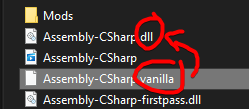
but i could be wrong
steam way is also just always accurate
mighty iron
west bane
try makinga new save without the mod enabled then going back into it with HPoin...
i tried doing that but my mod wont work still
 willow flint
Is anyone on that could help me troubleshoot a Custom Knight issue?
willow flint
The mod works and the game loads, but I can't switch skins. I was wondering if this was an issue with the skins themselves, or if its just me not having another mod thats needed loaded aside from just Custom Knight
All of the folders in the Custom Knight mod folder lead directly into the sprite sheets and I haven't renamed any of them, so I'm not exactly sure whats going on
 minor quartz
Did you put them in the right folder?
 sonic plank
When I try to turn a mod off it, the mod installer 2 crashes, anyone know why?
This is what I can capture in the command line before it crashes, if this helps:
west bane
willow flint
The mod works and the game loads, but I can't switch skins. I was wondering if t...
you dont have modcommon
real jacinth
willow flint
All of the folders in the Custom Knight mod folder lead directly into the sprite...
you don't have modcommon
willow flint
Alright, thanks
I'll enable that and see if it works
I didn't know if modcommon was needed for custom knight
Works flawlessly now, thanks for your help! @west bane @real jacinth
 tulip yarrow
Are you able to have mods on the windows store version of hollow knight?
I got it on pc with game pass
 vestal depot
Hey does someone know if you can mod the game with the microsoft store version?
keen radish
tulip yarrow
Are you able to have mods on the windows store version of hollow knight?
im pretty sure no,
keen radish
vestal depot
Hey does someone know if you can mod the game with the microsoft store version?
and i think its a no to that aswell
vestal depot
Oh ok, thank you
wheat orchid
@keen radish correct on both of those
keen radish
hell yeah
 sonic moth
Hi, I'm new to the server. I'm having some issues with my ModInstaller. It worked well first but then one day when I was playing my game crashed. And then we I came back my saves were loading forever ( just like the pic). So I deleted everything related to modding API and then my game came back to normal. But everytime I want to install it again my saves still keep loading forever. Any solution to this issue ?
dense shuttleBOT
Saves
Windows File Paths: (Assumes Default Steam Install Path, Adjust accordingly for DRM Free or Non-Standard Steam Path)
Game Files: C:\Program Files (x86)\Steam\steamapps\common\Hollow Knight\```
** **
Mac File Paths:
```Save Files: ~/Library/Application Support/unity.Team Cherry.Hollow Knight/
Game Files: ~/Library/Application Support/Steam/steamapps/common/Hollow Knight/hollow_knight.app/```
** **
Linux File Paths:
```Save Files: ~/.config/unity3d/Team Cherry/Hollow Knight/
Game Files: ~/.local/share/Steam/steamapps/common/Hollow Knight/```
sonic moth
Ok, gonna try it rn
sonic moth
Ok so I deleted it but it's still the same thing. Also what bak are you talking about ? There's a ton of them
real jacinth
moddingapi.globalsettings.json and moddingapi.globalsettings.json.bak
if you don't have file extensions on, your moddingapi.globalsettings.json.bak will appear to be moddingapi.globalsettings.json
so you probably deleted the wrong file
sonic moth
Yikes. Well, how I can get the file extensions ?
real jacinth
sonic moth
Oh ok lol. Thanks, I will reinstall the modding api and try to delete the right file
cursive torrent
Does anyone know why HollowKnightRandomizerTracker would be throwing these?
fixed it, nvm
 violet dew
Happy hollow-days to all the cool modders
real jacinth
every day is hollow when you have depression
 halcyon narwhal
hey so im trying to use the Sanic mod. saw on youtube i need to edit the Sanic.GlobalSettings file to change the speed. where can i find that file?
 lost comet
can you mod pirated hollow knight
dense shuttleBOT
Saves
Windows File Paths: (Assumes Default Steam Install Path, Adjust accordingly for DRM Free or Non-Standard Steam Path)
Game Files: C:\Program Files (x86)\Steam\steamapps\common\Hollow Knight\```
** **
Mac File Paths:
```Save Files: ~/Library/Application Support/unity.Team Cherry.Hollow Knight/
Game Files: ~/Library/Application Support/Steam/steamapps/common/Hollow Knight/hollow_knight.app/```
** **
Linux File Paths:
```Save Files: ~/.config/unity3d/Team Cherry/Hollow Knight/
Game Files: ~/.local/share/Steam/steamapps/common/Hollow Knight/```
west bane
are you benchwarping
west bane
after you benchwarp just pause then unpause
 tacit fractal
how do i get the grimm knight not in the drive?
 rustic crow
Anyone else have consistent infinite load on THK room with benchwarp on, or know how to fix it? Happens every time, I have to restart the game and sometimes even disable benchwarp to get it to work. I have already enabled reduced preloads in benchwarp settings.
 worldly kraken
?help
guys where can I download modinstaller? wanna be sure I am right coz the one I'm downloading now says it's virus
well I didn't notice the button on top of discord. Sorry!
 olive bay
I have a very odd problem, i am doing too much damage (like on hitting gruz mother etc.) I tried reinstalling the game but this did not help. My first thought was: the debug mod, but after uninstalling the mod and deleting the .jason file, i am still doing to much damage. Can somebody help me?
vernal rain
if you have the QoL Mod:
- go to save files
- locate
userX.json(with X being the save slot number from 1 - 4) - ctrl+f "nailDamage"
- set the value to the corresponding one from https://hollowknight.fandom.com/wiki/Nail
if you don't have the QoL Mod: - https://bloodorca.github.io/hollow/
- go to save files
- locate
userX.dat(with X being the save slot number from 1 - 4) - upload that to the website
- ctrl+f "nailDamage"
- set the value to the corresponding one from https://hollowknight.fandom.com/wiki/Nail
- download encrypted (PC)
- rename it to the original name (will be downloaded as
user1.dat, rename if you want slot 2, 3 or 4 to be edited) - put it back to the save file folder
?saves
dense shuttleBOT
Saves
Windows File Paths: (Assumes Default Steam Install Path, Adjust accordingly for DRM Free or Non-Standard Steam Path)
Game Files: C:\Program Files (x86)\Steam\steamapps\common\Hollow Knight\```
** **
Mac File Paths:
```Save Files: ~/Library/Application Support/unity.Team Cherry.Hollow Knight/
Game Files: ~/Library/Application Support/Steam/steamapps/common/Hollow Knight/hollow_knight.app/```
** **
Linux File Paths:
```Save Files: ~/.config/unity3d/Team Cherry/Hollow Knight/
Game Files: ~/.local/share/Steam/steamapps/common/Hollow Knight/```
 pallid stream
Hello i have a problem. I installed the uuwuu mod and it not only doesnt work but it also broke my uumuu fight. I want to try doing him on radiant difficulty but i cant even enter the attuned ot ascended battle.
The problem lies in the save file because on other saves it works normally. Does anyone know what to do?
If i could at least read and edit the save file i could just change the line that says "completedTier3: false" to "true" just like i did with the .json file but i cant do the same with .dat file
 unique parrot
What's a good way to get the Demon Slash Skin ?
wheat orchid
@pallid stream wdym the mod doesn’t work? Also I fixed that bug in the new version of Uuwuu but it was never put on the installer and it has a new dependency because it adds a journal entry.
Also the Teir3 thing doesn’t have anything to do with the problem
It’s the UsingAltVersion that you need to change to false in the save file
I’m guessing you were missing modcommon and it caused the mod not to work
Anyway here is the Uuwuu update. Use the manually install mods button on the installer to select the dll files you download from this page https://github.com/RedFrog6002/HollowKnight.Uuwuu/releases/tag/2.0.0.0

GitHub
Journal Entry Update. New dependency: FrogCore. You can get it from
https://github.com/RedFrog6002/FrogCore/releases if it's not on the installer
FrogCore depends on Vasi and Modcommon, so get ...
 maiden summit
hey uh
the mod installer doesnt work for my pc
is there a way to manually install hollow knight mods? if there are then please tell me
(fyi, no, i did not pirate the game, i can even send a screenshot to prove it)
nevermind, found something at pins
pallid stream
@wheat orchid Okay so i dont know what i did exactly but now it works. The mod was installed long time ago and it wasnt the newest version so the bug you fixed recently was still there. I also dowlnoalded the SFCore.dll which i dont even know if its necessary but THE MOD WORKS. Thank you for help 🙂
wheat orchid
Yeah SFCore is necessary for the added charm. Glad it works
 zinc comet
Aksu skin has a problem
novel bronze
I have some issues with lunching the game with mod. I download the modinstaller and when I try to lunch the it crash. If someone can help me (sorry for bad english)
I have done test and it's juste elderbug god who makes me crash anyone know why ?
tight iris
no worries
rustic crow
@pallid stream uuwuu corrupted my godseeker file as well, I had to delete it and start over 
 stable mountain
I downloaded the custom skins mod but now I cant hear any sounds in the game(all the audio options are on and my headphones are working properly)
 topaz locust
my game saves wont load when the mod loader is active
 tulip sand
am i supposed to use modInstaller 1 or 2?
wheat orchid
@♡ Mei 猫#3810 unplug controller and plug in at main menu
lol they either left or were banned
@topaz locust go to your save files path and delete all files with ModdingApi in their name
?saves
dense shuttleBOT
Saves
Windows File Paths: (Assumes Default Steam Install Path, Adjust accordingly for DRM Free or Non-Standard Steam Path)
Game Files: C:\Program Files (x86)\Steam\steamapps\common\Hollow Knight\```
** **
Mac File Paths:
```Save Files: ~/Library/Application Support/unity.Team Cherry.Hollow Knight/
Game Files: ~/Library/Application Support/Steam/steamapps/common/Hollow Knight/hollow_knight.app/```
** **
Linux File Paths:
```Save Files: ~/.config/unity3d/Team Cherry/Hollow Knight/
Game Files: ~/.local/share/Steam/steamapps/common/Hollow Knight/```
wheat orchid
@zinc comet what’s the problem?
tulip sand
I see the GUI on the left to change my Custom Knight skin, but I can't click on anything
wheat orchid
Get the modcommon mod
CustomKnight needs it to work
Or: remove the moresaves mod since it bugs other mods
tulip sand
i have the modcommon mod
wheat orchid
What other mods do you have?
tulip sand
wheat orchid
Screenshot the inside of the skin folder you are trying to switch to
@ me when you send it
tulip sand
Theres a folder called the skin name, then a folder named custom knight inside of that folder, which has all the skins
should i remove the first folder so its a direct path
@wheat orchid
zinc comet
wheat orchid
<@!363587799254958091> what’s the problem?
The knight texture don't change
limber egret
@tulip sand can you include the file path on that screenshot?
zinc comet
The soul thong and masks do turn to what they should, but not the knight and the attacks
wheat orchid
All of the skin folders need to have the png files directly inside them
CustomKnight folder > skin folder > png files
Otherwise nothing is read
zinc comet
Welp it's already like that
tulip sand
wheat orchid
@zinc comet screenshot the inside of the skin folder
wheat orchid
zinc comet
Welp it's already like that
I was talking to howdy
limber egret
You need to have the image files one folder up
zinc comet
limber egret
So they're in the folder with the name, not the one named custom Knight
zinc comet
wheat orchid
I was talking to howdy
how, my bad 
tulip sand
so just copy paste them all
zinc comet
the nail arts I suppose
wheat orchid
There is no Knight file
limber egret
Does that image just have loads of images of the Knight doing different stuff?
wheat orchid
But there isn’t a png file specifically for nail arts
limber egret
If so just rename it Knight
wheat orchid
I think it’s the knight spritesheet but everything is transparent except the nail arts
limber egret
tulip sand
so just copy paste them all
Yeah, cut them, then go up a folder, paste, then delete the now empty folder
limber egret
👍
zinc comet
Now I have the nails arts but no knight
wheat orchid
Yeah
The skin author did a stupid
You need to copy the original knight spritesheet, edit the copy in a picture editor(paint 3D works) and insert the file from the skin folder on top. Then save it. Now use the edited knight spritesheet instead
Stuff like ms paint doesn’t work because it has no transparency
 velvet coral
my mod installer says that is unable to locate game files
then i click ok, and the program close
wheat orchid
Where did you purchase hk?
velvet coral
Steam
wheat orchid
Look in the pins for how to reset the installer then follow those steps, make sure the game is installed, then try again
velvet coral
ok
stable mountain
my game doesn't have sound after I downloaded CustomSkins Mod
velvet coral
wheat orchid
Look in the pins for how to reset the installer then follow those steps, make su...
it worked, thank you!
wheat orchid
@stable mountain unplug the controller until the main menu after restarting hk. Also it’s CustomKnight not CustomSkins
stable mountain
I play with mouse and keyboard also thank you for the correction
wheat orchid
?saves
dense shuttleBOT
Saves
Windows File Paths: (Assumes Default Steam Install Path, Adjust accordingly for DRM Free or Non-Standard Steam Path)
Game Files: C:\Program Files (x86)\Steam\steamapps\common\Hollow Knight\```
** **
Mac File Paths:
```Save Files: ~/Library/Application Support/unity.Team Cherry.Hollow Knight/
Game Files: ~/Library/Application Support/Steam/steamapps/common/Hollow Knight/hollow_knight.app/```
** **
Linux File Paths:
```Save Files: ~/.config/unity3d/Team Cherry/Hollow Knight/
Game Files: ~/.local/share/Steam/steamapps/common/Hollow Knight/```
wheat orchid
Go to your save files path and delete all files with ModdingApi
stable mountain
Is there supposed to be a file named "saves" or something like it?
vernal rain
userX.dat (x goes from 1 to 4)
fresh nacelle
How do I make a custom knight?
stable mountain
vernal rain
`userX.dat` (x goes from 1 to 4)
can't seem to find a file name that resembles it
wheat orchid
@stable mountain screenshot. You probably went to the game files path instead of the saves path
@fresh nacelle #modding-discussion pins. Spritepacker tutorial
fresh nacelle
thanks
stable mountain
wheat orchid
<@379311064153587722> screenshot. You probably went to the game files path inste...
is this the right file?
tight iris
where is the readme installed?
https://cdn.discordapp.com/attachments/462200562620825600/789917159878950952/unknown.png
(HollowPoint at the bottom)
 real jacinth
in your game files
real jacinth
novel bronze
How do I use MoreSaves mod?
I just installed it for the first time and my save select screen says "page 1/2" but I have no way of going to page 2
real jacinth
[ ]
novel bronze
Oh thanks
stable mountain
I deleted the save files that had ModdingApi in it but the issue still persists
real jacinth
show your title screen
and you sure it's not just a OS issue
where you muted it in windows mixer
or it's coming out a different audio source
real jacinth
things can be set to different audio outputs
even if something else still has sound
stable mountain
my default device output is my default headphones
it is set to that
I had sound coming today before I downloaded the ModdingApi
velvet coral
i need help with multiplayer
me and my friend can't connect each other
we're using hamachi, too
i'm the server, so i created the hamachi network
the ip is correct but it don't connect
 reef blaze


 wheat orchid
I have been summoned
velvet coral
yay
velvet coral
default is 26590, right?
wheat orchid
Yes
velvet coral
950?
wheat orchid
26950
wheat orchid
Hmmm