#archived-modding-help
1 messages · Page 133 of 1
 wheat orchid
seanprcore and vasi and modcommon are helper mods. they make making mods easier, but if your mod is made with them they are required for the mod to work. qol is Quality of life. good for a lot of stuff
 atomic estuary
alrighty
whats the difference between area randomizer, connected-area randomizer and room randomizer?
And is there a spreadsheet explaining all of this?
So like this?
What does random dreamers do? Will they be in any random room spawning instead of some regular enemy? And how would you "randomize" grubs, maps and stags? What even is the purpose of maps in this run?
 real jacinth
random dreamers adds the dreamers to the pool
same with everything else
stag tolls become random items, grubs become random items
etc
you have to find the stag station locations to travel to them
as random pickups
atomic estuary
so I can just find the grubs/dreamers as items? 🤔
real jacinth
yes
 civic eagle
I have arrived.How do I mod HK?
 lime pasture
So what u do is download this
Installing Mods
ModInstaller Links
Windows (or Mac/Linux, with mono): https://radiance.host/mods/ModInstaller.exe
Mac: https://cdn.discordapp.com/attachments/462200562620825600/606553897255043127/ModInstallerMac.zip
ModInstaller Questions

- My ModInstaller gives me the error "Unable to download mod list."
+ Delete ModInstaller and download it from the link above. This error occurs in an old version of ModInstaller which was broken by an update.

- My ModInstaller can't find Hollow Knight.
+ The first time you launch ModInstaller, it will prompt you to set the filepath if it can't find the game. If you skipped past the prompt before, you can reset the ModInstaller's settings by deleting the "ModInstaller" folder at %appdata%\..\Local

- How can I remove all mods from my computer?
+ ModInstaller allows you to uninstall mods and remove the Modding API, if originally installed with ModInstaller. Alternatively, you can restore the original game by choosing to Verify Integrity of Game Files in Steam. Once finished, you can simply delete ModInstaller, as it is only an executable.

- I'm trying to install mods on a patch other than 1.4.3.2
+ ModInstaller only supports current patch Hollow Knight. Read the guide for manually installing mods instead.

- I'm using a different program like Crossroads, and I can't find the mod I'm looking for.
+ The only consistently up-to-date and supported mod installer is the one linked above.

- I bought the game on Windows Store and want to play with mods.
+ Unfortunately, the Windows Store has impossibly restricted file permissions to allow modding. Either buy the game on Steam/GoG, or dual boot with linux.

- Can I install mods on Switch/Xbox/PS?
+ No.

- I pirated the game and want to play with mods.
+ Buy the game. Don't waste everyone else's time by lying or complaining that ModInstaller doesn't work.
you download the FAQ
lime pasture
Sorry that was too much
lime pasture
Yes
Download the radiance host thing
Then run it
Then find a mod called moresaves
civic eagle
mkay, thank you
lime pasture
Np
civic eagle
the program with the zote head is the correct one, right?
real jacinth
yes
lime pasture
Yessir
civic eagle
what is "Daughter of Hollownest"?
real jacinth
a mod
civic eagle
well yeah but what
wheat orchid
Hornet sentinel mod
 proud quailBOT
Mods
Google Drive with Mods - https://drive.google.com/drive/folders/0B_b9PFqx_PR9Um9MeFZMV21oWGs
Installer - https://radiance.host/mods/ModInstaller.exe
Mod Summaries - https://docs.google.com/document/d/1cz5tcggpGofrBcM90XyTkMWjMelDHzugvQM6HpB13Ew
real jacinth
read summaries
wheat orchid
Just a small buff
civic eagle
mkay, thanks someone
lime pasture
It’s a rly hard hornet mod
wheat orchid
No it’s not
real jacinth
there's 2 DoH mods
wheat orchid
Just a small buff
lime pasture
*easy
real jacinth
because naming
wheat orchid
lol
civic eagle
oh wow, I love that theres a "revert back to unmodded", props to whoever made this
civic eagle
Oh, acutally one more thing...
wheat orchid
More saves can bug
civic eagle
How would I open this program again in the future? It should just appear in my downloads folder, right? Or the programs folder?
lime pasture
Yeah
civic eagle
Uh oh, what kind of bug?
 lime pasture
I put it on my desktop
civic eagle
If moresaves is gonna bug I think Ill just play it safe. Thanks anyways
wheat orchid
Yeah
civic eagle
mkay
atomic estuary
So this is the configuration I came up with. Is it always possible to beat the game? I mean random rooms may sometimes require items I dont have
real jacinth
randomization has logic to always be possible
atomic estuary
and not having duplicate major items makes it just that much harder
 novel bronze
guys
i need help
i have deleted modinstaller but in top left screen in the game it say mod api
how?
i can't find it
 olive whale
i dont know if its the mods that are breaking the game but i started a new game and its stuck on a screen of a room with a geo cache
i cant press escape
help?
real jacinth
what mods, what platform, show installer, show title screen, etc
olive whale
the mods i have are enemy randomizer, randomizer 3, hollow point, benchwarp, infinite notches, custom knight, and debug
 elfin jasper
atomic estuary
elfin jasper
atomic estuary
@olive whale I had the same problem earlier, you need to install SeanPrCore, QoL and Vasti as well
How do I install these two files to the hollow knight folder?
real jacinth
why not just use the installer
wheat orchid
Yeah
real jacinth
PDT is on the installer
atomic estuary
if they are on there, sure
real jacinth
as player data dump
and the API is auto installed by the installer
because mods can't run w/o the API at all
atomic estuary
Damn... that's a lot easier than what I was trying to do, thanks!
olive whale
i think i know why it did that when i started the game it said that QoL failed to load
wheat orchid
Get Vasi
olive whale
i already did and that seemed to fix it
novel bronze
how do i completely uninstall mod instlaer
atomic estuary
You just click on "revert back to unmodded" in the installer
olive whale
um
now i am flying like i have noclip on but i cant go up or down
nvm i can go up and down
but its like i have noclip
but its not on
atomic estuary
I just tried to customize the Item Overlay... I dont think its supposed to look like this
wheat orchid
Yeah
real jacinth
open a seed and find out
atomic estuary
and why I dont have the bottom right box like relyea
atomic estuary
where can I find a new one?
olive whale
benchwarp shows everywhere as locked
i dont know how to fix it
im just idiot
nvm
 fair idol
how do you change the file path using modinstaller2? i’ve tried deleting the mods folder but it doesn’t prompt me to do anything, it just creates its own files in the same location. i’m on mac
 polar siren
anyone have a item and enemy randomizer i could use?
fair idol
yeah
ya
yeah, bc my steam files are installed on a harddrive rather than on the usual path
i know what the path is but idk how to set it up with the installer
it creates a folder in the usual steam path called hollow knight with a corrupted hollow knight app file that has the mod folder in it
but it’s not the actual game file
it won’t let me open the app bc it’s incomplete but the mods are downloaded in its package contents
that would probably work but idk if i have enough space on my computer for it
hence them being on a harddrive
i have like 8gb free
hm okay, i’ll try
fair idol
bruh hk is 7.98 gb for me on mac
yeah, it was similar for me last time i checked
not all of the files are mine tho, a lot of the filespace is from my mum bc it used to be her laptop
i could do that, and will probably try that for the moment, though if anyone knows how to change the file path that would be easier
 undone void
okay my problem rn is that I want to configure QoL and I do not how to actually open the config file, I have located it but my computer gives me no options as to what to open it with
you're supposed to be able to open them with notepad but I am not being given that option
apologies if this is a dumb question, I am trying to google things about it
ah I am a fool I found it, I hate windows 10
 opal magnet
can someone help why cant i change skins
 limpid parcel
ok so idk what exact program i have installed onto my windows but its preventing me from running the mod installer, what should I do? There's no option to run it anyways
oh wait nvm i had to click more info to reveal the run anyway option thats dumb lmao
 white basin
From where i can found skins for knight?
 pseudo cape
 gray bridge
Is there a mod which skips intro for boss fight like radiance?
proud quailBOT
Mods
Google Drive with Mods - https://drive.google.com/drive/folders/0B_b9PFqx_PR9Um9MeFZMV21oWGs
Installer - https://radiance.host/mods/ModInstaller.exe
Mod Summaries - https://docs.google.com/document/d/1cz5tcggpGofrBcM90XyTkMWjMelDHzugvQM6HpB13Ew
proud quailBOT
Saves
Windows File Paths: (Assumes Default Steam Install Path, Adjust accordingly for DRM Free or Non-Standard Steam Path)
Game Files: C:\Program Files (x86)\Steam\steamapps\common\Hollow Knight\```
** **
Mac File Paths:
```Save Files: ~/Library/Application Support/unity.Team Cherry.Hollow Knight/
Game Files: ~/Library/Application Support/Steam/steamapps/common/Hollow Knight/hollow_knight.app/```
** **
Linux File Paths:
```Save Files: ~/.config/unity3d/Team Cherry/Hollow Knight/
Game Files: ~/.local/share/Steam/steamapps/common/Hollow Knight/```
gray bridge
thx
 tall nova
Hi everygone, does anyone experience just a black screen when trying to run the Bonfire Mod?
 sleek tiger
isn't Bonfire outdated
 lone turtle
I downloaded the zote skin for customknight but when i pause the game and click on where it says zote under change skin nothing happens. Does anyone know what's going on?
wheat orchid
Did you put the .png files in the right place
lone turtle
I unzipped the file and put the folder in the customknight folder
Was i supposed to do something else?
In fireb0rn's guide there was an image behind each skin name but i dont have that
real jacinth
The image was removed on the pause screen to improve performance
lone turtle
I got it to work turns out i put the wrong folder in the customknight folder
wheat orchid
lol
gray bridge
In fireb0rn's guide there was an image behind each skin name but i dont have that
@lone turtle thats not important
lone turtle
ok
 balmy olive
Is there a custom skin mod version that works on 1.2.2.1?
 past swallow
i really want to use the poorly translated mod but modinstaller says no, how do i fix this?
 west bane
Manually install. Dll is pinned in #archived-modding-development
past swallow
i have the google drive page open and downloaded the mod from there but i dont know how to apply it
past swallow
i did that?
past swallow
if i click on manual install it sends me to recent doenloads
so if i put it there what do i do
balmy olive
open the dll
past swallow
like the zip archive or?
balmy olive
open the zip
west bane
Click on the dll. Hit ok
west bane
That’s it
balmy olive
ur done
past swallow
then how to enable/disable it?
west bane
Close and reopen the installer
past swallow
ok it now shows, thx
 wintry isle
I just downloaded the randomizer the other day, and that's been working fine, but I can't figure out how to start a new normal game with it installed. Is that possible, or do I need to uninstall the randomizer to start a normal game?
wintry isle
Okay, so finish my current rando first, then uninstall to start the new game.
Thanks
wheat orchid
Np
 tulip totem
guys how can i no clip
real jacinth
debug mod
tulip totem
thanks
 hazy egret
Hey so everytime i beat hollowknight with mods installed if i reopen the game saves wont load the music is gone so i have to uninstall a reinstall the game everytime. Is there anyway to fix this??
real jacinth
Go to saves location. Delete the API settings json
Play windowed, and go lower
You can go as low of resolution as you want
Especially with launch commands
You put them in the game settings for steam
-popupwindow -screen-height 540
Something like that
I forget the height and width commands. But you can Google it
 spare patrol
I want to use the player data tracker for personal ease, I'm not recording or streaming or anything like that. The read me is confusing me. Every step of it mentions OBS, which is not something I have or use, do I still need to follow the listed steps in the readme for the mod to work?
real jacinth
how would you use it?
spare patrol
I might just misunderstand, does it appear over the game itself while being played? Or only over a stream. I wanted to use it to track things for myself while I go through the game
real jacinth
it appears on a web page
which is put on stream
so no. not over the game
at all
spare patrol
ahh, got it. never mind then! thank you
real jacinth
it's intended to be a visible inventory for the viewers
so people don't constantly ask to "open inventory, i want to see what you have"
what you're asking for is the same as pressing inventory and seeing what you have
with only a few exceptions. like.... total grubs saved
 hoary mango
Hello
How can I get the tanjirou mod?
real jacinth
what is that
hoary mango
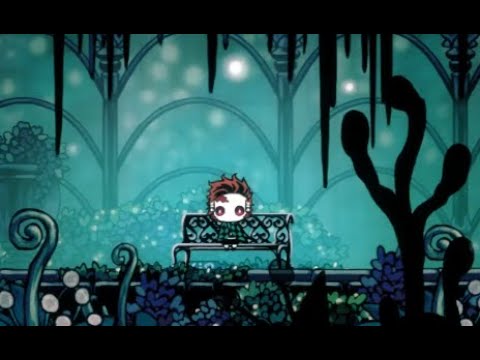
A new skin made by Xieyu, but as it's a private skin there won't be links about it. The character was Kamado Tanjirou, from Demon Slayer
According to the will of the original author, there will be a challenge for this skin.
For further information, check out the official HK ...
real jacinth
so customknight
it's on the installer
then download the skin from TWP's drive, and install it per the customknight readme
 unique summit
Enemy randomizer seems to have made a closed arena that doesn’t spawn any enemies and never lets me out, and it’s right outside of my bench room. I’m guessing I have to noclip, but I thought I’d ask here if there might be something I’m missing
 spring bane
I've heard enemy rando can mess up arenas like that. probably do have to noclip
 silver trellis
my controller does not work anymore when i install mods i am on mac
 fair ibex
try unplugging your controller, launching the game, then pluggin the controller back in at the title screen
silver trellis
Oof
fair ibex
that's... how you're supposed to fix the crash but oh well
 crisp widget
oh
right
by reading logs
running Arch with Kernel 5.7.11 if it matters
also with XPad as a Kernel module through DKMS
Maybe it's something to do with Mono ?
I'll check
where are the crash logs located by the way ? with the save files or under the Managed directory ?
Oh it's with the save files
crisp widget
Huh ? There isn't any crash log
The game quits to desktop and apparently runs in the BG
Steam doesn't manage to kill it and i can't find the process name to use killall
my ModLog.txt only has one warn which is for... multiplayer somehow ?
Mod utilities are kinda janky under Mono
i'll check if Mono isn't the cause itself
The tutorial says to install the packages mono and mono-complete, but the later doesn't exist on Arch, i assume that it's packaged in with mono, but maybe the AUR has an answer to that
that's what i get for not running a mainstream distro
Nope, nothing, looks like my mono install isn't faulty
Oh !

I'm sure it's been brought up before, but the version of Unity used (at the time of posting, 2017.4.10f1) has a bug on Linux that causes the game to crash within a second of starting or within a second of plugging in basically any controller. Hopefully Team Cherry update to 20...
Looks like it's a Unity issue
hey @silver trellis Check this out, it's a Linux thing but the issue is related and might work to fix your controller issue on MacOS, try it out !
crisp widget
Note that you'll need to get your hands on a version of Unity, in the post 2017 LTS is recommanded but since you need a paid license to use it, just use LTS 2018 instead
Because it's considered downgrading
which isn't available for download as of right now for a personal license
At least to my knowledge
hm ? i didn't see it
and anyways, i guess the newer the better, as the bug may have more chances to be fixed
o-oh
I used the unity hub
i'm dumb lol, never used Unity before so idk
also only a mac and windows download
Argh, i got a download link but the app doesn't recognize it as it's an AppImage
Please AUR have what i need once again
Yup i have unityhub in there
Oh no
It's a build from source
Looks like i'll spend the day on it huh
All i wanted is to get the DebugMod to work damnit ;-;
grrrr it doesn't work even with the AUR version of the hub
oh well
 ashen magnet
I’m trying to install mods in the mod launcher but every time I try it keeps saying “Central Directory corrupt”.
lime pasture
Hollow knight was being broken so I verified integrity of game files but now even after installing mod installer again none of the mods show up on the main menu
Of hollow knight
west bane
reset the installer
lime pasture
Still nothing
real jacinth
show installer
fair ibex
so, i have this bug where great slash and dash slash not being boosted by fury of the fallen
and it's 99% related to mods
before, the bug only happened on modded, not on vanilla, but now it happens on vanilla too
and i fixed it previously by deleting my disabled folder, then when it reappeared i fixed it by deleting a mods.zip in my managed folder
now, it reappeared, and deleting my disabled folder doesn't work, and mods.zip is no longer there since i deleted it
the cause could possibly be because i messed with nail damage in debug mod, but i've reinstalled debug mod several times and checked that the nail damage is normal
btw i'm on mac and have the game on steam, i think that's it
 umbral aurora
Just installed everything needed to do randomizers. The only thing is Moddiing API didn't download with everything else, and it is not in the mod menu to install, where can I get it??
real jacinth
close and open the installer
umbral aurora
@real jacinth still don't have the API after closing and opening the installer, anything else?
umbral aurora
yes
real jacinth
show your title screen
umbral aurora
yes it was closed, btw thanks for helping. and one sec
umbral aurora
Oh, okay. It just didn't show up right way. It's showing up now on the main menu
Again, thanks. I'm sure it gets annoying helping clueless people on this stuff 😅
real jacinth
no problem. you're far from the most clueless
umbral aurora
It helps with having experience in coding, modding, and having a huge interest in wanting to make plandos for hollow knight.
Besides what you see installed, anything else you'd recommend to someone interested in participating in randomizers?
real jacinth
probably just customknight for some added flair. and removal of debug. debug isn't allowed in a race setting
 haughty thistle
how do i get the mod loader
haughty thistle
nevermind
 quiet temple
Is Lightbringer updated to current patch? Or is it on 1.2.2.1
Just making sure I put them on the right patch
sleek tiger
p sure it was updated
quiet temple
Alrighty, thanks a bunch
 keen plaza
Hey does anyone know how to add a sprite to a custom charm? I just started this and im no too sure how. Im using the Charm Helper with its example, and i found this line charmHelper.customSprites = new Sprite[] { new Sprite(), new Sprite(), new Sprite(), new Sprite() };. I got 4 png images but i dont know how to have those become sprites. Thanks
@vernal rain Thanks for the help. When you you have it be an embedded resource do you mean like this?
Thanks it works! Those names were just stand-in names, changed now.
wheat orchid
Did you already download it?
novel bronze
yep
wheat orchid
Did you extract the file
novel bronze
yeah
wheat orchid
Is there a hollow_knight_data folder?
wheat orchid
Np
novel bronze
btw is mod installer safe?
wheat orchid
Yes
novel bronze
Ok
lime pasture
What even is casi
Casi
Vasi
Like what exactly does it do
Is it required for anything?
real jacinth
QoL
 formal peak
kyc
lime pasture
I can’t install any mods with the mod installer
API doesn’t even show up on the main menu
I reset the installer after verifying integrity of game files
real jacinth
show installer
lime pasture
wheat orchid
no
lime pasture
Oh I see nvm
real jacinth
if you want to disable a mod, you press the disable button next to it. the button at the bottom of the installer will remove the API so no mods get run
which is why pressing "enable all installed mods" worked
 leaden depot
Hello! Help me please. This massage I take when I try to launch modinstaller
Can I install multiplayer mod without modinstaller?
west bane
reset the installer
leaden depot
It does not help. this error most likely occurs due to the net framework which I cannot configure normally
west bane
install net framework 3.5
leaden depot
It is installed few days ago special for play in other game
novel bronze
I decided to install mod installer,I tried to install framework - it didn't help (it occurs when I run modloader)
@leaden depot Тоже,верно?
leaden depot
Да, та же штуковина
novel bronze
(У тебя пиратка,или лицензия?)
leaden depot
Пиратка, но я думаю дело не в этом
novel bronze
Согласна...
wheat orchid
do you have the mod installer
wheat orchid
why?
 wind glacier
?
wind glacier
have all necessary for the mods installed
wind glacier
Oh ok! XD
wind glacier
yeah
wind glacier
Yep
wheat orchid
have you extracted it?
proud quailBOT
Saves
Windows File Paths: (Assumes Default Steam Install Path, Adjust accordingly for DRM Free or Non-Standard Steam Path)
Game Files: C:\Program Files (x86)\Steam\steamapps\common\Hollow Knight\```
** **
Mac File Paths:
```Save Files: ~/Library/Application Support/unity.Team Cherry.Hollow Knight/
Game Files: ~/Library/Application Support/Steam/steamapps/common/Hollow Knight/hollow_knight.app/```
** **
Linux File Paths:
```Save Files: ~/.config/unity3d/Team Cherry/Hollow Knight/
Game Files: ~/.local/share/Steam/steamapps/common/Hollow Knight/```
wheat orchid
go to your game files path
wheat orchid
go into the hollow_knight_data folder
then the managed folder
then the mods folder
then the customknight folder
then put your skins in there
wind glacier
ok!
real jacinth
i would highly suggest not putting all of those in at once
it will really bog down your game
 wild bobcat
I can't find the hollow knight data folder can any one help?
real jacinth
not without info
wild bobcat
what kind of info?
real jacinth
what OS do you have, where'd you get the game from, what's your credit card number
wild bobcat
Don't know what OS means but I got the game on steam
wild bobcat
window
real jacinth
well it kinda doesn't matter I guess cuz you got it from steam
right click the game in steam
properties
browse local files
 unkempt robin
Hello everyone! Everytime i download a mod i get this weird glitch in my hollowknight where everything is invisible i have only downloaded bench warp but yet it still is doing this im on windows and i got the game from steam, any help would be appreciated!
proud quailBOT
Saves
Windows File Paths: (Assumes Default Steam Install Path, Adjust accordingly for DRM Free or Non-Standard Steam Path)
Game Files: C:\Program Files (x86)\Steam\steamapps\common\Hollow Knight\```
** **
Mac File Paths:
```Save Files: ~/Library/Application Support/unity.Team Cherry.Hollow Knight/
Game Files: ~/Library/Application Support/Steam/steamapps/common/Hollow Knight/hollow_knight.app/```
** **
Linux File Paths:
```Save Files: ~/.config/unity3d/Team Cherry/Hollow Knight/
Game Files: ~/.local/share/Steam/steamapps/common/Hollow Knight/```
unkempt robin
Thank you! It worked!
 coarse bloom
So.
I dont know what I did
But know mods doesnt load to my HK
I have Steam version
Selected installation paths
But still nothing
unkempt robin
Wait after activating randomizers i opened up the game and the screen is stuck like this
coarse bloom
Yes
@unkempt robin To fix it, when opening the game (if you have Enemy randomizer active) click in top left where it says [ACTIVE ENEMY RANZOMIZER] Wait and will be done
unkempt robin
Yeah i did that but it still is doing that
coarse bloom
You must wait
Oh wait
Also there was a randomizer that was bug
Dont put Randomizer 3 and 2 together
unkempt robin
Yeah thats what i thought
coarse bloom
@unkempt robin Try disabling each one per time to see which one is the problem
unkempt robin
Aight
wind glacier
coarse bloom
?
So.
I dont know what I did
But know mods doesnt load to my HK
I have Steam version
Selected installation paths
But still nothing
coarse bloom
@unkempt robin looks like you're missing a dependency mod
@real jacinth Randomizers worked perfect without them for me
real jacinth
i seriously doubt that
real jacinth
the installer will auto install mod dependencies
coarse bloom
the installer will auto install mod dependencies
@real jacinth Yeah. Maybe i did not notice
@real jacinth Can you help me with my problem?
Please
real jacinth
you've given me nothing to go off of
coarse bloom
you've given me nothing to go off of
@real jacinth Simply mods did stop to work
I selected literally all possible installation paths
real jacinth
you've given me nothing to go off of
@real jacinth
saying "my mods no work" is not giving me useful information
real jacinth
coarse bloom
I dowload them, open the game and first: the mods enabled doesn't appear in the top left of the screen on menu or when pause
Ight
wait
Im sending picture.
Here the tittle screen with mods enabled
real jacinth
send a screenshot of your installer
real jacinth
and you have only 1 copy of the game? did the installer do anything when you just opened it?
coarse bloom
and you have only 1 copy of the game? did the installer do anything when you just opened it?
@real jacinth First said It did not locate game files, just re installed and done, but about what I understood, this is a common bug
I tried uninstalling it all the time
real jacinth
what
coarse bloom
Nothing
Also before you say
Yes.
I tried changing installation paths
And I only have one copy
real jacinth
changing installation paths is worse.
coarse bloom
Yep
real jacinth
did you install thru steam to multiple drives?
coarse bloom
did you install thru steam to multiple drives?
@real jacinth Oh yes
In my secondary computer
You think may be that because Steam Cloud?
real jacinth
okay, well I have no idea what state your computer is currently in. it's probably a shit storm of installs. the installer says everything is working fine and things are installed properly, so my guess is that you have more than 1 copy of the game on your current computer on multiple drives, and you're opening 1 of them to play, and installing mods on the other
coarse bloom
okay, well I have no idea what state your computer is currently in. it's probably a shit storm of installs. the installer says everything is working fine and things are installed properly, so my guess is that you have more than 1 copy of the game on your current computer on multiple drives, and you're opening 1 of them to play, and installing mods on the other
@real jacinth Nop. Only one copy
Wait
Got an idea
Yes
worked
lime pasture
Does randomap mod work with 3.0
 muted crane
 twin gyro
I want to make a skin for custom knight, are there existing guides to help with this?
 jagged current
yo if i were to copy the game files would that copy my save files as well?
fair ibex
no your save files are stored in a different location
wheat orchid
?saves
proud quailBOT
Saves
Windows File Paths: (Assumes Default Steam Install Path, Adjust accordingly for DRM Free or Non-Standard Steam Path)
Game Files: C:\Program Files (x86)\Steam\steamapps\common\Hollow Knight\```
** **
Mac File Paths:
```Save Files: ~/Library/Application Support/unity.Team Cherry.Hollow Knight/
Game Files: ~/Library/Application Support/Steam/steamapps/common/Hollow Knight/hollow_knight.app/```
** **
Linux File Paths:
```Save Files: ~/.config/unity3d/Team Cherry/Hollow Knight/
Game Files: ~/.local/share/Steam/steamapps/common/Hollow Knight/```
jagged current
wait tf i cant find %APPDATA%?
 pliant otter
search for it in the windows searchbar
fair ibex
asking again
wheat orchid
how many times?
also your pc probably wants to kill you and eat your corpse. I suggest you run
fair ibex
maybe
it's happened like 3 separate times
first time was when i was doing the halloween skin challenge and nail arts stopped working with fury
second time was when i was doing the sub 30 poh challenge and it stopped working
third time was when i was doing poh fury nail only and then it happened again, and still not fixed
wheat orchid
they said it happens on vanilla now
fair ibex
currently, customknight, benchwarp, modcommon, qol, vasi, seanprcore, and some modded bosses
before, i think i had customknight, benchwarp, modcommon, and debug
that's what i did to revert to vanilla
and then it was still bugged
ok
i have to do smth else rn, i'll send it later
fair ibex
ok my brain hurts now
i just went back to test it really quick and now it works for some reason?
this is wack
fair ibex
good idea
wheat orchid
now it has a bunch more power as a black hole!
fair ibex
i'll test it on vanilla real quick
wheat orchid

fair ibex
oh
aaaaand it works on vanilla
well the good news is that it works again
the bad news is i still have no idea what causes it and therefore can't prevent it in the future
or fix it for that matter
this time it just went away on its own somehow
yes
the game is watching over my discord account
when i ask it fixes itself
and then i stop asking and it reappears
west bane
?i
proud quailBOT
Reminder: The mod installer (https://radiance.host/mods/ModInstaller.exe) and other modding resources can be found from the pinned messages.
unique summit
Can I not turn off dreamer randomization in randomizer 3? The button doesn't work, but I don't really know why that wouldn't be an option
 tacit walrus
I can't get the path to work so i can't mod mine can anyone help
west bane
reset the installer, how-to in the pins
 lyric tide
I'm having an issue with the Custom Knight mod. I installed using the mod installer but after the loading bar at the beginning the game crashes.
west bane
controller?
lyric tide
yes. is that the controller issue pinned mentions?
seemed different, which is why I didn't try it
west bane
nah it should be the same
lyric tide
yeah that fixed it. I thought it was a different issue cuz it was the game not working, not the controller. thanks
west bane
np, first person to read the pins in a while 
lyric tide
lol
west bane
what mods do you have installed
real jacinth
I'll take elderbug God for 200
tacit walrus
i had that one i just took it off before talking to u guys so i guess that
tacit walrus
what mod makes all the text funky
like it changes the lanuage or something to make it look wierd
anyone answer me
please i gotta know
nvm i found it
 spark elm
anyone wanna play hollow knight online with me
west bane
This is modding-help
 sullen harness
I need help with the Custom Knight mod. Usually, if I click ESC I get the Custom Knight menu, but for some reason, it doesn't show anymore. I think I did everything right, but removing the custom skins also doesn't work.
 hoary aspen
did you install a different version?
hoary aspen
You need to place the modinstaller in the hollow knight folder i believe
 fluid tree
continue
hoary aspen
...try doing that
west bane
do you have net framework 3.5
 low oasis
i want to use the grimmchild upgrades mod but when i open up the game it says it failed to load and to check the modlog.txt file but i have no idea where that is, does anyone know where the file is or how to fix it?
west bane
?saves
proud quailBOT
Saves
Windows File Paths: (Assumes Default Steam Install Path, Adjust accordingly for DRM Free or Non-Standard Steam Path)
Game Files: C:\Program Files (x86)\Steam\steamapps\common\Hollow Knight\```
** **
Mac File Paths:
```Save Files: ~/Library/Application Support/unity.Team Cherry.Hollow Knight/
Game Files: ~/Library/Application Support/Steam/steamapps/common/Hollow Knight/hollow_knight.app/```
** **
Linux File Paths:
```Save Files: ~/.config/unity3d/Team Cherry/Hollow Knight/
Game Files: ~/.local/share/Steam/steamapps/common/Hollow Knight/```
west bane
in your save files
 teal heart
For me what worked when it was doing that was to just wait an hour or 2
It wouldn’t work even after a restart, a reinstall, and a game file validation
But when I waited a few hours it just worked
 quick solar
Yo can u use Custom knight WHILE doing an item randomizer? Like do the mods overlap or is it ok
wheat orchid
there is somewhere
quick solar
Ok cool
Because for some reason the side bar isn’t showing up? Yet all the things have the correct number of files n junk
wheat orchid
do you have modcommon?
real jacinth
did you read the readme? did you use the installer? are things showing up in top left of title screen? did you unzip the skins you downloaded?
wheat orchid
yeah
real jacinth
yes, but if they're not even getting the default skin menu to show up when paused, they didn't install it right
limpid parcel
Hey is there any way to disable the dreamers being included in the randomization? I really dont want them mixed in and want to get them the normal way cause last time it kinda bugged out my game
lime pasture
Any tips for twp fool challenge
hoary aspen
try practicing or seeing videos of other people doing this challenge
fair ibex
@lime pasture i suggest trying this method, going full soul lets you get more damage on zote faster
also there's a chance that they'll kinda circle around zote like in the video
lime pasture
I’m just having trouble surviving
I got to Gruz mother with 1 go
Hp
Glowing womb keeps stealing my soul
lime pasture
How is cyclone useful?
 vagrant stratus
fair ibex
vagrant stratus
fair ibex
it's 7 hits that deal 1.25 base nail damage
so you get like 7 hits worth of soul and with old nail deal 49 damage i think
lime pasture
Yeah but my weaverlibgs just instantly steal all of that
fair ibex
well just keep using cyclone slash then
lime pasture
Got it
fair ibex
you should end up with full soul if you save enough of it
lime pasture
Yeah I’m just bad against the aspids and rolly guys
Aight I did it but wasn’t recording
Now for real
fair ibex
oof
fair ibex
gl
lime pasture
It isn’t as hard as I thought it would be
Some of the other challenges look impossible
fair ibex
fool skin is just a lot of rng
halloween isn't that hard especially since you can grab lifeblood
double vessel is the easiest pale king challenge but that's also a lot of rng
onikiri is the hardest challenge out of all of them
lime pasture
I did it
fair ibex
nice!
lime pasture
I’ll send a link once I upload it
fair ibex
send it to benji
lime pasture
I did
Its pretty scuffed

Just a clip of me doing the challenge for the fool skin by TWP (The White Palace). I hope you enjoy!
 frozen forge
so i'm playing the gun mod rn
HollowPoint
does Fragile Stength increase the gun damage?
real jacinth
did you read the description
frozen forge
did you read the description
@real jacinth it's normal
maybe it changes when i buy the charm
lime pasture
Yes
frozen forge
but in the shop, the description isn't changed
lime pasture
Also how are you supposed to do absrad without nail for pale king skin
frozen forge
you can still use the nail btw
frozen forge
the spell button is replace with weapon change
and the quick cast button is a fucking grenade 
 worthy topaz
some of my custom knight textures wont load and instead will be replaced with the default?
lime pasture
Install mod common
 abstract hemlock
Im using debug mode and when i try to use the up key i get teleported to the ground , how do i remove this ?
quick solar
Ok so?? I have modcommon, i unzipped all the files, I put em in the right place but it’s not showing up like. At all
 bronze moon
i can't seem to disable Blackmoth ingame, and the mod installer won't launch. what do i do?
 rustic cliff
just move/delete the file in your game folder
tacit walrus
is there more than one mod loader or just the radiance one?
how do u use the gun for hollowpoint?
tacit walrus
i tried and nothing happened
wheat orchid
do you have modcommon?
tacit walrus
ya
 waxen surge
is there a way to teleport to a specific room
tacit walrus
wait what about the gun how can i activate it
wheat orchid
it's either focus or quick cast
novel bronze
Guys initially in the first versions of Custom Knight an icon was there in game to preview the skin before choosing but now for some reason that icon does not load up in game after updating Custom Knight.
What can I do to bring those icon previews back?
wheat orchid
they were removed because they were crashing the game
novel bronze
Oh i remember that whenever you switched saves in one instance your player became invisible and after sometime the game froze or softlocked for me.
tacit walrus
what's world sense
wheat orchid
the ability to see the completion percent
 hidden hemlock
Is there a good guide/tool to use when doing a rando game? Im stuck on my game
 versed remnant
the pins in #randomizer have a guide
The rando map mod also is good and shows where avaliable items are
The helper log is a non graphical version of the same thing and is located where ur saves are
hidden hemlock
Thankyou!
tacit walrus
is hollow point only a granade launcher?
versed remnant
no there are several guns
sleek tiger
with?
 raven badger
is there a hollow knight mod installer for macos?
hoary aspen
yes, pins
raven badger
what?
hoary aspen
it's in the pins
raven badger
ok
my installer wont load
nvm
but it says its ModInstaller.app” can’t be opened because it was not downloaded from the App Store.
hoary aspen
obviously
raven badger
how do i fix it?
hoary aspen
i don't use mac, so i'm not sure
raven badger
:|
 granite thistle

 lethal moon
okay, so this is more mod-adjacent, but i suck at these platforming challenges in white palace and i've spent in the ballpark of ten hours working at it
after a few hours on a section my computer died and i got reset back to the start
sleek tiger
@raven badger pls be patient
raven badger
ok
sleek tiger
somebody more familiar will come over hopefully
ping some random modding staff if you really wanna
lethal moon
i've got the hollowknight save editor up and i'm looking specifically at
"dreamgateMapPos": {
  "x": -14.787001609802246,
  "y": 1.9259997606277466,
  "z": 0
sleek tiger
which platofrming challenges in particular?
lethal moon
can i set a dreamgate in white palace to skip to where i was, and if not
sleek tiger
I'm guessing you're tryna hack your way through instead of playing
since you're not in help
in which case
lethal moon
yep
sleek tiger
get debug
it has invincibility
you can just like walk right theough the hazards
also NoClip in case you also wanna fly up
lethal moon
perfect, how do i turn that on/off
sleek tiger
install debug
press F1 ti open debug menu
top right there's a 'cheats' option
lethal moon
i'm enjoying working through this, but i'll absolutely lose it if those hours get wasted lmao
sleek tiger
clicking it once will make it light up in whih case it's active
lethal moon
where should i install debug from?
proud quailBOT
Mods
Google Drive with Mods - https://drive.google.com/drive/folders/0B_b9PFqx_PR9Um9MeFZMV21oWGs
Installer - https://radiance.host/mods/ModInstaller.exe
Mod Summaries - https://docs.google.com/document/d/1cz5tcggpGofrBcM90XyTkMWjMelDHzugvQM6HpB13Ew
lethal moon
mac
sleek tiger
as in, can you turn mods off easily?
yeah, though anything debug can be turned off as well
and the menu hidden
practically leaving the game as was unmodded
lethal moon
is there a github repo or something i can go through for info about how to use it?
novel bronze
Guys today I re-installed the mod installer and shortly after startup this weird error appears and everytime I delete this specific file it comes again from nowhere.
lime pasture
Try downloading it again
Delete mod installer in local app data
And delete the hollow knight mods folder
 trail torrent
probably a FAQ, but where are config files for mods found?
if its different for every mod, for the death counter mod
wheat orchid
?saves
proud quailBOT
Saves
Windows File Paths: (Assumes Default Steam Install Path, Adjust accordingly for DRM Free or Non-Standard Steam Path)
Game Files: C:\Program Files (x86)\Steam\steamapps\common\Hollow Knight\```
** **
Mac File Paths:
```Save Files: ~/Library/Application Support/unity.Team Cherry.Hollow Knight/
Game Files: ~/Library/Application Support/Steam/steamapps/common/Hollow Knight/hollow_knight.app/```
** **
Linux File Paths:
```Save Files: ~/.config/unity3d/Team Cherry/Hollow Knight/
Game Files: ~/.local/share/Steam/steamapps/common/Hollow Knight/```
wheat orchid
look in your saves for (modname).globalsettings and if it doesn't seem to exist, use (modname).globalsettings.json
 wheat orchid
what mod are you looking for
trail torrent
DeathCounter
wheat orchid
why do you need to edit that(it probably doesn't have settings)
trail torrent
was hoping it would let me move it on the screen
like change some offset or something
wheat orchid
probably not
trail torrent
cuz it covers over the spent geo counter
Also this is going to seem dumb
What mod is this
wheat orchid
benchwarp
trail torrent
oh its part of benchwarp
didn't realise that
what does this part do if you don't mind
wheat orchid
places a bench anywhere you want
trail torrent
I'll just go actually read the documentation otherwise its all good
oh
that's crazy
novel bronze
Someone knows where the Glacial Knight skin link is?
hoary aspen
pins in #modding-discussion i believe
novel bronze
I already search in there
novel bronze
Wait, just a moment
Here, CrankyTemplar's video

Showcasing the Glacier Knight skin for the Custom Knight mod created by dreamlike. Another ascended difficulty fight as Fury of the Fallen makes the ice effects of the nail a nifty blood red.
Pretty cool ice theme for the Knight's abilities. The ice arrows look neat along wit...
thanks buddy
teal heart
how do you unbind a key for debug mod
hoary aspen
how do you unbind a key for debug mod
@teal heart there's a file in the save folder
 desert pumice
Every time I try to open the mod manager it has just one button that says "manually" and it just takes me to my mod folder instead of just letting me download kids from the manager
Either that or it will just tell me how to get to the mod folder
 slate hull
So I have an issue with QoL where it fails to load in. Also when it happens it disables some of my controls, like the pause button for instance. The menu tells me to check ModLog txt. (which I assumed with the Readme in the installer)
proud quailBOT
Saves
Windows File Paths: (Assumes Default Steam Install Path, Adjust accordingly for DRM Free or Non-Standard Steam Path)
Game Files: C:\Program Files (x86)\Steam\steamapps\common\Hollow Knight\```
** **
Mac File Paths:
```Save Files: ~/Library/Application Support/unity.Team Cherry.Hollow Knight/
Game Files: ~/Library/Application Support/Steam/steamapps/common/Hollow Knight/hollow_knight.app/```
** **
Linux File Paths:
```Save Files: ~/.config/unity3d/Team Cherry/Hollow Knight/
Game Files: ~/.local/share/Steam/steamapps/common/Hollow Knight/```
slate hull
Ty
wheat orchid
Np
slate hull
Now what would I do to fix this however
west bane
get the vasi mod
 earnest tundra
im trying to download the mod installer but it say unable to locate game files can someone help me
west bane
reset the installer (how-to in the pins) then run the installer again
wheat orchid
Does it ask you to locate them?
earnest tundra
yes
wheat orchid
Does it allow you to locate them?
earnest tundra
yes
wheat orchid
?saves
proud quailBOT
Saves
Windows File Paths: (Assumes Default Steam Install Path, Adjust accordingly for DRM Free or Non-Standard Steam Path)
Game Files: C:\Program Files (x86)\Steam\steamapps\common\Hollow Knight\```
** **
Mac File Paths:
```Save Files: ~/Library/Application Support/unity.Team Cherry.Hollow Knight/
Game Files: ~/Library/Application Support/Steam/steamapps/common/Hollow Knight/hollow_knight.app/```
** **
Linux File Paths:
```Save Files: ~/.config/unity3d/Team Cherry/Hollow Knight/
Game Files: ~/.local/share/Steam/steamapps/common/Hollow Knight/```
wheat orchid
Look in the game files path for your operating system
earnest tundra
ok
wheat orchid
Just copy and paste the path since some folders are probably hidden
earnest tundra
ummm i did it but still says unable to locate game files
 warped birch
I need help with a controller issue where would be the best place to post it?
And i posted it here because it doesn't work in the with the modded version of the game but works with the normal version
undone void
do you know where Hollow Knight is on your computer, where the actual application is? because you need to show it the application
and if you're having controller problems, do you plug your controller in when you're at the title screen or before?
 sudden flower
what does the weaver core mod do
earnest tundra
hollow knight is in my desktop and on steamapps
sudden flower
thanks @vernal rain
desert pumice
how do I download the mod installer 2?
 crystal bay
pins
desert pumice
I already have it on my computer and unzipped but how do I actually use it
wheat orchid
Open it.....?
desert pumice
it just brings up a window window with nothing but a black background
wait nvm
now im on a gray screen with all the mod names and buttons. All of them are enabled but none are installed
wheat orchid
Click on the install one
desert pumice
every time i try to prss one it just crashes
desert pumice
I'm trying to install benchwarp but every time it just freezes the window or says it's norlt responding
wheat orchid
You are on Catalina, right?
desert pumice
I don't know
wheat orchid
Then try using a different version of the mod installer
desert pumice
i dont see any different ones in the pins
desert pumice
the radiance one was the one i used before that wasnt working
wheat orchid
Try the Mac one then
 wintry tiger
I'm trying to use the randomizer mod, but when I start the game the camera is in the wrong position and it uncontrollably shakes. I cannot see the knight, and none of the buttons seem to have any effect, including escape.
How can I fix this?
wheat orchid
Get those
wintry tiger
Okay.
wintry tiger
Do I need all three?
real jacinth
yes
sudden flower
how do i activate inferno king grimm
lime pasture
Fight Grimm in godhome
warped birch
@undone void its in my common folder under steam and my controller always stays plugged in
wheat orchid
Plug it in after you get to the main menu if you have mods
If the folder in common doesn’t work, use the hollow_knight_Data folder
 merry oasis
yo sorry if this is a dumb question but is there a way to update HollowPoint(beta) in modinstaller?
or would i have to uninstall it and download the new version from the github
wheat orchid
Mod installer probably has the most recent version
If a mod isn’t the most recent version, it will ask you to update it
merry oasis
ok
cuz my steady body and blast shell are bugged and i read on the github that they were fixed
wheat orchid
Open mod installer and see if it lets you update the mod
merry oasis
 trail flint
update isnt for release yet
trail flint
i want to tidy it up before releasing the actual final version
wheat orchid
If there were an update, you would see it asking you to update it before the mods list appeared
merry oasis
@trail flint ive been loving the mod, thanks for all the work that you put into it!
ok that makes sense
trail flint
thanks dude, glad youre enjoying it
merry oasis
thanks @wheat orchid im new to downloading mods 🙂
wheat orchid
Np
merry oasis
also one more question
wheat orchid
Download Uuwuu
merry oasis
when i kill the collector during p3 sometimes he gets stuck in his death animation
i get softlocked
my mods are benchwarp, enemyHPbar, hollowpoint(beta), modcommon, QoL, vasi
wheat orchid
Idk
merry oasis
ok
wheat orchid
Maybe you kill it too fast
warped birch
using the hollow_knight_data doesnt have the app for you to put it in steam unless im a dumb dumb.
warped birch
if you go to add a game it needs a .exe file to be added
warped birch
i dont need the mod installer
warped birch
i just have a controller issue
warped birch
yeah my bad for intruding
wheat orchid
Try making the modded ver the main install of hk
If that doesn’t work, your controller doesn’t work with mods
warped birch
its an offbrand ps4 controller so thats a possibility i suppose.
wheat orchid
Also plug it in after you get to the main menu of hk
warped birch
i just dont think it works. 😦
 sudden patrol
Hi i'm using the custom skins and the lightbringer mod, and whenever i go into a new screen, the skin resets to the white cloak, possibly because lightbringer sets the default skin to whitecloak and that's messing it up? how do i fix?
wheat orchid
As I said, idk where it is
 pearl zinc
i try to use the custom fyremoth skin, but when i go to select it, the menu disappears, and the knight doesnt change, did i possibly do something wrong?
 halcyon narwhal
is there a way to access old versions of mods? I'd like to play the version of the randomizer from around...
April
There's some changes in the latest update that dont sit right with me and idk how to revert it
pearl zinc
Ping me when someone responds back, im going to bed
wheat orchid
@pearl zinc install modcommon
@halcyon narwhal build the mod yourself from the github files
Not going to tell you how to do that
halcyon narwhal
Is the GitHub old?
wheat orchid
Ping me if you have any other questions
Probably not
But you can see every change since then
pearl zinc
thanks
halcyon narwhal
Ah
wheat orchid
Np
pseudo cape
whats up
pseudo cape
another one huh? prob ask a modding staff member
pseudo cape
wait a while then they might be busy
real jacinth
DMing staff individually is annoying AF and unlikely to get you help. it's actually more likely to get you ignored
raven badger
😦
pseudo cape
oh you meant in dms? no probably dont do that
real jacinth
yes. DM'd all staff afaik
fair ibex
just get the modinstaller for mac catalina (regardless of if you're on catalina or not) and run it
fair ibex
wdym by stopped
raven badger
like it quited itself
fair ibex
never encountered that issue
raven badger
😦
fair ibex
is there any sort of error?
raven badger
no error message
fair ibex
idk try restarting? that fixes things a lot of the time
fair ibex
otherwise i'd say ask modding staff but seems like they're kinda mad at you for dm'ing them all