#archived-modding-help
1 messages · Page 111 of 1
 wraith abyss
 real jacinth
go to your downloads folder, take a screenshot, and post it here
actually, that's unnecessary
just move the modinstaller exe to your desktop, and run it as admin
 novel bronze
I dont have hollow_knight_data

 gritty shuttle
hi guys just wondering whether/how you can use the art mod w out the wingshade font
 proud quailBOT
Mods
Google Drive with Mods - https://drive.google.com/drive/folders/0B_b9PFqx_PR9Um9MeFZMV21oWGs
Installer - https://radiance.host/mods/ModInstaller.exe
Mod Summaries - https://docs.google.com/document/d/1cz5tcggpGofrBcM90XyTkMWjMelDHzugvQM6HpB13Ew
 trail flint
?mods
 rich basin
I'd like to do the room randomizer and I wanted to ask how should I go about making my own map?
rich basin
:p
 grave girder
@stone epoch Can you DM me the ModLog for a failed Enemy Rando load? I want to take a look to see where in the loading process it is locking up for you for insight into why it does that sometimes
trail flint
faster than light
 gusty rune
proud quailBOT
gusty rune
proud quailBOT
Mods
Google Drive with Mods - https://drive.google.com/drive/folders/0B_b9PFqx_PR9Um9MeFZMV21oWGs
Installer - https://radiance.host/mods/ModInstaller.exe
Mod Summaries - https://docs.google.com/document/d/1cz5tcggpGofrBcM90XyTkMWjMelDHzugvQM6HpB13Ew
novel bronze
im on mac and I want to install the blackmoth mod
how would I do this?
i tried putting the files in the right folders, but when I did, and I opened hollow knight, it was only a black screen
i've got modinstaller 2 and hit the checkmark on blackmoth
can I now launch hk or do I need to do something else?
where do I get those?
all I have to do is hit the checkmark and its installed?
amazing
thanks for the help
 molten flame
Has custom knight changed or is it just not compatable with redwing?
novel bronze
not a mod problem (i hope) but now my controller wont work with hk
ok
my laptop itself is registering the inputs, but not hk
yes, customknight now has different instructions for installing skins, they're in the Readme in the installer
and I only know one of the other mes, dunno who the other 2 are
molten flame
okay thanks
novel bronze
it even says "Config loaded: Gamepad"
molten flame
everytime I click the readme I get this.
molten flame
nvm found it in the files
novel bronze
this is so wierd
hollow knight detects my controler inputs
but as soon as I enable the api and have the mods, it doesnt work
novel bronze
ok im trying in like an 2 hours to change skin. Did anybody know how
real jacinth
download what skins you want, then follow the instructions in the readme
novel bronze
errrr k
real jacinth
Skin packs can be found in pinned messages
novel bronze
no i mean i can't change skin from in the game
novel bronze
yes
real jacinth
show me your title screen of your game and a screenshot of your installer
novel bronze
so this is mod installer
and i can tell what numbers i've got on my main screen of the game
real jacinth
or just screenshot it
novel bronze
i know but to be honest ive just get a new computer with fricked up screenshoting what am i forgotting over and over (no it's not f12)
 covert oasis
press the print screen button
novel bronze
Could you also show how your CustomKnight folder is structured
 tacit nebula
Yo are their mods for mac
real jacinth
yes
tacit nebula
nice
novel bronze
model of folder
tacit nebula
ickely can you tell me where and how 👀
real jacinth
pinned messages
tacit nebula
thx
real jacinth
different installer versions depending on what mac os you have
that folder structure seems fine
unless "hollow_knight_data" is the customknight folder tree and is in the wrong spot
novel bronze
what do you mean by that?
real jacinth
what's the folder above "hollow_knight_data"
since I can only see that far in the path line
novel bronze
ok man I don't know what I done wrong. I had just copied the linked for windows from README(customkinght)
The Readme tells you to extract the zip files and place the resulting folders in the CustomKnight directory
not the zip files themselves
yes
Can you show how Godmaster is structured?
yeah i get it after 30 minutes trying
ok gimme a sec
there you go
or you mean in godmaster
yeah, inside Godmaster
8 folders just like in readme
The Godmaster skin pack is structured weird
It should open directly into the image files, not to another folder as it is here with Mods > CustomKnight > images
hmm
You can see in the address bar
yeah
it should be C:\Program Files (x86)\Steam\steamapps\common\Hollow Knight\hollow_knight_Data\Managed\Mods\CustomKnight\<images>
real jacinth
the only thing that sucks about updating the file structure for what the mod does now, is that everyone will have their customknight broken when they update it
 real jacinth
or the customknight one
novel bronze
idk why it's setup like that, the other skins arent
I mean skin is that important for the game just you know coloseum and the boss rush colors
tacit nebula
quick question whats the newest patch for HK
novel bronze
1.4.3.2
after many tries (I mean deaths) I had get bored ant wanted something differnt
 fossil bone
can somebody tell me where i find the mod manager in the files?
i cant find it
all i can find is the mod installer
 supple coral
So...what is the Chaos Mod supposed to do?
 weak plank
i dont know what the chaos mod does but it should be fun to find out
supple coral
For debug mode, how do I bind things like make a keybinding for noclip?
gritty shuttle
i have modinstaller and was wondering if someone could tell me how to remove/disable a portion of art mod while leaving the rest intact
specifically, i want to get rid of the wingshade font
but keep the nuke cutscene and the rest of art mod
real jacinth
you rewrite the code of the mod
gritty shuttle
are you talking about the stuff in C:\Program Files (x86)\Steam\steamapps\common\Hollow Knight\hollow_knight_Data\Managed\Mods
real jacinth
that's where you put the mod file, yes
so you'd have to rewrite the code of that mod to do what you're asking
gritty shuttle
right
the only issue is that when i open half mod its gibberish
mayeb i need to open it though an app?
real jacinth
yeah, cuz that's what it's intended to do
gritty shuttle
oh
real jacinth
it's a shitpost mod
 turbid void
So I'm playing on Mac and I opened up the ModInstaller before, but whenever I try to open it up now, it shows up quickly in the dock then disappears and no windows open. How do I open it up again?
Nevermind, I got it to open! All I had to do was move it to the desktop.
 olive whale
how do you change the modes for enemy randomizer
gritty shuttle
how do you undo the all charms part of the debug mod?
olive whale
i dont get it what happens after i click the enemy randomizer button and rejooin the game
if it instantly changed the mode after you leave i clicked it like 100 times so i dont know what setting its on
i figured it out
grave girder
?saves
proud quailBOT
Saves
Windows File Paths: (Assumes Default Steam Install Path, Adjust accordingly for DRM Free or Non-Standard Steam Path)
Game Files: C:\Program Files (x86)\Steam\steamapps\common\Hollow Knight\```
** **
Mac File Paths:
```Save Files: ~/Library/Application Support/unity.Team Cherry.Hollow Knight/
Game Files: ~/Library/Application Support/Steam/steamapps/common/Hollow Knight/hollow_knight.app/```
** **
Linux File Paths:
```Save Files: ~/.config/unity3d/Team Cherry/Hollow Knight/
Game Files: ~/.local/share/Steam/steamapps/common/Hollow Knight/```
 mortal skiff
Emm, i want to ask.. how i can install mod HK with AKA-47 ?
mortal skiff
Yeah, i've install
But when i want to play with my old save game, the mod is on but the gun didn't appear
Like this
mortal skiff
Hmm, yeah
novel bronze
did anybody figure something out about whats happening with my hollow knight game folder
novel bronze
yeah but it wouldn't open, and the modinstaller 2 wouldn't ask for my path no matter how hard I tried
real jacinth
Did you move the first to your desktop
novel bronze
yeah
real jacinth
Do you have catalina
novel bronze
yup
novel bronze
mhm
real jacinth
Then just use it
 obsidian belfry
For Grimmchild Upgrades, how do you change grimmchild's color?
 frail tendon
novel bronze
frail tendon
novel bronze
i clicked install on every mod in the mod installer 2 and nothing worked
obsidian belfry
there are various mods that dont interact well with each other
 grim isle
 west bane
do you need help getting it to work
 static bridge
can someone give me a list of all the current mods?
proud quailBOT
Mods
Google Drive with Mods - https://drive.google.com/drive/folders/0B_b9PFqx_PR9Um9MeFZMV21oWGs
Installer - https://radiance.host/mods/ModInstaller.exe
Mod Summaries - https://docs.google.com/document/d/1cz5tcggpGofrBcM90XyTkMWjMelDHzugvQM6HpB13Ew
static bridge
ty
 marsh umbra
ive installed mods on terraria before, and if you don't do it right, you lose your saves. Is this the same for HK, because o just want the custom knight?
@here
also how do I use custom knight?
marsh umbra
i am so lost
 supple sable
Help I've been trying to make my game go back to the base unmodded version but it won't. It says it can't find the vanilla files.
I don't know how to do that
Thanks
novel bronze
where do i find the redwing.settings thingy? ive looked around and i cant seem to find it
proud quailBOT
Saves
Windows File Paths: (Assumes Default Steam Install Path, Adjust accordingly for DRM Free or Non-Standard Steam Path)
Game Files: C:\Program Files (x86)\Steam\steamapps\common\Hollow Knight\```
** **
Mac File Paths:
```Save Files: ~/Library/Application Support/unity.Team Cherry.Hollow Knight/
Game Files: ~/Library/Application Support/Steam/steamapps/common/Hollow Knight/hollow_knight.app/```
** **
Linux File Paths:
```Save Files: ~/.config/unity3d/Team Cherry/Hollow Knight/
Game Files: ~/.local/share/Steam/steamapps/common/Hollow Knight/```
 harsh mirage
i just saw the randomizer mod, how do i install it?
 robust condor
im looking to use the randomizer mod as well I have almost no prior moding expiriance
novel bronze
how do you change the sanic mod speed settings?
i can't find them anywhere
mods screen is empty
readme just says "timescale changer"
any ideas?
 glass meteor
saves folder config
 hasty marlin
heyo, sorry if this question has been asked already or if it's in the wrong channel (checked pinned messages here but didn't see anything about it)
I've been playing around with the randomizer mods for a bit (both enemy randomizer and randomizer 3)
is it possible to alter randomizer 3 in such a way that the game will be completable? I tried the standard completionist mode but didn't get mothwing cloak after fighting hornet and was thus stuck there
or didn't get vengeful spirit to be able to leave crossroads
is there a setting that I'm overlooking or is this just not an option since it's a randomizer?
real jacinth
Every seed is completable
hasty marlin
oh I see
so I guess it just involves finding a different path of completing the game
my bad then, thank you for answering
 elfin jasper
Keep in mind that you can save and quit or warp to your last bench to continue after reaching an area where you can't progress
hasty marlin
alrighty
thank you both 
 mint mulch
oh hi
novel bronze
customknight seems to crash my game, does anyone else have this issue?
it just crashes on boot even with a clean install
novel bronze
have you tried waiting more
how am i supposed to wait if the game crashes and closes
is it closing automatically or are you clicking close when the window says it's not responding
automatically
no "not responding" window
i get the loading bar and then i hear the crash noise and it closes
hmmm
show me your modlog located in
?saves
proud quailBOT
Saves
Windows File Paths: (Assumes Default Steam Install Path, Adjust accordingly for DRM Free or Non-Standard Steam Path)
Game Files: C:\Program Files (x86)\Steam\steamapps\common\Hollow Knight\```
** **
Mac File Paths:
```Save Files: ~/Library/Application Support/unity.Team Cherry.Hollow Knight/
Game Files: ~/Library/Application Support/Steam/steamapps/common/Hollow Knight/hollow_knight.app/```
** **
Linux File Paths:
```Save Files: ~/.config/unity3d/Team Cherry/Hollow Knight/
Game Files: ~/.local/share/Steam/steamapps/common/Hollow Knight/```
novel bronze
tried looking online and there's very little there
sure, sec
OH
i think i know the issue
looking at this, at the end it says [INFO]:[API] - Preload done, returning to main menu
however i have native input on
since i play with an arcade stick and there's no other way to get hk to detect it
but that comes with the side effect that hk crashes whenever i return to the main menu
gonna see if turning it off fixes it
ok
yup
it's working
lol
thanks for showing me the modlog exists or i would've never figured this out
np
 wary zephyr
I don't know if this belongs here, but I have been searching for a solution for so long
with the custom knight gimp customization files, how do you edit the pre-selected cape color
how do you edit anything to be honest
in the edit history it says that I am editing, but nothing is changin
there is only 1 layer, I've tried de-selecting and re-selecting the area I want to edit
none of the painting tools such as paintbrush, eraser, bucket, or anything else do anything
If I'm editing a regular image where nothing is pre-selected I can easily select what I want then do whatever I want with it, but it isn't working with these customization files
I clicked on the red, blue, green, and alpha channels and now I can do stuff so I guess I'm good now
 nocturne arch
unsure where to ask this but i need help on how to install mods on hollow knight
proud quailBOT
Reminder: The mod installer (https://radiance.host/mods/ModInstaller.exe) and other modding resources can be found from the pinned messages.
nocturne arch
thanks so much, i couldnt find it at all sadly
 limpid ore
why does redwing give infinite soul? is there a way to disable that or is that a bug?
proud quailBOT
Mods
Google Drive with Mods - https://drive.google.com/drive/folders/0B_b9PFqx_PR9Um9MeFZMV21oWGs
Installer - https://radiance.host/mods/ModInstaller.exe
Mod Summaries - https://docs.google.com/document/d/1cz5tcggpGofrBcM90XyTkMWjMelDHzugvQM6HpB13Ew
 tough cradle
ok i figured out that its the mod, and u go on ascended markoth
 dire aspen
when i try to go back to unmodded it says "Unable to locate vanilla Hollow Knight. Please verify integrity of game files and relaunch this installer." can anyone help?
tough cradle
Are you on gog
dire aspen
im on modinstaller
tough cradle
no do you play hk on gog or steam
tough cradle
ah
limpid ore
can you play lightbringer and blackmoth together? im worried there could be issues with the same charm being modified by the 2 mods
 spare mirage
dire aspen
spare mirage
dire aspen
@vernal rain it said "all files successfully validated" but on modinstaller it still pops up with the same message
on my game it doesn't have the modding api thing at the top right so im gonna assume it isn't modded anymore
 raw needle
hey all, I'm trying to update my moddingAPI, the new one has caused my controller to stop functioning. @glass meteor provided a custom moddingAPI the previous time this happened. I am guessing I will need another. would there be a way to have my controller function regardless of the moddingAPI version?
glass meteor
Linux?
raw needle
yes
glass meteor
is the Linux one in the drive not up to date
if it isn't gimme a bit and I'll recompile it
raw needle
I think it is, I trying both universal and linuxmac, the game launches with moddingAPI 53, but no controller support
tried*
glass meteor
ok I'll do it after I eat
raw needle
Im away for a bit. if you need something from me, let me know, I can get it to you this evening
 pearl fjord
I think I'm missing something obvious. I'm trying to set up homothety's randomizer map, and it's remaining blank. It's correctly reading the log file.
elfin jasper
Are you playing area randomizer or room randomizer?
pearl fjord
Area
Does it only work with the room randomizer?
I guess it's working now that I'm in Dirtmouth?
Anyway it seems to be functional now.
novel bronze
oof
 quick estuary
My game crashes when using custom knight... :<
It does the loading bar, makes a bunch of sounds when it fills up, then crashes just before the main menu.
real jacinth
Unplug controller. Launch game. Plug controller in at title screen
mint mulch
How do I bring up debug menu in Hollow Knight?
 crystal knot
f1
quick estuary
I tried unplugging my controller and it still crashes.
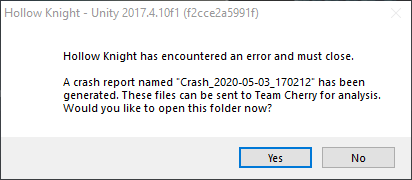 mint mulch
Lmao oof
novel bronze
where do i dowload the grimm knight sprite for custom knight?
It does the loading bar, makes a bunch of sounds when it fills up, then crashes just before the main menu.
@quick estuary same
i stop using it for that
 runic oriole
what mods do you guys have installed
elfin jasper
I have randomizer mod 3.0 installed
I also like to use QoL by 5fiftysix6 🙂
How about you?
 safe canopy
 only
only
 stark sleet
hey guys, how can i get a mod for replaying path of pain?
covert oasis
QoL mod
 solar carbon
i just i quit the game and start again bad its not that good
quick estuary
Yeah I have QoL, Data tracker, Rando 3, and custom knight. (And seanpr core)
 opal dew
is there a mac download for the mod installer
opal dew
10.13.6
opal dew
i'm on high sierra
proud quailBOT
Reminder: The mod installer (https://radiance.host/mods/ModInstaller.exe) and other modding resources can be found from the pinned messages.
opal dew
ok
tough cradle
is there any way of downloading the dumb radiancemod
 languid zealot
Is there a mod that puts all three trails on the collesseum together
tough cradle
?mods
proud quailBOT
Mods
Google Drive with Mods - https://drive.google.com/drive/folders/0B_b9PFqx_PR9Um9MeFZMV21oWGs
Installer - https://radiance.host/mods/ModInstaller.exe
Mod Summaries - https://docs.google.com/document/d/1cz5tcggpGofrBcM90XyTkMWjMelDHzugvQM6HpB13Ew
 slate pawn
How i install skins for Hollow Knight using Custom Knight?
'-'
Oh
True
Thanks :v
 narrow pollen
Is there any way to view a preview of the images included in the google drive things? (for custom knight, i wanna see what i'm getting.)
Nevermind.
 shrewd rain
Customknight and hellmod arent working
Hell mod just says unknown while custom knight says to check the mod log( i dont know where it is)
narrow pollen
How do i change my skin in custom knight?
shrewd rain
youre supposed to do this
- Create the following folders/file path:
Hollow Knight.app/Contents/Managed/Mods/CustomKnight - Place the PNG files inside the "CustomKnight" Folder. (There must be 8 PNG files present in this location. Some Custom Knight skins do not contain all 8 PNG files, so you must place the remaining vanilla sprite sheets here too. The mod looks for the presence of all 8 to run.)
- Boot up your game.
tho it aint working for me
 untold elm
narrow pollen
untold elm
narrow pollen
Yeah i don't know how to change the skin to non-default.
shrewd rain
how do i access the mod logs
narrow pollen
uh i made a file for my own thing, i then clicked the skin change thing and now i'm invisible.
novel bronze
The new instructions for customknight are located in the readme in the modinstaller
narrow pollen
i broke mod manager, it's just a blank gray screen with no way to get mods.
it's using the wrong path despite me giving it the correct path like 1 second ago.
 jaunty axle
can someone please tell me how to turn off "flying" in the mod? when reloading for the hornet fight i fly sometimes and dont know how to tuirn it off thanks
 fading girder
Is there a way I can have both of these mods working at the same time?
https://www.nexusmods.com/hollowknight/mods/3?tab=description
https://www.nexusmods.com/hollowknight/mods/4?tab=description

Nexus Mods :: Hollow Knight
A few Charms were either not worth their notches and/or were prohibitively too costly to wear. This mod addresses that without being game-breaking.

Nexus Mods :: Hollow Knight
Makes the Wayward Compass and the Gathering Swarm cost zero notches, freeing up space for other charms.
real jacinth
we don't endorse anything that's on nexusmods
so, use at your own risk
if you want "official" mods, use the installer and the google drive where we store finished mods
?mods
proud quailBOT
Mods
Google Drive with Mods - https://drive.google.com/drive/folders/0B_b9PFqx_PR9Um9MeFZMV21oWGs
Installer - https://radiance.host/mods/ModInstaller.exe
Mod Summaries - https://docs.google.com/document/d/1cz5tcggpGofrBcM90XyTkMWjMelDHzugvQM6HpB13Ew
jaunty axle
@real jacinth can you tell me how to turn on and off the flying feature on debug mod? i just need to be able to turn it off please
real jacinth
click no clip
jaunty axle
that just made me move faster? but ill try it again
real jacinth
that's the only "flying" feature of debug
jaunty axle
okay thank you
jaunty axle
okay so if anyone knows why i "fly" or just no longer fall after loading the hornet fight 3-5 times and how to fix that please let me know. its not noclip as ive tried that multiple times now
real jacinth
what other mods do you have
and what are you doing. are you loading a save state or something?
novel bronze
Do you have any suggestions for custom kinght. Just asking dor fun ^^
real jacinth
suggestion: use it
jaunty axle
@real jacinth yeah relaoding the same save over and over to refight hornet
novel bronze
no I mean some sprites what you reccomend
jaunty axle
between 3 -5 reloads i start "flying"/floating off the ledge
and cant get down
tried te noclip like you said
real jacinth
you didn't answer my question
"relaoding the same save over and over"
is this a save state? or are you loading the game save where you're at the bench
jaunty axle
im using a save state from debug mod
real jacinth
usually not a good idea to load a save state in the same room as the boss
jaunty axle
i have the 2 mods reccomended off of speedruns
okay so maybe use the save in the room before hornet?
real jacinth
much better to put it just outside the transition
jaunty axle
okay cool ill try that, its just been really frustrating having to get all the way back to hornet every 3-5 tries lol
real jacinth
you can also put a dream gate down
jaunty axle
then warp from the bench after dying?
jaunty axle
thanks @real jacinth for all the help
ima try the out of the room/transition and see if that fixes it
jaunty axle
welp no matter where i set my save state the flying seems to happen, i guess ill try with a dream gate tomorrow. if anyone knows why a save state make my knight "fly" after 3-5 uses please let me know
 hoary aspen
is there a way to disable mods without putting them all in the disabled folder?
yea even if i put them all in disabled folder, it still shows modding api at the top
i did relaunch it
 vernal mirage
So I heard there was a mod that slightly helps the game run ?
I just got my modInstaller done and wanted to ask which one that was ?
west bane
if you wanna go to complete vanilla hit the "revert back to vanilla" button on the installer
the modding api itself slightly helps the game run better
vernal mirage
oh ok
thnx Zaliant
hoary aspen
it just offers me to put everything in disabled
i guess..
i'm always afraid to do that since i never want to risk it replacing files i don't know about that are modded, but i guess i'll do that
 strange trench
How would you guys recommend I set up saves for different practice segments for speedrunning? I understand I can use dreamgates, but that means that certain areas will not be different based on which dreamgate I go to (ie forgotten crossroads not being corrupted by the orange stuff when it should)
west bane
 royal mural
 prisma solar
my mod makes the game like vvvvvv it works with everything except dirtmouth help
west bane
shrewd rain
Is there a mod that allows me to spawn bosses n stuff i really wanna fight thk without him being invisible or atleast spawn pure vessel as a replacement for em
 unborn coral
hey, I'm having trouble getting hollow point mod to work, (I'm on mac and couldn't find any videos that went through how to make it work) i would really appreciate it if someone could help me out 🙂 thanks
west bane
are you using the modinstaller
unborn coral
yeah, i downloaded it from the pins
 broken pike
 little forge
Is it possible to get different ending than ending 1 with mods?
I only used debug and benchwarp
And other that require for benchwarp
I found Lurien but there was no boss, only item.
Same with Herra
west bane
this chat is for about installing HK mods, but endings are tied to voidheart, that's all that matters to the game
little forge
Oh, k.
novel bronze
what is a good randomizer mod? ive tried some but have been unable to complete the game with them
slate pawn
How a search for skins for Custom Knight?
I have searching for hours but i dont find '-'
novel bronze
i dont know as well
slate pawn
:v
 snow stratus
check pinned
 young yarrow
hey, sorry probably noob question but i cant find the hollow knight installation path when loading the modinstaller?
never mind! your boi figured it out
tough cradle
im downloading the dumb radiance dll, put it in the mods folder and its enabled in modinstaller, but it says error and go to mod log
where is the mod log?
real jacinth
?saves
proud quailBOT
Saves
Windows File Paths: (Assumes Default Steam Install Path, Adjust accordingly for DRM Free or Non-Standard Steam Path)
Game Files: C:\Program Files (x86)\Steam\steamapps\common\Hollow Knight\```
** **
Mac File Paths:
```Save Files: ~/Library/Application Support/unity.Team Cherry.Hollow Knight/
Game Files: ~/Library/Application Support/Steam/steamapps/common/Hollow Knight/hollow_knight.app/```
** **
Linux File Paths:
```Save Files: ~/.config/unity3d/Team Cherry/Hollow Knight/
Game Files: ~/.local/share/Steam/steamapps/common/Hollow Knight/```
real jacinth
save files
real jacinth
¯_(ツ)_/¯
if you have modcommon, the API, and seanprcore installed, that's all the dependencies
tough cradle
ill download ultimatium and see if that works
real jacinth
dumb radiance is just some random mod a random person posted in chat
I have no clue if it even works
tough cradle
alright thanks for the help tho
obsidian belfry
How to customize Grimmchild's color with the Grimmchild Upgrades mod?
 edgy tapir
my first modinstaller launch
crashes afterwards
reset the installer multiple times, nothing
 cosmic halo
now that i've closed the modinsstaller where can i find it again?
cosmic halo
oh duh i thought that was the installer program for the installer haha
obsidian belfry
thank you ickely
obsidian belfry
this works like a color picker does right? what does colorAlpha mean?
ohh alright, thank you
real jacinth
did you tell it the correct game location then?
and you downloaded it from this discord right?
obsidian belfry
Whenever I try to run the game with custom knight, it loads then closes. The mod was working yesterday and im not running anything new. Any help?
this is the error log
ive added some more skin folders to the custom knight folder, but that was also fine when i did that yesterday
cosmic halo
im getting the ranodmizer to work for items but the enemy one wont kick in
cosmic halo
i didnt do anything with adding skins
i just installed the randomizer 3 and enemy randomizer
was i supposed to do more?
real jacinth
second sentence was to lizzard
cosmic halo
oooh okay
real jacinth
did you press the load enemies button at main menu
and have it freak out for a few minutes
cosmic halo
im relaunching right now
oh i found the load button
i dont think it was there last time
idk
obsidian belfry
ahh is there a limit to how many can be added at once?
i just added a bunch so i could choose them if i wanted, if thats the case i'll take a few of them out
obsidian belfry
okay, thank you again
real jacinth
and since that's all that you changed since yesterday.... seems logical that's the cause
novel bronze
Does the game close immediately or does it freeze first?
obsidian belfry
assuming you're asking me? it froze on this screen for a moment then closed:
but its fixed now
edgy tapir
did you tell it the correct game location then?
yes, but my steam library is on d:, which is not my system volume
and you downloaded it from this discord right?
yeah
real jacinth
yes, but my steam library is on d:, which is not my system volume
what do you mean by system volume
unless you mean C:
did you press "yes" on the first prompt of the installer?
edgy tapir
my system is on c:
real jacinth
or did you say no
real jacinth
even when you reset it?
edgy tapir
yes
real jacinth
there's a prompt that asks yes/no if your game is in a specific spot
after you reset it
edgy tapir
it immediately went to ask the path
proud quailBOT
Reminder: The mod installer (https://radiance.host/mods/ModInstaller.exe) and other modding resources can be found from the pinned messages.
edgy tapir
real jacinth
there should be two yes/no prompts before this
real jacinth
when is "before"
edgy tapir
now it's the new one
real jacinth
okay, well something you're telling me isn't right then, or you're missing a step. Can you show me the folder you're deleting to reset the installer
edgy tapir
real jacinth
where's your installer exe located
and you're running it as admin?
and once you delete that folder, the very first thing that shows up, should be a pop up that asks if your game is on your C:/ drive
edgy tapir
my installer is at d:\progs\
ran it as admin with the same outcome
deleted local files multiple times, same stuff as I said
real jacinth
this is what should show up.
try moving your installer exe to your desktop instead of your D: drive
shouldn't matter, but if these aren't showing up at all....
edgy tapir
failed
I'm confused now, the installer is on radiance host right? it's the one I have
I could reinstall the game probably
 hearty glade
im having trouble getting benchwarp and randomapmod to load right. It tells me it failed to load for both, but it shows randomapmod's version number (0.3.4)
real jacinth
reinstalling the game won't do anything
PoH, just redownload it from this link
?i
proud quailBOT
Reminder: The mod installer (https://radiance.host/mods/ModInstaller.exe) and other modding resources can be found from the pinned messages.
real jacinth
send screenshots kahoot
hearty glade
real jacinth
check your mod log
or just upload it here
it's in your save file location
?saves
proud quailBOT
Saves
Windows File Paths: (Assumes Default Steam Install Path, Adjust accordingly for DRM Free or Non-Standard Steam Path)
Game Files: C:\Program Files (x86)\Steam\steamapps\common\Hollow Knight\```
** **
Mac File Paths:
```Save Files: ~/Library/Application Support/unity.Team Cherry.Hollow Knight/
Game Files: ~/Library/Application Support/Steam/steamapps/common/Hollow Knight/hollow_knight.app/```
** **
Linux File Paths:
```Save Files: ~/.config/unity3d/Team Cherry/Hollow Knight/
Game Files: ~/.local/share/Steam/steamapps/common/Hollow Knight/```
hearty glade
real jacinth
which rando map mod are you using
the one from the installer? or the one pinned in another channel
hearty glade
the one from the installer
real jacinth
don't use that one. you need to be using rando 2 for that one
hearty glade
ok, I can live without that, but what about benchwarp?
real jacinth
just point the installer to this with the manual install button
and it'll put it where it belongs
hearty glade
hey, it worked! thanks, thats definitely progress
real jacinth
for the other one, delete your global api settings json in the saves folder
and relaunch the game
edgy tapir
that might be helpful for my case as well
will look in that folder once I get back to my pc
hearty glade
youre an absolute lifesaver lol, ive been having issues for quite a while
thanks a lot
real jacinth
that work?
hearty glade
yes
real jacinth
👍
 sly smelt
Question. How do i reset my nail damage in Debug mod?
real jacinth
press - until it's back to where it was
sly smelt
ok
 craggy agate
Does the mod installer link up top of the page work for Mac/steam? My Aim is to make custom skins for the Knight but I want to know if I can even do it. Can anyone help?
craggy agate
Thank you Ickely. Where can I find the .app version?
real jacinth
pinned messages
craggy agate
Excellent.
 safe torrent
Hey I got Hollow Knight recently (and just joined the server) I've completed 91% of the game already and I was thinking about trying some mods after I complete everything including dlc and such. I am not really sure how to mod Hollow Knight specifically or how to remove them 😅 A little help would be much appriecated
real jacinth
?i
proud quailBOT
Reminder: The mod installer (https://radiance.host/mods/ModInstaller.exe) and other modding resources can be found from the pinned messages.
safe torrent
oh .-.
thanks
Sorry for not checking pins first, that's my bad
So is it as simple as just installing and enabling/disabling them before I run Hollow Knight?
real jacinth
yup
safe torrent
Wow, that is actually amazing, probably the least complicated modding system I've seen so far besides steam workshop
Thanks a ton 😄
craggy agate
But next I want to be able to change the Knight skins to my own skin. What are my next steps, please?
real jacinth
read the readme of customknight
safe torrent
Is Chaos Mod just a randomizer or can it break my game to the point I cannot complete it?
real jacinth
it's chaos
 lament laurel
Question
How would one remove the modloader
Dont want it rn but will add it at a later date
lament laurel
I deleted it from my downloads, but it still runs
lament laurel
Ye
lament laurel
How do I do that, I'm not very experienced
real jacinth
right click game, properties, files, verify game files
lament laurel
Ok, gotcha, thank you @real jacinth
craggy agate
the mods I've selected don't seem to work
they are showing installed and I had restarted the game
any thoughts?
real jacinth
which installer did you use
craggy agate
modinstaller 2
craggy agate
ah
okay let me try that
yeah, the enemy bar worked, for example
but now my controller won't function...
craggy agate
when I uninstalled the modinstaller and verified the integrity of the files the controller worked again
real jacinth
the API changes how inputs are received
craggy agate
I reinstalled and the mod functioned but the controller didn't again
I see
I am on Mac
How can I get around that?
real jacinth
if you don't have like.... an xbox one or ps4 controller or keyboard, it can have this side effect
what's your controller
craggy agate
PS4 dual shock
real jacinth
first thing to try is checking modding API linux/mac instead of the windows one
craggy agate
Really appreciate all yur help by the way
real jacinth
in the installer
real jacinth
@glass meteor
I don't remember what the fix for this is
 peak matrix
so i installed randomizer 3 but cant figure out how to randomize the rooms
real jacinth
Angus - are inputs working using your keyboard?
and for randomizer, you just change the option where all the randomizer options are when you are starting a new file
you click on item randomizer until it says room
craggy agate
The inputs are working on the keyboard yeah
real jacinth
so.... something you could use as a workaround then would be a controller to keyboard mapping program
that would at least let you play
http://joystickmapper.com/ as an example
Joystick Mapper
Joystick Mapper, An app for Mac OS X that allows you to use gamepads in any app or game
 gray sandal
Im trying to get a custom skin from custom knight and well the things that are supposed to be downloaded for skins arent downloading.
also ive already checked out a link
from speedrun.com
i guess what im saying is how do i download the assets
real jacinth
check the pins
 zenith spruce
is the website for the mod installer down or is it a problem on my end?
covert oasis
looks like a problem on your end, i downloaded it just fine
zenith spruce
good ol' server not found, welp
guess i'll have to install them manually then
wow it's not even just the download page, radiance.host itself just doesn't load for me
west bane
@zenith spruce does this work
zenith spruce
absolutely, thank you very much!
novel bronze
Question, where do the sprites end up with the SpriteDump mod??
And how exactly does it work? Do I have to stand there n hold it while it does its thing??
elfin jasper
If you want sprites, I recommend looking at the last pinned message in #art-discussion
novel bronze
Thank u
 devout current
Is there a guide out there on creating mods?
 spare yew
where do i get the modding API
west bane
it's installed when you run the modinstaller for the first time
 runic heron
This is probably a dumb question but this is my first time modding a game
I want to try out some mods on the other 3 files how will the mods affect my first file?
Also how do these affect steam achievements
west bane
they dont effect them unless you use debug and like give yourself all charms / abilities, but if you really want you can backup your saves user#.dat in your saves folder
they effect steam achievements if you meet the criteria
runic heron
I meant more of does it disable them
I seem to have successfully downloaded and installed the mods
There’s a big white/grey bar is that normal?
west bane
no it doesnt disable them, and yes, that's the modding api loading all the mods
runic heron
Ok I’m there now
I started and now there’s like a million options
Help
I installed randomizer 3 btw
west bane
what do you need help with
runic heron
Ok so
I realized randomizer 3 does not involve enemies
So I got that too
On the main screen on hk there was load enemie randomizer
But it always freezes at 88%
I don’t know what’s causing that
Do I need something else?
@west bane
west bane
that is more #modding-discussion
 long turret
whats the mod called for noclip and godmode?
 marble hornet
Debug?
runic heron
Hold on
@oblique dew hey did you get the 88 thing fixed
Since I have the same issue
runic heron
Do I need qol for enemy randomizer or randomizer 3?
elfin jasper
yes, QoL is listed as a dependency of randomizer 3
devout current
is there a mod that allows you to re-enter the PoP even if its been completed?
elfin jasper
yes, QoL
elfin jasper
It is a very useful mod in general. It also reduces transition times everywhere, so I would recommend it for everyone 
runic heron
Ok so
If I disable mods then they won’t work, right?
I don’t have to uninstall them
I’m trying to play enemy and randomizer 3
And besides these 2 I have seanprcore qol and benchwarp
Since I apparently need those
 wintry lynx
proud quailBOT
wintry lynx
proud quailBOT
Mods
Google Drive with Mods - https://drive.google.com/drive/folders/0B_b9PFqx_PR9Um9MeFZMV21oWGs
Installer - https://radiance.host/mods/ModInstaller.exe
Mod Summaries - https://docs.google.com/document/d/1cz5tcggpGofrBcM90XyTkMWjMelDHzugvQM6HpB13Ew
runic heron
Yes I did all that
 spare ravine
guys
how do i install the path of pain mod
so i can do it again
plz tell every step in detail
where do i manualy put the files of the mod
without the installer
real jacinth
why not just use the installer
spare ravine
i have a non legit verson
 jovial sigil
Hey, I installed the latest CustomKnight and a skin, and the skin menu shows up in game, but changing skins has no effect. Any tips?
real jacinth
Then nobody here is going to help you anyways zappa
Does the other skin you put in show up in the skin menu in game pimpas
jovial sigil
Yes, both the Default skin and the new one appear
real jacinth
and clicking on the other one does nothing?
jovial sigil
Pretty much. When I unpause my character flashes for a moment but nothing else happens
real jacinth
can you send a screenshot of that menu open?
jovial sigil
OK, give me a minute
real jacinth
and you might have to wait until the character model changes before unpausing
unpausing too early might cancel it
I haven't tried the new customknight version yet, so I'm guessing here
real jacinth
you should also add modcommon and seanprcore if you haven't
I don't see modcommon in your mod list
so definitely add that
real jacinth
yeah. seanprcore doesn't show up in the top left b/c reasons
jovial sigil
Ah, now it worked. I did have to wait a bit, though
before the skin change took effect
real jacinth
👍
jovial sigil
It would be nice if the customknight readme told you about this stuff
thanks btw
Speaking of that readme, I found a mistake in it. In the fist part it tells you to install the skins under ~/Library/Application Support/Steam/steamapps/common/Hollow Knight/Managed/Mods/CustomKnight, but it's actually ~/Library/Application Support/Steam/steamapps/common/Hollow Knight/hollow_knight.app/Managed/Mods/CustomKnight
It's missing the hollow_knight.app in the middle
runic heron
I’m trying to get the enemy randomizer paired with randomizer 3 but when I load the enemy one it always freezes at 88% I have no other mods installed (except for qol benchwarp and the other necessary one) does someone know what the problem is
novel bronze
whoops
narrow pollen
Can anyone hand me the new customknight readme? I can't get it in the mod installer since for some reason for me the mod installer is broken.
Nevermind.
novel bronze
where do i get custom knight sprites/skins
 wise solar
where I find the link to download what brings all the mods
real jacinth
?i
proud quailBOT
Reminder: The mod installer (https://radiance.host/mods/ModInstaller.exe) and other modding resources can be found from the pinned messages.
wise solar
Yes is that, thanks
young yarrow
Hey everyone, hopefully someone can help me out eee. Playing through the hollowknight randomizer 3 with bench warp, and loaded it this morning and benchwarp failed to load
It says check, modlog.txt
Any idea where I can find this or how to solve the problem?
Other mods are currently working fine
I've tried enabling and disabling its inod manager but it's not working
Reinstalled it and still same issue
young yarrow
Halp
 winged vigil
young yarrow
winged vigil
young yarrow
I'm so lost, I've tried installing benchwarp from the Google drive and placing it in the local files manually and I still aren't getting anywhere
grave girder
@runic heron The enemy randomizer load locking up like that is a known issue on the list of things I plan to look into. Make sure to check everything mentioned in the pin from Aug 18, 2019 in case that can help you in the meantime
@young yarrow The modlog.txt is in your Hollow Knight saves folder
?saves
proud quailBOT
Saves
Windows File Paths: (Assumes Default Steam Install Path, Adjust accordingly for DRM Free or Non-Standard Steam Path)
Game Files: C:\Program Files (x86)\Steam\steamapps\common\Hollow Knight\```
** **
Mac File Paths:
```Save Files: ~/Library/Application Support/unity.Team Cherry.Hollow Knight/
Game Files: ~/Library/Application Support/Steam/steamapps/common/Hollow Knight/hollow_knight.app/```
** **
Linux File Paths:
```Save Files: ~/.config/unity3d/Team Cherry/Hollow Knight/
Game Files: ~/.local/share/Steam/steamapps/common/Hollow Knight/```
young yarrow
Wait so that's in the browse local game files¿ tab in steam hollow knight properties
grave girder
No, it is in the folder that the bot says it is based on your operating system
young yarrow
Sorry, I'm confused where do I put in the first step?
grave girder
What is your operating system?
young yarrow
Windows
grave girder
Open your File Explorer, click on the blank area on the right side of your current file path and paste this into the bar and hit enter: %APPDATA%\..\LocalLow\Team Cherry\Hollow Knight\
runic heron
Thanks gallus I’ll give it a try
grave girder
Hopefully it works. If not, hopefully the issue will be worked out in the near future
young yarrow
It says no items match your search
I copied it straight from discord
You mean here right?
runic heron
What’s modcommon though is that just the installer?
grave girder
Sorry, that's the search bar. You want to click in file path bar. The one that currently says "Search Results in Roaming". Just make sure to click to the right of the last >
covert oasis
use windows key + shift + s to take screenshots
young yarrow
Ah thanks Gallus, I got it. But there's nothing relevant in the modlog.txt file
grave girder
@runic heron Check if ModCommon is listed in the top left with the other mod information when you launch your modded version. The version I currently have is 0.0.6
young yarrow
grave girder
Okay, so Tiramisu, run your modded Hollow Knight with Benchwarp installed and enabled from the ModInstaller as it was when you got the failed to load error, and check it again. It only has the information from the previous run of the modded game.
grave girder
If ModCommon isn't there B1ackZer0, it should be able to be manually installed. Can look into that if it is an issue
runic heron
Is it in the pins?
grave girder
@young yarrow Can you DM me the ModLog so I can take a closer look?
I'm unsure. If I recall correctly, it should be able to be downloaded from the mod drive for manual install like other mods
 spark grail
so I am running macos mojave and I try running the install and it just shows up with mono32 as running but nothing is happening
 noble rune
Does anyone know how to download and use the CustomKnight sprites?
I really want to do the challenge
Okay, once again, the small extent of my intelligence has been revealed
spark grail
your on mac right
noble rune
Yes
spark grail
your also not running catalina hopefully
noble rune
Nope
spark grail
well shit
noble rune
I mean yes, I am not running catalina
spark grail
So how did you get the installer to run
west bane
should be able to just use the regular modinstller then
spark grail
it pops up as running but nothing happens
real jacinth
Move it to your desktop
spark grail
Thanks that worked
noble rune
I've downloaded the link for mac in the second pin and I've got the ModInstaller on my desktop
But when I open it it just says it is downloading mono
real jacinth
Okay, so let it
real jacinth
5 to 10 minutes
noble rune
It opens a mono32 application with Zote's head as an icon and then immediately closes it
noble rune
I am on Mojave
real jacinth
Did you run it and then wait a minute?
noble rune
Yeah
 rich garnet
Is there a mod to access everything without actually having to play through the game again? Already beat the game on my switch, no reason to do that again on PC.
west bane
you can just download a save file from speedrun.com
runic heron
@grave girder so i tried it again and patiently did nothing while it was loading but it still stopped again
Ima send a picture of the mod versions
 modest lily
how can you get that custom knight mod that allowsd you to be broken vessel and pale king like the one cranky templar had?
 winged void
Check the pins
modest lily
i don't know what you mean by that but it's not like the normal custom knight mod
novel bronze
so when i try to install the modinstaller, it says it cant find the files and then tells me to buy the game, even tho i have the game both legally got and currently installed.
what more should i tell that can help in someone helping me?
 rich summit
I am new to Hollow knight and having difficulty with the skills needed.. Since there is no easy mode :(, I am looking for mods that can either give me god-like ability or reduce boss strength..
I looked at the documentation for the mod-installer.. is there any mod that can help me? Help appreciated
trail flint
debug mod
allows you to boost your nail damage to whatever, and invincibility if you really still cant push
west bane
also sanic mod, lts you alter game time if you want a slower game
novel bronze
right so i solved my problem by literally putting the modinstaller inside the steam dir and running it again. just incase someone had the same problem as me
¯_(ツ)_/¯
west bane
i think all it matters is that it's out of your downloads folder, and then there's another reset method by deleting a folder
novel bronze
either way its working
runic heron
It worked for me from inside downloads
 stone mist
how can you get that custom knight mod that allowsd you to be broken vessel and pale king like the one cranky templar had?
pale king is a challenge
broken vessel i dont know
 north rune
Does anyone know why doesn't CharmOverhaul work? This mod which reduces Notch costs on Charms?
Other mods seems to work properly which is kida odd
 bright canyon
does anyone have the files for poorly translated?, i cant get it to install via the mod installer, my friend says it might be a broken zip file or something
proud quailBOT
Mods
Google Drive with Mods - https://drive.google.com/drive/folders/0B_b9PFqx_PR9Um9MeFZMV21oWGs
Installer - https://radiance.host/mods/ModInstaller.exe
Mod Summaries - https://docs.google.com/document/d/1cz5tcggpGofrBcM90XyTkMWjMelDHzugvQM6HpB13Ew
bright canyon
ah, didnt know about that command, thanks!
tough cradle
@modest lily
For the broken vessel custom knight, go to #modding-discussion pins and thr TWP google drive, theres a folder called SCION
for the pale king custom skin its #modding-discussion pinned, check the event
Custom knight info is all in pind
rich summit
debug mod
@trail flint debug mod is overwhelming. For a semi-technically challenged person this is what I was hoping for. I'll be fine with a simple mod which can grant high nail damage & infinite lives. Are there other mods outside this mod-installer that I can use?
trail flint
unfortunately the stuff that can make it easier drastically changes the game, like zaliant said you can also use sanic mode to slow stuff down but otherwise, theres no simple "easy" mod so to say
also debug is not really that complicated, all you need to know is that the hotkey for the menu is F1, and all you really need to pay attention to is the nail damage and invulnerability
 ripe bone
 real jacinth
?i
proud quailBOT
Reminder: The mod installer (https://radiance.host/mods/ModInstaller.exe) and other modding resources can be found from the pinned messages.
real jacinth
hollow point
molten flame
not sure exactly where this belongs in the discord but what does quick dash do in blackmoth
real jacinth
what does it say it does?
rich summit
unfortunately the stuff that can make it easier drastically changes the game, like zaliant said you can also use sanic mode to slow stuff down but otherwise, theres no simple "easy" mod so to say
@trail flint I'm trying it. I used F1 to go to the page and managed to change my nail damage by pressing + button. How do you move between the Misc. pages (it shows 1/13) for me, so I can navigate to change my invulnerability state
real jacinth
for the mouse to show up, yea
molten flame
It says that allows the bearer to slash more rapidly with their dash
real jacinth
did you try spamming your dash
molten flame
oh okay thanks
rich summit
Which key should I use to pause the game, so my mouse can show up?
 strong tree
wait where do i get the installer
real jacinth
?i
proud quailBOT
Reminder: The mod installer (https://radiance.host/mods/ModInstaller.exe) and other modding resources can be found from the pinned messages.
real jacinth
check the pins
 keen trout
I'm getting this when trying to install Custom Knight from the Mod Installer
strong tree
hold on does it work for mac os
strong tree
“ModInstaller” cannot be opened because the developer cannot be verified. i get this every time i try to activate it
real jacinth
unless something else in your game is corrupt, in which case you'd want to verify your game files, and then redownload the installer and run it again
so tell your computer to open it anyways
keen trout
still happens
real jacinth
what do the details on the error say
keen trout
real jacinth
move your mod installer out of your downloads folder
keen trout
I put it in HK's directory and still happens
real jacinth
just put it on your desktop
keen trout
still happens
real jacinth
did you try deleting the modinstaller memory files to reset it
keen trout
still happens
rich summit
esc
@vernal rain Thanks for the help, I willtry
I am having another strange problem. My Xbox 360 controller is not working after I have the mods. BTW,I have installed and enabled these 3 mods: Debug, lightbringer & EnemyHPbar. BTW, in the options menu, I am able to turn on the controller but none of the keys work subsequently either in the game or in the main menus. ANy idea why?
 heavy palm
I'm getting this when trying to install Custom Knight from the Mod Installer
@keen trout I also get this message but tried to install Windows game pass beta
keen trout
I get that message from Custom Knight and Poorly Translated but I've installed other mods
 toxic trail
guys is there any mod like
god mode or invisibilty
not taking damage from anything?
keen trout
install Debug and enable invincibility
 terse sleet
in randomizer 3 where do the spoiler logs and tracker logs save to?
toxic trail
@keen trout bro how can i enable that
<@&328354344313421825> guys how can i enable invicible on debug mod?
 versed needle
You click the thing in the cheat menu
toxic trail
wait i dont understand
when i do anything game brokes
i cant do anything
oh fk
<@&328354344313421825> can you help me out im streaming in general chat 1
i cant stream AAAAAAAAAAAAAAAAAAA
elfin jasper
Hello. Please provide details and explain how you attempted to solve your problem. Seanpr already offered a solution, and it seems like you ignored it. Also, it's very unlikely that anyone will want to come help you in voice chat rather than in here.
In general, it is considered rude to ping users or roles in every message. I assure you, people are reading your messages, and deciding whether to respond based on your behavior.
toxic trail
Oh if i be rude i'm sorry
elfin jasper
What is your problem?
toxic trail
i didn't mean that
elfin jasper
For debug, press F1 to open the cheats menu, then pause the game and click on it with the mouse.
toxic trail
my problem is when i trying to cheat on and do anything game stops
it stopped again
and it wont come normal again
elfin jasper
What happens when it pauses? Did you by any chance attempt to bind debug controls to the mouse?
You can delete debug binds by deleting the Debug Mod GlobalSettings json in the saves folder
?saves
proud quailBOT
Saves
Windows File Paths: (Assumes Default Steam Install Path, Adjust accordingly for DRM Free or Non-Standard Steam Path)
Game Files: C:\Program Files (x86)\Steam\steamapps\common\Hollow Knight\```
** **
Mac File Paths:
```Save Files: ~/Library/Application Support/unity.Team Cherry.Hollow Knight/
Game Files: ~/Library/Application Support/Steam/steamapps/common/Hollow Knight/hollow_knight.app/```
** **
Linux File Paths:
```Save Files: ~/.config/unity3d/Team Cherry/Hollow Knight/
Game Files: ~/.local/share/Steam/steamapps/common/Hollow Knight/```
toxic trail
i just trying to press anything on menu i meanl ike everything
basicly when i cheat game stops
real jacinth
I have no idea what I'm looking at
these are just folders
you're on windows?
?i
proud quailBOT
Reminder: The mod installer (https://radiance.host/mods/ModInstaller.exe) and other modding resources can be found from the pinned messages.
real jacinth
debug
real jacinth
did you click continue
real jacinth
with your mouse
toxic trail
idk lemme check
real jacinth
can you send screenshots or something
toxic trail
i can try
real jacinth
I still don't even understand the issue from your descriptions
toxic trail
wait
i'm trying to send video but
I DONT HAVE NITRO
how can i..
i can stream tho
how can ı stream?
narrow pollen
How do i change the path the modinstaller uses? It keeps trying to use the wrong path.
real jacinth
reset it
narrow pollen
How?
real jacinth
pins