#archived-modding-help
1 messages · Page 74 of 1
 river vortex
 glass meteor
dnSpy is used to edit dlls
However if you're making mods for more than just yourself you shouldn't be using that for editing
glass meteor
okay cool
river vortex
I want to increase my health and take less damage
Since I suck at the game, but still want to play
glass meteor

GitHub
.NET debugger and assembly editor. Contribute to 0xd4d/dnSpy development by creating an account on GitHub.
 real jacinth
Could just use debug mod
glass meteor
that's a pain though
glass meteor
it has an option for that
river vortex
And I don't want that xD
glass meteor
invin mod sucks
river vortex
I just want more health and to not die so much
river vortex
I am using it to practice platforming and nailjumping
glass meteor
Installer for mods
glass meteor
yw
river vortex
Infinite health would be great for practice
Since I am trying to get my timing right
glass meteor
yeah it's fantastic
river vortex
That is my main problem is really slow reflexes
I'm autistic and have trouble with a LOT of stuff liek that xD
But practice makes perfect
Practice without extreme frustration is better
glass meteor
yes
river vortex
I will go modify my game files back and play with that!
Ooh... what is custom knight?
What's the charm notch mod?
 novel bronze
**Mods**
river vortex
Ooh thank you!
Debug will be perfect
How do you toggle stuff in Debug? Are there keybindings?
glass meteor
Keybindings and there's a ui
you can toggle the ui with f1
you interact with the ui using mouse when the game is paused
river vortex
Thanks!
Sorry I am dumb af xD
AH YESS it's working... now I can pratice and not suck so bad xD
 broken falcon
I wanted to add some cosmetic changes to hollow knight and I don't know how "custom knight" is suppose to work. Can somebody explain how to use it to me please?
^ i used the modloader, and it didn't have a readme file on custom knight
more precisely, where can i get skins for the knight?
glass meteor
 tawny carbon
@broken falcon
novel bronze
is charm overhaul broken?
literally rejoined my save and the wayward compass was 1 notch, the dashmaster was 2
wayward compass is the best item
and i can't use it now
it does like +100 nail damage
real jacinth
and that's the only mod you have active?
novel bronze
you have to sit get up and sit on the bench again @novel bronze
it sets the charm cost back to default after quitting out so that the charm costs don't persist after uninstalling the mod
which is because charm cost is a value in the save data
(this is why if you have a save from before quickslash or flukenest got cost increased to 3, they will still be 2)
tawny carbon
cool!
 crystal knot
guys how do i install mods on my nintendo xbox 4
crystal knot
i tried it, didn’t work
real jacinth
harder
tawny carbon
faster
crystal knot
i am weak boye
crystal knot
cursed
tawny carbon

tawny carbon
modding staff gone insane find out more in the link below
crystal knot
just needed to go harder :^)
 wet skiff
Do y'all know if glass mode is still a thing?
I remember that mod back in 2017 but I haven't seen any updated versions
tawny carbon
yeah
 untold elm
theres a glass soul mod on the drive
crystal knot
i think it still works
untold elm
glass soul isnt on the installer
crystal knot
i can’t remember since i beat it 112% long time ago
i am too good to remember anything
wet skiff
Btw, does the mod just get rid of vessel shards or something?
Or are they just useless
tawny carbon
not as i remember
 west bane
wait that's it?
tawny carbon
u
west bane
well i guess when you get like 8 masks you do a fuck ton
tawny carbon
you cant
untold elm
with charms you can
untold elm
but it's not worth to bother with that
tawny carbon
^
west bane
i mean for 250 geo i can get +4 in early game
untold elm
the only really worth thing is to use lifeblood core if you have strength on
west bane
so yeah
west bane
5 to 9 with nailsmith upgrade
west bane
thats why initially i wasl ike "thats it?" cause of nailsmith initially
wet skiff
I mean I think the surplus of damage is the point
You're a glass cannon
Otherwise it'd be way too hard
untold elm
with glass soul mod the max nail damage per hit would be with pure nail, nine masks joni's blessing lifeblood core, lifeblood heart, fragile heart, and overcharm for strength
then go through pantheon 5 with all bindings done on 1-4
untold elm
it is
real jacinth
your skill matters way more than the 1 dmg
tawny carbon

untold elm
with glass soul you can legitimately shred pure vessel if you use the max hp build with strength overcharmed
 untold elm
it's just radiant
novel bronze
can someone help me, whenever i try to install the modding menu, it says invalid path.
west bane
where is your path
wet skiff
Can someone please explain to me out to use https://rainingchain.com/hollowknight/randomizer?
Randomizer Helper for the game Hollow Knight.
real jacinth
You click on what you have and have checked
wet skiff
Man, I'm a fucking idiot
I thought it was used to create a more specific seed
real jacinth
wet skiff
See, I just want to customize which items get randomized and which items stay the same
For example, I want certain key abilities like the kingsoul to be in their original place, while charms and other items are all swapped
Is this sort of thing possible?
I really thought it was because you can enter in your own seed before starting a playthrough it appears
 elfin jasper
No, that isn't possible
But if you're using the randomizer off the installer, Kingsoul isn't randomized anyways
wet skiff
Are abilities like shade cloak randomized?
elfin jasper
Yes
wet skiff
Wait, is the kings brand randomized?
See, I want to have a fresh experience but I also want to be immersed
I don't want things to not make any sense (i.e., getting wayward compass where kings brand should be)
Really wish there was some way to customize it further, but oh well
wet skiff
You misunderstand
I just want very specific items to be in their original place, so things make sense
Like, I'm fine with getting mantis claws somewhere completely knew
But getting shade cloak from somewhere other than the abyss just feels wrong
real jacinth
Okay. well that doesn't exist. you're not allowed to pick and choose what items are randomized specifically and what isn't.
there is a large amount of customization available
but not down to the item
elfin jasper
Hating on the Mantis Village lore 
 elfin jasper
k, Iselda sells compass for 10000 in vanilla, right? I can do that
elfin jasper
I like luring the vengeflies in King's Pass into the stalagtites
it's a good strat because it doesn't require nail presses
west bane
you have the ability to test this yourself but you want us to do your work for you, is that what i'm getting?
west bane
just make a backup
 normal pike
I don’t believe they usually work together
Some make different changes to the same aspects of the same charms
tawny carbon
pins
novel bronze
also what name does the sound effects have?
tawny carbon
@novel bronze here you can find all info
Embrace the light. If you’re seeking empowerment through the light and love of the Radiance, you have come to the right place. If you are simply interested in our faith then we hope this will serve as a useful resource.
 fringe flame
after changing notch-cost of the charms do you have to start a new game?
fringe flame
i just made it myself
it didn't work in my current game, maybe because i already have the charm
it did work if i made a new game though
tawny carbon
did you try unequip and equip?
real jacinth
sounds like you programmed it to only work on a new game
fringe flame
i guess cause i already bought it
oh yea that could be i dont know what i did really. just modified the dll and charmCost_
real jacinth
funny thing about computers, they do exactly what you tell them to
fringe flame
yea, don't know much about programming
fringe flame
just edited the charmCost_ integer with dnspy
tawny carbon
hmm how do you edit an integer
fringe flame
sec
tawny carbon
https://radiance.host/mods.html this gives info about how to use API i guess
Embrace the light. If you’re seeking empowerment through the light and love of the Radiance, you have come to the right place. If you are simply interested in our faith then we hope this will serve as a useful resource.
fringe flame
chose edit class
and changed the 1 for charmCost_1 = 1 to a 0
ill look at that stuff probably safer 😄
tawny carbon
cool thank you , will try soon 
glass meteor
If you change the initializers about 0 is going to happen on old saves
Just like how flukenest is 2 notches on old saves
fringe flame
hmm ok i'm not a programmer not sure what i did tbh
just know that it only worked on the new game i made
real jacinth
you basically changed the variable that says "on new save, define what each charm costs."
fringe flame
yea
real jacinth
which doesn't get run on old saves
cuz they're already defined
you would have to update charm costs in another way
tawny carbon
what is the other things that you can mod hk with
glass meteor
You compile a dll using Visual Studio/Rider which is loaded by the API
From there I'd use a GetInt hook
You could also just set it on save load and that'd persist even without the mod if you want that
@fringe flame if you only want it on some saves, charm costs are in the save so you could just use a save editor
RainingChain has one, there's one in pins, and I think there's an online one
tawny carbon
what do i do now
glass meteor
You could also install QoL and that gives jsons with the saves, pretty-printed for easy editing
Don't do that Sugar, there's also weird cost calcs in the fsm
Just outright set the cost in CharmUpdate
It's on HeroController
glass meteor
Have you tried showing the whole method
glass meteor


 hollow pine
Question about the Randomizer 2.9, is a dark Deepnest part of the "Dark room" setting?
west bane
is it dark
hollow pine
Yeah 😅 but it wasn't required in the old version (before 2.x at least) I think.
west bane
is it a room
hollow pine
A couple of them for sure.
west bane
we solved the case
hollow pine
Thanks 😉
west bane
and if homothety says otherwise yell at him
hollow pine
I would be rather grateful 
 sleek tiger
@upbeat coral how are you installing it?
 upbeat coral
do i need the modinstaller for the randomizer ?
just downloaded the randomizer yet and putted it into the hk folder
sleek tiger
modinstaller should make it easier
novel bronze
How can I edit the game UI?
 crystal bay
custom knight mod lets you recolor and slightly retexture the health and soul meter
 copper flume
Is there a mod installer version for the Mac?
novel bronze
**Mac**
Yes, mods can be installed on a mac.
You can use the installer
To run the installer:
- Open the Terminal
- Type
cd $(dirname - Drag the exe onto the terminal.
- Type
)then hit Return/Enter - Type
mono --arch=32(Note the space at the end) - Drag the exe onto the terminal and then hit Return/Enter
If this fails with bash: mono: command not found then
- install mono here
- Open a new terminal window
- Type/paste in
export PATH=/usr/local/bin:${PATH}and hit Return/Enter - Repeat steps 2-6 above.
copper flume
Thank You 56!
What do I need to input for the dirname? I assume I'm doing something wrong since it keeps coming back with file not found
nvm found the vid in pins
 brisk swan
can someone help me
i uh
in the debug menu in the part where debug mod is
i accidentally set the binding thing (below the f1) to my left click
is there any way i can fix or reset it?
sleek tiger
should be
either open it and rebind it
of directly from the .json (?) file
that should be an option too
real jacinth
Yes. Delete the json to reset all binds. It's located in the save file location
Hollow Knight - Changing CustomKnight Sprites. - by MickelyMickely
 plush igloo
What's the correct install path for the mod installer?
plush igloo
Okay, the install path is set there. Either that's not the right place or i fucked up something majorly regarding the mod installer
plush igloo
No error in particular
The modding api doesn't seem to be working
Unless i don't have that installed...
sleek tiger
weird
plush igloo
I verified the integrity of the game files, so that's probably why
I forgot how you're meant to install the modding api. Is it through the mod installer?
 old tendon
Ok, 2 questions? Are there any good mods for a hollow knight playthrough? I'm thinking randomiser and lightbringer or black moth, but I don't know what to add. For some clarification, since some guy was being a jerk about it last time I asked, I'd like some mods that add a lot of new content and challenge to the game, but nothing unreal like ngg. (Oh, and of course, I'd need the mods to be compatible with eachother.)
2. What's the room randomiser mod people keep talking about? Is it worth downloading/adding to my playthrough?
Thank you for getting through this wall of text! 
Any suggestion helps.
crystal bay
room rando randomizes all the areas
lightbringer adds a lot but it doesn't make the game more difficult
real jacinth
The API is installed automatically with the installer
Verifying file integrity removes the API
So don't do that after you've opened the installer
 quick herald
@primal terrace look at the 3rd pinned comment, there's a link to the installer
 primal terrace
quick herald
primal terrace
quick herald
Fourth pinned comment, first link is the mod summary (google drive)
novel bronze
**Mods**
old tendon
Do you guys think the room randomiser in it's current state would be good for a hollow knight playthrough?
 runic oriole
Let me ask you this
How good are you at the game
Like, for starters, can you play item randomizer in the hard preset?
runic oriole
No
brisk swan
aw
old tendon
At the game, I'm pretty good. At speedrunning tech and all of those shenenagins, I'm trash
runic oriole
Yeah so
Prolly practice some rando2 hard mode first
After you got that down you can give room rando a shot
Because you absolutely need to know skips etc. by heart to play room rando
Also don't ever combine gameplay mods (such as lightbringer) with rando
You can
It won't break
But it misses the point
old tendon
Alright. Thanks for the tip.
Do you have any reccomendations for a gameplay mod like lightbringer?
runic oriole
Lightbringer or blackmoth should be fine
old tendon
Alright. Thanks for the advice.
And sorry for all the late responses.
 dim marten
Does anyone know how to get into crystal peak in the lightbringer mod?
untold elm
oh yeah
dim marten
have to beat muzz
untold elm
you are supposed to just go to city
dim marten
dang
I kind of wanted to go to salubra early to check out all the cool charms
I'll grind then
west bane
do the resting grounds route
untold elm
I should do lightbringer
west bane
no you don't
west bane
if only i could disable bosses that are too hard for me
real jacinth
Just get stronger
dim marten
*tho
real jacinth
Or go around thru blue lake
west bane
he said you needed crystal peak for htat 
real jacinth
Muzz is hard on purpose to block end game charms
real jacinth
you only need dive for that
Or claw actually
Cuz you can get that, then tram pass, then get to right side
west bane
copper flume
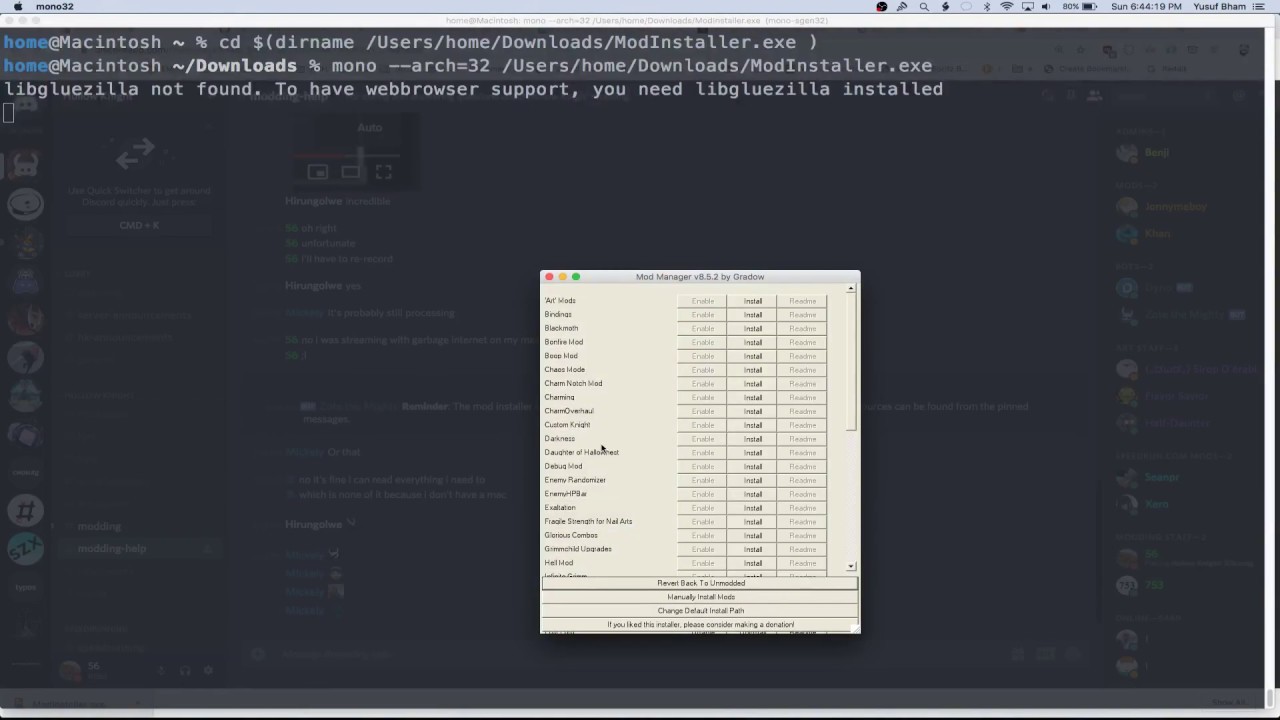
So I followed the steps to install the ModInstaller, but at as soon as I drag the .exe folder into the terminal and hit enter, it says "/Users/(me)/Desktop/ModInstaller.exe: Permission denied". I'm using a Macbook Air and followed the instructions the bot here gives. How do I fix this?
tawny carbon
@copper flume this might help https://youtu.be/FFXnCESFDLU
 copper flume
It doesn't show anything about being denied... Oof. Thanks for trying!
glass meteor
@copper flume
You have to drag it in after typing mono --arch=32
with a space at the end
So the total command would be like
mono --arch=32 /Users/user/Downloads/ModInstaller.exe```Ahhh, ok. I'll try that! As for the Permissions denied, i just had to edit it and give it permissions
copper flume
That makes sense
glass meteor
because they have to be run via mono as .net stuff is only compiled to bytecode
copper flume
Again, makes sense
Ok! I was being stupid and hitting enter after cd dirname. (I realize my own stupidity, obviously), and now it's loading
Application not responding TvT
WAIT
It's working
Thank you 56!
 tiny blade
thx ur angel
glass meteor

copper flume
So, was a window supposed to pop up showing the mods? [Refering to the video Sugar (moth gang) pasted earlier]
What do I do once the ModInstaller is installed?
west bane
run it
copper flume
Cannot be run in DOS mode... Gonna go look up what that is
Aaaand Aparently that's something that is only on Windows... ;v;
glass meteor
what
copper flume
I have no idea what went wrong
glass meteor
Running the modinstaller via mono should pop up the modinstaller box
it takes a year and a half
copper flume
Nope, but i'll try again
west bane
see you in 723 days
glass meteor
that's more than a year and a half
west bane
its leap year
 safe canopy
a leap year with an additional 112 days
west bane
its just a long leap
copper flume
Ok, it says it's downloading the API
It worked! Thank you!
Now to mod the game beyond the point of recognition ^-^
 vague lake
Stupid question but you can turn off mods once you get them right
glass meteor
Yeah
copper flume
It uninstalled my Hollow knight ;v;
Oh well! Getting mad will do nothing. Time to start over... TvT
old tendon
In terms of content and (realistic) challenge, which mod is better - lightbringer, or dark moth?
runic oriole
uhhh
it's hard to compare them tbh
they're very different
blackmoth makes exploration easier because of the dash
lightbringer mixes stuff up more by using Muzznik
sleek tiger
dark moth
 hazy pond
Hello, I'm trying to get the Randomizer mod to work but it's my first time using mods at all. I thought I did it right but when in-game, the API told me that the mod failed to load. The ModLog told me this:
[INFO]:[API] - Adding GitHub SSL Cert to Allow for Checking of Mod Versions
[INFO]:[ModManager] - Initializing
[INFO]:[ModManager] - Initialized
[INFO]:Loading ModdingApi Global Settings.
[INFO]:GameLoading
[INFO]:[API] - Trying to load mods
[ERROR]:[API] - Error: System.Reflection.ReflectionTypeLoadException: The classes in the module cannot be loaded.
at (wrapper managed-to-native) System.Reflection.Assembly:GetTypes (bool)
at System.Reflection.Assembly.GetExportedTypes () [0x00000] in <filename unknown>:0
at Modding.ModLoader+<LoadMods>d__6.MoveNext () [0x00000] in <filename unknown>:0
[INFO]:[API] - Preloading
[INFO]:Loading ModdingApi Global Settings.
[INFO]:Saving Global Settings
glass meteor
SeanprCore
 pine sierra
I want to ask a question about randomizer mod:
I have downloaded and installed the modding api of version 1.4.3.2-51
I have installed the seanprcore.dll
I have the latest modcommon.dll
and the websocket.dll (although I dont know what it is used for)
Now I have installed the randomizer v2.9
when I begin my game, there's sth that stop my from playing it
no matter which type of game I start, [item-rando], [area-rando], [room-rando], the game always shuts down.
oh I have also installed the benchwarp mod which is needed by the randomizer 2.9
if I give up playing randomizer2.9, all my other mods (customknight, QoL, debug, Pain of Path, ...) can work
only this randomizer2.9, which I really eager to have a try but it doesn't work
besides, my computer is mac
p.s. there's nothing wrong in modlog, everything seems right and secceeded
 hoary aspen
Not exactly modding, but which file is responsible for remembering if I cleared the game?
novel bronze
the save file
or do you mean in terms of in game achievements and unlocked extra menu backgrounds?
copper flume
Hey, So it unistalled my Hollow Knight game, but once i reinstalled it the files were there. So whatever i did wrong fixed itself, I suppose! (I'm just thankful i don't have to start over)
Aaaand the Modinstaller unistalled itself. Round 19, here we go!
copper flume
I got it to work, thankfully.
tawny carbon
yw
copper flume
Thank you!
tawny carbon
 dapper gorge
haloa
I started trying to mod HK just now, with mod installer
is it normal HK starts downloadind a tiny file when I launch it?
and this too
dapper gorge
Steam starts a sort of update when I launch Hollow Knight after installing mods
real jacinth
Then turn off updates
dapper gorge
is it possible it's cloud stuff?
 warm parrot
Hey for the bonfire mod, when i upgrade Restitution, i dont get extra masks
is it a bug?
untold elm
you have to upgrade it more than once
glass meteor
Mac or Linux? @novel bronze
novel bronze
**Mac**
Yes, mods can be installed on a mac.
You can use the installer
To run the installer:
- Open the Terminal
- Type
cd $(dirname - Drag the exe onto the terminal.
- Type
)then hit Return/Enter - Type
mono --arch=32(Note the space at the end) - Drag the exe onto the terminal and then hit Return/Enter
If this fails with bash: mono: command not found then
- install mono here
- Open a new terminal window
- Type/paste in
export PATH=/usr/local/bin:${PATH}and hit Return/Enter - Repeat steps 2-6 above.
glass meteor
There's a video in pins
elfin jasper
Benji's pin in here explains how to install mods without the installer
The filepath tells you what folder to use
steps 3 and 4 from the pin
There's a folder with the APIs for each version on the drive
It's a file called Assembly-CSharp
The randomizer is pinned in #randomizer. There's only one version
Yes
That isn't a program
why
Follow the instructions
yes
- Find your Hollow Knight folder
- Replace Assembly-Csharp with the API in the "Managed" folder
- Put the mod in a "Mods" folder inside the "Managed" folder
that's it
That's what the file path is for
Steam also has an option to open it in your file explorer
"View local files"
yes
you may need to show hidden files
warm parrot
@untold elm what do you mean upgrade it more than once? So each upgrade instance must be applied each time?
untold elm
for that stat you have to increase the stat more than once for the extra mask
warm parrot
Oh okay thanks I'll try it out
elfin jasper
I don't know anything about mac
Hopefully someone with more knowledge can come by and help you
glass meteor
You are not good at reading the pins
why are you manually installing
I literally linked mac instructions for the installer
Because you didn't do what it said to
you don't just run it
that's the entire point of that thing
novel bronze
**Mac**
Yes, mods can be installed on a mac.
You can use the installer
To run the installer:
- Open the Terminal
- Type
cd $(dirname - Drag the exe onto the terminal.
- Type
)then hit Return/Enter - Type
mono --arch=32(Note the space at the end) - Drag the exe onto the terminal and then hit Return/Enter
If this fails with bash: mono: command not found then
- install mono here
- Open a new terminal window
- Type/paste in
export PATH=/usr/local/bin:${PATH}and hit Return/Enter - Repeat steps 2-6 above.
glass meteor
you see this wonderful set of instructions
coupled with this video

launchpad
Or spotlight
or go to the applications folder and within it there's a utilities folder which has the app
yea
yes
elfin jasper
56 is very helpful 
hazy pond
I tried to get the randomizer to work today but I just got a Failed to Load message, so atleast I know the API is working but I don't know how to get the actual randomizer to run
elfin jasper
seanprcore
hazy pond
What's that?
elfin jasper
it's a dependency for the randomizer
If you're using the installer, it's installed automatically
If you're using the beta randomizer, then you went past several documents telling you to install it
hazy pond
Probably. I didn't use the installer and did everything manually
I only got the API file and the Randomizer 2.0
I got the seanprcore zip from the Drive, I assume that's the last file I need.
elfin jasper
Yes
hazy pond
Nice, I'm gonna test it out
glass meteor
Did you close and reopen the terminal
hazy pond
Alright, it all works now. No idea what the restrictions like All Bosses and All Charms means though
glass meteor
Nevermind
Why are you trying to run the dll
ModInstaller.exe
it's the blue link which says here
the first one
cool
warm parrot
i love 56
crystal knot
 tardy briar
Is there a bug with the QoL Mod causing Dung Defender not to sleep since you never technically killed the Dreamers? Cause i've Dream Nailed all three Dreamers and defeated Dung Defender and he refuses to go to sleep.
tardy briar
Ah...Is there a way to fix it for the save, or am I le screwed?
glass meteor
really easy to fix
esp because you have qol
@tardy briar So the save in which this happened
There'll be a json next to it
so like f.e user1
open that
there'll be dungDefenderSleeping in that
like
dungDefenderSleeping: false
just make it true
sleek tiger
56
glass meteor
hello
tardy briar
Alrighty, thank you!
sleek tiger
I wanna bring them back
sleek tiger
smh
tardy briar
...Just to check, "Mega Beam Miner" is the Crystal Guardian in Crystal Peaks, right?
tardy briar
...Coulda swore I murdered his second fight, guess i'm gonna have to go check that.
glass meteor
ok i put the fix up for that but it's not backwards acting
if you want I can quickly make something which just sets the stuff for you
it'd be like 2m
tardy briar
I got him sleeping thanks to the json edit.
glass meteor
cool
tardy briar
Huh, yeah I did defeat Crystal Guardian's 2nd fight, but the JSON has defeatedMegaBeamMiner2 set to false.
glass meteor
tc
elfin jasper
many of the playerdata bools are unused
 fallen vessel
Is it in any way possible to mod on ps4?
untold elm
not really
fallen vessel
ohf
 flint nimbus
Can anyone explain to me why key items aren't random?
I'm using randomizer 2
 last vigil
Is it possible to mod on switch
last vigil
Thought so thanks!
tawny carbon
np
last vigil
Yeah that's a rip
last vigil
Nah it's fine. Probably wouldn't have been able to do lightbringer anyway
tawny carbon
alright
flint nimbus
My key itens aren't random
Even masks or vessel frags aren't random too
and I don't find a option to change this
novel bronze
can i have the file for the double pv mod
 buoyant plume
@flint nimbus Looks like you grabbed the rando from mod installer. You'll want to disable/uninstall that one and install the one pinned in #randomizer
real jacinth
Keys and key items are not the same thing
If you want everything randomized. You'll have to install the beta version manually. It's pinned where kingkiller said
 weary pilot
Iv been trying to the art file for the pure vessels armor but I have had a bunch off trouble finding it any suggestions?
 covert oasis
pretty sure every sprite is pinned in #art-discussion
novel bronze
help how to stop running into pale princes dagger things
i'm so used to dashing towards him in that attack
i am suffering very much
pine sierra
so does anyone know why my computer has a bug like that, or know some possibilities of that phenomenon?
real jacinth
Don't install so many mods
And use the installer for everything that's not the randomizer 2.9
That way all the correct dependencies will be installed and updated
tawny carbon
yeah randomizer makes my pc lag too
pine sierra
well, i'back
i reverted my hk game by the revert button in the modinstaller
and i reinstalled all things that is needed
and i.tried again
and this is what happend
it says that my game shut down
tawny carbon
japanese
pine sierra
no, chinese
pine sierra
the first line says that the hollowknight accidentally turned off
 old crest
probably verify game files in steam and check if it runs.
after that, install mods one by one
and check every single time
tawny carbon
yeah that makes sense too
pine sierra
i'll give that a try
give me 20mins
what's interesting is that, every other mods can work
i have verifyed and i have opened the game, i have been to the dirtmouth and nothing's wrong.
now i'm installing modding api by modinstaller
OK, nothing's wrong.
dirtmouth again
modcommon get
seanprcore get
and......rando2.9
guess what?
boom...
elfin jasper
Is seanprcore in the managed folder?
pine sierra
yes
elfin jasper
Hmmm. It could just be a mac issue, unless anyone else has managed to run it on mac
But with only the modlog, I obviously don't see any errors
pine sierra
so do i (i have read the modlog 3days ago when i first found this issue and when i asked for help at here)
let me see if i can find another mac user...
thankyou for trying to solve my problems, and its 2a.m. in my country, so goodnight
 hollow juniper
Multiworld mod isn't loading, I'm getting this error
[INFO]:[ModManager] - Initializing
[INFO]:[ModManager] - Initialized
[INFO]:Loading ModdingApi Global Settings.
[INFO]:GameLoading
[INFO]:[API] - Trying to load mods
[INFO]:[ModCommon] - Initializing
[INFO]:[ModCommon] - Instantiating Mod
[INFO]:[ModCommon] - Loading Global Settings
[INFO]:[MultiWorldMod] - Initializing
[INFO]:[MultiWorldMod] - Loading Global Settings
[INFO]:[API] - Preloading
[INFO]:[API] - Checking preloads for mod "ModCommon"
[INFO]:[API] - Checking preloads for mod "MultiWorldMod"
[INFO]:[API] - Found object "Tutorial_01._Props/Chest/Item/Shiny Item (1)"
[INFO]:[API] - Loading scene "Tutorial_01"
[INFO]:[API] - Fetching objects for mod "MultiWorldMod"
[INFO]:[API] - Fetching object "_Props/Chest/Item/Shiny Item (1)"
[INFO]:[API] - Preload done, returning to main menu
[INFO]:GameLoading
[INFO]:Loading ModdingApi Global Settings.
[INFO]:[ModCommon] - Mod Common initializing!
[INFO]:[ModCommon] - Global settings version match!
[INFO]:[ModCommon] - Saving Global Settings
[INFO]:[ModCommon] - Mod Common is done initializing!
[ERROR]:[API] - Error: System.Net.Sockets.SocketException: Une opération de blocage a été interrompue par un appel à WSACancelBlockingCall.

  at System.Net.Sockets.Socket.Connect (System.Net.EndPoint remoteEP, Boolean requireSocketPolicy) [0x00000] in <filename unknown>:0
  at System.Net.Sockets.Socket.Connect (System.Net.EndPoint remoteEP) [0x00000] in <filename unknown>:0
  at System.Net.Sockets.TcpClient.Connect (System.Net.IPEndPoint remote_end_point) [0x00000] in <filename unknown>:0
at System.Net.Sockets.TcpClient.Connect (System.Net.IPAddress[] ipAddresses, Int32 port) [0x00000] in <filename unknown>:0 ```I don't really know what do to , can someone can help me 🤷
runic oriole
@glass meteor

 fervent horizon
Hey guys, I found a mod called Exaltation and I want to play it but its not in the Mod Installer. So is there a way to add it Manually ?
tawny carbon
yes
If you don't want to use an installer, or if you prefer a more textual guide, please follow this easy and simple step-by-step guide. (This is assuming you have a Windows system. Check the File Paths in the pins if you are using a Mac.)
- Make sure your Hollow Knight version is up to date.
- Download all the mods you need from the Google Drive. You need the Modding API first and foremost, together with the API mod of your choosing (also found there). MAKE SURE YOU DOWNLOAD FOR THE CURRENT VERSION OF THE GAME WHEN YOU DOWNLOAD THE MODS. (current version: 1.4.2.4)
- Locate your Hollow Knight data folder. (Usually found in C:\Program Files (x86)\Steam\steamapps\common\Hollow Knight
- Merge the folders from the download (hollow_knight_Data) with the mods you just downloaded. A simple drag and drop should work, the folder names just have to match up.
- Make sure \Hollow Knight\hollow_knight_Data\Managed\Mods exists and has the mod .dll of the mod you want to download. If not, place it in there. It should just be there as a .dll and not as a folder.
- Boot up the game and see if in the top left corner, mod information is displayed (just a name and a version number). If not, verify game integrity (Right-click on the game on Steam, click Properties, go to the Local Files tab and press Verify integrity of game files.) and install the Modding API again as shown in Step 3.
Enjoy your modded Hollow Knight experience!
fervent horizon
Thank you Sir !
tawny carbon
np
glass meteor
]
novel bronze
thanks
 severe juniper
Hey im pretty new to this. I downloaded the enemy randomizer mod ant when i click load the mod, it gets stuck at 94%. I have restarted my computer and the game multiple times
And*
tawny carbon
for randomizer questions i thin go to #randomizer
also
wait
that rando is broke
outdated
glass meteor
enemy rando is dead give up
tawny carbon
it worked on relyea tho
severe juniper
Not big suprise
tawny carbon
matter of luck
 fervent pagoda
Hi so i was wondering where i could find the mod called "Sprite dump"? I really want to be able to mess with some of the game sprites
tawny carbon
where di you see that mod?
fervent pagoda
in the google doc in pins
tawny carbon
it isnt in the installer right?
fervent pagoda
No?
tawny carbon
If you don't want to use an installer, or if you prefer a more textual guide, please follow this easy and simple step-by-step guide. (This is assuming you have a Windows system. Check the File Paths in the pins if you are using a Mac.)
- Make sure your Hollow Knight version is up to date.
- Download all the mods you need from the Google Drive. You need the Modding API first and foremost, together with the API mod of your choosing (also found there). MAKE SURE YOU DOWNLOAD FOR THE CURRENT VERSION OF THE GAME WHEN YOU DOWNLOAD THE MODS. (current version: 1.4.2.4)
- Locate your Hollow Knight data folder. (Usually found in C:\Program Files (x86)\Steam\steamapps\common\Hollow Knight
- Merge the folders from the download (hollow_knight_Data) with the mods you just downloaded. A simple drag and drop should work, the folder names just have to match up.
- Make sure \Hollow Knight\hollow_knight_Data\Managed\Mods exists and has the mod .dll of the mod you want to download. If not, place it in there. It should just be there as a .dll and not as a folder.
- Boot up the game and see if in the top left corner, mod information is displayed (just a name and a version number). If not, verify game integrity (Right-click on the game on Steam, click Properties, go to the Local Files tab and press Verify integrity of game files.) and install the Modding API again as shown in Step 3.
Enjoy your modded Hollow Knight experience!
glass meteor
You can get the assets off of art discussion pins
novel bronze
fervent pagoda
Oh thanks!
pine sierra
@severe juniper one of the bugs of enemy rando is that tHe percentage might stop at 94. Close the game and open it again might help.
severe juniper
Ok
 versed needle
Enemy randomizer is not that interesting even, imo
It's good once to see how dumb and chaotic things get
severe juniper
@pine sierra and if that doesnt work?
 rigid ivy
hey guys ^^
just downpatched to 1.2.2.1 and installed the 1.2.2.1 Mod API and tried to insert the debug mod for it aswell
the mod API is shown in the game but i cant get the debug mod to work, does anyone have a solution for it ?
and yes, the debug mod files are already in the hk local files
 scenic pulsar
is it possible to add a function of making multiple marks before those transitions
it would be really helpful for room rando since i always get lost
 hollow finch
hey, im new to modding and was wondering if the randomizer 2 also acts as an item randomizer, and if so how to manipulate the settings to do that. I thought I had it but when I sprinted to the fury of the fallen chest it just game me money, I'm just struggling to make sense of everything in the new save menu
hollow finch
oh damn
then next question
is it really random, because i have started several saves while futzing with the presets and it seemed the same both times
specifically the chest
glass meteor
default is fury is geo
severe juniper
Oh boy more problems
Ok so
I have done all of the steps in the customknight mod directions
But it doesnt work
The sprites dont show
I have used the spells from the ghost aprite sheet and the regular knight sprites
pine sierra
i have nothing to help you with enemy rando
have you put the pictures of customknight in the right place?
severe juniper
Yeah
real jacinth
Do you have 7 Sprite sheets in that spot?
Did you add them when the game was closed?
severe juniper
Yup
real jacinth
Send screenshots
pine sierra
one possibility is that if you have sheets in the right place less than 7, the 7-sheet-customknight will not work
if the sheets is less than 5, the 5-sheet-customknight will work
severe juniper
where do i see how much they are
because where it is supposed to say its size, it says nothing
need a screenshot?
untold elm
try enabling it from the mods thing ingame
severe juniper
ok
untold elm
wow nice
severe juniper
sorry for wasting your time
i will now edit these sprite sheets to my real liking
untold elm
just turn it into black squares for all of them
 cloud igloo
ehhhh hi i am latin my name is devil the grimm
safe canopy
ok buddy
glass meteor
ok buddy
 plain raven
Where can i download room rando
tawny carbon
randomizer races pins
plain raven
ty
tawny carbon
yw
 clever ginkgo
which mods are best for fun ?
clever ginkgo
item rando?
novel bronze
**Mods**
dim marten
so
I'm playing lightbringer mod
and
I tried to go around muznik through blue lake
but there is a part where you need the lumafly lantern to get past some crystal hunter filled parkour
and i can't get a lumafly lantern without passing this parkour
huge F in the chat
time to fight crystal hunters and do parkour in the dark
 pallid seal
Does MoreSaves 0.4.2 not work on HK 1.4.3.2?
The name is showing up in the corner with my other mods (Modding API, Benchwarp, and RandomizerMod), but the saves page doesn't seem altered in any way
real jacinth
Press ]
pallid seal
It didn't do anything
pallid seal
Yeah
real jacinth
We're you on the saves page
real jacinth
[ and ] are the page turning buttons
pallid seal
Neither do anything
real jacinth
So it should give you more using that
If it's actually installed, then I don't know what to tell you cuz those keys control the pages. You could always add more saves manually
What controller are you using
real jacinth
Do you have the controller input beta turned on in game?
 sharp fog
 worldly kraken
real jacinth
worldly kraken
real jacinth
Turn off the input beta
clever ginkgo
i cant use randomizer help me please
 broken oracle
im trying to do it on my mac and it not working so can someone tell me if theres a vid that could help?
pine sierra
@ @broken oracle what were you trying to do on your mac?
 coral zenith
No
 sinful wave
aw
 pliant mountain
Any tips for room randomizer?
 gentle kettle
Hey i have the windows 10 version of hollow knight and the mod installer doesnt work. (It gives me an error when selecting the folder with the exe). I´ve tried things like moving the folder location but it still doesnt work so is there a way to get the mod installer on windows 10 or another way to install mods?
gentle kettle
tawny carbon
can you translate it?
gentle kettle
Well the top part is not the error
The bottom text is and doesnt need to be translated
tawny carbon
i see
broken oracle
Um I’m trying to download a mod for hollow knight
 tawny carbon
re download and relocate the path
glass meteor
it won't work
tawny carbon
if that doesnt work
If you don't want to use an installer, or if you prefer a more textual guide, please follow this easy and simple step-by-step guide. (This is assuming you have a Windows system. Check the File Paths in the pins if you are using a Mac.)
- Make sure your Hollow Knight version is up to date.
- Download all the mods you need from the Google Drive. You need the Modding API first and foremost, together with the API mod of your choosing (also found there). MAKE SURE YOU DOWNLOAD FOR THE CURRENT VERSION OF THE GAME WHEN YOU DOWNLOAD THE MODS. (current version: 1.4.2.4)
- Locate your Hollow Knight data folder. (Usually found in C:\Program Files (x86)\Steam\steamapps\common\Hollow Knight
- Merge the folders from the download (hollow_knight_Data) with the mods you just downloaded. A simple drag and drop should work, the folder names just have to match up.
- Make sure \Hollow Knight\hollow_knight_Data\Managed\Mods exists and has the mod .dll of the mod you want to download. If not, place it in there. It should just be there as a .dll and not as a folder.
- Boot up the game and see if in the top left corner, mod information is displayed (just a name and a version number). If not, verify game integrity (Right-click on the game on Steam, click Properties, go to the Local Files tab and press Verify integrity of game files.) and install the Modding API again as shown in Step 3.
Enjoy your modded Hollow Knight experience!
glass meteor
No
broken oracle
Hhhhhhh okay 😃
glass meteor
you can literally use a system cmd prompt and it won't have perms
the only way you modify those files is using a Linux live disk
glass meteor
gamer
Yeah okay then this shouldn't be too bad
Replace assembly-csharp with the one in the API zip on the drive and make the mods folder
Make sure to shut down while holding shift otherwise windows does that shitty hibernate fast shut down thing and you're stuck with a ro mount
gentle kettle
Ok thanks
 olive orchid
Hey there, anyone here?
The creator of Mod Installer told me to come here, he said the app was already available for Linux, but I didn't find it. Can you guys point me to the right direction?
glass meteor
You run it with mono
olive orchid
Could you please clarify it a bit?
glass meteor
mono ModInstaller.exe
olive orchid
Thanks, I'll try that. Is the installer from ModDB up to date?
 pearl vale
I'm trying to do a run with room randomizer from crankytemplar's video, but i cannot find the mod anywhere, can anyone help?
elfin jasper
pearl vale
i checked the pinned messages on there, clicked through everything and still can't find it
what's the name of the mod?
pearl vale
i have the 2.0.dll, so im just missing the v2.9 right?
elfin jasper
What?
pearl vale
or do i have to just use the v2.9
elfin jasper
that's a version number
pearl vale
i have randomizer2.0.dll in my mods directory
so this is my mod directory, are you talking about this?
elfin jasper
You can view version numbers in game
in the top left corner
The pin in #randomizer literally has the mod in a folder named "Randomizer v2.9" though...
pearl vale
oh now i see, looks like i confused myself. cranky's video description somehow convinced myself that these two are seperate mods
elfin jasper
Glad you got it sorted out then!
pearl vale
yea i thought randomizer2.0 was just the item randomizer and the area randomizer is its own seperate mod. thanks for clearing it up for me
 vocal rune
Just a naive question: have any of the mods been used outside Windows environments?
safe canopy
they work on linux and mac
vocal rune
Got to use mono then I guess! Thanks, I'll dig into this later on. 😃
safe canopy
you have to use mono to run the installer
the mods are just dlls and they work on all versions
elfin jasper
I see. If the crash is due to filepaths, it'll be fixed on 2.9.1, but otherwise, I don't know what could cause it
pine sierra
thx, expecting for 2.9.1
 hexed shoal
Hey, does anyone know of it's possible to run mods using wine? Someone on Reddit mentioned that the people on the discord knew how to do it.
real jacinth
you don't even need wine to run mods
pine sierra
on mac you can use modinstaller by someway that is in the Pins, or you can install the mods manufactually by downloading and replacing files
 shy rose
is the room randomiser mod call randomapmod in the installer?
shy rose
i downloaded the file and mannually installed it via the launcher, what now?
nothing's happened
glass meteor
it shows (?) where the items you can get are iirc
with your current abilities
the items you can get that you haven't already gotten
shy rose
oh wow
that's kind of cool
i'm going to go classical and use a paper and pen to map out the game with the room randomiser though
and maps wouldnt even work would they?
glass meteor
correct
shy rose
ok so I've downloaded seanprcore
where do i put the randomizer mod master file? It's not showing up in the installer or the game when I put it in the mods folder in my hk install
is there some variable i have to change or something
glass meteor
the who what
glass meteor
did you get it off GitHub
shy rose
yes
shy rose
oh lmfao
glass meteor
the compiled version is in a gdrive link
glass meteor
yes
shy rose
awesome, thanks
shy rose
erm, the only version in the google doc is 2.0?
it's in the folder called randomiser 2.9 but the .dll is 2.0 & it doesn't have any option to randomise rooms
and it doesn't do it by default either
 dense forge
Don't worry about the naming of the dll. All 2.x versions I've seen have 2.0 as dll, so as long as the map you got it from was labeled randomizer 2.9, it's 2.9. But if 2.9 is enabled then creating a new game should have a menu in which at the top you can switch between item randomizer, area randomizer and room randomizer.
tawny carbon
which randomizer btw
tawny carbon
enemy rando: broken(there is a possibilty for it to work)
item rando: at the installer above
area rando: #randomizer pins
uh
 odd oxide
Oh... Okay Thx
tawny carbon
but try it
shy rose
I don't have that menu you're talking about merlin
It can switch between "normal" and "no claw"
game type switches between refular & steel soul
ah, nevermind. I did a fresh isntall of the mod manager, turns out I already had randomiser 2 installed
so i guess they were conflicting with each other
all good now thanks anyways 👍
 shut spade
 tawny carbon
but which rando
pine sierra
one cannot get rando 2.9 from mod installer
real jacinth
It's also a beta build and not currently released. The current release version of randomizer is on the installer
 golden gazelle
how i reset the key commands in debug mod
real jacinth
Delete the json where your saves are
novel bronze
**Saves**
Windows File Paths: (Assumes Default Steam Install Path, Adjust accordingly for DRM Free or Non-Standard Steam Path)
Save Files: %APPDATA%\..\LocalLow\Team Cherry\Hollow Knight\
Game Files: C:\Program Files (x86)\Steam\steamapps\common\Hollow Knight\
Mac File Paths:
Save Files: ~/Library/Application Support/unity.Team Cherry.Hollow Knight/
Game Files: ~/Library/Application Support/Steam/steamapps/common/Hollow Knight/hollow_knight.app/
Linux File Paths:
Save Files: ~/.config/unity3d/Team Cherry/Hollow Knight/
Game Files: ~/.local/share/Steam/steamapps/common/Hollow Knight/
im now in the game folder of hollow knight what noow?
real jacinth
Delete the json where your saves are
golden gazelle
were i click on
real jacinth
That's not where your saves are
golden gazelle
were then ?
novel bronze
**Saves**
Windows File Paths: (Assumes Default Steam Install Path, Adjust accordingly for DRM Free or Non-Standard Steam Path)
Save Files: %APPDATA%\..\LocalLow\Team Cherry\Hollow Knight\
Game Files: C:\Program Files (x86)\Steam\steamapps\common\Hollow Knight\
Mac File Paths:
Save Files: ~/Library/Application Support/unity.Team Cherry.Hollow Knight/
Game Files: ~/Library/Application Support/Steam/steamapps/common/Hollow Knight/hollow_knight.app/
Linux File Paths:
Save Files: ~/.config/unity3d/Team Cherry/Hollow Knight/
Game Files: ~/.local/share/Steam/steamapps/common/Hollow Knight/
but my mac doesend understand thet cus thets not my language