
#difference between two versions - server & standalone
1 messages · Page 1 of 1 (latest)
 pastel kiln
@static turret hello
I just remembered that you participated in the code of the hub, maybe you have some information to give me too?
 silk coyote
server version has more debug information
if you run it on a client, you will see errors on top of the gameplay while they happen
pastel kiln
silk coyote
if you run it on a client, you will see errors on top of the gameplay while they...
Are you talking about the F5 menu or another kind of log/debug?
pastel kiln
silk coyote
you will see
ok, so the server version, run graphically, shows logs at the bottom of the screen
and 3 new buttons
one that opens ~/.config/unity3d/Unitystation/unitystation/player.log
clear and close
But only while loading
plus it loads a local server directly
interesting for testing or a server i guess
silk coyote
server version is just the same game with debug on
you can run the normal version like that as well
./Unitystation --nographics
pastel kiln
forget my last sentence, I said something dumb
pastel kiln
silk coyote
./Unitystation --nographics
--batchmode --nographics --logfile log1.txt
What is the purpose of the following options?
Are there any others that I can list?
silk coyote
I think first one enables the possibility for the second one
last one is to define where to store your logs
pastel kiln
--nographics, I guess that's the headless mode
--logfile, I assume this determines where to save the session activity log
 pastel kiln
silk coyote
https://docs.unity3d.com/Manual/PlayerCommandLineArguments.html
pastel kiln
silk coyote
https://docs.unity3d.com/Manual/PlayerCommandLineArguments.html
so all the functions listed in this link work with unitystation?
silk coyote
yeah, they should
pastel kiln
silk coyote
yeah, they should
so nographics can only be run if -batchmode is used, right?
pastel kiln
silk coyote
that's what docs say
and the log in question is similar to the
~/.config/unity3d/Unitystation/unitystation/player.log
or is it something different?
Also the player.log file, is that what you see in game if you press F5?
pastel kiln
silk coyote
yes, what you see in f5 is your log
I hope I'm not boring you with my questions.
For once I can understand something in this discussion.
Server hosting is really something that interests me and is within my reach.
silk coyote
it is fine
pastel kiln
I reassure you, I'm taking notes, so I won't have to make you repeat yourself.
That's why I ask for a maximum of details;
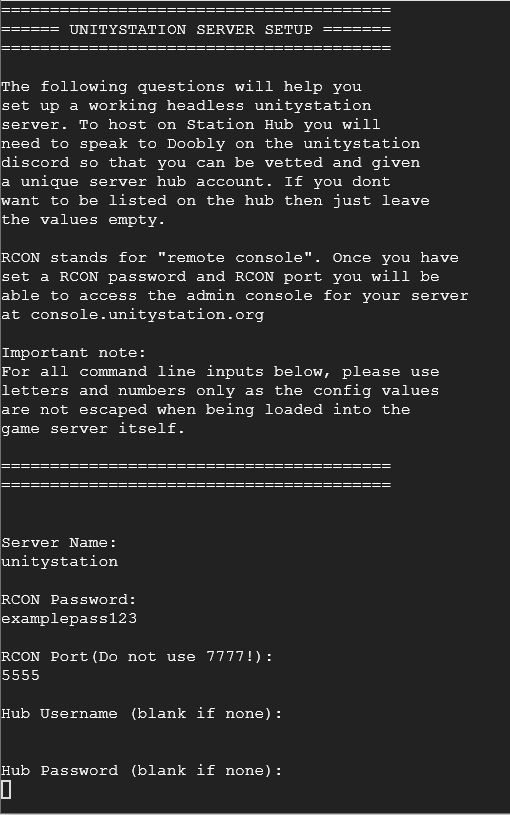
@silk coyoteAnother question, with my current host, I did not understand how to access the following image
https://user-images.githubusercontent.com/64000371/92241244-96d99a80-eec6-11ea-8180-073de6a7b4bd.png

In particular, to indicate the identifiers that you communicated to me to appear on the hub
Is it in a specific file that I have to edit manually?
Or did I miss something?
 silk coyote
yes
pastel kiln
silk coyote
yes
.
- yes I screwed up?
or - yes I have to edit a file manually?
silk coyote
file manually
I'm looking for it
https://github.com/unitystation/unitystation/blob/develop/UnityProject/Assets/StreamingAssets/config/config.json should be here
GitHub
The original unitystation. Contribute to unitystation/unitystation development by creating an account on GitHub.
you add HubUser and HubPassword
pastel kiln
silk coyote
you add ``HubUser`` and ``HubPassword``
    "AddressableCatalogues": [
        "https://raw.githubusercontent.com/unitystation/unitystation/develop/AddressableContent/SoundAndMusic/SoundAndMusic.txt"],
    "LobbyAddressableCatalogues": [
        "https://raw.githubusercontent.com/unitystation/unitystation/develop/AddressableContent/SoundAndMusic/SoundAndMusic.txt"],
    "ConnectionPassword": "",
    "WinDownload": "https://unitystationfile.b-cdn.net/UnityStationDevelop/StandaloneWindows64/23022600.zip",
    "OSXDownload": "https://unitystationfile.b-cdn.net/UnityStationDevelop/StandaloneOSX/23022600.zip",
    "LinuxDownload": "https://unitystationfile.b-cdn.net/UnityStationDevelop/StandaloneLinux64/23022600.zip",
    "HubUser": "",
    "HubPassword": "",
}
like this ?
@silk coyote this is correct ?
the space between "" must be filled with information
such as the server login password for players or the Hub ID
silk coyote
try it