1 messages · Page 1 of 1 (latest)
 stone nexus
Just installed Java this morning to run a model that generates text for a presentation tomorrow. For some reason, even though I have JDK installed, my program won't run. Is it the file location? I grouped it up with my coding assignments (which are all python). I checked the version of java in cmd in the file directory, but I got an error from that as well. When I opened a new cmd window to check the version of Java again, it worked. Im extremely confused. Can someone tell me how to fix this so I can run some code in this language?
 worldly cedarBOT
<@&987246399047479336> please have a look, thanks.
 wheat holly
It looks like you opened the ones it didn't work in as admin
And that probably has a different PATH
And you don't need javac yet
Just run java Java_Experiment.java
stone nexus
So it’s a location issue?
stone nexus
wheat holly
It looks like you opened the ones it didn't work in as admin
Not sure wym by that
I tried running the file without the directory and it’s still not working
 trim bison
The system has a "path" that it searches for executables. You have to have java listed in that path variable.
So first do you know where in your file system the jdk is at?
stone nexus
Yeah
stone nexus
trim bison
The system has a "path" that it searches for executables. You have to have java ...
How do I do that?
trim bison
Learn how to set up your Java path on Windows 11 with our easy-to-follow guide. Get your system ready for Java development in no time!
Normally we create a new system variable called JAVA_HOME and give it the location of where the Java installation is.
 last yacht
we have a screenshot guide here as well:
worldly cedarBOT
Download latest Java from https://adoptium.net/, run the installer.
Open a CMD and type java -version and javac -version, if both show your new Java version, you have successfully installed Java! 🎉
https://i.ibb.co/X8Kms8q/CurMujt.png
In order to prevent issues with old installations you may want to remove them. Type where java and where javac. They should only show the new and no old entries:
https://i.ibb.co/fkKHv0b/x5k1GxG.png
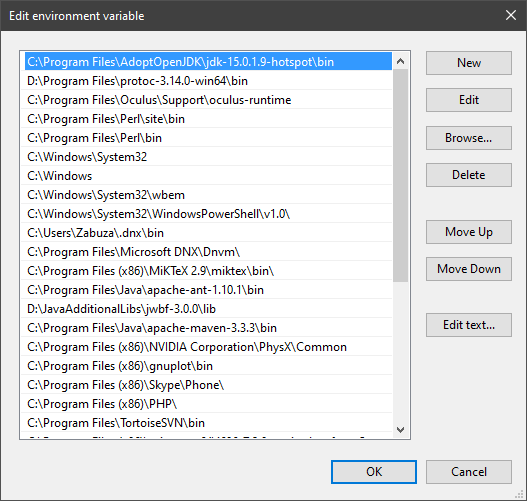
If that is not the case, you may want to clean up. Therefore, type "environment variable" into the Windows search and follow the dialog. You will see two entries for a variable called Path, one for your user and one for the system. This variable tells Windows where to look for commands, like java and javac.
https://i.ibb.co/BwvMpM6/3bN9QE2.png
Edit both. Make sure that they only list the entry to your new Java installation and remove all the old entries you have seen with the where command before:
https://i.ibb.co/9GTnHsm/JAYog1U.png
Confirm and close all dialogs. Restart your CMD window and try where java and where javac again. It should only list the new installation now and nothing else.
Congratulation, your Java is now finally ready, happy coding 🎉

Eclipse Adoptium provides prebuilt OpenJDK binaries from a fully open source set of build scripts and infrastructure.


 trim bison
Then in the Path variable, you will see a bunch of locations separated by semicolon, you would just append that long line with %JAVA_HOME%\bin and it will be expanded with the value you entered for JAVA_HOME.
trim bison
last yacht
we have a screenshot guide here as well:
That doesn't use JAVA_HOME, the point of it is so you don't end up with bunch of trash in your path when you change jdks.