Hi, I downloaded Java from the official website and tried to install it. The installer asked for permission to make changes, I allowed it, but nothing happened after that — no confirmation or error.
I also tried using the Java Uninstall Tool, but it says Java is not installed on my system.
When I check the Java version in CMD, it doesn’t recognize Java at all.
Can someone help me figure out how to properly install Java on my PC?
Thanks!
#Help needed with Java installation issue on Windows
1 messages · Page 1 of 1 (latest)
 latent maple
 tawny gardenBOT
<@&987246399047479336> please have a look, thanks.
Download latest Java from https://adoptium.net/, run the installer.
Open a CMD and type java -version and javac -version, if both show your new Java version, you have successfully installed Java! 🎉
https://i.ibb.co/X8Kms8q/CurMujt.png
In order to prevent issues with old installations you may want to remove them. Type where java and where javac. They should only show the new and no old entries:
https://i.ibb.co/fkKHv0b/x5k1GxG.png
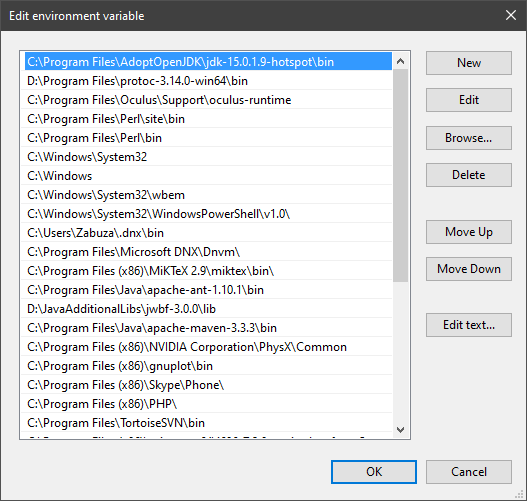
If that is not the case, you may want to clean up. Therefore, type "environment variable" into the Windows search and follow the dialog. You will see two entries for a variable called Path, one for your user and one for the system. This variable tells Windows where to look for commands, like java and javac.
https://i.ibb.co/BwvMpM6/3bN9QE2.png
Edit both. Make sure that they only list the entry to your new Java installation and remove all the old entries you have seen with the where command before:
https://i.ibb.co/9GTnHsm/JAYog1U.png
Confirm and close all dialogs. Restart your CMD window and try where java and where javac again. It should only list the new installation now and nothing else.
Congratulation, your Java is now finally ready, happy coding 🎉
zabuzard • used /tag id: install
·

Eclipse Adoptium provides prebuilt OpenJDK binaries ...


 oak remnant
I personally wouldnt install java from "official website", adoptium installer is way better
latent maple
oak remnant
I personally wouldnt install java from "official website", adoptium installer is...
Thanks for your help but when I run java version in CMD, I get this error:
Error: could not find java.dll
Error: Could not find Java SE Runtime Environment.
 prisma scarab
run the installer as explained in the bots message
latent maple
prisma scarab
run the installer as explained in the bots message
I followed all the steps exactly, but it’s still not working.
I edited the PATH variable, removed old Java entries, added the new Java path at the beginning, restarted the CMD, but when I run java -version it doesn't show the new version.
Also, it shows me the following error message:
Error: could not find java.dll
Error: Could not find Java SE Runtime Environment.
prisma scarab
latent maple
I followed all the steps exactly, but it’s still not working.
I edited the PATH ...
so u downloaded the adoptium installer?
instead of the one from the oracle website?
which is step 1 in what the bot says
can u show ur environment variables. is there any that is called JVM_OPTIONS or similar? if so, delete it
latent maple
Yes, I downloaded the Adoptium installer, not from Oracle.
I checked my environment variables, and there’s no JVM_OPTIONS or anything similar.
Still getting the same error.
oak remnant
can you show us the full console log when running java -version
latent maple
Is this what you wanted?
 oak remnant
did you download this, a .msi?

also it might be helpful if you share your environment variables Path
latent maple
oak remnant
did you download this, a .msi?
Yes, I downloaded the .msi installer from Adoptium.
latent maple
oak remnant
also it might be helpful if you share your environment variables Path
Is this what you wanted?

 gentle parcel
@latent maple hello i don’t know if this gonna help you but i installer jdk 24 from oracle and it installed fine for me but you need to go to properties system and then variable enviroment and add Java there that what i did i it worked
latent maple
gentle parcel
<@1024026800059326504> hello i don’t know if this gonna help you but i installe...
That was actually the main issue — I first tried installing from Oracle, but it didn’t work.
latent maple
latent maple
Is this what you wanted?
@prisma scarab @oak remnant do you have any ideas what else I could try?
prisma scarab
latent maple
<@157994153806921728> <@565887697269293066> do you have any ideas what else I co...
if u follow the tutorial from the bot closely step by step it will work. promised
if it doesnt u must have skipped a step
we have people come here with this issue multiple times a week for years already and it always worked after doing that
if u need help with it ull have to share details and screenshots of every single step so we can tell u where u went wrong
start with where java and where javac as the bot explained
show us what it says please
is it pointing to the adoptium one or not
if not, u still have an offender in ur PATH. possibly in the user PATH or in the system PATH (there are two in the window if u look closely)
but step by step
gentle parcel
latent maple
That was actually the main issue — I first tried installing from Oracle, but it ...
Îm sorry but that the only thing that i did and u know if i find any vidéo that expalain how to install it i will send it here or in private ok
latent maple
prisma scarab
if not, u still have an offender in ur PATH. possibly in the user PATH or in the...
I followed all the bot’s steps exactly, but it still doesn’t work.
Can you please tell me which screenshots exactly you want me to share? Meanwhile, I’m attaching this one:
 prisma scarab
gentle parcel
Îm sorry but that the only thing that i did and u know if i find any vidéo that...
prisma scarab
gentle parcel
Îm sorry but that the only thing that i did and u know if i find any vidéo that...
not sure what ur trying to do, help OP? please note that stuff has to happen on our server, not in DMs
prisma scarab
latent maple
I followed all the bot’s steps exactly, but it still doesn’t work.
Can you pleas...
u forgot where java
as i explained earlier, best would be if u simply share many screenshots. of every single step
then u would avoid this ping pong that drags forever and we would likely have spotted the issue already and it would be fixed

 prisma scarab
can u screenshot ur env var window
i suspect sth faulty there
see if theres anything java, jdk, jre, jvm, oracle,... in the env vars or in PATH. check both, the user and the system env variables (the top and bottom half of the window).
screenshot if ur unsure and want us to check as well
gentle parcel
prisma scarab
not sure what ur trying to do, help OP? please note that stuff has to happen on ...
@prisma scarab I'm sorry i did not know i was trying just to help him i i ever find a vidéo that will explain the issu that his having
tawny gardenBOT
@latent maple
Your question has been closed due to inactivity.
If it was not resolved yet, feel free to just post a message below
to reopen it, or create a new thread.
Note that usually the reason for nobody calling back is that your
question may have been not well asked and hence no one felt confident
enough answering.
When you reopen the thread, try to use your time to improve the quality
of the question by elaborating, providing details, context, all relevant code
snippets, any errors you are getting, concrete examples and perhaps also some
screenshots. Share your attempt, explain the expected results and compare
them to the current results.
Also try to make the information easily accessible by sharing code
or assignment descriptions directly on Discord, not behind a link or
PDF-file; provide some guidance for long code snippets and ensure
the code is well formatted and has syntax highlighting. Kindly read through
https://stackoverflow.com/help/how-to-ask for more.
With enough info, someone knows the answer for sure 👍
tawny gardenBOT
@latent maple
Your question has been closed due to inactivity.
If it was not resolved yet, feel free to just post a message below
to reopen it, or create a new thread.
Note that usually the reason for nobody calling back is that your
question may have been not well asked and hence no one felt confident
enough answering.
When you reopen the thread, try to use your time to improve the quality
of the question by elaborating, providing details, context, all relevant code
snippets, any errors you are getting, concrete examples and perhaps also some
screenshots. Share your attempt, explain the expected results and compare
them to the current results.
Also try to make the information easily accessible by sharing code
or assignment descriptions directly on Discord, not behind a link or
PDF-file; provide some guidance for long code snippets and ensure
the code is well formatted and has syntax highlighting. Kindly read through
https://stackoverflow.com/help/how-to-ask for more.
With enough info, someone knows the answer for sure 👍
 harsh lodge
latent maple
Is this what you wanted?
harsh lodge
latent maple
Is this what you wanted?
could you show the full path entry for the JDK?
seems the JDK was added to the path, but does it point to the bin folder?
java does seem to be recognized. its not saying "unknown command", its saying "cant find dll"
but just to be safe, lets confirm the path entry
prisma scarab
i suspect a jvm_options or another PATH with sth wrong in user vs systems env vars
latent maple
prisma scarab
i suspect a jvm_options or another PATH with sth wrong in user vs systems env va...
 harsh lodge
whether its the user path or system path also plays a role
in the end, what matters for this is whats specified on the path
path seems fine, sounds like a bad install
you could always manually install Java, its not that hard
just download it, put it on the path
set it as a file association if you wanna go to those lengths
latent maple
harsh lodge
you could always manually install Java, its not that hard
I tried installing multiple versions of Java, but none of them worked.
(Of course, I removed all of them afterwards.)
harsh lodge
i dont think its the version, i think its the installation process
do you need a specific version?
if not, lets download the latest OpenJDK & manually install
its simple, and it would iron out any issues with installation
download the version you need, add it's bin to your PATH
make sure it appears as the first/top-most JDK entry in your path
latent maple
harsh lodge
do you need a specific version?
Java 21 or 17
harsh lodge
latent maple
Java 21 or 17
whichever you wanna use. the latest is 24
could download it there, then manually install
prisma scarab
do u happen to run a 32-bit windows instead of 64-bit? these are very rare nowadays but u never know
or are u on an old unsupported windows version?
id also suggest putting the java install out of ur appdata and somewhere into C:/Programs instead. perhaps that helps
tawny gardenBOT
@latent maple
Your question has been closed due to inactivity.
If it was not resolved yet, feel free to just post a message below
to reopen it, or create a new thread.
Note that usually the reason for nobody calling back is that your
question may have been not well asked and hence no one felt confident
enough answering.
When you reopen the thread, try to use your time to improve the quality
of the question by elaborating, providing details, context, all relevant code
snippets, any errors you are getting, concrete examples and perhaps also some
screenshots. Share your attempt, explain the expected results and compare
them to the current results.
Also try to make the information easily accessible by sharing code
or assignment descriptions directly on Discord, not behind a link or
PDF-file; provide some guidance for long code snippets and ensure
the code is well formatted and has syntax highlighting. Kindly read through
https://stackoverflow.com/help/how-to-ask for more.
With enough info, someone knows the answer for sure 👍
latent maple
@prisma scarab Could you please continue helping me?
 humble laurel
latent maple
<@157994153806921728> Could you please continue helping me?
humble laurel
latent maple
<@157994153806921728> Could you please continue helping me?
they didn't stop helping
you stopped answering
latent maple
humble laurel
they didn't stop helping
you stopped answering
I know, I meant that I want him to continue helping me from where we left off.
prisma scarab
we are all here just waiting
no need to ask for asking, just start straight away 🙂
 astral jungle
You are getting that error because you username has non-latin characters. If you reinstall it somewhere outside your users directory then it should work (so long as you don't use non-latin characters again).
latent maple
prisma scarab
no need to ask for asking, just start straight away 🙂
Thank you very much 🙏 , so what should I do now?
tawny gardenBOT
Download latest Java from https://adoptium.net/, run the installer.
Open a CMD and type java -version and javac -version, if both show your new Java version, you have successfully installed Java! 🎉
https://i.ibb.co/X8Kms8q/CurMujt.png
In order to prevent issues with old installations you may want to remove them. Type where java and where javac. They should only show the new and no old entries:
https://i.ibb.co/fkKHv0b/x5k1GxG.png
If that is not the case, you may want to clean up. Therefore, type "environment variable" into the Windows search and follow the dialog. You will see two entries for a variable called Path, one for your user and one for the system. This variable tells Windows where to look for commands, like java and javac.
https://i.ibb.co/BwvMpM6/3bN9QE2.png
Edit both. Make sure that they only list the entry to your new Java installation and remove all the old entries you have seen with the where command before:
https://i.ibb.co/9GTnHsm/JAYog1U.png
Confirm and close all dialogs. Restart your CMD window and try where java and where javac again. It should only list the new installation now and nothing else.
Congratulation, your Java is now finally ready, happy coding 🎉
_nobodyhome • used /tag id: install
·

Eclipse Adoptium provides prebuilt OpenJDK binaries from a fully open source set of build scripts and infrastructure.


 latent maple
prisma scarab
what carrots says
latent maple
prisma scarab
what carrots says
I'm sorry... but it didn't work...
I changed the file, it is now located at:
C:\Java\jdk-25.0.1.8-hotspot\bin\java.exe
Gosh... what’s wrong with the computer? Why isn’t it working?
prisma scarab
so, can u share screenshots of the console commands where javac and where java please
as shown in the bots response u made
 prisma scarab
ur java is installed correctly
if it still doesnt work u have to share more info with us
and answer the questions ive send u recently
🙂
latent maple
prisma scarab
and answer the questions ive send u recently
which questions?
I dont remember...
 lone linden
latent maple
I'm sorry... but it didn't work...
lone linden
latent maple
I'm sorry... but it didn't work...
What didn't work?
Since Java is now found on the path, I presume there's something you want to do with Java that isn't working.
Is this a problem with an editor or IDE? Because another problem we regularly see is people trying to use Java on projects stored inside Onedrive (and your desktop is on Onedrive by the looks of it).
Also, if the path changed (such as adding the Java bin folder to the path), applications that were open before the path change may need to be closed and reopened to see the new path.
latent maple
lone linden
_What_ didn't work?
Since Java is now found on the path, I presume there's some...
When I try to open Minecraft, I still get these two errors:
Error: Could not find java.dll
Error: Could not find Java SE Runtime Environment
People told me that Java wasn’t installed on my computer, but now it is, and I’m still getting the errors...
lone linden
If I'm recalling correctly, Minecraft, by default, bundles its own JVM. And that would be in the profile directory and could be suffering the same path-name issues.
You can edit the minecraft profile (in the launcher) to specify which JVM to use.
 keen root
Yall should update that adoptium tag to use a JAVA_HOME in teh path.
latent maple
lone linden
If I'm recalling correctly, Minecraft, by default, bundles its own JVM. And that...
Can you still help me with this, or should I contact Minecraft support now?
Btw, thank you so much for your time and help 🙏
lone linden
By default the configurations in the Minecraft Launcher have '<Use bundled Java runtime>'. If you want to use the one you installed, you need to:
- Go to 'Installations' in the launcher
- open the
...menu on the installation you want to change, and select Edit - Click 'More Options'
- Browse to select your new Java installation.
This all assumes that the Minecraft installation you want to update works with Java 25 (which is the version you installed I think).
latent maple
lone linden
By default the configurations in the Minecraft Launcher have '<Use bundled Java ...
I deleted and reinstalled Java 17 and unfortunately it still doesn’t work…
The Java error is gone, but now there’s an error from Minecraft itself, which I assume is related to Java...
here
 latent maple
@lone linden Did I do this correctly?
 lone linden
Presumably they want java.exe (or javaw.exe), I'm not sure which. They won't want javac.exe (which is the compiler, not access to a runtime).
latent maple
lone linden
Presumably they want `java.exe` (or `javaw.exe`), I'm not sure which. They won't...
same error :(
lone linden
I don't see the error mentioned.
keen root
 latent maple
lone linden
I don't see the error mentioned.
latent maple
lone linden
I don't see the error mentioned.
Oh, now I’m getting Minecraft error 1. When I searched Google for the error, it said it’s related to Java...
keen root
Your profile says you're playing it now
latent maple
keen root
Your profile says you're playing it now
It shows that I’m playing while I’m on the launcher… now that I closed it, it no longer shows that I’m playing.
latent maple
keen root
Your profile says you're playing it now
It shows this because of the game overlay… even though I’m just on the launcher and getting this error: (I’m not sure if a screenshot of the error will help, but… I’m sending it anyway.)
 lone linden
The exit code is just that the process failed. The minecraft logs might have more. There are many reasons Minecraft could be failing but it is at least finding and launching Java (though the Java version can also be a cause). I'm presuming this is modded - since generally you'd just run with the bundled JVM.
latent maple
lone linden
The exit code is just that the process failed. The minecraft logs might have mor...
When I run with the bundled JVM, I get both of these errors:
Error: Could not find java.dll
Error: Could not find Java SE Runtime Environment
Isn’t that a bit strange? @lone linden
lone linden
The bundled one probably can't be found because of the path (as mentioned earlier). What version of Minecraft are you trying to run? It might be that you are not launching a compatible version (though I thought Minecraft would try to check that - doing better than an unhelpful exit code)
latent maple
lone linden
The bundled one probably can't be found because of the path (as mentioned earlie...
For example, in version 1.19.1 I heard that Java 17 works perfectly with this version (right now I just want to see that Minecraft can run at all…).
latent maple
I don’t understand why this is taking us so much time… I thought it would be much, much easier…
 lusty burrow
latent maple
I don’t understand why this is taking us so much time… I thought it would be muc...
lusty burrow
latent maple
I don’t understand why this is taking us so much time… I thought it would be muc...
For what it's worth, neither do we
tawny gardenBOT
Your question has been closed due to inactivity.
If it was not resolved yet, feel free to just post a message below
to reopen it, or create a new thread.
Note that usually the reason for nobody calling back is that your
question may have been not well asked and hence no one felt confident
enough answering.
When you reopen the thread, try to use your time to improve the quality
of the question by elaborating, providing details, context, all relevant code
snippets, any errors you are getting, concrete examples and perhaps also some
screenshots. Share your attempt, explain the expected results and compare
them to the current results.
Also try to make the information easily accessible by sharing code
or assignment descriptions directly on Discord, not behind a link or
PDF-file; provide some guidance for long code snippets and ensure
the code is well formatted and has syntax highlighting. Kindly read through
https://stackoverflow.com/help/how-to-ask for more.
With enough info, someone knows the answer for sure 👍
latent maple
lusty burrow
For what it's worth, neither do we
So, what should I do next?
It’s strange to me why Java isn’t working, and right now I have no idea what to do…
lusty burrow
latent maple
So, what should I do next?
All I can think of is "reset to square one". ... Somehow
And then maybe have one of us look over your shoulder and see what you are doing wrong
latent maple
lusty burrow
All I can think of is "reset to square one". ... Somehow
Yes, okay, I’m ready.
latent maple
lusty burrow
And then maybe have one of us look over your shoulder and see what you are doing...
But where will you look?
lusty burrow
latent maple
But where will you look?
🤷♂️ I just figure i can figure it out
latent maple
lusty burrow
🤷♂️ I just figure i can figure it out
Ok, Im ready. Just let me know what you need me to do.
lusty burrow
latent maple
Ok, Im ready. Just let me know what you need me to do.
well can you hop in VC?
latent maple
lusty burrow
well can you hop in VC?
Unfortunately, English is not my first language… so this will be difficult…
lusty burrow
its already hard
latent maple
lusty burrow
its already hard
In text, I have time to reply, but on voice it will be difficult. I can do it with you on voice, and I’ll show you what I’m doing without speaking.
lusty burrow
sure
lusty burrow
what language is the username for your computer written in?
okay. my guess is that that is what is causing the issue
just for whatever reason minecraft or java has trouble finding its own files when there is hebrew in the path
i don't know why - but thats my current guess
we can resolve this actually by using a windows feature you probably have never used: a second user account
Learn how to add user accounts in Windows 10 and Windows 11. With an account, each person has separate files, browser favorites, and a private desktop.
so make a new user on your computer where there are no hebrew characters in the name
then try to install minecraft on that user
and we will see if it works
latent maple
Okay, it’ll take a bit of time to install Minecraft with my Microsoft account details, but alright.
By the way, thank you so much for your patience and your time with me.
just a sec
thank you!!!!!!!
thank you so much!!!
First of all, thank you so much @lusty burrow , but I tried changing the username on the account I’m currently using, and I’m not sure if that was supposed to fix the problem. If it was, though, it didn’t solve the issue…
Only letters in English.
lusty burrow
latent maple
First of all, thank you so much <@242066553183404032> , but I tried changing the...
it doesn't change the paths
so even though you changed the name to abc - the files are still under C:\users\<hebrew characters>
and thats what the problem is
now it shouldn't be an issue, you should report the issue to the java people
latent maple
lusty burrow
it doesn't change the paths
So, if I change it in the path, will the problem be fixed?
lusty burrow
latent maple
So, if I change it in the path, will the problem be fixed?
i thought that
thats why i had you make that Minecraft folder
so we were changing the install path
but for some reason just having that path at all is an issue?
idk problems for another time
report it to mojang and to java
latent maple
lusty burrow
thats why i had you make that `Minecraft` folder
Anyway, thanks a lot for the help, but it’s a little strange that I play only Minecraft on one account and all my other stuff on the computer is on a second account...
lusty burrow
You can just start using the second account only I guess, but yeah that's a pain
latent maple
lusty burrow
idk problems for another time
And move all the stuff I have on the computer?! I can’t believe there’s no solution, it’s really annoying to do this. No one is going to start moving everything on their computer just for a Minecraft game.
lusty burrow
latent maple
And move all the stuff I have on the computer?! I can’t believe there’s no solut...
Report it to Java and mojang
 void phoenix
anything
normal launcher just sucks
really i had sooooo many issues with it, most of them are bc of microsoft
 maiden sentinel
True
latent maple
@void phoenix @maiden sentinel I tried using Lunar Client as well, and I got the same error…
Error: Could not find java.dll
Error: Could not find Java SE Runtime Environment
@lusty burrow Thank you very much for your patience with me. I really appreciate it, and I hope this issue will be resolved as soon as possible...
lusty burrow
latent maple
Error: Could not find java.dll
Error: Could not find Java SE Runtime Environment
Yeah it's pretty solid hint that the problem is with Java
And there are people to bug about that who will handle it
Try the link I sent above it might be a little annoying but it works
I'll try to find the Java bug tracking number when you get it
latent maple
lusty burrow
https://bugreport.java.com/bugreport/
Are you talking about this link?
lusty burrow
latent maple
Are you talking about this link?
yeah
latent maple
lusty burrow
yeah
Ah, I already sent it a long time ago.
lone linden
I think it's a little of both. Java inside the unicode path fails completely. Java outside the path, and Minecraft fails (because the launcher still has minecraft place assets in the user's unicode path).
There is some alignment with this conclusion in online discussions dating back some years - though poorly detailed. The only successful solution seems to have been to create a new account without unicode in the user's path.
Unless it's possible to get the Minecraft launcher to use a location other than the the user's path for all assets, that might be the only solution.
Disappointing, as it is completely possible to write Java code that works correctly - and the fact that Java itself fails is pretty damned disappointing.
latent maple
lone linden
I think it's a little of both. Java inside the unicode path fails completely. Ja...
Java, as a major software, I wouldn’t expect them to fail on these trivial issues...
maiden sentinel
latent maple
<@1095981397509947423> <@791363303976337438> I tried using Lunar Client as well,...
Try multimc, modrinth launcher or prismlauncher. Modrinth launcher is my top recommendation, but the others are good choices as well. LC is not that better than the vanilla launcher regarding java installation handling
latent maple
maiden sentinel
Try multimc, modrinth launcher or prismlauncher. Modrinth launcher is my top rec...
same error...
Error: Could not find java.dll
Error: Could not find Java SE Runtime Environment
lusty burrow
latent maple
Error: Could not find java.dll
Error: Could not find Java SE Runtime Environment
Rule of the software world: most stuff is written considering English first
You just have to adapt to it
humble laurel
latent maple
Ah, I already sent it a long time ago.
can you link me the issue please ? i want to check it out
maiden sentinel
latent maple
same error...
Shich did you try
latent maple
humble laurel
can you link me the issue please ? i want to check it out
For some reason, I didn’t receive the email with the ID in Gmail. It was written at the end of the message, but I forgot it.
latent maple
maiden sentinel
Shich did you try
I tried what you recommended, Modrinth, and I got the same known errors.
maiden sentinel
latent maple
I tried what you recommended, Modrinth, and I got the same known errors.
go to the settings of the modrinth app, go to the java section, and press all the download recommended buttons you can find. After that try again
latent maple
maiden sentinel
go to the settings of the modrinth app, go to the java section, and press all th...
On every Install Recommended, I get the known errors...
Error: Could not find java.dll
Error: Could not find Java SE Runtime Environment
I don’t know what’s going on with my computer, but this is so strange…
humble laurel
@maiden sentinel please stop advising that
when someone has q problem, you solve it, you don't lead them to alternatives
tawny gardenBOT
Your question has been closed due to inactivity.
If it was not resolved yet, feel free to just post a message below
to reopen it, or create a new thread.
Note that usually the reason for nobody calling back is that your
question may have been not well asked and hence no one felt confident
enough answering.
When you reopen the thread, try to use your time to improve the quality
of the question by elaborating, providing details, context, all relevant code
snippets, any errors you are getting, concrete examples and perhaps also some
screenshots. Share your attempt, explain the expected results and compare
them to the current results.
Also try to make the information easily accessible by sharing code
or assignment descriptions directly on Discord, not behind a link or
PDF-file; provide some guidance for long code snippets and ensure
the code is well formatted and has syntax highlighting. Kindly read through
https://stackoverflow.com/help/how-to-ask for more.
With enough info, someone knows the answer for sure 👍
latent maple
So what am I supposed to do now? @lusty burrow You’ve seen what the problem is. Do you have any ideas or anything? This is really strange, and it doesn’t make sense that I would need to create another account on my computer just to play Minecraft…
lusty burrow
latent maple
So what am I supposed to do now? <@242066553183404032> You’ve seen what the prob...
it makes sense if you consider "nobody tested this with a hebrew username"
link the bug number if you have it
we can help from that angle
latent maple
If I create another account on the computer with Hebrew characters, and it works, would that be strange? @lusty burrow
lusty burrow
yeah
but you see how this has exited the realm of reasonable
now its just a wacky issue you work around
lone linden
I don't know Hebrew. Are there any multi-character code-points? It could be that this is the difference between the two accounts - but I am just speculating.
As Ethan says, you are well off the beaten track of our experience with Java installation issues.
(grr... unhelpful mobile corrections typed as a passenger in a car)
latent maple
lone linden
I don't know Hebrew. Are there any multi-character code-points? It could be that...
I didn’t quite understand your question…
What are “multi-year after code points”?
Ugh, annoying problem… Why isn’t there a simple solution?
lone linden
typo... Multi-character codepoints... Lots of programs mishandle unicode strings which compose code-points from multiple characters.
latent maple
lone linden
typo... Multi-character codepoints... Lots of programs mishandle unicode strings...
My Windows account name is just “עמית”.
It’s only the four Hebrew letters — no combined characters, accents, or special symbols.
So I don’t think it uses multi-character code-points.
And, I still find it hard to believe that just because I created a user with Hebrew letters within a few seconds, Minecraft doesn’t work.
By the way @lusty burrow, yesterday I created many users, some with English names and some with Hebrew names. All the users with Hebrew names didn’t work, so that really was the problem.
lone linden
latent maple
My Windows account name is just “עמית”.
It’s only the four Hebrew letters — no c...
Then I would have said that it's definitely not that... In which case it must be something about the account and not just the name (a relief, for while I do see unicode handling mistakes often, from the JVM would have been surprising).
Then I see that you've reproduced it just with the differences being Hebrew or not... Very disappointing.
lusty burrow
latent maple
What are “multi-year after code points”?
good time to learn about unicode for fun
latent maple
lusty burrow
good time to learn about unicode for fun

I sent a message to Minecraft Support about the errors, let’s see what they say.
tawny gardenBOT
Your question has been closed due to inactivity.
If it was not resolved yet, feel free to just post a message below
to reopen it, or create a new thread.
Note that usually the reason for nobody calling back is that your
question may have been not well asked and hence no one felt confident
enough answering.
When you reopen the thread, try to use your time to improve the quality
of the question by elaborating, providing details, context, all relevant code
snippets, any errors you are getting, concrete examples and perhaps also some
screenshots. Share your attempt, explain the expected results and compare
them to the current results.
Also try to make the information easily accessible by sharing code
or assignment descriptions directly on Discord, not behind a link or
PDF-file; provide some guidance for long code snippets and ensure
the code is well formatted and has syntax highlighting. Kindly read through
https://stackoverflow.com/help/how-to-ask for more.
With enough info, someone knows the answer for sure 👍
latent maple
latent maple
I sent a message to Minecraft Support about the errors, let’s see what they say.
@lusty burrow, @lone linden
I’ve been in contact with Minecraft Support, and they said this issue happens because of a bug in the Java Runtime Environment — when the PC name contains special/alt characters, Java can’t find the files correctly. They suggested either creating a new Windows user without special characters, which works, or performing advanced edits in the registry files on the main account (though this is risky and not recommended).
Is this a known Java bug, and is there a proper fix planned?
lone linden
So you can definitely resolve the 'java' part, by just installing outside of the profile and then telling the launcher to use that Java runtime.
However Minecraft itself will look in the profile for assets - and that could be having similar issues.
lone linden
I wasn't aware this was an issue for the Java Runtime, and I haven't searched the Java bug-tracker to know if it's even reported.
 solar fjord
Why not install to C:/java problem solved.
lusty burrow
solar fjord
Why not install to C:/java problem solved.
we tried that - or at least a solution in the same vein
didn't work
right now we need to just find a JBS number
solar fjord
Why not use something portable and specify java_home correctly
If anything just correct the launcher paths.
lusty burrow
solar fjord
Why not use something portable and specify java_home correctly
we've tried all that
lone linden
It's a long history. To recap...
- When using the bundled JVM, Minecraft fails with an error
- Trying to run that version of Java (which is in the Hebrew-named profile path) from a shell, with
-version, you get "could not find java.dll" from java.exe - Installing another java in the profile gets the same
- Installing Java outside the profile no longer gets the error from the shell
- Minecraft, which still has its asssets in the profile folder, still fails
The errors, reported by the MC launcher, are unhelpful - reporting only that the Java process returned error code 1. It is possible there are MC logs with better error detail, but we have not seen them.
OP has tried this with a new user that does not have Hebrew naming and this seems to be resolved.
So there are likely two issues
- Java itself has an issue with its JVM residing in a path with Hebrew characters - which is pretty damned disappointing for such a major piece of software.
- Minecraft itself also does not correctly handle paths for its assets, if they reside in paths with Hebrew characters.
So far we have not been able to resolve OP's issue, beyond using a different user account.
It is possible you might be able to reconfigure MC not to use paths in the user's profile. I don't know the MC configuration well enough to advise here.
 opaque bough
Might be worth trying a different launcher. Prism launcher is popular and trusted. It can be installed anywhere and gives more control over how the game is launched
latent maple
opaque bough
Might be worth trying a different launcher. Prism launcher is popular and truste...
I think this is a Java issue, so I don’t think using a different launcher will fix it…
lone linden
It's only an issue with Java being installed in the profile... You've already confirmed that installing it elsewhere avoids that issue.
opaque bough
Prism could fix the asset folder issue, as it stores it elsewhere. It also installs java differently from the normal launcher
latent maple
opaque bough
Prism could fix the asset folder issue, as it stores it elsewhere. It also insta...
the same errors
Error: Could not find java.dll
Error: Could not find Java SE Runtime Environment
lone linden
If it's trying to run a JVM located under the profile folder then it will have the same issues.
tawny gardenBOT
Your question has been closed due to inactivity.
If it was not resolved yet, feel free to just post a message below
to reopen it, or create a new thread.
Note that usually the reason for nobody calling back is that your
question may have been not well asked and hence no one felt confident
enough answering.
When you reopen the thread, try to use your time to improve the quality
of the question by elaborating, providing details, context, all relevant code
snippets, any errors you are getting, concrete examples and perhaps also some
screenshots. Share your attempt, explain the expected results and compare
them to the current results.
Also try to make the information easily accessible by sharing code
or assignment descriptions directly on Discord, not behind a link or
PDF-file; provide some guidance for long code snippets and ensure
the code is well formatted and has syntax highlighting. Kindly read through
https://stackoverflow.com/help/how-to-ask for more.
With enough info, someone knows the answer for sure 👍
astral jungle
I'm not familiar with minecraft but if your original question on how to get the java command was fixed by moving java out of your user directory (with non-ascii characters) then can't you just re-install minecraft to outside your user directory too? Have you already tried that?
lone linden
Assuming that the minecraft installer gives that option. If so, yes, just avoid the profile folder altogether.
astral jungle
You could also try changing your windows language to hebrew (I'm guessing it's english) if that's an acceptable solution for you. There's a ticket at https://bugs.openjdk.org/browse/JDK-8242283 that talks about the language / regions being set differently that causes issues. It's not exactly the issue you're facing but might give some clue to a possible solution.
latent maple
astral jungle
You could also try changing your windows language to hebrew (I'm guessing it's e...
I think this idea might actually work…
latent maple
Well, unfortunately, it didn’t work…
latent maple
astral jungle
I'm not familiar with minecraft but if your original question on how to get the ...
Minecraft is installed on my computer on the C drive. I’m not sure how that would help, but maybe?
astral jungle
latent maple
Minecraft is installed on my computer on the C drive. I’m not sure how that woul...
When you say on your C drive, do you mean C:\<minecraft> or C:\Users\<user>\<minecraft>. Both are on C: drive.
I think you've tried changing the path of java in the minecraft launcher itself but changed it javac. It might be worth posting a screenshot just so we can really make sure you've set the correctly.
tawny gardenBOT
Your question has been closed due to inactivity.
If it was not resolved yet, feel free to just post a message below
to reopen it, or create a new thread.
Note that usually the reason for nobody calling back is that your
question may have been not well asked and hence no one felt confident
enough answering.
When you reopen the thread, try to use your time to improve the quality
of the question by elaborating, providing details, context, all relevant code
snippets, any errors you are getting, concrete examples and perhaps also some
screenshots. Share your attempt, explain the expected results and compare
them to the current results.
Also try to make the information easily accessible by sharing code
or assignment descriptions directly on Discord, not behind a link or
PDF-file; provide some guidance for long code snippets and ensure
the code is well formatted and has syntax highlighting. Kindly read through
https://stackoverflow.com/help/how-to-ask for more.
With enough info, someone knows the answer for sure 👍
latent maple
Hi, I’m back after a period of not being active on my computer. I tried running Feather Client, but it didn’t work. Then I tried changing the game folder like you suggested in the Minecraft launcher, and it actually worked!!
@lone linden, @lusty burrow Isn’t it strange that it doesn’t work in the Minecraft launcher, but it works in another launcher?
lone linden
Moving the game folder, and JVM out of the profile? That's what we expected to work. It may be that the other launchers already do that, or that they specify paths differently, avoiding whatever unicode issue is the root cause.
latent maple
lone linden
Moving the game folder, and JVM out of the profile? That's what we expected to w...
I’m trying to get help from ChatGPT, even though I’m not sure it will really help us with anything. Here’s what happened: when I ran Minecraft and got the errors, I ran this command:
C:\Users\עמית>wmic process where "name='javaw.exe'" get ExecutablePath
ExecutablePath
and I got this:
C:\Users????\AppData\Local\Packages\Microsoft.4297127D64EC6_8wekyb3d8bbwe\LocalCache\Local\runtime\java-runtime-delta\windows-x64\java-runtime-delta\bin\javaw.exe
I’m not sure what this means, but I can guess that the ???? are related to the Hebrew characters in my username. So maybe javaw is still looking for something using my username in Hebrew.
 lusty burrow
latent maple
<@239293680844931072>, <@242066553183404032> Isn’t it strange that it doesn’t wo...
lusty burrow
latent maple
<@239293680844931072>, <@242066553183404032> Isn’t it strange that it doesn’t wo...
Yes it's weird, but I think we all just accept that some things are cursed
latent maple
lusty burrow
Yes it's weird, but I think we all just accept that some things are cursed
It really sucks that there’s no solution. I can’t believe just four Hebrew characters are enough to mess up the whole JVM.
tawny gardenBOT
Your question has been closed due to inactivity.
If it was not resolved yet, feel free to just post a message below
to reopen it, or create a new thread.
Note that usually the reason for nobody calling back is that your
question may have been not well asked and hence no one felt confident
enough answering.
When you reopen the thread, try to use your time to improve the quality
of the question by elaborating, providing details, context, all relevant code
snippets, any errors you are getting, concrete examples and perhaps also some
screenshots. Share your attempt, explain the expected results and compare
them to the current results.
Also try to make the information easily accessible by sharing code
or assignment descriptions directly on Discord, not behind a link or
PDF-file; provide some guidance for long code snippets and ensure
the code is well formatted and has syntax highlighting. Kindly read through
https://stackoverflow.com/help/how-to-ask for more.
With enough info, someone knows the answer for sure 👍
latent maple
@lusty burrow @lone linden I can’t believe I actually managed to fix Minecraft!!!
latent maple
latent maple
<@242066553183404032> <@239293680844931072> I can’t believe I actually managed t...
What I did was: I went to Control Panel → Clock and Region, then I went to Region, entered Administrative, and then Change system locale. After that, I checked Beta: Use Unicode UTF-8 for worldwide language support.
I'm not sure what I did there, but it actually worked!!!!




 latent maple
keen root
hackerman
latent maple
keen root
hackerman
Just so you know, these two have been trying to help me for months.
And neither of them succeeded… which is strange
keen root
I doubt it's strange, trying to diagnose someone else computer problem, remotely, is historically NOT FUN.
lusty burrow
latent maple
And neither of them succeeded… which is strange
I succeeded on my own terms; i would have given up and saved the mental headache
but i'd report your fix on all the places youve found with people talking about the issue
lone linden
latent maple
Just so you know, these two have been trying to help me for months.
I haven't been working on it the whole time. Not having a non-English system, I could only speculate as to causes and solutions.
I hadn't even seen the option you mention.
Kinda appalling that after decades of Unicode systems, it's a beta option. I guess it shows just how few users must be using these problematic combinations of apps and system configurations.
Congratulations.
 tulip roost
Yeah, don't make your username unicode is a long standing known fact among IT people
latent maple
 open kraken
אתה ישראלי?
open kraken
אתה ישראלי?
רוצה וויס?