#I download Java but I dont know how it works
1 messages · Page 1 of 1 (latest)
 acoustic yarrow
 loud forumBOT
<@&987246399047479336> please have a look, thanks.
Here is an AI assisted attempt to answer your question 🤖. Maybe it helps! In any case, a human is on the way 👍. To continue talking to the AI, you can use </chatgpt:1108714622413963314>.
 TJ-Bot
I don’t know how to make the Java command work on my steam deck
Java is a popular programming language used for developing various applications, including games. To run Java programs on your Steam Deck, you first need to ensure that you have the Java Development Kit (JDK) installed on your device.
Here are some steps to help you get started with running Java on your Steam Deck:
-
Download and install the JDK: Visit the official Oracle website or OpenJDK to download the latest version of the JDK compatible with your Steam Deck's operating system.
-
Set up the PATH variable: After installing the JDK, you need to set up the PATH environment variable to point to the Java executable. This allows you to run Java commands from any directory in your command prompt.
-
Write a Java program: Use a text editor or an Integrated Development Environment (IDE) like IntelliJ IDEA or Eclipse to write your Java code. Make sure to save the file with a .java extension.
-
Compile and run your program: Open your command prompt and navigate to the directory where your Java file is saved. Use the javac command to compile your program (e.g., javac YourProgram.java) and then use java followed by the class name (e.g., java YourProgram) to run it.
By following these steps, you should be able to successfully run Java programs on your Steam Deck and start learning more about programming in Java. Feel free to ask for further assistance or clarification if needed!
- AI generated response
 ivory oriole
Why are you trying to install Java, and how did you install it?
 unkempt tendon
steam deck is "just linux". so go desktop mode and install java the way ud do it on any linux system
acoustic yarrow
ivory oriole
Why are you trying to install Java, and how did you install it?
I need to install Java to open this randimizer but it said can’t detect Java
When I downloaded it
Idk what file to extract to make my steam deck detect it
acoustic yarrow
How
unkempt tendon
google "install java on linux"
thats what u need to follow
and then it works
as soon as whereis java and whereis javac work, it works
acoustic yarrow
I did. But don’t understand
unkempt tendon
then u need to share what u did or we cant help u find and correct mistakes
 unkempt tendon
whereis java and whereis javac

 unkempt tendon
ur not doing what im saying
open ur command line
execute whereis java
does it say it found it or does it say it did not find it
 unkempt tendon
whereis javac (note the c at the end)
 unkempt tendon
type javac -version just to be sure
 unkempt tendon
so. back to u not having installed java properly yet
google "linux install java", follow it
if it doesnt work u need to share each step with us


 white vigil
acoustic yarrow
I downloaded the 64 bit one
white vigil
acoustic yarrow
I downloaded the 64 bit one
where did you install Java to initially?
acoustic yarrow
From that site
white vigil
for Java to be recognized, it needs to be specified on the PATH
acoustic yarrow
Wdym
white vigil
the Java you downloaded has a bin folder, that's what contains the executable
you need to tell Linux to check that folder
acoustic yarrow
Yes
white vigil
you probably need to specify it on the path though
 white vigil
so google "how to add to path on linux"
theres a command
see if adding it to path works
 rotund schooner
because it is linux nano is probably already installed
acoustic yarrow
Then y can’t I access Java
@rotund schooner
I looked it up and it still confusing
white vigil
acoustic yarrow
<@281666014754897921> it said I need a editor
you should be able to edit files in the terminal
https://docs.oracle.com/cd/E19062-01/sun.mgmt.ctr36/819-5418/gaznb/index.html
old article, but should still work
 white vigil
java is installed
you tried javac
you need a JDK to use javac
you dont need javac to run java programs
its used to develop java programs
acoustic yarrow
How do I get a JDK
white vigil
you shouldnt need it if you're just trying to play a game
show the error you are having troubles with
 unkempt tendon
can u share that sh file?
or open it in a text editor and share its contents
u can also use the command cat <name of the file>
 unkempt tendon
open it with kate and share its contents
 unkempt tendon
no need to ping us constantly btw
acoustic yarrow
Ok
unkempt tendon
in ur bash like u did previously
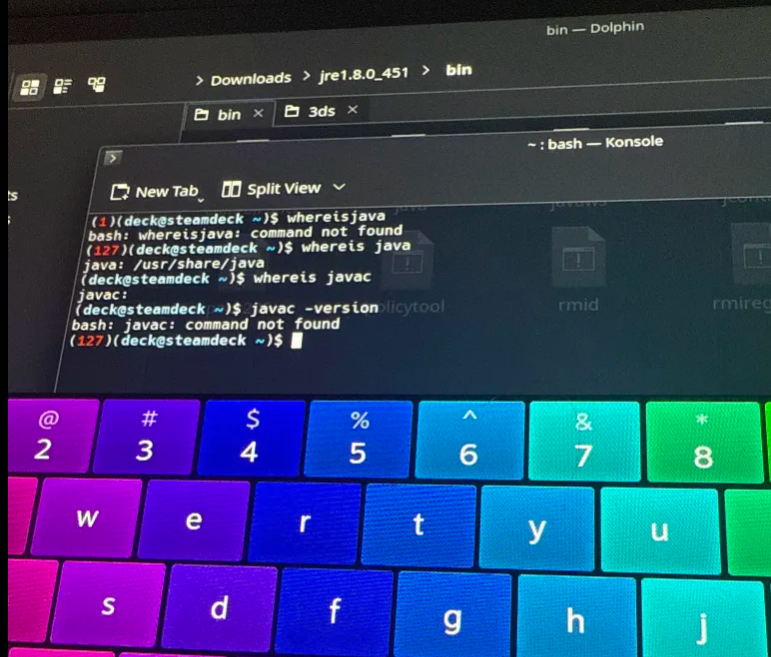 acoustic yarrow
 unkempt tendon
welp. see, u still didnt put it on PATH properly yet
and hence it wont work
ur linux has no idea what command "java" is
thats controlled by the PATH variable
the PATH variable tells linux where to look for commands
it must include ur jdk/bin folder
acoustic yarrow
How do I put the path
unkempt tendon
it should be described in any tutorial when u google "linux install java"
or when u google "linux add command to path"
like people asked u to do earlier
did u do that already?
first result if i google:
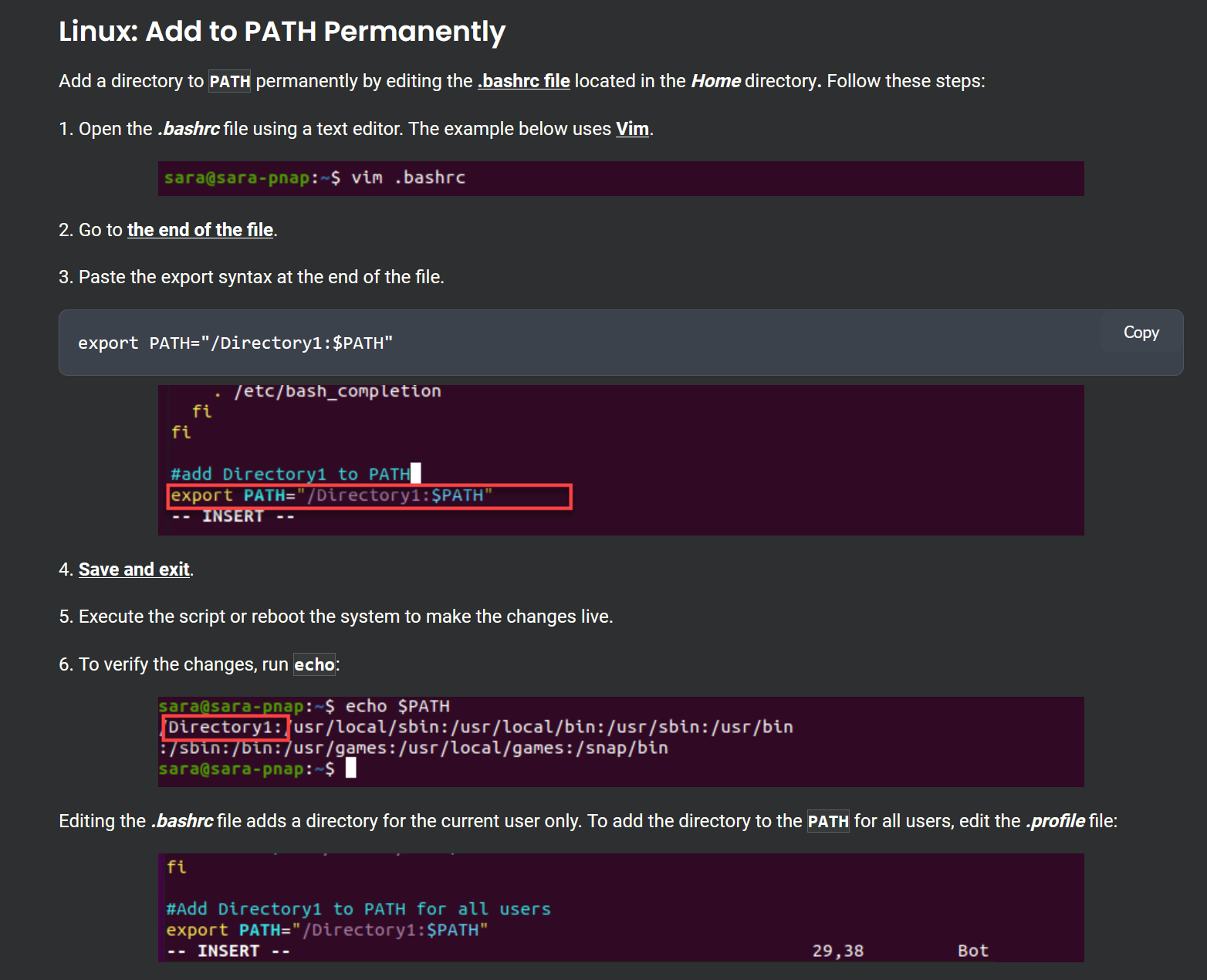 acoustic yarrow
 unkempt tendon
dunno man. ur not doing what people tell u to do
it seems like u just do ur own thing instead
if u would just do what people tell u to do ud be done already
i have a steamdeck with java as well, works like a charm
ive screenshotted it for u in the last message
thats all u have to do
acoustic yarrow
What text editor do I download
acoustic yarrow
unkempt tendon
dunno man. ur not doing what people tell u to do
I’m trying
I found the text editor for Java
 unkempt tendon
no idea what ur doing. definetly not what i told u to do
acoustic yarrow
Bashrc file
unkempt tendon
u can open it with Kate
acoustic yarrow
Where’s that
unkempt tendon
or nano or vim
doesn't matter
what do u mean where is it?
the screenshot shows u where it is
and what u have to do


 ivory oriole
acoustic yarrow
I found the text editor for Java
ivory oriole
acoustic yarrow
I found the text editor for Java
There is no such thing as text editor for Java. Just use the text editor that you want.
Please just follow what zabuzard said.
unkempt tendon
its in ur home directory. as explained in the screenshot
u need to read carefully
the screenshot literally tells u the commands
im not sure why u deviate from that constantly
u waste time by not following the instructions and by that run out of my time at least
acoustic yarrow
I have autism so my brain is slow at times
Trying to find bashrc in the home directory
ivory oriole
That's explained on the site Zabuzard linked.
acoustic yarrow
Ok I will check
I read it is the bashrc the konsole because I typed it in search looked through the home directory couldn’t find it
I did everything he said one problem is idk where to look in home directory and u said im doing my own thing im following instructions exactly but i get confused easily
I’m not doing my own thing
Idk where to even look in the home directory
The only thing I can think of is konsole
I’m a lost for words
It says what to type in it’s in the home directory
But doesn’t say where in the home directory

I’m in the home directory
I don’t see any file by that name or what folder it would be in
ivory oriole
You can also creat it. It's literally documented at https://phoenixnap.com/kb/bashrc .

Knowledge Base by phoenixNAP
Learn how to configure the Bash shell, customize the prompt colors, and add custom functions and command aliases in this guide.
acoustic yarrow
ivory oriole
You can also creat it. It's literally documented at https://phoenixnap.com/kb/ba...

Is this right
ivory oriole
Please just follow the document, it fully lays it out and try it out.
acoustic yarrow
 acoustic yarrow
ivory oriole
Please just follow the document, it fully lays it out and try it out.
acoustic yarrow
ivory oriole
Please just follow the document, it fully lays it out and try it out.
It worked till the last part
Fi

Did everything it said
acoustic yarrow
@white vigil