#Help with installation
1 messages · Page 1 of 1 (latest)
 hybrid swallow
 raw glenBOT
<@&987246399047479336> please have a look, thanks.
Here is an AI assisted attempt to answer your question 🤖. Maybe it helps! In any case, a human is on the way 👍. To continue talking to the AI, you can use </chatgpt:1108714622413963314>.
 TJ-Bot
I am trying to install Java, but nothing happens when I try to execute the installer.
Could someone help me please?
It sounds like you may be experiencing an issue with running the Java installer. Here are a few steps you can try to troubleshoot the problem:
-
Make sure you have downloaded the correct version of Java for your operating system. For example, if you are using a Windows machine, make sure you have downloaded the Windows version of Java.
-
Check if your system meets the minimum requirements for installing Java. Ensure that your operating system is up to date and that you have enough disk space available for the installation.
-
Try running the installer as an administrator. Right-click on the installer file and select "Run as administrator" to see if this resolves the issue.
-
Disable any antivirus software or firewall temporarily while running the installer, as they may be blocking the installation process.
-
If none of these steps work, try downloading the offline installer for Java from the official website and run it on your machine.
If you continue to experience issues, feel free to provide more details about your setup so we can better assist you with troubleshooting.
- AI generated response
 tacit fox
windows?
hybrid swallow
yes
tacit fox
where did you get your installation file from?
hybrid swallow
I tried both java and the oracle website for JRE and JDK but neither work
tacit fox
you downloaded the x64 Installer?
hybrid swallow
yes
tacit fox
aaand you are on a 64bit system?
 tacit fox
you don't even get this popup where windows asks you to allow this file to make changes to your system?
hybrid swallow
I get that but after I allow it—it does nothing
tacit fox
you can try the good old run as admin trick 😄
tacit fox
straaange indeed
tacit fox
you can try to execute it via the terminal; it may print some error message there
SHIFT + RIGHTLICK in the folder with the installation file and Open in Terminal
.\java_install.exe
whatever the name is ^^
tacit fox
for me it opened like this
 hybrid swallow
the setup wizard does not pop up
tacit fox
aaand there is no error message in the terminal or smth?
hybrid swallow
none
tacit fox
hit WINDOWS + R and type eventvwr
this will open the event viewer
on the left hand side go to Windows Logs -> Application

I have an entry there for the Installer
do you have an error there?
 tacit fox
in the error box scroll down a little more 😄
hybrid swallow
 tacit fox
Application Error 0xc0000005 (Access Violation)
puuuh this can be anything
your hard drive / memory may be faulty
can you install other applications? :x
hybrid swallow
yes
tacit fox
do you have an antivirus running?
hybrid swallow
yes
hybrid swallow
I disabled it still nothing
tacit fox
aaargh
tacit fox
something is fishy with your system... but whaaaat xD
The Program Install and Uninstall troubleshooter helps you automatically repair issues when you're blocked from installing or removing programs.
may be worth a shot
hybrid swallow
running it, lets see
 jovial yoke
hybrid swallow
jovial yoke
hybrid swallow
If it doesn't work, you can install manually
Download the zip containing the jdk
Unzip it in for example program files
add bin to java home
add java home to path
here you go
Also
tacit fox
jovial yoke
If it doesn't work, you can install manually
Download the zip containing the jdk...
ya; the last straw 😄
hybrid swallow
tacit fox
https://support.microsoft.com/en-us/topic/fix-problems-that-block-programs-from-...
the thing could not figure it out x-x
tacit fox
T_T
hybrid swallow
jovial yoke
If it doesn't work, you can install manually
Download the zip containing the jdk...
gonna try this
jovial yoke
hybrid swallow
gonna try this
also can you try those installers https://adoptium.net/temurin/releases/?os=windows

Eclipse Adoptium provides prebuilt OpenJDK binaries ...
and also
can you press windows key, enter system, press enter and take screenshot of the specs of your computer ?
hybrid swallow

 jovial yoke
you have a x64 so it should work
jovial yoke
jovial yoke
also can you try those installers https://adoptium.net/temurin/releases/?os=wind...
can you try those installers ? @hybrid swallow
tacit fox
ya I thought about a 32bit system too; but very uncommon these days xD
hybrid swallow
uh what excactly am I doing with this zip after I download I'm not quite sure what
tacit fox
unpack it and: https://www.ibm.com/docs/en/b2b-integrator/6.2.0?topic=variables-setting-java-windows
JAVA_HOME and PATH variables are required for the operating system to find the required Java programs and utilities.
jovial yoke
hybrid swallow
uh what excactly am I doing with this zip after I download I'm not quite sure w...
can you try the installer one more time please
before that
jovial yoke
jovial yoke
also can you try those installers https://adoptium.net/temurin/releases/?os=wind...
installer from this
hybrid swallow
the .msi?
tacit fox
🥁
tacit fox
thaaat's even more strange xDD
hybrid swallow
noted
raw glenBOT
Download latest Java from https://adoptium.net/, run the installer.
Open a CMD and type java -version and javac -version, if both show your new Java version, you have successfully installed Java! 🎉
https://i.ibb.co/X8Kms8q/CurMujt.png
In order to prevent issues with old installations you may want to remove them. Type where java and where javac. They should only show the new and no old entries:
https://i.ibb.co/fkKHv0b/x5k1GxG.png
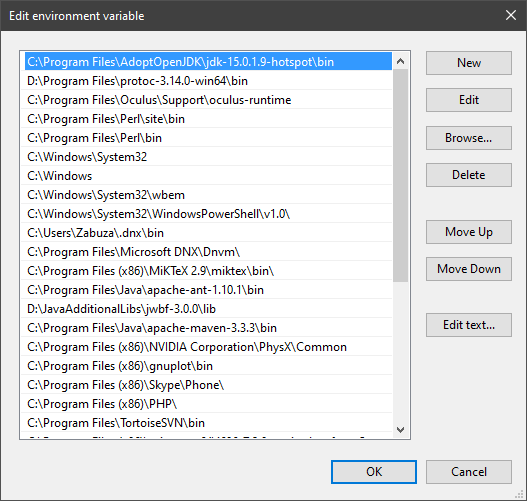
If that is not the case, you may want to clean up. Therefore, type "environment variable" into the Windows search and follow the dialog. You will see two entries for a variable called Path, one for your user and one for the system. This variable tells Windows where to look for commands, like java and javac.
https://i.ibb.co/BwvMpM6/3bN9QE2.png
Edit both. Make sure that they only list the entry to your new Java installation and remove all the old entries you have seen with the where command before:
https://i.ibb.co/9GTnHsm/JAYog1U.png
Confirm and close all dialogs. Restart your CMD window and try where java and where javac again. It should only list the new installation now and nothing else.
Congratulation, your Java is now finally ready, happy coding 🎉
alathreon • used /tag id: install
·

Eclipse Adoptium provides prebuilt OpenJDK binaries ...


 jovial yoke
also @tacit fox use this
tacit fox
I use my IDE for managing my JDKs under windows xD
hybrid swallow
I think this is why alathreon is an expert lol
jovial yoke
tacit fox
I use my IDE for managing my JDKs under windows xD
I mean, next time you help someone
jovial yoke
hybrid swallow
I think this is why alathreon is an expert lol
Now install IntelliJ 🙂
hybrid swallow
Thank you 🙏
tacit fox
jovial yoke
I mean, next time you help someone
always recommend using adoptium you mean?
jovial yoke
tacit fox
always recommend using adoptium you mean?
yes and also use this tag
instead of the links you used




 jovial yoke
tacit fox
I can't see the tag you used
jovial yoke
tacit fox
I can't see the tag you used
click on tag
jovial yoke
tacit fox
aah it doesn't change the cursor xD
yes but the color change
from dark blue to light blue