
#I have java installed properly and updated, still wont let me open .jar with java for mc server
1 messages · Page 1 of 1 (latest)
 onyx tide
 dark gustBOT
<@&987246399047479336> please have a look, thanks.
 ebon saddle
do this then it works:
dark gustBOT
Download latest Java from https://adoptium.net/, run the installer.
Open a CMD and type java -version and javac -version, if both show your new Java version, you have successfully installed Java! 🎉
https://i.ibb.co/X8Kms8q/CurMujt.png

In order to prevent issues with old installations you may want to remove them. Type where java and where javac. They should only show the new and no old entries:
https://i.ibb.co/fkKHv0b/x5k1GxG.png

If that is not the case, you may want to clean up. Therefore, type "environment variable" into the Windows search and follow the dialog. You will see two entries for a variable called Path, one for your user and one for the system. This variable tells Windows where to look for commands, like java and javac.
https://i.ibb.co/BwvMpM6/3bN9QE2.png

Edit both. Make sure that they only list the entry to your new Java installation and remove all the old entries you have seen with the where command before:
https://i.ibb.co/9GTnHsm/JAYog1U.png
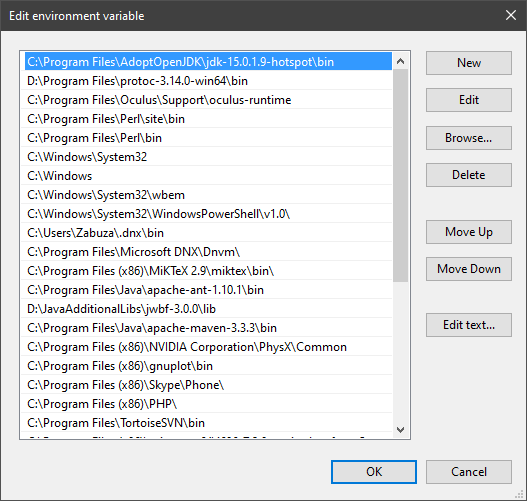
Confirm and close all dialogs. Restart your CMD window and try where java and where javac again. It should only list the new installation now and nothing else.
Congratulation, your Java is now finally ready, happy coding 🎉
zabuzard • used /tag id: install
·

Eclipse Adoptium provides prebuilt OpenJDK binaries ...


 ebon saddle
if it still doesnt work, download jarfix
dark gustBOT
If you double-click on a jar file, and your Java application does not start, your .jar association has been hijacked. You can fix the problem with Jarfix. https://johann.loefflmann.net/en/software/jarfix/index.html
simon_verhoeven • used /tag id: jarfix
·
Jarfix
onyx tide
ebon saddle
if it still doesnt work, download jarfix
this fixed it, thank you!