#"A java exception has occured"
1 messages · Page 1 of 1 (latest)
 languid venture
 sweet scarabBOT
<@&987246652869971988> please have a look, thanks.
Here is an AI assisted attempt to answer your question 🤖. Maybe it helps! In any case, a human is on the way 👍. To continue talking to the AI, you can use </chatgpt:1108714622413963314>.
 TJ-Bot
Im trying to create my own minecraft server but cant seem to even launch the jar file from java. What is this error code? I cant figure out how to fix it.
The error message "A java exception has occurred" generally indicates that there is an issue with the code or configuration of the Minecraft server. This error can be caused by various factors such as incorrect Java version, conflicting mods, corrupted files, or insufficient system resources.
To troubleshoot this issue, you can try the following steps:
- Make sure you are using the correct Java version for running the Minecraft server.
- Check for any conflicting mods or plugins that may be causing the error.
- Verify that all necessary files for the server are present and not corrupted.
- Increase the allocated memory for Java to ensure that there are enough resources for the server to run smoothly.
- Consult online forums or communities for specific solutions to common Java exceptions in Minecraft servers.
If you are still unable to resolve the issue, consider seeking help from experienced Minecraft server administrators or developers who may have encountered similar problems before. Additionally, providing more details about the specific error message or log output can help others in diagnosing and solving the problem more effectively.
- AI generated response
 rigid hinge
Can you share the specific exception?
languid venture
theres no error code i can see
ill share a snip

im just double clicking it
im gonna re install java now and see if it helps but im almost 100% sure i have the current version
what sucks is we just bought a little $100 PC to use as a server lmao
 next current
languid venture
next current
languid venture
run it from command line
 little dune
you know about "cmd"?
languid venture
what do i run tho?
little dune
first you got to be in the same directory as the file
where is the server jar located?
 restive prairie
I guess I'd try to move it to you local disk first instead of running it on onedrive, finding the path for the microsoft cloud is a pain the butt
little dune
then if you open cmd it should already be at your users account location
so simply running cd Desktop should work
languid venture
im in the early stage where i dont associate it with minecraft yet
languid venture
little dune
then if you open cmd it should already be at your users account location
so simp...
okay ill do that
cannot find the path
little dune
restive prairie
I guess I'd try to move it to you local disk first instead of running it on oned...
oh yeah, I wouldnt store such runnables in one drive
languid venture
restive prairie
I guess I'd try to move it to you local disk first instead of running it on oned...
where should i move it then?
bc the path to my desktop doesnt work for some reason
also thank you guys for helping i appreciate it a lot
restive prairie
copy it to local disk c so it's directly on your computer drive
languid venture
okay
little dune
languid venture
you can also try clicking into this field and then typing cmd and press enter
this should open cmd in that context
 languid venture
i moved it to my main c drive, the whole file
restive prairie
okay
languid venture
little dune
you can also try clicking into this field and then typing cmd and press enter
th...
ooo okay i might try that too
restive prairie
now you see your file alongside a bunch of folders right?
languid venture
yeah all my normal ones
restive prairie
right click on an empty space and "open with terminal"
little dune
essentially the command for running jar files is java -jar File.jar where you replace File.jar with the actual file name
languid venture
 restive prairie
once you got the terminal opened type "dir" just to check if the folder's there
little dune
languid venture
that looks good
 restive prairie
there tyou go buddy
restive prairie
little dune
essentially the command for running jar files is `java -jar File.jar` where you ...
now do this
little dune
languid venture
would a vc be easier or nah
its fine, there arent many more steps
languid venture
little dune
essentially the command for running jar files is `java -jar File.jar` where you ...
this?
java -server
is what i run right?
little dune
java -jar server.jar
restive prairie
java -jar server.jar
 restive prairie
little dune
`java -jar server.jar`
restive prairie
little dune
`java -jar server.jar`
there ya go
languid venture
says its been compiled by a more recent version
little dune
you can check with java -version
languid venture
i just downloaded the most current one
languid venture
 little dune
java 8 is old
restive prairie
languid venture
gawdamn
little dune
java 23 exists
little dune
check this:
sweet scarabBOT
Download latest Java from https://adoptium.net/, run the installer.
Open a CMD and type java -version and javac -version, if both show your new Java version, you have successfully installed Java! 🎉
https://i.ibb.co/X8Kms8q/CurMujt.png
In order to prevent issues with old installations you may want to remove them. Type where java and where javac. They should only show the new and no old entries:
https://i.ibb.co/fkKHv0b/x5k1GxG.png
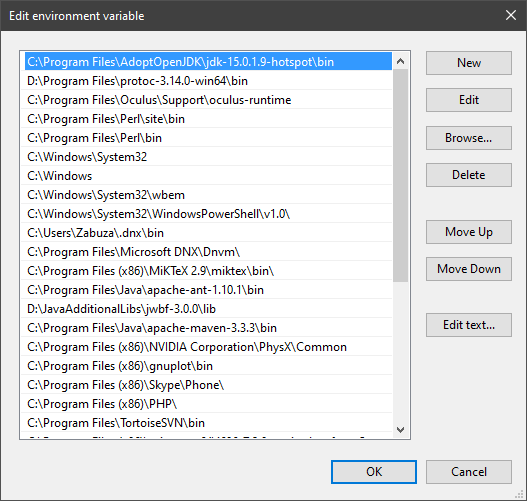
If that is not the case, you may want to clean up. Therefore, type "environment variable" into the Windows search and follow the dialog. You will see two entries for a variable called Path, one for your user and one for the system. This variable tells Windows where to look for commands, like java and javac.
https://i.ibb.co/BwvMpM6/3bN9QE2.png
Edit both. Make sure that they only list the entry to your new Java installation and remove all the old entries you have seen with the where command before:
https://i.ibb.co/9GTnHsm/JAYog1U.png
Confirm and close all dialogs. Restart your CMD window and try where java and where javac again. It should only list the new installation now and nothing else.
Congratulation, your Java is now finally ready, happy coding 🎉
squidxtv • used /tag id: install
·

Eclipse Adoptium provides prebuilt OpenJDK binaries ...


 restive prairie
little dune
java 23 exists
restive prairie
little dune
java 23 exists
wouldnt 21 be better? I mean its lts
languid venture
i just downloaded one i thought lmao
little dune
restive prairie
wouldnt 21 be better? I mean its lts
no, LTS literally doesnt matter for any normal user
restive prairie
little dune
no, LTS literally doesnt matter for any normal user
ok :(
restive prairie
show us what u got
little dune
yeah thats fine
languid venture
now just run the command again?
restive prairie
yeah that'll do
languid venture
or do i need to mess with more
restive prairie
did you install it?
languid venture
oh yup i see the current version now
little dune
languid venture
now just run the command again?
you need to restart the console and then run again
restive prairie
send the holy text to us
 little dune
thats normal
 flint pike
there is an exception
little dune
now you need to do what it says, update the EULA
languid venture
i see a "failed to load properties"
little dune
first update the EULA
languid venture
okay
little dune
the server should usually generate that properties file on its own
little dune
wdym, there should be such a file in that directory
open it with some text editor
and update it
languid venture
 languid venture
oh duh
eula
changed to true and closed it
re run the command for the server?
little dune
yea
little dune
did you save the file?
languid venture
i did
little dune
you sure?
languid venture
and it says true when i open it
languid venture
but all the server stuff populated
ok

you guys are geniuses
theres huge threads everywhere about this issue i couldnt find a fix for months
now i just need to carry on in the set up
thank you!
little dune
np
restive prairie
knock yourself out
languid venture
can i close this thread?
little dune
/help-thread close
sweet scarabBOT
Closed the thread.
sweet scarabBOT
@languid venture
Your question has been closed due to inactivity.
If it was not resolved yet, feel free to just post a message below
to reopen it, or create a new thread.
Note that usually the reason for nobody calling back is that your
question may have been not well asked and hence no one felt confident
enough answering.
When you reopen the thread, try to use your time to improve the quality
of the question by elaborating, providing details, context, all relevant code
snippets, any errors you are getting, concrete examples and perhaps also some
screenshots. Share your attempt, explain the expected results and compare
them to the current results.
Also try to make the information easily accessible by sharing code
or assignment descriptions directly on Discord, not behind a link or
PDF-file; provide some guidance for long code snippets and ensure
the code is well formatted and has syntax highlighting. Kindly read through
https://stackoverflow.com/help/how-to-ask for more.
With enough info, someone knows the answer for sure 👍
little dune
@languid venture
little dune
np




 little dune
go ahead, but if its not related to this question make a new question thread please
languid venture
its along the lines of what we were talking about
little dune
languid venture
this seems broken
languid venture
thats what i think
little dune
there is no jar file
little dune
well run wont properly work without the jar file
little dune
languid venture
and when i press run it opens my cmd
but yeah thats what its doing
languid venture
its not downloading for some reason
this is the forge one
from ver 19
why is it not downloading?
little dune
run isnt downloading anything
thats not how it works
you download the server jar from the website
languid venture
 little dune
that also wont work
languid venture
little dune
you download the server jar from the website
im thinking about using cursedforge for everything atp
little dune
also why is one of them a text document
languid venture
is there a better reason to use a manual style like this over cursed forge?
little dune
no idea how that works 🤷♂️
languid venture
fug
little dune
languid venture
is there a better reason to use a manual style like this over cursed forge?
dont know
languid venture
can someone vc with me and help me lmao
little dune
you didnt really formulate a question yet though
just that you try to do something with curseforge
languid venture
im just having issues with folders installing and dont know if im doing them right
this thread was mostly fixing my java
little dune
languid venture
im just having issues with folders installing and dont know if im doing them rig...
you actually need to give details, no one can help you with just that
languid venture
idk what u want me to show u
i have no idea whats wrong
i know that something isnt downloading even though im using forges thing
and thats the jar file
little dune
languid venture
i have no idea whats wrong
I dont either with that little context
languid venture
its saying i havent agreed to the eula
the file does look how its supposed to tho
its different with this mod installation
but i definitely agreed to the eula already
the bottom of the script says i need to agree to the eula first but i have
little dune
you sure you look at the correct eula?
languid venture
im opening the one in this file
little dune
otherwise its still pretty hard to follow what exactly you are doing right now
languid venture
im worried ive closed out others or something but ive done this 3 times now
thats why i wanna screenshare lol
little dune
how are you creating the server?
languid venture
i go to the forge files site, go to 1.19.4, download reccomened
then i install the jdk server to my desktop minecraft file
and everything works as intended hold for the eula part
little dune
you sure you saved the eula file properly?
languid venture
ill try again rn
wow
im fucking stupid
closing it wasnt saving the registery lmao it was just saving the text
sorry bro ty for your patience
little dune
dont worry