#Not Writing to Txt File
1 messages · Page 1 of 1 (latest)
 granite terraceBOT
 warm mirage
have u verified that u even reach the line? i.e. do u see these prints?
could u share the full console output of ur interaction
note that ur way of doing file io is pretty old and outdated
 raven fox
yes these are all my outputs
 raven fox
warm mirage
note that ur way of doing file io is pretty old and outdated
raven fox
warm mirage
note that ur way of doing file io is pretty old and outdated
Oh I see, it's just the way my teacher taught me
heres the declaration for the txt file

 raven fox
warm mirage
https://i.imgur.com/p4G931U.png
raven fox
warm mirage
https://i.imgur.com/p4G931U.png
sorry maybe this is an output before i changed something, I will run again and send the new output. My apologies
warm mirage
could u also send the full code launchCrypto()
raven fox
 warm mirage
why do u think it didnt work? cant u find the file? perhaps ur just looking in the wrong folders
raven fox
The txt file is in the same location as my other txt file, keys. and my code writes to that txt fil perfectly
warm mirage
so u cant find the src/crypto_launched file, right?
(note that u didnt give it a file ending)
warm mirage
can u change ur launchCrypto to do new FileWriter("src/test.txt", true) instead
hardcode it right in that method
dont adjust ur cryptoFile variable please
btw, here is how to do file io proper in java:
granite terraceBOT
File IO in Java should be done preferably with NIO (Java 7+), revolving around the classes Files and Path; and not with the old interface File, BufferedReader, FileReader and similar.
NIO is simple to use. The path to a file is represented using the Path class:
Path path = Path.of("myFile.txt");
All file operations can be found in the Files class:
// Reading
List<String> allLines = Files.readAllLines(path);
// or as a single string
String content = Files.readString(path);
// or with a stream
try (Stream<String> stream = Files.lines(path)) {
  stream.forEach(System.out::println);
}

// Writing
Files.write(path, lines);
// or as a single string
Files.writeString(path, "hello world");
// or with extra options
Files.writeString(path, "hello world",
  StandardOpenOption.WRITE,
  StandardOpenOption.CREATE,
  StandardOpenOption.APPEND);
If you need more control over the process, you can fallback to the old interface, but prefer using the bridge methods from NIO (Files.newBufferedReader, Files.newInputStream, path.toFile() and similar) to benefit from advantages such as correct encoding and better error detection.
Here is a simple example of how to read a file line-wise with the old interface
try (BufferedReader br = Files.newBufferedReader(path)) {
  String line;
  while ((line = br.readLine()) != null) {
    System.out.println(line);
  }
}
it is way more verbose than NIO but it gives more control.
You must not forget to close file handles, even in all exceptional cases. Closing a handle manually is very hard, which is why you should always use try-with-resources for this to let Java automatically close the handle for you:
try (SomeResource resource = ...) {
  ...
} // Automatically closed here, even in exceptional cases
zabuzard • used /tag id: nio
·
raven fox
warm mirage
can u change ur `launchCrypto` to do `new FileWriter("src/test.txt", true)` inst...
sorry where exactly must I do that? im sorry im still new to java
 raven fox
Oh alright thanks
warm mirage
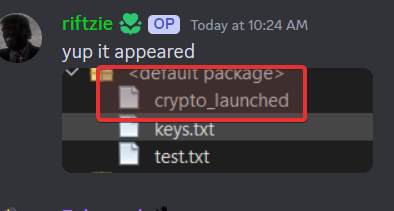
yup. run it and see if that file appears
raven fox
yup it appeared

 raven fox
it was just not writing to the file
warm mirage
so the file is empty or what
raven fox
yea
warm mirage
completely empty?
raven fox
yeah

 warm mirage
then either ur editor is confused or there is another part in ur code that clears the file again after writing
check if cryptoFile is used anywhere else in ur code
raven fox
ok ok
warm mirage
i.e. the code snippet u shared works just fine, it successfully writes to the file
the issue must be elsewhere
raven fox
No that method is the only place where i use the cryptoFile
raven fox
how would i do that? sorry
 raven fox
oh alright
warm mirage
and u can undo the change we did to ur filewriter again
so that it uses cryptoFile again

 warm mirage
can u navigate to the file in ur actual file explorer instead of the IDE please
and double click it so it opens with ur default text viewer
instead of the IDE
 warm mirage
can u share ur full code?
raven fox
sure
warm mirage
there must be sth in the code that clears the file again
granite terraceBOT
I uploaded your attachments as Gist.
warm mirage
when i run that file myself, what do i need to enter in order to test it?
raven fox
Login with wallet
67890!9%$3
enter this key
or any of the sequencces before the # in the keys.txt
warm mirage
ah wait i think i see the issue
ur in a recursion
oh boi, this will be tricky for u to fix
so here is the thing
raven fox
😭
warm mirage
FileWriter writes to the file when u close it
u close it at the end of ur try
that is here:
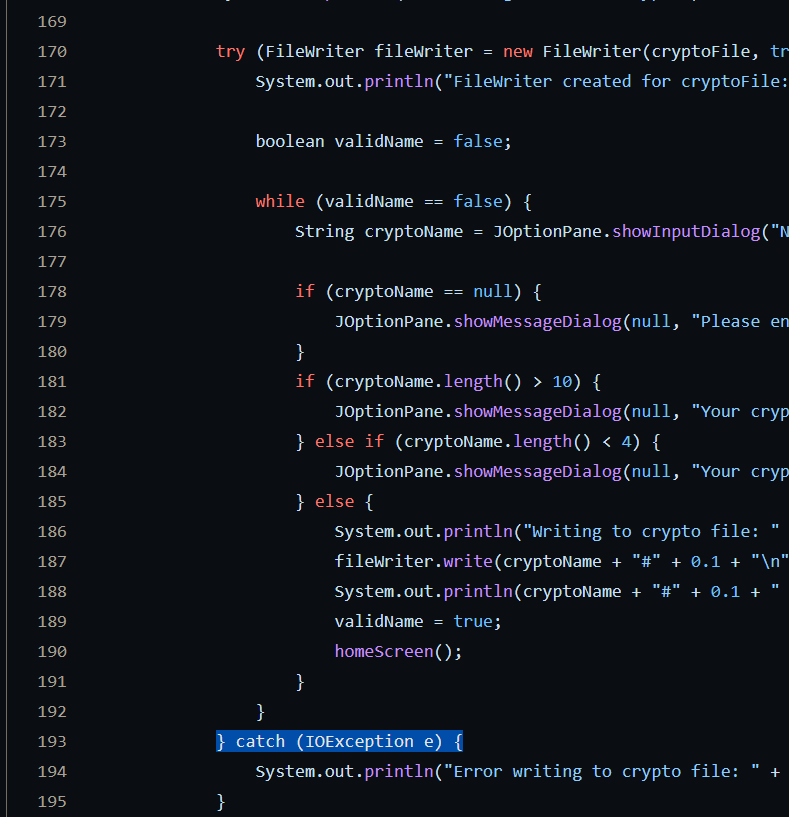
but u never reach this line
bc u have this:
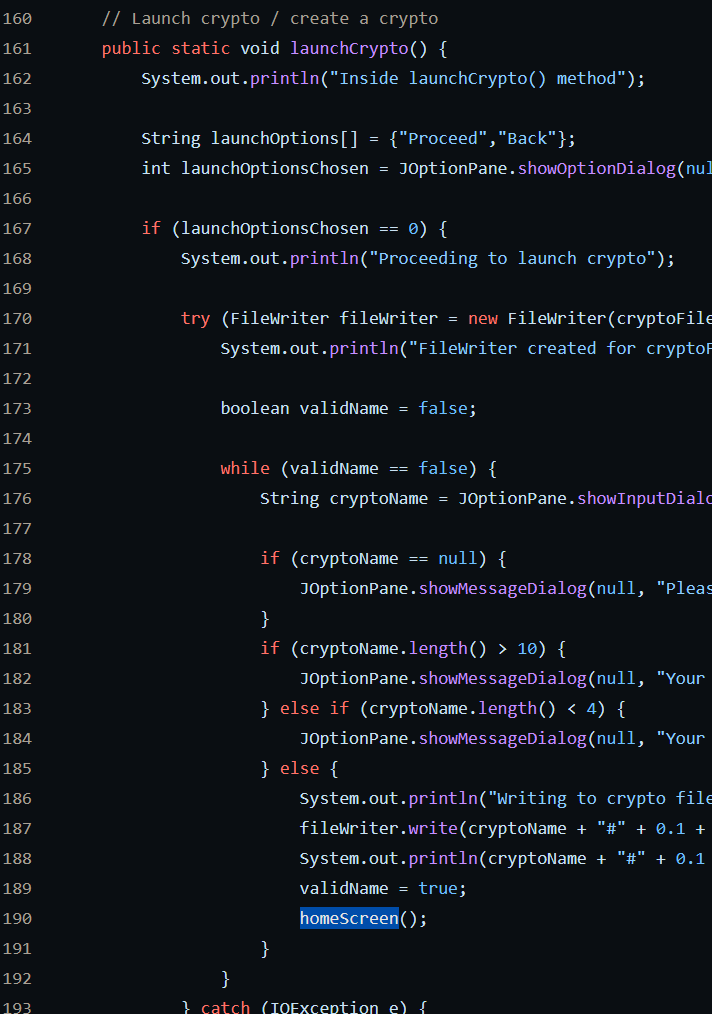


u enter homeScreen
raven fox
Ohhh
raven fox
I see
raven fox
Ok thats making sense
warm mirage
otherwise ur program will also crash if users do this 200 times
cause ur list of "methods that are still active" (callstack) will just grow and grow
until the program cant handle it anymore (around 200)
raven fox
I see
warm mirage
so yeah, the logic just has to change a bit
raven fox
Alright So I can just call the homeScreen() in the main method then after the launchCrypto() has finished?
or will that not work?
warm mirage
i mean, ur concept is kinda flawed to begin with
the submethods shouldnt choose when to go back to the home screen
there should probably be some form of loop somewhere on the menu
with the submethods returning back their status
raven fox
Can I have the submethods changed a boolean and when the boolean is changed to a certain condition in the main method it calls the homeScreen()?
warm mirage
these kind of menu navigations are really hard to solve in a proper and elegant way if ur not experienced on this
thing is, depending on how much ur planning to grow the complexity of this further u might just run into the next menu-navigation related issue
raven fox
I see
Thanks for helping identify the problem though 🙏
Helped me a lot, I tried using AI and that didnt help one bit
warm mirage
a quick fix for now would be to move the homeScreen() call out of the try block
raven fox
yeah