#solved
1 messages · Page 1 of 1 (latest)
 tall fossil
 olive plumeBOT
<@&987246399047479336> please have a look, thanks.
 silver moth
What does java --version in a command prompt return?
olive plumeBOT
Download latest Java from https://adoptium.net/, run the installer.
Open a CMD and type java -version and javac -version, if both show your new Java version, you have successfully installed Java! 🎉
https://i.ibb.co/X8Kms8q/CurMujt.png
In order to prevent issues with old installations you may want to remove them. Type where java and where javac. They should only show the new and no old entries:
https://i.ibb.co/fkKHv0b/x5k1GxG.png
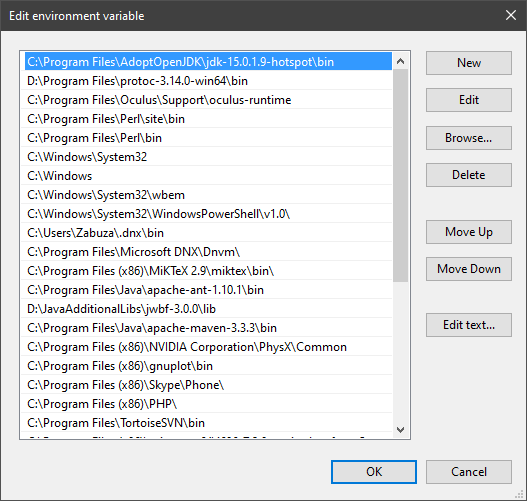
If that is not the case, you may want to clean up. Therefore, type "environment variable" into the Windows search and follow the dialog. You will see two entries for a variable called Path, one for your user and one for the system. This variable tells Windows where to look for commands, like java and javac.
https://i.ibb.co/BwvMpM6/3bN9QE2.png
Edit both. Make sure that they only list the entry to your new Java installation and remove all the old entries you have seen with the where command before:
https://i.ibb.co/9GTnHsm/JAYog1U.png
Confirm and close all dialogs. Restart your CMD window and try where java and where javac again. It should only list the new installation now and nothing else.
Congratulation, your Java is now finally ready, happy coding 🎉
simon_verhoeven • used /tag id: install
·

Eclipse Adoptium provides prebuilt OpenJDK binaries ...


 olive plumeBOT
@tall fossil
Your question has been closed due to inactivity.
If it was not resolved yet, feel free to just post a message below
to reopen it, or create a new thread.
Note that usually the reason for nobody calling back is that your
question may have been not well asked and hence no one felt confident
enough answering.
When you reopen the thread, try to use your time to improve the quality
of the question by elaborating, providing details, context, all relevant code
snippets, any errors you are getting, concrete examples and perhaps also some
screenshots. Share your attempt, explain the expected results and compare
them to the current results.
Also try to make the information easily accessible by sharing code
or assignment descriptions directly on Discord, not behind a link or
PDF-file; provide some guidance for long code snippets and ensure
the code is well formatted and has syntax highlighting. Kindly read through
https://stackoverflow.com/help/how-to-ask for more.
With enough info, someone knows the answer for sure 👍
tall fossil
silver moth
What does `java --version` in a command prompt return?
let me check
tall fossil
silver moth
What does `java --version` in a command prompt return?
“Java is not recognized as an internal or external command.”
 still flint
Do you have environmental variables for JAVA_HOME and PATH?
tall fossil
what
 next mauve
olive plume
next mauve
olive plume
follow this and it will work
tall fossil
it worked
but now im getting another error
Bad video card drivers!
-----------------------
Minecraft was unable to start because it failed to find an accelerated OpenGL mode.
This can usually be fixed by updating the video card drivers.
--- BEGIN ERROR REPORT 7fe0271 --------
Generated 9/30/24 5:30 PM
Minecraft: Minecraft Beta 1.7.3
OS: Windows 7 (amd64) version 6.1
Java: 1.8.0_422, Temurin
VM: OpenJDK 64-Bit Server VM (mixed mode), Temurin
LWJGL: 2.9.4
[failed to get system properties (java.lang.RuntimeException: No OpenGL context found in the current thread.)]
org.lwjgl.LWJGLException: Pixel format not accelerated
at org.lwjgl.opengl.WindowsPeerInfo.nChoosePixelFormat(Native Method)
at org.lwjgl.opengl.WindowsPeerInfo.choosePixelFormat(WindowsPeerInfo.java:52)
at org.lwjgl.opengl.WindowsDisplay.createWindow(WindowsDisplay.java:247)
at org.lwjgl.opengl.Display.createWindow(Display.java:306)
at org.lwjgl.opengl.Display.create(Display.java:848)
at org.lwjgl.opengl.Display.create(Display.java:757)
at org.lwjgl.opengl.Display.create(Display.java:739)
at net.minecraft.client.Minecraft.a(SourceFile:294)
at net.minecraft.client.Minecraft.run(SourceFile:716)
at java.lang.Thread.run(Thread.java:750)
--- END ERROR REPORT d10155aa ----------
 ruby mirage
tall fossil
it worked
ruby mirage
tall fossil
it worked
do you have multiple graphic cards? like in a laptop? ^^
tall fossil
ruby mirage
do you have multiple graphic cards? like in a laptop? ^^
no
i don’t know if I have one
ruby mirage
what's your graphic card?
tall fossil
idk
ruby mirage
lol
ruby mirage
it just says Intel® Graphics xD
tall fossil
wtf
ruby mirage
could be onboard
tall fossil
i think it is
ruby mirage
you can try to update your graphic drivers or your "card" just isn't able to run games ^^
ruby mirage
according to the specs Intel UHD Graphics 730 / 770 support OpenGL
tall fossil
how do i find the drivers
ruby mirage
windows?
tall fossil
windows 7
ruby mirage
press WINDOWS + R enter devmgmt.msc
ruby mirage
what's under Display adaptors?
tall fossil
Standard VGA Graphics Adapter
ruby mirage
are there uninstalled devices?
tall fossil
no
ruby mirage
can you rightlick the "Standard VGA Graphics Adapter" and look into the properties
tall fossil
ok
ruby mirage
what does it say?
tall fossil
Driver Provider: Microsoft
Driver Date: 6/21/2006
Driver Version: 6.1.7600.16385
Digital Singer: Microsoft Windows




 ruby mirage
tall fossil
ruby mirage
tall fossil
postive this wont fuck anything up..??
tall fossil
ok then
ruby mirage
but I guess the installer should be able to see whether it supports your hardware
ruby mirage
niice 😄
ruby mirage
you are running a 12 year old CPU with a very weak GPU; so don't expect wonders ^^
tall fossil
ruby mirage
you are running a 12 year old CPU with a very weak GPU; so don't expect wonders ...
i just wanna play minecraft
this is quite literally my only pc
ruby mirage
even minecraft needs some resources ^^
tall fossil
fair
 ruby mirage
uff xD
tall fossil
this happened when running half life
ruby mirage
with the updated driver?
tall fossil
no
ruby mirage
ah ok
ruby mirage
it wants to download .NET 🤔
tall fossil
yes\
ruby mirage
you are sure you have a 64bit windows installed and downloaded a 64bit driver? xD
ruby mirage
hmmm... you can; but I have low hopes xD
tall fossil
same thing
tall fossil
ruby mirage
I'm still researching ^^
thanks
ruby mirage
you can also try this one https://www.dell.com/support/home/en-uk/product-support/product/optiplex-7010-small-ff/diagnose
tall fossil
my display isnt stretched now 
ruby mirage
uuh; sounds promising ^^
ruby mirage
but can it run Crysis?
tall fossil
my ps3 can
ruby mirage
^^
tall fossil
i have cyrsis 2
sorry i suck at spelling
but it works
thanks so much
ur the best
im going to go play minecraft now
ruby mirage
hf & gl 😄
tall fossil
AND HALF LIFE 2 WORKS
btw thanks for being cool and not saying “why the fuck are you using windows 7, update your pc” like the other people
tall fossil
solved