#Images not displaying properly in JLabels?
1 messages · Page 1 of 1 (latest)
 solar roverBOT
Here is an AI assisted attempt to answer your question 🤖. Maybe it helps! In any case, a human is on the way 👍. To continue talking to the AI, you can use </chatgpt:1108714622413963314>.
 TJ-Bot
Im making blackjack and currently my images are not being displayed in their labels. I don't know whats wrong as I've imported everything properly and the default ones get changed to nothing, but not updated with any images.
fault images are showing up just fine. Can anyone help me troubleshoot this issue?
First, make sure that the image files you are trying to display are in the correct directory and that the paths you are using to access them in your code are correct.
Next, double-check that you are actually setting the image to the JLabel using the setIcon() method. Make sure that you are providing a valid ImageIcon object as an argument to this method.
If you have confirmed that the image paths and setting of the icons are correct, try resizing your images to see if that makes a difference. Sometimes images can be too large for JLabels to display properly. You can use ImageIcon's getImage().getScaledInstance() method to resize your images before setting them on the JLabel.
Lastly, check if there are any layout issues causing the JLabels not to display properly. Make sure that your JFrame or JPanel layout is set up correctly and that there is enough space for the JLabels to be displayed.
If none of these solutions work, consider sharing a minimal reproducible example of your code so that others can better assist you in troubleshooting the issue.
- AI generated response
 stable sentinel
print System.getProperty("user.dir") to check program's working dir
 prisma hill
Without your code it's hard to chime in.
stable sentinel
that too ⬆️ , what is the path you're using
what is the code that gets the image from the path?
prisma hill
Are your files in your resource folder? Normally it's just getClass().getResource("2ofspades.png").
stable sentinel
prisma hill
Are your files in your resource folder? Normally it's just `getClass().getResour...
if youre using this
solar roverBOT
I uploaded your attachments as Gist.
prisma hill
Place the images in your resource folder.
Yes.
It's just a new folder.
Usually you have src/main/java. Create src/main/resources.
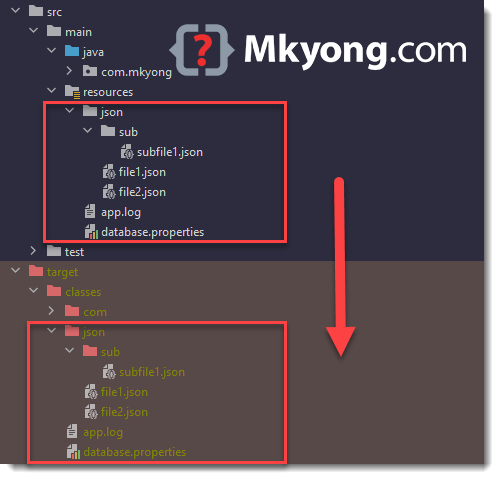
Mkyong.com
This article will show you how to read a file from a resources folder, getResourceAsStream or getResource.
solar roverBOT
@woven spindle
Your question has been closed due to inactivity.
If it was not resolved yet, feel free to just post a message below
to reopen it, or create a new thread.
Note that usually the reason for nobody calling back is that your
question may have been not well asked and hence no one felt confident
enough answering.
When you reopen the thread, try to use your time to improve the quality
of the question by elaborating, providing details, context, all relevant code
snippets, any errors you are getting, concrete examples and perhaps also some
screenshots. Share your attempt, explain the expected results and compare
them to the current results.
Also try to make the information easily accessible by sharing code
or assignment descriptions directly on Discord, not behind a link or
PDF-file; provide some guidance for long code snippets and ensure
the code is well formatted and has syntax highlighting. Kindly read through
https://stackoverflow.com/help/how-to-ask for more.
With enough info, someone knows the answer for sure 👍