#hi I need help with installing Java on steam on connecting my controller dm to help
1 messages · Page 1 of 1 (latest)
 pine plover
 normal cypressBOT
<@&987246399047479336> please have a look, thanks.
Here is an AI assisted attempt to answer your question 🤖. Maybe it helps! In any case, a human is on the way 👍. To continue talking to the AI, you can use </chatgpt:1108714622413963314>.
 TJ-Bot
.
To install Java on Steam, you would first need to ensure that you have the Java Runtime Environment (JRE) installed on your computer. You can download the JRE from the official Oracle website or use a package manager like Homebrew on MacOS or Chocolatey on Windows.
Once you have the JRE installed, you can add it to your Steam library by selecting "Add a non-Steam game" and then navigating to the Java executable file. This will create a shortcut in your Steam library for launching Java applications.
If you are having trouble connecting your controller to Steam while using Java, it may be due to compatibility issues or configuration settings. Make sure that your controller is properly recognized by your computer and that all drivers are up to date.
If you need further assistance with installing Java on Steam or connecting your controller, feel free to send me a direct message so I can help troubleshoot the issue.
- AI generated response
 steel summit
Installing Java on Steam? What do you mean?
pine plover
Like can you download Java on steam
I just got a pc so I don’t rly know how to download it .
How do you download Minecraft Java then
normal cypressBOT
Download latest Java from https://adoptium.net/, run the installer.
Open a CMD and type java -version and javac -version, if both show your new Java version, you have successfully installed Java! 🎉
https://i.ibb.co/X8Kms8q/CurMujt.png
In order to prevent issues with old installations you may want to remove them. Type where java and where javac. They should only show the new and no old entries:
https://i.ibb.co/fkKHv0b/x5k1GxG.png
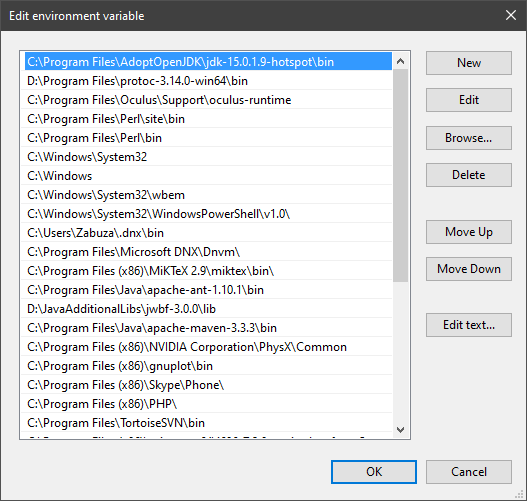
If that is not the case, you may want to clean up. Therefore, type "environment variable" into the Windows search and follow the dialog. You will see two entries for a variable called Path, one for your user and one for the system. This variable tells Windows where to look for commands, like java and javac.
https://i.ibb.co/BwvMpM6/3bN9QE2.png
Edit both. Make sure that they only list the entry to your new Java installation and remove all the old entries you have seen with the where command before:
https://i.ibb.co/9GTnHsm/JAYog1U.png
Confirm and close all dialogs. Restart your CMD window and try where java and where javac again. It should only list the new installation now and nothing else.
Congratulation, your Java is now finally ready, happy coding 🎉
simon_verhoeven • used /tag id: install
·

Eclipse Adoptium provides prebuilt OpenJDK binaries ...


 eager aspen
pine plover
How do you download Minecraft Java then
eager aspen
pine plover
How do you download Minecraft Java then
im pretty sure MC comes bundled with java
what problems are you encountering?
pine plover
Ok so how do I download and buy mc
steel summit
Wait.
pine plover
Ok
steel summit
Do you want to install Java, or Minecraft Java version?
pine plover
What’s the difference lol
steel summit
One is a programming language, the other is a game.
pine plover
The game
steel summit
If you want the game, you buy it through the microsoft store.
pine plover
Mc Java
pine plover
steel summit
If you want the game, you buy it through the microsoft store.
Oh ok
eager aspen
buy it from mojang's website
pine plover
So it’s as easy as that ?
pine plover
eager aspen
buy it from mojang's website
Ok
steel summit
Yes.
pine plover
No files or anything like that’ ?
steel summit
Well the installer if you buy it from the site, and not from the MS store.
eager aspen
pine plover
No files or anything like that’ ?
if you have problems with getting MC, you should contact MC support
pine plover
Witch one would be easier
eager aspen
this is a Java programming server
pine plover
Huh
pine plover
pine plover
Witch one would be easier
Where should I download it from
eager aspen
youd connect your controller to your PC. thatll depend on the controller you have
eager aspen
have you Googled about this yet?
pine plover
Yh but it seems complicated
eager aspen
which part?
pine plover
pine plover
Yh but it seems complicated
U have to install smth called controlify
To be able to connect it to Java is diffrent than. Connecting it to ur pc it said
eager aspen
 pine plover
It’s diffrent
eager aspen
as for support in-game, you can probably map the input
steel summit
Minecraft Wiki
Here is a quick tutorial on how to use a controller (PlayStation, Xbox, Nintendo Switch, etc.) as input while playing the Java Edition of Minecraft. The Java Edition of Minecraft does not natively...
pine plover
Ok
I don’t understand this part
Select "Manage Shortcut" then "Controller Configuration" to allow you to configure the controller layout. You can either do it manually or use "Browse Configs" to browse presets from other users.
steel summit
Those are menu options, it'll make more sense when you get there.
pine plover
Oh ok ig ty
normal cypressBOT
@pine plover
Your question has been closed due to inactivity.
If it was not resolved yet, feel free to just post a message below
to reopen it, or create a new thread.
Note that usually the reason for nobody calling back is that your
question may have been not well asked and hence no one felt confident
enough answering.
When you reopen the thread, try to use your time to improve the quality
of the question by elaborating, providing details, context, all relevant code
snippets, any errors you are getting, concrete examples and perhaps also some
screenshots. Share your attempt, explain the expected results and compare
them to the current results.
Also try to make the information easily accessible by sharing code
or assignment descriptions directly on Discord, not behind a link or
PDF-file; provide some guidance for long code snippets and ensure
the code is well formatted and has syntax highlighting. Kindly read through
https://stackoverflow.com/help/how-to-ask for more.
With enough info, someone knows the answer for sure 👍
 late wasp
minicraft is wirtted in java.you should install jre in your computer. jre like a tarnslator between java and conputer.
 fading mulch
 ocean harbor