
#Can't build a valid Jar file for my JFX Application
1 messages · Page 1 of 1 (latest)
 inland temple
 sharp waspBOT
<@&987246527741304832> please have a look, thanks.
inland temple
note that the program runs as intended in IntelliJ
inland temple
what are hypens?
 stable quail
inland temple
what are hypens?
stable quail
stable quail
inland temple
what are hypens?
stable quail
it is, in terms of arithmetic
this isnt arithmetic though
hyphen is also used to combine/split words
inland temple
ikik, i just didnt know it was called hyphen
give me one second to try again
Error: JavaFX runtime components are missing, and are required to run this application
when running in IntelliJ it gives a similar warning to this but still works: WARNING: Unsupported JavaFX configuration: classes were loaded from 'unnamed module @48421cb'
 crimson wind
okay so
stable quail
which build tool do you use?
crimson wind
^
inland temple
wdym build tool?
crimson wind
right
stable quail
maven, gradle, ant
inland temple
i got javafx from the official website and added the lib folder of it as a external java library to my project
inland temple
i use neither maven, nor gradle, when selecting that i clicked "IntelliJ"
crimson wind
java --module-path lib --add-modules ALL-MODULE-PATH -jar ...
speaking of which
does your code have a module-info.java?
if so, what does it look like
inland temple
crimson wind
`java --module-path lib --add-modules ALL-MODULE-PATH -jar ...`
where do i put that?
inland temple
crimson wind
does your code have a module-info.java?
no i dont think so
crimson wind
okay
you put that here

right now your command to run the code is java -jar <....>
make it
java --module-path lib --add-modules ALL-MODULE-PATH -jar <....>
stable quail
problem is, you'd have to run from cmd to provide those flags each time you wanna run
id recommend using a build tool
crimson wind
java --module-path lib --add-modules javafx.base,javafx.controls,javafx.fxml,javafx.graphics,javafx.media,javafx.swing,javafx.web -jar <....>
this is equivalent to ALL-MODULE-PATH
I would say "problem" - more "beware"
inland temple
 crimson wind
and a build tool wouldn't help here outside of development, where you can just click the button in intellij anyways (at this point)
crimson wind
inland temple
can you type dir
inland temple
sure
crimson wind
what does that show you
stable quail
crimson wind
and a build tool wouldn't help here outside of development, where you can just c...
it would help, as it would package FX with the app, preventing the need for VM arguments
inland temple
a list of things in my users directory
crimson wind
stable quail
it would help, as it would package FX with the app, preventing the need for VM a...
intellij has buttons for that
crimson wind
inland temple
a list of things in my users directory
well instead of lib put the path to the actual folder where you downloaded the javafx jars
stable quail
crimson wind
intellij has buttons for that
you can include dependencies, but you cant specify modules
inland temple
inland temple
so instead of lib i put javafx-sdk-22.0.1?
143 errors now
crimson wind
good start
inland temple
it doesn't recognise javafx anymore
inland temple
inland temple
it doesn't recognise javafx anymore
*seems to
crimson wind
send errors
inland temple
 crimson wind
im confused as hell
we are just telling you commands to run in the terminal
non-destructive ones
how did that make for errors in your intellij
crimson wind
java --module-path <PATH TO JAVAFX JARS> --add-modules ALL-MODULE-PATH -jar <PATH TO YOUR JAR>
inland temple
crimson wind
`java --module-path <PATH TO JAVAFX JARS> --add-modules ALL-MODULE-PATH -jar <PA...
^^
how would i get that to work only by double clicking the jar file?
crimson wind
you cannot
stable quail
moment of truth
inland temple
crimson wind
you cannot
great
inland temple
crimson wind
you cannot
i actually had it working like that around a week ago, before i updated to java 21.0.2
inland temple
crimson wind
you can get it to work by double clicking *something*
a batch file, i know that
stable quail
no im not
crimson wind
but it would only work on your machine without some extra steps
stable quail
you're wasting their time
 inland temple
yes
crimson wind
can you change directory - cd to the folder where your project is
inland temple
yes, i know
crimson wind
okay
inland temple
so in my case idea projects folder?
crimson wind
okay so now
run this
jlink --module-path libs --add-modules ALL-MODULE-PATH --output java_runtime
Error: jdk.tools.jlink.plugin.PluginException: ModuleTarget attribute is missing for java.base module
crimson wind
thats...fascinating
inland temple
lol
stable quail
maven, takes less than a few minutes, will help with future problems too
no need to create a custom runtime with jlink
these days, you should be using a build tool
crimson wind
stable quail
no need to create a custom runtime with jlink
there 100% is
inland temple
stable quail
maven, takes less than a few minutes, will help with future problems too
and i have 0 idea what it is and how it works
crimson wind
the end point is the same here - javafx needs to be on the module path
stable quail
inland temple
and i have 0 idea what it is and how it works
which IDE do you use?
inland temple
stable quail
which IDE do you use?
intelliJ
stable quail
right click your project, Add Framework Support > Maven
then, add the fx plugin & dependencies
add the shade plugin
bam, you're done
crimson wind
stable quail
add the shade plugin
NO@!
the shade plugin
okay so the shade plugin just merges jars
takes the zip files and combines them
javafx is only supported on the module path
inland temple
crimson wind
takes the zip files and combines them
ok
crimson wind
so that will not work
stable quail
ethan, how many fx projects have you deployed
crimson wind
it might "work", but its just simply not the way to do it and you might run into strange ass shit
stable quail
no
inland temple
crimson wind
it might "work", but its just simply not the way to do it and you might run into...
okay, i can follow you
crimson wind
hence the warning
crimson wind
inland temple
okay, i can follow you
okay so can you find the folder your java is installed in?
stable quail
you can use a different, weaker plugin to create fat jars
crimson wind
something is wacky
inland temple
crimson wind
okay so can you find the folder your java is installed in?
sure, 1 sec
C:\Program Files\Java\jdk-21
this?
crimson wind
stable quail
you can use a different, weaker plugin to create fat jars
a fat jar is not a valid deployment for javafx
stable quail
what???
stable quail
@inland temple ping me once you're ready to solve this
crimson wind
jlink --module-path "C:\Program Files\Java\jdk-21\jmods";libs --add-modules ALL-MODULE-PATH --output java_runtime
or maybe jlink --module-path "C:\Program Files\Java\jdk-21\jmods;libs" --add-modules ALL-MODULE-PATH --output java_runtime
inland temple
java 21.0.2 2024-01-16 LTS
Java(TM) SE Runtime Environment (build 21.0.2+13-LTS-58)
Java HotSpot(TM) 64-Bit Server VM (build 21.0.2+13-LTS-58, mixed mode)
inland temple
[email protected]
[email protected]
[email protected]
[email protected]
[email protected]
[email protected]
[email protected]
[email protected]
[email protected]
[email protected]
[email protected]
[email protected]
[email protected]
java.se@21.0.2
[email protected]
[email protected]
[email protected]
[email protected]
[email protected]
[email protected]
[email protected]
[email protected]
[email protected]
[email protected]
[email protected]
[email protected]
[email protected]
jdk.crypto.ec@21.0.2
[email protected]
[email protected]
[email protected]
[email protected]
[email protected]
[email protected]
[email protected]
[email protected]
[email protected]
[email protected]
jdk.internal.vm.ci@21.0.2
[email protected]
[email protected]
[email protected]
[email protected]
[email protected]
[email protected]
[email protected]
[email protected]
[email protected]
[email protected]
[email protected]
[email protected]
[email protected]
[email protected]
[email protected]
[email protected]
[email protected]
[email protected]
[email protected]
[email protected]
[email protected]
jdk.net@21.0.2
[email protected]
[email protected]
[email protected]
[email protected]
[email protected]
[email protected]
[email protected]
[email protected]
[email protected]
crimson wind
(itll be a long list, just confirm javafx stuff is on it)
inland temple
it is not
crimson wind
okay what was the exact command you ran
inland temple
inland temple
it is not
as far as i cant tell
java_runtime\bin\java --list-modules
copy & paste what you said
crimson wind
jlink --module-path "C:\Program Files\Java\jdk-21\jmods;libs" --add-modules ALL-MODULE-PATH --output java_runtime
delete the java_runtime folder before running again
but maybe make libs the full path to the libs folder?
this smells like you are in the wrong directory when you run the command
oh wait its just lib right?
inland temple
crimson wind
this smells like you are in the wrong directory when you run the command
which one am i supposed to be in?
crimson wind
jlink --module-path "C:\Program Files\Java\jdk-21\jmods;lib" --add-modules ALL-MODULE-PATH --output java_runtime
inland temple
crimson wind
`jlink --module-path "C:\Program Files\Java\jdk-21\jmods;lib" --add-modules ALL-...
i did that
C:\Users\myuser\IdeaProjects\Primzahl Tester GUI>jlink --module-path "C:\Program Files\Java\jdk-21\jmods;lib" --add-modules ALL-MODULE-PATH --output java_runtime
WARNING: Using incubator modules: jdk.incubator.vector
inland temple
[email protected]
[email protected]
[email protected]
[email protected]
[email protected]
[email protected]
[email protected]
[email protected]
[email protected]
[email protected]
[email protected]
[email protected]
[email protected]
java.se@21.0.2
[email protected]
[email protected]
[email protected]
[email protected]
[email protected]
[email protected]
[email protected]
[email protected]
[email protected]
[email protected]
[email protected]
[email protected]
[email protected]
jdk.crypto.ec@21.0.2
[email protected]
[email protected]
[email protected]
[email protected]
[email protected]
[email protected]
[email protected]
[email protected]
[email protected]
[email protected]
jdk.internal.vm.ci@21.0.2
[email protected]
[email protected]
[email protected]
[email protected]
[email protected]
[email protected]
[email protected]
[email protected]
[email protected]
[email protected]
[email protected]
[email protected]
[email protected]
[email protected]
[email protected]
[email protected]
[email protected]
[email protected]
[email protected]
[email protected]
[email protected]
jdk.net@21.0.2
[email protected]
[email protected]
[email protected]
[email protected]
[email protected]
[email protected]
[email protected]
[email protected]
[email protected]
inland temple
21/04/2024 16:41 <DIR> .
21/04/2024 15:43 <DIR> ..
11/04/2024 19:27 344 .gitignore
21/04/2024 16:21 <DIR> .idea
21/04/2024 16:41 <DIR> java_runtime
15/04/2024 17:55 <DIR> out
21/04/2024 16:21 546 Primzahl Tester GUI.iml
11/04/2024 19:29 <DIR> src
2 File(s) 890 bytes
6 Dir(s) 792.649.285.632 bytes free
inland temple
wait, where am i supposed to execute all the commands in?
thought my project folder
inland temple
i have no idea honestly
stable quail
this is a lot of effort to have a dev avoid using a very useful tool
even ethan would recommend youd use a build tool
inland temple
in intelliJ it says lib(i hope it's the lib we're looking for) is in external libraries
crimson wind
okay but when you added that, it was actually on some folder on your computer
find that folder
inland temple
crimson wind
find that folder
oh yeah
crimson wind
thats what you need to put instead of lib
inland temple
C:\Users\thisUser\javafx-sdk-22.0.1\lib
crimson wind
okay now try again
crimson wind
yes
so our 2 steps here are
- Make a java runtime which includes javafx
- Package your app up with it
we're still on step 1
inland temple
so i do jlink --module-path "C:\Program Files\Java\jdk-21\jmods;C:\Users\thisUser\javafx-sdk-22.0.1\lib" --add-modules ALL-MODULE-PATH --output java_runtime
so this is correct ^^
?
crimson wind
seems it
stable quail
and keep in mind, your app wont work on all machines
crimson wind
which is true of javafx in general, hence you needing to download just the windows version
stable quail
no
inland temple
Error: automatic module cannot be used with jlink: javafx.swt from file:///C:/Users/User/javafx-sdk-22.0.1/lib/javafx-swt.jar
stable quail
you clearly have no experience with fx
inland temple
stable quail
you clearly have no experience with fx
i dont
crimson wind
he means me
stable quail
im talking about ethan
inland temple
oh
crimson wind
inland temple
Error: automatic module cannot be used with jlink: javafx.swt from file:///C:/Us...
thats fascinating
okay so
inland temple
crimson wind
thats fascinating
uh oh
stable quail
i mean, you wouldnt recommend a dev using a build tool? thats just silly, even outside of fx
crimson wind
instead of ALL-MODULE-PATH put this
crimson wind
stable quail
i mean, you wouldnt recommend a dev using a build tool? thats just silly, even o...
please try to make maven accomplish this same task
stable quail
easy, with the jlink plugin
theres even a jpackage plugin
cause build tools aim to make building easier
crimson wind
java.se,javafx.base,javafx.controls,javafx.fxml,javafx.graphics,javafx.media,javafx.swing,javafx.web
inland temple
could we continue this later? i kinda need to do smth irl?
stable quail
but it doesn't even matter. you're taking tons of steps for minimal benefit. you could do this same thing, easier, with the plugins
crimson wind
^ run the same command but with that instead of ALL-MODULE-PATH
inland temple
yes
stable quail
pretty sure they just want their app to work
crimson wind
inland temple
could we continue this later? i kinda need to do smth irl?
same, but if I stop dioxin's stress veins won't pop
stable quail
would have been solved within 5 mins, before you hijacked the thread
cause i was helping someone, which i have years of fx experience
then you pop in, 0 experience, taking them down the longest route
crimson wind
yes.
stable quail
should have your helper rank revoked for that
crimson wind
ok? just because maven is generally bad at jlink/jpackage doesn't make it okay to use javafx off the module path
stable quail
its not
i use jlink and jpackage with maven just fine
nothing is "fascinating" to me
inland temple
i cant even paste the command anymore, it is to long or smth
crimson wind
"you don't understand, I have purged myself of all wonder; all joy"
stable quail
thats what years of experience will do
this person just wants their app to work
i was doing a fine job at guiding them
so Miuf, let me know when you're done with this silly stuff
inland temple
okay guys, no need to fight over my issue right now.
inland temple
i anyways gotta go for now, i will be back later and try to make it work then.
thanks so far for both of your guys help
crimson wind
meh? he needs to learn it at some point, but this exact thing gets straight in to the hairiest part of maven
custom plugins + plugins with bad error messages when you mess them up
stable quail
so instead of learning a build tool, lets have him blindly use jlink?
crimson wind
i mean, blindly is an overstatement
stable quail
"run this command"
crimson wind
yeah, then we explain what the command did and why
which is the exact context you actually need to deal with the maven plugins for this
not to mention those plugins would throw a fit because his code does not itself have a module-info
stable quail
crimson wind
not to mention those plugins would throw a **fit** because his code does not its...
nope
crimson wind
and so that would be another detour
stable quail
you're guessing
inland temple
okay, so after my mom not needing my help, then suddenly needing my help she now doesnt need my help and im back
fml
stable quail
build tools are much more important than jlink
crimson wind
jlink --module-path "C:\Program Files\Java\jdk-21\jmods;C:\Users\thisUser\javafx-sdk-22.0.1\lib" --add-modules java.se,javafx.base,javafx.controls,javafx.fxml,javafx.graphics,javafx.media,javafx.swing,javafx.web --output java_runtime
stable quail
just show them the proper way to do it
inland temple
crimson wind
`jlink --module-path "C:\Program Files\Java\jdk-21\jmods;C:\Users\thisUser\javaf...
ah
no error, nothing
inland temple
[email protected]
[email protected]
[email protected]
[email protected]
[email protected]
[email protected]
[email protected]
[email protected]
[email protected]
[email protected]
[email protected]
[email protected]
[email protected]
java.se@21.0.2
[email protected]
[email protected]
[email protected]
[email protected]
[email protected]
[email protected]
[email protected]
[email protected]
[email protected]
[email protected]
[email protected]
[email protected]
[email protected]
javafx.web@22.0.1
[email protected]
[email protected]
[email protected]
[email protected]
crimson wind
so what jlink does is make a custom install of java which includes all of the javafx libraries
stable quail
even the ones you arent using
crimson wind
yep
inland temple
crimson wind
so what `jlink` does is make a custom install of java which includes all of the ...
ah, but i cant export the jar file to another pc and run it there, can i?
stable quail
so whats the benefit of this lmao, its going against the nature of jlink
crimson wind
inland temple
ah, but i cant export the jar file to another pc and run it there, can i?
so the next step is to package your app with that java install
jpackage --dest packaged_app --type app-image --runtime-image java_runtime --main-jar <PATH TO YOUR MAIN JAR>
inland temple
Error: Missing argument: --input
crimson wind
add --input .
inland temple
at the end?
inland temple
uh
crimson wind
the only thing i'm unsure of is if it will be able to find your main jar
inland temple
nothing
crimson wind
since you are putting stuff in strange folders
nothing meaning it just ran and finished?
inland temple
not even a new line with my directory
crimson wind
or its still running
inland temple
oh, might be
inland temple
C:\Users\myuser\IdeaProjects\Primzahl Tester GUI>
crimson wind
what is the path of the jar?
inland temple
"C:\Users\user\IdeaProjects\Primzahl Tester GUI\out\artifacts\Primzahl_Tester_GUI_jar\Primzahl Tester GUI.jar"
inland temple
its not done yet
even though i have a folder called packaged app, containing app, runtime (both folders) and primeNumberCheckMain.exe
crimson wind
if this doesn't work then my guess will be that it should be --input "out\artifacts\Primzahl_Tester_GUI_jar" --main-jar "Primzahl Tester GUI.jar"
crimson wind
inland temple
even though i have a folder called packaged app, containing app, runtime (both f...
whats in the folder?
inland temple
"packaged_app"
crimson wind
yeah, anything in there?
inland temple
as i said: 2 other folders called app and runtime
when running the exe it says: failed to launch JVM
crimson wind
okay
inland temple
would you mind continuing in a call? i feel like screenshare would make everything easier
crimson wind
sure
stable quail
inland temple
would you mind continuing in a call? i feel like screenshare would make everythi...
did you guys resolve it?
 agile hawk
@crimson wind isn't using the classpath with jlink setup maybe a bit complex for @inland temple ? Please correct me if I'm wrong Miuf, but at first glance you haven't developed too many (javafx) applications yet? What @stable quail mentioned seemed like a good start.
Personally I suggest following this site for your first JavaFX project: https://openjfx.io/openjfx-docs/#maven
Getting started with JavaFX for Java desktop application development
inland temple
agile hawk
<@242066553183404032> isn't using the classpath with jlink setup maybe a bit com...
i have pretty much 0 experience
agile hawk
inland temple
i have pretty much 0 experience
Ok, in that case I recommend looking at that link. It even contains a nice sample repository ( https://github.com/openjfx/samples/blob/master/HelloFX/Maven ) to get your feet wet.

GitHub
JavaFX samples to run with different options and build tools - openjfx/samples
inland temple
ok
right now we're trying to delete an "infinite folder" we accidently created on my pc lol
its around 100gb in 2 folders, created by some strange jpackage things
agile hawk
Trying to delete? Why is it failing? In case it's locked you can use windows powertoys to unlock the files/folders.
inland temple
it's not locked, its some other bs
if you can join vc i can try to explain
Pretty much jpackage did things it wasn’t supposed to
agile hawk
I can hop in for a smidge, but I have a meeting in a little bit I still need to prepare for.
inland temple
then do that, it has priority
agile hawk
inland temple
then do that, it has priority
I can have a quick listen. I'm in the general one.
inland temple
1sec
 agile hawk
<project xmlns="http://maven.apache.org/POM/4.0.0" xmlns:xsi="http://www.w3.org/2001/XMLSchema-instance"
  xsi:schemaLocation="http://maven.apache.org/POM/4.0.0 http://maven.apache.org/maven-v4_0_0.xsd">
  <modelVersion>4.0.0</modelVersion>
  <groupId>yourgorup</groupId>
  <artifactId>yourname</artifactId>
  <packaging>jar</packaging>
  <version>1.0-SNAPSHOT</version>
  <name>yourname</name>
  <url>http://maven.apache.org</url>

  <properties>
    <project.build.sourceEncoding>UTF-8</project.build.sourceEncoding>
    <javafx.version>21</javafx.version>
    <javafx.maven.plugin.version>0.0.8</javafx.maven.plugin.version>
  </properties>

  <dependencies>
    <dependency>
      <groupId>org.openjfx</groupId>
      <artifactId>javafx-controls</artifactId>
      <version>${javafx.version}</version>
    </dependency>
  </dependencies>

  <build>
    <plugins>
      <plugin>
        <groupId>org.openjfx</groupId>
        <artifactId>javafx-maven-plugin</artifactId>
        <version>${javafx.maven.plugin.version}</version>
        <configuration>
          <mainClass>HelloFX</mainClass>
        </configuration>
      </plugin>
    </plugins>
  </build>

</project>
dependency lookup site: https://mvnrepository.com/
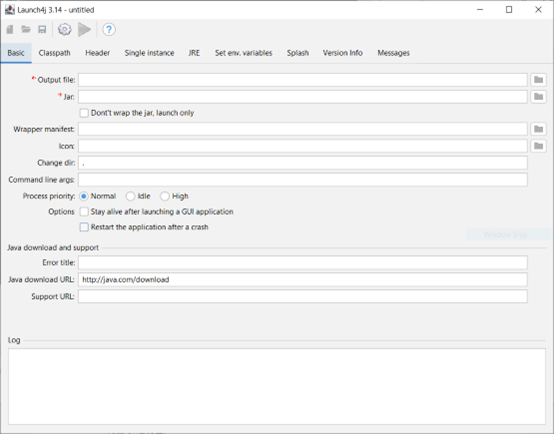
The aim is to package up our Java application so that we can distribute it to others. We want them to be able to launch the application without having to install anything else.
Maven-shade plugin will also be needed
<plugin>
    <groupId>org.apache.maven.plugins</groupId>
    <artifactId>maven-shade-plugin</artifactId>
    <version>3.5.2</version>
    <executions>
        <execution>
            <phase>package</phase>
            <goals>
                <goal>shade</goal>
            </goals>
            <configuration>
                <transformers>
                    <transformer implementation="org.apache.maven.plugins.shade.resource.ManifestResourceTransformer">
                        <mainClass>Application.Main</mainClass>
                    </transformer>
                </transformers>
            </configuration>
        </execution>
    </executions>
</plugin>
<plugin>
    <groupId>org.apache.maven.plugins</groupId>
    <artifactId>maven-jar-plugin</artifactId>
    <version>3.4.1</version>
    <configuration>
        <archive>
            <manifest>
                <mainClass>your main class</mainClass>
            </manifest>
        </archive>
    </configuration>
</plugin>
GitHub
Make your JAR a standalone executable with Launch4J (Step-by-step tutorial for newbies). - fabnicolas/launch4j_exe_tutorial
JPackage can also work, there are a lot of possible paths.
inland temple
agile hawk
https://github.com/fabnicolas/launch4j_exe_tutorial
I will try that later, thank you
inland temple
agile hawk
https://github.com/fabnicolas/launch4j_exe_tutorial
is there any way to download the newest jre without creating a oracle account?
agile hawk
inland temple
is there any way to download the newest jre without creating a oracle account?
You shouldn't use the oracle JRE.
sharp waspBOT
Download latest Java from https://adoptium.net/, run the installer.
Open a CMD and type java -version and javac -version, if both show your new Java version, you have successfully installed Java! 🎉
https://i.ibb.co/X8Kms8q/CurMujt.png

In order to prevent issues with old installations you may want to remove them. Type where java and where javac. They should only show the new and no old entries:
https://i.ibb.co/fkKHv0b/x5k1GxG.png

If that is not the case, you may want to clean up. Therefore, type "environment variable" into the Windows search and follow the dialog. You will see two entries for a variable called Path, one for your user and one for the system. This variable tells Windows where to look for commands, like java and javac.
https://i.ibb.co/BwvMpM6/3bN9QE2.png

Edit both. Make sure that they only list the entry to your new Java installation and remove all the old entries you have seen with the where command before:
https://i.ibb.co/9GTnHsm/JAYog1U.png
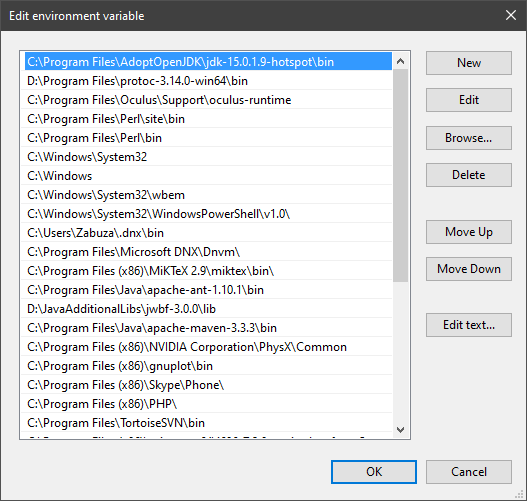
Confirm and close all dialogs. Restart your CMD window and try where java and where javac again. It should only list the new installation now and nothing else.
Congratulation, your Java is now finally ready, happy coding 🎉
simon_verhoeven • used /tag id: install
·

Eclipse Adoptium provides prebuilt OpenJDK binaries ...


 inland temple
this is somewhat strange
It created an Exe, but:
"Operation did not complete successfilly becfause the file contains a virus or potentially unwanted software"
 chrome bluff
probably have to sign it
chrome bluff
google it
inland temple
ok