#Bot isn't providing the "Member" role to anyone but me
1 messages · Page 1 of 1 (latest)
 dry onyx
 steel doveBOT
<@&987246883653156906> please have a look, thanks.
steel doveBOT
steel dove
<@&987246883653156906> please have a look, thanks.
While you are waiting for getting help, here are some tips to improve your experience:
Code is much easier to read if posted with syntax highlighting and proper formatting.

If nobody is calling back, that usually means that your question was not well asked and hence nobody feels confident enough answering. Try to use your time to elaborate, provide details, context, more code, examples and maybe some screenshots. With enough info, someone knows the answer for sure.
Don't forget to close your thread using the command </help-thread close:1027500463647621170> when your question has been answered, thanks.
Here is an AI assisted attempt to answer your question 🤖. Maybe it helps! In any case, a human is on the way 👍. To continue talking to the AI, you can use </chatgpt:1108714622413963314>.
There could be several reasons why the Java Code Review Bot is not assigning the "Member" role to anyone in your server. Here are a few possible causes and solutions:
-
Bot Permissions: Ensure that the bot has the necessary permissions to manage roles in your server. Check if it has the "Manage Roles" permission enabled.
-
Role Hierarchy: Make sure that the bot's role is positioned higher than the "Member" role in the role hierarchy. The bot needs to have a higher position than the roles it assigns.
-
Role Assignment Command: Verify that you are using the correct command to assign the "Member" role. Double-check if you are using the appropriate syntax and parameters for assigning roles.
-
Server Settings: Check if there are any specific server settings or restrictions that prevent bots from assigning roles. Some servers may have certain configurations that limit bot functionality.
-
Bot Code: Review the code of your Java Code Review Bot and ensure that it correctly assigns roles to users based on specific conditions or triggers. Look for any potential bugs or issues in your code logic.
If none of these solutions resolve the problem, consider reaching out to the bot's developer or support community for further assistance. They may be able to provide more specific guidance based on your bot's implementation and configuration.
dry onyx
Here is the code:
@Override
public void onSlashCommandInteraction(SlashCommandInteractionEvent event) {
    Member issuer = event.getMember();
    Guild guild = event.getGuild();

    // Get the Member and Core Staff roles
    Role memberRole = guild.getRolesByName("Member", true).get(0);
    Role coreStaffRole = guild.getRolesByName("Core Staff", true).get(0);

    // Check if issuer has Core Staff role
    if(!issuer.getRoles().contains(coreStaffRole)) {
        event.reply("You need the Core Staff role to run this command!").setEphemeral(true).queue();
        return;
    }

    // Iterate through all members
    int membersGivenRole = 0;
    for(Member member : guild.getMembers()) {
        // Check for Member role
        if(!member.getRoles().contains(memberRole)) {
            guild.addRoleToMember(member, memberRole).queue();
            membersGivenRole++;
        }
    }

    // Reply with results
    event.reply("Gave the Member role to "+membersGivenRole+" members").queue();
}
Not here
in my bot
steel doveBOT
dry onyx
@Override
public void onSlashCommandInteraction(SlashCommandInteractionEvent...
Detected code, here are some useful tools:
Formatted code
@Override
public void onSlashCommandInteraction(SlashCommandInteractionEvent event) {
  Member issuer = event.getMember();
  Guild guild = event.getGuild();
  // Get the Member and Core Staff roles
  Role memberRole = guild.getRolesByName("Member", true).get(0);
  Role coreStaffRole = guild.getRolesByName("Core Staff", true).get(0);
  // Check if issuer has Core Staff role
  if (!issuer.getRoles().contains(coreStaffRole)) {
    event.reply("You need the Core Staff role to run this command!").setEphemeral(true).queue();
    return ;
  }
  // Iterate through all members
  int membersGivenRole = 0;
  for (Member member : guild.getMembers()) {
    // Check for Member role
    if (!member.getRoles().contains(memberRole)) {
      guild.addRoleToMember(member, memberRole).queue();
      membersGivenRole++;
    }
  }
  // Reply with results
  event.reply("Gave the Member role to " + membersGivenRole + " members").queue();
}
 neat bone
can u show a screenshot of how the command looks in discord?
like, show a screenshot like this please:

its easier to understand what we are even looking at that way
dry onyx
neat bone
https://i.imgur.com/GY925hy.png
Here you go
 neat bone
click it so that we can see the arguments please
ah
well, the problem is the same as last time u asked a question
until im confusing u
ur checking the member cache only
guild.getMembers()
that gets members from the cache
instead of asking discord via an api call what the actual list of members is
u must use the retrieveXXX methods that return RestActions
otherwise ur not talking to the discord api
but purely "offline"
dry onyx
oh
dry onyx
neat bone
u must use the `retrieveXXX` methods that return `RestAction`s
wdym but the retrievexxx?
is it an example or what?
neat bone
there are methods like getUser and retrieveUser
getMembers, retrieveMembers
and so on
dry onyx
The result, should show how many members were given the "Member" role if they don't have it
 dry onyx
neat bone
and so on
dry onyx
neat bone
and so on
oh
neat bone
one checks the cache only, the other asks discord for the truth
btw, ur code will easily run into rate limits and get blocked by discord. unless ur server is small
ur mass-changing roles and send a single request for each individual user
dry onyx
neat bone
btw, ur code will easily run into rate limits and get blocked by discord. unless...
why?
neat bone
so for a 2k server, u would send 2k requests to discord
neat bone
either check if theres a way to send it as bulk-request (all changes in a single request) - but i doubt there is, or it cant be used without delaying each request and executing it over multiple days
unless, as said, its a small server
(20 people)
well, ull see urself if it crashes or not
dry onyx
Hopefully not
dry onyx
neat bone
there are methods like `getUser` and `retrieveUser`
Which one is the best to use?
neat bone
dry onyx
Which one is the best to use?
u have to understand the core difference
one only checks ur local cache
the other asks discord for the full list
the cache only contains stuff that u already touched and have seen
so it only contains u, no one else
dry onyx
i want the one that checks every user
dry onyx
neat bone
so. pick that one
;-;
neat bone
whats unclear to u?
dry onyx
okay..
dry onyx
neat bone
what should i explain?
So
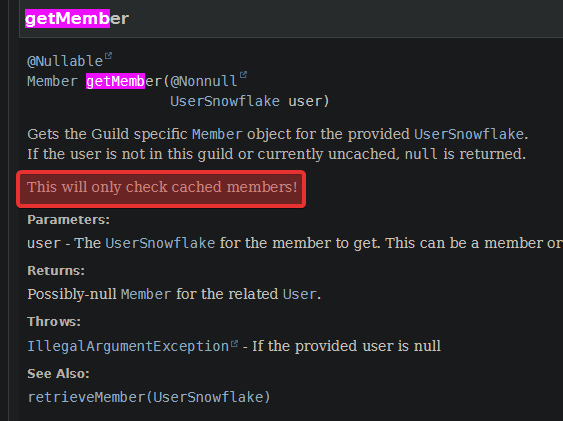
guild.getmember() is for the local cache
thats what you are saying?
neat bone
yes
put ur mouse over it and u will see it in the documentation
its clearly mentioned there
dry onyx
so does getUser send the api to discord to check every single member
neat bone
 neat bone
dry onyx
so does ``getUser`` send the api to discord to check every single member
neat bone
dry onyx
so does ``getUser`` send the api to discord to check every single member
no. only the retrieve... methods do
neat bone
yes. getFoo vs retrieveFoo
dry onyx
neat bone
yes. `getFoo` vs `retrieveFoo`
So do i change guild.getmember() to guild.retrieveMember?
 dry onyx
neat bone
https://i.imgur.com/2kq7uoZ.png
dry onyx
neat bone
https://i.imgur.com/2kq7uoZ.png
so "guild.retrieveMembers"?
neat bone
in ur specific case, u want loadMembers()
declaration: package: net.dv8tion.jda.api.entities, interface: Guild
inconsistent naming, but thats the method ur looking for
and since u want to filter, u should use findMembers as explained by the documentation
dry onyx
neat bone
and since u want to filter, u should use `findMembers` as explained by the docum...
filter?
neat bone
then the filtering is done on discord side and not send over the traffic
dry onyx
what filter?
neat bone
if (!member.getRoles().contains(memberRole)) {
u only want people who dont have the role yet
so instead of getting all members and then skipping some
u can tell discord that u dont want them in the first place
and then it will only send u the ones that dont have the role
dry onyx
oh
neat bone
guild.findMembers(
  member -> !member.getRoles().contains(memberRole)
)
This is the correct code?
neat bone
why are u so insecure with these "basic java" things? are u a beginner who does discord bot coding before learning java?
sounds like a bumpy road
dry onyx
neat bone
why are u so insecure with these "basic java" things? are u a beginner who does ...
emm
kind of
neat bone
mh. it might be easier to step back and practice simpler stuff first. i guess u figured that already
anyways, yes, thats the code
and now u have a restaction
so u enter the terrirory of asynchronous coding
which is probably very overwhelming to u
 neat bone
thats not what i meant
discord bots are just not easy. they require advanced java knowledge
so either u learn it now by suffering through it
or u step back and learn it in a more natural way
if u have any concrete questions, just ask. we will try to explain it
dry onyx
neat bone
if u have any concrete questions, just ask. we will try to explain it
Okay, thank you
dry onyx
neat bone
if u have any concrete questions, just ask. we will try to explain it
hey, it didn't work
oh wait
my bad
neat bone
dry onyx
hey, it didn't work
u gotta show ur code and explain whats happening
otherwise we cant help
dry onyx
neat bone
otherwise we cant help
So it's correct this way?
@Override
public void onSlashCommandInteraction(SlashCommandInteractionEvent event) {
    Member issuer = event.getMember();
    Guild guild = event.getGuild();

    // Get the Member and Core Staff roles
    Role memberRole = guild.getRolesByName("Member", true).get(0);
    Role coreStaffRole = guild.getRolesByName("Core Staff", true).get(0);

    // Check if issuer has Core Staff role
    if(!issuer.getRoles().contains(coreStaffRole)) {
        event.reply("You need the Core Staff role to run this command!").setEphemeral(true).queue();
        return;
    }

    // Iterate through all members
    int membersGivenRole = 0;
    for(Member member : guild.findMembers(
            member -> !member.getRoles().contains(memberRole),
    )) {
        // Check for Member role
        if(!member.getRoles().contains(memberRole)) {
            guild.addRoleToMember(member, memberRole).queue();
            membersGivenRole++;
        }
    }

    // Reply with results
    event.reply("Gave the Member role to "+membersGivenRole+" members").queue();
}
Detected code, here are some useful tools:
Formatted code
@Override
public void onSlashCommandInteraction(SlashCommandInteractionEvent event) {
  Member issuer = event.getMember();
  Guild guild = event.getGuild();
  // Get the Member and Core Staff roles
  Role memberRole = guild.getRolesByName("Member", true).get(0);
  Role coreStaffRole = guild.getRolesByName("Core Staff", true).get(0);
  // Check if issuer has Core Staff role
  if (!issuer.getRoles().contains(coreStaffRole)) {
    event.reply("You need the Core Staff role to run this command!").setEphemeral(true).queue();
    return ;
  }
  // Iterate through all members
  int membersGivenRole = 0;
  for (Member member : guild.findMembers(member -> !member.getRoles().contains(memberRole), )) {
    // Check for Member role
    if (!member.getRoles().contains(memberRole)) {
      guild.addRoleToMember(member, memberRole).queue();
      membersGivenRole++;
    }
  }
  // Reply with results
  event.reply("Gave the Member role to " + membersGivenRole + " members").queue();
}
that doesnt even compile, does it
neat bone
findMembers returns a Task<List<Member>>, not a list of members
its asynchronous
a "future"
u either have to continue asynchronously or make a blocking request to execute it first
latter is a performance disaster
dry onyx
i don't understand
neat bone
but in ur case u would likely get away with it
neat bone
dry onyx
i don't understand
it doesnt give u a list of members yet. it gives u the task that can do it
the task still has to be executed
dry onyx
neat bone
the task still has to be executed
which is giving the role?


 neat bone
ur code doesnt compile, its nonsense java-wise
bc of what i just explained
findMember does not return a list of people that u can iterate through yet
it returns a Task
which first has to be executed
like, u only prepared what u want to do. u still have to send it to discord and wait for a result to come back
dry onyx
how do i excute it?
dry onyx
neat bone
im out of battery
oh okay