#github
1 messages · Page 1 of 1 (latest)
 marsh hornetBOT
<@&987246964494204979> please have a look, thanks.
 chrome barn
 marsh hornetBOT
marsh hornet
<@&987246964494204979> please have a look, thanks.
marsh hornetBOT
marsh hornet
<@&987246964494204979> please have a look, thanks.
While you are waiting for getting help, here are some tips to improve your experience:
Code is much easier to read if posted with syntax highlighting and proper formatting.

If nobody is calling back, that usually means that your question was not well asked and hence nobody feels confident enough answering. Try to use your time to elaborate, provide details, context, more code, examples and maybe some screenshots. With enough info, someone knows the answer for sure.
Don't forget to close your thread using the command </help-thread close:1027500463647621170> when your question has been answered, thanks.
 wooden abyss
since ur not using the command line but click some IDE buttons, please show us exactly what ur doing
also post the link to the repo as text please


 wooden abyss
okay, the link to the repo please
wooden abyss
so u want to update ur master branch with a commit u made locally?

 shy drum
chrome barn
shy drum
chrome barn
This error usually happens when you create two unrelated repo and try to push one into the other @wooden abyss
wooden abyss
yes
and thats the case here as well
ur online repo seems completely unrelated
it has a main branch
and a readme commit
but ur intellij thing is completely different
it has a master branch and 2 commits called "commit"
@chrome barn what do u want to happen?
are u sure this is the right repo?
chrome barn
I want to store my files on github
wooden abyss
yeah but ur github repo is at a completely different state
do u want to delete whats on github right now and replace it with ur stuff instead?
chrome barn
except the readme file
chrome barn
oh okay
wooden abyss
and u need to force-push
chrome barn
I thought it would pull the readme file
wooden abyss
u just said u want the opposite
chrome barn
Im watching a video at linked in learning
wooden abyss
u said u want to delete the readme file and replace it with what u have locally
what do u want to do?
chrome barn
I want to sync it
wooden abyss
u cant sync two histories that are completely unrelated
chrome barn
ok let me finish watching the vidfeo
wooden abyss
also, ur branches are incorrectly named
the one on ur github is called main
in intellij u called it master
i doubt ur video wanted u to do that
wooden abyss
id suggest u first push ur code
to master
not main
then u manually copy the readme file into ur intellij and push it as well
then u delete the main branch on github
chrome barn
ay ay captain
wooden abyss
and go into the settings to tell it to use master as default branch
chrome barn
I think its because I was following another tutorial and changed the git settings
and then I went onto this video
shy drum
wooden abyss
u cant sync two histories that are completely unrelated
You can
You can ask git to basically put your commits on top of the unrelated commits, similarly to a rebase, it's just a flag
 shy drum
chrome barn
shy drum
chrome barn
Do you really want to erase what is in github?
chrome barn
its my first time using github and I have the code backed up already in a zip file
shy drum
You can simply do git pull --allow-unrelated-histories
If you want to keep both what is on github and what is in local
shy drum
s*
chrome barn

 chrome barn
I dont remember what I did earlier because I was following a different tutorial
chrome barn
is there a way I can delete everything and redo it?
shy drum
chrome barn
is there a way I can delete everything and redo it?
Then delete the project and redo it
But there is no need to do thay

 plush quartz
shy drum
What is the branch where your commits are ?
plush quartz
shy drum
What is the branch where your commits are ?
I would guess the master being the one because its the only local
chrome barn

should I try main instead?
Im looking at the first tutorial I did
I used git clone
and then git branch --all
git branch mybranch
git checkout mybranch
idk if that matters
shy drum
Ah my bad
wooden abyss
i really would not recommend mixing the branches
its easier to get rid of main and push master
shy drum
You need to specify the remote
chrome barn
but that was for another repo
wooden abyss
its not a good idea to have master linked to main
wooden abyss
OPs local branch is master
githubs branch is main
and they have unrelated histories
shy drum
Huh
shy drum
Unrelated histories isn't a problem
shy drum
But different branches yes
wooden abyss
shy drum
Unrelated histories isn't a problem
yeah, but they are not really worth saving anyways
its literally just a single readme file
chrome barn
the readme file doesnt have anything to do with my code
its just a readme file that the tutorial told me to make
wooden abyss
but u want it. im saying its easier to just copy pasta it
instead of trying to tell git to merge the branches together
u have to clean up ur branch mess
- copy pasta the readme file into ur master branch locally
- push ur master branch
- github settings > set master as default branch
- github > delete main branch
that takes just a few seconds if u know where to click
so stick with me and tell me if ur stuck
chrome barn
how do I copy and paste the readme file?
wooden abyss
go to ur github website
click the file
download it. or click on "raw" and copy the content
then create the file in ur intellij
this has nothing to do with git-magic
its just making a new ordinary file on ur operating system
chrome barn
 wooden abyss
yes
and put the content in there that u want to save
cause we will delete main and hence everything in that git repository online
so the old readme is gone then
chrome barn
ok I created the readme file
chrome barn
 chrome barn
 wooden abyss
right on the first page
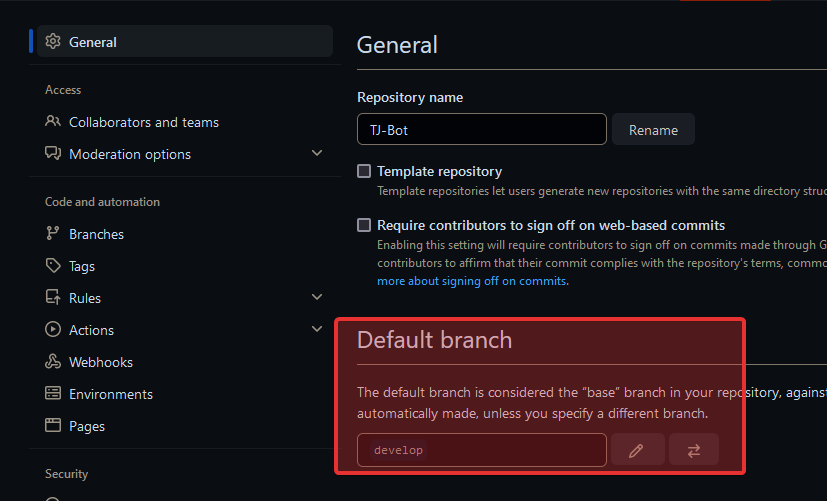
where it says default branch
select master
instead of main
chrome barn
 wooden abyss
now click here on the main page: https://i.imgur.com/WduPWeN.png
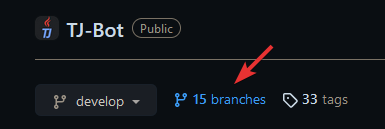
ull find a 🚮 icon next to the branches
chrome barn
delete main?
 wooden abyss
yes. delete main
 wooden abyss
if u now go on ur main page of the repo, it should show master and all ur code + readme and everything is fine, right?
ah the readme is still missing
make a commit and push
in intellij
chrome barn
its in the src folder
wooden abyss
yeah but u havent uploaded it yet
its not on github
only in intellij
so u have to create a commit and then push that commit
chrome barn
oh okay its there now
wooden abyss
👍
chrome barn
cool thanks
 wooden abyss
what do u mean "backup"?
chrome barn
like when I am working on my project and I mess up and cant redo the code and I want to get to a previous version of my project
wooden abyss
u just use git revert
or checkout a previous commit
all ur code and the full history is on github, online. u cant lose anything anymore
not sure how it works in the intellij ui. but i guess u would just click on a commit in the history graph and then right click checkout
or right click revert
sth like that
chrome barn




 chrome barn
oh I see
wooden abyss
so if u want to go back, u just click there
chrome barn
better delete that it has my email
wooden abyss
so if u now right click for example the commit 49 minutes ago
it should show sth like revert
chrome barn
if I revert
chrome barn
can I undo the revert?
wooden abyss
as long as u dont git push -f (force push), u dont lose anything
chrome barn
okay
wooden abyss
if u just want to experiment temporarily, create a new branch
chrome barn
this is so cool
wooden abyss
u should get into the habit of master being the final version
chrome barn
so commit and push creates it in the git hub?
wooden abyss
commit creates "units of changes" and push then uploads all ur new commits
chrome barn
and pull gets it from the github?
wooden abyss
yes, pull downloads all new commits
chrome barn
yeah my friends were using github and i thought it would be necessary for me to use it as well
they were using command line though
wooden abyss
if ur a programmer, its a must at some point
latest in job
there is no programmer job that doesnt use git
chrome barn
well git is not too complicated
wooden abyss
until u run into complex situations, yeah
chrome barn
oh
wooden abyss
wait until u have to resolve ur first merge conflicts 😄
but that doesnt happen unless ur working with others on the same project
dont worry though. juniors arent really expected to be good at git yet
many people learn that as they enter the job
barely anyone is good at git before being thrown into actual real projects with other colleagues
wooden abyss
nice 🎉
chrome barn
Im turning 41
but squid does not believe I am that old
well anyway I should get to sleep
gn
wooden abyss
have a good one 👍
chrome barn
so the main three commands are commit, push, and pull?
shy drum
chrome barn
so the main three commands are commit, push, and pull?
not really, well if that's simpler for you