#Return an output for something that is not recognized by the computer
1 messages · Page 1 of 1 (latest)
 sage scrollBOT
sage scroll
<@&987246399047479336> please have a look, thanks.
sage scrollBOT
sage scrollBOT
sage scroll
<@&987246399047479336> please have a look, thanks.
While you are waiting for getting help, here are some tips to improve your experience:
Code is much easier to read if posted with syntax highlighting and proper formatting.

If nobody is calling back, that usually means that your question was not well asked and hence nobody feels confident enough answering. Try to use your time to elaborate, provide details, context, more code, examples and maybe some screenshots. With enough info, someone knows the answer for sure.
Don't forget to close your thread using the command </help-thread close:1027500463647621170> when your question has been answered, thanks.
 latent robin
if its only one of those u can do a few other things,
its a fixed list so enum
and do not let the user type at all, but select it from a list or generate buttons based on the enum
etc
 digital kite
latent robin
if its only one of those u can do a few other things,
its a fixed list so ...
digital kite
latent robin
if its only one of those u can do a few other things,
its a fixed list so ...
im sorry, i am 5 days into java and I have no idea how to do that, and also, my assignment requires the user to input a value into it, so therefore it can be transfered into a switch/break brancch
latent robin
in that case, same trick as with console output
user types -> goes trough some validation, if not valid, the scene does not progress
digital kite
could you show me the code needed to do that, please?
latent robin
nope
digital kite
okay, then could you show me methods i coculd get that to work then?
latent robin
( i wont, and there a gazillion ways your code could of been made to get this far 😉 )
i can talk u trought the process
at the moment , u got what exactly ?
digital kite
ill send you a picutre


i have this so far.
and in order for the switch statements to work, i would need a valid input, or if the user inputs an invalid input, I can at least return something telling them that it is invalid
sage scrollBOT
Please use this format for posting code:
```java
// Example java program
int value = 5;
System.out.println(value);
```
Which results in:
// Example java program
int value = 5;
System.out.println(value);
For syntax highlighting, you have to add the name of the language after the three backticks, like ```java. Please make sure to use exactly this format, so no space between the backticks and the language name, and a newline before the code starts. If done right, the syntax highlighting will even be applied to your text as you type, before sending.
fa285634 • used /tag id: code
·
digital kite
you want me to display liek this, right?
latent robin
yeah, else its really not readable
digital kite
is there a caommnd i can do
to get my code like that?
i can paste it
but where do i paste it?
latent robin
test(foo){bar();}
read the bot text and insert the code that way, then it becomes readable
digital kite
it is notw roking
i can get the language working
but i canot enter
once i apsted my code
latent robin
yeah
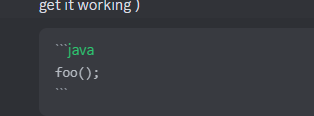
3 times that, directly followed by java, as mentiond in the bot text ( try with some small code first to get it working )
foo();
 digital kite
OHHH
you need 3 backticks at thee end
i see
import javax.swing.*;

class Main {
    public static void main(String[] args) {

        JOptionPane.showMessageDialog(null, "Choose a category you would like to rate?");
        String beginOption = JOptionPane.showInputDialog(null, "please select one of the categories {Movie, Book, Game}");

        if (beginOption.isBlank()) {
            System.err.println("System exited because no value was given");
            System.exit(0);
        }

        switch (beginOption) {
            case "movie", "Movie" -> {
                JOptionPane.showMessageDialog(null, "please rate the movie from 1-10");
                String movieRating = JOptionPane.showInputDialog(null, "please enter a value from 1-10");
                Double numericalMovie = Double.parseDouble(movieRating);
                if (movieRating.isBlank()) {
                    System.err.println("System exited because no rating was given");
                    System.exit(0);
                } else if (numericalMovie < 0) {
                    System.err.println("System exited because the rating was unrealistic");
                    System.exit(0);
                }

                if (numericalMovie >= 0 && numericalMovie < 4) {
                    System.out.println("Not a great movie.");
                } else if (numericalMovie >= 4 && numericalMovie < 6) {
                    System.out.println("It is a decent movie.");
                } else if (numericalMovie >= 6 && numericalMovie < 8) {
                    System.out.println("this is a great movie!");
                } else if (numericalMovie >= 8 && numericalMovie <= 10) {
                    System.out.println("This is a fantastic movie!");
                }
            }

            case "book", "Book" -> {
                JOptionPane.showMessageDialog(null, "please rate the book from 1-10.");
                String bookRating = JOptionPane.showInputDialog(null, "please enter a value from 1-10");
                Double numericalBook = Double.parseDouble(bookRating);
                if (bookRating.isBlank()) {
                    System.err.println("System exited because no rating was given");
                    System.exit(0);
                } else if (numericalBook < 0) {
                    System.err.println("System exited because the rating was unrealistic");
                    System.exit(0);
                }
Detected code, here are some useful tools:
latent robin
read the bot text ....
digital kite
if (numericalBook >= 0 && numericalBook < 4) {
                    System.out.println("Not a great movie.");
                } else if (numericalBook >= 4 && numericalBook < 6) {
                    System.out.println("It is a decent movie.");
                } else if (numericalBook >= 6 && numericalBook < 8) {
                    System.out.println("this is a great movie!");
                } else if (numericalBook >= 8 && numericalBook <= 10) {
                    System.out.println("This is a fantastic movie!");
                }
            }

            case "game", "Game" -> {
                JOptionPane.showMessageDialog(null, "please rate the game from 1-10.");
                String gameRating = JOptionPane.showInputDialog(null, "please enter a value from 1-10");
                Double numericalGameScore = Double.parseDouble(gameRating);
                if (gameRating.isBlank()) {
                    System.err.println("System exited because no rating was given");
                    System.exit(0);
                } else if (numericalGameScore < 0) {
                    System.err.println("System exited because the rating was unrealistic");
                    System.exit(0);
                }

                if (numericalGameScore >= 0 && numericalGameScore < 4) {
                    System.out.println("Not a great game.");
                } else if (numericalGameScore >= 4 && numericalGameScore < 6) {
                    System.out.println("It is a decent game.");
                } else if (numericalGameScore >= 6 && numericalGameScore < 8) {
                    System.out.println("this is a great game!");
                } else if (numericalGameScore >= 8 && numericalGameScore <= 10) {
                    System.out.println("This is a fantastic game!");
                }

            }

        }
    }
}
Detected code, here are some useful tools:
latent robin
perfect 🙂
digital kite
my bad
latent robin
as your skipping alot of java prior to starting with a frontend:
digital kite
could you dumb that sentence down for me?
digital kite
as in, progressing too fast?
latent robin
yeah
digital kite
yeah, well i signed up for a 10 day java beginner lesson for the summer
this was day 5
so I was just following the curriculum, didn't know it was going too fast
latent robin
your trying to learn GUI and java at the same time
digital kite
well, the GUI is not really the focus
latent robin
works like nothing, but u get stuck really fast
digital kite
the insutrctor just mentioned we could incorporate
latent robin
the trick to your problem is this
place the input in a loop and have it check the sentence each pass
and make it exit the loop when its valid ( or a exit condition is met )
digital kite
latent robin
and make it exit the loop when its valid ( or a exit condition is met )
you just said i was moving too fast, not only do i not know how to make a loop, i am confuseed on how to make a valid exit loop 🤣
latent robin
yeah, u should know that by now
digital kite
if statements?
latent robin
only happens once aswell, if u need repeats, u needs some sort of repetition
digital kite
so my main goal, again, here is to make the wrong input of the user exit thee program
once it exits, it shoul[d prompt thee user who put in the input that it was wrong,
and I am confused how a loop is goinig to accomplsih that
does it make the user retype it utnil it is right?
latent robin
yup, or untill the exit condition is met ( in your case empty )
digital kite
well, not realy empty
latent robin
  if (beginOption.isBlank()) {
            System.err.println("System exited because no value was given");
            System.exit(0);
        }
Detected code, here are some useful tools:
digital kite
correct me if im wrong, because you are much more experienced probably, but the 3 possible inputs the coputer realizes should be movie, book, or game
latent robin
your code -> empty = stop program
digital kite
String beginOption = JOptionPane.showInputDialog(null, "please select one of the categories {Movie, Book, Game}");
an input dialog
latent robin
digital kite
correct me if im wrong, because you are much more experienced probably, but the ...
there are quite alot more, but u need some manipulation to make it to 3
book -> Book -> bOok -> .....
digital kite
if the user does not type one of the three, then i want he code to prompt the user it is not recofized
digital kite
latent robin
book -> Book -> bOok -> .....
i suppose we need to ignorecase?
latent robin
yep , to reduce to soemthing controlable
digital kite
or i could prompt the user to write it in a specific way
digital kite
latent robin
yep , to reduce to soemthing controlable
alright
I think i can do that
that'll be it for me today
thank you.
digital kite
?
latent robin
make your first input
digital kite
mhm..
latent robin
then write the validation
if its not valid, paste the code to enter the text again
if u get that working, then read up on how loops work
( easy adjust and it will work as intended )
so input -> not valid -> input
then read up on loops
digital kite
ok
- get the ignore case down [control]
- input
- validation/loop code to get down to the proper input i want the user to put in
correct?
latent robin
step 0 -> get input
digital kite
right.
latent robin
ignore the loop at the moment as u do not know it
write this
ask input
validate
if not correct, ask input again
and then read up on loops
latent robin
If u get that working, the skeleton for the loop is in place
easiest, place them in an array and go over them
( for your knowledge )
latent robin
u can, or u can leave it open incase u run into more problems
digital kite
i have an uncle that will become available later, I think i can close it now
latent robin
( keep in mind that newer joiners will need to catch up on all the above )
digital kite
okay