#Need help with Hangman game (text-based)
1 messages · Page 1 of 1 (latest)
 dense terraceBOT
dense terrace
<@&987246399047479336> please have a look, thanks.
dense terraceBOT
dense terraceBOT
dense terrace
<@&987246399047479336> please have a look, thanks.
While you are waiting for getting help, here are some tips to improve your experience:
Code is much easier to read if posted with syntax highlighting and proper formatting.

If nobody is calling back, that usually means that your question was not well asked and hence nobody feels confident enough answering. Try to use your time to elaborate, provide details, context, more code, examples and maybe some screenshots. With enough info, someone knows the answer for sure.
Don't forget to close your thread using the command </help-thread close:1027500463647621170> when your question has been answered, thanks.
 hearty pendant
You need to import ArrayList
You can literally hover with ur mouse over and Intellij do it for u
hearty pendant
it dosent work to import ArrayList?
what does not work
whats the error
screenshot
ur main method is empty
its where the code starts to run
u running nothing basically
 silver bear
well, whatever u want to do
u have to understand ur code
we can't write it for u
the main method is where java starts executing code when u run it
it runs it top to bottom
once main is done, the program ends
so with an empty main methods, ur program doesnt do anything at all
dense terraceBOT
I uploaded your attachments as Gist.
silver bear
yes
im surprised how much code u wrote without ever executing it
thats not how people write code normally
hearty pendant
silver bear
im surprised how much code u wrote without ever executing it
prob a template from teacher
silver bear
usually code is written step by step and constantly executed to check whether it works
what's unclear to u based on what has been explained by us
hearty pendant
That year is already close to over, so u were in ur school for 1 year and you still dont know anything, if you never hear what is said in lesson and only on homework u ask someone to do it for u its not how that works
if u dont know a main method u know nothing about Java at all
so u will never finish a hangman game if you dont start to really learn
You can view that course, should be enough for school work: https://www.youtube.com/watch?v=xk4_1vDrzzo&t=293s

Java tutorial for beginners full course
#Java #tutorial #beginners
⭐️Time Stamps⭐️
#1 (00:00:00) Java tutorial for beginners ☕
#2 (00:20:26) variables ❌
#3 (00:32:58) swap two variables 💱
#4 (00:36:42) user input ⌨️
#5 (00:44:40) expressions 🧮
#6 (00:49:13) GUI intro 🚩
#7 (00:55:01) Math class 📐
#8 (01:01:08) ra...
we cant explain whole Java to u in couple minutes, just watch the first 30min-1h of the course then you will be able to finish that
And also redo what the guy does in video if you want that it stays in ur head
no we cant, as i said we cant explain whole Java to you. And if we do the homework for you, you will never start to learn self
If you on a IT school and dont wanna learn Java, then you should switch school
Do you even know what the hangmanWord method does
or are you just shifthing code all over the place and hope something will work
Is that bringing the whole application to run a hangman game
im asking you if that makes a hangman game, you said self it chooses a word, but u not only want to choose a word
read what other methods doing
and then call the right one
yes
hell no, just the call to them, not smash all the code in the main method
your sentence does 0 sense but i think right what u prob mean
u just need to call 1 single method which will run the whole game, just read what all methods doing 
silver bear
now, ur java program, when executed, will run the hangmanWord method
nothing else
most likely not what u wanted to do
what about all ur other methods
begin and game
are they not important?
if u dont call them, they are not executed
think again
and u really have to understand the code
not just do random stuff
and sorry for the harsh words. ( @hearty pendant try to give the reality check a bit more friendly next time 😄 )
 snow raft
hearty pendant
That year is already close to over, so u were in ur school for 1 year and you st...
snow raft
hearty pendant
That year is already close to over, so u were in ur school for 1 year and you st...
I'm impressed tbh
silver bear
mind sharing ur main method
dense terraceBOT
I uploaded your attachments as Gist.
silver bear
why are u calling hangmanWord in ur main method
seems to be totally wrong
but do u also understand it
otherwise ur just writing what im saying
and that wont help u
alright
the next problem is that ur running into this scanner issue here:
dense terraceBOT
Mixing any nextXXX method with nextLine from the Scanner class for user input, will not ask you for input again but instead result in an empty line read by nextLine.
To prevent this, when reading user input, always only use nextLine. If you need an int, do
int value = Integer.parseInt(scanner.nextLine());
instead of using nextInt.
Assume the following:
Scanner scanner = new Scanner(System.in);

System.out.println("Enter your age:");
int age = scanner.nextInt();
System.out.println("Enter your name:");
String name = scanner.nextLine();

System.out.println("Hello " + name + ", you are " + age + " years old");
When executing this code, you will be asked to enter an age, suppose you enter 20.
However, the code will not ask you to actually input a name and the output will be:
Hello , you are 20 years old.
The reason why is that when you hit the enter button, your actual input is
20\n
and not just 20. A call to nextInt will now consume the 20 and leave the newline symbol \n in the internal input buffer of System.in. The call to nextLine will now not lead to a new input, since there is still unread input left in System.in. So it will read the \n, leading to an empty input.
So every user input is not only a number, but a full line. As such, it makes much more sense to also use nextLine(), even if reading just an age. The corrected code which works as intended is:
Scanner scanner = new Scanner(System.in);

System.out.println("Enter your age:");
// Now nextLine, not nextInt anymore
int age = Integer.parseInt(scanner.nextLine());
System.out.println("Enter your name:");
String name = scanner.nextLine();

System.out.println("Hello " + name + ", you are " + age + " years old");
The nextXXX methods, such as nextInt can be useful when reading multi-input from a single line. For example when you enter 20 John in a single line.
zabuzard • used /tag id: scanner
·
silver bear
also, u shouldnt create two scanners. create one and reuse it
in fact, u already have one prepared for reusing
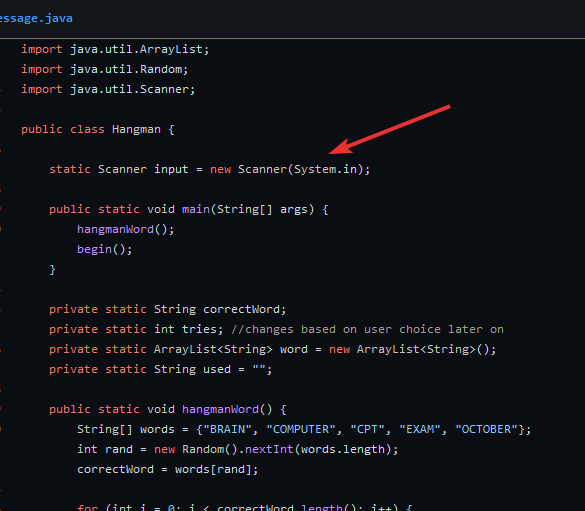

back to u not fully understanding ur own code. which is the main issue here
no
re-read what i said please
hearty pendant
silver bear
and sorry for the harsh words. ( <@585514788260675595> try to give the reality c...
Hell no, if people not wanna learn i wont help them, im not a babysitter. You should be the same and say them in thier face that they need to learn or they will suck for rest of thier lifes
silver bear
hearty pendant
Hell no, if people not wanna learn i wont help them, im not a babysitter. You sh...
if u cant tell someone friendly that they fucked up, without them feeling like absolute shit, then please rather not say anything at all and let someone else handle it, thanks
this can be done in a friendly way as well
hearty pendant
They need to feel shit to understand that they do something pretty wrong and need to change something
No one will change if u babysit him
silver bear
hearty pendant
They need to feel shit to understand that they do something pretty wrong and nee...
i disagree. we can discuss this in DM if u want.
its fine. ur doing great. im sure u will be able to finish the hangman game if u put in some effort now and stick with us and the guidance 🙂
yeah. but u got enough time to finish this task still
in any case, we are here to help and assist u 🙂
in fact, after uve fixed the two scanner issues explained above, u will be moving forward quite a bunch already
not sure i follow
have u fixed the scanner issues already?
please reshare
dense terraceBOT
I uploaded your attachments as Gist.
silver bear
well. seems u misunderstood me
u didnt do any of what i said
each time someone calls the begin method, ur creating a new scanner
same with the game method
thats bad
they can interfere with each other and mess up ur input
ur whole program should use a single scanner and reuse it everywhere
the program was already prepared to do so
with the static scanner field at the top
which u were supposed to use instead
but u just killed it
and u didnt fix the issue with nextInt() that the bot explained
leading to ur inputs not being recognized by the scanner
and then use it instead of creating other scanners
it feels like ur only reading 20% of my sentences
and then use it instead of creating other scanners
ur whole program should use a single scanner and reuse it everywhere
which u were supposed to use instead
keep the scanner at the top. kill the other 2. and then reuse the scanner from the top everywhere
so that ur whole program is using one scanner
not 3 or more
listen
ur still not reading what im saying
do u understand why u get an error?
if not, we have a much bigger problem now
no
what is the error message
and why is that the case
what does that mean
and why did it work before
no
or which one do u mean
okay. so u dont understand why its red now?
what does this line mean
int choice = scnr.nextInt();
what does it do
which one
yes. but why does it use this scanner and not the other two
what in this line is telling it to use that scanner
u have 3 scanners after all
yes. so what do u have to do to use the other scanner?
well. from the 3 scanners we have, which one do we want to use everywhere?
right. so what do u have to change for
int choice = scnr.nextInt();
to use that scanner instead
so u would write
int choice = nextInt();
instead, or what?
and then u think it uses the other scanner?
no
the scanner being at the very top is correct. u dont have to do anything anymore to use it
okay. lets approach it from this side:
Scanner a = new Scanner(System.in); // 1
Scanner b = new Scanner(System.in); // 2
Scanner c = new Scanner(System.in); // 3

String text = b.nextLine();
which scanner does the text thing use?
scanner 1, 2 or 3?
and what do u have to change so that it uses the third scanner instead?
correct. so back to our original problem. what do u have to change in
int choice = scnr.nextInt();
so it uses the scanner at the top of the program instead of the one in ur method?
so u would write
int choice = static scaner.nextInt();
or what exactly?
no
im not sure why u cant transfer it
look at this again
Scanner a = new Scanner(System.in); // 1
Scanner b = new Scanner(System.in); // 2
Scanner c = new Scanner(System.in); // 3

String text = b.nextLine();
for some reason u were able to tell me that it uses the second scanner
and that u have to change it into c.nextLine() to use the third scanner
so u understood this
now, u have to do the exact same in ur code
and someone ur totally lost
which makes little sense

cool. so now use input in both methods and get rid of the two scanners u created in the methods
so that everywhere in ur program ur only using the input scanner
alright. have a good one
we are here when u want to continue
🙂
no worries 🙂