
#getting theta from a mouse
1 messages · Page 1 of 1 (latest)
 strange cedar
 ruby yarrowBOT
<@&987246487241105418> please have a look, thanks.
ruby yarrowBOT
ruby yarrow
<@&987246487241105418> please have a look, thanks.
While you are waiting for getting help, here are some tips to improve your experience:
Code is much easier to read if posted with syntax highlighting and proper formatting.

If nobody is calling back, that usually means that your question was not well asked and hence nobody feels confident enough answering. Try to use your time to elaborate, provide details, context, more code, examples and maybe some screenshots. With enough info, someone knows the answer for sure.
Don't forget to close your thread using the command </help-thread close:1027500463647621170> when your question has been answered, thanks.
 tall terrace
not sure what u mean by theta and what specifically is ur problem or unclear to u
if its the math, its this:
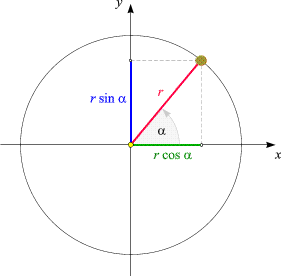
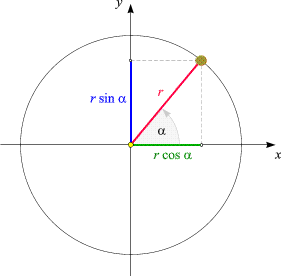
so u just measure the angle between the mouse coordinates and the center of the unit
and then rotate the sprite by that angle
as u might remember from school, sin(alpha) = opposite/hypotenuse
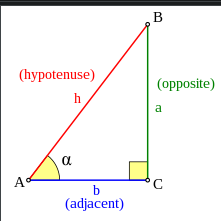

opposite is the y difference between the two coordinates
so opposite = mouse_y - unit_y
and the hypotenuse is given with pythagoras
a^2 = b^2 + c^2
the adjacent is the x diff of both coords
adjacent = mouse_x - unit_x
plug in and u get the hypotenuse
then plug in and u get sin(alpha)
(undo sine to get the angle in degrees)
once u have the angle, rotate the sprite in that angle and its pointing to ur mouse
quite satisfying to watch when it does that. enjoy! 🙂
if u want to shortcut the math a bit, theres something called atan2
the formula is:
Math.atan2(mouse.y - unit.y, mouse.x - unit.x)
for the angle directly
but its a bit trickier to understand that, hence i went for the other more straightforward route
strange cedar
Thanks, I’m new to javafx and I’m making my first game so this helps a lot.