
#java fx installation errors
1 messages · Page 1 of 1 (latest)
 mint mirage
 blissful pollenBOT
<@&987246487241105418> please have a look, thanks.
blissful pollenBOT
blissful pollen
<@&987246487241105418> please have a look, thanks.
While you are waiting for getting help, here are some tips to improve your experience:
Code is much easier to read if posted with syntax highlighting and proper formatting.

If nobody is calling back, that usually means that your question was not well asked and hence nobody feels confident enough answering. Try to use your time to elaborate, provide details, context, more code, examples and maybe some screenshots. With enough info, someone knows the answer for sure.
Don't forget to close your thread using the command </help-thread close:1027500463647621170> when your question has been answered, thanks.
mint mirage
I followed this tutorial: https://www.youtube.com/watch?v=_7OM-cMYWbQ
Setting up JavaFX for Eclipse is a pain in the ass
- (00:00:35) Download JavaFX SDK
- (00:01:59) Install JavaFX plugin
- (00:02:31) Create a new JavaFX project
- (00:03:47) Create user library
- (00:04:40) Set user library
- (00:05:02) Configure build path
- (00:05:36) Add VM arguments
Linux/Mac: --module-path /pat...
 hoary edge
tried having a look in your build path jar's to see that there is no duplicate ?
mint mirage
hoary edge
tried having a look in your build path jar's to see that there is no duplicate ?
I kinda fixed it
but theres still an issue
Multiple markers at this line
- The method getStylesheets() from the type Scene refers to the missing type String
- The method getClass() is undefined for the type Main
- The type java.lang.String cannot be resolved. It is indirectly referenced from required type javafx.application.Application
mint mirage
 barren hound
looks like you are missing the stdlib
barren hound
looks like you are missing the stdlib
what is it
barren hound
stdlib = standard library
mint mirage
barren hound
stdlib = standard library
 barren hound
ah. yeah its unbound
you need to bind it to your installed jre
if you press Edit on it, you should be able to bind it
 rose estuary
mint mirage
rose estuary
mint mirage
you shouldn't install it but rather use maven or gradle
mint mirage
barren hound
if you press `Edit` on it, you should be able to bind it
I will try soon
mint mirage
rose estuary
you shouldn't install it but rather use maven or gradle
What's that?
Im a bit ignorant on the subject
rose estuary
mint mirage
What's that?
build tools/dependency managers
they will automatically download libs or other dependencies, install them, build your program, package it, and run it
mint mirage
rose estuary
build tools/dependency managers
they will automatically download libs or other d...
Is there any tutorial for that?
rose estuary
mint mirage
Is there any tutorial for that?
google it I guess
I can help you with maven tho
mint mirage
barren hound
if you press `Edit` on it, you should be able to bind it
it works, but I also get this issue:
Error: Could not find or load main class application.Main
Caused by: java.lang.ClassNotFoundException: application.Main
mint mirage
rose estuary
google it I guess
I can help you with maven tho
can u help me with this error?
rose estuary
mint mirage
can u help me with this error?
are you using maven or gradle ?
mint mirage
rose estuary
are you using maven or gradle ?
none of them
because I already have java fx installed
 dapper elbow
Did you set VM arguments?
mint mirage
dapper elbow
Did you set VM arguments?
the whats?
dapper elbow
To run a JavaFX application you need to set some VM arguments, to do so you need to paste them into the run configuration (it's called like this in Eclipse, idk which IDE you are using)
mint mirage
Im using Eclipse
how do I do that?
I set java fx as in the module and classpath tho
dapper elbow
from this open "run configurations"

Then create one run configuration for your project/edit the one you already have
and under "VM arguments" write that: --module-path "paste here JavaFX/lib directory" --add-modules javafx.controls
mint mirage
dapper elbow
and under "VM arguments" write that: ```--module-path "paste here JavaFX/lib dir...
ah yes, it doesnt have a module anymore..
do I have to add one?
dapper elbow
Did you create a user library?
mint mirage
yes
dapper elbow
Ok then add the user library to your project and put these arguments

 dapper elbow
Remove JavaFX from modulepath
dapper elbow
mint mirage
You need to set the correct JavaFX directory and select the folder called "lib"
mint mirage
k, then
mint mirage
dapper elbow
You need to set the correct JavaFX directory and select the folder called "lib"
oh u mean
the folder
dapper elbow
Like "C:\something\lib"
mint mirage
ahh yes
 fringe lichen
example
 mint mirage
Error occurred during initialization of boot layer
java.lang.module.FindException: Error reading module: C:\Users\Andrew\Desktop\programs\javafx-sdk-20.0.1\lib\javafx.base.jar
Caused by: java.lang.module.InvalidModuleDescriptorException: Unsupported major.minor version 61.0
dapper elbow
Wait are you using JavaFX version 20.0.1 with Java 17?
hoary edge
need to up your pc's java for that
mint mirage
dapper elbow
Wait are you using JavaFX version 20.0.1 with Java 17?
it says unbound till java 14
I meant
all the versions above it are unbound
so im using java fx 20 with java 14
is that all right?
hoary edge
JavaFX 20 is designed to work with JDK 20, but it is known to work with JDK 17 and later versions.
from their site
 hoary edge
use alterernate and point it towards the correct one
most likely your installation comes with java till 14 , and the rest is not bound to eclipse
hoary edge
no, point it towards the installed one
dapper elbow
Just install a newer version of Java and add the buildpath on eclipse
Then change the compilance level
 hoary edge
could try adoptium, https://adoptium.net/temurin/releases/?version=20

Eclipse Adoptium provides prebuilt OpenJDK binaries from a fully open source set of build scripts and infrastructure. Supported platforms include Linux, macOS, Windows, ARM, Solaris, and AIX.
( its got other versions aswell , its just a quick grab link )
 hoary edge
expand javaFx
 dapper elbow
Under module path do add library -> JRE System Library
mint mirage
 hoary edge
drop to lib\
mint mirage
same issue
mint mirage
 dapper elbow
Btw that's java 8
mint mirage
u sure?
hoary edge
1.8 is 8
hoary edge
u need the jdk
dapper elbow
Wait your goal here is to get a newer version of java
from java 12 (i think, maybe 11?) there isn't a jre and a jdk, there is only the jdk
mint mirage
thats why
dapper elbow
If you have already installed JavaFX 20.0.1 get the same java version
You can either install it from oracle site or from openjdk (that's better so you don't have licensing problems)
mint mirage
ok it works but
Error: Could not find or load main class application.Main
Caused by: java.lang.ClassNotFoundException: application.Main
dapper elbow
Now you need VM arguments
mint mirage
of java fx or jdk?
dapper elbow
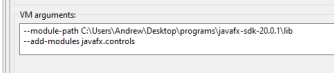
--add-modules javafx.controls```I used this: --module-path C:\Users\Andrew\Desktop\programs\javafx-sdk-20.0.1\lib --add-modules javafx.controls
and I still get the same error
dapper elbow
Send a screenshot
mint mirage
 hoary edge
and the Main tab ?
mint mirage
 dapper elbow
What's that warning?
 mint mirage
nothing important, java fx import is never used
hoary edge
that seems odd
dapper elbow
Have you launched that project with this run configuration?
mint mirage
yes
Error: Could not find or load main class application.Main
Caused by: java.lang.ClassNotFoundException: application.Main
hoary edge
just to avoid some shenaningans, restart eclipse
mint mirage
k
mint mirage
I installed e(fx)
hoary edge
not the question, did u type that import or did eclipse add it ?
hoary edge
so u typed it, then u can erase it
 dapper elbow
I don't think that's the case 'cause there aren't spaces in your path, but try to put " before and after JavaFX's path
mint mirage
same thing
maybe its not related to VM
maybe its because java fx isnt in the module path
dapper elbow
No that's the classic error that you get when you don't put correct VM arguments
mint mirage
ye
--module-path "C:\Users\Andrew\Desktop\programs\javafx-sdk-20.0.1\lib"
--add-modules javafx.controls
hoary edge
from where does the new line come ?
mint mirage
which one
 mint mirage
I think its an enter
hoary edge
yeah a new line
mint mirage
yeah
hoary edge
remove it
mint mirage
still same issue
hoary edge
wonder if its problem due to windows cheating on paths
your fx lib is on your desktop ?
mint mirage
in a desktop folder
dapper elbow
If you paste "C:\Users\Andrew\Desktop\programs\javafx-sdk-20.0.1\lib" in your source explorer you get to the correct folder?
mint mirage
without the "" yes
"Error: Could not find or load main class application.Main
Caused by: java.lang.ClassNotFoundException: application.Main
"
hoary edge
just to rule something out, share your code screen
mint mirage
 hoary edge
try refactoring the class to avoid confusion
mint mirage
hoary edge
try refactoring the class to avoid confusion
the name?
hoary edge
the class name
mint mirage
same thing
hoary edge
can u share an updated shot ?


 dapper elbow
In src there is package named "application" i think
and Main is a class in that package
Tbh i don't know why it doesn't work, with the correct version of java, the user library and VM arguments it should work
hoary edge
theres another one that can interfere, if he placed it on the desktop
onedrive
@mint mirage what happens when u right click on the class with the main method ( on the left side window ) and run it from the popup ?
mint mirage
I will tell u tomorrow, gtg now