
#Interactive Rebase Help
1 messages · Page 1 of 1 (latest)
 stone nymph
 glad lakeBOT
<@&987246964494204979> please have a look, thanks.
glad lakeBOT
glad lake
<@&987246964494204979> please have a look, thanks.
While you are waiting for getting help, here are some tips to improve your experience:
Code is much easier to read if posted with syntax highlighting and proper formatting.

If nobody is calling back, that usually means that your question was not well asked and hence nobody feels confident enough answering. Try to use your time to elaborate, provide details, context, more code, examples and maybe some screenshots. With enough info, someone knows the answer for sure.
Don't forget to close your thread using the command </help-thread close:1027500463647621170> when your question has been answered, thanks.
stone nymph
I want to only take certain changes from Add logs for IgClient and discard the others
I wish to keep all changes from the commits after that
I am guessing interactive rebase is the solution, but I was not able to start one in gitkraken as it did not give me the option when i right-clicked on main
when i started one in terminal, i could not find all the commit names which i had to mark as p, r or e so I aborted the rebase
 runic parrot
stone nymph
when i started one in terminal, i could not find all the commit names which i ha...
runic parrot
stone nymph
when i started one in terminal, i could not find all the commit names which i ha...
if u want to modify a commit, its a bit more difficult. but doable
check out the troublesome commit first
first of all, create a safety branch
on the latest commit
so Changes
so the first thing u should do now is to create a branch
main_backup or sth
then, right click the troublesome branch and click "reset hard to this commit"
ur now "on that commit"
next, right click the commit right before it. so Add sl4j framework and click "reset mixed to this commit"
mixed, not hard, not soft
this will delete the commit, but u keep all the changes as unstaged change now
u can now edit the code and craft ur new commit
once done, commit it as usual
then, u have to get back the ~6 other commits that were above it previously
therefore, do cherry-pick
cherry-pick each of them
stone nymph
runic parrot
first of all, create a safety branch
temp is my safety branch, all my actual work was happening on main
runic parrot
make a safety of main though
otherwise, when u do the reset, ur extra commits are gone
runic parrot
yes. but those commits are local to ur machine only, arent they
so if u do a mistake, they are gone forever
we need them for the cherry picking
stone nymph
runic parrot
yes. but those commits are local to ur machine only, arent they
no i think they are pushed
ill make one just in case still
runic parrot
alternatively, u can do an interactive rebase per console
cause the console stops after each one
and gives u the chance to edit the code
the gitkraken UI doesnt
stone nymph
runic parrot
cause the console stops after each one
yeah but i dont know vim too well
 stone nymph
so i made the backup branch
my temp is on the commit before the bad commit
should i checkout the bad commit then?
from temp?
runic parrot
do u want to do it with console-interactive-rebase or the way i said earlier?
stone nymph
i prefer gitkraken ui
runic parrot
u made a backup of this branch/commit?
https://i.imgur.com/wHYZ1k1.png
 stone nymph
yes
runic parrot
okay, then go on the branch u want to change, i guess thats that main branch
then right click the troublesome commit and reset-hard on it
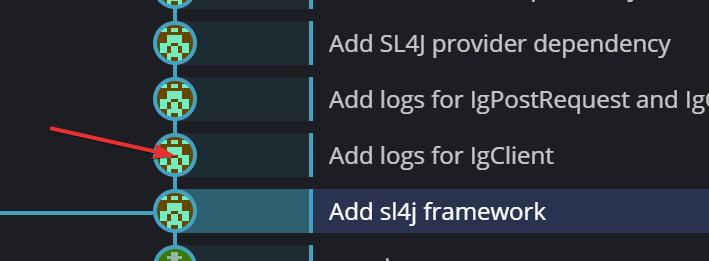
so this guy here
this will delete all commits above (for this branch - but u have the backup)
stone nymph
runic parrot
okay, then go on the branch u want to change, i guess thats that main branch
main branch is also on Changes only btw
it will still work?
runic parrot
then reset it hard to the lgCLient commit
this will delete all newer commits from it
permanently
stone nymph
done
runic parrot
which is why we made a backup
now reset-mixed to the commit before it
the sl4j framework commit
this will delete the commit, but keep the code changes (unstaged)
stone nymph
yup now its unstaged
runic parrot
u should now have the code changes on ur right, as if u just coded them fresh
stone nymph
as a WIP
runic parrot
now change the code
once done, commit
then cherry pick all commits u want
(right click > cherry pick)
stone nymph
runic parrot
now change the code
should i just discard uneccessary hunks?
runic parrot
u have now the Add logs for lgClient changes unstaged
u can now freely modify them
with ur intellij or whatever
stone nymph
ah ok i got it
runic parrot
once ur satisfied, commit them as usual
then u have to cherry pick all the newer commits on top
stone nymph
can i squash them or something?
runic parrot
if thats what u want
or u squash afterwards
with interactive rebase
cause thats easy with the ui
stone nymph
oh i got a merge conflict
its cuz of this one line
i want to keep everything from the left, except for the one line where i log it

that i want to get from the right
but when i try to add that line it puts it at the end of the chunk, not where it originally was
is this possible to do in gitkraken?
runic parrot
merge conflict from one of the cherry pick commits?
stone nymph
yeah
i had 2 conflicts(same file), i fixed one of them but the second one i had that problem
runic parrot
dont u have a third window below those where u can manually write the target file?
stone nymph
i need prenium to edit in that window 😄
runic parrot
lol what
dunno, i never use the built-in merge. i always use p4merge and tell my gitkraken to use that instead
runic parrot
probably. worst case, u just click anything and then reset-mixed that commit to adjust it
stone nymph
i resolved the conflict and then added the missing line in intellij
yeah it worked looks like
everything is cherry picked
now ill merge to main?
runic parrot
if ur branch looks the way u want, u can now push it wherever u want
either by resetting the other branch to it (hard reset)
or by force pushing ur branch on them
or if the history is compatible, normal push
stone nymph
this thing is also normal btw right?
 runic parrot
yes, the history is incompatible since u changed a commit content
needs a force push now
stone nymph
it says im in a detached head state
runic parrot
do u still have a rebase going on or something
stone nymph
i accidently checked out a commit instead of cherry picking it, but i immediately checked out my to my previous state, maybe thats what caused it
runic parrot
detached head means there is still some operation going on. so ur in a special state. for example during rebase or a merge conflict


